Docs in asciidoc & deploy antora docs after build (#408)
3 files modified
83 files added
| | |
|---|
| | | export REPO_NAME_LC=$(echo '${{github.event.repository.name}}' | tr '[:upper:]' '[:lower:]') |
|---|
| | | export SITE_DOC_FOLDER=${REPO_NAME_LC}-doc-generated-ref |
|---|
| | | cd doc.openidentityplatform.org |
|---|
| | | rm -rf ${REPO_NAME_LC} |
|---|
| | | cp -R ../${SITE_DOC_FOLDER}/target/docbkx/bootstrap ../doc.openidentityplatform.org/${REPO_NAME_LC} |
|---|
| | | rm -rf ${REPO_NAME_LC}/modules |
|---|
| | | cp -R ../${SITE_DOC_FOLDER}/target/asciidoc/antora/modules ../doc.openidentityplatform.org/${REPO_NAME_LC} |
|---|
| | | git add -A |
|---|
| | | git commit -a -m "upload ${{github.event.repository.name}} docs after deploy ${{ github.sha }}" |
|---|
| | | git push --force https://github.com/OpenIdentityPlatform/doc.openidentityplatform.org.git |
|---|
| | |
|---|
| | | <profile> |
|---|
| | | <id>man-pages</id> |
|---|
| | | <activation> |
|---|
| | | <os><family>unix</family></os> |
|---|
| | | <os> |
|---|
| | | <family>unix</family> |
|---|
| | | <name>Linux</name> |
|---|
| | | </os> |
|---|
| | | </activation> |
|---|
| | | <build><finalName>${project.groupId}.${project.artifactId}</finalName> |
|---|
| | | <plugins> |
|---|
| | | <plugin> |
|---|
| | | <groupId>org.openidentityplatform.opendj</groupId> |
|---|
| | | <artifactId>opendj-doc-maven-plugin</artifactId> |
|---|
| | | |
|---|
| | | <executions> |
|---|
| | | <execution> |
|---|
| | | <id>generate-man-pages</id> |
|---|
| | |
|---|
| | | <goal>release</goal> |
|---|
| | | </goals> |
|---|
| | | </execution> |
|---|
| | | <execution> |
|---|
| | | <id>build-man-pages-asciidoc</id> |
|---|
| | | <phase>package</phase> |
|---|
| | | <goals> |
|---|
| | | <goal>asciidoc-pre-process</goal> |
|---|
| | | <goal>antora</goal> |
|---|
| | | <goal>asciidoc-to-pdf</goal> |
|---|
| | | </goals> |
|---|
| | | <configuration> |
|---|
| | | <documents> |
|---|
| | | <document>install-guide</document> |
|---|
| | | <document>admin-guide</document> |
|---|
| | | <document>server-dev-guide</document> |
|---|
| | | <document>reference</document> |
|---|
| | | </documents> |
|---|
| | | </configuration> |
|---|
| | | </execution> |
|---|
| | | </executions> |
|---|
| | | <configuration> |
|---|
| | | <projectName>OpenDJ</projectName> |
|---|
| New file |
| | |
|---|
| | | //// |
|---|
| | | The contents of this file are subject to the terms of the Common Development and |
|---|
| | | Distribution License (the License). You may not use this file except in compliance with the |
|---|
| | | License. |
|---|
| | | |
|---|
| | | You can obtain a copy of the License at legal/CDDLv1.0.txt. See the License for the |
|---|
| | | specific language governing permission and limitations under the License. |
|---|
| | | |
|---|
| | | When distributing Covered Software, include this CDDL Header Notice in each file and include |
|---|
| | | the License file at legal/CDDLv1.0.txt. If applicable, add the following below the CDDL |
|---|
| | | Header, with the fields enclosed by brackets [] replaced by your own identifying |
|---|
| | | information: "Portions copyright [year] [name of copyright owner]". |
|---|
| | | |
|---|
| | | Copyright 2017 ForgeRock AS. |
|---|
| | | Portions Copyright 2024 3A Systems LLC. |
|---|
| | | //// |
|---|
| | | |
|---|
| | | :figure-caption!: |
|---|
| | | :example-caption!: |
|---|
| | | :table-caption!: |
|---|
| | | |
|---|
| | | |
|---|
| | | [#chap-account-lockout] |
|---|
| | | == Implementing Account Lockout and Notification |
|---|
| | | |
|---|
| | | This chapter covers configuration of account lockout and account status notification. In this chapter you will learn to: |
|---|
| | | |
|---|
| | | * Configure password policies to manage account lockout automatically |
|---|
| | | |
|---|
| | | * Manage lockout with the `manage-account` command |
|---|
| | | |
|---|
| | | * Set up email notification of account status |
|---|
| | | |
|---|
| | | OpenDJ directory server supports automatic account lockout. The aim of account lockout is not to punish users who mistype their passwords, but instead to protect the directory against attacks in which the attacker attempts to guess a user password, repeatedly attempting to bind until success is achieved. |
|---|
| | | |
|---|
| | | Account lockout disables a user account after a specified number of successive authentication failures. When you implement account lockout, you can opt to have OpenDJ directory server unlock the account after a specified interval, or you can leave the account locked until the password is reset. |
|---|
| | | |
|---|
| | | [NOTE] |
|---|
| | | ==== |
|---|
| | | You configure account lockout as part of password policy. OpenDJ locks an account after the specified number of consecutive authentication failures. Account lockout is not transactional across a replication topology. Under normal circumstances, replication propagates lockout quickly. If replication is ever delayed, an attacker with direct access to multiple replicas could try to authenticate up to the specified number of times on each replica before being locked out on all replicas. |
|---|
| | | ==== |
|---|
| | | This chapter shows you how to set up account lockout policies by using the `dsconfig` command, described in xref:../reference/admin-tools-ref.adoc#dsconfig-1[dsconfig(1)] in the __Reference__, and how to intervene manually to lock and unlock accounts by using the `manage-account` command, described in xref:../reference/admin-tools-ref.adoc#manage-account-1[manage-account(1)] in the __Reference__. |
|---|
| | | |
|---|
| | | [#configure-account-lockout] |
|---|
| | | === Configuring Account Lockout |
|---|
| | | |
|---|
| | | Account lockout is configured as part of password policy. This section demonstrates configuring account lockout as part of the default password policy. Users are allowed three consecutive failures before being locked out for five minutes. Failures themselves also expire after five minutes. |
|---|
| | | |
|---|
| | | Change the default password policy to activate lockout using the `dsconfig` command. As the password policy is part of the server configuration, you must manually apply the changes to each replica in a replication topology: |
|---|
| | | |
|---|
| | | [source, console] |
|---|
| | | ---- |
|---|
| | | $ dsconfig \ |
|---|
| | | set-password-policy-prop \ |
|---|
| | | --port 4444 \ |
|---|
| | | --hostname opendj.example.com \ |
|---|
| | | --bindDN "cn=Directory Manager" \ |
|---|
| | | --bindPassword password \ |
|---|
| | | --policy-name "Default Password Policy" \ |
|---|
| | | --set lockout-failure-count:3 \ |
|---|
| | | --set lockout-duration:5m \ |
|---|
| | | --set lockout-failure-expiration-interval:5m \ |
|---|
| | | --trustAll \ |
|---|
| | | --no-prompt |
|---|
| | | ---- |
|---|
| | | Users having the default password policy are then locked out after three failed attempts in succession: |
|---|
| | | |
|---|
| | | [source, console] |
|---|
| | | ---- |
|---|
| | | $ ldapsearch \ |
|---|
| | | --port 1389 \ |
|---|
| | | --bindDN "uid=bjensen,ou=people,dc=example,dc=com" \ |
|---|
| | | --bindPassword hifalutin \ |
|---|
| | | --baseDN dc=example,dc=com \ |
|---|
| | | uid=bjensen \ |
|---|
| | | mail |
|---|
| | | dn: uid=bjensen,ou=People,dc=example,dc=com |
|---|
| | | mail: bjensen@example.com |
|---|
| | | |
|---|
| | | $ ldapsearch \ |
|---|
| | | --port 1389 \ |
|---|
| | | --bindDN "uid=bjensen,ou=people,dc=example,dc=com" \ |
|---|
| | | --bindPassword fatfngrs \ |
|---|
| | | --baseDN dc=example,dc=com \ |
|---|
| | | uid=bjensen \ |
|---|
| | | mail |
|---|
| | | The simple bind attempt failed |
|---|
| | | Result Code: 49 (Invalid Credentials) |
|---|
| | | |
|---|
| | | $ ldapsearch \ |
|---|
| | | --port 1389 \ |
|---|
| | | --bindDN "uid=bjensen,ou=people,dc=example,dc=com" \ |
|---|
| | | --bindPassword fatfngrs \ |
|---|
| | | --baseDN dc=example,dc=com \ |
|---|
| | | uid=bjensen \ |
|---|
| | | mail |
|---|
| | | The simple bind attempt failed |
|---|
| | | Result Code: 49 (Invalid Credentials) |
|---|
| | | |
|---|
| | | $ ldapsearch \ |
|---|
| | | --port 1389 \ |
|---|
| | | --bindDN "uid=bjensen,ou=people,dc=example,dc=com" \ |
|---|
| | | --bindPassword fatfngrs \ |
|---|
| | | --baseDN dc=example,dc=com \ |
|---|
| | | uid=bjensen \ |
|---|
| | | mail |
|---|
| | | The simple bind attempt failed |
|---|
| | | Result Code: 49 (Invalid Credentials) |
|---|
| | | |
|---|
| | | $ ldapsearch \ |
|---|
| | | --port 1389 \ |
|---|
| | | --bindDN "uid=bjensen,ou=people,dc=example,dc=com" \ |
|---|
| | | --bindPassword hifalutin \ |
|---|
| | | --baseDN dc=example,dc=com \ |
|---|
| | | uid=bjensen \ |
|---|
| | | mail |
|---|
| | | The simple bind attempt failed |
|---|
| | | Result Code: 49 (Invalid Credentials) |
|---|
| | | ---- |
|---|
| | | |
|---|
| | | |
|---|
| | | [#manage-accounts] |
|---|
| | | === Managing Accounts Manually |
|---|
| | | |
|---|
| | | This section covers disabling and enabling accounts by using the `manage-account` command. Password reset is covered in the chapter on performing LDAP operations. |
|---|
| | | |
|---|
| | | For the following examples, the directory admin user, Kirsten Vaughan, has `ds-privilege-name: password-reset`, and the following ACI on `ou=People,dc=example,dc=com`: |
|---|
| | | |
|---|
| | | [source] |
|---|
| | | ---- |
|---|
| | | (target="ldap:///ou=People,dc=example,dc=com") (targetattr ="*||+")( |
|---|
| | | version 3.0;acl "Admins can run amok"; allow(all) groupdn = |
|---|
| | | "ldap:///cn=Directory Administrators,ou=Groups,dc=example,dc=com";) |
|---|
| | | ---- |
|---|
| | | |
|---|
| | | [#disable-account] |
|---|
| | | .To Disable an Account |
|---|
| | | ==== |
|---|
| | | |
|---|
| | | * Set the account status to disabled with the `manage-account` command: |
|---|
| | | + |
|---|
| | | |
|---|
| | | [source, console] |
|---|
| | | ---- |
|---|
| | | $ manage-account \ |
|---|
| | | set-account-is-disabled \ |
|---|
| | | --port 4444 \ |
|---|
| | | --bindDN "uid=kvaughan,ou=people,dc=example,dc=com" \ |
|---|
| | | --bindPassword bribery \ |
|---|
| | | --operationValue true \ |
|---|
| | | --targetDN uid=bjensen,ou=people,dc=example,dc=com \ |
|---|
| | | --trustAll |
|---|
| | | Account Is Disabled: true |
|---|
| | | ---- |
|---|
| | | |
|---|
| | | ==== |
|---|
| | | |
|---|
| | | [#reactivate-account] |
|---|
| | | .To Activate a Disabled Account |
|---|
| | | ==== |
|---|
| | | |
|---|
| | | * Clear the disabled status using the `manage-account` command: |
|---|
| | | + |
|---|
| | | |
|---|
| | | [source, console] |
|---|
| | | ---- |
|---|
| | | $ manage-account \ |
|---|
| | | clear-account-is-disabled \ |
|---|
| | | --port 4444 \ |
|---|
| | | --bindDN "uid=kvaughan,ou=people,dc=example,dc=com" \ |
|---|
| | | --bindPassword bribery \ |
|---|
| | | --targetDN uid=bjensen,ou=people,dc=example,dc=com \ |
|---|
| | | --trustAll |
|---|
| | | Account Is Disabled: false |
|---|
| | | ---- |
|---|
| | | |
|---|
| | | ==== |
|---|
| | | |
|---|
| | | |
|---|
| | | [#account-status-notification] |
|---|
| | | === Managing Account Status Notification |
|---|
| | | |
|---|
| | | OpenDJ can send mail about account status changes. OpenDJ needs an SMTP server to send messages, and needs templates for the mail it sends. By default, message templates are in English, under `/path/to/opendj/config/messages/`. |
|---|
| | | |
|---|
| | | OpenDJ generates notifications only when OpenDJ writes to an entry or evaluates a user entry for authentication. OpenDJ generates account enabled and account disabled notifications when the user account is enabled or disabled with the `manage-account` command, which writes to the entry. OpenDJ generates password expiration notifications when a user tries to bind. |
|---|
| | | |
|---|
| | | For example, if you set up OpenDJ directory server to send a notification about password expiration, that notification gets triggered when the user authenticates during the password expiration warning interval. OpenDJ directory server does not automatically scan entries to send password expiry notifications. OpenDJ directory server does implement controls that you can pass in an LDAP search to determine whether a user's password is about to expire. See xref:../reference/appendix-controls.adoc#appendix-controls["LDAP Controls"] in the __Reference__ for a list. You can send notifications based on the results of your search. |
|---|
| | | |
|---|
| | | [#mail-account-status-notifications] |
|---|
| | | .To Mail Users About Account Status |
|---|
| | | ==== |
|---|
| | | The following steps demonstrate how to set up notifications. Whether OpenDJ sends notifications depends on the settings in the password policy, and on account activity as described above. |
|---|
| | | |
|---|
| | | . Identify the SMTP server to which OpenDJ sends messages: |
|---|
| | | + |
|---|
| | | |
|---|
| | | [source, console] |
|---|
| | | ---- |
|---|
| | | $ dsconfig \ |
|---|
| | | set-global-configuration-prop \ |
|---|
| | | --port 4444 \ |
|---|
| | | --hostname opendj.example.com \ |
|---|
| | | --bindDN "cn=Directory Manager" \ |
|---|
| | | --bindPassword password \ |
|---|
| | | --set smtp-server:smtp.example.com:25 \ |
|---|
| | | --trustAll \ |
|---|
| | | --no-prompt |
|---|
| | | ---- |
|---|
| | | |
|---|
| | | . Set up OpenDJ to be able to mail users about account status. |
|---|
| | | + |
|---|
| | | The following example configures OpenDJ to send text-format mail messages: |
|---|
| | | + |
|---|
| | | |
|---|
| | | [source, console] |
|---|
| | | ---- |
|---|
| | | $ dsconfig \ |
|---|
| | | set-account-status-notification-handler-prop \ |
|---|
| | | --port 4444 \ |
|---|
| | | --hostname opendj.example.com \ |
|---|
| | | --bindDN "cn=Directory Manager" \ |
|---|
| | | --bindPassword password \ |
|---|
| | | --handler-name "SMTP Handler" \ |
|---|
| | | --set enabled:true \ |
|---|
| | | --set email-address-attribute-type:mail \ |
|---|
| | | --trustAll \ |
|---|
| | | --no-prompt |
|---|
| | | ---- |
|---|
| | | + |
|---|
| | | Notice that OpenDJ finds the user's mail address on the attribute on the user's entry, specified by `email-address-attribute-type`. |
|---|
| | | + |
|---|
| | | You can also configure the `message-subject` and `message-template-file` properties. Try interactive mode if you plan to do so. |
|---|
| | | + |
|---|
| | | You find templates for messages by default under the `config/messages` directory. You can edit the templates to suit your purposes. |
|---|
| | | + |
|---|
| | | If you edit the templates to send HTML rather than text messages, then set the advanced property, `send-email-as-html`, as shown in the following example: |
|---|
| | | + |
|---|
| | | |
|---|
| | | [source, console] |
|---|
| | | ---- |
|---|
| | | $ dsconfig \ |
|---|
| | | set-account-status-notification-handler-prop \ |
|---|
| | | --port 4444 \ |
|---|
| | | --hostname opendj.example.com \ |
|---|
| | | --bindDN "cn=Directory Manager" \ |
|---|
| | | --bindPassword password \ |
|---|
| | | --handler-name "SMTP Handler" \ |
|---|
| | | --set enabled:true \ |
|---|
| | | --set send-email-as-html:true \ |
|---|
| | | --trustAll \ |
|---|
| | | --no-prompt |
|---|
| | | ---- |
|---|
| | | |
|---|
| | | . Adjust applicable password policies to use the account status notification handler you configured: |
|---|
| | | + |
|---|
| | | |
|---|
| | | [source, console] |
|---|
| | | ---- |
|---|
| | | $ dsconfig \ |
|---|
| | | set-password-policy-prop \ |
|---|
| | | --port 4444 \ |
|---|
| | | --hostname opendj.example.com \ |
|---|
| | | --bindDN "cn=Directory Manager" \ |
|---|
| | | --bindPassword password \ |
|---|
| | | --policy-name "Default Password Policy" \ |
|---|
| | | --set account-status-notification-handler:"SMTP Handler" \ |
|---|
| | | --trustAll \ |
|---|
| | | --no-prompt |
|---|
| | | ---- |
|---|
| | | |
|---|
| | | ==== |
|---|
| | | [#about-message-templates] |
|---|
| | | .About Notification Message Templates |
|---|
| | | -- |
|---|
| | | When editing the `config/messages` templates to suit your purposes, you can use the following tokens to have OpenDJ update the message text dynamically. |
|---|
| | | |
|---|
| | | `%%notification-type%%`:: |
|---|
| | | This token is replaced with the name of the account status notification type for the notification. |
|---|
| | | |
|---|
| | | `%%notification-message%%`:: |
|---|
| | | This token is replaced with the message for the account status notification. |
|---|
| | | |
|---|
| | | `%%notification-user-dn%%`:: |
|---|
| | | This token is replaced with the string representation of the DN for the user who is the target of the account status notification. |
|---|
| | | |
|---|
| | | `%%notification-user-attr:attrname%%`:: |
|---|
| | | This token is replaced with the value of the attribute specified by __attrname__ from the user's entry. If the specified attribute has multiple values, then OpenDJ uses the first value encountered. If the specified attribute does not have any values, then OpenDJ replaces it with an emtpy string. |
|---|
| | | |
|---|
| | | `%%notification-property:propname%%`:: |
|---|
| | | This token is replaced with the value of the specified notification property from the account status notification. If the specified property has multiple values, then OpenDJ uses the first value encountered. If the specified property does not have any values, then OpenDJ replaces it with an empty string. Valid __propname__ values include the following: |
|---|
| | | + |
|---|
| | | |
|---|
| | | * `account-unlock-time` |
|---|
| | | |
|---|
| | | * `new-password` |
|---|
| | | |
|---|
| | | * `old-password` |
|---|
| | | |
|---|
| | | * `password-expiration-time` |
|---|
| | | |
|---|
| | | * `password-policy-dn` |
|---|
| | | |
|---|
| | | * `seconds-until-expiration` |
|---|
| | | |
|---|
| | | * `seconds-until-unlock` |
|---|
| | | |
|---|
| | | * `time-until-expiration` |
|---|
| | | |
|---|
| | | * `time-until-unlock` |
|---|
| | | |
|---|
| | | |
|---|
| | | -- |
|---|
| | | |
|---|
| | | |
|---|
| New file |
| | |
|---|
| | | //// |
|---|
| | | The contents of this file are subject to the terms of the Common Development and |
|---|
| | | Distribution License (the License). You may not use this file except in compliance with the |
|---|
| | | License. |
|---|
| | | |
|---|
| | | You can obtain a copy of the License at legal/CDDLv1.0.txt. See the License for the |
|---|
| | | specific language governing permission and limitations under the License. |
|---|
| | | |
|---|
| | | When distributing Covered Software, include this CDDL Header Notice in each file and include |
|---|
| | | the License file at legal/CDDLv1.0.txt. If applicable, add the following below the CDDL |
|---|
| | | Header, with the fields enclosed by brackets [] replaced by your own identifying |
|---|
| | | information: "Portions copyright [year] [name of copyright owner]". |
|---|
| | | |
|---|
| | | Copyright 2017 ForgeRock AS. |
|---|
| | | Portions Copyright 2024 3A Systems LLC. |
|---|
| | | //// |
|---|
| | | |
|---|
| | | :figure-caption!: |
|---|
| | | :example-caption!: |
|---|
| | | :table-caption!: |
|---|
| | | |
|---|
| | | |
|---|
| | | [#chap-admin-tools] |
|---|
| | | == Administration Interfaces and Tools |
|---|
| | | |
|---|
| | | This chapter covers OpenDJ administration tools. In this chapter you will learn to: |
|---|
| | | |
|---|
| | | * Find and run OpenDJ control panel |
|---|
| | | |
|---|
| | | * Find and run OpenDJ command-line tools |
|---|
| | | |
|---|
| | | OpenDJ server software installs with a cross-platform, Java Swing-based control panel for many day-to-day tasks. OpenDJ server software also installs command-line tools for configuration and management tasks. |
|---|
| | | |
|---|
| | | This chapter is one of the few to include screen shots of the control panel. Most examples make use of the command-line tools. Once you understand the concepts and how to use the command-line tools, you only need to know where to start in the control panel to accomplish what you set out to do. |
|---|
| | | |
|---|
| | | At a protocol level, administration tools and interfaces connect to servers through a different network port than that used to listen for traffic from other client applications. |
|---|
| | | |
|---|
| | | This chapter takes a quick look at the tools for managing directory services. |
|---|
| | | |
|---|
| | | [#control-panel] |
|---|
| | | === Control Panel |
|---|
| | | |
|---|
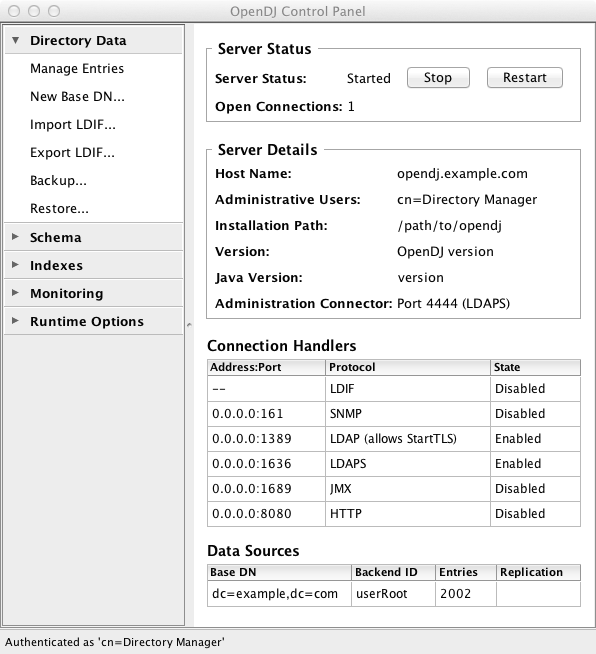
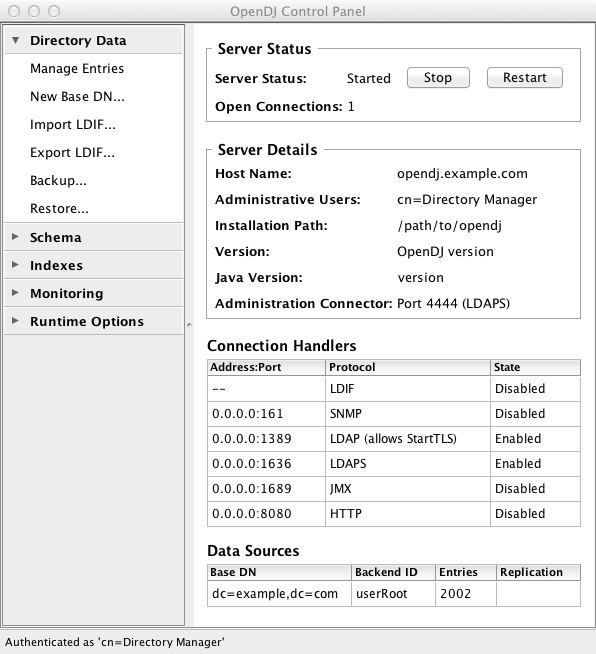
| | | OpenDJ control panel offers a GUI for managing both local and remote servers. You choose the server to manage when you start the control panel. The control panel connects to the administration server port, making a secure LDAPS connection. |
|---|
| | | |
|---|
| | | The version of OpenDJ control panel must be the same as the target version of OpenDJ directory server. |
|---|
| | | Start OpenDJ control panel by running the `control-panel` command, described in xref:../reference/admin-tools-ref.adoc#control-panel-1[control-panel(1)] in the __Reference__: |
|---|
| | | |
|---|
| | | * (Linux, Solaris) Run `/path/to/opendj/bin/control-panel`. |
|---|
| | | |
|---|
| | | * (Windows) Double-click `C:\path\to\opendj\bat\control-panel.bat`. |
|---|
| | | |
|---|
| | | * (Mac OS X) Double-click `/path/to/opendj/bin/ControlPanel.app`. |
|---|
| | | |
|---|
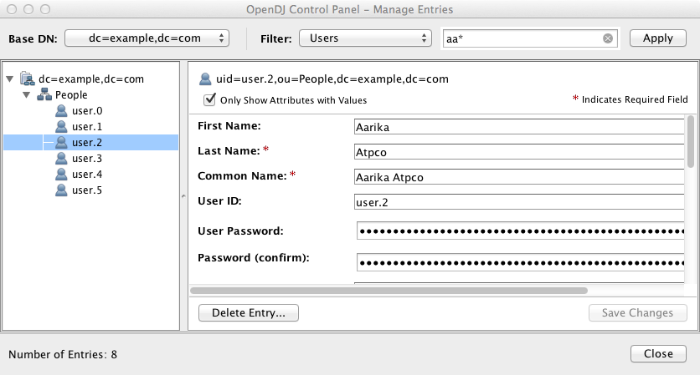
| | | When you log in to OpenDJ control panel, you authenticate over LDAP. This means that if users can run the control panel, they can use it to manage a running server. Yet, to start and stop the server process through OpenDJ control panel, you must start the control panel on the system where OpenDJ runs, as the user who owns the OpenDJ server files (such as the user who installed OpenDJ). In other words, the OpenDJ control panel does not do remote process management. |
|---|
| | | |
|---|
| | | [#figure-opendj-control-panel] |
|---|
| | | image::images/OpenDJ-Control-Panel.png[] |
|---|
| | | -- |
|---|
| | | Down the left side of OpenDJ control panel, notice what you can configure: |
|---|
| | | |
|---|
| | | Directory Data:: |
|---|
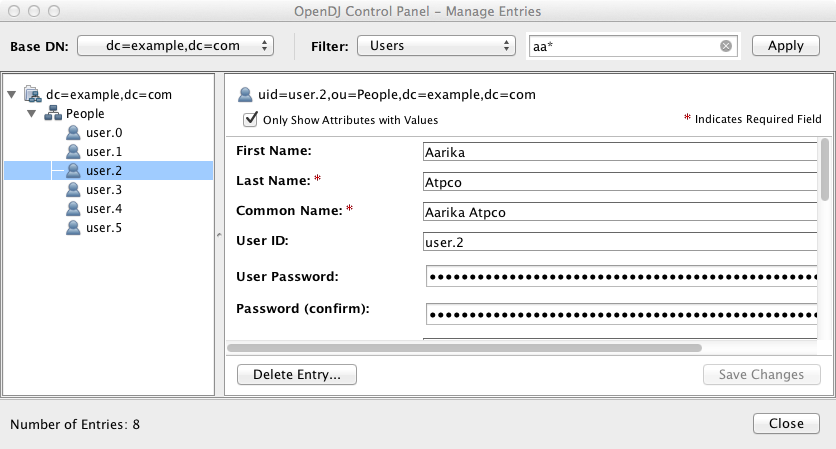
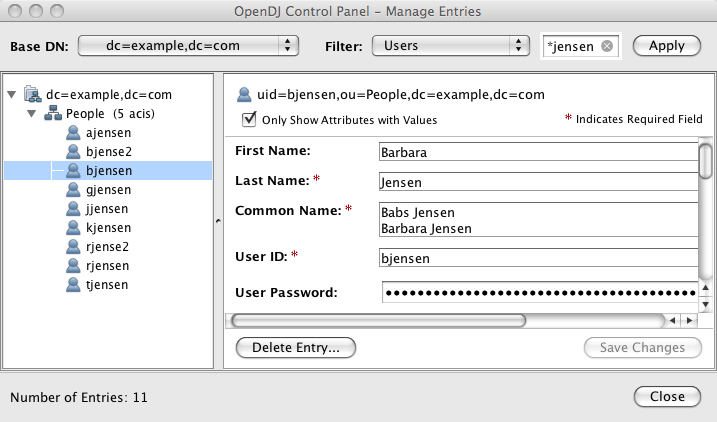
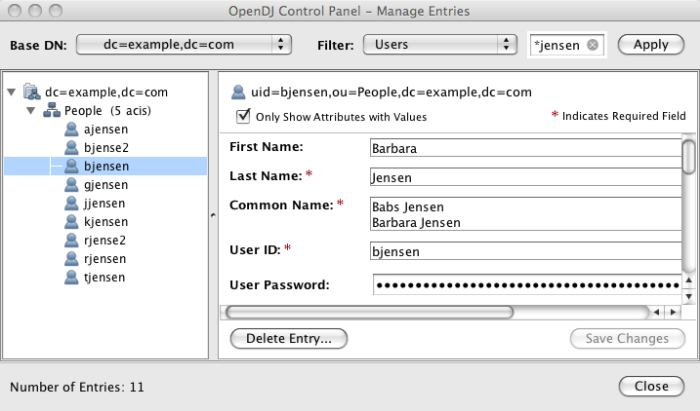
| | | Directory data provisioning is typically not something you do by hand in most deployments. Usually entries are created, modified, and deleted through specific directory client applications. The Manage Entries window can be useful in the lab as you design and test directory data and if you modify individual ACIs or debug issues with particular entries. |
|---|
| | | + |
|---|
| | | |
|---|
| | | [#figure-manage-entries] |
|---|
| | | image::images/Manage-Entries.png[] |
|---|
| | | + |
|---|
| | | Additionally, the Directory Data list makes it easy to create a new base DN, and then import user data for the new base DN from LDAP Data Interchange Format (LDIF) files. You can also use the tools in the list to export user data to LDIF, and to backup and restore user data. |
|---|
| | | |
|---|
| | | Schema:: |
|---|
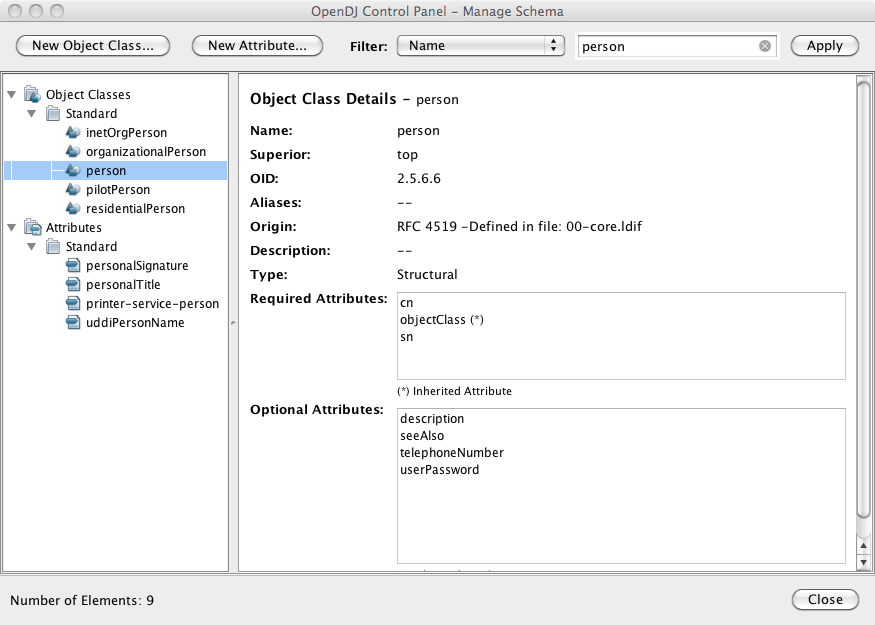
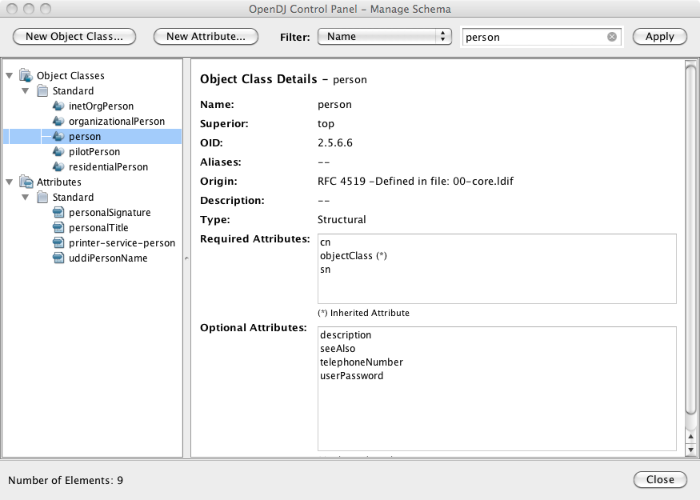
| | | The Manage Schema window lets you browse and modify the rules that define how data is stored in the directory. You can add new schema definitions such as new attribute types and new object classes while the server is running, and the changes you make take effect immediately. |
|---|
| | | |
|---|
| | | Indexes:: |
|---|
| | | The Manage Indexes window gives you a quick overview of all the indexes currently maintained for directory attributes. To protect your directory resources from being absorbed by costly searches on unindexed attributes, you may choose to keep the default behavior, preventing unindexed searches, instead adding indexes required by specific applications. (Notice that if the number of user data entries is smaller than the default resource limits, you can still perform what appear to be unindexed searches. That is because the `dn2id` index returns all user data entries without hitting a resource limit that would make the search unindexed.) |
|---|
| | | |
|---|
| | | + |
|---|
| | | OpenDJ control panel also allows you to verify and rebuild existing indexes, which you may have to do after an upgrade operation, or if you have reason to suspect index corruption. |
|---|
| | | |
|---|
| | | Monitoring:: |
|---|
| | | The Monitoring list gives you windows to observe information about the system, the Java Virtual Machine (JVM) used, and indications about how the cache is used, whether the work queue has been filling up, as well as details about the database. You can also view the numbers and types of requests arriving over the connection handlers, and the current tasks in progress as well. |
|---|
| | | |
|---|
| | | Runtime Options:: |
|---|
| | | If you did not set appropriate JVM runtime options during the installation process, this is the list that allows you to do so through the control panel. |
|---|
| | | |
|---|
| | | -- |
|---|
| | | |
|---|
| | | |
|---|
| | | [#cli-overview] |
|---|
| | | === Command-Line Tools |
|---|
| | | |
|---|
| | | Before you try the examples in this guide, set your PATH to include the OpenDJ directory server tools. The location of the tools depends on the operating environment and on the packages used to install OpenDJ. xref:#cli-path-locations["Paths To Administration Tools"] indicates where to find the tools. |
|---|
| | | |
|---|
| | | [#cli-path-locations] |
|---|
| | | .Paths To Administration Tools |
|---|
| | | [cols="33%,33%,34%"] |
|---|
| | | |=== |
|---|
| | | |OpenDJ running on... |OpenDJ installed from... |Default path to tools... |
|---|
| | | |
|---|
| | | a|Apple Mac OS X, Linux distributions, Oracle Solaris |
|---|
| | | a|.zip |
|---|
| | | a|`/path/to/opendj/bin` |
|---|
| | | |
|---|
| | | a|Linux distributions |
|---|
| | | a|.deb, .rpm |
|---|
| | | a|`/opt/opendj/bin` |
|---|
| | | |
|---|
| | | a|Microsoft Windows |
|---|
| | | a|.zip |
|---|
| | | a|`C:\path\to\opendj\bat` |
|---|
| | | |
|---|
| | | a|Oracle Solaris |
|---|
| | | a|SVR4 |
|---|
| | | a|`/usr/opendj/bin` |
|---|
| | | |=== |
|---|
| | | You find the installation and upgrade tools, `setup`, `upgrade`, and `uninstall`, in the parent directory of the other tools, as these tools are not used for everyday administration. For example, if the path to most tools is `/path/to/opendj/bin` you can find these tools in `/path/to/opendj`. For instructions on how to use the installation and upgrade tools, see the xref:../install-guide/index.adoc[Installation Guide]. |
|---|
| | | |
|---|
| | | All OpenDJ command-line tools take the `--help` option. |
|---|
| | | |
|---|
| | | All commands call Java programs and therefore involve starting a JVM. |
|---|
| | | |
|---|
| | | xref:#cli-constraints["Tools and Server Constraints"] indicates the constraints, if any, that apply when using a command-line tool with a directory server. |
|---|
| | | |
|---|
| | | [#cli-constraints] |
|---|
| | | .Tools and Server Constraints |
|---|
| | | [cols="50%,50%"] |
|---|
| | | |=== |
|---|
| | | |Commands |Constraints |
|---|
| | | |
|---|
| | | a|[none] |
|---|
| | | * `backendstat` |
|---|
| | | * `create-rc-script` |
|---|
| | | * `dsjavaproperties` |
|---|
| | | * `encode-password` |
|---|
| | | * `list-backends` |
|---|
| | | * `setup` |
|---|
| | | * `start-ds` |
|---|
| | | * `upgrade` |
|---|
| | | * `windows-service` |
|---|
| | | a|These commands must be used with the local OpenDJ directory server in the same installation as the tools. |
|---|
| | | |
|---|
| | | These commands are not useful with non-OpenDJ directory servers. |
|---|
| | | |
|---|
| | | a|[none] |
|---|
| | | * `control-panel` |
|---|
| | | * `dsconfig` |
|---|
| | | * `export-ldif` |
|---|
| | | * `import-ldif` |
|---|
| | | * `manage-account` |
|---|
| | | * `manage-tasks` |
|---|
| | | * `rebuild-index` |
|---|
| | | * `restore` |
|---|
| | | * `status` |
|---|
| | | * `stop-ds` |
|---|
| | | * `uninstall` |
|---|
| | | * `verify-index` |
|---|
| | | a|These commands must be used with OpenDJ directory server having the same version as the command. |
|---|
| | | |
|---|
| | | These commands are not useful with non-OpenDJ directory servers. |
|---|
| | | |
|---|
| | | a|[none] |
|---|
| | | * `dsreplication` |
|---|
| | | a|With one exception, this command can be used with current and previous OpenDJ directory server versions. The one exception is the `dsreplication reset-change-number` subcommand, which requires OpenDJ directory server version 3.0.0 or later. |
|---|
| | | |
|---|
| | | This commands is not useful with other types of directory servers. |
|---|
| | | |
|---|
| | | a|[none] |
|---|
| | | * `make-ldif` |
|---|
| | | a|This command depends on template files. The template files can make use of configuration files installed with OpenDJ directory server under `config/MakeLDIF/`. |
|---|
| | | |
|---|
| | | The LDIF output can be used with OpenDJ and other directory servers. |
|---|
| | | |
|---|
| | | a|[none] |
|---|
| | | * `base64` |
|---|
| | | * `ldapcompare` |
|---|
| | | * `ldapdelete` |
|---|
| | | * `ldapmodify` |
|---|
| | | * `ldappasswordmodify` |
|---|
| | | * `ldapsearch` |
|---|
| | | * `ldif-diff` |
|---|
| | | * `ldifmodify` |
|---|
| | | * `ldifsearch` |
|---|
| | | a|These commands can be used independently of OpenDJ directory server, and so are not tied to a specific version. |
|---|
| | | |=== |
|---|
| | | -- |
|---|
| | | The following list uses the UNIX names for the commands. On Windows all command-line tools have the extension .bat: |
|---|
| | | |
|---|
| | | `backendstat`:: |
|---|
| | | Debug databases for pluggable backends. |
|---|
| | | |
|---|
| | | + |
|---|
| | | For details see xref:../reference/admin-tools-ref.adoc#backendstat-1[backendstat(1)] in the __Reference__. |
|---|
| | | |
|---|
| | | `backup`:: |
|---|
| | | Back up or schedule backup of directory data. |
|---|
| | | |
|---|
| | | + |
|---|
| | | For details see xref:../reference/admin-tools-ref.adoc#backup-1[backup(1)] in the __Reference__. |
|---|
| | | |
|---|
| | | `base64`:: |
|---|
| | | Encode and decode data in base64 format. |
|---|
| | | |
|---|
| | | + |
|---|
| | | Base64-encoding represents binary data in ASCII, and can be used to encode character strings in LDIF, for example. |
|---|
| | | |
|---|
| | | + |
|---|
| | | For details see xref:../reference/admin-tools-ref.adoc#base64-1[base64(1)] in the __Reference__. |
|---|
| | | |
|---|
| | | `create-rc-script` (UNIX):: |
|---|
| | | Generate a script you can use to start, stop, and restart the server either directly or at system boot and shutdown. Use `create-rc-script -f script-file`. |
|---|
| | | |
|---|
| | | + |
|---|
| | | For details see xref:../reference/admin-tools-ref.adoc#create-rc-script-1[create-rc-script(1)] in the __Reference__. |
|---|
| | | |
|---|
| | | `dsconfig`:: |
|---|
| | | The `dsconfig` command is the primary command-line tool for viewing and editing an OpenDJ configuration. When started without arguments, `dsconfig` prompts you for administration connection information. Once connected it presents you with a menu-driven interface to the server configuration. |
|---|
| | | |
|---|
| | | + |
|---|
| | | When you pass connection information, subcommands, and additional options to `dsconfig`, the command runs in script mode and so is not interactive. |
|---|
| | | |
|---|
| | | + |
|---|
| | | You can prepare `dsconfig` batch scripts by running the command with the `--commandFilePath` option in interactive mode, then reading from the batch file with the `--batchFilePath` option in script mode. Batch files can be useful when you have many `dsconfig` commands to run and want to avoid starting the JVM for each command. |
|---|
| | | |
|---|
| | | + |
|---|
| | | Alternatively, you can read commands from standard input by using the `--batch` option. |
|---|
| | | |
|---|
| | | + |
|---|
| | | For details see xref:../reference/admin-tools-ref.adoc#dsconfig-1[dsconfig(1)] in the __Reference__. |
|---|
| | | |
|---|
| | | `dsjavaproperties`:: |
|---|
| | | Apply changes you make to `opendj/config/java.properties`, which sets Java runtime options. |
|---|
| | | |
|---|
| | | + |
|---|
| | | For details see xref:../reference/admin-tools-ref.adoc#dsjavaproperties-1[dsjavaproperties(1)] in the __Reference__. |
|---|
| | | |
|---|
| | | `dsreplication`:: |
|---|
| | | Configure data replication between directory servers to keep their contents in sync. |
|---|
| | | |
|---|
| | | + |
|---|
| | | For details see xref:../reference/admin-tools-ref.adoc#dsreplication-1[dsreplication(1)] in the __Reference__. |
|---|
| | | |
|---|
| | | `encode-password`:: |
|---|
| | | Encode a cleartext password according to one of the available storage schemes. |
|---|
| | | |
|---|
| | | + |
|---|
| | | For details see xref:../reference/admin-tools-ref.adoc#encode-password-1[encode-password(1)] in the __Reference__. |
|---|
| | | |
|---|
| | | `export-ldif`:: |
|---|
| | | Export directory data to LDIF, the standard, portable, text-based representation of directory content. |
|---|
| | | |
|---|
| | | + |
|---|
| | | For details see xref:../reference/admin-tools-ref.adoc#export-ldif-1[export-ldif(1)] in the __Reference__. |
|---|
| | | |
|---|
| | | `import-ldif`:: |
|---|
| | | Load LDIF content into the directory, overwriting existing data. It cannot be used to append data to the backend database. |
|---|
| | | |
|---|
| | | + |
|---|
| | | For details see xref:../reference/admin-tools-ref.adoc#import-ldif-1[import-ldif(1)] in the __Reference__. |
|---|
| | | |
|---|
| | | `ldapcompare`:: |
|---|
| | | Compare the attribute values you specify with those stored on entries in the directory. |
|---|
| | | |
|---|
| | | + |
|---|
| | | For details see xref:../reference/admin-tools-ref.adoc#ldapcompare-1[ldapcompare(1)] in the __Reference__. |
|---|
| | | |
|---|
| | | `ldapdelete`:: |
|---|
| | | Delete one entry or an entire branch of subordinate entries in the directory. |
|---|
| | | |
|---|
| | | + |
|---|
| | | For details see xref:../reference/admin-tools-ref.adoc#ldapdelete-1[ldapdelete(1)] in the __Reference__. |
|---|
| | | |
|---|
| | | `ldapmodify`:: |
|---|
| | | Modify the specified attribute values for the specified entries. |
|---|
| | | |
|---|
| | | + |
|---|
| | | Use the `ldapmodify` command with the `-a` option to add new entries. |
|---|
| | | |
|---|
| | | + |
|---|
| | | For details see xref:../reference/admin-tools-ref.adoc#ldapmodify-1[ldapmodify(1)] in the __Reference__. |
|---|
| | | |
|---|
| | | `ldappasswordmodify`:: |
|---|
| | | Modify user passwords. |
|---|
| | | |
|---|
| | | + |
|---|
| | | For details see xref:../reference/admin-tools-ref.adoc#ldappasswordmodify-1[ldappasswordmodify(1)] in the __Reference__. |
|---|
| | | |
|---|
| | | `ldapsearch`:: |
|---|
| | | Search a branch of directory data for entries that match the LDAP filter you specify. |
|---|
| | | |
|---|
| | | + |
|---|
| | | For details see xref:../reference/admin-tools-ref.adoc#ldapsearch-1[ldapsearch(1)] in the __Reference__. |
|---|
| | | |
|---|
| | | `ldif-diff`:: |
|---|
| | | Display differences between two LDIF files, with the resulting output having LDIF format. |
|---|
| | | |
|---|
| | | + |
|---|
| | | For details see xref:../reference/admin-tools-ref.adoc#ldif-diff-1[ldif-diff(1)] in the __Reference__. |
|---|
| | | |
|---|
| | | `ldifmodify`:: |
|---|
| | | Similar to the `ldapmodify` command, modify specified attribute values for specified entries in an LDIF file. |
|---|
| | | |
|---|
| | | + |
|---|
| | | For details see xref:../reference/admin-tools-ref.adoc#ldifmodify-1[ldifmodify(1)] in the __Reference__. |
|---|
| | | |
|---|
| | | `ldifsearch`:: |
|---|
| | | Similar to the `ldapsearch` command, search a branch of data in LDIF for entries matching the LDAP filter you specify. |
|---|
| | | |
|---|
| | | + |
|---|
| | | For details see xref:../reference/admin-tools-ref.adoc#ldifsearch-1[ldifsearch(1)] in the __Reference__. |
|---|
| | | |
|---|
| | | `list-backends`:: |
|---|
| | | List backends and base DNs served by OpenDJ directory server. |
|---|
| | | |
|---|
| | | + |
|---|
| | | For details see xref:../reference/admin-tools-ref.adoc#list-backends-1[list-backends(1)] in the __Reference__. |
|---|
| | | |
|---|
| | | `make-ldif`:: |
|---|
| | | Generate directory data in LDIF based on templates that define how the data should appear. |
|---|
| | | |
|---|
| | | + |
|---|
| | | The `make-ldif` command is designed to help generate test data that mimics data expected in production, but without compromising real, potentially private information. |
|---|
| | | |
|---|
| | | + |
|---|
| | | For details see xref:../reference/admin-tools-ref.adoc#make-ldif-1[make-ldif(1)] in the __Reference__. |
|---|
| | | |
|---|
| | | `manage-account`:: |
|---|
| | | Lock and unlock user accounts, and view and manipulate password policy state information. |
|---|
| | | |
|---|
| | | + |
|---|
| | | For details see xref:../reference/admin-tools-ref.adoc#manage-account-1[manage-account(1)] in the __Reference__. |
|---|
| | | |
|---|
| | | `manage-tasks`:: |
|---|
| | | View information about tasks scheduled to run in the server, and cancel specified tasks. |
|---|
| | | |
|---|
| | | + |
|---|
| | | For details see xref:../reference/admin-tools-ref.adoc#manage-tasks-1[manage-tasks(1)] in the __Reference__. |
|---|
| | | |
|---|
| | | `rebuild-index`:: |
|---|
| | | Rebuild an index stored in an indexed backend. |
|---|
| | | |
|---|
| | | + |
|---|
| | | For details see xref:../reference/admin-tools-ref.adoc#rebuild-index-1[rebuild-index(1)] in the __Reference__. |
|---|
| | | |
|---|
| | | `restore`:: |
|---|
| | | Restore data from backup. |
|---|
| | | |
|---|
| | | + |
|---|
| | | For details see xref:../reference/admin-tools-ref.adoc#restore-1[restore(1)] in the __Reference__. |
|---|
| | | |
|---|
| | | `start-ds`:: |
|---|
| | | Start OpenDJ directory server. |
|---|
| | | |
|---|
| | | + |
|---|
| | | For details see xref:../reference/admin-tools-ref.adoc#start-ds-1[start-ds(1)] in the __Reference__. |
|---|
| | | |
|---|
| | | `status`:: |
|---|
| | | Display information about the server. |
|---|
| | | |
|---|
| | | + |
|---|
| | | For details see xref:../reference/admin-tools-ref.adoc#status-1[status(1)] in the __Reference__. |
|---|
| | | |
|---|
| | | `stop-ds`:: |
|---|
| | | Stop OpenDJ directory server. |
|---|
| | | |
|---|
| | | + |
|---|
| | | For details see xref:../reference/admin-tools-ref.adoc#stop-ds-1[stop-ds(1)] in the __Reference__. |
|---|
| | | |
|---|
| | | `verify-index`:: |
|---|
| | | Verify that an index stored in an indexed backend is not corrupt. |
|---|
| | | |
|---|
| | | + |
|---|
| | | For details see xref:../reference/admin-tools-ref.adoc#verify-index-1[verify-index(1)] in the __Reference__. |
|---|
| | | |
|---|
| | | `windows-service` (Windows):: |
|---|
| | | Register OpenDJ as a Windows Service. |
|---|
| | | |
|---|
| | | + |
|---|
| | | For details see xref:../reference/admin-tools-ref.adoc#windows-service[windows-service(1)] in the __Reference__. |
|---|
| | | |
|---|
| | | -- |
|---|
| | | |
|---|
| | | |
|---|
| New file |
| | |
|---|
| | | //// |
|---|
| | | The contents of this file are subject to the terms of the Common Development and |
|---|
| | | Distribution License (the License). You may not use this file except in compliance with the |
|---|
| | | License. |
|---|
| | | |
|---|
| | | You can obtain a copy of the License at legal/CDDLv1.0.txt. See the License for the |
|---|
| | | specific language governing permission and limitations under the License. |
|---|
| | | |
|---|
| | | When distributing Covered Software, include this CDDL Header Notice in each file and include |
|---|
| | | the License file at legal/CDDLv1.0.txt. If applicable, add the following below the CDDL |
|---|
| | | Header, with the fields enclosed by brackets [] replaced by your own identifying |
|---|
| | | information: "Portions copyright [year] [name of copyright owner]". |
|---|
| | | |
|---|
| | | Copyright 2017 ForgeRock AS. |
|---|
| | | Portions Copyright 2024 3A Systems LLC. |
|---|
| | | //// |
|---|
| | | |
|---|
| | | :figure-caption!: |
|---|
| | | :example-caption!: |
|---|
| | | :table-caption!: |
|---|
| | | |
|---|
| | | |
|---|
| | | [#chap-attribute-uniqueness] |
|---|
| | | == Implementing Attribute Value Uniqueness |
|---|
| | | |
|---|
| | | This chapter shows you how to enforce that specified attributes do not have repeated values in different directory entries. You can use attribute uniqueness, for example, to prevent two user entries sharing the same email address. In this chapter you will learn to: |
|---|
| | | |
|---|
| | | * Enforce uniqueness for user IDs and other attributes |
|---|
| | | |
|---|
| | | * Limit the scope of attribute value uniqueness |
|---|
| | | |
|---|
| | | * Manage attribute value uniqueness across replicated directory servers |
|---|
| | | |
|---|
| | | Some attribute values ought to remain unique. If you are using `uid` values as RDNs to distinguish between millions of user entries stored under `ou=People`, then you do not want your directory to contain two or more identical `uid` values. If your credit card or mobile number is stored as an attribute value on your directory entry, you certainly do not want to share that credit card or mobile number with another customer. The same is true for your email address. |
|---|
| | | The difficulty for you as directory administrator lies in implementing attribute value uniqueness without sacrificing the high availability that comes from using OpenDJ's loosely consistent, multi-master data replication. Indeed OpenDJ's replication model lets you maintain write access during network outages for directory applications. Yet, write access during a network outage can result in the same, theoretically unique attribute value getting assigned to two different entries at once. You do not notice the duplicate assignment until the network outage ends and replication resumes. |
|---|
| | | This chapter shows you how to set up attribute value uniqueness in your directory environment with the following procedures: |
|---|
| | | |
|---|
| | | * xref:#enable-unique-uids["To Enable Unique UIDs"] |
|---|
| | | |
|---|
| | | * xref:#enable-unique-attributes["To Enable Unique Values For Other Attributes"] |
|---|
| | | |
|---|
| | | * xref:#unique-attributes-scoped["To Limit The Scope of Uniqueness"] |
|---|
| | | |
|---|
| | | * xref:#unique-attributes-repl["To Ensure Unique Attribute Values With Replication"] |
|---|
| | | |
|---|
| | | OpenDJ directory server uses the unique attribute plugin to handle attribute value uniqueness. As shown in the examples in this chapter, you can configure the unique attribute plugin to handle one or more attributes and to handle entries under one or more base DNs. You can also configure multiple instances of the plugin for the same OpenDJ directory server. |
|---|
| | | |
|---|
| | | [#enable-unique-uids] |
|---|
| | | .To Enable Unique UIDs |
|---|
| | | ==== |
|---|
| | | OpenDJ provides a unique attribute plugin that you configure by using the `dsconfig` command. By default, the plugin is prepared to ensure attribute values are unique for `uid` attributes. |
|---|
| | | |
|---|
| | | . Set the base DN where `uid` should have unique values, and enable the plugin: |
|---|
| | | + |
|---|
| | | |
|---|
| | | [source, console] |
|---|
| | | ---- |
|---|
| | | $ dsconfig \ |
|---|
| | | set-plugin-prop \ |
|---|
| | | --port 4444 \ |
|---|
| | | --hostname opendj.example.com \ |
|---|
| | | --bindDN "cn=Directory Manager" \ |
|---|
| | | --bindPassword password \ |
|---|
| | | --plugin-name "UID Unique Attribute" \ |
|---|
| | | --set base-dn:ou=people,dc=example,dc=com \ |
|---|
| | | --set enabled:true \ |
|---|
| | | --trustAll \ |
|---|
| | | --no-prompt |
|---|
| | | ---- |
|---|
| | | + |
|---|
| | | Alternatively, you can specify multiple base DNs for unique values across multiple suffixes: |
|---|
| | | + |
|---|
| | | |
|---|
| | | [source, console] |
|---|
| | | ---- |
|---|
| | | $ dsconfig \ |
|---|
| | | set-plugin-prop \ |
|---|
| | | --port 4444 \ |
|---|
| | | --hostname opendj.example.com \ |
|---|
| | | --bindDn "cn=Directory Manager" \ |
|---|
| | | --bindPassword password \ |
|---|
| | | --plugin-name "UID Unique Attribute" \ |
|---|
| | | --set enabled:true \ |
|---|
| | | --add base-dn:ou=people,dc=example,dc=com \ |
|---|
| | | --add base-dn:ou=people,dc=example,dc=org \ |
|---|
| | | --trustAll \ |
|---|
| | | --no-prompt |
|---|
| | | ---- |
|---|
| | | |
|---|
| | | . Check that the plugin is working correctly: |
|---|
| | | + |
|---|
| | | |
|---|
| | | [source, console] |
|---|
| | | ---- |
|---|
| | | $ cat bjensen.ldif |
|---|
| | | dn: uid=ajensen,ou=People,dc=example,dc=com |
|---|
| | | changetype: modify |
|---|
| | | add: uid |
|---|
| | | uid: bjensen |
|---|
| | | |
|---|
| | | $ ldapmodify \ |
|---|
| | | --defaultAdd \ |
|---|
| | | --port 1389 \ |
|---|
| | | --bindDN "cn=Directory Manager" \ |
|---|
| | | --bindPassword password \ |
|---|
| | | --filename bjensen.ldif |
|---|
| | | Processing MODIFY request for uid=ajensen,ou=People,dc=example,dc=com |
|---|
| | | MODIFY operation failed |
|---|
| | | Result Code: 19 (Constraint Violation) |
|---|
| | | Additional Information: A unique attribute conflict was detected for |
|---|
| | | attribute uid: value bjensen already exists in entry |
|---|
| | | uid=bjensen,ou=People,dc=example,dc=com |
|---|
| | | ---- |
|---|
| | | + |
|---|
| | | If you have set up multiple suffixes, you might try something like this: |
|---|
| | | + |
|---|
| | | |
|---|
| | | [source, console] |
|---|
| | | ---- |
|---|
| | | $ cat bjensen.ldif |
|---|
| | | dn: uid=bjensen,ou=People,dc=example,dc=org |
|---|
| | | objectClass: top |
|---|
| | | objectClass: person |
|---|
| | | objectClass: organizationalPerson |
|---|
| | | objectClass: inetOrgPerson |
|---|
| | | cn: Babs |
|---|
| | | sn: Jensen |
|---|
| | | uid: bjensen |
|---|
| | | |
|---|
| | | $ ldapmodify \ |
|---|
| | | --port 1389 \ |
|---|
| | | --bindDN "cn=Directory Manager" \ |
|---|
| | | --bindPassword password \ |
|---|
| | | --defaultAdd \ |
|---|
| | | --filename bjensen.ldif |
|---|
| | | Processing ADD request for uid=bjensen,ou=People,dc=example,dc=org |
|---|
| | | ADD operation failed |
|---|
| | | Result Code: 19 (Constraint Violation) |
|---|
| | | Additional Information: A unique attribute conflict was detected for attribute |
|---|
| | | uid: value bjensen already exists in entry |
|---|
| | | uid=bjensen,ou=People,dc=example,dc=com |
|---|
| | | ---- |
|---|
| | | |
|---|
| | | ==== |
|---|
| | | |
|---|
| | | [#enable-unique-attributes] |
|---|
| | | .To Enable Unique Values For Other Attributes |
|---|
| | | ==== |
|---|
| | | You can also configure the unique attribute plugin for use with other attributes, such as `mail`, `mobile`, or attributes you define, for example `cardNumber`. |
|---|
| | | |
|---|
| | | . Before you set up the plugin, index the attribute for equality. |
|---|
| | | + |
|---|
| | | See xref:chap-indexing.adoc#configure-indexes["Configuring and Rebuilding Indexes"] for instructions. |
|---|
| | | |
|---|
| | | . Set up the plugin configuration for your attribute. |
|---|
| | | + |
|---|
| | | You can either add the attribute to an existing plugin configuration, or create a new plugin configuration including the attribute. |
|---|
| | | + |
|---|
| | | When choosing between these alternatives, keep in mind that values must be unique across the attributes and base DNs specified in each plugin configuration. Therefore only group attributes together in the same configuration if you want each value to be unique for all attributes. For example, you might create a single plugin configuration for telephone, fax, mobile, and pager numbers. As an alternative example, suppose user IDs are numeric, that user entries also specify `uidNumber`, and that user IDs are normally the same as their `uidNumber`s. In that case you create separate unique attribute configurations for `uid` and `uidNumber`: |
|---|
| | | + |
|---|
| | | |
|---|
| | | * If you want to add the attribute to an existing plugin configuration, do so as shown in the following example which uses the plugin configuration from xref:#enable-unique-uids["To Enable Unique UIDs"]: |
|---|
| | | + |
|---|
| | | |
|---|
| | | [source, console] |
|---|
| | | ---- |
|---|
| | | $ dsconfig \ |
|---|
| | | set-plugin-prop \ |
|---|
| | | --port 4444 \ |
|---|
| | | --hostname opendj.example.com \ |
|---|
| | | --bindDN "cn=Directory Manager" \ |
|---|
| | | --bindPassword password \ |
|---|
| | | --plugin-name "UID Unique Attribute" \ |
|---|
| | | --add type:mobile \ |
|---|
| | | --trustAll \ |
|---|
| | | --no-prompt |
|---|
| | | ---- |
|---|
| | | |
|---|
| | | * If you want to create a new plugin configuration, do so as shown in the following example: |
|---|
| | | + |
|---|
| | | |
|---|
| | | [source, console] |
|---|
| | | ---- |
|---|
| | | $ dsconfig \ |
|---|
| | | create-plugin \ |
|---|
| | | --port 4444 \ |
|---|
| | | --hostname opendj.example.com \ |
|---|
| | | --bindDN "cn=Directory Manager" \ |
|---|
| | | --bindPassword password \ |
|---|
| | | --plugin-name "Unique mobile numbers" \ |
|---|
| | | --type unique-attribute \ |
|---|
| | | --set enabled:true \ |
|---|
| | | --set base-dn:ou=people,dc=example,dc=com \ |
|---|
| | | --set type:mobile \ |
|---|
| | | --trustAll \ |
|---|
| | | --no-prompt |
|---|
| | | ---- |
|---|
| | | |
|---|
| | | |
|---|
| | | . Check that the plugin is working correctly: |
|---|
| | | + |
|---|
| | | |
|---|
| | | [source, console] |
|---|
| | | ---- |
|---|
| | | $ cat mobile.ldif |
|---|
| | | dn: uid=ajensen,ou=People,dc=example,dc=com |
|---|
| | | changetype: modify |
|---|
| | | add: mobile |
|---|
| | | mobile: +1 828 555 1212 |
|---|
| | | |
|---|
| | | dn: uid=bjensen,ou=People,dc=example,dc=com |
|---|
| | | changetype: modify |
|---|
| | | add: mobile |
|---|
| | | mobile: +1 828 555 1212 |
|---|
| | | |
|---|
| | | $ ldapmodify \ |
|---|
| | | --defaultAdd \ |
|---|
| | | --port 1389 \ |
|---|
| | | --bindDN "cn=Directory Manager" \ |
|---|
| | | --bindPassword password \ |
|---|
| | | --filename mobile.ldif |
|---|
| | | Processing MODIFY request for uid=ajensen,ou=People,dc=example,dc=com |
|---|
| | | MODIFY operation successful for DN uid=ajensen,ou=People,dc=example,dc=com |
|---|
| | | Processing MODIFY request for uid=bjensen,ou=People,dc=example,dc=com |
|---|
| | | MODIFY operation failed |
|---|
| | | Result Code: 19 (Constraint Violation) |
|---|
| | | Additional Information: A unique attribute conflict was detected for |
|---|
| | | attribute mobile: value +1 828 555 1212 already exists in entry |
|---|
| | | uid=ajensen,ou=People,dc=example,dc=com |
|---|
| | | ---- |
|---|
| | | |
|---|
| | | ==== |
|---|
| | | |
|---|
| | | [#unique-attributes-scoped] |
|---|
| | | .To Limit The Scope of Uniqueness |
|---|
| | | ==== |
|---|
| | | In some cases you need attribute uniqueness separately for different base DNs in your directory. For example, you need all `uid` values to remain unique both for users in `dc=example,dc=com` and `dc=example,dc=org`, but it is not a problem to have one entry under each base DN with the same user ID as the organizations are separate. The following steps demonstrate how to limit the scope of uniqueness by creating separate configuration entries for the unique attribute plugin. |
|---|
| | | |
|---|
| | | . If the attribute you target is not indexed for equality by default, index the attribute for equality. |
|---|
| | | + |
|---|
| | | See xref:chap-indexing.adoc#configure-indexes["Configuring and Rebuilding Indexes"] for instructions. |
|---|
| | | + |
|---|
| | | The examples in this procedure target the user ID attribute, `uid`, which is indexed for equality by default. |
|---|
| | | |
|---|
| | | . For each base DN, set up a configuration entry that ensures the target attribute values are unique: |
|---|
| | | + |
|---|
| | | |
|---|
| | | [source, console] |
|---|
| | | ---- |
|---|
| | | $ dsconfig \ |
|---|
| | | create-plugin \ |
|---|
| | | --port 4444 \ |
|---|
| | | --hostname opendj.example.com \ |
|---|
| | | --bindDN "cn=Directory Manager" \ |
|---|
| | | --bindPassword password \ |
|---|
| | | --plugin-name "Unique Example.com UIDs" \ |
|---|
| | | --type unique-attribute \ |
|---|
| | | --set enabled:true \ |
|---|
| | | --set base-dn:dc=example,dc=com \ |
|---|
| | | --set type:uid \ |
|---|
| | | --trustAll \ |
|---|
| | | --no-prompt |
|---|
| | | |
|---|
| | | $ dsconfig \ |
|---|
| | | create-plugin \ |
|---|
| | | --port 4444 \ |
|---|
| | | --hostname opendj.example.com \ |
|---|
| | | --bindDN "cn=Directory Manager" \ |
|---|
| | | --bindPassword password \ |
|---|
| | | --plugin-name "Unique Example.org UIDs" \ |
|---|
| | | --type unique-attribute \ |
|---|
| | | --set enabled:true \ |
|---|
| | | --set base-dn:dc=example,dc=org \ |
|---|
| | | --set type:uid \ |
|---|
| | | --trustAll \ |
|---|
| | | --no-prompt |
|---|
| | | ---- |
|---|
| | | |
|---|
| | | . Check that the plugin is working correctly: |
|---|
| | | + |
|---|
| | | |
|---|
| | | [source, console] |
|---|
| | | ---- |
|---|
| | | $ cat uniq-ids.ldif |
|---|
| | | dn: uid=unique,ou=People,dc=example,dc=com |
|---|
| | | uid: unique |
|---|
| | | givenName: Unique |
|---|
| | | objectClass: person |
|---|
| | | objectClass: organizationalPerson |
|---|
| | | objectClass: inetOrgPerson |
|---|
| | | objectClass: top |
|---|
| | | cn: Unique Person |
|---|
| | | sn: Person |
|---|
| | | userPassword: 1Mun1qu3 |
|---|
| | | |
|---|
| | | dn: uid=unique,ou=People,dc=example,dc=org |
|---|
| | | uid: unique |
|---|
| | | givenName: Unique |
|---|
| | | objectClass: person |
|---|
| | | objectClass: organizationalPerson |
|---|
| | | objectClass: inetOrgPerson |
|---|
| | | objectClass: top |
|---|
| | | cn: Unique Person |
|---|
| | | sn: Person |
|---|
| | | userPassword: 1Mun1qu3 |
|---|
| | | |
|---|
| | | dn: uid=copycat,ou=People,dc=example,dc=com |
|---|
| | | uid: unique |
|---|
| | | uid: copycat |
|---|
| | | givenName: Copycat |
|---|
| | | objectClass: person |
|---|
| | | objectClass: organizationalPerson |
|---|
| | | objectClass: inetOrgPerson |
|---|
| | | objectClass: top |
|---|
| | | cn: Copycat Person |
|---|
| | | sn: Person |
|---|
| | | userPassword: copycopy |
|---|
| | | |
|---|
| | | $ ldapmodify \ |
|---|
| | | --defaultAdd \ |
|---|
| | | --port 1389 \ |
|---|
| | | --bindDN "cn=Directory Manager" \ |
|---|
| | | --bindPassword password \ |
|---|
| | | --filename uniq-ids.ldif |
|---|
| | | Processing ADD request for uid=unique,ou=People,dc=example,dc=com |
|---|
| | | ADD operation successful for DN uid=unique,ou=People,dc=example,dc=com |
|---|
| | | Processing ADD request for uid=unique,ou=People,dc=example,dc=org |
|---|
| | | ADD operation successful for DN uid=unique,ou=People,dc=example,dc=org |
|---|
| | | Processing ADD request for uid=copycat,ou=People,dc=example,dc=com |
|---|
| | | ADD operation failed |
|---|
| | | Result Code: 19 (Constraint Violation) |
|---|
| | | Additional Information: A unique attribute conflict was detected for |
|---|
| | | attribute uid: value unique already exists in entry |
|---|
| | | uid=unique,ou=People,dc=example,dc=com |
|---|
| | | ---- |
|---|
| | | |
|---|
| | | ==== |
|---|
| | | |
|---|
| | | [#unique-attributes-repl] |
|---|
| | | .To Ensure Unique Attribute Values With Replication |
|---|
| | | ==== |
|---|
| | | The unique attribute plugin ensures unique attribute values on the directory server where the attribute value is updated. If client applications write the same attribute value separately at the same time on different directory replicas, it is possible that both servers consider the duplicate value unique, especially if the network is down between the replicas. |
|---|
| | | |
|---|
| | | . Enable the plugin identically on all replicas. |
|---|
| | | |
|---|
| | | . To avoid duplicate values where possible, try one of the following solutions: |
|---|
| | | + |
|---|
| | | |
|---|
| | | * Use a load balancer or proxy technology to direct all updates to the unique attribute to the same directory server. |
|---|
| | | + |
|---|
| | | The drawback here is the need for an additional component to direct the updates to the same server, and to manage failover should that server go down. |
|---|
| | | |
|---|
| | | * Configure safe read mode assured replication between replicas storing the unique attribute. |
|---|
| | | + |
|---|
| | | The drawbacks here are the cost of safe read assured replication, and the likelihood that assured replication can enter degraded mode during a network outage, thus continuing to allow updates during the outage. |
|---|
| | | |
|---|
| | | |
|---|
| | | ==== |
|---|
| | | |
|---|
| New file |
| | |
|---|
| | | //// |
|---|
| | | The contents of this file are subject to the terms of the Common Development and |
|---|
| | | Distribution License (the License). You may not use this file except in compliance with the |
|---|
| | | License. |
|---|
| | | |
|---|
| | | You can obtain a copy of the License at legal/CDDLv1.0.txt. See the License for the |
|---|
| | | specific language governing permission and limitations under the License. |
|---|
| | | |
|---|
| | | When distributing Covered Software, include this CDDL Header Notice in each file and include |
|---|
| | | the License file at legal/CDDLv1.0.txt. If applicable, add the following below the CDDL |
|---|
| | | Header, with the fields enclosed by brackets [] replaced by your own identifying |
|---|
| | | information: "Portions copyright [year] [name of copyright owner]". |
|---|
| | | |
|---|
| | | Copyright 2017 ForgeRock AS. |
|---|
| | | Portions Copyright 2024 3A Systems LLC. |
|---|
| | | //// |
|---|
| | | |
|---|
| | | :figure-caption!: |
|---|
| | | :example-caption!: |
|---|
| | | :table-caption!: |
|---|
| | | |
|---|
| | | |
|---|
| | | [#chap-backup-restore] |
|---|
| | | == Backing Up and Restoring Data |
|---|
| | | |
|---|
| | | This chapter covers management of directory data backup archives. For information on managing directory data in an interoperable format that is portable between directory server products, see xref:chap-import-export.adoc#chap-import-export["Managing Directory Data"] instead. In this chapter you will learn to: |
|---|
| | | |
|---|
| | | * Create backup archives |
|---|
| | | |
|---|
| | | * Restore data from backup archives |
|---|
| | | |
|---|
| | | OpenDJ lets you back up and restore your data either in compressed, binary format, or in LDIF. This chapter shows you how to back up and to restore OpenDJ data from archives, and explains portability of backup archives, as well as backing up server configuration information. |
|---|
| | | |
|---|
| | | [IMPORTANT] |
|---|
| | | ==== |
|---|
| | | As explained in xref:chap-import-export.adoc#about-database-backends["About Database Backends"], cleanup processes applied by database backends can be writing data even when there are no pending client or replication operations. To back up a server using a file system snapshot, you must __stop the server before taking the snapshot__. |
|---|
| | | ==== |
|---|
| | | |
|---|
| | | [#backup] |
|---|
| | | === Backing Up Directory Data |
|---|
| | | |
|---|
| | | A `bak/` directory is provided when you install OpenDJ, as a location to save binary backups. When you create a backup, the `bak/backup.info` contains information about the archive. This is acceptable if you have only one backend to back up. Each `backup.info` file only contains information about one backend, however. If you have more than one backend, then use a separate backup directory for each backend in order to have separate `backup.info` files for each backend ID. |
|---|
| | | |
|---|
| | | Archives produced by the `backup` command contain backups only of the directory data. Backups of server configuration are found in `config/archived-configs/`. |
|---|
| | | |
|---|
| | | [IMPORTANT] |
|---|
| | | ==== |
|---|
| | | The `backup` command can encrypt the backup data. It encrypts the data using a symmetric key that is stored with the server configuration. The symmetric key is encrypted in turn with the server's public key that is also stored with the server configuration. |
|---|
| | | |
|---|
| | | When multiple servers are configured to replicate data as described in xref:chap-replication.adoc#chap-replication["Managing Data Replication"], the servers replicate the keys as well, allowing any server replica to decrypt the backup data. |
|---|
| | | |
|---|
| | | __If ever all servers in the replication topology are lost, new servers can no longer decrypt any encrypted backup files.__ |
|---|
| | | |
|---|
| | | To work around this limitation, maintain a file system backup of at least one server from each replication topology in your deployment. To recover from a disaster where all servers in the topology were lost, restore the server files from the file system backup, and start the restored server. Other new servers whose data you restore from encrypted backup can then obtain the decryption keys from the restored server as described in xref:#restore-replica["To Restore a Replica"]. |
|---|
| | | ==== |
|---|
| | | This section includes the following procedures: |
|---|
| | | |
|---|
| | | * xref:#backup-immediately["To Back Up Data Immediately"] |
|---|
| | | |
|---|
| | | * xref:#schedule-backup["To Schedule Data Backup"] |
|---|
| | | |
|---|
| | | * xref:#schedule-incremental-backup["To Schedule Incremental Data Backup"] |
|---|
| | | |
|---|
| | | |
|---|
| | | [#backup-immediately] |
|---|
| | | .To Back Up Data Immediately |
|---|
| | | ==== |
|---|
| | | To perform online backup, you start backup as a task by connecting to the administrative port and authenticating as a user with the `backend-backup` privilege, and also setting a start time for the task by using the `--start` option. |
|---|
| | | |
|---|
| | | To perform offline backup when OpenDJ directory server is stopped, you run the `backup` command, described in xref:../reference/admin-tools-ref.adoc#backup-1[backup(1)] in the __Reference__, without connecting to the server, authenticating, or requesting a backup task. |
|---|
| | | |
|---|
| | | * Use one of the following alternatives: |
|---|
| | | + |
|---|
| | | |
|---|
| | | ** Back up only the database for Example.com, where the data is stored in the backend named `userRoot`. |
|---|
| | | + |
|---|
| | | The following example requests an online backup task that starts immediately, backing up only the `userRoot` backend: |
|---|
| | | + |
|---|
| | | |
|---|
| | | [source, console] |
|---|
| | | ---- |
|---|
| | | $ backup \ |
|---|
| | | --port 4444 \ |
|---|
| | | --bindDN "cn=Directory Manager" \ |
|---|
| | | --bindPassword password \ |
|---|
| | | --backendID userRoot \ |
|---|
| | | --backupDirectory /path/to/opendj/bak/userRoot \ |
|---|
| | | --start 0 |
|---|
| | | Backup task 20110613143715983 scheduled to start Jun 13, 2011 2:37:15 PM CEST |
|---|
| | | ---- |
|---|
| | | |
|---|
| | | ** Stop the server to back up Example.com data offline. |
|---|
| | | + |
|---|
| | | The following example stops OpenDJ, runs offline backup, and starts the server after backup has completed: |
|---|
| | | + |
|---|
| | | |
|---|
| | | [source, console] |
|---|
| | | ---- |
|---|
| | | $ stop-ds |
|---|
| | | Stopping Server... |
|---|
| | | |
|---|
| | | [13/Jun/2011:14:31:00 +0200] category=BACKEND severity=NOTICE msgID=9896306 |
|---|
| | | msg=The backend userRoot is now taken offline |
|---|
| | | [13/Jun/2011:14:31:00 +0200] category=CORE severity=NOTICE msgID=458955 |
|---|
| | | msg=The Directory Server is now stopped |
|---|
| | | $ backup --backendID userRoot -d /path/to/opendj/bak |
|---|
| | | [13/Jun/2011:14:33:48 +0200] category=TOOLS severity=NOTICE msgID=10944792 |
|---|
| | | msg=Starting backup for backend userRoot |
|---|
| | | ... |
|---|
| | | [13/Jun/2011:14:33:48 +0200] category=TOOLS severity=NOTICE msgID=10944795 |
|---|
| | | msg=The backup process completed successfully |
|---|
| | | $ start-ds |
|---|
| | | ... The Directory Server has started successfully |
|---|
| | | ---- |
|---|
| | | |
|---|
| | | ** Back up all user data on the server. |
|---|
| | | + |
|---|
| | | The following example requests an online backup task that starts immediately, backing up all backends: |
|---|
| | | + |
|---|
| | | |
|---|
| | | [source, console] |
|---|
| | | ---- |
|---|
| | | $ backup \ |
|---|
| | | --port 4444 \ |
|---|
| | | --bindDN "cn=Directory Manager" \ |
|---|
| | | --bindPassword password \ |
|---|
| | | --backUpAll \ |
|---|
| | | --backupDirectory /path/to/opendj/bak/userRoot \ |
|---|
| | | --start 0 |
|---|
| | | Backup task 20110613143801866 scheduled to start Jun 13, 2011 2:38:01 PM CEST |
|---|
| | | ---- |
|---|
| | | |
|---|
| | | |
|---|
| | | ==== |
|---|
| | | |
|---|
| | | [#schedule-backup] |
|---|
| | | .To Schedule Data Backup |
|---|
| | | ==== |
|---|
| | | You can schedule online data backup using `crontab` format. |
|---|
| | | |
|---|
| | | * Back up all user data every night at 2 AM, and notify diradmin@example.com when finished, or on error: |
|---|
| | | + |
|---|
| | | |
|---|
| | | [source, console] |
|---|
| | | ---- |
|---|
| | | $ backup \ |
|---|
| | | --port 4444 \ |
|---|
| | | --bindDN "cn=Directory Manager" \ |
|---|
| | | --bindPassword password \ |
|---|
| | | --backUpAll \ |
|---|
| | | --backupDirectory /path/to/opendj/bak \ |
|---|
| | | --recurringTask "00 02 * * *" \ |
|---|
| | | --completionNotify diradmin@example.com \ |
|---|
| | | --errorNotify diradmin@example.com |
|---|
| | | Recurring Backup task BackupTask-988d6adf-4d65-44bf-8546-6ea74a2480b0 |
|---|
| | | scheduled successfully |
|---|
| | | ---- |
|---|
| | | |
|---|
| | | ==== |
|---|
| | | |
|---|
| | | [#schedule-incremental-backup] |
|---|
| | | .To Schedule Incremental Data Backup |
|---|
| | | ==== |
|---|
| | | You can schedule an incremental backup by using the `--incremental` option. If you do not set the `--incrementalBaseID` option, then OpenDJ increments based on the last backup taken. |
|---|
| | | |
|---|
| | | * Back up `userRoot` backend data incrementally every night at 3 AM, and notify diradmin@example.com when finished, or on error: |
|---|
| | | + |
|---|
| | | |
|---|
| | | [source, console] |
|---|
| | | ---- |
|---|
| | | $ backup \ |
|---|
| | | --port 4444 \ |
|---|
| | | --bindDN "cn=Directory Manager" \ |
|---|
| | | --bindPassword password \ |
|---|
| | | --backupDirectory /path/to/opendj/bak/userRoot \ |
|---|
| | | --backendID userRoot \ |
|---|
| | | --incremental \ |
|---|
| | | --recurringTask "00 03 * * *" \ |
|---|
| | | --completionNotify diradmin@example.com \ |
|---|
| | | --errorNotify diradmin@example.com |
|---|
| | | Recurring Backup task BackupTask-6988c19d-9afc-4f50-89b7-d3e167255d3e |
|---|
| | | scheduled successfully |
|---|
| | | ---- |
|---|
| | | |
|---|
| | | ==== |
|---|
| | | |
|---|
| | | |
|---|
| | | [#restore-data] |
|---|
| | | === Restoring Directory Data From Backup |
|---|
| | | |
|---|
| | | When you restore data, the procedure to follow depends on whether the OpenDJ directory server is replicated. |
|---|
| | | |
|---|
| | | [#restore-standalone-server] |
|---|
| | | .To Restore a Stand-alone Server |
|---|
| | | ==== |
|---|
| | | To restore OpenDJ when the server is online, you start a restore task by connecting to the administrative port and authenticating as a user with the `backend-restore` privilege, and also setting a start time for the task by using the `--start` option. |
|---|
| | | |
|---|
| | | To restore data when OpenDJ directory server is stopped, you run the `restore` command, described in xref:../reference/admin-tools-ref.adoc#restore-1[restore(1)] in the __Reference__, without connecting to the server, authenticating, or requesting a restore task. |
|---|
| | | |
|---|
| | | * Use one of the following alternatives: |
|---|
| | | + |
|---|
| | | |
|---|
| | | ** Stop the server to restore data for Example.com. |
|---|
| | | + |
|---|
| | | The following example stops OpenDJ, restores data offline from one of the available backups, and then starts the server after the restore is complete: |
|---|
| | | + |
|---|
| | | |
|---|
| | | [source, console] |
|---|
| | | ---- |
|---|
| | | $ stop-ds |
|---|
| | | Stopping Server... |
|---|
| | | |
|---|
| | | [13/Jun/2011:15:44:06 +0200] category=BACKEND severity=NOTICE msgID=9896306 |
|---|
| | | msg=The backend userRoot is now taken offline |
|---|
| | | [13/Jun/2011:15:44:06 +0200] category=CORE severity=NOTICE msgID=458955 |
|---|
| | | msg=The Directory Server is now stopped |
|---|
| | | $ restore --backupDirectory /path/to/opendj/bak/userRoot --listBackups |
|---|
| | | Backup ID: 20110613080032 |
|---|
| | | Backup Date: 13/Jun/2011:08:00:45 +0200 |
|---|
| | | Is Incremental: false |
|---|
| | | Is Compressed: false |
|---|
| | | Is Encrypted: false |
|---|
| | | Has Unsigned Hash: false |
|---|
| | | Has Signed Hash: false |
|---|
| | | Dependent Upon: none |
|---|
| | | $ restore --backupDirectory /path/to/opendj/bak/userRoot --backupID 20110613080032 |
|---|
| | | [13/Jun/2011:15:47:41 +0200] ... msg=Restored: 00000000.jdb (size 341835) |
|---|
| | | $ start-ds |
|---|
| | | ... The Directory Server has started successfully |
|---|
| | | ---- |
|---|
| | | |
|---|
| | | ** Schedule the restore as a task to begin immediately. |
|---|
| | | + |
|---|
| | | The following example requests an online restore task, scheduled to start immediately: |
|---|
| | | + |
|---|
| | | |
|---|
| | | [source, console] |
|---|
| | | ---- |
|---|
| | | $ restore \ |
|---|
| | | --port 4444 \ |
|---|
| | | --bindDN "cn=Directory Manager" \ |
|---|
| | | --bindPassword password \ |
|---|
| | | --backupDirectory /path/to/opendj/bak/userRoot \ |
|---|
| | | --backupID 20110613080032 \ |
|---|
| | | --start 0 |
|---|
| | | Restore task 20110613155052932 scheduled to start Jun 13, 2011 3:50:52 PM CEST |
|---|
| | | ---- |
|---|
| | | |
|---|
| | | |
|---|
| | | ==== |
|---|
| | | |
|---|
| | | [#restore-replica] |
|---|
| | | .To Restore a Replica |
|---|
| | | ==== |
|---|
| | | After you restore a replica from backup, replication brings the replica up to date with changes that happened after you created the backup. In order to bring the replica up to date, replication must apply changes that happened after the backup was made. Replication uses internal change log records to determine what changes to apply. |
|---|
| | | |
|---|
| | | Internal change log records are not kept forever, though. Replication is configured to purge the change log of old changes, preventing the log from growing indefinitely. Yet, for replication to determine what changes to apply to a restored replica, it must find change log records dating back at least to the last change in the backup. In other words, replication can bring the restored replica up to date __as long as the change log records used to determine which changes to apply have not been purged__. |
|---|
| | | |
|---|
| | | Therefore, when you restore a replicated server from backup, make sure the backup you use is newer than the last purge of the replication change log (default: 3 days). If all your backups are older than the replication purge delay, do not restore from a backup, but instead initialize a new replica as described in xref:chap-replication.adoc#init-repl["Initializing Replicas"]. |
|---|
| | | |
|---|
| | | . (Optional) When restoring data from encrypted backup, enable replication between the new replica server and a server from the existing topology as described in xref:chap-replication.adoc#enable-repl["Enabling Replication"]. |
|---|
| | | + |
|---|
| | | If the backup is not encrypted, you can skip this step. |
|---|
| | | + |
|---|
| | | This step initiates OpenDJ's key distribution capability, which makes it possible for the replica to obtain secret keys for decrypting backup data from existing replicas. Without the secret key for decryption, the new server cannot read the encrypted backup to restore. |
|---|
| | | + |
|---|
| | | |
|---|
| | | [IMPORTANT] |
|---|
| | | ====== |
|---|
| | | After a disaster leading to the loss of all servers in the replication topology, you must first restore a server from file system backup as described in xref:#backup["Backing Up Directory Data"]. |
|---|
| | | When the restored server is running, enable replication between the new replica server and the restored server. |
|---|
| | | ====== |
|---|
| | | + |
|---|
| | | It is not necessary to initialize replication in this step, as you will restore the data in the next step. |
|---|
| | | |
|---|
| | | . Restore the server database from the backup archive that you are sure is newer than the last purge of the replication change log: |
|---|
| | | + |
|---|
| | | |
|---|
| | | [source, console] |
|---|
| | | ---- |
|---|
| | | $ stop-ds |
|---|
| | | Stopping Server... |
|---|
| | | |
|---|
| | | [13/Jun/2011:15:44:06 +0200] category=BACKEND severity=NOTICE msgID=9896306 |
|---|
| | | msg=The backend userRoot is now taken offline |
|---|
| | | [13/Jun/2011:15:44:06 +0200] category=CORE severity=NOTICE msgID=458955 |
|---|
| | | msg=The Directory Server is now stopped |
|---|
| | | $ restore --backupDirectory /path/to/opendj/bak/userRoot --listBackups |
|---|
| | | Backup ID: 20110613080032 |
|---|
| | | Backup Date: 13/Jun/2011:08:00:45 +0200 |
|---|
| | | Is Incremental: false |
|---|
| | | Is Compressed: false |
|---|
| | | Is Encrypted: false |
|---|
| | | Has Unsigned Hash: false |
|---|
| | | Has Signed Hash: false |
|---|
| | | Dependent Upon: none |
|---|
| | | $ restore --backupDirectory /path/to/opendj/bak/userRoot --backupID 20110613080032 |
|---|
| | | [13/Jun/2011:15:47:41 +0200] ... msg=Restored: 00000000.jdb (size 341835) |
|---|
| | | $ start-ds |
|---|
| | | ... The Directory Server has started successfully |
|---|
| | | ---- |
|---|
| | | |
|---|
| | | ==== |
|---|
| | | |
|---|
| | | |
|---|
| New file |
| | |
|---|
| | | //// |
|---|
| | | The contents of this file are subject to the terms of the Common Development and |
|---|
| | | Distribution License (the License). You may not use this file except in compliance with the |
|---|
| | | License. |
|---|
| | | |
|---|
| | | You can obtain a copy of the License at legal/CDDLv1.0.txt. See the License for the |
|---|
| | | specific language governing permission and limitations under the License. |
|---|
| | | |
|---|
| | | When distributing Covered Software, include this CDDL Header Notice in each file and include |
|---|
| | | the License file at legal/CDDLv1.0.txt. If applicable, add the following below the CDDL |
|---|
| | | Header, with the fields enclosed by brackets [] replaced by your own identifying |
|---|
| | | information: "Portions copyright [year] [name of copyright owner]". |
|---|
| | | |
|---|
| | | Copyright 2017 ForgeRock AS. |
|---|
| | | Portions Copyright 2024 3A Systems LLC. |
|---|
| | | //// |
|---|
| | | |
|---|
| | | :figure-caption!: |
|---|
| | | :example-caption!: |
|---|
| | | :table-caption!: |
|---|
| | | |
|---|
| | | |
|---|
| | | [#chap-change-certs] |
|---|
| | | == Changing Server Certificates |
|---|
| | | |
|---|
| | | This chapter covers how to replace OpenDJ key pairs and public key certificates. In this chapter you will learn to: |
|---|
| | | |
|---|
| | | * Replace a key pair for securing a connection handler |
|---|
| | | |
|---|
| | | * Replace a key pair used for replication |
|---|
| | | |
|---|
| | | OpenDJ uses keystores (for private keys) and truststores (for public, signed certificates). Up to three sets of keystores are used, as shown in the following illustration. |
|---|
| | | |
|---|
| | | [#figure-keystores] |
|---|
| | | image::images/keystores.png[] |
|---|
| | | By default the keystores are located in the `/path/to/opendj/config` directory: |
|---|
| | | |
|---|
| | | * The `keystore` and `truststore` hold keys for securing connections with client applications. |
|---|
| | | |
|---|
| | | * The `admin-keystore` and `admin-truststore` hold keys for securing administrative connections, such as those used when connecting with the `dsconfig` command. |
|---|
| | | |
|---|
| | | * The `ads-truststore` holds keys for securing replication connections with other OpenDJ servers in the replication topology. |
|---|
| | | |
|---|
| | | -- |
|---|
| | | Each keystore has a specific purpose: |
|---|
| | | |
|---|
| | | `admin-keystore`:: |
|---|
| | | This Java Keystore holds the private key and administrative certificate for the server, `admin-cert`. This key pair is used to protect communications on the administration port. The password, stored in `admin-keystore.pin`, is also the key password for `admin-cert`. |
|---|
| | | |
|---|
| | | `admin-truststore`:: |
|---|
| | | This Java Keystore holds a copy of the administrative certificate, `admin-cert`. The password is the same as for the `admin-keystore`, in other words the string in `admin-keystore.pin`. |
|---|
| | | |
|---|
| | | `ads-truststore`:: |
|---|
| | | This Java Keystore holds public key certificates of all servers replicating with the current server. It also includes the `ads-certificate` key pair of the current server. The password is stored in `ads-truststore.pin`. |
|---|
| | | |
|---|
| | | + |
|---|
| | | Do not change this keystore directly. |
|---|
| | | |
|---|
| | | `keystore`:: |
|---|
| | | This Java Keystore holds the private key and server certificate, `server-cert`, used to protect TLS/SSL communications with client applications. The password, stored in `keystore.pin`, is also the key password for `server-cert`. |
|---|
| | | |
|---|
| | | `truststore`:: |
|---|
| | | This Java Keystore holds a copy of the `server-cert` certificate from the `keystore`. This is also where you import certificates of client applications if you want OpenDJ to recognize them. The password is the same as for the `keystore`, in other words the string in `keystore.pin`. |
|---|
| | | |
|---|
| | | -- |
|---|
| | | |
|---|
| | | [TIP] |
|---|
| | | ==== |
|---|
| | | Examples in this chapter use self-signed certificates, but you can also use certificates signed by a Certificate Authority (CA). |
|---|
| | | |
|---|
| | | When importing a certificate (`keytool -import`) signed by a well-known CA, use the `-trustcacerts` option to trust the CA certificates delivered with the Java runtime environment. |
|---|
| | | ==== |
|---|
| | | |
|---|
| | | [#replace-key-pair] |
|---|
| | | .To Replace a Server Key Pair |
|---|
| | | ==== |
|---|
| | | This procedure shows how to replace a server key pair in the `admin-keystore` and copy of the administrative certificate in `admin-truststore`. |
|---|
| | | |
|---|
| | | The examples also apply when replacing a key pair in the `keystore` and copy of the server certificate in `truststore`. Just adapt the commands to use the correct keystore, truststore, and PIN file names. |
|---|
| | | |
|---|
| | | This procedure does not apply for replication key pairs. Instead, see xref:#replace-ads-cert["To Replace the Key Pair Used for Replication"]. |
|---|
| | | |
|---|
| | | . Check the alias of the key pair and certificate copy to replace: |
|---|
| | | + |
|---|
| | | |
|---|
| | | [source, console] |
|---|
| | | ---- |
|---|
| | | $ cd /path/to/opendj/config |
|---|
| | | $ keytool -list -keystore admin-keystore -storepass `cat admin-keystore.pin` |
|---|
| | | |
|---|
| | | Keystore type: JKS |
|---|
| | | Keystore provider: SUN |
|---|
| | | |
|---|
| | | Your keystore contains 1 entry |
|---|
| | | |
|---|
| | | admin-cert, May 20, 2015, PrivateKeyEntry, |
|---|
| | | Certificate fingerprint (SHA1): 21:9F:F0:E8:A3:22:A3:62:1D:C7:04:BD:12:44:A6:FA:0C:3F:3A:35 |
|---|
| | | $ keytool -list -keystore admin-truststore -storepass `cat admin-keystore.pin` |
|---|
| | | |
|---|
| | | Keystore type: JKS |
|---|
| | | Keystore provider: SUN |
|---|
| | | |
|---|
| | | Your keystore contains 1 entry |
|---|
| | | |
|---|
| | | admin-cert, May 20, 2015, trustedCertEntry, |
|---|
| | | Certificate fingerprint (SHA1): 21:9F:F0:E8:A3:22:A3:62:1D:C7:04:BD:12:44:A6:FA:0C:3F:3A:35 |
|---|
| | | ---- |
|---|
| | | + |
|---|
| | | This alias is also stored in the server configuration. |
|---|
| | | |
|---|
| | | . Remove the key pair and certificate copy to replace: |
|---|
| | | + |
|---|
| | | |
|---|
| | | [source, console] |
|---|
| | | ---- |
|---|
| | | $ keytool \ |
|---|
| | | -delete \ |
|---|
| | | -alias admin-cert \ |
|---|
| | | -keystore admin-keystore \ |
|---|
| | | -storepass `cat admin-keystore.pin` |
|---|
| | | |
|---|
| | | $ keytool \ |
|---|
| | | -delete \ |
|---|
| | | -alias admin-cert \ |
|---|
| | | -keystore admin-truststore \ |
|---|
| | | -storepass `cat admin-keystore.pin` |
|---|
| | | ---- |
|---|
| | | |
|---|
| | | . Generate a new key pair in the keystore: |
|---|
| | | + |
|---|
| | | |
|---|
| | | [source, console] |
|---|
| | | ---- |
|---|
| | | $ keytool \ |
|---|
| | | -genkey \ |
|---|
| | | -alias admin-cert \ |
|---|
| | | -keyalg RSA \ |
|---|
| | | -validity 7300 \ |
|---|
| | | -keysize 2048 \ |
|---|
| | | -ext "san=dns:opendj.example.com" \ |
|---|
| | | -dname "CN=opendj.example.com, O=Administration Connector Self-Signed Certificate" \ |
|---|
| | | -keystore admin-keystore \ |
|---|
| | | -storepass `cat admin-keystore.pin` \ |
|---|
| | | -keypass `cat admin-keystore.pin` |
|---|
| | | ---- |
|---|
| | | + |
|---|
| | | Notice that the `-alias` option takes the same alias as before. This is because the `ssl-cert-nickname` for the Administration Connector is configured as `admin-cert`. Also, the `-dname` option has a CN value corresponding to the fully qualified domain name of the host where OpenDJ directory server is running. |
|---|
| | | |
|---|
| | | . Get the new key pair's certificate signed, using one of the following alternatives: |
|---|
| | | + |
|---|
| | | |
|---|
| | | * Self-sign the certificate: |
|---|
| | | + |
|---|
| | | |
|---|
| | | [source, console] |
|---|
| | | ---- |
|---|
| | | $ keytool \ |
|---|
| | | -selfcert \ |
|---|
| | | -alias admin-cert \ |
|---|
| | | -validity 7300 \ |
|---|
| | | -keystore admin-keystore \ |
|---|
| | | -storepass `cat admin-keystore.pin` |
|---|
| | | ---- |
|---|
| | | |
|---|
| | | * Create a certificate signing request, have it signed by a CA, and import the signed certificate from the CA reply. |
|---|
| | | + |
|---|
| | | For examples of the `keytool` commands to use, see xref:chap-connection-handlers.adoc#new-ca-signed-cert["To Request and Install a CA-Signed Certificate"]. |
|---|
| | | |
|---|
| | | |
|---|
| | | . Export a copy of the certificate from the keystore: |
|---|
| | | + |
|---|
| | | |
|---|
| | | [source, console] |
|---|
| | | ---- |
|---|
| | | $ keytool \ |
|---|
| | | -export \ |
|---|
| | | -alias admin-cert \ |
|---|
| | | -keystore admin-keystore \ |
|---|
| | | -storepass `cat admin-keystore.pin` \ |
|---|
| | | -file admin-cert.crt |
|---|
| | | Certificate stored in file <admin-cert.crt> |
|---|
| | | ---- |
|---|
| | | |
|---|
| | | . Import the copy of the certificate into the truststore: |
|---|
| | | + |
|---|
| | | |
|---|
| | | [source, console] |
|---|
| | | ---- |
|---|
| | | $ keytool \ |
|---|
| | | -import \ |
|---|
| | | -alias admin-cert \ |
|---|
| | | -keystore admin-truststore \ |
|---|
| | | -storepass `cat admin-keystore.pin` \ |
|---|
| | | -file admin-cert.crt |
|---|
| | | Owner: CN=opendj.example.com, O=Administration Connector Self-Signed Certificate |
|---|
| | | Issuer: CN=opendj.example.com, O=Administration Connector Self-Signed Certificate |
|---|
| | | Serial number: 4cdd42a |
|---|
| | | Valid from: Thu May 28 11:32:05 CEST 2015 until: Wed May 23 11:32:05 CEST 2035 |
|---|
| | | Certificate fingerprints: |
|---|
| | | MD5: 40:38:24:5D:DD:BE:EC:D6:07:56:08:25:95:D9:61:FE |
|---|
| | | SHA1: BC:3D:A9:26:CD:4E:71:04:44:16:1E:A5:79:DA:43:2A:65:E8:85:85 |
|---|
| | | SHA256: D3:41:EE:44:5A:54:74:11:5A:...:9F:8F:08:13:09:DD:71:52:7E:35:66:7E |
|---|
| | | Signature algorithm name: SHA256withRSA |
|---|
| | | Version: 3 |
|---|
| | | |
|---|
| | | Extensions: |
|---|
| | | |
|---|
| | | #1: ObjectId: 2.5.29.17 Criticality=false |
|---|
| | | SubjectAlternativeName [ |
|---|
| | | DNSName: opendj.example.com |
|---|
| | | ] |
|---|
| | | |
|---|
| | | #2: ObjectId: 2.5.29.14 Criticality=false |
|---|
| | | SubjectKeyIdentifier [ |
|---|
| | | KeyIdentifier [ |
|---|
| | | 0000: 08 E3 D3 62 AA 68 E6 02 52 25 F8 22 C4 43 82 2D ...b.h..R%.".C.- |
|---|
| | | 0010: 20 C1 39 99 .9. |
|---|
| | | ] |
|---|
| | | ] |
|---|
| | | |
|---|
| | | Trust this certificate? [no]: yes |
|---|
| | | Certificate was added to keystore |
|---|
| | | ---- |
|---|
| | | |
|---|
| | | . Restart OpenDJ to make sure it reloads the keystores: |
|---|
| | | + |
|---|
| | | |
|---|
| | | [source, console] |
|---|
| | | ---- |
|---|
| | | $ cd /path/to/opendj/bin |
|---|
| | | $ stop-ds --restart |
|---|
| | | ---- |
|---|
| | | |
|---|
| | | . If you have client applications trusting the self-signed certificate, have them import the new one (`admin-cert.crt` in this example). |
|---|
| | | |
|---|
| | | ==== |
|---|
| | | |
|---|
| | | [#replace-ads-cert] |
|---|
| | | .To Replace the Key Pair Used for Replication |
|---|
| | | ==== |
|---|
| | | Follow these steps to replace the key pair that is used to secure replication connections. |
|---|
| | | |
|---|
| | | . Generate a new key pair for the server. |
|---|
| | | + |
|---|
| | | The changes you perform are replicated across the topology. |
|---|
| | | + |
|---|
| | | OpenDJ has an `ads-certificate` and private key, which is a local copy of the key pair used to secure replication connections. |
|---|
| | | + |
|---|
| | | To generate the new key pair, you remove the `ads-certificate` key pair, prompt OpenDJ to generate a new `ads-certificate` key pair, and then add a copy to the administrative data using the MD5 fingerprint of the certificate to define the RDN. |
|---|
| | | + |
|---|
| | | |
|---|
| | | .. Delete the `ads-certificate` entry: |
|---|
| | | + |
|---|
| | | |
|---|
| | | [source, console] |
|---|
| | | ---- |
|---|
| | | $ ldapmodify \ |
|---|
| | | --port 1389 \ |
|---|
| | | --hostname opendj.example.com \ |
|---|
| | | --bindDN "cn=Directory Manager" \ |
|---|
| | | --bindPassword password |
|---|
| | | dn: ds-cfg-key-id=ads-certificate,cn=ads-truststore |
|---|
| | | changetype: delete |
|---|
| | | |
|---|
| | | Processing DELETE request for ds-cfg-key-id=ads-certificate,cn=ads-truststore |
|---|
| | | DELETE operation successful for DN ds-cfg-key-id=ads-certificate, |
|---|
| | | cn=ads-truststore |
|---|
| | | ---- |
|---|
| | | |
|---|
| | | .. Prompt OpenDJ to generate a new, self-signed `ads-certificate` key pair. |
|---|
| | | + |
|---|
| | | You do this by adding an `ads-certificate` entry with object class `ds-cfg-self-signed-cert-request`: |
|---|
| | | + |
|---|
| | | |
|---|
| | | [source, console] |
|---|
| | | ---- |
|---|
| | | $ ldapmodify \ |
|---|
| | | --port 1389 \ |
|---|
| | | --hostname opendj.example.com \ |
|---|
| | | --bindDN "cn=Directory Manager" \ |
|---|
| | | --bindPassword password |
|---|
| | | dn: ds-cfg-key-id=ads-certificate,cn=ads-truststore |
|---|
| | | changetype: add |
|---|
| | | objectclass: ds-cfg-self-signed-cert-request |
|---|
| | | |
|---|
| | | Processing ADD request for ds-cfg-key-id=ads-certificate,cn=ads-truststore |
|---|
| | | ADD operation successful for DN ds-cfg-key-id=ads-certificate,cn=ads-truststore |
|---|
| | | ---- |
|---|
| | | |
|---|
| | | .. Retrieve the `ads-certificate` entry: |
|---|
| | | + |
|---|
| | | |
|---|
| | | [source, console] |
|---|
| | | ---- |
|---|
| | | $ ldapsearch \ |
|---|
| | | --port 1389 \ |
|---|
| | | --hostname opendj.example.com \ |
|---|
| | | --baseDN cn=ads-truststore \ |
|---|
| | | "(ds-cfg-key-id=ads-certificate)" |
|---|
| | | dn: ds-cfg-key-id=ads-certificate,cn=ads-truststore |
|---|
| | | ds-cfg-key-id: ads-certificate |
|---|
| | | ds-cfg-public-key-certificate;binary:: MIIB6zCCAVSgAwIBAgIEDKSUFjANBgkqhkiG9w0BA |
|---|
| | | QUFADA6MRswGQYDVQQKExJPcGVuREogQ2VydGlmaWNhdGUxGzAZBgNVBAMTEm9wZW5hbS5leGFtcGxl |
|---|
| | | LmNvbTAeFw0xMzAyMDcxMDMwMzNaFw0zMzAyMDIxMDMwMzNaMDoxGzAZBgNVBAoTEk9wZW5ESiBDZXJ |
|---|
| | | 0aWZpY2F0ZTEbMBkGA1UEAxMSb3BlbmFtLmV4YW1wbGUuY29tMIGfMA0GCSqGSIb3DQEBAQUAA4GNAD |
|---|
| | | CBiQKBgQCfGLAiUOz4sC8CM9T5DPTk9V9ErNC8N59XwBt1aN7UjhQl4/JZZsetubtUrZBLS9cRrnYdZ |
|---|
| | | cpFgLQNEmXifS+PdZ0DJkaLNFmd8ZX0spX8++fb4SkkggkmNRmi1fccDQ/DHMlwl7kk884lXummrzcD |
|---|
| | | GbZ7p4vnY7y7GmD1vZSP+wIDAQABMA0GCSqGSIb3DQEBBQUAA4GBAJciUzUP8T8A9VV6dQB0SYCNG1o |
|---|
| | | 7IvpE7jGVZh6KvM0m5sBNX3wPbTVJQNij3TDm8nx6yhi6DUkpiAZfz/OBL5k+WSw80TjpIZ2+klhP1s |
|---|
| | | srsST4Um4fHzDZXOXHR6NM83XxZBsR6MazYecL8CiGwnYW2AeBapzbAnGn1J831q1q |
|---|
| | | objectClass: top |
|---|
| | | objectClass: ds-cfg-instance-key |
|---|
| | | ---- |
|---|
| | | |
|---|
| | | .. Retrieve the MD5 fingerprint of the `ads-certificate`. |
|---|
| | | + |
|---|
| | | In this example, the MD5 fingerprint is `07:35:80:D8:F3:CE:E1:39:9C:D0:73:DB:6C:FA:CC:1C`: |
|---|
| | | + |
|---|
| | | |
|---|
| | | [source, console] |
|---|
| | | ---- |
|---|
| | | $ keytool \ |
|---|
| | | -list \ |
|---|
| | | -v \ |
|---|
| | | -alias ads-certificate \ |
|---|
| | | -keystore /path/to/opendj/config/ads-truststore \ |
|---|
| | | -storepass `cat /path/to/opendj/config/ads-truststore.pin` |
|---|
| | | Alias name: ads-certificate |
|---|
| | | Creation date: Feb 7, 2013 |
|---|
| | | Entry type: PrivateKeyEntry |
|---|
| | | Certificate chain length: 1 |
|---|
| | | Certificate[1]: |
|---|
| | | Owner: CN=opendj.example.com, O=OpenDJ Certificate |
|---|
| | | Issuer: CN=opendj.example.com, O=OpenDJ Certificate |
|---|
| | | Serial number: ca49416 |
|---|
| | | Valid from: Thu Feb 07 11:30:33 CET 2013 until: Wed Feb 02 11:30:33 CET 2033 |
|---|
| | | Certificate fingerprints: |
|---|
| | | MD5: 07:35:80:D8:F3:CE:E1:39:9C:D0:73:DB:6C:FA:CC:1C |
|---|
| | | SHA1: 56:30:F6:79:AA:C0:BD:61:88:3E:FB:38:38:9D:84:70:0B:E4:43:57 |
|---|
| | | SHA256: A8:4B:81:EE:30:2A:0C:09:2E:...:C1:41:F5:AB:19:C6:EE:AB:50:64 |
|---|
| | | Signature algorithm name: SHA1withRSA |
|---|
| | | Version: 3 |
|---|
| | | ---- |
|---|
| | | |
|---|
| | | .. Using the MD5 fingerprint and the certificate entry, prepare LDIF to update `cn=admin data` with the new server certificate: |
|---|
| | | + |
|---|
| | | |
|---|
| | | [source, console] |
|---|
| | | ---- |
|---|
| | | $ cat /path/to/update-server-cert.ldif |
|---|
| | | dn: ds-cfg-key-id=073580D8F3CEE1399CD073DB6CFACC1C,cn=instance keys, |
|---|
| | | cn=admin data |
|---|
| | | changetype: add |
|---|
| | | ds-cfg-key-id: 073580D8F3CEE1399CD073DB6CFACC1C |
|---|
| | | ds-cfg-public-key-certificate;binary:: MIIB6zCCAVSgAwIBAgIEDKSUFjANBgkqhkiG9w0BA |
|---|
| | | QUFADA6MRswGQYDVQQKExJPcGVuREogQ2VydGlmaWNhdGUxGzAZBgNVBAMTEm9wZW5hbS5leGFtcGxl |
|---|
| | | LmNvbTAeFw0xMzAyMDcxMDMwMzNaFw0zMzAyMDIxMDMwMzNaMDoxGzAZBgNVBAoTEk9wZW5ESiBDZXJ |
|---|
| | | 0aWZpY2F0ZTEbMBkGA1UEAxMSb3BlbmFtLmV4YW1wbGUuY29tMIGfMA0GCSqGSIb3DQEBAQUAA4GNAD |
|---|
| | | CBiQKBgQCfGLAiUOz4sC8CM9T5DPTk9V9ErNC8N59XwBt1aN7UjhQl4/JZZsetubtUrZBLS9cRrnYdZ |
|---|
| | | cpFgLQNEmXifS+PdZ0DJkaLNFmd8ZX0spX8++fb4SkkggkmNRmi1fccDQ/DHMlwl7kk884lXummrzcD |
|---|
| | | GbZ7p4vnY7y7GmD1vZSP+wIDAQABMA0GCSqGSIb3DQEBBQUAA4GBAJciUzUP8T8A9VV6dQB0SYCNG1o |
|---|
| | | 7IvpE7jGVZh6KvM0m5sBNX3wPbTVJQNij3TDm8nx6yhi6DUkpiAZfz/OBL5k+WSw80TjpIZ2+klhP1s |
|---|
| | | srsST4Um4fHzDZXOXHR6NM83XxZBsR6MazYecL8CiGwnYW2AeBapzbAnGn1J831q1q |
|---|
| | | objectClass: top |
|---|
| | | objectClass: ds-cfg-instance-key |
|---|
| | | |
|---|
| | | dn: cn=opendj.example.com:4444,cn=Servers,cn=admin data |
|---|
| | | changetype: modify |
|---|
| | | replace: ds-cfg-key-id |
|---|
| | | ds-cfg-key-id: 073580D8F3CEE1399CD073DB6CFACC1C |
|---|
| | | ---- |
|---|
| | | |
|---|
| | | .. Update the administrative data, causing OpenDJ to create a copy of the new `ads-certificate` with its MD5 signature as the alias in the `ads-truststore`: |
|---|
| | | + |
|---|
| | | |
|---|
| | | [source, console] |
|---|
| | | ---- |
|---|
| | | $ ldapmodify \ |
|---|
| | | --port 1389 \ |
|---|
| | | --hostname opendj.example.com \ |
|---|
| | | --bindDN "cn=Directory Manager" \ |
|---|
| | | --bindPassword password \ |
|---|
| | | --filename /path/to/update-server-cert.ldif |
|---|
| | | Processing ADD request for ds-cfg-key-id=073580D8F3CEE1399CD073DB6CFACC1C, |
|---|
| | | cn=instance keys,cn=admin data |
|---|
| | | ADD operation successful for DN ds-cfg-key-id=073580D8F3CEE1399CD073DB6CFACC1C, |
|---|
| | | cn=instance keys,cn=admin data |
|---|
| | | Processing MODIFY request for cn=opendj.example.com:4444,cn=Servers, |
|---|
| | | cn=admin data |
|---|
| | | MODIFY operation successful for DN cn=opendj.example.com:4444,cn=Servers, |
|---|
| | | cn=admin data |
|---|
| | | ---- |
|---|
| | | |
|---|
| | | |
|---|
| | | . Force OpenDJ to reopen replication connections using the new key pair. |
|---|
| | | + |
|---|
| | | Stop replication temporarily and then start it again as described in xref:chap-replication.adoc#configure-repl["Configuring Replication"]: |
|---|
| | | + |
|---|
| | | |
|---|
| | | [source, console] |
|---|
| | | ---- |
|---|
| | | $ dsconfig \ |
|---|
| | | set-synchronization-provider-prop \ |
|---|
| | | --port 4444 \ |
|---|
| | | --hostname opendj.example.com \ |
|---|
| | | --bindDN "cn=Directory Manager" \ |
|---|
| | | --bindPassword password \ |
|---|
| | | --provider-name "Multimaster Synchronization" \ |
|---|
| | | --set enabled:false \ |
|---|
| | | --no-prompt |
|---|
| | | |
|---|
| | | $ dsconfig \ |
|---|
| | | set-synchronization-provider-prop \ |
|---|
| | | --port 4444 \ |
|---|
| | | --hostname opendj.example.com \ |
|---|
| | | --bindDN "cn=Directory Manager" \ |
|---|
| | | --bindPassword password \ |
|---|
| | | --provider-name "Multimaster Synchronization" \ |
|---|
| | | --set enabled:true \ |
|---|
| | | --no-prompt |
|---|
| | | ---- |
|---|
| | | |
|---|
| | | ==== |
|---|
| | | |
|---|
| New file |
| | |
|---|
| | | //// |
|---|
| | | The contents of this file are subject to the terms of the Common Development and |
|---|
| | | Distribution License (the License). You may not use this file except in compliance with the |
|---|
| | | License. |
|---|
| | | |
|---|
| | | You can obtain a copy of the License at legal/CDDLv1.0.txt. See the License for the |
|---|
| | | specific language governing permission and limitations under the License. |
|---|
| | | |
|---|
| | | When distributing Covered Software, include this CDDL Header Notice in each file and include |
|---|
| | | the License file at legal/CDDLv1.0.txt. If applicable, add the following below the CDDL |
|---|
| | | Header, with the fields enclosed by brackets [] replaced by your own identifying |
|---|
| | | information: "Portions copyright [year] [name of copyright owner]". |
|---|
| | | |
|---|
| | | Copyright 2017 ForgeRock AS. |
|---|
| | | Portions Copyright 2024 3A Systems LLC. |
|---|
| | | //// |
|---|
| | | |
|---|
| | | :figure-caption!: |
|---|
| | | :example-caption!: |
|---|
| | | :table-caption!: |
|---|
| | | |
|---|
| | | |
|---|
| | | [#chap-connection-handlers] |
|---|
| | | == Configuring Connection Handlers |
|---|
| | | |
|---|
| | | This chapter shows you how to configure OpenDJ directory server to listen for directory client requests using connection handlers. You can view information about connection handlers in the OpenDJ control panel, and update the configuration using the `dsconfig` command, described in xref:../reference/admin-tools-ref.adoc#dsconfig-1[dsconfig(1)] in the __Reference__. |
|---|
| | | In this chapter you will learn to: |
|---|
| | | |
|---|
| | | * Enable client applications to access the directory over LDAP and secure LDAP (LDAPS) |
|---|
| | | |
|---|
| | | * Enable client applications to access the directory over HTTP whether using DSML, or the REST style |
|---|
| | | |
|---|
| | | * Enable monitoring using Java Management Extensions (JMX), or over Simple Network Management Protocol (SNMP) |
|---|
| | | |
|---|
| | | * Enable automated processing of LDIF files |
|---|
| | | |
|---|
| | | * Configure restrictions for client access such as requiring authentication or limiting the maximum number of concurrent connections |
|---|
| | | |
|---|
| | | * Configure transport layer security for all relevant protocols |
|---|
| | | |
|---|
| | | |
|---|
| | | [#configure-ldap-port] |
|---|
| | | === LDAP Client Access |
|---|
| | | |
|---|
| | | You configure LDAP client access by using the command-line tool `dsconfig`. By default you configure OpenDJ to listen for LDAP when you install. |
|---|
| | | |
|---|
| | | The standard port number for LDAP client access is 389. If you install OpenDJ directory server as a user who can use port 389 and the port is not yet in use, then 389 is the default port number presented at installation time. If you install as a user who cannot use a port < 1024, then the default port number presented at installation time is 1389. |
|---|
| | | |
|---|
| | | [#change-ldap-port] |
|---|
| | | .To Change the LDAP Port Number |
|---|
| | | ==== |
|---|
| | | |
|---|
| | | . Change the port number using the `dsconfig` command: |
|---|
| | | + |
|---|
| | | |
|---|
| | | [source, console] |
|---|
| | | ---- |
|---|
| | | $ dsconfig \ |
|---|
| | | set-connection-handler-prop \ |
|---|
| | | --hostname opendj.example.com \ |
|---|
| | | --port 4444 \ |
|---|
| | | --bindDN "cn=Directory Manager" \ |
|---|
| | | --bindPassword password \ |
|---|
| | | --handler-name "LDAP Connection Handler" \ |
|---|
| | | --set listen-port:11389 \ |
|---|
| | | --trustAll \ |
|---|
| | | --no-prompt |
|---|
| | | ---- |
|---|
| | | + |
|---|
| | | This example changes the port number to 11389 in the configuration. |
|---|
| | | |
|---|
| | | . Restart the connection handler so the change takes effect. |
|---|
| | | + |
|---|
| | | To restart the connection handler, you disable it, then enable it again: |
|---|
| | | + |
|---|
| | | |
|---|
| | | [source, console] |
|---|
| | | ---- |
|---|
| | | $ dsconfig \ |
|---|
| | | set-connection-handler-prop \ |
|---|
| | | --hostname opendj.example.com \ |
|---|
| | | --port 4444 \ |
|---|
| | | --bindDN "cn=Directory Manager" \ |
|---|
| | | --bindPassword password \ |
|---|
| | | --handler-name "LDAP Connection Handler" \ |
|---|
| | | --set enabled:false \ |
|---|
| | | --trustAll \ |
|---|
| | | --no-prompt |
|---|
| | | |
|---|
| | | $ dsconfig \ |
|---|
| | | set-connection-handler-prop \ |
|---|
| | | --hostname opendj.example.com \ |
|---|
| | | --port 4444 \ |
|---|
| | | --bindDN "cn=Directory Manager" \ |
|---|
| | | --bindPassword password \ |
|---|
| | | --handler-name "LDAP Connection Handler" \ |
|---|
| | | --set enabled:true \ |
|---|
| | | --trustAll \ |
|---|
| | | --no-prompt |
|---|
| | | ---- |
|---|
| | | |
|---|
| | | ==== |
|---|
| | | |
|---|
| | | |
|---|
| | | [#setup-server-cert] |
|---|
| | | === Preparing For Secure Communications |
|---|
| | | |
|---|
| | | One common way to protect connections between OpenDJ and client applications involves using StartTLS for LDAP or LDAPS to secure connections. OpenDJ and client applications use X.509 digital certificates to set up secure connections. |
|---|
| | | |
|---|
| | | Both OpenDJ and client applications check that certificates are signed by a trusted party before accepting them. Merely setting up a secure connection therefore involves a sort of authentication using certificates. If either OpenDJ or the client application cannot trust the peer certificate, then the attempt to set up a secure connection will fail. |
|---|
| | | |
|---|
| | | By default OpenDJ client tools prompt you if they do not recognize the server certificate. Other clients might not prompt you. OpenDJ server has no one to prompt when a client presents a certificate that cannot be trusted, so refuses to set up the connection.footnote:d67723e2828[Unless you use the Blind Trust Manager Provider, which is recommended only for test purposes.] In other words, it is important for both OpenDJ and client applications to be able to verify that peer certificates exchanged have been signed by a trusted party. |
|---|
| | | |
|---|
| | | In practice, this means that both OpenDJ and client applications must put the certificates that were used to sign each others' certificates in their respective truststores. Conventionally, certificates are therefore signed by a Certificate Authority (CA). A CA is trusted to sign other certificates. The Java runtime environment, for example, comes with a truststore holding certificates from many well-known CAs.footnote:d67723e2834[`$JAVA_HOME/jre/lib/security/cacerts`holds the CA certificates. To read the full list, use the following command:] If your client uses a valid certificate signed by one of these CAs, then OpenDJ can verify the certificate without additional configuration, because OpenDJ can find the CA certificate in the Java CA certificate truststore. Likewise, if you set up StartTLS or LDAPS in OpenDJ using a valid certificate signed by one of these CAs, then many client applications can verify the OpenDJ server certificate without further configuration. |
|---|
| | | |
|---|
| | | In summary, if you need a certificate to be recognized automatically, get the certificate signed by a well-known CA. |
|---|
| | | |
|---|
| | | You can, however, choose to have your certificates signed some other way. You can set up your own CA. You can use a CA whose signing certificate is not widely distributed. You can also use self-signed certificates. In each case, you must add the signing certificates into the truststore of each peer making secure connections. |
|---|
| | | |
|---|
| | | For OpenDJ directory server, you can choose to import your own CA-signed certificate as part of the installation process, or later using command-line tools. Alternatively, you can let the OpenDJ installation program create a self-signed certificate as part of the OpenDJ installation process. In addition, you can add a signing certificate to the OpenDJ truststore using the Java `keytool` command. |
|---|
| | | |
|---|
| | | The following example shows the `keytool` command to add a client application's binary format, self-signed certificate to the OpenDJ truststore (assuming OpenDJ is already configured to use secure connections). This enables OpenDJ to recognize the self-signed client application certificate. By definition a self-signed certificate is itself the signing certificate. Notice that the Owner and the Issuer are the same: |
|---|
| | | |
|---|
| | | [source, console] |
|---|
| | | ---- |
|---|
| | | $ keytool \ |
|---|
| | | -import \ |
|---|
| | | -alias myapp-cert \ |
|---|
| | | -file myapp-cert.crt \ |
|---|
| | | -keystore /path/to/opendj/config/truststore \ |
|---|
| | | -storepass `cat /path/to/opendj/config/keystore.pin` |
|---|
| | | Owner: CN=My App, OU=Apps, DC=example, DC=com |
|---|
| | | Issuer: CN=My App, OU=Apps, DC=example, DC=com |
|---|
| | | Serial number: 5ae2277 |
|---|
| | | Valid from: Fri Jan 18 18:27:09 CET 2013 until: Thu Jan 13 18:27:09 CET 2033 |
|---|
| | | Certificate fingerprints: |
|---|
| | | MD5: 48:AC:F9:13:11:E0:AB:C4:65:A2:83:9E:DB:FE:0C:37 |
|---|
| | | SHA1: F9:61:54:37:AA:C1:BC:92:45:07:64:4B:23:6C:BC:C9:CD:1D:44:0F |
|---|
| | | SHA256: 2D:B1:58:CD:33:40:E9:ED:...:EA:C9:FF:6A:19:93:FE:E4:84:E3 |
|---|
| | | Signature algorithm name: SHA256withRSA |
|---|
| | | Version: 3 |
|---|
| | | |
|---|
| | | Extensions: |
|---|
| | | |
|---|
| | | #1: ObjectId: 2.5.29.14 Criticality=false |
|---|
| | | SubjectKeyIdentifier [ |
|---|
| | | KeyIdentifier [ |
|---|
| | | 0000: 54 C0 C5 9C 73 37 85 4B F2 3B D3 37 FD 45 0A AB T...s7.K.;.7.E.. |
|---|
| | | 0010: C9 6B 32 95 .k2. |
|---|
| | | ] |
|---|
| | | ] |
|---|
| | | |
|---|
| | | Trust this certificate? [no]: yes |
|---|
| | | Certificate was added to keystore |
|---|
| | | ---- |
|---|
| | | When working with a certificate in printable encoding format (.pem) rather than binary format, use the `-rfc` option, too. |
|---|
| | | |
|---|
| | | Restart OpenDJ after adding certificates to the truststore to make sure that OpenDJ reads the updated truststore file. |
|---|
| | | |
|---|
| | | On the client side, if your applications are Java applications, then you can also import the OpenDJ signing certificate into the trust store for the applications using the `keytool` command. |
|---|
| | | |
|---|
| | | The following example shows the `keytool` command to export the OpenDJ self-signed certificate in binary format: |
|---|
| | | |
|---|
| | | [source, console] |
|---|
| | | ---- |
|---|
| | | $ keytool \ |
|---|
| | | -export \ |
|---|
| | | -alias server-cert \ |
|---|
| | | -file server-cert.crt \ |
|---|
| | | -keystore /path/to/opendj/config/keystore \ |
|---|
| | | -storepass `cat /path/to/opendj/config/keystore.pin` |
|---|
| | | Certificate stored in file <server-cert.crt> |
|---|
| | | ---- |
|---|
| | | Importing the server certificate is similar to importing the client certificate, as shown above. |
|---|
| | | |
|---|
| | | The following sections describe how to get and install certificates for OpenDJ directory server on the command-line, for use when setting up StartTLS or LDAPS. |
|---|
| | | |
|---|
| | | [#new-ca-signed-cert] |
|---|
| | | .To Request and Install a CA-Signed Certificate |
|---|
| | | ==== |
|---|
| | | First, create a server private key and public key certificate in a Java Keystore. Next, issue a signing request to the CA, and get the CA-signed certificate as a reply. Then, set up the key manager provider and trust manager provider to rely on your new server certificate stored in the OpenDJ keystore. |
|---|
| | | |
|---|
| | | . Generate the server private key and public key certificate by using the Java `keytool` command. |
|---|
| | | + |
|---|
| | | The FQDN for OpenDJ directory server, which you can see under Server Details in the OpenDJ control panel, is set both as a `DNSName` in the certificate's `SubjectAlternativeName` list, and also in the CN of the certificate's subject name DN for backwards compatibility: |
|---|
| | | + |
|---|
| | | |
|---|
| | | [source, console] |
|---|
| | | ---- |
|---|
| | | $ keytool \ |
|---|
| | | -genkey \ |
|---|
| | | -alias server-cert \ |
|---|
| | | -keyalg rsa \ |
|---|
| | | -ext "san=dns:opendj.example.com" \ |
|---|
| | | -dname "CN=opendj.example.com,O=Example Corp,C=FR" \ |
|---|
| | | -keystore /path/to/opendj/config/keystore \ |
|---|
| | | -storepass changeit \ |
|---|
| | | -keypass changeit |
|---|
| | | ---- |
|---|
| | | + |
|---|
| | | |
|---|
| | | [NOTE] |
|---|
| | | ====== |
|---|
| | | Notice that the `-storepass` and `-keypass` options take identical password arguments. OpenDJ requires that you use the same password to protect both the keystore and the private key. |
|---|
| | | ====== |
|---|
| | | + |
|---|
| | | If the server can respond on multiple FQDNs, then specify multiple subject alternative names when using the `keytool` command's `-ext` option. In the following example the primary FQDN is `opendj.example.com` and the alternative is `ldap.example.com`: |
|---|
| | | + |
|---|
| | | |
|---|
| | | [source, console] |
|---|
| | | ---- |
|---|
| | | $ keytool \ |
|---|
| | | -genkey \ |
|---|
| | | -alias server-cert \ |
|---|
| | | -keyalg rsa \ |
|---|
| | | -ext "san=dns:opendj.example.com,dns:ldap.example.com" \ |
|---|
| | | -dname "CN=opendj.example.com,O=Example Corp,C=FR" \ |
|---|
| | | -keystore /path/to/opendj/config/keystore \ |
|---|
| | | -storepass changeit \ |
|---|
| | | -keypass changeit |
|---|
| | | ---- |
|---|
| | | |
|---|
| | | . Create a certificate signing request file for the certificate you generated: |
|---|
| | | + |
|---|
| | | |
|---|
| | | [source, console] |
|---|
| | | ---- |
|---|
| | | $ keytool \ |
|---|
| | | -certreq \ |
|---|
| | | -alias server-cert \ |
|---|
| | | -keystore /path/to/opendj/config/keystore \ |
|---|
| | | -storepass changeit \ |
|---|
| | | -file server-cert.csr |
|---|
| | | ---- |
|---|
| | | |
|---|
| | | . Have the CA sign the request (`server-cert.csr`). |
|---|
| | | + |
|---|
| | | See the instructions from your CA on how to provide the request. |
|---|
| | | + |
|---|
| | | The CA returns the signed certificate. |
|---|
| | | |
|---|
| | | . If you have set up your own CA and signed the certificate, or are using a CA whose signing certificate is not included in the Java runtime environment, import the CA certificate into the keystore so that it can be trusted. |
|---|
| | | + |
|---|
| | | Otherwise, when you import the signed certificate in the reply from the (unknown) CA, `keytool` fails to import the signed certificate with the message `keytool error: java.lang.Exception: Failed to establish chain from reply`. |
|---|
| | | + |
|---|
| | | The following example illustrates the import of a CA certificate created with the `openssl` command. See the `openssl` documentation for instructions on creating CAs and on signing other certificates with the CA you created: |
|---|
| | | + |
|---|
| | | |
|---|
| | | [source, console] |
|---|
| | | ---- |
|---|
| | | $ keytool \ |
|---|
| | | -import \ |
|---|
| | | -trustcacerts \ |
|---|
| | | -keystore /path/to/opendj/config/keystore \ |
|---|
| | | -file ca.crt \ |
|---|
| | | -alias ca-cert \ |
|---|
| | | -storepass changeit |
|---|
| | | Owner: EMAILADDRESS=admin@example.com, CN=Example CA, O=Example Corp, C=FR |
|---|
| | | Issuer: EMAILADDRESS=admin@example.com, CN=Example CA, O=Example Corp, C=FR |
|---|
| | | Serial number: d4586ea05c878b0c |
|---|
| | | Valid from: Tue Jan 29 09:30:31 CET 2013 until: Mon Jan 24 09:30:31 CET 2033 |
|---|
| | | Certificate fingerprints: |
|---|
| | | MD5: 8A:83:61:9B:E7:18:A2:21:CE:92:94:96:59:68:60:FA |
|---|
| | | SHA1: 01:99:18:38:3A:57:D7:92:7B:D6:03:8C:7B:E4:1D:37:45:0E:29:DA |
|---|
| | | SHA256: 5D:20:F1:86:CC:CD:64:50:...:DF:15:43:07:69:44:00:FB:36:CF |
|---|
| | | Signature algorithm name: SHA1withRSA |
|---|
| | | Version: 3 |
|---|
| | | |
|---|
| | | Extensions: |
|---|
| | | |
|---|
| | | #1: ObjectId: 2.5.29.35 Criticality=false |
|---|
| | | AuthorityKeyIdentifier [ |
|---|
| | | KeyIdentifier [ |
|---|
| | | 0000: 30 07 67 7D 1F 09 B6 E6 90 85 95 58 94 37 FD 31 0.g........X.7.1 |
|---|
| | | 0010: 03 D4 56 7B ..V. |
|---|
| | | ] |
|---|
| | | [EMAILADDRESS=admin@example.com, CN=Example CA, O=Example Corp, C=FR] |
|---|
| | | SerialNumber: [ d4586ea0 5c878b0c] |
|---|
| | | ] |
|---|
| | | |
|---|
| | | #2: ObjectId: 2.5.29.19 Criticality=false |
|---|
| | | BasicConstraints:[ |
|---|
| | | CA:true |
|---|
| | | PathLen:2147483647 |
|---|
| | | ] |
|---|
| | | |
|---|
| | | #3: ObjectId: 2.5.29.14 Criticality=false |
|---|
| | | SubjectKeyIdentifier [ |
|---|
| | | KeyIdentifier [ |
|---|
| | | 0000: 30 07 67 7D 1F 09 B6 E6 90 85 95 58 94 37 FD 31 0.g........X.7.1 |
|---|
| | | 0010: 03 D4 56 7B ..V. |
|---|
| | | ] |
|---|
| | | ] |
|---|
| | | |
|---|
| | | Trust this certificate? [no]: yes |
|---|
| | | Certificate was added to keystore |
|---|
| | | ---- |
|---|
| | | |
|---|
| | | . Import the signed certificate from the CA reply into the keystore where you generated the server certificate. |
|---|
| | | + |
|---|
| | | In this example the certificate from the reply is `~/Downloads/server-cert.crt`: |
|---|
| | | + |
|---|
| | | |
|---|
| | | [source, console] |
|---|
| | | ---- |
|---|
| | | $ keytool \ |
|---|
| | | -import \ |
|---|
| | | -trustcacerts \ |
|---|
| | | -alias server-cert \ |
|---|
| | | -file ~/Downloads/server-cert.crt \ |
|---|
| | | -keystore /path/to/opendj/config/keystore \ |
|---|
| | | -storepass changeit \ |
|---|
| | | -keypass changeit |
|---|
| | | Certificate reply was installed in keystore |
|---|
| | | ---- |
|---|
| | | |
|---|
| | | . Configure the file-based key manager provider for the Java Keystore (JKS) to use the file name and keystore PIN that you set up with the `keytool` command: |
|---|
| | | + |
|---|
| | | |
|---|
| | | [source, console] |
|---|
| | | ---- |
|---|
| | | $ dsconfig \ |
|---|
| | | set-key-manager-provider-prop \ |
|---|
| | | --hostname opendj.example.com \ |
|---|
| | | --port 4444 \ |
|---|
| | | --bindDN "cn=Directory Manager" \ |
|---|
| | | --bindPassword password \ |
|---|
| | | --provider-name JKS \ |
|---|
| | | --set enabled:true \ |
|---|
| | | --set key-store-pin:changeit \ |
|---|
| | | --remove key-store-pin-file:config/keystore.pin \ |
|---|
| | | --trustAll \ |
|---|
| | | --no-prompt |
|---|
| | | ---- |
|---|
| | | |
|---|
| | | . Configure the file-based trust manager provider. |
|---|
| | | + |
|---|
| | | By convention and by default, the OpenDJ file-based trust manager provider uses a JKS file, `opendj/config/truststore`, to hold trusted public key certificates. Follow these steps to set up the truststore file, and to configure the trust manager provider. |
|---|
| | | + |
|---|
| | | |
|---|
| | | .. If you imported your own CA certificate into the keystore, also import the file into the truststore: |
|---|
| | | + |
|---|
| | | |
|---|
| | | [source, console] |
|---|
| | | ---- |
|---|
| | | $ keytool \ |
|---|
| | | -import \ |
|---|
| | | -trustcacerts \ |
|---|
| | | -keystore /path/to/opendj/config/truststore \ |
|---|
| | | -file ca.crt \ |
|---|
| | | -alias ca-cert \ |
|---|
| | | -storepass changeit |
|---|
| | | Owner: EMAILADDRESS=admin@example.com, CN=Example CA, O=Example Corp, C=FR |
|---|
| | | Issuer: EMAILADDRESS=admin@example.com, CN=Example CA, O=Example Corp, C=FR |
|---|
| | | Serial number: d4586ea05c878b0c |
|---|
| | | Valid from: Tue Jan 29 09:30:31 CET 2013 until: Mon Jan 24 09:30:31 CET 2033 |
|---|
| | | Certificate fingerprints: |
|---|
| | | MD5: 8A:83:61:9B:E7:18:A2:21:CE:92:94:96:59:68:60:FA |
|---|
| | | SHA1: 01:99:18:38:3A:57:D7:92:7B:D6:03:8C:7B:E4:1D:37:45:0E:29:DA |
|---|
| | | SHA256: 5D:20:F1:86:CC:CD:64:50:...:DF:15:43:07:69:44:00:FB:36:CF |
|---|
| | | Signature algorithm name: SHA1withRSA |
|---|
| | | Version: 3 |
|---|
| | | |
|---|
| | | Extensions: |
|---|
| | | |
|---|
| | | #1: ObjectId: 2.5.29.35 Criticality=false |
|---|
| | | AuthorityKeyIdentifier [ |
|---|
| | | KeyIdentifier [ |
|---|
| | | 0000: 30 07 67 7D 1F 09 B6 E6 90 85 95 58 94 37 FD 31 0.g........X.7.1 |
|---|
| | | 0010: 03 D4 56 7B ..V. |
|---|
| | | ] |
|---|
| | | [EMAILADDRESS=admin@example.com, CN=Example CA, O=Example Corp, C=FR] |
|---|
| | | SerialNumber: [ d4586ea0 5c878b0c] |
|---|
| | | ] |
|---|
| | | |
|---|
| | | #2: ObjectId: 2.5.29.19 Criticality=false |
|---|
| | | BasicConstraints:[ |
|---|
| | | CA:true |
|---|
| | | PathLen:2147483647 |
|---|
| | | ] |
|---|
| | | |
|---|
| | | #3: ObjectId: 2.5.29.14 Criticality=false |
|---|
| | | SubjectKeyIdentifier [ |
|---|
| | | KeyIdentifier [ |
|---|
| | | 0000: 30 07 67 7D 1F 09 B6 E6 90 85 95 58 94 37 FD 31 0.g........X.7.1 |
|---|
| | | 0010: 03 D4 56 7B ..V. |
|---|
| | | ] |
|---|
| | | ] |
|---|
| | | |
|---|
| | | Trust this certificate? [no]: yes |
|---|
| | | Certificate was added to keystore |
|---|
| | | ---- |
|---|
| | | |
|---|
| | | .. Import the signed server certificate into the truststore: |
|---|
| | | + |
|---|
| | | |
|---|
| | | [source, console] |
|---|
| | | ---- |
|---|
| | | $ keytool \ |
|---|
| | | -import \ |
|---|
| | | -trustcacerts \ |
|---|
| | | -alias server-cert \ |
|---|
| | | -file ~/Downloads/server-cert.crt \ |
|---|
| | | -keystore /path/to/opendj/config/truststore \ |
|---|
| | | -storepass changeit \ |
|---|
| | | -keypass changeit |
|---|
| | | Certificate was added to keystore |
|---|
| | | ---- |
|---|
| | | |
|---|
| | | .. Configure the file-based trust manager provider to use the truststore: |
|---|
| | | + |
|---|
| | | |
|---|
| | | [source, console] |
|---|
| | | ---- |
|---|
| | | $ dsconfig \ |
|---|
| | | set-trust-manager-provider-prop \ |
|---|
| | | --hostname opendj.example.com \ |
|---|
| | | --port 4444 \ |
|---|
| | | --bindDN "cn=Directory Manager" \ |
|---|
| | | --bindPassword password \ |
|---|
| | | --provider-name JKS \ |
|---|
| | | --set enabled:true \ |
|---|
| | | --set trust-store-file:config/truststore \ |
|---|
| | | --set trust-store-pin:changeit \ |
|---|
| | | --trustAll \ |
|---|
| | | --no-prompt |
|---|
| | | ---- |
|---|
| | | |
|---|
| | | + |
|---|
| | | At this point, OpenDJ directory server can use your new CA-signed certificate, for example, for StartTLS and LDAPS connection handlers. |
|---|
| | | |
|---|
| | | . If you use a CA certificate that is not known to clients, such as a CA that you set up yourself rather than a well-known CA whose certificate is included with the client system, import the CA certificate into the client application truststore. Otherwise the client application cannot trust the signature on the OpenDJ CA-signed server certificate. |
|---|
| | | |
|---|
| | | ==== |
|---|
| | | |
|---|
| | | [#new-self-signed-cert] |
|---|
| | | .To Create and Install a Self-Signed Certificate |
|---|
| | | ==== |
|---|
| | | If you choose to configure LDAP secure access when setting up OpenDJ directory server, the setup program generates a key pair in the JKS `/path/to/opendj/config/keystore`, and self-signs the public key certificate, which has the alias `server-cert`. The password for the keystore and the private key is stored in cleartext in the file `/path/to/opendj/config/keystore.pin`. |
|---|
| | | |
|---|
| | | If you want to secure communications, but chose not to configure LDAP secure access at setup time, this procedure can help. The following steps explain how to create and install a key pair with a self-signed certificate in preparation for configuring LDAPS or HTTPS. First, create a key pair in a new JKS, and then self-sign the certificate. Next, set up the key manager provider and trust manager provider to access the new server certificate in the new keystore. |
|---|
| | | |
|---|
| | | To __replace the existing server key pair with a self-signed certificate and new private key__, first, use `keytool -delete -alias server-cert` to delete the existing keys, then generate a new key pair with the same alias. Either reuse the existing password in `keystore.pin`, or use a new password as shown in the steps below. |
|---|
| | | |
|---|
| | | . Generate the server certificate using the Java `keytool` command: |
|---|
| | | + |
|---|
| | | |
|---|
| | | [source, console] |
|---|
| | | ---- |
|---|
| | | $ keytool \ |
|---|
| | | -genkey \ |
|---|
| | | -alias server-cert \ |
|---|
| | | -keyalg rsa \ |
|---|
| | | -ext "san=dns:opendj.example.com" \ |
|---|
| | | -dname "CN=opendj.example.com,O=Example Corp,C=FR" \ |
|---|
| | | -keystore /path/to/opendj/config/keystore \ |
|---|
| | | -storepass changeit \ |
|---|
| | | -keypass changeit |
|---|
| | | ---- |
|---|
| | | + |
|---|
| | | In this example, OpenDJ is running on a system with fully qualified host name `opendj.example.com`. The JKS is created in the `config` directory where OpenDJ is installed, which is the default value for a JKS. |
|---|
| | | + |
|---|
| | | |
|---|
| | | [NOTE] |
|---|
| | | ====== |
|---|
| | | Notice that the `-storepass` and `-keypass` options take identical password arguments. OpenDJ requires that you use the same password to protect both the keystore and the private key. |
|---|
| | | ====== |
|---|
| | | + |
|---|
| | | If the server can respond on multiple FQDNs, then specify multiple subject alternative names when using the `keytool` command's `-ext` option. In the following example the primary FQDN is `opendj.example.com` and the alternative is `ldap.example.com`: |
|---|
| | | + |
|---|
| | | |
|---|
| | | [source, console] |
|---|
| | | ---- |
|---|
| | | $ keytool \ |
|---|
| | | -genkey \ |
|---|
| | | -alias server-cert \ |
|---|
| | | -keyalg rsa \ |
|---|
| | | -ext "san=dns:opendj.example.com,dns:ldap.example.com" \ |
|---|
| | | -dname "CN=opendj.example.com,O=Example Corp,C=FR" \ |
|---|
| | | -keystore /path/to/opendj/config/keystore \ |
|---|
| | | -storepass changeit \ |
|---|
| | | -keypass changeit |
|---|
| | | ---- |
|---|
| | | + |
|---|
| | | Keep track of the password provided to the `-storepass` and `-keypass` options. |
|---|
| | | |
|---|
| | | . Self-sign the server certificate: |
|---|
| | | + |
|---|
| | | |
|---|
| | | [source, console] |
|---|
| | | ---- |
|---|
| | | $ keytool \ |
|---|
| | | -selfcert \ |
|---|
| | | -alias server-cert \ |
|---|
| | | -keystore /path/to/opendj/config/keystore \ |
|---|
| | | -storepass changeit |
|---|
| | | ---- |
|---|
| | | |
|---|
| | | . Configure the file-based key manager provider for JKS to access the Java Keystore with keystore/private key password. |
|---|
| | | + |
|---|
| | | In this example, the alias is `server-cert` and the password is `changeit`. |
|---|
| | | + |
|---|
| | | If you are replacing a key pair with a self-signed certificate, reusing the `server-cert` alias and password stored in `keystore.pin`, then you can skip this step: |
|---|
| | | + |
|---|
| | | |
|---|
| | | [source, console] |
|---|
| | | ---- |
|---|
| | | $ echo changeit > /path/to/opendj/config/keystore.pin |
|---|
| | | $ chmod 600 /path/to/opendj/config/keystore.pin |
|---|
| | | $ dsconfig \ |
|---|
| | | set-key-manager-provider-prop \ |
|---|
| | | --hostname opendj.example.com \ |
|---|
| | | --port 4444 \ |
|---|
| | | --bindDN "cn=Directory Manager" \ |
|---|
| | | --bindPassword password \ |
|---|
| | | --provider-name JKS \ |
|---|
| | | --set enabled:true \ |
|---|
| | | --set key-store-file:config/keystore \ |
|---|
| | | --set key-store-pin-file:config/keystore.pin \ |
|---|
| | | --trustAll \ |
|---|
| | | --no-prompt |
|---|
| | | ---- |
|---|
| | | |
|---|
| | | . Configure the file-based trust manager provider for JKS to use the new server certificate. |
|---|
| | | + |
|---|
| | | By convention and by default, the OpenDJ file-based trust manager provider uses a Java Keystore file, `opendj/config/truststore`, to hold trusted public key certificates. Follow these steps to set up the truststore file, and to configure the trust manager provider. |
|---|
| | | + |
|---|
| | | |
|---|
| | | .. Set up a truststore containing the server's public key certificate: |
|---|
| | | + |
|---|
| | | |
|---|
| | | [source, console] |
|---|
| | | ---- |
|---|
| | | $ keytool \ |
|---|
| | | -export \ |
|---|
| | | -alias server-cert \ |
|---|
| | | -keystore /path/to/opendj/config/keystore \ |
|---|
| | | -storepass changeit \ |
|---|
| | | -file server-cert.crt |
|---|
| | | Certificate stored in file <server-cert.crt> |
|---|
| | | $ keytool \ |
|---|
| | | -import \ |
|---|
| | | -trustcacerts \ |
|---|
| | | -alias server-cert \ |
|---|
| | | -file server-cert.crt \ |
|---|
| | | -keystore /path/to/opendj/config/truststore \ |
|---|
| | | -storepass changeit |
|---|
| | | ... |
|---|
| | | Trust this certificate? [no]: yes |
|---|
| | | Certificate was added to keystore |
|---|
| | | ---- |
|---|
| | | |
|---|
| | | .. Configure the trust manager provider to use the truststore: |
|---|
| | | + |
|---|
| | | |
|---|
| | | [source, console] |
|---|
| | | ---- |
|---|
| | | $ echo changeit > /path/to/opendj/config/truststore.pin |
|---|
| | | $ chmod 600 /path/to/opendj/config/truststore.pin |
|---|
| | | $ dsconfig \ |
|---|
| | | set-trust-manager-provider-prop \ |
|---|
| | | --hostname opendj.example.com \ |
|---|
| | | --port 4444 \ |
|---|
| | | --bindDN "cn=Directory Manager" \ |
|---|
| | | --bindPassword password \ |
|---|
| | | --provider-name JKS \ |
|---|
| | | --set enabled:true \ |
|---|
| | | --set trust-store-file:config/truststore \ |
|---|
| | | --set trust-store-pin-file:config/truststore.pin \ |
|---|
| | | --trustAll \ |
|---|
| | | --no-prompt |
|---|
| | | ---- |
|---|
| | | |
|---|
| | | + |
|---|
| | | At this point, OpenDJ directory server can use your new self-signed certificate, for example, for StartTLS and LDAPS or HTTPS connection handlers. |
|---|
| | | |
|---|
| | | ==== |
|---|
| | | |
|---|
| | | |
|---|
| | | [#configure-starttls] |
|---|
| | | === LDAP Client Access With Transport Layer Security |
|---|
| | | |
|---|
| | | StartTLS negotiations start on the unsecure LDAP port, and then protect communication with the client. You can configure StartTLS during installation, or later using the `dsconfig` command. |
|---|
| | | |
|---|
| | | [#setup-starttls-port] |
|---|
| | | .To Enable StartTLS on the LDAP Port |
|---|
| | | ==== |
|---|
| | | |
|---|
| | | . Make sure you have a server certificate installed: |
|---|
| | | + |
|---|
| | | |
|---|
| | | [source, console] |
|---|
| | | ---- |
|---|
| | | $ keytool \ |
|---|
| | | -list \ |
|---|
| | | -alias server-cert \ |
|---|
| | | -keystore /path/to/opendj/config/keystore \ |
|---|
| | | -storepass `cat /path/to/opendj/config/keystore.pin` |
|---|
| | | server-cert, Jun 17, 2013, PrivateKeyEntry, |
|---|
| | | Certificate fingerprint (SHA1): 92:B7:4C:4F:2E:24:...:EB:7C:22:3F |
|---|
| | | ---- |
|---|
| | | |
|---|
| | | . Activate StartTLS on the current LDAP port: |
|---|
| | | + |
|---|
| | | |
|---|
| | | [source, console] |
|---|
| | | ---- |
|---|
| | | $ dsconfig \ |
|---|
| | | set-connection-handler-prop \ |
|---|
| | | --hostname opendj.example.com \ |
|---|
| | | --port 4444 \ |
|---|
| | | --bindDN "cn=Directory Manager" \ |
|---|
| | | --bindPassword password \ |
|---|
| | | --handler-name "LDAP Connection Handler" \ |
|---|
| | | --set allow-start-tls:true \ |
|---|
| | | --set key-manager-provider:JKS \ |
|---|
| | | --set trust-manager-provider:JKS \ |
|---|
| | | --trustAll \ |
|---|
| | | --no-prompt |
|---|
| | | ---- |
|---|
| | | + |
|---|
| | | The change takes effect. No need to restart the server. |
|---|
| | | |
|---|
| | | ==== |
|---|
| | | |
|---|
| | | |
|---|
| | | [#configure-ssl] |
|---|
| | | === LDAP Client Access Over SSL |
|---|
| | | |
|---|
| | | You configure LDAPS (LDAP/SSL) client access by using the command-line tool `dsconfig`. You can opt to configure LDAPS access when you install. |
|---|
| | | |
|---|
| | | The standard port number for LDAPS client access is 636. If you install OpenDJ directory server as a user who can use port 636 and the port is not yet in use, then 636 is the default port number presented at installation time. If you install as a user who cannot use a port < 1024, then the default port number presented at installation time is 1636. |
|---|
| | | |
|---|
| | | [#setup-ssl-port] |
|---|
| | | .To Set Up LDAPS Access |
|---|
| | | ==== |
|---|
| | | |
|---|
| | | . Make sure you have a server certificate installed: |
|---|
| | | + |
|---|
| | | |
|---|
| | | [source, console] |
|---|
| | | ---- |
|---|
| | | $ keytool \ |
|---|
| | | -list \ |
|---|
| | | -alias server-cert \ |
|---|
| | | -keystore /path/to/opendj/config/keystore \ |
|---|
| | | -storepass `cat /path/to/opendj/config/keystore.pin` |
|---|
| | | server-cert, Jun 17, 2013, PrivateKeyEntry, |
|---|
| | | Certificate fingerprint (SHA1): 92:B7:4C:4F:2E:24:...:EB:7C:22:3F |
|---|
| | | ---- |
|---|
| | | |
|---|
| | | . Configure the server to activate LDAPS access: |
|---|
| | | + |
|---|
| | | |
|---|
| | | [source, console] |
|---|
| | | ---- |
|---|
| | | $ dsconfig \ |
|---|
| | | set-connection-handler-prop \ |
|---|
| | | --hostname opendj.example.com \ |
|---|
| | | --port 4444 \ |
|---|
| | | --bindDN "cn=Directory Manager" \ |
|---|
| | | --bindPassword password \ |
|---|
| | | --handler-name "LDAPS Connection Handler" \ |
|---|
| | | --set listen-port:1636 \ |
|---|
| | | --set enabled:true \ |
|---|
| | | --set use-ssl:true \ |
|---|
| | | --trustAll \ |
|---|
| | | --no-prompt |
|---|
| | | ---- |
|---|
| | | + |
|---|
| | | This example changes the port number to 1636 in the configuration. |
|---|
| | | |
|---|
| | | ==== |
|---|
| | | |
|---|
| | | [#change-ssl-port] |
|---|
| | | .To Change the LDAPS Port Number |
|---|
| | | ==== |
|---|
| | | |
|---|
| | | . Change the port number using the `dsconfig` command: |
|---|
| | | + |
|---|
| | | |
|---|
| | | [source, console] |
|---|
| | | ---- |
|---|
| | | $ dsconfig \ |
|---|
| | | set-connection-handler-prop \ |
|---|
| | | --hostname opendj.example.com \ |
|---|
| | | --port 4444 \ |
|---|
| | | --bindDN "cn=Directory Manager" \ |
|---|
| | | --bindPassword password \ |
|---|
| | | --handler-name "LDAPS Connection Handler" \ |
|---|
| | | --set listen-port:11636 \ |
|---|
| | | --trustAll \ |
|---|
| | | --no-prompt |
|---|
| | | ---- |
|---|
| | | + |
|---|
| | | This example changes the port number to 11636 in the configuration. |
|---|
| | | |
|---|
| | | . Restart the connection handler so the change takes effect. |
|---|
| | | + |
|---|
| | | To restart the connection handler, you disable it, then enable it again: |
|---|
| | | + |
|---|
| | | |
|---|
| | | [source, console] |
|---|
| | | ---- |
|---|
| | | $ dsconfig \ |
|---|
| | | set-connection-handler-prop \ |
|---|
| | | --hostname opendj.example.com \ |
|---|
| | | --port 4444 \ |
|---|
| | | --bindDN "cn=Directory Manager" \ |
|---|
| | | --bindPassword password \ |
|---|
| | | --handler-name "LDAPS Connection Handler" \ |
|---|
| | | --set enabled:false \ |
|---|
| | | --trustAll \ |
|---|
| | | --no-prompt |
|---|
| | | |
|---|
| | | $ dsconfig \ |
|---|
| | | set-connection-handler-prop \ |
|---|
| | | --hostname opendj.example.com \ |
|---|
| | | --port 4444 \ |
|---|
| | | --bindDN "cn=Directory Manager" \ |
|---|
| | | --bindPassword password \ |
|---|
| | | --handler-name "LDAPS Connection Handler" \ |
|---|
| | | --set enabled:true \ |
|---|
| | | --trustAll \ |
|---|
| | | --no-prompt |
|---|
| | | ---- |
|---|
| | | |
|---|
| | | ==== |
|---|
| | | |
|---|
| | | |
|---|
| | | [#restrict-clients] |
|---|
| | | === Restricting Client Access |
|---|
| | | |
|---|
| | | Using the OpenDJ directory server global configuration properties, you can add global restrictions on how clients access the server. These settings are server-specific, and must be set independently on each server participating within the replication topology. |
|---|
| | | |
|---|
| | | These global settings are fairly coarse-grained. For a full discussion of the rich set of administrative privileges and fine-grained access control instructions that OpenDJ directory server supports, see xref:chap-privileges-acis.adoc#chap-privileges-acis["Configuring Privileges and Access Control"]. |
|---|
| | | -- |
|---|
| | | Consider the following global configuration settings: |
|---|
| | | |
|---|
| | | `bind-with-dn-requires-password`:: |
|---|
| | | Whether the directory server should reject any simple bind request that contains a DN but no password. Default: `true` |
|---|
| | | |
|---|
| | | + |
|---|
| | | To change this setting use the following command: |
|---|
| | | + |
|---|
| | | |
|---|
| | | [source, console] |
|---|
| | | ---- |
|---|
| | | $ dsconfig \ |
|---|
| | | set-global-configuration-prop \ |
|---|
| | | --port 4444 \ |
|---|
| | | --hostname opendj.example.com \ |
|---|
| | | --bindDN "cn=Directory Manager" \ |
|---|
| | | --bindPassword password \ |
|---|
| | | --set bind-with-dn-requires-password:false \ |
|---|
| | | --no-prompt |
|---|
| | | ---- |
|---|
| | | |
|---|
| | | `max-allowed-client-connections`:: |
|---|
| | | Restricts the number of concurrent client connections to the directory server. Default: 0, meaning no limit is set. |
|---|
| | | |
|---|
| | | + |
|---|
| | | To set a limit of 32768 use the following command: |
|---|
| | | + |
|---|
| | | |
|---|
| | | [source, console] |
|---|
| | | ---- |
|---|
| | | $ dsconfig \ |
|---|
| | | set-global-configuration-prop \ |
|---|
| | | --port 4444 \ |
|---|
| | | --hostname opendj.example.com \ |
|---|
| | | --bindDN "cn=Directory Manager" \ |
|---|
| | | --bindPassword password \ |
|---|
| | | --set max-allowed-client-connections:32768 \ |
|---|
| | | --no-prompt |
|---|
| | | ---- |
|---|
| | | |
|---|
| | | `reject-unauthenticated-requests`:: |
|---|
| | | Rejects any request (other than bind or StartTLS requests) received from a client that has not yet been authenticated, whose last authentication attempt was unsuccessful, or whose last authentication attempt used anonymous authentication. Default: `false`. |
|---|
| | | |
|---|
| | | + |
|---|
| | | To shut down anonymous binds use the following command: |
|---|
| | | + |
|---|
| | | |
|---|
| | | [source, console] |
|---|
| | | ---- |
|---|
| | | $ dsconfig \ |
|---|
| | | set-global-configuration-prop \ |
|---|
| | | --port 4444 \ |
|---|
| | | --hostname opendj.example.com \ |
|---|
| | | --bindDN "cn=Directory Manager" \ |
|---|
| | | --bindPassword password \ |
|---|
| | | --set reject-unauthenticated-requests:true \ |
|---|
| | | --no-prompt |
|---|
| | | ---- |
|---|
| | | |
|---|
| | | `return-bind-error-messages`:: |
|---|
| | | Does not restrict access, but by default prevents OpenDJ directory server from returning extra information about why a bind failed, as that information could be used by an attacker. Instead, the information is written to the server errors log. Default: `false`. |
|---|
| | | |
|---|
| | | + |
|---|
| | | To have OpenDJ return additional information about why a bind failed use the following command: |
|---|
| | | + |
|---|
| | | |
|---|
| | | [source, console] |
|---|
| | | ---- |
|---|
| | | $ dsconfig \ |
|---|
| | | set-global-configuration-prop \ |
|---|
| | | --port 4444 \ |
|---|
| | | --hostname opendj.example.com \ |
|---|
| | | --bindDN "cn=Directory Manager" \ |
|---|
| | | --bindPassword password \ |
|---|
| | | --set return-bind-error-messages:true \ |
|---|
| | | --no-prompt |
|---|
| | | ---- |
|---|
| | | |
|---|
| | | -- |
|---|
| | | |
|---|
| | | |
|---|
| | | [#tls-protocols-cipher-suites] |
|---|
| | | === TLS Protocols and Cipher Suites |
|---|
| | | |
|---|
| | | By default OpenDJ supports the SSL and TLS protocols and the cipher suites supported by the underlying Java virtual machine. For details see the documentation for the Java virtual machine (JVM) in which you run OpenDJ. For Oracle Java, see the __Java Cryptography Architecture Oracle Providers Documentation__ for the link:http://docs.oracle.com/javase/7/docs/technotes/guides/security/SunProviders.html#SunJSSEProvider[The SunJSSE Provider, window=\_blank]. |
|---|
| | | |
|---|
| | | To list the available protocols and cipher suites, read the `supportedTLSProtocols` and `supportedTLSCiphers` attributes of the root DSE. Install unlimited strength Java cryptography extensions for stronger ciphers: |
|---|
| | | |
|---|
| | | [source, console] |
|---|
| | | ---- |
|---|
| | | $ ldapsearch --port 1389 --baseDN "" --searchScope base "(objectclass=*)" \ |
|---|
| | | supportedTLSCiphers supportedTLSProtocols |
|---|
| | | dn: |
|---|
| | | supportedTLSCiphers: TLS_ECDHE_ECDSA_WITH_AES_128_CBC_SHA256 |
|---|
| | | supportedTLSCiphers: TLS_ECDHE_RSA_WITH_AES_128_CBC_SHA256 |
|---|
| | | supportedTLSCiphers: TLS_RSA_WITH_AES_128_CBC_SHA256 |
|---|
| | | supportedTLSCiphers: TLS_ECDH_ECDSA_WITH_AES_128_CBC_SHA256 |
|---|
| | | supportedTLSCiphers: TLS_ECDH_RSA_WITH_AES_128_CBC_SHA256 |
|---|
| | | supportedTLSCiphers: TLS_DHE_RSA_WITH_AES_128_CBC_SHA256 |
|---|
| | | supportedTLSCiphers: TLS_DHE_DSS_WITH_AES_128_CBC_SHA256 |
|---|
| | | supportedTLSCiphers: TLS_ECDHE_ECDSA_WITH_AES_128_CBC_SHA |
|---|
| | | supportedTLSCiphers: TLS_ECDHE_RSA_WITH_AES_128_CBC_SHA |
|---|
| | | supportedTLSCiphers: TLS_RSA_WITH_AES_128_CBC_SHA |
|---|
| | | supportedTLSCiphers: TLS_ECDH_ECDSA_WITH_AES_128_CBC_SHA |
|---|
| | | supportedTLSCiphers: TLS_ECDH_RSA_WITH_AES_128_CBC_SHA |
|---|
| | | supportedTLSCiphers: TLS_DHE_RSA_WITH_AES_128_CBC_SHA |
|---|
| | | supportedTLSCiphers: TLS_DHE_DSS_WITH_AES_128_CBC_SHA |
|---|
| | | supportedTLSCiphers: TLS_ECDHE_ECDSA_WITH_AES_128_GCM_SHA256 |
|---|
| | | supportedTLSCiphers: TLS_ECDHE_RSA_WITH_AES_128_GCM_SHA256 |
|---|
| | | supportedTLSCiphers: TLS_RSA_WITH_AES_128_GCM_SHA256 |
|---|
| | | supportedTLSCiphers: TLS_ECDH_ECDSA_WITH_AES_128_GCM_SHA256 |
|---|
| | | supportedTLSCiphers: TLS_ECDH_RSA_WITH_AES_128_GCM_SHA256 |
|---|
| | | supportedTLSCiphers: TLS_DHE_RSA_WITH_AES_128_GCM_SHA256 |
|---|
| | | supportedTLSCiphers: TLS_DHE_DSS_WITH_AES_128_GCM_SHA256 |
|---|
| | | supportedTLSCiphers: TLS_ECDHE_ECDSA_WITH_3DES_EDE_CBC_SHA |
|---|
| | | supportedTLSCiphers: TLS_ECDHE_RSA_WITH_3DES_EDE_CBC_SHA |
|---|
| | | supportedTLSCiphers: SSL_RSA_WITH_3DES_EDE_CBC_SHA |
|---|
| | | supportedTLSCiphers: TLS_ECDH_ECDSA_WITH_3DES_EDE_CBC_SHA |
|---|
| | | supportedTLSCiphers: TLS_ECDH_RSA_WITH_3DES_EDE_CBC_SHA |
|---|
| | | supportedTLSCiphers: SSL_DHE_RSA_WITH_3DES_EDE_CBC_SHA |
|---|
| | | supportedTLSCiphers: SSL_DHE_DSS_WITH_3DES_EDE_CBC_SHA |
|---|
| | | supportedTLSCiphers: TLS_EMPTY_RENEGOTIATION_INFO_SCSV |
|---|
| | | supportedTLSProtocols: SSLv2Hello |
|---|
| | | supportedTLSProtocols: TLSv1 |
|---|
| | | supportedTLSProtocols: TLSv1.1 |
|---|
| | | supportedTLSProtocols: TLSv1.2 |
|---|
| | | ---- |
|---|
| | | You can restrict the list of protocols and cipher suites used by setting the `ssl-protocol` and `ssl-cipher-suite` connection handler properties to include only the protocols or cipher suites you want. |
|---|
| | | |
|---|
| | | For example, to restrict the cipher suites to `TLS_EMPTY_RENEGOTIATION_INFO_SCSV` and `TLS_RSA_WITH_AES_256_CBC_SHA` use the `dsconfig set-connection-handler-prop` command as shown in the following example: |
|---|
| | | |
|---|
| | | [source, console] |
|---|
| | | ---- |
|---|
| | | $ dsconfig \ |
|---|
| | | set-connection-handler-prop \ |
|---|
| | | --port 4444 \ |
|---|
| | | --hostname opendj.example.com \ |
|---|
| | | --bindDN "cn=Directory Manager" \ |
|---|
| | | --bindPassword password \ |
|---|
| | | --handler-name "LDAPS Connection Handler" \ |
|---|
| | | --add ssl-cipher-suite:TLS_EMPTY_RENEGOTIATION_INFO_SCSV \ |
|---|
| | | --add ssl-cipher-suite:TLS_RSA_WITH_AES_256_CBC_SHA \ |
|---|
| | | --no-prompt \ |
|---|
| | | --trustAll |
|---|
| | | ---- |
|---|
| | | |
|---|
| | | |
|---|
| | | [#client-cert-validation] |
|---|
| | | === Client Certificate Validation and the Directory |
|---|
| | | |
|---|
| | | This section clarifies the roles that client applications' X.509 digital certificates play in establishing secure connections and in authenticating the client as a directory user. Keep in mind that establishing a secure connection happens before the server handles the LDAP or HTTP requests that the client sends over the secure connection. Establishing a secure connection is handled separately from authenticating a client as a directory user, even though both processes can involve the client's certificate. |
|---|
| | | |
|---|
| | | When a client and a server negotiate a secure connection over LDAPS or HTTPS, they can use public key cryptography to authenticate each other. The server, client, or both present certificates to each other. By default, OpenDJ directory server LDAPS and HTTPS connection handlers are configured to present the server certificate, and to consider the client certificate optional. The connection handlers' `ssl-client-auth-policy` property makes the latter behavior configurable. For the DSML and REST to LDAP gateways, HTTPS negotiation is handled by the web application container where the gateway runs. See the web application container documentation for details on configuring how the container handles the client certificate. |
|---|
| | | |
|---|
| | | One step toward establishing a secure connection involves validating the certificate that was presented by the other party. Part of this is trusting the certificate. The certificate identifies the client or server and the CA certificate used to sign the client or server certificate. The validating party checks that the other party corresponds to the one identified by the certificate, and checks that the signature can be trusted. If the signature is valid, and the CA certificate used to sign the certificate can be trusted, then the certificate can be trusted. This part of the validation process is also described briefly in xref:#setup-server-cert["Preparing For Secure Communications"]. |
|---|
| | | |
|---|
| | | Certificates can be revoked after they are signed. Therefore, the validation process can involve checking whether the certificate is still valid. Two different methods for performing this validation use the Online Certificate Status Protocol (OCSP) or Certificate Revocation Lists (CRLs). OCSP is a newer solution that provides an online service to handle the revocation check for a specific certificate. CRLs are potentially large lists of user certificates that are no longer valid or that are on hold. A CRL is signed by the CA. The validating party obtains the CRL and checks that the certificate being validated is not listed. For a brief comparison, see link:https://en.wikipedia.org/wiki/Online_Certificate_Status_Protocol#Comparison_to_CRLs[OCSP: Comparison to CRLs, window=\_blank]. A certificate can include links to contact the OCSP responder or to the CRL distribution point. The validating party can use these links to check whether the the certificate is still valid. |
|---|
| | | |
|---|
| | | In both cases, the CA who signed the certificate acts as the OCSP responder or publishes the CRLs. When establishing a secure connection with a client application, OpenDJ relies on the CA for OCSP and CRLs. This is the case even when OpenDJ is the repository for the CRLs. |
|---|
| | | OpenDJ is a logical repository for certificates and CRLs. For example, OpenDJ directory server can store CRLs in a `certificateRevocationList` attribute as in the following example entry: |
|---|
| | | |
|---|
| | | [source, ldif] |
|---|
| | | ---- |
|---|
| | | dn: cn=My CA,dc=example,dc=com |
|---|
| | | objectClass: top |
|---|
| | | objectClass: applicationProcess |
|---|
| | | objectClass: certificationAuthority |
|---|
| | | cn: My CA |
|---|
| | | authorityRevocationList;binary: Base64-encoded ARL |
|---|
| | | cACertificate;binary:: Base64-encoded CA certificate |
|---|
| | | certificateRevocationList;binary:: Base64-encoded CRL |
|---|
| | | ---- |
|---|
| | | The CRL could then be replicated to other OpenDJ directory servers for high availability. (Notice the ARL in this entry. An ARL is like a CRL, but for CA certificates.) |
|---|
| | | |
|---|
| | | Again, despite being a repository for CRLs, OpenDJ does not use the CRLs directly when checking a client certificate. Instead, when negotiating a secure connection, OpenDJ depends on the JVM security configuration. The JVM configuration governs whether validation uses OCSP, CRLs, or both. As described in the __Java PKI Programmer's Guide__ under link:http://docs.oracle.com/javase/7/docs/technotes/guides/security/certpath/CertPathProgGuide.html#CRLDP[Support for the CRL Distribution Points Extension, window=\_blank], and link:http://docs.oracle.com/javase/7/docs/technotes/guides/security/certpath/CertPathProgGuide.html#AppC[Appendix C: On-Line Certificate Status Protocol (OCSP) Support, window=\_blank], the JVM relies on system properties that define whether to use the CRL distribution points defined in certificates, and how to handle OCSP requests. These system properties can be set system-wide in `$JAVA_HOME/lib/security/java.security` (`$JAVA_HOME/jre/lib/security/java.security` for the JDK). The JVM handles revocation checking without OpenDJ's involvement. |
|---|
| | | |
|---|
| | | After a connection is negotiated, OpenDJ directory server can authenticate a client application at the LDAP level based on the certificate. For details, see xref:../server-dev-guide/chap-ldap-operations.adoc#client-cert-auth["Authenticating Using a Certificate"] in the __Directory Server Developer's Guide__. |
|---|
| | | |
|---|
| | | OCSP and obtaining CRLs depend on network access to the CA. If OpenDJ directory servers or the DSML or REST to LDAP gateways run on a network where the CA is not accessible, and the deployment nevertheless requires OSCP or checking CRLs for client application certificates, then you must provide some alternative means to handle OCSP or CRL requests. The JVM can be configured to use a locally available OCSP responder, for example, and that OCSP responder might depend on OpenDJ directory server. If the solution depends on CRLs, you could regularly update the CRLs in the directory with copies of the CA CRLs obtained by other means. |
|---|
| | | |
|---|
| | | |
|---|
| | | [#setup-rest2ldap] |
|---|
| | | === RESTful Client Access Over HTTP |
|---|
| | | |
|---|
| | | This section describes how to use functionality in OpenDJ 3.5 and later. If you are using OpenDJ 3.0, see xref:#setup-rest2ldap-3-0["RESTful Client Access (3.0)"]. |
|---|
| | | OpenDJ offers two ways to give RESTful client applications HTTP access to directory user data as JSON resources: |
|---|
| | | |
|---|
| | | * Enable the listener on OpenDJ directory server to respond to REST requests. |
|---|
| | | + |
|---|
| | | With this approach, you do not need to install additional software. |
|---|
| | | + |
|---|
| | | For details, see the following procedures: |
|---|
| | | |
|---|
| | | ** xref:#setup-http-connection-handler["To Set Up an HTTP Connection Handler"] |
|---|
| | | |
|---|
| | | ** xref:#setup-rest2ldap-endpoint["To Set Up REST Access to User Data"] |
|---|
| | | |
|---|
| | | ** xref:#setup-http-authorization["To Set Up HTTP Authorization"] |
|---|
| | | |
|---|
| | | |
|---|
| | | * Configure the external REST to LDAP gateway Servlet to access the directory service. |
|---|
| | | + |
|---|
| | | With this approach, you must install the gateway separately. |
|---|
| | | + |
|---|
| | | For details, see xref:#setup-rest2ldap-gateway["To Set Up OpenDJ REST to LDAP Gateway"]. |
|---|
| | | |
|---|
| | | OpenDJ directory server also exposes administrative data over HTTP. For details, see xref:#setup-admin-endpoint["To Set Up REST Access to Administrative Data"]. |
|---|
| | | The REST to LDAP mappings follow these rules to determine JSON property types: |
|---|
| | | |
|---|
| | | * If the LDAP attribute is defined in the LDAP schema, then the REST to LDAP mapping uses the most appropriate type in JSON. For example, numbers appear as JSON numbers, and booleans as booleans. |
|---|
| | | |
|---|
| | | * If the LDAP attribute only has one value, then it is returned as a scalar. |
|---|
| | | |
|---|
| | | * If the LDAP attribute has multiple values, then the values are returned in an array. |
|---|
| | | |
|---|
| | | |
|---|
| | | [#setup-http-connection-handler] |
|---|
| | | .To Set Up an HTTP Connection Handler |
|---|
| | | ==== |
|---|
| | | OpenDJ directory server has a handler for HTTP connections. This handler exposes directory data over HTTP, including the RESTful API demonstrated in xref:../server-dev-guide/chap-rest-operations.adoc#chap-rest-operations["Performing RESTful Operations"] in the __Directory Server Developer's Guide__. The HTTP connection handler is not enabled by default. |
|---|
| | | |
|---|
| | | Once you enable the HTTP connection handler and at least one HTTP endpoint, client applications can connect to OpenDJ directory server over HTTP. This procedure shows you how to enable the HTTP connection handler. |
|---|
| | | |
|---|
| | | After you set up the HTTP connection handler, make sure that at least one HTTP endpoint is enabled, for example by following the steps described in xref:#setup-rest2ldap-endpoint["To Set Up REST Access to User Data"], or the steps described in xref:#setup-admin-endpoint["To Set Up REST Access to Administrative Data"]. It is possible to enable multiple HTTP endpoints, as long as their base paths are different. |
|---|
| | | |
|---|
| | | [NOTE] |
|---|
| | | ====== |
|---|
| | | The split between the HTTP connection handler and HTTP endpoint is new in OpenDJ 3.5. |
|---|
| | | ====== |
|---|
| | | |
|---|
| | | . Enable the connection handler: |
|---|
| | | + |
|---|
| | | |
|---|
| | | [source, console] |
|---|
| | | ---- |
|---|
| | | $ dsconfig \ |
|---|
| | | set-connection-handler-prop \ |
|---|
| | | --hostname opendj.example.com \ |
|---|
| | | --port 4444 \ |
|---|
| | | --bindDN "cn=Directory Manager" \ |
|---|
| | | --bindPassword password \ |
|---|
| | | --handler-name "HTTP Connection Handler" \ |
|---|
| | | --set enabled:true \ |
|---|
| | | --no-prompt \ |
|---|
| | | --trustAll |
|---|
| | | ---- |
|---|
| | | |
|---|
| | | . Enable the HTTP access log: |
|---|
| | | + |
|---|
| | | |
|---|
| | | [source, console] |
|---|
| | | ---- |
|---|
| | | $ dsconfig \ |
|---|
| | | set-log-publisher-prop \ |
|---|
| | | --hostname opendj.example.com \ |
|---|
| | | --port 4444 \ |
|---|
| | | --bindDN "cn=Directory Manager" \ |
|---|
| | | --bindPassword password \ |
|---|
| | | --publisher-name "File-Based HTTP Access Logger" \ |
|---|
| | | --set enabled:true \ |
|---|
| | | --no-prompt \ |
|---|
| | | --trustAll |
|---|
| | | ---- |
|---|
| | | + |
|---|
| | | This enables the HTTP access log, `opendj/logs/http-access`. For details on the format of the HTTP access log, see xref:chap-monitoring.adoc#logging["Server Logs"]. |
|---|
| | | |
|---|
| | | . (Optional) If necessary, change the connection handler configuration using the `dsconfig` command. |
|---|
| | | + |
|---|
| | | The following example shows how to set the port to 8443, and to configure the connection handler to use transport layer security (using the default server certificate). If you did not generate a default, self-signed certificate when installing OpenDJ directory server, see xref:#new-self-signed-cert["To Create and Install a Self-Signed Certificate"], and more generally see xref:#setup-server-cert["Preparing For Secure Communications"] for additional instructions including how to import a CA-signed certificate: |
|---|
| | | + |
|---|
| | | |
|---|
| | | [source, console] |
|---|
| | | ---- |
|---|
| | | $ dsconfig \ |
|---|
| | | set-trust-manager-provider-prop \ |
|---|
| | | --hostname opendj.example.com \ |
|---|
| | | --port 4444 \ |
|---|
| | | --bindDN "cn=Directory Manager" \ |
|---|
| | | --bindPassword password \ |
|---|
| | | --provider-name "Blind Trust" \ |
|---|
| | | --set enabled:true \ |
|---|
| | | --no-prompt \ |
|---|
| | | --trustAll |
|---|
| | | |
|---|
| | | $ dsconfig \ |
|---|
| | | set-connection-handler-prop \ |
|---|
| | | --hostname opendj.example.com \ |
|---|
| | | --port 4444 \ |
|---|
| | | --bindDN "cn=Directory Manager" \ |
|---|
| | | --bindPassword password \ |
|---|
| | | --handler-name "HTTP Connection Handler" \ |
|---|
| | | --set listen-port:8443 \ |
|---|
| | | --set use-ssl:true \ |
|---|
| | | --set key-manager-provider:JKS \ |
|---|
| | | --set trust-manager-provider:"Blind Trust" \ |
|---|
| | | --no-prompt \ |
|---|
| | | --trustAll |
|---|
| | | |
|---|
| | | $ stop-ds --restart |
|---|
| | | Stopping Server... |
|---|
| | | .... The Directory Server has started successfully |
|---|
| | | ---- |
|---|
| | | |
|---|
| | | ==== |
|---|
| | | |
|---|
| | | [#setup-rest2ldap-endpoint] |
|---|
| | | .To Set Up REST Access to User Data |
|---|
| | | ==== |
|---|
| | | The way directory data appears to client applications is configurable. You can configure one or more Rest2ldap endpoints to expose user directory data over HTTP. The mapping defined for the Rest2ldap endpoint defines a mapping between JSON resources and LDAP entries. The mapping is expressed in a configuration file, by default `/path/to/opendj/config/rest2ldap/endpoints/api/example-v1.json`. The configuration is described in xref:../reference/appendix-rest2ldap.adoc#appendix-rest2ldap["REST to LDAP Configuration"] in the __Reference__. |
|---|
| | | |
|---|
| | | [NOTE] |
|---|
| | | ====== |
|---|
| | | The HTTP endpoint configuration is new in OpenDJ 3.5. |
|---|
| | | ====== |
|---|
| | | The default Rest2ldap endpoint exposes the RESTful API demonstrated in xref:../server-dev-guide/chap-rest-operations.adoc#chap-rest-operations["Performing RESTful Operations"] in the __Directory Server Developer's Guide__. The default mapping works out of the box with Example.com data generated as part of the setup process and with example data imported from link:../resources/Example.ldif[Example.ldif, window=\_blank]: |
|---|
| | | |
|---|
| | | . (Optional) If necessary, change the properties of the default Rest2ldap endpoint, or create a new endpoint. |
|---|
| | | + |
|---|
| | | A Rest2ldap HTTP endpoint named `/api` after its `base-path` is enabled by default. The `base-path` must be the same as the name, and is read-only after creation. By default, the `/api` endpoint requires authentication. |
|---|
| | | + |
|---|
| | | The following example confirms the default values. Adjust these settings as necessary: |
|---|
| | | + |
|---|
| | | |
|---|
| | | [source, console] |
|---|
| | | ---- |
|---|
| | | $ dsconfig \ |
|---|
| | | set-http-endpoint-prop \ |
|---|
| | | --hostname opendj.example.com \ |
|---|
| | | --port 4444 \ |
|---|
| | | --bindDN "cn=Directory Manager" \ |
|---|
| | | --bindPassword password \ |
|---|
| | | --endpoint-name /api \ |
|---|
| | | --set authorization-mechanism:"HTTP Basic" \ |
|---|
| | | --set config-directory:config/rest2ldap/endpoints/api \ |
|---|
| | | --set enabled:true \ |
|---|
| | | --no-prompt \ |
|---|
| | | --trustAll |
|---|
| | | ---- |
|---|
| | | + |
|---|
| | | Alternatively, you can create another Rest2ldap endpoint to expose a different view of the directory data, or to publish data under an alternative base path, such as `/rest`: |
|---|
| | | + |
|---|
| | | |
|---|
| | | [source, console] |
|---|
| | | ---- |
|---|
| | | $ dsconfig \ |
|---|
| | | create-http-endpoint \ |
|---|
| | | --hostname opendj.example.com \ |
|---|
| | | --port 4444 \ |
|---|
| | | --bindDN "cn=Directory Manager" \ |
|---|
| | | --bindPassword password \ |
|---|
| | | --endpoint-name /rest \ |
|---|
| | | --type rest2ldap-endpoint \ |
|---|
| | | --set authorization-mechanism:"HTTP Basic" \ |
|---|
| | | --set config-directory:config/rest2ldap/endpoints/api \ |
|---|
| | | --set enabled:true \ |
|---|
| | | --no-prompt \ |
|---|
| | | --trustAll |
|---|
| | | ---- |
|---|
| | | |
|---|
| | | . (Optional) If necessary, adjust the endpoint configuration to use an alternative HTTP authorization mechanism. |
|---|
| | | + |
|---|
| | | By default, the Rest2ldap endpoint maps HTTP Basic authentication to LDAP authentication to set the authorization identity for operations. You can change the `authorization-mechanism` setting to use a different HTTP authorization mechanism as described in xref:#setup-http-authorization["To Set Up HTTP Authorization"]. |
|---|
| | | |
|---|
| | | . (Optional) Try reading a resource. |
|---|
| | | + |
|---|
| | | The following example demonstrates reading the resource that corresponds to Barbara Jensen's entry as a JSON resource: |
|---|
| | | + |
|---|
| | | |
|---|
| | | [source, console] |
|---|
| | | ---- |
|---|
| | | $ curl http://bjensen:hifalutin@opendj.example.com:8080/api/users/bjensen |
|---|
| | | { |
|---|
| | | "_id": "bjensen", |
|---|
| | | "_rev": "000000009ce6c3c3", |
|---|
| | | "_schema": "frapi:opendj:rest2ldap:posixUser:1.0", |
|---|
| | | "_meta": {}, |
|---|
| | | "userName": "bjensen@example.com", |
|---|
| | | "displayName": ["Barbara Jensen", "Babs Jensen"], |
|---|
| | | "name": { |
|---|
| | | "givenName": "Barbara", |
|---|
| | | "familyName": "Jensen" |
|---|
| | | }, |
|---|
| | | "description": "Original description", |
|---|
| | | "contactInformation": { |
|---|
| | | "telephoneNumber": "+1 408 555 1862", |
|---|
| | | "emailAddress": "bjensen@example.com" |
|---|
| | | }, |
|---|
| | | "uidNumber": 1076, |
|---|
| | | "gidNumber": 1000, |
|---|
| | | "homeDirectory": "/home/bjensen", |
|---|
| | | "manager": { |
|---|
| | | "_id": "trigden", |
|---|
| | | "displayName": "Torrey Rigden" |
|---|
| | | } |
|---|
| | | } |
|---|
| | | ---- |
|---|
| | | |
|---|
| | | . (Optional) If the HTTP connection handler is configured to use HTTPS, try reading an entry over HTTPS. |
|---|
| | | + |
|---|
| | | The following example writes the (self-signed) server certificate into a trust store file, and uses the file to trust the server when setting up the HTTPS connection: |
|---|
| | | + |
|---|
| | | |
|---|
| | | [source, console] |
|---|
| | | ---- |
|---|
| | | $ keytool \ |
|---|
| | | -export \ |
|---|
| | | -rfc \ |
|---|
| | | -alias server-cert \ |
|---|
| | | -keystore /path/to/opendj/config/keystore \ |
|---|
| | | -storepass `cat /path/to/opendj/config/keystore.pin` \ |
|---|
| | | -file server-cert.pem |
|---|
| | | Certificate stored in file <server-cert.pem> |
|---|
| | | |
|---|
| | | $ curl \ |
|---|
| | | --cacert server-cert.pem \ |
|---|
| | | --user bjensen:hifalutin \ |
|---|
| | | https://opendj.example.com:8443/api/users/bjensen |
|---|
| | | { |
|---|
| | | "_id": "bjensen", |
|---|
| | | "_rev": "000000009ce6c3c3", |
|---|
| | | "_schema": "frapi:opendj:rest2ldap:posixUser:1.0", |
|---|
| | | "_meta": {}, |
|---|
| | | "userName": "bjensen@example.com", |
|---|
| | | "displayName": ["Barbara Jensen", "Babs Jensen"], |
|---|
| | | "name": { |
|---|
| | | "givenName": "Barbara", |
|---|
| | | "familyName": "Jensen" |
|---|
| | | }, |
|---|
| | | "description": "Original description", |
|---|
| | | "contactInformation": { |
|---|
| | | "telephoneNumber": "+1 408 555 1862", |
|---|
| | | "emailAddress": "bjensen@example.com" |
|---|
| | | }, |
|---|
| | | "uidNumber": 1076, |
|---|
| | | "gidNumber": 1000, |
|---|
| | | "homeDirectory": "/home/bjensen", |
|---|
| | | "manager": { |
|---|
| | | "_id": "trigden", |
|---|
| | | "displayName": "Torrey Rigden" |
|---|
| | | } |
|---|
| | | } |
|---|
| | | ---- |
|---|
| | | + |
|---|
| | | Notice the `--cacert server-cert.pem` option used with the `curl` command. This is the way to specify a self-signed server certificate when using HTTPS. |
|---|
| | | |
|---|
| | | ==== |
|---|
| | | |
|---|
| | | [#setup-http-authorization] |
|---|
| | | .To Set Up HTTP Authorization |
|---|
| | | ==== |
|---|
| | | HTTP authorization mechanisms define how OpenDJ directory server authorizes client HTTP requests to directory data. Authorization mechanisms map credentials from an HTTP-based protocol, such as link:https://tools.ietf.org/html/rfc7235[HTTP Basic authentication, window=\_blank] or link:https://tools.ietf.org/html/rfc6749[OAuth 2.0, window=\_blank], to LDAP credentials. |
|---|
| | | |
|---|
| | | [NOTE] |
|---|
| | | ====== |
|---|
| | | The HTTP authentication mechanism configuration is new in OpenDJ 3.5. |
|---|
| | | ====== |
|---|
| | | Multiple HTTP authorization mechanisms can be enabled simultaneously, and assigned to HTTP endpoints, such as Rest2ldap endpoints described in xref:#setup-rest2ldap-endpoint["To Set Up REST Access to User Data"] or the Admin endpoint described in xref:#setup-admin-endpoint["To Set Up REST Access to Administrative Data"]. |
|---|
| | | -- |
|---|
| | | By default, these HTTP authorization mechanisms are supported: footnote:d67723e3853[The HTTP OAuth2 File mechanism is an internal interface intended for testing and not supported for production use.] |
|---|
| | | |
|---|
| | | HTTP Anonymous (enabled by default):: |
|---|
| | | Handle anonymous HTTP requests, optionally binding with a specified DN. |
|---|
| | | |
|---|
| | | + |
|---|
| | | If no bind DN is specified (default), anonymous LDAP requests are used. |
|---|
| | | |
|---|
| | | HTTP Basic (enabled by default):: |
|---|
| | | Handle HTTP Basic authentication requests by mapping the HTTP Basic identity to a user's directory account for the underlying LDAP operation. |
|---|
| | | |
|---|
| | | + |
|---|
| | | By default, the Exact Match identity mapper with its default configuration is used to map the HTTP Basic user name to an LDAP `uid`. OpenDJ directory server then searches in all public naming contexts to find the user's entry based in the `uid` value. |
|---|
| | | |
|---|
| | | HTTP OAuth2 CTS:: |
|---|
| | | Handle OAuth 2.0 requests as an OAuth 2.0 resource server, where OpenDJ directory server acts as an OpenAM Core Token Service (CTS) store. |
|---|
| | | |
|---|
| | | + |
|---|
| | | When the client bearing an OAuth 2.0 access token presents the token to access the JSON resource, OpenDJ directory server tries to resolve the access token against the CTS data that it serves for OpenAM. If the access token resolves correctly (is found in the CTS data and has not expired), OpenDJ directory server extracts the user identity and OAuth 2.0 scopes. If the required scopes are present and the token is valid, it maps the user identity to a user's directory account for the underlying LDAP operation. |
|---|
| | | |
|---|
| | | + |
|---|
| | | This mechanism makes it possible to resolve access tokens by making an internal request, avoiding a request to OpenAM. __This mechanism does not, however, ensure that the token requested will have already been replicated to the directory server where the request is routed.__ |
|---|
| | | |
|---|
| | | + |
|---|
| | | OpenAM's CTS store is constrained to a specific layout. The `authzid-json-pointer` must therefore use `userName/0` for the user identifier. |
|---|
| | | |
|---|
| | | HTTP OAuth2 OpenAM:: |
|---|
| | | Handle OAuth 2.0 requests as an OAuth 2.0 resource server, where OpenDJ directory server sends requests to OpenAM for access token resolution. |
|---|
| | | |
|---|
| | | + |
|---|
| | | When the client bearing an OAuth 2.0 access token presents the token to access the JSON resource, OpenDJ directory server requests token information from OpenAM. If the access token is valid, OpenDJ directory server extracts the user identity and OAuth 2.0 scopes. If the required scopes are present, it maps the user identity to a user's directory account for the underlying LDAP operation. |
|---|
| | | |
|---|
| | | + |
|---|
| | | As access token resolution requests ought to be sent over HTTPS, you can configure a trust store manager if necessary to trust the authorization server certificate, and a key store manager to obtain the OpenDJ directory server certificate if the authorization server requires mutual authentication. |
|---|
| | | |
|---|
| | | HTTP OAuth2 Token Introspection (RFC7662):: |
|---|
| | | Handle OAuth 2.0 requests as an OAuth 2.0 resource server, where OpenDJ directory server sends requests to an RFC 7662-compliant authorization server for access token resolution. |
|---|
| | | |
|---|
| | | + |
|---|
| | | RFC 7662, link:https://tools.ietf.org/html/rfc7662[OAuth 2.0 Token Introspection, window=\_blank], defines a standard method for resolving access tokens. OpenDJ directory server must be registered as a client of the authorization server. |
|---|
| | | |
|---|
| | | + |
|---|
| | | When the client bearing an OAuth 2.0 access token presents the token to access the JSON resource, OpenDJ directory server requests token introspection from the authorization server. If the access token is valid, OpenDJ directory server extracts the user identity and OAuth 2.0 scopes. If the required scopes are present, it maps the user identity to a user's directory account for the underlying LDAP operation. |
|---|
| | | |
|---|
| | | + |
|---|
| | | As access token resolution requests ought to be sent over HTTPS, you can configure a trust store manager if necessary to trust the authorization server certificate, and a key store manager to obtain the OpenDJ directory server certificate if the authorization server requires mutual authentication. |
|---|
| | | |
|---|
| | | -- |
|---|
| | | When more than one authentication mechanism is specified, mechanisms are applied in the following order: |
|---|
| | | |
|---|
| | | * If the client request has an `Authorization` header, and an OAuth 2.0 mechanism is specified, the server attempts to apply the OAuth 2.0 mechanism. |
|---|
| | | |
|---|
| | | * If the client request has an `Authorization` header, or has the custom credentials headers specified in the configuration, and an HTTP Basic mechanism is specified, the server attempts to apply the Basic Auth mechanism. |
|---|
| | | |
|---|
| | | * Otherwise, if an HTTP anonymous mechanism is specified, and none of the previous mechanisms apply, the server attempts to apply the mechanism for anonymous HTTP requests. |
|---|
| | | |
|---|
| | | There are many possibilities when configuring HTTP authorization mechanisms. __This procedure shows only one OAuth 2.0 example.__ |
|---|
| | | |
|---|
| | | The example that follows demonstrates an OpenDJ directory server configured for tests (insecure connections) to request OAuth 2.0 token information from OpenAM. Download ForgeRock Access Management or OpenAM software from link:https://backstage.forgerock.com/downloads/[https://backstage.forgerock.com/downloads/, window=\_top]. |
|---|
| | | |
|---|
| | | [#d67723e3953] |
|---|
| | | .Settings for OAuth 2.0 Example With OpenAM |
|---|
| | | [cols="50%,50%"] |
|---|
| | | |=== |
|---|
| | | |Setting |Value |
|---|
| | | |
|---|
| | | a|OpenAM URL |
|---|
| | | a|`\http://openam.example.com:8088/openam` |
|---|
| | | |
|---|
| | | a|Authorization server endpoint |
|---|
| | | a|`/oauth2/tokeninfo` (top-level realm) |
|---|
| | | |
|---|
| | | a|Identity repository |
|---|
| | | a|`opendj.example.com:1389` with `Example.ldif` data |
|---|
| | | |
|---|
| | | a|OAuth 2.0 client ID |
|---|
| | | a|`myClientID` |
|---|
| | | |
|---|
| | | a|OAuth 2.0 client secret |
|---|
| | | a|`password` |
|---|
| | | |
|---|
| | | a|OAuth 2.0 client scopes |
|---|
| | | a|`read`, `uid`, `write` |
|---|
| | | |
|---|
| | | a|Rest2ldap configuration |
|---|
| | | a|Default settings. See xref:#setup-rest2ldap-endpoint["To Set Up REST Access to User Data"]. |
|---|
| | | |=== |
|---|
| | | Read the OpenAM documentation if necessary to install and configure OpenAM. Then follow these steps to try the demonstration: |
|---|
| | | |
|---|
| | | . Update the default HTTP OAuth2 OpenAM configuration: |
|---|
| | | + |
|---|
| | | |
|---|
| | | [source, console] |
|---|
| | | ---- |
|---|
| | | $ dsconfig \ |
|---|
| | | set-http-authorization-mechanism-prop \ |
|---|
| | | --hostname opendj.example.com \ |
|---|
| | | --port 4444 \ |
|---|
| | | --bindDN "cn=Directory Manager" \ |
|---|
| | | --bindPassword password \ |
|---|
| | | --mechanism-name "HTTP OAuth2 OpenAM" \ |
|---|
| | | --set enabled:true \ |
|---|
| | | --set token-info-url:http://openam.example.com:8088/openam/oauth2/tokeninfo \ |
|---|
| | | --no-prompt \ |
|---|
| | | --trustAll |
|---|
| | | ---- |
|---|
| | | |
|---|
| | | . Update the default Rest2ldap endpoint configuration to use HTTP OAuth2 OpenAM as the authorization mechanism: |
|---|
| | | + |
|---|
| | | |
|---|
| | | [source, console] |
|---|
| | | ---- |
|---|
| | | $ dsconfig \ |
|---|
| | | set-http-endpoint-prop \ |
|---|
| | | --hostname opendj.example.com \ |
|---|
| | | --port 4444 \ |
|---|
| | | --bindDN "cn=Directory Manager" \ |
|---|
| | | --bindPassword password \ |
|---|
| | | --endpoint-name "/api" \ |
|---|
| | | --set authorization-mechanism:"HTTP OAuth2 OpenAM" \ |
|---|
| | | --no-prompt \ |
|---|
| | | --trustAll |
|---|
| | | ---- |
|---|
| | | |
|---|
| | | . Obtain an access token with the appropriate scopes: |
|---|
| | | + |
|---|
| | | |
|---|
| | | [source, console] |
|---|
| | | ---- |
|---|
| | | $ curl \ |
|---|
| | | --request POST \ |
|---|
| | | --user "myClientID:password" \ |
|---|
| | | --data "grant_type=password&username=bjensen&password=hifalutin&scope=read%20uid%20write" \ |
|---|
| | | http://openam.example.com:8088/openam/oauth2/access_token |
|---|
| | | { |
|---|
| | | "access_token": "token-string", |
|---|
| | | "scope": "uid read write", |
|---|
| | | "token_type": "Bearer", |
|---|
| | | "expires_in": 3599 |
|---|
| | | } |
|---|
| | | ---- |
|---|
| | | + |
|---|
| | | In production systems, make sure you use HTTPS when obtaining access tokens. |
|---|
| | | |
|---|
| | | . Request a resource at the Rest2ldap endpoint using HTTP Bearer authentication with the access token: |
|---|
| | | + |
|---|
| | | |
|---|
| | | [source, console] |
|---|
| | | ---- |
|---|
| | | $ curl \ |
|---|
| | | --header "Authorization: Bearer token-string" \ |
|---|
| | | http://opendj.example.com:8080/api/users/bjensen |
|---|
| | | { |
|---|
| | | "_id": "bjensen", |
|---|
| | | "_rev": "000000009ce6c3c3", |
|---|
| | | "_schema": "frapi:opendj:rest2ldap:posixUser:1.0", |
|---|
| | | "_meta": {}, |
|---|
| | | "userName": "bjensen@example.com", |
|---|
| | | "displayName": ["Barbara Jensen", "Babs Jensen"], |
|---|
| | | "name": { |
|---|
| | | "givenName": "Barbara", |
|---|
| | | "familyName": "Jensen" |
|---|
| | | }, |
|---|
| | | "description": "Original description", |
|---|
| | | "contactInformation": { |
|---|
| | | "telephoneNumber": "+1 408 555 1862", |
|---|
| | | "emailAddress": "bjensen@example.com" |
|---|
| | | }, |
|---|
| | | "uidNumber": 1076, |
|---|
| | | "gidNumber": 1000, |
|---|
| | | "homeDirectory": "/home/bjensen", |
|---|
| | | "manager": { |
|---|
| | | "_id": "trigden", |
|---|
| | | "displayName": "Torrey Rigden" |
|---|
| | | } |
|---|
| | | } |
|---|
| | | ---- |
|---|
| | | + |
|---|
| | | In production systems, make sure you use HTTPS when presenting access tokens. |
|---|
| | | |
|---|
| | | ==== |
|---|
| | | |
|---|
| | | [#setup-admin-endpoint] |
|---|
| | | .To Set Up REST Access to Administrative Data |
|---|
| | | ==== |
|---|
| | | -- |
|---|
| | | By default, the HTTP connection handler exposes an Admin endpoint with base path `/admin` that is protected by the HTTP Basic authorization mechanism. (This endpoint is not available through the gateway.) The APIs for configuration and monitoring OpenDJ directory server are under the following endpoints: |
|---|
| | | |
|---|
| | | `/admin/config`:: |
|---|
| | | Provides a REST API to directory server configuration with a JSON-based view of `cn=config` and the configuration backend. |
|---|
| | | |
|---|
| | | + |
|---|
| | | Each LDAP entry maps to a resource under `/admin/config`, with default values shown in the resource even if they are not set in the LDAP representation. |
|---|
| | | |
|---|
| | | `/admin/monitor`:: |
|---|
| | | Provides a REST API to directory server monitoring information with a read-only JSON-based view of `cn=monitor` and the monitoring backend. |
|---|
| | | |
|---|
| | | + |
|---|
| | | Each LDAP entry maps to a resource under `/admin/monitor`. |
|---|
| | | |
|---|
| | | -- |
|---|
| | | To use the Admin endpoint APIs, follow these steps: |
|---|
| | | |
|---|
| | | . Grant users access to the endpoints as appropriate: |
|---|
| | | + |
|---|
| | | |
|---|
| | | * For access to `/admin/config`, assign `config-read` or `config-write` privileges. |
|---|
| | | + |
|---|
| | | The following example assigns the `config-read` privilege to Kirsten Vaughan: |
|---|
| | | + |
|---|
| | | |
|---|
| | | [source, console] |
|---|
| | | ---- |
|---|
| | | $ ldapmodify \ |
|---|
| | | --port 1389 \ |
|---|
| | | --bindDN "cn=Directory Manager" \ |
|---|
| | | --bindPassword password |
|---|
| | | dn: uid=kvaughan,ou=People,dc=example,dc=com |
|---|
| | | changetype: modify |
|---|
| | | add: ds-privilege-name |
|---|
| | | ds-privilege-name: config-read |
|---|
| | | |
|---|
| | | Processing MODIFY request for uid=kvaughan,ou=People,dc=example,dc=com |
|---|
| | | MODIFY operation successful for DN uid=kvaughan,ou=People,dc=example,dc=com |
|---|
| | | ---- |
|---|
| | | + |
|---|
| | | For more detail, see xref:chap-privileges-acis.adoc#configure-privileges["Configuring Privileges"]. |
|---|
| | | |
|---|
| | | * For access to `/admin/monitor`, authenticated users can read information. |
|---|
| | | |
|---|
| | | |
|---|
| | | . (Optional) If necessary, adjust the `authorization-mechanism` setting for the Admin endpoint. |
|---|
| | | + |
|---|
| | | By default, the Admin endpoint uses the HTTP Basic authorization mechanism. The HTTP Basic authorization mechanism default configuration resolves the user identity extracted from the HTTP request to an LDAP user identity as follows: |
|---|
| | | |
|---|
| | | .. If the request has an `Authorization: Basic` header for HTTP Basic authentication, the server extracts the username and password. |
|---|
| | | |
|---|
| | | .. If the request has `X-OpenIDM-Username` and `X-OpenIDM-Password` headers, the server extracts the username and password. |
|---|
| | | |
|---|
| | | .. The server uses the default Exact Match identity mapper to search for a unique match between the username and the UID attribute value of an entry in the public naming contexts of the directory server. |
|---|
| | | + |
|---|
| | | In other words, in LDAP terms, it searches under all user data base DNs for `(uid=http-username)`. The username `kvaughan` maps to the example entry with DN `uid=kvaughan,ou=People,dc=example,dc=com`. |
|---|
| | | |
|---|
| | | + |
|---|
| | | For details on configuring HTTP authorization mechanisms, see xref:#setup-http-authorization["To Set Up HTTP Authorization"]. |
|---|
| | | |
|---|
| | | . (Optional) Consider protecting traffic to the Admin endpoint by using HTTPS as described in xref:#setup-http-connection-handler["To Set Up an HTTP Connection Handler"]. |
|---|
| | | |
|---|
| | | . Test access to the endpoint as an authorized user. |
|---|
| | | + |
|---|
| | | The examples below use the (self-signed) server certificate which the following command writes into file named `server-cert.pem`: |
|---|
| | | + |
|---|
| | | |
|---|
| | | [source, console] |
|---|
| | | ---- |
|---|
| | | $ keytool \ |
|---|
| | | -export \ |
|---|
| | | -rfc \ |
|---|
| | | -alias server-cert \ |
|---|
| | | -keystore /path/to/opendj/config/keystore \ |
|---|
| | | -storepass `cat /path/to/opendj/config/keystore.pin` \ |
|---|
| | | -file server-cert.pem |
|---|
| | | Certificate stored in file <server-cert.pem> |
|---|
| | | ---- |
|---|
| | | + |
|---|
| | | The following example demonstrates reading the Admin endpoint resource under `/admin/config`: |
|---|
| | | + |
|---|
| | | |
|---|
| | | [source, console] |
|---|
| | | ---- |
|---|
| | | $ curl \ |
|---|
| | | --cacert server-cert.pem \ |
|---|
| | | --user kvaughan:bribery \ |
|---|
| | | "https://opendj.example.com:8443/admin/config/http-endpoints/%2Fadmin" |
|---|
| | | { |
|---|
| | | "_id" : "/admin", |
|---|
| | | "_rev" : "00000000f54a6278", |
|---|
| | | "_schema" : "admin-endpoint", |
|---|
| | | "java-class" : "org.opends.server.protocols.http.rest2ldap.AdminEndpoint", |
|---|
| | | "base-path" : "/admin", |
|---|
| | | "enabled" : true, |
|---|
| | | "authorization-mechanism" : "HTTP Basic" |
|---|
| | | } |
|---|
| | | ---- |
|---|
| | | + |
|---|
| | | Notice how the path to the resource in the example above, `/admin/config/http-endpoints/%2Fadmin`, corresponds to the DN of the entry under cn=config, which is `ds-cfg-base-path=/admin,cn=HTTP Endpoints,cn=config`. |
|---|
| | | + |
|---|
| | | The following example demonstrates reading everything under `/admin/monitor`: |
|---|
| | | + |
|---|
| | | |
|---|
| | | [source, console] |
|---|
| | | ---- |
|---|
| | | $ curl \ |
|---|
| | | --cacert server-cert.pem \ |
|---|
| | | --user kvaughan:bribery \ |
|---|
| | | "https://opendj.example.com:8443/admin/monitor?_queryFilter=true" |
|---|
| | | { |
|---|
| | | "result": [... many resources under /admin/monitor ...], |
|---|
| | | "resultCount": 29, |
|---|
| | | "pagedResultsCookie": null, |
|---|
| | | "totalPagedResultsPolicy": "NONE", |
|---|
| | | "totalPagedResults": -1, |
|---|
| | | "remainingPagedResults": -1 |
|---|
| | | } |
|---|
| | | ---- |
|---|
| | | |
|---|
| | | ==== |
|---|
| | | |
|---|
| | | [#setup-rest2ldap-gateway] |
|---|
| | | .To Set Up OpenDJ REST to LDAP Gateway |
|---|
| | | ==== |
|---|
| | | Follow these steps to set up OpenDJ REST to LDAP gateway Servlet to access your directory service. |
|---|
| | | |
|---|
| | | . Download and install the gateway as described in xref:../install-guide/chap-install.adoc#install-rest2ldap-servlet["To Install OpenDJ REST to LDAP Gateway"] in the __Installation Guide__. |
|---|
| | | |
|---|
| | | . Adjust the configuration for your directory service as described in xref:../reference/appendix-rest2ldap.adoc#appendix-rest2ldap["REST to LDAP Configuration"] in the __Reference__. |
|---|
| | | |
|---|
| | | ==== |
|---|
| | | |
|---|
| | | |
|---|
| | | [#setup-rest2ldap-3-0] |
|---|
| | | === RESTful Client Access (3.0) |
|---|
| | | |
|---|
| | | |
|---|
| | | [NOTE] |
|---|
| | | ==== |
|---|
| | | This section applies to OpenDJ 3.0. For the version that applies to OpenDJ 3.5 and later, see xref:#setup-rest2ldap["RESTful Client Access Over HTTP"]. |
|---|
| | | ==== |
|---|
| | | OpenDJ offers two ways to give RESTful client applications HTTP access to directory data as JSON resources: |
|---|
| | | |
|---|
| | | . Enable the listener on OpenDJ directory server to respond to REST requests. |
|---|
| | | + |
|---|
| | | With this approach, you do not need to install additional software. |
|---|
| | | |
|---|
| | | . Configure the external REST to LDAP gateway Servlet to access your directory service. |
|---|
| | | + |
|---|
| | | With this approach, you must install the gateway separately. |
|---|
| | | |
|---|
| | | |
|---|
| | | [#setup-rest2ldap-connection-handler] |
|---|
| | | .To Set Up REST Access to OpenDJ Directory Server |
|---|
| | | ==== |
|---|
| | | OpenDJ directory server has a handler for HTTP connections where it exposes the RESTful API demonstrated in xref:../server-dev-guide/chap-rest-operations.adoc#chap-rest-operations["Performing RESTful Operations"] in the __Directory Server Developer's Guide__. The HTTP connection handler is not enabled by default. |
|---|
| | | |
|---|
| | | You configure the mapping between JSON resources and LDAP entries by editing the configuration file for the HTTP connection handler, by default `/path/to/opendj/config/http-config.json`. The configuration is described in xref:../reference/appendix-rest2ldap-3-0.adoc#appendix-rest2ldap-3-0["REST to LDAP Configuration (3.0)"] in the __Reference__. The default mapping works out of the box with Example.com data generated as part of the setup process and with link:../resources/Example.ldif[Example.ldif, window=\_blank]: |
|---|
| | | |
|---|
| | | . Enable the connection handler: |
|---|
| | | + |
|---|
| | | |
|---|
| | | [source, console] |
|---|
| | | ---- |
|---|
| | | $ dsconfig \ |
|---|
| | | set-connection-handler-prop \ |
|---|
| | | --hostname opendj.example.com \ |
|---|
| | | --port 4444 \ |
|---|
| | | --bindDN "cn=Directory Manager" \ |
|---|
| | | --bindPassword password \ |
|---|
| | | --handler-name "HTTP Connection Handler" \ |
|---|
| | | --set enabled:true \ |
|---|
| | | --no-prompt \ |
|---|
| | | --trustAll |
|---|
| | | ---- |
|---|
| | | |
|---|
| | | . Enable the HTTP access log: |
|---|
| | | + |
|---|
| | | |
|---|
| | | [source, console] |
|---|
| | | ---- |
|---|
| | | $ dsconfig \ |
|---|
| | | set-log-publisher-prop \ |
|---|
| | | --hostname opendj.example.com \ |
|---|
| | | --port 4444 \ |
|---|
| | | --bindDN "cn=Directory Manager" \ |
|---|
| | | --bindPassword password \ |
|---|
| | | --publisher-name "File-Based HTTP Access Logger" \ |
|---|
| | | --set enabled:true \ |
|---|
| | | --no-prompt \ |
|---|
| | | --trustAll |
|---|
| | | ---- |
|---|
| | | + |
|---|
| | | This enables the HTTP access log, `opendj/logs/http-access`. For details on the format of the HTTP access log, see xref:chap-monitoring.adoc#logging["Server Logs"]. |
|---|
| | | |
|---|
| | | . (Optional) Try reading a resource. |
|---|
| | | + |
|---|
| | | The HTTP connection handler paths start by default at the root context, as shown in the following example: |
|---|
| | | + |
|---|
| | | |
|---|
| | | [source, console] |
|---|
| | | ---- |
|---|
| | | $ curl http://bjensen:hifalutin@opendj.example.com:8080/users/bjensen |
|---|
| | | { |
|---|
| | | "_rev" : "00000000315fb731", |
|---|
| | | "schemas" : [ "urn:scim:schemas:core:1.0" ], |
|---|
| | | "manager" : [ { |
|---|
| | | "_id" : "trigden", |
|---|
| | | "displayName" : "Torrey Rigden" |
|---|
| | | } ], |
|---|
| | | "contactInformation" : { |
|---|
| | | "telephoneNumber" : "+1 408 555 1862", |
|---|
| | | "emailAddress" : "bjensen@example.com" |
|---|
| | | }, |
|---|
| | | "_id" : "bjensen", |
|---|
| | | "name" : { |
|---|
| | | "familyName" : "Jensen", |
|---|
| | | "givenName" : "Barbara" |
|---|
| | | }, |
|---|
| | | "userName" : "bjensen@example.com", |
|---|
| | | "displayName" : "Barbara Jensen" |
|---|
| | | } |
|---|
| | | ---- |
|---|
| | | |
|---|
| | | . (Optional) If necessary, change the connection handler configuration using the `dsconfig` command. |
|---|
| | | + |
|---|
| | | The following example shows how to set the port to 8443, and to configure the connection handler to use transport layer security (using the default server certificate). If you did not generate a default, self-signed certificate when installing OpenDJ directory server, see xref:#new-self-signed-cert["To Create and Install a Self-Signed Certificate"], and more generally see xref:#setup-server-cert["Preparing For Secure Communications"] for additional instructions including how to import a CA-signed certificate: |
|---|
| | | + |
|---|
| | | |
|---|
| | | [source, console] |
|---|
| | | ---- |
|---|
| | | $ dsconfig \ |
|---|
| | | set-trust-manager-provider-prop \ |
|---|
| | | --hostname opendj.example.com \ |
|---|
| | | --port 4444 \ |
|---|
| | | --bindDN "cn=Directory Manager" \ |
|---|
| | | --bindPassword password \ |
|---|
| | | --provider-name "Blind Trust" \ |
|---|
| | | --set enabled:true \ |
|---|
| | | --no-prompt \ |
|---|
| | | --trustAll |
|---|
| | | |
|---|
| | | $ dsconfig \ |
|---|
| | | set-connection-handler-prop \ |
|---|
| | | --hostname opendj.example.com \ |
|---|
| | | --port 4444 \ |
|---|
| | | --bindDN "cn=Directory Manager" \ |
|---|
| | | --bindPassword password \ |
|---|
| | | --handler-name "HTTP Connection Handler" \ |
|---|
| | | --set listen-port:8443 \ |
|---|
| | | --set use-ssl:true \ |
|---|
| | | --set key-manager-provider:JKS \ |
|---|
| | | --set trust-manager-provider:"Blind Trust" \ |
|---|
| | | --no-prompt \ |
|---|
| | | --trustAll |
|---|
| | | |
|---|
| | | $ stop-ds --restart |
|---|
| | | Stopping Server... |
|---|
| | | .... The Directory Server has started successfully |
|---|
| | | |
|---|
| | | $ keytool \ |
|---|
| | | -export \ |
|---|
| | | -rfc \ |
|---|
| | | -alias server-cert \ |
|---|
| | | -keystore /path/to/opendj/config/keystore \ |
|---|
| | | -storepass `cat /path/to/opendj/config/keystore.pin` \ |
|---|
| | | -file server-cert.pem |
|---|
| | | Certificate stored in file <server-cert.pem> |
|---|
| | | |
|---|
| | | $ curl \ |
|---|
| | | --cacert server-cert.pem \ |
|---|
| | | --user bjensen:hifalutin \ |
|---|
| | | https://opendj.example.com:8443/users/bjensen |
|---|
| | | { |
|---|
| | | "_rev" : "0000000018c8b685", |
|---|
| | | "schemas" : [ "urn:scim:schemas:core:1.0" ], |
|---|
| | | "contactInformation" : { |
|---|
| | | "telephoneNumber" : "+1 408 555 1862", |
|---|
| | | "emailAddress" : "bjensen@example.com" |
|---|
| | | }, |
|---|
| | | "_id" : "bjensen", |
|---|
| | | "name" : { |
|---|
| | | "familyName" : "Jensen", |
|---|
| | | "givenName" : "Barbara" |
|---|
| | | }, |
|---|
| | | "userName" : "bjensen@example.com", |
|---|
| | | "displayName" : "Barbara Jensen", |
|---|
| | | "manager" : [ { |
|---|
| | | "_id" : "trigden", |
|---|
| | | "displayName" : "Torrey Rigden" |
|---|
| | | } ] |
|---|
| | | } |
|---|
| | | ---- |
|---|
| | | + |
|---|
| | | Notice the `--cacert server-cert.pem` option used with the `curl` command. This is the way to specify a self-signed server certificate when using HTTPS. |
|---|
| | | |
|---|
| | | ==== |
|---|
| | | |
|---|
| | | |
|---|
| | | [#setup-dsml] |
|---|
| | | === DSML Client Access |
|---|
| | | |
|---|
| | | Directory Services Markup Language (DSML) client access is implemented as a servlet that runs in a web application container. |
|---|
| | | |
|---|
| | | You configure DSML client access by editing the `WEB-INF/web.xml` after you deploy the web application. In particular, you must at least set the `ldap.host` and `ldap.port` parameters if they differ from the default values, which are `localhost` and `389`. |
|---|
| | | -- |
|---|
| | | The list of DSML configuration parameters, including those that are optional, consists of the following: |
|---|
| | | |
|---|
| | | `ldap.host`:: |
|---|
| | | Required parameter indicating the host name of the underlying directory server. Default: `localhost`. |
|---|
| | | |
|---|
| | | `ldap.port`:: |
|---|
| | | Required parameter indicating the LDAP port of the underlying directory server. Default: 389. |
|---|
| | | |
|---|
| | | `ldap.userdn`:: |
|---|
| | | Optional parameter specifying the DN used by the DSML gateway to bind to the underlying directory server. Not used by default. |
|---|
| | | |
|---|
| | | `ldap.userpassword`:: |
|---|
| | | Optional parameter specifying the password used by the DSML gateway to bind to the underlying directory server. Not used by default. |
|---|
| | | |
|---|
| | | `ldap.authzidtypeisid`:: |
|---|
| | | This parameter can help you set up the DSML gateway to do HTTP Basic Access Authentication, given the appropriate mapping between the user ID, and the user's entry in the directory. |
|---|
| | | |
|---|
| | | + |
|---|
| | | Required boolean parameter specifying whether the HTTP Authorization header field's Basic credentials in the request hold a plain ID, rather than a DN. If set to `true`, then the gateway performs an LDAP SASL bind using SASL plain, enabled by default in OpenDJ to look for an exact match between a `uid` value and the plain ID value from the header. In other words, if the plain ID is `bjensen`, and that corresponds in the directory server to Babs Jensen's entry with DN `uid=bjensen,ou=people,dc=example,dc=com`, then the bind happens as Babs Jensen. Note also that you can configure OpenDJ identity mappers for scenarios that use a different attribute than `uid`, such as the `mail` attribute. |
|---|
| | | |
|---|
| | | + |
|---|
| | | Default: `false` |
|---|
| | | |
|---|
| | | `ldap.usessl`:: |
|---|
| | | Required parameter indicating whether `ldap.port` points to a port listening for LDAPS (LDAP/SSL) traffic. Default: `false`. |
|---|
| | | |
|---|
| | | `ldap.usestarttls`:: |
|---|
| | | Required parameter indicating whether to use StartTLS to connect to the specified `ldap.port`. Default: `false`. |
|---|
| | | |
|---|
| | | `ldap.trustall`:: |
|---|
| | | Required parameter indicating whether to blindly trust all certificates presented to the DSML gateway when using secure connections (LDAPS or StartTLS). Default: `false`. |
|---|
| | | |
|---|
| | | `ldap.truststore.path`:: |
|---|
| | | Optional parameter indicating the truststore used to verify certificates when using secure connections. If you want to connect using LDAPS or StartTLS, and do not want the gateway blindly to trust all certificates, then you must set up a truststore. Not used by default. |
|---|
| | | |
|---|
| | | `ldap.truststore.password`:: |
|---|
| | | Optional parameter indicating the truststore password. If you set up and configure a truststore, then you need to set this as well. Not used by default. |
|---|
| | | |
|---|
| | | -- |
|---|
| | | The DSML servlet translates between DSML and LDAP, and passes requests to the directory server. For initial testing purposes, you might try link:http://jxplorer.org/[JXplorer, window=\_top], where DSML Service: /__webapp-dir__/DSMLServlet. Here, __webapp-dir__ refers to the name of the directory in which you unpacked the DSML `.war`. xref:#figure-jxplorer-dsml["JXplorer Accessing OpenDJ Directory Server"] shows the result. |
|---|
| | | |
|---|
| | | [#figure-jxplorer-dsml] |
|---|
| | | image::images/JXplorer-dsml.png[] |
|---|
| | | |
|---|
| | | |
|---|
| | | [#jmx-access] |
|---|
| | | === JMX Client Access |
|---|
| | | |
|---|
| | | You configure Java Management Extensions (JMX) client access by using the command-line tool, `dsconfig`. |
|---|
| | | |
|---|
| | | [#setup-jmx] |
|---|
| | | .To Set Up JMX Access |
|---|
| | | ==== |
|---|
| | | |
|---|
| | | . Configure the server to activate JMX access: |
|---|
| | | + |
|---|
| | | |
|---|
| | | [source, console] |
|---|
| | | ---- |
|---|
| | | $ dsconfig \ |
|---|
| | | set-connection-handler-prop \ |
|---|
| | | --hostname opendj.example.com \ |
|---|
| | | --port 4444 \ |
|---|
| | | --bindDN "cn=Directory Manager" \ |
|---|
| | | --bindPassword password \ |
|---|
| | | --handler-name "JMX Connection Handler" \ |
|---|
| | | --set enabled:true \ |
|---|
| | | --trustAll \ |
|---|
| | | --no-prompt |
|---|
| | | ---- |
|---|
| | | + |
|---|
| | | This example uses the default port number, 1689. |
|---|
| | | |
|---|
| | | . Restart the server so the change takes effect: |
|---|
| | | + |
|---|
| | | |
|---|
| | | [source, console] |
|---|
| | | ---- |
|---|
| | | $ stop-ds --restart |
|---|
| | | ---- |
|---|
| | | |
|---|
| | | ==== |
|---|
| | | |
|---|
| | | [#access-jmx] |
|---|
| | | .To Configure Access To JMX |
|---|
| | | ==== |
|---|
| | | After you set up OpenDJ directory server to listen for JMX connections, you must assign privileges in order to allow a user to connect over protocol: |
|---|
| | | |
|---|
| | | . Assign the privileges, `jmx-notify`, `jmx-read`, and `jmx-write` as necessary to the user who connects over JMX. For details see xref:chap-privileges-acis.adoc#configure-privileges["Configuring Privileges"]. |
|---|
| | | |
|---|
| | | . Connect using the service URI, user name, and password: |
|---|
| | | + |
|---|
| | | -- |
|---|
| | | |
|---|
| | | Service URI:: |
|---|
| | | Full URI to the service including the hostname or IP address and port number for JMX where OpenDJ directory server listens for connections. For example, if the server IP is `192.168.0.10` and you configured OpenDJ to listen for JMX connections on port 1689, then the service URI is `service:jmx:rmi:///jndi/rmi://192.168.0.10:1689/org.opends.server.protocols.jmx.client-unknown`. |
|---|
| | | |
|---|
| | | User name:: |
|---|
| | | The full DN of the user with privileges to connect over JMX such as `uid=kvaughan,ou=People,dc=example,dc=com`. |
|---|
| | | |
|---|
| | | Password:: |
|---|
| | | The bind password for the user. |
|---|
| | | |
|---|
| | | -- |
|---|
| | | |
|---|
| | | ==== |
|---|
| | | |
|---|
| | | |
|---|
| | | [#ldif-access] |
|---|
| | | === LDIF File Access |
|---|
| | | |
|---|
| | | The LDIF connection handler lets you make changes to directory data by placing LDIF in a file system directory that OpenDJ server regularly polls for changes. The LDIF, once consumed, is deleted. |
|---|
| | | |
|---|
| | | You configure LDIF file access by using the command-line tool `dsconfig`. |
|---|
| | | |
|---|
| | | [#setup-ldif-access] |
|---|
| | | .To Set Up LDIF File Access |
|---|
| | | ==== |
|---|
| | | |
|---|
| | | . Activate LDIF file access: |
|---|
| | | + |
|---|
| | | |
|---|
| | | [source, console] |
|---|
| | | ---- |
|---|
| | | $ dsconfig \ |
|---|
| | | set-connection-handler-prop \ |
|---|
| | | --hostname opendj.example.com \ |
|---|
| | | --port 4444 \ |
|---|
| | | --bindDN "cn=Directory Manager" \ |
|---|
| | | --bindPassword password \ |
|---|
| | | --handler-name "LDIF Connection Handler" \ |
|---|
| | | --set enabled:true \ |
|---|
| | | --trustAll \ |
|---|
| | | --no-prompt |
|---|
| | | ---- |
|---|
| | | + |
|---|
| | | The change takes effect immediately. |
|---|
| | | |
|---|
| | | . Add the directory where you put LDIF to be processed: |
|---|
| | | + |
|---|
| | | |
|---|
| | | [source, console] |
|---|
| | | ---- |
|---|
| | | $ mkdir /path/to/opendj/config/auto-process-ldif |
|---|
| | | ---- |
|---|
| | | + |
|---|
| | | This example uses the default value of the `ldif-directory` property for the LDIF connection handler. |
|---|
| | | |
|---|
| | | ==== |
|---|
| | | |
|---|
| | | |
|---|
| | | [#snmp-access] |
|---|
| | | === SNMP Access |
|---|
| | | |
|---|
| | | For instructions on setting up the SNMP connection handler, see xref:chap-monitoring.adoc#snmp-monitoring["SNMP-Based Monitoring"]. |
|---|
| | | |
|---|
| | | |
|---|
| New file |
| | |
|---|
| | | //// |
|---|
| | | The contents of this file are subject to the terms of the Common Development and |
|---|
| | | Distribution License (the License). You may not use this file except in compliance with the |
|---|
| | | License. |
|---|
| | | |
|---|
| | | You can obtain a copy of the License at legal/CDDLv1.0.txt. See the License for the |
|---|
| | | specific language governing permission and limitations under the License. |
|---|
| | | |
|---|
| | | When distributing Covered Software, include this CDDL Header Notice in each file and include |
|---|
| | | the License file at legal/CDDLv1.0.txt. If applicable, add the following below the CDDL |
|---|
| | | Header, with the fields enclosed by brackets [] replaced by your own identifying |
|---|
| | | information: "Portions copyright [year] [name of copyright owner]". |
|---|
| | | |
|---|
| | | Copyright 2017 ForgeRock AS. |
|---|
| | | Portions Copyright 2024 3A Systems LLC. |
|---|
| | | //// |
|---|
| | | |
|---|
| | | :figure-caption!: |
|---|
| | | :example-caption!: |
|---|
| | | :table-caption!: |
|---|
| | | |
|---|
| | | |
|---|
| | | [#chap-import-export] |
|---|
| | | == Managing Directory Data |
|---|
| | | |
|---|
| | | This chapter covers management of LDAP Data Interchange Format (LDIF) data. In this chapter you will learn to: |
|---|
| | | |
|---|
| | | * Generate test LDIF data |
|---|
| | | |
|---|
| | | * Import and export LDIF data |
|---|
| | | |
|---|
| | | * Perform searches and modifications on LDIF files with command-line tools |
|---|
| | | |
|---|
| | | * Create and manage database backends to house directory data imported from LDIF |
|---|
| | | |
|---|
| | | * Delete database backends |
|---|
| | | |
|---|
| | | LDIF provides a mechanism for representing directory data in text format. LDIF data is typically used to initialize directory databases, but also may be used to move data between different directories that cannot replicate directly, or even as an alternative backup format. |
|---|
| | | |
|---|
| | | [#generating-ldif] |
|---|
| | | === Generating Test Data |
|---|
| | | |
|---|
| | | When you install OpenDJ, you have the option of importing sample data that is generated during the installation. This procedure demonstrates how to generate LDIF by using the `make-ldif` command, described in xref:../reference/admin-tools-ref.adoc#make-ldif-1[make-ldif(1)] in the __Reference__. |
|---|
| | | |
|---|
| | | [#generate-ldif] |
|---|
| | | .To Generate Test LDIF Data |
|---|
| | | ==== |
|---|
| | | The `make-ldif` command uses templates to provide sample data. Default templates are located in the `/path/to/opendj/config/MakeLDIF/` directory. The `example.template` file can be used to create a suffix with entries of the type `inetOrgPerson`. You can do the equivalent in OpenDJ control panel (Directory Data > New Base DN... > Import Automatically Generated Example Data). |
|---|
| | | |
|---|
| | | . Write a file to act as the template for your generated LDIF. |
|---|
| | | + |
|---|
| | | The resulting test data template depends on what data you expect to encounter in production. Base your work on your knowledge of the production data, and on the sample template, `/path/to/opendj/config/MakeLDIF/example.template`, and associated data. |
|---|
| | | + |
|---|
| | | See xref:../reference/admin-tools-ref.adoc#make-ldif-template-5[make-ldif.template(5)] in the __Reference__ for reference information about template files. |
|---|
| | | |
|---|
| | | . Create additional data files for the content in your template to be selected randomly from a file, rather than generated by an expression. |
|---|
| | | + |
|---|
| | | Additional data files are located in the same directory as your template file. |
|---|
| | | |
|---|
| | | . Decide whether you want to generate the same test data each time you run the `make-ldif` command with your template. |
|---|
| | | + |
|---|
| | | If so, provide the same `randomSeed` integer each time you run the command. |
|---|
| | | |
|---|
| | | . Before generating a very large LDIF file, make sure you have enough space on disk. |
|---|
| | | |
|---|
| | | . Run the `make-ldif` command to generate your LDIF file: |
|---|
| | | + |
|---|
| | | |
|---|
| | | [source, console] |
|---|
| | | ---- |
|---|
| | | $ make-ldif \ |
|---|
| | | --randomSeed 0 \ |
|---|
| | | --templateFile /path/to/my.template \ |
|---|
| | | --ldifFile /path/to/generated.ldif |
|---|
| | | Processed 1000 entries |
|---|
| | | Processed 2000 entries |
|---|
| | | ... |
|---|
| | | Processed 10000 entries |
|---|
| | | LDIF processing complete. 10003 entries written |
|---|
| | | ---- |
|---|
| | | |
|---|
| | | ==== |
|---|
| | | |
|---|
| | | |
|---|
| | | [#importing-exporting-ldif] |
|---|
| | | === Importing and Exporting Data |
|---|
| | | |
|---|
| | | You can use OpenDJ control panel to import data (Directory Data > Import LDIF) and to export data (Directory Data > Export LDIF). The following procedures demonstrate how to use the `import-ldif` and `export-ldif` commands, described in xref:../reference/admin-tools-ref.adoc#import-ldif-1[import-ldif(1)] in the __Reference__ and xref:../reference/admin-tools-ref.adoc#export-ldif-1[export-ldif(1)] in the __Reference__. |
|---|
| | | |
|---|
| | | [#import-ldif] |
|---|
| | | .To Import LDIF Data |
|---|
| | | ==== |
|---|
| | | The most efficient method of importing LDIF data is to take the OpenDJ server offline. Alternatively, you can schedule a task to import the data while the server is online. |
|---|
| | | |
|---|
| | | [NOTE] |
|---|
| | | ====== |
|---|
| | | Importing from LDIF overwrites all data in the target backend with entries from the LDIF data. |
|---|
| | | ====== |
|---|
| | | |
|---|
| | | . (Optional) If you do not want to use the default `userRoot` backend, create a new backend for your data. |
|---|
| | | + |
|---|
| | | See xref:#create-database-backend["Creating a New Database Backend"] for details. |
|---|
| | | |
|---|
| | | . The following example imports `dc=example,dc=org` data into the `userRoot` backend, overwriting existing data: |
|---|
| | | + |
|---|
| | | |
|---|
| | | * If you want to speed up the process—for example because you have millions of directory entries to import—first shut down the server, and then run the `import-ldif` command: |
|---|
| | | + |
|---|
| | | |
|---|
| | | [source, console] |
|---|
| | | ---- |
|---|
| | | $ stop-ds |
|---|
| | | $ import-ldif \ |
|---|
| | | --offline \ |
|---|
| | | --includeBranch dc=example,dc=org \ |
|---|
| | | --backendID userRoot \ |
|---|
| | | --ldifFile /path/to/generated.ldif |
|---|
| | | ---- |
|---|
| | | |
|---|
| | | * If not, schedule a task to import the data while online: |
|---|
| | | + |
|---|
| | | |
|---|
| | | [source, console] |
|---|
| | | ---- |
|---|
| | | $ import-ldif \ |
|---|
| | | --port 4444 \ |
|---|
| | | --hostname opendj.example.com \ |
|---|
| | | --bindDN "cn=Directory Manager" \ |
|---|
| | | --bindPassword password \ |
|---|
| | | --includeBranch dc=example,dc=org \ |
|---|
| | | --backendID userRoot \ |
|---|
| | | --ldifFile /path/to/generated.ldif \ |
|---|
| | | --trustAll |
|---|
| | | ---- |
|---|
| | | + |
|---|
| | | Notice that the task is scheduled through communication over SSL on the administration port, by default `4444`. You can schedule the import task to start at a particular time using the `--start` option. |
|---|
| | | + |
|---|
| | | The `--trustAll` option trusts all SSL certificates, such as a default self-signed certificate used for testing. |
|---|
| | | |
|---|
| | | |
|---|
| | | . If the server is replicated with other servers, initialize replication again after the successful import. |
|---|
| | | + |
|---|
| | | For details see xref:chap-replication.adoc#init-repl["Initializing Replicas"]. |
|---|
| | | + |
|---|
| | | Initializing replication overwrites data in the remote servers in the same way that import overwrites existing data with LDIF data. |
|---|
| | | |
|---|
| | | ==== |
|---|
| | | |
|---|
| | | [#export-ldif] |
|---|
| | | .To Export LDIF Data |
|---|
| | | ==== |
|---|
| | | The following examples export `dc=example,dc=org` data from the `userRoot` backend: |
|---|
| | | |
|---|
| | | . To expedite export, shut down the server and then use the `export-ldif` command: |
|---|
| | | + |
|---|
| | | |
|---|
| | | [source, console] |
|---|
| | | ---- |
|---|
| | | $ stop-ds |
|---|
| | | $ export-ldif \ |
|---|
| | | --offline |
|---|
| | | --includeBranch dc=example,dc=org \ |
|---|
| | | --backendID userRoot \ |
|---|
| | | --ldifFile /path/to/backup.ldif |
|---|
| | | ---- |
|---|
| | | |
|---|
| | | . To export the data while online, leave the server running and schedule a task: |
|---|
| | | + |
|---|
| | | |
|---|
| | | [source, console] |
|---|
| | | ---- |
|---|
| | | $ export-ldif \ |
|---|
| | | --port 4444 \ |
|---|
| | | --hostname opendj.example.com \ |
|---|
| | | --bindDN "cn=Directory Manager" \ |
|---|
| | | --bindPassword password \ |
|---|
| | | --includeBranch dc=example,dc=org \ |
|---|
| | | --backendID userRoot \ |
|---|
| | | --ldifFile /path/to/backup.ldif \ |
|---|
| | | --start 20111221230000 \ |
|---|
| | | --trustAll |
|---|
| | | ---- |
|---|
| | | + |
|---|
| | | The `--start 20111221230000` option tells OpenDJ to start the export at 11 PM on December 21, 2012. |
|---|
| | | + |
|---|
| | | If OpenDJ is stopped at this time, then when you start OpenDJ again, the server attempts to perform the task after starting up. |
|---|
| | | |
|---|
| | | ==== |
|---|
| | | |
|---|
| | | |
|---|
| | | [#ldif-tools] |
|---|
| | | === Other Tools For Working With LDIF Data |
|---|
| | | |
|---|
| | | This section demonstrates the `ldifsearch`, `ldifmodify` and `ldif-diff` commands, described in xref:../reference/admin-tools-ref.adoc#ldifsearch-1[ldifsearch(1)] in the __Reference__, xref:../reference/admin-tools-ref.adoc#ldifmodify-1[ldifmodify(1)] in the __Reference__, and xref:../reference/admin-tools-ref.adoc#ldif-diff-1[ldif-diff(1)] in the __Reference__. |
|---|
| | | |
|---|
| | | [#ldifsearch-example] |
|---|
| | | ==== Searching in LDIF With ldifsearch |
|---|
| | | |
|---|
| | | The `ldifsearch` command is to LDIF files what the `ldapsearch` command is to directory servers: |
|---|
| | | |
|---|
| | | [source, console] |
|---|
| | | ---- |
|---|
| | | $ ldifsearch \ |
|---|
| | | --baseDN dc=example,dc=org \ |
|---|
| | | --ldifFile generated.ldif \ |
|---|
| | | "(sn=Grenier)" \ |
|---|
| | | mobile |
|---|
| | | dn: uid=user.4630,ou=People,dc=example,dc=org |
|---|
| | | mobile: +1 728 983 6669 |
|---|
| | | ---- |
|---|
| | | The `--ldifFile ldif-file` option replaces the `--hostname` and `--port` options used to connect to an LDAP directory. Otherwise, the command syntax and LDIF output is familiar to `ldapsearch` users. |
|---|
| | | |
|---|
| | | |
|---|
| | | [#ldifmodify-example] |
|---|
| | | ==== Updating LDIF With ldifmodify |
|---|
| | | |
|---|
| | | The `ldifmodify` command lets you apply changes to LDIF files, generating a new, changed version of the original file: |
|---|
| | | |
|---|
| | | [source, console] |
|---|
| | | ---- |
|---|
| | | $ cat changes.ldif |
|---|
| | | dn: uid=user.0,ou=People,dc=example,dc=org |
|---|
| | | changetype: modify |
|---|
| | | replace: description |
|---|
| | | description: This is the new description for Aaccf Amar. |
|---|
| | | - |
|---|
| | | replace: initials |
|---|
| | | initials: AAA |
|---|
| | | |
|---|
| | | $ ldifmodify \ |
|---|
| | | --sourceLDIF generated.ldif \ |
|---|
| | | --changesLDIF changes.ldif \ |
|---|
| | | --targetLDIF new.ldif |
|---|
| | | ---- |
|---|
| | | Notice that the resulting new LDIF file is likely to be about the same size as the source LDIF file. |
|---|
| | | |
|---|
| | | |
|---|
| | | [#ldif-diff-example] |
|---|
| | | ==== Comparing LDIF With ldif-diff |
|---|
| | | |
|---|
| | | The `ldif-diff` command reports differences between two LDIF files in LDIF format: |
|---|
| | | |
|---|
| | | [source, console] |
|---|
| | | ---- |
|---|
| | | $ ldif-diff --sourceLDIF old.ldif --targetLDIF new.ldif |
|---|
| | | dn: uid=user.0,ou=People,dc=example,dc=org |
|---|
| | | changetype: modify |
|---|
| | | add: initials |
|---|
| | | initials: AAA |
|---|
| | | - |
|---|
| | | delete: initials |
|---|
| | | initials: ASA |
|---|
| | | - |
|---|
| | | add: description |
|---|
| | | description: This is the new description for Aaccf Amar. |
|---|
| | | - |
|---|
| | | delete: description |
|---|
| | | description: This is the description for Aaccf Amar. |
|---|
| | | ---- |
|---|
| | | The `ldif-diff` command reads both files into memory, and constructs tree maps to perform the comparison. The command is designed to work with small files and fragments, and can quickly run out of memory when calculating differences between large files. |
|---|
| | | |
|---|
| | | |
|---|
| | | |
|---|
| | | [#about-database-backends] |
|---|
| | | === About Database Backends |
|---|
| | | |
|---|
| | | OpenDJ directory server stores data in a __backend__. A backend is a private server repository that can be implemented in memory, as a file, or as an embedded database. |
|---|
| | | |
|---|
| | | Database backends are designed to hold large amounts of user data. OpenDJ directory server has tools for backing up and restoring database backends, as described in xref:chap-backup-restore.adoc#chap-backup-restore["Backing Up and Restoring Data"]. By default, OpenDJ directory server stores user data in a database backend named `userRoot`. |
|---|
| | | When installing the server and importing user data, and when creating a database backend, you choose the backend type. OpenDJ directory server offers a choice of JE and PDB types. |
|---|
| | | |
|---|
| | | These backend types are implemented using B-tree data structures. They store data as key-value pairs, which is different from the relational model exposed to clients of relational databases. JE and PDB backends differ in how they manage data on disk: |
|---|
| | | |
|---|
| | | * A JE backend stores data on disk using append-only log files with names like `number.jdb`. The JE backend writes updates to the highest-numbered log file. The log files grow until they reach a specified size (default: 100 MB). When the current log file reaches the specified size, the JE backend creates a new log file. |
|---|
| | | + |
|---|
| | | To avoid an endless increase in database size on disk, JE backends clean their log files in the background. A cleaner thread copies active records to new log files. Log files that no longer contain active records are deleted. |
|---|
| | | + |
|---|
| | | By default, JE backends let the operating system potentially cache data for a period of time before flushing the data to disk. This setting trades full durability with higher disk I/O for good performance with lower disk I/O. With this setting, it is possible to lose the most recent updates that were not yet written to disk in the event of an underlying OS or hardware failure. You can modify this behavior by changing the advanced configuration settings for the JE backend. |
|---|
| | | + |
|---|
| | | When a JE backend is opened, it recovers by recreating its B-tree structure from its log files. This is a normal process, one that allows the backend to recover after an orderly shutdown or after a crash. |
|---|
| | | |
|---|
| | | * A PDB backend stores data on disk using volume and journal files. |
|---|
| | | + |
|---|
| | | Volume files hold the data in identically sized sections called pages. A page either holds actual data or serves as an index to other pages. If a volume file runs out of space on existing pages, the PDB backend expands the volume to add more pages. The PDB backend does not, however, shrink the volume if pages become vacant, though it can reuse free pages. Volume files stay the same size or continue to grow once you have imported the data from LDIF. Only another import operation can shrink the volume size. |
|---|
| | | + |
|---|
| | | Journal files are append-only logs that record transactions and updated pages. Journal files have names like `dj_journal.number`. The PDB backend writes updates to the highest-numbered journal file. A journal file grows until it reaches 1 GB in size. The PDB backend then opens a new journal file. |
|---|
| | | + |
|---|
| | | To avoid an endless increase in disk space used by journal files, PDB backends clean their journal files when idle. When the backend is idle and not in the process of being backed up, a `JOURNAL_COPIER` thread copies pages from journal files to the appropriate volume. Old journal files are deleted. If the backend is idle long enough, the PDB backend copies all updates to the volume, leaving only one small journal file. |
|---|
| | | + |
|---|
| | | A PDB backend uses buffer pools in Java heap memory to cache data for fast access. Buffers are allocated to the PDB backend as long as it is in use, and are not subject to Java garbage collection. The PDB backend caches copies of data pages in the buffers, and lazily writes pages to the current journal file. At a configurable interval, the PDB backend ensures that all pages are written to disk and writes a checkpoint marker. It also writes a checkpoint marker during an orderly shutdown. |
|---|
| | | + |
|---|
| | | By default, a PDB backend is configured to trade full durability with higher disk I/O for good performance with lower disk I/O. With this setting, it is possible to lose the most recent updates that were not yet written to disk before a crash. You can modify this behavior by changing the advanced configuration settings for the PDB backend. |
|---|
| | | + |
|---|
| | | When a PDB backend is opened, it recovers by using its volume and journal files to recreate its B-tree structure starting with the last checkpoint marker, and then replaying more recent updates from the journal. (Recovery from an orderly shutdown is therefore optimally fast.) Recovery is a normal process, one that allows the backend to recover after an orderly shutdown or after a crash. |
|---|
| | | |
|---|
| | | Due to the cleanup processes, JE and PDB backends can be actively writing to disk even when there are no pending client or replication operations. To back up a server using a file system snapshot, you must __stop the server before taking the snapshot__. |
|---|
| | | |
|---|
| | | |
|---|
| | | [#create-database-backend] |
|---|
| | | === Creating a New Database Backend |
|---|
| | | |
|---|
| | | OpenDJ stores your directory data in a __backend__. A backend is a repository that a directory server can access to store data. OpenDJ directory server offers different implementations, such as memory backends, LDIF file backends, and database backends. Database backends can be backed up and restored. By default, OpenDJ stores your data in a database backend named `userRoot`. |
|---|
| | | |
|---|
| | | You can create new backends using the `dsconfig create-backend` command, described in xref:../reference/dsconfig-subcommands-ref.adoc#dsconfig-create-backend[dsconfig create-backend(1)] in the __Reference__. OpenDJ directory server supports a variety of backend types, including in-memory backends, backends that store data in LDIF files, and backends that store data in key-value databases with indexes to improve performance with large data sets. When you create a backend, choose the type of backend that fits your purpose. |
|---|
| | | |
|---|
| | | The following example creates a backend named `myData`. The backend is of type `pdb`, which relies on a PDB database for data storage and indexing. Alternatively, you can choose a different backend type with a different argument to the `--type` option, as in `--type je`: |
|---|
| | | |
|---|
| | | [source, console] |
|---|
| | | ---- |
|---|
| | | $ dsconfig \ |
|---|
| | | create-backend \ |
|---|
| | | --hostname opendj.example.com \ |
|---|
| | | --port 4444 \ |
|---|
| | | --bindDN "cn=Directory Manager" \ |
|---|
| | | --bindPassword password \ |
|---|
| | | --type pdb \ |
|---|
| | | --backend-name myData \ |
|---|
| | | --set base-dn:dc=example,dc=com \ |
|---|
| | | --set enabled:true \ |
|---|
| | | --set db-cache-percent:25 \ |
|---|
| | | --trustAll \ |
|---|
| | | --no-prompt |
|---|
| | | ---- |
|---|
| | | Notice the setting `db-cache-percent:25`. This says to allocate 25% of memory available to the JVM to the new backend's database cache. The default setting for `db-cache-percent` allocates 50%. When creating a new database backend, take care to keep the total memory allocated to all database caches lower than the total memory available to the JVM. As an alternative to `db-cache-percent`, you can use `db-cache-size`. The `db-cache-size` value is a specific amount of memory, such as `2 GB`. |
|---|
| | | |
|---|
| | | After creating the backend, you can view the settings as in the following example: |
|---|
| | | |
|---|
| | | [source, console] |
|---|
| | | ---- |
|---|
| | | $ dsconfig \ |
|---|
| | | get-backend-prop \ |
|---|
| | | --hostname opendj.example.com \ |
|---|
| | | --port 4444 \ |
|---|
| | | --bindDN "cn=Directory Manager" \ |
|---|
| | | --bindPassword password \ |
|---|
| | | --backend-name myData \ |
|---|
| | | --trustAll \ |
|---|
| | | --no-prompt |
|---|
| | | Property : Value(s) |
|---|
| | | ------------------:-------------------- |
|---|
| | | backend-id : myData |
|---|
| | | base-dn : "dc=example,dc=com" |
|---|
| | | compact-encoding : true |
|---|
| | | db-cache-percent : 25 |
|---|
| | | db-cache-size : 0 b |
|---|
| | | db-directory : db |
|---|
| | | enabled : true |
|---|
| | | index-entry-limit : 4000 |
|---|
| | | writability-mode : enabled |
|---|
| | | ---- |
|---|
| | | Alternatively, you can create a new backend in OpenDJ control panel (Directory Data > New Base DN > Backend > New Backend: __backend-name__). |
|---|
| | | When you create a new backend using the `dsconfig` command, OpenDJ directory server creates the following indexes automatically: |
|---|
| | | [none] |
|---|
| | | * `aci` presence |
|---|
| | | * `ds-sync-conflict` equality |
|---|
| | | * `ds-sync-hist` ordering |
|---|
| | | * `entryUUID` equality |
|---|
| | | * `objectClass` equality |
|---|
| | | You can create additional indexes as described in xref:../admin-guide/chap-indexing.adoc#configure-indexes["Configuring and Rebuilding Indexes"]. |
|---|
| | | |
|---|
| | | |
|---|
| | | [#encrypt-directory-data] |
|---|
| | | === Encrypting Directory Data |
|---|
| | | |
|---|
| | | OpenDJ directory server can encrypt directory data before storing it in a database backend on disk, keeping the data confidential until it is accessed by a directory client. |
|---|
| | | |
|---|
| | | [NOTE] |
|---|
| | | ==== |
|---|
| | | This feature is new in OpenDJ directory server 3.5. |
|---|
| | | ==== |
|---|
| | | -- |
|---|
| | | Data encryption is useful for at least the following cases: |
|---|
| | | |
|---|
| | | Ensuring Confidentiality and Integrity:: |
|---|
| | | Encrypted directory data is confidential, remaining private until decrypted with a proper key. |
|---|
| | | |
|---|
| | | + |
|---|
| | | Encryption ensures data integrity at the moment it is accessed. OpenDJ directory cannot decrypt corrupted data. |
|---|
| | | |
|---|
| | | Protection on a Shared Infrastructure:: |
|---|
| | | When you deploy directory services on a shared infrastructure you relinquish full and sole control of directory data. |
|---|
| | | |
|---|
| | | + |
|---|
| | | For example, if OpenDJ directory server runs in the cloud, or in a data center with shared disks, the file system and disk management are not under your control. |
|---|
| | | |
|---|
| | | -- |
|---|
| | | -- |
|---|
| | | Data confidentiality and encryption come with the following trade-offs: |
|---|
| | | |
|---|
| | | Equality Indexes Limited to Equality Matching:: |
|---|
| | | When an equality index is configured without confidentiality, the values can be maintained in sorted order. A non-confidential, cleartext equality index can therefore be used for searches that require ordering and searches that match an initial substring. |
|---|
| | | |
|---|
| | | + |
|---|
| | | An example of a search that requires ordering is a search with a filter `"(cn<=App)"`. The filter matches entries with `commonName` up to those starting with `App` (case-insensitive) in alphabetical order. |
|---|
| | | |
|---|
| | | + |
|---|
| | | An example of a search that matches an initial substring is a search with a filter `"(cn=A*)"`. The filter matches entries having a `commonName` that starts with `a` (case-insensitive). |
|---|
| | | |
|---|
| | | + |
|---|
| | | In an equality index with confidentiality enabled, OpenDJ directory server no longer sorts cleartext values. As a result, you must accept that ordering and initial substring searches are unindexed. |
|---|
| | | |
|---|
| | | Performance Impact:: |
|---|
| | | Encryption and decryption requires more processing than handling cleartext values. |
|---|
| | | |
|---|
| | | + |
|---|
| | | Encrypted values also take up more space than cleartext values. |
|---|
| | | |
|---|
| | | Replication Configuration Before Encryption:: |
|---|
| | | A directory server provides data confidentiality without requiring you to supply a key for encryption and decryption. It encrypts the data using a symmetric key stored under `cn=admin data` in the admin-backend. The symmetric key is encrypted in turn with the server's public key also stored there. When multiple servers are configured to replicate data as described in xref:../admin-guide/chap-replication.adoc#chap-replication["Managing Data Replication"], the servers replicate the keys as well, allowing any server replica to decrypt any other replica's encrypted data. |
|---|
| | | |
|---|
| | | + |
|---|
| | | The directory server generates a secret key the first time it must encrypt data. That key is then shared across the replication topology as described above, or until it is marked as compromised. (For details regarding compromised keys, see xref:../admin-guide/chap-troubleshooting.adoc#troubleshoot-compromised-key["Handling Compromised Keys"].) |
|---|
| | | |
|---|
| | | + |
|---|
| | | When you configure replication, the source server overwrites `cn=admin data` in the destination server. This data includes any secret keys stored there by the destination server. |
|---|
| | | |
|---|
| | | + |
|---|
| | | Therefore, if you configure data confidentiality before replication, the destination server's keys disappear when you configure replication. The destination server can no longer decrypt any of its data. |
|---|
| | | |
|---|
| | | + |
|---|
| | | To prevent this problem, always configure replication before configuring data confidentiality. |
|---|
| | | |
|---|
| | | -- |
|---|
| | | As explained in xref:chap-production.adoc#production-files["Protect OpenDJ Directory Server Files"], OpenDJ directory server does not encrypt directory data by default. This means that any user with system access to read directory files can potentially access directory data in cleartext: |
|---|
| | | |
|---|
| | | [source, console] |
|---|
| | | ---- |
|---|
| | | $ strings /path/to/opendj/db/userRoot/dj* | grep bjensen | sort | uniq |
|---|
| | | 'uid=bjensen,ou=People,dc=example,dc=com |
|---|
| | | /home/bjensen |
|---|
| | | bjensen |
|---|
| | | bjensen@example.com |
|---|
| | | ---- |
|---|
| | | To maintain data confidentiality on disk, you must configure it explicitly. In addition to preventing read access by other users as described in xref:chap-production.adoc#production-system-account["Set Up a System Account for OpenDJ Directory Server"], you can configure confidentiality for database backends. When confidentiality is enabled for a backend, OpenDJ directory server encrypts entries before storing them in the backend. |
|---|
| | | |
|---|
| | | [IMPORTANT] |
|---|
| | | ==== |
|---|
| | | Encrypting stored directory data does not prevent it from being sent over the network in the clear. |
|---|
| | | |
|---|
| | | Apply the suggestions in xref:chap-production.adoc#production-message-level-security["Protect Directory Server Network Connections"] to protect data sent over the network. |
|---|
| | | ==== |
|---|
| | | Enable backend confidentiality with the default encryption settings as shown in the following example that applies to the `userRoot` backend: |
|---|
| | | |
|---|
| | | [source, console] |
|---|
| | | ---- |
|---|
| | | $ dsconfig \ |
|---|
| | | set-backend-prop \ |
|---|
| | | --hostname opendj.example.com \ |
|---|
| | | --port 4444 \ |
|---|
| | | --bindDN "cn=Directory Manager" \ |
|---|
| | | --bindPassword password \ |
|---|
| | | --backend-name userRoot \ |
|---|
| | | --set confidentiality-enabled:true \ |
|---|
| | | --no-prompt \ |
|---|
| | | --trustAll |
|---|
| | | ---- |
|---|
| | | After confidentiality is enabled, entries are encrypted when next written. That is, OpenDJ directory server does not automatically rewrite all entries in encrypted form. Instead, it encrypts each entry on update, for example, when a user updates their entry or when you import data. |
|---|
| | | The settings for data confidentiality depend on the encryption capabilities of the JVM. For example, for details about the Sun/Oracle Java implementation, see the explanations in link:https://docs.oracle.com/javase/7/docs/api/index.html?javax/crypto/Cipher.html[javax.crypto.Cipher, window=\_blank]. You can accept the default settings, or choose to specify the following: |
|---|
| | | |
|---|
| | | * The cipher algorithm defining how the cleartext is encrypted and decrypted. |
|---|
| | | |
|---|
| | | * The cipher mode of operation defining how a block cipher algorithm should transform data larger than a single block. |
|---|
| | | |
|---|
| | | * The cipher padding defining how to pad the cleartext to reach appropriate size for the algorithm. |
|---|
| | | |
|---|
| | | * The cipher key length, where longer key lengths strengthen encryption at the cost of more performance impact. |
|---|
| | | |
|---|
| | | The default settings for confidentiality are `cipher-transformation: AES/CBC/PKCS5Padding` and `cipher-key-length: 128`. This means the algorithm is the Advanced Encryption Standard (AES), the cipher mode is Cipher Block Chaining (CBC), and the padding is PKCS#5 padding as described in link:https://tools.ietf.org/html/rfc2898[RFC 2898: PKCS #5: Password-Based Cryptography Specification, window=\_blank]. The syntax for the `cipher-transformation` is `algorithm/mode/padding`, and all three must be specified. When the algorithm does not require a mode, use `NONE`. When the algorithm does not require padding, use `NoPadding`. Use of larger `cipher-key-length` values can require that you install JCE policy files such as those for unlimited strength. |
|---|
| | | |
|---|
| | | OpenDJ directory server encrypts data using a symmetric key that is stored with the server configuration. The symmetric key is encrypted in turn with the server's public key that is also stored with the server configuration. When multiple servers are configured to replicate data as described in xref:chap-replication.adoc#configure-repl["Configuring Replication"], the servers replicate the keys as well, allowing any server replica to decrypt the data. |
|---|
| | | |
|---|
| | | In addition to entry encryption, you can enable confidentiality by backend index, as long as confidentiality is enabled for the backend itself. Confidentiality hashes keys for equality type indexes using SHA-1, and encrypts the list of entries matching a substring key for substring indexes. The following example shows how to enable confidentiality for the `mail` index: |
|---|
| | | |
|---|
| | | [source, console] |
|---|
| | | ---- |
|---|
| | | $ dsconfig \ |
|---|
| | | set-backend-index-prop \ |
|---|
| | | --hostname opendj.example.com \ |
|---|
| | | --port 4444 \ |
|---|
| | | --bindDN "cn=Directory Manager" \ |
|---|
| | | --bindPassword password \ |
|---|
| | | --backend-name userRoot \ |
|---|
| | | --index-name mail \ |
|---|
| | | --set confidentiality-enabled:true \ |
|---|
| | | --no-prompt \ |
|---|
| | | --trustAll |
|---|
| | | ---- |
|---|
| | | After changing the index configuration, you can rebuild the index to enforce confidentiality immediately. For details, see xref:chap-indexing.adoc#configure-indexes["Configuring and Rebuilding Indexes"]. |
|---|
| | | |
|---|
| | | Avoid using sensitive attributes in VLV indexes. Confidentiality cannot be enabled for VLV indexes. |
|---|
| | | |
|---|
| | | Encrypting and decrypting data comes with costs in terms of cryptographic processing that reduces throughput and of extra space for larger encrypted values. In general, tests with default settings show that the cost of enabling confidentiality can be quite modest, but your results can vary based on your systems and on the settings used for `cipher-transformation` and `cipher-key-length`. Make sure you test your deployment to qualify the impact of confidentiality before enabling it in production. |
|---|
| | | |
|---|
| | | |
|---|
| | | [#set-database-backend-disk-thresholds] |
|---|
| | | === Setting Disk Space Thresholds For Database Backends |
|---|
| | | |
|---|
| | | Directory data growth depends on applications that use the directory. As a result, when directory applications add more data than they delete, the database backend grows until it fills the available disk space. The system can end up in an unrecoverable state if no disk space is available. |
|---|
| | | |
|---|
| | | Database backends therefore have advanced properties, `disk-low-threshold` and `disk-full-threshold`. When available disk space falls below `disk-low-threshold`, OpenDJ server only allows updates from users and applications that have the `bypass-lockdown` privilege, as described in xref:chap-privileges-acis.adoc#about-privileges["About Privileges"]. When available space falls below `disk-full-threshold`, OpenDJ server stops allowing updates, instead returning an `UNWILLING_TO_PERFORM` error to each update request. |
|---|
| | | |
|---|
| | | __OpenDJ server continues to apply replication updates without regard to the thresholds.__ OpenDJ server can therefore fill available disk space despite the thresholds, by accepting replication updates made on other servers. You can give yourself more time to react to the situation both by monitoring directory data growth and also by increasing the thresholds. |
|---|
| | | |
|---|
| | | If growth across the directory service tends to happen quickly, set the thresholds higher than the defaults to allow more time to react when growth threatens to fill the disk. The following example sets `disk-low-threshold` to 2 GB `disk-full-threshold` to 1 GB for the `userRoot` backend: |
|---|
| | | |
|---|
| | | [source, console] |
|---|
| | | ---- |
|---|
| | | $ dsconfig \ |
|---|
| | | set-backend-prop \ |
|---|
| | | --hostname opendj.example.com \ |
|---|
| | | --port 4444 \ |
|---|
| | | --bindDN "cn=Directory Manager" \ |
|---|
| | | --bindPassword password \ |
|---|
| | | --backend-name userRoot \ |
|---|
| | | --set "disk-low-threshold:2 GB" \ |
|---|
| | | --set "disk-full-threshold:1 GB" \ |
|---|
| | | --trustAll \ |
|---|
| | | --no-prompt |
|---|
| | | ---- |
|---|
| | | The properties `disk-low-threshold` and `disk-full-threshold` are listed as __advanced__ properties. To examine their values with the `dsconfig` command, use the `--advanced` option as shown in the following example: |
|---|
| | | |
|---|
| | | [source, console] |
|---|
| | | ---- |
|---|
| | | $ dsconfig \ |
|---|
| | | get-backend-prop \ |
|---|
| | | --advanced \ |
|---|
| | | --hostname opendj.example.com \ |
|---|
| | | --port 4444 \ |
|---|
| | | --bindDN "cn=Directory Manager" \ |
|---|
| | | --bindPassword password \ |
|---|
| | | --backend-name userRoot \ |
|---|
| | | --property disk-low-threshold \ |
|---|
| | | --property disk-full-threshold \ |
|---|
| | | --trustAll \ |
|---|
| | | --no-prompt |
|---|
| | | Property : Value(s) |
|---|
| | | --------------------:--------- |
|---|
| | | disk-full-threshold : 1 gb |
|---|
| | | disk-low-threshold : 2 gb |
|---|
| | | ---- |
|---|
| | | |
|---|
| | | |
|---|
| | | [#update-database-backend] |
|---|
| | | === Updating an Existing Backend to Add a New Base DN |
|---|
| | | |
|---|
| | | In addition to letting you create new backends as described in xref:#create-database-backend["Creating a New Database Backend"], OpenDJ lets you add a new base DN to an existing backend. |
|---|
| | | |
|---|
| | | The following example adds the suffix `o=example` to the existing backend `userRoot`: |
|---|
| | | |
|---|
| | | [source, console] |
|---|
| | | ---- |
|---|
| | | $ dsconfig \ |
|---|
| | | set-backend-prop \ |
|---|
| | | --hostname opendj.example.com \ |
|---|
| | | --port 4444 \ |
|---|
| | | --bindDN "cn=Directory Manager" \ |
|---|
| | | --bindPassword password \ |
|---|
| | | --backend-name userRoot \ |
|---|
| | | --add base-dn:o=example \ |
|---|
| | | --trustAll \ |
|---|
| | | --no-prompt |
|---|
| | | |
|---|
| | | $ dsconfig \ |
|---|
| | | get-backend-prop \ |
|---|
| | | --hostname opendj.example.com \ |
|---|
| | | --port 4444 \ |
|---|
| | | --bindDN "cn=Directory Manager" \ |
|---|
| | | --bindPassword password \ |
|---|
| | | --backend-name userRoot \ |
|---|
| | | --property base-dn \ |
|---|
| | | --trustAll \ |
|---|
| | | --no-prompt |
|---|
| | | Property : Value(s) |
|---|
| | | ---------:------------------------------- |
|---|
| | | base-dn : "dc=example,dc=com", o=example |
|---|
| | | ---- |
|---|
| | | Alternatively, you can update an existing backend in OpenDJ control panel (Directory Data > New Base DN, then select the existing backend from the dropdown Backend list, and enter the new Base DN name). |
|---|
| | | |
|---|
| | | |
|---|
| | | [#delete-database-backend] |
|---|
| | | === Deleting a Database Backend |
|---|
| | | |
|---|
| | | You delete a database backend by using the `dsconfig delete-backend` command, described in xref:../reference/dsconfig-subcommands-ref.adoc#dsconfig-delete-backend[dsconfig delete-backend(1)] in the __Reference__. |
|---|
| | | |
|---|
| | | When you delete a database backend by using the `dsconfig delete-backend` command, OpenDJ does not actually remove the database files for two reasons. First, a mistake could potentially cause lots of data to be lost. Second, deleting a large database backend could cause severe service degradation due to a sudden increase in I/O load. |
|---|
| | | |
|---|
| | | Instead, after you run the `dsconfig delete-backend` command you must also manually remove the database backend files. |
|---|
| | | |
|---|
| | | If you do run the `dsconfig delete-backend` command by mistake and have not yet deleted the actual files, then you can recover from the mistake by creating the backend again, reconfiguring the indexes that were removed, and rebuilding the indexes as described in xref:chap-indexing.adoc#configure-indexes["Configuring and Rebuilding Indexes"]. |
|---|
| | | |
|---|
| | | |
|---|
| New file |
| | |
|---|
| | | //// |
|---|
| | | The contents of this file are subject to the terms of the Common Development and |
|---|
| | | Distribution License (the License). You may not use this file except in compliance with the |
|---|
| | | License. |
|---|
| | | |
|---|
| | | You can obtain a copy of the License at legal/CDDLv1.0.txt. See the License for the |
|---|
| | | specific language governing permission and limitations under the License. |
|---|
| | | |
|---|
| | | When distributing Covered Software, include this CDDL Header Notice in each file and include |
|---|
| | | the License file at legal/CDDLv1.0.txt. If applicable, add the following below the CDDL |
|---|
| | | Header, with the fields enclosed by brackets [] replaced by your own identifying |
|---|
| | | information: "Portions copyright [year] [name of copyright owner]". |
|---|
| | | |
|---|
| | | Copyright 2017 ForgeRock AS. |
|---|
| | | Portions Copyright 2024 3A Systems LLC. |
|---|
| | | //// |
|---|
| | | |
|---|
| | | :figure-caption!: |
|---|
| | | :example-caption!: |
|---|
| | | :table-caption!: |
|---|
| | | |
|---|
| | | |
|---|
| | | [#chap-indexing] |
|---|
| | | == Indexing Attribute Values |
|---|
| | | |
|---|
| | | This chapter covers OpenDJ indexing features used to speed up searches, and to limit the impact of searches on directory server resources. In this chapter you will learn to: |
|---|
| | | |
|---|
| | | * Define indexes and explain why they are useful |
|---|
| | | |
|---|
| | | * Determine what to index and what types of indexes to use |
|---|
| | | |
|---|
| | | * Configure, build, and rebuild indexes |
|---|
| | | |
|---|
| | | * Check that indexes are valid |
|---|
| | | |
|---|
| | | |
|---|
| | | [#about-indexes] |
|---|
| | | === About Indexes |
|---|
| | | |
|---|
| | | A basic, standard directory feature is the ability to respond quickly to searches. |
|---|
| | | An LDAP search specifies the following information that directly affects how long the directory might take to respond: |
|---|
| | | |
|---|
| | | * The base DN for the search. |
|---|
| | | + |
|---|
| | | The more specific the base DN, the less information to check during the search. For example, a request with base DN `dc=example,dc=com` potentially involves checking many more entries than a request with base DN `uid=bjensen,ou=people,dc=example,dc=com`. |
|---|
| | | |
|---|
| | | * The scope of the search. |
|---|
| | | + |
|---|
| | | A subtree or one-level scope targets many entries, whereas a base search is limited to one entry. |
|---|
| | | |
|---|
| | | * The search filter to match. |
|---|
| | | + |
|---|
| | | A search filter, such as `(cn=Babs Jensen)`, asserts that an attribute on the entry to search for, in this case `cn`, corresponds to some value. In this case, the attribute must have a value that equals `Babs Jensen`, ignoring case sensitivity. |
|---|
| | | + |
|---|
| | | It would generally be a waste of resources to have the directory server check all entries to see whether they have a CN of Babs Jensen. Instead, directory servers maintain indexes to expedite checking whether a search filter matches. |
|---|
| | | |
|---|
| | | Directories like OpenDJ directory server even go so far as to disallow searches that cannot be handled expediently using indexes. Maintaining appropriate indexes is a key aspect of directory administration. |
|---|
| | | |
|---|
| | | The role of an index is to answer the question, "Which entries have an attribute with this corresponding value?" Each index is therefore specific to an attribute. Each index is also specific to the comparison implied in the search filter. For example, OpenDJ directory server maintains distinct indexes for exact (equality) matching and for substring matching. The types of indexes are explained in xref:#indexes-overview["Index Types and Their Functions"]. Furthermore, indexes are configured in specific directory backends. |
|---|
| | | |
|---|
| | | An OpenDJ index is implemented as a tree of key-value pairs. The key is a form of the value to match, such as `babs jensen`. The value is a list of IDs for entries that match the key. xref:#figure-equality-index["An OpenDJ Equality Index"] shows an equality (case ignore exact match) index with five keys from a total of four entries. If the data set were large, there could be more than one entry ID per key. |
|---|
| | | |
|---|
| | | [#figure-equality-index] |
|---|
| | | image::images/equality-index.png[] |
|---|
| | | This is how OpenDJ directory server uses indexes. When the search filter is `(cn=Babs Jensen)`, OpenDJ directory server retrieves the IDs for entries with a CN matching `Babs Jensen` from the equality index of the CN attribute. (For a complex filter, OpenDJ directory server might optimize the search by changing the order in which it uses the indexes.) A successful result is zero or more entry IDs. These are the candidate result entries. |
|---|
| | | |
|---|
| | | For each candidate, OpenDJ directory server retrieves the entry by ID from a special system index called `id2entry`, which, as its name suggests, returns an entry for an entry ID. If there is a match, and the client application has the right to access to the data, OpenDJ directory server returns the search result. It continues this process until no candidates are left. |
|---|
| | | |
|---|
| | | If there are no indexes that correspond to a search request, then OpenDJ directory server must potentially check for a match against every entry in the scope of the search. Evaluating every entry for a match is referred to as an __unindexed__ search. An unindexed search is an expensive operation, particularly for large directories. For this reason, OpenDJ directory server refuses unindexed searches unless the user making the request has specific permission to make such requests. Permission to perform an unindexed search is granted with the `unindexed-search` privilege. This privilege is reserved for the directory root user by default, and should not be granted lightly. |
|---|
| | | |
|---|
| | | |
|---|
| | | [#what-to-index] |
|---|
| | | === What To Index |
|---|
| | | |
|---|
| | | OpenDJ search performance depends on indexes as described in xref:#about-indexes["About Indexes"]. |
|---|
| | | |
|---|
| | | OpenDJ directory server maintains generally useful indexes for data imported into the default `userRoot` backend. When you create a new backend, OpenDJ directory server only maintains the necessary system indexes unless you configure additional indexes. For details, see xref:#default-indexes["Default Indexes"]. |
|---|
| | | |
|---|
| | | The default settings are fine for evaluating OpenDJ directory server, and they work well with sample data. The default settings might not, however, fit your directory data and the searches performed on your directory service. |
|---|
| | | |
|---|
| | | You can view and edit what is indexed through OpenDJ control panel, Indexes > Manage Indexes. Alternatively, you can manage indexes using the command-line tools demonstrated in xref:#configure-indexes["Configuring and Rebuilding Indexes"]. |
|---|
| | | |
|---|
| | | [#necessary-indexes] |
|---|
| | | ==== Determining Which Indexes Are Needed |
|---|
| | | |
|---|
| | | Index maintenance has its costs. Every time an indexed attribute is updated, OpenDJ directory server must update each affected index to reflect the change, which is wasteful if the index is hardly used. Indexes, especially substring indexes, can take up more memory and disk space than the corresponding data. |
|---|
| | | |
|---|
| | | Aim to maintain only those indexes that speed up appropriate searches, and that allow OpenDJ directory server to operate properly. The latter indexes include non-configurable internal indexes, and generally are handled by OpenDJ directory server without intervention. The former, indexes for appropriate searches, require thought and investigation. Whether a search is appropriate depends on the circumstances. |
|---|
| | | |
|---|
| | | Begin by reviewing the attributes of your directory data. Which attributes would you expect to see in a search filter? If an attribute is going to show up frequently in reasonable search filters, then it ought to be indexed. |
|---|
| | | |
|---|
| | | Compare your guesses with what you see actually happening in the directory. One way of doing this is to review the access log for search results that are marked `unindexed`: |
|---|
| | | |
|---|
| | | [source, console] |
|---|
| | | ---- |
|---|
| | | $ grep -B 1 unindexed /path/to/opendj/logs/access |
|---|
| | | SEARCH REQ conn=5 op=0 msgID=1 base="ou=people,dc=example,dc=com" scope=sub |
|---|
| | | filter="(&(mail=*.net)(objectclass=person))" attrs="ALL" |
|---|
| | | SEARCH RES conn=5 op=0 msgID=1 result=50 message="You do not have sufficient |
|---|
| | | privileges to perform an unindexed search" nentries=0 unindexed etime=9 |
|---|
| | | -- |
|---|
| | | SEARCH REQ conn=9 op=0 msgID=1 base="ou=people,dc=example,dc=com" scope=sub |
|---|
| | | filter="(&(employeenumber=86182)(mail=*@maildomain.net))" attrs="ALL" |
|---|
| | | SEARCH RES conn=9 op=0 msgID=1 result=50 message="You do not have sufficient |
|---|
| | | privileges to perform an unindexed search" nentries=0 unindexed etime=3 |
|---|
| | | -- |
|---|
| | | SEARCH REQ conn=11 op=0 msgID=1 base="ou=people,dc=example,dc=com" scope=sub |
|---|
| | | filter="(objectclass=person)" attrs="ALL" |
|---|
| | | SEARCH RES conn=11 op=0 msgID=1 result=50 message="You do not have sufficient |
|---|
| | | privileges to perform an unindexed search" nentries=0 unindexed etime=3 |
|---|
| | | ---- |
|---|
| | | Understand the search filter that led to each unindexed search. If the filter is appropriate and frequently used, add an index to facilitate the search. You can either consume the access logs to determine how often a search filter is used, or monitor what is happening in the directory by using the index analysis feature. |
|---|
| | | |
|---|
| | | OpenDJ directory server provides this feature to collect information about filters in search requests. You can activate the index analysis mechanism using the `dsconfig set-backend-prop` command: |
|---|
| | | |
|---|
| | | [source, console] |
|---|
| | | ---- |
|---|
| | | $ dsconfig \ |
|---|
| | | set-backend-prop \ |
|---|
| | | --port 4444 \ |
|---|
| | | --hostname opendj.example.com \ |
|---|
| | | --bindDN "cn=Directory Manager" \ |
|---|
| | | --bindPassword password \ |
|---|
| | | --backend-name userRoot \ |
|---|
| | | --set index-filter-analyzer-enabled:true \ |
|---|
| | | --no-prompt \ |
|---|
| | | --trustAll |
|---|
| | | ---- |
|---|
| | | The command causes OpenDJ directory server to analyze filters used, and to keep the results in memory, so that you can read them through the `cn=monitor` interface: |
|---|
| | | |
|---|
| | | [source, console] |
|---|
| | | ---- |
|---|
| | | $ ldapsearch \ |
|---|
| | | --port 1389 \ |
|---|
| | | --baseDN "cn=userRoot Storage,cn=monitor" \ |
|---|
| | | --bindDN "cn=Directory Manager" \ |
|---|
| | | --bindPassword password \ |
|---|
| | | "(objectclass=*)" \ |
|---|
| | | filter-use |
|---|
| | | dn: cn=userRoot Storage,cn=monitor |
|---|
| | | filter-use: (objectClass=ldapSubentry) hits:1 maxmatches:0 message: |
|---|
| | | filter-use: (aci=*) hits:1 maxmatches:0 message: |
|---|
| | | filter-use: (employeenumber=86182) hits:6 maxmatches:-1 message:equality index t |
|---|
| | | ype is disabled for the employeeNumber attribute |
|---|
| | | filter-use: (mail=*@maildomain.net) hits:6 maxmatches:-1 message:The filter valu |
|---|
| | | e exceeded the index entry limit for the /dc=com,dc=example/mail.caseIgnoreIA5S |
|---|
| | | ubstringsMatch:6 index... |
|---|
| | | filter-use: (objectClass=subentry) hits:1 maxmatches:0 message: |
|---|
| | | filter-use: (cn=aa*) hits:2 maxmatches:50 message: |
|---|
| | | filter-use: (objectClass=ds-virtual-static-group) hits:1 maxmatches:0 message: |
|---|
| | | filter-use: (objectClass=groupOfNames) hits:1 maxmatches:0 message: |
|---|
| | | filter-use: (uid=user.86182) hits:2 maxmatches:1 message: |
|---|
| | | filter-use: (mail=*.net) hits:1 maxmatches:-1 message:The filter value exceeded |
|---|
| | | the index entry limit for the /dc=com,dc=example/mail.caseIgnoreIA5SubstringsMa |
|---|
| | | tch:6 index |
|---|
| | | filter-use: (objectclass=person) hits:3 maxmatches:-1 message:The filter value e |
|---|
| | | xceeded the index entry limit for the /dc=com,dc=example/objectClass.objectIden |
|---|
| | | tifierMatch index |
|---|
| | | filter-use: (objectClass=groupOfEntries) hits:1 maxmatches:0 message: |
|---|
| | | filter-use: (objectClass=groupOfUniqueNames) hits:1 maxmatches:0 message: |
|---|
| | | filter-use: (objectClass=groupOfURLs) hits:1 maxmatches:0 message: |
|---|
| | | ---- |
|---|
| | | The `filter-use` values are the filter, the `hits` (number of times the filter was used), the `maxmatches` (number of matches found), and an optional message. |
|---|
| | | |
|---|
| | | Notice in the example output above that you see filters for internal use, such as `(aci=*)`. You also see filters for searches that are not indexed. |
|---|
| | | |
|---|
| | | One appropriate search filter that led to an unindexed search, `(employeenumber=86182)`, had no matches because, "equality index type is disabled for the employeeNumber attribute." Some client application is trying to find specific users by employee number, but no index exists for that purpose. If this appears regularly as a frequent search, add an employee number index as described in xref:#configure-standard-index["Configuring a Standard Index"]. |
|---|
| | | |
|---|
| | | One inappropriate search filter that led to an unindexed search, `(mail=*.net)`, had no matches because, "The filter value exceeded the index entry limit for the /dc=com,dc=example/mail.caseIgnoreIA5SubstringsMatch:6 index." It appears that some client application is trying to list all entries with an email address ending in `.net`. There are so many such entries that although an index exists for the `mail` attribute, OpenDJ directory server has given up maintaining the list of entries with email addresses ending in `.net`. In a large directory, there might be many thousands of matching entries. If you take action to allow this expensive search, the requests could consume a large share of directory resources, or even cause a denial of service to other requests. |
|---|
| | | |
|---|
| | | To avoid impacting OpenDJ directory server performance, turn off index analysis after you collect the information you need. You turn off index analysis with the `dsconfig set-backend-prop` command: |
|---|
| | | |
|---|
| | | [source, console] |
|---|
| | | ---- |
|---|
| | | $ dsconfig \ |
|---|
| | | set-backend-prop \ |
|---|
| | | --port 4444 \ |
|---|
| | | --hostname opendj.example.com \ |
|---|
| | | --bindDN "cn=Directory Manager" \ |
|---|
| | | --bindPassword password \ |
|---|
| | | --backend-name userRoot \ |
|---|
| | | --set index-filter-analyzer-enabled:false \ |
|---|
| | | --no-prompt \ |
|---|
| | | --trustAll |
|---|
| | | ---- |
|---|
| | | Directory users might complain to you that their searches are refused because they are unindexed. Ask for the result code, additional information, and search filter. OpenDJ directory server responds to an LDAP client application that attempts an unindexed search with a result code of 50 and additional information about an unindexed search. The following example attempts, anonymously, to get the entries for all users whose email address ends in `.net`: |
|---|
| | | |
|---|
| | | [source, console] |
|---|
| | | ---- |
|---|
| | | $ ldapsearch \ |
|---|
| | | --port 1389 \ |
|---|
| | | --baseDN ou=people,dc=example,dc=com \ |
|---|
| | | "(&(mail=*.net)(objectclass=person))" |
|---|
| | | SEARCH operation failed |
|---|
| | | Result Code: 50 (Insufficient Access Rights) |
|---|
| | | Additional Information: |
|---|
| | | You do not have sufficient privileges to perform an unindexed search |
|---|
| | | ---- |
|---|
| | | Rather than adjusting settings to permit the search, try to understand why the user wants to perform an unindexed search. |
|---|
| | | |
|---|
| | | Perhaps they are unintentionally requesting an unindexed search. If so, you can help them find a less expensive search, by using an approach that limits the number of candidate result entries. For example, if a GUI application lets a user browse a group of entries, the application could use a browsing index to retrieve a block of entries for each screen, rather than retrieving all the entries at once. |
|---|
| | | |
|---|
| | | Perhaps they do have a legitimate reason to get the full list of all entries in one operation, such as regularly rebuilding some database that depends on the directory. If so, their application can perform the search as a user who has the `unindexed-search` privilege. To assign the `unindexed-search` privilege, see xref:chap-privileges-acis.adoc#configure-privileges["Configuring Privileges"]. |
|---|
| | | |
|---|
| | | |
|---|
| | | [#debug-search] |
|---|
| | | ==== Clarifying Which Indexes Are Used by a Search |
|---|
| | | |
|---|
| | | Sometimes it is not obvious by inspection how OpenDJ directory server handles a given search request internally. The directory root user can inspect how OpenDJ directory server resolves the search request by performing the same search with the `debugsearchindex` attribute. The following example demonstrates this feature for an exact match search: |
|---|
| | | |
|---|
| | | [source, console] |
|---|
| | | ---- |
|---|
| | | $ ldapsearch \ |
|---|
| | | --port 1389 \ |
|---|
| | | --baseDN dc=example,dc=com \ |
|---|
| | | --bindDN "cn=Directory Manager" \ |
|---|
| | | --bindPassword password \ |
|---|
| | | "(uid=user.1000)" \ |
|---|
| | | debugsearchindex |
|---|
| | | dn: cn=debugsearch |
|---|
| | | debugsearchindex: filter=(uid=user.1000)[INDEX:uid.equality][COUNT:1] final=[COU |
|---|
| | | NT:1] |
|---|
| | | ---- |
|---|
| | | When you request the `debugsearchindex` attribute, instead of performing the search, OpenDJ directory server returns debug information indicating how it would process the search operation. In the example above, notice that OpenDJ directory server uses the equality index for the `uid` attribute. |
|---|
| | | |
|---|
| | | A search with a less exact filter requires more work. In the following example OpenDJ directory server would have to evaluate over 10,000 entries: |
|---|
| | | |
|---|
| | | [source, console] |
|---|
| | | ---- |
|---|
| | | $ ldapsearch \ |
|---|
| | | --port 1389 \ |
|---|
| | | --baseDN dc=example,dc=com \ |
|---|
| | | --bindDN "cn=Directory Manager" \ |
|---|
| | | --bindPassword password \ |
|---|
| | | "(uid=*)" \ |
|---|
| | | debugsearchindex |
|---|
| | | dn: cn=debugsearch |
|---|
| | | debugsearchindex: filter=(uid=*)[NOT-INDEXED] scope=sub[LIMIT-EXCEEDED:10002] |
|---|
| | | final=[NOT-INDEXED] |
|---|
| | | ---- |
|---|
| | | Although an index exists, the set of results is so large that OpenDJ directory server has stopped maintaining the list of entry IDs, and so the search is considered unindexed. |
|---|
| | | |
|---|
| | | If an index already exists, but you suspect it is not working properly, see xref:#verify-index["Verifying Indexes"]. |
|---|
| | | [#about-debugsearchindex] |
|---|
| | | .About debugsearchindex Values |
|---|
| | | -- |
|---|
| | | The values of the `debugsearchindex` attribute show you how OpenDJ directory server uses search filters and scope to determine the results of the search. In general, the `debugsearchindex` attribute has the form: `(filter|vlv)=filter-with-info( scope=scope-idscope-info) final=final-info`. |
|---|
| | | |
|---|
| | | If a normal filter applies, the value starts with `filter=`. If the search operation parameters have an associated VLV index, the value starts with `vlv=`. A `scope` component provides information about how the scope affected the results. The `final` component provides information about the overall result. |
|---|
| | | |
|---|
| | | __filter-with-info__:: |
|---|
| | | This field looks like a string representation of the LDAP filter with extra information after the closing parenthesis of each simple filter component. |
|---|
| | | |
|---|
| | | + |
|---|
| | | For a VLV index, only the extra information is shown: |
|---|
| | | + |
|---|
| | | The extra information takes the form: `([INDEX:index-id])([COUNT:entry-count]|[LIMIT-EXCEEDED]|[NOT-INDEXED])`, where: |
|---|
| | | |
|---|
| | | * `[INDEX:index-id]` identifies the index that could be used to find matches for this filter. |
|---|
| | | |
|---|
| | | * `[COUNT:entry-count]` specifies the number of entries found to match the filter. |
|---|
| | | |
|---|
| | | * `[LIMIT-EXCEEDED]` indicates the server maintains a matching index, but the index entry limit was exceeded for the value specified. |
|---|
| | | |
|---|
| | | * `[NOT-INDEXED]` indicates no matching index value or index key was found. |
|---|
| | | |
|---|
| | | + |
|---|
| | | For example, the `debugsearchindex` attribute value excerpt `filter=(&(objectClass=person)[INDEX:objectClass.equality] [LIMIT-EXCEEDED](cn=*a*)[INDEX:cn.substring][NOT-INDEXED])[NOT-INDEXED]` provides information about how OpenDJ evaluates the complex filter `(&(objectClass=person)(cn=*a*))`. The filter component `(objectClass=person)` does correspond to the equality index for `objectClass`, but there are so many entries matching `objectClass=person` that the server has stopped maintaining index entries for that value. The filter component `cn=*a*` did not match an index, as might be expected for such a short substring. No matching index was found for the whole complex filter. |
|---|
| | | |
|---|
| | | __scope-id__:: |
|---|
| | | The scope can be one of `base`, `one`, `sub`, or `subordinate`. |
|---|
| | | |
|---|
| | | __scope-info__:: |
|---|
| | | This field is similar to the extra information for filter components: |
|---|
| | | |
|---|
| | | * `[COUNT:entry-count]` specifies the number of entries found in the scope. |
|---|
| | | |
|---|
| | | * `[LIMIT-EXCEEDED:entry-count]` indicates the scope did not prevent the search from exceeding the resource limit that caps the number of entries a search can return. |
|---|
| | | |
|---|
| | | + |
|---|
| | | For example, the `debugsearchindex` attribute value excerpt `scope=sub[LIMIT-EXCEEDED:10002]` indicates that the number of matches in the subtree scope that exceeded the resource limit capping how many entries a search can return. |
|---|
| | | |
|---|
| | | __final-info__:: |
|---|
| | | This field shows at a glance whether the search was indexed: |
|---|
| | | |
|---|
| | | * `[COUNT:entry-count]` specifies the number of entries found, and indicates that the search was indexed. |
|---|
| | | |
|---|
| | | * `[NOT-INDEXED]` indicates that the search was unindexed. |
|---|
| | | |
|---|
| | | |
|---|
| | | -- |
|---|
| | | |
|---|
| | | |
|---|
| | | |
|---|
| | | [#indexes-overview] |
|---|
| | | === Index Types and Their Functions |
|---|
| | | |
|---|
| | | OpenDJ directory server supports multiple index types, each corresponding to a different type of search. This section describes the index types and what they are used for. |
|---|
| | | |
|---|
| | | View what is indexed through OpenDJ control panel, Indexes > Manage Indexes. Alternatively, use the `backendstat list-indexes` command. For details about a particular index, you can use the `backendstat dump-index` command. |
|---|
| | | |
|---|
| | | [#indexes-presence] |
|---|
| | | ==== Presence Index |
|---|
| | | |
|---|
| | | A presence index is used to match an attribute that is present on the entry, regardless of the value. The `aci` attribute is indexed for presence by default to allow quick retrieval of entries with ACIs: |
|---|
| | | |
|---|
| | | [source, console] |
|---|
| | | ---- |
|---|
| | | $ ldapsearch \ |
|---|
| | | --port 1389 \ |
|---|
| | | --bindDN "cn=Directory Manager" \ |
|---|
| | | --bindPassword password \ |
|---|
| | | --baseDN dc=example,dc=com \ |
|---|
| | | "(aci=*)" - |
|---|
| | | dn: dc=example,dc=com |
|---|
| | | |
|---|
| | | dn: ou=People,dc=example,dc=com |
|---|
| | | ---- |
|---|
| | | Due to its implementation, a presence index takes up less space than other indexes. In a presence index, there is just one key with a list of IDs. |
|---|
| | | |
|---|
| | | As described in xref:#about-indexes["About Indexes"], an OpenDJ directory server index is implemented as a tree of key-value pairs. The following command examines the ACI presence index for Example.ldif data: |
|---|
| | | |
|---|
| | | [source, console] |
|---|
| | | ---- |
|---|
| | | $ backendstat \ |
|---|
| | | dump-index \ |
|---|
| | | --backendID userRoot \ |
|---|
| | | --baseDN dc=example,dc=com \ |
|---|
| | | --indexName aci.presence |
|---|
| | | Key (len 1): PRESENCE |
|---|
| | | Value (len 5): [COUNT:2] 100003 100011 |
|---|
| | | |
|---|
| | | Total Records: 1 |
|---|
| | | Total / Average Key Size: 1 bytes / 1 bytes |
|---|
| | | Total / Average Data Size: 5 bytes / 5 bytes |
|---|
| | | ---- |
|---|
| | | In this case, there are two entries that have ACI attributes. Their IDs are `100003` and `100011`. |
|---|
| | | |
|---|
| | | |
|---|
| | | [#indexes-equality] |
|---|
| | | ==== Equality Index |
|---|
| | | |
|---|
| | | An equality index is used to match values that correspond exactly (though generally without case sensitivity) to the value provided in the search filter. An equality index requires clients to match values without wildcards or misspellings: |
|---|
| | | |
|---|
| | | [source, console] |
|---|
| | | ---- |
|---|
| | | $ ldapsearch --port 1389 --baseDN dc=example,dc=com "(uid=bjensen)" mail |
|---|
| | | dn: uid=bjensen,ou=People,dc=example,dc=com |
|---|
| | | mail: bjensen@example.com |
|---|
| | | ---- |
|---|
| | | An equality index has one list of entry IDs for each attribute value. Depending on the backend implementation, the keys in a case-insensitive index might not be strings. For example, a key of `6A656E73656E` could represent `jensen`. |
|---|
| | | |
|---|
| | | As described in xref:#about-indexes["About Indexes"], an OpenDJ directory server index is implemented as a tree of key-value pairs. The following command examines the SN equality index for Example.ldif data: |
|---|
| | | |
|---|
| | | [source, console] |
|---|
| | | ---- |
|---|
| | | $ backendstat \ |
|---|
| | | dump-index \ |
|---|
| | | --backendID userRoot \ |
|---|
| | | --baseDN dc=example,dc=com \ |
|---|
| | | --indexName sn.caseIgnoreMatch |
|---|
| | | ... |
|---|
| | | Key (len 6): jensen |
|---|
| | | Value (len 12): [COUNT:9] 100018 100031 100032 100066 100079 100094 100133 |
|---|
| | | 100134 100150 |
|---|
| | | ... |
|---|
| | | |
|---|
| | | Total Records: 87 |
|---|
| | | Total / Average Key Size: 528 bytes / 6 bytes |
|---|
| | | Total / Average Data Size: 414 bytes / 4 bytes |
|---|
| | | ---- |
|---|
| | | In this case, there are nine entries that have an SN of Jensen. |
|---|
| | | |
|---|
| | | As long as the keys of the equality index are not encrypted, OpenDJ directory server can reuse an equality index for some other searches, such as ordering and initial substring searches. |
|---|
| | | |
|---|
| | | |
|---|
| | | [#indexes-approximate] |
|---|
| | | ==== Approximate Index |
|---|
| | | |
|---|
| | | An approximate index is used to match values that "sound like" those provided in the filter. An approximate index on `cn` lets client applications find people even when they misspell names, as in the following example: |
|---|
| | | |
|---|
| | | [source, console] |
|---|
| | | ---- |
|---|
| | | $ ldapsearch --port 1389 --baseDN dc=example,dc=com "(cn~=Babs Jansen)" cn |
|---|
| | | dn: uid=bjensen,ou=People,dc=example,dc=com |
|---|
| | | cn: Barbara Jensen |
|---|
| | | cn: Babs Jensen |
|---|
| | | ---- |
|---|
| | | An approximate index squashes attribute values into a normalized form. |
|---|
| | | |
|---|
| | | As described in xref:#about-indexes["About Indexes"], an OpenDJ directory server index is implemented as a tree of key-value pairs. The following command examines an SN approximate index for Example.ldif data: |
|---|
| | | |
|---|
| | | [source, console] |
|---|
| | | ---- |
|---|
| | | $ backendstat \ |
|---|
| | | dump-index \ |
|---|
| | | --backendID userRoot \ |
|---|
| | | --baseDN dc=example,dc=com \ |
|---|
| | | --indexName sn.ds-mr-double-metaphone-approx |
|---|
| | | ... |
|---|
| | | Key (len 4): JNSN |
|---|
| | | Value (len 13): [COUNT:10] 100018 100031 100032 100059 100066 100079 100094 |
|---|
| | | 100133 100134 100150 |
|---|
| | | ... |
|---|
| | | |
|---|
| | | Total Records: 84 |
|---|
| | | Total / Average Key Size: 276 bytes / 3 bytes |
|---|
| | | Total / Average Data Size: 405 bytes / 4 bytes |
|---|
| | | ---- |
|---|
| | | In this case, there are ten entries that have an SN that sounds like Jensen. |
|---|
| | | |
|---|
| | | |
|---|
| | | [#indexes-substring] |
|---|
| | | ==== Substring Index |
|---|
| | | |
|---|
| | | A substring index is used to match values that are specified with wildcards in the filter. Substring indexes can be expensive to maintain, especially for large attribute values: |
|---|
| | | |
|---|
| | | [source, console] |
|---|
| | | ---- |
|---|
| | | $ ldapsearch --port 1389 --baseDN dc=example,dc=com "(cn=Barb*)" cn |
|---|
| | | dn: uid=bfrancis,ou=People,dc=example,dc=com |
|---|
| | | cn: Barbara Francis |
|---|
| | | |
|---|
| | | dn: uid=bhal2,ou=People,dc=example,dc=com |
|---|
| | | cn: Barbara Hall |
|---|
| | | |
|---|
| | | dn: uid=bjablons,ou=People,dc=example,dc=com |
|---|
| | | cn: Barbara Jablonski |
|---|
| | | |
|---|
| | | dn: uid=bjensen,ou=People,dc=example,dc=com |
|---|
| | | cn: Barbara Jensen |
|---|
| | | cn: Babs Jensen |
|---|
| | | |
|---|
| | | dn: uid=bmaddox,ou=People,dc=example,dc=com |
|---|
| | | cn: Barbara Maddox |
|---|
| | | ---- |
|---|
| | | In a substring index, there are enough keys to allow OpenDJ directory server to match any substring in the attribute values. Each key is associated with a list of IDs. The default maximum size of a substring key is 6 bytes. |
|---|
| | | |
|---|
| | | As described in xref:#about-indexes["About Indexes"], an OpenDJ directory server index is implemented as a tree of key-value pairs. The following command examines an SN substring index for Example.ldif data: |
|---|
| | | |
|---|
| | | [source, console] |
|---|
| | | ---- |
|---|
| | | $ backendstat \ |
|---|
| | | dump-index \ |
|---|
| | | --backendID userRoot \ |
|---|
| | | --baseDN dc=example,dc=com \ |
|---|
| | | --indexName sn.caseIgnoreSubstringsMatch:6 |
|---|
| | | ... |
|---|
| | | Key (len 1): e |
|---|
| | | Value (len 25): [COUNT:22] 100024 100027 100035 100046 100048 100052 100058 |
|---|
| | | 100070 100073 100074 100075 100080 100091 100093 100100 100115 100117 100123 |
|---|
| | | 100142 100148 100152 100155 |
|---|
| | | ... |
|---|
| | | Key (len 2): en |
|---|
| | | Value (len 15): [COUNT:12] 100018 100031 100032 100037 100066 100079 100094 |
|---|
| | | 100122 100133 100134 100150 100156 |
|---|
| | | ... |
|---|
| | | Key (len 3): ens |
|---|
| | | Value (len 4): [COUNT:1] 100147 |
|---|
| | | Key (len 5): ensen |
|---|
| | | Value (len 12): [COUNT:9] 100018 100031 100032 100066 100079 100094 100133 |
|---|
| | | 100134 100150 |
|---|
| | | ... |
|---|
| | | Key (len 6): jensen |
|---|
| | | Value (len 12): [COUNT:9] 100018 100031 100032 100066 100079 100094 100133 |
|---|
| | | 100134 100150 |
|---|
| | | ... |
|---|
| | | Key (len 1): n |
|---|
| | | Value (len 35): [COUNT:32] 100013 100014 100018 100019 100020 100022 100031 |
|---|
| | | 100032 100037 100049 100054 100059 100066 100071 100077 100079 100088 100094 |
|---|
| | | 100097 100102 100106 100113 100116 100122 100124 100133 100134 100143 100144 |
|---|
| | | 100150 100153 100156 |
|---|
| | | ... |
|---|
| | | Key (len 2): ns |
|---|
| | | Value (len 4): [COUNT:1] 100147 |
|---|
| | | Key (len 4): nsen |
|---|
| | | Value (len 12): [COUNT:9] 100018 100031 100032 100066 100079 100094 100133 |
|---|
| | | 100134 100150 |
|---|
| | | ... |
|---|
| | | Key (len 1): s |
|---|
| | | Value (len 15): [COUNT:12] 100012 100026 100047 100064 100095 100098 100108 |
|---|
| | | 100131 100135 100147 100149 100154 |
|---|
| | | ... |
|---|
| | | Key (len 2): se |
|---|
| | | Value (len 9): [COUNT:6] 100052 100058 100075 100117 100123 100148 |
|---|
| | | Key (len 3): sen |
|---|
| | | Value (len 12): [COUNT:9] 100018 100031 100032 100066 100079 100094 100133 |
|---|
| | | 100134 100150 |
|---|
| | | ... |
|---|
| | | |
|---|
| | | Total Records: 391 |
|---|
| | | Total / Average Key Size: 1653 bytes / 4 bytes |
|---|
| | | Total / Average Data Size: 2095 bytes / 5 bytes |
|---|
| | | ---- |
|---|
| | | In this case, the SN value Jensen shares substrings with many other entries. Given the size of the lists and number of keys in a substring index, it is much more expensive to maintain than other indexes. This is particularly true for longer attribute values. |
|---|
| | | |
|---|
| | | |
|---|
| | | [#indexes-ordering] |
|---|
| | | ==== Ordering Index |
|---|
| | | |
|---|
| | | An ordering index is used to match values for a filter that specifies a range. For example, the `ds-sync-hist` attribute, which is for OpenDJ directory server's internal use, has an ordering index by default. Searches on that attribute often seek entries with changes more recent than the last time a search was performed. |
|---|
| | | |
|---|
| | | The following example shows a search that specifies a range on the SN attribute value: |
|---|
| | | |
|---|
| | | [source, console] |
|---|
| | | ---- |
|---|
| | | $ ldapsearch --port 1389 --baseDN dc=example,dc=com "(sn>=winter)" sn |
|---|
| | | dn: uid=aworrell,ou=People,dc=example,dc=com |
|---|
| | | sn: Worrell |
|---|
| | | |
|---|
| | | dn: uid=kwinters,ou=People,dc=example,dc=com |
|---|
| | | sn: Winters |
|---|
| | | |
|---|
| | | dn: uid=pworrell,ou=People,dc=example,dc=com |
|---|
| | | sn: Worrell |
|---|
| | | ---- |
|---|
| | | In this case, OpenDJ directory server only requires an ordering index if it cannot reuse the (ordered) equality index instead. For example, if the equality index is encrypted, the ordering index would need to be maintained separately. |
|---|
| | | |
|---|
| | | |
|---|
| | | [#indexes-vlv] |
|---|
| | | ==== Virtual List View (Browsing) Index |
|---|
| | | |
|---|
| | | A virtual list view (VLV) or browsing index is designed to help the server respond to client applications that need virtual list view results, for example, to browse through a long list in a GUI. They also help the server respond to clients that request server-side sorting of the search results. |
|---|
| | | |
|---|
| | | VLV indexes correspond to particular searches. Configure your VLV indexes using the control panel, and copy the command-line equivalent from the Details pane for the operation, if necessary. |
|---|
| | | |
|---|
| | | |
|---|
| | | [#indexes-extensible] |
|---|
| | | ==== Extensible Matching Rule Index |
|---|
| | | |
|---|
| | | In some cases you need an index for a matching rule other than those described above. For example, OpenDJ supports generalized time-based matching so that applications can search for all times later than, or earlier than a specified time. |
|---|
| | | |
|---|
| | | |
|---|
| | | |
|---|
| | | [#configure-indexes] |
|---|
| | | === Configuring and Rebuilding Indexes |
|---|
| | | |
|---|
| | | You modify index configurations by using the `dsconfig` command. The subcommands to use depend on the backend type, as shown in the examples that follow. The configuration changes then take effect after you rebuild the index according to the new configuration, using the `rebuild-index` command. The `dsconfig --help-database` command lists subcommands for creating, reading, updating, and deleting index configuration. |
|---|
| | | |
|---|
| | | [TIP] |
|---|
| | | ==== |
|---|
| | | Indexes are per directory backend rather than per suffix. To maintain separate indexes for different suffixes on the same directory server, put the suffixes in different backends. |
|---|
| | | ==== |
|---|
| | | This section includes the following procedures: |
|---|
| | | |
|---|
| | | * xref:#configure-standard-index["Configuring a Standard Index"] |
|---|
| | | |
|---|
| | | * xref:#configure-vlv["Configuring a Virtual List View Index"] |
|---|
| | | |
|---|
| | | * xref:#rebuild-index["Rebuilding Indexes"] |
|---|
| | | |
|---|
| | | * xref:#index-entry-limits["Understanding Index Entry Limits"] |
|---|
| | | |
|---|
| | | |
|---|
| | | [#configure-standard-index] |
|---|
| | | ==== Configuring a Standard Index |
|---|
| | | |
|---|
| | | You can configure standard indexes from the control panel, and also on the command-line using the `dsconfig` command. After you finish configuring the index, you must rebuild the index for the changes to take effect. |
|---|
| | | |
|---|
| | | To prevent indexed values from appearing in cleartext in a backend, you can enable confidentiality by backend index. For details, see xref:chap-import-export.adoc#encrypt-directory-data["Encrypting Directory Data"]. |
|---|
| | | |
|---|
| | | [#create-index-example] |
|---|
| | | .Create a New Index |
|---|
| | | ==== |
|---|
| | | The following example creates a new equality index for the `cn` (common name) attribute in a backend of type `pdb` named `myData`: |
|---|
| | | |
|---|
| | | [source, console] |
|---|
| | | ---- |
|---|
| | | $ dsconfig \ |
|---|
| | | create-backend-index \ |
|---|
| | | --port 4444 \ |
|---|
| | | --hostname opendj.example.com \ |
|---|
| | | --bindDN "cn=Directory Manager" \ |
|---|
| | | --bindPassword password \ |
|---|
| | | --backend-name myData \ |
|---|
| | | --index-name cn \ |
|---|
| | | --set index-type:equality \ |
|---|
| | | --trustAll \ |
|---|
| | | --no-prompt |
|---|
| | | ---- |
|---|
| | | ==== |
|---|
| | | |
|---|
| | | [#approx-index-example] |
|---|
| | | .Configure an Approximate Index |
|---|
| | | ==== |
|---|
| | | The following example configures an approximate index for the `cn` (common name) attribute in a backend of type `pdb` named `myData`: |
|---|
| | | |
|---|
| | | [source, console] |
|---|
| | | ---- |
|---|
| | | $ dsconfig \ |
|---|
| | | set-backend-index-prop \ |
|---|
| | | --port 4444 \ |
|---|
| | | --hostname opendj.example.com \ |
|---|
| | | --bindDN "cn=Directory Manager" \ |
|---|
| | | --bindPassword password \ |
|---|
| | | --backend-name myData \ |
|---|
| | | --index-name cn \ |
|---|
| | | --set index-type:approximate \ |
|---|
| | | --trustAll \ |
|---|
| | | --no-prompt |
|---|
| | | ---- |
|---|
| | | Approximate indexes depend on the Double Metaphone matching rule, described in xref:#extensible-match-index-example["Configure an Extensible Match Index"]. |
|---|
| | | ==== |
|---|
| | | |
|---|
| | | [#extensible-match-index-example] |
|---|
| | | .Configure an Extensible Match Index |
|---|
| | | ==== |
|---|
| | | OpenDJ directory server supports matching rules defined in LDAP RFCs. It also defines OpenDJ-specific extensible matching rules. |
|---|
| | | -- |
|---|
| | | The following are OpenDJ-specific extensible matching rules: |
|---|
| | | |
|---|
| | | Name: `ds-mr-double-metaphone-approx`,OID: `1.3.6.1.4.1.26027.1.4.1`:: |
|---|
| | | Double Metaphone Approximate Match described at link:http://aspell.net/metaphone/[http://aspell.net/metaphone/, window=\_blank]. The OpenDJ implementation always produces a single value rather than one or possibly two values. |
|---|
| | | |
|---|
| | | + |
|---|
| | | Configure approximate indexes as described in xref:#approx-index-example["Configure an Approximate Index"]. |
|---|
| | | |
|---|
| | | + |
|---|
| | | For an example using this matching rule, see xref:../server-dev-guide/chap-ldap-operations.adoc#approximate-match-search["Search: Finding an Approximate Match"] in the __Directory Server Developer's Guide__. |
|---|
| | | |
|---|
| | | Name: `ds-mr-user-password-exact`,OID: `1.3.6.1.4.1.26027.1.4.2`:: |
|---|
| | | User password exact matching rule used to compare encoded bytes of two hashed password values for exact equality. |
|---|
| | | |
|---|
| | | Name: `ds-mr-user-password-equality`,OID: `1.3.6.1.4.1.26027.1.4.3`:: |
|---|
| | | User password matching rule implemented as the user password exact matching rule. |
|---|
| | | |
|---|
| | | Name: `partialDateAndTimeMatchingRule`,OID: `1.3.6.1.4.1.26027.1.4.7`:: |
|---|
| | | Partial date and time matching rule for matching parts of dates in time-based searches. |
|---|
| | | |
|---|
| | | + |
|---|
| | | For an example using this matching rule, see xref:../server-dev-guide/chap-ldap-operations.adoc#extensible-match-search["Search: Listing Active Accounts"] in the __Directory Server Developer's Guide__. |
|---|
| | | |
|---|
| | | Name: `relativeTimeOrderingMatch.gt`,OID: `1.3.6.1.4.1.26027.1.4.5`:: |
|---|
| | | Greater-than relative time matching rule for time-based searches. |
|---|
| | | |
|---|
| | | + |
|---|
| | | For an example that configures an index with this matching rule, see xref:../server-dev-guide/chap-ldap-operations.adoc#extensible-match-search["Search: Listing Active Accounts"] in the __Directory Server Developer's Guide__. |
|---|
| | | |
|---|
| | | Name: `relativeTimeOrderingMatch.lt`,OID: `1.3.6.1.4.1.26027.1.4.6`:: |
|---|
| | | Less-than relative time matching rule for time-based searches. |
|---|
| | | |
|---|
| | | + |
|---|
| | | For an example using this matching rule, see xref:../server-dev-guide/chap-ldap-operations.adoc#extensible-match-search["Search: Listing Active Accounts"] in the __Directory Server Developer's Guide__. |
|---|
| | | |
|---|
| | | -- |
|---|
| | | The OpenDJ control panel New Index window does not help you set up extensible matching rule indexes. Use the `dsconfig` command instead. |
|---|
| | | |
|---|
| | | The following example configures an extensible matching rule index for "later than" and "earlier than" generalized time matching on a `lastLoginTime` attribute in a backend of type `pdb` named `myData`: |
|---|
| | | |
|---|
| | | [source, console] |
|---|
| | | ---- |
|---|
| | | $ dsconfig \ |
|---|
| | | create-backend-index \ |
|---|
| | | --port 4444 \ |
|---|
| | | --hostname opendj.example.com \ |
|---|
| | | --bindDN "cn=Directory Manager" \ |
|---|
| | | --bindPassword password \ |
|---|
| | | --backend-name myData \ |
|---|
| | | --set index-type:extensible \ |
|---|
| | | --set index-extensible-matching-rule:1.3.6.1.4.1.26027.1.4.5 \ |
|---|
| | | --set index-extensible-matching-rule:1.3.6.1.4.1.26027.1.4.6 \ |
|---|
| | | --index-name lastLoginTime \ |
|---|
| | | --trustAll \ |
|---|
| | | --no-prompt |
|---|
| | | ---- |
|---|
| | | ==== |
|---|
| | | |
|---|
| | | |
|---|
| | | [#configure-vlv] |
|---|
| | | ==== Configuring a Virtual List View Index |
|---|
| | | |
|---|
| | | In the OpenDJ control panel, select Manage Indexes > New VLV Index, and then set up your VLV index using the New VLV Index window as shown in xref:#figure-create-vlv-index["New VLV Index Window"]. |
|---|
| | | |
|---|
| | | [#figure-create-vlv-index] |
|---|
| | | image::images/create-vlv-index.png[] |
|---|
| | | After you finish configuring your index and click OK, the Control Panel prompts you to make the additional changes necessary to complete the VLV index configuration, and then to build the index. |
|---|
| | | |
|---|
| | | You can also create the equivalent index configuration by using the `dsconfig` command. |
|---|
| | | |
|---|
| | | The following example shows how to create the VLV index for a backend of type `pdb` named `myData`: |
|---|
| | | |
|---|
| | | [source, console] |
|---|
| | | ---- |
|---|
| | | $ dsconfig \ |
|---|
| | | create-backend-vlv-index \ |
|---|
| | | --port 4444 \ |
|---|
| | | --hostname opendj.example.com \ |
|---|
| | | --bindDn "cn=Directory Manager" \ |
|---|
| | | --bindPassword password \ |
|---|
| | | --backend-name myData \ |
|---|
| | | --index-name people-by-last-name \ |
|---|
| | | --set base-dn:ou=People,dc=example,dc=com \ |
|---|
| | | --set filter:"(|(givenName=*)(sn=*))" \ |
|---|
| | | --set scope:single-level \ |
|---|
| | | --set sort-order:"+sn +givenName" \ |
|---|
| | | --trustAll \ |
|---|
| | | --no-prompt |
|---|
| | | ---- |
|---|
| | | |
|---|
| | | [NOTE] |
|---|
| | | ==== |
|---|
| | | When referring to a VLV index after creation, you must add `vlv.` as a prefix. In other words, if you named the VLV index `people-by-last-name`, you refer to it as `vlv.people-by-last-name` when rebuilding indexes, changing index properties such as the index entry limit, or verifying indexes. |
|---|
| | | ==== |
|---|
| | | |
|---|
| | | |
|---|
| | | [#rebuild-index] |
|---|
| | | ==== Rebuilding Indexes |
|---|
| | | |
|---|
| | | After you change an index configuration, or when you find that an index is corrupt, you can rebuild the index. When you rebuild indexes, you specify the base DN of the data to index, and either the list of indexes to rebuild or `--rebuildAll`. You can rebuild indexes while the server is offline, or while the server is online. If you rebuild the index while the server is online, then you must schedule the rebuild process as a task. |
|---|
| | | This section includes the following examples: |
|---|
| | | |
|---|
| | | * xref:#rebuild-index-example["Rebuild Index"] |
|---|
| | | |
|---|
| | | * xref:#rebuild-degraded-indexes-example["Rebuild Degraded Indexes"] |
|---|
| | | |
|---|
| | | * xref:#clear-degraded-indexes-example["Clear New, Unused, Degraded Indexes"] |
|---|
| | | |
|---|
| | | |
|---|
| | | [#rebuild-index-example] |
|---|
| | | .Rebuild Index |
|---|
| | | ==== |
|---|
| | | The following example rebuilds the `cn` index immediately with the server online: |
|---|
| | | |
|---|
| | | [source, console] |
|---|
| | | ---- |
|---|
| | | $ rebuild-index \ |
|---|
| | | --port 4444 \ |
|---|
| | | --hostname opendj.example.com \ |
|---|
| | | --bindDN "cn=Directory Manager" \ |
|---|
| | | --bindPassword password \ |
|---|
| | | --baseDN dc=example,dc=com \ |
|---|
| | | --index cn \ |
|---|
| | | --start 0 \ |
|---|
| | | --trustAll |
|---|
| | | Rebuild Index task 20150219181540575 scheduled to start Feb 19, 2015 6:15:40 |
|---|
| | | ---- |
|---|
| | | ==== |
|---|
| | | |
|---|
| | | [#rebuild-degraded-indexes-example] |
|---|
| | | .Rebuild Degraded Indexes |
|---|
| | | ==== |
|---|
| | | The following example rebuilds degraded indexes immediately with the server online: |
|---|
| | | |
|---|
| | | [source, console] |
|---|
| | | ---- |
|---|
| | | $ rebuild-index \ |
|---|
| | | --port 4444 \ |
|---|
| | | --hostname opendj.example.com \ |
|---|
| | | --bindDN "cn=Directory Manager" \ |
|---|
| | | --bindPassword password \ |
|---|
| | | --baseDN dc=example,dc=com \ |
|---|
| | | --rebuildDegraded |
|---|
| | | ... |
|---|
| | | ...message="Due to changes in the configuration, |
|---|
| | | index dc=com,dc=example_description is currently operating in a degraded state |
|---|
| | | and must be rebuilt before it can be used" |
|---|
| | | ...message="Rebuild of all degraded indexes started |
|---|
| | | with 177 total entries to process" |
|---|
| | | ..."Rebuild complete. Processed 177 entries in 0 seconds |
|---|
| | | (average rate 3160.7/sec)" |
|---|
| | | ... |
|---|
| | | Rebuild Index task 20151031164835613 has been successfully completed |
|---|
| | | ---- |
|---|
| | | ==== |
|---|
| | | |
|---|
| | | [#clear-degraded-indexes-example] |
|---|
| | | .Clear New, Unused, Degraded Indexes |
|---|
| | | ==== |
|---|
| | | When you add a new attribute as described in xref:chap-schema.adoc#update-schema["Updating Directory Schema"], and then create indexes for the new attribute, the new indexes appear as degraded, even though the attribute has not yet been used, and so indexes are sure to be empty, rather than degraded. |
|---|
| | | |
|---|
| | | In this special case, you can safely use the `rebuild-index --clearDegradedState` command to avoid having to scan the entire directory backend before rebuilding the new, unused index. In this example, an index has just been created for `newUnusedAttribute`. |
|---|
| | | |
|---|
| | | Before using the `rebuild-index` command, test the index status to make sure that the index has not yet been used: by using the `backendstat` command, described in xref:../reference/admin-tools-ref.adoc#backendstat-1[backendstat(1)] in the __Reference__. |
|---|
| | | |
|---|
| | | OpenDJ directory server must be stopped before you use the `backendstat` command: |
|---|
| | | |
|---|
| | | [source, console] |
|---|
| | | ---- |
|---|
| | | $ stop-ds |
|---|
| | | ---- |
|---|
| | | The third column of the output is the `Index Valid` column, which is `false` before the rebuild, `true` after: |
|---|
| | | |
|---|
| | | [source, console] |
|---|
| | | ---- |
|---|
| | | $ backendstat show-index-status --backendID userRoot --baseDN dc=example,dc=com \ |
|---|
| | | | grep newunusedattribute |
|---|
| | | newunusedattribute.presence ... false ... |
|---|
| | | newunusedattribute.caseIgnoreMatch ... false ... |
|---|
| | | newunusedattribute.caseIgnoreSubstringsMatch:6 ... false ... |
|---|
| | | ---- |
|---|
| | | Update the index information to fix the value of the unused index: |
|---|
| | | |
|---|
| | | [source, console] |
|---|
| | | ---- |
|---|
| | | $ rebuild-index --baseDN dc=example,dc=com --clearDegradedState \ |
|---|
| | | --index newUnusedAttribute |
|---|
| | | ---- |
|---|
| | | Check that the `Index Valid` column for the index status is now set to `true`: |
|---|
| | | |
|---|
| | | [source, console] |
|---|
| | | ---- |
|---|
| | | $ backendstat show-index-status --backendID userRoot --baseDN dc=example,dc=com \ |
|---|
| | | | grep newunusedattribute |
|---|
| | | newunusedattribute.presence ... true ... |
|---|
| | | newunusedattribute.caseIgnoreMatch ... true ... |
|---|
| | | newunusedattribute.caseIgnoreSubstringsMatch:6 ... true ... |
|---|
| | | ---- |
|---|
| | | Start OpenDJ directory server: |
|---|
| | | |
|---|
| | | [source, console] |
|---|
| | | ---- |
|---|
| | | $ start-ds |
|---|
| | | ---- |
|---|
| | | If the newly indexed attribute has already been used, rebuild the index instead of clearing the degraded state. |
|---|
| | | ==== |
|---|
| | | |
|---|
| | | |
|---|
| | | [#index-entry-limits] |
|---|
| | | ==== Understanding Index Entry Limits |
|---|
| | | |
|---|
| | | As described in xref:#about-indexes["About Indexes"], an OpenDJ directory server index is implemented as a tree of key-value pairs. The key is what the search is trying to match. The value is a list of entry IDs. |
|---|
| | | |
|---|
| | | As the number of entries in the directory grows, the list of entry IDs for some keys can become very large. For example, every entry in the directory has the value `top` for the `objectClass` attribute. If the directory maintains a substring index for `mail`, the number of entries ending in `.com` could be huge. |
|---|
| | | |
|---|
| | | OpenDJ directory server therefore defines an __index entry limit__. When the number of entry IDs for a key exceeds the limit, OpenDJ directory server stops maintaining a list of IDs for that key. The limit effectively makes a search using that key unindexed. Searches using other keys in the same index are not affected. |
|---|
| | | |
|---|
| | | xref:#figure-index-entry-limit["Index Entry Limit Exceeded For a Single Key"] shows a fragment from a substring index for the `mail` attribute. The number of email addresses ending in `.com` has exceeded the index entry limit. For the other substring keys, the entry ID lists are still maintained, but to save space the entry IDs are not shown in the diagram. |
|---|
| | | |
|---|
| | | [#figure-index-entry-limit] |
|---|
| | | image::images/index-entry-limit.png[] |
|---|
| | | Ideally, the limit is set at the point where it becomes more expensive to maintain the entry ID list for a key and to perform an indexed search than to perform an unindexed search. In practice, the limit is a trade off, with a default index entry limit value of 4000. |
|---|
| | | |
|---|
| | | ==== |
|---|
| | | The following steps show how to get information about indexes where the index entry limit is exceeded for some keys. In this case, the directory server holds 10,000 user entries. The settings for this directory server are reasonable. |
|---|
| | | |
|---|
| | | Use the `backendstat show-index-status` command, described in xref:../reference/admin-tools-ref.adoc#backendstat-1[backendstat(1)] in the __Reference__. |
|---|
| | | |
|---|
| | | . Stop OpenDJ directory server before you use the `backendstat` command: |
|---|
| | | + |
|---|
| | | |
|---|
| | | [source, console] |
|---|
| | | ---- |
|---|
| | | $ stop-ds |
|---|
| | | ---- |
|---|
| | | |
|---|
| | | . Non-zero values in the Over Entry Limit column of the output table indicate the number of keys for which the limit has been reached. The keys that are over the limit are then listed below the table: |
|---|
| | | + |
|---|
| | | |
|---|
| | | [source, console] |
|---|
| | | ---- |
|---|
| | | $ backendstat show-index-status --backendID userRoot --baseDN dc=example,dc=com |
|---|
| | | Index Name ... Index Valid Record Count Over Entry Limit 95% 90% 85% |
|---|
| | | --------------------------------------...----------------------------------------------------------- |
|---|
| | | uniqueMember.uniqueMemberMatch ... true 0 0 0 0 0 |
|---|
| | | mail.caseIgnoreIA5Match ... true 10000 0 0 0 0 |
|---|
| | | mail.caseIgnoreIA5SubstringsMatch:6 ... true 31235 15 0 0 0 |
|---|
| | | telephoneNumber.... ... true 73235 0 0 0 0 |
|---|
| | | telephoneNumber.telephoneNumberMatch ... true 10000 0 0 0 0 |
|---|
| | | aci.presence ... true 0 0 0 0 0 |
|---|
| | | ds-sync-hist.... ... true 0 0 0 0 0 |
|---|
| | | cn.caseIgnoreMatch ... true 10000 0 0 0 0 |
|---|
| | | cn.caseIgnoreSubstringsMatch:6 ... true 86040 0 0 0 0 |
|---|
| | | objectClass.objectIdentifierMatch ... true 6 4 0 0 0 |
|---|
| | | entryUUID.uuidMatch ... true 10002 0 0 0 0 |
|---|
| | | uid.caseIgnoreMatch ... true 10000 0 0 0 0 |
|---|
| | | givenName.caseIgnoreMatch ... true 8605 0 0 0 0 |
|---|
| | | givenName.caseIgnoreSubstringsMatch:6 ... true 19629 0 0 0 0 |
|---|
| | | member.distinguishedNameMatch ... true 0 0 0 0 0 |
|---|
| | | sn.caseIgnoreMatch ... true 10000 0 0 0 0 |
|---|
| | | sn.caseIgnoreSubstringsMatch:6 ... true 32217 0 0 0 0 |
|---|
| | | ds-sync-conflict.... ... true 0 0 0 0 0 |
|---|
| | | |
|---|
| | | Total: 18 |
|---|
| | | |
|---|
| | | Index: /dc=com,dc=example/objectClass.objectIdentifierMatch |
|---|
| | | Over index-entry-limit keys: [2.5.6.0] [2.5.6.6] [2.5.6.7] [inetorgperson] |
|---|
| | | |
|---|
| | | Index: /dc=com,dc=example/mail.caseIgnoreIA5SubstringsMatch:6 |
|---|
| | | Over index-entry-limit keys: [.net] [@maild] [aildom] [ain.ne] [domain] [et] [ildoma] |
|---|
| | | [in.net] [ldomai] [maildo] [main.n] [n.net] [net] [omain.] [t] |
|---|
| | | ---- |
|---|
| | | + |
|---|
| | | Every user entry has the object classes listed, and every user entry has an email address ending in `@maildomain.net`, so those values are not specific enough to be used in search filters. |
|---|
| | | |
|---|
| | | . Start OpenDJ directory server: |
|---|
| | | + |
|---|
| | | |
|---|
| | | [source, console] |
|---|
| | | ---- |
|---|
| | | $ start-ds |
|---|
| | | ---- |
|---|
| | | |
|---|
| | | ==== |
|---|
| | | |
|---|
| | | [#change-index-entry-limit] |
|---|
| | | .Index Entry Limit Changes |
|---|
| | | ==== |
|---|
| | | In rare cases, the index entry limit might be too low for a certain key. This could manifest itself as a frequent, useful search becoming unindexed, with no reasonable way to narrow the search. |
|---|
| | | |
|---|
| | | You can change the index entry limit on a per-index basis. Do not do this in production unless you can explain and show why the benefits outweigh the costs. |
|---|
| | | |
|---|
| | | [IMPORTANT] |
|---|
| | | ====== |
|---|
| | | Changing the index entry limit significantly can result in serious performance degradation. Be prepared to test performance thoroughly before you roll out an index entry limit change in production. |
|---|
| | | ====== |
|---|
| | | Consider a directory with more than 4000 groups in a backend. When the backend is brought online, OpenDJ directory server searches for the groups with a search filter of `(|(objectClass=groupOfNames)(objectClass=groupOfEntries)(objectClass=groupOfUniqueNames))`, which is an unindexed search due to the default index entry limit setting. The following example raises the index entry limit for the `objectClass` index to `10000`, and then rebuilds the index for the configuration change to take effect. The steps are the same for any other index: |
|---|
| | | |
|---|
| | | [source, console] |
|---|
| | | ---- |
|---|
| | | $ dsconfig \ |
|---|
| | | set-backend-index-prop \ |
|---|
| | | --port 4444 \ |
|---|
| | | --hostname opendj.example.com \ |
|---|
| | | --bindDN "cn=Directory Manager" \ |
|---|
| | | --bindPassword password \ |
|---|
| | | --backend-name userRoot \ |
|---|
| | | --index-name objectClass \ |
|---|
| | | --set index-entry-limit:10000 \ |
|---|
| | | --trustAll \ |
|---|
| | | --no-prompt |
|---|
| | | |
|---|
| | | $ rebuild-index \ |
|---|
| | | --port 4444 \ |
|---|
| | | --hostname opendj.example.com \ |
|---|
| | | --bindDN "cn=Directory Manager" \ |
|---|
| | | --bindPassword password \ |
|---|
| | | --baseDN dc=example,dc=com \ |
|---|
| | | --index objectClass \ |
|---|
| | | --start 0 |
|---|
| | | Rebuild Index task 20160729123736723 scheduled to start ... |
|---|
| | | ---- |
|---|
| | | ==== |
|---|
| | | It is also possible, but not recommended, to configure the global `index-entry-limit` for a backend. This changes the default for all indexes in the backend. Use the `dsconfig set-backend-prop` command as shown in the following example: |
|---|
| | | |
|---|
| | | [source, console] |
|---|
| | | ---- |
|---|
| | | # Not recommended |
|---|
| | | $ dsconfig \ |
|---|
| | | set-backend-prop \ |
|---|
| | | --port 4444 \ |
|---|
| | | --hostname opendj.example.com \ |
|---|
| | | --bindDN "cn=Directory Manager" \ |
|---|
| | | --bindPassword password \ |
|---|
| | | --backend-name userRoot \ |
|---|
| | | --set index-entry-limit:10000 \ |
|---|
| | | --trustAll \ |
|---|
| | | --no-prompt |
|---|
| | | ---- |
|---|
| | | |
|---|
| | | |
|---|
| | | |
|---|
| | | [#verify-index] |
|---|
| | | === Verifying Indexes |
|---|
| | | |
|---|
| | | You can verify that indexes correspond to current directory data, and that indexes do not contain errors by using the `verify-index` command, described in xref:../reference/admin-tools-ref.adoc#verify-index-1[verify-index(1)] in the __Reference__. |
|---|
| | | |
|---|
| | | [#verify-index-example] |
|---|
| | | .Verify Index |
|---|
| | | ==== |
|---|
| | | The following example verifies the `cn` (common name) index for completeness and for errors: |
|---|
| | | |
|---|
| | | [source, console] |
|---|
| | | ---- |
|---|
| | | $ verify-index \ |
|---|
| | | --baseDN dc=example,dc=com \ |
|---|
| | | --index cn \ |
|---|
| | | --clean \ |
|---|
| | | --countErrors |
|---|
| | | ...msg=Checked 1316 records and found 0 error(s) in 0 seconds |
|---|
| | | (average rate 2506.7/sec) |
|---|
| | | ...msg=Number of records referencing more than one entry: 315 |
|---|
| | | ...msg=Number of records that exceed the entry limit: 0 |
|---|
| | | ...msg=Average number of entries referenced is 1.58/record |
|---|
| | | ...msg=Maximum number of entries referenced by any record is 32 |
|---|
| | | ---- |
|---|
| | | Ignore the messages regarding lock tables and cleaner threads. The important information is whether any errors are found in the indexes. |
|---|
| | | ==== |
|---|
| | | |
|---|
| | | |
|---|
| | | [#default-indexes] |
|---|
| | | === Default Indexes |
|---|
| | | |
|---|
| | | When you first install OpenDJ directory server and import your data from LDIF, the following indexes are configured. |
|---|
| | | |
|---|
| | | [#d67723e8528] |
|---|
| | | .Default Indexes |
|---|
| | | [cols="14%,14%,14%,15%,14%,14%,15%"] |
|---|
| | | |=== |
|---|
| | | |Index |Approx. |Equality |Ordering |Presence |Substring |Entry Limit |
|---|
| | | |
|---|
| | | a|`aci` |
|---|
| | | a|- |
|---|
| | | a|- |
|---|
| | | a|- |
|---|
| | | a|Yes |
|---|
| | | a|- |
|---|
| | | a|4000 |
|---|
| | | |
|---|
| | | a|`cn` |
|---|
| | | a|- |
|---|
| | | a|Yes |
|---|
| | | a|- |
|---|
| | | a|- |
|---|
| | | a|Yes |
|---|
| | | a|4000 |
|---|
| | | |
|---|
| | | a|`dn2id` |
|---|
| | | 6+a|Non-configurable internal index |
|---|
| | | |
|---|
| | | a|`ds-sync-conflict` |
|---|
| | | a|- |
|---|
| | | a|Yes |
|---|
| | | a|- |
|---|
| | | a|- |
|---|
| | | a|- |
|---|
| | | a|4000 |
|---|
| | | |
|---|
| | | a|`ds-sync-hist` |
|---|
| | | a|- |
|---|
| | | a|- |
|---|
| | | a|Yes |
|---|
| | | a|- |
|---|
| | | a|- |
|---|
| | | a|4000 |
|---|
| | | |
|---|
| | | a|`entryUUID` |
|---|
| | | a|- |
|---|
| | | a|Yes |
|---|
| | | a|- |
|---|
| | | a|- |
|---|
| | | a|- |
|---|
| | | a|4000 |
|---|
| | | |
|---|
| | | a|`givenName` |
|---|
| | | a|- |
|---|
| | | a|Yes |
|---|
| | | a|- |
|---|
| | | a|- |
|---|
| | | a|Yes |
|---|
| | | a|4000 |
|---|
| | | |
|---|
| | | a|`id2children` |
|---|
| | | 6+a|Non-configurable internal index |
|---|
| | | |
|---|
| | | a|`id2subtree` |
|---|
| | | 6+a|Non-configurable internal index |
|---|
| | | |
|---|
| | | a|`mail` |
|---|
| | | a|- |
|---|
| | | a|Yes |
|---|
| | | a|- |
|---|
| | | a|- |
|---|
| | | a|Yes |
|---|
| | | a|4000 |
|---|
| | | |
|---|
| | | a|`member` |
|---|
| | | a|- |
|---|
| | | a|Yes |
|---|
| | | a|- |
|---|
| | | a|- |
|---|
| | | a|- |
|---|
| | | a|4000 |
|---|
| | | |
|---|
| | | a|`objectClass` |
|---|
| | | a|- |
|---|
| | | a|Yes |
|---|
| | | a|- |
|---|
| | | a|- |
|---|
| | | a|- |
|---|
| | | a|4000 |
|---|
| | | |
|---|
| | | a|`sn` |
|---|
| | | a|- |
|---|
| | | a|Yes |
|---|
| | | a|- |
|---|
| | | a|- |
|---|
| | | a|Yes |
|---|
| | | a|4000 |
|---|
| | | |
|---|
| | | a|`telephoneNumber` |
|---|
| | | a|- |
|---|
| | | a|Yes |
|---|
| | | a|- |
|---|
| | | a|- |
|---|
| | | a|Yes |
|---|
| | | a|4000 |
|---|
| | | |
|---|
| | | a|`uid` |
|---|
| | | a|- |
|---|
| | | a|Yes |
|---|
| | | a|- |
|---|
| | | a|- |
|---|
| | | a|- |
|---|
| | | a|4000 |
|---|
| | | |
|---|
| | | a|`uniqueMember` |
|---|
| | | a|- |
|---|
| | | a|Yes |
|---|
| | | a|- |
|---|
| | | a|- |
|---|
| | | a|- |
|---|
| | | a|4000 |
|---|
| | | |=== |
|---|
| | | When you create a new backend using the `dsconfig` command, OpenDJ directory server creates the following indexes automatically: |
|---|
| | | [none] |
|---|
| | | * `aci` presence |
|---|
| | | * `ds-sync-conflict` equality |
|---|
| | | * `ds-sync-hist` ordering |
|---|
| | | * `entryUUID` equality |
|---|
| | | * `objectClass` equality |
|---|
| | | You can create additional indexes as described in xref:../admin-guide/chap-indexing.adoc#configure-indexes["Configuring and Rebuilding Indexes"]. |
|---|
| | | |
|---|
| | | |
|---|
| New file |
| | |
|---|
| | | //// |
|---|
| | | The contents of this file are subject to the terms of the Common Development and |
|---|
| | | Distribution License (the License). You may not use this file except in compliance with the |
|---|
| | | License. |
|---|
| | | |
|---|
| | | You can obtain a copy of the License at legal/CDDLv1.0.txt. See the License for the |
|---|
| | | specific language governing permission and limitations under the License. |
|---|
| | | |
|---|
| | | When distributing Covered Software, include this CDDL Header Notice in each file and include |
|---|
| | | the License file at legal/CDDLv1.0.txt. If applicable, add the following below the CDDL |
|---|
| | | Header, with the fields enclosed by brackets [] replaced by your own identifying |
|---|
| | | information: "Portions copyright [year] [name of copyright owner]". |
|---|
| | | |
|---|
| | | Copyright 2017 ForgeRock AS. |
|---|
| | | Portions Copyright 2024 3A Systems LLC. |
|---|
| | | //// |
|---|
| | | |
|---|
| | | :figure-caption!: |
|---|
| | | :example-caption!: |
|---|
| | | :table-caption!: |
|---|
| | | |
|---|
| | | |
|---|
| | | [#chap-monitoring] |
|---|
| | | == Monitoring, Logging, and Alerts |
|---|
| | | |
|---|
| | | This chapter covers OpenDJ monitoring capabilities. In this chapter you will learn to: |
|---|
| | | |
|---|
| | | * Access monitoring information over LDAP, over SNMP, and though use of JMX. |
|---|
| | | |
|---|
| | | * Monitor directory server status, including the status of directory server tasks |
|---|
| | | |
|---|
| | | * Configure directory server logs and interpret the messages they contain |
|---|
| | | |
|---|
| | | * Configure email settings for administrative alert notifications |
|---|
| | | |
|---|
| | | OpenDJ control panel provides basic monitoring capabilities under Monitoring > General Information, Monitoring > Connection Handler, and Monitoring > Manage Tasks. This chapter covers the other options for monitoring OpenDJ. |
|---|
| | | |
|---|
| | | [#ldap-monitoring] |
|---|
| | | === LDAP-Based Monitoring |
|---|
| | | |
|---|
| | | OpenDJ exposes monitoring information over LDAP under the entry `cn=monitor`. Many different types of information are exposed. The following example shows monitoring information about the `userRoot` backend holding Example.com data: |
|---|
| | | |
|---|
| | | Interface stability: Evolving (See xref:../reference/appendix-interface-stability.adoc#interface-stability["ForgeRock Product Interface Stability"] in the __Reference__) |
|---|
| | | |
|---|
| | | [source, console] |
|---|
| | | ---- |
|---|
| | | $ ldapsearch --port 1389 --baseDN cn=monitor "(cn=userRoot backend)" |
|---|
| | | dn: cn=userRoot backend,cn=Disk Space Monitor,cn=monitor |
|---|
| | | disk-state: normal |
|---|
| | | objectClass: top |
|---|
| | | objectClass: ds-monitor-entry |
|---|
| | | objectClass: extensibleObject |
|---|
| | | disk-dir: /path/to/opendj/db/userRoot |
|---|
| | | disk-free: 343039315968 |
|---|
| | | cn: userRoot backend |
|---|
| | | |
|---|
| | | dn: cn=userRoot Backend,cn=monitor |
|---|
| | | objectClass: top |
|---|
| | | objectClass: ds-monitor-entry |
|---|
| | | objectClass: ds-backend-monitor-entry |
|---|
| | | cn: userRoot Backend |
|---|
| | | ds-backend-id: userRoot |
|---|
| | | ds-backend-base-dn: dc=example,dc=com |
|---|
| | | ds-backend-is-private: FALSE |
|---|
| | | ds-backend-entry-count: 176 |
|---|
| | | ds-base-dn-entry-count: 176 dc=example,dc=com |
|---|
| | | ds-backend-writability-mode: enabled |
|---|
| | | ---- |
|---|
| | | You can set global ACIs on the Access Control Handler if you want to limit read access under `cn=monitor`. |
|---|
| | | |
|---|
| | | |
|---|
| | | [#snmp-monitoring] |
|---|
| | | === SNMP-Based Monitoring |
|---|
| | | |
|---|
| | | OpenDJ lets you monitor the server over SNMP with support for the Management Information Base described in link:http://tools.ietf.org/html/rfc2605[RFC 2605: Directory Server Monitoring MIB, window=\_top]. |
|---|
| | | |
|---|
| | | SNMP is not enabled by default. SNMP-based monitoring depends on OpenDMK, which you must link:https://github.com/OpenIdentityPlatform/OpenDJ/raw/master/opendj-server-legacy/opendmk/jdmkrt.jar[download separately, window=\_blank]. OpenDJ directory server that you download from GitHub is built with OpenDMK, but due to licensing OpenDMK is not part of OpenDJ. SNMP is therefore not enabled by default. |
|---|
| | | |
|---|
| | | To run the OpenDMK installer, use the self-extracting .jar: |
|---|
| | | |
|---|
| | | [source, console] |
|---|
| | | ---- |
|---|
| | | $ java -jar ~/Downloads/opendmk-1.0-b02-*.jar |
|---|
| | | $ cd ~/Downloads/ |
|---|
| | | $ unzip DS-5.5.0.zip |
|---|
| | | $ java -jar opendj/snmp/opendmk.jar |
|---|
| | | ---- |
|---|
| | | If you install under `/path/to`, then the runtime library needed for SNMP is `/path/to/OpenDMK-bin/lib/jdmkrt.jar`. |
|---|
| | | |
|---|
| | | Once you have installed OpenDMK, you can set up a connection handler for SNMP by enabling the connection handler, and pointing OpenDJ to your installation of the OpenDMK `jdmkrt.jar` library: |
|---|
| | | |
|---|
| | | [source, console] |
|---|
| | | ---- |
|---|
| | | $ dsconfig \ |
|---|
| | | set-connection-handler-prop \ |
|---|
| | | --port 4444 \ |
|---|
| | | --hostname opendj.example.com \ |
|---|
| | | --bindDN "cn=Directory Manager" \ |
|---|
| | | --bindPassword password \ |
|---|
| | | --handler-name "SNMP Connection Handler" \ |
|---|
| | | --set enabled:true \ |
|---|
| | | --set opendmk-jarfile:/path/to/OpenDMK-bin/lib/jdmkrt.jar \ |
|---|
| | | --trustAll \ |
|---|
| | | --no-prompt |
|---|
| | | ---- |
|---|
| | | By default, the SNMP connection handler listens on port 161 and uses port 162 for traps. On UNIX and Linux systems, only root can normally open these ports. Therefore if you install as a normal user, you might want to change the listen and trap ports: |
|---|
| | | |
|---|
| | | [source, console] |
|---|
| | | ---- |
|---|
| | | $ dsconfig \ |
|---|
| | | set-connection-handler-prop \ |
|---|
| | | --port 4444 \ |
|---|
| | | --hostname opendj.example.com \ |
|---|
| | | --bindDN "cn=Directory Manager" \ |
|---|
| | | --bindPassword password \ |
|---|
| | | --handler-name "SNMP Connection Handler" \ |
|---|
| | | --set listen-port:11161 \ |
|---|
| | | --set trap-port:11162 \ |
|---|
| | | --trustAll \ |
|---|
| | | --no-prompt |
|---|
| | | ---- |
|---|
| | | Restart the SNMP connection handler to take the port number changes into account. |
|---|
| | | |
|---|
| | | To restart the connection handler, you disable it, then enable it again: |
|---|
| | | |
|---|
| | | [source, console] |
|---|
| | | ---- |
|---|
| | | $ dsconfig \ |
|---|
| | | set-connection-handler-prop \ |
|---|
| | | --port 4444 \ |
|---|
| | | --hostname opendj.example.com \ |
|---|
| | | --bindDN "cn=Directory Manager" \ |
|---|
| | | --bindPassword password \ |
|---|
| | | --handler-name "SNMP Connection Handler" \ |
|---|
| | | --set enabled:false \ |
|---|
| | | --trustAll \ |
|---|
| | | --no-prompt |
|---|
| | | |
|---|
| | | $ dsconfig \ |
|---|
| | | set-connection-handler-prop \ |
|---|
| | | --port 4444 \ |
|---|
| | | --hostname opendj.example.com \ |
|---|
| | | --bindDN "cn=Directory Manager" \ |
|---|
| | | --bindPassword password \ |
|---|
| | | --handler-name "SNMP Connection Handler" \ |
|---|
| | | --set enabled:true \ |
|---|
| | | --trustAll \ |
|---|
| | | --no-prompt |
|---|
| | | ---- |
|---|
| | | Use a command such as `snmpwalk` to check that the SNMP listen port works: |
|---|
| | | |
|---|
| | | [source, console] |
|---|
| | | ---- |
|---|
| | | $ snmpwalk -v 2c -c OpenDJ@OpenDJ localhost:11161 |
|---|
| | | SNMPv2-SMI::mib-2.66.1.1.1.1 = STRING: "OpenDJ 3.5.3..." |
|---|
| | | SNMPv2-SMI::mib-2.66.1.1.2.1 = STRING: "/path/to/opendj" |
|---|
| | | ... |
|---|
| | | ---- |
|---|
| | | |
|---|
| | | |
|---|
| | | [#jmx-monitoring] |
|---|
| | | === JMX-Based Monitoring |
|---|
| | | |
|---|
| | | OpenDJ provides JMX-based monitoring. A number of tools support JMX, including `jconsole` and `jvisualvm`, which are bundled with the Sun/Oracle Java platform. JMX is not configured by default. Use the `dsconfig` command to configure the JMX connection handler: |
|---|
| | | |
|---|
| | | Interface stability: Evolving (See xref:../reference/appendix-interface-stability.adoc#interface-stability["ForgeRock Product Interface Stability"] in the __Reference__) |
|---|
| | | |
|---|
| | | Configure the server to activate JMX access. The following example uses the reserved port number, 1689: |
|---|
| | | |
|---|
| | | [source, console] |
|---|
| | | ---- |
|---|
| | | $ dsconfig \ |
|---|
| | | set-connection-handler-prop \ |
|---|
| | | --port 4444 \ |
|---|
| | | --hostname opendj.example.com \ |
|---|
| | | --bindDN "cn=Directory Manager" \ |
|---|
| | | --bindPassword password \ |
|---|
| | | --handler-name "JMX Connection Handler" \ |
|---|
| | | --set enabled:true \ |
|---|
| | | --trustAll \ |
|---|
| | | --no-prompt |
|---|
| | | ---- |
|---|
| | | Add appropriate privileges to access JMX monitoring information. By default, no users have privileges to access the JMX connection. The following commands create a user with JMX privileges, who can authenticate over an insecure connection: |
|---|
| | | |
|---|
| | | [source, console] |
|---|
| | | ---- |
|---|
| | | $ bin/dsconfig |
|---|
| | | create-password-policy |
|---|
| | | --policy-name "Allow insecure authentication" |
|---|
| | | --type password-policy |
|---|
| | | --set default-password-storage-scheme:PBKDF2-HMAC-SHA256 |
|---|
| | | --set password-attribute:userPassword |
|---|
| | | --trustAll --no-prompt |
|---|
| | | --hostname opendj.example.com |
|---|
| | | --port 4444 |
|---|
| | | --bindDN "cn=Directory Manager" |
|---|
| | | --bindPassword passwordt |
|---|
| | | ---- |
|---|
| | | |
|---|
| | | [source, console] |
|---|
| | | ---- |
|---|
| | | $ bin/ldapmodify --port 1389 --bindDN "cn=Directory Manager" --bindPassword password |
|---|
| | | dn: uid=JMX Monitor,dc=example,dc=com |
|---|
| | | objectClass: top |
|---|
| | | objectClass: person |
|---|
| | | objectClass: organizationalPerson |
|---|
| | | objectClass: inetOrgPerson |
|---|
| | | cn: JMX Monitor |
|---|
| | | sn: User |
|---|
| | | uid: JMX Monitor |
|---|
| | | userPassword: password |
|---|
| | | ds-privilege-name: monitor-read |
|---|
| | | ds-privilege-name: jmx-notify |
|---|
| | | ds-privilege-name: jmx-read |
|---|
| | | ds-privilege-name: jmx-write |
|---|
| | | ds-pwp-password-policy-dn: cn=Allow insecure authentication,cn=Password Policies,cn=config |
|---|
| | | |
|---|
| | | Processing ADD request for uid=JMX Monitor,dc=example,dc=com |
|---|
| | | ADD operation successful for DN uid=JMX Monitor,dc=example,dc=com |
|---|
| | | ^C |
|---|
| | | ---- |
|---|
| | | Connect remotely. |
|---|
| | | |
|---|
| | | [source, console] |
|---|
| | | ---- |
|---|
| | | $ jconsole & |
|---|
| | | ---- |
|---|
| | | |
|---|
| | | Remote process:: |
|---|
| | | `service:jmx:rmi:///jndi/rmi://localhost:1689/org.opends.server.protocols.jmx.client-unknown` |
|---|
| | | |
|---|
| | | Username:: |
|---|
| | | `uid=JMX Monitor,dc=example,dc=com` |
|---|
| | | |
|---|
| | | Password:: |
|---|
| | | `password` |
|---|
| | | |
|---|
| | | Connect:: |
|---|
| | | Insecure connection |
|---|
| | | |
|---|
| | | |
|---|
| | | |
|---|
| | | [#monitoring-status-and-tasks] |
|---|
| | | === Server Operation and Tasks |
|---|
| | | |
|---|
| | | OpenDJ comes with two commands for monitoring server processes and tasks. The `status` command, described in xref:../reference/admin-tools-ref.adoc#status-1[status(1)] in the __Reference__, displays basic information about the local server, similar to what is seen in the default window of the control panel. The `manage-tasks` command, described in xref:../reference/admin-tools-ref.adoc#manage-tasks-1[manage-tasks(1)] in the __Reference__, lets you manage tasks scheduled on a server, such as nightly backup. |
|---|
| | | |
|---|
| | | The `status` command takes administrative credentials to read the configuration, as does the control panel: |
|---|
| | | |
|---|
| | | [source, console] |
|---|
| | | ---- |
|---|
| | | $ status --bindDN "cn=Directory Manager" --bindPassword password |
|---|
| | | |
|---|
| | | --- Server Status --- |
|---|
| | | Server Run Status: Started |
|---|
| | | Open Connections: 1 |
|---|
| | | |
|---|
| | | --- Server Details --- |
|---|
| | | Host Name: localhost |
|---|
| | | Administrative Users: cn=Directory Manager |
|---|
| | | Installation Path: /path/to/opendj |
|---|
| | | Version: OpenDJ 3.5.3 |
|---|
| | | Java Version: version |
|---|
| | | Administration Connector: Port 4444 (LDAPS) |
|---|
| | | |
|---|
| | | --- Connection Handlers --- |
|---|
| | | Address:Port : Protocol : State |
|---|
| | | -------------:----------:--------- |
|---|
| | | -- : LDIF : Disabled |
|---|
| | | 0.0.0.0:636 : LDAPS : Disabled |
|---|
| | | 0.0.0.0:1389 : LDAP : Enabled |
|---|
| | | 0.0.0.0:1689 : JMX : Disabled |
|---|
| | | |
|---|
| | | --- Data Sources --- |
|---|
| | | Base DN: dc=example,dc=com |
|---|
| | | Backend ID: userRoot |
|---|
| | | Entries: 163 |
|---|
| | | Replication: Disabled |
|---|
| | | ---- |
|---|
| | | The `manage-tasks` command connects over the administration port, and so can connect to both local and remote servers: |
|---|
| | | |
|---|
| | | [source, console] |
|---|
| | | ---- |
|---|
| | | $ manage-tasks \ |
|---|
| | | --hostname opendj.example.com \ |
|---|
| | | --port 4444 \ |
|---|
| | | --bindDN "cn=Directory Manager" \ |
|---|
| | | --bindPassword password \ |
|---|
| | | --trustAll \ |
|---|
| | | --no-prompt |
|---|
| | | |
|---|
| | | ID Type Status |
|---|
| | | -------------------------------------------------------- |
|---|
| | | example Backup Recurring |
|---|
| | | example-20110623030000000 Backup Waiting on start time |
|---|
| | | ---- |
|---|
| | | |
|---|
| | | |
|---|
| | | [#logging] |
|---|
| | | === Server Logs |
|---|
| | | |
|---|
| | | By default OpenDJ stores access and errors logs, and a server process ID file under the `logs/` directory. For the replication service, OpenDJ also keeps a replication log there. You can also configure a debug log. You can also configure policies about how logs are rotated, and how they are retained. You configure logging using the `dsconfig` command. |
|---|
| | | |
|---|
| | | Each log depends on a __log publisher__, whose type corresponds to the type of log. OpenDJ provides a number of file-based log publishers out of the box, and supports the ForgeRock common audit event framework, sometimes referred to as Common Audit. The ForgeRock common audit event framework provides log handlers for publishing to CSV files, relational databases, and the UNIX system log (Syslog) as described in xref:#log-common-audit["Common ForgeRock Access Logs"]. The framework makes it possible to plug in additional handlers as well. |
|---|
| | | |
|---|
| | | [#log-access] |
|---|
| | | ==== Access Logs |
|---|
| | | |
|---|
| | | The __access log__ traces the operations the server processes including timestamps, connection information, and information about the operation itself. The access log can grow quickly, as each client request results in at least one new log message. |
|---|
| | | |
|---|
| | | The following access log excerpt shows a search operation from the local host, with the first three lines wrapped for readability: |
|---|
| | | |
|---|
| | | [source] |
|---|
| | | ---- |
|---|
| | | [21/Jun/2011:08:01:53 +0200] CONNECT conn=4 from=127.0.0.1:49708 |
|---|
| | | to=127.0.0.1:1389 protocol=LDAP |
|---|
| | | [21/Jun/2011:08:01:53 +0200] SEARCH REQ conn=4 op=0 msgID=1 |
|---|
| | | base="dc=example,dc=com" scope=wholeSubtree filter="(uid=bjensen)" attrs="ALL" |
|---|
| | | [21/Jun/2011:08:01:53 +0200] SEARCH RES conn=4 op=0 msgID=1 |
|---|
| | | result=0 nentries=1 etime=3 |
|---|
| | | [21/Jun/2011:08:01:53 +0200] UNBIND REQ conn=4 op=1 msgID=2 |
|---|
| | | [21/Jun/2011:08:01:53 +0200] DISCONNECT conn=4 reason="Client Unbind" |
|---|
| | | ---- |
|---|
| | | Notice that by default OpenDJ directory server logs a message for the search request, and a message for the search response.footnote:d67723e14476[You can also configure the access logger to combine log messages by setting the property`log-format:combined`. The setting is useful when filtering messages based on response criteria. It causes the server to log one message per operation, rather than one message for the request and another for the response.] The server also logs request and response messages for other operations that have responses, such as bind and modify operations. The server does not log response messages for all operations, as some operations, such as persistent searches, abandon operations, unbind operations, and abandoned operations, do not have responses. In the preceding excerpt, notice that the log message for the unbind request is followed by a log message for the disconnection. |
|---|
| | | |
|---|
| | | |
|---|
| | | [#log-common-audit] |
|---|
| | | ==== Common ForgeRock Access Logs |
|---|
| | | |
|---|
| | | In addition to the default file-based access log formats, OpenDJ directory server supports the ForgeRock common audit event framework. OpenDJ uses the framework to write access logs in formats that are compatible with all products using the framework. The framework uses transaction IDs that make it easy to correlate requests as they traverse the platform. This makes it easier to monitor activity and to enrich reports. |
|---|
| | | |
|---|
| | | Interface stability: Evolving (See xref:../reference/appendix-interface-stability.adoc#interface-stability["ForgeRock Product Interface Stability"] in the __Reference__) |
|---|
| | | |
|---|
| | | The ForgeRock common audit event framework is built around audit event handlers. Audit event handlers can encapsulate their own configurations. Audit event handlers are the same in each product in the ForgeRock platform. As a result, you can plug in custom handlers that comply with the framework without having to upgrade OpenDJ directory server. |
|---|
| | | The ForgeRock common audit event framework includes handlers for logging audit event messages to local files and facilities, as well as to remote systems. Handlers for the following are supported: |
|---|
| | | |
|---|
| | | * CSV files, with support for tamper-evident logs. |
|---|
| | | + |
|---|
| | | OpenDJ supports LDAP and HTTP CSV access logs, which you must configure in order to use. |
|---|
| | | |
|---|
| | | * Elasticsearch server. |
|---|
| | | + |
|---|
| | | You configure the Elasticsearch handler as an external log publisher that logs access messages to Elasticsearch. |
|---|
| | | |
|---|
| | | * Relational database using JDBC. |
|---|
| | | + |
|---|
| | | You configure the JDBC handler as an external log publisher that logs access messages to a relational database. |
|---|
| | | |
|---|
| | | * The UNIX system log facility. |
|---|
| | | + |
|---|
| | | Although it is rarely used for access events, you can configure the Syslog handler as an external log publisher that logs access messages to the UNIX Syslog facility. |
|---|
| | | |
|---|
| | | The ForgeRock common audit event framework supports a variety of audit event topics. OpenDJ currently supports handling for access events, which are system boundary events such as the initial request and final response to that request. In other words, the implementation in OpenDJ is focused only on access logging. Based on the connection handler for the request, OpenDJ divides access events into `ldap-access` events and `http-access` events. |
|---|
| | | To enable common audit-based logging, follow one of these procedures: |
|---|
| | | |
|---|
| | | * xref:#log-common-audit-ldap-csv["To Enable LDAP CSV Access Logs"] |
|---|
| | | |
|---|
| | | * xref:#log-common-audit-http-csv["To Enable HTTP CSV Access Logs"] |
|---|
| | | |
|---|
| | | * xref:#log-common-audit-external["To Enable External LDAP or HTTP Access Logging"] |
|---|
| | | |
|---|
| | | |
|---|
| | | [#log-common-audit-ldap-csv] |
|---|
| | | .To Enable LDAP CSV Access Logs |
|---|
| | | ==== |
|---|
| | | After you complete the following steps, OpenDJ directory server records LDAP access event messages in files named like `logs/ldap-access.csv`: |
|---|
| | | |
|---|
| | | . (Optional) If you trust transaction IDs sent by client applications, and want monitoring and reporting systems consuming the logs to allow correlation of requests as they traverse multiple servers, update the global server configuration as described in xref:#log-common-audit-trust-transaction-ids["To Trust Transaction IDs"]. |
|---|
| | | |
|---|
| | | . Create an enabled CSV File Access Log Publisher with optional rotation and retention policies as in the following example: |
|---|
| | | + |
|---|
| | | |
|---|
| | | [source, console] |
|---|
| | | ---- |
|---|
| | | $ dsconfig \ |
|---|
| | | create-log-publisher \ |
|---|
| | | --port 4444 \ |
|---|
| | | --hostname opendj.example.com \ |
|---|
| | | --bindDN "cn=Directory Manager" \ |
|---|
| | | --bindPassword password \ |
|---|
| | | --publisher-name "Common Audit Csv File Access Logger" \ |
|---|
| | | --type csv-file-access \ |
|---|
| | | --set enabled:true \ |
|---|
| | | --set "rotation-policy:24 Hours Time Limit Rotation Policy" \ |
|---|
| | | --set "rotation-policy:Size Limit Rotation Policy" \ |
|---|
| | | --set "retention-policy:File Count Retention Policy" \ |
|---|
| | | --trustAll \ |
|---|
| | | --no-prompt |
|---|
| | | ---- |
|---|
| | | + |
|---|
| | | You can view the log publisher properties to check your work as in the following example: |
|---|
| | | + |
|---|
| | | |
|---|
| | | [source, console] |
|---|
| | | ---- |
|---|
| | | $ dsconfig \ |
|---|
| | | get-log-publisher-prop \ |
|---|
| | | --port 4444 \ |
|---|
| | | --hostname opendj.example.com \ |
|---|
| | | --bindDN "cn=Directory Manager" \ |
|---|
| | | --bindPassword password \ |
|---|
| | | --publisher-name "Common Audit Csv File Access Logger" \ |
|---|
| | | --trustAll \ |
|---|
| | | --no-prompt |
|---|
| | | Property : Value(s) |
|---|
| | | -------------------:----------------------------------------------------------- |
|---|
| | | csv-delimiter-char : "," |
|---|
| | | enabled : true |
|---|
| | | filtering-policy : no-filtering |
|---|
| | | key-store-file : - |
|---|
| | | key-store-pin-file : - |
|---|
| | | log-control-oids : false |
|---|
| | | log-directory : logs |
|---|
| | | retention-policy : File Count Retention Policy |
|---|
| | | rotation-policy : 24 Hours Time Limit Rotation Policy, Size Limit Rotation |
|---|
| | | : Policy |
|---|
| | | tamper-evident : false |
|---|
| | | ---- |
|---|
| | | + |
|---|
| | | Notice that when setting the CSV File Access Log Publisher properties, you can set the log directory, but you cannot change the log file name, which contains `ldap-access`. |
|---|
| | | |
|---|
| | | . (Optional) If you require tamper-evident logs, prepare a keystore as described in xref:#log-common-audit-keystore["To Prepare a Keystore for Tamper-Evident Logs"]. Then enable tamper-evident capability as in the following example: |
|---|
| | | + |
|---|
| | | |
|---|
| | | [source, console] |
|---|
| | | ---- |
|---|
| | | $ dsconfig \ |
|---|
| | | set-log-publisher-prop \ |
|---|
| | | --port 4444 \ |
|---|
| | | --hostname opendj.example.com \ |
|---|
| | | --bindDN "cn=Directory Manager" \ |
|---|
| | | --bindPassword password |
|---|
| | | --publisher-name "Common Audit Csv File Access Logger" \ |
|---|
| | | --set tamper-evident:true \ |
|---|
| | | --set key-store-file:config/audit-keystore \ |
|---|
| | | --set key-store-pin-file:config/audit-keystore.pin \ |
|---|
| | | --trustAll \ |
|---|
| | | --no-prompt |
|---|
| | | ---- |
|---|
| | | + |
|---|
| | | Tamper-evident logging relies on digital signatures and regularly flushing messages to the log system. In high-volume directory deployments with heavy access patterns, signing log messages has a severe negative impact on server performance, reducing throughput by orders of magnitude. |
|---|
| | | + |
|---|
| | | Make certain that you test the performance impact of tamper-evident logging with realistic access patterns for your deployment before enabling the feature in production. |
|---|
| | | |
|---|
| | | ==== |
|---|
| | | |
|---|
| | | [#log-common-audit-http-csv] |
|---|
| | | .To Enable HTTP CSV Access Logs |
|---|
| | | ==== |
|---|
| | | If you have enabled the HTTP connection handler as described in xref:chap-connection-handlers.adoc#setup-rest2ldap-endpoint["To Set Up REST Access to User Data"], you might want to enable CSV-format HTTP access logs. |
|---|
| | | |
|---|
| | | After you complete the following steps, OpenDJ directory server records HTTP access event messages in files named like `logs/http-access.csv`: |
|---|
| | | |
|---|
| | | . (Optional) If you trust transaction IDs sent by client applications, and want monitoring and reporting systems consuming the logs to allow correlation of requests as they traverse multiple servers, update the global server configuration as described in xref:#log-common-audit-trust-transaction-ids["To Trust Transaction IDs"]. |
|---|
| | | |
|---|
| | | . Create an enabled CSV File HTTP Access Log Publisher with optional rotation and retention policies as in the following example: |
|---|
| | | + |
|---|
| | | |
|---|
| | | [source, console] |
|---|
| | | ---- |
|---|
| | | $ dsconfig \ |
|---|
| | | create-log-publisher \ |
|---|
| | | --port 4444 \ |
|---|
| | | --hostname opendj.example.com \ |
|---|
| | | --bindDN "cn=Directory Manager" \ |
|---|
| | | --bindPassword password \ |
|---|
| | | --publisher-name "Common Audit Csv File HTTP Access Logger" \ |
|---|
| | | --type csv-file-http-access \ |
|---|
| | | --set enabled:true \ |
|---|
| | | --set "rotation-policy:24 Hours Time Limit Rotation Policy" \ |
|---|
| | | --set "rotation-policy:Size Limit Rotation Policy" \ |
|---|
| | | --set "retention-policy:File Count Retention Policy" \ |
|---|
| | | --trustAll \ |
|---|
| | | --no-prompt |
|---|
| | | ---- |
|---|
| | | + |
|---|
| | | You can view the log publisher properties to check your work as in the following example: |
|---|
| | | + |
|---|
| | | |
|---|
| | | [source, console] |
|---|
| | | ---- |
|---|
| | | $ dsconfig \ |
|---|
| | | get-log-publisher-prop \ |
|---|
| | | --port 4444 \ |
|---|
| | | --hostname opendj.example.com \ |
|---|
| | | --bindDN "cn=Directory Manager" \ |
|---|
| | | --bindPassword password \ |
|---|
| | | --publisher-name "Common Audit Csv File HTTP Access Logger" \ |
|---|
| | | --trustAll \ |
|---|
| | | --no-prompt |
|---|
| | | Property : Value(s) |
|---|
| | | -------------------:----------------------------------------------------------- |
|---|
| | | csv-delimiter-char : "," |
|---|
| | | enabled : true |
|---|
| | | key-store-file : - |
|---|
| | | key-store-pin-file : - |
|---|
| | | log-directory : logs |
|---|
| | | retention-policy : File Count Retention Policy |
|---|
| | | rotation-policy : 24 Hours Time Limit Rotation Policy, Size Limit Rotation |
|---|
| | | : Policy |
|---|
| | | tamper-evident : false |
|---|
| | | ---- |
|---|
| | | + |
|---|
| | | Notice that when setting the CSV File HTTP Access Log Publisher properties, you can set the log directory, but you cannot change the log file name, which contains `http-access`. |
|---|
| | | |
|---|
| | | . (Optional) If you require tamper-evident logs, prepare a keystore as described in xref:#log-common-audit-keystore["To Prepare a Keystore for Tamper-Evident Logs"]. Then enable tamper-evident capability as in the following example: |
|---|
| | | + |
|---|
| | | |
|---|
| | | [source, console] |
|---|
| | | ---- |
|---|
| | | $ dsconfig \ |
|---|
| | | set-log-publisher-prop \ |
|---|
| | | --port 4444 \ |
|---|
| | | --hostname opendj.example.com \ |
|---|
| | | --bindDN "cn=Directory Manager" \ |
|---|
| | | --bindPassword password |
|---|
| | | --publisher-name "Common Audit Csv File HTTP Access Logger" \ |
|---|
| | | --set tamper-evident:true \ |
|---|
| | | --set key-store-file:config/audit-keystore \ |
|---|
| | | --set key-store-pin-file:config/audit-keystore.pin \ |
|---|
| | | --trustAll \ |
|---|
| | | --no-prompt |
|---|
| | | ---- |
|---|
| | | + |
|---|
| | | Tamper-evident logging relies on digital signatures and regularly flushing messages to the log system. In high-volume directory deployments with heavy access patterns, signing log messages has a severe negative impact on server performance, reducing throughput by orders of magnitude. |
|---|
| | | + |
|---|
| | | Make certain that you test the performance impact of tamper-evident logging with realistic access patterns for your deployment before enabling the feature in production. |
|---|
| | | |
|---|
| | | ==== |
|---|
| | | |
|---|
| | | [#log-common-audit-keystore] |
|---|
| | | .To Prepare a Keystore for Tamper-Evident Logs |
|---|
| | | ==== |
|---|
| | | Tamper-evident logging depends on a public key/private key pair and on a secret key that are stored together in a JCEKS keystore. Follow these steps to prepare the keystore: |
|---|
| | | |
|---|
| | | . Create a password for the keystore. |
|---|
| | | + |
|---|
| | | The following example uses the default file name. If you use a different filename, then you must edit `key-store-pin-file` property when configuring the log publisher: |
|---|
| | | + |
|---|
| | | |
|---|
| | | [source, console] |
|---|
| | | ---- |
|---|
| | | $ echo password > /path/to/opendj/config/audit-keystore.pin |
|---|
| | | $ chmod 400 /path/to/opendj/config/audit-keystore.pin |
|---|
| | | ---- |
|---|
| | | |
|---|
| | | . Generate a key pair in the keystore. |
|---|
| | | + |
|---|
| | | The CSV event handler expects a JCEKS-type keystore with a key alias of `Signature` for the signing key, where the key is generated with the `RSA` key algorithm and the `SHA256withRSA` signature algorithm. |
|---|
| | | + |
|---|
| | | The following example uses the default file name. If you use a different filename, then you must edit `key-store-file` property when configuring the log publisher: |
|---|
| | | + |
|---|
| | | |
|---|
| | | [source, console] |
|---|
| | | ---- |
|---|
| | | $ keytool \ |
|---|
| | | -genkeypair \ |
|---|
| | | -keyalg RSA \ |
|---|
| | | -sigalg SHA256withRSA \ |
|---|
| | | -alias "Signature" \ |
|---|
| | | -dname "CN=opendj.example.com,O=Example Corp,C=FR" \ |
|---|
| | | -keystore /path/to/opendj/config/audit-keystore \ |
|---|
| | | -storetype JCEKS \ |
|---|
| | | -storepass `cat /path/to/opendj/config/audit-keystore.pin` \ |
|---|
| | | -keypass `cat /path/to/opendj/config/audit-keystore.pin` |
|---|
| | | ---- |
|---|
| | | |
|---|
| | | . Generate a secret key in the keystore. |
|---|
| | | + |
|---|
| | | The CSV event handler expects a JCEKS-type keystore with a key alias of `Password` for the symmetric key, where the key is generated with the `HmacSHA256` key algorithm and 256-bit key size. |
|---|
| | | + |
|---|
| | | The following example uses the default file name. If you use a different filename, then you must edit `key-store-file` property when configuring the log publisher: |
|---|
| | | + |
|---|
| | | |
|---|
| | | [source, console] |
|---|
| | | ---- |
|---|
| | | $ keytool \ |
|---|
| | | -genseckey \ |
|---|
| | | -keyalg HmacSHA256 \ |
|---|
| | | -keysize 256 \ |
|---|
| | | -alias "Password" \ |
|---|
| | | -keystore /path/to/opendj/config/audit-keystore \ |
|---|
| | | -storetype JCEKS \ |
|---|
| | | -storepass `cat /path/to/opendj/config/audit-keystore.pin` \ |
|---|
| | | -keypass `cat /path/to/opendj/config/audit-keystore.pin` |
|---|
| | | ---- |
|---|
| | | |
|---|
| | | . Verify the contents of the keystore: |
|---|
| | | + |
|---|
| | | |
|---|
| | | [source, console] |
|---|
| | | ---- |
|---|
| | | $ keytool \ |
|---|
| | | -list \ |
|---|
| | | -keystore /path/to/opendj/config/audit-keystore \ |
|---|
| | | -storetype JCEKS \ |
|---|
| | | -storepass `cat /path/to/opendj/config/audit-keystore.pin` |
|---|
| | | |
|---|
| | | Keystore type: JCEKS |
|---|
| | | Keystore provider: SunJCE |
|---|
| | | |
|---|
| | | Your keystore contains 2 entries |
|---|
| | | |
|---|
| | | signature, Nov 27, 2015, PrivateKeyEntry, |
|---|
| | | Certificate fingerprint (SHA1): 4D:CF:CC:29:...:8B:6E:68:D1 |
|---|
| | | password, Nov 27, 2015, SecretKeyEntry, |
|---|
| | | ---- |
|---|
| | | |
|---|
| | | ==== |
|---|
| | | |
|---|
| | | [#log-common-audit-external] |
|---|
| | | .To Enable External LDAP or HTTP Access Logging |
|---|
| | | ==== |
|---|
| | | External LDAP or HTTP access event logging lets you use an Elasticsearch handler to log to an Elasticsearch server, a JDBC handler to log to a relational database, a Syslog handler to log to the UNIX Syslog facility, or a custom handler to consume the events in some other way. The configuration depends on the handler, and is provided as a JSON file that corresponds to the handler. |
|---|
| | | |
|---|
| | | Follow these steps: |
|---|
| | | |
|---|
| | | . (Optional) If you trust transaction IDs sent by client applications, and want monitoring and reporting systems consuming the logs to allow correlation of requests as they traverse multiple servers, update the global server configuration as described in xref:#log-common-audit-trust-transaction-ids["To Trust Transaction IDs"]. |
|---|
| | | |
|---|
| | | . If necessary, prepare the data store: |
|---|
| | | + |
|---|
| | | |
|---|
| | | * For an Elasticsearch server, create a mapping in the index for the messages. |
|---|
| | | + |
|---|
| | | See xref:#example-log-common-audit-elasticsearch["Using an Elasticsearch Audit Log Handler"]. |
|---|
| | | |
|---|
| | | * For the relational database that the JDBC handler connects to, create the necessary schema and tables. |
|---|
| | | + |
|---|
| | | See the examples in the `db` directory inside the `opendj/lib/forgerock-audit-handler-jdbc.jar` file. |
|---|
| | | |
|---|
| | | + |
|---|
| | | The columns and fields of the audit event messages correspond to the fields in the logs generated by the CSV audit handler. |
|---|
| | | |
|---|
| | | . Create the JSON configuration file for the external handler, and copy it to the `config` directory for the OpenDJ directory server. |
|---|
| | | + |
|---|
| | | For details, see xref:#log-common-audit-jdbc["JDBC Audit Event Handler Configuration"] and xref:#log-common-audit-syslog["Syslog Audit Event Handler Configuration"]. |
|---|
| | | |
|---|
| | | . (Optional) For LDAP access logging, create an External Access Log Publisher |
|---|
| | | + |
|---|
| | | The following example creates a JDBC LDAP access log publisher: |
|---|
| | | + |
|---|
| | | |
|---|
| | | [source, console] |
|---|
| | | ---- |
|---|
| | | $ dsconfig \ |
|---|
| | | create-log-publisher \ |
|---|
| | | --port 4444 \ |
|---|
| | | --hostname opendj.example.com \ |
|---|
| | | --bindDN "cn=Directory Manager" \ |
|---|
| | | --bindPassword password \ |
|---|
| | | --publisher-name "JDBC LDAP Access Log Publisher" \ |
|---|
| | | --type external-access \ |
|---|
| | | --set enabled:true \ |
|---|
| | | --set config-file:config/jdbc-handler.json \ |
|---|
| | | --trustAll \ |
|---|
| | | --no-prompt |
|---|
| | | ---- |
|---|
| | | |
|---|
| | | . (Optional) For HTTP access logging, create an External HTTP Access Log Publisher |
|---|
| | | + |
|---|
| | | The following example creates a JDBC HTTP access log publisher: |
|---|
| | | + |
|---|
| | | |
|---|
| | | [source, console] |
|---|
| | | ---- |
|---|
| | | $ dsconfig \ |
|---|
| | | create-log-publisher \ |
|---|
| | | --port 4444 \ |
|---|
| | | --hostname opendj.example.com \ |
|---|
| | | --bindDN "cn=Directory Manager" \ |
|---|
| | | --bindPassword password \ |
|---|
| | | --publisher-name "JDBC HTTP Access Log Publisher" \ |
|---|
| | | --type external-http-access \ |
|---|
| | | --set enabled:true \ |
|---|
| | | --set config-file:config/jdbc-handler.json \ |
|---|
| | | --trustAll \ |
|---|
| | | --no-prompt |
|---|
| | | ---- |
|---|
| | | |
|---|
| | | . (Optional) For a custom access logger, follow these general steps: |
|---|
| | | + |
|---|
| | | |
|---|
| | | .. Copy the .jar file for the custom audit event handler to `/path/to/opendj/lib/extensions`. |
|---|
| | | |
|---|
| | | .. Prepare the JSON configuration file for the custom handler. |
|---|
| | | |
|---|
| | | .. Create an External Access Log Publisher or External HTTP Access Log Publisher configuration as appropriate for the custom access logger. |
|---|
| | | |
|---|
| | | |
|---|
| | | ==== |
|---|
| | | |
|---|
| | | [#log-common-audit-trust-transaction-ids] |
|---|
| | | .To Trust Transaction IDs |
|---|
| | | ==== |
|---|
| | | Client applications using the ForgeRock common audit event framework send transaction IDs with their requests. The transaction IDs are used to correlate audit events for monitoring and reporting that trace the request through multiple applications. |
|---|
| | | |
|---|
| | | Transaction IDs are sent over LDAP using an internal OpenDJ request control. They are sent over HTTP in an HTTP header. |
|---|
| | | |
|---|
| | | By default, OpenDJ directory server is configured not to trust transaction IDs sent with client application requests. The default transaction ID is used instead. The default transaction ID is zero: `0`. |
|---|
| | | |
|---|
| | | * Set the advanced global server property, `trust-transaction-ids`, to `true`: |
|---|
| | | + |
|---|
| | | |
|---|
| | | [source, console] |
|---|
| | | ---- |
|---|
| | | $ dsconfig \ |
|---|
| | | set-global-configuration-prop \ |
|---|
| | | --advanced \ |
|---|
| | | --port 4444 \ |
|---|
| | | --hostname opendj.example.com \ |
|---|
| | | --bindDN "cn=Directory Manager" \ |
|---|
| | | --bindPassword password \ |
|---|
| | | --set trust-transaction-ids:true \ |
|---|
| | | --trustAll \ |
|---|
| | | --no-prompt |
|---|
| | | ---- |
|---|
| | | + |
|---|
| | | At this point transaction IDs are trusted, and can be written to the logs. |
|---|
| | | |
|---|
| | | ==== |
|---|
| | | |
|---|
| | | [#log-common-audit-elasticsearch] |
|---|
| | | ===== Elasticsearch Audit Event Handler Configuration |
|---|
| | | |
|---|
| | | An Elasticsearch audit event handler logs audit event messages to an Elasticsearch server. This section briefly describes the JSON configuration file for the handler. |
|---|
| | | |
|---|
| | | The JSON file has the following format: |
|---|
| | | |
|---|
| | | [source, javascript] |
|---|
| | | ---- |
|---|
| | | { |
|---|
| | | "class": "org.forgerock.audit.handlers.elasticsearch.ElasticsearchAuditEventHandler", |
|---|
| | | "config": { |
|---|
| | | "name": string, // Handler name, such as "elasticsearch". |
|---|
| | | "topics": [ string, ...], // LDAP: "ldap-access"; HTTP: "http-access". |
|---|
| | | "connection": { |
|---|
| | | "host": string, // Elasticsearch host. Default: localhost |
|---|
| | | "port": number, // Elasticsearch host. Default: 9200 |
|---|
| | | "useSSL": boolean, // Connect to Elasticsearch over HTTPS? |
|---|
| | | "username": string, // (Optional) User name for HTTP Basic auth. |
|---|
| | | "password": string // (Optional) Password for HTTP Basic auth. |
|---|
| | | }, |
|---|
| | | "indexMapping": { |
|---|
| | | "indexName": string // Name of the Elasticsearch index. |
|---|
| | | }, |
|---|
| | | "buffering": { |
|---|
| | | "enabled": boolean, // Buffer messages to be sent? Default: false. |
|---|
| | | "maxSize": number, // Maximum number of buffered events. |
|---|
| | | "writeInterval": duration, // Interval between sending batch of events. |
|---|
| | | "maxBatchedEvents": number // Number of events to send per interval. |
|---|
| | | } |
|---|
| | | } |
|---|
| | | } |
|---|
| | | ---- |
|---|
| | | |
|---|
| | | [#example-log-common-audit-elasticsearch] |
|---|
| | | .Using an Elasticsearch Audit Log Handler |
|---|
| | | ==== |
|---|
| | | This example demonstrates logging an HTTP audit event message to a local Elasticsearch server. |
|---|
| | | To prepare the example, complete these steps: |
|---|
| | | |
|---|
| | | . Install and run an Elasticsearch server on localhost:9200. |
|---|
| | | |
|---|
| | | . Create an `audit` index in the Elasticsearch server for OpenDJ HTTP audit event messages: |
|---|
| | | + |
|---|
| | | |
|---|
| | | [source, console] |
|---|
| | | ---- |
|---|
| | | $ curl --request POST --header "Content-Type: application/json" --data '{ |
|---|
| | | "settings": {}, |
|---|
| | | "mappings": { |
|---|
| | | "ldap-access": { |
|---|
| | | "_source": { |
|---|
| | | "enabled": true |
|---|
| | | }, |
|---|
| | | "properties": { |
|---|
| | | "timestamp": { |
|---|
| | | "type": "date" |
|---|
| | | }, |
|---|
| | | "eventName": { |
|---|
| | | "type": "string", |
|---|
| | | "index": "not_analyzed" |
|---|
| | | }, |
|---|
| | | "transactionId": { |
|---|
| | | "type": "string", |
|---|
| | | "index": "not_analyzed" |
|---|
| | | }, |
|---|
| | | "userId": { |
|---|
| | | "type": "string", |
|---|
| | | "index": "not_analyzed" |
|---|
| | | }, |
|---|
| | | "trackingIds": { |
|---|
| | | "type": "string", |
|---|
| | | "index": "not_analyzed" |
|---|
| | | }, |
|---|
| | | "server": { |
|---|
| | | "properties": { |
|---|
| | | "ip": { |
|---|
| | | "type": "string", |
|---|
| | | "index": "not_analyzed" |
|---|
| | | }, |
|---|
| | | "port": { |
|---|
| | | "type": "integer" |
|---|
| | | } |
|---|
| | | } |
|---|
| | | }, |
|---|
| | | "client": { |
|---|
| | | "properties": { |
|---|
| | | "ip": { |
|---|
| | | "type": "string", |
|---|
| | | "index": "not_analyzed" |
|---|
| | | }, |
|---|
| | | "port": { |
|---|
| | | "type": "integer" |
|---|
| | | } |
|---|
| | | } |
|---|
| | | }, |
|---|
| | | "request": { |
|---|
| | | "properties": { |
|---|
| | | "protocol": { |
|---|
| | | "type": "string", |
|---|
| | | "index": "not_analyzed" |
|---|
| | | }, |
|---|
| | | "operation": { |
|---|
| | | "type": "string", |
|---|
| | | "index": "not_analyzed" |
|---|
| | | }, |
|---|
| | | "detail": { |
|---|
| | | "type": "nested" |
|---|
| | | } |
|---|
| | | } |
|---|
| | | }, |
|---|
| | | "ldap": { |
|---|
| | | "properties": { |
|---|
| | | "connId": { |
|---|
| | | "type": "integer", |
|---|
| | | "index": "not_analyzed" |
|---|
| | | }, |
|---|
| | | "msgId": { |
|---|
| | | "type": "integer" |
|---|
| | | }, |
|---|
| | | "dn": { |
|---|
| | | "type": "string" |
|---|
| | | }, |
|---|
| | | "scope": { |
|---|
| | | "type": "string" |
|---|
| | | }, |
|---|
| | | "filter": { |
|---|
| | | "type": "string" |
|---|
| | | }, |
|---|
| | | "attrs": { |
|---|
| | | "type": "string" |
|---|
| | | }, |
|---|
| | | "nentries": { |
|---|
| | | "type": "string" |
|---|
| | | }, |
|---|
| | | "authType": { |
|---|
| | | "type": "string" |
|---|
| | | }, |
|---|
| | | "reqControls": { |
|---|
| | | "type": "string" |
|---|
| | | }, |
|---|
| | | "respControls": { |
|---|
| | | "type": "string" |
|---|
| | | }, |
|---|
| | | "additionalItems": { |
|---|
| | | "type": "string" |
|---|
| | | }, |
|---|
| | | "items": { |
|---|
| | | "type": "string" |
|---|
| | | }, |
|---|
| | | "attr": { |
|---|
| | | "type": "string" |
|---|
| | | }, |
|---|
| | | "failureReason": { |
|---|
| | | "type": "string" |
|---|
| | | }, |
|---|
| | | "idToAbandon": { |
|---|
| | | "type": "integer" |
|---|
| | | }, |
|---|
| | | "maskedResult": { |
|---|
| | | "type": "integer" |
|---|
| | | }, |
|---|
| | | "maskedMessage": { |
|---|
| | | "type": "string" |
|---|
| | | }, |
|---|
| | | "message": { |
|---|
| | | "type": "string" |
|---|
| | | }, |
|---|
| | | "name": { |
|---|
| | | "type": "string" |
|---|
| | | }, |
|---|
| | | "newRDN": { |
|---|
| | | "type": "string" |
|---|
| | | }, |
|---|
| | | "newSup": { |
|---|
| | | "type": "string" |
|---|
| | | }, |
|---|
| | | "deleteOldRDN": { |
|---|
| | | "type": "boolean" |
|---|
| | | }, |
|---|
| | | "oid": { |
|---|
| | | "type": "string" |
|---|
| | | }, |
|---|
| | | "version": { |
|---|
| | | "type": "string" |
|---|
| | | }, |
|---|
| | | "reason": { |
|---|
| | | "type": "string" |
|---|
| | | }, |
|---|
| | | "opType": { |
|---|
| | | "type": "string" |
|---|
| | | } |
|---|
| | | } |
|---|
| | | }, |
|---|
| | | "response": { |
|---|
| | | "properties": { |
|---|
| | | "status": { |
|---|
| | | "type": "string", |
|---|
| | | "index": "not_analyzed" |
|---|
| | | }, |
|---|
| | | "statusCode": { |
|---|
| | | "type": "string", |
|---|
| | | "index": "not_analyzed" |
|---|
| | | }, |
|---|
| | | "detail": { |
|---|
| | | "type": "string", |
|---|
| | | "index": "not_analyzed" |
|---|
| | | }, |
|---|
| | | "elapsedTime": { |
|---|
| | | "type": "integer" |
|---|
| | | }, |
|---|
| | | "elapsedTimeUnits": { |
|---|
| | | "type": "string", |
|---|
| | | "index": "not_analyzed" |
|---|
| | | } |
|---|
| | | } |
|---|
| | | } |
|---|
| | | } |
|---|
| | | }, |
|---|
| | | "http-access": { |
|---|
| | | "_source": { |
|---|
| | | "enabled": true |
|---|
| | | }, |
|---|
| | | "properties": { |
|---|
| | | "timestamp": { |
|---|
| | | "type": "date" |
|---|
| | | }, |
|---|
| | | "eventName": { |
|---|
| | | "type": "string", |
|---|
| | | "index": "not_analyzed" |
|---|
| | | }, |
|---|
| | | "transactionId": { |
|---|
| | | "type": "string", |
|---|
| | | "index": "not_analyzed" |
|---|
| | | }, |
|---|
| | | "userId": { |
|---|
| | | "type": "string", |
|---|
| | | "index": "not_analyzed" |
|---|
| | | }, |
|---|
| | | "trackingIds": { |
|---|
| | | "type": "string", |
|---|
| | | "index": "not_analyzed" |
|---|
| | | }, |
|---|
| | | "server": { |
|---|
| | | "properties": { |
|---|
| | | "ip": { |
|---|
| | | "type": "string", |
|---|
| | | "index": "not_analyzed" |
|---|
| | | }, |
|---|
| | | "port": { |
|---|
| | | "type": "integer" |
|---|
| | | } |
|---|
| | | } |
|---|
| | | }, |
|---|
| | | "client": { |
|---|
| | | "properties": { |
|---|
| | | "ip": { |
|---|
| | | "type": "string", |
|---|
| | | "index": "not_analyzed" |
|---|
| | | }, |
|---|
| | | "port": { |
|---|
| | | "type": "integer" |
|---|
| | | } |
|---|
| | | } |
|---|
| | | }, |
|---|
| | | "request": { |
|---|
| | | "properties": { |
|---|
| | | "protocol": { |
|---|
| | | "type": "string", |
|---|
| | | "index": "not_analyzed" |
|---|
| | | }, |
|---|
| | | "operation": { |
|---|
| | | "type": "string", |
|---|
| | | "index": "not_analyzed" |
|---|
| | | }, |
|---|
| | | "detail": { |
|---|
| | | "type": "nested" |
|---|
| | | } |
|---|
| | | } |
|---|
| | | }, |
|---|
| | | "http": { |
|---|
| | | "properties": { |
|---|
| | | "request": { |
|---|
| | | "properties": { |
|---|
| | | "secure": { |
|---|
| | | "type": "boolean" |
|---|
| | | }, |
|---|
| | | "method": { |
|---|
| | | "type": "string", |
|---|
| | | "index": "not_analyzed" |
|---|
| | | }, |
|---|
| | | "path": { |
|---|
| | | "type": "string", |
|---|
| | | "index": "not_analyzed" |
|---|
| | | }, |
|---|
| | | "queryParameters": { |
|---|
| | | "type": "nested" |
|---|
| | | }, |
|---|
| | | "headers": { |
|---|
| | | "type": "nested" |
|---|
| | | }, |
|---|
| | | "cookies": { |
|---|
| | | "type": "nested" |
|---|
| | | } |
|---|
| | | } |
|---|
| | | }, |
|---|
| | | "response": { |
|---|
| | | "properties": { |
|---|
| | | "headers": { |
|---|
| | | "type": "nested" |
|---|
| | | } |
|---|
| | | } |
|---|
| | | } |
|---|
| | | } |
|---|
| | | }, |
|---|
| | | "response": { |
|---|
| | | "properties": { |
|---|
| | | "status": { |
|---|
| | | "type": "string", |
|---|
| | | "index": "not_analyzed" |
|---|
| | | }, |
|---|
| | | "statusCode": { |
|---|
| | | "type": "string", |
|---|
| | | "index": "not_analyzed" |
|---|
| | | }, |
|---|
| | | "detail": { |
|---|
| | | "type": "string", |
|---|
| | | "index": "not_analyzed" |
|---|
| | | }, |
|---|
| | | "elapsedTime": { |
|---|
| | | "type": "integer" |
|---|
| | | }, |
|---|
| | | "elapsedTimeUnits": { |
|---|
| | | "type": "string", |
|---|
| | | "index": "not_analyzed" |
|---|
| | | } |
|---|
| | | } |
|---|
| | | } |
|---|
| | | } |
|---|
| | | } |
|---|
| | | } |
|---|
| | | }' http://localhost:9200/audit |
|---|
| | | {"acknowledged":true} |
|---|
| | | ---- |
|---|
| | | |
|---|
| | | . Configure OpenDJ directory server to enable HTTP access as described in xref:../admin-guide/chap-connection-handlers.adoc#setup-rest2ldap-endpoint["To Set Up REST Access to User Data"]. |
|---|
| | | |
|---|
| | | . Add a JSON configuration file under for the handler: |
|---|
| | | + |
|---|
| | | |
|---|
| | | [source, console] |
|---|
| | | ---- |
|---|
| | | $ cat /path/to/opendj/config/elasticsearch-handler.json |
|---|
| | | { |
|---|
| | | "class": "org.forgerock.audit.handlers.elasticsearch.ElasticsearchAuditEventHandler", |
|---|
| | | "config": { |
|---|
| | | "name": "elasticsearch", |
|---|
| | | "topics": ["http-access"], |
|---|
| | | "connection": { |
|---|
| | | "useSSL": false, |
|---|
| | | "host": "localhost", |
|---|
| | | "port": 9200 |
|---|
| | | }, |
|---|
| | | "indexMapping": { |
|---|
| | | "indexName": "audit" |
|---|
| | | }, |
|---|
| | | "buffering": { |
|---|
| | | "enabled": true, |
|---|
| | | "maxSize": 10000, |
|---|
| | | "writeInterval": "100 ms", |
|---|
| | | "maxBatchedEvents": 500 |
|---|
| | | } |
|---|
| | | } |
|---|
| | | } |
|---|
| | | ---- |
|---|
| | | |
|---|
| | | . Configure OpenDJ directory server to use the Elasticsearch audit handler: |
|---|
| | | + |
|---|
| | | |
|---|
| | | [source, console] |
|---|
| | | ---- |
|---|
| | | $ dsconfig \ |
|---|
| | | create-log-publisher \ |
|---|
| | | --port 4444 \ |
|---|
| | | --hostname opendj.example.com \ |
|---|
| | | --bindDN "cn=Directory Manager" \ |
|---|
| | | --bindPassword password \ |
|---|
| | | --publisher-name "Elasticsearch HTTP Access Log Publisher" \ |
|---|
| | | --type external-http-access \ |
|---|
| | | --set enabled:true \ |
|---|
| | | --set config-file:config/elasticsearch-handler.json \ |
|---|
| | | --trustAll \ |
|---|
| | | --no-prompt |
|---|
| | | ---- |
|---|
| | | |
|---|
| | | With Elasticsearch and OpenDJ diretory server running, audit event messages for HTTP requests to OpenDJ directory server are sent to Elasticsearch. |
|---|
| | | |
|---|
| | | The following example requests Babs Jensen's entry: |
|---|
| | | |
|---|
| | | [source, console] |
|---|
| | | ---- |
|---|
| | | $ curl --user bjensen:hifalutin http://opendj.example.com:8080/api/users/bjensen |
|---|
| | | { |
|---|
| | | "_id": "bjensen", |
|---|
| | | "_rev": "00000000828dc352", |
|---|
| | | "schemas": ["urn:scim:schemas:core:1.0"], |
|---|
| | | "userName": "bjensen@example.com", |
|---|
| | | "displayName": "Barbara Jensen", |
|---|
| | | "name": { |
|---|
| | | "givenName": "Barbara", |
|---|
| | | "familyName": "Jensen" |
|---|
| | | }, |
|---|
| | | "contactInformation": { |
|---|
| | | "telephoneNumber": "+1 408 555 1862", |
|---|
| | | "emailAddress": "bjensen@example.com" |
|---|
| | | }, |
|---|
| | | "meta": {}, |
|---|
| | | "manager": [{ |
|---|
| | | "_id": "trigden", |
|---|
| | | "displayName": "Torrey Rigden" |
|---|
| | | }] |
|---|
| | | } |
|---|
| | | ---- |
|---|
| | | A search request to Elasticsearch shows the resulting audit event content: |
|---|
| | | |
|---|
| | | [source, console] |
|---|
| | | ---- |
|---|
| | | $ curl 'localhost:9200/audit/_search?q=*&pretty' |
|---|
| | | { |
|---|
| | | "took" : 31, |
|---|
| | | "timed_out" : false, |
|---|
| | | "_shards" : { |
|---|
| | | "total" : 5, |
|---|
| | | "successful" : 5, |
|---|
| | | "failed" : 0 |
|---|
| | | }, |
|---|
| | | "hits" : { |
|---|
| | | "total" : 1, |
|---|
| | | "max_score" : 1.0, |
|---|
| | | "hits" : [ { |
|---|
| | | "_index" : "audit", |
|---|
| | | "_type" : "http-access", |
|---|
| | | "_id" : "a5c09e11-cc79-4a34-8dbe-b23cc1a79a8b-30", |
|---|
| | | "_score" : 1.0, |
|---|
| | | "_source" : { |
|---|
| | | "eventName" : "OpenDJ Server-HTTP-ACCESS", |
|---|
| | | "timestamp" : "2016-06-07T21:19:23.939Z", |
|---|
| | | "transactionId" : "a5c09e11-cc79-4a34-8dbe-b23cc1a79a8b-29", |
|---|
| | | "server" : { |
|---|
| | | "ip" : "0:0:0:0:0:0:0:1", |
|---|
| | | "port" : 8080 |
|---|
| | | }, |
|---|
| | | "client" : { |
|---|
| | | "ip" : "0:0:0:0:0:0:0:1", |
|---|
| | | "port" : 58907 |
|---|
| | | }, |
|---|
| | | "http" : { |
|---|
| | | "request" : { |
|---|
| | | "secure" : false, |
|---|
| | | "method" : "GET", |
|---|
| | | "path" : "http://opendj.example.com:8080/api/users/bjensen", |
|---|
| | | "queryParameters" : { }, |
|---|
| | | "cookies" : { } |
|---|
| | | }, |
|---|
| | | "response" : { |
|---|
| | | "headers" : { |
|---|
| | | "Cache-Control" : [ "no-cache" ], |
|---|
| | | "Content-Type" : [ "application/json; charset=UTF-8" ], |
|---|
| | | "ETag" : [ "\"00000000828dc352\"" ] |
|---|
| | | } |
|---|
| | | } |
|---|
| | | }, |
|---|
| | | "response" : { |
|---|
| | | "status" : "SUCCESSFUL", |
|---|
| | | "statusCode" : "200", |
|---|
| | | "elapsedTime" : 6, |
|---|
| | | "elapsedTimeUnits" : "MILLISECONDS" |
|---|
| | | } |
|---|
| | | } |
|---|
| | | } ] |
|---|
| | | } |
|---|
| | | } |
|---|
| | | ---- |
|---|
| | | See the Elasticsearch documentation for details on searching and search results. |
|---|
| | | ==== |
|---|
| | | |
|---|
| | | |
|---|
| | | [#log-common-audit-jdbc] |
|---|
| | | ===== JDBC Audit Event Handler Configuration |
|---|
| | | |
|---|
| | | The JDBC audit event handler that responds to events by logging messages to an appropriately configured relational database table. This section briefly describes the JSON configuration file for the handler. |
|---|
| | | -- |
|---|
| | | The JSON file has the following format: |
|---|
| | | |
|---|
| | | [source, javascript] |
|---|
| | | ---- |
|---|
| | | { |
|---|
| | | "class": "org.forgerock.audit.handlers.jdbc.JdbcAuditEventHandler", |
|---|
| | | "config": { |
|---|
| | | "name": string, |
|---|
| | | "topics": array, |
|---|
| | | "databaseType": string, |
|---|
| | | "enabled": boolean, |
|---|
| | | "buffering": { |
|---|
| | | "enabled": boolean, |
|---|
| | | "writeInterval": duration, |
|---|
| | | "autoFlush": boolean, |
|---|
| | | "maxBatchedEvents": number, |
|---|
| | | "maxSize": number, |
|---|
| | | "writerThreads": number |
|---|
| | | }, |
|---|
| | | "connectionPool": { |
|---|
| | | "dataSourceClassName": string, |
|---|
| | | "jdbcUrl": string, |
|---|
| | | "username": string, |
|---|
| | | "password": string, |
|---|
| | | "autoCommit": boolean, |
|---|
| | | "connectionTimeout": number, |
|---|
| | | "idleTimeout": number, |
|---|
| | | "maxLifetime": number, |
|---|
| | | "minIdle": number, |
|---|
| | | "maxPoolSize": number, |
|---|
| | | "poolName": string |
|---|
| | | }, |
|---|
| | | "tableMappings": [ |
|---|
| | | { |
|---|
| | | "event": string, |
|---|
| | | "table": string, |
|---|
| | | "fieldToColumn": { |
|---|
| | | "event-field": "database-column" |
|---|
| | | } |
|---|
| | | } |
|---|
| | | ] |
|---|
| | | } |
|---|
| | | } |
|---|
| | | ---- |
|---|
| | | The `class` field identifies the handler. |
|---|
| | | |
|---|
| | | The `"config"` object has the following properties: |
|---|
| | | |
|---|
| | | `"name"`: __string, required__:: |
|---|
| | | The name of the event handler. |
|---|
| | | |
|---|
| | | `"topics"`: __array of strings, required__:: |
|---|
| | | The topics that this event handler intercepts. |
|---|
| | | |
|---|
| | | + |
|---|
| | | OpenDJ supports handling access events that occur at the system boundary, such as arrival of the initial request and departure of the final response. |
|---|
| | | |
|---|
| | | + |
|---|
| | | Set this to `"topics": [ "http-access" ]` or `"topics": [ "ldap-access" ]`. |
|---|
| | | |
|---|
| | | `"databaseType"`: __string, required__:: |
|---|
| | | The database type name. |
|---|
| | | |
|---|
| | | + |
|---|
| | | Built-in support is provided for `oracle`, `mysql`, and `h2`. Unrecognized database types rely on a `GenericDatabaseStatementProvider`. |
|---|
| | | |
|---|
| | | `"enabled"`: __boolean, optional__:: |
|---|
| | | Whether this event handler is active. |
|---|
| | | |
|---|
| | | + |
|---|
| | | Default: true. |
|---|
| | | |
|---|
| | | `"buffering"`: __object, optional__:: |
|---|
| | | Buffering settings for sending messages to the database. The default is for messages to be written to the log file for each event. |
|---|
| | | + |
|---|
| | | [open] |
|---|
| | | ==== |
|---|
| | | The buffering object has the following fields: |
|---|
| | | |
|---|
| | | `"enabled"`: __boolean, optional__:: |
|---|
| | | Whether log buffering is enabled. |
|---|
| | | |
|---|
| | | + |
|---|
| | | Default: false. |
|---|
| | | |
|---|
| | | `"writeInterval"`: __duration, required__:: |
|---|
| | | The interval at which to send buffered event messages to the database. |
|---|
| | | |
|---|
| | | + |
|---|
| | | This interval must be greater than 0 if buffering is enabled. |
|---|
| | | + |
|---|
| | | A duration is a lapse of time expressed in English, such as `23 hours 59 minutes and 59 seconds`. |
|---|
| | | |
|---|
| | | Durations are not case sensitive. |
|---|
| | | |
|---|
| | | Negative durations are not supported. |
|---|
| | | |
|---|
| | | The following units can be used in durations: |
|---|
| | | |
|---|
| | | * `indefinite`, `infinity`, `undefined`, `unlimited`: unlimited duration |
|---|
| | | |
|---|
| | | * `zero`, `disabled`: zero-length duration |
|---|
| | | |
|---|
| | | * `days`, `day`, `d`: days |
|---|
| | | |
|---|
| | | * `hours`, `hour`, `h`: hours |
|---|
| | | |
|---|
| | | * `minutes`, `minute`, `min`, `m`: minutes |
|---|
| | | |
|---|
| | | * `seconds`, `second`, `sec`, `s`: seconds |
|---|
| | | |
|---|
| | | * `milliseconds`, `millisecond`, `millisec`, `millis`, `milli`, `ms`: milliseconds |
|---|
| | | |
|---|
| | | * `microseconds`, `microsecond`, `microsec`, `micros`, `micro`, `us`: microseconds |
|---|
| | | |
|---|
| | | * `nanoseconds`, `nanosecond`, `nanosec`, `nanos`, `nano`, `ns`: nanoseconds |
|---|
| | | |
|---|
| | | |
|---|
| | | `"autoFlush"`: __boolean, optional__:: |
|---|
| | | Whether the events are automatically flushed after being written. |
|---|
| | | |
|---|
| | | + |
|---|
| | | Default: true. |
|---|
| | | |
|---|
| | | `"maxBatchedEvents"`: __number, optional__:: |
|---|
| | | The maximum number of event messages batched into a link:http://docs.oracle.com/javase/7/docs/api/java/sql/PreparedStatement.html[PreparedStatement, window=\_blank]. |
|---|
| | | |
|---|
| | | + |
|---|
| | | Default: 100. |
|---|
| | | |
|---|
| | | `"maxSize"`: __number, optional__:: |
|---|
| | | The maximum size of the queue of buffered event messages. |
|---|
| | | |
|---|
| | | + |
|---|
| | | Default: 5000. |
|---|
| | | |
|---|
| | | `"writerThreads"`: __number, optional__:: |
|---|
| | | The number of threads to write buffered event messages to the database. |
|---|
| | | |
|---|
| | | + |
|---|
| | | Default: 1. |
|---|
| | | |
|---|
| | | ==== |
|---|
| | | |
|---|
| | | `"connectionPool"`: __object, required__:: |
|---|
| | | Connection pool settings for sending messages to the database. |
|---|
| | | + |
|---|
| | | [open] |
|---|
| | | ==== |
|---|
| | | The connection pool object has the following fields: |
|---|
| | | |
|---|
| | | `"dataSourceClassName"`: __string, optional__:: |
|---|
| | | The class name of the data source for the database. |
|---|
| | | |
|---|
| | | `"jdbcUrl"`: __string, required__:: |
|---|
| | | The JDBC URL to connect to the database. |
|---|
| | | |
|---|
| | | `"username"`: __string, required__:: |
|---|
| | | The username identifier for the database user with access to write the messages. |
|---|
| | | |
|---|
| | | `"password"`: __number, optional__:: |
|---|
| | | The password for the database user with access to write the messages. |
|---|
| | | |
|---|
| | | `"autoCommit"`: __boolean, optional__:: |
|---|
| | | Whether to commit transactions automatically when writing messages. |
|---|
| | | |
|---|
| | | + |
|---|
| | | Default: true. |
|---|
| | | |
|---|
| | | `"connectionTimeout"`: __number, optional__:: |
|---|
| | | The number of milliseconds to wait for a connection from the pool before timing out. |
|---|
| | | |
|---|
| | | + |
|---|
| | | Default: 30000. |
|---|
| | | |
|---|
| | | `"idleTimeout"`: __number, optional__:: |
|---|
| | | The number of milliseconds to allow a database connection to remain idle before timing out. |
|---|
| | | |
|---|
| | | + |
|---|
| | | Default: 600000. |
|---|
| | | |
|---|
| | | `"maxLifetime"`: __number, optional__:: |
|---|
| | | The number of milliseconds to allow a database connection to remain in the pool. |
|---|
| | | |
|---|
| | | + |
|---|
| | | Default: 1800000. |
|---|
| | | |
|---|
| | | `"minIdle"`: __number, optional__:: |
|---|
| | | The minimum number of idle connections in the pool. |
|---|
| | | |
|---|
| | | + |
|---|
| | | Default: 10. |
|---|
| | | |
|---|
| | | `"maxPoolSize"`: __number, optional__:: |
|---|
| | | The maximum number of connections in the pool. |
|---|
| | | |
|---|
| | | + |
|---|
| | | Default: 10. |
|---|
| | | |
|---|
| | | `"poolName"`: __string, optional__:: |
|---|
| | | The name of the connection pool. |
|---|
| | | |
|---|
| | | ==== |
|---|
| | | |
|---|
| | | `"tableMappings"`: __array of objects, required__:: |
|---|
| | | Table mappings for directing event content to database table columns. |
|---|
| | | + |
|---|
| | | [open] |
|---|
| | | ==== |
|---|
| | | A table mappings object has the following fields: |
|---|
| | | |
|---|
| | | `"event"`: __string, required__:: |
|---|
| | | The audit event that the table mapping is for. |
|---|
| | | |
|---|
| | | + |
|---|
| | | Set this to `access`. |
|---|
| | | |
|---|
| | | `"table"`: __string, required__:: |
|---|
| | | The name of the database table that corresponds to the mapping. |
|---|
| | | |
|---|
| | | `"fieldToColumn"`: __object, required__:: |
|---|
| | | This object maps the names of audit event fields to database columns, where the keys and values are both strings. |
|---|
| | | |
|---|
| | | + |
|---|
| | | Audit event fields use JSON pointer notation, and are taken from the JSON schema for the audit event content. |
|---|
| | | |
|---|
| | | ==== |
|---|
| | | |
|---|
| | | -- |
|---|
| | | |
|---|
| | | |
|---|
| | | [#log-common-audit-syslog] |
|---|
| | | ===== Syslog Audit Event Handler Configuration |
|---|
| | | |
|---|
| | | The Syslog audit event handler that responds to events by logging messages to the UNIX system log as governed by RFC 5424, link:https://tools.ietf.org/html/rfc5424[The Syslog Protocol, window=\_blank]. This section briefly describes the JSON configuration file for the handler. |
|---|
| | | -- |
|---|
| | | The JSON file has the following format: |
|---|
| | | |
|---|
| | | [source, javascript] |
|---|
| | | ---- |
|---|
| | | { |
|---|
| | | "class": "org.forgerock.audit.handlers.syslog.SyslogAuditEventHandler", |
|---|
| | | "config": { |
|---|
| | | "name": string, |
|---|
| | | "topics": array, |
|---|
| | | "protocol": string, |
|---|
| | | "host": string, |
|---|
| | | "port": number, |
|---|
| | | "connectTimeout": number, |
|---|
| | | "facility": "string", |
|---|
| | | "buffering": { |
|---|
| | | "enabled": boolean, |
|---|
| | | "maxSize": number |
|---|
| | | }, |
|---|
| | | "severityFieldMappings": [ |
|---|
| | | { |
|---|
| | | "topic": string, |
|---|
| | | "field": string, |
|---|
| | | "valueMappings": { |
|---|
| | | "field-value": "syslog-severity" |
|---|
| | | } |
|---|
| | | } |
|---|
| | | ] |
|---|
| | | } |
|---|
| | | } |
|---|
| | | ---- |
|---|
| | | The `class` field identifies the handler. |
|---|
| | | |
|---|
| | | The `"config"` object has the following properties: |
|---|
| | | |
|---|
| | | `"name"`: __string, required__:: |
|---|
| | | The name of the event handler. |
|---|
| | | |
|---|
| | | `"topics"`: __array of strings, required__:: |
|---|
| | | The topics that this event handler intercepts. |
|---|
| | | |
|---|
| | | + |
|---|
| | | OpenDJ supports handling access events that occur at the system boundary, such as arrival of the initial request and departure of the final response. |
|---|
| | | |
|---|
| | | + |
|---|
| | | Set this to `"topics": [ "http-access" ]` or `"topics": [ "ldap-access" ]`. |
|---|
| | | |
|---|
| | | `"protocol"`: __string, required__:: |
|---|
| | | The transport protocol used to send event messages to the Syslog daemon. |
|---|
| | | |
|---|
| | | + |
|---|
| | | Set this to `TCP` for Transmission Control Protocol, or to `UDP` for User Datagram Protocol. |
|---|
| | | |
|---|
| | | `"host"`: __string, required__:: |
|---|
| | | The hostname of the Syslog daemon to which to send event messages. The hostname must resolve to an IP address. |
|---|
| | | |
|---|
| | | `"port"`: __number, required__:: |
|---|
| | | The port of the Syslog daemon to which to send event messages. |
|---|
| | | |
|---|
| | | + |
|---|
| | | The value must be between 0 and 65535. |
|---|
| | | |
|---|
| | | `"connectTimeout"`: __number, required when using TCP__:: |
|---|
| | | The number of milliseconds to wait for a connection before timing out. |
|---|
| | | |
|---|
| | | `"facility"`: __string, required__:: |
|---|
| | | The Syslog facility to use for event messages. |
|---|
| | | + |
|---|
| | | [open] |
|---|
| | | ==== |
|---|
| | | Set this to one of the following values: |
|---|
| | | |
|---|
| | | `kern`:: |
|---|
| | | Kernel messages |
|---|
| | | |
|---|
| | | `user`:: |
|---|
| | | User-level messages |
|---|
| | | |
|---|
| | | `mail`:: |
|---|
| | | Mail system |
|---|
| | | |
|---|
| | | `daemon`:: |
|---|
| | | System daemons |
|---|
| | | |
|---|
| | | `auth`:: |
|---|
| | | Security/authorization messages |
|---|
| | | |
|---|
| | | `syslog`:: |
|---|
| | | Messages generated internally by `syslogd` |
|---|
| | | |
|---|
| | | `lpr`:: |
|---|
| | | Line printer subsystem |
|---|
| | | |
|---|
| | | `news`:: |
|---|
| | | Network news subsystem |
|---|
| | | |
|---|
| | | `uucp`:: |
|---|
| | | UUCP subsystem |
|---|
| | | |
|---|
| | | `cron`:: |
|---|
| | | Clock daemon |
|---|
| | | |
|---|
| | | `authpriv`:: |
|---|
| | | Security/authorization messages |
|---|
| | | |
|---|
| | | `ftp`:: |
|---|
| | | FTP daemon |
|---|
| | | |
|---|
| | | `ntp`:: |
|---|
| | | NTP subsystem |
|---|
| | | |
|---|
| | | `logaudit`:: |
|---|
| | | Log audit |
|---|
| | | |
|---|
| | | `logalert`:: |
|---|
| | | Log alert |
|---|
| | | |
|---|
| | | `clockd`:: |
|---|
| | | Clock daemon |
|---|
| | | |
|---|
| | | `local0`:: |
|---|
| | | Local use 0 |
|---|
| | | |
|---|
| | | `local1`:: |
|---|
| | | Local use 1 |
|---|
| | | |
|---|
| | | `local2`:: |
|---|
| | | Local use 2 |
|---|
| | | |
|---|
| | | `local3`:: |
|---|
| | | Local use 3 |
|---|
| | | |
|---|
| | | `local4`:: |
|---|
| | | Local use 4 |
|---|
| | | |
|---|
| | | `local5`:: |
|---|
| | | Local use 5 |
|---|
| | | |
|---|
| | | `local6`:: |
|---|
| | | Local use 6 |
|---|
| | | |
|---|
| | | `local7`:: |
|---|
| | | Local use 7 |
|---|
| | | |
|---|
| | | ==== |
|---|
| | | |
|---|
| | | `"buffering"`: __object, optional__:: |
|---|
| | | Buffering settings for writing to the system log facility. The default is for messages to be written to the log for each event. |
|---|
| | | + |
|---|
| | | [open] |
|---|
| | | ==== |
|---|
| | | The buffering object has the following fields: |
|---|
| | | |
|---|
| | | `"enabled"`: __boolean, optional__:: |
|---|
| | | Whether log buffering is enabled. |
|---|
| | | |
|---|
| | | + |
|---|
| | | Default: false. |
|---|
| | | |
|---|
| | | `"maxSize"`: __number, optional__:: |
|---|
| | | The maximum number of buffered event messages. |
|---|
| | | |
|---|
| | | + |
|---|
| | | Default: 5000. |
|---|
| | | |
|---|
| | | ==== |
|---|
| | | |
|---|
| | | `"severityFieldMappings"`: __object, optional__:: |
|---|
| | | Severity field mappings set the correspondence between audit event fields and Syslog severity values. |
|---|
| | | + |
|---|
| | | [open] |
|---|
| | | ==== |
|---|
| | | The severity field mappings object has the following fields: |
|---|
| | | |
|---|
| | | `"topic"`: __string, required__:: |
|---|
| | | The audit event topic to which the mapping applies. |
|---|
| | | |
|---|
| | | + |
|---|
| | | Set this to `access`. |
|---|
| | | |
|---|
| | | `"field"`: __string, required__:: |
|---|
| | | The audit event field to which the mapping applies. |
|---|
| | | |
|---|
| | | + |
|---|
| | | Audit event fields use JSON pointer notation, and are taken from the JSON schema for the audit event content. |
|---|
| | | |
|---|
| | | `"valueMappings"`: __object, required__:: |
|---|
| | | The map of audit event values to Syslog severities, where both the keys and the values are strings. |
|---|
| | | + |
|---|
| | | [open] |
|---|
| | | ====== |
|---|
| | | Syslog severities are one of the following values: |
|---|
| | | |
|---|
| | | `emergency`:: |
|---|
| | | System is unusable. |
|---|
| | | |
|---|
| | | `alert`:: |
|---|
| | | Action must be taken immediately. |
|---|
| | | |
|---|
| | | `critical`:: |
|---|
| | | Critical conditions. |
|---|
| | | |
|---|
| | | `error`:: |
|---|
| | | Error conditions. |
|---|
| | | |
|---|
| | | `warning`:: |
|---|
| | | Warning conditions. |
|---|
| | | |
|---|
| | | `notice`:: |
|---|
| | | Normal but significant condition. |
|---|
| | | |
|---|
| | | `informational`:: |
|---|
| | | Informational messages. |
|---|
| | | |
|---|
| | | `debug`:: |
|---|
| | | Debug-level messages. |
|---|
| | | |
|---|
| | | ====== |
|---|
| | | |
|---|
| | | ==== |
|---|
| | | |
|---|
| | | -- |
|---|
| | | |
|---|
| | | |
|---|
| | | |
|---|
| | | [#log-error] |
|---|
| | | ==== Error Logs |
|---|
| | | |
|---|
| | | The __errors log__ traces server events, error conditions, and warnings, categorized and identified by severity. |
|---|
| | | |
|---|
| | | The following `errors` log excerpt shows log entries for a backup task, with lines wrapped for readability: |
|---|
| | | |
|---|
| | | [source] |
|---|
| | | ---- |
|---|
| | | [06/Oct/2015:16:58:15 +0200] category=... severity=NOTICE msgID=... |
|---|
| | | msg=Backup task 20151006165815904 started execution |
|---|
| | | [06/Oct/2015:16:58:15 +0200] category=TASK severity=NOTICE msgID=... |
|---|
| | | msg=Starting backup for backend userRoot |
|---|
| | | [06/Oct/2015:16:58:16 +0200] category=UTIL severity=NOTICE msgID=... |
|---|
| | | msg=Archived backup file: dj |
|---|
| | | ... |
|---|
| | | [06/Oct/2015:16:58:16 +0200] category=UTIL severity=NOTICE msgID=... |
|---|
| | | msg=Archived backup file: tasks.ldif |
|---|
| | | [06/Oct/2015:16:58:16 +0200] category=TASK severity=NOTICE msgID=... |
|---|
| | | msg=The backup process completed successfully |
|---|
| | | [06/Oct/2015:16:58:16 +0200] category=... severity=NOTICE msgID=... |
|---|
| | | msg=Backup task 20151006165815904 finished execution in the state |
|---|
| | | Completed successfully |
|---|
| | | ---- |
|---|
| | | |
|---|
| | | |
|---|
| | | [#log-http-access] |
|---|
| | | ==== HTTP Access Logs |
|---|
| | | |
|---|
| | | For the HTTP Connection Handler, OpenDJ maintains a separate access log in `logs/http-access`. This access log, by default configured as the File Based HTTP Access Log Publisher, uses a different format than the LDAP access log. This HTTP access log uses link:http://www.w3.org/TR/WD-logfile.html[Extended Log File Format, window=\_blank] with fields described in link:http://www.microsoft.com/technet/prodtechnol/WindowsServer2003/Library/IIS/676400bc-8969-4aa7-851a-9319490a9bbb.mspx?mfr=true[Microsoft's implementation, window=\_blank] as well. |
|---|
| | | |
|---|
| | | Interface stability: Evolving (See xref:../reference/appendix-interface-stability.adoc#interface-stability["ForgeRock Product Interface Stability"] in the __Reference__) |
|---|
| | | -- |
|---|
| | | The following default fields are shown here in the order they occur in the log file: |
|---|
| | | |
|---|
| | | `cs-host`:: |
|---|
| | | Client host name |
|---|
| | | |
|---|
| | | `c-ip`:: |
|---|
| | | Client IP address |
|---|
| | | |
|---|
| | | `cs-username`:: |
|---|
| | | Username used to authenticate |
|---|
| | | |
|---|
| | | `x-datetime`:: |
|---|
| | | Completion timestamp for the HTTP request, which you can configure using the `log-record-time-format` property |
|---|
| | | |
|---|
| | | `cs-method`:: |
|---|
| | | HTTP method requested by the client |
|---|
| | | |
|---|
| | | `cs-uri`:: |
|---|
| | | URI requested by the client |
|---|
| | | |
|---|
| | | + |
|---|
| | | This field is new in 3.5. |
|---|
| | | |
|---|
| | | `cs-uri-stem`:: |
|---|
| | | URL-encoded path requested by the client |
|---|
| | | |
|---|
| | | + |
|---|
| | | This field is new in 3.5. |
|---|
| | | |
|---|
| | | `cs-uri-query`:: |
|---|
| | | URL-encoded query parameter string requested by the client |
|---|
| | | |
|---|
| | | `cs-version`:: |
|---|
| | | HTTP version requested by the client |
|---|
| | | |
|---|
| | | `sc-status`:: |
|---|
| | | HTTP status code for the operation |
|---|
| | | |
|---|
| | | `cs(User-Agent)`:: |
|---|
| | | User-Agent identifier |
|---|
| | | |
|---|
| | | `x-connection-id`:: |
|---|
| | | Connection ID used for OpenDJ internal operations |
|---|
| | | |
|---|
| | | + |
|---|
| | | When using this field to match HTTP requests with internal operations in the LDAP access log, first set the access log advanced property, `suppress-internal-operations`, to `false`. By default, internal operations do not appear in the LDAP access log. |
|---|
| | | |
|---|
| | | `x-etime`:: |
|---|
| | | Execution time in milliseconds needed by OpenDJ to service the HTTP request |
|---|
| | | |
|---|
| | | `x-transaction-id`:: |
|---|
| | | ForgeRock common audit event framework transaction ID for the request |
|---|
| | | |
|---|
| | | + |
|---|
| | | This defaults to `0` unless you configure OpenDJ to trust transaction IDs as described in xref:#log-common-audit-trust-transaction-ids["To Trust Transaction IDs"]. |
|---|
| | | |
|---|
| | | -- |
|---|
| | | Missing values are replaced with `-`. Tabs separate the fields, and if a field contains a tab character, then the field is surrounded with double quotes. OpenDJ then doubles double quotes in the field to escape them. |
|---|
| | | |
|---|
| | | The following example shows an excerpt of an HTTP access log with the default configuration. Lines are folded and space reformatted for the printed page: |
|---|
| | | |
|---|
| | | [source] |
|---|
| | | ---- |
|---|
| | | - 192.168.0.15 bjensen 22/May/2013:10:06:18 +0200 |
|---|
| | | GET /users/bjensen?_prettyPrint=true HTTP/1.1 200 |
|---|
| | | curl/7.21.4 3 40 |
|---|
| | | - 192.168.0.15 bjensen 22/May/2013:10:06:52 +0200 |
|---|
| | | GET /groups/Directory%20Administrators?_prettyPrint=true HTTP/1.1 200 |
|---|
| | | curl/7.21.4 4 41 |
|---|
| | | - 192.168.0.12 bjensen 22/May/2013:10:07:07 +0200 |
|---|
| | | GET /users/missing?_prettyPrint=true HTTP/1.1 200 |
|---|
| | | curl/7.21.4 5 9 |
|---|
| | | - 192.168.0.12 - 22/May/2013:10:07:46 +0200 |
|---|
| | | GET /users/missing?_prettyPrint=true HTTP/1.1 401 |
|---|
| | | curl/7.21.4 6 0 |
|---|
| | | - 192.168.0.15 kvaughan 22/May/2013:10:09:10 +0200 |
|---|
| | | POST /users?_action=create&_prettyPrint=true HTTP/1.1 200 |
|---|
| | | curl/7.21.4 7 120 |
|---|
| | | ---- |
|---|
| | | You can configure the `log-format` for the access log using the `dsconfig` command. |
|---|
| | | -- |
|---|
| | | In addition to the default fields, the following standard fields are supported: |
|---|
| | | |
|---|
| | | `c-port`:: |
|---|
| | | Client port number |
|---|
| | | |
|---|
| | | `s-computername`:: |
|---|
| | | Server name where the access log was written |
|---|
| | | |
|---|
| | | `s-ip`:: |
|---|
| | | Server IP address |
|---|
| | | |
|---|
| | | `s-port`:: |
|---|
| | | Server port number |
|---|
| | | |
|---|
| | | -- |
|---|
| | | |
|---|
| | | |
|---|
| | | [#log-replication] |
|---|
| | | ==== Replication Logs |
|---|
| | | |
|---|
| | | The __replication log__ traces replication events, with entries similar to the errors log. The following excerpt has lines wrapped for readability: |
|---|
| | | |
|---|
| | | [source] |
|---|
| | | ---- |
|---|
| | | [22/Jun/2011:14:37:34 +0200] category=SYNC severity=NOTICE msgID=15139026 |
|---|
| | | msg=Finished total update: exported domain "dc=example,dc=com" from this |
|---|
| | | directory server DS(24065) to all remote directory servers. |
|---|
| | | [22/Jun/2011:14:37:35 +0200] category=SYNC severity=MILD_WARNING msgID=14745663 |
|---|
| | | msg=Replication server RS(23947) at opendj.example.com/10.10.0.168:8989 has |
|---|
| | | closed the connection to this directory server DS(24065). This directory |
|---|
| | | server will now try to connect to another replication server in order to |
|---|
| | | receive changes for the domain "dc=example,dc=com" |
|---|
| | | [22/Jun/2011:14:37:35 +0200] category=SYNC severity=NOTICE msgID=15138894 |
|---|
| | | msg=The generation ID for domain "dc=example,dc=com" has been reset to 3679640 |
|---|
| | | ---- |
|---|
| | | Notice that the replication log does not trace replication operations. Use the external change log instead to get notifications about changes to directory data over protocol. You can alternatively configure an audit log, which is a type of access log that dumps changes in LDIF. |
|---|
| | | |
|---|
| | | |
|---|
| | | [#log-debug] |
|---|
| | | ==== Debug Logs |
|---|
| | | |
|---|
| | | A __debug log__ traces details needed to troubleshoot a problem in the server. Debug logs can grow large quickly, and therefore no debug logs are enabled by default. |
|---|
| | | |
|---|
| | | For debug logging, you must set a __debug target__ to control what gets logged. |
|---|
| | | |
|---|
| | | |
|---|
| | | [#log-rotation] |
|---|
| | | ==== Log Rotation and Retention |
|---|
| | | |
|---|
| | | Each file-based log can be associated with a __log rotation policy__, and a __log retention policy__. The former can specify when, after how much time, or at what maximum size a log is rotated. The latter can specify a maximum number or size of logs to retain, or an amount of free disk space to maintain. The design allows for custom policies as well. |
|---|
| | | |
|---|
| | | By default the file-based logs are subject to rotation and retention policies that you can list with `dsconfig list-log-rotation-policies` and `dsconfig list-log-retention-policies`. |
|---|
| | | |
|---|
| | | For example, view the log rotation policies with the following command: |
|---|
| | | |
|---|
| | | [source, console] |
|---|
| | | ---- |
|---|
| | | $ dsconfig \ |
|---|
| | | list-log-rotation-policies \ |
|---|
| | | --port 4444 \ |
|---|
| | | --hostname opendj.example.com \ |
|---|
| | | --bindDN "cn=Directory Manager" \ |
|---|
| | | --bindPassword password |
|---|
| | | |
|---|
| | | |
|---|
| | | Log Rotation Policy : Type : file-size-limit : rotation-interval : time-of-day |
|---|
| | | ------------------------------------:------------:-----------------:-------------------:------------ |
|---|
| | | 24 Hours Time Limit Rotation Policy : time-limit : - : 1 d : - |
|---|
| | | 7 Days Time Limit Rotation Policy : time-limit : - : 1 w : - |
|---|
| | | Fixed Time Rotation Policy : fixed-time : - : - : 2359 |
|---|
| | | Size Limit Rotation Policy : size-limit : 100 mb : - : - |
|---|
| | | ---- |
|---|
| | | View the log retention policies with the following command: |
|---|
| | | |
|---|
| | | [source, console] |
|---|
| | | ---- |
|---|
| | | $ dsconfig \ |
|---|
| | | list-log-retention-policies \ |
|---|
| | | --port 4444 \ |
|---|
| | | --hostname opendj.example.com \ |
|---|
| | | --bindDN "cn=Directory Manager" \ |
|---|
| | | --bindPassword password |
|---|
| | | |
|---|
| | | |
|---|
| | | Log Retention Policy : Type : disk-space-used : free-disk-space : number-of-files |
|---|
| | | ---------------------------------:-----------------:-----------------:-----------------:---------------- |
|---|
| | | File Count Retention Policy : file-count : - : - : 10 |
|---|
| | | Free Disk Space Retention Policy : free-disk-space : - : 500 mb : - |
|---|
| | | Size Limit Retention Policy : size-limit : 500 mb : - : - |
|---|
| | | ---- |
|---|
| | | Use the `dsconfig get-log-publisher-prop` command to examine the policies that apply to a particular logger: |
|---|
| | | |
|---|
| | | [source, console] |
|---|
| | | ---- |
|---|
| | | $ dsconfig \ |
|---|
| | | get-log-publisher-prop \ |
|---|
| | | --port 4444 \ |
|---|
| | | --hostname opendj.example.com \ |
|---|
| | | --bindDN "cn=Directory Manager" \ |
|---|
| | | --bindPassword password \ |
|---|
| | | --publisher-name "File-Based Access Logger" \ |
|---|
| | | --property retention-policy \ |
|---|
| | | --property rotation-policy |
|---|
| | | Property : Value(s) |
|---|
| | | -----------------:------------------------------------------------------------- |
|---|
| | | retention-policy : File Count Retention Policy |
|---|
| | | rotation-policy : 24 Hours Time Limit Rotation Policy, Size Limit Rotation |
|---|
| | | : Policy |
|---|
| | | ---- |
|---|
| | | In other words, by default OpenDJ keeps 10 access log files, rotating the access log each day, or when the log size reaches 100 MB. |
|---|
| | | |
|---|
| | | The `dsconfig` command offers a number of subcommands for creating and deleting log rotation and retention policies, and for setting policy properties. You can update which policies apply to a logger by using the `dsconfig set-log-publisher-prop` command. |
|---|
| | | |
|---|
| | | |
|---|
| | | [#log-filtering] |
|---|
| | | ==== Log Filtering |
|---|
| | | |
|---|
| | | Each time a client application sends a request to OpenDJ, the server writes to its access log. As shown above, a simple search operation results in five messages written to the access log. This volume of logging gives you the information to analyze overall access patterns, or to audit access when you do not know in advance what you are looking for. |
|---|
| | | |
|---|
| | | When you do know what you are looking for, log filtering lets you limit what the server logs, and focus on what you want to see. You define the filter criteria, and also set the filtering policy. |
|---|
| | | |
|---|
| | | You can filter both access and also audit logs. |
|---|
| | | Log filtering lets you define rules based these criteria: |
|---|
| | | |
|---|
| | | * Client IP address, bind DN, group membership |
|---|
| | | |
|---|
| | | * Port number |
|---|
| | | |
|---|
| | | * Protocol used (such as LDAP, LDAPS, JMX) |
|---|
| | | |
|---|
| | | * Response times |
|---|
| | | |
|---|
| | | * Result codes (only log error results, for example) |
|---|
| | | |
|---|
| | | * Search response criteria (number of entries returned, whether the search was indexed) |
|---|
| | | |
|---|
| | | * Target DN |
|---|
| | | |
|---|
| | | * Type of operation (connect, bind, add, delete, modify, rename, search, etc.) |
|---|
| | | |
|---|
| | | The filtering policy in the log publisher configuration specifies whether to include or exclude log messages that match the criteria you define. OpenDJ does not filter logs until you update the log publisher configuration. |
|---|
| | | |
|---|
| | | [#log-filtering-exclude-control-panel] |
|---|
| | | .Example: Exclude Control Panel-Related Messages |
|---|
| | | ==== |
|---|
| | | A common development troubleshooting technique consists of sending client requests while tailing the access log: |
|---|
| | | |
|---|
| | | [source, console] |
|---|
| | | ---- |
|---|
| | | $ tail -f /path/to/opendj/logs/access |
|---|
| | | ---- |
|---|
| | | The trouble is, when OpenDJ control panel is running, or when you are also adapting your configuration using the `dsconfig` command, OpenDJ writes access log messages related to administration. These might prevent you from noticing the messages that interest you. |
|---|
| | | |
|---|
| | | This example demonstrates how to filter out access log messages due to administrative connections over LDAPS on ports 1636 and 4444. |
|---|
| | | |
|---|
| | | Create access log filtering criteria rules: |
|---|
| | | |
|---|
| | | [source, console] |
|---|
| | | ---- |
|---|
| | | $ dsconfig \ |
|---|
| | | create-access-log-filtering-criteria \ |
|---|
| | | --port 4444 \ |
|---|
| | | --hostname opendj.example.com \ |
|---|
| | | --bindDN "cn=Directory Manager" \ |
|---|
| | | --bindPassword password \ |
|---|
| | | --publisher-name "File-Based Access Logger" \ |
|---|
| | | --criteria-name "Exclude LDAPS on 1636 and 4444" \ |
|---|
| | | --type generic \ |
|---|
| | | --set connection-port-equal-to:1636 \ |
|---|
| | | --set connection-port-equal-to:4444 \ |
|---|
| | | --set connection-protocol-equal-to:ldaps \ |
|---|
| | | --trustAll \ |
|---|
| | | --no-prompt |
|---|
| | | ---- |
|---|
| | | Activate filtering to exclude messages from the default access log according to the criteria you specified: |
|---|
| | | |
|---|
| | | [source, console] |
|---|
| | | ---- |
|---|
| | | $ dsconfig \ |
|---|
| | | set-log-publisher-prop \ |
|---|
| | | --port 4444 \ |
|---|
| | | --hostname opendj.example.com \ |
|---|
| | | --bindDN "cn=Directory Manager" \ |
|---|
| | | --bindPassword password \ |
|---|
| | | --publisher-name "File-Based Access Logger" \ |
|---|
| | | --set filtering-policy:exclusive \ |
|---|
| | | --trustAll \ |
|---|
| | | --no-prompt |
|---|
| | | ---- |
|---|
| | | At this point, OpenDJ filters out connections over LDAPS to ports 1636 and 4444. While performing operations in OpenDJ control panel, if you perform a simple `ldapsearch --port 1389 --baseDN dc=example,dc=com uid=bjensen cn`, then all you see in the access log is the effect of the `ldapsearch` command: |
|---|
| | | |
|---|
| | | [source, console] |
|---|
| | | ---- |
|---|
| | | $ tail -f /path/to/opendj/logs/access |
|---|
| | | [19/Oct/2011:16:37:16 +0200] CONNECT conn=8 from=127.0.0.1:54165 |
|---|
| | | to=127.0.0.1:1389 protocol=LDAP |
|---|
| | | [19/Oct/2011:16:37:16 +0200] SEARCH REQ conn=8 op=0 msgID=1 |
|---|
| | | base="dc=example,dc=com" scope=wholeSubtree filter="(uid=bjensen)" attrs="cn" |
|---|
| | | [19/Oct/2011:16:37:16 +0200] SEARCH RES conn=8 op=0 msgID=1 result=0 nentries=1 |
|---|
| | | etime=14 |
|---|
| | | [19/Oct/2011:16:37:16 +0200] UNBIND REQ conn=8 op=1 msgID=2 |
|---|
| | | [19/Oct/2011:16:37:16 +0200] DISCONNECT conn=8 reason="Client Unbind" |
|---|
| | | ---- |
|---|
| | | ==== |
|---|
| | | In addition to the filtering policy, you can also adjust how OpenDJ writes log messages. By default, OpenDJ writes one log message for a request, and another for a response. You can set the log publisher property `log-format` to `combined` to have OpenDJ write a single message per operation. This can be helpful, for example, when evaluating response times. In addition, you can change the log message time stamps with `log-record-time-format`, and specify whether to log LDAP control OIDs for operations by setting `log-control-oids` to `true`. |
|---|
| | | |
|---|
| | | |
|---|
| | | |
|---|
| | | [#alert-notifications] |
|---|
| | | === Alert Notifications |
|---|
| | | |
|---|
| | | OpenDJ can send alerts to provide notifications of significant server events. Yet alert notifications are not enabled by default. You can use the `dsconfig` command to enable alert notifications: |
|---|
| | | |
|---|
| | | [source, console] |
|---|
| | | ---- |
|---|
| | | $ dsconfig \ |
|---|
| | | set-alert-handler-prop \ |
|---|
| | | --port 4444 \ |
|---|
| | | --hostname opendj.example.com \ |
|---|
| | | --bindDN "cn=Directory Manager" \ |
|---|
| | | --bindPassword password \ |
|---|
| | | --handler-name "JMX Alert Handler" \ |
|---|
| | | --set enabled:true \ |
|---|
| | | --trustAll \ |
|---|
| | | --no-prompt |
|---|
| | | ---- |
|---|
| | | OpenDJ can also send mail over SMTP instead of JMX notifications. Before you set up the SMTP-based alert handler, you must identify an SMTP server to which OpenDJ sends messages: |
|---|
| | | |
|---|
| | | [source, console] |
|---|
| | | ---- |
|---|
| | | $ dsconfig \ |
|---|
| | | set-global-configuration-prop \ |
|---|
| | | --port 4444 \ |
|---|
| | | --hostname opendj.example.com \ |
|---|
| | | --bindDN "cn=Directory Manager" \ |
|---|
| | | --bindPassword password \ |
|---|
| | | --set smtp-server:smtp.example.com \ |
|---|
| | | --trustAll \ |
|---|
| | | --no-prompt |
|---|
| | | |
|---|
| | | $ dsconfig \ |
|---|
| | | create-alert-handler \ |
|---|
| | | --port 4444 \ |
|---|
| | | --hostname opendj.example.com \ |
|---|
| | | --bindDN "cn=Directory Manager" \ |
|---|
| | | --bindPassword password \ |
|---|
| | | --handler-name "SMTP Alert Handler" \ |
|---|
| | | --type smtp \ |
|---|
| | | --set enabled:true \ |
|---|
| | | --set message-subject:"OpenDJ Alert, Type: %%alert-type%%, ID: %%alert-id%%" \ |
|---|
| | | --set message-body:"%%alert-message%%" \ |
|---|
| | | --set recipient-address:kvaughan@example.com \ |
|---|
| | | --set sender-address:opendj@example.com \ |
|---|
| | | --trustAll \ |
|---|
| | | --no-prompt |
|---|
| | | ---- |
|---|
| | | [#alert-types] |
|---|
| | | .Alert Types |
|---|
| | | -- |
|---|
| | | OpenDJ directory server uses the following types when sending alerts. For alert types that indicate server problems, check `OpenDJ/logs/errors` for details. |
|---|
| | | |
|---|
| | | `org.opends.server.AccessControlDisabled`:: |
|---|
| | | The access control handler has been disabled. |
|---|
| | | |
|---|
| | | `org.opends.server.AccessControlEnabled`:: |
|---|
| | | The access control handler has been enabled. |
|---|
| | | |
|---|
| | | `org.opends.server.authentiation.dseecompat.ACIParseFailed`:: |
|---|
| | | The dseecompat access control subsystem failed to correctly parse one or more ACI rules when the server first started. |
|---|
| | | |
|---|
| | | `org.opends.server.BackendRunRecovery`:: |
|---|
| | | The pluggable backend has thrown a `RunRecoveryException`. The directory server needs to be restarted. |
|---|
| | | |
|---|
| | | `org.opends.server.CannotCopySchemaFiles`:: |
|---|
| | | A problem has occurred while attempting to create copies of the existing schema configuration files before making a schema update, and the schema configuration has been left in a potentially inconsistent state. |
|---|
| | | |
|---|
| | | `org.opends.server.CannotRenameCurrentTaskFile`:: |
|---|
| | | The directory server is unable to rename the current tasks backing file in the process of trying to write an updated version. |
|---|
| | | |
|---|
| | | `org.opends.server.CannotRenameNewTaskFile`:: |
|---|
| | | The directory server is unable to rename the new tasks backing file into place. |
|---|
| | | |
|---|
| | | `org.opends.server.CannotScheduleRecurringIteration`:: |
|---|
| | | The directory server is unable to schedule an iteration of a recurring task. |
|---|
| | | |
|---|
| | | `org.opends.server.CannotWriteConfig`:: |
|---|
| | | The directory server is unable to write its updated configuration for some reason and therefore the server may not exhibit the new configuration if it is restarted. |
|---|
| | | |
|---|
| | | `org.opends.server.CannotWriteNewSchemaFiles`:: |
|---|
| | | A problem has occurred while attempting to write new versions of the server schema configuration files, and the schema configuration has been left in a potentially inconsistent state. |
|---|
| | | |
|---|
| | | `org.opends.server.CannotWriteTaskFile`:: |
|---|
| | | The directory server is unable to write an updated tasks backing file for some reason. |
|---|
| | | |
|---|
| | | `org.opends.server.DirectoryServerShutdown`:: |
|---|
| | | The directory server has begun the process of shutting down. |
|---|
| | | |
|---|
| | | `org.opends.server.DirectoryServerStarted`:: |
|---|
| | | The directory server has completed its startup process. |
|---|
| | | |
|---|
| | | `org.opends.server.DiskFull`:: |
|---|
| | | Free disk space has reached the full threshold. |
|---|
| | | |
|---|
| | | + |
|---|
| | | Default is 20 MB. |
|---|
| | | |
|---|
| | | `org.opends.server.DiskSpaceLow`:: |
|---|
| | | Free disk space has reached the low threshold. |
|---|
| | | |
|---|
| | | + |
|---|
| | | Default is 100 MB. |
|---|
| | | |
|---|
| | | `org.opends.server.EnteringLockdownMode`:: |
|---|
| | | The directory server is entering lockdown mode, wherein only root users are allowed to perform operations and only over the loopback address. |
|---|
| | | |
|---|
| | | `org.opends.server.LDAPHandlerDisabledByConsecutiveFailures`:: |
|---|
| | | Consecutive failures have occurred in the LDAP connection handler and have caused it to become disabled. |
|---|
| | | |
|---|
| | | `org.opends.server.LDAPHandlerUncaughtError`:: |
|---|
| | | Uncaught errors in the LDAP connection handler that have caused it to become disabled. |
|---|
| | | |
|---|
| | | `org.opends.server.LDIFBackendCannotWriteUpdate`:: |
|---|
| | | An LDIF backend was unable to store an updated copy of the LDIF file after processing a write operation. |
|---|
| | | |
|---|
| | | `org.opends.server.LDIFConnectionHandlerIOError`:: |
|---|
| | | The LDIF connection handler encountered an I/O error that prevented it from completing its processing. |
|---|
| | | |
|---|
| | | `org.opends.server.LDIFConnectionHandlerParseError`:: |
|---|
| | | The LDIF connection handler encountered an unrecoverable error while attempting to parse an LDIF file. |
|---|
| | | |
|---|
| | | `org.opends.server.LeavingLockdownMode`:: |
|---|
| | | The directory server is leaving lockdown mode. |
|---|
| | | |
|---|
| | | `org.opends.server.ManualConfigEditHandled`:: |
|---|
| | | The directory server detects that its configuration has been manually edited with the server online and those changes were overwritten by another change made through the server. The manually edited configuration will be copied to another location. |
|---|
| | | |
|---|
| | | `org.opends.server.ManualConfigEditLost`:: |
|---|
| | | The directory server detects that its configuration has been manually edited with the server online and those changes were overwritten by another change made through the server. The manually edited configuration could not be preserved due to an unexpected error. |
|---|
| | | |
|---|
| | | `org.opends.server.replication.UnresolvedConflict`:: |
|---|
| | | Multimaster replication cannot resolve a conflict automatically. |
|---|
| | | |
|---|
| | | `org.opends.server.UncaughtException`:: |
|---|
| | | A directory server thread has encountered an uncaught exception that caused that thread to terminate abnormally. The impact that this problem has on the server depends on which thread was impacted and the nature of the exception. |
|---|
| | | |
|---|
| | | `org.opends.server.UniqueAttributeSynchronizationConflict`:: |
|---|
| | | A unique attribute conflict has been detected during synchronization processing. |
|---|
| | | |
|---|
| | | `org.opends.server.UniqueAttributeSynchronizationError`:: |
|---|
| | | An error occurred while attempting to perform unique attribute conflict detection during synchronization processing. |
|---|
| | | |
|---|
| | | -- |
|---|
| | | |
|---|
| | | |
|---|
| New file |
| | |
|---|
| | | //// |
|---|
| | | The contents of this file are subject to the terms of the Common Development and |
|---|
| | | Distribution License (the License). You may not use this file except in compliance with the |
|---|
| | | License. |
|---|
| | | |
|---|
| | | You can obtain a copy of the License at legal/CDDLv1.0.txt. See the License for the |
|---|
| | | specific language governing permission and limitations under the License. |
|---|
| | | |
|---|
| | | When distributing Covered Software, include this CDDL Header Notice in each file and include |
|---|
| | | the License file at legal/CDDLv1.0.txt. If applicable, add the following below the CDDL |
|---|
| | | Header, with the fields enclosed by brackets [] replaced by your own identifying |
|---|
| | | information: "Portions copyright [year] [name of copyright owner]". |
|---|
| | | |
|---|
| | | Copyright 2017 ForgeRock AS. |
|---|
| | | Portions Copyright 2024 3A Systems LLC. |
|---|
| | | //// |
|---|
| | | |
|---|
| | | :figure-caption!: |
|---|
| | | :example-caption!: |
|---|
| | | :table-caption!: |
|---|
| | | |
|---|
| | | |
|---|
| | | [#chap-mv-servers] |
|---|
| | | == Moving Servers |
|---|
| | | |
|---|
| | | This chapter explains how to move OpenDJ directory servers. In this chapter you will learn to: |
|---|
| | | |
|---|
| | | * Prepare for the move, especially when the server is replicated, and when the directory service remains available during the move |
|---|
| | | |
|---|
| | | * Perform the configuration needed to move the directory server |
|---|
| | | |
|---|
| | | When you change where OpenDJ is deployed, you must take host names, port numbers, and certificates into account. The changes can also affect your replication configuration. |
|---|
| | | |
|---|
| | | [#moving-servers-overview] |
|---|
| | | === Overview |
|---|
| | | |
|---|
| | | From time to time you might change server hardware, file system layout, or host names. At those times you move the services running on the system. You can move OpenDJ data between servers and operating systems. Most of the configuration is also portable. |
|---|
| | | Two aspects of the configuration are not portable: |
|---|
| | | |
|---|
| | | . Server certificates contain the host name of the system. Even if you did not set up secure communications when you installed the server, the server still has a certificate used for secure communications on the administrative port. |
|---|
| | | + |
|---|
| | | To resolve the issue with server certificates, you can change the server certificates during the move as described in this chapter. |
|---|
| | | |
|---|
| | | . Replication configuration includes the host name and administrative port numbers. |
|---|
| | | + |
|---|
| | | You can work around the issue with replication configuration by disabling replication for the server before the move, and then enabling and initializing replication again after the move. |
|---|
| | | |
|---|
| | | |
|---|
| | | |
|---|
| | | [#before-moving-servers] |
|---|
| | | === Before You Move |
|---|
| | | |
|---|
| | | Take a moment to determine whether you find it quicker and easier to move your server, or to recreate a copy. To recreate a copy, install a new server, set up the new server configuration to match the old, and then copy only the data from the old server to the new server, initializing replication from existing data, or even from LDIF if your database is not too large. |
|---|
| | | |
|---|
| | | After you decide to move a server, start by taking it out of service. Taking it out of service means directing client applications elsewhere, and then preventing updates from client applications, and finally disabling replication. Directing client applications elsewhere depends on your network configuration and possibly on your client application configuration. The other two steps can be completed with the `dsconfig` and `dsreplication` commands. |
|---|
| | | |
|---|
| | | [#remove-server] |
|---|
| | | .To Take the Server Out of Service |
|---|
| | | ==== |
|---|
| | | |
|---|
| | | . Direct client applications to other servers. |
|---|
| | | + |
|---|
| | | How you do this depends on your network and client application configurations. |
|---|
| | | |
|---|
| | | . Prevent the server from accepting updates from client applications: |
|---|
| | | + |
|---|
| | | |
|---|
| | | [source, console] |
|---|
| | | ---- |
|---|
| | | $ dsconfig \ |
|---|
| | | set-global-configuration-prop \ |
|---|
| | | --port 4444 \ |
|---|
| | | --hostname opendj2.example.com \ |
|---|
| | | --bindDN "cn=Directory Manager" \ |
|---|
| | | --bindPassword password \ |
|---|
| | | --set writability-mode:internal-only \ |
|---|
| | | --trustAll \ |
|---|
| | | --no-prompt |
|---|
| | | ---- |
|---|
| | | |
|---|
| | | . Disable replication for the server: |
|---|
| | | + |
|---|
| | | |
|---|
| | | [source, console] |
|---|
| | | ---- |
|---|
| | | $ dsreplication \ |
|---|
| | | disable \ |
|---|
| | | --disableAll \ |
|---|
| | | --port 4444 \ |
|---|
| | | --hostname opendj2.example.com \ |
|---|
| | | --adminUID admin \ |
|---|
| | | --adminPassword password \ |
|---|
| | | --trustAll \ |
|---|
| | | --no-prompt |
|---|
| | | Establishing connections ..... Done. |
|---|
| | | Disabling replication on base DN dc=example,dc=com of server |
|---|
| | | opendj2.example.com:4444 ..... Done. |
|---|
| | | Disabling replication on base DN cn=admin data of server |
|---|
| | | opendj2.example.com:4444 ..... Done. |
|---|
| | | Disabling replication on base DN cn=schema of server |
|---|
| | | opendj2.example.com:4444 ..... Done. |
|---|
| | | Disabling replication port 8989 of server opendj2.example.com:4444 ..... Done. |
|---|
| | | Removing registration information ..... Done. |
|---|
| | | Removing truststore information ..... Done. |
|---|
| | | |
|---|
| | | See |
|---|
| | | /var/.../opends-replication-3173475478874782719.log |
|---|
| | | for a detailed log of this operation. |
|---|
| | | ---- |
|---|
| | | |
|---|
| | | . With the server no longer receiving traffic or accepting updates from clients, and no longer replicating to other servers, you can shut it down in preparation for the move: |
|---|
| | | + |
|---|
| | | |
|---|
| | | [source, console] |
|---|
| | | ---- |
|---|
| | | $ stop-ds |
|---|
| | | Stopping Server... |
|---|
| | | |
|---|
| | | ... msg=The Directory Server is now stopped |
|---|
| | | ---- |
|---|
| | | |
|---|
| | | . (Optional) You might also choose to remove extra log files from the server `logs/` directory before moving the server. |
|---|
| | | |
|---|
| | | ==== |
|---|
| | | |
|---|
| | | |
|---|
| | | [#moving-servers] |
|---|
| | | === Moving a Server |
|---|
| | | |
|---|
| | | Now that you have decided to move your server, and prepared for the move, you must not only move the files but also fix the configuration and the server certificates, and then enable replication. |
|---|
| | | |
|---|
| | | [#mv-one-server] |
|---|
| | | .To Move the Server |
|---|
| | | ==== |
|---|
| | | |
|---|
| | | . Move the contents of the server installation directory to the new location. |
|---|
| | | |
|---|
| | | . (Optional) If you must change port numbers, edit the port numbers in `config/config.ldif`, carefully avoiding changing any whitespace or other lines in the file. |
|---|
| | | |
|---|
| | | . Change server certificates as described in xref:chap-change-certs.adoc#chap-change-certs["Changing Server Certificates"]. |
|---|
| | | |
|---|
| | | . Start the server: |
|---|
| | | + |
|---|
| | | |
|---|
| | | [source, console] |
|---|
| | | ---- |
|---|
| | | $ start-ds |
|---|
| | | ... The Directory Server has started successfully |
|---|
| | | ---- |
|---|
| | | |
|---|
| | | . Enable and initialize replication: |
|---|
| | | + |
|---|
| | | |
|---|
| | | [source, console] |
|---|
| | | ---- |
|---|
| | | $ dsreplication \ |
|---|
| | | enable \ |
|---|
| | | --adminUID admin \ |
|---|
| | | --bindPassword password \ |
|---|
| | | --baseDN dc=example,dc=com \ |
|---|
| | | --host1 opendj.example.com \ |
|---|
| | | --port1 4444 \ |
|---|
| | | --bindDN1 "cn=Directory Manager" \ |
|---|
| | | --bindPassword1 password \ |
|---|
| | | --replicationPort1 8989 \ |
|---|
| | | --host2 opendj2.example.com \ |
|---|
| | | --port2 4444 \ |
|---|
| | | --bindDN2 "cn=Directory Manager" \ |
|---|
| | | --bindPassword2 password \ |
|---|
| | | --replicationPort2 8989 \ |
|---|
| | | --trustAll \ |
|---|
| | | --no-prompt |
|---|
| | | |
|---|
| | | Establishing connections ..... Done. |
|---|
| | | Checking registration information ..... Done. |
|---|
| | | Configuring Replication port on server opendj.example.com:4444 ..... Done. |
|---|
| | | Updating remote references on server opendj2.example.com:4444 ..... Done. |
|---|
| | | Updating replication configuration for baseDN dc=example,dc=com on server |
|---|
| | | opendj.example.com:4444 ..... Done. |
|---|
| | | Updating replication configuration for baseDN dc=example,dc=com on server |
|---|
| | | opendj2.example.com:4444 ..... Done. |
|---|
| | | Updating registration configuration on server |
|---|
| | | opendj.example.com:4444 ..... Done. |
|---|
| | | Updating registration configuration on server |
|---|
| | | opendj2.example.com:4444 ..... Done. |
|---|
| | | Updating replication configuration for baseDN cn=schema on server |
|---|
| | | opendj.example.com:4444 ..... Done. |
|---|
| | | Updating replication configuration for baseDN cn=schema on server |
|---|
| | | opendj2.example.com:4444 ..... Done. |
|---|
| | | Initializing registration information on server opendj.example.com:4444 with |
|---|
| | | the contents of server opendj2.example.com:4444 ..... Done. |
|---|
| | | Initializing schema on server opendj2.example.com:4444 with the contents of |
|---|
| | | server opendj.example.com:4444 ..... Done. |
|---|
| | | |
|---|
| | | Replication has been successfully enabled. Note that for replication to work |
|---|
| | | you must initialize the contents of the base DN's that are being replicated |
|---|
| | | (use dsreplication initialize to do so). |
|---|
| | | |
|---|
| | | See /tmp/opends-replication-1476402020764482023.log for a detailed log of this |
|---|
| | | operation. |
|---|
| | | |
|---|
| | | $ dsreplication \ |
|---|
| | | pre-external-initialization \ |
|---|
| | | --adminUID admin \ |
|---|
| | | --bindPassword password \ |
|---|
| | | --port 4444 \ |
|---|
| | | --baseDN dc=example,dc=com \ |
|---|
| | | --trustAll \ |
|---|
| | | --no-prompt |
|---|
| | | |
|---|
| | | Preparing base DN dc=example,dc=com to be initialized externally ..... Done. |
|---|
| | | |
|---|
| | | Now you can proceed to the initialization of the contents of the base DN's on |
|---|
| | | all the replicated servers. You can use the command import-ldif or the binary |
|---|
| | | copy to do so. You must use the same LDIF file or binary copy on each server. |
|---|
| | | |
|---|
| | | When the initialization is completed you must use the subcommand |
|---|
| | | 'post-external-initialization' for replication to work with the new base DN's |
|---|
| | | contents. |
|---|
| | | |
|---|
| | | $ dsreplication \ |
|---|
| | | post-external-initialization \ |
|---|
| | | --adminUID admin \ |
|---|
| | | --bindPassword password \ |
|---|
| | | --port 4444 \ |
|---|
| | | --baseDN dc=example,dc=com \ |
|---|
| | | --trustAll \ |
|---|
| | | --no-prompt |
|---|
| | | |
|---|
| | | Updating replication information on base DN dc=example,dc=com ..... Done. |
|---|
| | | |
|---|
| | | Post initialization procedure completed successfully. |
|---|
| | | ---- |
|---|
| | | |
|---|
| | | . Accept updates from client applications: |
|---|
| | | + |
|---|
| | | |
|---|
| | | [source, console] |
|---|
| | | ---- |
|---|
| | | $ dsconfig \ |
|---|
| | | set-global-configuration-prop \ |
|---|
| | | --port 4444 \ |
|---|
| | | --hostname opendj.example.com \ |
|---|
| | | --bindDN "cn=Directory Manager" \ |
|---|
| | | --bindPassword password \ |
|---|
| | | --set writability-mode:enabled \ |
|---|
| | | --trustAll \ |
|---|
| | | --no-prompt |
|---|
| | | ---- |
|---|
| | | |
|---|
| | | . Direct client applications to the server. |
|---|
| | | |
|---|
| | | ==== |
|---|
| | | |
|---|
| | | |
|---|
| New file |
| | |
|---|
| | | //// |
|---|
| | | The contents of this file are subject to the terms of the Common Development and |
|---|
| | | Distribution License (the License). You may not use this file except in compliance with the |
|---|
| | | License. |
|---|
| | | |
|---|
| | | You can obtain a copy of the License at legal/CDDLv1.0.txt. See the License for the |
|---|
| | | specific language governing permission and limitations under the License. |
|---|
| | | |
|---|
| | | When distributing Covered Software, include this CDDL Header Notice in each file and include |
|---|
| | | the License file at legal/CDDLv1.0.txt. If applicable, add the following below the CDDL |
|---|
| | | Header, with the fields enclosed by brackets [] replaced by your own identifying |
|---|
| | | information: "Portions copyright [year] [name of copyright owner]". |
|---|
| | | |
|---|
| | | Copyright 2017 ForgeRock AS. |
|---|
| | | Portions Copyright 2024 3A Systems LLC. |
|---|
| | | //// |
|---|
| | | |
|---|
| | | :figure-caption!: |
|---|
| | | :example-caption!: |
|---|
| | | :table-caption!: |
|---|
| | | |
|---|
| | | |
|---|
| | | [#chap-privileges-acis] |
|---|
| | | == Configuring Privileges and Access Control |
|---|
| | | |
|---|
| | | OpenDJ supports two mechanisms to protect access to the directory, __access control instructions__ and administrative __privileges__. Access control instructions apply to directory data, providing fine-grained control over what a user or group member is authorized to do in terms of LDAP operations. Most access control instructions specify scopes (targets) to which they apply such that an administrative user who has all access to `dc=example,dc=com` need not have any access to `dc=example,dc=org`. Privileges control the administrative tasks that users can perform, such as bypassing the access control mechanism, performing backup and restore operations, making changes to the configuration, and other tasks. |
|---|
| | | |
|---|
| | | Privileges are implemented independently from access control. By default, privileges restrict administrative access to directory root users, though any user can be assigned a privilege. Privileges apply to a directory server, and do not have a scope. This chapter covers both access control and privileges. In this chapter you will learn to: |
|---|
| | | |
|---|
| | | * Configure privileges for directory administration |
|---|
| | | |
|---|
| | | * Read and write access control instructions |
|---|
| | | |
|---|
| | | * Configure access rights by setting access control instructions |
|---|
| | | |
|---|
| | | * Evaluate effective access rights for a particular user |
|---|
| | | |
|---|
| | | Some operations require both privileges and also access control instructions. For example, in order to reset user's passwords, an administrator needs both the `password-reset` privilege and also access control to write `userPassword` values on the user entries. By combining an access control instruction with a privilege, you can effectively restrict the scope of that privilege to a particular branch of the Directory Information Tree. |
|---|
| | | |
|---|
| | | [#about-acis] |
|---|
| | | === About Access Control Instructions |
|---|
| | | |
|---|
| | | OpenDJ directory server access control instructions (ACIs) exist as operational `aci` attribute values on directory entries, and as global ACIs stored in the configuration. ACIs apply to a scope defined in the instruction, and set permissions that depend on what operation is requested, who requested the operation, and how the client connected to the server. |
|---|
| | | |
|---|
| | | For example, the ACIs on the following entry allow anonymous read access to all attributes except passwords, and allow read-write access for directory administrators under `dc=example,dc=com`: |
|---|
| | | |
|---|
| | | [source, ldif] |
|---|
| | | ---- |
|---|
| | | dn: dc=example,dc=com |
|---|
| | | objectClass: domain |
|---|
| | | objectClass: top |
|---|
| | | dc: example |
|---|
| | | aci: (target ="ldap:///dc=example,dc=com")(targetattr != |
|---|
| | | "userPassword")(version 3.0;acl "Anonymous read-search access"; |
|---|
| | | allow (read, search, compare)(userdn = "ldap:///anyone");) |
|---|
| | | aci: (target="ldap:///dc=example,dc=com") (targetattr = |
|---|
| | | "*")(version 3.0; acl "allow all Admin group"; allow(all) groupdn = |
|---|
| | | "ldap:///cn=Directory Administrators,ou=Groups,dc=example,dc=com";) |
|---|
| | | ---- |
|---|
| | | OpenDJ directory server's default behavior is that no access is allowed unless it is specifically granted by an access control instruction. In addition privileges assigned to certain users such as `cn=Directory Manager` allow them to bypass access control checks. |
|---|
| | | |
|---|
| | | OpenDJ directory server provides several global ACIs out of the box to facilitate evaluation while maintaining a reasonable security policy. By default users are allow to read the root DSE, to read the schema, to use certain controls and extended operations, to modify their own entries, to bind, and other operations. Global ACIs are defined on the access control handler, and apply to the entire directory server. You must adjust the default global ACIs to match the security policies for your organization, for example, to restrict anonymous access. |
|---|
| | | |
|---|
| | | ACI attribute values use a specific language described in this section. Although ACI attribute values can become difficult to read in LDIF, the basic syntax is simple: |
|---|
| | | |
|---|
| | | [source] |
|---|
| | | ---- |
|---|
| | | targets(version 3.0;acl "name";permissions subjects;) |
|---|
| | | ---- |
|---|
| | | The following list briefly explains the variables in the syntax above: |
|---|
| | | -- |
|---|
| | | |
|---|
| | | __targets__:: |
|---|
| | | The __targets__ specifies entries, attributes, controls, and extended operations to which the ACI applies. |
|---|
| | | |
|---|
| | | + |
|---|
| | | To include multiple __targets__, enclose each individual target in parentheses, (). When you specify multiple targets, all targets must match for the ACI to apply (`AND`). |
|---|
| | | |
|---|
| | | __name__:: |
|---|
| | | Supplies a human-readable description of what the ACI does. |
|---|
| | | |
|---|
| | | __permissions__:: |
|---|
| | | Defines which actions to allow, and which to deny. Paired with __subjects__. |
|---|
| | | |
|---|
| | | __subjects__:: |
|---|
| | | Identify clients to which the ACI applies depending on who connected, and when, where, and how they connected. Paired with __permissions__. |
|---|
| | | |
|---|
| | | -- |
|---|
| | | Separate multiple pairs of __permissions__ __subjects__ definitions with semicolons, ;. When you specify multiple permissions-subjects pairs, at least one must match (`OR`). |
|---|
| | | |
|---|
| | | [#aci-targets] |
|---|
| | | ==== ACI Targets |
|---|
| | | |
|---|
| | | The seven types of ACI targets identify the objects to which the ACI applies. Most expressions allow you to use either `=` to specify that the target should match the value or `!=` to specify that the target should not match the value: |
|---|
| | | -- |
|---|
| | | |
|---|
| | | `(target [!]= "ldap:///DN")`:: |
|---|
| | | Sets the scope to the entry with distinguished name __DN__, and to child entries. |
|---|
| | | |
|---|
| | | + |
|---|
| | | You can use asterisks, *, to replace attribute types, attribute values, and entire DN components. In other words, the following specification targets both `uid=bjensen,ou=People,dc=example,dc=com` and also `cn=Frank Zappa,ou=Musicians,dc=example,dc=com`: |
|---|
| | | + |
|---|
| | | |
|---|
| | | [source] |
|---|
| | | ---- |
|---|
| | | (target = "ldap:///*=*,*,dc=example,dc=com") |
|---|
| | | ---- |
|---|
| | | + |
|---|
| | | The __DN__ must be in the subtree of the entry on which the ACI is defined. |
|---|
| | | |
|---|
| | | + |
|---|
| | | If you do not specify `target`, then the entry holding this ACI will be affected. If `targetscope` is also omitted, then this entry and all subordinates will be affected. |
|---|
| | | |
|---|
| | | `(targetattr [!]= "attr-list")`:: |
|---|
| | | Replace __attr-list__ with a list of attribute type names, such as `userPassword`, separating multiple attribute type names with ||. |
|---|
| | | |
|---|
| | | + |
|---|
| | | This specification affects the entry where the ACI is located, or the entries specified by other targets in the ACI. |
|---|
| | | |
|---|
| | | + |
|---|
| | | You can use an asterisk, *, to specify all user attributes, although you will see better performance when explicitly including or excluding attribute types needed. You can use a plus sign, +, to specify all operational attributes. |
|---|
| | | |
|---|
| | | + |
|---|
| | | Note that a negated __attr-list__ of operational attributes will only match other operational attributes and never any user attributes, and vice-versa. |
|---|
| | | |
|---|
| | | + |
|---|
| | | If you do not include this target specification, then by default no attributes are affected by the ACI. |
|---|
| | | |
|---|
| | | `(targetfilter [!]= "ldap-filter")`:: |
|---|
| | | Sets the scope to match the __ldap-filter__ dynamically, as in an LDAP search. The __ldap-filter__ can be any valid LDAP filter. |
|---|
| | | |
|---|
| | | `(targattrfilters [!]= "expression")`:: |
|---|
| | | Use this target specification when managing changes made to particular attributes. |
|---|
| | | |
|---|
| | | + |
|---|
| | | Here __expression__ takes one of the following forms. Separate expressions with semicolons (;): |
|---|
| | | + |
|---|
| | | |
|---|
| | | [source] |
|---|
| | | ---- |
|---|
| | | op=attr1:filter1[&& attr2:filter2 …][;op=attr3:filter3[&& attr4:filter4 …] …] |
|---|
| | | ---- |
|---|
| | | + |
|---|
| | | Here __op__ can be either `add` for operations creating attributes, or `del` for operations removing them. Replace __attr__ with an attribute type. Replace __filter__ with an LDAP filter that corresponds to the __attr__ attribute type. |
|---|
| | | |
|---|
| | | `(targetscope = "base|onelevel|subtree|subordinate")`:: |
|---|
| | | Here `base` refers to the entry where the ACI is defined, `onelevel` to immediate children, `subtree` to the base entry and all children, and `subordinate` to all children only. |
|---|
| | | |
|---|
| | | + |
|---|
| | | If you do not specify `targetscope`, then the default is `subtree`. |
|---|
| | | |
|---|
| | | `(targetcontrol [!]= "OID")`:: |
|---|
| | | Replace __OID__ with the object identifier for the LDAP control to target. Separate multiple OIDs with ||. |
|---|
| | | |
|---|
| | | + |
|---|
| | | To use an LDAP control, the bind DN user must have `allow(read)` permissions. |
|---|
| | | |
|---|
| | | + |
|---|
| | | This target cannot be restricted to a specific subtree by combining it with another target. |
|---|
| | | |
|---|
| | | `(extop [!]= "OID")`:: |
|---|
| | | Replace __OID__ with the object identifier for the extended operation to target. Separate multiple OIDs with ||. |
|---|
| | | + |
|---|
| | | To use an LDAP extended operation, the bind DN user must have `allow(read)` permissions. |
|---|
| | | + |
|---|
| | | This target cannot be restricted to a specific subtree by combining it with another target. |
|---|
| | | -- |
|---|
| | | |
|---|
| | | [NOTE] |
|---|
| | | ==== |
|---|
| | | Different LDAP server implementations that support Netscape's ACI syntax |
|---|
| | | may support different multi-valued quotation styles or policies. Specifically, |
|---|
| | | this can relate to `attr-list` and `OID` |
|---|
| | | values. |
|---|
| | | |
|---|
| | | OpenDJ ONLY offers support for the so-called "All-Encompassing" quotation |
|---|
| | | style, as is demonstrated throughout this guide. For instance: |
|---|
| | | |
|---|
| | | `(targetattr = "attr1 || attr2 || attr3")` |
|---|
| | | |
|---|
| | | Other implementations may also support the so-called "Individual" quotation |
|---|
| | | style, which is expressed as: |
|---|
| | | `(targetattr = "attr1" || "attr2" || "attr3")` |
|---|
| | | |
|---|
| | | Users migrating to OpenDJ from an implementation that not only supports the |
|---|
| | | "Individual" quotation style, but is actively using it, will need to take care to |
|---|
| | | sanitize any inbound ACIs bearing this style of quotation, else errors will occur |
|---|
| | | during integration. |
|---|
| | | ==== |
|---|
| | | |
|---|
| | | |
|---|
| | | [#aci-permissions] |
|---|
| | | ==== ACI Permissions |
|---|
| | | |
|---|
| | | ACI permission definitions take one of the following forms: |
|---|
| | | |
|---|
| | | [source] |
|---|
| | | ---- |
|---|
| | | allow(action[, action …]) |
|---|
| | | ---- |
|---|
| | | |
|---|
| | | [source] |
|---|
| | | ---- |
|---|
| | | deny(action[, action …]) |
|---|
| | | ---- |
|---|
| | | |
|---|
| | | [TIP] |
|---|
| | | ==== |
|---|
| | | Although `deny` is supported, avoid restricting permissions by using `deny`. Instead, explicitly `allow` access only where needed. What looks harmless and simple in your lab examples can grow difficult to maintain in a real-world deployment with nested ACIs. |
|---|
| | | ==== |
|---|
| | | Replace __action__ with one of the following: |
|---|
| | | -- |
|---|
| | | |
|---|
| | | `add`:: |
|---|
| | | Entry creation, as for an LDAP add operation. |
|---|
| | | |
|---|
| | | `all`:: |
|---|
| | | All permissions, except `export`, `import`, `proxy`. |
|---|
| | | |
|---|
| | | `compare`:: |
|---|
| | | Attribute value comparison, as for an LDAP compare operation. |
|---|
| | | |
|---|
| | | `delete`:: |
|---|
| | | Entry deletion, as for an LDAP delete operation. |
|---|
| | | |
|---|
| | | `export`:: |
|---|
| | | Entry export during a modify DN operation. |
|---|
| | | |
|---|
| | | + |
|---|
| | | Despite the name, this action is unrelated to LDIF export operations. |
|---|
| | | |
|---|
| | | `import`:: |
|---|
| | | Entry import during a modify DN operation. |
|---|
| | | |
|---|
| | | + |
|---|
| | | Despite the name, this action is unrelated to LDIF import operations. |
|---|
| | | |
|---|
| | | `proxy`:: |
|---|
| | | Access the ACI target using the rights of another user. |
|---|
| | | |
|---|
| | | `read`:: |
|---|
| | | Read entries and attributes, or use an LDAP control or extended operation. |
|---|
| | | |
|---|
| | | `search`:: |
|---|
| | | Search the ACI targets. Needs to be combine with `read` in order to read the search results. |
|---|
| | | |
|---|
| | | `selfwrite`:: |
|---|
| | | Add or delete own DN from a group. |
|---|
| | | |
|---|
| | | `write`:: |
|---|
| | | Modify attributes on ACI target entries. |
|---|
| | | |
|---|
| | | -- |
|---|
| | | |
|---|
| | | |
|---|
| | | [#aci-subjects] |
|---|
| | | ==== ACI Subjects |
|---|
| | | |
|---|
| | | ACI subjects match characteristics of the client connection to the server. Use subjects to restrict whether the ACI applies depending on who connected, and when, where, and how they connected. Most expressions allow you to use either `=` to specify that the subject condition should match the value or `!=` to specify that the subject condition should not match the value: |
|---|
| | | -- |
|---|
| | | |
|---|
| | | `authmethod [!]= "none|simple|ssl|sasl mech"`:: |
|---|
| | | Here you use `none` to mean do not check, `simple` for simple authentication, `ssl` for certificate-based authentication over LDAPS, `sasl mech` for SASL where __mech__ is DIGEST-MD5, EXTERNAL, or GSSAPI. |
|---|
| | | |
|---|
| | | `dayofweek [!]= "day[, day …]"`:: |
|---|
| | | Replace __day__ with one of `sun`, `mon`, `tue`, `wed`, `thu`, `fri`, `sat`. |
|---|
| | | |
|---|
| | | `dns [!]= "hostname"`:: |
|---|
| | | You can use asterisks, *, to replace name components, such as `dns = "*.myCompany.com"`. |
|---|
| | | |
|---|
| | | `groupdn [!]= "ldap:///DN[|| ldap:///DN …]"`:: |
|---|
| | | Replace __DN__ with the distinguished name of a group to permit or restrict access for members. |
|---|
| | | |
|---|
| | | `ip [!]= "addresses"`:: |
|---|
| | | Here __addresses__ can be specified for IPv4 or IPv6. IPv6 addresses are specified in brackets as `ldap://[address]/subnet-prefix` where /__subnet-prefix__ is optional. You can specify individual IPv4 addresses, addresses with asterisks (*) to replace subnets and host numbers, CIDR notation, and forms such as `192.168.0.*+255.255.255.0` to specify subnet masks. |
|---|
| | | |
|---|
| | | `ssf = "strength"`,`ssf != "strength"`,`ssf > "strength"`,`ssf >= "strength"`,`ssf < "strength"`,`ssf <= "strength"`:: |
|---|
| | | Here the security strength factor pertains to the cipher key strength for connections using DIGEST-MD5, GSSAPI, SSL, or TLS. For example, to require that the connection must have at least 128 bits of encryption, specify `ssf >= "128"`. |
|---|
| | | |
|---|
| | | `timeofday = "hhmm"`,`timeofday != "hhmm"`,`timeofday > "hhmm"`,`timeofday >= "hhmm"`,`timeofday < "hhmm"`,`timeofday <= "hhmm"`:: |
|---|
| | | Here __hhmm__ is expressed as on a 24-hour clock. For example, 1:15 PM is written `1315`. |
|---|
| | | |
|---|
| | | `userattr [!]= "attr#value"`,`userattr [!]= ldap-url#LDAPURL"`,`userattr [!]= "[parent[child-level]. ]attr#GROUPDN|USERDN"`:: |
|---|
| | | The `userattr` subject specifies an attribute that must match on both the bind entry and the target of the ACI. |
|---|
| | | |
|---|
| | | + |
|---|
| | | To match when the user attribute on the bind DN entry corresponds directly to the attribute on the target entry, replace __attr__ with the user attribute type, and __value__ with the attribute value. To get the attributes of the bind entry, OpenDJ performs an internal search for the user attributes. This ACI subject therefore does not work with operational attributes. |
|---|
| | | |
|---|
| | | + |
|---|
| | | To match when the target entry is identified by an LDAP URL, and the bind DN is in the subtree of the DN of the LDAP URL, use __ldap-url__#LDAPURL. |
|---|
| | | |
|---|
| | | + |
|---|
| | | To match when the bind DN corresponds to a member of the group identified by the __attr__ value on the target entry, use __attr__#GROUPDN. |
|---|
| | | |
|---|
| | | + |
|---|
| | | To match when the bind DN corresponds to the __attr__ value on the target entry, use __attr__#USERDN. |
|---|
| | | |
|---|
| | | + |
|---|
| | | The optional inheritance specification, `parent[child-level].`, lets you specify how many levels below the target entry inherit the ACI. Here __child-level__ is a number from 0 to 9, with 0 indicating the target entry only. Separate multiple __child-level__ digits with commas (,). |
|---|
| | | |
|---|
| | | `userdn [!]= "ldap-url++[|| ldap-url++ …]"`:: |
|---|
| | | To match the bind DN, replace __ldap-url++__ with either a valid LDAP URL such as `ldap:///uid=bjensen,ou=People,dc=example,dc=com`, `ldap:///dc=example,dc=com??sub?(uid=bjensen)`, or a special LDAP URL-like keyword from the following list: |
|---|
| | | + |
|---|
| | | [open] |
|---|
| | | ==== |
|---|
| | | |
|---|
| | | `ldap:///all`:: |
|---|
| | | Match authenticated users. |
|---|
| | | |
|---|
| | | `ldap:///anyone`:: |
|---|
| | | Match anonymous and authenticated users. |
|---|
| | | |
|---|
| | | `ldap:///parent`:: |
|---|
| | | Match when the bind DN is a parent of the ACI target. |
|---|
| | | |
|---|
| | | `ldap:///self`:: |
|---|
| | | Match when the bind DN entry corresponds to ACI target. |
|---|
| | | |
|---|
| | | ==== |
|---|
| | | |
|---|
| | | -- |
|---|
| | | |
|---|
| | | |
|---|
| | | [#aci-evaluation] |
|---|
| | | ==== How ACI is Evaluated |
|---|
| | | |
|---|
| | | Understanding how OpenDJ evaluates the `aci` values is critical when implementing an access control policy. The rules the server follows are simple: |
|---|
| | | |
|---|
| | | . To determine if an operation is allowed or denied, the OpenDJ server looks in the directory for the target of the operation. It collects any aci values from that entry, and then walks up the directory tree to the suffix, collecting all aci values en route. Global aci values are then collected. |
|---|
| | | |
|---|
| | | . It then separates the aci values into two lists; one list contains all the aci values that matches the target and denies the required access, and the other list contains all the aci values that matches the target and allows the required access. |
|---|
| | | |
|---|
| | | . If the deny list contains any aci values after this procedure, access will be immediately denied. |
|---|
| | | |
|---|
| | | . If the deny list is empty, then the allow list is processed. If the allow list contains any aci values, access will be allowed. |
|---|
| | | |
|---|
| | | . If both lists are empty, access will be denied. |
|---|
| | | |
|---|
| | | |
|---|
| | | [NOTE] |
|---|
| | | ==== |
|---|
| | | Some operations require multiple permissions and involve multiple targets. Evaluation will therefore take place multiple times. For example, a search operation requires the `search` permission for each attribute in the search filter. If all those are allowed, the `read` permission is used to decide what attributes and values can be returned. |
|---|
| | | ==== |
|---|
| | | |
|---|
| | | |
|---|
| | | [#aci-required] |
|---|
| | | ==== ACI Required For LDAP Operations |
|---|
| | | |
|---|
| | | The minimal access control information required for specific LDAP operations is described here: |
|---|
| | | -- |
|---|
| | | |
|---|
| | | Add:: |
|---|
| | | The ACI must allow the `add` permission to entries in the target. This implicitly allows the attributes and values to be set. Use `targattrfilters` to explicitly deny access to any values if required. |
|---|
| | | |
|---|
| | | + |
|---|
| | | For example, the ACI required to allow `uid=bjensen,ou=People,dc=example,dc=com` to add an entry is: |
|---|
| | | + |
|---|
| | | |
|---|
| | | [source, ldif] |
|---|
| | | ---- |
|---|
| | | aci: (version 3.0;acl "Add entry"; allow (add)(userdn = |
|---|
| | | "ldap:///uid=bjensen,ou=People,dc=example,dc=com");) |
|---|
| | | ---- |
|---|
| | | |
|---|
| | | Bind:: |
|---|
| | | Because this is used to establish the user's identity and derived authorizations, ACI is irrelevant for this operation and is not checked. To prevent authentication, disable the account instead. For details see xref:chap-account-lockout.adoc#manage-accounts["Managing Accounts Manually"]. |
|---|
| | | |
|---|
| | | Compare:: |
|---|
| | | The ACI must allow the `compare` permission to the attribute in the target entry. |
|---|
| | | |
|---|
| | | + |
|---|
| | | For example, the ACI required to allow `uid=bjensen,ou=People,dc=example,dc=com` to compare values against the `sn` attribute is: |
|---|
| | | + |
|---|
| | | |
|---|
| | | [source, ldif] |
|---|
| | | ---- |
|---|
| | | aci: (targetattr = "sn")(version 3.0;acl "Compare surname"; |
|---|
| | | allow (compare)(userdn = |
|---|
| | | "ldap:///uid=bjensen,ou=People,dc=example,dc=com");) |
|---|
| | | ---- |
|---|
| | | |
|---|
| | | Delete:: |
|---|
| | | The ACI must allow the `delete` permission to the target entry. This implicitly allows the attributes and values in the target to be deleted. Use `targattrfilters` to explicitly deny access to the values if required. |
|---|
| | | |
|---|
| | | + |
|---|
| | | For example, the ACI required to allow `uid=bjensen,ou=People,dc=example,dc=com` to delete an entry is: |
|---|
| | | + |
|---|
| | | |
|---|
| | | [source, ldif] |
|---|
| | | ---- |
|---|
| | | aci: (version 3.0;acl "Delete entry"; allow (delete) |
|---|
| | | (userdn = "ldap:///uid=bjensen,ou=People,dc=example,dc=com");) |
|---|
| | | ---- |
|---|
| | | |
|---|
| | | Modify:: |
|---|
| | | The ACI must allow the `write` permission to attributes in the target entries. This implicitly allows all values in the target attribute to be modified. Use `targattrfilters` to explicitly deny access to specific values if required. |
|---|
| | | |
|---|
| | | + |
|---|
| | | For example, the ACI required to allow `uid=bjensen,ou=People,dc=example,dc=com` to modify the `description` attribute in an entry is: |
|---|
| | | + |
|---|
| | | |
|---|
| | | [source, ldif] |
|---|
| | | ---- |
|---|
| | | aci: (targetattr = "description")(version 3.0; |
|---|
| | | acl "Modify description"; allow (write)(userdn = |
|---|
| | | "ldap:///uid=bjensen,ou=People,dc=example,dc=com");) |
|---|
| | | ---- |
|---|
| | | |
|---|
| | | ModifyDN:: |
|---|
| | | If the entry is being moved to a `newSuperior`, the `export` permission must be allowed on the target, and the `import` permission must be allowed on the `newSuperior` entry. |
|---|
| | | |
|---|
| | | + |
|---|
| | | The ACI must allow `write` permission to the attributes in the old RDN and the new RDN. All values of the old RDN and new RDN can be written implicitly; use `targattrfilters` to explicitly deny access to values used if required. |
|---|
| | | |
|---|
| | | + |
|---|
| | | For example, the ACI required to allow `uid=bjensen,ou=People,dc=example,dc=com` to rename entries named with the `uid` attribute to new locations: |
|---|
| | | + |
|---|
| | | |
|---|
| | | [source, ldif] |
|---|
| | | ---- |
|---|
| | | aci: (targetattr = "uid")(version 3.0;acl "Rename uid= entries"; |
|---|
| | | allow (write, import, export)(userdn = |
|---|
| | | "ldap:///uid=bjensen,ou=People,dc=example,dc=com");) |
|---|
| | | ---- |
|---|
| | | |
|---|
| | | Search:: |
|---|
| | | ACI is required to process the search filter, and to determine what attributes and values may be returned in the results. The `search` permission is used to allow particular attributes in the search filter. The `read` permission is used to allow particular attributes to be returned. If `read` permission is allowed to any attribute, the server will automatically allow the `objectClass` attribute to also be read. |
|---|
| | | |
|---|
| | | + |
|---|
| | | For example, the ACI required to allow `uid=bjensen,ou=People,dc=example,dc=com` to search for `uid` attributes, and also to read that attribute in matching entries is: |
|---|
| | | + |
|---|
| | | |
|---|
| | | [source, ldif] |
|---|
| | | ---- |
|---|
| | | aci: (targetattr = "uid")(version 3.0;acl "Search and read uid"; |
|---|
| | | allow (search, read)(userdn = |
|---|
| | | "ldap:///uid=bjensen,ou=People,dc=example,dc=com");) |
|---|
| | | ---- |
|---|
| | | |
|---|
| | | Use Control or Extended Operation:: |
|---|
| | | The ACI must allow the `read` permission to the `targetcontrol` or `extop` OIDs. |
|---|
| | | |
|---|
| | | + |
|---|
| | | For example, the ACI required to allow `uid=bjensen,ou=People,dc=example,dc=com` to use the Persistent Search request control with OID `2.16.840.1.113730.3.4.3` is: |
|---|
| | | + |
|---|
| | | |
|---|
| | | [source, ldif] |
|---|
| | | ---- |
|---|
| | | aci: (targetcontrol = "2.16.840.1.113730.3.4.3")(version 3.0;acl |
|---|
| | | "Request Persistent Search"; allow (read)(userdn = |
|---|
| | | "ldap:///uid=bjensen,ou=People,dc=example,dc=com");) |
|---|
| | | ---- |
|---|
| | | |
|---|
| | | -- |
|---|
| | | |
|---|
| | | |
|---|
| | | |
|---|
| | | [#about-privileges] |
|---|
| | | === About Privileges |
|---|
| | | |
|---|
| | | Privileges provide access control for server administration independently from access control instructions. |
|---|
| | | |
|---|
| | | Directory root users, such as `cn=Directory Manager`, are granted privileges in the following list and marked with an asterisk (*) by default. Other administrator users can be assigned privileges, too: |
|---|
| | | -- |
|---|
| | | |
|---|
| | | `backend-backup`*:: |
|---|
| | | Request a task to back up data |
|---|
| | | |
|---|
| | | `backend-restore`*:: |
|---|
| | | Request a task to restore data from backup |
|---|
| | | |
|---|
| | | `bypass-acl`*:: |
|---|
| | | Perform operations without regard to ACIs |
|---|
| | | |
|---|
| | | `bypass-lockdown`*:: |
|---|
| | | Perform operations without regard to lockdown mode |
|---|
| | | |
|---|
| | | `cancel-request`*:: |
|---|
| | | Cancel any client request |
|---|
| | | |
|---|
| | | `changelog-read`*:: |
|---|
| | | Read the changelog (under `cn=changelog`) |
|---|
| | | |
|---|
| | | `config-read`*:: |
|---|
| | | Read the server configuration |
|---|
| | | |
|---|
| | | `config-write`*:: |
|---|
| | | Change the server configuration |
|---|
| | | |
|---|
| | | `data-sync`:: |
|---|
| | | Perform data synchronization |
|---|
| | | |
|---|
| | | `disconnect-client`*:: |
|---|
| | | Close any client connection |
|---|
| | | |
|---|
| | | `jmx-notify`:: |
|---|
| | | Subscribe to JMX notifications |
|---|
| | | |
|---|
| | | `jmx-read`:: |
|---|
| | | Read JMX attribute values |
|---|
| | | |
|---|
| | | `jmx-write`:: |
|---|
| | | Write JMX attribute values |
|---|
| | | |
|---|
| | | `ldif-export`*:: |
|---|
| | | Export data to LDIF |
|---|
| | | |
|---|
| | | `ldif-import`*:: |
|---|
| | | Import data from LDIF |
|---|
| | | |
|---|
| | | `modify-acl`*:: |
|---|
| | | Change ACIs |
|---|
| | | |
|---|
| | | `password-reset`*:: |
|---|
| | | Reset other users' passwords |
|---|
| | | |
|---|
| | | `privilege-change`*:: |
|---|
| | | Change the privileges assigned to users |
|---|
| | | |
|---|
| | | `proxied-auth`:: |
|---|
| | | Use the Proxied Authorization control |
|---|
| | | |
|---|
| | | `server-lockdown`*:: |
|---|
| | | Put OpenDJ into and take OpenDJ out of lockdown mode |
|---|
| | | |
|---|
| | | `server-restart`*:: |
|---|
| | | Request a task to restart the server |
|---|
| | | |
|---|
| | | `server-shutdown`*:: |
|---|
| | | Request a task to stop the server |
|---|
| | | |
|---|
| | | `subentry-write`*:: |
|---|
| | | Perform LDAP subentry write operations |
|---|
| | | |
|---|
| | | `unindexed-search`*:: |
|---|
| | | Search using a filter with no correponding index |
|---|
| | | |
|---|
| | | `update-schema`*:: |
|---|
| | | Change OpenDJ schema definitions |
|---|
| | | |
|---|
| | | -- |
|---|
| | | * = default directory root user privileges |
|---|
| | | |
|---|
| | | |
|---|
| | | [#configure-privileges] |
|---|
| | | === Configuring Privileges |
|---|
| | | |
|---|
| | | For root directory administrators, by default `cn=Directory Manager`, you configure privileges using the `dsconfig` command. |
|---|
| | | |
|---|
| | | For non-root directory administrators, you add privileges with the `ldapmodify` command. |
|---|
| | | |
|---|
| | | [#change-root-dn-privileges] |
|---|
| | | .To Change Root DN Privileges |
|---|
| | | ==== |
|---|
| | | |
|---|
| | | . Start `dsconfig` in interactive mode: |
|---|
| | | + |
|---|
| | | |
|---|
| | | [source, console] |
|---|
| | | ---- |
|---|
| | | $ dsconfig \ |
|---|
| | | --port 4444 \ |
|---|
| | | --hostname opendj.example.com \ |
|---|
| | | --bindDN "cn=Directory Manager" \ |
|---|
| | | --bindPassword password |
|---|
| | | ---- |
|---|
| | | |
|---|
| | | . Select the Root DN menu. |
|---|
| | | |
|---|
| | | . Select View and edit the Root DN. |
|---|
| | | |
|---|
| | | . Edit the `default-root-privilege-name`. |
|---|
| | | |
|---|
| | | . Make sure you apply the changes when finished. |
|---|
| | | |
|---|
| | | ==== |
|---|
| | | |
|---|
| | | [#change-individual-privileges] |
|---|
| | | .To Add Privileges on an Individual Entry |
|---|
| | | ==== |
|---|
| | | Privileges are specified using the `ds-privilege-name` operational attribute, which you can change on the command-line using `ldapmodify`. |
|---|
| | | |
|---|
| | | . Determine the privileges to add: |
|---|
| | | + |
|---|
| | | |
|---|
| | | [source, console] |
|---|
| | | ---- |
|---|
| | | $ cat privilege.ldif |
|---|
| | | dn: uid=kvaughan,ou=People,dc=example,dc=com |
|---|
| | | changetype: modify |
|---|
| | | add: ds-privilege-name |
|---|
| | | ds-privilege-name: config-read |
|---|
| | | ds-privilege-name: password-reset |
|---|
| | | ---- |
|---|
| | | + |
|---|
| | | This example lets the user read the server configuration, and reset user passwords. In order for the user to be able to change a user password, you must also allow the modification using ACIs. For this example, Kirsten Vaughan is a member of the Directory Administrators group for Example.com, and already has access to modify user entries. |
|---|
| | | + |
|---|
| | | Prior to having the privileges, Kirsten gets messages about insufficient access when trying to read the server configuration, or reset a user password: |
|---|
| | | + |
|---|
| | | |
|---|
| | | [source, console] |
|---|
| | | ---- |
|---|
| | | $ ldapsearch \ |
|---|
| | | --port 1389 \ |
|---|
| | | --bindDN "uid=kvaughan,ou=people,dc=example,dc=com" \ |
|---|
| | | --bindPassword bribery \ |
|---|
| | | --baseDN cn=config \ |
|---|
| | | "(objectclass=*)" |
|---|
| | | SEARCH operation failed |
|---|
| | | Result Code: 50 (Insufficient Access Rights) |
|---|
| | | Additional Information: You do not have sufficient privileges to perform |
|---|
| | | search operations in the Directory Server configuration |
|---|
| | | |
|---|
| | | $ ldappasswordmodify \ |
|---|
| | | --port 1389 \ |
|---|
| | | --bindDN "uid=kvaughan,ou=people,dc=example,dc=com" \ |
|---|
| | | --bindPassword bribery \ |
|---|
| | | --authzID "dn:uid=scarter,ou=People,dc=example,dc=com" \ |
|---|
| | | --newPassword changeit |
|---|
| | | The LDAP password modify operation failed with result code 50 |
|---|
| | | Error Message: You do not have sufficient privileges to perform password |
|---|
| | | reset operations |
|---|
| | | ---- |
|---|
| | | |
|---|
| | | . Apply the change as a user with the `privilege-change` privilege: |
|---|
| | | + |
|---|
| | | |
|---|
| | | [source, console] |
|---|
| | | ---- |
|---|
| | | $ ldapmodify \ |
|---|
| | | --port 1389 \ |
|---|
| | | --bindDN "cn=Directory Manager" \ |
|---|
| | | --bindPassword password \ |
|---|
| | | --filename privilege.ldif |
|---|
| | | Processing MODIFY request for uid=kvaughan,ou=People,dc=example,dc=com |
|---|
| | | MODIFY operation successful for DN uid=kvaughan,ou=People,dc=example,dc=com |
|---|
| | | ---- |
|---|
| | | + |
|---|
| | | At this point, Kirsten can perform the operations requiring privileges: |
|---|
| | | + |
|---|
| | | |
|---|
| | | [source, console] |
|---|
| | | ---- |
|---|
| | | $ ldapsearch \ |
|---|
| | | --port 1389 \ |
|---|
| | | --bindDN "uid=kvaughan,ou=people,dc=example,dc=com" \ |
|---|
| | | --bindPassword bribery \ |
|---|
| | | --baseDN cn=config \ |
|---|
| | | "(objectclass=*)" |
|---|
| | | dn: cn=config |
|---|
| | | ds-cfg-return-bind-error-messages: false |
|---|
| | | ds-cfg-default-password-policy: cn=Default Password Policy,cn=Password Policies, |
|---|
| | | cn=config |
|---|
| | | … |
|---|
| | | |
|---|
| | | $ ldappasswordmodify \ |
|---|
| | | --port 1389 \ |
|---|
| | | --bindDN "uid=kvaughan,ou=people,dc=example,dc=com" \ |
|---|
| | | --bindPassword bribery \ |
|---|
| | | --authzID "dn:uid=scarter,ou=People,dc=example,dc=com" \ |
|---|
| | | --newPassword changeit |
|---|
| | | The LDAP password modify operation was successful |
|---|
| | | ---- |
|---|
| | | |
|---|
| | | ==== |
|---|
| | | |
|---|
| | | [#change-group-privileges] |
|---|
| | | .To Add Privileges For a Group of Administrators |
|---|
| | | ==== |
|---|
| | | For deployments with more than one administrator, you no doubt use a group to define adminstrative rights. You can use a collective attribute subentry to specify privileges for the administrator group. |
|---|
| | | |
|---|
| | | Collective attributes provide a standard mechanism for defining attributes that appear on all the entries in a particular subtree. OpenDJ extends collective attributes to give you fine-grained control over the which entries in the subtree are targeted. |
|---|
| | | |
|---|
| | | Also, by also extending the RFC 3672 `SpecificationFilter` component, users may leverage virtual attributes, such as `isMemberOf`, to construct a search filter for targeting entries to which the collective attributes apply. This allows you, for example, to define administrative privileges that apply to all users who belong to an administrator group. |
|---|
| | | |
|---|
| | | In addition to this feature, the traditional `Refinement` `ASN.1 CHOICE component` -- also defined within RFC 3672 -- is supported for use as a `SpecificationFilter` statement as well. |
|---|
| | | |
|---|
| | | . Create an LDAP subentry that specifies the collective attributes: |
|---|
| | | + |
|---|
| | | |
|---|
| | | [source, console] |
|---|
| | | ---- |
|---|
| | | $ cat collective.ldif |
|---|
| | | dn: cn=Administrator Privileges,dc=example,dc=com |
|---|
| | | objectClass: collectiveAttributeSubentry |
|---|
| | | objectClass: extensibleObject |
|---|
| | | objectClass: subentry |
|---|
| | | objectClass: top |
|---|
| | | cn: Administrator Privileges |
|---|
| | | ds-privilege-name;collective: config-read |
|---|
| | | ds-privilege-name;collective: config-write |
|---|
| | | ds-privilege-name;collective: ldif-export |
|---|
| | | ds-privilege-name;collective: modify-acl |
|---|
| | | ds-privilege-name;collective: password-reset |
|---|
| | | ds-privilege-name;collective: proxied-auth |
|---|
| | | subtreeSpecification: {base "ou=people", specificationFilter |
|---|
| | | "(isMemberOf=cn=Directory Administrators,ou=Groups,dc=example,dc=com)" } |
|---|
| | | |
|---|
| | | $ ldapmodify \ |
|---|
| | | --port 1389 \ |
|---|
| | | --bindDN "cn=Directory Manager" \ |
|---|
| | | --bindPassword password \ |
|---|
| | | --defaultAdd \ |
|---|
| | | --filename collective.ldif |
|---|
| | | Processing ADD request for cn=Administrator Privileges,dc=example,dc=com |
|---|
| | | ADD operation successful for DN cn=Administrator Privileges,dc=example,dc=com |
|---|
| | | ---- |
|---|
| | | + |
|---|
| | | The Directory Administrators group for Example.com includes members like Kirsten Vaughan. |
|---|
| | | |
|---|
| | | . Observe that the change takes effect immediately: |
|---|
| | | + |
|---|
| | | |
|---|
| | | [source, console] |
|---|
| | | ---- |
|---|
| | | $ ldappasswordmodify \ |
|---|
| | | --port 1389 \ |
|---|
| | | --bindDN "uid=kvaughan,ou=people,dc=example,dc=com" \ |
|---|
| | | --bindPassword bribery \ |
|---|
| | | --authzID "dn:uid=scarter,ou=People,dc=example,dc=com" \ |
|---|
| | | --newPassword changeit |
|---|
| | | The LDAP password modify operation was successful |
|---|
| | | ---- |
|---|
| | | |
|---|
| | | ==== |
|---|
| | | |
|---|
| | | [#limit-privileges] |
|---|
| | | .To Limit Inherited Privileges |
|---|
| | | ==== |
|---|
| | | When privileges are set as described in xref:#change-group-privileges["To Add Privileges For a Group of Administrators"], the same list of privileges is applied to every target account. OpenDJ also assigns default directory root user privileges. In some cases the list of inherited privileges can be too broad. OpenDJ has a mechanism to limit the privileges assigned by preceding the privilege attribute value with a `-`. |
|---|
| | | |
|---|
| | | The following steps show how to prevent Kirsten Vaughan from resetting passwords when the privilege is assigned as in xref:#change-group-privileges["To Add Privileges For a Group of Administrators"]: |
|---|
| | | |
|---|
| | | . Check the privilege settings for the account: |
|---|
| | | + |
|---|
| | | |
|---|
| | | [source, console] |
|---|
| | | ---- |
|---|
| | | $ ldapsearch \ |
|---|
| | | --port 1389 \ |
|---|
| | | --bindDN "cn=Directory Manager" \ |
|---|
| | | --bindPassword password \ |
|---|
| | | --baseDN dc=example,dc=com \ |
|---|
| | | "(uid=kvaughan)" \ |
|---|
| | | ds-privilege-name |
|---|
| | | dn: uid=kvaughan,ou=People,dc=example,dc=com |
|---|
| | | ds-privilege-name: config-read |
|---|
| | | ds-privilege-name: config-write |
|---|
| | | ds-privilege-name: ldif-export |
|---|
| | | ds-privilege-name: modify-acl |
|---|
| | | ds-privilege-name: password-reset |
|---|
| | | ds-privilege-name: proxied-auth |
|---|
| | | ---- |
|---|
| | | |
|---|
| | | . Set the privilege attribute for the account to deny the privilege: |
|---|
| | | + |
|---|
| | | |
|---|
| | | [source, console] |
|---|
| | | ---- |
|---|
| | | $ ldapmodify \ |
|---|
| | | --port 1389 \ |
|---|
| | | --bindDN "cn=Directory Manager" \ |
|---|
| | | --bindPassword password |
|---|
| | | dn: uid=kvaughan,ou=people,dc=example,dc=com |
|---|
| | | changetype: modify |
|---|
| | | add: ds-privilege-name |
|---|
| | | ds-privilege-name: -password-reset |
|---|
| | | |
|---|
| | | Processing MODIFY request for uid=kvaughan,ou=people,dc=example,dc=com |
|---|
| | | MODIFY operation successful for DN uid=kvaughan,ou=people,dc=example,dc=com |
|---|
| | | ---- |
|---|
| | | |
|---|
| | | . Observe that the privilege is no longer in effect: |
|---|
| | | + |
|---|
| | | |
|---|
| | | [source, console] |
|---|
| | | ---- |
|---|
| | | $ ldappasswordmodify \ |
|---|
| | | --port 1389 \ |
|---|
| | | --bindDN "uid=kvaughan,ou=people,dc=example,dc=com" \ |
|---|
| | | --bindPassword bribery \ |
|---|
| | | --authzID "dn:uid=scarter,ou=People,dc=example,dc=com" \ |
|---|
| | | --newPassword changeit |
|---|
| | | The LDAP password modify operation failed with result code 50 |
|---|
| | | Error Message: You do not have sufficient privileges to perform password |
|---|
| | | reset operations |
|---|
| | | ---- |
|---|
| | | |
|---|
| | | ==== |
|---|
| | | |
|---|
| | | |
|---|
| | | [#configure-acis] |
|---|
| | | === Configuring Access Control |
|---|
| | | |
|---|
| | | Access control instructions are defined in the data as values for `aci` attributes. They can be imported in LDIF and modified over LDAP. Yet in order to make changes to ACIs users first need the `modify-acl` privilege described previously. By default, only the root DN user has the `modify-acl` privilege. |
|---|
| | | |
|---|
| | | Global ACIs on `cn=Access Control Handler,cn=config` can be set using the `dsconfig` command. Global ACIs have attribute type `ds-cfg-global-aci`. For a list, see xref:#table-global-acis["Default Global ACIs"]. |
|---|
| | | You can modify global ACIs from the Access Control Handler menu in `dsconfig`. Modifying and removing global ACIs can have deleterious effects. Generally the impact depends on your deployment requirements. |
|---|
| | | |
|---|
| | | Modifications to global ACIs fall into the following categories: |
|---|
| | | |
|---|
| | | * Modification or removal is permitted. |
|---|
| | | + |
|---|
| | | You must test client applications when deleting the specified ACI. |
|---|
| | | |
|---|
| | | * Modification or removal may affect applications. |
|---|
| | | + |
|---|
| | | You must test client applications when modifying or deleting the specified ACI. |
|---|
| | | |
|---|
| | | * Modification or removal may affect applications, but is not recommended. |
|---|
| | | + |
|---|
| | | You must test client applications when modifying or deleting the specified ACI. |
|---|
| | | |
|---|
| | | * Do not modify or delete. |
|---|
| | | |
|---|
| | | |
|---|
| | | [#table-global-acis] |
|---|
| | | .Default Global ACIs |
|---|
| | | [cols="20%,40%,40%"] |
|---|
| | | |=== |
|---|
| | | |Name |Description |ACI Definition |
|---|
| | | |
|---|
| | | a|Anonymous control access |
|---|
| | | a|Anonymous and authenticated users can use the LDAP controls that are specified by OID. Modification or removal may affect applications. |
|---|
| | | a|`(targetcontrol="2.16.840.1.113730.3.4.2 \|\| 2.16.840.1.113730.3.4.17 \|\| 2.16.840.1.113730.3.4.19 \|\| 1.3.6.1.4.1.4203.1.10.2 \|\| 1.3.6.1.4.1.42.2.27.8.5.1 \|\| 2.16.840.1.113730.3.4.16 \|\| 1.2.840.113556.1.4.1413 \|\| 1.3.6.1.4.1.36733.2.1.5.1") (version 3.0; acl "Anonymous control access"; allow(read) userdn="ldap:///anyone";)` |
|---|
| | | |
|---|
| | | a|Anonymous control access |
|---|
| | | a|Anonymous and authenticated users can use the LDAP controls that are specified by OID. Modification or removal may affect applications. |
|---|
| | | a|`(targetcontrol="2.16.840.1.113730.3.4.2 \|\| 2.16.840.1.113730.3.4.17 \|\| 2.16.840.1.113730.3.4.19 \|\| 1.3.6.1.4.1.4203.1.10.2 \|\| 1.3.6.1.4.1.42.2.27.8.5.1 \|\| 2.16.840.1.113730.3.4.16 \|\| 1.2.840.113556.1.4.1413 \|\| 1.3.6.1.4.1.36733.2.1.5.1") (version 3.0; acl "Anonymous control access"; allow(read) userdn="ldap:///anyone";)` |
|---|
| | | |
|---|
| | | a|Anonymous control access |
|---|
| | | a|Anonymous and authenticated users can use the LDAP controls that are specified by OID. Modification or removal may affect applications. |
|---|
| | | a|`(targetcontrol="2.16.840.1.113730.3.4.2 \|\| 2.16.840.1.113730.3.4.17 \|\| 2.16.840.1.113730.3.4.19 \|\| 1.3.6.1.4.1.4203.1.10.2 \|\| 1.3.6.1.4.1.42.2.27.8.5.1 \|\| 2.16.840.1.113730.3.4.16 \|\| 1.2.840.113556.1.4.1413 \|\| 1.3.6.1.4.1.36733.2.1.5.1") (version 3.0; acl "Anonymous control access"; allow(read) userdn="ldap:///anyone";)` |
|---|
| | | |
|---|
| | | a|Anonymous extended operation access |
|---|
| | | a|Anonymous and authenticated users can request the LDAP extended operations that are specified by OID. Modification or removal may affect applications. |
|---|
| | | a|`(extop="1.3.6.1.4.1.26027.1.6.1 \|\| 1.3.6.1.4.1.26027.1.6.3 \|\| 1.3.6.1.4.1.4203.1.11.1 \|\| 1.3.6.1.4.1.1466.20037 \|\| 1.3.6.1.4.1.4203.1.11.3") (version 3.0; acl "Anonymous extended operation access"; allow(read) userdn="ldap:///anyone";)` |
|---|
| | | |
|---|
| | | a|Anonymous extended operation access |
|---|
| | | a|Anonymous and authenticated users can request the LDAP extended operations that are specified by OID. Modification or removal may affect applications. |
|---|
| | | a|`(extop="1.3.6.1.4.1.26027.1.6.1 \|\| 1.3.6.1.4.1.26027.1.6.3 \|\| 1.3.6.1.4.1.4203.1.11.1 \|\| 1.3.6.1.4.1.1466.20037 \|\| 1.3.6.1.4.1.4203.1.11.3") (version 3.0; acl "Anonymous extended operation access"; allow(read) userdn="ldap:///anyone";)` |
|---|
| | | |
|---|
| | | a|Anonymous extended operation access |
|---|
| | | a|Anonymous and authenticated users can request the LDAP extended operations that are specified by OID. Modification or removal may affect applications. |
|---|
| | | a|`(extop="1.3.6.1.4.1.26027.1.6.1 \|\| 1.3.6.1.4.1.26027.1.6.3 \|\| 1.3.6.1.4.1.4203.1.11.1 \|\| 1.3.6.1.4.1.1466.20037 \|\| 1.3.6.1.4.1.4203.1.11.3") (version 3.0; acl "Anonymous extended operation access"; allow(read) userdn="ldap:///anyone";)` |
|---|
| | | |
|---|
| | | a|Anonymous read access |
|---|
| | | a|Anonymous and authenticated users can read the user data attributes that are specified by their names. Modification or removal is permitted. |
|---|
| | | a|`(targetattr!="userPassword\|\|authPassword\|\|debugsearchindex\|\|changes\|\|changeNumber\|\|changeType\|\|changeTime\|\|targetDN\|\|newRDN\|\|newSuperior\|\|deleteOldRDN")(version 3.0; acl "Anonymous read access"; allow (read,search,compare) userdn="ldap:///anyone";)` |
|---|
| | | |
|---|
| | | a|Anonymous read access |
|---|
| | | a|Anonymous and authenticated users can read the user data attributes that are specified by their names. Modification or removal is permitted. |
|---|
| | | a|`(targetattr!="userPassword\|\|authPassword\|\|debugsearchindex\|\|changes\|\|changeNumber\|\|changeType\|\|changeTime\|\|targetDN\|\|newRDN\|\|newSuperior\|\|deleteOldRDN")(version 3.0; acl "Anonymous read access"; allow (read,search,compare) userdn="ldap:///anyone";)` |
|---|
| | | |
|---|
| | | a|Anonymous read access |
|---|
| | | a|Anonymous and authenticated users can read the user data attributes that are specified by their names. Modification or removal is permitted. |
|---|
| | | a|`(targetattr!="userPassword\|\|authPassword\|\|debugsearchindex\|\|changes\|\|changeNumber\|\|changeType\|\|changeTime\|\|targetDN\|\|newRDN\|\|newSuperior\|\|deleteOldRDN")(version 3.0; acl "Anonymous read access"; allow (read,search,compare) userdn="ldap:///anyone";)` |
|---|
| | | |
|---|
| | | a|Authenticated users control access |
|---|
| | | a|Authenticated users can use the LDAP controls that are specified by OID. Modification or removal may affect applications. |
|---|
| | | a|`(targetcontrol="1.3.6.1.1.12 \|\| 1.3.6.1.1.13.1 \|\| 1.3.6.1.1.13.2 \|\| 1.2.840.113556.1.4.319 \|\| 1.2.826.0.1.3344810.2.3 \|\| 2.16.840.1.113730.3.4.18 \|\| 2.16.840.1.113730.3.4.9 \|\| 1.2.840.113556.1.4.473 \|\| 1.3.6.1.4.1.42.2.27.9.5.9") (version 3.0; acl "Authenticated users control access"; allow(read) userdn="ldap:///all";)` |
|---|
| | | |
|---|
| | | a|Authenticated users control access |
|---|
| | | a|Authenticated users can use the LDAP controls that are specified by OID. Modification or removal may affect applications. |
|---|
| | | a|`(targetcontrol="1.3.6.1.1.12 \|\| 1.3.6.1.1.13.1 \|\| 1.3.6.1.1.13.2 \|\| 1.2.840.113556.1.4.319 \|\| 1.2.826.0.1.3344810.2.3 \|\| 2.16.840.1.113730.3.4.18 \|\| 2.16.840.1.113730.3.4.9 \|\| 1.2.840.113556.1.4.473 \|\| 1.3.6.1.4.1.42.2.27.9.5.9") (version 3.0; acl "Authenticated users control access"; allow(read) userdn="ldap:///all";)` |
|---|
| | | |
|---|
| | | a|Authenticated users control access |
|---|
| | | a|Authenticated users can use the LDAP controls that are specified by OID. Modification or removal may affect applications. |
|---|
| | | a|`(targetcontrol="1.3.6.1.1.12 \|\| 1.3.6.1.1.13.1 \|\| 1.3.6.1.1.13.2 \|\| 1.2.840.113556.1.4.319 \|\| 1.2.826.0.1.3344810.2.3 \|\| 2.16.840.1.113730.3.4.18 \|\| 2.16.840.1.113730.3.4.9 \|\| 1.2.840.113556.1.4.473 \|\| 1.3.6.1.4.1.42.2.27.9.5.9") (version 3.0; acl "Authenticated users control access"; allow(read) userdn="ldap:///all";)` |
|---|
| | | |
|---|
| | | a|Self entry modification |
|---|
| | | a|Authenticated users can modify the specified attributes on their own entries. Modification or removal is permitted. |
|---|
| | | a|`(targetattr="audio\|\|authPassword\|\|description\|\|displayName\|\|givenName\|\|homePhone\|\|homePostalAddress\|\|initials\|\|jpegPhoto\|\|labeledURI\|\|mobile\|\|pager\|\|postalAddress\|\|postalCode\|\|preferredLanguage\|\|telephoneNumber\|\|userPassword")(version 3.0; acl "Self entry modification"; allow (write) userdn="ldap:///self";)` |
|---|
| | | |
|---|
| | | a|Self entry modification |
|---|
| | | a|Authenticated users can modify the specified attributes on their own entries. Modification or removal is permitted. |
|---|
| | | a|`(targetattr="audio\|\|authPassword\|\|description\|\|displayName\|\|givenName\|\|homePhone\|\|homePostalAddress\|\|initials\|\|jpegPhoto\|\|labeledURI\|\|mobile\|\|pager\|\|postalAddress\|\|postalCode\|\|preferredLanguage\|\|telephoneNumber\|\|userPassword")(version 3.0; acl "Self entry modification"; allow (write) userdn="ldap:///self";)` |
|---|
| | | |
|---|
| | | a|Self entry modification |
|---|
| | | a|Authenticated users can modify the specified attributes on their own entries. Modification or removal is permitted. |
|---|
| | | a|`(targetattr="audio\|\|authPassword\|\|description\|\|displayName\|\|givenName\|\|homePhone\|\|homePostalAddress\|\|initials\|\|jpegPhoto\|\|labeledURI\|\|mobile\|\|pager\|\|postalAddress\|\|postalCode\|\|preferredLanguage\|\|telephoneNumber\|\|userPassword")(version 3.0; acl "Self entry modification"; allow (write) userdn="ldap:///self";)` |
|---|
| | | |
|---|
| | | a|Self entry read |
|---|
| | | a|Authenticated users can read the password values on their own entries. By default, the server applies a one-way hash algorithm to the password value before writing it to the entry, so it is computationally difficult to recover the cleartext version of the password from the stored value. Modification or removal is permitted. |
|---|
| | | a|`(targetattr="userPassword\|\|authPassword")(version 3.0; acl "Self entry read"; allow (read,search,compare) userdn="ldap:///self";)` |
|---|
| | | |
|---|
| | | a|Self entry read |
|---|
| | | a|Authenticated users can read the password values on their own entries. By default, the server applies a one-way hash algorithm to the password value before writing it to the entry, so it is computationally difficult to recover the cleartext version of the password from the stored value. Modification or removal is permitted. |
|---|
| | | a|`(targetattr="userPassword\|\|authPassword")(version 3.0; acl "Self entry read"; allow (read,search,compare) userdn="ldap:///self";)` |
|---|
| | | |
|---|
| | | a|Self entry read |
|---|
| | | a|Authenticated users can read the password values on their own entries. By default, the server applies a one-way hash algorithm to the password value before writing it to the entry, so it is computationally difficult to recover the cleartext version of the password from the stored value. Modification or removal is permitted. |
|---|
| | | a|`(targetattr="userPassword\|\|authPassword")(version 3.0; acl "Self entry read"; allow (read,search,compare) userdn="ldap:///self";)` |
|---|
| | | |
|---|
| | | a|User-Visible Operational Attributes |
|---|
| | | a|Anonymous and authenticated users can read attributes that identify entries and that contain information about modifications to entries. Modification or removal may affect applications. |
|---|
| | | a|`(targetattr="createTimestamp\|\|creatorsName\|\|modifiersName\|\|modifyTimestamp\|\|entryDN\|\|entryUUID\|\|subschemaSubentry\|\|etag\|\|governingStructureRule\|\|structuralObjectClass\|\|hasSubordinates\|\|numSubordinates\|\|isMemberOf")(version 3.0; acl "User-Visible Operational Attributes"; allow (read,search,compare) userdn="ldap:///anyone";)` |
|---|
| | | |
|---|
| | | a|User-Visible Operational Attributes |
|---|
| | | a|Anonymous and authenticated users can read attributes that identify entries and that contain information about modifications to entries. Modification or removal may affect applications. |
|---|
| | | a|`(targetattr="createTimestamp\|\|creatorsName\|\|modifiersName\|\|modifyTimestamp\|\|entryDN\|\|entryUUID\|\|subschemaSubentry\|\|etag\|\|governingStructureRule\|\|structuralObjectClass\|\|hasSubordinates\|\|numSubordinates\|\|isMemberOf")(version 3.0; acl "User-Visible Operational Attributes"; allow (read,search,compare) userdn="ldap:///anyone";)` |
|---|
| | | |
|---|
| | | a|User-Visible Operational Attributes |
|---|
| | | a|Anonymous and authenticated users can read attributes that identify entries and that contain information about modifications to entries. Modification or removal may affect applications. |
|---|
| | | a|`(targetattr="createTimestamp\|\|creatorsName\|\|modifiersName\|\|modifyTimestamp\|\|entryDN\|\|entryUUID\|\|subschemaSubentry\|\|etag\|\|governingStructureRule\|\|structuralObjectClass\|\|hasSubordinates\|\|numSubordinates\|\|isMemberOf")(version 3.0; acl "User-Visible Operational Attributes"; allow (read,search,compare) userdn="ldap:///anyone";)` |
|---|
| | | |
|---|
| | | a|User-Visible Root DSE Operational Attributes |
|---|
| | | a|Anonymous and authenticated users can read attributes that describe what the server supports. Modification or removal may affect applications. |
|---|
| | | a|`(target="ldap:///")(targetscope="base")(targetattr="objectClass\|\|namingContexts\|\|supportedAuthPasswordSchemes\|\|supportedControl\|\|supportedExtension\|\|supportedFeatures\|\|supportedLDAPVersion\|\|supportedSASLMechanisms\|\|supportedTLSCiphers\|\|supportedTLSProtocols\|\|vendorName\|\|vendorVersion")(version 3.0; acl "User-Visible Root DSE Operational Attributes"; allow (read,search,compare) userdn="ldap:///anyone";)` |
|---|
| | | |
|---|
| | | a|User-Visible Root DSE Operational Attributes |
|---|
| | | a|Anonymous and authenticated users can read attributes that describe what the server supports. Modification or removal may affect applications. |
|---|
| | | a|`(target="ldap:///")(targetscope="base")(targetattr="objectClass\|\|namingContexts\|\|supportedAuthPasswordSchemes\|\|supportedControl\|\|supportedExtension\|\|supportedFeatures\|\|supportedLDAPVersion\|\|supportedSASLMechanisms\|\|supportedTLSCiphers\|\|supportedTLSProtocols\|\|vendorName\|\|vendorVersion")(version 3.0; acl "User-Visible Root DSE Operational Attributes"; allow (read,search,compare) userdn="ldap:///anyone";)` |
|---|
| | | |
|---|
| | | a|User-Visible Root DSE Operational Attributes |
|---|
| | | a|Anonymous and authenticated users can read attributes that describe what the server supports. Modification or removal may affect applications. |
|---|
| | | a|`(target="ldap:///")(targetscope="base")(targetattr="objectClass\|\|namingContexts\|\|supportedAuthPasswordSchemes\|\|supportedControl\|\|supportedExtension\|\|supportedFeatures\|\|supportedLDAPVersion\|\|supportedSASLMechanisms\|\|supportedTLSCiphers\|\|supportedTLSProtocols\|\|vendorName\|\|vendorVersion")(version 3.0; acl "User-Visible Root DSE Operational Attributes"; allow (read,search,compare) userdn="ldap:///anyone";)` |
|---|
| | | |
|---|
| | | a|User-Visible Schema Operational Attributes |
|---|
| | | a|Anonymous and authenticated users can read LDAP schema definitions. Modification or removal may affect applications. |
|---|
| | | a|`(target="ldap:///cn=schema")(targetscope="base")(targetattr="objectClass\|\|attributeTypes\|\|dITContentRules\|\|dITStructureRules\|\|ldapSyntaxes\|\|matchingRules\|\|matchingRuleUse\|\|nameForms\|\|objectClasses")(version 3.0; acl "User-Visible Schema Operational Attributes"; allow (read,search,compare) userdn="ldap:///anyone";)` |
|---|
| | | |
|---|
| | | a|User-Visible Schema Operational Attributes |
|---|
| | | a|Anonymous and authenticated users can read LDAP schema definitions. Modification or removal may affect applications. |
|---|
| | | a|`(target="ldap:///cn=schema")(targetscope="base")(targetattr="objectClass\|\|attributeTypes\|\|dITContentRules\|\|dITStructureRules\|\|ldapSyntaxes\|\|matchingRules\|\|matchingRuleUse\|\|nameForms\|\|objectClasses")(version 3.0; acl "User-Visible Schema Operational Attributes"; allow (read,search,compare) userdn="ldap:///anyone";)` |
|---|
| | | |
|---|
| | | a|User-Visible Schema Operational Attributes |
|---|
| | | a|Anonymous and authenticated users can read LDAP schema definitions. Modification or removal may affect applications. |
|---|
| | | a|`(target="ldap:///cn=schema")(targetscope="base")(targetattr="objectClass\|\|attributeTypes\|\|dITContentRules\|\|dITStructureRules\|\|ldapSyntaxes\|\|matchingRules\|\|matchingRuleUse\|\|nameForms\|\|objectClasses")(version 3.0; acl "User-Visible Schema Operational Attributes"; allow (read,search,compare) userdn="ldap:///anyone";)` |
|---|
| | | |=== |
|---|
| | | Users with write access to add ACIs and with the `modify-acl` privilege can use the `ldapmodify` command to change ACIs located in user data. |
|---|
| | | |
|---|
| | | This section therefore focuses on ACI examples, rather than demonstrating how to update the directory for each example. To update ACIs, either change them using the `ldapmodify` command, or using OpenDJ control panel. |
|---|
| | | |
|---|
| | | If you use OpenDJ control panel, find the entry to modify in the Manage Entries window. Then try View > LDIF View to edit the entry. The control panel checks your syntax and lets you know if you made an error before it saves any changes. |
|---|
| | | |
|---|
| | | For hints on updating directory entries with the `ldapmodify` command, see xref:../server-dev-guide/chap-ldap-operations.adoc#modify-ldap["Modifying Entry Attributes"] in the __Directory Server Developer's Guide__, keeping in mind that the name of the ACI attribute is `aci` as shown in the examples that follow. |
|---|
| | | |
|---|
| | | [#access-control-anonymous-reads] |
|---|
| | | .ACI: Anonymous Reads and Searches |
|---|
| | | ==== |
|---|
| | | This works when the only attributes you do not want world-readable are password attributes: |
|---|
| | | |
|---|
| | | [source, ldif] |
|---|
| | | ---- |
|---|
| | | aci: (target ="ldap:///dc=example,dc=com")(targetattr != |
|---|
| | | "authPassword || userPassword")(version 3.0;acl "Anonymous read-search access"; |
|---|
| | | allow (read, search, compare)(userdn = "ldap:///anyone");) |
|---|
| | | ---- |
|---|
| | | ==== |
|---|
| | | |
|---|
| | | [#access-control-disable-anonymous] |
|---|
| | | .ACI: Disable Anonymous Access |
|---|
| | | ==== |
|---|
| | | By default OpenDJ denies access unless an access control explicitly allows access.footnote:d67723e6927[This does not apply to the directory root user, such as`cn=Directory Manager`, who bypasses ACIs.] However, OpenDJ also allows anonymous access by default to use some controls, to perform certain extended operations, to view root DSE operational attributes, to view directory schema definitions, to view some other operational attributes, and to perform compare and search operations. |
|---|
| | | |
|---|
| | | These default capabilities are defined on the `global-aci` property of the access control handler, which you can read by using the `dsconfig get-access-control-handler-prop` command: |
|---|
| | | |
|---|
| | | [source, console] |
|---|
| | | ---- |
|---|
| | | $ dsconfig \ |
|---|
| | | get-access-control-handler-prop \ |
|---|
| | | --port 4444 \ |
|---|
| | | --hostname opendj.example.com \ |
|---|
| | | --bindDN "cn=Directory Manager" \ |
|---|
| | | --bindPassword password \ |
|---|
| | | --property global-aci |
|---|
| | | ---- |
|---|
| | | You can disable anonymous access either by editing relevant `global-aci` properties, or by using the global server configuration property, `reject-unauthenticated-requests`. Editing relevant `global-aci` properties lets you take a fine-grained approach to limit anonymous access. Setting `reject-unauthenticated-requests:true` causes OpenDJ directory server to reject all requests from clients who are not authenticated except bind requests and StartTLS requests. |
|---|
| | | |
|---|
| | | To take a fine-grained approach, use the `dsconfig` command to edit `global-aci` properties. One of the most expedient ways to do this is to use the command interactively on one OpenDJ directory server, capturing the output to a script with the `--commandFilePath script` option, and then editing the script for use on other servers. With this approach, you can allow anonymous read access to the root DSE and to directory schemas so that clients do not have to authenticate to discover server capabilities, and also allow anonymous users access to some controls and extended operations: |
|---|
| | | |
|---|
| | | [source, console] |
|---|
| | | ---- |
|---|
| | | $ dsconfig \ |
|---|
| | | --port 4444 \ |
|---|
| | | --hostname opendj.example.com \ |
|---|
| | | --bindDN "cn=Directory Manager" \ |
|---|
| | | --bindPassword password \ |
|---|
| | | --commandFilePath /tmp/captured-global-aci-edits.sh |
|---|
| | | |
|---|
| | | # The dsconfig command runs interactively. |
|---|
| | | |
|---|
| | | # Edit Access Control Handler, global-aci attributes replacing |
|---|
| | | # userdn="ldap:///anyone" (anonymous) with userdn="ldap:///all" (authenticated) |
|---|
| | | # in "Anonymous read access" and "User-Visible Operational Attributes" ACIs. |
|---|
| | | |
|---|
| | | # To make this change, you first remove the existing values, |
|---|
| | | # then add the edited values, and finally apply the changes. |
|---|
| | | ---- |
|---|
| | | Make sure that you also set appropriate ACIs on any data that you import. |
|---|
| | | |
|---|
| | | At this point, clients must authenticate to view search results, for example: |
|---|
| | | |
|---|
| | | [source, console] |
|---|
| | | ---- |
|---|
| | | $ ldapsearch --port 1389 --baseDN dc=example,dc=com "(uid=bjensen)" |
|---|
| | | $ ldapsearch \ |
|---|
| | | --bindDN uid=bjensen,ou=people,dc=example,dc=com \ |
|---|
| | | --bindPassword hifalutin \ |
|---|
| | | --port 1389 \ |
|---|
| | | --baseDN dc=example,dc=com \ |
|---|
| | | "(uid=bjensen)" cn uid |
|---|
| | | dn: uid=bjensen,ou=People,dc=example,dc=com |
|---|
| | | cn: Barbara Jensen |
|---|
| | | cn: Babs Jensen |
|---|
| | | uid: bjensen |
|---|
| | | ---- |
|---|
| | | An example of the captured command is the shell script, link:../resources/captured-global-aci-edits.sh[captured-global-aci-edits.sh, window=\_blank]. |
|---|
| | | |
|---|
| | | To reject anonymous access except bind and StartTLS requests, set `reject-unauthenticated-requests:true`: |
|---|
| | | |
|---|
| | | [source, console] |
|---|
| | | ---- |
|---|
| | | $ dsconfig \ |
|---|
| | | set-global-configuration-prop \ |
|---|
| | | --port 4444 \ |
|---|
| | | --hostname opendj.example.com \ |
|---|
| | | --bindDN "cn=Directory Manager" \ |
|---|
| | | --bindPassword password \ |
|---|
| | | --trustAll \ |
|---|
| | | --no-prompt \ |
|---|
| | | --set reject-unauthenticated-requests:true |
|---|
| | | ---- |
|---|
| | | Once you set the property, anonymous clients trying to search, for example, get an `Unwilling to Perform` response from OpenDJ directory server: |
|---|
| | | |
|---|
| | | [source, console] |
|---|
| | | ---- |
|---|
| | | $ ldapsearch --port 1389 --baseDN dc=example,dc=com "(uid=bjensen)" |
|---|
| | | SEARCH operation failed |
|---|
| | | Result Code: 53 (Unwilling to Perform) |
|---|
| | | Additional Information: Rejecting the requested operation |
|---|
| | | because the connection has not been authenticated |
|---|
| | | ---- |
|---|
| | | In both cases, notice that the changes apply to a single OpenDJ directory server configuration, and so are not replicated to other servers. You must instead apply the changes separately to each server. |
|---|
| | | ==== |
|---|
| | | |
|---|
| | | [#access-control-full-access] |
|---|
| | | .ACI: Full Access for Administrators |
|---|
| | | ==== |
|---|
| | | Directory Administrators need privileges as well for full access to administrative operations: |
|---|
| | | |
|---|
| | | [source, ldif] |
|---|
| | | ---- |
|---|
| | | aci: (target="ldap:///dc=example,dc=com") (targetattr = |
|---|
| | | "* || +")(version 3.0;acl "Admins can run amok"; allow( |
|---|
| | | all, proxy, import, export) groupdn = |
|---|
| | | "ldap:///cn=Directory Administrators,ou=Groups,dc=example,dc=com";) |
|---|
| | | ---- |
|---|
| | | `targetattr = "* || +"` permits access to all user attributes and all operational attributes. `allow(all, proxy, import, export)` permits all user operations, proxy authorization, and data import and export operations. |
|---|
| | | ==== |
|---|
| | | |
|---|
| | | [#access-control-selfwrite-password] |
|---|
| | | .ACI: Change Your Password |
|---|
| | | ==== |
|---|
| | | By default this capability is set in a global ACI: |
|---|
| | | |
|---|
| | | [source, ldif] |
|---|
| | | ---- |
|---|
| | | aci: (target ="ldap:///ou=People,dc=example,dc=com")(targetattr = |
|---|
| | | "authPassword || userPassword")(version 3.0;acl "Allow users to change pass |
|---|
| | | words"; allow (write)(userdn = "ldap:///self");) |
|---|
| | | ---- |
|---|
| | | ==== |
|---|
| | | |
|---|
| | | [#access-control-selfwrite-group] |
|---|
| | | .ACI: Manage Your Group Membership |
|---|
| | | ==== |
|---|
| | | For some static groups such as carpoolers and social club members, you might choose to let users manage their own memberships: |
|---|
| | | |
|---|
| | | [source, ldif] |
|---|
| | | ---- |
|---|
| | | aci: (target ="ldap:///ou=Self Service,ou=Groups,dc=example,dc=com")( |
|---|
| | | targetattr = "member")(version 3.0;acl "Self registration"; allow(selfwrite)( |
|---|
| | | userdn = "ldap:///uid=*,ou=People,dc=example,dc=com");) |
|---|
| | | ---- |
|---|
| | | ==== |
|---|
| | | |
|---|
| | | [#access-control-self-service-group] |
|---|
| | | .ACI: Manage Self-Service Groups |
|---|
| | | ==== |
|---|
| | | Let users create and delete self-managed groups: |
|---|
| | | |
|---|
| | | [source, ldif] |
|---|
| | | ---- |
|---|
| | | aci: (target ="ldap:///ou=Self Service,ou=Groups,dc=example,dc=com")( |
|---|
| | | targattrfilters="add=objectClass:(objectClass=groupOfNames)")(version 3.0; |
|---|
| | | acl "All can create self service groups"; allow (add)(userdn= " |
|---|
| | | ldap:///uid=*,ou=People,dc=example,dc=com");) |
|---|
| | | aci: (target ="ldap:///ou=Self Service,ou=Groups,dc=example,dc=com")(version 3 |
|---|
| | | .0; acl "Owner can delete self service groups"; allow (delete)(userattr= " |
|---|
| | | owner#USERDN");) |
|---|
| | | ---- |
|---|
| | | ==== |
|---|
| | | |
|---|
| | | [#access-control-loopback-only] |
|---|
| | | .ACI: Permit Cleartext Access Over Loopback Only |
|---|
| | | ==== |
|---|
| | | This ACI uses IP address and Security Strength Factor subjects: |
|---|
| | | |
|---|
| | | [source, ldif] |
|---|
| | | ---- |
|---|
| | | aci: (target = "ldap:///dc=example,dc=com")(targetattr = |
|---|
| | | "*")(version 3.0;acl "Use loopback only for LDAP in the clear"; deny (all)( |
|---|
| | | ip != "127.0.0.1" and ssf <= "1");) |
|---|
| | | ---- |
|---|
| | | When you use TLS but have not configured a cipher, `ssf` is one. Packets are checksummed for integrity checking, but all content is sent in cleartext. |
|---|
| | | ==== |
|---|
| | | |
|---|
| | | |
|---|
| | | [#get-effective-rights] |
|---|
| | | === Viewing Effective Rights |
|---|
| | | |
|---|
| | | Once you set up a number of ACIs, you might find it difficult to understand by inspection what rights a user actually has to a given entry. The Get Effective Rights control can help. |
|---|
| | | |
|---|
| | | [NOTE] |
|---|
| | | ==== |
|---|
| | | The control OID, `1.3.6.1.4.1.42.2.27.9.5.2`, is not allowed by the default global ACIs. |
|---|
| | | ==== |
|---|
| | | In this example, Babs Jensen is the owner of a small group of people who are willing to carpool: |
|---|
| | | |
|---|
| | | [source, console] |
|---|
| | | ---- |
|---|
| | | $ ldapsearch \ |
|---|
| | | --port 1389 \ |
|---|
| | | --bindDN "uid=bjensen,ou=people,dc=example,dc=com" \ |
|---|
| | | --bindPassword hifalutin \ |
|---|
| | | --baseDN "ou=Self Service,ou=Groups,dc=example,dc=com" \ |
|---|
| | | "cn=*" |
|---|
| | | dn: cn=Carpoolers,ou=Self Service,ou=Groups,dc=example,dc=com |
|---|
| | | objectClass: groupOfNames |
|---|
| | | objectClass: top |
|---|
| | | member: uid=bjensen,ou=People,dc=example,dc=com |
|---|
| | | description: People who are willing to carpool |
|---|
| | | owner: uid=bjensen,ou=People,dc=example,dc=com |
|---|
| | | cn: Carpoolers |
|---|
| | | ---- |
|---|
| | | Performing the same search with the get effective rights control, and asking for the `aclRights` attribute, shows what rights Babs has on the entry: |
|---|
| | | |
|---|
| | | [source, console] |
|---|
| | | ---- |
|---|
| | | $ ldapsearch \ |
|---|
| | | --control effectiverights \ |
|---|
| | | --port 1389 \ |
|---|
| | | --bindDN "uid=bjensen,ou=people,dc=example,dc=com" \ |
|---|
| | | --bindPassword hifalutin \ |
|---|
| | | --baseDN "ou=Self Service,ou=Groups,dc=example,dc=com" \ |
|---|
| | | "cn=*" \ |
|---|
| | | aclRights |
|---|
| | | dn: cn=Carpoolers,ou=Self Service,ou=Groups,dc=example,dc=com |
|---|
| | | aclRights;entryLevel: add:0,delete:1,read:1,write:0,proxy:0 |
|---|
| | | ---- |
|---|
| | | When you request the `aclRightsInfo` attribute, the server responds with information about the ACIs applied: |
|---|
| | | |
|---|
| | | [source, console] |
|---|
| | | ---- |
|---|
| | | $ ldapsearch \ |
|---|
| | | --control effectiverights \ |
|---|
| | | --port 1389 \ |
|---|
| | | --bindDN "uid=bjensen,ou=people,dc=example,dc=com" \ |
|---|
| | | --bindPassword hifalutin \ |
|---|
| | | --baseDN "ou=Self Service,ou=Groups,dc=example,dc=com" \ |
|---|
| | | "cn=*" \ |
|---|
| | | aclRights \ |
|---|
| | | aclRightsInfo |
|---|
| | | dn: cn=Carpoolers,ou=Self Service,ou=Groups,dc=example,dc=com |
|---|
| | | aclRightsInfo;logs;entryLevel;read: acl_summary(main): access allowed(read) on e |
|---|
| | | ntry/attr(cn=Carpoolers,ou=Self Service,ou=Groups,dc=example,dc=com, objectClas |
|---|
| | | s) to (uid=bjensen,ou=People,dc=example,dc=com) (not proxied) ( reason: evaluat |
|---|
| | | ed allow , deciding_aci: Anonymous read-search access) |
|---|
| | | aclRightsInfo;logs;entryLevel;write: acl_summary(main): access not allowed(write |
|---|
| | | ) on entry/attr(cn=Carpoolers,ou=Self Service,ou=Groups,dc=example,dc=com, NULL |
|---|
| | | ) to (uid=bjensen,ou=People,dc=example,dc=com) (not proxied) ( reason: no acis |
|---|
| | | matched the subject ) |
|---|
| | | aclRightsInfo;logs;entryLevel;add: acl_summary(main): access not allowed(add) on |
|---|
| | | entry/attr(cn=Carpoolers,ou=Self Service,ou=Groups,dc=example,dc=com, NULL) to |
|---|
| | | (uid=bjensen,ou=People,dc=example,dc=com) (not proxied) ( reason: no acis matc |
|---|
| | | hed the subject ) |
|---|
| | | aclRightsInfo;logs;entryLevel;delete: acl_summary(main): access allowed(delete) |
|---|
| | | on entry/attr(cn=Carpoolers,ou=Self Service,ou=Groups,dc=example,dc=com, NULL) |
|---|
| | | to (uid=bjensen,ou=People,dc=example,dc=com) (not proxied) ( reason: evaluated |
|---|
| | | allow , deciding_aci: Owner can delete self service groups) |
|---|
| | | aclRights;entryLevel: add:0,delete:1,read:1,write:0,proxy:0 |
|---|
| | | aclRightsInfo;logs;entryLevel;proxy: acl_summary(main): access not allowed(proxy |
|---|
| | | ) on entry/attr(cn=Carpoolers,ou=Self Service,ou=Groups,dc=example,dc=com, NULL |
|---|
| | | ) to (uid=bjensen,ou=People,dc=example,dc=com) (not proxied) ( reason: no acis |
|---|
| | | matched the subject ) |
|---|
| | | ---- |
|---|
| | | You can also request the effective rights for another user by using the `--getEffectiveRightsAuthzid` (short form: `-g`) option, which takes the authorization identity of the other user as an argument. The following example shows Directory Manager checking anonymous user rights to the same entry. Notice that the authorization identity for an anonymous user is expressed as `dn:`: |
|---|
| | | |
|---|
| | | [source, console] |
|---|
| | | ---- |
|---|
| | | $ ldapsearch \ |
|---|
| | | --getEffectiveRightsAuthzid "dn:" \ |
|---|
| | | --port 1389 \ |
|---|
| | | --bindDN "cn=Directory Manager" \ |
|---|
| | | --bindPassword password \ |
|---|
| | | --baseDN "ou=Self Service,ou=groups,dc=example,dc=com" \ |
|---|
| | | "cn=*" aclRightsInfo |
|---|
| | | dn: cn=Carpoolers,ou=Self Service,ou=Groups,dc=example,dc=com |
|---|
| | | aclRightsInfo;logs;entryLevel;read: acl_summary(main): access allowed(read) on e |
|---|
| | | ntry/attr(cn=Carpoolers,ou=Self Service,ou=Groups,dc=example,dc=com, objectClas |
|---|
| | | s) to (anonymous) (not proxied) ( reason: evaluated allow , deciding_aci: Anony |
|---|
| | | mous read-search access) |
|---|
| | | aclRightsInfo;logs;entryLevel;write: acl_summary(main): access not allowed(write |
|---|
| | | ) on entry/attr(cn=Carpoolers,ou=Self Service,ou=Groups,dc=example,dc=com, NULL |
|---|
| | | ) to (anonymous) (not proxied) ( reason: no acis matched the subject ) |
|---|
| | | aclRightsInfo;logs;entryLevel;add: acl_summary(main): access not allowed(add) on |
|---|
| | | entry/attr(cn=Carpoolers,ou=Self Service,ou=Groups,dc=example,dc=com, NULL) to |
|---|
| | | (anonymous) (not proxied) ( reason: no acis matched the subject ) |
|---|
| | | aclRightsInfo;logs;entryLevel;delete: acl_summary(main): access not allowed(dele |
|---|
| | | te) on entry/attr(cn=Carpoolers,ou=Self Service,ou=Groups,dc=example,dc=com, NU |
|---|
| | | LL) to (anonymous) (not proxied) ( reason: no acis matched the subject ) |
|---|
| | | aclRightsInfo;logs;entryLevel;proxy: acl_summary(main): access not allowed(proxy |
|---|
| | | ) on entry/attr(cn=Carpoolers,ou=Self Service,ou=Groups,dc=example,dc=com, NULL |
|---|
| | | ) to (anonymous) (not proxied) ( reason: no acis matched the subject ) |
|---|
| | | ---- |
|---|
| | | When you need to check access to an attribute that might not yet exist on the entry, use the `--getEffectiveRightsAttribute` (short form: `-e`) option, which takes an attribute list as an argument. The following example shows Directory Manager checking anonymous user access to the description attribute for the Self Service groups organizational unit entry. The description attribute is not yet in the entry: |
|---|
| | | |
|---|
| | | [source, console] |
|---|
| | | ---- |
|---|
| | | $ ldapsearch \ |
|---|
| | | --port 1389 \ |
|---|
| | | --baseDN "ou=Self Service,ou=groups,dc=example,dc=com" \ |
|---|
| | | "ou=Self Service" description |
|---|
| | | dn: ou=Self Service,ou=Groups,dc=example,dc=com |
|---|
| | | |
|---|
| | | $ ldapsearch \ |
|---|
| | | --getEffectiveRightsAuthzid "dn:" \ |
|---|
| | | --getEffectiveRightsAttribute description \ |
|---|
| | | --port 1389 \ |
|---|
| | | --bindDN "cn=Directory Manager" \ |
|---|
| | | --bindPassword password \ |
|---|
| | | --baseDN "ou=Self Service,ou=groups,dc=example,dc=com" \ |
|---|
| | | "ou=Self Service" aclRights |
|---|
| | | dn: ou=Self Service,ou=Groups,dc=example,dc=com |
|---|
| | | aclRights;attributeLevel;description: search:1,read:1,compare:1,write:0,selfwrit |
|---|
| | | e_add:0,selfwrite_delete:0,proxy:0 |
|---|
| | | aclRights;entryLevel: add:0,delete:0,read:1,write:0,proxy:0 |
|---|
| | | ---- |
|---|
| | | |
|---|
| | | |
|---|
| New file |
| | |
|---|
| | | //// |
|---|
| | | The contents of this file are subject to the terms of the Common Development and |
|---|
| | | Distribution License (the License). You may not use this file except in compliance with the |
|---|
| | | License. |
|---|
| | | |
|---|
| | | You can obtain a copy of the License at legal/CDDLv1.0.txt. See the License for the |
|---|
| | | specific language governing permission and limitations under the License. |
|---|
| | | |
|---|
| | | When distributing Covered Software, include this CDDL Header Notice in each file and include |
|---|
| | | the License file at legal/CDDLv1.0.txt. If applicable, add the following below the CDDL |
|---|
| | | Header, with the fields enclosed by brackets [] replaced by your own identifying |
|---|
| | | information: "Portions copyright [year] [name of copyright owner]". |
|---|
| | | |
|---|
| | | Copyright 2017 ForgeRock AS. |
|---|
| | | Portions Copyright 2024 3A Systems LLC. |
|---|
| | | //// |
|---|
| | | |
|---|
| | | :figure-caption!: |
|---|
| | | :example-caption!: |
|---|
| | | :table-caption!: |
|---|
| | | |
|---|
| | | |
|---|
| | | [#chap-production] |
|---|
| | | == Securing and Hardening OpenDJ Directory Server |
|---|
| | | |
|---|
| | | By default OpenDJ directory server is set up for ease of evaluation and deployment. When you deploy OpenDJ in production, there are specific precautions you should take to minimize risks. This chapter recommends the key precautions to take. In this chapter you will learn to: |
|---|
| | | |
|---|
| | | * Set up a special system account for OpenDJ directory server, and appropriately protect access to directory server files |
|---|
| | | |
|---|
| | | * Enforce use of the latest Java security updates |
|---|
| | | |
|---|
| | | * Enable only directory services that are actually used |
|---|
| | | |
|---|
| | | * Use appropriate log configuration, global access control, password storage, and password policy settings |
|---|
| | | |
|---|
| | | * Avoid overuse of the default directory root user account |
|---|
| | | |
|---|
| | | * Use appropriate global access control settings |
|---|
| | | |
|---|
| | | * Secure connections to the directory |
|---|
| | | |
|---|
| | | After following the recommendations in this chapter, make sure that you test your installation to verify that it behaves as expected before putting the server into production. |
|---|
| | | |
|---|
| | | [#production-system-account] |
|---|
| | | === Set Up a System Account for OpenDJ Directory Server |
|---|
| | | |
|---|
| | | Do not run OpenDJ directory server as the system superuser (root). When applications run as superuser, the system effectively does not control their actions. When running the server as superuser, a bug in the server could affect other applications or the system itself. |
|---|
| | | |
|---|
| | | After setting up a system account for the server, and using that account only to run OpenDJ directory server, you can use system controls to limit user access. |
|---|
| | | |
|---|
| | | The user running OpenDJ directory server must have access to use the configured ports. Make sure you configure the system to let the user access privileged ports such as 389 and 636 if necessary. Make sure you configure the firewall to permit access to the server ports. |
|---|
| | | |
|---|
| | | The user running OpenDJ directory server must have access to all server files, including configuration files, data files, log files, keystores, truststores and their password files, and other files. By default OpenDJ lets users in the same group as the user running the server read server files, though not directory data files. |
|---|
| | | |
|---|
| | | The user running OpenDJ directory server does not, however, need access to login from a remote system or to perform actions unrelated to OpenDJ. |
|---|
| | | |
|---|
| | | Set up the user account to prevent other users from reading configuration files. On UNIX, set an appropriate umask such as `027` to prevent users in other groups from accessing server files. On Windows, use file access control to do the same. Do consider letting all users to run command-line tools. What a user can do with tools depends on server access control mechanisms. |
|---|
| | | |
|---|
| | | On UNIX and Linux, the group for the user running OpenDJ directory server has access by default to read files, including log files. You can restrict this after installation by setting the `log-file-permissions` property on each active log publisher. |
|---|
| | | |
|---|
| | | You can create a UNIX service script to start the server at system startup and stop the server at system shutdown by using the `create-rc-script` command. For details see xref:../reference/admin-tools-ref.adoc#create-rc-script-1[create-rc-script(1)] in the __Reference__. |
|---|
| | | |
|---|
| | | You can use the `windows-service` command to register OpenDJ directory server as a Windows service. For details see xref:../reference/admin-tools-ref.adoc#windows-service[windows-service(1)] in the __Reference__. |
|---|
| | | |
|---|
| | | |
|---|
| | | [#production-java-updates] |
|---|
| | | === Install and Use Java Security Updates |
|---|
| | | |
|---|
| | | Security updates are occasionally released for the Java runtime environment. |
|---|
| | | |
|---|
| | | Make sure that your operational plans provide for deploying Java security updates to systems where you run OpenDJ software. |
|---|
| | | |
|---|
| | | After you update the Java runtime environment, edit the `default.java-home` setting in the file `/path/to/opendj/config/java.properties` to use the path to the update release, and then use the `dsjavaproperties` command for the changes to be taken into account. Then restart OpenDJ directory server. For details see xref:../reference/admin-tools-ref.adoc#dsjavaproperties-1[dsjavaproperties(1)] in the __Reference__. |
|---|
| | | |
|---|
| | | |
|---|
| | | [#production-services] |
|---|
| | | === Only Enable Necessary Services |
|---|
| | | |
|---|
| | | By default, OpenDJ directory server enables an LDAP connection handler and an administration connector. If the LDAP connection handler is not used, either because only LDAPS is used or because applications access directory data only over HTTPS, then set the LDAP connection handler property to `enabled:false` by using the `dsconfig set-connection-handler-prop` command. |
|---|
| | | |
|---|
| | | Likewise, if you have enabled other connection handlers that are not used, you can also disable them by using the `dsconfig` command. Use the `status` command to check which connection handlers are enabled. |
|---|
| | | |
|---|
| | | |
|---|
| | | [#production-logging] |
|---|
| | | === Configure Logging Appropriately |
|---|
| | | |
|---|
| | | By default, OpenDJ directory server writes log messages to files when an error is encountered and when the server is accessed. Access logs tend to be much more intensively updated than error logs. You can also configure debug logging, generally too verbose for continuous use in production, and audit logging, which uses the access log mechanism to record changes. Debug and audit logs are not enabled by default. For details see xref:chap-monitoring.adoc#logging["Server Logs"]. |
|---|
| | | |
|---|
| | | The default OpenDJ directory server error log levels and log rotation and retention policies are set to prevent the logs from harming performance or filling up the disk while still making it possible to perform basic troubleshooting. If you must set a more verbose error log level or if you must activate debug logging on a production system for more advanced troubleshooting, be aware that extra logging can negatively impact performance and generate large files on heavily used servers. When finished troubleshooting, reset the log configuration for more conservative logging. |
|---|
| | | |
|---|
| | | The audit log in OpenDJ directory server is not for security audits. Instead it records changes in LDIF. The audit log is intended to help you as server administrator diagnose problems in the way applications change directory data. For change notification as a service use the external change log instead. For details about the external change log see xref:chap-replication.adoc#repl-change-notification["Change Notification For Your Applications"]. |
|---|
| | | |
|---|
| | | |
|---|
| | | [#production-administrators] |
|---|
| | | === Limit Use of the cn=Directory Manager Account |
|---|
| | | |
|---|
| | | Directory root DN accounts are stored in the server configuration under `cn=Root DNs,cn=config`. In order to bootstrap the system, the default root DN administrator, `cn=Directory Manager`, is not subject to access control and has privileges to perform almost every administrative operation, including changing privileges. |
|---|
| | | |
|---|
| | | Use this account like you use the superuser (root) account on UNIX or the Administrator account on Windows: Use it only when you must. |
|---|
| | | |
|---|
| | | Instead of allowing other applications to perform operations as the root DN administrator `cn=Directory Manager`, either create alternative root DN administrators with limited privileges, or explicitly assign directory administrator rights to specific accounts. |
|---|
| | | |
|---|
| | | When creating alternative root DN administrators, you can limit their inherited privileges to prevent them from inheriting `bypass-acl` and `privilege-change` privileges. For an example of how to do this see xref:chap-privileges-acis.adoc#change-group-privileges["To Add Privileges For a Group of Administrators"]. |
|---|
| | | |
|---|
| | | To explicitly assign rights to specific accounts, create a directory administrator group and add administrators as members. Use the group to assign privileges to the administrators. For details see xref:chap-privileges-acis.adoc#change-group-privileges["To Add Privileges For a Group of Administrators"]. Create multiple administrator groups if necessary for your deployment. |
|---|
| | | |
|---|
| | | In both cases, explicitly set up access control instructions (ACIs) to allow administrators to perform administrative actions. For details see xref:chap-privileges-acis.adoc#chap-privileges-acis["Configuring Privileges and Access Control"]. This prevents administrators from accidentally or intentionally overstepping their authority when managing directory servers and directory data, and you make it easier to audit what administrators can do. |
|---|
| | | |
|---|
| | | |
|---|
| | | [#production-access-control] |
|---|
| | | === Reconsider Default Global ACIs |
|---|
| | | |
|---|
| | | Global ACIs are defined in the directory server configuration. Global ACIs apply whenever no other ACIs take precedence. Global ACIs allow applications to read the root DSE, to read directory server schema, to read directory data anonymously, to modify one's own entry, and to request extended operations and operations with certain controls. For details see xref:chap-privileges-acis.adoc#table-global-acis["Default Global ACIs"]. |
|---|
| | | |
|---|
| | | If the default global ACIs do not match your requirements, make sure you change them on each server as the server configuration data is not replicated. Global ACIs have the same syntax as ACIs in the directory data. For details about ACIs see xref:chap-privileges-acis.adoc#chap-privileges-acis["Configuring Privileges and Access Control"]. |
|---|
| | | |
|---|
| | | Generally it is fine to allow applications at least to read the root DSE and schema operational attributes, to request the StartTLS extended operation over a cleartext connection, even if read access to most directory data requires authorization. The operational attributes on the root DSE indicate the server capabilities, allowing applications to discover interactively how to use the server. The schema operational attributes describe the data stored in the directory. The StartTLS extended operation lets an application initiate a secure session starting on a port that does not require encryption. |
|---|
| | | |
|---|
| | | |
|---|
| | | [#production-message-level-security] |
|---|
| | | === Protect Directory Server Network Connections |
|---|
| | | |
|---|
| | | Directory server protocols like LDAP, HTTP, JMX, and replication rely on transport layer security to protect network connections. For evaluation and initial testing you might find it useful to be able to inspect the network traffic without decrypting messages. For final testing and production environments, secure the connections. |
|---|
| | | |
|---|
| | | Transport layer security depends on public key infrastructure when negotiating encryption. OpenDJ directory server has multiple keystores and truststores for handling the key pairs and public key certificates as described in xref:chap-change-certs.adoc#chap-change-certs["Changing Server Certificates"]. |
|---|
| | | |
|---|
| | | OpenDJ directory server can simplify installation by self-signing certificates for server key pairs. Self-signed certificates are not recognized by applications until you add them to the application's truststore. This is not a problem when you control both the service and the applications. Self-signed certificates are generally fine even in production systems for administrative and replication connections not used by other applications. For connection handlers that primarily serve applications you do not control, have the server public key certificate signed by a well-known CA so that the applications can recognize the certificate by default. For details on setting up connection handlers for secure communications, see xref:chap-connection-handlers.adoc#chap-connection-handlers["Configuring Connection Handlers"]. |
|---|
| | | |
|---|
| | | You can use an ACI to require secure communications for most operations. Keep a global ACI that allows anonymous access to request the StartTLS extended operation. For all operations other than requesting StartTLS, use ACIs whose subject sets `authmethod = ssl`, and also sets `ssf` appropriately. |
|---|
| | | |
|---|
| | | A security strength factor (`ssf`) is set when the server negotiates connection security with a client application. The `ssf` setting in an ACI subject indicates acceptable security strength factors for the target operation. The server can then check whether the security strength factor for the connection is acceptable according to ACIs that apply. The `ssf` setting in an ACI takes an integer between 0 and 1024. `ssf = 0` (or not set) means cleartext is acceptable. `ssf = 1` calls for integrity protection, meaning the connection should prevent messages from being corrupted between the sender and the receiver. `ssf >= integer` where __integer__ is two or more calls for integrity and confidentiality protection. Confidential messages are encrypted. Integers larger than one reflect the effective key size of the cipher negotiated between OpenDJ directory server and the LDAP client application. With the `ssf` setting, the aim is to achieve a balance. If not set, or set too low, the server and client can negotiate a connection that is not secure. If set too high, the server and some clients might not be able to negotiate connection settings at all. |
|---|
| | | |
|---|
| | | When OpenDJ directory server and a client application negotiate connection security, they must agree on a security protocol and cipher suite. By default OpenDJ directory server supports all the SSL and TLS protocols and the cipher suites supported by the underlying Java virtual machine. The list can include protocols and ciphers that are not secure enough for the production environment. You can limit the security protocols and ciphers to those that are secure enough. For an example of how to change the settings for a connection handler, see xref:chap-connection-handlers.adoc#tls-protocols-cipher-suites["TLS Protocols and Cipher Suites"]. You can also change the settings on the administration connector with the `dsconfig set-administration-connector-prop` command, and change the settings for replication by changing the crypto manager settings with the `dsconfig set-crypto-manager-prop` command. |
|---|
| | | |
|---|
| | | |
|---|
| | | [#production-passwords] |
|---|
| | | === Use Appropriate Password Storage and Password Policies |
|---|
| | | |
|---|
| | | Make sure you keep passwords secret in production. OpenDJ directory server configuration includes files that hold passwords. Command-line tools allow users to provide password credentials. Passwords are also stored in directory data. This section looks at how to protect passwords in each situation. |
|---|
| | | |
|---|
| | | [#production-passwords-configuration] |
|---|
| | | ==== Passwords in Configuration Files |
|---|
| | | |
|---|
| | | OpenDJ directory server stores passwords in configuration files. |
|---|
| | | |
|---|
| | | The `config.ldif` file stores hashes of the passwords for root DN users, such as `cn=Directory Manager`. Likewise for replicated servers the `admin-backend.ldif` file stores a password hash for the global administrator, such as `cn=admin,cn=Administrators,cn=admin data`. By default the password storage algorithm is Salted SHA512, a salted form of the 512-bit SHA-2 message digest algorithm. Permissions on the current copy of the file make it readable and writable only by the user running the server. A backup copy of the version used for the latest successful server startup, `config.ldif.startok`, can be readable to other users depending on the UNIX umask or Windows access control. Use a storage scheme that protects the passwords in server configuration files. |
|---|
| | | |
|---|
| | | By default OpenDJ directory server stores passwords for keystores and truststores in configuration files with `.pin` extensions. These files contain the cleartext, randomly generated passwords. Keep the PIN files readable and writable only by the user running the server. Alternatively, you can use the `dsconfig` command to configure the server to store keystore and truststore passwords in environment variables or Java properties if your procedures make these methods more secure in production. The settings to change are those of the Key Manager Providers and Trust Manager Providers. |
|---|
| | | |
|---|
| | | |
|---|
| | | [#production-passwords-commands] |
|---|
| | | ==== Passwords as Command-Line Arguments |
|---|
| | | |
|---|
| | | OpenDJ commands supply credentials for any operations that are not anonymous. Password credentials can be supplied as arguments such as the `--bindPassword password` option shown in many of the examples in the documentation. The passwords for keystores and truststores are handled in the same way. This is not recommended in production as the password appears in the command. Passwords can also be supplied interactively by using a `-` in the commands, as in `--bindPassword -`. The following example demonstrates a password supplied interactively: |
|---|
| | | |
|---|
| | | [source, console] |
|---|
| | | ---- |
|---|
| | | $ ldapsearch \ |
|---|
| | | --bindDN "cn=Directory Manager" \ |
|---|
| | | --bindPassword - \ |
|---|
| | | --port 1389 \ |
|---|
| | | --hostname opendj.example.com \ |
|---|
| | | --baseDN cn=config \ |
|---|
| | | "(cn=Directory Manager)" \ |
|---|
| | | userPassword |
|---|
| | | Password for user 'cn=Directory Manager': |
|---|
| | | dn: cn=Directory Manager,cn=Root DNs,cn=config |
|---|
| | | userPassword: {SSHA512}WiYWHyAa612EZwCMY7uGwN/WYp2Ne7EmV0QTPX5g6RrTKi8jZX3u5rBIW |
|---|
| | | OUY1DPK3TGYqDiF7d/BEhHnIjBmBtkotWkHIKMa |
|---|
| | | ---- |
|---|
| | | Notice that the password appears neither in the shell history, nor in the terminal session. |
|---|
| | | |
|---|
| | | When using scripts where the password cannot be supplied interactively, passwords can be read from files. For example, the `--bindPasswordFile file` option takes a file that should be readable only by the user running the command. It is also possible to set passwords in the `tools.properties` file for the user. This file is located in the user's home directory, on UNIX `~/.opendj/tools.properties`, and on Windows typically `C:\Documents and Settings\username\.opendj\tools.properties`, though the location can depend on the Java runtime environment used. Here as well, make sure that the file is readable only by the user. Alternatively, use other approaches that work with scripts such as Java properties or environment variables, depending on what method is most secure in production. |
|---|
| | | |
|---|
| | | |
|---|
| | | [#production-password-policy] |
|---|
| | | ==== Passwords in Directory Data |
|---|
| | | |
|---|
| | | OpenDJ directory server encodes users' passwords before storing them. A variety of built-in password storage schemes are available, using either one-way (hash) or reversible algorithms. The default storage schemes use one-way algorithms to make it computationally difficult to recover the cleartext password values even when given full access to the files containing stored password values. |
|---|
| | | |
|---|
| | | For details see xref:chap-pwd-policy.adoc#configure-pwd-storage["Configuring Password Storage"]. |
|---|
| | | |
|---|
| | | In OpenDJ directory server, password policies govern password storage schemes, valid password values, password term duration, account lockout, and others. For example, you can configure password policies that prevent users from setting weak passwords and from reusing passwords. OpenDJ provides a wide range of alternatives. For details see xref:chap-pwd-policy.adoc#chap-pwd-policy["Configuring Password Policy"]. |
|---|
| | | |
|---|
| | | |
|---|
| | | |
|---|
| | | [#production-files] |
|---|
| | | === Protect OpenDJ Directory Server Files |
|---|
| | | |
|---|
| | | By default, OpenDJ directory server does not encrypt directory server files or directory data. The only attribute values stored in encrypted or digest form are passwords. For instructions on encrypting entries and index content, see xref:chap-import-export.adoc#encrypt-directory-data["Encrypting Directory Data"]. For instructions on encrypting change log content, see xref:chap-replication.adoc#encrypt-ecl["To Encrypt External Change Log Data"]. |
|---|
| | | |
|---|
| | | If you set up an appropriate user account for the server as described in xref:#production-system-account["Set Up a System Account for OpenDJ Directory Server"], and unpacked the server files as that user, then the system should prevent other users from having overly permissive access to directory server files. |
|---|
| | | |
|---|
| | | Included in the files that directory server does not encrypt are LDIF exports of directory data. LDIF export files are readable and writable depending on the UNIX umask or Windows file access control settings for the user who runs the command to export the LDIF. The `export-ldif` command can compress the LDIF, but does not have an option for encrypting LDIF. |
|---|
| | | |
|---|
| | | Directory backup archives can be encrypted, but are not encrypted by default. Backup archive file permissions depend on the UNIX umask or Windows file access control settings. When using the `backup` command, run an online backup and supply the `--encrypt` option as shown in the following example: |
|---|
| | | |
|---|
| | | [source, console] |
|---|
| | | ---- |
|---|
| | | $ backup \ |
|---|
| | | --port 4444 \ |
|---|
| | | --bindDN "cn=Directory Manager" \ |
|---|
| | | --bindPassword - \ |
|---|
| | | --backupAll \ |
|---|
| | | --backupDirectory /path/to/opendj/bak \ |
|---|
| | | --encrypt \ |
|---|
| | | --start 0 |
|---|
| | | Password for user 'cn=Directory Manager': |
|---|
| | | Backup task 20150810105606755 scheduled to start ... |
|---|
| | | ---- |
|---|
| | | The server uses its Crypto Manager configuration to determine how to encrypt the backup archive data. The `--encrypt` option is not available for offline back up. If you back up server data offline, plan to protect the files separately. |
|---|
| | | |
|---|
| | | |
|---|
| New file |
| | |
|---|
| | | //// |
|---|
| | | The contents of this file are subject to the terms of the Common Development and |
|---|
| | | Distribution License (the License). You may not use this file except in compliance with the |
|---|
| | | License. |
|---|
| | | |
|---|
| | | You can obtain a copy of the License at legal/CDDLv1.0.txt. See the License for the |
|---|
| | | specific language governing permission and limitations under the License. |
|---|
| | | |
|---|
| | | When distributing Covered Software, include this CDDL Header Notice in each file and include |
|---|
| | | the License file at legal/CDDLv1.0.txt. If applicable, add the following below the CDDL |
|---|
| | | Header, with the fields enclosed by brackets [] replaced by your own identifying |
|---|
| | | information: "Portions copyright [year] [name of copyright owner]". |
|---|
| | | |
|---|
| | | Copyright 2017 ForgeRock AS. |
|---|
| | | Portions Copyright 2024 3A Systems LLC. |
|---|
| | | //// |
|---|
| | | |
|---|
| | | :figure-caption!: |
|---|
| | | :example-caption!: |
|---|
| | | :table-caption!: |
|---|
| | | |
|---|
| | | |
|---|
| | | [#chap-pta] |
|---|
| | | == Configuring Pass-Through Authentication |
|---|
| | | |
|---|
| | | This chapter focuses on pass-through authentication (PTA), whereby you configure another server to determine the response to an authentication request. A typical use case for PTA involves passing authentication through to Active Directory for users coming from Microsoft Windows systems. In this chapter you will learn to: |
|---|
| | | |
|---|
| | | * Configure password policies to use PTA |
|---|
| | | |
|---|
| | | * Assign PTA policies to users and to groups |
|---|
| | | |
|---|
| | | |
|---|
| | | [#about-pta] |
|---|
| | | === About Pass-through Authentication |
|---|
| | | |
|---|
| | | You use __pass-through authentication__ (PTA) when the credentials for authenticating are stored in a remote directory service instead of OpenDJ. In effect OpenDJ redirects the bind operation against a remote LDAP server. |
|---|
| | | The method OpenDJ uses to redirect the bind depends on the mapping from the user entry in OpenDJ to the corresponding user entry in the remote directory. OpenDJ provides you several choices to set up the mapping: |
|---|
| | | |
|---|
| | | * When both the local entry in OpenDJ and the remote entry in the other server have the same DN, you do not have to set up the mapping. By default, OpenDJ redirects the bind with the original DN and password from the client application. |
|---|
| | | |
|---|
| | | * When the local entry in OpenDJ has been provisioned with an attribute holding the DN of the remote entry, you can specify which attribute holds the DN, and OpenDJ redirects the bind on the remote server using the DN value. |
|---|
| | | |
|---|
| | | * When you cannot get the remote bind DN directly, you need an attribute and value on the OpenDJ entry that corresponds to an identical attribute and value on the remote server. In this case you also need the bind credentials for a user who can search for the entry on the remote server. OpenDJ performs a search for the entry using the matching attribute and value, and then redirects the bind with the DN from the remote entry. |
|---|
| | | |
|---|
| | | You configure PTA as an authentication policy that you associate with a user's entry in the same way that you associate a password policy with a user's entry. Either a user has an authentication policy for PTA, or the user has a local password policy. |
|---|
| | | |
|---|
| | | |
|---|
| | | [#configure-pta] |
|---|
| | | === Setting Up Pass-Through Authentication |
|---|
| | | |
|---|
| | | When setting up pass-through authentication, you need to know to which remote server or servers to redirect binds, and you need to know how you map user entries in OpenDJ to user entries in the remote directory. |
|---|
| | | |
|---|
| | | [#configure-ssl-to-test-pta] |
|---|
| | | .To Set Up SSL Communication For Testing |
|---|
| | | ==== |
|---|
| | | When performing PTA, you protect communications between OpenDJ and the server providing authentication. If you test using SSL with self-signed certificates, and you do not want the client to blindly trust the server, follow these steps to import the authentication server's certificate into the OpenDJ keystore. |
|---|
| | | |
|---|
| | | . Export the server certificate from the authentication server. |
|---|
| | | + |
|---|
| | | How you perform this step depends on the authentication directory server. With OpenDJ, you can export the certificate as shown here: |
|---|
| | | + |
|---|
| | | |
|---|
| | | [source, console] |
|---|
| | | ---- |
|---|
| | | $ cd /path/to/PTA-Server/config |
|---|
| | | $ keytool \ |
|---|
| | | -exportcert \ |
|---|
| | | -rfc \ |
|---|
| | | -alias server-cert \ |
|---|
| | | -keystore keystore \ |
|---|
| | | -storepass `cat keystore.pin` \ |
|---|
| | | > /tmp/pta-srv-cert.pem |
|---|
| | | ---- |
|---|
| | | |
|---|
| | | . Make note of the host name used in the certificate. |
|---|
| | | + |
|---|
| | | You use the host name when configuring the SSL connection. With OpenDJ, you can view the certificate details as shown here: |
|---|
| | | + |
|---|
| | | |
|---|
| | | [source, console] |
|---|
| | | ---- |
|---|
| | | $ keytool \ |
|---|
| | | -list \ |
|---|
| | | -v \ |
|---|
| | | -alias server-cert \ |
|---|
| | | -keystore keystore \ |
|---|
| | | -storepass `cat keystore.pin` |
|---|
| | | Alias name: server-cert |
|---|
| | | Creation date: Sep 12, 2011 |
|---|
| | | Entry type: PrivateKeyEntry |
|---|
| | | Certificate chain length: 1 |
|---|
| | | Certificate[1]: |
|---|
| | | Owner: CN=pta-server.example.com, O=OpenDJ Self-Signed Certificate |
|---|
| | | Issuer: CN=pta-server.example.com, O=OpenDJ Self-Signed Certificate |
|---|
| | | Serial number: 4e6dc429 |
|---|
| | | Valid from: Mon Sep 12 10:34:49 CEST 2011 until: Wed Sep 11 10:34:49 CEST 2013 |
|---|
| | | Certificate fingerprints: |
|---|
| | | MD5: B6:EE:1C:A0:71:12:EF:6F:21:24:B9:50:EF:8B:4E:6A |
|---|
| | | SHA1: 7E:A1:C9:07:D2:86:56:31:24:14:F7:07:A8:6B:3E:A1:39:63:F4:0E |
|---|
| | | Signature algorithm name: SHA1withRSA |
|---|
| | | Version: 3 |
|---|
| | | ---- |
|---|
| | | |
|---|
| | | . Import the authentication server certificate into OpenDJ's keystore: |
|---|
| | | + |
|---|
| | | |
|---|
| | | [source, console] |
|---|
| | | ---- |
|---|
| | | $ cd /path/to/opendj/config |
|---|
| | | $ keytool \ |
|---|
| | | -importcert \ |
|---|
| | | -alias pta-cert \ |
|---|
| | | -keystore truststore \ |
|---|
| | | -storepass `cat keystore.pin` \ |
|---|
| | | -file /tmp/pta-srv-cert.pem |
|---|
| | | Owner: CN=pta-server.example.com, O=OpenDJ Self-Signed Certificate |
|---|
| | | Issuer: CN=pta-server.example.com, O=OpenDJ Self-Signed Certificate |
|---|
| | | Serial number: 4e6dc429 |
|---|
| | | Valid from: Mon Sep 12 10:34:49 CEST 2011 until: Wed Sep 11 10:34:49 CEST 2013 |
|---|
| | | Certificate fingerprints: |
|---|
| | | MD5: B6:EE:1C:A0:71:12:EF:6F:21:24:B9:50:EF:8B:4E:6A |
|---|
| | | SHA1: 7E:A1:C9:07:D2:86:56:31:24:14:F7:07:A8:6B:3E:A1:39:63:F4:0E |
|---|
| | | Signature algorithm name: SHA1withRSA |
|---|
| | | Version: 3 |
|---|
| | | Trust this certificate? [no]: yes |
|---|
| | | Certificate was added to keystore |
|---|
| | | ---- |
|---|
| | | |
|---|
| | | ==== |
|---|
| | | |
|---|
| | | [#configure-pta-policy] |
|---|
| | | .To Configure an LDAP Pass-Through Authentication Policy |
|---|
| | | ==== |
|---|
| | | You configure authentication policies with the `dsconfig` command. Notice that authentication policies are part of the server configuration, and therefore not replicated. |
|---|
| | | |
|---|
| | | . Set up an authentication policy for pass-through authentication to the authentication server: |
|---|
| | | + |
|---|
| | | |
|---|
| | | [source, console] |
|---|
| | | ---- |
|---|
| | | $ dsconfig \ |
|---|
| | | create-password-policy \ |
|---|
| | | --port 4444 \ |
|---|
| | | --hostname opendj.example.com \ |
|---|
| | | --bindDN "cn=Directory Manager" \ |
|---|
| | | --bindPassword password \ |
|---|
| | | --type ldap-pass-through \ |
|---|
| | | --policy-name "PTA Policy" \ |
|---|
| | | --set primary-remote-ldap-server:pta-server.example.com:636 \ |
|---|
| | | --set mapped-attribute:uid \ |
|---|
| | | --set mapped-search-base-dn:"dc=PTA Server,dc=com" \ |
|---|
| | | --set mapping-policy:mapped-search \ |
|---|
| | | --set use-ssl:true \ |
|---|
| | | --set trust-manager-provider:JKS \ |
|---|
| | | --trustAll \ |
|---|
| | | --no-prompt |
|---|
| | | ---- |
|---|
| | | + |
|---|
| | | The policy shown here maps identities with this this password policy to identities under `dc=PTA Server,dc=com`. Users must have the same `uid` values on both servers. The policy here also uses SSL between OpenDJ and the authentication server. |
|---|
| | | |
|---|
| | | . Check that your policy has been added to the list: |
|---|
| | | + |
|---|
| | | |
|---|
| | | [source, console] |
|---|
| | | ---- |
|---|
| | | $ dsconfig \ |
|---|
| | | list-password-policies \ |
|---|
| | | --port 4444 \ |
|---|
| | | --hostname opendj.example.com \ |
|---|
| | | --bindDN "cn=Directory Manager" \ |
|---|
| | | --bindPassword password \ |
|---|
| | | --property use-ssl |
|---|
| | | |
|---|
| | | Password Policy : Type : use-ssl |
|---|
| | | ------------------------:-------------------:-------- |
|---|
| | | Default Password Policy : password-policy : - |
|---|
| | | PTA Policy : ldap-pass-through : true |
|---|
| | | Root Password Policy : password-policy : - |
|---|
| | | ---- |
|---|
| | | |
|---|
| | | ==== |
|---|
| | | |
|---|
| | | [#configure-pta-to-ad] |
|---|
| | | .To Configure Pass-Through Authentication To Active Directory |
|---|
| | | ==== |
|---|
| | | The steps below demonstrate how to set up PTA to Active Directory. Here is some information to help you make sense of the steps. |
|---|
| | | |
|---|
| | | Entries on the OpenDJ side use `uid` as the naming attribute, and entries also have `cn` attributes. Active Directory entries use `cn` as the naming attribute. User entries on both sides share the same `cn` values. The mapping between entries therefore uses `cn`. |
|---|
| | | |
|---|
| | | Consider the example where an OpenDJ account with `cn=LDAP PTA User` and DN `uid=ldapptauser,ou=People,dc=example,dc=com` corresponds to an Active Directory account with DN `CN=LDAP PTA User,CN=Users,DC=internal,DC=forgerock,DC=com`. The steps below enable the user with `cn=LDAP PTA User` on OpenDJ authenticate through to Active Directory: |
|---|
| | | |
|---|
| | | [source, console] |
|---|
| | | ---- |
|---|
| | | $ ldapsearch \ |
|---|
| | | --hostname opendj.example.com \ |
|---|
| | | --baseDN dc=example,dc=com \ |
|---|
| | | uid=ldapptauser \ |
|---|
| | | cn |
|---|
| | | dn: uid=ldapptauser,ou=People,dc=example,dc=com |
|---|
| | | cn: LDAP PTA User |
|---|
| | | |
|---|
| | | $ ldapsearch \ |
|---|
| | | --hostname ad.example.com \ |
|---|
| | | --baseDN "CN=Users,DC=internal,DC=forgerock,DC=com" \ |
|---|
| | | --bindDN "cn=administrator,cn=Users,DC=internal,DC=forgerock,DC=com" \ |
|---|
| | | --bindPassword password \ |
|---|
| | | "(cn=LDAP PTA User)" \ |
|---|
| | | cn |
|---|
| | | dn: CN=LDAP PTA User,CN=Users,DC=internal,DC=forgerock,DC=com |
|---|
| | | cn: LDAP PTA User |
|---|
| | | ---- |
|---|
| | | OpenDJ must map its `uid=ldapptauser,ou=People,dc=example,dc=com` entry to the Active Directory entry, `CN=LDAP PTA User,CN=Users,DC=internal,DC=forgerock,DC=com`. In order to do the mapping, OpenDJ has to perform a search for the user in Active Directory using the `cn` value it recovers from its own entry for the user. Active Directory does not allow anonymous searches, so part of the authentication policy configuration consists of the administrator DN and password OpenDJ uses to bind to Active Directory to be able to search. |
|---|
| | | |
|---|
| | | Finally, before setting up the PTA policy, make sure OpenDJ can connect to Active Directory over a secure connection to avoid sending passwords in the clear. |
|---|
| | | |
|---|
| | | . Export the certificate from the Windows server. |
|---|
| | | + |
|---|
| | | |
|---|
| | | .. Click start > All Programs > Administrative Tools > Certification Authority, then right-click the CA and select Properties. |
|---|
| | | |
|---|
| | | .. In the General tab, select the certificate and click View Certificate. |
|---|
| | | |
|---|
| | | .. In the Certificate dialog, click the Details tab, then click Copy to File... |
|---|
| | | |
|---|
| | | .. Use the Certificate Export Wizard to export the certificate into a file, such as `windows.cer`. |
|---|
| | | |
|---|
| | | |
|---|
| | | . Copy the exported certificate to the system running OpenDJ. |
|---|
| | | |
|---|
| | | . Import the server certificate into OpenDJ's keystore: |
|---|
| | | + |
|---|
| | | |
|---|
| | | [source, console] |
|---|
| | | ---- |
|---|
| | | $ cd /path/to/opendj/config |
|---|
| | | $ keytool \ |
|---|
| | | -importcert \ |
|---|
| | | -alias ad-cert \ |
|---|
| | | -keystore truststore \ |
|---|
| | | -storepass `cat keystore.pin` \ |
|---|
| | | -file ~/Downloads/windows.cer |
|---|
| | | Owner: CN=internal-ACTIVEDIRECTORY-CA, DC=internal, DC=forgerock, DC=com |
|---|
| | | Issuer: CN=internal-ACTIVEDIRECTORY-CA, DC=internal, DC=forgerock, DC=com |
|---|
| | | Serial number: 587465257200a7b14a6976cb47916b32 |
|---|
| | | Valid from: Tue Sep 20 11:14:24 CEST 2011 until: Tue Sep 20 11:24:23 CEST 2016 |
|---|
| | | Certificate fingerprints: |
|---|
| | | MD5: A3:D6:F1:8D:0D:F9:9C:76:00:BC:84:8A:14:55:28:38 |
|---|
| | | SHA1: 0F:BD:45:E6:21:DF:BD:6A:CA:8A:7C:1D:F9:DA:A1:8E:8A:0D:A4:BF |
|---|
| | | Signature algorithm name: SHA1withRSA |
|---|
| | | Version: 3 |
|---|
| | | |
|---|
| | | Extensions: |
|---|
| | | |
|---|
| | | #1: ObjectId: 2.5.29.19 Criticality=true |
|---|
| | | BasicConstraints:[ |
|---|
| | | CA:true |
|---|
| | | PathLen:2147483647 |
|---|
| | | ] |
|---|
| | | |
|---|
| | | #2: ObjectId: 2.5.29.15 Criticality=false |
|---|
| | | KeyUsage [ |
|---|
| | | DigitalSignature |
|---|
| | | Key_CertSign |
|---|
| | | Crl_Sign |
|---|
| | | ] |
|---|
| | | |
|---|
| | | #3: ObjectId: 2.5.29.14 Criticality=false |
|---|
| | | SubjectKeyIdentifier [ |
|---|
| | | KeyIdentifier [ |
|---|
| | | 0000: A3 3E C0 E3 B2 76 15 DC 97 D0 B3 C0 2E 77 8A 11 .>...v.......w.. |
|---|
| | | 0010: 24 62 70 0A $bp. |
|---|
| | | ] |
|---|
| | | ] |
|---|
| | | |
|---|
| | | #4: ObjectId: 1.3.6.1.4.1.311.21.1 Criticality=false |
|---|
| | | |
|---|
| | | Trust this certificate? [no]: yes |
|---|
| | | Certificate was added to keystore |
|---|
| | | ---- |
|---|
| | | + |
|---|
| | | At this point OpenDJ can connect to Active Directory over SSL. |
|---|
| | | |
|---|
| | | . Set up an authentication policy for OpenDJ users to authenticate to Active Directory: |
|---|
| | | + |
|---|
| | | |
|---|
| | | [source, console] |
|---|
| | | ---- |
|---|
| | | $ dsconfig \ |
|---|
| | | create-password-policy \ |
|---|
| | | --port 4444 \ |
|---|
| | | --hostname opendj.example.com \ |
|---|
| | | --bindDN "cn=Directory Manager" \ |
|---|
| | | --bindPassword password \ |
|---|
| | | --type ldap-pass-through \ |
|---|
| | | --policy-name "AD PTA Policy" \ |
|---|
| | | --set primary-remote-ldap-server:ad.example.com:636 \ |
|---|
| | | --set mapped-attribute:cn \ |
|---|
| | | --set mapped-search-base-dn:"CN=Users,DC=internal,DC=forgerock,DC=com" \ |
|---|
| | | --set mapped-search-bind-dn:"cn=administrator,cn=Users,DC=internal, \ |
|---|
| | | DC=forgerock,DC=com" \ |
|---|
| | | --set mapped-search-bind-password:password \ |
|---|
| | | --set mapping-policy:mapped-search \ |
|---|
| | | --set trust-manager-provider:JKS \ |
|---|
| | | --set use-ssl:true \ |
|---|
| | | --trustAll \ |
|---|
| | | --no-prompt |
|---|
| | | ---- |
|---|
| | | |
|---|
| | | . Assign the authentication policy to a test user: |
|---|
| | | + |
|---|
| | | |
|---|
| | | [source, console] |
|---|
| | | ---- |
|---|
| | | $ ldapmodify \ |
|---|
| | | --port 1389 \ |
|---|
| | | --bindDN "cn=Directory Manager" \ |
|---|
| | | --bindPassword password |
|---|
| | | dn: uid=ldapptauser,ou=People,dc=example,dc=com |
|---|
| | | changetype: modify |
|---|
| | | add: ds-pwp-password-policy-dn |
|---|
| | | ds-pwp-password-policy-dn: cn=AD PTA Policy,cn=Password Policies,cn=config |
|---|
| | | |
|---|
| | | Processing MODIFY request for uid=ldapptauser,ou=People,dc=example,dc=com |
|---|
| | | MODIFY operation successful for DN uid=ldapptauser,ou=People,dc=example,dc=com |
|---|
| | | ---- |
|---|
| | | |
|---|
| | | . Check that the user can bind using PTA to Active Directory: |
|---|
| | | + |
|---|
| | | |
|---|
| | | [source, console] |
|---|
| | | ---- |
|---|
| | | $ ldapsearch \ |
|---|
| | | --hostname opendj.example.com \ |
|---|
| | | --port 1389 \ |
|---|
| | | --baseDN dc=example,dc=com \ |
|---|
| | | --bindDN uid=ldapptauser,ou=People,dc=example,dc=com \ |
|---|
| | | --bindPassword password \ |
|---|
| | | "(cn=LDAP PTA User)" \ |
|---|
| | | userpassword cn |
|---|
| | | dn: uid=ldapptauser,ou=People,dc=example,dc=com |
|---|
| | | cn: LDAP PTA User |
|---|
| | | ---- |
|---|
| | | + |
|---|
| | | Notice that to complete the search, the user authenticated with a password to Active Directory, though no `userpassword` value is present on the entry on the OpenDJ side. |
|---|
| | | |
|---|
| | | ==== |
|---|
| | | |
|---|
| | | |
|---|
| | | [#assigning-pta] |
|---|
| | | === Assigning Pass-Through Authentication Policies |
|---|
| | | |
|---|
| | | You assign authentication policies in the same way as you assign password policies, by using the `ds-pwp-password-policy-dn` attribute. |
|---|
| | | |
|---|
| | | [NOTE] |
|---|
| | | ==== |
|---|
| | | Although you assign the pass-through authentication policy using the same attribute as for password policy, the authentication policy is not in fact a password policy. Therefore, the user with a pass-through authentication policy does not have a value for the operational attribute `pwdPolicySubentry`: |
|---|
| | | |
|---|
| | | [source, console] |
|---|
| | | ---- |
|---|
| | | $ ldapsearch \ |
|---|
| | | --port 1389 \ |
|---|
| | | --bindDN "cn=Directory Manager" \ |
|---|
| | | --bindPassword password \ |
|---|
| | | --baseDN dc=example,dc=com \ |
|---|
| | | uid=user.0 \ |
|---|
| | | pwdPolicySubentry |
|---|
| | | dn: uid=user.0,ou=People,dc=example,dc=com |
|---|
| | | ---- |
|---|
| | | ==== |
|---|
| | | |
|---|
| | | [#assign-pta-to-user] |
|---|
| | | .To Assign a Pass-Through Authentication Policy To a User |
|---|
| | | ==== |
|---|
| | | Users depending on PTA no longer need a local password policy, as they no longer authenticate locally. |
|---|
| | | |
|---|
| | | Examples in the following procedure work for this user, whose entry on OpenDJ is as shown. Notice that the user has no password set. The user's password on the authentication server is `password`: |
|---|
| | | |
|---|
| | | [source, ldif] |
|---|
| | | ---- |
|---|
| | | dn: uid=user.0,ou=People,dc=example,dc=com |
|---|
| | | cn: Aaccf Amar |
|---|
| | | description: This is the description for Aaccf Amar. |
|---|
| | | employeeNumber: 0 |
|---|
| | | givenName: Aaccf |
|---|
| | | homePhone: +1 225 216 5900 |
|---|
| | | initials: ASA |
|---|
| | | l: Panama City |
|---|
| | | mail: user.0@maildomain.net |
|---|
| | | mobile: +1 010 154 3228 |
|---|
| | | objectClass: person |
|---|
| | | objectClass: inetorgperson |
|---|
| | | objectClass: organizationalperson |
|---|
| | | objectClass: top |
|---|
| | | pager: +1 779 041 6341 |
|---|
| | | postalAddress: Aaccf Amar$01251 Chestnut Street$Panama City, DE 50369 |
|---|
| | | postalCode: 50369 |
|---|
| | | sn: Amar |
|---|
| | | st: DE |
|---|
| | | street: 01251 Chestnut Street |
|---|
| | | telephoneNumber: +1 685 622 6202 |
|---|
| | | uid: user.0 |
|---|
| | | ---- |
|---|
| | | This user's entry on the authentication server also has `uid=user.0`, and the pass-through authentication policy performs the mapping to find the user entry in the authentication server. |
|---|
| | | |
|---|
| | | . Prevent users from changing their own password policies: |
|---|
| | | + |
|---|
| | | |
|---|
| | | [source, console] |
|---|
| | | ---- |
|---|
| | | $ cat protect-pta.ldif |
|---|
| | | dn: ou=People,dc=example,dc=com |
|---|
| | | changetype: modify |
|---|
| | | add: aci |
|---|
| | | aci: (target ="ldap:///uid=*,ou=People,dc=example,dc=com")(targetattr = |
|---|
| | | "ds-pwp-password-policy-dn")(version 3.0;acl "Cannot choose own pass |
|---|
| | | word policy";deny (write)(userdn = "ldap:///self");) |
|---|
| | | |
|---|
| | | $ ldapmodify \ |
|---|
| | | --port 1389 \ |
|---|
| | | --bindDN "cn=Directory Manager" \ |
|---|
| | | --bindPassword password \ |
|---|
| | | --filename protect-pta.ldif |
|---|
| | | Processing MODIFY request for ou=People,dc=example,dc=com |
|---|
| | | MODIFY operation successful for DN ou=People,dc=example,dc=com |
|---|
| | | ---- |
|---|
| | | |
|---|
| | | . Update the user's `ds-pwp-password-policy-dn` attribute: |
|---|
| | | + |
|---|
| | | |
|---|
| | | [source, console] |
|---|
| | | ---- |
|---|
| | | $ ldapmodify \ |
|---|
| | | --port 1389 \ |
|---|
| | | --bindDN "cn=Directory Manager" \ |
|---|
| | | --bindPassword password |
|---|
| | | dn: uid=user.0,ou=People,dc=example,dc=com |
|---|
| | | changetype: modify |
|---|
| | | add: ds-pwp-password-policy-dn |
|---|
| | | ds-pwp-password-policy-dn: cn=PTA Policy,cn=Password Policies,cn=config |
|---|
| | | |
|---|
| | | Processing MODIFY request for uid=user.0,ou=People,dc=example,dc=com |
|---|
| | | MODIFY operation successful for DN uid=user.0,ou=People,dc=example,dc=com |
|---|
| | | ---- |
|---|
| | | |
|---|
| | | . Check that the user can authenticate through to the authentication server: |
|---|
| | | + |
|---|
| | | |
|---|
| | | [source, console] |
|---|
| | | ---- |
|---|
| | | $ ldapsearch \ |
|---|
| | | --port 1389 \ |
|---|
| | | --baseDN dc=example,dc=com \ |
|---|
| | | --bindDN uid=user.0,ou=People,dc=example,dc=com \ |
|---|
| | | --bindPassword password \ |
|---|
| | | uid=user.0 \ |
|---|
| | | cn sn |
|---|
| | | dn: uid=user.0,ou=People,dc=example,dc=com |
|---|
| | | cn: Aaccf Amar |
|---|
| | | sn: Amar |
|---|
| | | ---- |
|---|
| | | |
|---|
| | | ==== |
|---|
| | | |
|---|
| | | [#assign-pta-to-group] |
|---|
| | | .To Assign a Pass-Through Authentication Policy To a Group |
|---|
| | | ==== |
|---|
| | | Examples in the following steps use the PTA policy as defined above. Kirsten Vaughan's entry has been reproduced on the authentication server under `dc=PTA Server,dc=com`. |
|---|
| | | |
|---|
| | | . Create a subentry to assign a collective attribute that sets the `ds-pwp-password-policy-dn` attribute for group members' entries: |
|---|
| | | + |
|---|
| | | |
|---|
| | | [source, console] |
|---|
| | | ---- |
|---|
| | | $ cat pta-coll.ldif |
|---|
| | | dn: cn=PTA Policy for Dir Admins,dc=example,dc=com |
|---|
| | | objectClass: collectiveAttributeSubentry |
|---|
| | | objectClass: extensibleObject |
|---|
| | | objectClass: subentry |
|---|
| | | objectClass: top |
|---|
| | | cn: PTA Policy for Dir Admins |
|---|
| | | ds-pwp-password-policy-dn;collective: cn=PTA Policy,cn=Password Policies, |
|---|
| | | cn=config |
|---|
| | | subtreeSpecification: { base "ou=People", specificationFilter "(isMemberOf= |
|---|
| | | cn=Directory Administrators,ou=Groups,dc=example,dc=com)"} |
|---|
| | | |
|---|
| | | $ ldapmodify \ |
|---|
| | | --port 1389 \ |
|---|
| | | --bindDN "cn=Directory Manager" \ |
|---|
| | | --bindPassword password \ |
|---|
| | | --defaultAdd \ |
|---|
| | | --filename pta-coll.ldif |
|---|
| | | Processing ADD request for cn=PTA Policy for Dir Admins,dc=example,dc=com |
|---|
| | | ADD operation successful for DN cn=PTA Policy for Dir Admins,dc=example,dc=com |
|---|
| | | ---- |
|---|
| | | |
|---|
| | | . Check that OpenDJ has applied the policy. |
|---|
| | | + |
|---|
| | | |
|---|
| | | .. Make sure you can bind as the user on the authentication server: |
|---|
| | | + |
|---|
| | | |
|---|
| | | [source, console] |
|---|
| | | ---- |
|---|
| | | $ ldapsearch \ |
|---|
| | | --port 2389 \ |
|---|
| | | --bindDN "uid=kvaughan,ou=People,dc=PTA Server,dc=com" \ |
|---|
| | | --bindPassword password \ |
|---|
| | | --baseDN "dc=PTA Server,dc=com" \ |
|---|
| | | uid=kvaughan |
|---|
| | | dn: uid=kvaughan,ou=People,dc=PTA Server,dc=com |
|---|
| | | objectClass: person |
|---|
| | | objectClass: organizationalPerson |
|---|
| | | objectClass: inetOrgPerson |
|---|
| | | objectClass: top |
|---|
| | | givenName: Kirsten |
|---|
| | | uid: kvaughan |
|---|
| | | cn: Kirsten Vaughan |
|---|
| | | sn: Vaughan |
|---|
| | | userPassword: {SSHA}x1BdtrJyRTw63kBSJFDvgvd4guzk66CV8L+t8w== |
|---|
| | | ou: People |
|---|
| | | mail: jvaughan@example.com |
|---|
| | | ---- |
|---|
| | | |
|---|
| | | .. Check that the user can authenticate through to the authentication server from OpenDJ directory server: |
|---|
| | | + |
|---|
| | | |
|---|
| | | [source, console] |
|---|
| | | ---- |
|---|
| | | $ ldapsearch \ |
|---|
| | | --port 1389 \ |
|---|
| | | --bindDN "uid=kvaughan,ou=people,dc=example,dc=com" \ |
|---|
| | | --bindPassword password \ |
|---|
| | | --baseDN dc=example,dc=com \ |
|---|
| | | uid=kvaughan \ |
|---|
| | | cn sn |
|---|
| | | dn: uid=kvaughan,ou=People,dc=example,dc=com |
|---|
| | | cn: Kirsten Vaughan |
|---|
| | | sn: Vaughan |
|---|
| | | ---- |
|---|
| | | |
|---|
| | | |
|---|
| | | ==== |
|---|
| | | |
|---|
| | | |
|---|
| New file |
| | |
|---|
| | | //// |
|---|
| | | The contents of this file are subject to the terms of the Common Development and |
|---|
| | | Distribution License (the License). You may not use this file except in compliance with the |
|---|
| | | License. |
|---|
| | | |
|---|
| | | You can obtain a copy of the License at legal/CDDLv1.0.txt. See the License for the |
|---|
| | | specific language governing permission and limitations under the License. |
|---|
| | | |
|---|
| | | When distributing Covered Software, include this CDDL Header Notice in each file and include |
|---|
| | | the License file at legal/CDDLv1.0.txt. If applicable, add the following below the CDDL |
|---|
| | | Header, with the fields enclosed by brackets [] replaced by your own identifying |
|---|
| | | information: "Portions copyright [year] [name of copyright owner]". |
|---|
| | | |
|---|
| | | Copyright 2017 ForgeRock AS. |
|---|
| | | Portions Copyright 2024 3A Systems LLC. |
|---|
| | | //// |
|---|
| | | |
|---|
| | | :figure-caption!: |
|---|
| | | :example-caption!: |
|---|
| | | :table-caption!: |
|---|
| | | |
|---|
| | | |
|---|
| | | [#chap-pwd-policy] |
|---|
| | | == Configuring Password Policy |
|---|
| | | |
|---|
| | | This chapter covers password policy including examples for common use cases. In this chapter you will learn to: |
|---|
| | | |
|---|
| | | * Decide what type of password policy is needed |
|---|
| | | |
|---|
| | | * Discover which password policy applies for a given user |
|---|
| | | |
|---|
| | | * Configure server-based and subentry-based password policies |
|---|
| | | |
|---|
| | | * Assign password policies to users and to groups |
|---|
| | | |
|---|
| | | * Configure automated password generation, password storage schemes, and validation of new passwords to reject invalid passwords before they are set |
|---|
| | | |
|---|
| | | If you want to synchronize password policy across your organization and your applications go to the directory for authentication, then the directory can be a good place to enforce your password policy uniformly. Even if you do not depend on the directory for all your password policy, you no doubt still want to consider directory password policy if only to choose the appropriate password storage scheme. |
|---|
| | | |
|---|
| | | [#pwp-overview] |
|---|
| | | === About OpenDJ Password Policies |
|---|
| | | |
|---|
| | | OpenDJ password policies govern not only passwords, but also account lockout, and how OpenDJ provides notification about account status. |
|---|
| | | |
|---|
| | | OpenDJ supports password policies as part of the server configuration, and also subentry password policies as part of the (replicated) user data. |
|---|
| | | |
|---|
| | | [#pwp-per-server] |
|---|
| | | ==== Server-Based Password Policies |
|---|
| | | |
|---|
| | | You manage server-based password policies in the OpenDJ configuration by using the `dsconfig` command. As they are part of the server configuration, such password policies are not replicated. You must instead apply password policy configuration updates to each replica in your deployment. |
|---|
| | | |
|---|
| | | By default, OpenDJ includes two password policy configurations, one default for all users, and another for directory root DN users, such as `cn=Directory Manager`. You can see all the default password policy settings using the `dsconfig` command as follows: |
|---|
| | | |
|---|
| | | [source, console] |
|---|
| | | ---- |
|---|
| | | $ dsconfig \ |
|---|
| | | get-password-policy-prop \ |
|---|
| | | --port 4444 \ |
|---|
| | | --hostname opendj.example.com \ |
|---|
| | | --bindDN "cn=Directory Manager" \ |
|---|
| | | --bindPassword password \ |
|---|
| | | --policy-name "Default Password Policy" \ |
|---|
| | | --advanced |
|---|
| | | Property : Value(s) |
|---|
| | | ------------------------------------------:-------------------------- |
|---|
| | | account-status-notification-handler : - |
|---|
| | | allow-expired-password-changes : false |
|---|
| | | allow-multiple-password-values : false |
|---|
| | | allow-pre-encoded-passwords : false |
|---|
| | | allow-user-password-changes : true |
|---|
| | | default-password-storage-scheme : Salted SHA-1 |
|---|
| | | deprecated-password-storage-scheme : - |
|---|
| | | expire-passwords-without-warning : false |
|---|
| | | force-change-on-add : false |
|---|
| | | force-change-on-reset : false |
|---|
| | | grace-login-count : 0 |
|---|
| | | idle-lockout-interval : 0 s |
|---|
| | | last-login-time-attribute : - |
|---|
| | | last-login-time-format : - |
|---|
| | | lockout-duration : 0 s |
|---|
| | | lockout-failure-count : 0 |
|---|
| | | lockout-failure-expiration-interval : 0 s |
|---|
| | | max-password-age : 0 s |
|---|
| | | max-password-reset-age : 0 s |
|---|
| | | min-password-age : 0 s |
|---|
| | | password-attribute : userpassword |
|---|
| | | password-change-requires-current-password : false |
|---|
| | | password-expiration-warning-interval : 5 d |
|---|
| | | password-generator : Random Password Generator |
|---|
| | | password-history-count : 0 |
|---|
| | | password-history-duration : 0 s |
|---|
| | | password-validator : - |
|---|
| | | previous-last-login-time-format : - |
|---|
| | | require-change-by-time : - |
|---|
| | | require-secure-authentication : false |
|---|
| | | require-secure-password-changes : false |
|---|
| | | skip-validation-for-administrators : false |
|---|
| | | state-update-failure-policy : reactive |
|---|
| | | ---- |
|---|
| | | For detailed descriptions of each property, see xref:../reference/dsconfig-subcommands-ref.adoc#dsconfig-create-password-policy-password-policy["Password Policy"] in the __Reference__. |
|---|
| | | |
|---|
| | | Notice that many capabilities are not set by default: no lockout, no password expiration, no multiple passwords, no password validator to check that passwords contain the appropriate mix of characters. This means that if you decide to use the directory to enforce password policy, you must configure at least the default password policy to meet your needs. |
|---|
| | | |
|---|
| | | Yet a few basic protections are configured by default. When you import LDIF with `userPassword` values, OpenDJ hashes the values before storing them. When a user provides a password value during a bind for example, the server hashes the value provided to compared it with the stored value. Even the directory manager cannot see the plain text value of a user's password: |
|---|
| | | |
|---|
| | | [source, console] |
|---|
| | | ---- |
|---|
| | | $ ldapsearch \ |
|---|
| | | --port 1389 \ |
|---|
| | | --bindDN "cn=Directory Manager" \ |
|---|
| | | --bindPassword password \ |
|---|
| | | --baseDN dc=example,dc=com \ |
|---|
| | | uid=bjensen \ |
|---|
| | | userpassword |
|---|
| | | dn: uid=bjensen,ou=People,dc=example,dc=com |
|---|
| | | userpassword: {SSHA}QWAtw8ch/9850HNFRRqLNMIQc1YhxCnOoGmk1g== |
|---|
| | | ---- |
|---|
| | | In addition, users can change their passwords provided you have granted them access to do so. OpenDJ uses the `userPassword` attribute to store passwords by default, rather than the `authPassword` attribute, which is designed to store passwords hashed by the client application. |
|---|
| | | |
|---|
| | | |
|---|
| | | [#pwp-replicated] |
|---|
| | | ==== Subentry-Based Password Policies |
|---|
| | | |
|---|
| | | You manage subentry password policies by adding the subentries alongside the user data. Thus, OpenDJ can replicate subentry password policies across servers. |
|---|
| | | Subentry password policies support the Internet-Draft link:http://tools.ietf.org/html/draft-behera-ldap-password-policy-09[Password Policy for LDAP Directories, window=\_top] (version 09). A subentry password policy effectively overrides settings in the default password policy defined in the OpenDJ configuration. Settings not supported or not included in the subentry password policy are thus inherited from the default password policy. |
|---|
| | | |
|---|
| | | As a result, the following Internet-Draft password policy attributes override the default password policy when you set them in the subentry: |
|---|
| | | |
|---|
| | | * `pwdAllowUserChange`, corresponding to the OpenDJ password policy property `allow-user-password-changes` |
|---|
| | | |
|---|
| | | * `pwdMustChange`, corresponding to the OpenDJ password policy property `force-change-on-reset` |
|---|
| | | |
|---|
| | | * `pwdGraceAuthNLimit`, corresponding to the OpenDJ password policy property `grace-login-count` |
|---|
| | | |
|---|
| | | * `pwdLockoutDuration`, corresponding to the OpenDJ password policy property `lockout-duration` |
|---|
| | | |
|---|
| | | * `pwdMaxFailure`, corresponding to the OpenDJ password policy property `lockout-failure-count` |
|---|
| | | |
|---|
| | | * `pwdFailureCountInterval`, corresponding to the OpenDJ password policy property `lockout-failure-expiration-interval` |
|---|
| | | |
|---|
| | | * `pwdMaxAge`, corresponding to the OpenDJ password policy property `max-password-age` |
|---|
| | | |
|---|
| | | * `pwdMinAge`, corresponding to the OpenDJ password policy property `min-password-age` |
|---|
| | | |
|---|
| | | * `pwdAttribute`, corresponding to the OpenDJ password policy property `password-attribute` |
|---|
| | | |
|---|
| | | * `pwdSafeModify`, corresponding to the OpenDJ password policy property `password-change-requires-current-password` |
|---|
| | | |
|---|
| | | * `pwdExpireWarning`, corresponding to the OpenDJ password policy property `password-expiration-warning-interval` |
|---|
| | | |
|---|
| | | * `pwdInHistory`, corresponding to the OpenDJ password policy property `password-history-count` |
|---|
| | | |
|---|
| | | The following Internet-Draft password policy attributes are not taken into account by OpenDJ: |
|---|
| | | |
|---|
| | | * `pwdCheckQuality`, as OpenDJ has password validators. You can set password validators to use in the default password policy. |
|---|
| | | |
|---|
| | | * `pwdMinLength`, as this is handled by the length-based password validator. You can configure this as part of the default password policy. |
|---|
| | | |
|---|
| | | * `pwdLockout`, as OpenDJ can deduce whether lockout is configured based on the values of other lockout-related password policy attributes. |
|---|
| | | |
|---|
| | | Values of the following properties are inherited from the default password policy for Internet-Draft based password policies: |
|---|
| | | |
|---|
| | | * `account-status-notification-handlers` |
|---|
| | | |
|---|
| | | * `allow-expired-password-changes` |
|---|
| | | |
|---|
| | | * `allow-multiple-password-values` |
|---|
| | | |
|---|
| | | * `allow-pre-encoded-passwords` |
|---|
| | | |
|---|
| | | * `default-password-storage-schemes` |
|---|
| | | |
|---|
| | | * `deprecated-password-storage-schemes` |
|---|
| | | |
|---|
| | | * `expire-passwords-without-warning` |
|---|
| | | |
|---|
| | | * `force-change-on-add` |
|---|
| | | |
|---|
| | | * `idle-lockout-interval` |
|---|
| | | |
|---|
| | | * `last-login-time-attribute` |
|---|
| | | |
|---|
| | | * `last-login-time-format` |
|---|
| | | |
|---|
| | | * `max-password-reset-age` |
|---|
| | | |
|---|
| | | * `password-generator` |
|---|
| | | |
|---|
| | | * `password-history-duration` |
|---|
| | | |
|---|
| | | * `password-validators` |
|---|
| | | |
|---|
| | | * `previous-last-login-time-formats` |
|---|
| | | |
|---|
| | | * `require-change-by-time` |
|---|
| | | |
|---|
| | | * `require-secure-authentication` |
|---|
| | | |
|---|
| | | * `require-secure-password-changes` |
|---|
| | | |
|---|
| | | * `skip-validation-for-administrators` |
|---|
| | | |
|---|
| | | * `state-update-failure-policy` |
|---|
| | | |
|---|
| | | If you would rather specify password validators for your policy, you can configure password validators for a subentry password policy by adding the auxiliary object class `pwdValidatorPolicy` and setting the multi-valued attribute, `ds-cfg-password-validator`, to the DNs of the password validator configuration entries. |
|---|
| | | |
|---|
| | | The following example shows a subentry password policy that references two password validator configuration entries. The Character Set password validator determines whether a proposed password is acceptable by checking whether it contains a sufficient number of characters from one or more user-defined character sets and ranges. The length-based password validator determines whether a proposed password is acceptable based on whether the number of characters it contains falls within an acceptable range of values. Both are enabled in the default OpenDJ directory server configuration: |
|---|
| | | |
|---|
| | | [source, ldif] |
|---|
| | | ---- |
|---|
| | | dn: cn=Subentry Password Policy with Validators,dc=example,dc=com |
|---|
| | | objectClass: top |
|---|
| | | objectClass: subentry |
|---|
| | | objectClass: pwdPolicy |
|---|
| | | objectClass: pwdValidatorPolicy |
|---|
| | | cn: Subentry Password Policy with Validators |
|---|
| | | pwdAttribute: userPassword |
|---|
| | | pwdLockout: TRUE |
|---|
| | | pwdMaxFailure: 3 |
|---|
| | | pwdFailureCountInterval: 300 |
|---|
| | | pwdLockoutDuration: 300 |
|---|
| | | pwdAllowUserChange: TRUE |
|---|
| | | pwdSafeModify: TRUE |
|---|
| | | ds-cfg-password-validator: cn=Character Set,cn=Password Validators,cn=config |
|---|
| | | ds-cfg-password-validator: cn=Length-Based Password Validator, |
|---|
| | | cn=Password Validators,cn=config |
|---|
| | | subtreeSpecification: {base "ou=people", specificationFilter |
|---|
| | | "(isMemberOf=cn=Directory Administrators,ou=Groups,dc=example,dc=com)" } |
|---|
| | | ---- |
|---|
| | | If a referenced password validator cannot be found, then OpenDJ directory server logs an error message when the password policy is invoked. This can occur, for example, when a subentry password policy is replicated to a directory server where the password validator is not (yet) configured. In that case when a user attempts to change their password, the server fails to find the referenced password validator. |
|---|
| | | |
|---|
| | | See also xref:#create-repl-pwp["To Create a Subentry-Based Password Policy"]. |
|---|
| | | |
|---|
| | | |
|---|
| | | [#pwp-application] |
|---|
| | | ==== Which Password Policy Applies |
|---|
| | | |
|---|
| | | The password policy that applies to a user is identified by the operational attribute, `pwdPolicySubentry`: |
|---|
| | | |
|---|
| | | [source, console] |
|---|
| | | ---- |
|---|
| | | $ ldapsearch \ |
|---|
| | | --port 1389 \ |
|---|
| | | --bindDN "cn=Directory Manager" \ |
|---|
| | | --bindPassword password \ |
|---|
| | | --baseDN dc=example,dc=com uid=bjensen \ |
|---|
| | | pwdPolicySubentry |
|---|
| | | dn: uid=bjensen,ou=People,dc=example,dc=com |
|---|
| | | pwdPolicySubentry: cn=Default Password Policy,cn=Password Policies,cn=config |
|---|
| | | ---- |
|---|
| | | The default global access control instructions prevent this operational attribute from being visible to normal users, so examples show it being accessed by the Directory Manager user. |
|---|
| | | |
|---|
| | | |
|---|
| | | |
|---|
| | | [#configure-pwp] |
|---|
| | | === Configuring Password Policies |
|---|
| | | |
|---|
| | | You configure server-based password policies by using the `dsconfig` command. Notice that server-based password policies are part of the server configuration, and therefore not replicated. Alternatively, you can configure a subset of password policy features by using subentry-based password policies that are stored with the replicated server data. This section covers both server-based and subentry-based password policies. |
|---|
| | | |
|---|
| | | [#default-pwp] |
|---|
| | | .To Adjust the Default Password Policy |
|---|
| | | ==== |
|---|
| | | You can reconfigure the default password policy, for example, to enforce password expiration, check that passwords do not match dictionary words, and prevent password reuse. This default policy is a server-based password policy. |
|---|
| | | |
|---|
| | | . Enable the appropriate password validator: |
|---|
| | | + |
|---|
| | | |
|---|
| | | [source, console] |
|---|
| | | ---- |
|---|
| | | $ dsconfig \ |
|---|
| | | set-password-validator-prop \ |
|---|
| | | --port 4444 \ |
|---|
| | | --hostname opendj.example.com \ |
|---|
| | | --bindDN "cn=Directory Manager" \ |
|---|
| | | --bindPassword password \ |
|---|
| | | --validator-name Dictionary \ |
|---|
| | | --set enabled:true \ |
|---|
| | | --set check-substrings:true \ |
|---|
| | | --set min-substring-length:4 \ |
|---|
| | | --trustAll \ |
|---|
| | | --no-prompt |
|---|
| | | ---- |
|---|
| | | |
|---|
| | | . Apply the changes to the default password policy: |
|---|
| | | + |
|---|
| | | |
|---|
| | | [source, console] |
|---|
| | | ---- |
|---|
| | | $ dsconfig \ |
|---|
| | | set-password-policy-prop \ |
|---|
| | | --port 4444 \ |
|---|
| | | --hostname opendj.example.com \ |
|---|
| | | --bindDN "cn=Directory Manager" \ |
|---|
| | | --bindPassword password \ |
|---|
| | | --policy-name "Default Password Policy" \ |
|---|
| | | --set max-password-age:90d \ |
|---|
| | | --set min-password-age:4w \ |
|---|
| | | --set password-history-count:7 \ |
|---|
| | | --set password-validator:Dictionary \ |
|---|
| | | --trustAll \ |
|---|
| | | --no-prompt |
|---|
| | | ---- |
|---|
| | | |
|---|
| | | . Check your work: |
|---|
| | | + |
|---|
| | | |
|---|
| | | [source, console] |
|---|
| | | ---- |
|---|
| | | $ dsconfig \ |
|---|
| | | get-password-policy-prop \ |
|---|
| | | --port 4444 \ |
|---|
| | | --hostname opendj.example.com \ |
|---|
| | | --bindDN "cn=Directory Manager" \ |
|---|
| | | --bindPassword password \ |
|---|
| | | --policy-name "Default Password Policy" |
|---|
| | | Property : Value(s) |
|---|
| | | ------------------------------------------:-------------------------- |
|---|
| | | account-status-notification-handler : - |
|---|
| | | allow-expired-password-changes : false |
|---|
| | | allow-user-password-changes : true |
|---|
| | | default-password-storage-scheme : Salted SHA-1 |
|---|
| | | deprecated-password-storage-scheme : - |
|---|
| | | expire-passwords-without-warning : false |
|---|
| | | force-change-on-add : false |
|---|
| | | force-change-on-reset : false |
|---|
| | | grace-login-count : 0 |
|---|
| | | idle-lockout-interval : 0 s |
|---|
| | | last-login-time-attribute : - |
|---|
| | | last-login-time-format : - |
|---|
| | | lockout-duration : 0 s |
|---|
| | | lockout-failure-count : 0 |
|---|
| | | lockout-failure-expiration-interval : 0 s |
|---|
| | | max-password-age : 12 w 6 d |
|---|
| | | max-password-reset-age : 0 s |
|---|
| | | min-password-age : 4 w |
|---|
| | | password-attribute : userpassword |
|---|
| | | password-change-requires-current-password : false |
|---|
| | | password-expiration-warning-interval : 5 d |
|---|
| | | password-generator : Random Password Generator |
|---|
| | | password-history-count : 7 |
|---|
| | | password-history-duration : 0 s |
|---|
| | | password-validator : Dictionary |
|---|
| | | previous-last-login-time-format : - |
|---|
| | | require-change-by-time : - |
|---|
| | | require-secure-authentication : false |
|---|
| | | require-secure-password-changes : false |
|---|
| | | ---- |
|---|
| | | |
|---|
| | | ==== |
|---|
| | | |
|---|
| | | [#create-per-server-pwp] |
|---|
| | | .To Create a Server-Based Password Policy |
|---|
| | | ==== |
|---|
| | | You can add a password policy, for example, for new users who have not yet used their credentials to bind. |
|---|
| | | |
|---|
| | | . Create the new password policy: |
|---|
| | | + |
|---|
| | | |
|---|
| | | [source, console] |
|---|
| | | ---- |
|---|
| | | $ dsconfig \ |
|---|
| | | create-password-policy \ |
|---|
| | | --port 4444 \ |
|---|
| | | --hostname opendj.example.com \ |
|---|
| | | --bindDN "cn=Directory Manager" \ |
|---|
| | | --bindPassword password \ |
|---|
| | | --policy-name "New Account Password Policy" \ |
|---|
| | | --set default-password-storage-scheme:"Salted SHA-1" \ |
|---|
| | | --set force-change-on-add:true \ |
|---|
| | | --set password-attribute:userPassword \ |
|---|
| | | --type password-policy \ |
|---|
| | | --trustAll \ |
|---|
| | | --no-prompt |
|---|
| | | ---- |
|---|
| | | |
|---|
| | | . Check your work: |
|---|
| | | + |
|---|
| | | |
|---|
| | | [source, console] |
|---|
| | | ---- |
|---|
| | | $ dsconfig \ |
|---|
| | | get-password-policy-prop \ |
|---|
| | | --port 4444 \ |
|---|
| | | --hostname opendj.example.com \ |
|---|
| | | --bindDN "cn=Directory Manager" \ |
|---|
| | | --bindPassword password \ |
|---|
| | | --policy-name "New Account Password Policy" |
|---|
| | | Property : Value(s) |
|---|
| | | ------------------------------------------:------------- |
|---|
| | | account-status-notification-handler : - |
|---|
| | | allow-expired-password-changes : false |
|---|
| | | allow-user-password-changes : true |
|---|
| | | default-password-storage-scheme : Salted SHA-1 |
|---|
| | | deprecated-password-storage-scheme : - |
|---|
| | | expire-passwords-without-warning : false |
|---|
| | | force-change-on-add : true |
|---|
| | | force-change-on-reset : false |
|---|
| | | grace-login-count : 0 |
|---|
| | | idle-lockout-interval : 0 s |
|---|
| | | last-login-time-attribute : - |
|---|
| | | last-login-time-format : - |
|---|
| | | lockout-duration : 0 s |
|---|
| | | lockout-failure-count : 0 |
|---|
| | | lockout-failure-expiration-interval : 0 s |
|---|
| | | max-password-age : 0 s |
|---|
| | | max-password-reset-age : 0 s |
|---|
| | | min-password-age : 0 s |
|---|
| | | password-attribute : userpassword |
|---|
| | | password-change-requires-current-password : false |
|---|
| | | password-expiration-warning-interval : 5 d |
|---|
| | | password-generator : - |
|---|
| | | password-history-count : 0 |
|---|
| | | password-history-duration : 0 s |
|---|
| | | password-validator : - |
|---|
| | | previous-last-login-time-format : - |
|---|
| | | require-change-by-time : - |
|---|
| | | require-secure-authentication : false |
|---|
| | | require-secure-password-changes : false |
|---|
| | | ---- |
|---|
| | | + |
|---|
| | | If you use a password policy like this, you might want to change the user's policy again when the new user successfully updates the password. |
|---|
| | | |
|---|
| | | ==== |
|---|
| | | |
|---|
| | | [#create-repl-pwp] |
|---|
| | | .To Create a Subentry-Based Password Policy |
|---|
| | | ==== |
|---|
| | | You can add a subentry to configure a password policy that applies to Directory Administrators. |
|---|
| | | |
|---|
| | | . Create the entry that specifies the password policy: |
|---|
| | | + |
|---|
| | | |
|---|
| | | [source, console] |
|---|
| | | ---- |
|---|
| | | $ cat /path/to/subentry-pwp.ldif |
|---|
| | | dn: cn=Subentry Password Policy,dc=example,dc=com |
|---|
| | | objectClass: top |
|---|
| | | objectClass: subentry |
|---|
| | | objectClass: pwdPolicy |
|---|
| | | cn: Subentry Password Policy |
|---|
| | | pwdAttribute: userPassword |
|---|
| | | pwdLockout: TRUE |
|---|
| | | pwdMaxFailure: 3 |
|---|
| | | pwdFailureCountInterval: 300 |
|---|
| | | pwdLockoutDuration: 300 |
|---|
| | | pwdAllowUserChange: TRUE |
|---|
| | | pwdSafeModify: TRUE |
|---|
| | | subtreeSpecification: {base "ou=people", specificationFilter |
|---|
| | | "(isMemberOf=cn=Directory Administrators,ou=Groups,dc=example,dc=com)" } |
|---|
| | | ---- |
|---|
| | | |
|---|
| | | . Add the policy to the directory: |
|---|
| | | + |
|---|
| | | |
|---|
| | | [source, console] |
|---|
| | | ---- |
|---|
| | | $ ldapmodify \ |
|---|
| | | --port 1389 \ |
|---|
| | | --bindDN "cn=Directory Manager" \ |
|---|
| | | --bindPassword password \ |
|---|
| | | --defaultAdd \ |
|---|
| | | --filename /path/to/subentry-pwp.ldif |
|---|
| | | Processing ADD request for cn=Subentry Password Policy,dc=example,dc=com |
|---|
| | | ADD operation successful for DN cn=Subentry Password Policy,dc=example,dc=com |
|---|
| | | ---- |
|---|
| | | |
|---|
| | | . Check that the policy applies as specified. |
|---|
| | | + |
|---|
| | | In the example, the policy should apply to a Directory Administrator, while a normal user has the default password policy. Here, Kirsten Vaughan is a member of the Directory Administrators group, and Babs Jensen is not a member: |
|---|
| | | + |
|---|
| | | |
|---|
| | | [source, console] |
|---|
| | | ---- |
|---|
| | | $ ldapsearch \ |
|---|
| | | --port 1389 \ |
|---|
| | | --bindDN "cn=Directory Manager" \ |
|---|
| | | --bindPassword password \ |
|---|
| | | --baseDN dc=example,dc=com \ |
|---|
| | | uid=kvaughan \ |
|---|
| | | pwdPolicySubentry |
|---|
| | | dn: uid=kvaughan,ou=People,dc=example,dc=com |
|---|
| | | pwdPolicySubentry: cn=Subentry Password Policy,dc=example,dc=com |
|---|
| | | |
|---|
| | | $ ldapsearch \ |
|---|
| | | --port 1389 \ |
|---|
| | | --bindDN "cn=Directory Manager" \ |
|---|
| | | --bindPassword password \ |
|---|
| | | --baseDN dc=example,dc=com \ |
|---|
| | | uid=bjensen \ |
|---|
| | | pwdPolicySubentry |
|---|
| | | dn: uid=bjensen,ou=People,dc=example,dc=com |
|---|
| | | pwdPolicySubentry: cn=Default Password Policy,cn=Password Policies,cn=config |
|---|
| | | ---- |
|---|
| | | |
|---|
| | | ==== |
|---|
| | | |
|---|
| | | |
|---|
| | | [#assign-pwp] |
|---|
| | | === Assigning Password Policies |
|---|
| | | |
|---|
| | | You assign subentry-based password policies for a subtree of the DIT by adding the policy to an LDAP subentry whose immediate superior is the root of the subtree. In other words you can add the subtree based password policy under `ou=People,dc=example,dc=com`, to have it apply to all entries under `ou=People,dc=example,dc=com`. You can further use the capabilities of LDAP link:http://tools.ietf.org/html/rfc3672[subentries, window=\_top] to refine the scope of application. |
|---|
| | | |
|---|
| | | You assign server-based password policies by using the `ds-pwp-password-policy-dn` attribute. |
|---|
| | | |
|---|
| | | [#assign-pwp-to-individual] |
|---|
| | | .To Assign a Password Policy to a User |
|---|
| | | ==== |
|---|
| | | |
|---|
| | | . Prevent users from selecting their own password policy: |
|---|
| | | + |
|---|
| | | |
|---|
| | | [source, console] |
|---|
| | | ---- |
|---|
| | | $ cat protectpwp.ldif |
|---|
| | | dn: ou=People,dc=example,dc=com |
|---|
| | | changetype: modify |
|---|
| | | add: aci |
|---|
| | | aci: (target ="ldap:///uid=*,ou=People,dc=example,dc=com")(targetattr = |
|---|
| | | "ds-pwp-password-policy-dn")(version 3.0;acl "Cannot choose own pass |
|---|
| | | word policy";deny (write)(userdn = "ldap:///self");) |
|---|
| | | |
|---|
| | | $ ldapmodify \ |
|---|
| | | --port 1389 \ |
|---|
| | | --bindDN "cn=Directory Manager" \ |
|---|
| | | --bindPassword password \ |
|---|
| | | --filename protectpwp.ldif |
|---|
| | | Processing MODIFY request for ou=People,dc=example,dc=com |
|---|
| | | MODIFY operation successful for DN ou=People,dc=example,dc=com |
|---|
| | | ---- |
|---|
| | | |
|---|
| | | . Update the user's `ds-pwp-password-policy-dn` attribute: |
|---|
| | | + |
|---|
| | | |
|---|
| | | [source, console] |
|---|
| | | ---- |
|---|
| | | $ cat newuser.ldif |
|---|
| | | dn: uid=newuser,ou=People,dc=example,dc=com |
|---|
| | | uid: newuser |
|---|
| | | objectClass: person |
|---|
| | | objectClass: organizationalPerson |
|---|
| | | objectClass: inetOrgPerson |
|---|
| | | objectClass: top |
|---|
| | | cn: New User |
|---|
| | | sn: User |
|---|
| | | ou: People |
|---|
| | | mail: newuser@example.com |
|---|
| | | userPassword: changeme |
|---|
| | | ds-pwp-password-policy-dn: cn=New Account Password Policy,cn=Password Policies, |
|---|
| | | cn=config |
|---|
| | | |
|---|
| | | $ ldapmodify \ |
|---|
| | | --port 1389 \ |
|---|
| | | --bindDN "cn=Directory Manager" \ |
|---|
| | | --bindPassword password \ |
|---|
| | | --defaultAdd \ |
|---|
| | | --filename newuser.ldif |
|---|
| | | Processing ADD request for uid=newuser,ou=People,dc=example,dc=com |
|---|
| | | ADD operation successful for DN uid=newuser,ou=People,dc=example,dc=com |
|---|
| | | ---- |
|---|
| | | |
|---|
| | | . Check your work: |
|---|
| | | + |
|---|
| | | |
|---|
| | | [source, console] |
|---|
| | | ---- |
|---|
| | | $ ldapsearch \ |
|---|
| | | --port 1389 \ |
|---|
| | | --bindDN "cn=Directory Manager" \ |
|---|
| | | --bindPassword password \ |
|---|
| | | --baseDN dc=example,dc=com \ |
|---|
| | | uid=newuser \ |
|---|
| | | pwdPolicySubentry |
|---|
| | | dn: uid=newuser,ou=People,dc=example,dc=com |
|---|
| | | pwdPolicySubentry: cn=New Account Password Policy,cn=Password Policies,cn=config |
|---|
| | | ---- |
|---|
| | | |
|---|
| | | ==== |
|---|
| | | |
|---|
| | | [#assign-pwp-to-group] |
|---|
| | | .To Assign a Password Policy to a Group |
|---|
| | | ==== |
|---|
| | | |
|---|
| | | . Create a subentry defining the collective attribute that sets the `ds-pwp-password-policy-dn` attribute for group members' entries: |
|---|
| | | + |
|---|
| | | |
|---|
| | | [source, console] |
|---|
| | | ---- |
|---|
| | | $ cat pwp-coll.ldif |
|---|
| | | dn: cn=Password Policy for Dir Admins,dc=example,dc=com |
|---|
| | | objectClass: collectiveAttributeSubentry |
|---|
| | | objectClass: extensibleObject |
|---|
| | | objectClass: subentry |
|---|
| | | objectClass: top |
|---|
| | | cn: Password Policy for Dir Admins |
|---|
| | | ds-pwp-password-policy-dn;collective: cn=Root Password Policy,cn=Pass |
|---|
| | | word Policies,cn=config |
|---|
| | | subtreeSpecification: { base "ou=People", specificationFilter "(isMemberOf= |
|---|
| | | cn=Directory Administrators,ou=Groups,dc=example,dc=com)"} |
|---|
| | | |
|---|
| | | $ ldapmodify \ |
|---|
| | | --port 1389 \ |
|---|
| | | --bindDN "cn=Directory Manager" \ |
|---|
| | | --bindPassword password \ |
|---|
| | | --defaultAdd \ |
|---|
| | | --filename pwp-coll.ldif |
|---|
| | | Processing ADD request for cn=Password Policy for Dir Admins,dc=example,dc=com |
|---|
| | | ADD operation successful for DN cn=Password Policy for Dir |
|---|
| | | Admins,dc=example,dc=com |
|---|
| | | ---- |
|---|
| | | |
|---|
| | | . Check your work: |
|---|
| | | + |
|---|
| | | |
|---|
| | | [source, console] |
|---|
| | | ---- |
|---|
| | | $ ldapsearch \ |
|---|
| | | --port 1389 \ |
|---|
| | | --bindDN "cn=Directory Manager" \ |
|---|
| | | --bindPassword password \ |
|---|
| | | --baseDN dc=example,dc=com \ |
|---|
| | | uid=kvaughan \ |
|---|
| | | pwdPolicySubentry |
|---|
| | | dn: uid=kvaughan,ou=People,dc=example,dc=com |
|---|
| | | pwdPolicySubentry: cn=Root Password Policy,cn=Password Policies,cn=config |
|---|
| | | ---- |
|---|
| | | |
|---|
| | | ==== |
|---|
| | | |
|---|
| | | [#assign-pwp-for-branch] |
|---|
| | | .To Assign Password Policy for an Entire Branch |
|---|
| | | ==== |
|---|
| | | You can use a collective attribute to assign a password policy to the entries under a base DN. |
|---|
| | | |
|---|
| | | . Create a password policy with a `subtreeSpecification` to assign the policy to all entries under a base DN. |
|---|
| | | + |
|---|
| | | The following example creates a password policy for entries under `ou=People,dc=example,dc=com`: |
|---|
| | | + |
|---|
| | | |
|---|
| | | [source, console] |
|---|
| | | ---- |
|---|
| | | $ cat people-pwp.ldif |
|---|
| | | dn: cn=People Password Policy,dc=example,dc=com |
|---|
| | | objectClass: top |
|---|
| | | objectClass: subentry |
|---|
| | | objectClass: pwdPolicy |
|---|
| | | cn: People Password Policy |
|---|
| | | pwdAttribute: userPassword |
|---|
| | | pwdLockout: TRUE |
|---|
| | | pwdMaxFailure: 3 |
|---|
| | | pwdFailureCountInterval: 300 |
|---|
| | | pwdLockoutDuration: 300 |
|---|
| | | pwdAllowUserChange: TRUE |
|---|
| | | pwdSafeModify: TRUE |
|---|
| | | subtreeSpecification: { base "ou=people" } |
|---|
| | | |
|---|
| | | |
|---|
| | | $ ldapmodify \ |
|---|
| | | --port 1389 \ |
|---|
| | | --bindDN "cn=Directory Manager" \ |
|---|
| | | --bindPassword password \ |
|---|
| | | --defaultAdd \ |
|---|
| | | --filename people-pwp.ldif |
|---|
| | | Processing ADD request for cn=People Password Policy,dc=example,dc=com |
|---|
| | | ADD operation successful for DN cn=People Password Policy,dc=example,dc=com |
|---|
| | | ---- |
|---|
| | | + |
|---|
| | | Notice the subtree specification used to assign the policy, `{ base "ou=people" }`. You can relax the subtree specification value to `{}` to apply the password policy to all sibling entries (all entries under `dc=example,dc=com`), or further restrict the subtree specification by adding a `specificationFilter`. See xref:../server-dev-guide/chap-virtual-attrs-collective-attrs.adoc#collective-attributes["Collective Attributes"] in the __Directory Server Developer's Guide__ for more information. |
|---|
| | | |
|---|
| | | . Check your work: |
|---|
| | | + |
|---|
| | | |
|---|
| | | [source, console] |
|---|
| | | ---- |
|---|
| | | $ ldapsearch \ |
|---|
| | | --port 1389 \ |
|---|
| | | --bindDN "cn=Directory Manager" \ |
|---|
| | | --bindPassword password \ |
|---|
| | | --baseDN dc=example,dc=com \ |
|---|
| | | "(uid=alutz)" \ |
|---|
| | | pwdPolicySubentry |
|---|
| | | dn: uid=alutz,ou=People,dc=example,dc=com |
|---|
| | | pwdPolicySubentry: cn=People Password Policy,dc=example,dc=com |
|---|
| | | ---- |
|---|
| | | + |
|---|
| | | If everything is correctly configured, then the password policy should be assigned to users whose entries are under `ou=People,dc=example,dc=com`. |
|---|
| | | |
|---|
| | | ==== |
|---|
| | | |
|---|
| | | |
|---|
| | | [#configure-pwd-generation] |
|---|
| | | === Configuring Password Generation |
|---|
| | | |
|---|
| | | Password generators are used by OpenDJ during the link:http://tools.ietf.org/html/rfc3062[LDAP Password Modify extended operation, window=\_blank] to construct a new password for the user. In other words, a directory administrator resetting a user's password can have OpenDJ directory server generate the new password by using the `ldappasswordmodify` command, described in xref:../reference/admin-tools-ref.adoc#ldappasswordmodify-1[ldappasswordmodify(1)] in the __Reference__: |
|---|
| | | |
|---|
| | | [source, console] |
|---|
| | | ---- |
|---|
| | | $ ldappasswordmodify \ |
|---|
| | | --port 1389 \ |
|---|
| | | --bindDN "cn=Directory Manager" \ |
|---|
| | | --bindPassword password \ |
|---|
| | | --authzID "u:bjensen" |
|---|
| | | The LDAP password modify operation was successful |
|---|
| | | Generated Password: eak77qdi |
|---|
| | | ---- |
|---|
| | | The default password policy shown in xref:#default-pwp["To Adjust the Default Password Policy"] uses the Random Password Generator, described in xref:../reference/dsconfig-subcommands-ref.adoc#dsconfig-create-password-generator-random-password-generator["Random Password Generator"] in the __Reference__: |
|---|
| | | |
|---|
| | | [source, console] |
|---|
| | | ---- |
|---|
| | | $ dsconfig \ |
|---|
| | | get-password-policy-prop \ |
|---|
| | | --hostname opendj.example.com \ |
|---|
| | | --port 4444 \ |
|---|
| | | --bindDN "cn=Directory Manager" \ |
|---|
| | | --bindPassword password \ |
|---|
| | | --policy-name "Default Password Policy" \ |
|---|
| | | --property password-generator |
|---|
| | | Property : Value(s) |
|---|
| | | -------------------:-------------------------- |
|---|
| | | password-generator : Random Password Generator |
|---|
| | | |
|---|
| | | $ dsconfig \ |
|---|
| | | get-password-generator-prop \ |
|---|
| | | --hostname opendj.example.com \ |
|---|
| | | --port 4444 \ |
|---|
| | | --bindDN "cn=Directory Manager" \ |
|---|
| | | --bindPassword password \ |
|---|
| | | --generator-name "Random Password Generator" \ |
|---|
| | | --property password-generator |
|---|
| | | Property : Value(s) |
|---|
| | | -----------------------:----------------------------------------------------- |
|---|
| | | enabled : true |
|---|
| | | password-character-set : alpha:abcdefghijklmnopqrstuvwxyz, numeric:0123456789 |
|---|
| | | password-format : "alpha:3,numeric:2,alpha:3" |
|---|
| | | ---- |
|---|
| | | Notice that the default configuration for the Random Password Generator defines two `password-character-set` values, and then uses those definitions in the `password-format` so that generated passwords have eight characters: three from the `alpha` set, followed by two from the `numeric` set, followed by three from the `alpha` set. The `password-character-set` name must be ASCII. |
|---|
| | | |
|---|
| | | To set the password generator that OpenDJ employs when constructing a new password for a user, set the `password-generator` property for the password policy that applies to the user. |
|---|
| | | |
|---|
| | | The following example does not change the password policy, but instead changes the Random Password Generator configuration, and then demonstrates a password being generated upon reset: |
|---|
| | | |
|---|
| | | [source, console] |
|---|
| | | ---- |
|---|
| | | $ dsconfig \ |
|---|
| | | set-password-generator-prop \ |
|---|
| | | --hostname opendj.example.com \ |
|---|
| | | --port 4444 \ |
|---|
| | | --bindDN "cn=Directory Manager" \ |
|---|
| | | --bindPassword password \ |
|---|
| | | --generator-name "Random Password Generator" \ |
|---|
| | | --remove password-character-set:alpha:abcdefghijklmnopqrstuvwxyz \ |
|---|
| | | --add \ |
|---|
| | | password-character-set:alpha:ABCDEFGHIJKLMNOPQRSTUVWabcdefghijklmnopqrstuvwxyz \ |
|---|
| | | --add password-character-set:punct:,./\`!@#\$%^&*:\;[]\"\'\(\)+=-_~\\ \ |
|---|
| | | --set \ |
|---|
| | | password-format:alpha:3,punct:1,numeric:2,punct:2,numeric:3,alpha:3,punct:2 \ |
|---|
| | | --no-prompt |
|---|
| | | |
|---|
| | | $ ldappasswordmodify \ |
|---|
| | | --port 1389 \ |
|---|
| | | --bindDN "cn=Directory Manager" \ |
|---|
| | | --bindPassword password \ |
|---|
| | | --authzID "u:bjensen" |
|---|
| | | The LDAP password modify operation was successful |
|---|
| | | Generated Password: pld^06:)529HTq$' |
|---|
| | | ---- |
|---|
| | | If you also set up a password validator in the password policy as shown in xref:#default-pwp["To Adjust the Default Password Policy"] and further described in xref:#configure-pwd-validation["Configuring Password Validation"], make sure the generated passwords are acceptable to the validator. |
|---|
| | | |
|---|
| | | |
|---|
| | | [#configure-pwd-storage] |
|---|
| | | === Configuring Password Storage |
|---|
| | | |
|---|
| | | Password storage schemes, described in xref:../reference/dsconfig-subcommands-ref.adoc#dsconfig-create-password-storage-scheme[dsconfig create-password-storage-scheme(1)] in the __Reference__, encode new passwords provided by users so that they are stored in an encoded manner. This makes it difficult or impossible to determine the cleartext passwords from the encoded values. Password storage schemes also determine whether a cleartext password provided by a client matches the encoded value stored by the server. |
|---|
| | | |
|---|
| | | OpenDJ offers a variety of both reversible and one-way password storage schemes. Some schemes make it easy to recover the cleartext password, whereas others aim to make it computationally hard to do so: |
|---|
| | | |
|---|
| | | [source, console] |
|---|
| | | ---- |
|---|
| | | $ dsconfig \ |
|---|
| | | list-password-storage-schemes \ |
|---|
| | | --hostname opendj.example.com \ |
|---|
| | | --port 4444 \ |
|---|
| | | --bindDN "cn=Directory Manager" \ |
|---|
| | | --bindPassword password |
|---|
| | | |
|---|
| | | Password Storage Scheme : Type : enabled |
|---|
| | | ------------------------:---------------:-------- |
|---|
| | | 3DES : triple-des : true |
|---|
| | | AES : aes : true |
|---|
| | | Base64 : base64 : true |
|---|
| | | Bcrypt : bcrypt : true |
|---|
| | | Blowfish : blowfish : true |
|---|
| | | Clear : clear : true |
|---|
| | | CRYPT : crypt : true |
|---|
| | | MD5 : md5 : true |
|---|
| | | PBKDF2 : pbkdf2 : true |
|---|
| | | PKCS5S2 : pkcs5s2 : true |
|---|
| | | RC4 : rc4 : true |
|---|
| | | Salted MD5 : salted-md5 : true |
|---|
| | | Salted SHA-1 : salted-sha1 : true |
|---|
| | | Salted SHA-256 : salted-sha256 : true |
|---|
| | | Salted SHA-384 : salted-sha384 : true |
|---|
| | | Salted SHA-512 : salted-sha512 : true |
|---|
| | | SHA-1 : sha1 : true |
|---|
| | | ---- |
|---|
| | | As shown in xref:#default-pwp["To Adjust the Default Password Policy"], the default password storage scheme for users in Salted SHA-1. When you add users or import user entries with `userPassword` values in cleartext, OpenDJ hashes them with the default password storage scheme. Root DN users have a different password policy by default, shown in xref:#assign-pwp-to-group["To Assign a Password Policy to a Group"]. The Root Password Policy uses Salted SHA-512 by default. |
|---|
| | | |
|---|
| | | The password storage schemes listed in xref:#pwd-storage-settings["Additional Password Storage Scheme Settings"] have additional configuration settings. |
|---|
| | | |
|---|
| | | [#pwd-storage-settings] |
|---|
| | | .Additional Password Storage Scheme Settings |
|---|
| | | [cols="16%,33%,51%"] |
|---|
| | | |=== |
|---|
| | | |Scheme |Setting |Description |
|---|
| | | |
|---|
| | | a|Bcrypt |
|---|
| | | a|`bcrypt-cost` |
|---|
| | | a|The cost parameter specifies a key expansion iteration count as a power of two. |
|---|
| | | |
|---|
| | | A default value of 12 (2^12^ iterations) is considered in 2016 as a reasonable balance between responsiveness and security for regular users. |
|---|
| | | |
|---|
| | | a|Crypt |
|---|
| | | a|`crypt-password-storage-encryption-algorithm` |
|---|
| | | a|Specifies the crypt algorithm to use to encrypt new passwords. |
|---|
| | | -- |
|---|
| | | The following values are supported: |
|---|
| | | |
|---|
| | | `unix`:: |
|---|
| | | The password is encrypted with the weak Unix crypt algorithm. |
|---|
| | | |
|---|
| | | + |
|---|
| | | This is the default setting. |
|---|
| | | |
|---|
| | | `md5`:: |
|---|
| | | The password is encrypted with the BSD MD5 algorithm and has a `$1$` prefix. |
|---|
| | | |
|---|
| | | `sha256`:: |
|---|
| | | The password is encrypted with the SHA256 algorithm and has a `$5$` prefix. |
|---|
| | | |
|---|
| | | `sha512`:: |
|---|
| | | The password is encrypted with the SHA512 algorithm and has a `$6$` prefix. |
|---|
| | | |
|---|
| | | -- |
|---|
| | | |
|---|
| | | a|PBKDF2 |
|---|
| | | a|`pbkdf2-iterations` |
|---|
| | | a|The number of algorithm iterations. NIST recommends at least 1000. |
|---|
| | | |
|---|
| | | The default is 10000. |
|---|
| | | |=== |
|---|
| | | You change the default password policy storage scheme for users by changing the applicable password policy, as shown in the following example: |
|---|
| | | |
|---|
| | | [source, console] |
|---|
| | | ---- |
|---|
| | | $ dsconfig \ |
|---|
| | | set-password-policy-prop \ |
|---|
| | | --hostname opendj.example.com \ |
|---|
| | | --port 4444 \ |
|---|
| | | --bindDN "cn=Directory Manager" \ |
|---|
| | | --bindPassword password \ |
|---|
| | | --policy-name "Default Password Policy" \ |
|---|
| | | --set default-password-storage-scheme:pbkdf2 \ |
|---|
| | | --no-prompt |
|---|
| | | ---- |
|---|
| | | Notice that the change in default password storage scheme does not cause OpenDJ to update any stored password values. By default, OpenDJ only stores a password with the new storage scheme the next time that the password is changed. |
|---|
| | | |
|---|
| | | OpenDJ prefixes passwords with the scheme used to encode them, which means it is straightforward to see which password storage scheme is in use. After the default password storage scheme is changed to PBKDF2, old user passwords remain encoded with Salted SHA-1: |
|---|
| | | |
|---|
| | | [source, console] |
|---|
| | | ---- |
|---|
| | | $ ldapsearch \ |
|---|
| | | --port 1389 \ |
|---|
| | | --bindDN uid=bjensen,ou=people,dc=example,dc=com \ |
|---|
| | | --bindPassword hifalutin \ |
|---|
| | | --baseDN dc=example,dc=com \ |
|---|
| | | "(uid=bjensen)" userPassword |
|---|
| | | dn: uid=bjensen,ou=People,dc=example,dc=com |
|---|
| | | userPassword: {SSHA}Rc3tkAj1qP5zGiRkwDIWDFxrxpGgO8Fwh3aibg== |
|---|
| | | ---- |
|---|
| | | When the password is changed, the new default password storage scheme takes effect, as shown in the following example: |
|---|
| | | |
|---|
| | | [source, console] |
|---|
| | | ---- |
|---|
| | | $ ldappasswordmodify \ |
|---|
| | | --port 1389 \ |
|---|
| | | --bindDN "cn=Directory Manager" \ |
|---|
| | | --bindPassword password \ |
|---|
| | | --authzID "u:bjensen" \ |
|---|
| | | --newPassword changeit |
|---|
| | | The LDAP password modify operation was successful |
|---|
| | | |
|---|
| | | $ ldapsearch \ |
|---|
| | | --port 1389 \ |
|---|
| | | --bindDN uid=bjensen,ou=people,dc=example,dc=com \ |
|---|
| | | --bindPassword changeit \ |
|---|
| | | --baseDN dc=example,dc=com \ |
|---|
| | | "(uid=bjensen)" userPassword |
|---|
| | | dn: uid=bjensen,ou=People,dc=example,dc=com |
|---|
| | | userPassword: {PBKDF2}10000:O3V6G7y7n7AefOkRGNKQ5ukrMuO5uf+iEQ9ZLg== |
|---|
| | | ---- |
|---|
| | | When you change the password storage scheme for users, realize that the user passwords must change in order for OpenDJ to encode them with the chosen storage scheme. If you are changing the storage scheme because the old scheme was too weak, then you no doubt want users to change their passwords anyway. |
|---|
| | | |
|---|
| | | If, however, the storage scheme change is not related to vulnerability, you can use the `deprecated-password-storage-scheme` property of the password policy to have OpenDJ store the password in the new format after successful authentication. This makes it possible to do password migration for active users without forcing users to change their passwords: |
|---|
| | | |
|---|
| | | [source, console] |
|---|
| | | ---- |
|---|
| | | $ ldapsearch \ |
|---|
| | | --port 1389 \ |
|---|
| | | --bindDN uid=kvaughan,ou=people,dc=example,dc=com \ |
|---|
| | | --bindPassword bribery \ |
|---|
| | | --baseDN dc=example,dc=com \ |
|---|
| | | "(uid=kvaughan)" userPassword |
|---|
| | | dn: uid=kvaughan,ou=People,dc=example,dc=com |
|---|
| | | userPassword: {SSHA}hDgK44F2GhIIZj913b+29Ak7phb9oU3Lz4ogkg== |
|---|
| | | |
|---|
| | | $ dsconfig \ |
|---|
| | | set-password-policy-prop \ |
|---|
| | | --hostname opendj.example.com \ |
|---|
| | | --port 4444 \ |
|---|
| | | --bindDN "cn=Directory Manager" \ |
|---|
| | | --bindPassword password \ |
|---|
| | | --policy-name "Default Password Policy" \ |
|---|
| | | --set deprecated-password-storage-scheme:"Salted SHA-1" \ |
|---|
| | | --no-prompt |
|---|
| | | |
|---|
| | | $ ldapsearch \ |
|---|
| | | --port 1389 \ |
|---|
| | | --bindDN uid=kvaughan,ou=people,dc=example,dc=com \ |
|---|
| | | --bindPassword bribery \ |
|---|
| | | --baseDN dc=example,dc=com \ |
|---|
| | | "(uid=kvaughan)" userPassword |
|---|
| | | dn: uid=kvaughan,ou=People,dc=example,dc=com |
|---|
| | | userPassword: {PBKDF2}10000:L4dCYqSsNnf47YZ3a6aC8K2E3DChhHHhpcoUzg== |
|---|
| | | ---- |
|---|
| | | Notice that with `deprecated-password-storage-scheme` set appropriately, Kirsten Vaughan's password was hashed again after she authenticated successfully. |
|---|
| | | |
|---|
| | | |
|---|
| | | [#configure-pwd-validation] |
|---|
| | | === Configuring Password Validation |
|---|
| | | |
|---|
| | | Password validators, described in xref:../reference/dsconfig-subcommands-ref.adoc#dsconfig-create-password-validator[dsconfig create-password-validator(1)] in the __Reference__, are responsible for determining whether a proposed password is acceptable for use. Validators can run checks like ensuring that the password meets minimum length requirements, that it has an appropriate range of characters, or that it is not in the history of recently used passwords. OpenDJ directory server provides a variety of password validators: |
|---|
| | | |
|---|
| | | [source, console] |
|---|
| | | ---- |
|---|
| | | $ dsconfig \ |
|---|
| | | list-password-validators \ |
|---|
| | | --hostname opendj.example.com \ |
|---|
| | | --port 4444 \ |
|---|
| | | --bindDN "cn=Directory Manager" \ |
|---|
| | | --bindPassword password |
|---|
| | | |
|---|
| | | |
|---|
| | | Password Validator : Type : enabled |
|---|
| | | ------------------------------------:---------------------:-------- |
|---|
| | | Attribute Value : attribute-value : true |
|---|
| | | Character Set : character-set : true |
|---|
| | | Dictionary : dictionary : false |
|---|
| | | Length-Based Password Validator : length-based : true |
|---|
| | | Repeated Characters : repeated-characters : true |
|---|
| | | Similarity-Based Password Validator : similarity-based : true |
|---|
| | | Unique Characters : unique-characters : true |
|---|
| | | ---- |
|---|
| | | The password policy for a user specifies the set of password validators that should be used whenever that user provides a new password. By default no password validators are configured. You can see an example setting the Default Password Policy to use the Dictionary validator in xref:#default-pwp["To Adjust the Default Password Policy"]. The following example shows how to set up a custom password validator and assign it to the default password policy. |
|---|
| | | The custom password validator ensures passwords meet at least three of the following four criteria. Passwords are composed of: |
|---|
| | | |
|---|
| | | * English lowercase characters (a through z) |
|---|
| | | |
|---|
| | | * English uppercase characters (A through Z) |
|---|
| | | |
|---|
| | | * Base 10 digits (0 through 9) |
|---|
| | | |
|---|
| | | * Non-alphabetic characters (for example, !, $, #, %) |
|---|
| | | |
|---|
| | | Notice how the `character-set` values are constructed. The initial `0:` means the set is optional, whereas `1:` would mean the set is required: |
|---|
| | | |
|---|
| | | [source, console] |
|---|
| | | ---- |
|---|
| | | $ dsconfig \ |
|---|
| | | create-password-validator \ |
|---|
| | | --hostname opendj.example.com \ |
|---|
| | | --port 4444 \ |
|---|
| | | --bindDN "cn=Directory Manager" \ |
|---|
| | | --bindPassword password \ |
|---|
| | | --validator-name "Custom Character Set Password Validator" \ |
|---|
| | | --set allow-unclassified-characters:true \ |
|---|
| | | --set enabled:true \ |
|---|
| | | --set character-set:0:abcdefghijklmnopqrstuvwxyz \ |
|---|
| | | --set character-set:0:ABCDEFGHIJKLMNOPQRSTUVWXYZ \ |
|---|
| | | --set character-set:0:0123456789 \ |
|---|
| | | --set character-set:0:!\"#\$%&\'\(\)*+,-./:\;\\<=\>?@[\\]^_\`{\|}~ \ |
|---|
| | | --set min-character-sets:3 \ |
|---|
| | | --type character-set \ |
|---|
| | | --no-prompt |
|---|
| | | |
|---|
| | | $ dsconfig \ |
|---|
| | | set-password-policy-prop \ |
|---|
| | | --hostname opendj.example.com \ |
|---|
| | | --port 4444 \ |
|---|
| | | --bindDN "cn=Directory Manager" \ |
|---|
| | | --bindPassword password \ |
|---|
| | | --policy-name "Default Password Policy" \ |
|---|
| | | --set password-validator:"Custom Character Set Password Validator" \ |
|---|
| | | --no-prompt |
|---|
| | | |
|---|
| | | $ ldappasswordmodify \ |
|---|
| | | --port 1389 \ |
|---|
| | | --bindDN "cn=Directory Manager" \ |
|---|
| | | --bindPassword password \ |
|---|
| | | --authzID "u:bjensen" \ |
|---|
| | | --newPassword '!ABcd$%^' |
|---|
| | | ---- |
|---|
| | | In the preceding example, the character set of ASCII punctuation, `!\"#\$%&\'\(\)*+,-./:\;\\<=\>?@[\\]^_\`{\|}~`, is hard to read because of all the escape characters. In practice it can be easier to enter sequences like that by using `dsconfig` in interactive mode, and letting it do the escaping for you. You can also use the `--commandFilePath {path}` option to save the result of your interactive session to a file for use in scripts later. |
|---|
| | | |
|---|
| | | An attempt to set an invalid password fails as shown in the following example: |
|---|
| | | |
|---|
| | | [source, console] |
|---|
| | | ---- |
|---|
| | | $ ldappasswordmodify \ |
|---|
| | | --port 1389 \ |
|---|
| | | --bindDN "cn=Directory Manager" \ |
|---|
| | | --bindPassword password \ |
|---|
| | | --authzID "u:bjensen" \ |
|---|
| | | --newPassword hifalutin |
|---|
| | | The LDAP password modify operation failed with result code 19 |
|---|
| | | Error Message: The provided new password failed the validation checks defined |
|---|
| | | in the server: The provided password did not contain characters from at least |
|---|
| | | 3 of the following character sets or ranges: 'ABCDEFGHIJKLMNOPQRSTUVWXYZ', |
|---|
| | | '!"#$%&'()*+,-./:;<=\>?@[\]^_`{|}~', '0123456789', 'abcdefghijklmnopqrstuvwxyz' |
|---|
| | | ---- |
|---|
| | | Validation does not affect existing passwords, but only takes effect when the password is updated. |
|---|
| | | |
|---|
| | | You can reference password validators from subentry password policies. See xref:#pwp-replicated["Subentry-Based Password Policies"] for an example. |
|---|
| | | |
|---|
| | | |
|---|
| | | [#sample-password-policies] |
|---|
| | | === Sample Password Policies |
|---|
| | | |
|---|
| | | The sample password policies in this section demonstrate OpenDJ server-based password policies for several common cases: |
|---|
| | | |
|---|
| | | * xref:#example-enforce-regular-password-changes["Enforce Regular Password Changes"] |
|---|
| | | |
|---|
| | | * xref:#example-track-last-login["Track Last Login Time"] |
|---|
| | | |
|---|
| | | * xref:#example-deprecate-storage-scheme["Deprecate a Password Storage Scheme"] |
|---|
| | | |
|---|
| | | * xref:#example-lock-idle-accounts["Lock Idle Accounts"] |
|---|
| | | |
|---|
| | | * xref:#example-allow-grace-login["Allow Grace Log In to Change Expired Password"] |
|---|
| | | |
|---|
| | | * xref:#example-require-password-change-on-add-or-reset["Require Password Change on Add or Reset"] |
|---|
| | | |
|---|
| | | |
|---|
| | | [#example-enforce-regular-password-changes] |
|---|
| | | .Enforce Regular Password Changes |
|---|
| | | ==== |
|---|
| | | The following commands configure an OpenDJ server-based password policy that sets age limits on passwords, requiring that they change periodically. It also sets the number of passwords to keep in the password history of the entry, thereby preventing users from reusing the same password on consecutive changes: |
|---|
| | | |
|---|
| | | [source, console] |
|---|
| | | ---- |
|---|
| | | $ dsconfig \ |
|---|
| | | create-password-policy \ |
|---|
| | | --port 4444 \ |
|---|
| | | --hostname opendj.example.com \ |
|---|
| | | --bindDN "cn=Directory Manager" \ |
|---|
| | | --bindPassword password \ |
|---|
| | | --policy-name "Enforce Regular Password Changes" \ |
|---|
| | | --type password-policy \ |
|---|
| | | --set default-password-storage-scheme:"Salted SHA-1" \ |
|---|
| | | --set password-attribute:userPassword \ |
|---|
| | | --set max-password-age:13w \ |
|---|
| | | --set min-password-age:4w \ |
|---|
| | | --set password-history-count:7 \ |
|---|
| | | --trustAll \ |
|---|
| | | --no-prompt |
|---|
| | | ---- |
|---|
| | | See also xref:#assign-pwp["Assigning Password Policies"] for instructions on using the policy. |
|---|
| | | ==== |
|---|
| | | |
|---|
| | | [#example-track-last-login] |
|---|
| | | .Track Last Login Time |
|---|
| | | ==== |
|---|
| | | The following commands configure an OpenDJ server-based password policy that keeps track of the last successful login. |
|---|
| | | |
|---|
| | | First, set up an attribute to which OpenDJ directory server can write a timestamp value on successful login. For additional information also see xref:../server-dev-guide/chap-ldap-operations.adoc#extensible-match-search["Search: Listing Active Accounts"] in the __Directory Server Developer's Guide__: |
|---|
| | | |
|---|
| | | [source, console] |
|---|
| | | ---- |
|---|
| | | $ ldapmodify \ |
|---|
| | | --port 1389 \ |
|---|
| | | --hostname opendj.example.com \ |
|---|
| | | --bindDN "cn=Directory Manager" \ |
|---|
| | | --bindPassword password |
|---|
| | | dn: cn=schema |
|---|
| | | changetype: modify |
|---|
| | | add: attributeTypes |
|---|
| | | attributeTypes: ( lastLoginTime-oid |
|---|
| | | NAME 'lastLoginTime' |
|---|
| | | DESC 'Last time the user logged in' |
|---|
| | | EQUALITY generalizedTimeMatch |
|---|
| | | ORDERING generalizedTimeOrderingMatch |
|---|
| | | SYNTAX 1.3.6.1.4.1.1466.115.121.1.24 |
|---|
| | | SINGLE-VALUE |
|---|
| | | NO-USER-MODIFICATION |
|---|
| | | USAGE directoryOperation |
|---|
| | | X-ORIGIN 'OpenDJ example documentation' ) |
|---|
| | | |
|---|
| | | Processing MODIFY request for cn=schema |
|---|
| | | MODIFY operation successful for DN cn=schema |
|---|
| | | ---- |
|---|
| | | Next, create the password policy that causes OpenDJ directory server to write the timestamp to the attribute on successful login: |
|---|
| | | |
|---|
| | | [source, console] |
|---|
| | | ---- |
|---|
| | | $ dsconfig \ |
|---|
| | | create-password-policy \ |
|---|
| | | --port 4444 \ |
|---|
| | | --hostname opendj.example.com \ |
|---|
| | | --bindDN "cn=Directory Manager" \ |
|---|
| | | --bindPassword password \ |
|---|
| | | --policy-name "Track Last Login Time" \ |
|---|
| | | --type password-policy \ |
|---|
| | | --set default-password-storage-scheme:"Salted SHA-1" \ |
|---|
| | | --set password-attribute:userPassword \ |
|---|
| | | --set last-login-time-attribute:lastLoginTime \ |
|---|
| | | --set last-login-time-format:"yyyyMMddHH'Z'" \ |
|---|
| | | --trustAll \ |
|---|
| | | --no-prompt |
|---|
| | | ---- |
|---|
| | | See also xref:#assign-pwp["Assigning Password Policies"] for instructions on using the policy. |
|---|
| | | ==== |
|---|
| | | |
|---|
| | | [#example-deprecate-storage-scheme] |
|---|
| | | .Deprecate a Password Storage Scheme |
|---|
| | | ==== |
|---|
| | | The following commands configure an OpenDJ server-based password policy that you can use when deprecating a password storage scheme. This policy uses elements from xref:#example-enforce-regular-password-changes["Enforce Regular Password Changes"], as OpenDJ directory server only employs the new password storage scheme to hash or to encrypt passwords when a password changes: |
|---|
| | | |
|---|
| | | [source, console] |
|---|
| | | ---- |
|---|
| | | $ dsconfig \ |
|---|
| | | create-password-policy \ |
|---|
| | | --port 4444 \ |
|---|
| | | --hostname opendj.example.com \ |
|---|
| | | --bindDN "cn=Directory Manager" \ |
|---|
| | | --bindPassword password \ |
|---|
| | | --policy-name "Deprecate a Password Storage Scheme" \ |
|---|
| | | --type password-policy \ |
|---|
| | | --set deprecated-password-storage-scheme:Crypt \ |
|---|
| | | --set default-password-storage-scheme:"Salted SHA-1" \ |
|---|
| | | --set password-attribute:userPassword \ |
|---|
| | | --set max-password-age:13w \ |
|---|
| | | --set min-password-age:4w \ |
|---|
| | | --set password-history-count:7 \ |
|---|
| | | --trustAll \ |
|---|
| | | --no-prompt |
|---|
| | | ---- |
|---|
| | | See also xref:#assign-pwp["Assigning Password Policies"] for instructions on using the policy. |
|---|
| | | ==== |
|---|
| | | |
|---|
| | | [#example-lock-idle-accounts] |
|---|
| | | .Lock Idle Accounts |
|---|
| | | ==== |
|---|
| | | The following commands configure an OpenDJ server-based password policy that locks idle accounts. This policy extends the example from xref:#example-track-last-login["Track Last Login Time"] as OpenDJ directory server must track last successful login time in order to calculate how long the account has been idle. You must first add the `lastLoginTime` attribute type in order for OpenDJ directory server to accept this new password policy: |
|---|
| | | |
|---|
| | | [source, console] |
|---|
| | | ---- |
|---|
| | | $ dsconfig \ |
|---|
| | | create-password-policy \ |
|---|
| | | --port 4444 \ |
|---|
| | | --hostname opendj.example.com \ |
|---|
| | | --bindDN "cn=Directory Manager" \ |
|---|
| | | --bindPassword password \ |
|---|
| | | --policy-name "Lock Idle Accounts" \ |
|---|
| | | --type password-policy \ |
|---|
| | | --set default-password-storage-scheme:"Salted SHA-1" \ |
|---|
| | | --set password-attribute:userPassword \ |
|---|
| | | --set last-login-time-attribute:lastLoginTime \ |
|---|
| | | --set last-login-time-format:"yyyyMMddHH'Z'" \ |
|---|
| | | --set idle-lockout-interval:13w \ |
|---|
| | | --trustAll \ |
|---|
| | | --no-prompt |
|---|
| | | ---- |
|---|
| | | See also xref:#assign-pwp["Assigning Password Policies"], and xref:chap-account-lockout.adoc#configure-account-lockout["Configuring Account Lockout"]. |
|---|
| | | ==== |
|---|
| | | |
|---|
| | | [#example-allow-grace-login] |
|---|
| | | .Allow Grace Log In to Change Expired Password |
|---|
| | | ==== |
|---|
| | | The following commands configure an OpenDJ server-based password policy that allows users to log in after their password has expired in order to choose a new password: |
|---|
| | | |
|---|
| | | [source, console] |
|---|
| | | ---- |
|---|
| | | $ dsconfig \ |
|---|
| | | create-password-policy \ |
|---|
| | | --port 4444 \ |
|---|
| | | --hostname opendj.example.com \ |
|---|
| | | --bindDN "cn=Directory Manager" \ |
|---|
| | | --bindPassword password \ |
|---|
| | | --policy-name "Allow Grace Login" \ |
|---|
| | | --type password-policy \ |
|---|
| | | --set default-password-storage-scheme:"Salted SHA-1" \ |
|---|
| | | --set password-attribute:userPassword \ |
|---|
| | | --set grace-login-count:2 \ |
|---|
| | | --trustAll \ |
|---|
| | | --no-prompt |
|---|
| | | ---- |
|---|
| | | See also xref:#assign-pwp["Assigning Password Policies"] for instructions on using the policy. |
|---|
| | | ==== |
|---|
| | | |
|---|
| | | [#example-require-password-change-on-add-or-reset] |
|---|
| | | .Require Password Change on Add or Reset |
|---|
| | | ==== |
|---|
| | | The following commands configure an OpenDJ server-based password policy that requires new users to change their password after logging in for the first time, and also requires users to change their password after their password is reset: |
|---|
| | | |
|---|
| | | [source, console] |
|---|
| | | ---- |
|---|
| | | $ dsconfig \ |
|---|
| | | create-password-policy \ |
|---|
| | | --port 4444 \ |
|---|
| | | --hostname opendj.example.com \ |
|---|
| | | --bindDN "cn=Directory Manager" \ |
|---|
| | | --bindPassword password \ |
|---|
| | | --policy-name "Require Password Change on Add or Reset" \ |
|---|
| | | --type password-policy \ |
|---|
| | | --set default-password-storage-scheme:"Salted SHA-1" \ |
|---|
| | | --set password-attribute:userPassword \ |
|---|
| | | --set force-change-on-add:true \ |
|---|
| | | --set force-change-on-reset:true \ |
|---|
| | | --trustAll \ |
|---|
| | | --no-prompt |
|---|
| | | ---- |
|---|
| | | See also xref:#assign-pwp["Assigning Password Policies"] for instructions on using the policy. |
|---|
| | | ==== |
|---|
| | | |
|---|
| | | |
|---|
| New file |
| | |
|---|
| | | //// |
|---|
| | | The contents of this file are subject to the terms of the Common Development and |
|---|
| | | Distribution License (the License). You may not use this file except in compliance with the |
|---|
| | | License. |
|---|
| | | |
|---|
| | | You can obtain a copy of the License at legal/CDDLv1.0.txt. See the License for the |
|---|
| | | specific language governing permission and limitations under the License. |
|---|
| | | |
|---|
| | | When distributing Covered Software, include this CDDL Header Notice in each file and include |
|---|
| | | the License file at legal/CDDLv1.0.txt. If applicable, add the following below the CDDL |
|---|
| | | Header, with the fields enclosed by brackets [] replaced by your own identifying |
|---|
| | | information: "Portions copyright [year] [name of copyright owner]". |
|---|
| | | |
|---|
| | | Copyright 2017 ForgeRock AS. |
|---|
| | | Portions Copyright 2024 3A Systems LLC. |
|---|
| | | //// |
|---|
| | | |
|---|
| | | :figure-caption!: |
|---|
| | | :example-caption!: |
|---|
| | | :table-caption!: |
|---|
| | | |
|---|
| | | |
|---|
| | | [#chap-replication] |
|---|
| | | == Managing Data Replication |
|---|
| | | |
|---|
| | | OpenDJ uses advanced data replication with automated conflict resolution to help ensure your directory services remain available during administrative operations that take an individual server offline, or in the event a server crashes or a network goes down. This chapter explains how to manage OpenDJ directory data replication. In this chapter you will learn to: |
|---|
| | | |
|---|
| | | * Set up replication as part of initial installation using OpenDJ control panel, or at any time using command-line tools |
|---|
| | | |
|---|
| | | * Understand how replication operates in order to configure it appropriately |
|---|
| | | |
|---|
| | | * Enable, initialize, and stop data replication |
|---|
| | | |
|---|
| | | * Configure standalone directory servers and replication servers, or break a server that plays both roles into two standalone servers |
|---|
| | | |
|---|
| | | * Configure replication groups, read-only replicas, assured replication, subtree replication, and fractional replication for complex deployments |
|---|
| | | |
|---|
| | | * Configure and use change notification to synchronize external applications with changes to directory data |
|---|
| | | |
|---|
| | | * Recover from situations where a user error has been applied to all replicas |
|---|
| | | |
|---|
| | | |
|---|
| | | [#repl-quick-setup] |
|---|
| | | === Replication Quick Setup |
|---|
| | | |
|---|
| | | You can set up replication during installation by using the setup wizard, starting with the Topology Options screen: |
|---|
| | | |
|---|
| | | * In the Topology Options screen for the first server you set up, select This server will be part of a replication topology. |
|---|
| | | + |
|---|
| | | If you also choose Configure as Secure, then replication traffic is protected by Transport Layer Security. |
|---|
| | | |
|---|
| | | * In the Topology Options screen for subsequent servers, select There is already a server in the topology. |
|---|
| | | + |
|---|
| | | Provide the Host Name, Administration Connector Port number, global Admin User identifier, and Admin Password for the first server. |
|---|
| | | |
|---|
| | | * When presented with the Create Global Administrator screen, provide a Global Administrator ID and Global Administrator Password. |
|---|
| | | + |
|---|
| | | The Global Administrator account exists on all servers in the replication topology. The account is stored under `cn=admin data`. It provides an account to administer replication with the same credentials on every server in the topology. |
|---|
| | | |
|---|
| | | * In the Data Replication screen, select the user and application data base DN(s) to replicate. |
|---|
| | | + |
|---|
| | | OpenDJ directory server automatically replicates configuration data and directory schema. |
|---|
| | | |
|---|
| | | Once replication is set up, it works for all the replicas. You can monitor replication status through OpenDJ control panel. |
|---|
| | | |
|---|
| | | |
|---|
| | | [#about-repl] |
|---|
| | | === About Replication |
|---|
| | | |
|---|
| | | Before you take replication further than setting up replication in the setup wizard, read this section to learn more about how OpenDJ replication works. |
|---|
| | | |
|---|
| | | [#repl-what-it-is] |
|---|
| | | ==== Replication Defined |
|---|
| | | |
|---|
| | | Replication is the process of copying updates between OpenDJ directory servers such that all servers converge on identical copies of directory data. Replication is designed to let convergence happen over time by default. footnote:d67723e8894[Assured replication can require, however, that the convergence happen before the client application is notified that the operation was successful.] Letting convergence happen over time means that different replicas can be momentarily out of sync, but it also means that if you lose an individual server or even an entire data center, your directory service can keep on running, and then get back in sync when the servers are restarted or the network is repaired. |
|---|
| | | |
|---|
| | | Replication is specific to the OpenDJ directory service. Replication uses a specific protocol that replays update operations quickly, storing enough historical information about the updates to resolve most conflicts automatically. For example, if two client applications separately update a user entry to change the phone number, replication can identify the latest change, and apply it across servers. The historical information needed to resolve these issues is periodically purged to avoid becoming too large. As a directory administrator, you must ensure that you do not purge the historical information more often than you back up your directory data. |
|---|
| | | |
|---|
| | | Keep server clocks synchronized for your topology. You can use NTP for example. Keeping server clocks synchronized helps prevent issues with SSL connections and with replication itself. Keeping server clocks synchronized also makes it easier to compare timestamps from multiple servers. |
|---|
| | | |
|---|
| | | |
|---|
| | | [#repl-per-suffix] |
|---|
| | | ==== Replication Per Suffix |
|---|
| | | |
|---|
| | | The primary unit of replication is the suffix, specified by a base DN such as `dc=example,dc=com`.footnote:d67723e8910[When you configure partial and fractional replication, however, you can replicate only part of a suffix, or only certain attributes on entries. Also, if you split your suffix across multiple backends, then you need to set up replication separately for each part of suffix in a different backend.] Replication also depends on the directory schema, defined on `cn=schema`, and the `cn=admin data` suffix with administrative identities and certificates for protecting communications. Thus that content gets replicated as well. |
|---|
| | | |
|---|
| | | The set of OpenDJ servers replicating data for a given suffix is called a replication topology. You can have more than one replication topology. For example, one topology could be devoted to `dc=example,dc=com`, and another to `dc=example,dc=org`. OpenDJ servers serve more than one suffix, and participate in more than one replication topology. |
|---|
| | | |
|---|
| | | [#figure-replication-topologies-right] |
|---|
| | | image::images/repl-topologies-right.png[] |
|---|
| | | Within a replication topology, the suffixes being replicated are identified to the replication servers by their DNs. All the replication servers are fully connected in a topology. Consequently it is impossible to have multiple separate, independent topologies for data under the same DN within the overall set of servers. This is illustrated in the following diagram. |
|---|
| | | |
|---|
| | | [#figure-replication-topologies-wrong] |
|---|
| | | image::images/repl-topologies-wrong.png[] |
|---|
| | | |
|---|
| | | |
|---|
| | | [#repl-connection-selection] |
|---|
| | | ==== Replication Connection Selection |
|---|
| | | |
|---|
| | | In order to understand what happens when individual servers stop responding due to a network partition or a crash, know that OpenDJ can offer both directory service and also replication service, and the two services are not the same, even if they can run alongside each other in the same OpenDJ server in the same Java Virtual Machine. |
|---|
| | | |
|---|
| | | Replication relies on the replication service provided by OpenDJ replication servers, where OpenDJ directory servers publish changes made to their data, and subscribe to changes published by other OpenDJ directory servers. A replication server manages replication data only, handling replication traffic with directory servers and with other replication servers, receiving, sending, and storing only changes to directory data rather than directory data itself. Once a replication server is connected to a replication topology, it maintains connections to all other replication servers in that topology. |
|---|
| | | |
|---|
| | | A directory server handles directory data. It responds to requests, stores directory data and historical information. For each replicated suffix, such as `dc=example,dc=com`, `cn=schema` and `cn=admin data`, the directory server publishes changes to a replication server, and subscribes to changes from that replication server. (Directory servers do not publish changes to other directory servers.) A directory server also resolves any conflicts that arise when reconciling changes from other directory servers, using the historical information about changes to resolve the conflicts. (Conflict resolution is the responsibility of the directory server rather than the replication server.) |
|---|
| | | |
|---|
| | | Once a directory server is connected to a replication topology for a particular suffix, it connects to one replication server at a time for that suffix. The replication server provides the directory server with a list of all replication servers for that suffix. Given the list of possible replication servers to which it can connect, the directory server can determine which replication server to connect to when starting up, or when the current connection is lost or becomes unresponsive. |
|---|
| | | For each replicated suffix, a directory server prefers to connect to a replication server: |
|---|
| | | |
|---|
| | | . In the same group as the directory server |
|---|
| | | |
|---|
| | | . Had the same initial data for the suffix as the directory server |
|---|
| | | |
|---|
| | | . If initial data was the same, has all the latest changes from the directory server |
|---|
| | | |
|---|
| | | . Runs in the same Java Virtual Machine as the directory server |
|---|
| | | |
|---|
| | | . Has the most available capacity relative to other eligible replication servers |
|---|
| | | + |
|---|
| | | Available capacity depends on how many directory servers in the topology are already connected to a replication server, and what proportion of all directory servers in the topology ought to be connected to the replication server. |
|---|
| | | + |
|---|
| | | To determine what proportion of the total number of directory servers should be connected to a replication server, OpenDJ uses replication server weight. When configuring a replication server, you can assign it a weight (default: 1). The weight property takes an integer that indicates capacity to provide replication service relative to other servers. For example, a weight of 2 would indicate a replication server that can handle twice as many connected servers as a replication server with weight 1. |
|---|
| | | + |
|---|
| | | The proportion of directory servers in a topology that should be connected to a given replication server is equal to (replication server weight)/(sum of replication server weights). In other words, if there are four replication servers in a topology each with default weights, the proportion for each replication server is 1/4. |
|---|
| | | |
|---|
| | | Consider a situation where seven directory servers are connected to replication servers A, B, C, and D for `dc=example,dc=com` data. Suppose two directory servers each are connected to A, B, and C, and once directory server is connected to replication server D. Replication server D is therefore the server with the most available capacity relative to other replication servers in the topology. All other criteria being equal, replication server D is the server to connect to when an eighth directory server joins the topology. |
|---|
| | | |
|---|
| | | The directory server regularly updates the list of replication servers in case it must reconnect. As available capacity of replication servers for each replication topology can change dynamically, a directory server can potentially reconnect to another replication server to balance the replication load in the topology. For this reason the server can also end up connected to different replication servers for different suffixes. |
|---|
| | | |
|---|
| | | |
|---|
| | | |
|---|
| | | [#configure-repl] |
|---|
| | | === Configuring Replication |
|---|
| | | |
|---|
| | | This section shows how to configure replication with command-line tools, such as the `dsreplication` command, described in xref:../reference/admin-tools-ref.adoc#dsreplication-1[dsreplication(1)] in the __Reference__. |
|---|
| | | |
|---|
| | | [#enable-repl] |
|---|
| | | ==== Enabling Replication |
|---|
| | | |
|---|
| | | You can start the replication process by using the `dsreplication enable` command: |
|---|
| | | |
|---|
| | | [source, console] |
|---|
| | | ---- |
|---|
| | | $ dsreplication \ |
|---|
| | | enable \ |
|---|
| | | --adminUID admin \ |
|---|
| | | --adminPassword password \ |
|---|
| | | --baseDN dc=example,dc=com \ |
|---|
| | | --host1 opendj.example.com \ |
|---|
| | | --port1 4444 \ |
|---|
| | | --bindDN1 "cn=Directory Manager" \ |
|---|
| | | --bindPassword1 password \ |
|---|
| | | --replicationPort1 8989 \ |
|---|
| | | --host2 opendj2.example.com \ |
|---|
| | | --port2 4444 \ |
|---|
| | | --bindDN2 "cn=Directory Manager" \ |
|---|
| | | --bindPassword2 password \ |
|---|
| | | --replicationPort2 8989 \ |
|---|
| | | --trustAll \ |
|---|
| | | --no-prompt |
|---|
| | | |
|---|
| | | Establishing connections ..... Done. |
|---|
| | | Checking registration information ..... Done. |
|---|
| | | Updating remote references on server opendj.example.com:4444 ..... Done. |
|---|
| | | Configuring Replication port on server opendj2.example.com:4444 ..... Done. |
|---|
| | | Updating replication configuration for baseDN dc=example,dc=com on server |
|---|
| | | opendj.example.com:4444 ..... Done. |
|---|
| | | Updating replication configuration for baseDN dc=example,dc=com on server |
|---|
| | | opendj2.example.com:4444 ..... Done. |
|---|
| | | Updating registration configuration on server |
|---|
| | | opendj.example.com:4444 ..... Done. |
|---|
| | | Updating registration configuration on server |
|---|
| | | opendj2.example.com:4444 ..... Done. |
|---|
| | | Updating replication configuration for baseDN cn=schema on server |
|---|
| | | opendj.example.com:4444 ..... Done. |
|---|
| | | Updating replication configuration for baseDN cn=schema on server |
|---|
| | | opendj2.example.com:4444 ..... Done. |
|---|
| | | Initializing registration information on server opendj2.example.com:4444 with |
|---|
| | | the contents of server opendj.example.com:4444 ..... Done. |
|---|
| | | Initializing schema on server opendj2.example.com:4444 with the contents of |
|---|
| | | server opendj.example.com:4444 ..... Done. |
|---|
| | | |
|---|
| | | Replication has been successfully enabled. Note that for replication to |
|---|
| | | work you must initialize the contents of the base DN's that are being |
|---|
| | | replicated (use dsreplication initialize to do so). |
|---|
| | | |
|---|
| | | See |
|---|
| | | /var/.../opends-replication-7958637258600693490.log |
|---|
| | | for a detailed log of this operation. |
|---|
| | | ---- |
|---|
| | | To enable secure connections for replication use the `--secureReplication1` and `--secureReplication2` options, which are equivalent to selecting Configure as Secure in the replication topology options screen of the setup wizard. |
|---|
| | | |
|---|
| | | As you see in the command output, replication is set up to function once enabled. You must, however, initialize replication in order to start the process. |
|---|
| | | |
|---|
| | | [TIP] |
|---|
| | | ==== |
|---|
| | | When scripting the configuration to set up multiple replicas in quick succession, use the same initial replication server each time you run the command. In other words, pass the same `--host1`, `--port1`, `--bindDN1`, `--bindPassword1`, and `--replicationPort1` options for each of the other replicas that you set up in your script. |
|---|
| | | ==== |
|---|
| | | If you need to add another OpenDJ directory server to participate in replication, use the `dsreplication enable` with the new server as the second server. |
|---|
| | | |
|---|
| | | |
|---|
| | | [#init-repl] |
|---|
| | | ==== Initializing Replicas |
|---|
| | | |
|---|
| | | You can initialize replication between servers by performing initialization over the network after you have enabled replication, or by importing the same LDIF data on all servers and then enabling replication. You can also add a new server by restoring a backup from an existing replica onto the new server and then enabling replication with an existing replica. |
|---|
| | | The alternatives are described step-by-step in the following procedures: |
|---|
| | | |
|---|
| | | * xref:#init-repl-online["To Initialize Replication Over the Network"] |
|---|
| | | |
|---|
| | | * xref:#init-repl-ldif["To Initialize All Servers From the Same LDIF"] |
|---|
| | | |
|---|
| | | * xref:#init-repl-backup["To Create a New Replica From an Existing Backup"] |
|---|
| | | |
|---|
| | | * xref:#reinit-repl["To Restore All Replicas to a Known State"] |
|---|
| | | |
|---|
| | | |
|---|
| | | [#init-repl-online] |
|---|
| | | .To Initialize Replication Over the Network |
|---|
| | | ==== |
|---|
| | | Initialization over the network while the server is online works well when you have no initial data, or when your network bandwidth is large compared to the initial amount of data to replicate. |
|---|
| | | |
|---|
| | | . Enable replication on all servers. |
|---|
| | | + |
|---|
| | | See xref:#enable-repl["Enabling Replication"] for instructions. |
|---|
| | | |
|---|
| | | . Start replication with the `dsreplication initialize-all` command: |
|---|
| | | + |
|---|
| | | |
|---|
| | | [source, console] |
|---|
| | | ---- |
|---|
| | | $ dsreplication \ |
|---|
| | | initialize-all \ |
|---|
| | | --adminUID admin \ |
|---|
| | | --adminPassword password \ |
|---|
| | | --baseDN dc=example,dc=com \ |
|---|
| | | --hostname opendj.example.com \ |
|---|
| | | --port 4444 \ |
|---|
| | | --trustAll \ |
|---|
| | | --no-prompt |
|---|
| | | |
|---|
| | | Initializing base DN dc=example,dc=com with the contents from |
|---|
| | | opendj.example.com:4444: 160 entries processed (100 % complete). |
|---|
| | | Base DN initialized successfully. |
|---|
| | | |
|---|
| | | See |
|---|
| | | /var/.../opends-replication-5020375834904394170.log |
|---|
| | | for a detailed log of this operation. |
|---|
| | | ---- |
|---|
| | | |
|---|
| | | ==== |
|---|
| | | |
|---|
| | | [#init-repl-ldif] |
|---|
| | | .To Initialize All Servers From the Same LDIF |
|---|
| | | ==== |
|---|
| | | This procedure can be useful when you are starting with a large amount of directory data that is available locally to all directory servers. |
|---|
| | | |
|---|
| | | . Enable replication for all servers. |
|---|
| | | + |
|---|
| | | |
|---|
| | | [IMPORTANT] |
|---|
| | | ====== |
|---|
| | | Enabling replication means overwriting data on the destination replica with data from the source replica, including administrative data. If the destination server replica generated encryption keys before replication was enabled, the destination server's encryption keys are overwritten when the administrative data is substituted with administrative data from the source server. Any data encrypted with the destination server's old keys can no longer be decrypted. |
|---|
| | | Once replication is enabled, however, the administrative data is also shared through replication. If you use data confidentiality to protect data stored on disk, then replication must be enabled before you import data to allow the replicas to share rather than overwrite each others' encryption keys. |
|---|
| | | ====== |
|---|
| | | + |
|---|
| | | See xref:#enable-repl["Enabling Replication"] for instructions. |
|---|
| | | |
|---|
| | | . (Optional) If you have not already done so, enable data confidentiality as described in xref:chap-import-export.adoc#encrypt-directory-data["Encrypting Directory Data"] and xref:#encrypt-ecl["To Encrypt External Change Log Data"]. |
|---|
| | | |
|---|
| | | . Import the same LDIF on all servers as described in xref:chap-import-export.adoc#import-ldif["To Import LDIF Data"]. |
|---|
| | | + |
|---|
| | | Do not yet accept updates to the directory data. xref:#read-only-repl["Read-Only Replicas"] shows how to prevent replicas from accepting updates from clients. |
|---|
| | | |
|---|
| | | . Allow updates to the directory data by setting `writability-mode:enabled` using a command like the one you found in xref:#read-only-repl["Read-Only Replicas"]. |
|---|
| | | |
|---|
| | | ==== |
|---|
| | | |
|---|
| | | [#init-repl-backup] |
|---|
| | | .To Create a New Replica From an Existing Backup |
|---|
| | | ==== |
|---|
| | | You can create a new replica from a backup of a server in the existing topology. |
|---|
| | | |
|---|
| | | . Install a new server to use as the new replica. |
|---|
| | | |
|---|
| | | . Backup the database on an existing server as described in xref:chap-backup-restore.adoc#backup["Backing Up Directory Data"]. |
|---|
| | | + |
|---|
| | | At this point, other servers in the topology can continue to process updates. |
|---|
| | | |
|---|
| | | . Enable replication on the new replica: |
|---|
| | | + |
|---|
| | | |
|---|
| | | [source, console] |
|---|
| | | ---- |
|---|
| | | $ dsreplication \ |
|---|
| | | enable \ |
|---|
| | | --adminUID admin \ |
|---|
| | | --adminPassword password \ |
|---|
| | | --baseDN dc=example,dc=com \ |
|---|
| | | --host1 opendj.example.com \ |
|---|
| | | --port1 4444 \ |
|---|
| | | --bindDN1 "cn=Directory Manager" \ |
|---|
| | | --bindPassword1 password \ |
|---|
| | | --replicationPort1 8989 \ |
|---|
| | | --host2 opendj3.example.com \ |
|---|
| | | --port2 4444 \ |
|---|
| | | --bindDN2 "cn=Directory Manager" \ |
|---|
| | | --bindPassword2 password \ |
|---|
| | | --replicationPort2 8989 \ |
|---|
| | | --trustAll \ |
|---|
| | | --no-prompt |
|---|
| | | |
|---|
| | | Establishing connections ..... Done. |
|---|
| | | Checking registration information ..... Done. |
|---|
| | | Updating remote references on server opendj.example.com:4444 ..... Done. |
|---|
| | | Configuring Replication port on server opendj3.example.com:4444 ..... Done. |
|---|
| | | Updating replication configuration for baseDN dc=example,dc=com on server |
|---|
| | | opendj.example.com:4444 ..... Done. |
|---|
| | | Updating replication configuration for baseDN dc=example,dc=com on server |
|---|
| | | opendj3.example.com:4444 ..... Done. |
|---|
| | | Updating replication configuration for baseDN dc=example,dc=com on server |
|---|
| | | opendj2.example.com:4444 ..... Done. |
|---|
| | | Updating remote references on server opendj2.example.com:4444 ..... Done. |
|---|
| | | Updating registration configuration on server |
|---|
| | | opendj.example.com:4444 ..... Done. |
|---|
| | | Updating registration configuration on server |
|---|
| | | opendj3.example.com:4444 ..... Done. |
|---|
| | | Updating registration configuration on server |
|---|
| | | opendj2.example.com:4444 ..... Done. |
|---|
| | | Updating replication configuration for baseDN cn=schema on server |
|---|
| | | opendj.example.com:4444 ..... Done. |
|---|
| | | Updating replication configuration for baseDN cn=schema on server |
|---|
| | | opendj3.example.com:4444 ..... Done. |
|---|
| | | Updating replication configuration for baseDN cn=schema on server |
|---|
| | | opendj2.example.com:4444 ..... Done. |
|---|
| | | Initializing registration information on server opendj3.example.com:4444 with |
|---|
| | | the contents of server opendj.example.com:4444 ..... Done. |
|---|
| | | |
|---|
| | | Replication has been successfully enabled. Note that for replication to |
|---|
| | | work you must initialize the contents of the base DN's that are being |
|---|
| | | replicated (use dsreplication initialize to do so). |
|---|
| | | |
|---|
| | | See |
|---|
| | | /var/.../opends-replication-1672058070147419978.log |
|---|
| | | for a detailed log of this operation. |
|---|
| | | ---- |
|---|
| | | + |
|---|
| | | Contrary to the message from the command, you do not need to use the `dsreplication initialize` command at this point. |
|---|
| | | |
|---|
| | | . On the new server, restore the database from the backup archive as described in xref:chap-backup-restore.adoc#restore-replica["To Restore a Replica"]. |
|---|
| | | + |
|---|
| | | As long as you restore the database on the new replica before the replication purge delay runs out, updates processed by other servers after you created the backup are replicated to the new server after you restore the data. |
|---|
| | | |
|---|
| | | ==== |
|---|
| | | |
|---|
| | | [#reinit-repl] |
|---|
| | | .To Restore All Replicas to a Known State |
|---|
| | | ==== |
|---|
| | | OpenDJ replication is designed to make directory data converge across all replicas in a topology. Directory replication mechanically applies new changes to ensure that replicated data is the same everywhere, with newer changes taking precedence over older changes. |
|---|
| | | |
|---|
| | | When you restore older backup data, for example, directory replication applies newer changes to the older data. This behavior is a good thing when the newer changes are correct. |
|---|
| | | This behavior can be problematic in the following cases: |
|---|
| | | |
|---|
| | | * A bug or serious user error results in unwanted new changes that are hard to fix. |
|---|
| | | |
|---|
| | | * The data in a test or proof-of-concept environment must regularly be reinitialized to a known state. |
|---|
| | | |
|---|
| | | The `dsreplication` command has the following subcommands that let you reinitialize directory data, preventing replication from replaying changes that occurred before reinitialization: |
|---|
| | | |
|---|
| | | * The `dsreplication pre-external-initialization` command removes the setting for the __generation ID__ across the topology for a specified base DN. The generation ID is an internal-use identifier that replication uses to determine what changes to apply. This halts replication. |
|---|
| | | |
|---|
| | | * The `dsreplication post-external-initialization` command sets a new generation ID across the topology, effectively resuming replication. |
|---|
| | | |
|---|
| | | |
|---|
| | | [CAUTION] |
|---|
| | | ====== |
|---|
| | | The steps in this procedure reinitialize the replication changelog, eliminating the history of changes that occurred before replication resumed. The replication changelog is described in xref:#repl-change-notification["Change Notification For Your Applications"]. Applications that depend on the changelog for change notifications must be reinitialized after this procedure is completed. |
|---|
| | | ====== |
|---|
| | | |
|---|
| | | . (Optional) Prevent changes to the affected data during the procedure, as such changes are lost for the purposes of replication. |
|---|
| | | + |
|---|
| | | For example, make each replica read-only as described in xref:#read-only-repl["Read-Only Replicas"]. |
|---|
| | | |
|---|
| | | . On a single server in the topology, run the `dsreplication pre-external-initialization` command for the base DN holding the relevant data, as shown in the following example: |
|---|
| | | + |
|---|
| | | |
|---|
| | | [source, console] |
|---|
| | | ---- |
|---|
| | | $ dsreplication \ |
|---|
| | | pre-external-initialization \ |
|---|
| | | --adminUID admin \ |
|---|
| | | --adminPassword password \ |
|---|
| | | --baseDN dc=example,dc=com \ |
|---|
| | | --hostname opendj.example.com \ |
|---|
| | | --port 4444 \ |
|---|
| | | --trustAll \ |
|---|
| | | --no-prompt |
|---|
| | | |
|---|
| | | Preparing base DN dc=example,dc=com to be initialized externally ..... Done. |
|---|
| | | |
|---|
| | | Now you can proceed to the initialization of the contents of the base DNs on |
|---|
| | | all the replicated servers. You can use the command import-ldif or the binary |
|---|
| | | copy to do so. You must use the same LDIF file or binary copy on each server. |
|---|
| | | |
|---|
| | | When the initialization is completed you must use the subcommand |
|---|
| | | 'post-external-initialization' for replication to work with the new base DNs |
|---|
| | | contents. |
|---|
| | | ---- |
|---|
| | | + |
|---|
| | | Replication halts as the command takes effect. |
|---|
| | | + |
|---|
| | | __Changes made at this time are not replicated, even after replication resumes.__ |
|---|
| | | |
|---|
| | | . On each server in the topology, restore the data in the topology to the known state in one of the following ways: |
|---|
| | | |
|---|
| | | * Import the data from LDIF as described in xref:chap-import-export.adoc#import-ldif["To Import LDIF Data"]. |
|---|
| | | |
|---|
| | | * Restore the data from backup as described in xref:chap-backup-restore.adoc#restore-standalone-server["To Restore a Stand-alone Server"]. |
|---|
| | | |
|---|
| | | |
|---|
| | | . On a single server in the topology, run the `dsreplication post-external-initialization` command for the base DN holding the relevant data, as shown in the following example: |
|---|
| | | + |
|---|
| | | |
|---|
| | | [source, console] |
|---|
| | | ---- |
|---|
| | | $ dsreplication \ |
|---|
| | | post-external-initialization \ |
|---|
| | | --adminUID admin \ |
|---|
| | | --adminPassword password \ |
|---|
| | | --baseDN dc=example,dc=com \ |
|---|
| | | --hostname opendj.example.com \ |
|---|
| | | --port 4444 \ |
|---|
| | | --trustAll \ |
|---|
| | | --no-prompt |
|---|
| | | |
|---|
| | | Updating replication information on base DN dc=example,dc=com ..... Done. |
|---|
| | | |
|---|
| | | |
|---|
| | | Post initialization procedure completed successfully. |
|---|
| | | ---- |
|---|
| | | + |
|---|
| | | Replication resumes as the command takes effect. |
|---|
| | | |
|---|
| | | . (Optional) If you made replicas read-only, make them read-write again by setting `writability-mode:enabled`. |
|---|
| | | |
|---|
| | | ==== |
|---|
| | | |
|---|
| | | |
|---|
| | | [#stop-repl] |
|---|
| | | ==== Stopping Replication |
|---|
| | | |
|---|
| | | How you stop replication depends on whether the change is meant to be temporary or permanent. |
|---|
| | | |
|---|
| | | [#stop-repl-tmp] |
|---|
| | | .To Stop Replication Temporarily For a Replica |
|---|
| | | ==== |
|---|
| | | If you must stop a server from replicating temporarily, you can do so by using the `dsconfig` command. |
|---|
| | | |
|---|
| | | [WARNING] |
|---|
| | | ====== |
|---|
| | | Do not allow modifications on the replica for which replication is disabled, as no record of such changes is kept, and the changes cause replication to diverge. |
|---|
| | | ====== |
|---|
| | | |
|---|
| | | . Disable the multimaster synchronization provider: |
|---|
| | | + |
|---|
| | | |
|---|
| | | [source, console] |
|---|
| | | ---- |
|---|
| | | $ dsconfig \ |
|---|
| | | set-synchronization-provider-prop \ |
|---|
| | | --port 4444 \ |
|---|
| | | --hostname opendj2.example.com \ |
|---|
| | | --bindDN "cn=Directory Manager" \ |
|---|
| | | --bindPassword password \ |
|---|
| | | --provider-name "Multimaster Synchronization" \ |
|---|
| | | --set enabled:false \ |
|---|
| | | --trustAll \ |
|---|
| | | --no-prompt |
|---|
| | | ---- |
|---|
| | | |
|---|
| | | . (Optional) When you are ready to resume replication, enable the multimaster synchronization provider: |
|---|
| | | + |
|---|
| | | |
|---|
| | | [source, console] |
|---|
| | | ---- |
|---|
| | | $ dsconfig \ |
|---|
| | | set-synchronization-provider-prop \ |
|---|
| | | --port 4444 \ |
|---|
| | | --hostname opendj2.example.com \ |
|---|
| | | --bindDN "cn=Directory Manager" \ |
|---|
| | | --bindPassword password \ |
|---|
| | | --provider-name "Multimaster Synchronization" \ |
|---|
| | | --set enabled:true \ |
|---|
| | | --trustAll \ |
|---|
| | | --no-prompt |
|---|
| | | ---- |
|---|
| | | |
|---|
| | | ==== |
|---|
| | | |
|---|
| | | [#stop-repl-permanent] |
|---|
| | | .To Stop Replication Permanently For a Replica |
|---|
| | | ==== |
|---|
| | | If you need to stop a server from replicating permanently, for example in preparation to remove a server, you can do so with the `dsreplication disable` command. |
|---|
| | | |
|---|
| | | . Stop replication using the `dsreplication disable` command: |
|---|
| | | + |
|---|
| | | |
|---|
| | | [source, console] |
|---|
| | | ---- |
|---|
| | | $ dsreplication \ |
|---|
| | | disable \ |
|---|
| | | --disableAll \ |
|---|
| | | --port 4444 \ |
|---|
| | | --hostname opendj2.example.com \ |
|---|
| | | --adminUID admin \ |
|---|
| | | --adminPassword password \ |
|---|
| | | --trustAll \ |
|---|
| | | --no-prompt |
|---|
| | | Establishing connections ..... Done. |
|---|
| | | Disabling replication on base DN cn=admin data of server |
|---|
| | | opendj2.example.com:4444 ..... Done. |
|---|
| | | Disabling replication on base DN dc=example,dc=com of server |
|---|
| | | opendj2.example.com:4444 ..... Done. |
|---|
| | | Disabling replication on base DN cn=schema of server |
|---|
| | | opendj2.example.com:4444 ..... Done. |
|---|
| | | Disabling replication port 8989 of server |
|---|
| | | opendj2.example.com:4444 ..... Done. |
|---|
| | | Removing registration information ..... Done. |
|---|
| | | Removing truststore information ..... Done. |
|---|
| | | |
|---|
| | | See |
|---|
| | | /var/.../opends-replication-125248191132797765.log |
|---|
| | | for a detailed log of this operation. |
|---|
| | | ---- |
|---|
| | | + |
|---|
| | | The `dsreplication disable` as shown completely removes the replication configuration information from the server. |
|---|
| | | |
|---|
| | | . (Optional) If you want to restart replication for the server, you need to run the `dsreplication enable` and `dsreplication initialize` commands again. |
|---|
| | | |
|---|
| | | ==== |
|---|
| | | |
|---|
| | | |
|---|
| | | [#repl-dedicated-servers] |
|---|
| | | ==== Standalone Replication Servers |
|---|
| | | |
|---|
| | | Replication in OpenDJ is designed to be both easy to implement in environments with a few servers, and also scalable in environments with many servers. You can enable the replication service on each OpenDJ directory server in your deployment, for example, to limit the number of servers you deploy. Yet in a large deployment, you can use standalone replication servers—OpenDJ servers that do nothing but relay replication messages—to configure (and troubleshoot) the replication service separately from the directory service. You only need a few standalone replication servers publishing changes to serve many directory servers subscribed to the changes. Furthermore, replication is designed such that you need only connect a directory server to the nearest replication server for the directory server to replicate with all others in your topology. Yet only the standalone replication servers participate in fully meshed replication. |
|---|
| | | |
|---|
| | | All replication servers in a topology are connected to all other replication servers. Directory servers are connected only to one replication server at a time, and their connections should be to replication servers on the same LAN. Therefore the total number of replication connections, Total~conn~ is expressed as follows. |
|---|
| | | |
|---|
| | | Total~conn~ = (N~RS~ * (N~RS~ -1))/2 + N~DS~ |
|---|
| | | Here, N~RS~ is the number of replication servers, and N~DS~ is the number of standalone directory servers. In other words, if you have only three servers, then Total~conn~ is three with no standalone servers. However, if you have two data centers, and need 12 directory servers, then with no standalone directory servers Total~conn~ is (12 * 11)/2 or 66. Yet, with four standalone replication servers, and 12 standalone directory servers, Total~conn~ is (4 * 3)/2 + 12, or 18, with only four of those connections needing to go over the WAN. (By running four directory servers that also run replication servers and eight standalone directory servers, you reduce the number of replication connections to 14 for 12 replicas.) |
|---|
| | | |
|---|
| | | [#figure-standalone-repl] |
|---|
| | | image::images/standalone-repl.png[] |
|---|
| | | |
|---|
| | | [TIP] |
|---|
| | | ==== |
|---|
| | | If you set up OpenDJ directory server to replicate by using the Quick Setup wizard, then the wizard activated the replication service for that server. You can turn off the replication service on OpenDJ directory server, and then configure the server to work with a separate, standalone replication server instead. Start by using the `dsreplication disable --disableReplicationServer` command to turn off the replication service on the server. |
|---|
| | | ==== |
|---|
| | | |
|---|
| | | [#repl-setup-dedicated-server] |
|---|
| | | .To Set Up a Standalone Replication Server |
|---|
| | | ==== |
|---|
| | | This example sets up a standalone replication server to handle the replication traffic between two directory servers that do not handle replication themselves. |
|---|
| | | |
|---|
| | | Here the replication server is `rs.example.com`. The directory servers are `opendj.example.com` and `opendj2.example.com`. |
|---|
| | | |
|---|
| | | In a real deployment, you would have more replication servers to avoid a single point of failure. |
|---|
| | | |
|---|
| | | . Set up the replication server as a directory server that has no database. |
|---|
| | | |
|---|
| | | . Set up the directory servers as standalone directory servers. |
|---|
| | | |
|---|
| | | . Enable replication with `--noReplicationServer` or `--onlyReplicationServer` options: |
|---|
| | | + |
|---|
| | | |
|---|
| | | [source, console] |
|---|
| | | ---- |
|---|
| | | $ dsreplication \ |
|---|
| | | enable \ |
|---|
| | | --adminUID admin \ |
|---|
| | | --adminPassword password \ |
|---|
| | | --baseDN dc=example,dc=com \ |
|---|
| | | --host1 opendj.example.com \ |
|---|
| | | --port1 4444 \ |
|---|
| | | --bindDN1 "cn=Directory Manager" \ |
|---|
| | | --bindPassword1 password \ |
|---|
| | | --noReplicationServer1 \ |
|---|
| | | --host2 rs.example.com \ |
|---|
| | | --port2 4444 \ |
|---|
| | | --bindDN2 "cn=Directory Manager" \ |
|---|
| | | --bindPassword2 password \ |
|---|
| | | --replicationPort2 8989 \ |
|---|
| | | --onlyReplicationServer2 \ |
|---|
| | | --trustAll \ |
|---|
| | | --no-prompt |
|---|
| | | Establishing connections ..... Done. |
|---|
| | | Only one replication server will be defined for the following base DN's: |
|---|
| | | dc=example,dc=com |
|---|
| | | It is recommended to have at least two replication servers (two changelogs) to |
|---|
| | | avoid a single point of failure in the replication topology. |
|---|
| | | |
|---|
| | | Checking registration information ..... Done. |
|---|
| | | Configuring Replication port on server rs.example.com:4444 ..... Done. |
|---|
| | | Updating replication configuration for baseDN dc=example,dc=com on server |
|---|
| | | opendj.example.com:4444 ..... Done. |
|---|
| | | Updating registration configuration on server |
|---|
| | | opendj.example.com:4444 ..... Done. |
|---|
| | | Updating registration configuration on server |
|---|
| | | rs.example.com:4444 ..... Done. |
|---|
| | | Updating replication configuration for baseDN cn=schema on server |
|---|
| | | opendj.example.com:4444 ..... Done. |
|---|
| | | Initializing registration information on server rs.example.com:4444 with |
|---|
| | | the contents of server opendj.example.com:4444 ..... Done. |
|---|
| | | |
|---|
| | | Replication has been successfully enabled. Note that for replication to work |
|---|
| | | you must initialize the contents of the base DN's that are being |
|---|
| | | replicated (use dsreplication initialize to do so). |
|---|
| | | |
|---|
| | | See |
|---|
| | | /var/.../opends-replication-1720959352638609971.log |
|---|
| | | for a detailed log of this operation. |
|---|
| | | |
|---|
| | | $ dsreplication \ |
|---|
| | | enable \ |
|---|
| | | --adminUID admin \ |
|---|
| | | --adminPassword password \ |
|---|
| | | --baseDN dc=example,dc=com \ |
|---|
| | | --host1 opendj2.example.com \ |
|---|
| | | --port1 4444 \ |
|---|
| | | --bindDN1 "cn=Directory Manager" \ |
|---|
| | | --bindPassword1 password \ |
|---|
| | | --noReplicationServer1 \ |
|---|
| | | --host2 rs.example.com \ |
|---|
| | | --port2 4444 \ |
|---|
| | | --bindDN2 "cn=Directory Manager" \ |
|---|
| | | --bindPassword2 password \ |
|---|
| | | --replicationPort2 8989 \ |
|---|
| | | --onlyReplicationServer2 \ |
|---|
| | | --trustAll \ |
|---|
| | | --no-prompt |
|---|
| | | |
|---|
| | | Establishing connections ..... Done. |
|---|
| | | Only one replication server will be defined for the following base DN's: |
|---|
| | | dc=example,dc=com |
|---|
| | | It is recommended to have at least two replication servers (two changelogs) to |
|---|
| | | avoid a single point of failure in the replication topology. |
|---|
| | | |
|---|
| | | Checking registration information ..... Done. |
|---|
| | | Updating remote references on server rs.example.com:4444 ..... Done. |
|---|
| | | Updating replication configuration for baseDN dc=example,dc=com on server |
|---|
| | | opendj2.example.com:4444 ..... Done. |
|---|
| | | Updating replication configuration for baseDN dc=example,dc=com on server |
|---|
| | | opendj.example.com:4444 ..... Done. |
|---|
| | | Updating registration configuration on server |
|---|
| | | opendj2.example.com:4444 ..... Done. |
|---|
| | | Updating registration configuration on server |
|---|
| | | rs.example.com:4444 ..... Done. |
|---|
| | | Updating registration configuration on server |
|---|
| | | opendj.example.com:4444 ..... Done. |
|---|
| | | Updating replication configuration for baseDN cn=schema on server |
|---|
| | | opendj2.example.com:4444 ..... Done. |
|---|
| | | Updating replication configuration for baseDN cn=schema on server |
|---|
| | | opendj.example.com:4444 ..... Done. |
|---|
| | | Initializing registration information on server opendj2.example.com:4444 with |
|---|
| | | the contents of server rs.example.com:4444 ..... Done. |
|---|
| | | |
|---|
| | | Replication has been successfully enabled. Note that for replication to work |
|---|
| | | you must initialize the contents of the base DN's that are being |
|---|
| | | replicated (use dsreplication initialize to do so). |
|---|
| | | |
|---|
| | | See |
|---|
| | | /var/folders/.../opends-replication-5893037538856033562.log |
|---|
| | | for a detailed log of this operation. |
|---|
| | | ---- |
|---|
| | | |
|---|
| | | . Initialize replication from one of the directory servers: |
|---|
| | | + |
|---|
| | | |
|---|
| | | [source, console] |
|---|
| | | ---- |
|---|
| | | $ dsreplication \ |
|---|
| | | initialize-all \ |
|---|
| | | --adminUID admin \ |
|---|
| | | --adminPassword password \ |
|---|
| | | --baseDN dc=example,dc=com \ |
|---|
| | | --hostname opendj.example.com \ |
|---|
| | | --port 4444 \ |
|---|
| | | --trustAll \ |
|---|
| | | --no-prompt |
|---|
| | | |
|---|
| | | Initializing base DN dc=example,dc=com with the contents from |
|---|
| | | opendj.example.com:4444: 160 entries processed (100 % complete). |
|---|
| | | Base DN initialized successfully. |
|---|
| | | |
|---|
| | | See |
|---|
| | | /var/.../opends-replication-7677303986403997574.log |
|---|
| | | for a detailed log of this operation. |
|---|
| | | ---- |
|---|
| | | |
|---|
| | | ==== |
|---|
| | | |
|---|
| | | |
|---|
| | | [#repl-dedicated-replica] |
|---|
| | | ==== Standalone Directory Server Replicas |
|---|
| | | |
|---|
| | | When you configure replication for an OpenDJ directory server, you can give the directory server the capability to handle replication traffic as well. As described in xref:#repl-dedicated-servers["Standalone Replication Servers"], OpenDJ servers can also be configured to handle only replication traffic. |
|---|
| | | |
|---|
| | | Alternatively you can configure an OpenDJ directory server to connect to a remote replication server of either variety, but to remain only a directory server itself. This sort of standalone directory server replica is shown in xref:#figure-standalone-repl["Deployment For Multiple Data Centers"]. |
|---|
| | | |
|---|
| | | Furthermore, you can make this standalone directory server replica read-only for client applications, accepting only replication updates. |
|---|
| | | |
|---|
| | | [#repl-setup-dedicated-replica] |
|---|
| | | .To Set Up a Standalone Directory Server Replica |
|---|
| | | ==== |
|---|
| | | The following steps show how to configure the server as a standalone, directory server-only replica of an existing replicated directory server. |
|---|
| | | |
|---|
| | | . Set up replication between other servers. |
|---|
| | | |
|---|
| | | . Install the directory server without configuring replication, but creating at least the base entry to be replicated. |
|---|
| | | |
|---|
| | | . Enable replication with the appropriate `--noReplicationServer` option: |
|---|
| | | + |
|---|
| | | |
|---|
| | | [source, console] |
|---|
| | | ---- |
|---|
| | | $ dsreplication \ |
|---|
| | | enable \ |
|---|
| | | --adminUID admin \ |
|---|
| | | --adminPassword password \ |
|---|
| | | --baseDN dc=example,dc=com \ |
|---|
| | | --host1 master.example.com \ |
|---|
| | | --port1 4444 \ |
|---|
| | | --bindDN1 "cn=Directory Manager" \ |
|---|
| | | --bindPassword1 password \ |
|---|
| | | --host2 ds-only.example.com \ |
|---|
| | | --port2 4444 \ |
|---|
| | | --bindDN2 "cn=Directory Manager" \ |
|---|
| | | --bindPassword2 password \ |
|---|
| | | --noReplicationServer2 \ |
|---|
| | | --trustAll \ |
|---|
| | | --no-prompt |
|---|
| | | |
|---|
| | | Establishing connections ..... Done. |
|---|
| | | Checking registration information ..... Done. |
|---|
| | | Updating remote references on server master.example.com:4444 ..... Done. |
|---|
| | | Updating replication configuration for baseDN dc=example,dc=com |
|---|
| | | on server master.example.com:4444 ..... Done. |
|---|
| | | Updating replication configuration for baseDN dc=example,dc=com |
|---|
| | | on server ds-only.example.com:4444 ..... Done. |
|---|
| | | Updating replication configuration for baseDN dc=example,dc=com |
|---|
| | | on server master2.example.com:4444 ..... Done. |
|---|
| | | Updating remote references on server master2.example.com:4444 ..... Done. |
|---|
| | | Updating registration configuration |
|---|
| | | on server master.example.com:4444 ..... Done. |
|---|
| | | Updating registration configuration |
|---|
| | | on server ds-only.example.com:4444 ..... Done. |
|---|
| | | Updating registration configuration |
|---|
| | | on server master2.example.com:4444 ..... Done. |
|---|
| | | Updating replication configuration for baseDN cn=schema |
|---|
| | | on server master.example.com:4444 ..... Done. |
|---|
| | | Updating replication configuration for baseDN cn=schema |
|---|
| | | on server ds-only.example.com:4444 ..... Done. |
|---|
| | | Updating replication configuration for baseDN cn=schema |
|---|
| | | on server master2.example.com:4444 ..... Done. |
|---|
| | | Initializing registration information on server ds-only.example.com:4444 |
|---|
| | | with the contents of server master.example.com:4444 ..... Done. |
|---|
| | | Initializing schema on server ds-only.example.com:4444 |
|---|
| | | with the contents of server master.example.com:4444 ..... Done. |
|---|
| | | |
|---|
| | | Replication has been successfully enabled. Note that for replication to work |
|---|
| | | you must initialize the contents of the base DNs that are being replicated |
|---|
| | | (use dsreplication initialize to do so). |
|---|
| | | |
|---|
| | | See |
|---|
| | | /var/.../opendj-replication-859181866587327450.log |
|---|
| | | for a detailed log of this operation. |
|---|
| | | ---- |
|---|
| | | + |
|---|
| | | Here the existing server is both directory server and replication server. If the existing server is a standalone replication server, then also use the appropriate `--onlyReplicationServer` option. |
|---|
| | | |
|---|
| | | . Initialize data on the new directory server replica: |
|---|
| | | + |
|---|
| | | |
|---|
| | | [source, console] |
|---|
| | | ---- |
|---|
| | | $ dsreplication \ |
|---|
| | | initialize \ |
|---|
| | | --adminUID admin \ |
|---|
| | | --adminPassword password \ |
|---|
| | | --baseDN dc=example,dc=com \ |
|---|
| | | --hostSource master.example.com \ |
|---|
| | | --portSource 4444 \ |
|---|
| | | --hostDestination ds-only.example.com \ |
|---|
| | | --portDestination 4444 \ |
|---|
| | | --trustAll \ |
|---|
| | | --no-prompt |
|---|
| | | |
|---|
| | | Initializing base DN dc=example,dc=com with the contents |
|---|
| | | from master.example.com:4444: |
|---|
| | | 0 entries processed (0 % complete). |
|---|
| | | 176 entries processed (100 % complete). |
|---|
| | | Base DN initialized successfully. |
|---|
| | | |
|---|
| | | See |
|---|
| | | /var/.../opendj-replication-4326340645155418876.log |
|---|
| | | for a detailed log of this operation. |
|---|
| | | ---- |
|---|
| | | |
|---|
| | | . If you want to make the directory server replica read-only for client application traffic, see xref:#read-only-repl["Read-Only Replicas"]. |
|---|
| | | |
|---|
| | | ==== |
|---|
| | | |
|---|
| | | |
|---|
| | | [#repl-groups] |
|---|
| | | ==== Replication Groups |
|---|
| | | |
|---|
| | | Replication lets you define groups so that replicas communicate first with replication servers in the group before going to replication servers outside the group. Groups are identified with unique numeric group IDs. |
|---|
| | | |
|---|
| | | Replication groups are designed for deployments across multiple data centers, where you aim to focus replication traffic on the LAN rather than the WAN. In multi-data center deployments, group nearby servers together. |
|---|
| | | |
|---|
| | | [#define-repl-groups] |
|---|
| | | .To Set Up Replication Groups |
|---|
| | | ==== |
|---|
| | | For each group, set the appropriate group ID for the topology on both the replication servers and the directory servers. |
|---|
| | | |
|---|
| | | The example commands in this procedure set up two replication groups, each with a replication server and a directory server. The directory servers are `opendj.example.com` and `opendj2.example.com`. The replication servers are `rs.example.com` and `rs2.example.com`. In a full-scale deployment, you would have multiple servers of each type in each group, such as all the replicas and replication servers in each data center being in the same group. |
|---|
| | | |
|---|
| | | . Pick a group ID for each group. |
|---|
| | | + |
|---|
| | | The default group ID is 1. |
|---|
| | | |
|---|
| | | . Set the group ID for each group by replication domain on the directory servers: |
|---|
| | | + |
|---|
| | | |
|---|
| | | [source, console] |
|---|
| | | ---- |
|---|
| | | $ dsconfig \ |
|---|
| | | set-replication-domain-prop \ |
|---|
| | | --port 4444 \ |
|---|
| | | --hostname opendj.example.com \ |
|---|
| | | --bindDN "cn=Directory Manager" \ |
|---|
| | | --bindPassword password \ |
|---|
| | | --provider-name "Multimaster Synchronization" \ |
|---|
| | | --domain-name "dc=example,dc=com" \ |
|---|
| | | --set group-id:1 \ |
|---|
| | | --trustAll \ |
|---|
| | | --no-prompt |
|---|
| | | |
|---|
| | | $ dsconfig \ |
|---|
| | | set-replication-domain-prop \ |
|---|
| | | --port 4444 \ |
|---|
| | | --hostname opendj2.example.com \ |
|---|
| | | --bindDN "cn=Directory Manager" \ |
|---|
| | | --bindPassword password \ |
|---|
| | | --provider-name "Multimaster Synchronization" \ |
|---|
| | | --domain-name "dc=example,dc=com" \ |
|---|
| | | --set group-id:2 \ |
|---|
| | | --trustAll \ |
|---|
| | | --no-prompt |
|---|
| | | ---- |
|---|
| | | |
|---|
| | | . Set the group ID for each group on the replication servers: |
|---|
| | | + |
|---|
| | | |
|---|
| | | [source, console] |
|---|
| | | ---- |
|---|
| | | $ dsconfig \ |
|---|
| | | set-replication-server-prop \ |
|---|
| | | --port 4444 \ |
|---|
| | | --hostname rs.example.com \ |
|---|
| | | --bindDN "cn=Directory Manager" \ |
|---|
| | | --bindPassword password \ |
|---|
| | | --provider-name "Multimaster Synchronization" \ |
|---|
| | | --set group-id:1 \ |
|---|
| | | --trustAll \ |
|---|
| | | --no-prompt |
|---|
| | | |
|---|
| | | $ dsconfig \ |
|---|
| | | set-replication-server-prop \ |
|---|
| | | --port 4444 \ |
|---|
| | | --hostname rs2.example.com \ |
|---|
| | | --bindDN "cn=Directory Manager" \ |
|---|
| | | --bindPassword password \ |
|---|
| | | --provider-name "Multimaster Synchronization" \ |
|---|
| | | --set group-id:2 \ |
|---|
| | | --trustAll \ |
|---|
| | | --no-prompt |
|---|
| | | ---- |
|---|
| | | |
|---|
| | | ==== |
|---|
| | | |
|---|
| | | |
|---|
| | | [#read-only-repl] |
|---|
| | | ==== Read-Only Replicas |
|---|
| | | |
|---|
| | | By default all directory servers in a replication topology are read-write. You can, however, choose to make replicas take updates only from the replication protocol, and refuse updates from client applications: |
|---|
| | | |
|---|
| | | [source, console] |
|---|
| | | ---- |
|---|
| | | $ dsconfig \ |
|---|
| | | set-global-configuration-prop \ |
|---|
| | | --port 4444 \ |
|---|
| | | --hostname opendj2.example.com \ |
|---|
| | | --bindDN "cn=Directory Manager" \ |
|---|
| | | --bindPassword password \ |
|---|
| | | --set writability-mode:internal-only \ |
|---|
| | | --trustAll \ |
|---|
| | | --no-prompt |
|---|
| | | ---- |
|---|
| | | |
|---|
| | | |
|---|
| | | [#repl-assured] |
|---|
| | | ==== Assured Replication |
|---|
| | | |
|---|
| | | In standard replication, when a client requests an update operation the directory server performs the update and, if the update is successful, sends information about the update to the replication service, and sends a result code to the client application right away. As a result, the client application can conclude that the update was successful, __but only on the replica that handled the update__. |
|---|
| | | |
|---|
| | | Assured replication lets you force the replica performing the initial update to wait for confirmation that the update has been received elsewhere in the topology before sending a result code to the client application. You can configure assured replication either to wait for one or more replication servers to acknowledge having received the update, or to wait for all directory servers to have replayed the update. |
|---|
| | | |
|---|
| | | As you might imagine, assured replication is theoretically safer than standard replication, yet it is also slower, potentially waiting for a timeout before failing when the network or other servers are down. |
|---|
| | | |
|---|
| | | [#repl-safe-data] |
|---|
| | | .To Ensure Updates Reach Replication Servers |
|---|
| | | ==== |
|---|
| | | Safe data mode requires the update be sent to `assured-sd-level` replication servers before acknowledgement is returned to the client application. |
|---|
| | | |
|---|
| | | * For each directory server, set safe data mode for the replication domain, and also set the safe data level: |
|---|
| | | + |
|---|
| | | |
|---|
| | | [source, console] |
|---|
| | | ---- |
|---|
| | | $ dsconfig \ |
|---|
| | | set-replication-domain-prop \ |
|---|
| | | --port 4444 \ |
|---|
| | | --hostname opendj.example.com \ |
|---|
| | | --bindDN "cn=Directory Manager" \ |
|---|
| | | --bindPassword password \ |
|---|
| | | --provider-name "Multimaster Synchronization" \ |
|---|
| | | --domain-name "dc=example,dc=com" \ |
|---|
| | | --set assured-type:safe-data \ |
|---|
| | | --set assured-sd-level:1 \ |
|---|
| | | --trustAll \ |
|---|
| | | --no-prompt |
|---|
| | | |
|---|
| | | $ dsconfig \ |
|---|
| | | set-replication-domain-prop \ |
|---|
| | | --port 4444 \ |
|---|
| | | --hostname opendj2.example.com \ |
|---|
| | | --bindDN "cn=Directory Manager" \ |
|---|
| | | --bindPassword password \ |
|---|
| | | --provider-name "Multimaster Synchronization" \ |
|---|
| | | --domain-name "dc=example,dc=com" \ |
|---|
| | | --set assured-type:safe-data \ |
|---|
| | | --set assured-sd-level:1 \ |
|---|
| | | --trustAll \ |
|---|
| | | --no-prompt |
|---|
| | | ---- |
|---|
| | | |
|---|
| | | ==== |
|---|
| | | |
|---|
| | | [#repl-safe-read] |
|---|
| | | .To Ensure Updates Are Replayed Everywhere |
|---|
| | | ==== |
|---|
| | | Safe read mode requires the update be replayed on all directory servers before acknowledgement is returned to the client application. |
|---|
| | | |
|---|
| | | * For each directory server, set safe read mode for the replication domain: |
|---|
| | | + |
|---|
| | | |
|---|
| | | [source, console] |
|---|
| | | ---- |
|---|
| | | $ dsconfig \ |
|---|
| | | set-replication-domain-prop \ |
|---|
| | | --port 4444 \ |
|---|
| | | --hostname opendj.example.com \ |
|---|
| | | --bindDN "cn=Directory Manager" \ |
|---|
| | | --bindPassword password \ |
|---|
| | | --provider-name "Multimaster Synchronization" \ |
|---|
| | | --domain-name "dc=example,dc=com" \ |
|---|
| | | --set assured-type:safe-read \ |
|---|
| | | --trustAll \ |
|---|
| | | --no-prompt |
|---|
| | | |
|---|
| | | $ dsconfig \ |
|---|
| | | set-replication-domain-prop \ |
|---|
| | | --port 4444 \ |
|---|
| | | --hostname opendj2.example.com \ |
|---|
| | | --bindDN "cn=Directory Manager" \ |
|---|
| | | --bindPassword password \ |
|---|
| | | --provider-name "Multimaster Synchronization" \ |
|---|
| | | --domain-name "dc=example,dc=com" \ |
|---|
| | | --set assured-type:safe-read \ |
|---|
| | | --trustAll \ |
|---|
| | | --no-prompt |
|---|
| | | ---- |
|---|
| | | |
|---|
| | | ==== |
|---|
| | | When working with assured replication, the replication server property `degraded-status-threshold` (default: 5000), sets the number of operations allowed to build up in the replication queue before the server is assigned degraded status. When a replication server has degraded status, assured replication ceases to have an effect. |
|---|
| | | |
|---|
| | | |
|---|
| | | [#repl-subtree] |
|---|
| | | ==== Subtree Replication |
|---|
| | | |
|---|
| | | OpenDJ can perform subtree replication, for example, replicating `ou=People,dc=example,dc=com`, but not the rest of `dc=example,dc=com`, by putting the subtree in a separate backend from the rest of the suffix. |
|---|
| | | |
|---|
| | | For example, in this case you might have a `userRoot` backend containing everything in `dc=example,dc=com` except `ou=People,dc=example,dc=com`, and a separate `peopleRoot` backend for `ou=People,dc=example,dc=com`. Then you replicate `ou=People,dc=example,dc=com` in its own topology. |
|---|
| | | |
|---|
| | | |
|---|
| | | [#repl-fractional] |
|---|
| | | ==== Fractional Replication |
|---|
| | | |
|---|
| | | OpenDJ can perform fractional replication, whereby you specify the attributes to include in or to exclude from the replication process. |
|---|
| | | |
|---|
| | | You set fractional replication configuration as `fractional-include` or `fractional-exclude` properties for a replication domain. When you include attributes, the attributes that are required on the relevant object classes are also included, whether you specify them or not. When you exclude attributes, the excluded attributes must be optional attributes for the relevant object classes. Fractional replicas still respect schema definitions. |
|---|
| | | |
|---|
| | | Fractional replication filters objects at the replication server level. Each attribute must remain available on at least one replica in the topology. Fractional replication is not designed to exclude the same attribute on every replica in a topology. When you configure a replica to exclude an attribute, OpenDJ directory server checks that the attribute is never added to the replica as part of any LDAP operation. As a result, if you exclude the attribute everywhere, it can never be added anywhere. |
|---|
| | | |
|---|
| | | When using fractional replication, initialize replication as you would normally. You cannot create a full replica, however, from a replica with only a subset of the data. If you must prevent data from being replicated across a national boundary, for example, split the replication server that handles updates from the directory servers as described in xref:#repl-setup-dedicated-server["To Set Up a Standalone Replication Server"]. |
|---|
| | | |
|---|
| | | For example, you might configure an externally facing fractional replica to include only some `inetOrgPerson` attributes: |
|---|
| | | |
|---|
| | | [source, console] |
|---|
| | | ---- |
|---|
| | | $ dsconfig \ |
|---|
| | | set-replication-domain-prop \ |
|---|
| | | --port 4444 \ |
|---|
| | | --hostname opendj.example.com \ |
|---|
| | | --bindDN "cn=Directory Manager" \ |
|---|
| | | --bindPassword password \ |
|---|
| | | --provider-name "Multimaster Synchronization" \ |
|---|
| | | --domain-name "dc=example,dc=com" \ |
|---|
| | | --trustAll \ |
|---|
| | | --no-prompt \ |
|---|
| | | --set \ |
|---|
| | | fractional-include:inetorgperson:cn,givenname,mail,mobile,sn,telephonenumber |
|---|
| | | ---- |
|---|
| | | As another example, you might exclude a custom attribute called `sessionToken` from being replicated: |
|---|
| | | |
|---|
| | | [source, console] |
|---|
| | | ---- |
|---|
| | | $ dsconfig \ |
|---|
| | | set-replication-domain-prop \ |
|---|
| | | --port 4444 \ |
|---|
| | | --hostname opendj.example.com \ |
|---|
| | | --bindDN "cn=Directory Manager" \ |
|---|
| | | --bindPassword password \ |
|---|
| | | --provider-name "Multimaster Synchronization" \ |
|---|
| | | --domain-name "dc=example,dc=com" \ |
|---|
| | | --set fractional-exclude:*:sessionToken \ |
|---|
| | | --trustAll \ |
|---|
| | | --no-prompt |
|---|
| | | ---- |
|---|
| | | This last example only works if you first define a `sessionToken` attribute in the directory server schema. |
|---|
| | | |
|---|
| | | |
|---|
| | | [#repl-break-into-ds-and-rs] |
|---|
| | | ==== Breaking a Multi-Role Server Into Standalone Components |
|---|
| | | |
|---|
| | | As described in xref:#about-repl["About Replication"], a replication topology is made up of servers playing the role of directory server, and servers playing the role of replication server. By default, each replicated OpenDJ server plays both roles. Some deployments call for standalone directory servers and standalone replication servers, however.footnote:d67723e9808[In practice, "standalone" technically usually refers only to the role with respect to replication of user data. In fact standalone servers generally continue to play both roles for server configuration data under`cn=admin data`and`cn=schema`. The update traffic to these suffixes is, however, generally orders of magnitude lower than update traffic for user data.] |
|---|
| | | |
|---|
| | | If possible avoid breaking apart an existing multi-role server. Instead, set up standalone servers as described in xref:#repl-dedicated-servers["Standalone Replication Servers"] and xref:#repl-dedicated-replica["Standalone Directory Server Replicas"]. |
|---|
| | | |
|---|
| | | The following procedure breaks a multi-role server into two standalone servers while preserving existing data. It does require disk space initially to hold copies of existing data. |
|---|
| | | |
|---|
| | | [#repl-split-multi-role-server] |
|---|
| | | .To Break a Multi-Role Server Into Standalone Components |
|---|
| | | ==== |
|---|
| | | The following steps show how to break a multi-role OpenDJ server into a standalone directory server and a standalone replication server. |
|---|
| | | |
|---|
| | | While you carry out this procedure, do not allow any client traffic to the servers you modify. |
|---|
| | | |
|---|
| | | . Make sure you have already set up at least a couple of OpenDJ servers that replicate user data. |
|---|
| | | + |
|---|
| | | This example starts with the following multi-role servers: |
|---|
| | | |
|---|
| | | * `/path/to/dsrs1` (ports: 1389, 1636, 4444, 8989; replicating user data for `dc=example,dc=com`) |
|---|
| | | |
|---|
| | | * `/path/to/dsrs2` (ports: 2389, 2636, 5444, 9989; replicating user data for `dc=example,dc=com`) |
|---|
| | | |
|---|
| | | + |
|---|
| | | `/path/to/dsrs1` is the target server to be broken into standalone components. |
|---|
| | | + |
|---|
| | | When you begin, the target server has both directory server and replication server components. |
|---|
| | | + |
|---|
| | | Before you proceed: |
|---|
| | | |
|---|
| | | * Read the rest of the procedure, and make sure you understand the steps. |
|---|
| | | |
|---|
| | | * Direct client traffic away from the target server. |
|---|
| | | |
|---|
| | | * Back up the target server. |
|---|
| | | |
|---|
| | | |
|---|
| | | . Run the `dsreplication status` command before making changes: |
|---|
| | | + |
|---|
| | | |
|---|
| | | [source, console] |
|---|
| | | ---- |
|---|
| | | $ dsreplication \ |
|---|
| | | status \ |
|---|
| | | --port 4444 \ |
|---|
| | | --hostname opendj.example.com \ |
|---|
| | | --adminUID admin \ |
|---|
| | | --adminPassword password \ |
|---|
| | | --baseDN "cn=admin data" \ |
|---|
| | | --baseDN cn=schema \ |
|---|
| | | --baseDN dc=example,dc=com \ |
|---|
| | | --trustAll \ |
|---|
| | | --no-prompt |
|---|
| | | |
|---|
| | | Suffix DN :...: DS ID : RS ID :... |
|---|
| | | ------------------:...:-------:-------:... |
|---|
| | | cn=admin data :...: 29388 : 32560 :... |
|---|
| | | cn=admin data :...: 7044 : 29137 :... |
|---|
| | | cn=schema :...: 24612 : 32560 :... |
|---|
| | | cn=schema :...: 22295 : 29137 :... |
|---|
| | | dc=example,dc=com :...: 20360 : 32560 :... |
|---|
| | | dc=example,dc=com :...: 12164 : 29137 :... |
|---|
| | | ... |
|---|
| | | ---- |
|---|
| | | + |
|---|
| | | Keep the output of the command for the IDs shown. The information is used later in this procedure. |
|---|
| | | |
|---|
| | | . Temporarily disable the multimaster synchronization provider on the target server: |
|---|
| | | + |
|---|
| | | |
|---|
| | | [source, console] |
|---|
| | | ---- |
|---|
| | | $ dsconfig \ |
|---|
| | | set-synchronization-provider-prop \ |
|---|
| | | --port 4444 \ |
|---|
| | | --hostname opendj.example.com \ |
|---|
| | | --bindDN "cn=Directory Manager" \ |
|---|
| | | --bindPassword password \ |
|---|
| | | --provider-name "Multimaster Synchronization" \ |
|---|
| | | --set enabled:false \ |
|---|
| | | --trustAll \ |
|---|
| | | --no-prompt |
|---|
| | | ---- |
|---|
| | | + |
|---|
| | | This step is also shown in xref:#stop-repl-tmp["To Stop Replication Temporarily For a Replica"]. |
|---|
| | | |
|---|
| | | . Temporarily disable the backend holding the replicated data: |
|---|
| | | + |
|---|
| | | |
|---|
| | | [source, console] |
|---|
| | | ---- |
|---|
| | | $ dsconfig \ |
|---|
| | | set-backend-prop \ |
|---|
| | | --port 4444 \ |
|---|
| | | --hostname opendj.example.com \ |
|---|
| | | --bindDN "cn=Directory Manager" \ |
|---|
| | | --bindPassword password \ |
|---|
| | | --backend-name userRoot \ |
|---|
| | | --set enabled:false \ |
|---|
| | | --trustAll \ |
|---|
| | | --no-prompt |
|---|
| | | ---- |
|---|
| | | |
|---|
| | | . Stop the target server: |
|---|
| | | + |
|---|
| | | |
|---|
| | | [source, console] |
|---|
| | | ---- |
|---|
| | | $ stop-ds |
|---|
| | | Stopping Server... |
|---|
| | | ... msg=The Directory Server is now stopped |
|---|
| | | ---- |
|---|
| | | |
|---|
| | | . Make two copies of the server files: |
|---|
| | | + |
|---|
| | | |
|---|
| | | [source, console] |
|---|
| | | ---- |
|---|
| | | $ cd /path/to/ |
|---|
| | | ---- |
|---|
| | | + |
|---|
| | | One copy will be the standalone directory server: |
|---|
| | | + |
|---|
| | | |
|---|
| | | [source, console] |
|---|
| | | ---- |
|---|
| | | $ cp -r dsrs1 ds |
|---|
| | | ---- |
|---|
| | | + |
|---|
| | | The other copy will the standalone replication server: |
|---|
| | | + |
|---|
| | | |
|---|
| | | [source, console] |
|---|
| | | ---- |
|---|
| | | $ cp -r dsrs1 rs |
|---|
| | | ---- |
|---|
| | | |
|---|
| | | . Start the copy that will become the standalone directory server, remove the replication server and changelog configuration, enable the user data backend, and then enable the multimaster synchronization provider on the directory server: |
|---|
| | | + |
|---|
| | | |
|---|
| | | [source, shell] |
|---|
| | | ---- |
|---|
| | | # The following command removes the replication server configuration. |
|---|
| | | |
|---|
| | | dsconfig \ |
|---|
| | | delete-replication-server \ |
|---|
| | | --port 4444 \ |
|---|
| | | --hostname opendj.example.com \ |
|---|
| | | --bindDN "cn=Directory Manager" \ |
|---|
| | | --bindPassword password \ |
|---|
| | | --provider-name "Multimaster Synchronization" \ |
|---|
| | | --trustAll \ |
|---|
| | | --no-prompt |
|---|
| | | |
|---|
| | | # The following command disables the changelog for the user data |
|---|
| | | # in dc=example,dc=com. |
|---|
| | | |
|---|
| | | dsconfig \ |
|---|
| | | set-external-changelog-domain-prop \ |
|---|
| | | --port 4444 \ |
|---|
| | | --hostname opendj.example.com \ |
|---|
| | | --bindDN "cn=Directory Manager" \ |
|---|
| | | --bindPassword password \ |
|---|
| | | --provider-name "Multimaster Synchronization" \ |
|---|
| | | --domain-name dc=example,dc=com |
|---|
| | | --set enabled:false |
|---|
| | | --trustAll \ |
|---|
| | | --no-prompt |
|---|
| | | |
|---|
| | | # The following command enables the user data backend. |
|---|
| | | |
|---|
| | | dsconfig \ |
|---|
| | | set-backend-prop \ |
|---|
| | | --port 4444 \ |
|---|
| | | --hostname opendj.example.com \ |
|---|
| | | --bindDN "cn=Directory Manager" \ |
|---|
| | | --bindPassword password \ |
|---|
| | | --backend-name userRoot \ |
|---|
| | | --set enabled:true \ |
|---|
| | | --trustAll \ |
|---|
| | | --no-prompt |
|---|
| | | |
|---|
| | | # The following command enables the multimaster synchronization provider. |
|---|
| | | |
|---|
| | | dsconfig \ |
|---|
| | | set-synchronization-provider-prop \ |
|---|
| | | --port 4444 \ |
|---|
| | | --hostname opendj.example.com \ |
|---|
| | | --bindDN "cn=Directory Manager" \ |
|---|
| | | --bindPassword password \ |
|---|
| | | --provider-name "Multimaster Synchronization" \ |
|---|
| | | --set enabled:true \ |
|---|
| | | --trustAll \ |
|---|
| | | --no-prompt |
|---|
| | | ---- |
|---|
| | | + |
|---|
| | | You can then remove the files for the changelog on the directory server: |
|---|
| | | + |
|---|
| | | |
|---|
| | | [source, console] |
|---|
| | | ---- |
|---|
| | | $ rm /path/to/ds/changelogDb/* |
|---|
| | | ---- |
|---|
| | | |
|---|
| | | . If the replication server is on the same host as the directory server, carefully change the connection handler port numbers and the administration port number in the configuration file before starting the replication server. Before making any changes, make sure that the new port numbers you use are available, and not in use by any other services on the system. |
|---|
| | | + |
|---|
| | | Change the port numbers for the LDAP and LDAPS connection handlers as described in xref:chap-connection-handlers.adoc#change-ldap-port["To Change the LDAP Port Number"]. |
|---|
| | | + |
|---|
| | | The following example changes the administration port to 6444. After this command succeeds, you must restart the server in order to use the `dsconfig` command again: |
|---|
| | | + |
|---|
| | | |
|---|
| | | [source, console] |
|---|
| | | ---- |
|---|
| | | $ dsconfig \ |
|---|
| | | set-administration-connector-prop \ |
|---|
| | | --port 4444 \ |
|---|
| | | --hostname opendj.example.com \ |
|---|
| | | --bindDN "cn=Directory Manager" \ |
|---|
| | | --bindPassword password \ |
|---|
| | | --set listen-port:6444 \ |
|---|
| | | --trustAll \ |
|---|
| | | --no-prompt |
|---|
| | | ---- |
|---|
| | | + |
|---|
| | | Restart the server to be able to connect on the new administration port: |
|---|
| | | + |
|---|
| | | |
|---|
| | | [source, console] |
|---|
| | | ---- |
|---|
| | | $ stop-ds --restart |
|---|
| | | Stopping Server... |
|---|
| | | ... |
|---|
| | | ...The Directory Server has started successfully |
|---|
| | | ---- |
|---|
| | | |
|---|
| | | . Change the server ID values for the `cn=admin data` and `cn=schema` replication domains on the copy that is to become the standalone replication server. |
|---|
| | | + |
|---|
| | | Replication uses unique server IDs to distinguish between different directory server replicas. When you make identical copies of the original multi-role server, the server IDs on the new standalone directory server and on the new standalone replication server are identical. |
|---|
| | | + |
|---|
| | | For the user data replication domains, such as `dc=example,dc=com`, you are going to fix the duplicate server ID problem as part of this procedure. When you remove the replication domain configuration information from the new standalone replication server for user data, part of the configuration information that you remove is the server ID. For the administrative data and directory schema, however, the new standalone replication server must maintain its administrative and schema data in sync with other servers, so it still holds that data like any other directory server. The server IDs for the `cn=admin data` and `cn=schema` replication domains must therefore be changed so as not to conflict with other existing server IDs. |
|---|
| | | + |
|---|
| | | If you try to edit server IDs by using the `dsconfig` command, you encounter an error: |
|---|
| | | + |
|---|
| | | |
|---|
| | | [source] |
|---|
| | | ---- |
|---|
| | | The Replication Domain property "server-id" is read-only and cannot be |
|---|
| | | modified |
|---|
| | | ---- |
|---|
| | | + |
|---|
| | | You must instead edit the server ID values directly in the configuration file while the new standalone replication server is stopped. |
|---|
| | | + |
|---|
| | | Before editing the configuration file, refer to the information you gather in Step 2 for the list of IDs that are in use in the replication topology. You must choose server ID values that are unique, and that are between 0 and 65535 inclusive. |
|---|
| | | + |
|---|
| | | After choosing two valid, unused server ID values, carefully edit the configuration file, `/path/to/rs/config/config.ldif`, to change the `ds-cfg-server-id` values for the entries with DNs `cn=cn=admin data,cn=domains,cn=Multimaster Synchronization,cn=Synchronization Providers,cn=config` and `cn=cn=schema,cn=domains,cn=Multimaster Synchronization,cn=Synchronization Providers,cn=config`. |
|---|
| | | + |
|---|
| | | For example, if the duplicate server IDs were 29388 and 24612, and you edited the configuration file to use 12345 and 23456 instead, the result might appear as follows: |
|---|
| | | + |
|---|
| | | |
|---|
| | | [source, console] |
|---|
| | | ---- |
|---|
| | | $ grep -B 1 ds-cfg-server-id /path/to/rs/config/config.ldif |
|---|
| | | cn: cn=admin data |
|---|
| | | #ds-cfg-server-id: 29388 |
|---|
| | | ds-cfg-server-id: 12345 |
|---|
| | | -- |
|---|
| | | cn: cn=schema |
|---|
| | | #ds-cfg-server-id: 24612 |
|---|
| | | ds-cfg-server-id: 23456 |
|---|
| | | ---- |
|---|
| | | |
|---|
| | | . Start the copy that is to become the standalone replication server, remove the user data backend configuration, remove the replication domain for the user data, and then enable the multimaster synchronization provider on the directory server: |
|---|
| | | + |
|---|
| | | |
|---|
| | | [source, shell] |
|---|
| | | ---- |
|---|
| | | # The following command removes the user data backend configuration. |
|---|
| | | |
|---|
| | | dsconfig \ |
|---|
| | | delete-backend \ |
|---|
| | | --port 6444 \ |
|---|
| | | --hostname opendj.example.com \ |
|---|
| | | --bindDN "cn=Directory Manager" \ |
|---|
| | | --bindPassword password \ |
|---|
| | | --backend-name userRoot \ |
|---|
| | | --trustAll \ |
|---|
| | | --no-prompt |
|---|
| | | |
|---|
| | | # The following command removes the replication domain for the user data. |
|---|
| | | |
|---|
| | | dsconfig \ |
|---|
| | | delete-replication-domain \ |
|---|
| | | --port 6444 \ |
|---|
| | | --hostname opendj.example.com \ |
|---|
| | | --bindDN "cn=Directory Manager" \ |
|---|
| | | --bindPassword password \ |
|---|
| | | --provider-name "Multimaster Synchronization" \ |
|---|
| | | --domain-name dc=example,dc=com \ |
|---|
| | | --trustAll \ |
|---|
| | | --no-prompt |
|---|
| | | |
|---|
| | | # The following command enables the multimaster synchronization provider. |
|---|
| | | |
|---|
| | | dsconfig \ |
|---|
| | | set-synchronization-provider-prop \ |
|---|
| | | --port 6444 \ |
|---|
| | | --hostname opendj.example.com \ |
|---|
| | | --bindDN "cn=Directory Manager" \ |
|---|
| | | --bindPassword password \ |
|---|
| | | --provider-name "Multimaster Synchronization" \ |
|---|
| | | --set enabled:true \ |
|---|
| | | --trustAll \ |
|---|
| | | --no-prompt |
|---|
| | | ---- |
|---|
| | | + |
|---|
| | | You can then remove the files for the user data backend on the replication server: |
|---|
| | | + |
|---|
| | | |
|---|
| | | [source, console] |
|---|
| | | ---- |
|---|
| | | $ rm -rf /path/to/rs/db/userRoot |
|---|
| | | ---- |
|---|
| | | |
|---|
| | | . If you have moved servers with secure ports configured, the host names in the server certificates might no longer correspond to the new host names. |
|---|
| | | + |
|---|
| | | For details see xref:chap-change-certs.adoc#chap-change-certs["Changing Server Certificates"]. |
|---|
| | | |
|---|
| | | . After testing that everything is working to your satisfaction, you can allow normal client traffic to the new directory server, and retire the old multi-role server (`rm -rf /path/to/dsrs1` in this example). |
|---|
| | | |
|---|
| | | ==== |
|---|
| | | |
|---|
| | | |
|---|
| | | |
|---|
| | | [#repl-change-notification] |
|---|
| | | === Change Notification For Your Applications |
|---|
| | | |
|---|
| | | Some applications require notification when directory data updates occur. For example, an application might need to sync directory data with another database, or the application might need to kick off other processing when certain updates occur. |
|---|
| | | |
|---|
| | | In addition to supporting persistent search operations, OpenDJ provides an external change log mechanism to allow applications to be notified of changes to directory data. |
|---|
| | | This section includes the following procedures: |
|---|
| | | |
|---|
| | | * xref:#enable-ecl["To Enable the External Change Log"] |
|---|
| | | |
|---|
| | | * xref:#encrypt-ecl["To Encrypt External Change Log Data"] |
|---|
| | | |
|---|
| | | * xref:#use-ecl["To Use the External Change Log"] |
|---|
| | | |
|---|
| | | * xref:#read-ecl-as-regular-user["To Allow a User to Read the Change Log"] |
|---|
| | | |
|---|
| | | * xref:#ecl-add-attributes["To Include Unchanged Attributes in the External Change Log"] |
|---|
| | | |
|---|
| | | * xref:#ecl-limit-content["To Limit External Change Log Content"] |
|---|
| | | |
|---|
| | | * xref:#ecl-legacy-format["To Align Draft Change Numbers"] |
|---|
| | | |
|---|
| | | |
|---|
| | | [#enable-ecl] |
|---|
| | | .To Enable the External Change Log |
|---|
| | | ==== |
|---|
| | | OpenDJ directory servers without replication cannot expose an external change log. The OpenDJ server that exposes the change log must function both as a directory server, and also as a replication server for the suffix whose changes you want logged. |
|---|
| | | |
|---|
| | | * Enable replication without using the `--noReplicationServer` or `--onlyReplicationServer` options. |
|---|
| | | + |
|---|
| | | With replication enabled, the data is under `cn=changelog`. The user reading the changelog must have appropriate access, and must have the `changelog-read` privilege. Directory Manager is not subject to access control, and has the privilege. The following example shows that Directory Manager can read the changelog: |
|---|
| | | + |
|---|
| | | |
|---|
| | | [source, console] |
|---|
| | | ---- |
|---|
| | | $ ldapsearch \ |
|---|
| | | --hostname opendj.example.com \ |
|---|
| | | --port 1389 \ |
|---|
| | | --bindDN "cn=Directory Manager" \ |
|---|
| | | --bindPassword password \ |
|---|
| | | --baseDN cn=changelog \ |
|---|
| | | "(objectclass=*)" \ |
|---|
| | | \* + |
|---|
| | | dn: cn=changelog |
|---|
| | | cn: changelog |
|---|
| | | objectClass: top |
|---|
| | | objectClass: container |
|---|
| | | subschemaSubentry: cn=schema |
|---|
| | | hasSubordinates: false |
|---|
| | | entryDN: cn=changelog |
|---|
| | | ---- |
|---|
| | | + |
|---|
| | | If the user reading the changelog is not Directory Manager, see xref:#read-ecl-as-regular-user["To Allow a User to Read the Change Log"]. |
|---|
| | | |
|---|
| | | ==== |
|---|
| | | |
|---|
| | | [#encrypt-ecl] |
|---|
| | | .To Encrypt External Change Log Data |
|---|
| | | ==== |
|---|
| | | |
|---|
| | | [NOTE] |
|---|
| | | ====== |
|---|
| | | This feature is new in OpenDJ directory server 3.5. |
|---|
| | | ====== |
|---|
| | | OpenDJ directory server does not encrypt external change log data by default. This means that any user with system access to read directory files can potentially access external change log data in cleartext: |
|---|
| | | |
|---|
| | | [source, console] |
|---|
| | | ---- |
|---|
| | | $ strings /path/to/opendj/changelogDb/*/*/head.log | grep bjensen | sort | uniq |
|---|
| | | bjensen@example.com0B |
|---|
| | | bjensen@example.org0B |
|---|
| | | uid=bjensen,ou=People,dc=example,dc=com |
|---|
| | | ---- |
|---|
| | | In addition to preventing read access by other users as described in xref:chap-production.adoc#production-system-account["Set Up a System Account for OpenDJ Directory Server"], you can configure confidentiality for external change log data. When confidentiality is enabled, OpenDJ directory server encrypts change log records before storing them. |
|---|
| | | |
|---|
| | | [IMPORTANT] |
|---|
| | | ====== |
|---|
| | | Encrypting stored directory data does not prevent it from being sent over the network in the clear. |
|---|
| | | |
|---|
| | | Apply the suggestions in xref:chap-production.adoc#production-message-level-security["Protect Directory Server Network Connections"] to protect data sent over the network. |
|---|
| | | ====== |
|---|
| | | OpenDJ directory server encrypts data using a symmetric key that is stored with the server configuration. The symmetric key is encrypted in turn with the server's public key that is also stored with the server configuration. When multiple servers are configured to replicate data as described in xref:#configure-repl["Configuring Replication"], the servers replicate the keys as well, allowing any server replica to decrypt the data. |
|---|
| | | |
|---|
| | | Encrypting and decrypting data comes with costs in terms of cryptographic processing that reduces throughput and of extra space for larger encrypted values. In general, tests with default settings show that the cost of enabling confidentiality can be quite modest, but your results can vary based on your systems and on the settings used for `cipher-transformation` and `cipher-key-length`. Make sure you test your deployment to qualify the impact of confidentiality before enabling it in production. |
|---|
| | | |
|---|
| | | Follow this procedure to enable confidentiality: |
|---|
| | | |
|---|
| | | . Before you enable confidentiality on a replication server for the external change log data, first enable confidentiality for data stored in directory backends. |
|---|
| | | + |
|---|
| | | For details, see xref:chap-import-export.adoc#encrypt-directory-data["Encrypting Directory Data"]. |
|---|
| | | |
|---|
| | | . Enable backend confidentiality with the default encryption settings as shown in the following example: |
|---|
| | | + |
|---|
| | | |
|---|
| | | [source, console] |
|---|
| | | ---- |
|---|
| | | $ dsconfig \ |
|---|
| | | set-replication-server-prop \ |
|---|
| | | --hostname opendj.example.com \ |
|---|
| | | --port 4444 \ |
|---|
| | | --bindDN "cn=Directory Manager" \ |
|---|
| | | --bindPassword password \ |
|---|
| | | --provider-name "Multimaster Synchronization" \ |
|---|
| | | --set confidentiality-enabled:true \ |
|---|
| | | --no-prompt \ |
|---|
| | | --trustAll |
|---|
| | | ---- |
|---|
| | | + |
|---|
| | | Encryption applies to the entire change log regardless of the confidentiality settings for each domain. |
|---|
| | | + |
|---|
| | | After confidentiality is enabled, new change log records are encrypted. OpenDJ directory server does not rewrite old records in encrypted form. |
|---|
| | | |
|---|
| | | . (Optional) If necessary, adjust additional confidentiality settings. |
|---|
| | | + |
|---|
| | | Use the same cipher suite for external change log confidentiality as was used to configure data confidentiality. |
|---|
| | | + |
|---|
| | | The default settings for confidentiality are `cipher-transformation: AES/CBC/PKCS5Padding` and `cipher-key-length: 128`. This means the algorithm is the Advanced Encryption Standard (AES), the cipher mode is Cipher Block Chaining (CBC), and the padding is PKCS#5 padding as described in link:https://tools.ietf.org/html/rfc2898[RFC 2898: PKCS #5: Password-Based Cryptography Specification, window=\_blank]. The syntax for the `cipher-transformation` is `algorithm/mode/padding`, and all three must be specified. When the algorithm does not require a mode, use `NONE`. When the algorithm does not require padding, use `NoPadding`. Use of larger `cipher-key-length` values can require that you install JCE policy files such as those for unlimited strength. |
|---|
| | | |
|---|
| | | ==== |
|---|
| | | |
|---|
| | | [#use-ecl] |
|---|
| | | .To Use the External Change Log |
|---|
| | | ==== |
|---|
| | | You read the external change log over LDAP. In addition, when you poll the change log periodically, you can get the list of updates that happened since your last request. |
|---|
| | | |
|---|
| | | The external change log mechanism uses an LDAP control with OID `1.3.6.1.4.1.26027.1.5.4` to allow the exchange of cookies for the client application to bookmark the last changes seen, and then start reading the next set of changes from where it left off on the previous request. |
|---|
| | | |
|---|
| | | This procedure shows the client reading the change log as `cn=Directory Manager`. Make sure your client application reads the changes with sufficient access and privileges to view all the changes it needs to see. |
|---|
| | | |
|---|
| | | . Send an initial search request using the LDAP control with no cookie value. |
|---|
| | | + |
|---|
| | | Notice the value of the `changeLogCookie` attribute for the last of the two changes: |
|---|
| | | + |
|---|
| | | |
|---|
| | | [source, console] |
|---|
| | | ---- |
|---|
| | | $ ldapsearch \ |
|---|
| | | --baseDN cn=changelog \ |
|---|
| | | --port 1389 \ |
|---|
| | | --bindDN "cn=Directory Manager" \ |
|---|
| | | --bindPassword password \ |
|---|
| | | --control "1.3.6.1.4.1.26027.1.5.4:false" \ |
|---|
| | | "(objectclass=*)" \ |
|---|
| | | \* + |
|---|
| | | dn: cn=changelog |
|---|
| | | cn: changelog |
|---|
| | | objectClass: top |
|---|
| | | objectClass: container |
|---|
| | | subschemaSubentry: cn=schema |
|---|
| | | hasSubordinates: true |
|---|
| | | entryDN: cn=changelog |
|---|
| | | |
|---|
| | | # Public changelog exchange control(1.3.6.1.4.1.26027.1.5.4): |
|---|
| | | dc=example,dc=com:0000013087cbc28212d100000001; |
|---|
| | | dn: replicationCSN=0000013087cbc28212d100000001,dc=example,dc=com,cn=changelog |
|---|
| | | targetDN: cn=arsene lupin,ou=special users,dc=example,dc=com |
|---|
| | | changeNumber: 0 |
|---|
| | | changes:: b2JqZWN0Q2xhc3M6IHBlcnNvbgpvYmplY3RDbGFzczogdG9wCmNuOiBBcnNlbmUgTHVwaW |
|---|
| | | 4KdGVsZXBob25lTnVtYmVyOiArMzMgMSAyMyA0NSA2NyA4OQpzbjogTHVwaW4KZW50cnlVVUlEOiA5M |
|---|
| | | GM3MTRmNy00ODZiLTRkNDctOTQwOS1iNDRkMTlkZWEzMWUKY3JlYXRlVGltZXN0YW1wOiAyMDExMDYx |
|---|
| | | MzA2NTg1NVoKY3JlYXRvcnNOYW1lOiBjbj1EaXJlY3RvcnkgTWFuYWdlcixjbj1Sb290IEROcyxjbj1 |
|---|
| | | jb25maWcK |
|---|
| | | changeType: add |
|---|
| | | changeTime: 20110613065855Z |
|---|
| | | objectClass: top |
|---|
| | | objectClass: changeLogEntry |
|---|
| | | targetEntryUUID: 90c714f7-486b-4d47-9409-b44d19dea31e |
|---|
| | | replicationCSN: 0000013087cbc28212d100000001 |
|---|
| | | numSubordinates: 0 |
|---|
| | | replicaIdentifier: 4817 |
|---|
| | | changeLogCookie: dc=example,dc=com:0000013087cbc28212d100000001; |
|---|
| | | changeInitiatorsName: cn=Directory Manager,cn=Root DNs,cn=config |
|---|
| | | subschemaSubentry: cn=schema |
|---|
| | | hasSubordinates: false |
|---|
| | | entryDN: replicationCSN=0000013087cbc28212d100000001,dc=example,dc=com,cn=change |
|---|
| | | log |
|---|
| | | |
|---|
| | | # Public changelog exchange control(1.3.6.1.4.1.26027.1.5.4): |
|---|
| | | dc=example,dc=com:0000013087cbc34a12d100000002; |
|---|
| | | dn: replicationCSN=0000013087cbc34a12d100000002,dc=example,dc=com,cn=changelog |
|---|
| | | targetDN: cn=horace velmont,ou=special users,dc=example,dc=com |
|---|
| | | changeNumber: 0 |
|---|
| | | changes:: b2JqZWN0Q2xhc3M6IHBlcnNvbgpvYmplY3RDbGFzczogdG9wCmNuOiBIb3JhY2UgVmVsbW |
|---|
| | | 9udAp0ZWxlcGhvbmVOdW1iZXI6ICszMyAxIDEyIDIzIDM0IDQ1CnNuOiBWZWxtb250CmVudHJ5VVVJR |
|---|
| | | DogNmIyMjQ0MGEtNzZkMC00MDMxLTk0YjctMzViMWQ4NmYwNjdlCmNyZWF0ZVRpbWVzdGFtcDogMjAx |
|---|
| | | MTA2MTMwNjU4NTVaCmNyZWF0b3JzTmFtZTogY249RGlyZWN0b3J5IE1hbmFnZXIsY249Um9vdCBETnM |
|---|
| | | sY249Y29uZmlnCg== |
|---|
| | | changeType: add |
|---|
| | | changeTime: 20110613065855Z |
|---|
| | | objectClass: top |
|---|
| | | objectClass: changeLogEntry |
|---|
| | | targetEntryUUID: 6b22440a-76d0-4031-94b7-35b1d86f067e |
|---|
| | | replicationCSN: 0000013087cbc34a12d100000002 |
|---|
| | | numSubordinates: 0 |
|---|
| | | replicaIdentifier: 4817 |
|---|
| | | changeLogCookie: dc=example,dc=com:0000013087cbc34a12d100000002; |
|---|
| | | changeInitiatorsName: cn=Directory Manager,cn=Root DNs,cn=config |
|---|
| | | subschemaSubentry: cn=schema |
|---|
| | | hasSubordinates: false |
|---|
| | | entryDN: replicationCSN=0000013087cbc34a12d100000002,dc=example,dc=com,cn=change |
|---|
| | | log |
|---|
| | | ---- |
|---|
| | | + |
|---|
| | | In this example, two new users were added to another replica before the change log request was made. |
|---|
| | | + |
|---|
| | | Here the changes are base64-encoded, so you can decode them using the `base64` command: |
|---|
| | | + |
|---|
| | | |
|---|
| | | [source, console] |
|---|
| | | ---- |
|---|
| | | $ base64 decode --encodedData b2JqZW...ZmlnCg== |
|---|
| | | objectClass: person |
|---|
| | | objectClass: top |
|---|
| | | cn: Horace Velmont |
|---|
| | | telephoneNumber: +33 1 12 23 34 45 |
|---|
| | | sn: Velmont |
|---|
| | | entryUUID: 6b22440a-76d0-4031-94b7-35b1d86f067e |
|---|
| | | createTimestamp: 20110613065855Z |
|---|
| | | creatorsName: cn=Directory Manager,cn=Root DNs,cn=config |
|---|
| | | ---- |
|---|
| | | |
|---|
| | | . For the next search, provide the cookie to start reading where you left off last time. |
|---|
| | | + |
|---|
| | | In this example, a description was added to Babs Jensen's entry: |
|---|
| | | + |
|---|
| | | |
|---|
| | | [source, console] |
|---|
| | | ---- |
|---|
| | | $ ldapsearch \ |
|---|
| | | --baseDN cn=changelog \ |
|---|
| | | --port 1389 \ |
|---|
| | | --bindDN "cn=Directory Manager" \ |
|---|
| | | --bindPassword password \ |
|---|
| | | --control "1.3.6.1.4.1.26027.1.5.4:false:dc=example, \ |
|---|
| | | dc=com:0000013087cbc34a12d100000002;" \ |
|---|
| | | "(objectclass=*)" \ |
|---|
| | | \* + |
|---|
| | | dn: cn=changelog |
|---|
| | | cn: changelog |
|---|
| | | objectClass: top |
|---|
| | | objectClass: container |
|---|
| | | subschemaSubentry: cn=schema |
|---|
| | | hasSubordinates: true |
|---|
| | | entryDN: cn=changelog |
|---|
| | | |
|---|
| | | # Public changelog exchange control(1.3.6.1.4.1.26027.1.5.4): |
|---|
| | | dc=example,dc=com:0000013087d7e27f12d100000003; |
|---|
| | | dn: replicationCSN=0000013087d7e27f12d100000003,dc=example,dc=com,cn=changelog |
|---|
| | | targetDN: uid=bjensen,ou=people,dc=example,dc=com |
|---|
| | | changeNumber: 0 |
|---|
| | | changes:: YWRkOiBkZXNjcmlwdGlvbgpkZXNjcmlwdGlvbjogQSB0aGlyZCBjaGFuZ2UKLQpyZXBsYW |
|---|
| | | NlOiBtb2RpZmllcnNOYW1lCm1vZGlmaWVyc05hbWU6IGNuPURpcmVjdG9yeSBNYW5hZ2VyLGNuPVJvb |
|---|
| | | 3QgRE5zLGNuPWNvbmZpZwotCnJlcGxhY2U6IG1vZGlmeVRpbWVzdGFtcAptb2RpZnlUaW1lc3RhbXA6 |
|---|
| | | IDIwMTEwNjEzMDcxMjEwWgotCg== |
|---|
| | | changeType: modify |
|---|
| | | changeTime: 20110613071210Z |
|---|
| | | objectClass: top |
|---|
| | | objectClass: changeLogEntry |
|---|
| | | targetEntryUUID: fc252fd9-b982-3ed6-b42a-c76d2546312c |
|---|
| | | replicationCSN: 0000013087d7e27f12d100000003 |
|---|
| | | numSubordinates: 0 |
|---|
| | | replicaIdentifier: 4817 |
|---|
| | | changeLogCookie: dc=example,dc=com:0000013087d7e27f12d100000003; |
|---|
| | | changeInitiatorsName: cn=Directory Manager,cn=Root DNs,cn=config |
|---|
| | | subschemaSubentry: cn=schema |
|---|
| | | hasSubordinates: false |
|---|
| | | entryDN: replicationCSN=0000013087d7e27f12d100000003,dc=example,dc=com,cn=change |
|---|
| | | log |
|---|
| | | ---- |
|---|
| | | + |
|---|
| | | If we base64-decode the changes, we see the following: |
|---|
| | | + |
|---|
| | | |
|---|
| | | [source, console] |
|---|
| | | ---- |
|---|
| | | $ base64 decode --encodedData YWRkO...gotCg== |
|---|
| | | add: description |
|---|
| | | description: A third change |
|---|
| | | - |
|---|
| | | replace: modifiersName |
|---|
| | | modifiersName: cn=Directory Manager,cn=Root DNs,cn=config |
|---|
| | | - |
|---|
| | | replace: modifyTimestamp |
|---|
| | | modifyTimestamp: 20110613071210Z |
|---|
| | | - |
|---|
| | | ---- |
|---|
| | | |
|---|
| | | . If for some reason you lose the cookie, you can start over from the earliest available change by sending a search request with no value for the cookie. |
|---|
| | | |
|---|
| | | ==== |
|---|
| | | |
|---|
| | | [#read-ecl-as-regular-user] |
|---|
| | | .To Allow a User to Read the Change Log |
|---|
| | | ==== |
|---|
| | | For a user to read the changelog, the user must have access to read, search, and compare changelog attributes, might have access to use the control to read the external changelog, and must have the `changelog-read` privilege. |
|---|
| | | |
|---|
| | | . Give the user access to read and search the changelog. |
|---|
| | | + |
|---|
| | | The following example adds a global ACI to give `My App` access to the changelog: |
|---|
| | | + |
|---|
| | | |
|---|
| | | [source, console] |
|---|
| | | ---- |
|---|
| | | $ dsconfig \ |
|---|
| | | set-access-control-handler-prop \ |
|---|
| | | --hostname opendj.example.com \ |
|---|
| | | --port 4444 \ |
|---|
| | | --bindDN "cn=Directory Manager" \ |
|---|
| | | --bindPassword password \ |
|---|
| | | --add global-aci:"(target=\"ldap:///cn=changelog\")(targetattr=\"*||+\")\ |
|---|
| | | (version 3.0; acl \"My App can access cn=changelog\"; \ |
|---|
| | | allow (read,search,compare) \ |
|---|
| | | userdn=\"ldap:///cn=My App,ou=Apps,dc=example,dc=com\";)" \ |
|---|
| | | --trustAll \ |
|---|
| | | --no-prompt |
|---|
| | | ---- |
|---|
| | | |
|---|
| | | . (Optional) Give the user access to use the control. |
|---|
| | | + |
|---|
| | | The following example adds a global ACI to give `My App` access to use the control: |
|---|
| | | + |
|---|
| | | |
|---|
| | | [source, console] |
|---|
| | | ---- |
|---|
| | | $ dsconfig \ |
|---|
| | | set-access-control-handler-prop \ |
|---|
| | | --hostname opendj.example.com \ |
|---|
| | | --port 4444 \ |
|---|
| | | --bindDN "cn=Directory Manager" \ |
|---|
| | | --bindPassword password \ |
|---|
| | | --add global-aci:"(targetcontrol=\"1.3.6.1.4.1.26027.1.5.4\")\ |
|---|
| | | (version 3.0; acl \"My App control access\"; \ |
|---|
| | | allow (read) \ |
|---|
| | | userdn=\"ldap:///cn=My App,ou=Apps,dc=example,dc=com\";)" \ |
|---|
| | | --trustAll \ |
|---|
| | | --no-prompt |
|---|
| | | ---- |
|---|
| | | |
|---|
| | | . Give the user the `changelog-read` privilege: |
|---|
| | | + |
|---|
| | | |
|---|
| | | [source, console] |
|---|
| | | ---- |
|---|
| | | $ ldapmodify \ |
|---|
| | | --port 1389 \ |
|---|
| | | --bindDN "cn=Directory Manager" \ |
|---|
| | | --bindPassword password |
|---|
| | | dn: cn=My App,ou=Apps,dc=example,dc=com |
|---|
| | | changetype: modify |
|---|
| | | add: ds-privilege-name |
|---|
| | | ds-privilege-name: changelog-read |
|---|
| | | |
|---|
| | | Processing MODIFY request for cn=My App,ou=Apps,dc=example,dc=com |
|---|
| | | MODIFY operation successful for DN cn=My App,ou=Apps,dc=example,dc=com |
|---|
| | | ---- |
|---|
| | | |
|---|
| | | . Test that the user can read the changelog: |
|---|
| | | + |
|---|
| | | |
|---|
| | | [source, console] |
|---|
| | | ---- |
|---|
| | | $ ldapsearch \ |
|---|
| | | --baseDN cn=changelog \ |
|---|
| | | --port 1389 \ |
|---|
| | | --bindDN "cn=My App,ou=Apps,dc=example,dc=com" \ |
|---|
| | | --bindPassword password \ |
|---|
| | | --control "1.3.6.1.4.1.26027.1.5.4:false" \ |
|---|
| | | "(objectclass=*)" \ |
|---|
| | | \* + |
|---|
| | | dn: cn=changelog |
|---|
| | | objectClass: top |
|---|
| | | objectClass: container |
|---|
| | | cn: changelog |
|---|
| | | subschemaSubentry: cn=schema |
|---|
| | | hasSubordinates: true |
|---|
| | | entryDN: cn=changelog |
|---|
| | | |
|---|
| | | # Public changelog exchange control(1.3.6.1.4.1.26027.1.5.4): dc=example,dc=com:...; |
|---|
| | | dn: replicationCSN=0000015530c8479f20d800000001,dc=example,dc=com,cn=changelog |
|---|
| | | objectClass: top |
|---|
| | | objectClass: changeLogEntry |
|---|
| | | ... |
|---|
| | | ---- |
|---|
| | | |
|---|
| | | ==== |
|---|
| | | |
|---|
| | | [#ecl-add-attributes] |
|---|
| | | .To Include Unchanged Attributes in the External Change Log |
|---|
| | | ==== |
|---|
| | | As shown above, the changes returned from a search on the external change log include only what was actually changed. If you have applications that need additional attributes published with every change log entry, regardless of whether or not the attribute itself has changed, then specify those using `ecl-include` and `ecl-include-for-deletes`. |
|---|
| | | |
|---|
| | | . Set the attributes to include for all update operations with `ecl-include`: |
|---|
| | | + |
|---|
| | | |
|---|
| | | [source, console] |
|---|
| | | ---- |
|---|
| | | $ dsconfig \ |
|---|
| | | set-external-changelog-domain-prop \ |
|---|
| | | --port 4444 \ |
|---|
| | | --hostname opendj.example.com \ |
|---|
| | | --bindDN "cn=Directory Manager" \ |
|---|
| | | --bindPassword password \ |
|---|
| | | --provider-name "Multimaster Synchronization" \ |
|---|
| | | --domain-name dc=example,dc=com \ |
|---|
| | | --set ecl-include:"@person" \ |
|---|
| | | --trustAll \ |
|---|
| | | --no-prompt |
|---|
| | | ---- |
|---|
| | | |
|---|
| | | . Set the attributes to include for deletes with `ecl-include-for-deletes`: |
|---|
| | | + |
|---|
| | | |
|---|
| | | [source, console] |
|---|
| | | ---- |
|---|
| | | $ dsconfig \ |
|---|
| | | set-external-changelog-domain-prop \ |
|---|
| | | --port 4444 \ |
|---|
| | | --hostname opendj.example.com \ |
|---|
| | | --bindDN "cn=Directory Manager" \ |
|---|
| | | --bindPassword password \ |
|---|
| | | --provider-name "Multimaster Synchronization" \ |
|---|
| | | --domain-name dc=example,dc=com \ |
|---|
| | | --add ecl-include-for-deletes:"*" \ |
|---|
| | | --add ecl-include-for-deletes:"+" \ |
|---|
| | | --trustAll \ |
|---|
| | | --no-prompt |
|---|
| | | ---- |
|---|
| | | |
|---|
| | | ==== |
|---|
| | | |
|---|
| | | [#ecl-limit-content] |
|---|
| | | .To Limit External Change Log Content |
|---|
| | | ==== |
|---|
| | | You can limit external change log content by disabling the domain for a base DN. By default, `cn=schema` and `cn=admin data` are not enabled. |
|---|
| | | |
|---|
| | | * Prevent OpenDJ from logging changes by disabling the domain: |
|---|
| | | + |
|---|
| | | |
|---|
| | | [source, console] |
|---|
| | | ---- |
|---|
| | | $ dsconfig \ |
|---|
| | | set-external-changelog-domain-prop \ |
|---|
| | | --port 4444 \ |
|---|
| | | --hostname opendj.example.com \ |
|---|
| | | --bindDN "cn=Directory Manager" \ |
|---|
| | | --bindPassword password \ |
|---|
| | | --provider-name "Multimaster Synchronization" \ |
|---|
| | | --domain-name dc=example,dc=com \ |
|---|
| | | --set enabled:false \ |
|---|
| | | --trustAll \ |
|---|
| | | --no-prompt |
|---|
| | | ---- |
|---|
| | | |
|---|
| | | ==== |
|---|
| | | |
|---|
| | | [#ecl-legacy-format] |
|---|
| | | .To Align Draft Change Numbers |
|---|
| | | ==== |
|---|
| | | The external change log can be used by applications that follow the link:http://tools.ietf.org/html/draft-good-ldap-changelog-04[Internet-Draft: Definition of an Object Class to Hold LDAP Change Records, window=\_top], and that cannot use change log cookies shared across the replication topology. Nothing special is required to get the objects specified for this legacy format, but there are steps you must perform to align change numbers across replicas. |
|---|
| | | |
|---|
| | | Change numbers described in the Internet-Draft are simple numbers, not cookies. When change log numbers are aligned across replicas, applications fail over from one replica to another when necessary. |
|---|
| | | |
|---|
| | | If you do not align the change numbers, each server keeps its own count. The same change numbers can refer to different changes on different replicas. |
|---|
| | | For example, if you install a new replica and initialize replication from an existing server, the last change numbers are likely to differ. The following example shows different last change numbers for an existing server and for a new replica that has just been initialized from the existing replica: |
|---|
| | | |
|---|
| | | [source, console] |
|---|
| | | ---- |
|---|
| | | $ ldapsearch \ |
|---|
| | | --hostname existing.example.com \ |
|---|
| | | --port 1389 \ |
|---|
| | | --bindDN "cn=Directory Manager" \ |
|---|
| | | --bindPassword password \ |
|---|
| | | --baseDN "" \ |
|---|
| | | --searchScope base \ |
|---|
| | | "(&)" lastChangeNumber |
|---|
| | | dn: |
|---|
| | | lastChangeNumber: 285924 |
|---|
| | | |
|---|
| | | |
|---|
| | | Result Code: 0 (Success) |
|---|
| | | |
|---|
| | | $ ldapsearch \ |
|---|
| | | --hostname new.example.com \ |
|---|
| | | --port 1389 \ |
|---|
| | | --bindDN "cn=Directory Manager" \ |
|---|
| | | --bindPassword password \ |
|---|
| | | --baseDN "" \ |
|---|
| | | --searchScope base \ |
|---|
| | | "(&)" lastChangeNumber |
|---|
| | | dn: |
|---|
| | | lastChangeNumber: 198643 |
|---|
| | | |
|---|
| | | |
|---|
| | | Result Code: 0 (Success) |
|---|
| | | ---- |
|---|
| | | When you add a new replica to an existing topology, follow these steps to align the change numbers with those of an existing server. |
|---|
| | | |
|---|
| | | These steps can also be used at any time to align the change numbers: |
|---|
| | | |
|---|
| | | . Make sure that the new replica has the same replication configuration as the existing replica. |
|---|
| | | + |
|---|
| | | Specifically, both replicas must replicate the same suffixes in order for the change number calculations to be the same on both replicas. If the suffix configurations differ, the change numbers cannot be aligned. |
|---|
| | | |
|---|
| | | . (Optional) If you must start the new replica's change numbering from a specific change, determine the `changeNumber` to use. |
|---|
| | | + |
|---|
| | | The `changeNumber` must be from a change that has not yet been purged according to the replication purge delay, which by default is three days. |
|---|
| | | |
|---|
| | | . Using the `dsreplication` command installed with the new replica, reset the change number on the new replica to the change number from the existing replica. |
|---|
| | | + |
|---|
| | | The following example does not specify the change number to use. By default, the new replica uses the last change number from the existing replica: |
|---|
| | | + |
|---|
| | | |
|---|
| | | [source, console] |
|---|
| | | ---- |
|---|
| | | $ dsreplication \ |
|---|
| | | reset-change-number \ |
|---|
| | | --adminUID admin \ |
|---|
| | | --adminPassword password \ |
|---|
| | | --hostSource existing.example.com \ |
|---|
| | | --portSource 4444 \ |
|---|
| | | --hostDestination new.example.com \ |
|---|
| | | --portDestination 4444 \ |
|---|
| | | --trustAll \ |
|---|
| | | --no-prompt |
|---|
| | | |
|---|
| | | Change-log change number reset task has finished successfully. |
|---|
| | | |
|---|
| | | See /path/to/opendj-replication-....log |
|---|
| | | for a detailed log of this operation. |
|---|
| | | ---- |
|---|
| | | + |
|---|
| | | At this point, the new replica's change log starts with the last change number from the existing replica. Earlier change numbers are no longer present in the new replica's change log. |
|---|
| | | |
|---|
| | | ==== |
|---|
| | | |
|---|
| | | |
|---|
| | | [#recover-from-user-error] |
|---|
| | | === Recovering From User Error |
|---|
| | | |
|---|
| | | Changes to a replicated OpenDJ directory service are similar to those made with the Unix `rm` command, but with a twist. With the `rm` command, if you make a mistake you can restore your files from backup, and lose only the work done since the last backup. If you make a mistake with a update to the directory service however, then after you restore a server from backup, replication efficiently replays your mistake to the server you restored. |
|---|
| | | There is more than one way to recover from user error. None of the ways involve simply changing OpenDJ settings. All of the ways instead involve manually fixing mistakes. |
|---|
| | | Consider these alternatives: |
|---|
| | | |
|---|
| | | * Encourage client applications to provide end users with undo capability if necessary. In this case, client applications take responsibility for keeping an undo history. |
|---|
| | | |
|---|
| | | * Maintain a record of each update to the service, so that you can manually "undo" mistakes. |
|---|
| | | + |
|---|
| | | You can use the external change log. A primary advantage to the external change log is that the change log is enabled with replication, and so it does not use additional space. |
|---|
| | | + |
|---|
| | | See xref:#repl-change-notification["Change Notification For Your Applications"] for instructions on enabling, using, and configuring the external change log. In particular, see xref:#ecl-add-attributes["To Include Unchanged Attributes in the External Change Log"] for instructions on saving not only what is changed, but also all attributes when an entry is deleted. |
|---|
| | | + |
|---|
| | | OpenDJ also provides a file-based audit log, but the audit log does not help with a general solution in this case. The OpenDJ audit log records changes to the data. When you delete an entry however, the audit log does not record the entry before deletion. The following example shows the audit log records of some changes made to Barbara Jensen's entry: |
|---|
| | | + |
|---|
| | | |
|---|
| | | [source, ldif] |
|---|
| | | ---- |
|---|
| | | # 30/Apr/2014:16:23:29 +0200; conn=7; op=10 |
|---|
| | | dn: uid=bjensen,ou=People,dc=example,dc=com |
|---|
| | | changetype: modify |
|---|
| | | replace: description |
|---|
| | | description: This is the description I want. |
|---|
| | | - |
|---|
| | | replace: modifiersName |
|---|
| | | modifiersName: cn=Directory Manager,cn=Root DNs,cn=config |
|---|
| | | - |
|---|
| | | replace: modifyTimestamp |
|---|
| | | modifyTimestamp: 20140430142329Z |
|---|
| | | |
|---|
| | | # 30/Apr/2014:16:23:46 +0200; conn=7; op=14 |
|---|
| | | dn: uid=bjensen,ou=People,dc=example,dc=com |
|---|
| | | changetype: modify |
|---|
| | | replace: description |
|---|
| | | description: I never should have changed this! |
|---|
| | | - |
|---|
| | | replace: modifiersName |
|---|
| | | modifiersName: cn=Directory Manager,cn=Root DNs,cn=config |
|---|
| | | - |
|---|
| | | replace: modifyTimestamp |
|---|
| | | modifyTimestamp: 20140430142346Z |
|---|
| | | |
|---|
| | | # 30/Apr/2014:16:24:53 +0200; conn=7; op=27 |
|---|
| | | dn: uid=bjensen,ou=People,dc=example,dc=com |
|---|
| | | changetype: delete |
|---|
| | | ---- |
|---|
| | | + |
|---|
| | | You can use these records to fix the mistaken update to the description, but the audit log lacks the information needed to restore Barbara Jensen's deleted entry. |
|---|
| | | |
|---|
| | | * For administrative errors that involve directory data, if you have properly configured the external change log, then use it. |
|---|
| | | + |
|---|
| | | If not, an alternative technique consists of restoring backup to a separate server not connected to the replication topology. (Do not connect the server to the topology as replication replays mistakes, too.) Compare data on the separate restored server to the live servers in the topology, and then fix the mistakes manually. |
|---|
| | | + |
|---|
| | | A more drastic alternative consists of rebuilding the entire service from backup, by disabling replication and restoring all servers from backup (or restoring one server and initializing all servers from that one). This alternative is only recommended in the case of a major error where you have a very fresh backup (taken immediately before the error), and no client applications are affected. |
|---|
| | | |
|---|
| | | * For administrative configuration errors that prevent servers from starting, know that OpenDJ keeps a copy of the last configuration that OpenDJ could use to start the server in the file `/path/to/opendj/config/config.ldif.startok`. |
|---|
| | | + |
|---|
| | | OpenDJ also backs up earlier versions of the configuration under `/path/to/opendj/config/archived-configs/`. |
|---|
| | | + |
|---|
| | | You can therefore compare the current configuration with the earlier configurations, and repair mistakes manually (avoiding trailing white space at the end of LDIF lines) while the server is down. |
|---|
| | | |
|---|
| | | |
|---|
| | | |
|---|
| New file |
| | |
|---|
| | | //// |
|---|
| | | The contents of this file are subject to the terms of the Common Development and |
|---|
| | | Distribution License (the License). You may not use this file except in compliance with the |
|---|
| | | License. |
|---|
| | | |
|---|
| | | You can obtain a copy of the License at legal/CDDLv1.0.txt. See the License for the |
|---|
| | | specific language governing permission and limitations under the License. |
|---|
| | | |
|---|
| | | When distributing Covered Software, include this CDDL Header Notice in each file and include |
|---|
| | | the License file at legal/CDDLv1.0.txt. If applicable, add the following below the CDDL |
|---|
| | | Header, with the fields enclosed by brackets [] replaced by your own identifying |
|---|
| | | information: "Portions copyright [year] [name of copyright owner]". |
|---|
| | | |
|---|
| | | Copyright 2017 ForgeRock AS. |
|---|
| | | Portions Copyright 2024 3A Systems LLC. |
|---|
| | | //// |
|---|
| | | |
|---|
| | | :figure-caption!: |
|---|
| | | :example-caption!: |
|---|
| | | :table-caption!: |
|---|
| | | |
|---|
| | | |
|---|
| | | [#chap-resource-limits] |
|---|
| | | == Setting Resource Limits |
|---|
| | | |
|---|
| | | This chapter shows you how to set resource limits that prevent directory clients from using an unfair share of system resources. In this chapter you will learn to: |
|---|
| | | |
|---|
| | | * Limit the resources used when a user searches the directory |
|---|
| | | |
|---|
| | | * Limit how long connections can remain idle before they are dropped |
|---|
| | | |
|---|
| | | * Limit the size of directory server requests |
|---|
| | | |
|---|
| | | |
|---|
| | | [#limit-search-resources] |
|---|
| | | === Limiting Search Resources |
|---|
| | | |
|---|
| | | Well-written directory client applications limit the scope of their searches with filters that narrow the number of results returned. By default, OpenDJ only allows users with appropriate privileges to perform unindexed searches. |
|---|
| | | You can further adjust additional limits on search operations, such as the following: |
|---|
| | | |
|---|
| | | * The __lookthrough limit__ defines the maximum number of candidate entries OpenDJ considers when processing a search. |
|---|
| | | + |
|---|
| | | The default lookthrough limit, which is set by using the global server property `lookthrough-limit`, is 5000. |
|---|
| | | + |
|---|
| | | You can override the limit for a particular user by changing the operational attribute, `ds-rlim-lookthrough-limit`, on the user's entry. |
|---|
| | | |
|---|
| | | * The __size limit__ sets the maximum number of entries returned for a search. |
|---|
| | | + |
|---|
| | | The default size limit, which is set by using the global server property `size-limit`, is 1000. |
|---|
| | | + |
|---|
| | | You can override the limit for a particular user by changing the operational attribute, `ds-rlim-size-limit`, on the user's entry. |
|---|
| | | |
|---|
| | | * The __time limit__ defines the maximum processing time OpenDJ devotes to a search operation. |
|---|
| | | + |
|---|
| | | The default time limit, which is set by using the global server property `time-limit`, is 1 minute. |
|---|
| | | + |
|---|
| | | You can override the limit for a particular user by changing the operational attribute, `ds-rlim-time-limit`, on the user's entry. Times for `ds-rlim-time-limit` are expressed in seconds. |
|---|
| | | |
|---|
| | | * The __idle time limit__ defines how long OpenDJ allows idle connections to remain open. |
|---|
| | | + |
|---|
| | | No default idle time limit is set. You can set an idle time limit by using the global server property `idle-time-limit`. |
|---|
| | | + |
|---|
| | | You can override the limit for a particular user by changing the operational attribute, `ds-rlim-idle-time-limit`, on the user's entry. Times for `ds-rlim-idle-time-limit` are expressed in seconds. |
|---|
| | | |
|---|
| | | * The maximum number of persistent searches can be set by using the global server property `max-psearches`. |
|---|
| | | |
|---|
| | | |
|---|
| | | [#set-search-limits-per-user] |
|---|
| | | .To Set Search Limits For a User |
|---|
| | | ==== |
|---|
| | | |
|---|
| | | * Change the user entry to set the limits to override: |
|---|
| | | + |
|---|
| | | |
|---|
| | | [source, console] |
|---|
| | | ---- |
|---|
| | | $ cat limit.ldif |
|---|
| | | dn: uid=bjensen,ou=People,dc=example,dc=com |
|---|
| | | changetype: modify |
|---|
| | | add: ds-rlim-size-limit |
|---|
| | | ds-rlim-size-limit: 10 |
|---|
| | | |
|---|
| | | $ ldapmodify \ |
|---|
| | | --port 1389 \ |
|---|
| | | --bindDN "cn=Directory Manager" \ |
|---|
| | | --bindPassword password \ |
|---|
| | | --filename limit.ldif |
|---|
| | | Processing MODIFY request for uid=bjensen,ou=People,dc=example,dc=com |
|---|
| | | MODIFY operation successful for DN uid=bjensen,ou=People,dc=example,dc=com |
|---|
| | | ---- |
|---|
| | | + |
|---|
| | | Now when Babs Jensen performs a search returning more than 10 entries, she sees the following message: |
|---|
| | | + |
|---|
| | | |
|---|
| | | [source] |
|---|
| | | ---- |
|---|
| | | Result Code: 4 (Size Limit Exceeded) |
|---|
| | | Additional Information: This search operation has sent the maximum of |
|---|
| | | 10 entries to the client |
|---|
| | | ---- |
|---|
| | | |
|---|
| | | ==== |
|---|
| | | |
|---|
| | | [#set-search-limits-per-group] |
|---|
| | | .To Set Search Limits For a Group |
|---|
| | | ==== |
|---|
| | | |
|---|
| | | . Create an LDAP subentry to specify the limits using collective attributes: |
|---|
| | | + |
|---|
| | | |
|---|
| | | [source, console] |
|---|
| | | ---- |
|---|
| | | $ cat grouplim.ldif |
|---|
| | | dn: cn=Remove Administrator Search Limits,dc=example,dc=com |
|---|
| | | objectClass: collectiveAttributeSubentry |
|---|
| | | objectClass: extensibleObject |
|---|
| | | objectClass: subentry |
|---|
| | | objectClass: top |
|---|
| | | cn: Remove Administrator Search Limits |
|---|
| | | ds-rlim-lookthrough-limit;collective: 0 |
|---|
| | | ds-rlim-size-limit;collective: 0 |
|---|
| | | ds-rlim-time-limit;collective: 0 |
|---|
| | | subtreeSpecification: {base "ou=people", specificationFilter " |
|---|
| | | (isMemberOf=cn=Directory Administrators,ou=Groups,dc=example,dc=com)" } |
|---|
| | | |
|---|
| | | $ ldapmodify \ |
|---|
| | | --port 1389 \ |
|---|
| | | --bindDN "cn=Directory Manager" \ |
|---|
| | | --bindPassword password \ |
|---|
| | | --defaultAdd \ |
|---|
| | | --filename grouplim.ldif |
|---|
| | | Processing ADD request for |
|---|
| | | cn=Remove Administrator Search Limits,dc=example,dc=com |
|---|
| | | ADD operation successful for DN |
|---|
| | | cn=Remove Administrator Search Limits,dc=example,dc=com |
|---|
| | | ---- |
|---|
| | | |
|---|
| | | . Check the results: |
|---|
| | | + |
|---|
| | | |
|---|
| | | [source, console] |
|---|
| | | ---- |
|---|
| | | $ ldapsearch --port 1389 --baseDN dc=example,dc=com uid=kvaughan +|grep ds-rlim |
|---|
| | | ds-rlim-lookthrough-limit: 0 |
|---|
| | | ds-rlim-time-limit: 0 |
|---|
| | | ds-rlim-size-limit: 0 |
|---|
| | | ---- |
|---|
| | | |
|---|
| | | ==== |
|---|
| | | |
|---|
| | | |
|---|
| | | [#limit-idle-time] |
|---|
| | | === Limiting Idle Time |
|---|
| | | |
|---|
| | | If you have applications that leave connections open for long periods, OpenDJ can end up devoting resources to maintaining connections that are no longer used. If your network does not drop such connections eventually, you can configure OpenDJ to drop them by setting the global configuration property, `idle-time-limit`. By default, no idle time limit is set. |
|---|
| | | |
|---|
| | | If your network load balancer is configured to drop connections that have been idle for some time, make sure you set the OpenDJ idle time limit to a lower value than the idle time limit for the load balancer. This helps to ensure that idle connections are shut down in orderly fashion. Setting the OpenDJ limit lower than the load balancer limit is particularly useful with load balancers that drop idle connections without cleanly closing the connection and notifying the client and server. |
|---|
| | | |
|---|
| | | [NOTE] |
|---|
| | | ==== |
|---|
| | | OpenDJ does not enforce idle timeout for persistent searches: |
|---|
| | | ==== |
|---|
| | | |
|---|
| | | [source, console] |
|---|
| | | ---- |
|---|
| | | $ dsconfig \ |
|---|
| | | set-global-configuration-prop \ |
|---|
| | | --port 4444 \ |
|---|
| | | --hostname opendj.example.com \ |
|---|
| | | --bindDN "cn=Directory Manager" \ |
|---|
| | | --bindPassword password \ |
|---|
| | | --set idle-time-limit:24h \ |
|---|
| | | --trustAll \ |
|---|
| | | --no-prompt |
|---|
| | | ---- |
|---|
| | | The example shown sets the idle time limit to 24 hours. |
|---|
| | | |
|---|
| | | |
|---|
| | | [#limit-max-request-size] |
|---|
| | | === Limiting Maximum Request Size |
|---|
| | | |
|---|
| | | The default maximum request size of 5 MB, set using the advanced connection handler property `max-request-size`, is sufficient to satisfy most client requests. Yet, there are some cases where you might need to raise the request size limit. For example, if clients add groups with large numbers of members, those add requests can go beyond the 5 MB limit: |
|---|
| | | |
|---|
| | | [source, console] |
|---|
| | | ---- |
|---|
| | | $ dsconfig \ |
|---|
| | | set-connection-handler-prop \ |
|---|
| | | --port 4444 \ |
|---|
| | | --hostname opendj.example.com \ |
|---|
| | | --bindDN "cn=Directory Manager" \ |
|---|
| | | --bindPassword password \ |
|---|
| | | --handler-name "LDAP Connection Handler" \ |
|---|
| | | --set max-request-size:20mb \ |
|---|
| | | --trustAll \ |
|---|
| | | --no-prompt |
|---|
| | | ---- |
|---|
| | | The example shown sets the maximum request size on the LDAP connection handler to 20 MB. |
|---|
| | | |
|---|
| | | |
|---|
| | | [#limits-and-proxied-authz] |
|---|
| | | === Resource Limits and Proxied Authorization |
|---|
| | | |
|---|
| | | Proxied authorization uses a standard LDAP control to permit an application to bind as one user and then carry out LDAP operations on behalf of other users. |
|---|
| | | |
|---|
| | | When using proxied authorization as described in xref:../server-dev-guide/chap-ldap-operations.adoc#proxied-authz["Configuring Proxied Authorization"] in the __Directory Server Developer's Guide__ know that the resource limits do not change when the user proxies as another user. In other words, resource limits depend on the bind DN, not the proxy authorization identity. |
|---|
| | | |
|---|
| | | |
|---|
| New file |
| | |
|---|
| | | //// |
|---|
| | | The contents of this file are subject to the terms of the Common Development and |
|---|
| | | Distribution License (the License). You may not use this file except in compliance with the |
|---|
| | | License. |
|---|
| | | |
|---|
| | | You can obtain a copy of the License at legal/CDDLv1.0.txt. See the License for the |
|---|
| | | specific language governing permission and limitations under the License. |
|---|
| | | |
|---|
| | | When distributing Covered Software, include this CDDL Header Notice in each file and include |
|---|
| | | the License file at legal/CDDLv1.0.txt. If applicable, add the following below the CDDL |
|---|
| | | Header, with the fields enclosed by brackets [] replaced by your own identifying |
|---|
| | | information: "Portions copyright [year] [name of copyright owner]". |
|---|
| | | |
|---|
| | | Copyright 2017 ForgeRock AS. |
|---|
| | | Portions Copyright 2024 3A Systems LLC. |
|---|
| | | //// |
|---|
| | | |
|---|
| | | :figure-caption!: |
|---|
| | | :example-caption!: |
|---|
| | | :table-caption!: |
|---|
| | | |
|---|
| | | |
|---|
| | | [#chap-samba] |
|---|
| | | == Samba Password Synchronization |
|---|
| | | |
|---|
| | | This chapter covers synchronization between directory passwords and Samba passwords. In this chapter you will learn to: |
|---|
| | | |
|---|
| | | * Configure Samba for use with OpenDJ directory server |
|---|
| | | |
|---|
| | | * Set up the OpenDJ directory sever Samba password plugin for synchronization |
|---|
| | | |
|---|
| | | link:http://www.samba.org/[Samba, window=\_blank], the Windows interoperability suite for Linux and UNIX, stores accounts because UNIX and Windows password storage management is not interoperable. The default account storage mechanism is designed to work well with relatively small numbers of accounts and configurations with one domain controller. For larger installations, you can configure Samba to use OpenDJ for storing Samba accounts. See the Samba documentation for your platform for instructions on how to configure an LDAP directory server such as OpenDJ as a Samba passdb backend. |
|---|
| | | |
|---|
| | | The rest of this chapter focuses on how you keep passwords in sync when using OpenDJ for Samba account storage. |
|---|
| | | |
|---|
| | | When you store Samba accounts in OpenDJ, Samba stores its own attributes as defined in the Samba schema. Samba does not use the LDAP standard `userPassword` attribute to store users' Samba passwords. You can configure Samba to apply changes to Samba passwords to LDAP passwords as well, too. Yet, if a user modifies their LDAP password directly without updating the Samba password, the LDAP and Samba passwords get out of sync. |
|---|
| | | |
|---|
| | | The OpenDJ Samba Password plugin resolves this problem for you. The plugin intercepts password changes to Samba user profiles, synchronizing Samba password and LDAP password values. For an incoming Password Modify Extended Request or modify request changing the user password, the OpenDJ Samba Password plugin detects whether the user's entry reflects a Samba user profile (entry has object class `sambaSAMAccount`), hashes the incoming password value, and applies the password change to the appropriate password attribute, keeping the password values in sync. The OpenDJ Samba Password plugin can perform synchronization as long as new passwords values are provided in cleartext in the modification request. If you configure Samba to synchronize LDAP passwords when it changes Samba passwords, then the plugin can ignore changes by the Samba user to avoid duplicate synchronization. |
|---|
| | | |
|---|
| | | [#setup-samba-administrator-account] |
|---|
| | | .To Set Up a Samba Administrator Account |
|---|
| | | ==== |
|---|
| | | The Samba Administrator synchronizes LDAP passwords after changing Samba passwords by issuing a Password Modify Extended Request. In Samba's `smb.conf` configuration file, the value of `ldap admin dn` is set to the DN of this account. When the Samba Administrator changes a user password, the plugin ignores the changes, so choose a distinct account different from Directory Manager and other administrators. |
|---|
| | | |
|---|
| | | . Create or choose an account for the Samba Administrator: |
|---|
| | | + |
|---|
| | | |
|---|
| | | [source, console] |
|---|
| | | ---- |
|---|
| | | $ cat samba.ldif |
|---|
| | | dn: uid=samba-admin,ou=Special Users,dc=example,dc=com |
|---|
| | | cn: Samba Administrator |
|---|
| | | givenName: Samba |
|---|
| | | mail: samba@example.com |
|---|
| | | objectClass: person |
|---|
| | | objectClass: inetOrgPerson |
|---|
| | | objectClass: organizationalPerson |
|---|
| | | objectClass: top |
|---|
| | | sn: Administrator |
|---|
| | | uid: samba-admin |
|---|
| | | userPassword: password |
|---|
| | | |
|---|
| | | $ ldapmodify \ |
|---|
| | | --port 1389 \ |
|---|
| | | --bindDN "cn=Directory Manager" \ |
|---|
| | | --bindPassword password \ |
|---|
| | | --defaultAdd \ |
|---|
| | | --filename samba.ldif |
|---|
| | | Processing ADD request for uid=samba-admin,ou=Special Users,dc=example,dc=com |
|---|
| | | ADD operation successful for DN uid=samba-admin,ou=Special Users, |
|---|
| | | dc=example,dc=com |
|---|
| | | ---- |
|---|
| | | |
|---|
| | | . Ensure the Samba Administrator can reset user passwords: |
|---|
| | | + |
|---|
| | | |
|---|
| | | [source, console] |
|---|
| | | ---- |
|---|
| | | $ cat samba-rights.ldif |
|---|
| | | dn: uid=samba-admin,ou=Special Users,dc=example,dc=com |
|---|
| | | changetype: modify |
|---|
| | | add: ds-privilege-name |
|---|
| | | ds-privilege-name: password-reset |
|---|
| | | |
|---|
| | | dn: dc=example,dc=com |
|---|
| | | changetype: modify |
|---|
| | | add: aci |
|---|
| | | aci: (target="ldap:///dc=example,dc=com") (targetattr ="*")(version 3.0; acl " |
|---|
| | | Samba Admin user rights"; allow(all) groupdn ="ldap:///uid=samba-user,ou= |
|---|
| | | Special Users,dc=example,dc=com";) |
|---|
| | | |
|---|
| | | $ ldapmodify \ |
|---|
| | | --port 1389 \ |
|---|
| | | --bindDN "cn=Directory Manager" \ |
|---|
| | | --bindPassword password \ |
|---|
| | | --filename samba-rights.ldif |
|---|
| | | Processing MODIFY request for uid=samba-admin,ou=Special Users,dc=example,dc=com |
|---|
| | | MODIFY operation successful for DN |
|---|
| | | uid=samba-admin,ou=Special Users,dc=example,dc=com |
|---|
| | | Processing MODIFY request for dc=example,dc=com |
|---|
| | | MODIFY operation successful for DN dc=example,dc=com |
|---|
| | | ---- |
|---|
| | | |
|---|
| | | ==== |
|---|
| | | |
|---|
| | | [#setup-samba-pwd-plugin] |
|---|
| | | .To Set Up the Samba Password Plugin |
|---|
| | | ==== |
|---|
| | | |
|---|
| | | . Determine whether the plugin must store passwords hashed like LanManager (`sync-lm-password`) or like Windows NT (`sync-nt-password`), based on how you set up Samba in your environment. |
|---|
| | | |
|---|
| | | . Enable the plugin: |
|---|
| | | + |
|---|
| | | |
|---|
| | | [source, console] |
|---|
| | | ---- |
|---|
| | | $ dsconfig \ |
|---|
| | | create-plugin \ |
|---|
| | | --port 4444 \ |
|---|
| | | --hostname opendj.example.com \ |
|---|
| | | --bindDN "cn=Directory Manager" \ |
|---|
| | | --bindPassword password \ |
|---|
| | | --plugin-name "Samba Password Synchronisation" \ |
|---|
| | | --type samba-password \ |
|---|
| | | --set enabled:true \ |
|---|
| | | --set pwd-sync-policy:sync-nt-password \ |
|---|
| | | --set \ |
|---|
| | | samba-administrator-dn:"uid=samba-admin,ou=Special Users,dc=example,dc=com" \ |
|---|
| | | --trustAll \ |
|---|
| | | --no-prompt |
|---|
| | | ---- |
|---|
| | | + |
|---|
| | | At this point the Samba Password plugin is active. |
|---|
| | | |
|---|
| | | . (Optional) When troubleshooting Samba Password plugin issues, you can turn on debug logging as follows: |
|---|
| | | + |
|---|
| | | |
|---|
| | | [source, console] |
|---|
| | | ---- |
|---|
| | | $ dsconfig \ |
|---|
| | | set-log-publisher-prop \ |
|---|
| | | --hostname opendj.example.com \ |
|---|
| | | --port 4444 \ |
|---|
| | | --bindDN "cn=Directory Manager" \ |
|---|
| | | --bindPassword password \ |
|---|
| | | --publisher-name "File-Based Debug Logger" \ |
|---|
| | | --set enabled:true \ |
|---|
| | | --no-prompt \ |
|---|
| | | --trustAll |
|---|
| | | |
|---|
| | | $ dsconfig \ |
|---|
| | | create-debug-target \ |
|---|
| | | --port 4444 \ |
|---|
| | | --hostname opendj.example.com \ |
|---|
| | | --bindDN "cn=Directory Manager" \ |
|---|
| | | --bindPassword password \ |
|---|
| | | --publisher-name "File-Based Debug Logger" \ |
|---|
| | | --target-name org.opends.server.plugins.SambaPasswordPlugin \ |
|---|
| | | --set enabled:true \ |
|---|
| | | --trustAll \ |
|---|
| | | --no-prompt |
|---|
| | | |
|---|
| | | $ tail -f /path/to/opendj/logs/debug |
|---|
| | | ---- |
|---|
| | | |
|---|
| | | ==== |
|---|
| | | |
|---|
| New file |
| | |
|---|
| | | //// |
|---|
| | | The contents of this file are subject to the terms of the Common Development and |
|---|
| | | Distribution License (the License). You may not use this file except in compliance with the |
|---|
| | | License. |
|---|
| | | |
|---|
| | | You can obtain a copy of the License at legal/CDDLv1.0.txt. See the License for the |
|---|
| | | specific language governing permission and limitations under the License. |
|---|
| | | |
|---|
| | | When distributing Covered Software, include this CDDL Header Notice in each file and include |
|---|
| | | the License file at legal/CDDLv1.0.txt. If applicable, add the following below the CDDL |
|---|
| | | Header, with the fields enclosed by brackets [] replaced by your own identifying |
|---|
| | | information: "Portions copyright [year] [name of copyright owner]". |
|---|
| | | |
|---|
| | | Copyright 2017 ForgeRock AS. |
|---|
| | | Portions Copyright 2024 3A Systems LLC. |
|---|
| | | //// |
|---|
| | | |
|---|
| | | :figure-caption!: |
|---|
| | | :example-caption!: |
|---|
| | | :table-caption!: |
|---|
| | | |
|---|
| | | |
|---|
| | | [#chap-schema] |
|---|
| | | == Managing Schema |
|---|
| | | |
|---|
| | | This chapter describes how to manage Lightweight Directory Access Protocol (LDAP) schema definitions for directory data. In this chapter you will learn to: |
|---|
| | | |
|---|
| | | * Understand LDAP schemas including the schema definitions delivered with OpenDJ directory server |
|---|
| | | |
|---|
| | | * Change and extend OpenDJ LDAP schemas |
|---|
| | | |
|---|
| | | * Relax schema checking when troubleshooting data that does not conform to schema definitions |
|---|
| | | |
|---|
| | | Schema definitions describe the data, and especially the object classes and attribute types that can be stored in the directory. By default OpenDJ conforms strictly to LDAPv3 standards pertaining to schema definitions and attribute syntax checking, ensuring that data stored is valid and properly formed. Unless your data uses only standard schema present in OpenDJ when you install, then you must add additional schema definitions to account for the data your applications stored. |
|---|
| | | |
|---|
| | | OpenDJ comes with many standard schema definitions out of the box. In addition you can update and extend schema definitions while OpenDJ is online. As a result you can add new applications requiring additional data without stopping your directory service. |
|---|
| | | |
|---|
| | | [#about-schema] |
|---|
| | | === About Directory Schema |
|---|
| | | |
|---|
| | | Directory schema, described in link:http://tools.ietf.org/html/rfc4512[RFC 4512, window=\_top], defines the kinds of information you find in the directory, and can define how the information are related. This chapter focuses primarily on the following types of directory schema definitions: |
|---|
| | | |
|---|
| | | * __Attribute type__ definitions describe attributes of directory entries, such as `givenName` or `mail`. |
|---|
| | | + |
|---|
| | | Here is an example of an attribute type definition: |
|---|
| | | + |
|---|
| | | |
|---|
| | | [source, ldif] |
|---|
| | | ---- |
|---|
| | | # Attribute type definition |
|---|
| | | attributeTypes: ( 0.9.2342.19200300.100.1.3 NAME ( 'mail' 'rfc822Mailbox' ) |
|---|
| | | EQUALITY caseIgnoreIA5Match SUBSTR caseIgnoreIA5SubstringsMatch |
|---|
| | | SYNTAX 1.3.6.1.4.1.1466.115.121.1.26{256} X-ORIGIN 'RFC 4524' ) |
|---|
| | | ---- |
|---|
| | | + |
|---|
| | | Attribute type definitions start with an OID, and generally a short name or names that are easier to remember than the OID. The attribute type definition can specify how attribute values should be collated for sorting, and what syntax they use. The X-ORIGIN is an extension to identify where the definition originated. When you define your own schema, you likely want to provide an X-ORIGIN to help you to track versions of definitions, and where the definitions came from. |
|---|
| | | |
|---|
| | | * __Object class__ definitions identify the attribute types that an entry must have, and may have. Examples of object classes include `person` and `organizationalUnit`. |
|---|
| | | + |
|---|
| | | Here is an example of an object class definition: |
|---|
| | | + |
|---|
| | | |
|---|
| | | [source, ldif] |
|---|
| | | ---- |
|---|
| | | # Object class definition |
|---|
| | | objectClasses: ( 2.5.6.6 NAME 'person' SUP top STRUCTURAL MUST ( sn $ cn ) |
|---|
| | | MAY ( userPassword $ telephoneNumber $ seeAlso $ description ) |
|---|
| | | X-ORIGIN 'RFC 4519' ) |
|---|
| | | ---- |
|---|
| | | + |
|---|
| | | Entries all have an attribute identifying their object classes, called `objectClass`. |
|---|
| | | + |
|---|
| | | Object class definitions start with an object identifier (OID), and generally a short name that is easier to remember than the OID. The definition here says that the person object class inherits from the top object class, which is the top-level parent of all object classes. An entry's `objectclass` attribute lists the entry's object classes. An entry can have one STRUCTURAL object class inheritance branch, such as `top` - `person` - `organizationalPerson` - `inetOrgPerson`. Yet entries can have multiple AUXILIARY object classes. The object class then defines the attribute types that must be included, and the attribute types that may be included on entries having the object class. |
|---|
| | | |
|---|
| | | * An __attribute syntax__ constrains what directory clients can store as attribute values. |
|---|
| | | + |
|---|
| | | An attribute syntax is identified in an attribute type definition by its OID. String-based syntax OIDs are optionally followed by a number set between braces that represents a minimum upper bound on the number of characters in the attribute value. For example, in the attribute type definition shown above, the syntax is `+1.3.6.1.4.1.1466.115.121.1.26{256}+`. The syntax is an IA5 string (composed of characters from the international version of the ASCII character set) that can contain at least 256 characters. |
|---|
| | | + |
|---|
| | | You can find a table matching attribute syntax OIDs with their human-readable names in RFC 4517, link:http://tools.ietf.org/html/rfc4517#appendix-A[Appendix A. Summary of Syntax Object Identifiers, window=\_blank]. The RFC describes attribute syntaxes in detail. Alternatively, you can see the attribute syntaxes that OpenDJ supports by opening the OpenDJ control panel and browsing to Schema > Manage Schema > Attribute Syntaxes. You can also list them by using the `dsconfig` command. |
|---|
| | | + |
|---|
| | | Although attribute syntaxes are often specified in attribute type definitions, directory servers do not always check that attribute values comply with attribute syntaxes. OpenDJ directory server does tend to enforce compliance by default, in particular for certificates, country strings, directory strings, JPEG photos, and telephone numbers. The aim is to avoid accumulating garbage in your directory data. |
|---|
| | | + |
|---|
| | | If you are trying unsuccessfully to import non-compliant data from a more lenient directory server, you can either clean the data before importing it, or if cleaning the data is not an option, read xref:#schema-legacy-support["Relaxing Schema Checking to Import Legacy Data"]. |
|---|
| | | + |
|---|
| | | When creating your own attribute type definitions, use existing attribute syntaxes where possible. If you must create your own attribute syntax, then consider the extensions in xref:#attr-syntax-schema-definition-extensions[Extensions for Attribute Syntax Descriptions]. |
|---|
| | | |
|---|
| | | * Matching rules determine how the directory server compares attribute values to assertion values for LDAP search and LDAP compare operations. |
|---|
| | | + |
|---|
| | | For example, suppose you search with the filter `(uid=bjensen)`. The assertion value in this case is `bjensen`. |
|---|
| | | + |
|---|
| | | OpenDJ has the following schema definition for the user ID attribute: |
|---|
| | | + |
|---|
| | | |
|---|
| | | [source, ldif] |
|---|
| | | ---- |
|---|
| | | attributeTypes: ( 0.9.2342.19200300.100.1.1 NAME ( 'uid' 'userid' ) |
|---|
| | | EQUALITY caseIgnoreMatch SUBSTR caseIgnoreSubstringsMatch |
|---|
| | | SYNTAX 1.3.6.1.4.1.1466.115.121.1.15{256} X-ORIGIN 'RFC 4519' ) |
|---|
| | | ---- |
|---|
| | | + |
|---|
| | | When finding an equality match for your search, OpenDJ uses the `caseIgnoreMatch` matching rule to check for user ID attribute values that equal `bjensen` without regard to case. |
|---|
| | | + |
|---|
| | | You can see the matching rules that OpenDJ supports by opening the OpenDJ control panel and browsing to Schema > Manage Schema > Matching Rules. Notice that many matching rules support string collation in languages other than English. You can also list matching rules by using the `dsconfig` command. |
|---|
| | | + |
|---|
| | | As you can read in examples such as xref:../server-dev-guide/chap-ldap-operations.adoc#extensible-match-search["Search: Listing Active Accounts"] in the __Directory Server Developer's Guide__, OpenDJ matching rules enable directory clients to compare other values besides strings, for example. |
|---|
| | | |
|---|
| | | OpenDJ exposes schema over protocol through the `cn=schema` entry. OpenDJ stores the schema definitions corresponding to the entry in LDIF under the `config/schema/` directory. Many standard definitions and definitions pertaining to the server configuration are included at installation time. |
|---|
| | | |
|---|
| | | |
|---|
| | | [#update-schema] |
|---|
| | | === Updating Directory Schema |
|---|
| | | |
|---|
| | | OpenDJ directory server is designed to permit updating the list of directory schema definitions while the server is running. As a result you can add support for new applications that require new attributes or new kinds of entries without interrupting the directory service. OpenDJ also replicates schema definitions, so the schema you add on one replica is propagated to other replicas without the need for manual intervention. |
|---|
| | | |
|---|
| | | As it is easy to introduce typos into schema definitions, the best way to start defining your own schema is with the OpenDJ Control Panel. Open the control panel > Schema > Manage Schema window to get started creating your custom object classes and attribute types. |
|---|
| | | |
|---|
| | | [#figure-manage-schema] |
|---|
| | | image::images/Manage-Schema.png[] |
|---|
| | | As object classes reference attribute types, you first create custom attribute types, and then create the object class that references the attribute types. |
|---|
| | | |
|---|
| | | Create a custom attribute type through the New Attribute window. |
|---|
| | | |
|---|
| | | [#figure-custom-attrtype] |
|---|
| | | image::images/custom-attrtype.png[] |
|---|
| | | Using the New Object Class window, create an auxiliary object class that allows your new custom attribute type. You set the type to Auxiliary under Extra Options. |
|---|
| | | |
|---|
| | | [#figure-custom-objclass] |
|---|
| | | image::images/custom-objclass.png[] |
|---|
| | | When you finish, the schema changes show up by default in the file `config/schema/99-user.ldif`. Notice that the file name starts with a number, 99. This number is larger than the numbers prefixing other schema file names. In fact, OpenDJ reads the schema files in sorted order, reading schema definitions as they occur. If OpenDJ reads a schema definition for an object class before it has read the definitions of the attribute types mentioned in the object class definition, then it displays an error. Therefore, when naming your schema file, make sure the name appears in the sorted list of file names __after__ all the schema files containing definitions that your schema definitions depends on. The default file name for your schema, `99-user.ldif`, ensures that your definitions load only after all of the schema files installed by default. |
|---|
| | | |
|---|
| | | You can create this file in the lab using the control panel, and then apply the definitions in production by adapting the content for use with the `ldapmodify` command, for example: |
|---|
| | | |
|---|
| | | [source, console] |
|---|
| | | ---- |
|---|
| | | $ cat config/schema/99-user.ldif |
|---|
| | | dn: cn=schema |
|---|
| | | objectClass: top |
|---|
| | | objectClass: ldapSubentry |
|---|
| | | objectClass: subschema |
|---|
| | | cn: schema |
|---|
| | | attributeTypes: ( temporary-fake-attr-id NAME 'myCustomAttribute' EQUALITY case |
|---|
| | | IgnoreMatch ORDERING caseIgnoreOrderingMatch SUBSTR caseIgnoreSubstrings |
|---|
| | | Match SYNTAX 1.3.6.1.4.1.1466.115.121.1.15 USAGE userApplications ) |
|---|
| | | objectClasses: ( temporary-fake-oc-id NAME 'myCustomObjClass |
|---|
| | | ' SUP top AUXILIARY MAY myCustomAttribute ) |
|---|
| | | modifiersName: cn=Directory Manager,cn=Root DNs,cn=config |
|---|
| | | modifyTimestamp: 20110620095948Z |
|---|
| | | ---- |
|---|
| | | To test your schema definition, add the object class and attribute to an entry: |
|---|
| | | |
|---|
| | | [source, console] |
|---|
| | | ---- |
|---|
| | | $ cat custom-attr.ldif |
|---|
| | | dn: uid=bjensen,ou=People,dc=example,dc=com |
|---|
| | | changetype: modify |
|---|
| | | add: objectClass |
|---|
| | | objectClass: myCustomObjClass |
|---|
| | | - |
|---|
| | | add: myCustomAttribute |
|---|
| | | myCustomAttribute: Testing 1, 2, 3... |
|---|
| | | |
|---|
| | | $ ldapmodify \ |
|---|
| | | --port 1389 \ |
|---|
| | | --bindDN "cn=Directory Manager" \ |
|---|
| | | --bindPassword password \ |
|---|
| | | --filename custom-attr.ldif |
|---|
| | | Processing MODIFY request for uid=bjensen,ou=People,dc=example,dc=com |
|---|
| | | MODIFY operation successful for DN uid=bjensen,ou=People,dc=example,dc=com |
|---|
| | | |
|---|
| | | $ ldapsearch \ |
|---|
| | | --port 1389 \ |
|---|
| | | --baseDN dc=example,dc=com \ |
|---|
| | | uid=bjensen \ |
|---|
| | | myCustomAttribute |
|---|
| | | dn: uid=bjensen,ou=People,dc=example,dc=com |
|---|
| | | myCustomAttribute: Testing 1, 2, 3... |
|---|
| | | ---- |
|---|
| | | In addition to supporting the standard schema definitions that are described in link:http://tools.ietf.org/html/rfc4512#section-4.1[RFC 4512, section 4.1, window=\_top], OpenDJ also supports the following extensions that you can use when adding your own definitions: |
|---|
| | | [#general-schema-definition-extensions] |
|---|
| | | .Extensions for All Schema Definitions |
|---|
| | | -- |
|---|
| | | |
|---|
| | | `X-ORIGIN`:: |
|---|
| | | Used to specify the origin of a schema element. Examples include `X-ORIGIN 'RFC 4519'`, `X-ORIGIN 'draft-ietf-ldup-subentry'`, and `X-ORIGIN 'OpenDJ Directory Server'`. |
|---|
| | | |
|---|
| | | `X-SCHEMA-FILE`:: |
|---|
| | | Used to specify the relative path to the schema file containing the schema element such as `X-SCHEMA-FILE '00-core.ldif'`. Schema definitions are located by default in `/path/to/opendj/config/schema/*.ldif` files. |
|---|
| | | |
|---|
| | | -- |
|---|
| | | [#attr-syntax-schema-definition-extensions] |
|---|
| | | .Extensions for Attribute Syntax Descriptions |
|---|
| | | -- |
|---|
| | | |
|---|
| | | `X-ENUM`:: |
|---|
| | | Used to define a syntax that is an enumeration of values. The following attribute syntax description defines a syntax allowing four possible attribute values, for example: |
|---|
| | | + |
|---|
| | | |
|---|
| | | [source, ldif] |
|---|
| | | ---- |
|---|
| | | ldapSyntaxes: ( security-label-syntax-oid DESC 'Security Label' |
|---|
| | | X-ENUM ( 'top-secret' 'secret' 'confidential' 'unclassified' ) ) |
|---|
| | | ---- |
|---|
| | | |
|---|
| | | `X-PATTERN`:: |
|---|
| | | Used to define a syntax based on a regular expression pattern, where valid regular expressions are those defined for link:http://docs.oracle.com/javase/6/docs/api/java/util/regex/Pattern.html[java.util.regex.Pattern, window=\_blank]. The following attribute syntax description defines a simple, lenient SIP phone URI syntax check: |
|---|
| | | + |
|---|
| | | |
|---|
| | | [source, ldif] |
|---|
| | | ---- |
|---|
| | | ldapSyntaxes: ( simple-sip-uri-syntax-oid DESC 'Lenient SIP URI Syntax' |
|---|
| | | X-PATTERN '^sip:[a-zA-Z0-9.]+@[a-zA-Z0-9.]+(:[0-9]+)?$' ) |
|---|
| | | ---- |
|---|
| | | |
|---|
| | | `X-SUBST`:: |
|---|
| | | Used as a fallback to substitute a defined syntax for one that OpenDJ does not implement. The following example substitutes Directory String syntax, which has OID 1.3.6.1.4.1.1466.115.121.1.15, for a syntax that OpenDJ does not implement: |
|---|
| | | + |
|---|
| | | |
|---|
| | | [source, ldif] |
|---|
| | | ---- |
|---|
| | | ldapSyntaxes: ( non-implemented-syntax-oid DESC 'Not Implemented in OpenDJ' |
|---|
| | | X-SUBST '1.3.6.1.4.1.1466.115.121.1.15' ) |
|---|
| | | ---- |
|---|
| | | |
|---|
| | | -- |
|---|
| | | [#attr-type-schema-definition-extensions] |
|---|
| | | .Extension for Attribute Type Descriptions |
|---|
| | | -- |
|---|
| | | |
|---|
| | | `X-APPROX`:: |
|---|
| | | `X-APPROX` is used to specify the approximate matching rule to use for a given attribute type when not using the default, which is the link:http://aspell.net/metaphone/[double metaphone approximate match, window=\_blank]. |
|---|
| | | |
|---|
| | | -- |
|---|
| | | |
|---|
| | | |
|---|
| | | [#schema-legacy-support] |
|---|
| | | === Relaxing Schema Checking to Import Legacy Data |
|---|
| | | |
|---|
| | | By default, OpenDJ accepts data that follows the schema for allowable and rejected data. You might have legacy data from a directory service that is more lenient, allowing non-standard constructions such as multiple structural object classes per entry, not checking attribute value syntax, or even not respecting schema definitions. |
|---|
| | | |
|---|
| | | For example, when importing data with multiple structural object classes defined per entry, you can relax schema checking to warn rather than reject entries having this issue: |
|---|
| | | |
|---|
| | | [source, console] |
|---|
| | | ---- |
|---|
| | | $ dsconfig \ |
|---|
| | | set-global-configuration-prop \ |
|---|
| | | --hostname opendj.example.com \ |
|---|
| | | --port 4444 \ |
|---|
| | | --bindDN "cn=Directory Manager" \ |
|---|
| | | --bindPassword password \ |
|---|
| | | --set single-structural-objectclass-behavior:warn \ |
|---|
| | | --trustAll \ |
|---|
| | | --no-prompt |
|---|
| | | ---- |
|---|
| | | You can allow attribute values that do not respect the defined syntax with the `dsconfig` command as well: |
|---|
| | | |
|---|
| | | [source, console] |
|---|
| | | ---- |
|---|
| | | $ dsconfig \ |
|---|
| | | set-global-configuration-prop \ |
|---|
| | | --hostname opendj.example.com \ |
|---|
| | | --port 4444 \ |
|---|
| | | --bindDN "cn=Directory Manager" \ |
|---|
| | | --bindPassword password \ |
|---|
| | | --set invalid-attribute-syntax-behavior:warn \ |
|---|
| | | --trustAll \ |
|---|
| | | --no-prompt |
|---|
| | | ---- |
|---|
| | | You can even turn off schema checking altogether, although turning off schema checking only really makes sense when you are absolutely sure that the entries and attribute values respect the schema definitions, and you simply want to turn off schema checking temporarily to speed up import processing: |
|---|
| | | |
|---|
| | | [source, console] |
|---|
| | | ---- |
|---|
| | | $ dsconfig \ |
|---|
| | | set-global-configuration-prop \ |
|---|
| | | --hostname opendj.example.com \ |
|---|
| | | --port 4444 \ |
|---|
| | | --bindDN "cn=Directory Manager" \ |
|---|
| | | --bindPassword password \ |
|---|
| | | --set check-schema:false \ |
|---|
| | | --trustAll \ |
|---|
| | | --no-prompt |
|---|
| | | ---- |
|---|
| | | |
|---|
| | | |
|---|
| | | [#standard-schema] |
|---|
| | | === Standard Schema Included With OpenDJ Server |
|---|
| | | |
|---|
| | | -- |
|---|
| | | OpenDJ directory server provides many standard schema definitions in these LDIF files under `/path/to/opendj/config/schema`: |
|---|
| | | |
|---|
| | | `00-core.ldif`:: |
|---|
| | | This file contains a core set of attribute type and object class definitions from the following Internet-Drafts, RFCs, and standards: |
|---|
| | | + |
|---|
| | | [none] |
|---|
| | | * link:https://tools.ietf.org/html/draft-ietf-boreham-numsubordinates[draft-ietf-boreham-numsubordinates, window=\_blank] |
|---|
| | | * link:https://tools.ietf.org/html/draft-findlay-ldap-groupofentries[draft-findlay-ldap-groupofentries, window=\_blank] |
|---|
| | | * link:https://tools.ietf.org/html/draft-furuseth-ldap-untypedobject[draft-furuseth-ldap-untypedobject, window=\_blank] |
|---|
| | | * link:https://tools.ietf.org/html/draft-good-ldap-changelog[draft-good-ldap-changelog, window=\_blank] |
|---|
| | | * link:https://tools.ietf.org/html/draft-ietf-ldup-subentry[draft-ietf-ldup-subentry, window=\_blank] |
|---|
| | | * link:https://tools.ietf.org/html/draft-wahl-ldap-adminaddr[draft-wahl-ldap-adminaddr, window=\_blank] |
|---|
| | | * link:https://tools.ietf.org/html/rfc1274[RFC 1274, window=\_blank] |
|---|
| | | * link:https://tools.ietf.org/html/rfc2079[RFC 2079, window=\_blank] |
|---|
| | | * link:https://tools.ietf.org/html/rfc2256[RFC 2256, window=\_blank] |
|---|
| | | * link:https://tools.ietf.org/html/rfc2798[RFC 2798, window=\_blank] |
|---|
| | | * link:https://tools.ietf.org/html/rfc3045[RFC 3045, window=\_blank] |
|---|
| | | * link:https://tools.ietf.org/html/rfc3296[RFC 3296, window=\_blank] |
|---|
| | | * link:https://tools.ietf.org/html/rfc3671[RFC 3671, window=\_blank] |
|---|
| | | * link:https://tools.ietf.org/html/rfc3672[RFC 3672, window=\_blank] |
|---|
| | | * link:https://tools.ietf.org/html/rfc4512[RFC 4512, window=\_blank] |
|---|
| | | * link:https://tools.ietf.org/html/rfc4519[RFC 4519, window=\_blank] |
|---|
| | | * link:https://tools.ietf.org/html/rfc4523[RFC 4523, window=\_blank] |
|---|
| | | * link:https://tools.ietf.org/html/rfc4524[RFC 4524, window=\_blank] |
|---|
| | | * link:https://tools.ietf.org/html/rfc4530[RFC 4530, window=\_blank] |
|---|
| | | * link:https://tools.ietf.org/html/rfc5020[RFC 5020, window=\_blank] |
|---|
| | | * link:https://www.itu.int/rec/T-REC-X.501[X.501, window=\_blank] |
|---|
| | | |
|---|
| | | `01-pwpolicy.ldif`:: |
|---|
| | | This file contains schema definitions from link:https://tools.ietf.org/html/draft-behera-ldap-password-policy-09[draft-behera-ldap-password-policy, window=\_blank] (Draft 09), which defines a mechanism for storing password policy information in an LDAP directory server. |
|---|
| | | |
|---|
| | | `02-config.ldif`:: |
|---|
| | | This file contains the attribute type and objectclass definitions for use with the directory server configuration. |
|---|
| | | |
|---|
| | | `03-changelog.ldif`:: |
|---|
| | | This file contains schema definitions from link:https://tools.ietf.org/html/draft-good-ldap-changelog[draft-good-ldap-changelog, window=\_blank], which defines a mechanism for storing information about changes to directory server data. |
|---|
| | | |
|---|
| | | `03-rfc2713.ldif`:: |
|---|
| | | This file contains schema definitions from link:https://tools.ietf.org/html/rfc2713[RFC 2713, window=\_blank], which defines a mechanism for storing serialized Java objects in the directory server. |
|---|
| | | |
|---|
| | | `03-rfc2714.ldif`:: |
|---|
| | | This file contains schema definitions from link:https://tools.ietf.org/html/rfc2714[RFC 2714, window=\_blank], which defines a mechanism for storing CORBA objects in the directory server. |
|---|
| | | |
|---|
| | | `03-rfc2739.ldif`:: |
|---|
| | | This file contains schema definitions from link:https://tools.ietf.org/html/rfc2739[RFC 2739, window=\_blank], which defines a mechanism for storing calendar and vCard objects in the directory server. Note that the definition in RFC 2739 contains a number of errors, and this schema file has been altered from the standard definition in order to fix a number of those problems. |
|---|
| | | |
|---|
| | | `03-rfc2926.ldif`:: |
|---|
| | | This file contains schema definitions from link:https://tools.ietf.org/html/rfc2926[RFC 2926, window=\_blank], which defines a mechanism for mapping between Service Location Protocol (SLP) advertisements and LDAP. |
|---|
| | | |
|---|
| | | `03-rfc3112.ldif`:: |
|---|
| | | This file contains schema definitions from link:https://tools.ietf.org/html/rfc3112[RFC 3112, window=\_blank], which defines the authentication password schema. |
|---|
| | | |
|---|
| | | `03-rfc3712.ldif`:: |
|---|
| | | This file contains schema definitions from link:https://tools.ietf.org/html/rfc3712[RFC 3712, window=\_blank], which defines a mechanism for storing printer information in the directory server. |
|---|
| | | |
|---|
| | | `03-uddiv3.ldif`:: |
|---|
| | | This file contains schema definitions from link:https://tools.ietf.org/html/rfc4403[RFC 4403, window=\_blank], which defines a mechanism for storing UDDIv3 information in the directory server. |
|---|
| | | |
|---|
| | | `04-rfc2307bis.ldif`:: |
|---|
| | | This file contains schema definitions from link:https://tools.ietf.org/html/draft-howard-rfc2307bis[draft-howard-rfc2307bis, window=\_blank], which defines a mechanism for storing naming service information in the directory server. |
|---|
| | | |
|---|
| | | `05-rfc4876.ldif`:: |
|---|
| | | This file contains schema definitions from link:https://tools.ietf.org/html/rfc4876[RFC 4876, window=\_blank], which defines a schema for storing Directory User Agent (DUA) profiles and preferences in the directory server. |
|---|
| | | |
|---|
| | | `05-samba.ldif`:: |
|---|
| | | This file contains schema definitions required when storing Samba user accounts in the directory server. |
|---|
| | | |
|---|
| | | `05-solaris.ldif`:: |
|---|
| | | This file contains schema definitions required for Solaris and OpenSolaris LDAP naming services. |
|---|
| | | |
|---|
| | | `06-compat.ldif`:: |
|---|
| | | This file contains the attribute type and objectclass definitions for use with the directory server configuration. |
|---|
| | | |
|---|
| | | -- |
|---|
| | | |
|---|
| | | [#nf-dsr-schema] |
|---|
| | | === Working With DIT Structure Rules & Name Forms |
|---|
| | | |
|---|
| | | This section contains useful information regarding name forms and DIT structure rules. |
|---|
| | | |
|---|
| | | [NOTE] |
|---|
| | | ==== |
|---|
| | | At this time, the OpenDJ Control Panel does not support the management of name forms and DIT structure rules. These schema definition types can only be implemented and managed by way of direct schema file edits (which will necessitate a restart of OpenDJ), _or_ through a use of *ldapmodify* against the server's `cn=schema` context. |
|---|
| | | ==== |
|---|
| | | |
|---|
| | | [#nf-schema] |
|---|
| | | ==== Name Forms |
|---|
| | | |
|---|
| | | From clause 13.1.8 of https://www.itu.int/rec/T-REC-X.501[ITU-T Rec. X.501, window=_blank] and http://tools.ietf.org/html/rfc4512#section-4.1.7.2[Section 4.1.7.2 of RFC 4512, window=_blank"] |
|---|
| | | |
|---|
| | | _name form_:: |
|---|
| | | __A name form specifies a permissible RDN for entries of a particular structural object class. A name form identifies a named object class and one or more attribute types to be used for naming (i.e., for the RDN). Name forms are primitive pieces of specification used in the definition of DIT structure rules.__ |
|---|
| | | |
|---|
| | | In simplest terms, a name form is a particular schema definition which requires specific RDN syntaxes for use upon entries bearing a specific STRUCTURAL class. |
|---|
| | | |
|---|
| | | To offer an example of this, consider the following UDDIv3 name form, per the `03-uddiv3.ldif` file included with OpenDJ: |
|---|
| | | |
|---|
| | | [source] |
|---|
| | | ---- |
|---|
| | | nameForms: ( 1.3.6.1.1.10.15.1 |
|---|
| | | NAME 'uddiBusinessEntityNameForm' |
|---|
| | | OC uddiBusinessEntity |
|---|
| | | MUST ( uddiBusinessKey ) |
|---|
| | | X-ORIGIN 'RFC 4403' ) |
|---|
| | | ---- |
|---|
| | | |
|---|
| | | This name form states that any entry bearing the STRUCTURAL class `uddiBusinessEntity` MUST ONLY be designated using the `uddiBusinessKey` as the principal RDN attribute type, for example, " `uddiBusinessKey=ABC123` ". |
|---|
| | | |
|---|
| | | Alternatively, when devising custom name forms, it is possible to enforce the use of specific attribute types within multi-valued RDNs. Consider the following hypothetical name form: |
|---|
| | | |
|---|
| | | [source] |
|---|
| | | ---- |
|---|
| | | nameForms: ( 1.3.6.1.4.1.56521.999.98.15 |
|---|
| | | NAME 'cnOrgForm' |
|---|
| | | OC groupOfUniqueNames |
|---|
| | | MUST ( cn $ o ) ) |
|---|
| | | ---- |
|---|
| | | |
|---|
| | | This name form states that any entry bearing the STRUCTURAL object class `groupOfUniqueNames` MUST be designated using attribute types `cn` _and_ `o` for a qualifying entry bearing a multi-valued RDN, such as |
|---|
| | | " `cn=Auditors+o=Acme Audit Co` ". |
|---|
| | | |
|---|
| | | Name forms also allow use of MAY clauses. Consider the following hypothetical name form, similar to the above: |
|---|
| | | |
|---|
| | | [source] |
|---|
| | | ---- |
|---|
| | | nameForms: ( 1.3.6.1.4.1.56521.999.98.16 |
|---|
| | | NAME 'cnOrgAltForm' |
|---|
| | | OC groupOfUniqueNames |
|---|
| | | MUST cn |
|---|
| | | MAY o ) |
|---|
| | | ---- |
|---|
| | | |
|---|
| | | This rule enforces use of the `cn` RDN attribute type the same as before, but while it no longer requires use of `o`, it will not reject it when present. As such, either of the following RDNs are acceptable: |
|---|
| | | |
|---|
| | | * `cn=Corporate Auditors` |
|---|
| | | * `cn=Third Party Auditors+o=Acme Audit Co` |
|---|
| | | |
|---|
| | | But, regardless of the permutations, a name form does little good in practice -- unless it is referenced by a DIT structure rule. |
|---|
| | | |
|---|
| | | [#dsr-schema] |
|---|
| | | ==== DIT Structure Rules |
|---|
| | | |
|---|
| | | From clause 13.1.6 of https://www.itu.int/rec/T-REC-X.501[ITU-T Rec. X.501, window=_blank] and http://tools.ietf.org/html/rfc4512#section-4.1.7.1[Section 4.1.7.1 of RFC 4512, window="_blank"] |
|---|
| | | |
|---|
| | | _DIT structure rule_:: |
|---|
| | | __A rule governing the structure of the DIT by specifying a permitted superior to subordinate entry relationship. A structure rule relates a name form, and therefore a structural object class, to superior structure rules. This permits entries of the structural object class identified by the name form to exist in the DIT as subordinates to entries governed by the indicated superior structure rules.__ |
|---|
| | | |
|---|
| | | In short, a DIT structure rule enforces the terms of its prescribed name form. To offer a simple analogy, if a name form presents a law, the DIT structure rule is the public official upholding that law. |
|---|
| | | |
|---|
| | | Consider this structure rule, per the included `03-uddiv3.ldif` file: |
|---|
| | | |
|---|
| | | [source] |
|---|
| | | ---- |
|---|
| | | dITStructureRules: ( 1 |
|---|
| | | NAME 'uddiBusinessEntityStructureRule' |
|---|
| | | FORM uddiBusinessEntityNameForm |
|---|
| | | X-ORIGIN 'RFC 4403' ) |
|---|
| | | ---- |
|---|
| | | |
|---|
| | | This rule employs the `uddiBusinessEntityNameForm` definition, and constrains entries bearing the STRUCTURAL object class of the name form -- also known as the `namedObjectClass` -- to the RDN attribute type (in this case, `uddiBusinessKey`). |
|---|
| | | |
|---|
| | | When a DIT structure rule is introduced to the directory schema, it will not be evaluated until an entry is added to the DIT it enforces. |
|---|
| | | |
|---|
| | | DIT structure rules shall not influence preexisting entries, even if based upon now-illegal STRUCTURAL class and RDN combinations. |
|---|
| | | |
|---|
| | | Once structure rules have been established, when a new entry is added to, or renamed within the DIT in violation of a structure rule, OpenDJ will return "Object class violation (65)" along with additional contextual information for debugging purposes. |
|---|
| | | |
|---|
| | | [NOTE] |
|---|
| | | ==== |
|---|
| | | As of version 4.8.0, OpenDJ is currently using the result code of "Object class violation (65)" for certain name form related errors, where it should be using "Naming violation (64)". |
|---|
| | | |
|---|
| | | This issue will be resolved in a future release of the package to avoid introducing breaking changes. Users are advised to update any external scripts or applications which may match the incorrect result code, and take steps to allow recognition of the correct result code in parallel for maximum compatibility. |
|---|
| | | ==== |
|---|
| | | |
|---|
| | | But when a new entry is successfully added to or renamed within the DIT, a new operational attribute type appears on the entry: governingStructureRule. |
|---|
| | | |
|---|
| | | From clause https://www.itu.int/rec/T-REC-X.501[13.1.7 of ITU-T Rec. X.501, window=_blank]: |
|---|
| | | |
|---|
| | | {sp}:: |
|---|
| | | __Governing structure rule (of an entry): With respect to a particular entry, the single DIT structure rule that applies to the entry. This rule is indicated by the governingStructureRule operational attribute.__ |
|---|
| | | |
|---|
| | | See also http://tools.ietf.org/html/rfc4512#section-3.4.6[Section 3.4.6 of RFC 4512, window=_blank]. |
|---|
| | | |
|---|
| | | In simplest terms, the `governingStructureRule` contains the integer identifier of the DIT structure rule which governs the entry. In the case of the above DIT structure rule, it would appear in LDAP search results as follows: |
|---|
| | | |
|---|
| | | `governingStructureRule: 1`:: {sp} |
|---|
| | | |
|---|
| | | Instances of this attribute type may be used for diagnostic reasons, or by client applications designed to determine the appropriate RDN syntax to be applied for a new entry, or for an entry being renamed and/or moved, in advance of the request. |
|---|
| | | |
|---|
| | | DIT structure rules can be configured in such a way that a particular rule extends from, or is subordinate to, another DIT structure rule using the SUP clause. |
|---|
| | | |
|---|
| | | [TIP] |
|---|
| | | ==== |
|---|
| | | A superior DIT structure rule is often referred to as a superior structure rule, per clause 13.1.9 of https://www.itu.int/rec/T-REC-X.501[ITU-T Rec. X.501, window=_blank]. |
|---|
| | | ==== |
|---|
| | | The purpose of the SUP clause is to allow an entry with a particular RDN syntax to reside beneath one of multiple possible choices. For example: |
|---|
| | | |
|---|
| | | [source] |
|---|
| | | ---- |
|---|
| | | SUP ( 20 21 ) |
|---|
| | | ---- |
|---|
| | | In this example, the integer identifiers 20 and 21 indicate that the bearer of this clause will allow entries to reside as subordinates to either of the entries governed by those rules. |
|---|
| | | |
|---|
| | | Also note that rules can be _recursive_ or "self-referencing". This manifests as an instance where a DIT structure rule possesses a SUP clause member that matches its own integer identifier. This is a particularly useful feature because it allows nesting of compliant entries -- for example, those bearing the `organizationalUnit` STRUCTURAL class -- to exist within superior entries of like-design. |
|---|
| | | |
|---|
| | | For an example of recursive rules in action, see the `ouStructure` rule (21) in the next section. |
|---|
| | | |
|---|
| | | [#dsr-dit-design-schema] |
|---|
| | | ==== DIT Design Under Governance - A Practical Overview |
|---|
| | | |
|---|
| | | This section will cover the highlights of creating initial DIT content while under the control of easily-understood DIT structure rules enforcing the use of common attribute types within entry RDNs. |
|---|
| | | |
|---|
| | | The following basic assumptions apply: |
|---|
| | | |
|---|
| | | * A new `userRoot` backend exists and is identified by the `base-dn` of `dc=example,dc=com`, containing no entries whatsoever, and ... |
|---|
| | | * The eight (8) definitions described have already been saved to `/opt/opendj/config/schema/99-user.ldif` or a similar file, or otherwise added via *ldapmodify* |
|---|
| | | |
|---|
| | | To begin, let's take a look at the following `nameForms` definitions: |
|---|
| | | |
|---|
| | | [source] |
|---|
| | | ---- |
|---|
| | | # |
|---|
| | | nameForms: ( 1.3.6.1.4.1.56521.999.2.7.1 |
|---|
| | | NAME 'rootSuffixForm' |
|---|
| | | OC domain |
|---|
| | | MUST dc ) |
|---|
| | | # |
|---|
| | | nameForms: ( 1.3.6.1.4.1.56521.999.2.7.2 |
|---|
| | | NAME 'ouForm' |
|---|
| | | OC organizationalUnit |
|---|
| | | MUST ou ) |
|---|
| | | # |
|---|
| | | nameForms: ( 1.3.6.1.4.1.56521.999.2.7.3 |
|---|
| | | NAME 'accountForm' |
|---|
| | | OC inetOrgPerson |
|---|
| | | MUST uid ) |
|---|
| | | # |
|---|
| | | nameForms: ( 1.3.6.1.4.1.56521.999.2.7.4 |
|---|
| | | NAME 'groupForm' |
|---|
| | | OC groupOfNames |
|---|
| | | MUST cn ) |
|---|
| | | ---- |
|---|
| | | |
|---|
| | | These name forms declare the following mandates: |
|---|
| | | |
|---|
| | | * Entries bearing the `domain` STRUCTURAL class, MUST utilize `dc` for their respective RDNs |
|---|
| | | * Entries bearing the `organizationalUnit` STRUCTURAL class, MUST utilize `ou` for their respective RDNs |
|---|
| | | * Entries bearing the `inetOrgPerson` STRUCTURAL class, MUST utilize `uid` for their respective RDNs |
|---|
| | | * Entries bearing the `groupOfNames` STRUCTURAL class, MUST utilize `cn` for their respective RDNs |
|---|
| | | |
|---|
| | | Next, we'll take a look at the new `dITStructureRules` instances, which will bring the above name forms to life: |
|---|
| | | |
|---|
| | | [source] |
|---|
| | | ---- |
|---|
| | | # |
|---|
| | | dITStructureRules: ( 20 |
|---|
| | | NAME 'rootSuffixStructure' |
|---|
| | | FORM rootSuffixForm ) |
|---|
| | | # |
|---|
| | | dITStructureRules: ( 21 |
|---|
| | | NAME 'ouStructure' |
|---|
| | | FORM ouForm |
|---|
| | | SUP ( 20 21 ) ) |
|---|
| | | # |
|---|
| | | dITStructureRules: ( 22 |
|---|
| | | NAME 'accountStructure' |
|---|
| | | FORM accountForm |
|---|
| | | SUP 21 ) |
|---|
| | | # |
|---|
| | | dITStructureRules: ( 23 |
|---|
| | | NAME 'groupStructure' |
|---|
| | | FORM groupForm |
|---|
| | | SUP 21 ) |
|---|
| | | ---- |
|---|
| | | |
|---|
| | | From these rules, one can begin to perceive an abstract DIT structure, defined by the incrementing -- and hierarchically-significant -- integer identifiers, each of which reflect the following respective conditions: |
|---|
| | | |
|---|
| | | * Given the absence of other entries, the introduction of an entry bearing the `domain` STRUCTURAL class and `dc` RDN attribute signifies the start of the administrative area, or the start of the "chain of enforced rules" |
|---|
| | | + |
|---|
| | | When added, this entry SHOULD bear a `governingStructureRule` integer identifier of 20 |
|---|
| | | |
|---|
| | | * Given the introduction of an entry, positioned directly subordinate to the root suffix and bearing the `organizationalUnit` STRUCTURAL class and `ou` RDN attribute, the entry is accepted |
|---|
| | | + |
|---|
| | | When added, this entry SHOULD bear a `governingStructureRule` integer identifier of 21, the subordinate structure rule of its superior structure rule, 20 |
|---|
| | | |
|---|
| | | * Given the introduction of any additional `organizationalUnit` entries, whether descending directly from the root suffix, OR if subordinate to other `organizationalUnit` entries in "nested" fashion, the entry is accepted by rite of structure rule recursion |
|---|
| | | + |
|---|
| | | When added, this entry SHOULD also bear a `governingStructureRule` integer identifier of 21, as with the previous case |
|---|
| | | |
|---|
| | | * Given the introduction of an entry, positioned directly subordinate to any `organizationalUnit` entry presently governed by DIT structure rule 21 and bearing the `inetOrgPerson` STRUCTURAL class and `uid` RDN attribute, the entry is accepted |
|---|
| | | + |
|---|
| | | When added, this entry SHOULD bear a `governingStructureRule` integer identifier of 22 |
|---|
| | | |
|---|
| | | * Given the introduction of an entry, positioned directly subordinate to any `organizationalUnit` entry presently governed by DIT structure rule 21 and bearing the `groupOfNames` STRUCTURAL class and `cn` RDN attribute, the entry is accepted |
|---|
| | | + |
|---|
| | | When added, this entry SHOULD bear a `governingStructureRule` integer identifier of 23 |
|---|
| | | |
|---|
| | | Next, we'll be creating the initial portions of the governed DIT using *ldapmodify*, and periodically checking the results with *ldapsearch* along the way. |
|---|
| | | |
|---|
| | | [NOTE] |
|---|
| | | ==== |
|---|
| | | In cases where changes are made in this section, the root DN user (`cn=Directory Manager`) is purposely used. This is simply to demonstrate that no user, regardless of privilege, can "bypass" or otherwise violate DIT structure rules in force. |
|---|
| | | ==== |
|---|
| | | |
|---|
| | | [source, console] |
|---|
| | | ---- |
|---|
| | | $ ldapmodify -w password \ |
|---|
| | | -D "cn=Directory Manager" \ |
|---|
| | | -h opendj.example.com |
|---|
| | | |
|---|
| | | dn: dc=example,dc=com |
|---|
| | | changetype: add |
|---|
| | | objectClass: domain |
|---|
| | | |
|---|
| | | Processing ADD request for dc=example,dc=com |
|---|
| | | ADD operation successful for DN dc=example,dc=com |
|---|
| | | |
|---|
| | | dn: ou=Accounts,dc=example,dc=com |
|---|
| | | changetype: add |
|---|
| | | objectClass: organizationalUnit |
|---|
| | | |
|---|
| | | Processing ADD request for ou=Accounts,dc=example,dc=com |
|---|
| | | ADD operation successful for DN ou=Accounts,dc=example,dc=com |
|---|
| | | |
|---|
| | | dn: ou=Consultants,ou=Accounts,dc=example,dc=com |
|---|
| | | changetype: add |
|---|
| | | objectClass: organizationalUnit |
|---|
| | | |
|---|
| | | Processing ADD request for ou=Consultants,dc=example,dc=com |
|---|
| | | ADD operation successful for DN ou=Consultants,dc=example,dc=com |
|---|
| | | ---- |
|---|
| | | |
|---|
| | | So far, so good. What we've just done is create the initial structure of our DIT, and in doing so we've confirmed the DIT structure rules do not seem to be interfering. |
|---|
| | | |
|---|
| | | But, let's stop for now and check our work. We want to see the DIT structure rules that are actively governing our entries. To do this, we need only perform a simple anonymous LDAP search: |
|---|
| | | |
|---|
| | | [source, console] |
|---|
| | | ---- |
|---|
| | | $ ldapsearch -h opendj.example.com \ |
|---|
| | | -b dc=example,dc=com \ |
|---|
| | | "(objectClass=*)" \ |
|---|
| | | governingStructureRule |
|---|
| | | |
|---|
| | | dn: dc=example,dc=com |
|---|
| | | governingStructureRule: 20 |
|---|
| | | |
|---|
| | | dn: ou=Accounts,dc=example,dc=com |
|---|
| | | governingStructureRule: 21 |
|---|
| | | |
|---|
| | | dn: ou=Consultants,ou=Accounts,dc=example,dc=com |
|---|
| | | governingStructureRule: 21 |
|---|
| | | ---- |
|---|
| | | |
|---|
| | | This proves the following: |
|---|
| | | |
|---|
| | | * Rule 20, the `rootSuffixStructure` definition, represents the start of the structure chain |
|---|
| | | * Rule 21, the `ouStructure` definition, represents the permitted subordinate naming context below entries governed by the `rootSuffixStructure` rule |
|---|
| | | * Rule 21, as it supports recursion by nature, allows `organizationalUnit` entries to reside _within_ `organizationalUnit` entries, thus allowing categorical organizational structures to exist |
|---|
| | | |
|---|
| | | Let's see what happens when we attempt to add an entry bearing an unauthorized RDN syntax. |
|---|
| | | |
|---|
| | | [source, console] |
|---|
| | | ---- |
|---|
| | | $ ldapmodify -w password \ |
|---|
| | | -D "cn=Directory Manager"\ |
|---|
| | | -h opendj.example.com |
|---|
| | | |
|---|
| | | dn: mail=user@example.com,ou=Consultants,ou=Accounts,dc=example,dc=com |
|---|
| | | changetype: add |
|---|
| | | objectClass: inetOrgPerson |
|---|
| | | cn: User Person |
|---|
| | | sn: Person |
|---|
| | | |
|---|
| | | Processing ADD request for |
|---|
| | | mail=user@example.com,ou=Consultants,ou=Accounts,dc=example,dc=com |
|---|
| | | The LDAP modify request failed: 65 (Object Class Violation) |
|---|
| | | Additional Information: Entry |
|---|
| | | mail=user@example.com,ou=Consultants,ou=Accounts,dc=example,dc=com violates |
|---|
| | | the Directory Server schema configuration because its RDN does not contain |
|---|
| | | attribute uid that is required by name form accountForm |
|---|
| | | ---- |
|---|
| | | |
|---|
| | | Good, the DIT structure rule in question seems to work in preventing bogus RDNs. Now let's continue with entries that are expected to work. |
|---|
| | | |
|---|
| | | [source, console] |
|---|
| | | ---- |
|---|
| | | $ ldapmodify -w password \ |
|---|
| | | -D "cn=Directory Manager" \ |
|---|
| | | -h opendj.example.com |
|---|
| | | |
|---|
| | | dn: uid=userPerson,ou=Consultants,ou=Accounts,dc=example,dc=com |
|---|
| | | changetype: add |
|---|
| | | objectClass: inetOrgPerson |
|---|
| | | sn: Person |
|---|
| | | cn: User Person |
|---|
| | | |
|---|
| | | Processing ADD request for uid=userPerson,ou=Consultants,ou=Accounts,dc=example,dc=com |
|---|
| | | ADD operation successful for DN uid=userPerson,ou=Consultants,ou=Accounts,dc=example,dc=com |
|---|
| | | |
|---|
| | | dn: ou=Groups,dc=example,dc=com |
|---|
| | | changetype: add |
|---|
| | | objectClass: organizationalUnit |
|---|
| | | |
|---|
| | | Processing ADD request for ou=Groups,dc=example,dc=com |
|---|
| | | ADD operation successful for DN ou=Groups,dc=example,dc=com |
|---|
| | | |
|---|
| | | dn: ou=Corporate,ou=Groups,dc=example,dc=com |
|---|
| | | changetype: add |
|---|
| | | objectClass: organizationalUnit |
|---|
| | | |
|---|
| | | Processing ADD request for ou=Corporate,ou=Groups,dc=example,dc=com |
|---|
| | | ADD operation successful for DN ou=Corporate,ou=Groups,dc=example,dc=com |
|---|
| | | |
|---|
| | | dn: ou=Infrastructure,ou=Groups,dc=example,dc=com |
|---|
| | | changetype: add |
|---|
| | | objectClass: organizationalUnit |
|---|
| | | |
|---|
| | | Processing ADD request for ou=Infrastructure,ou=Groups,dc=example,dc=com |
|---|
| | | ADD operation successful for DN ou=Infrastructure,ou=Groups,dc=example,dc=com |
|---|
| | | |
|---|
| | | dn: cn=Abuse Mail,ou=Infrastructure,ou=Groups,dc=example,dc=com |
|---|
| | | changetype: add |
|---|
| | | objectClass: groupOfNames |
|---|
| | | |
|---|
| | | Processing ADD request for cn=Abuse Mail,ou=Infrastructure,ou=Groups,dc=example,dc=com |
|---|
| | | ADD operation successful for DN cn=Abuse Mail,ou=Infrastructure,ou=Groups,dc=example,dc=com |
|---|
| | | ---- |
|---|
| | | |
|---|
| | | Again, let's check our work (omitting the contents of the previous LDAP search): |
|---|
| | | |
|---|
| | | [source, console] |
|---|
| | | ---- |
|---|
| | | $ ldapsearch -h opendj.example.com \ |
|---|
| | | -b dc=example,dc=com \ |
|---|
| | | "(objectClass=*)" \ |
|---|
| | | governingStructureRule |
|---|
| | | |
|---|
| | | dn: uid=userPerson,ou=Consultants,ou=Accounts,dc=example,dc=com |
|---|
| | | governingStructureRule: 22 |
|---|
| | | |
|---|
| | | dn: ou=Groups,dc=example,dc=com |
|---|
| | | governingStructureRule: 21 |
|---|
| | | |
|---|
| | | dn: ou=Corporate,ou=Groups,dc=example,dc=com |
|---|
| | | governingStructureRule: 21 |
|---|
| | | |
|---|
| | | dn: ou=Infrastructure,ou=Groups,dc=example,dc=com |
|---|
| | | governingStructureRule: 21 |
|---|
| | | |
|---|
| | | dn: cn=Abuse Mail,ou=Infrastructure,ou=Groups,dc=example,dc=com |
|---|
| | | governingStructureRule: 23 |
|---|
| | | ---- |
|---|
| | | |
|---|
| | | So, what did we learn? |
|---|
| | | |
|---|
| | | * `ouStructure` rule 21 continues to allow recursive `organizationalUnit` entries, so long as they ultimately extend from the `rootSuffixStructure` superior structure (ancestor) rule 20, _or_ another such entry governed by rule 21 |
|---|
| | | * `accountStructure` rule 22 is correctly governing entries bearing the `inetOrgPerson` STRUCTURAL class found within an `organizationalUnit` entry (superior structure rule 21) |
|---|
| | | * `groupStructure` rule 23 is correctly governing entries bearing the `groupOfNames` STRUCTURAL class found within an `organizationalUnit` entry (superior structure rule 21) |
|---|
| | | |
|---|
| | | DIT structure rules are extremely powerful. When properly planned and implemented, they can greatly aid in the formation of clean and orderly directory structures without the need for additional ACIs. |
|---|
| | | |
|---|
| | | [#dsr-impl-preexist-dit-schema] |
|---|
| | | ==== Considerations Relating To The Implementation Of DIT Structure Rules In An Established DIT |
|---|
| | | |
|---|
| | | Because DIT structure rules do not influence preexisting entries, even those in violation of those rules, this presents a potential pain-point regarding the restoration of content that (in some way) predates the incorporation of those DIT structure rules. This situation may apply following a disaster-triggered reload of data, or when using this data to "seed" a new DSA being built in the topology. |
|---|
| | | |
|---|
| | | If DIT structure rules are already applied to the DSA in question, but data has NOT yet been loaded, the DIT structure rules in question will consider ANY data to be "new" regardless of its true chronological age. |
|---|
| | | |
|---|
| | | If violations are perceived, this will result in errors during the incorporation of that data. This can be confusing to administrators if that same data exists as expected on other DSAs -- even those with effectively identical configurations. |
|---|
| | | |
|---|
| | | When introducing DIT structure rules to an established (preexisting) DIT, it is strongly recommended that separate load-tests be conducted on a disposable system or virtual image that is under the governance of all planned DIT structure rules. This will allow accurate simulation of new in-topology server builds, or rebuilds of preexisting servers that have suffered a malfunction of some kind, or have been rebuilt due to upgrade or other reasons. |
|---|
| | | |
|---|
| | | [#dsr-subentries-schema] |
|---|
| | | |
|---|
| | | ==== Considerations For Collective Attribute Subentries |
|---|
| | | DIT structure rules apply not only to standard entries as demonstrated in the previous section, but also to subentries -- entries that bear the `subentry` STRUCTURAL class defined in http://tools.ietf.org/html/rfc3672#section-2.4[Section 2.4 of RFC 3672, window=_blank]. |
|---|
| | | |
|---|
| | | In cases where a directory server employs DIT structure rules in addition to collective attributes, it is necessary to implement a new `dITStructureRules` definition: one that enforces a suitable RDN attribute type (such as `cn`) for subentries, while taking into account the superior structure rule(s) involved. |
|---|
| | | |
|---|
| | | To begin, as was done in the previous section, a nameForms definition is required first. |
|---|
| | | |
|---|
| | | [source] |
|---|
| | | ---- |
|---|
| | | nameForms: ( 1.3.6.1.4.1.56521.999.2.7.5 |
|---|
| | | NAME 'subentryForm' |
|---|
| | | OC subentry |
|---|
| | | MUST cn ) |
|---|
| | | ---- |
|---|
| | | |
|---|
| | | Here, we are stating that any entry bearing the `subentry` STRUCTURAL class MUST ONLY utilize the `cn` attribute type for its RDN, as it represents the most common naming strategy for subentries. |
|---|
| | | |
|---|
| | | Next, we need to create the DIT structure rule, but first we need to identify the appropriate superior integer identifiers for the SUP clause. |
|---|
| | | |
|---|
| | | Determining these identifiers is a simple matter. First off, subentries are never created below entries that are not parents themselves (or expected to be parents). In the spirit of the previous section, this allows us to strike two (2) candidates from the list: `inetOrgPerson` entries (accounts), and `groupOfNames` entries (groups). |
|---|
| | | |
|---|
| | | This leaves `domain` (20) and `organizationalUnit` (21) entries. Thus: |
|---|
| | | |
|---|
| | | [source] |
|---|
| | | ---- |
|---|
| | | dITStructureRules: ( 24 |
|---|
| | | NAME 'subentryStructure' |
|---|
| | | FORM subentryForm |
|---|
| | | SUP ( 20 21 ) ) |
|---|
| | | ---- |
|---|
| | | |
|---|
| | | Because subentries themselves do not allow for subordinate entries, we need not worry about rule recursion in this instance. |
|---|
| | | |
|---|
| | | When implemented (and with respect to the parameters of the previous subsection), the definitions defined in this subsection will correctly allow for the addition of entries bearing the `subentry` STRUCTURAL class, thus allowing use of dependent constructs, such as collective attributes, to be used unfettered. |
|---|
| | | |
|---|
| | | [#aci-vs-dsr-schema] |
|---|
| | | |
|---|
| | | ==== ACIs Vs. DIT Structure Rules |
|---|
| | | |
|---|
| | | Some LDAP implementations on the market today offer no support for DIT structure rules. A common workaround for this is the use of ACIs to enforce specific naming conventions for entries. While OpenDJ supports this technique just the same, there are potential caveats. |
|---|
| | | |
|---|
| | | Use of ACIs to enforce such rules can be bypassed by users with sufficient access privileges. DIT structure rules, on the other hand, are defined in the schema, which conceptually exists at a lower and more fundamental level than ACIs. As such, no user can bypass a DIT structure rule using conventional means -- not even the root DN. |
|---|
| | | |
|---|
| | | There is also the classic argument that use of ACIs to effect "behavioral changes" in this manner is contrary to the very intent of ACIs. Because DIT structure rules are essentially immutable and do not discriminate the origin of any request, they resemble configuration directives in practice more so than an expression of privilege. |
|---|
| | | |
|---|
| | | The argument against ACIs in this context gains additional momentum when one considers the innate risk of altering ACIs for any reason, as even the slightest misstep can deny critical functionality or, worse, expose data. |
|---|
| | | |
|---|
| New file |
| | |
|---|
| | | //// |
|---|
| | | The contents of this file are subject to the terms of the Common Development and |
|---|
| | | Distribution License (the License). You may not use this file except in compliance with the |
|---|
| | | License. |
|---|
| | | |
|---|
| | | You can obtain a copy of the License at legal/CDDLv1.0.txt. See the License for the |
|---|
| | | specific language governing permission and limitations under the License. |
|---|
| | | |
|---|
| | | When distributing Covered Software, include this CDDL Header Notice in each file and include |
|---|
| | | the License file at legal/CDDLv1.0.txt. If applicable, add the following below the CDDL |
|---|
| | | Header, with the fields enclosed by brackets [] replaced by your own identifying |
|---|
| | | information: "Portions copyright [year] [name of copyright owner]". |
|---|
| | | |
|---|
| | | Copyright 2017 ForgeRock AS. |
|---|
| | | Portions Copyright 2024 3A Systems LLC. |
|---|
| | | //// |
|---|
| | | |
|---|
| | | :figure-caption!: |
|---|
| | | :example-caption!: |
|---|
| | | :table-caption!: |
|---|
| | | |
|---|
| | | |
|---|
| | | [#chap-server-process] |
|---|
| | | == Managing Server Processes |
|---|
| | | |
|---|
| | | This chapter covers starting and stopping OpenDJ directory server. In this chapter you will learn to: |
|---|
| | | |
|---|
| | | * Start, restart, and stop OpenDJ directory server using OpenDJ command-line tools, OpenDJ control panel, or system service integration on Linux and Windows systems |
|---|
| | | |
|---|
| | | * Understand how to recognize that OpenDJ directory server is recovering from a crash or abrupt shutdown |
|---|
| | | |
|---|
| | | * Configure whether OpenDJ directory server loads data into cache at server startup before accepting client connections |
|---|
| | | |
|---|
| | | |
|---|
| | | [#start-server] |
|---|
| | | === Starting a Server |
|---|
| | | |
|---|
| | | Use one of the following techniques: |
|---|
| | | |
|---|
| | | * Use the `start-ds` command, described in xref:../reference/admin-tools-ref.adoc#start-ds-1[start-ds(1)] in the __Reference__: |
|---|
| | | + |
|---|
| | | |
|---|
| | | [source, console] |
|---|
| | | ---- |
|---|
| | | $ start-ds |
|---|
| | | ---- |
|---|
| | | + |
|---|
| | | Alternatively, you can specify the `--no-detach` option to start the server in the foreground. |
|---|
| | | |
|---|
| | | * (Linux) If OpenDJ directory server was installed from a .deb or .rpm package, then service management scripts were created at setup time. |
|---|
| | | + |
|---|
| | | Use the `service opendj start` command: |
|---|
| | | + |
|---|
| | | |
|---|
| | | [source, console] |
|---|
| | | ---- |
|---|
| | | centos# service opendj start |
|---|
| | | Starting opendj (via systemctl): [ OK ] |
|---|
| | | ---- |
|---|
| | | + |
|---|
| | | |
|---|
| | | [source, console] |
|---|
| | | ---- |
|---|
| | | ubuntu$ sudo service opendj start |
|---|
| | | $Starting opendj: > SUCCESS. |
|---|
| | | ---- |
|---|
| | | |
|---|
| | | * (UNIX) Create an RC script by using the `create-rc-script` command, described in xref:../reference/admin-tools-ref.adoc#create-rc-script-1[create-rc-script(1)] in the __Reference__, and then use the script to start the server. |
|---|
| | | + |
|---|
| | | Unless you run OpenDJ on Linux as root, use the `--userName userName` option to specify the user who installed OpenDJ: |
|---|
| | | + |
|---|
| | | |
|---|
| | | [source, console] |
|---|
| | | ---- |
|---|
| | | $ sudo create-rc-script \ |
|---|
| | | --outputFile /etc/init.d/opendj \ |
|---|
| | | --userName mark |
|---|
| | | |
|---|
| | | $ sudo /etc/init.d/opendj start |
|---|
| | | ---- |
|---|
| | | + |
|---|
| | | For example, if you run OpenDJ on Linux as root, you can use the RC script to start the server at system boot, and stop the server at system shutdown: |
|---|
| | | + |
|---|
| | | |
|---|
| | | [source, console] |
|---|
| | | ---- |
|---|
| | | $ sudo update-rc.d opendj defaults |
|---|
| | | update-rc.d: warning: /etc/init.d/opendj missing LSB information |
|---|
| | | update-rc.d: see <http://wiki.debian.org/LSBInitScripts> |
|---|
| | | Adding system startup for /etc/init.d/opendj ... |
|---|
| | | /etc/rc0.d/K20opendj -> ../init.d/opendj |
|---|
| | | /etc/rc1.d/K20opendj -> ../init.d/opendj |
|---|
| | | /etc/rc6.d/K20opendj -> ../init.d/opendj |
|---|
| | | /etc/rc2.d/S20opendj -> ../init.d/opendj |
|---|
| | | /etc/rc3.d/S20opendj -> ../init.d/opendj |
|---|
| | | /etc/rc4.d/S20opendj -> ../init.d/opendj |
|---|
| | | /etc/rc5.d/S20opendj -> ../init.d/opendj |
|---|
| | | ---- |
|---|
| | | |
|---|
| | | * (Windows) Register OpenDJ as a Windows Service by using the `windows-service` command, described in xref:../reference/admin-tools-ref.adoc#windows-service[windows-service(1)] in the __Reference__, and then manage the service through Windows administration tools: |
|---|
| | | + |
|---|
| | | |
|---|
| | | [source, console] |
|---|
| | | ---- |
|---|
| | | C:\path\to\opendj\bat> windows-service.bat --enableService |
|---|
| | | ---- |
|---|
| | | |
|---|
| | | By default OpenDJ saves a compressed version of the server configuration used on successful startup. This ensures that the server provides a last known good configuration, which can be used as a reference or copied into the active configuration if the server fails to start with the current active configuration. It is possible, though not usually recommended, to turn this behavior off by changing the global server setting `save-config-on-successful-startup` to `false`. |
|---|
| | | |
|---|
| | | |
|---|
| | | [#stop-server] |
|---|
| | | === Stopping a Server |
|---|
| | | |
|---|
| | | Although OpenDJ directory server is designed to recover from failure and disorderly shutdown, it is safer to shut the server down cleanly, because a clean shutdown reduces startup delays during which OpenDJ server attempts to recover database backend state, and prevents situations where OpenDJ server cannot recover automatically. |
|---|
| | | |
|---|
| | | Follow these steps to shut down OpenDJ server cleanly: |
|---|
| | | |
|---|
| | | ==== |
|---|
| | | |
|---|
| | | . (Optional) If you are stopping a replicated server __permanently__, for example, before decommissioning the underlying system or virtual machine, first remove the server from the replication topology: |
|---|
| | | + |
|---|
| | | |
|---|
| | | [source, console] |
|---|
| | | ---- |
|---|
| | | $ dsreplication \ |
|---|
| | | disable \ |
|---|
| | | --disableAll \ |
|---|
| | | --port 4444 \ |
|---|
| | | --hostname opendj.example.com \ |
|---|
| | | --adminUID admin \ |
|---|
| | | --adminPassword password \ |
|---|
| | | --trustAll \ |
|---|
| | | --no-prompt |
|---|
| | | ---- |
|---|
| | | + |
|---|
| | | This step unregisters the server from the replication topology, effectively removing its replication configuration from other servers. This step must be performed before you decommission the system, because the server must connect to its peers in the replication topology. |
|---|
| | | |
|---|
| | | . Before shutting down the system where OpenDJ server is running, and before detaching any storage used for directory data, cleanly stop the server using one of the following techniques: |
|---|
| | | + |
|---|
| | | |
|---|
| | | * Use the `stop-ds` command, described in xref:../reference/admin-tools-ref.adoc#stop-ds-1[stop-ds(1)] in the __Reference__: |
|---|
| | | + |
|---|
| | | |
|---|
| | | [source, console] |
|---|
| | | ---- |
|---|
| | | $ stop-ds |
|---|
| | | ---- |
|---|
| | | |
|---|
| | | * (Linux) If OpenDJ directory server was installed from a .deb or .rpm package, then service management scripts were created at setup time. |
|---|
| | | + |
|---|
| | | Use the `service opendj stop` command: |
|---|
| | | + |
|---|
| | | |
|---|
| | | [source, console] |
|---|
| | | ---- |
|---|
| | | centos# service opendj stop |
|---|
| | | Stopping opendj (via systemctl): [ OK ] |
|---|
| | | ---- |
|---|
| | | + |
|---|
| | | |
|---|
| | | [source, console] |
|---|
| | | ---- |
|---|
| | | ubuntu$ sudo service opendj stop |
|---|
| | | $Stopping opendj: ... > SUCCESS. |
|---|
| | | ---- |
|---|
| | | |
|---|
| | | * (UNIX) Create an RC script, and then use the script to stop the server: |
|---|
| | | + |
|---|
| | | |
|---|
| | | [source, console] |
|---|
| | | ---- |
|---|
| | | $ sudo create-rc-script \ |
|---|
| | | --outputFile /etc/init.d/opendj \ |
|---|
| | | --userName mark |
|---|
| | | |
|---|
| | | $ sudo /etc/init.d/opendj stop |
|---|
| | | ---- |
|---|
| | | |
|---|
| | | * (Windows) Register OpenDJ as a Windows Service, and then manage the service through Windows administration tools: |
|---|
| | | + |
|---|
| | | |
|---|
| | | [source, console] |
|---|
| | | ---- |
|---|
| | | C:\path\to\opendj\bat> windows-service.bat --enableService |
|---|
| | | ---- |
|---|
| | | |
|---|
| | | + |
|---|
| | | __Do not intentionally kill the OpenDJ server process__ unless the server is completely unresponsive. |
|---|
| | | + |
|---|
| | | When stopping cleanly, the server writes state information to database backends, and releases locks that it holds on database files. |
|---|
| | | |
|---|
| | | ==== |
|---|
| | | |
|---|
| | | |
|---|
| | | [#restart-server] |
|---|
| | | === Restarting a Server |
|---|
| | | |
|---|
| | | Use one of the following techniques: |
|---|
| | | |
|---|
| | | * Use the `stop-ds` command: |
|---|
| | | + |
|---|
| | | |
|---|
| | | [source, console] |
|---|
| | | ---- |
|---|
| | | $ stop-ds --restart |
|---|
| | | ---- |
|---|
| | | |
|---|
| | | * (Linux) If OpenDJ directory server was installed from a .deb or .rpm package, then service management scripts were created at setup time. |
|---|
| | | + |
|---|
| | | Use the `service opendj restart` command: |
|---|
| | | + |
|---|
| | | |
|---|
| | | [source, console] |
|---|
| | | ---- |
|---|
| | | centos# service opendj restart |
|---|
| | | Restarting opendj (via systemctl): [ OK ] |
|---|
| | | ---- |
|---|
| | | + |
|---|
| | | |
|---|
| | | [source, console] |
|---|
| | | ---- |
|---|
| | | ubuntu$ sudo service opendj restart |
|---|
| | | $Stopping opendj: ... > SUCCESS. |
|---|
| | | |
|---|
| | | $Starting opendj: > SUCCESS. |
|---|
| | | ---- |
|---|
| | | |
|---|
| | | * (UNIX) Create an RC script, and then use the script to stop the server: |
|---|
| | | + |
|---|
| | | |
|---|
| | | [source, console] |
|---|
| | | ---- |
|---|
| | | $ sudo create-rc-script \ |
|---|
| | | --outputFile /etc/init.d/opendj \ |
|---|
| | | --userName mark |
|---|
| | | |
|---|
| | | $ /etc/init.d/opendj restart |
|---|
| | | ---- |
|---|
| | | |
|---|
| | | * (Windows) Register OpenDJ as a Windows Service, and then manage the service through Windows administration tools: |
|---|
| | | + |
|---|
| | | |
|---|
| | | [source, console] |
|---|
| | | ---- |
|---|
| | | C:\path\to\opendj\bat> windows-service.bat --enableService |
|---|
| | | ---- |
|---|
| | | |
|---|
| | | |
|---|
| | | |
|---|
| | | [#crash-recovery] |
|---|
| | | === Server Recovery |
|---|
| | | |
|---|
| | | OpenDJ tends to show resilience when restarting after a crash or after the server process is killed abruptly. OpenDJ might have to replay the last few entries in a transaction log. Generally, OpenDJ returns to service quickly. |
|---|
| | | |
|---|
| | | Database recovery messages are found in the database log file, such as `/path/to/opendj/db/userRoot/dj.log`. |
|---|
| | | |
|---|
| | | The following example shows two example messages from the recovery log. The first message is written at the beginning of the recovery process. The second message is written at the end of the process: |
|---|
| | | |
|---|
| | | [source] |
|---|
| | | ---- |
|---|
| | | 111104 10:23:48:967 CONFIG [/path/to/opendj/db/userRoot]Recovery |
|---|
| | | underway, found end of log |
|---|
| | | ... |
|---|
| | | 111104 10:23:49:015 CONFIG [/path/to/opendj/db/userRoot]Recovery finished: |
|---|
| | | Recovery Info ... |
|---|
| | | ---- |
|---|
| | | What can take some time during server startup is preloading database content into memory when the server starts. Objects cached in memory do not survive a crash. By default, OpenDJ does not cache objects in memory before starting to accept client requests. You can, however, set the `preload-time-limit` property for the database cache of your backend if you do want to load objects into the database cache before OpenDJ begins accepting client connections. |
|---|
| | | |
|---|
| | | |
|---|
| New file |
| | |
|---|
| | | //// |
|---|
| | | The contents of this file are subject to the terms of the Common Development and |
|---|
| | | Distribution License (the License). You may not use this file except in compliance with the |
|---|
| | | License. |
|---|
| | | |
|---|
| | | You can obtain a copy of the License at legal/CDDLv1.0.txt. See the License for the |
|---|
| | | specific language governing permission and limitations under the License. |
|---|
| | | |
|---|
| | | When distributing Covered Software, include this CDDL Header Notice in each file and include |
|---|
| | | the License file at legal/CDDLv1.0.txt. If applicable, add the following below the CDDL |
|---|
| | | Header, with the fields enclosed by brackets [] replaced by your own identifying |
|---|
| | | information: "Portions copyright [year] [name of copyright owner]". |
|---|
| | | |
|---|
| | | Copyright 2017 ForgeRock AS. |
|---|
| | | Portions Copyright 2024 3A Systems LLC. |
|---|
| | | //// |
|---|
| | | |
|---|
| | | :figure-caption!: |
|---|
| | | :example-caption!: |
|---|
| | | :table-caption!: |
|---|
| | | |
|---|
| | | |
|---|
| | | [#chap-troubleshooting] |
|---|
| | | == Troubleshooting Server Problems |
|---|
| | | |
|---|
| | | This chapter describes how to troubleshoot common server problems, and how to collect information necessary when seeking support help. In this chapter you will learn to: |
|---|
| | | |
|---|
| | | * Identify directory server problems systematically as a first troubleshooting step |
|---|
| | | |
|---|
| | | * Troubleshoot problems with installation and upgrade procedures, directory data import, data replication, and secure connections |
|---|
| | | |
|---|
| | | * Reset lost administrator passwords |
|---|
| | | |
|---|
| | | * Enable debug logging judiciously when solving problems |
|---|
| | | |
|---|
| | | * Prevent applications from accessing the directory server when solving problems |
|---|
| | | |
|---|
| | | * Troubleshoot problems with the way client applications access the directory |
|---|
| | | |
|---|
| | | * Prepare evidence when asking a directory expert for help |
|---|
| | | |
|---|
| | | |
|---|
| | | [#troubleshoot-identify-problem] |
|---|
| | | === Identifying the Problem |
|---|
| | | |
|---|
| | | In order to solve your problem methodically, save time by defining the problem clearly up front. In a replicated environment with multiple directory servers and many client applications, it can be particularly important to pin down not only the problem (difference in observed behavior compared to expected behavior), but also the circumstances and steps that lead to the problem occurring. |
|---|
| | | Answer the following questions: |
|---|
| | | |
|---|
| | | * How do you reproduce the problem? |
|---|
| | | |
|---|
| | | * What exactly is the problem? In other words, what is the behavior you expected? What is the behavior you observed? |
|---|
| | | |
|---|
| | | * When did the problem start occurring? Under similar circumstances, when does the problem not occur? |
|---|
| | | |
|---|
| | | * Is the problem permanent? Intermittent? Is it getting worse? Getting better? Staying the same? |
|---|
| | | |
|---|
| | | Pinpointing the problem can sometimes indicate where you should start looking for solutions. |
|---|
| | | |
|---|
| | | |
|---|
| | | [#troubleshoot-installation] |
|---|
| | | === Troubleshooting Installation and Upgrade |
|---|
| | | |
|---|
| | | Installation and upgrade procedures result in a log file tracing the operation. The log location differs by operating system, but look for lines in the command output of the following form: |
|---|
| | | |
|---|
| | | [source] |
|---|
| | | ---- |
|---|
| | | See /var/....log for a detailed log of this operation. |
|---|
| | | ---- |
|---|
| | | Prevent antivirus and intrusion detection systems from interfering with OpenDJ directory server. |
|---|
| | | |
|---|
| | | Antivirus and intrusion detection systems that do a deep inspection of database files are not compatible with OpenDJ directory server. Disable antivirus and intrusion detection systems, or at least prevent them from operating on OpenDJ directory server files. |
|---|
| | | |
|---|
| | | |
|---|
| | | [#troubleshoot-reset-admin-passwords] |
|---|
| | | === Resetting Administrator Passwords |
|---|
| | | |
|---|
| | | This section describes what to do if you forgot the password for Directory Manager or for the global (replication) administrator. |
|---|
| | | |
|---|
| | | [#reset-directory-manager-password] |
|---|
| | | .Resetting the Directory Manager's Password |
|---|
| | | ==== |
|---|
| | | OpenDJ directory server stores the entry for Directory Manager in the LDIF representation of its configuration. You must be able to edit directory server files in order to reset Directory Manager's password. |
|---|
| | | |
|---|
| | | . Generate the encoded version of the new password using the OpenDJ `encode-password` command: |
|---|
| | | + |
|---|
| | | |
|---|
| | | [source, console] |
|---|
| | | ---- |
|---|
| | | $ encode-password --storageScheme SSHA512 --clearPassword password |
|---|
| | | Encoded Password: "{SSHA512}yWqHnYV4a5llPvE7WHLe5jzK27oZQWLIlVcs9gySu4TyZJMg |
|---|
| | | NQNRtnR/Xx2xces1wu1dVLI9jVVtl1W4BVsmOKjyjr0rWrHt" |
|---|
| | | ---- |
|---|
| | | |
|---|
| | | . Stop OpenDJ directory server while you edit the configuration: |
|---|
| | | + |
|---|
| | | |
|---|
| | | [source, console] |
|---|
| | | ---- |
|---|
| | | $ stop-ds |
|---|
| | | ---- |
|---|
| | | |
|---|
| | | . Find Directory Manager's entry, which has DN `cn=Directory Manager,cn=Root DNs,cn=config`, in `/path/to/opendj/config/config.ldif`, and carefully replace the `userpassword` attribute value with the encoded version of the new password, taking care not to leave any whitespace at the end of the line: |
|---|
| | | + |
|---|
| | | |
|---|
| | | [source, ldif] |
|---|
| | | ---- |
|---|
| | | dn: cn=Directory Manager,cn=Root DNs,cn=config |
|---|
| | | objectClass: person |
|---|
| | | objectClass: inetOrgPerson |
|---|
| | | objectClass: organizationalPerson |
|---|
| | | objectClass: ds-cfg-root-dn-user |
|---|
| | | objectClass: top |
|---|
| | | userpassword: {SSHA512}yWqHnYV4a5llPvE7WHLe5jzK27oZQWLIlVcs9gySu4TyZJMg |
|---|
| | | NQNRtnR/Xx2xces1wu1dVLI9jVVtl1W4BVsmOKjyjr0rWrHt |
|---|
| | | givenName: Directory |
|---|
| | | cn: Directory Manager |
|---|
| | | ds-cfg-alternate-bind-dn: cn=Directory Manager |
|---|
| | | sn: Manager |
|---|
| | | ds-pwp-password-policy-dn: cn=Root Password Policy,cn=Password Policies |
|---|
| | | ,cn=config |
|---|
| | | ds-rlim-time-limit: 0 |
|---|
| | | ds-rlim-lookthrough-limit: 0 |
|---|
| | | ds-rlim-idle-time-limit: 0 |
|---|
| | | ds-rlim-size-limit: 0 |
|---|
| | | ---- |
|---|
| | | |
|---|
| | | . Start OpenDJ directory server again: |
|---|
| | | + |
|---|
| | | |
|---|
| | | [source, console] |
|---|
| | | ---- |
|---|
| | | $ start-ds |
|---|
| | | ---- |
|---|
| | | |
|---|
| | | . Verify that you can administer the server as Directory Manager using the new password: |
|---|
| | | + |
|---|
| | | |
|---|
| | | [source, console] |
|---|
| | | ---- |
|---|
| | | $ dsconfig -p 4444 -h opendj.example.com -D "cn=Directory Manager" -w password |
|---|
| | | |
|---|
| | | |
|---|
| | | >>>> OpenDJ configuration console main menu |
|---|
| | | |
|---|
| | | What do you want to configure? |
|---|
| | | |
|---|
| | | ... |
|---|
| | | |
|---|
| | | Enter choice: q |
|---|
| | | ---- |
|---|
| | | |
|---|
| | | ==== |
|---|
| | | |
|---|
| | | [#reset-repl-admin-password] |
|---|
| | | .To Reset the Global Administrator's Password |
|---|
| | | ==== |
|---|
| | | When you enable replication, part of the process involves creating a global administrator and setting that user's password. This user is present on all replicas. If you chose default values, this user has DN `cn=admin,cn=Administrators,cn=admin data`. You reset the password as you would for any other user, though you do so as Directory Manager. |
|---|
| | | |
|---|
| | | . Use the `ldappasswordmodify` command to reset the global administrator's password: |
|---|
| | | + |
|---|
| | | |
|---|
| | | [source, console] |
|---|
| | | ---- |
|---|
| | | $ ldappasswordmodify \ |
|---|
| | | --useStartTLS \ |
|---|
| | | --port 1389 \ |
|---|
| | | --hostname opendj.example.com \ |
|---|
| | | --bindDN "cn=Directory Manager" \ |
|---|
| | | --bindPassword password \ |
|---|
| | | --authzID "cn=admin,cn=Administrators,cn=admin data" \ |
|---|
| | | --newPassword password |
|---|
| | | The LDAP password modify operation was successful |
|---|
| | | ---- |
|---|
| | | |
|---|
| | | . Let replication copy the password change to other replicas. |
|---|
| | | |
|---|
| | | ==== |
|---|
| | | |
|---|
| | | |
|---|
| | | [#troubleshoot-enable-debug-logging] |
|---|
| | | === Enabling Debug Logging |
|---|
| | | |
|---|
| | | OpenDJ can write debug information and stack traces to the server debug log. What is logged depends both on debug targets that you create, and on the debug level that you choose. |
|---|
| | | |
|---|
| | | [#configure-debug-logging] |
|---|
| | | .To Configure Debug Logging |
|---|
| | | ==== |
|---|
| | | |
|---|
| | | . Enable the debug log, `opendj/logs/debug`, which is not enabled by default: |
|---|
| | | + |
|---|
| | | |
|---|
| | | [source, console] |
|---|
| | | ---- |
|---|
| | | $ dsconfig \ |
|---|
| | | set-log-publisher-prop \ |
|---|
| | | --hostname opendj.example.com \ |
|---|
| | | --port 4444 \ |
|---|
| | | --bindDN "cn=Directory Manager" \ |
|---|
| | | --bindPassword password \ |
|---|
| | | --publisher-name "File-Based Debug Logger" \ |
|---|
| | | --set enabled:true \ |
|---|
| | | --no-prompt \ |
|---|
| | | --trustAll |
|---|
| | | ---- |
|---|
| | | |
|---|
| | | . Create a debug target or targets. |
|---|
| | | + |
|---|
| | | No debug targets are enabled by default: |
|---|
| | | + |
|---|
| | | |
|---|
| | | [source, console] |
|---|
| | | ---- |
|---|
| | | $ dsconfig \ |
|---|
| | | list-debug-targets \ |
|---|
| | | --hostname opendj.example.com \ |
|---|
| | | --port 4444 \ |
|---|
| | | --bindDN "cn=Directory Manager" \ |
|---|
| | | --bindPassword password \ |
|---|
| | | --publisher-name "File-Based Debug Logger" \ |
|---|
| | | --no-prompt \ |
|---|
| | | --trustAll |
|---|
| | | |
|---|
| | | Debug Target : enabled : debug-exceptions-only |
|---|
| | | -------------:---------:---------------------- |
|---|
| | | |
|---|
| | | $ |
|---|
| | | ---- |
|---|
| | | + |
|---|
| | | A debug target specifies a fully qualified OpenDJ Java package, class, or method for which to log debug messages at the level you specify: |
|---|
| | | + |
|---|
| | | |
|---|
| | | [source, console] |
|---|
| | | ---- |
|---|
| | | $ dsconfig \ |
|---|
| | | create-debug-target \ |
|---|
| | | --hostname opendj.example.com \ |
|---|
| | | --port 4444 \ |
|---|
| | | --bindDN "cn=Directory Manager" \ |
|---|
| | | --bindPassword password \ |
|---|
| | | --publisher-name "File-Based Debug Logger" \ |
|---|
| | | --type generic \ |
|---|
| | | --target-name org.opends.server.api \ |
|---|
| | | --set enabled:true \ |
|---|
| | | --no-prompt \ |
|---|
| | | --trustAll |
|---|
| | | ---- |
|---|
| | | |
|---|
| | | . Restart OpenDJ to see debug messages in the log: |
|---|
| | | + |
|---|
| | | |
|---|
| | | [source, console] |
|---|
| | | ---- |
|---|
| | | $ stop-ds --restart |
|---|
| | | ... |
|---|
| | | $ dsconfig \ |
|---|
| | | list-debug-targets \ |
|---|
| | | --hostname opendj.example.com \ |
|---|
| | | --port 4444 \ |
|---|
| | | --bindDN "cn=Directory Manager" \ |
|---|
| | | --bindPassword password \ |
|---|
| | | --publisher-name "File-Based Debug Logger" \ |
|---|
| | | --no-prompt \ |
|---|
| | | --trustAll |
|---|
| | | |
|---|
| | | Debug Target : enabled : debug-exceptions-only |
|---|
| | | ----------------------:---------:---------------------- |
|---|
| | | org.opends.server.api : true : false |
|---|
| | | |
|---|
| | | $ tail -f /path/to/opendj/logs/debug |
|---|
| | | ... |
|---|
| | | ---- |
|---|
| | | + |
|---|
| | | |
|---|
| | | [CAUTION] |
|---|
| | | ====== |
|---|
| | | OpenDJ directory server can generate a high volume of debug output. Use debug logging very sparingly on production systems. |
|---|
| | | ====== |
|---|
| | | |
|---|
| | | ==== |
|---|
| | | |
|---|
| | | |
|---|
| | | [#troubleshoot-use-lockdown-mode] |
|---|
| | | === Preventing Access While You Fix Issues |
|---|
| | | |
|---|
| | | Misconfiguration can potentially put OpenDJ in a state where you must intervene, and where you need to prevent users and applications from accessing the directory until you are done fixing the problem. |
|---|
| | | |
|---|
| | | OpenDJ provides a __lockdown mode__ that allows connections only on the loopback address, and allows only operations requested by root users, such as `cn=Directory Manager`. You can use lockdown mode to prevent all but administrative access to OpenDJ in order to repair the server. |
|---|
| | | |
|---|
| | | To put OpenDJ into lockdown mode, the server must be running. You cause the server to enter lockdown mode by using a task. Notice that the modify operation is performed over the loopback address (accessing OpenDJ on the local host): |
|---|
| | | |
|---|
| | | [source, console] |
|---|
| | | ---- |
|---|
| | | $ ldapmodify \ |
|---|
| | | --port 1389 \ |
|---|
| | | --bindDN "cn=Directory Manager" \ |
|---|
| | | --bindPassword password \ |
|---|
| | | --defaultAdd |
|---|
| | | dn: ds-task-id=Enter Lockdown Mode,cn=Scheduled Tasks,cn=tasks |
|---|
| | | objectClass: top |
|---|
| | | objectClass: ds-task |
|---|
| | | ds-task-id: Enter Lockdown Mode |
|---|
| | | ds-task-class-name: org.opends.server.tasks.EnterLockdownModeTask |
|---|
| | | |
|---|
| | | Processing ADD request for |
|---|
| | | ds-task-id=Enter Lockdown Mode,cn=Scheduled Tasks,cn=tasks |
|---|
| | | ADD operation successful for DN |
|---|
| | | ds-task-id=Enter Lockdown Mode,cn=Scheduled Tasks,cn=tasks |
|---|
| | | ---- |
|---|
| | | OpenDJ logs a notice message in `logs/errors` when lockdown mode takes effect: |
|---|
| | | |
|---|
| | | [source] |
|---|
| | | ---- |
|---|
| | | [30/Jan/2012:17:04:32 +0100] category=BACKEND severity=NOTICE msgID=9896350 |
|---|
| | | msg=Lockdown task Enter Lockdown Mode finished execution |
|---|
| | | ---- |
|---|
| | | Client applications that request operations get a message concerning lockdown mode: |
|---|
| | | |
|---|
| | | [source, console] |
|---|
| | | ---- |
|---|
| | | $ ldapsearch --port 1389 --baseDN "" --searchScope base "(objectclass=*)" + |
|---|
| | | SEARCH operation failed |
|---|
| | | Result Code: 53 (Unwilling to Perform) |
|---|
| | | Additional Information: Rejecting the requested operation because the server |
|---|
| | | is in lockdown mode and will only accept requests from root users over |
|---|
| | | loopback connections |
|---|
| | | ---- |
|---|
| | | You also leave lockdown mode by using a task: |
|---|
| | | |
|---|
| | | [source, console] |
|---|
| | | ---- |
|---|
| | | $ ldapmodify \ |
|---|
| | | --port 1389 \ |
|---|
| | | --bindDN "cn=Directory Manager" \ |
|---|
| | | --bindPassword password \ |
|---|
| | | --defaultAdd |
|---|
| | | dn: ds-task-id=Leave Lockdown Mode,cn=Scheduled Tasks,cn=tasks |
|---|
| | | objectClass: top |
|---|
| | | objectClass: ds-task |
|---|
| | | ds-task-id: Leave Lockdown Mode |
|---|
| | | ds-task-class-name: org.opends.server.tasks.LeaveLockdownModeTask |
|---|
| | | |
|---|
| | | Processing ADD request for |
|---|
| | | ds-task-id=Leave Lockdown Mode,cn=Scheduled Tasks,cn=tasks |
|---|
| | | ADD operation successful for DN |
|---|
| | | ds-task-id=Leave Lockdown Mode,cn=Scheduled Tasks,cn=tasks |
|---|
| | | ---- |
|---|
| | | OpenDJ also logs a notice message when leaving lockdown: |
|---|
| | | |
|---|
| | | [source] |
|---|
| | | ---- |
|---|
| | | [30/Jan/2012:17:13:05 +0100] category=BACKEND severity=NOTICE msgID=9896350 |
|---|
| | | msg=Leave Lockdown task Leave Lockdown Mode finished execution |
|---|
| | | ---- |
|---|
| | | |
|---|
| | | |
|---|
| | | [#troubleshoot-import] |
|---|
| | | === Troubleshooting LDIF Import |
|---|
| | | |
|---|
| | | By default OpenDJ requires that LDIF data you import respect standards. In particular, OpenDJ is set to check that entries to import match the schema defined for the server. You can temporarily bypass this check by using the `--skipSchemaValidation` with the `import-ldif` command. |
|---|
| | | |
|---|
| | | OpenDJ also ensures by default that entries have only one structural object class. You can relax this behavior by using the advanced global configuration property, `single-structural-objectclass-behavior`. This can be useful when importing data exported from Sun Directory Server. For example, to warn when entries have more than one structural object class instead of reject such entries being added, set `single-structural-objectclass-behavior:warn` as follows: |
|---|
| | | |
|---|
| | | [source, console] |
|---|
| | | ---- |
|---|
| | | $ dsconfig \ |
|---|
| | | set-global-configuration-prop \ |
|---|
| | | --port 4444 \ |
|---|
| | | --hostname opendj.example.com \ |
|---|
| | | --bindDN "cn=Directory Manager" \ |
|---|
| | | --bindPassword password \ |
|---|
| | | --set single-structural-objectclass-behavior:warn \ |
|---|
| | | --trustAll \ |
|---|
| | | --no-prompt |
|---|
| | | ---- |
|---|
| | | By default, OpenDJ also checks syntax for a number of attribute types. Relax this behavior by using the `dsconfig set-attribute-syntax-prop` command. Use the `--help` option for further information. |
|---|
| | | |
|---|
| | | When running `import-ldif`, you can use the `-R rejectFile` option to capture entries that could not be imported, and the `--countRejects` option to return the number of rejected entries as the `import-ldif` exit code. |
|---|
| | | |
|---|
| | | Once you work through the issues with your LDIF data, reinstate the default behavior to ensure automated checking. |
|---|
| | | |
|---|
| | | |
|---|
| | | [#troubleshoot-secure-connections] |
|---|
| | | === Troubleshooting TLS/SSL Connections |
|---|
| | | |
|---|
| | | In order to trust the server certificate, client applications usually compare the signature on certificates with those of the Certificate Authorities (CAs) whose certificates are distributed with the client software. For example, the Java environment is distributed with a keystore holding many CA certificates: |
|---|
| | | |
|---|
| | | [source, console] |
|---|
| | | ---- |
|---|
| | | $ keytool \ |
|---|
| | | -list \ |
|---|
| | | -keystore $JAVA_HOME/jre/lib/security/cacerts \ |
|---|
| | | -storepass changeit \ |
|---|
| | | | wc -l |
|---|
| | | 208 |
|---|
| | | ---- |
|---|
| | | The self-signed server certificates that can be configured during OpenDJ setup are not recognized as being signed by any CAs. Your software therefore is configured not to trust the self-signed certificates by default. You must either configure the client applications to accept the self-signed certificates, or else use certificates signed by recognized CAs. |
|---|
| | | |
|---|
| | | You can further debug the network traffic by collecting debug traces. To see the traffic going over TLS/SSL in debug mode, configure OpenDJ to dump debug traces from `javax.net.debug` into the `logs/server.out` file: |
|---|
| | | |
|---|
| | | [source, console] |
|---|
| | | ---- |
|---|
| | | $ OPENDJ_JAVA_ARGS="-Djavax.net.debug=all" start-ds |
|---|
| | | ---- |
|---|
| | | |
|---|
| | | [#troubleshoot-certificate-authentication] |
|---|
| | | ==== Troubleshooting Certificates and SSL Authentication |
|---|
| | | |
|---|
| | | Replication uses SSL to protect directory data on the network. In some configurations, replica can fail to connect to each other due to SSL handshake errors. This leads to error log messages such as the following: |
|---|
| | | |
|---|
| | | [source] |
|---|
| | | ---- |
|---|
| | | [21/Nov/2011:13:03:20 -0600] category=SYNC severity=NOTICE |
|---|
| | | msgID=15138921 msg=SSL connection attempt from myserver (123.456.789.012) |
|---|
| | | failed: Remote host closed connection during handshake |
|---|
| | | ---- |
|---|
| | | Notice these problem characteristics in the message above: |
|---|
| | | |
|---|
| | | * The host name, `myserver`, is not fully qualified. |
|---|
| | | + |
|---|
| | | You should not see non-fully qualified host names in the error logs. Non-fully qualified host names are a sign that an OpenDJ server has not been configured properly. |
|---|
| | | + |
|---|
| | | Always install and configure OpenDJ using fully qualified host names. The OpenDJ administration connector, which is used by the `dsconfig` command, and also replication depend upon SSL and, more specifically, self-signed certificates for establishing SSL connections. If the host name used for connection establishment does not correspond to the host name stored in the SSL certificate then the SSL handshake can fail. For the purposes of establishing the SSL connection, a host name like `myserver` does not match `myserver.example.com`, and vice versa. |
|---|
| | | |
|---|
| | | * The connection succeeded, but the SSL handshake failed, suggesting a problem with authentication or with the cipher or protocol negotiation. As most deployments use the same Java Virtual Machine (JVM), and the same JVM configuration for each replica, the problem is likely not related to SSL cipher or protocol negotiation, but instead lies with authentication. |
|---|
| | | |
|---|
| | | Follow these steps on each OpenDJ server to check whether the problem lies with the host name configuration: |
|---|
| | | |
|---|
| | | . Make sure each OpenDJ server uses only fully qualified host names in the replication configuration. You can obtain a quick summary by running the following command against each server's configuration: |
|---|
| | | + |
|---|
| | | |
|---|
| | | [source, console] |
|---|
| | | ---- |
|---|
| | | $ grep ds-cfg-replication-server: config/config.ldif | sort | uniq |
|---|
| | | ---- |
|---|
| | | |
|---|
| | | . Make sure that the host names in OpenDJ certificates also contain fully qualified host names, and correspond to the host names found in the previous step: |
|---|
| | | + |
|---|
| | | |
|---|
| | | [source, console] |
|---|
| | | ---- |
|---|
| | | # Examine the certificates used for the administration connector. |
|---|
| | | $ keytool -list -v -keystore config/admin-truststore \ |
|---|
| | | -storepass `cat config/admin-keystore.pin` |grep "^Owner:" |
|---|
| | | |
|---|
| | | # Examine the certificates used for replication. |
|---|
| | | $ keytool -list -v -keystore config/ads-truststore \ |
|---|
| | | -storepass `cat config/ads-truststore.pin`| grep "^Owner:" |
|---|
| | | ---- |
|---|
| | | |
|---|
| | | Sample output for a server on host `opendj.example.com` follows: |
|---|
| | | |
|---|
| | | [source, console] |
|---|
| | | ---- |
|---|
| | | $ grep ds-cfg-replication-server: config/config.ldif |sort | uniq |
|---|
| | | ds-cfg-replication-server: opendj.example.com:8989 |
|---|
| | | ds-cfg-replication-server: opendj.example.com:9989 |
|---|
| | | |
|---|
| | | $ keytool -list -v -keystore config/admin-truststore |
|---|
| | | -storepass `cat config/admin-keystore.pin` | grep "^Owner:" |
|---|
| | | Owner: CN=opendj.example.com, O=Administration Connector Self-Signed Certificate |
|---|
| | | |
|---|
| | | $ keytool -list -v -keystore config/ads-truststore \ |
|---|
| | | -storepass `cat config/ads-truststore.pin`| grep "^Owner:" |
|---|
| | | Owner: CN=opendj.example.com, O=OpenDJ Certificate |
|---|
| | | Owner: CN=opendj.example.com, O=OpenDJ Certificate |
|---|
| | | Owner: CN=opendj.example.com, O=OpenDJ Certificate |
|---|
| | | ---- |
|---|
| | | Unfortunately there is no easy solution to badly configured host names. It is often easier and quicker simply to reinstall your OpenDJ servers remembering to use fully qualified host names everywhere. Consider the following: |
|---|
| | | |
|---|
| | | * When using the `setup` tool to install and configure a server ensure that the `-h` option is included, and that it specifies the fully qualified host name. Make sure you include this option even if you are not enabling SSL/StartTLS LDAP connections. |
|---|
| | | + |
|---|
| | | If you are using the GUI installer, then make sure you specify the fully qualified host name on the first page of the wizard. |
|---|
| | | |
|---|
| | | * When using the `dsreplication` tool to enable replication make sure that any `--host` options include the fully qualified host name. |
|---|
| | | |
|---|
| | | If you cannot reinstall the server, follow these steps: |
|---|
| | | |
|---|
| | | . Disable replication in each replica: |
|---|
| | | + |
|---|
| | | |
|---|
| | | [source, console] |
|---|
| | | ---- |
|---|
| | | $ dsreplication \ |
|---|
| | | disable \ |
|---|
| | | --disableAll \ |
|---|
| | | --port adminPort \ |
|---|
| | | --hostname hostName \ |
|---|
| | | --adminUID admin \ |
|---|
| | | --adminPassword password \ |
|---|
| | | --trustAll \ |
|---|
| | | --no-prompt |
|---|
| | | ---- |
|---|
| | | |
|---|
| | | . Stop and restart each server in order to clear the in-memory ADS truststore backend. |
|---|
| | | |
|---|
| | | . Enable replication making certain that fully qualified host names are used throughout: |
|---|
| | | + |
|---|
| | | |
|---|
| | | [source, console] |
|---|
| | | ---- |
|---|
| | | $ dsreplication \ |
|---|
| | | enable \ |
|---|
| | | --adminUID admin \ |
|---|
| | | --adminPassword password \ |
|---|
| | | --baseDN dc=example,dc=com \ |
|---|
| | | --host1 hostName1 \ |
|---|
| | | --port1 adminPort1 \ |
|---|
| | | --bindDN1 "cn=Directory Manager" \ |
|---|
| | | --bindPassword1 password \ |
|---|
| | | --replicationPort1 replPort1 \ |
|---|
| | | --host2 hostName2 \ |
|---|
| | | --port2 adminPort2 \ |
|---|
| | | --bindDN2 "cn=Directory Manager" \ |
|---|
| | | --bindPassword2 password \ |
|---|
| | | --replicationPort2 replPort2 \ |
|---|
| | | --trustAll \ |
|---|
| | | --no-prompt |
|---|
| | | ---- |
|---|
| | | |
|---|
| | | . Repeat the previous step for each remaining replica. In other words, host1 with host2, host1 with host3, host1 with host4, ..., host1 with hostN. |
|---|
| | | |
|---|
| | | . Initialize all remaining replica with the data from host1: |
|---|
| | | + |
|---|
| | | |
|---|
| | | [source, console] |
|---|
| | | ---- |
|---|
| | | $ dsreplication \ |
|---|
| | | initialize-all \ |
|---|
| | | --adminUID admin \ |
|---|
| | | --adminPassword password \ |
|---|
| | | --baseDN dc=example,dc=com \ |
|---|
| | | --hostname hostName1 \ |
|---|
| | | --port 4444 \ |
|---|
| | | --trustAll \ |
|---|
| | | --no-prompt |
|---|
| | | ---- |
|---|
| | | |
|---|
| | | . Check that the host names are correct in the configuration and in the keystores by following the steps you used to check for host name problems. The only broken host name remaining should be in the key and truststores for the administration connector: |
|---|
| | | + |
|---|
| | | |
|---|
| | | [source, console] |
|---|
| | | ---- |
|---|
| | | $ keytool -list -v -keystore config/admin-truststore \ |
|---|
| | | -storepass `cat config/admin-keystore.pin` |grep "^Owner:" |
|---|
| | | ---- |
|---|
| | | |
|---|
| | | . Stop each server, and then fix the remaining admin connector certificate as described in xref:chap-change-certs.adoc#replace-key-pair["To Replace a Server Key Pair"]. |
|---|
| | | |
|---|
| | | |
|---|
| | | |
|---|
| | | [#troubleshoot-compromised-key] |
|---|
| | | ==== Handling Compromised Keys |
|---|
| | | |
|---|
| | | As explained in xref:chap-change-certs.adoc#chap-change-certs["Changing Server Certificates"], OpenDJ directory server has different keys and keystores for different purposes. The public keys used for replication are also used to encrypt shared secret symmetric keys, for example, to encrypt and to sign backups. This section looks at what to do if either a key pair or secret key is compromised. |
|---|
| | | How you handle the problem depends on which key was compromised: |
|---|
| | | |
|---|
| | | * For a key pair used for a client connection handler and with a certificate signed by a certificate authority (CA), contact the CA for help. The CA might choose to publish a certificate revocation list (CRL) that identifies the certificate of the compromised key pair. |
|---|
| | | + |
|---|
| | | Also make sure you replace the key pair. See xref:chap-change-certs.adoc#replace-key-pair["To Replace a Server Key Pair"] for specific steps. |
|---|
| | | |
|---|
| | | * For a key pair used for a client connection handler and that has a self-signed certificate, follow the steps in xref:chap-change-certs.adoc#replace-key-pair["To Replace a Server Key Pair"], and make sure the clients remove the compromised certificate from their truststores, updating those truststores with the new certificate. |
|---|
| | | |
|---|
| | | * For a key pair that is used for replication, mark the key as compromised as described below, and replace the key pair. See xref:chap-change-certs.adoc#replace-ads-cert["To Replace the Key Pair Used for Replication"] for specific steps. |
|---|
| | | + |
|---|
| | | To mark the key pair as compromised, follow these steps: |
|---|
| | | |
|---|
| | | . Identify the key entry by searching administrative data on the server whose key was compromised. |
|---|
| | | + |
|---|
| | | The server in this example is installed on `opendj.example.com` with administration port `4444`: |
|---|
| | | + |
|---|
| | | |
|---|
| | | [source, console] |
|---|
| | | ---- |
|---|
| | | $ ldapsearch \ |
|---|
| | | --port 1389 \ |
|---|
| | | --hostname opendj.example.com \ |
|---|
| | | --baseDN "cn=admin data" \ |
|---|
| | | "(cn=opendj.example.com:4444)" ds-cfg-key-id |
|---|
| | | dn: cn=opendj.example.com:4444,cn=Servers,cn=admin data |
|---|
| | | ds-cfg-key-id: 4F2F97979A7C05162CF64C9F73AF66ED |
|---|
| | | ---- |
|---|
| | | + |
|---|
| | | The key ID, `4F2F97979A7C05162CF64C9F73AF66ED`, is the RDN of the key entry. |
|---|
| | | |
|---|
| | | . Mark the key as compromised by adding the attribute, `ds-cfg-key-compromised-time`, to the key entry. |
|---|
| | | + |
|---|
| | | The attribute has generalized time syntax, and so takes as its value the time at which the key was compromised expressed in generalized time. In the following example, the key pair was compromised at 8:34 AM UTC on March 21, 2013: |
|---|
| | | + |
|---|
| | | |
|---|
| | | [source, console] |
|---|
| | | ---- |
|---|
| | | $ ldapmodify \ |
|---|
| | | --port 1389 \ |
|---|
| | | --hostname opendj.example.com \ |
|---|
| | | --bindDN "cn=Directory Manager" \ |
|---|
| | | --bindPassword password |
|---|
| | | dn: ds-cfg-key-id=4F2F97979A7C05162CF64C9F73AF66ED,cn=instance keys,cn=admin data |
|---|
| | | changetype: modify |
|---|
| | | add: ds-cfg-key-compromised-time |
|---|
| | | ds-cfg-key-compromised-time: 201303210834Z |
|---|
| | | |
|---|
| | | Processing MODIFY request for ds-cfg-key-id=4F2F97979A7C05162CF64C9F73AF66ED, |
|---|
| | | cn=instance keys,cn=admin data |
|---|
| | | MODIFY operation successful for DN ds-cfg-key-id=4F2F97979A7C05162CF64C9F73AF66ED |
|---|
| | | ,cn=instance keys,cn=admin data |
|---|
| | | ---- |
|---|
| | | |
|---|
| | | . If the server uses encrypted or signed data, then the shared secret keys used for encryption or signing and associated with the compromised key pair should also be considered compromised. Therefore, mark all shared secret keys encrypted with the instance key as compromised. |
|---|
| | | + |
|---|
| | | To identify the shared secret keys, find the list of secret keys in the administrative data whose `ds-cfg-symmetric-key` starts with the key ID of the compromised key: |
|---|
| | | + |
|---|
| | | |
|---|
| | | [source, console] |
|---|
| | | ---- |
|---|
| | | $ ldapsearch \ |
|---|
| | | --port 1389 \ |
|---|
| | | --bindDN "cn=Directory Manager" \ |
|---|
| | | --bindPassword password \ |
|---|
| | | --baseDN "cn=secret keys,cn=admin data" \ |
|---|
| | | "(ds-cfg-symmetric-key=4F2F97979A7C05162CF64C9F73AF66ED*)" dn |
|---|
| | | dn: ds-cfg-key-id=fba16e59-2ce1-4619-96e7-8caf33f916c8,cn=secret keys,cn=admin d |
|---|
| | | ata |
|---|
| | | |
|---|
| | | dn: ds-cfg-key-id=57bd8b8b-9cc6-4a29-b42f-fb7a9e48d713,cn=secret keys,cn=admin d |
|---|
| | | ata |
|---|
| | | |
|---|
| | | dn: ds-cfg-key-id=f05e2e6a-5c4b-44d0-b2e8-67a36d304f3a,cn=secret keys,cn=admin d |
|---|
| | | ata |
|---|
| | | ---- |
|---|
| | | + |
|---|
| | | For each such key, mark the entry with `ds-cfg-key-compromised-time` as shown above for the instance key. |
|---|
| | | |
|---|
| | | + |
|---|
| | | Changes to administration data are replicated to other OpenDJ servers in the replication topology. |
|---|
| | | |
|---|
| | | * For a shared secret key used for data encryption that has been compromised, mark the key entry with `ds-cfg-key-compromised-time` as shown in the example above that demonstrates marking the instance key as compromised. |
|---|
| | | + |
|---|
| | | Again, changes to administration data are replicated to other OpenDJ servers in the replication topology. |
|---|
| | | |
|---|
| | | |
|---|
| | | |
|---|
| | | |
|---|
| | | [#troubleshoot-connections] |
|---|
| | | === Troubleshooting Client Operations |
|---|
| | | |
|---|
| | | By default OpenDJ logs information about all LDAP client operations in `logs/access`, and all HTTP client operations in `logs/http-access`. The following lines are wrapped for readability, showing a search for the entry with `uid=bjensen` as traced in the LDAP access log. In the access log itself, each line starts with a time stamp: |
|---|
| | | |
|---|
| | | [source] |
|---|
| | | ---- |
|---|
| | | [27/Jun/2011:17:23:00 +0200] CONNECT conn=19 from=127.0.0.1:56641 |
|---|
| | | to=127.0.0.1:1389 protocol=LDAP |
|---|
| | | [27/Jun/2011:17:23:00 +0200] SEARCH REQ conn=19 op=0 msgID=1 |
|---|
| | | base="dc=example,dc=com" scope=wholeSubtree filter="(uid=bjensen)" attrs="ALL" |
|---|
| | | [27/Jun/2011:17:23:00 +0200] SEARCH RES conn=19 op=0 msgID=1 |
|---|
| | | result=0 nentries=1 etime=3 |
|---|
| | | [27/Jun/2011:17:23:00 +0200] UNBIND REQ conn=19 op=1 msgID=2 |
|---|
| | | [27/Jun/2011:17:23:00 +0200] DISCONNECT conn=19 reason="Client Unbind" |
|---|
| | | ---- |
|---|
| | | As you see, each client connection and set of LDAP operations are traced, starting with a time stamp and information about the operation performed, then including information about the connection, the operation number for the sequence of operations performed by the client, a message identification number, and additional information about the operation. |
|---|
| | | |
|---|
| | | To match HTTP client operations with related internal server operations, first prevent OpenDJ from suppressing internal operations from the LDAP access log by using the `dsconfig` command to set the LDAP access log publisher `suppress-internal-operations` advanced property to `false`. Then match the values of the `x-connection-id` field in the HTTP access log with `conn=id` values in the LDAP access log. |
|---|
| | | |
|---|
| | | For example, consider an HTTP GET request for the `_id` field of the user `newuser`, which is handled by connection 4 as shown in `logs/http-access`: |
|---|
| | | |
|---|
| | | [source] |
|---|
| | | ---- |
|---|
| | | - 192.168.0.12 bjensen 22/May/2013:16:27:52 +0200 |
|---|
| | | GET /users/newuser?_fields=_id HTTP/1.1 200 |
|---|
| | | curl/7.21.4 4 12 |
|---|
| | | ---- |
|---|
| | | With internal operations logged in `logs/access`, log lines for the related operations have `conn=4`: |
|---|
| | | |
|---|
| | | [source] |
|---|
| | | ---- |
|---|
| | | [22/May/2013:16:27:52 +0200] CONNECT conn=4 |
|---|
| | | from=192.168.0.12:63593 to=192.168.0.12:8080 protocol=HTTP/1.1 |
|---|
| | | [22/May/2013:16:27:52 +0200] SEARCH REQ conn=4 |
|---|
| | | op=0 msgID=0 base="ou=people,dc=example,dc=com" scope=wholeSubtree |
|---|
| | | filter="(&(objectClass=inetOrgPerson)(uid=bjensen))" attrs="1.1" |
|---|
| | | [22/May/2013:16:27:52 +0200] SEARCH RES conn=4 |
|---|
| | | op=0 msgID=0 result=0 nentries=1 etime=5 |
|---|
| | | [22/May/2013:16:27:52 +0200] BIND REQ conn=4 |
|---|
| | | op=1 msgID=1 version=3 type=SIMPLE |
|---|
| | | dn="uid=bjensen,ou=People,dc=example,dc=com" |
|---|
| | | [22/May/2013:16:27:52 +0200] BIND RES conn=4 |
|---|
| | | op=1 msgID=1 result=0 authDN="uid=bjensen,ou=People,dc=example,dc=com" |
|---|
| | | etime=3 |
|---|
| | | [22/May/2013:16:27:52 +0200] SEARCH REQ conn=4 |
|---|
| | | op=2 msgID=2 base="uid=newuser,ou=people,dc=example,dc=com" scope=baseObject |
|---|
| | | filter="(objectClass=*)" attrs="uid,etag" |
|---|
| | | [22/May/2013:16:27:52 +0200] SEARCH RES conn=4 |
|---|
| | | op=2 msgID=2 result=0 nentries=1 etime=4 |
|---|
| | | [22/May/2013:16:27:52 +0200] UNBIND REQ conn=4 |
|---|
| | | op=3 msgID=3 |
|---|
| | | [22/May/2013:16:27:52 +0200] DISCONNECT conn=4 |
|---|
| | | reason="Client Unbind" |
|---|
| | | ---- |
|---|
| | | To help diagnose errors due to access permissions, OpenDJ supports the get effective rights control. The control OID, `1.3.6.1.4.1.42.2.27.9.5.2`, is not allowed by the default global ACIs. You must therefore add access to use the get effective rights control when not using it as Directory Manager. |
|---|
| | | |
|---|
| | | [#troubleshoot-simple-paged-results] |
|---|
| | | ==== Clients Need Simple Paged Results Control |
|---|
| | | |
|---|
| | | For Solaris and some versions of Linux you might see a message in the OpenDJ access logs such as the following: |
|---|
| | | |
|---|
| | | [source] |
|---|
| | | ---- |
|---|
| | | The request control with Object Identifier (OID) "1.2.840.113556.1.4.319" |
|---|
| | | cannot be used due to insufficient access rights |
|---|
| | | ---- |
|---|
| | | This message means clients are trying to use the link:http://tools.ietf.org/html/rfc2696[simple paged results control, window=\_blank] without authenticating. By default, OpenDJ includes a global ACI to allow only authenticated users to use the control: |
|---|
| | | |
|---|
| | | [source, console] |
|---|
| | | ---- |
|---|
| | | $ dsconfig \ |
|---|
| | | --port 4444 \ |
|---|
| | | --hostname opendj.example.com \ |
|---|
| | | --bindDN "cn=Directory Manager" \ |
|---|
| | | --bindPassword "password" \ |
|---|
| | | get-access-control-handler-prop |
|---|
| | | |
|---|
| | | Property : Value(s) |
|---|
| | | -----------:------------------------------------------------------------------- |
|---|
| | | enabled : true |
|---|
| | | global-aci : (extop="1.3.6.1.4.1.26027.1.6.1 || 1.3.6.1.4.1.26027.1.6.3 || |
|---|
| | | ... |
|---|
| | | : (targetcontrol="1.3.6.1.1.12 || 1.3.6.1.1.13.1 || 1.3.6.1.1.13.2 |
|---|
| | | : || 1.2.840.113556.1.4.319 || 1.2.826.0.1.3344810.2.3 || |
|---|
| | | : 2.16.840.1.113730.3.4.18 || 2.16.840.1.113730.3.4.9 || |
|---|
| | | : 1.2.840.113556.1.4.473 || 1.3.6.1.4.1.42.2.27.9.5.9") (version |
|---|
| | | : 3.0; acl "Authenticated users control access"; allow(read) |
|---|
| | | : userdn="ldap:///all";), (targetcontrol="2.16.840.1.113730.3.4.2 || |
|---|
| | | : 2.16.840.1.113730.3.4.17 || 2.16.840.1.113730.3.4.19 || |
|---|
| | | : 1.3.6.1.4.1.4203.1.10.2 || 1.3.6.1.4.1.42.2.27.8.5.1 || |
|---|
| | | : 2.16.840.1.113730.3.4.16") (version 3.0; acl "Anonymous control |
|---|
| | | : access"; allow(read) userdn="ldap:///anyone";) |
|---|
| | | ---- |
|---|
| | | To grant anonymous (unauthenticated) user access to the control, add the OID for the simple paged results control to the list of those in the `Anonymous control access` global ACI: |
|---|
| | | |
|---|
| | | [source, console] |
|---|
| | | ---- |
|---|
| | | $ dsconfig \ |
|---|
| | | --port 4444 \ |
|---|
| | | --hostname opendj.example.com \ |
|---|
| | | --bindDN "cn=Directory Manager" \ |
|---|
| | | --bindPassword "password" \ |
|---|
| | | set-access-control-handler-prop \ |
|---|
| | | --remove global-aci:"(targetcontrol=\"2.16.840.1.113730.3.4.2 || \ |
|---|
| | | 2.16.840.1.113730.3.4.17 || 2.16.840.1.113730.3.4.19 || \ |
|---|
| | | 1.3.6.1.4.1.4203.1.10.2 || 1.3.6.1.4.1.42.2.27.8.5.1 || \ |
|---|
| | | 2.16.840.1.113730.3.4.16\") (version 3.0; acl \"Anonymous control access\"; \ |
|---|
| | | allow(read) userdn=\"ldap:///anyone\";)" \ |
|---|
| | | --add global-aci:"(targetcontrol=\"2.16.840.1.113730.3.4.2 || \ |
|---|
| | | 2.16.840.1.113730.3.4.17 || 2.16.840.1.113730.3.4.19 || \ |
|---|
| | | 1.3.6.1.4.1.4203.1.10.2 || 1.3.6.1.4.1.42.2.27.8.5.1 || \ |
|---|
| | | 2.16.840.1.113730.3.4.16 || 1.2.840.113556.1.4.319\") \ |
|---|
| | | (version 3.0; acl \"Anonymous control access\"; allow(read) \ |
|---|
| | | userdn=\"ldap:///anyone\";)" \ |
|---|
| | | --no-prompt |
|---|
| | | ---- |
|---|
| | | Alternatively, stop OpenDJ, edit the corresponding ACI carefully in `/path/to/opendj/config/config.ldif`, and restart OpenDJ. footnote:d67723e18754[Unlike the`dsconfig`command, the`config.ldif`file is not a public interface, so this alternative should not be used in production.] |
|---|
| | | |
|---|
| | | |
|---|
| | | |
|---|
| | | [#troubleshoot-repl] |
|---|
| | | === Troubleshooting Replication |
|---|
| | | |
|---|
| | | Replication can generally recover from conflicts and transient issues. Replication does, however, require that update operations be copied from server to server. It is therefore possible to experience temporary delays while replicas converge, especially when the write operation load is heavy. OpenDJ's tolerance for temporary divergence between replicas is what allows OpenDJ to remain available to serve client applications even when networks linking the replicas go down. |
|---|
| | | |
|---|
| | | In other words, the fact that directory services are loosely convergent rather than transactional is a feature, not a bug. |
|---|
| | | |
|---|
| | | That said, you may encounter errors. Replication uses its own error log file, `logs/replication`. Error messages in the log file have `category=SYNC`. The messages have the following form. Here the line is folded for readability: |
|---|
| | | |
|---|
| | | [source] |
|---|
| | | ---- |
|---|
| | | [27/Jun/2011:14:37:48 +0200] category=SYNC severity=INFORMATION msgID=14680169 |
|---|
| | | msg=Replication server accepted a connection from 10.10.0.10/10.10.0.10:52859 |
|---|
| | | to local address 0.0.0.0/0.0.0.0:8989 but the SSL handshake failed. This is |
|---|
| | | probably benign, but may indicate a transient network outage or a |
|---|
| | | misconfigured client application connecting to this replication server. |
|---|
| | | The error was: Remote host closed connection during handshake |
|---|
| | | ---- |
|---|
| | | OpenDJ maintains historical information about changes in order to bring replicas up to date, and to resolve replication conflicts. To prevent historical information from growing without limit, OpenDJ purges historical information after a configurable delay (`replication-purge-delay`, default: 3 days). A replica can become irrevocably out of sync if you restore it from a backup archive older than the purge delay, or if you stop it for longer than the purge delay. If this happens to you, disable the replica, and then reinitialize it from a recent backup or from a server that is up to date. |
|---|
| | | |
|---|
| | | |
|---|
| | | [#troubleshoot-get-help] |
|---|
| | | === Asking For Help |
|---|
| | | |
|---|
| | | When you cannot resolve a problem yourself, and want to ask for help, clearly identify the problem and how you reproduce it, and also the version of OpenDJ you use to reproduce the problem. The version includes both a version number and also a build time stamp: |
|---|
| | | |
|---|
| | | [source, console] |
|---|
| | | ---- |
|---|
| | | $ dsconfig --version |
|---|
| | | OpenDJ 3.5.3 |
|---|
| | | Build yyyymmddhhmmssZ |
|---|
| | | ---- |
|---|
| | | Be ready to provide the following additional information: |
|---|
| | | |
|---|
| | | * The output from the `java -version` command. |
|---|
| | | |
|---|
| | | * `access` and `errors` logs showing what the server was doing when the problem started occurring |
|---|
| | | |
|---|
| | | * A copy of the server configuration file, `config/config.ldif`, in use when the problem started occurring |
|---|
| | | |
|---|
| | | * Other relevant logs or output, such as those from client applications experiencing the problem |
|---|
| | | |
|---|
| | | * A description of the environment where OpenDJ is running, including system characteristics, host names, IP addresses, Java versions, storage characteristics, and network characteristics. This helps to understand the logs, and other information. |
|---|
| | | |
|---|
| | | |
|---|
| | | |
|---|
| New file |
| | |
|---|
| | | //// |
|---|
| | | The contents of this file are subject to the terms of the Common Development and |
|---|
| | | Distribution License (the License). You may not use this file except in compliance with the |
|---|
| | | License. |
|---|
| | | |
|---|
| | | You can obtain a copy of the License at legal/CDDLv1.0.txt. See the License for the |
|---|
| | | specific language governing permission and limitations under the License. |
|---|
| | | |
|---|
| | | When distributing Covered Software, include this CDDL Header Notice in each file and include |
|---|
| | | the License file at legal/CDDLv1.0.txt. If applicable, add the following below the CDDL |
|---|
| | | Header, with the fields enclosed by brackets [] replaced by your own identifying |
|---|
| | | information: "Portions copyright [year] [name of copyright owner]". |
|---|
| | | |
|---|
| | | Copyright 2017 ForgeRock AS. |
|---|
| | | Portions Copyright 2024 3A Systems LLC. |
|---|
| | | //// |
|---|
| | | |
|---|
| | | :figure-caption!: |
|---|
| | | :example-caption!: |
|---|
| | | :table-caption!: |
|---|
| | | |
|---|
| | | |
|---|
| | | [#chap-tuning] |
|---|
| | | == Tuning Servers For Performance |
|---|
| | | |
|---|
| | | This chapter suggests ways to measure and improve directory service performance. In this chapter you will learn to: |
|---|
| | | |
|---|
| | | * Define directory server performance goals operationally in accordance with the needs of client applications |
|---|
| | | |
|---|
| | | * Identify constraints that might limit achievable performance goals |
|---|
| | | |
|---|
| | | * Design and execute appropriate performance tests with the help of OpenDJ command-line tools |
|---|
| | | |
|---|
| | | * Adjust OpenDJ and system settings to achieve performance goals |
|---|
| | | |
|---|
| | | Server tuning refers to the art of adjusting server, JVM, and system configuration to meet the service-level performance requirements of directory clients. In the optimal case you achieve service-level performance requirements without much tuning at all, perhaps only setting JVM runtime options when installing OpenDJ. |
|---|
| | | |
|---|
| | | If you are reading this chapter, however, you are probably not facing an optimal situation. Instead you are looking for trade-offs that maximize performance for clients given the constraints of your deployment. |
|---|
| | | |
|---|
| | | [#perf-define-starting-points] |
|---|
| | | === Defining Performance Requirements and Constraints |
|---|
| | | |
|---|
| | | Your key performance requirement is most likely to satisfy your users or customers with the resources available to you. Before you can solve potential performance problems, define what those users or customers expect, and determine what resources you will have to satisfy their expectations. |
|---|
| | | |
|---|
| | | [#perf-sla] |
|---|
| | | ==== Service-Level Agreements |
|---|
| | | |
|---|
| | | Service-level agreement (SLA) is a formal name for what directory client applications and the people who run them expect from your service in terms of performance. |
|---|
| | | |
|---|
| | | SLAs might cover many aspects of the directory service. Whether or not your SLA is formally defined, you ought to know what is expected, or at least what you provide, in the following four areas: |
|---|
| | | |
|---|
| | | * Directory service __response times__ |
|---|
| | | + |
|---|
| | | Directory service response times range from less than a millisecond on average across a low latency connection on the same network to however long it takes your network to deliver the response. More important than average or best response times is the response time distribution, because applications set timeouts based on worst case scenarios. For example, a response time performance requirement might be defined as, __Directory response times must average less than 10 milliseconds for all operations except searches returning more than 10 entries, with 99.9% of response times under 40 milliseconds.__ |
|---|
| | | |
|---|
| | | * Directory service __throughput__ |
|---|
| | | + |
|---|
| | | Directory service throughput can range up to many thousands of operations per second. In fact there is no upper limit for read operations such as searches, because only write operations must be replicated. To increase read throughput, simply add additional replicas. More important than average throughput is peak throughput. You might have peak write throughput in the middle of the night when batch jobs update entries in bulk, and peak binds for a special event or first thing Monday morning. For example, a throughput performance requirement might be expressed as, __The directory service must sustain a mix of 5,000 operations per second made up of 70% reads, 25% modifies, 3% adds, and 2% deletes.__ |
|---|
| | | + |
|---|
| | | Even better is to mimic the behavior of key operations for performance testing, so that you understand the patterns of operations in the throughput you need to provide. |
|---|
| | | |
|---|
| | | * Directory service __availability__ |
|---|
| | | + |
|---|
| | | OpenDJ is designed to let you build directory services that are basically available, including during maintenance and even upgrade of individual servers. Yet, in order to reach very high levels of availability, you must make sure not only that the software is designed for availability, but also that your operations execute in such a way as to preserve availability. Availability requirements can be as lax as best effort, or as stringent as 99.999% or more uptime. |
|---|
| | | + |
|---|
| | | Replication is the OpenDJ feature that allows you to build a highly available directory service. |
|---|
| | | |
|---|
| | | * Directory service administrative support |
|---|
| | | + |
|---|
| | | Be sure to understand how you support your users when they run into trouble. While directory services can help you turn password management into a self-service visit to a web site, some users still need to know what they can expect if they need your help. |
|---|
| | | |
|---|
| | | Creating an SLA, even if your first version consists of guesses, helps you reduce performance tuning from an open-ended project to a clear set of measurable goals for a manageable project with a definite outcome. |
|---|
| | | |
|---|
| | | |
|---|
| | | [#perf-constraints] |
|---|
| | | ==== Available Resources |
|---|
| | | |
|---|
| | | With your SLA in hand, inventory the server, networks, storage, people, and other resources at your disposal. Now is the time to estimate whether it is possible to meet the requirements at all. |
|---|
| | | |
|---|
| | | If, for example you are expected to serve more throughput than the network can transfer, maintain high-availability with only one physical machine, store 100 GB of backups on a 50 GB partition, or provide 24/7 support all alone, no amount of tweaking available resources is likely to fix the problem. |
|---|
| | | |
|---|
| | | When checking that the resources you have at least theoretically suffice to meet your requirements, do not forget that high availability in particular requires at least two of everything to avoid single points of failure. Be sure to list the resources you expect to have, when and how long you expect to have them, and why you need them. Also make note of what is missing and why. |
|---|
| | | |
|---|
| | | [#perf-hardware] |
|---|
| | | ===== Server Hardware Recommendations |
|---|
| | | |
|---|
| | | OpenDJ runs on systems with Java support, and is therefore very portable. OpenDJ tends to perform best on single-board, x86 systems due to low memory latency. |
|---|
| | | |
|---|
| | | |
|---|
| | | [#perf-storage] |
|---|
| | | ===== Advice Concerning Storage |
|---|
| | | |
|---|
| | | High-performance storage is essential for handling high-write throughput. When the database stays fully cached in memory, directory read operations do not result in disk I/O. Only writes result in disk I/O. You can further improve write performance by using solid-state disks for persistent storage, or for file system cache. |
|---|
| | | |
|---|
| | | [IMPORTANT] |
|---|
| | | ==== |
|---|
| | | OpenDJ directory server is designed to work with __local storage__ for database backends. __Do not use network file systems, such as NFS, where there is no guarantee that a single process has access to files.__ |
|---|
| | | |
|---|
| | | Storage area networks (SANs) and attached storage are fine for use with OpenDJ directory server. |
|---|
| | | ==== |
|---|
| | | Regarding database size on disk, sustained write traffic can cause the database to grow to more than twice its initial size on disk. This is normal behavior. The size on disk does not impact the DB cache size requirements. |
|---|
| | | |
|---|
| | | In order to avoid directory database file corruption after crashes or power failures on Linux systems, enable file system write barriers and make sure that the file system journaling mode is ordered. For details on how to enable write barriers and how to set the journaling mode for data, see the options for your file system in the `mount` command manual page. |
|---|
| | | |
|---|
| | | |
|---|
| | | |
|---|
| | | |
|---|
| | | [#perf-testing] |
|---|
| | | === Testing Performance |
|---|
| | | |
|---|
| | | Even if you do not need high availability, you still need two of everything, because your test environment needs to mimic your production environment as closely as possible if you want to avoid unwelcome surprises. |
|---|
| | | |
|---|
| | | In your test environment, you set up OpenDJ as you will later in production, and then conduct experiments to determine how best to meet the requirements defined in the SLA. |
|---|
| | | |
|---|
| | | Use the `make-ldif` command, described in xref:../reference/admin-tools-ref.adoc#make-ldif-1[make-ldif(1)] in the __Reference__, to generate sample data that match what you expect to find in production. |
|---|
| | | |
|---|
| | | The OpenDJ LDAP Toolkit provides command-line tools to help with basic performance testing: |
|---|
| | | |
|---|
| | | * The `addrate` command measures add and delete throughput and response time. |
|---|
| | | |
|---|
| | | * The `authrate` command measures bind throughput and response time. |
|---|
| | | |
|---|
| | | * The `modrate` command measures modification throughput and response time. |
|---|
| | | |
|---|
| | | * The `searchrate` command measures search throughput and response time. |
|---|
| | | |
|---|
| | | All these commands show you information about the response time distributions, and allow you to perform tests at specific levels of throughput. |
|---|
| | | |
|---|
| | | If you need additional precision when evaluating response times, use the global configuration setting `etime-resolution`, to change elapsed processing time resolution from milliseconds (default) to nanoseconds: |
|---|
| | | |
|---|
| | | [source, console] |
|---|
| | | ---- |
|---|
| | | $ dsconfig \ |
|---|
| | | set-global-configuration-prop \ |
|---|
| | | --port 4444 \ |
|---|
| | | --hostname opendj.example.com \ |
|---|
| | | --bindDN "cn=Directory Manager" \ |
|---|
| | | --bindPassword password \ |
|---|
| | | --set etime-resolution:nanoseconds \ |
|---|
| | | --trustAll \ |
|---|
| | | --no-prompt |
|---|
| | | ---- |
|---|
| | | |
|---|
| | | |
|---|
| | | [#perf-tweaking] |
|---|
| | | === Tweaking OpenDJ Performance |
|---|
| | | |
|---|
| | | When your tests show that OpenDJ performance is lacking even though you have the right underlying network, hardware, storage, and system resources in place, you can tweak OpenDJ performance in a number of ways. This section covers the most common tweaks. |
|---|
| | | |
|---|
| | | [#prerequisites-file-descriptors] |
|---|
| | | ==== Maximum Open Files |
|---|
| | | |
|---|
| | | OpenDJ needs to be able to open many file descriptors, especially when handling thousands of client connections. Linux systems in particular often set a limit of 1024 per user, which is too low to handle many client connections to OpenDJ. |
|---|
| | | |
|---|
| | | When setting up OpenDJ for production use, make sure OpenDJ can use at least 64K (65536) file descriptors. For example, when running OpenDJ as user `opendj` on a Linux system that uses `/etc/security/limits.conf` to set user level limits, you can set soft and hard limits by adding these lines to the file: |
|---|
| | | |
|---|
| | | [source] |
|---|
| | | ---- |
|---|
| | | opendj soft nofile 65536 |
|---|
| | | opendj hard nofile 131072 |
|---|
| | | ---- |
|---|
| | | The example above assumes the system has enough file descriptors available overall. You can check the Linux system overall maximum as follows: |
|---|
| | | |
|---|
| | | [source, console] |
|---|
| | | ---- |
|---|
| | | $ cat /proc/sys/fs/file-max |
|---|
| | | 204252 |
|---|
| | | ---- |
|---|
| | | |
|---|
| | | |
|---|
| | | [#perf-java] |
|---|
| | | ==== Java Settings |
|---|
| | | |
|---|
| | | Default Java settings let you evaluate OpenDJ using limited system resources. If you need high performance for production system, test with the following JVM options. These apply to the Sun/Oracle JVM. |
|---|
| | | |
|---|
| | | [TIP] |
|---|
| | | ==== |
|---|
| | | To apply JVM settings for your server, edit `config/java.properties`, and apply the changes with the `dsjavaproperties` command, described in xref:../reference/admin-tools-ref.adoc#dsjavaproperties-1[dsjavaproperties(1)] in the __Reference__: |
|---|
| | | ==== |
|---|
| | | -- |
|---|
| | | |
|---|
| | | `-server`:: |
|---|
| | | Use the C2 compiler and optimizer (HotSpot Server VM). |
|---|
| | | |
|---|
| | | `-d64`:: |
|---|
| | | Use this option on 64-bit systems for heaps larger than 3.5 GB. |
|---|
| | | |
|---|
| | | `-Xms, -Xmx`:: |
|---|
| | | Set both minimum and maximum heap size to the same value to avoid resizing. Leave space for the entire DB cache and more. |
|---|
| | | |
|---|
| | | + |
|---|
| | | Use at least a 2 GB heap (`-Xms2G -Xmx2G`) unless your data set is small. |
|---|
| | | |
|---|
| | | `-Xmn`:: |
|---|
| | | When using CMS garbage collection, consider using this option. Do not use it when using G1 garbage collection. |
|---|
| | | |
|---|
| | | + |
|---|
| | | If a server handles high throughput, set the new generation size large enough for the JVM to avoid promoting short-lived objects into the old generation space (`-Xmn512M`). |
|---|
| | | |
|---|
| | | `-XX:MaxTenuringThreshold=1`:: |
|---|
| | | Force OpenDJ directory server to only create objects that have either a short lifetime, or a long lifetime. |
|---|
| | | |
|---|
| | | `-XX:+UseConcMarkSweepGC`:: |
|---|
| | | The CMS garbage collector tends to give the best performance characteristics with the lowest garbage collection pause times. |
|---|
| | | |
|---|
| | | + |
|---|
| | | Consider using the G1 garbage collector only if CMS performance characteristics do not fit your deployment, and testing shows G1 performs better. |
|---|
| | | |
|---|
| | | `-XX:+UseCompressedOops`:: |
|---|
| | | Set this option when you have a 64-bit JVM, and `-Xmx` less than 32 GB. Java object pointers normally have the same size as native machine pointers. If you run a small 64-bit JVM, then compressed object pointers can save space. |
|---|
| | | |
|---|
| | | `-XX:+PrintGCDetails`,`-XX:+PrintGCTimeStamps`:: |
|---|
| | | Use these options when diagnosing JVM tuning problems. You can turn them off when everything is running smoothly. |
|---|
| | | |
|---|
| | | -- |
|---|
| | | |
|---|
| | | |
|---|
| | | [#perf-data-storage] |
|---|
| | | ==== Data Storage Settings |
|---|
| | | |
|---|
| | | By default, OpenDJ compresses attribute descriptions and object class sets to reduce data size. This is called compact encoding. |
|---|
| | | |
|---|
| | | By default, OpenDJ does not, however, compress entries stored in its backend database. If your entries hold values that compress well—such as text— you can gain space by setting the backend property `entries-compressed`, to `true` before you (re-)import data from LDIF. With `entries-compressed: true` OpenDJ compresses entries before writing them to the database:footnote:d67723e16841[OpenDJ does not proactively rewrite all entries in the database after you change the settings. Instead, to force OpenDJ to compress all entries, import the data from LDIF.] |
|---|
| | | |
|---|
| | | [source, console] |
|---|
| | | ---- |
|---|
| | | $ dsconfig \ |
|---|
| | | set-backend-prop \ |
|---|
| | | --port 4444 \ |
|---|
| | | --hostname opendj.example.com \ |
|---|
| | | --bindDN "cn=Directory Manager" \ |
|---|
| | | --bindPassword password \ |
|---|
| | | --backend-name userRoot \ |
|---|
| | | --set entries-compressed:true \ |
|---|
| | | --trustAll \ |
|---|
| | | --no-prompt |
|---|
| | | |
|---|
| | | $ import-ldif \ |
|---|
| | | --port 4444 \ |
|---|
| | | --hostname opendj.example.com \ |
|---|
| | | --bindDN "cn=Directory Manager" \ |
|---|
| | | --bindPassword password \ |
|---|
| | | --ldifFile /path/to/Example.ldif \ |
|---|
| | | --backendID userRoot \ |
|---|
| | | --includeBranch dc=example,dc=com \ |
|---|
| | | --start 0 |
|---|
| | | Import task 20120917100628767 scheduled to start Sep 17, 2012 10:06:28 AM CEST |
|---|
| | | ---- |
|---|
| | | If write traffic to your directory service occurs in short bursts, and you use database backends of type `pdb`, you can potentially improve short-term performance during the bursts by increasing the `db-checkpointer-wakeup-interval` setting. This setting specifies the maximum length of time between attempts to write a checkpoint to the journal. Longer intervals allow more updates to accumulate in buffers before they are required to be written to disk. The transaction log is still written to disk, but the modified pages are kept in memory longer before being written. Longer intervals potentially cause recovery from an abrupt termination to take more time. |
|---|
| | | |
|---|
| | | |
|---|
| | | [#perf-import] |
|---|
| | | ==== LDIF Import Settings |
|---|
| | | |
|---|
| | | You can tweak OpenDJ to speed up import of large LDIF files. |
|---|
| | | |
|---|
| | | By default, the temporary directory used for scratch files is `import-tmp` under the directory where you installed OpenDJ. Use the `import-ldif` command, described in xref:../reference/admin-tools-ref.adoc#import-ldif-1[import-ldif(1)] in the __Reference__, with the `--tmpdirectory` option to set this directory to a `tmpfs` file system, such as `/tmp`. |
|---|
| | | |
|---|
| | | If you are certain your LDIF contains only valid entries with correct syntax, because the LDIF was exported from OpenDJ with all checks active, for example, you can skip schema validation. Use the `--skipSchemaValidation` option with the `import-ldif` command to skip validation. |
|---|
| | | |
|---|
| | | |
|---|
| | | [#perf-db-cache] |
|---|
| | | ==== Database Cache Settings |
|---|
| | | |
|---|
| | | Database cache size is, by default, set as a percentage of the JVM heap by using the backend property `db-cache-percent`. Alternatively, you use the backend property `db-cache-size`, to set the size. If you set up multiple database backends, the total percent of JVM heap used must remain less than 100, and must leave space for other uses. Default settings work for servers with one user data backend JVM heaps up to 2 GB. For heaps larger than 2 GB, you can allocate a larger percentage of heap space to DB cache. |
|---|
| | | Depending on the size of your database, you have a choice to make about database cache settings: |
|---|
| | | |
|---|
| | | * By caching the entire database in the JVM heap, you can get more deterministic response times and limit disk I/O. Yet, caching the whole DB can require a very large JVM. Database backends of type `pdb` allocate all of the cache memory at startup. |
|---|
| | | |
|---|
| | | * By allowing file system cache to hold the portion of database that does not fit in the DB cache, you trade less deterministic and slightly slower response times for a smaller JVM heap. How you configure the file system cache depends on your operating system. |
|---|
| | | |
|---|
| | | |
|---|
| | | |
|---|
| | | [#perf-entry-cache] |
|---|
| | | ==== Caching Large, Frequently Used Entries |
|---|
| | | |
|---|
| | | OpenDJ implements an entry cache designed for deployments with a few large entries that are regularly updated or accessed. The common use case is a deployment with a few large static groups that are updated or accessed regularly. An entry cache is used to keep such groups in memory in a format that avoids the need to constantly read and deserialize the large entries. |
|---|
| | | |
|---|
| | | When configuring an entry cache, take care to include only the entries that need to be cached by using the configuration properties `include-filter` and `exclude-filter`. The memory devoted to the entry cache is not available for other purposes. |
|---|
| | | |
|---|
| | | The following example adds a Soft Reference entry cache to hold entries that match the filter `(ou=Large Static Groups)`. A Soft Reference entry cache allows cached entries to be released if the JVM is running low on memory. A Soft Reference entry cache has no maximum size setting, so the number of entries cached is limited only by the `include-filter` and `exclude-filter` settings: |
|---|
| | | |
|---|
| | | [source, console] |
|---|
| | | ---- |
|---|
| | | $ dsconfig \ |
|---|
| | | create-entry-cache \ |
|---|
| | | --port 4444 \ |
|---|
| | | --hostname opendj.example.com \ |
|---|
| | | --bindDN "cn=Directory Manager" \ |
|---|
| | | --bindPassword password \ |
|---|
| | | --cache-name "Large Group Entry Cache" \ |
|---|
| | | --type soft-reference \ |
|---|
| | | --set cache-level:1 \ |
|---|
| | | --set include-filter:"(ou=Large Static Groups)" \ |
|---|
| | | --set enabled:true \ |
|---|
| | | --trustAll \ |
|---|
| | | --no-prompt |
|---|
| | | ---- |
|---|
| | | The entry cache configuration takes effect when the entry cache is enabled. |
|---|
| | | |
|---|
| | | |
|---|
| | | [#perf-logging] |
|---|
| | | ==== Logging Settings |
|---|
| | | |
|---|
| | | Debug logs trace the internal workings of OpenDJ, and therefore generally should be used sparingly, especially in high performance deployments. |
|---|
| | | |
|---|
| | | In general leave other logs active for production environments to help troubleshoot any issues that arise. |
|---|
| | | |
|---|
| | | For OpenDJ servers handling very high throughput, however, such as 100,000 operations per second or more, the access log constitute a performance bottleneck, as each client request results in multiple access log messages. Consider disabling the access log in such cases: |
|---|
| | | |
|---|
| | | [source, console] |
|---|
| | | ---- |
|---|
| | | $ dsconfig \ |
|---|
| | | set-log-publisher-prop \ |
|---|
| | | --port 4444 \ |
|---|
| | | --hostname opendj.example.com \ |
|---|
| | | --bindDN "cn=Directory Manager" \ |
|---|
| | | --bindPassword password \ |
|---|
| | | --publisher-name "File-Based Access Logger" \ |
|---|
| | | --set enabled:false \ |
|---|
| | | --trustAll \ |
|---|
| | | --no-prompt |
|---|
| | | ---- |
|---|
| | | |
|---|
| | | |
|---|
| | | |
|---|
| New file |
| | |
|---|
| | | //// |
|---|
| | | The contents of this file are subject to the terms of the Common Development and |
|---|
| | | Distribution License (the License). You may not use this file except in compliance with the |
|---|
| | | License. |
|---|
| | | |
|---|
| | | You can obtain a copy of the License at legal/CDDLv1.0.txt. See the License for the |
|---|
| | | specific language governing permission and limitations under the License. |
|---|
| | | |
|---|
| | | When distributing Covered Software, include this CDDL Header Notice in each file and include |
|---|
| | | the License file at legal/CDDLv1.0.txt. If applicable, add the following below the CDDL |
|---|
| | | Header, with the fields enclosed by brackets [] replaced by your own identifying |
|---|
| | | information: "Portions copyright [year] [name of copyright owner]". |
|---|
| | | |
|---|
| | | Copyright 2017 ForgeRock AS. |
|---|
| | | Portions Copyright 2024 3A Systems LLC. |
|---|
| | | //// |
|---|
| | | |
|---|
| | | :figure-caption!: |
|---|
| | | :example-caption!: |
|---|
| | | :table-caption!: |
|---|
| | | |
|---|
| | | |
|---|
| | | [#chap-understanding-ldap] |
|---|
| | | == Understanding Directory Services |
|---|
| | | |
|---|
| | | This chapter introduces directory concepts and directory server features. In this chapter you will learn: |
|---|
| | | |
|---|
| | | * Why directory services exist and what they do well |
|---|
| | | |
|---|
| | | * How data is arranged in directories that support Lightweight Directory Access Protocol (LDAP) |
|---|
| | | |
|---|
| | | * How clients and servers communicate in LDAP |
|---|
| | | |
|---|
| | | * What operations are standard according to LDAP and how standard extensions to the protocol work |
|---|
| | | |
|---|
| | | * Why directory servers index directory data |
|---|
| | | |
|---|
| | | * What LDAP schemas are for |
|---|
| | | |
|---|
| | | * What LDAP directories provide to control access to directory data |
|---|
| | | |
|---|
| | | * Why LDAP directory data is replicated and what replication does |
|---|
| | | |
|---|
| | | * What Directory Services Markup Language (DSML) is for |
|---|
| | | |
|---|
| | | * How HTTP applications can access directory data in the Representation State Transfer (REST) style |
|---|
| | | |
|---|
| | | A directory resembles a dictionary or a phone book. If you know a word, you can look it up its entry in the dictionary to learn its definition or its pronunciation. If you know a name, you can look it up its entry in the phone book to find the telephone number and street address associated with the name. If you are bored, curious, or have lots of time, you can also read through the dictionary, phone book, or directory, entry after entry. |
|---|
| | | |
|---|
| | | Where a directory differs from a paper dictionary or phone book is in how entries are indexed. Dictionaries typically have one index—words in alphabetical order. Phone books, too—names in alphabetical order. Directories' entries on the other hand are often indexed for multiple attributes, names, user identifiers, email addresses, and telephone numbers. This means you can look up a directory entry by the name of the user the entry belongs to, but also by their user identifier, their email address, or their telephone number, for example. |
|---|
| | | |
|---|
| | | OpenDJ directory services are based on the Lightweight Directory Access Protocol (LDAP). Much of this chapter serves therefore as an introduction to LDAP. OpenDJ directory services also provide RESTful access to directory data, yet, as directory administrator, you will find it useful to understand the underlying model even if most users are accessing the directory over HTTP rather than LDAP. |
|---|
| | | |
|---|
| | | [#ldap-directory-history] |
|---|
| | | === How Directories and LDAP Evolved |
|---|
| | | |
|---|
| | | Phone companies have been managing directories for many decades. The Internet itself has relied on distributed directory services like DNS since the mid 1980s. |
|---|
| | | |
|---|
| | | It was not until the late 1980s, however, that experts from what is now the International Telecommunications Union published the X.500 set of international standards, including Directory Access Protocol. The X.500 standards specify Open Systems Interconnect (OSI) protocols and data definitions for general purpose directory services. The X.500 standards were designed to meet the needs of systems built according to the X.400 standards, covering electronic mail services. |
|---|
| | | |
|---|
| | | Lightweight Directory Access Protocol has been around since the early 1990s. LDAP was originally developed as an alternative protocol that would allow directory access over Internet protocols rather than OSI protocols, and be lightweight enough for desktop implementations. By the mid-1990s, LDAP directory servers became generally available and widely used. |
|---|
| | | |
|---|
| | | Until the late 1990s, LDAP directory servers were designed primarily with quick lookups and high availability for lookups in mind. LDAP directory servers replicate data, so when an update is made, that update is applied to other peer directory servers. Thus, if one directory server goes down, lookups can continue on other servers. Furthermore, if a directory service needs to support more lookups, the administrator can simply add another directory server to replicate with its peers. |
|---|
| | | |
|---|
| | | As organizations rolled out larger and larger directories serving more and more applications, they discovered that they needed high availability not only for lookups, but also for updates. Around the year 2000, directories began to support multi-master replication; that is, replication with multiple read-write servers. Soon thereafter, the organizations with the very largest directories started to need higher update performance as well as availability. |
|---|
| | | |
|---|
| | | The OpenDJ code base began in the mid-2000s, when engineers solving the update performance issue decided the cost of adapting the existing C-based directory technology for high-performance updates would be higher than the cost of building a next generation, high performance directory using Java technology. |
|---|
| | | |
|---|
| | | |
|---|
| | | [#directory-data] |
|---|
| | | === About Data In LDAP Directories |
|---|
| | | |
|---|
| | | LDAP directory data is organized into entries, similar to the entries for words in the dictionary, or for subscriber names in the phone book. A sample entry follows: |
|---|
| | | |
|---|
| | | [source, ldif] |
|---|
| | | ---- |
|---|
| | | dn: uid=bjensen,ou=People,dc=example,dc=com |
|---|
| | | uid: bjensen |
|---|
| | | cn: Babs Jensen |
|---|
| | | cn: Barbara Jensen |
|---|
| | | facsimileTelephoneNumber: +1 408 555 1992 |
|---|
| | | gidNumber: 1000 |
|---|
| | | givenName: Barbara |
|---|
| | | homeDirectory: /home/bjensen |
|---|
| | | l: San Francisco |
|---|
| | | mail: bjensen@example.com |
|---|
| | | objectClass: inetOrgPerson |
|---|
| | | objectClass: organizationalPerson |
|---|
| | | objectClass: person |
|---|
| | | objectClass: posixAccount |
|---|
| | | objectClass: top |
|---|
| | | ou: People |
|---|
| | | ou: Product Development |
|---|
| | | roomNumber: 0209 |
|---|
| | | sn: Jensen |
|---|
| | | telephoneNumber: +1 408 555 1862 |
|---|
| | | uidNumber: 1076 |
|---|
| | | ---- |
|---|
| | | Barbara Jensen's entry has a number of attributes, such as `uid: bjensen`, `telephoneNumber: +1 408 555 1862`, and `objectClass: posixAccount`footnote:d67723e435[The`objectClass`attribute type indicates which types of attributes are allowed and optional for the entry. As the entries object classes can be updated online, and even the definitions of object classes and attributes are expressed as entries that can be updated online, directory data is extensible on the fly.]. When you look up her entry in the directory, you specify one or more attributes and values to match. The directory server then returns entries with attribute values that match what you specified. |
|---|
| | | |
|---|
| | | The attributes you search for are indexed in the directory, so the directory server can retrieve them more quickly.footnote:d67723e444[Attribute values do not have to be strings. Some attribute values are pure binary like certificates and photos.] |
|---|
| | | |
|---|
| | | The entry also has a unique identifier, shown at the top of the entry, `dn: uid=bjensen,ou=People,dc=example,dc=com`. DN is an acronym for distinguished name. No two entries in the directory have the same distinguished name. Yet, DNs are typically composed of case-insensitive attributes. |
|---|
| | | |
|---|
| | | Sometimes distinguished names include characters that you must escape. The following example shows an entry that includes escaped characters in the DN: |
|---|
| | | |
|---|
| | | [source, console] |
|---|
| | | ---- |
|---|
| | | $ ldapsearch --port 1389 --baseDN dc=example,dc=com "(uid=escape)" |
|---|
| | | dn: cn=\" # \+ \, \; \< = \> \\ DN Escape Characters,dc=example,dc=com |
|---|
| | | objectClass: person |
|---|
| | | objectClass: inetOrgPerson |
|---|
| | | objectClass: organizationalPerson |
|---|
| | | objectClass: top |
|---|
| | | givenName: " # + , ; < = > \ |
|---|
| | | uid: escape |
|---|
| | | cn: " # + , ; < = > \ DN Escape Characters |
|---|
| | | sn: DN Escape Characters |
|---|
| | | mail: escape@example.com |
|---|
| | | ---- |
|---|
| | | LDAP entries are arranged hierarchically in the directory. The hierarchical organization resembles a file system on a PC or a web server, often imagined as an upside-down tree structure, looking similar to a pyramid. footnote:d67723e465[Hence pyramid icons are associated with directory servers.] The distinguished name consists of components separated by commas, `uid=bjensen,ou=People,dc=example,dc=com`. The names are little-endian. The components reflect the hierarchy of directory entries. |
|---|
| | | |
|---|
| | | [#figure-data-organization] |
|---|
| | | image::images/data-organization.png[] |
|---|
| | | Barbara Jensen's entry is located under an entry with DN `ou=People,dc=example,dc=com`, an organization unit and parent entry for the people at Example.com. The `ou=People` entry is located under the entry with DN `dc=example,dc=com`, the base entry for Example.com. DC is an acronym for domain component. The directory has other base entries, such as `cn=config`, under which the configuration is accessible through LDAP. A directory can serve multiple organizations, too. You might find `dc=example,dc=com`, `dc=mycompany,dc=com`, and `o=myOrganization` in the same LDAP directory. Therefore, when you look up entries, you specify the base DN to look under in the same way you need to know whether to look in the New York, Paris, or Tokyo phone book to find a telephone number.footnote:d67723e506[The root entry for the directory, technically the entry with DN`""`(the empty string), is called the root DSE, and contains information about what the server supports, including the other base DNs it serves.] |
|---|
| | | |
|---|
| | | A directory server stores two kinds of attributes in a directory entry: __user attributes__ and __operational attributes__. User attributes hold the information for users of the directory. All of the attributes shown in the entry at the outset of this section are user attributes. Operational attributes hold information used by the directory itself. Examples of operational attributes include `entryUUID`, `modifyTimestamp`, and `subschemaSubentry`. When an LDAP search operation finds an entry in the directory, the directory server returns all the visible user attributes unless the search request restricts the list of attributes by specifying those attributes explicitly. The directory server does not, however, return any operational attributes unless the search request specifically asks for them. Generally speaking, applications should change only user attributes, and leave updates of operational attributes to the server, relying on public directory server interfaces to change server behavior. An exception is access control instruction (`aci`) attributes, which are operational attributes used to control access to directory data. |
|---|
| | | |
|---|
| | | |
|---|
| | | [#ldap-client-server-communication] |
|---|
| | | === About LDAP Client and Server Communication |
|---|
| | | |
|---|
| | | In some client server communication, like web browsing, a connection is set up and then torn down for each client request to the server. LDAP has a different model. In LDAP the client application connects to the server and authenticates, then requests any number of operations, perhaps processing results in between requests, and finally disconnects when done. |
|---|
| | | The standard operations are as follows: |
|---|
| | | |
|---|
| | | * Bind (authenticate). The first operation in an LDAP session usually involves the client binding to the LDAP server, with the server authenticating the client.footnote:d67723e543[If the client does not bind explicitly, the server treats the client as an anonymous client. An anonymous client is allowed to do anything that can be done anonymously. What can be done anonymously depends on access control and configuration settings. The client can also bind again on the same connection.] Authentication identifies the client's identity in LDAP terms, the identity which is later used by the server to authorize (or not) access to directory data that the client wants to lookup or change. |
|---|
| | | |
|---|
| | | * Search (lookup). After binding, the client can request that the server return entries based on an LDAP filter, which is an expression that the server uses to find entries that match the request, and a base DN under which to search. For example, to look up all entries for people with the email address `bjensen@example.com` in data for Example.com, you would specify a base DN such as `ou=People,dc=example,dc=com` and the filter `(mail=bjensen@example.com)`. |
|---|
| | | |
|---|
| | | * Compare. After binding, the client can request that the server compare an attribute value the client specifies with the value stored on an entry in the directory. |
|---|
| | | |
|---|
| | | * Modify. After binding, the client can request that the server change one or more attribute values on an entry. Often administrators do not allow clients to change directory data, so allow appropriate access for client application if they have the right to update data. |
|---|
| | | |
|---|
| | | * Add. After binding, the client can request to add one or more new LDAP entries to the server. |
|---|
| | | |
|---|
| | | * Delete. After binding, the client can request that the server delete one or more entries. To delete an entry with other entries underneath, first delete the children, then the parent. |
|---|
| | | |
|---|
| | | * Modify DN. After binding, the client can request that the server change the distinguished name of the entry. In other words, this renames the entry or moves it to another location. For example, if Barbara changes her unique identifier from `bjensen` to something else, her DN would have to change. For another example, if you decide to consolidate `ou=Customers` and `ou=Employees` under `ou=People` instead, all the entries underneath must change distinguished names. footnote:d67723e586[Renaming entire branches of entries can be a major operation for the directory, so avoid moving entire branches if you can.] |
|---|
| | | |
|---|
| | | * Unbind. When done making requests, the client can request an unbind operation to end the LDAP session. |
|---|
| | | |
|---|
| | | * Abandon. When a request seems to be taking too long to complete, or when a search request returns many more matches than desired, the client can send an abandon request to the server to drop the operation in progress. |
|---|
| | | |
|---|
| | | For practical examples showing how to perform the key operations using the command-line tools delivered with OpenDJ directory server, read xref:../server-dev-guide/chap-ldap-operations.adoc#chap-ldap-operations["Performing LDAP Operations"] in the __Directory Server Developer's Guide__. |
|---|
| | | |
|---|
| | | |
|---|
| | | [#standard-ldap-controls-extensions] |
|---|
| | | === About LDAP Controls and Extensions |
|---|
| | | |
|---|
| | | LDAP has standardized two mechanisms for extending the operations directory servers can perform beyond the basic operations listed above. One mechanism involves using LDAP controls. The other mechanism involves using LDAP extended operations. |
|---|
| | | LDAP controls are information added to an LDAP message to further specify how an LDAP operation should be processed. For example, the Server-Side Sort request control modifies a search to request that the directory server return entries to the client in sorted order. The Subtree Delete request control modifies a delete to request that the server also remove child entries of the entry targeted for deletion. |
|---|
| | | |
|---|
| | | One special search operation that OpenDJ supports is Persistent Search. The client application sets up a Persistent Search to continue receiving new results whenever changes are made to data that is in the scope of the search, thus using the search as a form of change notification. Persistent Searches are intended to remain connected permanently, though they can be idle for long periods of time. |
|---|
| | | |
|---|
| | | The directory server can also send response controls in some cases to indicate that the response contains special information. Examples include responses for entry change notification, password policy, and paged results. |
|---|
| | | |
|---|
| | | For the list of supported LDAP controls, see xref:../reference/appendix-controls.adoc#appendix-controls["LDAP Controls"] in the __Reference__. |
|---|
| | | LDAP extended operations are additional LDAP operations not included in the original standard list. For example, the Cancel Extended Operation works like an abandon operation, but finishes with a response from the server after the cancel is complete. The StartTLS Extended Operation allows a client to connect to a server on an unsecure port, but then starts Transport Layer Security negotiations to protect communications. |
|---|
| | | |
|---|
| | | For the list of supported LDAP extended operations, see xref:../reference/appendix-extended-ops.adoc#appendix-extended-ops["LDAP Extended Operations"] in the __Reference__. |
|---|
| | | |
|---|
| | | |
|---|
| | | [#about-directory-indexes] |
|---|
| | | === About Indexes |
|---|
| | | |
|---|
| | | As mentioned early in this chapter, directories have indexes for multiple attributes. In fact, by default OpenDJ does not let normal users perform searches that are not indexed, because such searches mean OpenDJ has to scan the entire directory looking for matches. |
|---|
| | | |
|---|
| | | As directory administrator, part of your responsibility is making sure directory data is properly indexed. OpenDJ provides tools for building and rebuilding indexes, for verifying indexes, and also for evaluating how well they are working. |
|---|
| | | |
|---|
| | | For help better understanding and managing indexes, read xref:chap-indexing.adoc#chap-indexing["Indexing Attribute Values"]. |
|---|
| | | |
|---|
| | | |
|---|
| | | [#schema-overview] |
|---|
| | | === About LDAP Schema |
|---|
| | | |
|---|
| | | Some databases are designed to hold huge amounts of data for a particular application. Although such databases might support multiple applications, how their data is organized depends a lot on the particular applications served. |
|---|
| | | |
|---|
| | | In contrast, directories are designed for shared, centralized services. Although the first guides to deploying directory services suggested taking inventory of all the applications that would access the directory, many current directory administrators do not even know how many applications use their services. The shared, centralized nature of directory services fosters interoperability in practice, and has helped directory services be successful in the long term. |
|---|
| | | |
|---|
| | | Part of what makes this possible is the shared model of directory user information, and in particular the LDAP schema. LDAP schema defines what the directory can contain. This means that directory entries are not arbitrary data, but instead tightly codified objects whose attributes are completely predictable from publicly readable definitions. Many schema definitions are in fact standard. They are the same not just across a directory service but across different directory services. |
|---|
| | | |
|---|
| | | At the same time, unlike some databases, LDAP schema and the data it defines can be extended on the fly while the service is running. LDAP schema is also accessible over LDAP. One attribute of every entry is its set of `objectClass` values. This gives you as administrator great flexibility in adapting your directory service to store new data without losing or changing the structure of existing data, and also without ever stopping your directory service. |
|---|
| | | |
|---|
| | | For a closer look, see xref:chap-schema.adoc#chap-schema["Managing Schema"]. |
|---|
| | | |
|---|
| | | |
|---|
| | | [#about-access-control] |
|---|
| | | === About Access Control |
|---|
| | | |
|---|
| | | In addition to directory schema, another feature of directory services that enables sharing is fine-grained access control. |
|---|
| | | |
|---|
| | | As directory administrator, you can control who has access to what data when, how, where and under what conditions by using access control instructions (ACI). You can allow some directory operations and not others. You can scope access control from the whole directory service down to individual attributes on directory entries. You can specify when, from what host or IP address, and what strength of encryption is needed in order to perform a particular operation. |
|---|
| | | |
|---|
| | | As ACIs are stored on entries in the directory, you can furthermore update access controls while the service is running, and even delegate that control to client applications. OpenDJ combines the strengths of ACIs with separate administrative privileges to help you secure access to directory data. |
|---|
| | | |
|---|
| | | For more information, read xref:chap-privileges-acis.adoc#chap-privileges-acis["Configuring Privileges and Access Control"]. |
|---|
| | | |
|---|
| | | |
|---|
| | | [#about-replication] |
|---|
| | | === About Replication |
|---|
| | | |
|---|
| | | Replication in OpenDJ consists of copying each update to the directory service to multiple directory servers. This brings both redundancy, in the case of network partitions or of crashes, and also scalability for read operations. Most directory deployments involve multiple servers replicating together. |
|---|
| | | |
|---|
| | | When you have replicated servers, all of which are writable, you can have replication conflicts. What if, for example, there is a network outage between two replicas, and meanwhile two different values are written to the same attribute on the same entry on the two replicas? In nearly all cases, OpenDJ replication can resolve these situations automatically without involving you, the directory administrator. This makes your directory service resilient and safe even in the unpredictable real world. |
|---|
| | | |
|---|
| | | One perhaps counterintuitive aspect of replication is that although you do add directory __read__ capacity by adding replicas to your deployment, you do not add directory __write__ capacity by adding replicas. As each write operation must be replayed everywhere, the result is that if you have N servers, you have N write operations to replay. |
|---|
| | | |
|---|
| | | Another aspect of replication to keep in mind is that it is "loosely consistent." Loosely consistent means that directory data will eventually converge to be the same everywhere, but it will not necessarily be the same everywhere right away. Client applications sometimes get this wrong when they write to a pool of load-balanced directory servers, immediately read back what they wrote, and are surprised that it is not the same. If your users are complaining about this, either make sure their application always gets sent to the same server, or else ask that they adapt their application to work in a more realistic manner. |
|---|
| | | |
|---|
| | | To get started with replication, see xref:chap-replication.adoc#chap-replication["Managing Data Replication"]. |
|---|
| | | |
|---|
| | | |
|---|
| | | [#directory-services-markup-language] |
|---|
| | | === About DSMLv2 |
|---|
| | | |
|---|
| | | Directory Services Markup Language (DSMLv2) v2.0 became a standard in 2001. DSMLv2 describes directory data and basic directory operations in XML format, so they can be carried in Simple Object Access Protocol (SOAP) messages. DSMLv2 further allows clients to batch multiple operations together in a single request, to be processed either in sequential order or in parallel. |
|---|
| | | |
|---|
| | | OpenDJ provides support for DSMLv2 as a DSML gateway, which is a Servlet that connects to any standard LDAPv3 directory. DSMLv2 opens basic directory services to SOAP-based web services and service oriented architectures. |
|---|
| | | |
|---|
| | | To set up DSMLv2 access, see xref:chap-connection-handlers.adoc#setup-dsml["DSML Client Access"]. |
|---|
| | | |
|---|
| | | |
|---|
| | | [#rest-and-ldap] |
|---|
| | | === About RESTful Access to Directory Services |
|---|
| | | |
|---|
| | | OpenDJ can expose directory data as JSON resources over HTTP to REST clients, providing easy access to directory data for developers who are not familiar with LDAP. RESTful access depends on a configuration that describes how the JSON representation maps to LDAP entries. |
|---|
| | | |
|---|
| | | Although client applications have no need to understand LDAP, OpenDJ's underlying implementation still uses the LDAP model for its operations. The mapping adds some overhead. Furthermore, depending on the configuration, individual JSON resources can require multiple LDAP operations. For example, an LDAP user entry represents `manager` as a DN (of the manager's entry). The same manager might be represented in JSON as an object holding the manager's user ID and full name, in which case OpenDJ must look up the manager's entry to resolve the mapping for the manager portion of the JSON resource, in addition to looking up the user's entry. As another example, suppose a large group is represented in LDAP as a set of 100,000 DNs. If the JSON resource is configured so that a member is represented by its name, then listing that resource would involve 100,000 LDAP searches to translate DNs to names. |
|---|
| | | |
|---|
| | | A primary distinction between LDAP entries and JSON resources is that LDAP entries hold sets of attributes and their values, whereas JSON resources are documents containing arbitrarily nested objects. As LDAP data is governed by schema, almost no LDAP objects are arbitrary collections of data. footnote:d67723e728[LDAP has the object class`extensibleObject`, but its use should be the exception rather than the rule.] Furthermore, JSON resources can hold arrays, ordered collections that can contain duplicates, whereas LDAP attributes are sets, unordered collections without duplicates. For most directory and identity data, these distinctions do not matter. You are likely to run into them, however, if you try to turn your directory into a document store for arbitrary JSON resources. |
|---|
| | | |
|---|
| | | Despite some extra cost in terms of system resources, exposing directory data over HTTP can unlock your directory services for a new generation of applications. The configuration provides flexible mapping, so that you can configure views that correspond to how client applications need to see directory data. OpenDJ also gives you a deployment choice for HTTP access. You can deploy the REST to LDAP gateway, which is a Servlet that connects to any standard LDAPv3 directory, or you can activate the HTTP connection handler on OpenDJ itself to allow direct and more efficient HTTP and HTTPS access. |
|---|
| | | |
|---|
| | | For examples showing how to use RESTful access, see xref:../server-dev-guide/chap-rest-operations.adoc#chap-rest-operations["Performing RESTful Operations"] in the __Directory Server Developer's Guide__. |
|---|
| | | |
|---|
| | | |
|---|
| | | [#about-building-directory-services] |
|---|
| | | === About Building Directory Services |
|---|
| | | |
|---|
| | | This chapter is meant to serve as an introduction, and so does not even cover everything in this guide, let alone everything you might want to know about directory services. |
|---|
| | | |
|---|
| | | When you have understood enough of the concepts to build the directory services that you want to deploy, you must still build a prototype and test it before you roll out shared, centralized services for your organization. Read xref:chap-tuning.adoc#chap-tuning["Tuning Servers For Performance"] for a look at how to meet the service levels that directory clients expect. |
|---|
| | | |
|---|
| | | |
|---|
| New file |
| | |
|---|
| | | //// |
|---|
| | | The contents of this file are subject to the terms of the Common Development and |
|---|
| | | Distribution License (the License). You may not use this file except in compliance with the |
|---|
| | | License. |
|---|
| | | |
|---|
| | | You can obtain a copy of the License at legal/CDDLv1.0.txt. See the License for the |
|---|
| | | specific language governing permission and limitations under the License. |
|---|
| | | |
|---|
| | | When distributing Covered Software, include this CDDL Header Notice in each file and include |
|---|
| | | the License file at legal/CDDLv1.0.txt. If applicable, add the following below the CDDL |
|---|
| | | Header, with the fields enclosed by brackets [] replaced by your own identifying |
|---|
| | | information: "Portions copyright [year] [name of copyright owner]". |
|---|
| | | |
|---|
| | | Copyright 2017 ForgeRock AS. |
|---|
| | | Portions Copyright 2024 3A Systems LLC. |
|---|
| | | //// |
|---|
| | | |
|---|
| | | = Administration Guide |
|---|
| | | :doctype: book |
|---|
| | | :toc: |
|---|
| | | :authors: Mark Craig, Nemanja Lukić, Ludovic Poitou, Chris Ridd, Valery Kharseko |
|---|
| | | :copyright: Copyright 2011-2017 ForgeRock AS. |
|---|
| | | :copyright: Portions Copyright 2024 3A Systems LLC. |
|---|
| | | |
|---|
| | | :imagesdir: ../ |
|---|
| | | :figure-caption!: |
|---|
| | | :example-caption!: |
|---|
| | | :table-caption!: |
|---|
| | | [abstract] |
|---|
| | | Hands-on guide to configuring and using OpenDJ features. The OpenDJ project offers open source LDAP directory services in Java. |
|---|
| | | |
|---|
| | | include::./preface.adoc[] |
|---|
| | | include::./chap-understanding-ldap.adoc[] |
|---|
| | | include::./chap-admin-tools.adoc[] |
|---|
| | | include::./chap-server-process.adoc[] |
|---|
| | | include::./chap-import-export.adoc[] |
|---|
| | | include::./chap-connection-handlers.adoc[] |
|---|
| | | include::./chap-privileges-acis.adoc[] |
|---|
| | | include::./chap-indexing.adoc[] |
|---|
| | | include::./chap-replication.adoc[] |
|---|
| | | include::./chap-backup-restore.adoc[] |
|---|
| | | include::./chap-pwd-policy.adoc[] |
|---|
| | | include::./chap-account-lockout.adoc[] |
|---|
| | | include::./chap-resource-limits.adoc[] |
|---|
| | | include::./chap-attribute-uniqueness.adoc[] |
|---|
| | | include::./chap-schema.adoc[] |
|---|
| | | include::./chap-pta.adoc[] |
|---|
| | | include::./chap-samba.adoc[] |
|---|
| | | include::./chap-monitoring.adoc[] |
|---|
| | | include::./chap-tuning.adoc[] |
|---|
| | | include::./chap-production.adoc[] |
|---|
| | | include::./chap-change-certs.adoc[] |
|---|
| | | include::./chap-mv-servers.adoc[] |
|---|
| | | include::./chap-troubleshooting.adoc[] |
|---|
| New file |
| | |
|---|
| | | //// |
|---|
| | | The contents of this file are subject to the terms of the Common Development and |
|---|
| | | Distribution License (the License). You may not use this file except in compliance with the |
|---|
| | | License. |
|---|
| | | |
|---|
| | | You can obtain a copy of the License at legal/CDDLv1.0.txt. See the License for the |
|---|
| | | specific language governing permission and limitations under the License. |
|---|
| | | |
|---|
| | | When distributing Covered Software, include this CDDL Header Notice in each file and include |
|---|
| | | the License file at legal/CDDLv1.0.txt. If applicable, add the following below the CDDL |
|---|
| | | Header, with the fields enclosed by brackets [] replaced by your own identifying |
|---|
| | | information: "Portions copyright [year] [name of copyright owner]". |
|---|
| | | |
|---|
| | | Copyright 2017 ForgeRock AS. |
|---|
| | | Portions Copyright 2024 3A Systems LLC. |
|---|
| | | //// |
|---|
| | | |
|---|
| | | :figure-caption!: |
|---|
| | | :example-caption!: |
|---|
| | | :table-caption!: |
|---|
| | | |
|---|
| | | |
|---|
| | | [preface] |
|---|
| | | [#preface] |
|---|
| | | == Preface |
|---|
| | | |
|---|
| | | This guide shows you how to configure, maintain, and troubleshoot OpenDJ directory services. OpenDJ directory services allow applications to access directory data: |
|---|
| | | |
|---|
| | | * Over Lightweight Directory Access Protocol (LDAP) |
|---|
| | | |
|---|
| | | * Using Directory Services Markup Language (DSML) |
|---|
| | | |
|---|
| | | * Over Hypertext Transfer Protocol (HTTP) by using HTTP methods in the Representational State Transfer (REST) style |
|---|
| | | |
|---|
| | | In reading and following the instructions in this guide, you will learn how to: |
|---|
| | | |
|---|
| | | * Use OpenDJ administration tools |
|---|
| | | |
|---|
| | | * Manage OpenDJ server processes |
|---|
| | | |
|---|
| | | * Import, export, backup, and restore directory data |
|---|
| | | |
|---|
| | | * Configure OpenDJ server connection handlers for all supported protocols |
|---|
| | | |
|---|
| | | * Configure administrative privileges and fine-grained access control |
|---|
| | | |
|---|
| | | * Index directory data, manage schemas for directory data, and enforce uniqueness of directory data attribute values |
|---|
| | | |
|---|
| | | * Configure data replication between OpenDJ directory servers |
|---|
| | | |
|---|
| | | * Implement password policies, pass-through authentication to another directory, password synchronization with Samba, account lockout, and account status notification |
|---|
| | | |
|---|
| | | * Set resource limits to prevent unfair use of directory server resources |
|---|
| | | |
|---|
| | | * Monitor directory servers through logs and alerts and over JMX |
|---|
| | | |
|---|
| | | * Tune directory servers for best performance |
|---|
| | | |
|---|
| | | * Secure directory server deployments |
|---|
| | | |
|---|
| | | * Change directory server key pairs and public key certificates |
|---|
| | | |
|---|
| | | * Move a directory server to a different system |
|---|
| | | |
|---|
| | | * Troubleshoot directory server issues |
|---|
| | | |
|---|
| | | |
|---|
| | | [#d67723e231] |
|---|
| | | === Using This Guide |
|---|
| | | |
|---|
| | | This guide is intended for system administrators who build, deploy, and maintain OpenDJ directory services for their organizations. |
|---|
| | | This guide starts with an introduction to directory services. The rest of this guide is written with the assumption that you have basic familiarity with the following topics: |
|---|
| | | |
|---|
| | | * The client-server model of distributed computing |
|---|
| | | |
|---|
| | | * Lightweight Directory Access Protocol (LDAP), including how clients and servers exchange messages |
|---|
| | | |
|---|
| | | * Managing Java-based services on operating systems and application servers |
|---|
| | | |
|---|
| | | * Using command-line tools and reading command-line examples written for UNIX/Linux systems |
|---|
| | | |
|---|
| | | * Configuring network connections on operating systems |
|---|
| | | |
|---|
| | | * Managing Public Key Infrastructure (PKI) used to establish secure connections |
|---|
| | | |
|---|
| | | Depending on the features you use, you should also have basic familiarity with the following topics: |
|---|
| | | |
|---|
| | | * Directory Services Markup Language (DSML), including how clients and servers exchange messages |
|---|
| | | |
|---|
| | | * Hypertext Transfer Protocol (HTTP), including how clients and servers exchange messages |
|---|
| | | |
|---|
| | | * Java Management Extensions (JMX) for monitoring services |
|---|
| | | |
|---|
| | | * Simple Network Management Protocol (SNMP) for monitoring services |
|---|
| | | |
|---|
| | | |
|---|
| | | |
|---|
| | | include::../partials/sec-formatting-conventions.adoc[] |
|---|
| | | |
|---|
| | | include::../partials/sec-accessing-doc-online.adoc[] |
|---|
| | | |
|---|
| | | include::../partials/sec-joining-the-community.adoc[] |
|---|
| | | |
|---|
| | | include::../partials/sec-support-contact.adoc[] |
|---|
| New file |
| | |
|---|
| | | //// |
|---|
| | | The contents of this file are subject to the terms of the Common Development and |
|---|
| | | Distribution License (the License). You may not use this file except in compliance with the |
|---|
| | | License. |
|---|
| | | |
|---|
| | | You can obtain a copy of the License at legal/CDDLv1.0.txt. See the License for the |
|---|
| | | specific language governing permission and limitations under the License. |
|---|
| | | |
|---|
| | | When distributing Covered Software, include this CDDL Header Notice in each file and include |
|---|
| | | the License file at legal/CDDLv1.0.txt. If applicable, add the following below the CDDL |
|---|
| | | Header, with the fields enclosed by brackets [] replaced by your own identifying |
|---|
| | | information: "Portions copyright [year] [name of copyright owner]". |
|---|
| | | |
|---|
| | | Copyright 2017 ForgeRock AS. |
|---|
| | | Portions Copyright 2024 3A Systems LLC. |
|---|
| | | //// |
|---|
| | | |
|---|
| | | :figure-caption!: |
|---|
| | | :example-caption!: |
|---|
| | | :table-caption!: |
|---|
| | | |
|---|
| | | |
|---|
| | | [#chap-install] |
|---|
| | | == Installing OpenDJ Servers |
|---|
| | | |
|---|
| | | This chapter covers installation of OpenDJ server software and includes the following procedures: |
|---|
| | | |
|---|
| | | * xref:#before-you-install["To Prepare For Installation"] |
|---|
| | | |
|---|
| | | * xref:#gui-install["To Install OpenDJ Directory Server With the GUI"] |
|---|
| | | |
|---|
| | | * xref:#install-launch-control-panel["To Start OpenDJ Control Panel"] |
|---|
| | | |
|---|
| | | * xref:#install-separate-tools-data["To Separate OpenDJ Directory Server Tools From Data"] |
|---|
| | | |
|---|
| | | * xref:#command-line-install["To Install OpenDJ Directory Server From the Command-Line"] |
|---|
| | | |
|---|
| | | * xref:#install-deb["To Install From the Debian Package"] |
|---|
| | | |
|---|
| | | * xref:#install-rpm["To Install From the RPM Package"] |
|---|
| | | |
|---|
| | | * xref:#install-properties-file["To Install OpenDJ Directory Server With a Properties File"] |
|---|
| | | |
|---|
| | | * xref:#pdb-to-je["To Move Data from a PDB Backend to a JE Backend"] |
|---|
| | | |
|---|
| | | * xref:#install-rest2ldap-servlet["To Install OpenDJ REST to LDAP Gateway"] |
|---|
| | | |
|---|
| | | * xref:#install-rest2ldap-servlet-3-0["To Install OpenDJ REST to LDAP Gateway (3.0)"] |
|---|
| | | |
|---|
| | | * xref:#install-dsml-gateway["To Install OpenDJ DSML gateway"] |
|---|
| | | |
|---|
| | | |
|---|
| | | [#before-you-install] |
|---|
| | | .To Prepare For Installation |
|---|
| | | ==== |
|---|
| | | |
|---|
| | | . Make sure you have a required Java environment installed. |
|---|
| | | + |
|---|
| | | If your default Java environment is not appropriate, set `OPENDJ_JAVA_HOME` to the path to the correct Java environment, or set `OPENDJ_JAVA_BIN` to the absolute path of the `java` command. The `OPENDJ_JAVA_BIN` environment variable is useful if you have both 32-bit and 64-bit versions of the Java environment installed, and want to make sure you use the 64-bit version. |
|---|
| | | |
|---|
| | | . Prevent antivirus and intrusion detection systems from interfering with OpenDJ directory server. |
|---|
| | | + |
|---|
| | | Antivirus and intrusion detection systems that do a deep inspection of database files are not compatible with OpenDJ directory server. Disable antivirus and intrusion detection systems, or at least prevent them from operating on OpenDJ directory server files. |
|---|
| | | |
|---|
| | | . Download enterprise software releases through the ForgeRock link:https://backstage.forgerock.com/[BackStage, window=\_blank] site. ForgeRock enterprise releases are thoroughly validated builds for ForgeRock customers who run OpenDJ in production deployments, and for those who want to try or test with release builds. |
|---|
| | | + |
|---|
| | | -- |
|---|
| | | The following OpenDJ 3.5.3 server software is available: |
|---|
| | | |
|---|
| | | opendj-3.5.3.zip,opendj-oem-3.5.3.zip (OEM Edition):: |
|---|
| | | Cross-platform OpenDJ directory server installation files. |
|---|
| | | |
|---|
| | | opendj_3.5.3-1_all.deb,opendj-oem_3.5.3-1_all.deb (OEM Edition):: |
|---|
| | | OpenDJ directory server native package for Debian and related Linux distributions. |
|---|
| | | |
|---|
| | | opendj-3.5.3-1.noarch.rpm,opendj-oem-3.5.3-1.noarch.rpm (OEM Edition):: |
|---|
| | | OpenDJ directory server native package for Red Hat and related Linux distributions. |
|---|
| | | |
|---|
| | | opendj-dsml-servlet-3.5.3.war:: |
|---|
| | | Cross-platform OpenDJ DSML gateway web archive |
|---|
| | | |
|---|
| | | opendj-rest2ldap-servlet-3.5.3.war:: |
|---|
| | | Cross-platform OpenDJ REST to LDAP gateway web archive |
|---|
| | | |
|---|
| | | -- |
|---|
| | | + |
|---|
| | | |
|---|
| | | [NOTE] |
|---|
| | | ====== |
|---|
| | | The OEM distribution of OpenDJ directory server does not include Berkeley DB Java Edition, and so does not support JE backends. |
|---|
| | | ====== |
|---|
| | | + |
|---|
| | | |
|---|
| | | . If you plan to install OpenDJ DSML gateway or OpenDJ REST to LDAP gateway, make sure you have an appropriate application server installed. |
|---|
| | | + |
|---|
| | | |
|---|
| | | . If you plan to configure SSL or TLS to secure network communications between the server and client applications, get a properly signed digital certificate that your client applications recognize, such as one that fits with your organization's PKI or one provided by a recognized certificate authority. |
|---|
| | | + |
|---|
| | | To use the certificate during installation, the certificate must be located in a keystore provided with Java (JKS, JCEKS, PKCS#12), or on a PKCS#11 token. To import a signed certificate into a keystore, use the Java `keytool` command. |
|---|
| | | + |
|---|
| | | For details see xref:../admin-guide/chap-connection-handlers.adoc#setup-server-cert["Preparing For Secure Communications"] in the __Administration Guide__. |
|---|
| | | |
|---|
| | | ==== |
|---|
| | | |
|---|
| | | [#gui-install] |
|---|
| | | .To Install OpenDJ Directory Server With the GUI |
|---|
| | | ==== |
|---|
| | | The OpenDJ `setup` command launches a wizard that lets you install OpenDJ directory server through a GUI. |
|---|
| | | |
|---|
| | | [NOTE] |
|---|
| | | ====== |
|---|
| | | If your environment picks up an old installation of Java, installation can fail. You might see an application error due to an old Java version. |
|---|
| | | ====== |
|---|
| | | After completing the steps in xref:#before-you-install["To Prepare For Installation"], follow these steps: |
|---|
| | | |
|---|
| | | . Unzip opendj-3.5.3.zip, and then run the `setup` command, described in xref:../reference/admin-tools-ref.adoc#setup-1[setup(1)] in the __Reference__. |
|---|
| | | + |
|---|
| | | When you unzip `opendj-3.5.3.zip`, a top-level `opendj` directory is created in the directory where you unzipped the file. On Windows systems if you unzip `opendj-3.5.3.zip`, with Right-Click > Extract All, be sure to remove the trailing `opendj-3.5.3` directory from the folder you specify. |
|---|
| | | + |
|---|
| | | Find the `setup` command in the following locations: |
|---|
| | | |
|---|
| | | * (UNIX|Linux) `opendj/setup` |
|---|
| | | |
|---|
| | | * (Windows) `opendj\setup.bat` |
|---|
| | | |
|---|
| | | |
|---|
| | | . Follow the instructions in the wizard. |
|---|
| | | + |
|---|
| | | The wizard presents the following screens: |
|---|
| | | |
|---|
| | | * __Welcome__: summarizes the setup process and indicates the minimum required Java version. |
|---|
| | | |
|---|
| | | * __License__: presents the license agreement to accept before installing OpenDJ software. |
|---|
| | | |
|---|
| | | * __Server Settings__: prompts for basic server settings including installation path, host name, port numbers, secure connections, and credentials for the directory superuser (default bind DN: `cn=Directory Manager`). |
|---|
| | | |
|---|
| | | * __Topology Options__: prompts for data replication options including whether this server is part of a replication topology, and if so, the port number and security settings for this server, as well as the connection settings for a remote replica, if available. |
|---|
| | | |
|---|
| | | * __Directory Data__: allows you to import or to generate LDAP directory data as part of the setup process. |
|---|
| | | + |
|---|
| | | This screen also allows you to select the backend type for data storage. |
|---|
| | | |
|---|
| | | * __Runtime Options__: allows you to adjust JVM settings as part of the setup process, for example, to allow OpenDJ to use more memory if necessary. |
|---|
| | | |
|---|
| | | * __Review__: presents current selections so that you can check everything is correct before running setup, with the option to start OpenDJ directory server after setup completes. |
|---|
| | | |
|---|
| | | * __Finished__: summarizes how setup completed, with the option to launch the OpenDJ control panel. |
|---|
| | | |
|---|
| | | + |
|---|
| | | xref:#figure-quicksetup-control-panel["OpenDJ Control Panel"] shows the top-level window with status information. OpenDJ control panel manages directory data, LDAP schema, indexes, monitoring, and JVM runtime options through a GUI. |
|---|
| | | |
|---|
| | | |
|---|
| | | [#figure-quicksetup-control-panel] |
|---|
| | | image::images/OpenDJ-Control-Panel.png[] |
|---|
| | | |
|---|
| | | |
|---|
| | | ==== |
|---|
| | | |
|---|
| | | [#install-launch-control-panel] |
|---|
| | | .To Start OpenDJ Control Panel |
|---|
| | | ==== |
|---|
| | | You might close OpenDJ control panel, or decide to start it later after closing the setup wizard: |
|---|
| | | |
|---|
| | | * To launch OpenDJ control panel, run the `control-panel` command, described in xref:../reference/admin-tools-ref.adoc#control-panel-1[control-panel(1)] in the __Reference__. |
|---|
| | | Depending on your host system, this command is one of the following: |
|---|
| | | |
|---|
| | | ** (Linux|UNIX) `/path/to/opendj/bin/control-panel` |
|---|
| | | |
|---|
| | | ** (Windows) `C:\path\to\opendj\bat\control-panel.bat` |
|---|
| | | |
|---|
| | | |
|---|
| | | ==== |
|---|
| | | |
|---|
| | | [#install-separate-tools-data] |
|---|
| | | .To Separate OpenDJ Directory Server Tools From Data |
|---|
| | | ==== |
|---|
| | | The OpenDJ directory server `setup` command starts with OpenDJ tools and libraries distributed with the software, and generates the configuration files, log files, and data files required to run the server and to hold directory data. By default, all the files are co-located. Optionally, you can choose to put the data files in a different location from the tools and server libraries. After OpenDJ server tools and libraries are installed, but before the `setup` command is run, an `instance.loc` file can be used to set a different location for the configuration, logs, and data files. |
|---|
| | | |
|---|
| | | [IMPORTANT] |
|---|
| | | ====== |
|---|
| | | You cannot use a single set of server tools for multiple servers. |
|---|
| | | |
|---|
| | | Tools for starting and stopping the server process, for example, work with a single configured server. They do not have a mechanism to specify an alternate server location. |
|---|
| | | |
|---|
| | | If you want to set up another server after running the `setup` command, install another set of tools and libraries. |
|---|
| | | ====== |
|---|
| | | Follow these steps to put the configuration, logs, and data files in a different location: |
|---|
| | | |
|---|
| | | . Before running the `setup` command, create an `instance.loc` file to identify the location. |
|---|
| | | + |
|---|
| | | The `setup` command tries to read `instance.loc` in the same directory as the `setup` command, such as `/path/to/opendj/`. |
|---|
| | | + |
|---|
| | | The `instance.loc` file contains a single line identifying either the absolute location, such as `/path/to/server`, or the location relative to the `instance.loc` file. |
|---|
| | | |
|---|
| | | . Run the `setup` command to complete OpenDJ directory server installation. |
|---|
| | | + |
|---|
| | | The directories for the server configuration, logs, and data files are located in the directory identified in the `instance.loc` file. |
|---|
| | | |
|---|
| | | ==== |
|---|
| | | |
|---|
| | | [#command-line-install] |
|---|
| | | .To Install OpenDJ Directory Server From the Command-Line |
|---|
| | | ==== |
|---|
| | | The OpenDJ `setup --cli` command launches a command-line installation that is interactive by default. After completing the steps in xref:#before-you-install["To Prepare For Installation"], follow these steps: |
|---|
| | | |
|---|
| | | . Unzip `opendj-3.5.3.zip` in the file system directory where you want to install the server. |
|---|
| | | + |
|---|
| | | The `setup` command, described in xref:../reference/admin-tools-ref.adoc#setup-1[setup(1)] in the __Reference__, uses the directory where you unzipped the files as the installation directory, and does not ask you where to install OpenDJ directory server. Therefore, if you want to install elsewhere on the file system, unzip the files in that location. |
|---|
| | | + |
|---|
| | | When you unzip `opendj-3.5.3.zip`, a top-level `opendj` directory is created in the directory where you unzipped the file. On Windows systems if you unzip `opendj-3.5.3.zip`, with Right-Click > Extract All, be sure to remove the trailing `opendj-3.5.3` directory from the folder you specify. |
|---|
| | | |
|---|
| | | . Run the `setup --cli` command found in the `/path/to/opendj` directory. |
|---|
| | | + |
|---|
| | | This command starts the setup program in interactive mode on the command-line, prompting you for each option. Alternatively, use additional `setup` options to specify values for the options you choose during interactive mode, thus scripting the installation process. See `setup --help` and the notes below. |
|---|
| | | + |
|---|
| | | To perform a non-interactive, silent installation, provide all the options to configure OpenDJ, and then also use the `-n` or `--no-prompt` option. |
|---|
| | | + |
|---|
| | | The `setup` command without the `--cli` option runs the GUI installer. |
|---|
| | | + |
|---|
| | | The following example shows interactive installation of OpenDJ directory server: |
|---|
| | | + |
|---|
| | | |
|---|
| | | [source, console] |
|---|
| | | ---- |
|---|
| | | $ /path/to/opendj/setup --cli |
|---|
| | | READ THIS SOFTWARE LICENSE AGREEMENT CAREFULLY. BY DOWNLOADING OR INSTALLING |
|---|
| | | THE FORGEROCK SOFTWARE, YOU, ON BEHALF OF YOURSELF AND YOUR COMPANY, AGREE TO |
|---|
| | | BE BOUND BY THIS SOFTWARE LICENSE AGREEMENT. IF YOU DO NOT AGREE TO THESE |
|---|
| | | TERMS, DO NOT DOWNLOAD OR INSTALL THE FORGEROCK SOFTWARE. |
|---|
| | | |
|---|
| | | ... |
|---|
| | | |
|---|
| | | Please read the License Agreement above. |
|---|
| | | You must accept the terms of the agreement before continuing with the |
|---|
| | | installation. |
|---|
| | | Accept the license (Yes/No) [No]:Yes |
|---|
| | | |
|---|
| | | What would you like to use as the initial root user DN for the Directory |
|---|
| | | Server? [cn=Directory Manager]: |
|---|
| | | Please provide the password to use for the initial root user: |
|---|
| | | Please re-enter the password for confirmation: |
|---|
| | | |
|---|
| | | Provide the fully-qualified directory server host name that will be used when |
|---|
| | | generating self-signed certificates for LDAP SSL/StartTLS, the administration |
|---|
| | | connector, and replication [opendj.example.com]: |
|---|
| | | |
|---|
| | | On which port would you like the Directory Server to accept connections from |
|---|
| | | LDAP clients? [1389]: |
|---|
| | | |
|---|
| | | On which port would you like the Administration Connector to accept |
|---|
| | | connections? [4444]: |
|---|
| | | |
|---|
| | | Do you want to create base DNs in the server? (yes / no) [yes]: |
|---|
| | | |
|---|
| | | Provide the backend type: |
|---|
| | | |
|---|
| | | 1) JE Backend |
|---|
| | | 2) PDB Backend |
|---|
| | | |
|---|
| | | Enter choice [1]: 2 |
|---|
| | | |
|---|
| | | Provide the base DN for the directory data: [dc=example,dc=com]: |
|---|
| | | |
|---|
| | | Options for populating the database: |
|---|
| | | |
|---|
| | | 1) Only create the base entry |
|---|
| | | 2) Leave the database empty |
|---|
| | | 3) Import data from an LDIF file |
|---|
| | | 4) Load automatically-generated sample data |
|---|
| | | |
|---|
| | | Enter choice [1]: 3 |
|---|
| | | |
|---|
| | | Please specify the path to the LDIF file containing the data to import: |
|---|
| | | /path/to/Example.ldif |
|---|
| | | |
|---|
| | | Do you want to enable SSL? (yes / no) [no]: |
|---|
| | | |
|---|
| | | Do you want to enable Start TLS? (yes / no) [no]: |
|---|
| | | |
|---|
| | | Do you want to start the server when the configuration is completed? (yes / |
|---|
| | | no) [yes]: |
|---|
| | | |
|---|
| | | |
|---|
| | | Setup Summary |
|---|
| | | ============= |
|---|
| | | LDAP Listener Port: 1389 |
|---|
| | | Administration Connector Port: 4444 |
|---|
| | | JMX Listener Port: |
|---|
| | | LDAP Secure Access: disabled |
|---|
| | | Root User DN: cn=Directory Manager |
|---|
| | | Directory Data: Create New Base DN dc=example,dc=com. |
|---|
| | | Base DN Data: Import Data from LDIF File (/path/to/Example.ldif) |
|---|
| | | |
|---|
| | | Start Server when the configuration is completed |
|---|
| | | |
|---|
| | | |
|---|
| | | What would you like to do? |
|---|
| | | |
|---|
| | | 1) Set up the server with the parameters above |
|---|
| | | 2) Provide the setup parameters again |
|---|
| | | 3) Print equivalent non-interactive command-line |
|---|
| | | 4) Cancel and exit |
|---|
| | | |
|---|
| | | Enter choice [1]: |
|---|
| | | |
|---|
| | | See /var/.../opendj-setup...log for a detailed log of this operation. |
|---|
| | | |
|---|
| | | Configuring Directory Server ..... Done. |
|---|
| | | Importing LDIF file /path/to/Example.ldif ........... Done. |
|---|
| | | Starting Directory Server ........... Done. |
|---|
| | | |
|---|
| | | To see basic server configuration status and configuration you can launch \ |
|---|
| | | /path/to/opendj/bin/status |
|---|
| | | ---- |
|---|
| | | + |
|---|
| | | -- |
|---|
| | | Notes on the options follow: |
|---|
| | | |
|---|
| | | Initial root user DN:: |
|---|
| | | The root user Distinguished Name (DN) identifies a user who can perform all operations allowed for the server, called root user due to the similarity to the UNIX root user. |
|---|
| | | + |
|---|
| | | The default, `cn=Directory Manager`, is a well-known name. For additional protection, use a different name. |
|---|
| | | |
|---|
| | | Initial root user password:: |
|---|
| | | The root user will use simple, password-based authentication. Later you can limit cleartext access to avoid snooping, but for now use a strong password here unless this is a throwaway server. |
|---|
| | | |
|---|
| | | Fully qualified directory server host name:: |
|---|
| | | OpenDJ uses fully qualified host name in self-signed certificates and for identification when you use replication. |
|---|
| | | + |
|---|
| | | If you are installing a single server temporarily for evaluation, and are not concerned about replication and whether self-signed certificates can be trusted, then you can use an FQDN such as `localhost.localdomain`. |
|---|
| | | + |
|---|
| | | Otherwise, use an FQDN that other hosts can resolve to reach your server. |
|---|
| | | |
|---|
| | | LDAP port:: |
|---|
| | | The default for LDAP is 389. |
|---|
| | | + |
|---|
| | | If you are working as a user who cannot open port 389, setup suggests 1389 by default. |
|---|
| | | |
|---|
| | | Administration port:: |
|---|
| | | The default is 4444. |
|---|
| | | + |
|---|
| | | This is the service port used to configure the server and to run tasks. |
|---|
| | | |
|---|
| | | Create base DNs:: |
|---|
| | | You need a base DN, such as `dc=example,dc=com`, to add directory data. If you already have LDIF, the base DN you want is the DN suffix common to all entries in your LDIF. |
|---|
| | | + |
|---|
| | | When you choose to create a base DN, the `setup` command also prompts you for a backend type, which identifies the implementation of the repository that holds your data. |
|---|
| | | + |
|---|
| | | Later you can add more base DNs if your data belongs in more than one suffix. |
|---|
| | | |
|---|
| | | Import LDIF:: |
|---|
| | | LDAP data interchange format (LDIF) is the standard text format for expressing LDAP data. |
|---|
| | | + |
|---|
| | | If you have LDIF already, one reason you might not want to import the data right away is because your data uses attributes not defined in the default schema. Add schema definitions after installation, and then import from LDIF. |
|---|
| | | + |
|---|
| | | If you have a large data set to import, also increase the import cache size, which you can do by passing a Java properties file. You might also prefer to perform data import offline. |
|---|
| | | |
|---|
| | | Enable SSL and TLS:: |
|---|
| | | Enabling SSL or TLS lets you protect the network traffic between directory clients and your server: |
|---|
| | | + |
|---|
| | | [open] |
|---|
| | | ====== |
|---|
| | | |
|---|
| | | SSL:: |
|---|
| | | SSL requires its own, separate port for LDAPS traffic. |
|---|
| | | + |
|---|
| | | The default port for LDAPS is 636. |
|---|
| | | + |
|---|
| | | If you are working as a user who cannot open port 636, setup suggests 1636 by default. |
|---|
| | | |
|---|
| | | TLS:: |
|---|
| | | TLS lets you use StartTLS to negotiate a secure connection between a client and server, starting from the same server port you configured for LDAP. |
|---|
| | | |
|---|
| | | X.509 certificates:: |
|---|
| | | The digital certificate you need for SSL and TLS can be self-signed and created while you are working. Remember that client applications view self-signed certificates like fake IDs, and so do not trust them. |
|---|
| | | + |
|---|
| | | Self-signed certificates for externally facing ports facilitate testing, but are not intended for production use. |
|---|
| | | |
|---|
| | | ====== |
|---|
| | | |
|---|
| | | Start the server:: |
|---|
| | | If you do not start the server during installation, you can use the `/path/to/opendj/bin/start-ds` command later. |
|---|
| | | |
|---|
| | | -- |
|---|
| | | |
|---|
| | | . Run the `status` command, described in xref:../reference/admin-tools-ref.adoc#status-1[status(1)] in the __Reference__, to make sure your OpenDJ server is working as expected as shown in the following example: |
|---|
| | | + |
|---|
| | | |
|---|
| | | [source, console] |
|---|
| | | ---- |
|---|
| | | $ /path/to/opendj/bin/status |
|---|
| | | |
|---|
| | | >>>> Specify OpenDJ LDAP connection parameters |
|---|
| | | |
|---|
| | | Administrator user bind DN [cn=Directory Manager]: |
|---|
| | | |
|---|
| | | Password for user 'cn=Directory Manager': |
|---|
| | | |
|---|
| | | --- Server Status --- |
|---|
| | | Server Run Status: Started |
|---|
| | | Open Connections: 1 |
|---|
| | | |
|---|
| | | --- Server Details --- |
|---|
| | | Host Name: opendj.example.com |
|---|
| | | Administrative Users: cn=Directory Manager |
|---|
| | | Installation Path: /path/to/opendj |
|---|
| | | Version: OpenDJ 3.5.3 |
|---|
| | | Java Version: version |
|---|
| | | Administration Connector: Port 4444 (LDAPS) |
|---|
| | | |
|---|
| | | --- Connection Handlers --- |
|---|
| | | Address:Port : Protocol : State |
|---|
| | | -------------:----------:--------- |
|---|
| | | -- : LDIF : Disabled |
|---|
| | | 0.0.0.0:161 : SNMP : Disabled |
|---|
| | | 0.0.0.0:636 : LDAPS : Disabled |
|---|
| | | 0.0.0.0:1389 : LDAP : Enabled |
|---|
| | | 0.0.0.0:1689 : JMX : Disabled |
|---|
| | | |
|---|
| | | --- Data Sources --- |
|---|
| | | Base DN: dc=example,dc=com |
|---|
| | | Backend ID: userRoot |
|---|
| | | Entries: 160 |
|---|
| | | Replication: Disabled |
|---|
| | | ---- |
|---|
| | | + |
|---|
| | | |
|---|
| | | [NOTE] |
|---|
| | | ====== |
|---|
| | | You can install OpenDJ in unattended and silent fashion, too. See the procedure, xref:#install-properties-file["To Install OpenDJ Directory Server With a Properties File"]. |
|---|
| | | ====== |
|---|
| | | |
|---|
| | | ==== |
|---|
| | | |
|---|
| | | [#install-deb] |
|---|
| | | .To Install From the Debian Package |
|---|
| | | ==== |
|---|
| | | On Debian and related Linux distributions such as Ubuntu, you can install OpenDJ directory server from the Debian package: |
|---|
| | | |
|---|
| | | . (Optional) Before you install OpenDJ, install a Java runtime environment if none is installed yet: |
|---|
| | | + |
|---|
| | | |
|---|
| | | [source, console] |
|---|
| | | ---- |
|---|
| | | $ sudo apt-get install default-jre |
|---|
| | | ---- |
|---|
| | | |
|---|
| | | . Install the OpenDJ directory server package: |
|---|
| | | + |
|---|
| | | |
|---|
| | | [source, console] |
|---|
| | | ---- |
|---|
| | | $ sudo dpkg -i opendj_3.5.3-1_all.deb |
|---|
| | | Selecting previously unselected package opendj. |
|---|
| | | (Reading database ... 185569 files and directories currently installed.) |
|---|
| | | Unpacking opendj (from opendj_3.5.3-1_all.deb) ... |
|---|
| | | |
|---|
| | | Setting up opendj (3.5.3) ... |
|---|
| | | Adding system startup for /etc/init.d/opendj ... |
|---|
| | | /etc/rc0.d/K20opendj -> ../init.d/opendj |
|---|
| | | /etc/rc1.d/K20opendj -> ../init.d/opendj |
|---|
| | | /etc/rc6.d/K20opendj -> ../init.d/opendj |
|---|
| | | /etc/rc2.d/S20opendj -> ../init.d/opendj |
|---|
| | | /etc/rc3.d/S20opendj -> ../init.d/opendj |
|---|
| | | /etc/rc4.d/S20opendj -> ../init.d/opendj |
|---|
| | | /etc/rc5.d/S20opendj -> ../init.d/opendj |
|---|
| | | |
|---|
| | | Processing triggers for ureadahead ... |
|---|
| | | ureadahead will be reprofiled on next reboot |
|---|
| | | ---- |
|---|
| | | + |
|---|
| | | The Debian package installs OpenDJ directory server in the `/opt/opendj` directory, generates service management scripts, adds documentation files under `/usr/share/doc/opendj`, and adds man pages under `/opt/opendj/share/man`. |
|---|
| | | + |
|---|
| | | The files are owned by root by default, making it easier to have OpenDJ listen on ports 389 and 636. |
|---|
| | | |
|---|
| | | . Configure OpenDJ directory server by using the command `sudo /opt/opendj/setup`: |
|---|
| | | + |
|---|
| | | |
|---|
| | | [source, console] |
|---|
| | | ---- |
|---|
| | | $ sudo /opt/opendj/setup --cli |
|---|
| | | ... |
|---|
| | | To see basic server configuration status and configuration you can launch |
|---|
| | | /opt/opendj/bin/status |
|---|
| | | ---- |
|---|
| | | |
|---|
| | | . (Optional) Check OpenDJ directory server status: |
|---|
| | | + |
|---|
| | | |
|---|
| | | [source, console] |
|---|
| | | ---- |
|---|
| | | $ service opendj status |
|---|
| | | $opendj status: > Running. |
|---|
| | | $ sudo /opt/opendj/bin/status |
|---|
| | | |
|---|
| | | |
|---|
| | | >>>> Specify OpenDJ LDAP connection parameters |
|---|
| | | |
|---|
| | | Administrator user bind DN [cn=Directory Manager]: |
|---|
| | | |
|---|
| | | Password for user 'cn=Directory Manager': |
|---|
| | | |
|---|
| | | --- Server Status --- |
|---|
| | | Server Run Status: Started |
|---|
| | | Open Connections: 1 |
|---|
| | | |
|---|
| | | --- Server Details --- |
|---|
| | | Host Name: ubuntu.example.com |
|---|
| | | Administrative Users: cn=Directory Manager |
|---|
| | | Installation Path: /opt/opendj |
|---|
| | | Version: OpenDJ 3.5.3 |
|---|
| | | Java Version: version |
|---|
| | | Administration Connector: Port 4444 (LDAPS) |
|---|
| | | |
|---|
| | | --- Connection Handlers --- |
|---|
| | | Address:Port : Protocol : State |
|---|
| | | -------------:------------------------:--------- |
|---|
| | | -- : LDIF : Disabled |
|---|
| | | 0.0.0.0:161 : SNMP : Disabled |
|---|
| | | 0.0.0.0:389 : LDAP (allows StartTLS) : Enabled |
|---|
| | | 0.0.0.0:636 : LDAPS : Enabled |
|---|
| | | 0.0.0.0:1689 : JMX : Disabled |
|---|
| | | 0.0.0.0:8080 : HTTP : Disabled |
|---|
| | | |
|---|
| | | --- Data Sources --- |
|---|
| | | Base DN: dc=example,dc=com |
|---|
| | | Backend ID: userRoot |
|---|
| | | Entries: 2002 |
|---|
| | | Replication: |
|---|
| | | ---- |
|---|
| | | |
|---|
| | | ==== |
|---|
| | | |
|---|
| | | [#install-rpm] |
|---|
| | | .To Install From the RPM Package |
|---|
| | | ==== |
|---|
| | | On Red Hat and related Linux distributions such as Fedora and CentOS, you can install OpenDJ directory server from the RPM package: |
|---|
| | | |
|---|
| | | . Log in as superuser to install the software: |
|---|
| | | + |
|---|
| | | |
|---|
| | | [source, console] |
|---|
| | | ---- |
|---|
| | | $ su |
|---|
| | | Password: |
|---|
| | | # |
|---|
| | | ---- |
|---|
| | | |
|---|
| | | . Before you install OpenDJ, install a Java runtime environment if none is installed yet. |
|---|
| | | + |
|---|
| | | You might need to download an RPM to install the Java runtime environment, and then install the RPM by using the `rpm` command: |
|---|
| | | + |
|---|
| | | |
|---|
| | | [source, console] |
|---|
| | | ---- |
|---|
| | | # rpm -ivh jre-*.rpm |
|---|
| | | ---- |
|---|
| | | |
|---|
| | | . Install the OpenDJ directory server package: |
|---|
| | | + |
|---|
| | | |
|---|
| | | [source, console] |
|---|
| | | ---- |
|---|
| | | # rpm -i opendj-3.5.3-1.noarch.rpm |
|---|
| | | Pre Install - initial install |
|---|
| | | Post Install - initial install |
|---|
| | | |
|---|
| | | # |
|---|
| | | ---- |
|---|
| | | + |
|---|
| | | The RPM package installs OpenDJ directory server in the `/opt/opendj` directory, generates service management scripts, and adds man pages under `/opt/opendj/share/man`. |
|---|
| | | + |
|---|
| | | The files are owned by root by default, making it easier to have OpenDJ listen on ports 389 and 636. |
|---|
| | | |
|---|
| | | . Configure OpenDJ directory server by using the command `/opt/opendj/setup`: |
|---|
| | | + |
|---|
| | | |
|---|
| | | [source, console] |
|---|
| | | ---- |
|---|
| | | # /opt/opendj/setup --cli |
|---|
| | | ... |
|---|
| | | To see basic server configuration status and configuration you can launch |
|---|
| | | /opt/opendj/bin/status |
|---|
| | | ---- |
|---|
| | | |
|---|
| | | . (Optional) Check OpenDJ directory server status: |
|---|
| | | + |
|---|
| | | |
|---|
| | | [source, console] |
|---|
| | | ---- |
|---|
| | | # service opendj status |
|---|
| | | opendj status: > Running. |
|---|
| | | # /opt/opendj/bin/status |
|---|
| | | |
|---|
| | | |
|---|
| | | >>>> Specify OpenDJ LDAP connection parameters |
|---|
| | | |
|---|
| | | Administrator user bind DN [cn=Directory Manager]: |
|---|
| | | |
|---|
| | | Password for user 'cn=Directory Manager': |
|---|
| | | |
|---|
| | | --- Server Status --- |
|---|
| | | Server Run Status: Started |
|---|
| | | Open Connections: 1 |
|---|
| | | |
|---|
| | | --- Server Details --- |
|---|
| | | Host Name: fedora.example.com |
|---|
| | | Administrative Users: cn=Directory Manager |
|---|
| | | Installation Path: /opt/opendj |
|---|
| | | Version: OpenDJ 3.5.3 |
|---|
| | | Java Version: version |
|---|
| | | Administration Connector: Port 4444 (LDAPS) |
|---|
| | | |
|---|
| | | --- Connection Handlers --- |
|---|
| | | Address:Port : Protocol : State |
|---|
| | | -------------:------------------------:--------- |
|---|
| | | -- : LDIF : Disabled |
|---|
| | | 0.0.0.0:161 : SNMP : Disabled |
|---|
| | | 0.0.0.0:389 : LDAP (allows StartTLS) : Enabled |
|---|
| | | 0.0.0.0:636 : LDAPS : Enabled |
|---|
| | | 0.0.0.0:1689 : JMX : Disabled |
|---|
| | | 0.0.0.0:8080 : HTTP : Disabled |
|---|
| | | |
|---|
| | | --- Data Sources --- |
|---|
| | | Base DN: dc=example,dc=com |
|---|
| | | Backend ID: userRoot |
|---|
| | | Entries: 2002 |
|---|
| | | Replication: |
|---|
| | | ---- |
|---|
| | | + |
|---|
| | | By default OpenDJ starts in run levels 2, 3, 4, and 5: |
|---|
| | | + |
|---|
| | | |
|---|
| | | [source, console] |
|---|
| | | ---- |
|---|
| | | # chkconfig --list | grep opendj |
|---|
| | | ... |
|---|
| | | opendj 0:off 1:off 2:on 3:on 4:on 5:on 6:off |
|---|
| | | ---- |
|---|
| | | |
|---|
| | | ==== |
|---|
| | | |
|---|
| | | [#install-properties-file] |
|---|
| | | .To Install OpenDJ Directory Server With a Properties File |
|---|
| | | ==== |
|---|
| | | You can install OpenDJ directory server by using the `setup` command with a properties file. |
|---|
| | | |
|---|
| | | Property names correspond to the option names, but without leading dashes. Options that take no arguments become boolean properties as in the following example: |
|---|
| | | |
|---|
| | | [source, ini] |
|---|
| | | ---- |
|---|
| | | enableStartTLS=true |
|---|
| | | ---- |
|---|
| | | If you use a properties file with multiple tools, prefix the property name with the tool name followed by a dot (`.`), in the following example: |
|---|
| | | |
|---|
| | | [source, ini] |
|---|
| | | ---- |
|---|
| | | setup.rootUserPasswordFile=/tmp/pwd.txt |
|---|
| | | ---- |
|---|
| | | The following steps demonstrate use of a properties file as part of a scripted installation process: |
|---|
| | | |
|---|
| | | . Prepare your properties file. |
|---|
| | | + |
|---|
| | | This procedure uses the following example properties file: |
|---|
| | | + |
|---|
| | | |
|---|
| | | [source, ini] |
|---|
| | | ---- |
|---|
| | | # |
|---|
| | | # Sample properties file to set up OpenDJ directory server |
|---|
| | | # |
|---|
| | | hostname =opendj.example.com |
|---|
| | | ldapPort =1389 |
|---|
| | | generateSelfSignedCertificate =true |
|---|
| | | enableStartTLS =true |
|---|
| | | ldapsPort =1636 |
|---|
| | | jmxPort =1689 |
|---|
| | | adminConnectorPort =4444 |
|---|
| | | rootUserDN =cn=Directory Manager |
|---|
| | | rootUserPassword =password |
|---|
| | | baseDN =dc=example,dc=com |
|---|
| | | ldifFile =/net/install/dj/Example.ldif |
|---|
| | | #sampleData =2000 |
|---|
| | | ---- |
|---|
| | | + |
|---|
| | | If you have multiple servers to install, consider scripting creation of the properties files. |
|---|
| | | |
|---|
| | | . Prepare an installation script: |
|---|
| | | + |
|---|
| | | |
|---|
| | | [source, console] |
|---|
| | | ---- |
|---|
| | | $ cat /net/install/dj/1/setup.sh |
|---|
| | | #!/bin/sh |
|---|
| | | |
|---|
| | | unzip -d /path/to /net/install/dj/opendj-3.5.3.zip && cd /path/to/opendj |
|---|
| | | ./setup --cli --propertiesFilePath /net/install/dj/1/setup.props \ |
|---|
| | | --acceptLicense --no-prompt |
|---|
| | | ---- |
|---|
| | | + |
|---|
| | | The properties file contains only installation options, and does not fully configure OpenDJ directory server. |
|---|
| | | + |
|---|
| | | If you also want your script to configure OpenDJ directory server, follow a successful run of the `setup` command with `dsconfig` commands to configure the server. To run a series of configuration commands as a batch using the `dsconfig` command, use either the `--batchFilePath file` option, where __file__ contains the configuration commands, or the `--batch` option to read from standard input as in the following example that creates a backend and sets up indexes: |
|---|
| | | + |
|---|
| | | |
|---|
| | | [source, console] |
|---|
| | | ---- |
|---|
| | | /path/to/opendj/bin/dsconfig \ |
|---|
| | | --port 4444 \ |
|---|
| | | --hostname opendj.example.com \ |
|---|
| | | --bindDN "cn=Directory Manager" \ |
|---|
| | | --bindPassword password \ |
|---|
| | | --no-prompt \ |
|---|
| | | --trustAll \ |
|---|
| | | --batch <<END_OF_COMMAND_INPUT |
|---|
| | | create-backend --backend-name newBackend \ |
|---|
| | | --type pdb \ |
|---|
| | | --set base-dn:"dc=example,dc=org" \ |
|---|
| | | --set db-cache-percent:20 \ |
|---|
| | | --set enabled:true |
|---|
| | | create-backend-index --backend-name newBackend \ |
|---|
| | | --type generic \ |
|---|
| | | --set index-type:equality \ |
|---|
| | | --set index-type:substring \ |
|---|
| | | --index-name cn |
|---|
| | | create-backend-index --backend-name newBackend \ |
|---|
| | | --type generic \ |
|---|
| | | --set index-type:equality \ |
|---|
| | | --set index-type:substring \ |
|---|
| | | --index-name sn |
|---|
| | | create-backend-index --backend-name newBackend \ |
|---|
| | | --type generic \ |
|---|
| | | --set index-type:equality \ |
|---|
| | | --index-name uid |
|---|
| | | create-backend-index --backend-name newBackend \ |
|---|
| | | --type generic \ |
|---|
| | | --set index-type:equality \ |
|---|
| | | --set index-type:substring \ |
|---|
| | | --index-name mail |
|---|
| | | END_OF_COMMAND_INPUT |
|---|
| | | ---- |
|---|
| | | |
|---|
| | | . Run your installation script: |
|---|
| | | + |
|---|
| | | |
|---|
| | | [source, console] |
|---|
| | | ---- |
|---|
| | | $ /net/install/dj/1/setup.sh |
|---|
| | | Archive: /net/install/dj/opendj-3.5.3.zip |
|---|
| | | creating: /path/to/opendj |
|---|
| | | ... |
|---|
| | | inflating: /path/to/opendj/setup |
|---|
| | | inflating: /path/to/opendj/uninstall |
|---|
| | | inflating: /path/to/opendj/upgrade |
|---|
| | | |
|---|
| | | READ THIS SOFTWARE LICENSE AGREEMENT CAREFULLY. BY DOWNLOADING OR INSTALLING |
|---|
| | | THE FORGEROCK SOFTWARE, YOU, ON BEHALF OF YOURSELF AND YOUR COMPANY, AGREE TO |
|---|
| | | BE BOUND BY THIS SOFTWARE LICENSE AGREEMENT. IF YOU DO NOT AGREE TO THESE |
|---|
| | | TERMS, DO NOT DOWNLOAD OR INSTALL THE FORGEROCK SOFTWARE. |
|---|
| | | |
|---|
| | | ... |
|---|
| | | |
|---|
| | | Do you accept the License Agreement?yes |
|---|
| | | See /var/folders/.../opendj-setup-....log for a detailed log of this operation. |
|---|
| | | |
|---|
| | | Configuring Directory Server ..... Done. |
|---|
| | | Configuring Certificates ..... Done. |
|---|
| | | Importing LDIF file /net/install/dj/Example.ldif ....... Done. |
|---|
| | | Starting Directory Server ....... Done. |
|---|
| | | |
|---|
| | | To see basic server configuration status and configuration you can launch |
|---|
| | | /path/to/opendj/bin/status |
|---|
| | | ---- |
|---|
| | | + |
|---|
| | | At this point you can use OpenDJ directory server, or you can perform additional configuration. |
|---|
| | | |
|---|
| | | ==== |
|---|
| | | |
|---|
| | | [#pdb-to-je] |
|---|
| | | .To Move Data from a PDB Backend to a JE Backend |
|---|
| | | ==== |
|---|
| | | Although the `dsconfig` command does not provide a way to change a database backend type, you can move data from a PDB Backend to a JE Backend as demonstrated by the script shown in xref:#example-pdb-to-je["Example Script for Changing a PDB Backend to a JE Backend"]. Alternatively, follow these steps: |
|---|
| | | |
|---|
| | | . List the indexes configured for the PDB backend. |
|---|
| | | + |
|---|
| | | The following example shows indexes for a `userRoot` PDB backend: |
|---|
| | | + |
|---|
| | | |
|---|
| | | [source, console] |
|---|
| | | ---- |
|---|
| | | $ dsconfig \ |
|---|
| | | list-backend-indexes \ |
|---|
| | | --port 4444 \ |
|---|
| | | --hostname opendj.example.com \ |
|---|
| | | --bindDN "cn=Directory Manager" \ |
|---|
| | | --bindPassword password \ |
|---|
| | | --backend-name userRoot \ |
|---|
| | | --no-prompt \ |
|---|
| | | --trustAll |
|---|
| | | Backend Index : index-type : index-entry-limit : index-extensible-matching-rule : confidentiality-enabled |
|---|
| | | -----------------:---------------------:-------------------:--------------------------------:------------------------ |
|---|
| | | aci : presence : 4000 : - : false |
|---|
| | | cn : equality, substring : 4000 : - : false |
|---|
| | | ds-sync-conflict : equality : 4000 : - : false |
|---|
| | | ds-sync-hist : ordering : 4000 : - : false |
|---|
| | | entryUUID : equality : 4000 : - : false |
|---|
| | | givenName : equality, substring : 4000 : - : false |
|---|
| | | mail : equality, substring : 4000 : - : false |
|---|
| | | member : equality : 4000 : - : false |
|---|
| | | objectClass : equality : 4000 : - : false |
|---|
| | | sn : equality, substring : 4000 : - : false |
|---|
| | | telephoneNumber : equality, substring : 4000 : - : false |
|---|
| | | uid : equality : 4000 : - : false |
|---|
| | | uniqueMember : equality : 4000 : - : false |
|---|
| | | ---- |
|---|
| | | |
|---|
| | | . Export the data in the PDB backend to LDIF. |
|---|
| | | + |
|---|
| | | For instructions, see xref:../admin-guide/chap-import-export.adoc#importing-exporting-ldif["Importing and Exporting Data"] in the __Administration Guide__. |
|---|
| | | |
|---|
| | | . Delete the PDB backend. |
|---|
| | | + |
|---|
| | | For instructions, see xref:../admin-guide/chap-import-export.adoc#delete-database-backend["Deleting a Database Backend"] in the __Administration Guide__. |
|---|
| | | |
|---|
| | | . Create a JE backend. |
|---|
| | | + |
|---|
| | | For instructions, see xref:../admin-guide/chap-import-export.adoc#create-database-backend["Creating a New Database Backend"] in the __Administration Guide__. |
|---|
| | | |
|---|
| | | . Create the same indexes for the JE backend that were present in the PDB backend. |
|---|
| | | + |
|---|
| | | For instructions, see xref:../admin-guide/chap-indexing.adoc#configure-indexes["Configuring and Rebuilding Indexes"] in the __Administration Guide__. |
|---|
| | | |
|---|
| | | . Import the data from LDIF into the JE backend. |
|---|
| | | |
|---|
| | | ==== |
|---|
| | | |
|---|
| | | [#example-pdb-to-je] |
|---|
| | | .Example Script for Changing a PDB Backend to a JE Backend |
|---|
| | | ==== |
|---|
| | | The following Bash script demonstrates how to change a PDB backend to a JE Backend: |
|---|
| | | |
|---|
| | | [source, bash] |
|---|
| | | ---- |
|---|
| | | #!/usr/bin/env bash |
|---|
| | | # |
|---|
| | | # The contents of this file are subject to the terms of the Common Development and |
|---|
| | | # Distribution License (the License). You may not use this file except in compliance with the |
|---|
| | | # License. |
|---|
| | | # |
|---|
| | | # You can obtain a copy of the License at legal-notices/CDDLv1.0.txt. See the License for the |
|---|
| | | # specific language governing permission and limitations under the License. |
|---|
| | | # |
|---|
| | | # When distributing Covered Software, include this CDDL Header Notice in each file and include |
|---|
| | | # the License file at legal-notices/CDDLv1.0.txt. If applicable, add the following below the CDDL |
|---|
| | | # Header, with the fields enclosed by brackets [] replaced by your own identifying |
|---|
| | | # information: "Portions Copyright [year] [name of copyright owner]". |
|---|
| | | # |
|---|
| | | # Copyright 2017-2018 ForgeRock AS. |
|---|
| | | # |
|---|
| | | |
|---|
| | | if test $# -ne 1 |
|---|
| | | then |
|---|
| | | echo "Usage: $0 backendID" |
|---|
| | | echo "Migrate a PDB backend to a JE backend with all the data." |
|---|
| | | echo "Run this script from the server base directory, such as /path/to/opendj." |
|---|
| | | exit 1 |
|---|
| | | fi |
|---|
| | | |
|---|
| | | # Check that the server is stopped. |
|---|
| | | echo "Verifying that the server is stopped..." |
|---|
| | | ./bin/status -n -s > /dev/null |
|---|
| | | if test $? -ne 0 |
|---|
| | | then |
|---|
| | | echo "The Directory Server must be stopped to migrate a backend." |
|---|
| | | echo "Please stop the server and relaunch the script." |
|---|
| | | exit 1 |
|---|
| | | fi |
|---|
| | | echo "" |
|---|
| | | |
|---|
| | | # Check for instance.loc. |
|---|
| | | LOC=. |
|---|
| | | if [ -f ./instance.loc ] |
|---|
| | | then |
|---|
| | | LOC=`cat ./instance.loc` |
|---|
| | | elif [ -f /etc/opendj/instance.loc ] |
|---|
| | | then |
|---|
| | | LOC=`cat /etc/opendj/instance.loc` |
|---|
| | | fi |
|---|
| | | |
|---|
| | | # Check the backendID. |
|---|
| | | echo "Verifying the backend $1" |
|---|
| | | DN=`./bin/ldifsearch --ldifFile "$LOC"/config/config.ldif "(&(objectclass=ds-cfg-pdb-backend)(ds-cfg-backend-id=$1))" dn | grep "^dn:"` |
|---|
| | | if [ -z "$DN" ] |
|---|
| | | then |
|---|
| | | echo "Could not find a PDB backend with this name. Exiting." |
|---|
| | | exit 2 |
|---|
| | | fi |
|---|
| | | |
|---|
| | | echo "Exporting data to /tmp/data_$$" |
|---|
| | | # Export data from the PDB backend. |
|---|
| | | ./bin/export-ldif -n "$1" -l /tmp/data_$$ |
|---|
| | | if test $? -ne 0 |
|---|
| | | then |
|---|
| | | echo "Export from PDB failed." |
|---|
| | | exit 3 |
|---|
| | | fi |
|---|
| | | |
|---|
| | | echo "Updating configuration" |
|---|
| | | # Change the PDB backend configuration to a JE backend configuration. |
|---|
| | | cat > /tmp/changes_$$ << EOF |
|---|
| | | $DN |
|---|
| | | changetype: modify |
|---|
| | | delete: objectClass |
|---|
| | | objectClass: ds-cfg-pdb-backend |
|---|
| | | - |
|---|
| | | add: objectClass |
|---|
| | | objectClass: ds-cfg-je-backend |
|---|
| | | - |
|---|
| | | replace: ds-cfg-java-class |
|---|
| | | ds-cfg-java-class: org.opends.server.backends.jeb.JEBackend |
|---|
| | | EOF |
|---|
| | | |
|---|
| | | ./bin/ldifmodify --targetLDIF "$LOC"/config/config.ldif.$$ --sourceLDIF "$LOC"/config/config.ldif --changesLDIF /tmp/changes_$$ |
|---|
| | | if test $? -ne 0 |
|---|
| | | then |
|---|
| | | echo "Modifications failed. Restoring the original configuration" |
|---|
| | | rm /tmp/changes_$$ |
|---|
| | | exit 4 |
|---|
| | | fi |
|---|
| | | |
|---|
| | | cp "$LOC"/config/config.ldif.$$ "$LOC"/config/config.ldif |
|---|
| | | echo "Configuration updates done." |
|---|
| | | echo "Importing data..." |
|---|
| | | # Import the data into the JE backend. |
|---|
| | | ./bin/import-ldif -n $1 -l /tmp/data_$$ |
|---|
| | | if test $? -ne 0 |
|---|
| | | then |
|---|
| | | echo "Importing data failed." |
|---|
| | | echo "The exported data file is /tmp/data_$$" |
|---|
| | | exit 5 |
|---|
| | | fi |
|---|
| | | echo "Backend $1 converted successfully from PDB to JE." |
|---|
| | | rm /tmp/data_$$ |
|---|
| | | rm /tmp/changes_$$ |
|---|
| | | rm "$LOC"/config/config.ldif.$$ |
|---|
| | | ---- |
|---|
| | | ==== |
|---|
| | | |
|---|
| | | [#install-rest2ldap-servlet] |
|---|
| | | .To Install OpenDJ REST to LDAP Gateway |
|---|
| | | ==== |
|---|
| | | The OpenDJ REST to LDAP gateway functions as a web application in a web application container, running independently of OpenDJ. Alternatively, you can use the HTTP connection handler in OpenDJ directory server. For instructions see xref:../admin-guide/chap-connection-handlers.adoc#setup-rest2ldap-endpoint["To Set Up REST Access to User Data"] in the __Administration Guide__. |
|---|
| | | -- |
|---|
| | | You configure the gateway to access your directory service by editing configuration files in the deployed web application: |
|---|
| | | |
|---|
| | | `WEB-INF/classes/config.json`:: |
|---|
| | | This file defines how the gateway connects to LDAP directory servers, and how user identities extracted from HTTP requests map to LDAP user identities. |
|---|
| | | |
|---|
| | | + |
|---|
| | | For details, see xref:../reference/appendix-rest2ldap.adoc#config-json["Gateway Configuration File"] in the __Reference__. |
|---|
| | | |
|---|
| | | `WEB-INF/classes/logging.properties`:: |
|---|
| | | This file defines logging properties, and can be used when the gateway runs in Apache Tomcat. |
|---|
| | | |
|---|
| | | `WEB-INF/classes/rest2ldap/rest2ldap.json`:: |
|---|
| | | This file defines which LDAP features the gateway uses. |
|---|
| | | |
|---|
| | | + |
|---|
| | | For details, see xref:../reference/appendix-rest2ldap.adoc#rest2ldap-json["Gateway REST2LDAP Configuration File"] in the __Reference__. |
|---|
| | | |
|---|
| | | `WEB-INF/classes/rest2ldap/endpoints/api/example-v1.json`:: |
|---|
| | | This file defines JSON resource to LDAP entry mappings. |
|---|
| | | |
|---|
| | | + |
|---|
| | | You can edit this file, and define additional files for alternative APIs and versions of APIs. For details, see xref:../reference/appendix-rest2ldap.adoc#mappings-json["Mapping Configuration File"] in the __Reference__. |
|---|
| | | |
|---|
| | | -- |
|---|
| | | Follow these steps to install the OpenDJ REST to LDAP gateway: |
|---|
| | | |
|---|
| | | . Deploy `opendj-rest2ldap-servlet-3.5.3.war` according to the instructions for your application server. |
|---|
| | | |
|---|
| | | . Edit the configuration files in the deployed gateway web application. |
|---|
| | | + |
|---|
| | | At minimum adjust the following configuration settings in `WEB-INF/classes/config.json`: |
|---|
| | | |
|---|
| | | * `primaryLDAPServers`: Set to the correct directory server host names and port numbers. |
|---|
| | | |
|---|
| | | * `authentication`: Set to the correct simple bind credentials. |
|---|
| | | + |
|---|
| | | The LDAP account used to authenticate needs to perform proxied authorization as described in xref:../server-dev-guide/chap-ldap-operations.adoc#proxied-authz["Configuring Proxied Authorization"] in the __Directory Server Developer's Guide__. |
|---|
| | | |
|---|
| | | + |
|---|
| | | The default sample configuration configuration is built to work with generated example data and also the sample content in link:../resources/Example.ldif[Example.ldif, window=\_blank]. If your data is different, then you must also change the JSON resource to LDAP entry mapping settings, described in xref:../reference/appendix-rest2ldap.adoc#mappings-json["Mapping Configuration File"] in the __Reference__. |
|---|
| | | + |
|---|
| | | For details regarding the configuration, see xref:../reference/appendix-rest2ldap.adoc#appendix-rest2ldap["REST to LDAP Configuration"] in the __Reference__. |
|---|
| | | + |
|---|
| | | When connecting to directory servers over LDAPS or LDAP and StartTLS, you can configure the trust manager to use a file-based truststore for server certificates that the gateway should trust. This allows the gateway to validate server certificates signed, for example, by a Certificate Authority not recognized by the Java environment when setting up LDAPS or StartTLS connections. See xref:../admin-guide/chap-connection-handlers.adoc#setup-server-cert["Preparing For Secure Communications"] in the __Administration Guide__ for an example of how to use the Java `keytool` command to import a server certificate into a truststore file. |
|---|
| | | |
|---|
| | | . (Optional) If necessary, adjust the log level. |
|---|
| | | + |
|---|
| | | Log levels are defined in link:https://docs.oracle.com/javase/7/docs/api/java/util/logging/Level.html[java.util.logging.Level, window=\_blank]. |
|---|
| | | + |
|---|
| | | By default, the log level is set to `INFO`, and the gateway logs HTTP request-related messages. To have the gateway log LDAP request-related messages, set the log level to `FINEST` in one of the following ways: |
|---|
| | | + |
|---|
| | | |
|---|
| | | * If the REST to LDAP gateway runs in Apache Tomcat, edit `WEB-INF/classes/logging.properties` to set `org.forgerock.opendj.rest2ldap.level = FINEST`. For details on Tomcat's implementation of the logging API, see link:https://tomcat.apache.org/tomcat-8.0-doc/logging.html#Java_logging_API_%E2%80%94_java.util.logging[Logging in Tomcat, window=\_blank]. |
|---|
| | | + |
|---|
| | | Messages are written to `CATALINA_BASE/logs/rest2ldap.yyyy-MM-dd.log`. |
|---|
| | | |
|---|
| | | * If the REST to LDAP gateway runs in Jetty, make sure you set the log level system property when starting Jetty: `-Dorg.forgerock.opendj.rest2ldap.level=FINEST`. |
|---|
| | | + |
|---|
| | | Messages are written to the Jetty log. |
|---|
| | | |
|---|
| | | |
|---|
| | | . Restart the REST to LDAP gateway or the application server to make sure the configuration changes are taken into account. |
|---|
| | | |
|---|
| | | . Make sure that your directory server is running, and then check that the gateway is connecting correctly. |
|---|
| | | + |
|---|
| | | The following command reads Babs Jensen's entry through the gateway to a directory server holding data from `Example.ldif`. In this example, the gateway is deployed under `/rest2ldap`: |
|---|
| | | + |
|---|
| | | |
|---|
| | | [source, console] |
|---|
| | | ---- |
|---|
| | | $ curl http://bjensen:hifalutin@opendj.example.com:8080/rest2ldap/api/users/bjensen |
|---|
| | | { |
|---|
| | | "_id" : "bjensen", |
|---|
| | | "_rev" : "0000000084ebc394", |
|---|
| | | "_schema" : "frapi:opendj:rest2ldap:posixUser:1.0", |
|---|
| | | "_meta" : { }, |
|---|
| | | "userName" : "bjensen@example.com", |
|---|
| | | "displayName" : [ "Barbara Jensen", "Babs Jensen" ], |
|---|
| | | "name" : { |
|---|
| | | "givenName" : "Barbara", |
|---|
| | | "familyName" : "Jensen" |
|---|
| | | }, |
|---|
| | | "description" : "Original description", |
|---|
| | | "contactInformation" : { |
|---|
| | | "telephoneNumber" : "+1 408 555 1862", |
|---|
| | | "emailAddress" : "bjensen@example.com" |
|---|
| | | }, |
|---|
| | | "uidNumber" : "1076", |
|---|
| | | "gidNumber" : "1000", |
|---|
| | | "homeDirectory" : "/home/bjensen", |
|---|
| | | "manager" : { |
|---|
| | | "_id" : "trigden", |
|---|
| | | "displayName" : "Torrey Rigden" |
|---|
| | | } |
|---|
| | | } |
|---|
| | | ---- |
|---|
| | | + |
|---|
| | | If you generated example data, Babs Jensen's entry is not included. Instead, try a URL such as `\http://user.0:password@opendj.example.com:8080/rest2ldap/api/users/user.0`. |
|---|
| | | |
|---|
| | | ==== |
|---|
| | | |
|---|
| | | [#install-rest2ldap-servlet-3-0] |
|---|
| | | .To Install OpenDJ REST to LDAP Gateway (3.0) |
|---|
| | | ==== |
|---|
| | | The OpenDJ REST to LDAP gateway functions as a web application in a web application container, running independently of OpenDJ. Alternatively, you can use the HTTP connection handler in OpenDJ directory server. For instructions see xref:../admin-guide/chap-connection-handlers.adoc#setup-rest2ldap-connection-handler["To Set Up REST Access to OpenDJ Directory Server"] in the __Administration Guide__. |
|---|
| | | |
|---|
| | | [NOTE] |
|---|
| | | ====== |
|---|
| | | This procedure applies to OpenDJ REST to LDAP gateway 3.0. If you are using OpenDJ REST to LDAP gateway 3.5, see xref:#install-rest2ldap-servlet["To Install OpenDJ REST to LDAP Gateway"]. |
|---|
| | | ====== |
|---|
| | | You configure the gateway to access your directory service by editing the configuration file `opendj-rest2ldap-servlet.json` in the deployed OpenDJ REST to LDAP gateway web application: |
|---|
| | | |
|---|
| | | . Deploy `opendj-rest2ldap-servlet-3.5.3-servlet.war` according to the instructions for your application server. |
|---|
| | | |
|---|
| | | . Edit `opendj-rest2ldap-servlet.json` where you deployed the gateway web application. |
|---|
| | | + |
|---|
| | | The default JSON resource for the configuration includes both connection and authentication information, and also `mappings`. The `mappings` describe how the gateway translates between JSON and LDAP representations of directory data. The default `mappings` are built to work with generated example data and also the sample content in link:../resources/Example.ldif[Example.ldif, window=\_blank]. |
|---|
| | | + |
|---|
| | | At minimum adjust the following gateway configuration settings: |
|---|
| | | |
|---|
| | | * `primaryLDAPServers`: Set to the correct directory server host names and port numbers |
|---|
| | | |
|---|
| | | * `authentication`: Set to the correct simple bind credentials |
|---|
| | | |
|---|
| | | * `mappings`: Make sure these match the directory data |
|---|
| | | |
|---|
| | | + |
|---|
| | | For details on the configuration see xref:../reference/appendix-rest2ldap.adoc#appendix-rest2ldap["REST to LDAP Configuration"] in the __Reference__. |
|---|
| | | + |
|---|
| | | When connecting to directory servers over LDAPS or LDAP and StartTLS, you can configure the trust manager to use a file-based truststore for server certificates that the gateway should trust. This allows the gateway to validate server certificates signed, for example, by a Certificate Authority not recognized by the Java environment when setting up LDAPS or StartTLS connections. See xref:../admin-guide/chap-connection-handlers.adoc#setup-server-cert["Preparing For Secure Communications"] in the __Administration Guide__ for an example of how to use the Java `keytool` command to import a server certificate into a truststore file. |
|---|
| | | |
|---|
| | | . Restart the REST to LDAP gateway or the application server to make sure the configuration changes are taken into account. |
|---|
| | | |
|---|
| | | . Make sure that your directory server is running, and then check that the gateway is connecting correctly. |
|---|
| | | + |
|---|
| | | The following command reads Babs Jensen's entry through the gateway to a directory server holding data from `Example.ldif`: |
|---|
| | | + |
|---|
| | | |
|---|
| | | [source, console] |
|---|
| | | ---- |
|---|
| | | $ curl http://bjensen:hifalutin@opendj.example.com:8080/rest2ldap/users/bjensen |
|---|
| | | { |
|---|
| | | "_rev" : "000000002ee3b764", |
|---|
| | | "schemas" : [ "urn:scim:schemas:core:1.0" ], |
|---|
| | | "contactInformation" : { |
|---|
| | | "telephoneNumber" : "+1 408 555 1862", |
|---|
| | | "emailAddress" : "bjensen@example.com" |
|---|
| | | }, |
|---|
| | | "_id" : "bjensen", |
|---|
| | | "name" : { |
|---|
| | | "familyName" : "Jensen", |
|---|
| | | "givenName" : "Barbara" |
|---|
| | | }, |
|---|
| | | "userName" : "bjensen@example.com", |
|---|
| | | "displayName" : "Barbara Jensen", |
|---|
| | | "manager" : [ { |
|---|
| | | "_id" : "trigden", |
|---|
| | | "displayName" : "Torrey Rigden" |
|---|
| | | } ] |
|---|
| | | } |
|---|
| | | ---- |
|---|
| | | + |
|---|
| | | If you generated example data, Babs Jensen's entry is not included. Instead, try a URL such as `\http://user.0:password@opendj.example.com:8080/rest2ldap/users/user.0`. |
|---|
| | | |
|---|
| | | ==== |
|---|
| | | |
|---|
| | | [#install-dsml-gateway] |
|---|
| | | .To Install OpenDJ DSML gateway |
|---|
| | | ==== |
|---|
| | | The OpenDJ DSML gateway functions as a web application in a web application container. The DSML gateway runs independently of OpenDJ directory server. You configure the gateway to access your directory service by editing the `ldap.host` and `ldap.port` parameters in the gateway `WEB-INF/web.xml` configuration file: |
|---|
| | | |
|---|
| | | . Deploy `opendj-dsml-servlet-3.5.3.war` according to the instructions for your application server. |
|---|
| | | |
|---|
| | | . Edit `WEB-INF/web.xml` to ensure the values for `ldap.host` and `ldap.port` are correct. |
|---|
| | | |
|---|
| | | . Restart the web application container according to the instructions for your application server. |
|---|
| | | |
|---|
| | | ==== |
|---|
| | | |
|---|
| New file |
| | |
|---|
| | | //// |
|---|
| | | The contents of this file are subject to the terms of the Common Development and |
|---|
| | | Distribution License (the License). You may not use this file except in compliance with the |
|---|
| | | License. |
|---|
| | | |
|---|
| | | You can obtain a copy of the License at legal/CDDLv1.0.txt. See the License for the |
|---|
| | | specific language governing permission and limitations under the License. |
|---|
| | | |
|---|
| | | When distributing Covered Software, include this CDDL Header Notice in each file and include |
|---|
| | | the License file at legal/CDDLv1.0.txt. If applicable, add the following below the CDDL |
|---|
| | | Header, with the fields enclosed by brackets [] replaced by your own identifying |
|---|
| | | information: "Portions copyright [year] [name of copyright owner]". |
|---|
| | | |
|---|
| | | Copyright 2017 ForgeRock AS. |
|---|
| | | Portions Copyright 2024 3A Systems LLC. |
|---|
| | | //// |
|---|
| | | |
|---|
| | | :figure-caption!: |
|---|
| | | :example-caption!: |
|---|
| | | :table-caption!: |
|---|
| | | |
|---|
| | | |
|---|
| | | [#chap-uninstall] |
|---|
| | | == Removing OpenDJ Servers |
|---|
| | | |
|---|
| | | This chapter includes the following procedures: |
|---|
| | | |
|---|
| | | * xref:#uninstall-gui["To Remove OpenDJ With the GUI Uninstaller"] |
|---|
| | | |
|---|
| | | * xref:#uninstall-cli["To Uninstall OpenDJ From the Command-Line"] |
|---|
| | | |
|---|
| | | * xref:#uninstall-deb["To Uninstall the Debian Package"] |
|---|
| | | |
|---|
| | | * xref:#uninstall-rpm["To Uninstall the RPM Package"] |
|---|
| | | |
|---|
| | | |
|---|
| | | [#uninstall-gui] |
|---|
| | | .To Remove OpenDJ With the GUI Uninstaller |
|---|
| | | ==== |
|---|
| | | |
|---|
| | | . Run the `uninstall` command, described in xref:../reference/admin-tools-ref.adoc#uninstall-1[uninstall(1)] in the __Reference__. |
|---|
| | | + |
|---|
| | | (UNIX) Run `/path/to/opendj/uninstall`. |
|---|
| | | + |
|---|
| | | (Windows) Double-click `/path/to/opendj\uninstall.bat`. |
|---|
| | | + |
|---|
| | | (Mac OS X) Double-click `/path/to/opendj/Uninstall.app`. |
|---|
| | | + |
|---|
| | | The Uninstall Options screen appears. |
|---|
| | | |
|---|
| | | . Select the components to remove in the Uninstall Options screen, and then click Uninstall to proceed. |
|---|
| | | |
|---|
| | | . To complete the process, manually remove any remaining components indicated in the Finished screen. |
|---|
| | | |
|---|
| | | ==== |
|---|
| | | |
|---|
| | | [#uninstall-cli] |
|---|
| | | .To Uninstall OpenDJ From the Command-Line |
|---|
| | | ==== |
|---|
| | | |
|---|
| | | . Login as the user who installed and runs the server. |
|---|
| | | |
|---|
| | | . Run the `/path/to/opendj/uninstall --cli` command. |
|---|
| | | + |
|---|
| | | This command starts the removal program in interactive mode on the command-line, prompting you for each option. Alternatively, use additional `uninstall` options to specify choices for the options. See `uninstall --help` for more information: |
|---|
| | | + |
|---|
| | | |
|---|
| | | [source, console] |
|---|
| | | ---- |
|---|
| | | $ /path/to/opendj/uninstall --cli |
|---|
| | | Do you want to remove all components of the server or select the components to |
|---|
| | | remove? |
|---|
| | | |
|---|
| | | 1) Remove all components |
|---|
| | | 2) Select the components to be removed |
|---|
| | | |
|---|
| | | q) quit |
|---|
| | | |
|---|
| | | Enter choice [1]: |
|---|
| | | |
|---|
| | | The server is currently running and must be stopped before uninstallation can |
|---|
| | | continue. |
|---|
| | | Stop the Server and permanently delete the files? (yes / no) [yes]: |
|---|
| | | |
|---|
| | | Stopping Directory Server ..... Done. |
|---|
| | | Deleting Files under the Installation Path ..... Done. |
|---|
| | | |
|---|
| | | The Uninstall Completed Successfully. |
|---|
| | | To complete the uninstallation, you must delete manually the following files |
|---|
| | | and directories: |
|---|
| | | /path/to/opendj/lib |
|---|
| | | See /var/....log for a detailed log of this operation. |
|---|
| | | ---- |
|---|
| | | |
|---|
| | | . If the command output tells you to delete files manually, then remove those remaining files to complete the process: |
|---|
| | | + |
|---|
| | | |
|---|
| | | [source, console] |
|---|
| | | ---- |
|---|
| | | $ rm -rf /path/to/opendj |
|---|
| | | ---- |
|---|
| | | |
|---|
| | | ==== |
|---|
| | | |
|---|
| | | [#uninstall-deb] |
|---|
| | | .To Uninstall the Debian Package |
|---|
| | | ==== |
|---|
| | | When you uninstall the Debian package from the command-line, OpenDJ directory server is stopped if it is running: |
|---|
| | | |
|---|
| | | * Remove the package from your system: |
|---|
| | | + |
|---|
| | | |
|---|
| | | [source, console] |
|---|
| | | ---- |
|---|
| | | $ sudo dpkg -r opendj |
|---|
| | | (Reading database ... 185725 files and directories currently installed.) |
|---|
| | | Removing opendj ... |
|---|
| | | *Stopping OpenDJ server... |
|---|
| | | Stopping Server... |
|---|
| | | [03/Jun/2013:10:00:49 +0200] category=BACKEND severity=NOTICE |
|---|
| | | msgID=9896306 msg=The backend userRoot is now taken offline |
|---|
| | | [03/Jun/2013:10:00:49 +0200] category=CORE severity=NOTICE |
|---|
| | | msgID=458955 msg=The Directory Server is now stopped |
|---|
| | | |
|---|
| | | *OpenDJ successfully removed |
|---|
| | | |
|---|
| | | $ |
|---|
| | | ---- |
|---|
| | | + |
|---|
| | | Removing the package does not remove your data or configuration. You must remove `/opt/opendj` manually to get rid of all files. |
|---|
| | | |
|---|
| | | ==== |
|---|
| | | |
|---|
| | | [#uninstall-rpm] |
|---|
| | | .To Uninstall the RPM Package |
|---|
| | | ==== |
|---|
| | | When you uninstall the RPM package from the command-line, OpenDJ directory server is stopped if it is running. |
|---|
| | | |
|---|
| | | * Remove the package from your system: |
|---|
| | | + |
|---|
| | | |
|---|
| | | [source, console] |
|---|
| | | ---- |
|---|
| | | # rpm -e opendj |
|---|
| | | Pre Uninstall - uninstall |
|---|
| | | Stopping Server... |
|---|
| | | [03/Jun/2013:10:42:46 +0200] category=BACKEND severity=NOTICE |
|---|
| | | msgID=9896306 msg=The backend userRoot is now taken offline |
|---|
| | | [03/Jun/2013:10:42:46 +0200] category=CORE severity=NOTICE |
|---|
| | | msgID=458955 msg=The Directory Server is now stopped |
|---|
| | | Post Uninstall - uninstall |
|---|
| | | OpenDJ successfully removed. |
|---|
| | | # |
|---|
| | | ---- |
|---|
| | | + |
|---|
| | | Removing the package does not remove your data or configuration. You must remove `/opt/opendj` manually to get rid of all files. |
|---|
| | | |
|---|
| | | ==== |
|---|
| | | |
|---|
| New file |
| | |
|---|
| | | //// |
|---|
| | | The contents of this file are subject to the terms of the Common Development and |
|---|
| | | Distribution License (the License). You may not use this file except in compliance with the |
|---|
| | | License. |
|---|
| | | |
|---|
| | | You can obtain a copy of the License at legal/CDDLv1.0.txt. See the License for the |
|---|
| | | specific language governing permission and limitations under the License. |
|---|
| | | |
|---|
| | | When distributing Covered Software, include this CDDL Header Notice in each file and include |
|---|
| | | the License file at legal/CDDLv1.0.txt. If applicable, add the following below the CDDL |
|---|
| | | Header, with the fields enclosed by brackets [] replaced by your own identifying |
|---|
| | | information: "Portions copyright [year] [name of copyright owner]". |
|---|
| | | |
|---|
| | | Copyright 2017 ForgeRock AS. |
|---|
| | | Portions Copyright 2024 3A Systems LLC. |
|---|
| | | //// |
|---|
| | | |
|---|
| | | :figure-caption!: |
|---|
| | | :example-caption!: |
|---|
| | | :table-caption!: |
|---|
| | | |
|---|
| | | |
|---|
| | | [#chap-upgrade] |
|---|
| | | == Upgrading to OpenDJ 3.5 |
|---|
| | | |
|---|
| | | This chapter covers upgrade from previous versions. |
|---|
| | | |
|---|
| | | If the OpenDJ directory server version is older than 2.6.0, you must upgrade your deployment to use at least OpenDJ directory server 2.6.0 before following the procedures in this chapter. For details on upgrading to that version, see link:https://backstage.forgerock.com/docs/opendj/2.6/install-guide/#chap-upgrade[Upgrading to OpenDJ 2.6.0, window=\_blank]. |
|---|
| | | |
|---|
| | | [TIP] |
|---|
| | | ==== |
|---|
| | | With the migration of OpenDJ project code from Subversion to Git, the upgrade code has changed to no longer rely on Subversion revision numbers. |
|---|
| | | |
|---|
| | | As a result, upgrade from a nightly build is not guaranteed to work. Upgrade from one release to another works fine, as does upgrade from a release to a nightly build. |
|---|
| | | |
|---|
| | | As a workaround, rather than upgrading from a nightly build, install a new server alongside the existing server and use replication to bring the new server up to date before retiring the older server. |
|---|
| | | ==== |
|---|
| | | This chapter includes the following procedures and examples: |
|---|
| | | |
|---|
| | | * xref:#before-you-upgrade["Before You Upgrade"] |
|---|
| | | |
|---|
| | | * xref:#upgrade-zip["To Upgrade to OpenDJ 3.5"] |
|---|
| | | |
|---|
| | | * xref:#upgrade-zip-example["Upgrading to OpenDJ 3.5"] |
|---|
| | | |
|---|
| | | * xref:#upgrade-je-pdb["To Upgrade to OpenDJ OEM Edition"] |
|---|
| | | |
|---|
| | | * xref:#upgrade-je-pdb-example["Upgrading To OpenDJ OEM Edition"] |
|---|
| | | |
|---|
| | | * xref:#upgrade-repl["To Upgrade Replicated Servers"] |
|---|
| | | |
|---|
| | | * xref:#new-repl-mixed-topology["To Add a New Replica to an Existing Topology"] |
|---|
| | | |
|---|
| | | * xref:#upgrade-rest2ldap["To Upgrade OpenDJ REST to LDAP Gateway"] |
|---|
| | | |
|---|
| | | * xref:#upgrade-dsml["To Upgrade OpenDJ DSML Gateway"] |
|---|
| | | |
|---|
| | | |
|---|
| | | [#before-you-upgrade] |
|---|
| | | .Before You Upgrade |
|---|
| | | ==== |
|---|
| | | |
|---|
| | | . Prepare to perform the upgrade procedure as the user who owns the OpenDJ server files. |
|---|
| | | + |
|---|
| | | Make sure you have the credentials to run commands as the user who owns the server. |
|---|
| | | |
|---|
| | | . (Optional) If OpenDJ directory server runs with Java 6, move to a newer version before continuing the upgrade process. |
|---|
| | | + |
|---|
| | | To move to a newer version, edit the `default.java-home` setting in the `opendj/config/java.properties` file, and then run the `dsjavaproperties` command. |
|---|
| | | |
|---|
| | | . (Optional) If you are upgrading to OpenDJ OEM edition from OpenDJ 2.6, make sure there is enough disk space to export all of the data to LDIF files. |
|---|
| | | |
|---|
| | | . Download enterprise software releases through the ForgeRock link:https://backstage.forgerock.com/[BackStage, window=\_blank] site. ForgeRock enterprise releases are thoroughly validated builds for ForgeRock customers who run OpenDJ in production deployments, and for those who want to try or test with release builds. |
|---|
| | | |
|---|
| | | . (Optional) If you are upgrading OpenDJ directory server on Windows, and OpenDJ is registered as a Windows service, disable OpenDJ as a Windows service before upgrade, as in the following example: |
|---|
| | | + |
|---|
| | | |
|---|
| | | [source, console] |
|---|
| | | ---- |
|---|
| | | C:\path\to\opendj\bat> windows-service.bat --disableService |
|---|
| | | ---- |
|---|
| | | + |
|---|
| | | After upgrade, you can enable OpenDJ as a Windows service again. |
|---|
| | | |
|---|
| | | . Make sure you perform a full backup of your current OpenDJ installation to revert if the upgrade fails. |
|---|
| | | + |
|---|
| | | Due to changes to the backup archive format, make sure you stop OpenDJ directory server and back up the file system directory where the current OpenDJ directory server is installed rather than creating a backup archive with the `backup` command. |
|---|
| | | |
|---|
| | | ==== |
|---|
| | | |
|---|
| | | [#upgrade-zip] |
|---|
| | | .To Upgrade to OpenDJ 3.5 |
|---|
| | | ==== |
|---|
| | | If you are upgrading to the OEM edition from OpenDJ 2.6, then this procedure does not apply. Skip instead to xref:#upgrade-je-pdb["To Upgrade to OpenDJ OEM Edition"]. |
|---|
| | | |
|---|
| | | Before starting this procedure, follow the steps in xref:#before-you-upgrade["Before You Upgrade"]. |
|---|
| | | |
|---|
| | | To upgrade to OpenDJ directory server installed from native packages (.deb, .rpm), use the command-line package management tools provided by the system. |
|---|
| | | |
|---|
| | | [NOTE] |
|---|
| | | ====== |
|---|
| | | OpenDJ directory server backend storage options have changed since OpenDJ 2.6. The underlying implementation is based on an extensible architecture, allowing you to choose the backend storage type when you create a persistent backend for directory data. |
|---|
| | | |
|---|
| | | This procedure applies when you upgrade from OpenDJ 2.6, retaining the same underlying backend storage. The configuration changes from a Local DB backend to a JE Backend, and the upgrade procedure migrates the underlying backend database. There is no need to export data to LDIF when following this procedure. |
|---|
| | | ====== |
|---|
| | | The following steps describe how to upgrade OpenDJ directory server installed from the cross-platform (.zip) delivery: |
|---|
| | | |
|---|
| | | . Log in as the user who owns the current OpenDJ server. |
|---|
| | | |
|---|
| | | . Stop the current OpenDJ server. |
|---|
| | | |
|---|
| | | . (Optional) If you have not already backed up the current OpenDJ server, make a back up copy of the directory where OpenDJ is installed. |
|---|
| | | |
|---|
| | | . Unpack the new files from the .zip delivery over the current server files. |
|---|
| | | |
|---|
| | | . Run the `upgrade` command, described in xref:../reference/admin-tools-ref.adoc#upgrade-1[upgrade(1)] in the __Reference__, to bring OpenDJ configuration and application data up to date with the new binary and script files that you copied over the current server files. |
|---|
| | | + |
|---|
| | | By default, the `upgrade` command requests confirmation before making important configuration changes. For some potentially long-duration tasks, such as rebuilding indexes, the default choice is to defer the tasks until after upgrade. Tasks that are not performed during upgrade must generally be performed after upgrade but before you restart the server. |
|---|
| | | + |
|---|
| | | You can use the `--no-prompt` option to run the command non-interactively, with the `--acceptLicense` option to accept the license terms non-interactively. |
|---|
| | | + |
|---|
| | | When using the `--no-prompt` option, if the `upgrade` command cannot complete because it requires confirmation for a potentially very long or critical task, then it exits with an error and a message about how to finish making the changes. You can add the `--force` option to force a non-interactive upgrade to continue in this case, also performing long running and critical tasks. |
|---|
| | | |
|---|
| | | . Start the upgraded OpenDJ server. |
|---|
| | | + |
|---|
| | | At this point the upgrade process is complete. See the resulting `upgrade.log` file for a full list of operations performed. |
|---|
| | | + |
|---|
| | | |
|---|
| | | [NOTE] |
|---|
| | | ====== |
|---|
| | | When you upgrade to OpenDJ 3.5 from an OpenDJ 3 or earlier, the upgrade procedure leaves the HTTP connection handler disabled. |
|---|
| | | The newer configuration supports inheritance and subsresources, but is not compatible with the previous configuration. |
|---|
| | | You must rewrite your configuration to the version described in xref:../reference/appendix-rest2ldap.adoc#appendix-rest2ldap["REST to LDAP Configuration"] in the __Reference__, and then reconfigure the server to use the new configuration. For details, see xref:../admin-guide/chap-connection-handlers.adoc#setup-rest2ldap["RESTful Client Access Over HTTP"] in the __Administration Guide__. |
|---|
| | | ====== |
|---|
| | | |
|---|
| | | . (Optional) If you are upgrading OpenDJ directory server on Windows, and you disabled OpenDJ as a Windows service in order to upgrade, enable OpenDJ as a Windows service again as in the following example: |
|---|
| | | + |
|---|
| | | |
|---|
| | | [source, console] |
|---|
| | | ---- |
|---|
| | | C:\path\to\opendj\bat> windows-service.bat --enableService |
|---|
| | | ---- |
|---|
| | | |
|---|
| | | ==== |
|---|
| | | |
|---|
| | | [#upgrade-zip-example] |
|---|
| | | .Upgrading to OpenDJ 3.5 |
|---|
| | | ==== |
|---|
| | | The following example upgrades an OpenDJ 2.6.3 directory server, backing up the current server directory in case the upgrade process fails. In this example, the server properties are updated to use Java 8, and the Local DB backend is migrated to a JE backend: |
|---|
| | | |
|---|
| | | [source, console] |
|---|
| | | ---- |
|---|
| | | $ cd /path/to/ |
|---|
| | | $ sed -e "s/default.java-home=.*/default.java-home=\/path\/to\/jdk1.8/" \ |
|---|
| | | opendj/config/java.properties \ |
|---|
| | | > opendj/config/java.properties.new ; \ |
|---|
| | | mv opendj/config/java.properties.new opendj/config/java.properties |
|---|
| | | $ /path/to/opendj/bin/dsjavaproperties |
|---|
| | | $ /path/to/opendj/bin/stop-ds --quiet |
|---|
| | | ... msg=The Directory Server is now stopped |
|---|
| | | $ zip -rq OpenDJ-backup.zip opendj/ |
|---|
| | | $ unzip -o ~/Downloads/opendj-3.5.3.zip |
|---|
| | | $ /path/to/opendj/upgrade --acceptLicense |
|---|
| | | |
|---|
| | | >>>> OpenDJ Upgrade Utility |
|---|
| | | |
|---|
| | | * OpenDJ will be upgraded from version 2.6.3.12667 to |
|---|
| | | 3.5.3.build-hash |
|---|
| | | * See '/path/to/opendj/upgrade.log' for a detailed log of this operation |
|---|
| | | |
|---|
| | | >>>> Preparing to upgrade |
|---|
| | | |
|---|
| | | OpenDJ 3.5.3 introduced changes to the JE backend configuration and database |
|---|
| | | format. The upgrade will update all JE backend configurations, but will only |
|---|
| | | migrate JE backend databases which are associated with *enabled* JE |
|---|
| | | backends. It is very strongly recommended that any existing data has been |
|---|
| | | backed up and that you have read the upgrade documentation before |
|---|
| | | proceeding. Do you want to proceed with the upgrade? (yes/no) [no]: yes |
|---|
| | | |
|---|
| | | OpenDJ 3.5.3 changed the matching rule implementations. All indexes have to |
|---|
| | | be rebuilt. This could take a long time to proceed. Do you want to launch |
|---|
| | | this process automatically at the end of the upgrade? (yes/no) [no]: yes |
|---|
| | | |
|---|
| | | OpenDJ 3.5.3 improved the replication changelog storage format. As a |
|---|
| | | consequence, the old changelog content of the current replication server |
|---|
| | | will be erased by the upgrade. The new changelog content will be |
|---|
| | | automatically reconstructed from the changelog of other replication servers |
|---|
| | | in the topology. After the upgrade, dsreplication reset-change-number can be |
|---|
| | | used to reset the changelog change-number of the current replication server |
|---|
| | | to match another replication server. Do you want to proceed with the |
|---|
| | | upgrade? (yes/no) [no]: yes |
|---|
| | | |
|---|
| | | The upgrade is ready to proceed. Do you wish to continue? (yes/no) [yes]: |
|---|
| | | |
|---|
| | | |
|---|
| | | >>>> Performing upgrade |
|---|
| | | |
|---|
| | | Changing matching rule for 'userCertificate' and 'caCertificate' to |
|---|
| | | CertificateExactMatch............................................... 100% |
|---|
| | | Configuring 'CertificateExactMatch' matching rule................... 100% |
|---|
| | | Replacing schema file '03-pwpolicyextension.ldif'................... 100% |
|---|
| | | Removing 'dc=replicationchanges' backend............................ 100% |
|---|
| | | Removing ACI for 'dc=replicationchanges'............................ 100% |
|---|
| | | Adding default privilege 'changelog-read' to all root DNs........... 100% |
|---|
| | | Adding PKCS5S2 password storage scheme configuration................ 100% |
|---|
| | | Rerunning dsjavaproperties.......................................... 100% |
|---|
| | | Updating ds-cfg-java-class attribute in File-Based Debug Logger..... 100% |
|---|
| | | Deleting ds-cfg-default-debug-level attribute in File-Based Debug |
|---|
| | | Logger.............................................................. 100% |
|---|
| | | Updating ds-cfg-default-severity attribute in File-Based Error |
|---|
| | | Logger.............................................................. 100% |
|---|
| | | Updating ds-cfg-override-severity attribute in Replication Repair |
|---|
| | | Logger.............................................................. 100% |
|---|
| | | Removing config for 'Network Groups'................................ 100% |
|---|
| | | Removing config for 'Workflows'..................................... 100% |
|---|
| | | Removing config for 'Workflow Elements'............................. 100% |
|---|
| | | Removing config for 'Network Group Plugin'.......................... 100% |
|---|
| | | Removing config for 'Extensions'.................................... 100% |
|---|
| | | Removing config for 'File System Entry Cache'....................... 100% |
|---|
| | | Removing config for 'Entry Cache Preload'........................... 100% |
|---|
| | | Removing file '/path/to/opendj/bin/dsframework'..................... 100% |
|---|
| | | Removing file '/path/to/opendj/bat/dsframework.bat'................. 100% |
|---|
| | | Migrating JE backend 'userRoot'..................................... 100% |
|---|
| | | Convert local DB backends to JE backends............................ 100% |
|---|
| | | Convert local DB indexes to backend indexes......................... 100% |
|---|
| | | Convert local DB VLV indexes to backend VLV indexes................. 100% |
|---|
| | | Removing file '/path/to/opendj/bin/dbtest'.......................... 100% |
|---|
| | | Removing file '/path/to/opendj/bat/dbtest.bat'...................... 100% |
|---|
| | | Removing content of changelog in '/path/to/opendj/./changelogDb' |
|---|
| | | directory........................................................... 100% |
|---|
| | | Enable log file based replication changelog storage................. 100% |
|---|
| | | Replacing schema file '02-config.ldif'.............................. 100% |
|---|
| | | Archiving concatenated schema....................................... 100% |
|---|
| | | |
|---|
| | | >>>> OpenDJ was successfully upgraded from version 2.6.3.12667 to |
|---|
| | | 3.5.3.build-hash |
|---|
| | | |
|---|
| | | |
|---|
| | | >>>> Performing post upgrade tasks |
|---|
| | | |
|---|
| | | ... |
|---|
| | | |
|---|
| | | >>>> Post upgrade tasks complete |
|---|
| | | |
|---|
| | | * See '/path/to/opendj/upgrade.log' for a detailed log of this operation |
|---|
| | | |
|---|
| | | $ /path/to/opendj/bin/start-ds --quiet |
|---|
| | | $ |
|---|
| | | ---- |
|---|
| | | ==== |
|---|
| | | |
|---|
| | | [#upgrade-je-pdb] |
|---|
| | | .To Upgrade to OpenDJ OEM Edition |
|---|
| | | ==== |
|---|
| | | If you are not upgrading to the OEM edition from OpenDJ 2.6, then this procedure does not apply. Skip instead to xref:#upgrade-zip["To Upgrade to OpenDJ 3.5"]. |
|---|
| | | |
|---|
| | | Before starting this procedure, follow the steps in xref:#before-you-upgrade["Before You Upgrade"]. |
|---|
| | | |
|---|
| | | [NOTE] |
|---|
| | | ====== |
|---|
| | | OpenDJ directory server backend storage options have changed since OpenDJ 2.6. The underlying implementation is based on an extensible architecture, allowing you to choose the backend storage type when you create a persistent backend for directory data. |
|---|
| | | |
|---|
| | | This procedure applies when you upgrade to the OEM edition from OpenDJ 2.6, changing the underlying backend storage. The configuration changes from a Local DB backend to a PDB Backend, but the `upgrade` command in this version __deletes the data from OpenDJ directory server__. Follow the instructions in this procedure to avoid data loss. |
|---|
| | | ====== |
|---|
| | | Follow these steps: |
|---|
| | | |
|---|
| | | . Login as the user who owns the current OpenDJ server. |
|---|
| | | |
|---|
| | | . Stop the current OpenDJ server. |
|---|
| | | |
|---|
| | | . Export all of the data to LDIF files. |
|---|
| | | + |
|---|
| | | OpenDJ directory server OEM edition uses a new backend type, PDB. This edition does not support the older Local DB backend type. The upgrade process transforms the configuration to use the new backend type, but it does not export and import directory data. You must export the data, unpack the files of the new version over the old, run the upgrade, and then import the data. |
|---|
| | | + |
|---|
| | | The following example exports Example.com data from the `userRoot` backend to an LDIF file: |
|---|
| | | + |
|---|
| | | |
|---|
| | | [source, console] |
|---|
| | | ---- |
|---|
| | | $ export-ldif --backendID userRoot --ldifFile ../ldif/Example.ldif |
|---|
| | | ---- |
|---|
| | | |
|---|
| | | . If you have not already backed up the current OpenDJ server, make a back up copy of the directory where OpenDJ is installed. |
|---|
| | | |
|---|
| | | . Unpack the new files over the current server files: |
|---|
| | | + |
|---|
| | | |
|---|
| | | * When upgrading the .zip distribution, overwrite the current files. |
|---|
| | | + |
|---|
| | | The following example overwrites the current files with the new files: |
|---|
| | | + |
|---|
| | | |
|---|
| | | [source, console] |
|---|
| | | ---- |
|---|
| | | $ cd /path/to ; unzip -o ~/Downloads/opendj-3.5.3.zip |
|---|
| | | ---- |
|---|
| | | |
|---|
| | | * When upgrading native packaging, use the command-line package management tools provided by the system to remove the 2.6 package, and then install the new package. |
|---|
| | | + |
|---|
| | | For details, see xref:chap-uninstall.adoc#uninstall-deb["To Uninstall the Debian Package"] or xref:chap-uninstall.adoc#uninstall-rpm["To Uninstall the RPM Package"], and xref:chap-install.adoc#install-deb["To Install From the Debian Package"] or xref:chap-install.adoc#install-rpm["To Install From the RPM Package"]. |
|---|
| | | |
|---|
| | | |
|---|
| | | . Run the `upgrade` command to bring OpenDJ configuration and schema data up to date with the new binary and script files that replaced existing server files. |
|---|
| | | + |
|---|
| | | By default, the `upgrade` command requests confirmation before making important configuration changes. For some potentially long-duration tasks, such as rebuilding indexes, the default choice is to defer the tasks until after upgrade. Tasks that are not performed during upgrade must generally be performed after upgrade but before you restart the server. |
|---|
| | | + |
|---|
| | | You can use the `--no-prompt` option to run the command non-interactively, with the `--acceptLicense` option to accept the license terms non-interactively. |
|---|
| | | + |
|---|
| | | When using the `--no-prompt` option, if the `upgrade` command cannot complete because it requires confirmation for a potentially very long or critical task, then it exits with an error and a message about how to finish making the changes. You can add the `--force` option to force a non-interactive upgrade to continue in this case, also performing long running and critical tasks. |
|---|
| | | + |
|---|
| | | Once this step is complete, OpenDJ directory server no longer has access to user data that was stored in Local DB backends. |
|---|
| | | |
|---|
| | | . (Optional) If user data occupies significant disk space, and not enough disk space is available, then remove binary backups of the user data that you exported to LDIF. |
|---|
| | | + |
|---|
| | | The upgrade process moves old user backend data to `opendj/db/*.bak` directories. This old user backend data is not accessible after upgrade. You can remove the old user backend data as shown in the following example: |
|---|
| | | + |
|---|
| | | |
|---|
| | | [source, console] |
|---|
| | | ---- |
|---|
| | | $ rm -rf /path/to/opendj/db/*.bak |
|---|
| | | ---- |
|---|
| | | |
|---|
| | | . Import all of the data from LDIF files. |
|---|
| | | + |
|---|
| | | The following example imports Example.com data from an LDIF file to the `userRoot` backend: |
|---|
| | | + |
|---|
| | | |
|---|
| | | [source, console] |
|---|
| | | ---- |
|---|
| | | $ cd opendj/bin ; import-ldif --backendID userRoot --ldifFile ../ldif/Example.ldif |
|---|
| | | ---- |
|---|
| | | + |
|---|
| | | Make sure you perform this step __for all user data backends__. |
|---|
| | | |
|---|
| | | . Start the upgraded OpenDJ server. |
|---|
| | | + |
|---|
| | | Replication updates the upgraded server with changes that occurred during the upgrade process. |
|---|
| | | + |
|---|
| | | At this point the upgrade process is complete. See the resulting `upgrade.log` file for a full list of operations performed. |
|---|
| | | |
|---|
| | | ==== |
|---|
| | | |
|---|
| | | [#upgrade-je-pdb-example] |
|---|
| | | .Upgrading To OpenDJ OEM Edition |
|---|
| | | ==== |
|---|
| | | The following example upgrades an OpenDJ 2.6.3 directory server to OpenDJ OEM edition, where the backend type for data storage is PDB. With the OEM edition, Local DB and JE backends are not supported. In this example, the server properties are updated to use Java 8, and the Local DB backend configuration is converted to use PDB backend. The directory data is exported to LDIF before upgrade, and imported from LDIF after upgrade: |
|---|
| | | |
|---|
| | | [source, console] |
|---|
| | | ---- |
|---|
| | | $ cd /path/to/ |
|---|
| | | $ sed -e "s/default.java-home=.*/default.java-home=\/path\/to\/jdk1.8/" \ |
|---|
| | | opendj/config/java.properties \ |
|---|
| | | > opendj/config/java.properties.new ; \ |
|---|
| | | mv opendj/config/java.properties.new opendj/config/java.properties |
|---|
| | | $ /path/to/opendj/bin/dsjavaproperties |
|---|
| | | $ /path/to/opendj/bin/stop-ds --quiet |
|---|
| | | ... msg=The Directory Server is now stopped |
|---|
| | | $ /path/to/opendj/bin/export-ldif --backendID userRoot \ |
|---|
| | | --ldifFile opendj/ldif/Example.ldif |
|---|
| | | $ zip -rq opendj-backup.zip opendj/ |
|---|
| | | $ unzip -o ~/Downloads/opendj-oem-3.5.3.zip |
|---|
| | | $ /path/to/opendj/upgrade --acceptLicense |
|---|
| | | |
|---|
| | | >>>> OpenDJ Upgrade Utility |
|---|
| | | |
|---|
| | | * OpenDJ will be upgraded from version 2.6.3.12667 to |
|---|
| | | 3.5.3.build-hash |
|---|
| | | * See '/path/to/opendj/upgrade.log' for a detailed log of this operation |
|---|
| | | |
|---|
| | | >>>> Preparing to upgrade |
|---|
| | | |
|---|
| | | WARNING: OpenDJ 3.5.3 OEM Edition removes support for the Berkeley JE |
|---|
| | | backend. |
|---|
| | | |
|---|
| | | The upgrade tool will reconfigure all JE backends as PDB backends. |
|---|
| | | |
|---|
| | | After the upgrade the new PDB backend(s) will be empty. It is therefore very |
|---|
| | | strongly recommended that any data that was in the JE backends be exported |
|---|
| | | to LDIF so that it can be re-imported once the upgrade completes. |
|---|
| | | |
|---|
| | | Do you want to make this configuration change? (yes/no) [no]: yes |
|---|
| | | |
|---|
| | | OpenDJ 3.5.3 changed the matching rule implementations. All indexes have to |
|---|
| | | be rebuilt. This could take a long time to proceed. Do you want to launch |
|---|
| | | this process automatically at the end of the upgrade? (yes/no) [no]: yes |
|---|
| | | |
|---|
| | | OpenDJ 3.5.3 improved the replication changelog storage format. As a |
|---|
| | | consequence, the old changelog content of the current replication server |
|---|
| | | will be erased by the upgrade. The new changelog content will be |
|---|
| | | automatically reconstructed from the changelog of other replication servers |
|---|
| | | in the topology. After the upgrade, dsreplication reset-change-number can be |
|---|
| | | used to reset the changelog change-number of the current replication server |
|---|
| | | to match another replication server. Do you want to proceed with the |
|---|
| | | upgrade? (yes/no) [no]: yes |
|---|
| | | |
|---|
| | | The upgrade is ready to proceed. Do you wish to continue? (yes/no) [yes]: |
|---|
| | | |
|---|
| | | |
|---|
| | | >>>> Performing upgrade |
|---|
| | | |
|---|
| | | Changing matching rule for 'userCertificate' and 'caCertificate' to |
|---|
| | | CertificateExactMatch............................................... 100% |
|---|
| | | Configuring 'CertificateExactMatch' matching rule................... 100% |
|---|
| | | Replacing schema file '03-pwpolicyextension.ldif'................... 100% |
|---|
| | | Removing 'dc=replicationchanges' backend............................ 100% |
|---|
| | | Removing ACI for 'dc=replicationchanges'............................ 100% |
|---|
| | | Adding default privilege 'changelog-read' to all root DNs........... 100% |
|---|
| | | Adding PKCS5S2 password storage scheme configuration................ 100% |
|---|
| | | Rerunning dsjavaproperties.......................................... 100% |
|---|
| | | Updating ds-cfg-java-class attribute in File-Based Debug Logger..... 100% |
|---|
| | | Deleting ds-cfg-default-debug-level attribute in File-Based Debug |
|---|
| | | Logger.............................................................. 100% |
|---|
| | | Updating ds-cfg-default-severity attribute in File-Based Error |
|---|
| | | Logger.............................................................. 100% |
|---|
| | | Updating ds-cfg-override-severity attribute in Replication Repair |
|---|
| | | Logger.............................................................. 100% |
|---|
| | | Removing config for 'Network Groups'................................ 100% |
|---|
| | | Removing config for 'Workflows'..................................... 100% |
|---|
| | | Removing config for 'Workflow Elements'............................. 100% |
|---|
| | | Removing config for 'Network Group Plugin'.......................... 100% |
|---|
| | | Removing config for 'Extensions'.................................... 100% |
|---|
| | | Removing config for 'File System Entry Cache'....................... 100% |
|---|
| | | Removing config for 'Entry Cache Preload'........................... 100% |
|---|
| | | Removing file '/path/to/opendj/bin/dsframework'..................... 100% |
|---|
| | | Removing file '/path/to/opendj/bat/dsframework.bat'................. 100% |
|---|
| | | Removing file '/path/to/opendj/lib/je.jar'.......................... 100% |
|---|
| | | Renaming local-db backend directory '/path/to/opendj/db/userRoot' |
|---|
| | | to '/path/to/opendj/db/userRoot.bak'................................ 100% |
|---|
| | | Reconfiguring local-db backends to PDB backends..................... 100% |
|---|
| | | Reconfiguring local-db backend indexes to PDB backend indexes....... 100% |
|---|
| | | Reconfiguring local-db backend VLV indexes to PDB backend VLV |
|---|
| | | indexes............................................................. 100% |
|---|
| | | Removing file '/path/to/opendj/bin/dbtest'.......................... 100% |
|---|
| | | Removing file '/path/to/opendj/bat/dbtest.bat'...................... 100% |
|---|
| | | Removing content of changelog in '/path/to/opendj/./changelogDb' |
|---|
| | | directory........................................................... 100% |
|---|
| | | Enable log file based replication changelog storage................. 100% |
|---|
| | | Replacing schema file '02-config.ldif'.............................. 100% |
|---|
| | | Archiving concatenated schema....................................... 100% |
|---|
| | | |
|---|
| | | >>>> OpenDJ was successfully upgraded from version 2.6.3.12667 to |
|---|
| | | 3.5.3.build-hash |
|---|
| | | |
|---|
| | | |
|---|
| | | >>>> Performing post upgrade tasks |
|---|
| | | |
|---|
| | | [!] You must reimport all your data into the PDB backends in order to have a |
|---|
| | | fully functional server |
|---|
| | | ... |
|---|
| | | |
|---|
| | | >>>> Post upgrade tasks complete |
|---|
| | | |
|---|
| | | * See '/path/to/opendj/upgrade.log' for a detailed log of this operation |
|---|
| | | |
|---|
| | | $ /path/to/opendj/bin/import-ldif --backendID userRoot \ |
|---|
| | | --ldifFile opendj/ldif/Example.ldif |
|---|
| | | $ /path/to/opendj/bin/start-ds --quiet |
|---|
| | | # Optionally remove Local DB backup data: |
|---|
| | | $ rm -rf /path/to/opendj/db/userRoot.bak/ |
|---|
| | | ---- |
|---|
| | | ==== |
|---|
| | | |
|---|
| | | [#upgrade-repl] |
|---|
| | | .To Upgrade Replicated Servers |
|---|
| | | ==== |
|---|
| | | |
|---|
| | | [IMPORTANT] |
|---|
| | | ====== |
|---|
| | | The OpenDJ directory server upgrade process is designed to support a rolling (sequential) upgrade of replicated servers. |
|---|
| | | |
|---|
| | | Do not upgrade all replicated servers at once in parallel, as this removes all replication changelog data simultaneously, breaking replication. |
|---|
| | | ====== |
|---|
| | | For each server in the replication topology, follow these steps: |
|---|
| | | |
|---|
| | | . Direct client application traffic away from the server to upgrade. |
|---|
| | | |
|---|
| | | . Upgrade the server as described above. |
|---|
| | | |
|---|
| | | . Direct client application traffic back to the upgraded server. |
|---|
| | | |
|---|
| | | ==== |
|---|
| | | |
|---|
| | | [#new-repl-mixed-topology] |
|---|
| | | .To Add a New Replica to an Existing Topology |
|---|
| | | ==== |
|---|
| | | Newer OpenDJ servers have updates to LDAP schema that enable support for some new features. The newer schemas are not all compatible with older servers. |
|---|
| | | |
|---|
| | | When adding a new server to a replication topology with older servers and following the instructions in xref:../admin-guide/chap-replication.adoc#enable-repl["Enabling Replication"] in the __Administration Guide__, also follow these recommendations: |
|---|
| | | |
|---|
| | | . Enable replication using the `dsreplication` command delivered with the new server. |
|---|
| | | |
|---|
| | | . Use the `--noSchemaReplication` or the `--useSecondServerAsSchemaSource` option to avoid copying the newer schema to the older server. |
|---|
| | | + |
|---|
| | | It is acceptable to copy the older schema to the newer server, though it prevents use of new features that depend on newer schema. |
|---|
| | | |
|---|
| | | . If some applications depend on Internet-Draft change numbers, see xref:../admin-guide/chap-replication.adoc#ecl-legacy-format["To Align Draft Change Numbers"] in the __Administration Guide__. |
|---|
| | | |
|---|
| | | ==== |
|---|
| | | |
|---|
| | | [#upgrade-rest2ldap] |
|---|
| | | .To Upgrade OpenDJ REST to LDAP Gateway |
|---|
| | | ==== |
|---|
| | | |
|---|
| | | . Rewrite your configuration to work with the new formats described in xref:../reference/appendix-rest2ldap.adoc#appendix-rest2ldap["REST to LDAP Configuration"] in the __Reference__. |
|---|
| | | |
|---|
| | | . Replace the gateway web application with the newer version, as for a fresh installation. |
|---|
| | | |
|---|
| | | ==== |
|---|
| | | |
|---|
| | | [#upgrade-dsml] |
|---|
| | | .To Upgrade OpenDJ DSML Gateway |
|---|
| | | ==== |
|---|
| | | |
|---|
| | | * Replace the gateway web application with the newer version, as for a fresh installation. |
|---|
| | | |
|---|
| | | ==== |
|---|
| | | |
|---|
| New file |
| | |
|---|
| | | //// |
|---|
| | | The contents of this file are subject to the terms of the Common Development and |
|---|
| | | Distribution License (the License). You may not use this file except in compliance with the |
|---|
| | | License. |
|---|
| | | |
|---|
| | | You can obtain a copy of the License at legal/CDDLv1.0.txt. See the License for the |
|---|
| | | specific language governing permission and limitations under the License. |
|---|
| | | |
|---|
| | | When distributing Covered Software, include this CDDL Header Notice in each file and include |
|---|
| | | the License file at legal/CDDLv1.0.txt. If applicable, add the following below the CDDL |
|---|
| | | Header, with the fields enclosed by brackets [] replaced by your own identifying |
|---|
| | | information: "Portions copyright [year] [name of copyright owner]". |
|---|
| | | |
|---|
| | | Copyright 2017 ForgeRock AS. |
|---|
| | | Portions Copyright 2024 3A Systems LLC. |
|---|
| | | //// |
|---|
| | | |
|---|
| | | = Installation Guide |
|---|
| | | :doctype: book |
|---|
| | | :toc: |
|---|
| | | :authors: Mark Craig |
|---|
| | | :copyright: Copyright 2011-2018 ForgeRock AS. |
|---|
| | | :copyright: Portions Copyright 2024 3A Systems LLC. |
|---|
| | | |
|---|
| | | :imagesdir: ../ |
|---|
| | | :figure-caption!: |
|---|
| | | :example-caption!: |
|---|
| | | :table-caption!: |
|---|
| | | [abstract] |
|---|
| | | This guide shows you how to install OpenDJ directory services. The OpenDJ project offers open source LDAP directory services in Java. |
|---|
| | | |
|---|
| | | include::./preface.adoc[] |
|---|
| | | include::./chap-install.adoc[] |
|---|
| | | include::./chap-upgrade.adoc[] |
|---|
| | | include::./chap-uninstall.adoc[] |
|---|
| New file |
| | |
|---|
| | | //// |
|---|
| | | The contents of this file are subject to the terms of the Common Development and |
|---|
| | | Distribution License (the License). You may not use this file except in compliance with the |
|---|
| | | License. |
|---|
| | | |
|---|
| | | You can obtain a copy of the License at legal/CDDLv1.0.txt. See the License for the |
|---|
| | | specific language governing permission and limitations under the License. |
|---|
| | | |
|---|
| | | When distributing Covered Software, include this CDDL Header Notice in each file and include |
|---|
| | | the License file at legal/CDDLv1.0.txt. If applicable, add the following below the CDDL |
|---|
| | | Header, with the fields enclosed by brackets [] replaced by your own identifying |
|---|
| | | information: "Portions copyright [year] [name of copyright owner]". |
|---|
| | | |
|---|
| | | Copyright 2017 ForgeRock AS. |
|---|
| | | Portions Copyright 2024 3A Systems LLC. |
|---|
| | | //// |
|---|
| | | |
|---|
| | | :figure-caption!: |
|---|
| | | :example-caption!: |
|---|
| | | :table-caption!: |
|---|
| | | |
|---|
| | | |
|---|
| | | [preface] |
|---|
| | | [#preface] |
|---|
| | | == Preface |
|---|
| | | |
|---|
| | | This guide shows you how to install, upgrade, and remove OpenDJ software. |
|---|
| | | |
|---|
| | | If you only want to try OpenDJ server software, and you do not plan to store any real or important data that you want to keep, then you need not read this entire guide. Instead read xref:chap-install.adoc#before-you-install["To Prepare For Installation"] and xref:chap-install.adoc#gui-install["To Install OpenDJ Directory Server With the GUI"]. |
|---|
| | | |
|---|
| | | [#d67379e160] |
|---|
| | | === Who Should Read this Guide |
|---|
| | | |
|---|
| | | This guide is written for anyone installing OpenDJ who plans to maintain directory services for client applications. Basic OpenDJ installation can be simple and straightforward, particularly if you are already acquainted with directory services. Upgrading a running directory service without a single point of failure that can cause downtime requires at least a little thought and planning. If you are doing a basic installation, you might find yourself wanting more information about the process. |
|---|
| | | |
|---|
| | | This guide covers the install, upgrade, and removal (uninstall) procedures that you theoretically perform only once per version. This guide aims to provide you with an understand of what happens when you perform the steps. |
|---|
| | | |
|---|
| | | You do not need to be an LDAP wizard to learn something from this guide, though knowing how to manage directory services helps. You do need to know how to manage servers and services on your operating system of choice. You can nevertheless get started with this guide, and then learn more as you go along. |
|---|
| | | |
|---|
| | | |
|---|
| | | include::../partials/sec-formatting-conventions.adoc[] |
|---|
| | | |
|---|
| | | include::../partials/sec-accessing-doc-online.adoc[] |
|---|
| | | |
|---|
| | | include::../partials/sec-joining-the-community.adoc[] |
|---|
| | | |
|---|
| | | include::../partials/sec-support-contact.adoc[] |
|---|
| | | |
|---|
| New file |
| | |
|---|
| | | //// |
|---|
| | | The contents of this file are subject to the terms of the Common Development and |
|---|
| | | Distribution License (the License). You may not use this file except in compliance with the |
|---|
| | | License. |
|---|
| | | |
|---|
| | | You can obtain a copy of the License at legal/CDDLv1.0.txt. See the License for the |
|---|
| | | specific language governing permission and limitations under the License. |
|---|
| | | |
|---|
| | | When distributing Covered Software, include this CDDL Header Notice in each file and include |
|---|
| | | the License file at legal/CDDLv1.0.txt. If applicable, add the following below the CDDL |
|---|
| | | Header, with the fields enclosed by brackets [] replaced by your own identifying |
|---|
| | | information: "Portions copyright [year] [name of copyright owner]". |
|---|
| | | |
|---|
| | | Copyright 2017 ForgeRock AS. |
|---|
| | | Portions Copyright 2024 3A Systems LLC. |
|---|
| | | //// |
|---|
| | | |
|---|
| | | :figure-caption!: |
|---|
| | | :example-caption!: |
|---|
| | | :table-caption!: |
|---|
| | | |
|---|
| | | |
|---|
| | | [appendix] |
|---|
| | | [#appendix-controls] |
|---|
| | | == LDAP Controls |
|---|
| | | |
|---|
| | | Controls provide a mechanism whereby the semantics and arguments of existing LDAP operations may be extended. One or more controls may be attached to a single LDAP message. A control only affects the semantics of the message it is attached to. Controls sent by clients are termed __request controls__, and those sent by servers are termed __response controls__. |
|---|
| | | |
|---|
| | | OpenDJ software supports the following LDAP controls: |
|---|
| | | -- |
|---|
| | | |
|---|
| | | [#account-usability-control] |
|---|
| | | Account Usability Control:: |
|---|
| | | + |
|---|
| | | Object Identifier: 1.3.6.1.4.1.42.2.27.9.5.8 |
|---|
| | | |
|---|
| | | + |
|---|
| | | Control originally provided by Sun Microsystems, used to determine whether a user account can be used to authenticate to the directory. |
|---|
| | | |
|---|
| | | [#assertion-request-control] |
|---|
| | | Assertion request control:: |
|---|
| | | + |
|---|
| | | Object Identifier: 1.3.6.1.1.12 |
|---|
| | | |
|---|
| | | + |
|---|
| | | RFC: link:http://tools.ietf.org/html/rfc4528[RFC 4528 - Lightweight Directory Access Protocol (LDAP) Assertion Control, window=\_top] |
|---|
| | | |
|---|
| | | [#authorization-identity-request-control] |
|---|
| | | Authorization Identity request control:: |
|---|
| | | + |
|---|
| | | Object Identifier: 2.16.840.1.113730.3.4.16 |
|---|
| | | |
|---|
| | | + |
|---|
| | | RFC: link:http://tools.ietf.org/html/rfc3829[RFC 3829 - Lightweight Directory Access Protocol (LDAP) Authorization Identity Request and Response Controls, window=\_top] |
|---|
| | | |
|---|
| | | [#authorization-identity-response-control] |
|---|
| | | Authorization Identity response control:: |
|---|
| | | + |
|---|
| | | Object Identifier: 2.16.840.1.113730.3.4.15 |
|---|
| | | |
|---|
| | | + |
|---|
| | | RFC: link:http://tools.ietf.org/html/rfc3829[RFC 3829 - Lightweight Directory Access Protocol (LDAP) Authorization Identity Request and Response Controls, window=\_top] |
|---|
| | | |
|---|
| | | [#entry-change-notification-response-control] |
|---|
| | | Entry Change Notification response control:: |
|---|
| | | + |
|---|
| | | Object Identifier: 2.16.840.1.113730.3.4.7 |
|---|
| | | |
|---|
| | | + |
|---|
| | | Internet-Draft: link:http://tools.ietf.org/html/draft-ietf-ldapext-psearch[draft-ietf-ldapext-psearch - Persistent Search: A Simple LDAP Change Notification Mechanism, window=\_top] |
|---|
| | | |
|---|
| | | [#get-effective-rights-request-control] |
|---|
| | | Get Effective Rights request control:: |
|---|
| | | + |
|---|
| | | Object Identifier: 1.3.6.1.4.1.42.2.27.9.5.2 |
|---|
| | | |
|---|
| | | + |
|---|
| | | Internet-Draft: link:http://tools.ietf.org/html/draft-ietf-ldapext-acl-model[draft-ietf-ldapext-acl-model - Access Control Model for LDAPv3, window=\_top] |
|---|
| | | |
|---|
| | | [#manage-dsait-request-control] |
|---|
| | | Manage DSAIT request control:: |
|---|
| | | + |
|---|
| | | Object Identifier: 2.16.840.1.113730.3.4.2 |
|---|
| | | |
|---|
| | | + |
|---|
| | | RFC: link:http://tools.ietf.org/html/rfc3296[RFC 3296 - Named Subordinate References in Lightweight Directory Access Protocol (LDAP) Directories, window=\_top] |
|---|
| | | |
|---|
| | | [#matched-values-request-control] |
|---|
| | | Matched Values request control:: |
|---|
| | | + |
|---|
| | | Object Identifier: 1.2.826.0.1.3344810.2.3 |
|---|
| | | |
|---|
| | | + |
|---|
| | | RFC: link:http://tools.ietf.org/html/rfc3876[RFC 3876 - Returning Matched Values with the Lightweight Directory Access Protocol version 3 (LDAPv3), window=\_top] |
|---|
| | | |
|---|
| | | [#noop-control] |
|---|
| | | No-Op Control:: |
|---|
| | | + |
|---|
| | | Object Identifier: 1.3.6.1.4.1.4203.1.10.2 |
|---|
| | | |
|---|
| | | + |
|---|
| | | Internet-Draft: link:http://tools.ietf.org/html/draft-zeilenga-ldap-noop-01[draft-zeilenga-ldap-noop - LDAP No-Op Control, window=\_top] |
|---|
| | | |
|---|
| | | [#password-expired-response-control] |
|---|
| | | Password Expired response control:: |
|---|
| | | + |
|---|
| | | Object Identifier: 2.16.840.1.113730.3.4.4 |
|---|
| | | |
|---|
| | | + |
|---|
| | | Internet-Draft: link:http://tools.ietf.org/html/draft-vchu-ldap-pwd-policy[draft-vchu-ldap-pwd-policy - Password Policy for LDAP Directories, window=\_top] |
|---|
| | | |
|---|
| | | [#password-expiring-response-control] |
|---|
| | | Password Expiring response control:: |
|---|
| | | + |
|---|
| | | Object Identifier: 2.16.840.1.113730.3.4.5 |
|---|
| | | |
|---|
| | | + |
|---|
| | | Internet-Draft: link:http://tools.ietf.org/html/draft-vchu-ldap-pwd-policy[draft-vchu-ldap-pwd-policy - Password Policy for LDAP Directories, window=\_top] |
|---|
| | | |
|---|
| | | [#password-policy-response-control] |
|---|
| | | Password Policy response control:: |
|---|
| | | + |
|---|
| | | Object Identifier: 1.3.6.1.4.1.42.2.27.8.5.1 |
|---|
| | | |
|---|
| | | + |
|---|
| | | Internet-Draft: link:http://tools.ietf.org/html/draft-behera-ldap-password-policy[draft-behera-ldap-password-policy - Password Policy for LDAP Directories, window=\_top] |
|---|
| | | |
|---|
| | | [#permissive-modify-request-control] |
|---|
| | | Permissive Modify request control:: |
|---|
| | | + |
|---|
| | | Object Identifier: 1.2.840.113556.1.4.1413 |
|---|
| | | |
|---|
| | | + |
|---|
| | | Microsoft defined this control that, "Allows an LDAP modify to work under less restrictive conditions. Without it, a delete will fail if an attribute done not exist, and an add will fail if an attribute already exists. No data is needed in this control." (link:http://www.alvestrand.no/objectid/1.2.840.113556.1.4.1413.html[source of quote, window=\_top]) |
|---|
| | | |
|---|
| | | [#persistent-search-request-control] |
|---|
| | | Persistent Search request control:: |
|---|
| | | + |
|---|
| | | Object Identifier: 2.16.840.1.113730.3.4.3 |
|---|
| | | |
|---|
| | | + |
|---|
| | | Internet-Draft: link:http://tools.ietf.org/html/draft-ietf-ldapext-psearch[draft-ietf-ldapext-psearch - Persistent Search: A Simple LDAP Change Notification Mechanism, window=\_top] |
|---|
| | | |
|---|
| | | [#post-read-request-control] |
|---|
| | | Post-Read request control:: |
|---|
| | | + |
|---|
| | | Object Identifier: 1.3.6.1.1.13.2 |
|---|
| | | |
|---|
| | | + |
|---|
| | | RFC: link:http://tools.ietf.org/html/rfc4527[RFC 4527 - Lightweight Directory Access Protocol (LDAP) Read Entry Controls, window=\_top] |
|---|
| | | |
|---|
| | | [#post-read-response-control] |
|---|
| | | Post-Read response control:: |
|---|
| | | + |
|---|
| | | Object Identifier: 1.3.6.1.1.13.2 |
|---|
| | | |
|---|
| | | + |
|---|
| | | RFC: link:http://tools.ietf.org/html/rfc4527[RFC 4527 - Lightweight Directory Access Protocol (LDAP) Read Entry Controls, window=\_top] |
|---|
| | | |
|---|
| | | [#pre-read-request-control] |
|---|
| | | Pre-Read request control:: |
|---|
| | | + |
|---|
| | | Object Identifier: 1.3.6.1.1.13.1 |
|---|
| | | |
|---|
| | | + |
|---|
| | | RFC: link:http://tools.ietf.org/html/rfc4527[RFC 4527 - Lightweight Directory Access Protocol (LDAP) Read Entry Controls, window=\_top] |
|---|
| | | |
|---|
| | | [#pre-read-response-control] |
|---|
| | | Pre-Read response control:: |
|---|
| | | + |
|---|
| | | Object Identifier: 1.3.6.1.1.13.1 |
|---|
| | | |
|---|
| | | + |
|---|
| | | RFC: link:http://tools.ietf.org/html/rfc4527[RFC 4527 - Lightweight Directory Access Protocol (LDAP) Read Entry Controls, window=\_top] |
|---|
| | | |
|---|
| | | [#proxied-authorization-v1-request-control] |
|---|
| | | Proxied Authorization v1 request control:: |
|---|
| | | + |
|---|
| | | Object Identifier: 2.16.840.1.113730.3.4.12 |
|---|
| | | |
|---|
| | | + |
|---|
| | | Internet-Draft: link:http://tools.ietf.org/html/draft-weltman-ldapv3-proxy-04[draft-weltman-ldapv3-proxy-04 - LDAP Proxied Authorization Control, window=\_top] |
|---|
| | | |
|---|
| | | [#proxied-autorization-v2-request-control] |
|---|
| | | Proxied Authorization v2 request control:: |
|---|
| | | + |
|---|
| | | Object Identifier: 2.16.840.1.113730.3.4.18 |
|---|
| | | |
|---|
| | | + |
|---|
| | | RFC: link:http://tools.ietf.org/html/rfc4370[RFC 4370 - Lightweight Directory Access Protocol (LDAP) Proxied Authorization Control, window=\_top] |
|---|
| | | |
|---|
| | | [#public-changelog-exchange-control] |
|---|
| | | Public Changelog Exchange Control:: |
|---|
| | | + |
|---|
| | | Object Identifier: 1.3.6.1.4.1.26027.1.5.4 |
|---|
| | | |
|---|
| | | + |
|---|
| | | OpenDJ specific, for using the bookmark cookie when reading the external change log. |
|---|
| | | |
|---|
| | | [#server-side-sort-request-control] |
|---|
| | | Server-Side Sort request control:: |
|---|
| | | + |
|---|
| | | Object Identifier: 1.2.840.113556.1.4.473 |
|---|
| | | |
|---|
| | | + |
|---|
| | | RFC: link:http://tools.ietf.org/html/rfc2891[RFC 2891 - LDAP Control Extension for Server Side Sorting of Search Results, window=\_top] |
|---|
| | | |
|---|
| | | [#server-side-sort-response-control] |
|---|
| | | Server-Side Sort response control:: |
|---|
| | | + |
|---|
| | | Object Identifier: 1.2.840.113556.1.4.474 |
|---|
| | | |
|---|
| | | + |
|---|
| | | RFC: link:http://tools.ietf.org/html/rfc2891[RFC 2891 - LDAP Control Extension for Server Side Sorting of Search Results, window=\_top] |
|---|
| | | |
|---|
| | | [#simple-paged-results-control] |
|---|
| | | Simple Paged Results Control:: |
|---|
| | | + |
|---|
| | | Object Identifier: 1.2.840.113556.1.4.319 |
|---|
| | | |
|---|
| | | + |
|---|
| | | RFC: link:http://tools.ietf.org/html/rfc2696[RFC 2696 - LDAP Control Extension for Simple Paged Results Manipulation, window=\_top] |
|---|
| | | |
|---|
| | | [#subentries-request-controls] |
|---|
| | | Subentries request controls:: |
|---|
| | | + |
|---|
| | | Object Identifier: 1.3.6.1.4.1.4203.1.10.1 |
|---|
| | | |
|---|
| | | + |
|---|
| | | RFC: link:http://tools.ietf.org/html/rfc3672[Subentries in the Lightweight Directory Access Protocol (LDAP), window=\_top] |
|---|
| | | |
|---|
| | | + |
|---|
| | | Object Identifier: 1.3.6.1.4.1.7628.5.101.1 |
|---|
| | | |
|---|
| | | + |
|---|
| | | Internet-Draft: link:http://tools.ietf.org/html/draft-ietf-ldup-subentry[draft-ietf-ldup-subentry - LDAP Subentry Schema, window=\_top] |
|---|
| | | |
|---|
| | | [#subtree-delete-request-control] |
|---|
| | | Subtree Delete request control:: |
|---|
| | | + |
|---|
| | | Object Identifier: 1.2.840.113556.1.4.805 |
|---|
| | | |
|---|
| | | + |
|---|
| | | Internet-Draft: link:http://tools.ietf.org/html/draft-armijo-ldap-treedelete[draft-armijo-ldap-treedelete - Tree Delete Control, window=\_top] |
|---|
| | | |
|---|
| | | [#virtual-list-view-request-control] |
|---|
| | | Virtual List View request control:: |
|---|
| | | + |
|---|
| | | Object Identifier: 2.16.840.1.113730.3.4.9 |
|---|
| | | |
|---|
| | | + |
|---|
| | | Internet-Draft: link:http://tools.ietf.org/html/draft-ietf-ldapext-ldapv3-vlv[draft-ietf-ldapext-ldapv3-vlv - LDAP Extensions for Scrolling View Browsing of Search Results, window=\_top] |
|---|
| | | |
|---|
| | | [#virtual-list-view-response-control] |
|---|
| | | Virtual List View response control:: |
|---|
| | | + |
|---|
| | | Object Identifier: 2.16.840.1.113730.3.4.10 |
|---|
| | | |
|---|
| | | + |
|---|
| | | Internet-Draft: link:http://tools.ietf.org/html/draft-ietf-ldapext-ldapv3-vlv[draft-ietf-ldapext-ldapv3-vlv - LDAP Extensions for Scrolling View Browsing of Search Results, window=\_top] |
|---|
| | | |
|---|
| | | [#relax-rules-control] |
|---|
| | | The LDAP Relax Rules Control:: |
|---|
| | | Object Identifier: 1.3.6.1.4.1.4203.666.5.12 |
|---|
| | | |
|---|
| | | + |
|---|
| | | Internet-Draft: link:https://tools.ietf.org/html/draft-zeilenga-ldap-relax-03[ddraft-zeilenga-ldap-relax-03 - The LDAP Relax Rules Control, window=\_top] |
|---|
| | | |
|---|
| | | -- |
|---|
| | | |
|---|
| New file |
| | |
|---|
| | | //// |
|---|
| | | The contents of this file are subject to the terms of the Common Development and |
|---|
| | | Distribution License (the License). You may not use this file except in compliance with the |
|---|
| | | License. |
|---|
| | | |
|---|
| | | You can obtain a copy of the License at legal/CDDLv1.0.txt. See the License for the |
|---|
| | | specific language governing permission and limitations under the License. |
|---|
| | | |
|---|
| | | When distributing Covered Software, include this CDDL Header Notice in each file and include |
|---|
| | | the License file at legal/CDDLv1.0.txt. If applicable, add the following below the CDDL |
|---|
| | | Header, with the fields enclosed by brackets [] replaced by your own identifying |
|---|
| | | information: "Portions copyright [year] [name of copyright owner]". |
|---|
| | | |
|---|
| | | Copyright 2017 ForgeRock AS. |
|---|
| | | Portions Copyright 2024 3A Systems LLC. |
|---|
| | | //// |
|---|
| | | |
|---|
| | | :figure-caption!: |
|---|
| | | :example-caption!: |
|---|
| | | :table-caption!: |
|---|
| | | |
|---|
| | | |
|---|
| | | [appendix] |
|---|
| | | [#appendix-extended-ops] |
|---|
| | | == LDAP Extended Operations |
|---|
| | | |
|---|
| | | Extended operations allow additional operations to be defined for services not already available in the protocol |
|---|
| | | |
|---|
| | | OpenDJ software supports the following LDAP extended operations: |
|---|
| | | -- |
|---|
| | | |
|---|
| | | [#cancel-extended-request] |
|---|
| | | Cancel Extended Request:: |
|---|
| | | + |
|---|
| | | Object Identifier: 1.3.6.1.1.8 |
|---|
| | | |
|---|
| | | + |
|---|
| | | RFC: link:http://tools.ietf.org/html/rfc3909[RFC 3909 - Lightweight Directory Access Protocol (LDAP) Cancel Operation, window=\_top] |
|---|
| | | |
|---|
| | | [#get-connection-id-extended-request] |
|---|
| | | Get Connection ID Extended Request:: |
|---|
| | | + |
|---|
| | | Object Identifier: 1.3.6.1.4.1.26027.1.6.2 |
|---|
| | | |
|---|
| | | + |
|---|
| | | OpenDJ extended operation to return the connection ID of the associated client connection. This extended operation is intended for OpenDJ internal use. |
|---|
| | | |
|---|
| | | [#password-modify-extended-request] |
|---|
| | | Password Modify Extended Request:: |
|---|
| | | + |
|---|
| | | Object Identifier: 1.3.6.1.4.1.4203.1.11.1 |
|---|
| | | |
|---|
| | | + |
|---|
| | | RFC: link:http://tools.ietf.org/html/rfc3062[RFC 3062 - LDAP Password Modify Extended Operation, window=\_top] |
|---|
| | | |
|---|
| | | [#password-policy-state-extended-operation] |
|---|
| | | Password Policy State Extended Operation:: |
|---|
| | | + |
|---|
| | | Object Identifier: 1.3.6.1.4.1.26027.1.6.1 |
|---|
| | | |
|---|
| | | + |
|---|
| | | OpenDJ extended operation to query and update password policy state for a given user entry. This extended operation is intended for OpenDJ internal use. |
|---|
| | | |
|---|
| | | [#start-transport-layer-security-extended-request] |
|---|
| | | Start Transport Layer Security Extended Request:: |
|---|
| | | + |
|---|
| | | Object Identifier: 1.3.6.1.4.1.1466.20037 |
|---|
| | | |
|---|
| | | + |
|---|
| | | RFC: link:http://tools.ietf.org/html/rfc4511[RFC 4511 - Lightweight Directory Access Protocol (LDAP): The Protocol, window=\_top] |
|---|
| | | |
|---|
| | | [#who-am-i-extended-request] |
|---|
| | | Who am I? Extended Request:: |
|---|
| | | + |
|---|
| | | Object Identifier: 1.3.6.1.4.1.4203.1.11.3 |
|---|
| | | |
|---|
| | | + |
|---|
| | | RFC: link:http://tools.ietf.org/html/rfc4532[RFC 4532 - Lightweight Directory Access Protocol (LDAP) "Who am I?" Operation, window=\_top] |
|---|
| | | |
|---|
| | | -- |
|---|
| | | |
|---|
| New file |
| | |
|---|
| | | //// |
|---|
| | | The contents of this file are subject to the terms of the Common Development and |
|---|
| | | Distribution License (the License). You may not use this file except in compliance with the |
|---|
| | | License. |
|---|
| | | |
|---|
| | | You can obtain a copy of the License at legal/CDDLv1.0.txt. See the License for the |
|---|
| | | specific language governing permission and limitations under the License. |
|---|
| | | |
|---|
| | | When distributing Covered Software, include this CDDL Header Notice in each file and include |
|---|
| | | the License file at legal/CDDLv1.0.txt. If applicable, add the following below the CDDL |
|---|
| | | Header, with the fields enclosed by brackets [] replaced by your own identifying |
|---|
| | | information: "Portions copyright [year] [name of copyright owner]". |
|---|
| | | |
|---|
| | | Copyright 2017 ForgeRock AS. |
|---|
| | | Portions Copyright 2024 3A Systems LLC. |
|---|
| | | //// |
|---|
| | | |
|---|
| | | :figure-caption!: |
|---|
| | | :example-caption!: |
|---|
| | | :table-caption!: |
|---|
| | | |
|---|
| | | |
|---|
| | | [appendix] |
|---|
| | | [#appendix-file-layout] |
|---|
| | | == File Layout |
|---|
| | | |
|---|
| | | OpenDJ software installs and creates the following files and directories. The following list is not meant to be exhaustive: |
|---|
| | | -- |
|---|
| | | |
|---|
| | | `legal-notices`:: |
|---|
| | | License information |
|---|
| | | |
|---|
| | | `QuickSetup.app`:: |
|---|
| | | Mac OS X GUI for installing OpenDJ |
|---|
| | | |
|---|
| | | `README`:: |
|---|
| | | Brief instructions on installing OpenDJ directory server |
|---|
| | | |
|---|
| | | `Uninstall.app`:: |
|---|
| | | Mac OS X GUI for removing OpenDJ |
|---|
| | | |
|---|
| | | `bak`:: |
|---|
| | | Directory for saving backup files |
|---|
| | | |
|---|
| | | `bat`:: |
|---|
| | | Windows command-line tools and control panel |
|---|
| | | |
|---|
| | | `bin`:: |
|---|
| | | UNIX/Linux/Mac OS X command-line tools and control panel |
|---|
| | | |
|---|
| | | `changelogDb`:: |
|---|
| | | Backend data for the external change log when using replication |
|---|
| | | |
|---|
| | | `classes`:: |
|---|
| | | Directory added to the `CLASSPATH` for OpenDJ, permitting individual classes to be patched |
|---|
| | | |
|---|
| | | `config`:: |
|---|
| | | OpenDJ server configuration and schema, PKI stores, LDIF generation templates, resources for upgrade |
|---|
| | | |
|---|
| | | `config/MakeLDIF`:: |
|---|
| | | Templates for use with the `make-ldif` LDIF generation tool |
|---|
| | | |
|---|
| | | `config/config.ldif`:: |
|---|
| | | LDIF representation of current OpenDJ server config |
|---|
| | | |
|---|
| | | + |
|---|
| | | Use the `dsconfig` command to edit OpenDJ server configuration. |
|---|
| | | |
|---|
| | | `config/java.properties`:: |
|---|
| | | JVM settings for OpenDJ server and tools |
|---|
| | | |
|---|
| | | `config/schema`:: |
|---|
| | | OpenDJ directory server LDAP schema definition files |
|---|
| | | |
|---|
| | | `config/tasks.ldif`:: |
|---|
| | | Data used by task scheduler backend so that scheduled tasks and recurring tasks persist after server restart |
|---|
| | | |
|---|
| | | `config/tools.properties`:: |
|---|
| | | Default settings for command-line tools |
|---|
| | | |
|---|
| | | + |
|---|
| | | Use as a template when creating an `~/.opendj/tools.properties` file. |
|---|
| | | |
|---|
| | | `config/upgrade`:: |
|---|
| | | Resources used by the upgrade command to move to the next version of OpenDJ |
|---|
| | | |
|---|
| | | `config/wordlist.txt`:: |
|---|
| | | List of words used to check password strength |
|---|
| | | |
|---|
| | | `db`:: |
|---|
| | | Backend database files for persistent, indexed backends that hold user data |
|---|
| | | |
|---|
| | | `example-plugin.zip`:: |
|---|
| | | Sample OpenDJ plugin code. Custom plugins are meant to be installed in `lib/extensions`. |
|---|
| | | |
|---|
| | | `import-tmp`:: |
|---|
| | | Used when importing data into OpenDJ |
|---|
| | | |
|---|
| | | `instance.loc`:: |
|---|
| | | Pointer to OpenDJ on the file system, provided for package installations where the program files are separate from the server instance files |
|---|
| | | |
|---|
| | | `ldif`:: |
|---|
| | | Directory for saving LDIF export files |
|---|
| | | |
|---|
| | | `lib`:: |
|---|
| | | Scripts and libraries needed by OpenDJ and added to the `CLASSPATH` for OpenDJ |
|---|
| | | |
|---|
| | | `lib/extensions`:: |
|---|
| | | File system directory to hold your custom plugins |
|---|
| | | |
|---|
| | | `locks`:: |
|---|
| | | Directory to hold lock files used when OpenDJ is running to prevent backends from accidentally being used by more than one server process |
|---|
| | | |
|---|
| | | `logs`:: |
|---|
| | | Access, errors, audit, and replication logs |
|---|
| | | |
|---|
| | | `logs/server.pid`:: |
|---|
| | | Contains the process ID for the server when OpenDJ is running |
|---|
| | | |
|---|
| | | `setup`:: |
|---|
| | | UNIX setup utility |
|---|
| | | |
|---|
| | | `setup.bat`:: |
|---|
| | | Windows setup utility |
|---|
| | | |
|---|
| | | `template`:: |
|---|
| | | Template files for a directory server instance |
|---|
| | | |
|---|
| | | `uninstall`:: |
|---|
| | | UNIX utility for removing OpenDJ |
|---|
| | | |
|---|
| | | `uninstall.bat`:: |
|---|
| | | Windows utility for removing OpenDJ |
|---|
| | | |
|---|
| | | `upgrade`:: |
|---|
| | | UNIX utility for upgrading OpenDJ by pointing to the new .zip |
|---|
| | | |
|---|
| | | `upgrade.bat`:: |
|---|
| | | Windows utility for upgrading OpenDJ by pointing to the new .zip |
|---|
| | | |
|---|
| | | -- |
|---|
| | | |
|---|
| New file |
| | |
|---|
| | | //// |
|---|
| | | The contents of this file are subject to the terms of the Common Development and |
|---|
| | | Distribution License (the License). You may not use this file except in compliance with the |
|---|
| | | License. |
|---|
| | | |
|---|
| | | You can obtain a copy of the License at legal/CDDLv1.0.txt. See the License for the |
|---|
| | | specific language governing permission and limitations under the License. |
|---|
| | | |
|---|
| | | When distributing Covered Software, include this CDDL Header Notice in each file and include |
|---|
| | | the License file at legal/CDDLv1.0.txt. If applicable, add the following below the CDDL |
|---|
| | | Header, with the fields enclosed by brackets [] replaced by your own identifying |
|---|
| | | information: "Portions copyright [year] [name of copyright owner]". |
|---|
| | | |
|---|
| | | Copyright 2017 ForgeRock AS. |
|---|
| | | Portions Copyright 2024 3A Systems LLC. |
|---|
| | | //// |
|---|
| | | |
|---|
| | | :figure-caption!: |
|---|
| | | :example-caption!: |
|---|
| | | :table-caption!: |
|---|
| | | |
|---|
| | | |
|---|
| | | [appendix] |
|---|
| | | [#appendix-interface-stability] |
|---|
| | | == Release Levels and Interface Stability |
|---|
| | | |
|---|
| | | This appendix includes Open Identity Platform definitions for product release levels and interface stability: |
|---|
| | | In addition to the indications concerning interface stability in the documentation, review the following information about OpenDJ user and application programming interfaces. |
|---|
| | | |
|---|
| | | * Client tools—`ldap*`, `ldif*`, and `*rate` commands—are Evolving. |
|---|
| | | |
|---|
| | | * The following classes, interfaces, and methods in the link:../javadoc/index.html[OpenDJ APIs, window=\_blank] are Evolving: |
|---|
| | | + |
|---|
| | | |
|---|
| | | ** `org.forgerock.opendj.ldap.Connections#newInternalConnection` |
|---|
| | | |
|---|
| | | ** `org.forgerock.opendj.ldap.Connections#newInternalConnectionFactory` |
|---|
| | | |
|---|
| | | ** `org.forgerock.opendj.ldap.Connections#newServerConnectionFactory` |
|---|
| | | |
|---|
| | | ** `org.forgerock.opendj.ldap.FutureResult` |
|---|
| | | |
|---|
| | | ** `org.forgerock.opendj.ldap.LDAPClientContext` |
|---|
| | | |
|---|
| | | ** `org.forgerock.opendj.ldap.LDAPListener` |
|---|
| | | |
|---|
| | | ** `org.forgerock.opendj.ldap.LDAPListenerOptions` |
|---|
| | | |
|---|
| | | ** `org.forgerock.opendj.ldap.MemoryBackend` |
|---|
| | | |
|---|
| | | ** `org.forgerock.opendj.ldap.RequestContext` |
|---|
| | | |
|---|
| | | ** `org.forgerock.opendj.ldap.RequestHandler` |
|---|
| | | |
|---|
| | | ** `org.forgerock.opendj.ldap.RequestHandlerFactory` |
|---|
| | | |
|---|
| | | ** `org.forgerock.opendj.ldap.ServerConnection` |
|---|
| | | |
|---|
| | | ** `org.forgerock.opendj.ldap.ServerConnectionFactory` |
|---|
| | | |
|---|
| | | |
|---|
| | | * The following classes and interfaces in the OpenDJ LDAP SDK APIs are Evolving: |
|---|
| | | + |
|---|
| | | |
|---|
| | | ** `org.forgerock.opendj.ldap.ConnectionSecurityLayer` |
|---|
| | | |
|---|
| | | ** `org.forgerock.opendj.ldap.LDAPUrl` |
|---|
| | | |
|---|
| | | ** `org.forgerock.opendj.ldap.requests.BindRequest`, including sub-types and especially SASL sub-types |
|---|
| | | |
|---|
| | | ** `org.forgerock.opendj.ldap.schema.MatchingRuleImpl` |
|---|
| | | |
|---|
| | | ** `org.forgerock.opendj.ldap.schema.SchemaValidationPolicy` |
|---|
| | | |
|---|
| | | ** `org.forgerock.opendj.ldap.schema.SyntaxImpl` |
|---|
| | | |
|---|
| | | |
|---|
| | | * The following methods are Deprecated: |
|---|
| | | + |
|---|
| | | |
|---|
| | | ** `org.forgerock.opendj.ldap.Connections#newHeartBeatConnectionFactory` |
|---|
| | | |
|---|
| | | ** `org.forgerock.opendj.ldap.LDAPListenerOptions#getTCPNIOTransport` |
|---|
| | | |
|---|
| | | ** `org.forgerock.opendj.ldap.LDAPListenerOptions#setTCPNIOTransport` |
|---|
| | | |
|---|
| | | ** `org.forgerock.opendj.ldap.LDAPOptions#getTCPNIOTransport` |
|---|
| | | |
|---|
| | | ** `org.forgerock.opendj.ldap.LDAPOptions#setTCPNIOTransport` |
|---|
| | | |
|---|
| | | |
|---|
| | | * The class `org.forgerock.opendj.ldap.CoreMessages` is Internal. |
|---|
| | | |
|---|
| | | * For all Java APIs, `com.*` packages are Internal. |
|---|
| | | |
|---|
| | | * The configuration, user, and application programming interfaces for RESTful access over HTTP to directory data are Evolving. This includes interfaces exposed for the HTTP connection handler, its access log, and also the REST to LDAP gateway. |
|---|
| | | |
|---|
| | | * Text in log messages should be considered Internal. Log message IDs are Evolving. |
|---|
| | | |
|---|
| | | * The default content of `cn=schema` (directory server LDAP schema) is Evolving. |
|---|
| | | |
|---|
| | | * The monitoring interface `cn=monitor` for LDAP and the monitoring interface exposed by the JMX connection handler are Evolving. |
|---|
| | | |
|---|
| | | * Interfaces that are not described in released product documentation should be considered Internal/Undocumented. For example, the LDIF representation of the server configuration, `config.ldif`, should be considered Internal. |
|---|
| | | |
|---|
| | | |
|---|
| | | include::../partials/sec-release-levels.adoc[] |
|---|
| | | |
|---|
| | | include::../partials/sec-interface-stability.adoc[] |
|---|
| | | |
|---|
| New file |
| | |
|---|
| | | //// |
|---|
| | | The contents of this file are subject to the terms of the Common Development and |
|---|
| | | Distribution License (the License). You may not use this file except in compliance with the |
|---|
| | | License. |
|---|
| | | |
|---|
| | | You can obtain a copy of the License at legal/CDDLv1.0.txt. See the License for the |
|---|
| | | specific language governing permission and limitations under the License. |
|---|
| | | |
|---|
| | | When distributing Covered Software, include this CDDL Header Notice in each file and include |
|---|
| | | the License file at legal/CDDLv1.0.txt. If applicable, add the following below the CDDL |
|---|
| | | Header, with the fields enclosed by brackets [] replaced by your own identifying |
|---|
| | | information: "Portions copyright [year] [name of copyright owner]". |
|---|
| | | |
|---|
| | | Copyright 2017 ForgeRock AS. |
|---|
| | | Portions Copyright 2024 3A Systems LLC. |
|---|
| | | //// |
|---|
| | | |
|---|
| | | :figure-caption!: |
|---|
| | | :example-caption!: |
|---|
| | | :table-caption!: |
|---|
| | | |
|---|
| | | |
|---|
| | | [appendix] |
|---|
| | | [#appendix-l10n] |
|---|
| | | == Localization |
|---|
| | | |
|---|
| | | OpenDJ software stores data in UTF-8 format. It enables you to store and to search for attribute values according to a variety of language specific locales. OpenDJ software is also itself localized for a smaller variety of languages. |
|---|
| | | |
|---|
| | | [#supported-languages] |
|---|
| | | === OpenDJ Languages |
|---|
| | | |
|---|
| | | OpenDJ 3.5 software is localized in the following languages: |
|---|
| | | |
|---|
| | | * French |
|---|
| | | |
|---|
| | | * German |
|---|
| | | |
|---|
| | | * Japanese |
|---|
| | | |
|---|
| | | * Simplified Chinese |
|---|
| | | |
|---|
| | | * Spanish |
|---|
| | | |
|---|
| | | |
|---|
| | | [NOTE] |
|---|
| | | ==== |
|---|
| | | Certain messages have also been translated into Catalan, Korean, Polish, and Traditional Chinese. Some error messages including messages labeled ERROR are provided only in English. |
|---|
| | | ==== |
|---|
| | | |
|---|
| | | |
|---|
| | | [#sec-locales-subtypes] |
|---|
| | | === Directory Support For Locales and Language Subtypes |
|---|
| | | |
|---|
| | | OpenDJ software supports the following locales with their associated language and country codes and their collation order object identifiers. Locale support depends on the Java Virtual Machine used at run time. The following list reflects all supported locales. |
|---|
| | | [#supported-locales] |
|---|
| | | .Supported Locales |
|---|
| | | -- |
|---|
| | | |
|---|
| | | Afrikaans:: |
|---|
| | | Code tag: af |
|---|
| | | |
|---|
| | | + |
|---|
| | | Collation order object identifier: 1.3.6.1.4.1.42.2.27.9.4.1.1 |
|---|
| | | |
|---|
| | | Albanian:: |
|---|
| | | Code tag: sq |
|---|
| | | |
|---|
| | | + |
|---|
| | | Collation order object identifier: 1.3.6.1.4.1.42.2.27.9.4.127.1 |
|---|
| | | |
|---|
| | | Amharic:: |
|---|
| | | Code tag: am |
|---|
| | | |
|---|
| | | + |
|---|
| | | Collation order object identifier: 1.3.6.1.4.1.42.2.27.9.4.2.1 |
|---|
| | | |
|---|
| | | Arabic:: |
|---|
| | | Code tag: ar |
|---|
| | | |
|---|
| | | + |
|---|
| | | Collation order object identifier: 1.3.6.1.4.1.42.2.27.9.4.3.1 |
|---|
| | | |
|---|
| | | Arabic (Algeria):: |
|---|
| | | Code tag: ar-DZ |
|---|
| | | |
|---|
| | | + |
|---|
| | | Collation order object identifier: 1.3.6.1.4.1.42.2.27.9.4.6.1 |
|---|
| | | |
|---|
| | | Arabic (Bahrain):: |
|---|
| | | Code tag: ar-BH |
|---|
| | | |
|---|
| | | + |
|---|
| | | Collation order object identifier: 1.3.6.1.4.1.42.2.27.9.4.5.1 |
|---|
| | | |
|---|
| | | Arabic (Egypt):: |
|---|
| | | Code tag: ar-EG |
|---|
| | | |
|---|
| | | + |
|---|
| | | Collation order object identifier: 1.3.6.1.4.1.42.2.27.9.4.7.1 |
|---|
| | | |
|---|
| | | Arabic (India):: |
|---|
| | | Code tag: ar-IN |
|---|
| | | |
|---|
| | | + |
|---|
| | | Collation order object identifier: 1.3.6.1.4.1.42.2.27.9.4.8.1 |
|---|
| | | |
|---|
| | | Arabic (Iraq):: |
|---|
| | | Code tag: ar-IQ |
|---|
| | | |
|---|
| | | + |
|---|
| | | Collation order object identifier: 1.3.6.1.4.1.42.2.27.9.4.9.1 |
|---|
| | | |
|---|
| | | Arabic (Jordan):: |
|---|
| | | Code tag: ar-JO |
|---|
| | | |
|---|
| | | + |
|---|
| | | Collation order object identifier: 1.3.6.1.4.1.42.2.27.9.4.10.1 |
|---|
| | | |
|---|
| | | Arabic (Kuwait):: |
|---|
| | | Code tag: ar-KW |
|---|
| | | |
|---|
| | | + |
|---|
| | | Collation order object identifier: 1.3.6.1.4.1.42.2.27.9.4.11.1 |
|---|
| | | |
|---|
| | | Arabic (Lebanon):: |
|---|
| | | Code tag: ar-LB |
|---|
| | | |
|---|
| | | + |
|---|
| | | Collation order object identifier: 1.3.6.1.4.1.42.2.27.9.4.12.1 |
|---|
| | | |
|---|
| | | Arabic (Libya):: |
|---|
| | | Code tag: ar-LY |
|---|
| | | |
|---|
| | | + |
|---|
| | | Collation order object identifier: 1.3.6.1.4.1.42.2.27.9.4.13.1 |
|---|
| | | |
|---|
| | | Arabic (Morocco):: |
|---|
| | | Code tag: ar-MA |
|---|
| | | |
|---|
| | | + |
|---|
| | | Collation order object identifier: 1.3.6.1.4.1.42.2.27.9.4.14.1 |
|---|
| | | |
|---|
| | | Arabic (Oman):: |
|---|
| | | Code tag: ar-OM |
|---|
| | | |
|---|
| | | + |
|---|
| | | Collation order object identifier: 1.3.6.1.4.1.42.2.27.9.4.15.1 |
|---|
| | | |
|---|
| | | Arabic (Qatar):: |
|---|
| | | Code tag: ar-QA |
|---|
| | | |
|---|
| | | + |
|---|
| | | Collation order object identifier: 1.3.6.1.4.1.42.2.27.9.4.16.1 |
|---|
| | | |
|---|
| | | Arabic (Saudi Arabia):: |
|---|
| | | Code tag: ar-SA |
|---|
| | | |
|---|
| | | + |
|---|
| | | Collation order object identifier: 1.3.6.1.4.1.42.2.27.9.4.17.1 |
|---|
| | | |
|---|
| | | Arabic (Sudan):: |
|---|
| | | Code tag: ar-SD |
|---|
| | | |
|---|
| | | + |
|---|
| | | Collation order object identifier: 1.3.6.1.4.1.42.2.27.9.4.18.1 |
|---|
| | | |
|---|
| | | Arabic (Syria):: |
|---|
| | | Code tag: ar-SY |
|---|
| | | |
|---|
| | | + |
|---|
| | | Collation order object identifier: 1.3.6.1.4.1.42.2.27.9.4.19.1 |
|---|
| | | |
|---|
| | | Arabic (Tunisia):: |
|---|
| | | Code tag: ar-TN |
|---|
| | | |
|---|
| | | + |
|---|
| | | Collation order object identifier: 1.3.6.1.4.1.42.2.27.9.4.20.1 |
|---|
| | | |
|---|
| | | Arabic (United Arab Emirates):: |
|---|
| | | Code tag: ar-AE |
|---|
| | | |
|---|
| | | + |
|---|
| | | Collation order object identifier: 1.3.6.1.4.1.42.2.27.9.4.4.1 |
|---|
| | | |
|---|
| | | Arabic (Yemen):: |
|---|
| | | Code tag: ar-YE |
|---|
| | | |
|---|
| | | + |
|---|
| | | Collation order object identifier: 1.3.6.1.4.1.42.2.27.9.4.21.1 |
|---|
| | | |
|---|
| | | Armenian:: |
|---|
| | | Code tag: hy |
|---|
| | | |
|---|
| | | + |
|---|
| | | Collation order object identifier: 1.3.6.1.4.1.42.2.27.9.4.89.1 |
|---|
| | | |
|---|
| | | Basque:: |
|---|
| | | Code tag: eu |
|---|
| | | |
|---|
| | | + |
|---|
| | | Collation order object identifier: 1.3.6.1.4.1.42.2.27.9.4.70.1 |
|---|
| | | |
|---|
| | | Belarusian:: |
|---|
| | | Code tag: be |
|---|
| | | |
|---|
| | | + |
|---|
| | | Collation order object identifier: 1.3.6.1.4.1.42.2.27.9.4.22.1 |
|---|
| | | |
|---|
| | | Bengali:: |
|---|
| | | Code tag: bn |
|---|
| | | |
|---|
| | | + |
|---|
| | | Collation order object identifier: 1.3.6.1.4.1.42.2.27.9.4.24.1 |
|---|
| | | |
|---|
| | | Bulgarian:: |
|---|
| | | Code tag: bg |
|---|
| | | |
|---|
| | | + |
|---|
| | | Collation order object identifier: 1.3.6.1.4.1.42.2.27.9.4.23.1 |
|---|
| | | |
|---|
| | | Catalan:: |
|---|
| | | Code tag: ca |
|---|
| | | |
|---|
| | | + |
|---|
| | | Collation order object identifier: 1.3.6.1.4.1.42.2.27.9.4.25.1 |
|---|
| | | |
|---|
| | | Chinese:: |
|---|
| | | Code tag: zh |
|---|
| | | |
|---|
| | | + |
|---|
| | | Collation order object identifier: 1.3.6.1.4.1.42.2.27.9.4.143.1 |
|---|
| | | |
|---|
| | | Chinese (China):: |
|---|
| | | Code tag: zh-CN |
|---|
| | | |
|---|
| | | + |
|---|
| | | Collation order object identifier: 1.3.6.1.4.1.42.2.27.9.4.144.1 |
|---|
| | | |
|---|
| | | Chinese (Hong Kong):: |
|---|
| | | Code tag: zh-HK |
|---|
| | | |
|---|
| | | + |
|---|
| | | Collation order object identifier: 1.3.6.1.4.1.42.2.27.9.4.145.1 |
|---|
| | | |
|---|
| | | Chinese (Macao):: |
|---|
| | | Code tag: zh-MO |
|---|
| | | |
|---|
| | | + |
|---|
| | | Collation order object identifier: 1.3.6.1.4.1.42.2.27.9.4.146.1 |
|---|
| | | |
|---|
| | | Chinese (Singapore):: |
|---|
| | | Code tag: zh-SG |
|---|
| | | |
|---|
| | | + |
|---|
| | | Collation order object identifier: 1.3.6.1.4.1.42.2.27.9.4.147.1 |
|---|
| | | |
|---|
| | | Chinese (Taiwan):: |
|---|
| | | Code tag: zh-TW |
|---|
| | | |
|---|
| | | + |
|---|
| | | Collation order object identifier: 1.3.6.1.4.1.42.2.27.9.4.148.1 |
|---|
| | | |
|---|
| | | Cornish:: |
|---|
| | | Code tag: kw |
|---|
| | | |
|---|
| | | + |
|---|
| | | Collation order object identifier: 1.3.6.1.4.1.42.2.27.9.4.99.1 |
|---|
| | | |
|---|
| | | Croatian:: |
|---|
| | | Code tag: hr |
|---|
| | | |
|---|
| | | + |
|---|
| | | Collation order object identifier: 1.3.6.1.4.1.42.2.27.9.4.87.1 |
|---|
| | | |
|---|
| | | Czech:: |
|---|
| | | Code tag: cs |
|---|
| | | |
|---|
| | | + |
|---|
| | | Collation order object identifier: 1.3.6.1.4.1.42.2.27.9.4.26.1 |
|---|
| | | |
|---|
| | | Danish:: |
|---|
| | | Code tag: da |
|---|
| | | |
|---|
| | | + |
|---|
| | | Collation order object identifier: 1.3.6.1.4.1.42.2.27.9.4.27.1 |
|---|
| | | |
|---|
| | | Dutch:: |
|---|
| | | Code tag: nl |
|---|
| | | |
|---|
| | | + |
|---|
| | | Collation order object identifier: 1.3.6.1.4.1.42.2.27.9.4.105.1 |
|---|
| | | |
|---|
| | | Dutch (Belgium):: |
|---|
| | | Code tag: nl-BE |
|---|
| | | |
|---|
| | | + |
|---|
| | | Collation order object identifier: 1.3.6.1.4.1.42.2.27.9.4.106.1 |
|---|
| | | |
|---|
| | | Dutch (Netherlands):: |
|---|
| | | Code tag: nl-NL |
|---|
| | | |
|---|
| | | + |
|---|
| | | Collation order object identifier: 1.3.6.1.4.1.42.2.27.9.4.105.1 |
|---|
| | | |
|---|
| | | English:: |
|---|
| | | Code tag: en |
|---|
| | | |
|---|
| | | + |
|---|
| | | Collation order object identifier: 1.3.6.1.4.1.42.2.27.9.4.34.1 |
|---|
| | | |
|---|
| | | English (Australia):: |
|---|
| | | Code tag: en-AU |
|---|
| | | |
|---|
| | | + |
|---|
| | | Collation order object identifier: 1.3.6.1.4.1.42.2.27.9.4.35.1 |
|---|
| | | |
|---|
| | | English (Canada):: |
|---|
| | | Code tag: en-CA |
|---|
| | | |
|---|
| | | + |
|---|
| | | Collation order object identifier: 1.3.6.1.4.1.42.2.27.9.4.36.1 |
|---|
| | | |
|---|
| | | English (Hong Kong):: |
|---|
| | | Code tag: en-HK |
|---|
| | | |
|---|
| | | + |
|---|
| | | Collation order object identifier: 1.3.6.1.4.1.42.2.27.9.4.38.1 |
|---|
| | | |
|---|
| | | English (India):: |
|---|
| | | Code tag: en-IN |
|---|
| | | |
|---|
| | | + |
|---|
| | | Collation order object identifier: 1.3.6.1.4.1.42.2.27.9.4.40.1 |
|---|
| | | |
|---|
| | | English (Ireland):: |
|---|
| | | Code tag: en-IE |
|---|
| | | |
|---|
| | | + |
|---|
| | | Collation order object identifier: 1.3.6.1.4.1.42.2.27.9.4.39.1 |
|---|
| | | |
|---|
| | | English (Malta):: |
|---|
| | | Code tag: en-MT |
|---|
| | | |
|---|
| | | + |
|---|
| | | Collation order object identifier: 1.3.6.1.4.1.42.2.27.9.4.41.1 |
|---|
| | | |
|---|
| | | English (New Zealand):: |
|---|
| | | Code tag: en-NZ |
|---|
| | | |
|---|
| | | + |
|---|
| | | Collation order object identifier: 1.3.6.1.4.1.42.2.27.9.4.42.1 |
|---|
| | | |
|---|
| | | English (Philippines):: |
|---|
| | | Code tag: en-PH |
|---|
| | | |
|---|
| | | + |
|---|
| | | Collation order object identifier: 1.3.6.1.4.1.42.2.27.9.4.43.1 |
|---|
| | | |
|---|
| | | English (Singapore):: |
|---|
| | | Code tag: en-SG |
|---|
| | | |
|---|
| | | + |
|---|
| | | Collation order object identifier: 1.3.6.1.4.1.42.2.27.9.4.44.1 |
|---|
| | | |
|---|
| | | English (South Africa):: |
|---|
| | | Code tag: en-ZA |
|---|
| | | |
|---|
| | | + |
|---|
| | | Collation order object identifier: 1.3.6.1.4.1.42.2.27.9.4.46.1 |
|---|
| | | |
|---|
| | | English (U.S. Virgin Islands):: |
|---|
| | | Code tag: en-VI |
|---|
| | | |
|---|
| | | + |
|---|
| | | Collation order object identifier: 1.3.6.1.4.1.42.2.27.9.4.45.1 |
|---|
| | | |
|---|
| | | English (United Kingdom):: |
|---|
| | | Code tag: en-GB |
|---|
| | | |
|---|
| | | + |
|---|
| | | Collation order object identifier: 1.3.6.1.4.1.42.2.27.9.4.37.1 |
|---|
| | | |
|---|
| | | English (United States):: |
|---|
| | | Code tag: en-US |
|---|
| | | |
|---|
| | | + |
|---|
| | | Collation order object identifier: 1.3.6.1.4.1.42.2.27.9.4.34.1 |
|---|
| | | |
|---|
| | | English (Zimbabwe):: |
|---|
| | | Code tag: en-ZW |
|---|
| | | |
|---|
| | | + |
|---|
| | | Collation order object identifier: 1.3.6.1.4.1.42.2.27.9.4.47.1 |
|---|
| | | |
|---|
| | | Esperanto:: |
|---|
| | | Code tag: eo |
|---|
| | | |
|---|
| | | + |
|---|
| | | Collation order object identifier: 1.3.6.1.4.1.42.2.27.9.4.48.1 |
|---|
| | | |
|---|
| | | Estonian:: |
|---|
| | | Code tag: et |
|---|
| | | |
|---|
| | | + |
|---|
| | | Collation order object identifier: 1.3.6.1.4.1.42.2.27.9.4.69.1 |
|---|
| | | |
|---|
| | | Faroese:: |
|---|
| | | Code tag: fo |
|---|
| | | |
|---|
| | | + |
|---|
| | | Collation order object identifier: 1.3.6.1.4.1.42.2.27.9.4.75.1 |
|---|
| | | |
|---|
| | | Finnish:: |
|---|
| | | Code tag: fi |
|---|
| | | |
|---|
| | | + |
|---|
| | | Collation order object identifier: 1.3.6.1.4.1.42.2.27.9.4.74.1 |
|---|
| | | |
|---|
| | | French:: |
|---|
| | | Code tag: fr |
|---|
| | | |
|---|
| | | + |
|---|
| | | Collation order object identifier: 1.3.6.1.4.1.42.2.27.9.4.76.1 |
|---|
| | | |
|---|
| | | French (Belgium):: |
|---|
| | | Code tag: fr-BE |
|---|
| | | |
|---|
| | | + |
|---|
| | | Collation order object identifier: 1.3.6.1.4.1.42.2.27.9.4.77.1 |
|---|
| | | |
|---|
| | | French (Canada):: |
|---|
| | | Code tag: fr-CA |
|---|
| | | |
|---|
| | | + |
|---|
| | | Collation order object identifier: 1.3.6.1.4.1.42.2.27.9.4.78.1 |
|---|
| | | |
|---|
| | | French (France):: |
|---|
| | | Code tag: fr-FR |
|---|
| | | |
|---|
| | | + |
|---|
| | | Collation order object identifier: 1.3.6.1.4.1.42.2.27.9.4.76.1 |
|---|
| | | |
|---|
| | | French (Luxembourg):: |
|---|
| | | Code tag: fr-LU |
|---|
| | | |
|---|
| | | + |
|---|
| | | Collation order object identifier: 1.3.6.1.4.1.42.2.27.9.4.80.1 |
|---|
| | | |
|---|
| | | French (Switzerland):: |
|---|
| | | Code tag: fr-CH |
|---|
| | | |
|---|
| | | + |
|---|
| | | Collation order object identifier: 1.3.6.1.4.1.42.2.27.9.4.79.1 |
|---|
| | | |
|---|
| | | Gallegan:: |
|---|
| | | Code tag: gl |
|---|
| | | |
|---|
| | | + |
|---|
| | | Collation order object identifier: 1.3.6.1.4.1.42.2.27.9.4.82.1 |
|---|
| | | |
|---|
| | | German:: |
|---|
| | | Code tag: de |
|---|
| | | |
|---|
| | | + |
|---|
| | | Collation order object identifier: 1.3.6.1.4.1.42.2.27.9.4.28.1 |
|---|
| | | |
|---|
| | | German (Austria):: |
|---|
| | | Code tag: de-AT |
|---|
| | | |
|---|
| | | + |
|---|
| | | Collation order object identifier: 1.3.6.1.4.1.42.2.27.9.4.29.1 |
|---|
| | | |
|---|
| | | German (Belgium):: |
|---|
| | | Code tag: de-BE |
|---|
| | | |
|---|
| | | + |
|---|
| | | Collation order object identifier: 1.3.6.1.4.1.42.2.27.9.4.30.1 |
|---|
| | | |
|---|
| | | German (Germany):: |
|---|
| | | Code tag: de-DE |
|---|
| | | |
|---|
| | | + |
|---|
| | | Collation order object identifier: 1.3.6.1.4.1.42.2.27.9.4.28.1 |
|---|
| | | |
|---|
| | | German (Luxembourg):: |
|---|
| | | Code tag: de-LU |
|---|
| | | |
|---|
| | | + |
|---|
| | | Collation order object identifier: 1.3.6.1.4.1.42.2.27.9.4.32.1 |
|---|
| | | |
|---|
| | | German (Switzerland):: |
|---|
| | | Code tag: de-CH |
|---|
| | | |
|---|
| | | + |
|---|
| | | Collation order object identifier: 1.3.6.1.4.1.42.2.27.9.4.31.1 |
|---|
| | | |
|---|
| | | Greek:: |
|---|
| | | Code tag: el |
|---|
| | | |
|---|
| | | + |
|---|
| | | Collation order object identifier: 1.3.6.1.4.1.42.2.27.9.4.33.1 |
|---|
| | | |
|---|
| | | Greenlandic:: |
|---|
| | | Code tag: kl |
|---|
| | | |
|---|
| | | + |
|---|
| | | Collation order object identifier: 1.3.6.1.4.1.42.2.27.9.4.95.1 |
|---|
| | | |
|---|
| | | Gujarati:: |
|---|
| | | Code tag: gu |
|---|
| | | |
|---|
| | | + |
|---|
| | | Collation order object identifier: 1.3.6.1.4.1.42.2.27.9.4.83.1 |
|---|
| | | |
|---|
| | | Hebrew:: |
|---|
| | | Code tag: iw |
|---|
| | | |
|---|
| | | + |
|---|
| | | Collation order object identifier: 1.3.6.1.4.1.42.2.27.9.4.85.1 |
|---|
| | | |
|---|
| | | Hindi:: |
|---|
| | | Code tag: hi |
|---|
| | | |
|---|
| | | + |
|---|
| | | Collation order object identifier: 1.3.6.1.4.1.42.2.27.9.4.86.1 |
|---|
| | | |
|---|
| | | Hungarian:: |
|---|
| | | Code tag: hu |
|---|
| | | |
|---|
| | | + |
|---|
| | | Collation order object identifier: 1.3.6.1.4.1.42.2.27.9.4.88.1 |
|---|
| | | |
|---|
| | | Icelandic:: |
|---|
| | | Code tag: is |
|---|
| | | |
|---|
| | | + |
|---|
| | | Collation order object identifier: 1.3.6.1.4.1.42.2.27.9.4.91.1 |
|---|
| | | |
|---|
| | | Indonesian:: |
|---|
| | | Code tag: in |
|---|
| | | |
|---|
| | | + |
|---|
| | | Collation order object identifier: 1.3.6.1.4.1.42.2.27.9.4.90.1 |
|---|
| | | |
|---|
| | | Irish:: |
|---|
| | | Code tag: ga |
|---|
| | | |
|---|
| | | + |
|---|
| | | Collation order object identifier: 1.3.6.1.4.1.42.2.27.9.4.81.1 |
|---|
| | | |
|---|
| | | Italian:: |
|---|
| | | Code tag: it |
|---|
| | | |
|---|
| | | + |
|---|
| | | Collation order object identifier: 1.3.6.1.4.1.42.2.27.9.4.92.1 |
|---|
| | | |
|---|
| | | Italian (Switzerland):: |
|---|
| | | Code tag: it-CH |
|---|
| | | |
|---|
| | | + |
|---|
| | | Collation order object identifier: 1.3.6.1.4.1.42.2.27.9.4.93.1 |
|---|
| | | |
|---|
| | | Japanese:: |
|---|
| | | Code tag: ja |
|---|
| | | |
|---|
| | | + |
|---|
| | | Collation order object identifier: 1.3.6.1.4.1.42.2.27.9.4.94.1 |
|---|
| | | |
|---|
| | | Kannada:: |
|---|
| | | Code tag: kn |
|---|
| | | |
|---|
| | | + |
|---|
| | | Collation order object identifier: 1.3.6.1.4.1.42.2.27.9.4.96.1 |
|---|
| | | |
|---|
| | | Konkani:: |
|---|
| | | Code tag: kok |
|---|
| | | |
|---|
| | | + |
|---|
| | | Collation order object identifier: 1.3.6.1.4.1.42.2.27.9.4.98.1 |
|---|
| | | |
|---|
| | | Korean:: |
|---|
| | | Code tag: ko |
|---|
| | | |
|---|
| | | + |
|---|
| | | Collation order object identifier: 1.3.6.1.4.1.42.2.27.9.4.97.1 |
|---|
| | | |
|---|
| | | Latvian:: |
|---|
| | | Code tag: lv |
|---|
| | | |
|---|
| | | + |
|---|
| | | Collation order object identifier: 1.3.6.1.4.1.42.2.27.9.4.101.1 |
|---|
| | | |
|---|
| | | Lithuanian:: |
|---|
| | | Code tag: lt |
|---|
| | | |
|---|
| | | + |
|---|
| | | Collation order object identifier: 1.3.6.1.4.1.42.2.27.9.4.100.1 |
|---|
| | | |
|---|
| | | Macedonian:: |
|---|
| | | Code tag: mk |
|---|
| | | |
|---|
| | | + |
|---|
| | | Collation order object identifier: 1.3.6.1.4.1.42.2.27.9.4.102.1 |
|---|
| | | |
|---|
| | | Maltese:: |
|---|
| | | Code tag: mt |
|---|
| | | |
|---|
| | | + |
|---|
| | | Collation order object identifier: 1.3.6.1.4.1.42.2.27.9.4.104.1 |
|---|
| | | |
|---|
| | | Manx:: |
|---|
| | | Code tag: gv |
|---|
| | | |
|---|
| | | + |
|---|
| | | Collation order object identifier: 1.3.6.1.4.1.42.2.27.9.4.84.1 |
|---|
| | | |
|---|
| | | Marathi:: |
|---|
| | | Code tag: mr |
|---|
| | | |
|---|
| | | + |
|---|
| | | Collation order object identifier: 1.3.6.1.4.1.42.2.27.9.4.103.1 |
|---|
| | | |
|---|
| | | Norwegian:: |
|---|
| | | Code tag: no |
|---|
| | | |
|---|
| | | + |
|---|
| | | Collation order object identifier: 1.3.6.1.4.1.42.2.27.9.4.107.1 |
|---|
| | | |
|---|
| | | Norwegian (Norway):: |
|---|
| | | Code tag: no-NO-B |
|---|
| | | |
|---|
| | | + |
|---|
| | | Collation order object identifier: 1.3.6.1.4.1.42.2.27.9.4.110.1 |
|---|
| | | |
|---|
| | | Norwegian Bokmål:: |
|---|
| | | Code tag: nb |
|---|
| | | |
|---|
| | | + |
|---|
| | | Collation order object identifier: 1.3.6.1.4.1.42.2.27.9.4.110.1 |
|---|
| | | |
|---|
| | | Norwegian Nynorsk:: |
|---|
| | | Code tag: nn |
|---|
| | | |
|---|
| | | + |
|---|
| | | Collation order object identifier: 1.3.6.1.4.1.42.2.27.9.4.109.1 |
|---|
| | | |
|---|
| | | Oromo:: |
|---|
| | | Code tag: om |
|---|
| | | |
|---|
| | | + |
|---|
| | | Collation order object identifier: 1.3.6.1.4.1.42.2.27.9.4.111.1 |
|---|
| | | |
|---|
| | | Oromo (Ethiopia):: |
|---|
| | | Code tag: om-ET |
|---|
| | | |
|---|
| | | + |
|---|
| | | Collation order object identifier: 1.3.6.1.4.1.42.2.27.9.4.112.1 |
|---|
| | | |
|---|
| | | Oromo (Kenya):: |
|---|
| | | Code tag: om-KE |
|---|
| | | |
|---|
| | | + |
|---|
| | | Collation order object identifier: 1.3.6.1.4.1.42.2.27.9.4.113.1 |
|---|
| | | |
|---|
| | | Persian:: |
|---|
| | | Code tag: fa |
|---|
| | | |
|---|
| | | + |
|---|
| | | Collation order object identifier: 1.3.6.1.4.1.42.2.27.9.4.71.1 |
|---|
| | | |
|---|
| | | Persian (India):: |
|---|
| | | Code tag: fa-IN |
|---|
| | | |
|---|
| | | + |
|---|
| | | Collation order object identifier: 1.3.6.1.4.1.42.2.27.9.4.72.1 |
|---|
| | | |
|---|
| | | Persian (Iran):: |
|---|
| | | Code tag: fa-IR |
|---|
| | | |
|---|
| | | + |
|---|
| | | Collation order object identifier: 1.3.6.1.4.1.42.2.27.9.4.73.1 |
|---|
| | | |
|---|
| | | Polish:: |
|---|
| | | Code tag: pl |
|---|
| | | |
|---|
| | | + |
|---|
| | | Collation order object identifier: 1.3.6.1.4.1.42.2.27.9.4.114.1 |
|---|
| | | |
|---|
| | | Portuguese:: |
|---|
| | | Code tag: pt |
|---|
| | | |
|---|
| | | + |
|---|
| | | Collation order object identifier: 1.3.6.1.4.1.42.2.27.9.4.115.1 |
|---|
| | | |
|---|
| | | Portuguese (Brazil):: |
|---|
| | | Code tag: pt-BR |
|---|
| | | |
|---|
| | | + |
|---|
| | | Collation order object identifier: 1.3.6.1.4.1.42.2.27.9.4.116.1 |
|---|
| | | |
|---|
| | | Portuguese (Portugal):: |
|---|
| | | Code tag: pt-PT |
|---|
| | | |
|---|
| | | + |
|---|
| | | Collation order object identifier: 1.3.6.1.4.1.42.2.27.9.4.115.1 |
|---|
| | | |
|---|
| | | Romanian:: |
|---|
| | | Code tag: ro |
|---|
| | | |
|---|
| | | + |
|---|
| | | Collation order object identifier: 1.3.6.1.4.1.42.2.27.9.4.117.1 |
|---|
| | | |
|---|
| | | Russian:: |
|---|
| | | Code tag: ru |
|---|
| | | |
|---|
| | | + |
|---|
| | | Collation order object identifier: 1.3.6.1.4.1.42.2.27.9.4.118.1 |
|---|
| | | |
|---|
| | | Russian (Russia):: |
|---|
| | | Code tag: ru-RU |
|---|
| | | |
|---|
| | | + |
|---|
| | | Collation order object identifier: 1.3.6.1.4.1.42.2.27.9.4.118.1 |
|---|
| | | |
|---|
| | | Russian (Ukraine):: |
|---|
| | | Code tag: ru-UA |
|---|
| | | |
|---|
| | | + |
|---|
| | | Collation order object identifier: 1.3.6.1.4.1.42.2.27.9.4.119.1 |
|---|
| | | |
|---|
| | | Serbian:: |
|---|
| | | Code tag: sr |
|---|
| | | |
|---|
| | | + |
|---|
| | | Collation order object identifier: 1.3.6.1.4.1.42.2.27.9.4.128.1 |
|---|
| | | |
|---|
| | | Serbo-Croatian:: |
|---|
| | | Code tag: sh |
|---|
| | | |
|---|
| | | + |
|---|
| | | Collation order object identifier: 1.3.6.1.4.1.42.2.27.9.4.120.1 |
|---|
| | | |
|---|
| | | Slovak:: |
|---|
| | | Code tag: sk |
|---|
| | | |
|---|
| | | + |
|---|
| | | Collation order object identifier: 1.3.6.1.4.1.42.2.27.9.4.121.1 |
|---|
| | | |
|---|
| | | Slovenian:: |
|---|
| | | Code tag: sl |
|---|
| | | |
|---|
| | | + |
|---|
| | | Collation order object identifier: 1.3.6.1.4.1.42.2.27.9.4.122.1 |
|---|
| | | |
|---|
| | | Somali:: |
|---|
| | | Code tag: so |
|---|
| | | |
|---|
| | | + |
|---|
| | | Collation order object identifier: 1.3.6.1.4.1.42.2.27.9.4.123.1 |
|---|
| | | |
|---|
| | | Somali (Djibouti):: |
|---|
| | | Code tag: so-DJ |
|---|
| | | |
|---|
| | | + |
|---|
| | | Collation order object identifier: 1.3.6.1.4.1.42.2.27.9.4.124.1 |
|---|
| | | |
|---|
| | | Somali (Ethiopia):: |
|---|
| | | Code tag: so-ET |
|---|
| | | |
|---|
| | | + |
|---|
| | | Collation order object identifier: 1.3.6.1.4.1.42.2.27.9.4.125.1 |
|---|
| | | |
|---|
| | | Somali (Kenya):: |
|---|
| | | Code tag: so-KE |
|---|
| | | |
|---|
| | | + |
|---|
| | | Collation order object identifier: 1.3.6.1.4.1.42.2.27.9.4.126.1 |
|---|
| | | |
|---|
| | | Somali (Somalia):: |
|---|
| | | Code tag: so-SO |
|---|
| | | |
|---|
| | | + |
|---|
| | | Collation order object identifier: 1.3.6.1.4.1.42.2.27.9.4.123.1 |
|---|
| | | |
|---|
| | | Spanish:: |
|---|
| | | Code tag: es |
|---|
| | | |
|---|
| | | + |
|---|
| | | Collation order object identifier: 1.3.6.1.4.1.42.2.27.9.4.49.1 |
|---|
| | | |
|---|
| | | Spanish (Argentina):: |
|---|
| | | Code tag: es-AR |
|---|
| | | |
|---|
| | | + |
|---|
| | | Collation order object identifier: 1.3.6.1.4.1.42.2.27.9.4.50.1 |
|---|
| | | |
|---|
| | | Spanish (Bolivia):: |
|---|
| | | Code tag: es-BO |
|---|
| | | |
|---|
| | | + |
|---|
| | | Collation order object identifier: 1.3.6.1.4.1.42.2.27.9.4.51.1 |
|---|
| | | |
|---|
| | | Spanish (Chile):: |
|---|
| | | Code tag: es-CL |
|---|
| | | |
|---|
| | | + |
|---|
| | | Collation order object identifier: 1.3.6.1.4.1.42.2.27.9.4.52.1 |
|---|
| | | |
|---|
| | | Spanish (Colombia):: |
|---|
| | | Code tag: es-CO |
|---|
| | | |
|---|
| | | + |
|---|
| | | Collation order object identifier: 1.3.6.1.4.1.42.2.27.9.4.53.1 |
|---|
| | | |
|---|
| | | Spanish (Costa Rica):: |
|---|
| | | Code tag: es-CR |
|---|
| | | |
|---|
| | | + |
|---|
| | | Collation order object identifier: 1.3.6.1.4.1.42.2.27.9.4.54.1 |
|---|
| | | |
|---|
| | | Spanish (Dominican Republic):: |
|---|
| | | Code tag: es-DO |
|---|
| | | |
|---|
| | | + |
|---|
| | | Collation order object identifier: 1.3.6.1.4.1.42.2.27.9.4.55.1 |
|---|
| | | |
|---|
| | | Spanish (Ecuador):: |
|---|
| | | Code tag: es-EC |
|---|
| | | |
|---|
| | | + |
|---|
| | | Collation order object identifier: 1.3.6.1.4.1.42.2.27.9.4.56.1 |
|---|
| | | |
|---|
| | | Spanish (El Salvador):: |
|---|
| | | Code tag: es-SV |
|---|
| | | |
|---|
| | | + |
|---|
| | | Collation order object identifier: 1.3.6.1.4.1.42.2.27.9.4.65.1 |
|---|
| | | |
|---|
| | | Spanish (Guatemala):: |
|---|
| | | Code tag: es-GT |
|---|
| | | |
|---|
| | | + |
|---|
| | | Collation order object identifier: 1.3.6.1.4.1.42.2.27.9.4.57.1 |
|---|
| | | |
|---|
| | | Spanish (Honduras):: |
|---|
| | | Code tag: es-HN |
|---|
| | | |
|---|
| | | + |
|---|
| | | Collation order object identifier: 1.3.6.1.4.1.42.2.27.9.4.58.1 |
|---|
| | | |
|---|
| | | Spanish (Mexico):: |
|---|
| | | Code tag: es-MX |
|---|
| | | |
|---|
| | | + |
|---|
| | | Collation order object identifier: 1.3.6.1.4.1.42.2.27.9.4.59.1 |
|---|
| | | |
|---|
| | | Spanish (Nicaragua):: |
|---|
| | | Code tag: es-NI |
|---|
| | | |
|---|
| | | + |
|---|
| | | Collation order object identifier: 1.3.6.1.4.1.42.2.27.9.4.60.1 |
|---|
| | | |
|---|
| | | Spanish (Panama):: |
|---|
| | | Code tag: es-PA |
|---|
| | | |
|---|
| | | + |
|---|
| | | Collation order object identifier: 1.3.6.1.4.1.42.2.27.9.4.61.1 |
|---|
| | | |
|---|
| | | Spanish (Paraguay):: |
|---|
| | | Code tag: es-PY |
|---|
| | | |
|---|
| | | + |
|---|
| | | Collation order object identifier: 1.3.6.1.4.1.42.2.27.9.4.64.1 |
|---|
| | | |
|---|
| | | Spanish (Peru):: |
|---|
| | | Code tag: es-PE |
|---|
| | | |
|---|
| | | + |
|---|
| | | Collation order object identifier: 1.3.6.1.4.1.42.2.27.9.4.62.1 |
|---|
| | | |
|---|
| | | Spanish (Puerto Rico):: |
|---|
| | | Code tag: es-PR |
|---|
| | | |
|---|
| | | + |
|---|
| | | Collation order object identifier: 1.3.6.1.4.1.42.2.27.9.4.63.1 |
|---|
| | | |
|---|
| | | Spanish (Spain):: |
|---|
| | | Code tag: es-ES |
|---|
| | | |
|---|
| | | + |
|---|
| | | Collation order object identifier: 1.3.6.1.4.1.42.2.27.9.4.49.1 |
|---|
| | | |
|---|
| | | Spanish (United States):: |
|---|
| | | Code tag: es-US |
|---|
| | | |
|---|
| | | + |
|---|
| | | Collation order object identifier: 1.3.6.1.4.1.42.2.27.9.4.66.1 |
|---|
| | | |
|---|
| | | Spanish (Uruguay):: |
|---|
| | | Code tag: es-UY |
|---|
| | | |
|---|
| | | + |
|---|
| | | Collation order object identifier: 1.3.6.1.4.1.42.2.27.9.4.67.1 |
|---|
| | | |
|---|
| | | Spanish (Venezuela):: |
|---|
| | | Code tag: es-VE |
|---|
| | | |
|---|
| | | + |
|---|
| | | Collation order object identifier: 1.3.6.1.4.1.42.2.27.9.4.68.1 |
|---|
| | | |
|---|
| | | Swahili:: |
|---|
| | | Code tag: sw |
|---|
| | | |
|---|
| | | + |
|---|
| | | Collation order object identifier: 1.3.6.1.4.1.42.2.27.9.4.131.1 |
|---|
| | | |
|---|
| | | Swahili (Kenya):: |
|---|
| | | Code tag: sw-KE |
|---|
| | | |
|---|
| | | + |
|---|
| | | Collation order object identifier: 1.3.6.1.4.1.42.2.27.9.4.132.1 |
|---|
| | | |
|---|
| | | Swahili (Tanzania):: |
|---|
| | | Code tag: sw-TZ |
|---|
| | | |
|---|
| | | + |
|---|
| | | Collation order object identifier: 1.3.6.1.4.1.42.2.27.9.4.133.1 |
|---|
| | | |
|---|
| | | Swedish:: |
|---|
| | | Code tag: sv |
|---|
| | | |
|---|
| | | + |
|---|
| | | Collation order object identifier: 1.3.6.1.4.1.42.2.27.9.4.129.1 |
|---|
| | | |
|---|
| | | Swedish (Finland):: |
|---|
| | | Code tag: sv-FI |
|---|
| | | |
|---|
| | | + |
|---|
| | | Collation order object identifier: 1.3.6.1.4.1.42.2.27.9.4.130.1 |
|---|
| | | |
|---|
| | | Swedish (Sweden):: |
|---|
| | | Code tag: sv-SE |
|---|
| | | |
|---|
| | | + |
|---|
| | | Collation order object identifier: 1.3.6.1.4.1.42.2.27.9.4.129.1 |
|---|
| | | |
|---|
| | | Tamil:: |
|---|
| | | Code tag: ta |
|---|
| | | |
|---|
| | | + |
|---|
| | | Collation order object identifier: 1 3 1.3.6.1.4.1.42.2.27.9.4.134.1 |
|---|
| | | |
|---|
| | | Telugu:: |
|---|
| | | Code tag: te |
|---|
| | | |
|---|
| | | + |
|---|
| | | Collation order object identifier: 1.3.6.1.4.1.42.2.27.9.4.135.1 |
|---|
| | | |
|---|
| | | Thai:: |
|---|
| | | Code tag: th |
|---|
| | | |
|---|
| | | + |
|---|
| | | Collation order object identifier: 1.3.6.1.4.1.42.2.27.9.4.136.1 |
|---|
| | | |
|---|
| | | Tigrinya:: |
|---|
| | | Code tag: ti |
|---|
| | | |
|---|
| | | + |
|---|
| | | Collation order object identifier: 1.3.6.1.4.1.42.2.27.9.4.137.1 |
|---|
| | | |
|---|
| | | Tigrinya (Eritrea):: |
|---|
| | | Code tag: ti-ER |
|---|
| | | |
|---|
| | | + |
|---|
| | | Collation order object identifier: 1.3.6.1.4.1.42.2.27.9.4.138.1 |
|---|
| | | |
|---|
| | | Tigrinya (Ethiopia):: |
|---|
| | | Code tag: ti-ET |
|---|
| | | |
|---|
| | | + |
|---|
| | | Collation order object identifier: 1.3.6.1.4.1.42.2.27.9.4.139.1 |
|---|
| | | |
|---|
| | | Turkish:: |
|---|
| | | Code tag: tr |
|---|
| | | |
|---|
| | | + |
|---|
| | | Collation order object identifier: 1.3.6.1.4.1.42.2.27.9.4.140.1 |
|---|
| | | |
|---|
| | | Ukrainian:: |
|---|
| | | Code tag: uk |
|---|
| | | |
|---|
| | | + |
|---|
| | | Collation order object identifier: 1.3.6.1.4.1.42.2.27.9.4.141.1 |
|---|
| | | |
|---|
| | | Vietnamese:: |
|---|
| | | Code tag: vi |
|---|
| | | |
|---|
| | | + |
|---|
| | | Collation order object identifier: 1.3.6.1.4.1.42.2.27.9.4.142.1 |
|---|
| | | |
|---|
| | | -- |
|---|
| | | .Supported Language Subtypes |
|---|
| | | |
|---|
| | | * Afrikaans, af |
|---|
| | | |
|---|
| | | * Albanian, sq |
|---|
| | | |
|---|
| | | * Amharic, am |
|---|
| | | |
|---|
| | | * Arabic, ar |
|---|
| | | |
|---|
| | | * Armenian, hy |
|---|
| | | |
|---|
| | | * Basque, eu |
|---|
| | | |
|---|
| | | * Belarusian, be |
|---|
| | | |
|---|
| | | * Bengali, bn |
|---|
| | | |
|---|
| | | * Bulgarian, bg |
|---|
| | | |
|---|
| | | * Catalan, ca |
|---|
| | | |
|---|
| | | * Chinese, zh |
|---|
| | | |
|---|
| | | * Cornish, kw |
|---|
| | | |
|---|
| | | * Croatian, hr |
|---|
| | | |
|---|
| | | * Czech, cs |
|---|
| | | |
|---|
| | | * Danish, da |
|---|
| | | |
|---|
| | | * Dutch, nl |
|---|
| | | |
|---|
| | | * English, en |
|---|
| | | |
|---|
| | | * Esperanto, eo |
|---|
| | | |
|---|
| | | * Estonian, et |
|---|
| | | |
|---|
| | | * Faroese, fo |
|---|
| | | |
|---|
| | | * Finnish, fi |
|---|
| | | |
|---|
| | | * French, fr |
|---|
| | | |
|---|
| | | * Gallegan, gl |
|---|
| | | |
|---|
| | | * German, de |
|---|
| | | |
|---|
| | | * Greek, el |
|---|
| | | |
|---|
| | | * Greenlandic, kl |
|---|
| | | |
|---|
| | | * Gujarati, gu |
|---|
| | | |
|---|
| | | * Hebrew, iw |
|---|
| | | |
|---|
| | | * Hindi, hi |
|---|
| | | |
|---|
| | | * Hungarian, hu |
|---|
| | | |
|---|
| | | * Icelandic, is |
|---|
| | | |
|---|
| | | * Indonesian, in |
|---|
| | | |
|---|
| | | * Irish, ga |
|---|
| | | |
|---|
| | | * Italian, it |
|---|
| | | |
|---|
| | | * Japanese, ja |
|---|
| | | |
|---|
| | | * Kannada, kn |
|---|
| | | |
|---|
| | | * Konkani, kok |
|---|
| | | |
|---|
| | | * Korean, ko |
|---|
| | | |
|---|
| | | * Latvian, lv |
|---|
| | | |
|---|
| | | * Lithuanian, lt |
|---|
| | | |
|---|
| | | * Macedonian, mk |
|---|
| | | |
|---|
| | | * Maltese, mt |
|---|
| | | |
|---|
| | | * Manx, gv |
|---|
| | | |
|---|
| | | * Marathi, mr |
|---|
| | | |
|---|
| | | * Norwegian, no |
|---|
| | | |
|---|
| | | * Norwegian Bokmål, nb |
|---|
| | | |
|---|
| | | * Norwegian Nynorsk, nn |
|---|
| | | |
|---|
| | | * Oromo, om |
|---|
| | | |
|---|
| | | * Persian, fa |
|---|
| | | |
|---|
| | | * Polish, pl |
|---|
| | | |
|---|
| | | * Portuguese, pt |
|---|
| | | |
|---|
| | | * Romanian, ro |
|---|
| | | |
|---|
| | | * Russian, ru |
|---|
| | | |
|---|
| | | * Serbian, sr |
|---|
| | | |
|---|
| | | * Serbo-Croatian, sh |
|---|
| | | |
|---|
| | | * Slovak, sk |
|---|
| | | |
|---|
| | | * Slovenian, sl |
|---|
| | | |
|---|
| | | * Somali, so |
|---|
| | | |
|---|
| | | * Spanish, es |
|---|
| | | |
|---|
| | | * Swahili, sw |
|---|
| | | |
|---|
| | | * Swedish, sv |
|---|
| | | |
|---|
| | | * Tamil, ta |
|---|
| | | |
|---|
| | | * Telugu, te |
|---|
| | | |
|---|
| | | * Thai, th |
|---|
| | | |
|---|
| | | * Tigrinya, ti |
|---|
| | | |
|---|
| | | * Turkish, tr |
|---|
| | | |
|---|
| | | * Ukrainian, uk |
|---|
| | | |
|---|
| | | * Vietnamese, vi |
|---|
| | | |
|---|
| | | |
|---|
| | | |
|---|
| New file |
| | |
|---|
| | | //// |
|---|
| | | The contents of this file are subject to the terms of the Common Development and |
|---|
| | | Distribution License (the License). You may not use this file except in compliance with the |
|---|
| | | License. |
|---|
| | | |
|---|
| | | You can obtain a copy of the License at legal/CDDLv1.0.txt. See the License for the |
|---|
| | | specific language governing permission and limitations under the License. |
|---|
| | | |
|---|
| | | When distributing Covered Software, include this CDDL Header Notice in each file and include |
|---|
| | | the License file at legal/CDDLv1.0.txt. If applicable, add the following below the CDDL |
|---|
| | | Header, with the fields enclosed by brackets [] replaced by your own identifying |
|---|
| | | information: "Portions copyright [year] [name of copyright owner]". |
|---|
| | | |
|---|
| | | Copyright 2017 ForgeRock AS. |
|---|
| | | Portions Copyright 2024 3A Systems LLC. |
|---|
| | | //// |
|---|
| | | |
|---|
| | | :figure-caption!: |
|---|
| | | :example-caption!: |
|---|
| | | :table-caption!: |
|---|
| | | |
|---|
| | | |
|---|
| | | [appendix] |
|---|
| | | [#appendix-ldap-result-codes] |
|---|
| | | == LDAP Result Codes |
|---|
| | | |
|---|
| | | An operation result code as defined in RFC 4511 section 4.1.9 is used to indicate the final status of an operation. If a server detects multiple errors for an operation, only one result code is returned. The server should return the result code that best indicates the nature of the error encountered. Servers may return substituted result codes to prevent unauthorized disclosures. |
|---|
| | | |
|---|
| | | [#d1822e364604] |
|---|
| | | .OpenDJ LDAP Result Codes |
|---|
| | | [cols="16%,33%,51%"] |
|---|
| | | |=== |
|---|
| | | |Result Code |Name |Description |
|---|
| | | |
|---|
| | | a|-1 |
|---|
| | | a|Undefined |
|---|
| | | a|The result code that should only be used if the actual result code has not yet been determined. Despite not being a standard result code, it is an implementation of the null object design pattern for this type. |
|---|
| | | |
|---|
| | | a|0 |
|---|
| | | a|Success |
|---|
| | | a|The result code that indicates that the operation completed successfully. |
|---|
| | | |
|---|
| | | a|1 |
|---|
| | | a|Operations Error |
|---|
| | | a|The result code that indicates that an internal error prevented the operation from being processed properly. |
|---|
| | | |
|---|
| | | a|2 |
|---|
| | | a|Protocol Error |
|---|
| | | a|The result code that indicates that the client sent a malformed or illegal request to the server. |
|---|
| | | |
|---|
| | | a|3 |
|---|
| | | a|Time Limit Exceeded |
|---|
| | | a|The result code that indicates that a time limit was exceeded while attempting to process the request. |
|---|
| | | |
|---|
| | | a|4 |
|---|
| | | a|Size Limit Exceeded |
|---|
| | | a|The result code that indicates that a size limit was exceeded while attempting to process the request. |
|---|
| | | |
|---|
| | | a|5 |
|---|
| | | a|Compare False |
|---|
| | | a|The result code that indicates that the attribute value assertion included in a compare request did not match the targeted entry. |
|---|
| | | |
|---|
| | | a|6 |
|---|
| | | a|Compare True |
|---|
| | | a|The result code that indicates that the attribute value assertion included in a compare request did match the targeted entry. |
|---|
| | | |
|---|
| | | a|7 |
|---|
| | | a|Authentication Method Not Supported |
|---|
| | | a|The result code that indicates that the requested authentication attempt failed because it referenced an invalid SASL mechanism. |
|---|
| | | |
|---|
| | | a|8 |
|---|
| | | a|Strong Authentication Required |
|---|
| | | a|The result code that indicates that the requested operation could not be processed because it requires that the client has completed a strong form of authentication. |
|---|
| | | |
|---|
| | | a|10 |
|---|
| | | a|Referral |
|---|
| | | a|The result code that indicates that a referral was encountered. Strictly speaking this result code should not be exceptional since it is considered as a "success" response. However, referrals should occur rarely in practice and, when they do occur, should not be ignored since the application may believe that a request has succeeded when, in fact, nothing was done. |
|---|
| | | |
|---|
| | | a|11 |
|---|
| | | a|Administrative Limit Exceeded |
|---|
| | | a|The result code that indicates that processing on the requested operation could not continue because an administrative limit was exceeded. |
|---|
| | | |
|---|
| | | a|12 |
|---|
| | | a|Unavailable Critical Extension |
|---|
| | | a|The result code that indicates that the requested operation failed because it included a critical extension that is unsupported or inappropriate for that request. |
|---|
| | | |
|---|
| | | a|13 |
|---|
| | | a|Confidentiality Required |
|---|
| | | a|The result code that indicates that the requested operation could not be processed because it requires confidentiality for the communication between the client and the server. |
|---|
| | | |
|---|
| | | a|14 |
|---|
| | | a|SASL Bind in Progress |
|---|
| | | a|The result code that should be used for intermediate responses in multi-stage SASL bind operations. |
|---|
| | | |
|---|
| | | a|16 |
|---|
| | | a|No Such Attribute |
|---|
| | | a|The result code that indicates that the requested operation failed because it targeted an attribute or attribute value that did not exist in the specified entry. |
|---|
| | | |
|---|
| | | a|17 |
|---|
| | | a|Undefined Attribute Type |
|---|
| | | a|The result code that indicates that the requested operation failed because it referenced an attribute that is not defined in the server schema. |
|---|
| | | |
|---|
| | | a|18 |
|---|
| | | a|Inappropriate Matching |
|---|
| | | a|The result code that indicates that the requested operation failed because it attempted to perform an inappropriate type of matching against an attribute. |
|---|
| | | |
|---|
| | | a|19 |
|---|
| | | a|Constraint Violation |
|---|
| | | a|The result code that indicates that the requested operation failed because it would have violated some constraint defined in the server. |
|---|
| | | |
|---|
| | | a|20 |
|---|
| | | a|Attribute or Value Exists |
|---|
| | | a|The result code that indicates that the requested operation failed because it would have resulted in a conflict with an existing attribute or attribute value in the target entry. |
|---|
| | | |
|---|
| | | a|21 |
|---|
| | | a|Invalid Attribute Syntax |
|---|
| | | a|The result code that indicates that the requested operation failed because it violated the syntax for a specified attribute. |
|---|
| | | |
|---|
| | | a|32 |
|---|
| | | a|No Such Entry |
|---|
| | | a|The result code that indicates that the requested operation failed because it referenced an entry that does not exist. |
|---|
| | | |
|---|
| | | a|33 |
|---|
| | | a|Alias Problem |
|---|
| | | a|The result code that indicates that the requested operation failed because it attempted to perform an illegal operation on an alias. |
|---|
| | | |
|---|
| | | a|34 |
|---|
| | | a|Invalid DN Syntax |
|---|
| | | a|The result code that indicates that the requested operation failed because it would have resulted in an entry with an invalid or malformed DN. |
|---|
| | | |
|---|
| | | a|36 |
|---|
| | | a|Alias Dereferencing Problem |
|---|
| | | a|The result code that indicates that a problem was encountered while attempting to dereference an alias for a search operation. |
|---|
| | | |
|---|
| | | a|48 |
|---|
| | | a|Inappropriate Authentication |
|---|
| | | a|The result code that indicates that an authentication attempt failed because the requested type of authentication was not appropriate for the targeted entry. |
|---|
| | | |
|---|
| | | a|49 |
|---|
| | | a|Invalid Credentials |
|---|
| | | a|The result code that indicates that an authentication attempt failed because the user did not provide a valid set of credentials. |
|---|
| | | |
|---|
| | | a|50 |
|---|
| | | a|Insufficient Access Rights |
|---|
| | | a|The result code that indicates that the client does not have sufficient permission to perform the requested operation. |
|---|
| | | |
|---|
| | | a|51 |
|---|
| | | a|Busy |
|---|
| | | a|The result code that indicates that the server is too busy to process the requested operation. |
|---|
| | | |
|---|
| | | a|52 |
|---|
| | | a|Unavailable |
|---|
| | | a|The result code that indicates that either the entire server or one or more required resources were not available for use in processing the request. |
|---|
| | | |
|---|
| | | a|53 |
|---|
| | | a|Unwilling to Perform |
|---|
| | | a|The result code that indicates that the server is unwilling to perform the requested operation. |
|---|
| | | |
|---|
| | | a|54 |
|---|
| | | a|Loop Detected |
|---|
| | | a|The result code that indicates that a referral or chaining loop was detected while processing the request. |
|---|
| | | |
|---|
| | | a|60 |
|---|
| | | a|Sort Control Missing |
|---|
| | | a|The result code that indicates that a search request included a VLV request control without a server-side sort control. |
|---|
| | | |
|---|
| | | a|61 |
|---|
| | | a|Offset Range Error |
|---|
| | | a|The result code that indicates that a search request included a VLV request control with an invalid offset. |
|---|
| | | |
|---|
| | | a|64 |
|---|
| | | a|Naming Violation |
|---|
| | | a|The result code that indicates that the requested operation failed because it would have violated the server's naming configuration. |
|---|
| | | |
|---|
| | | a|65 |
|---|
| | | a|Object Class Violation |
|---|
| | | a|The result code that indicates that the requested operation failed because it would have resulted in an entry that violated the server schema. |
|---|
| | | |
|---|
| | | a|66 |
|---|
| | | a|Not Allowed on Non-Leaf |
|---|
| | | a|The result code that indicates that the requested operation is not allowed for non-leaf entries. |
|---|
| | | |
|---|
| | | a|67 |
|---|
| | | a|Not Allowed on RDN |
|---|
| | | a|The result code that indicates that the requested operation is not allowed on an RDN attribute. |
|---|
| | | |
|---|
| | | a|68 |
|---|
| | | a|Entry Already Exists |
|---|
| | | a|The result code that indicates that the requested operation failed because it would have resulted in an entry that conflicts with an entry that already exists. |
|---|
| | | |
|---|
| | | a|69 |
|---|
| | | a|Object Class Modifications Prohibited |
|---|
| | | a|The result code that indicates that the operation could not be processed because it would have modified the objectclasses associated with an entry in an illegal manner. |
|---|
| | | |
|---|
| | | a|71 |
|---|
| | | a|Affects Multiple DSAs |
|---|
| | | a|The result code that indicates that the operation could not be processed because it would impact multiple DSAs or other repositories. |
|---|
| | | |
|---|
| | | a|76 |
|---|
| | | a|Virtual List View Error |
|---|
| | | a|The result code that indicates that the operation could not be processed because there was an error while processing the virtual list view control. |
|---|
| | | |
|---|
| | | a|80 |
|---|
| | | a|Other |
|---|
| | | a|The result code that should be used if no other result code is appropriate. |
|---|
| | | |
|---|
| | | a|81 |
|---|
| | | a|Server Connection Closed |
|---|
| | | a|The client-side result code that indicates that a previously-established connection to the server was lost. This is for client-side use only and should never be transferred over protocol. |
|---|
| | | |
|---|
| | | a|82 |
|---|
| | | a|Local Error |
|---|
| | | a|The client-side result code that indicates that a local error occurred that had nothing to do with interaction with the server. This is for client-side use only and should never be transferred over protocol. |
|---|
| | | |
|---|
| | | a|83 |
|---|
| | | a|Encoding Error |
|---|
| | | a|The client-side result code that indicates that an error occurred while encoding a request to send to the server. This is for client-side use only and should never be transferred over protocol. |
|---|
| | | |
|---|
| | | a|84 |
|---|
| | | a|Decoding Error |
|---|
| | | a|The client-side result code that indicates that an error occurred while decoding a response from the server. This is for client-side use only and should never be transferred over protocol. |
|---|
| | | |
|---|
| | | a|85 |
|---|
| | | a|Client-Side Timeout |
|---|
| | | a|The client-side result code that indicates that the client did not receive an expected response in a timely manner. This is for client-side use only and should never be transferred over protocol. |
|---|
| | | |
|---|
| | | a|86 |
|---|
| | | a|Unknown Authentication Mechanism |
|---|
| | | a|The client-side result code that indicates that the user requested an unknown or unsupported authentication mechanism. This is for client-side use only and should never be transferred over protocol. |
|---|
| | | |
|---|
| | | a|87 |
|---|
| | | a|Filter Error |
|---|
| | | a|The client-side result code that indicates that the filter provided by the user was malformed and could not be parsed. This is for client-side use only and should never be transferred over protocol. |
|---|
| | | |
|---|
| | | a|88 |
|---|
| | | a|Cancelled by User |
|---|
| | | a|The client-side result code that indicates that the user cancelled an operation. This is for client-side use only and should never be transferred over protocol. |
|---|
| | | |
|---|
| | | a|89 |
|---|
| | | a|Parameter Error |
|---|
| | | a|The client-side result code that indicates that there was a problem with one or more of the parameters provided by the user. This is for client-side use only and should never be transferred over protocol. |
|---|
| | | |
|---|
| | | a|90 |
|---|
| | | a|Out of Memory |
|---|
| | | a|The client-side result code that indicates that the client application was not able to allocate enough memory for the requested operation. This is for client-side use only and should never be transferred over protocol. |
|---|
| | | |
|---|
| | | a|91 |
|---|
| | | a|Connect Error |
|---|
| | | a|The client-side result code that indicates that the client was not able to establish a connection to the server. This is for client-side use only and should never be transferred over protocol. |
|---|
| | | |
|---|
| | | a|92 |
|---|
| | | a|Operation Not Supported |
|---|
| | | a|The client-side result code that indicates that the user requested an operation that is not supported. This is for client-side use only and should never be transferred over protocol. |
|---|
| | | |
|---|
| | | a|93 |
|---|
| | | a|Control Not Found |
|---|
| | | a|The client-side result code that indicates that the client expected a control to be present in the response from the server but it was not included. This is for client-side use only and should never be transferred over protocol. |
|---|
| | | |
|---|
| | | a|94 |
|---|
| | | a|No Results Returned |
|---|
| | | a|The client-side result code that indicates that the requested single entry search operation or read operation failed because the Directory Server did not return any matching entries. This is for client-side use only and should never be transferred over protocol. |
|---|
| | | |
|---|
| | | a|95 |
|---|
| | | a|Unexpected Results Returned |
|---|
| | | a|The client-side result code that the requested single entry search operation or read operation failed because the Directory Server returned multiple matching entries (or search references) when only a single matching entry was expected. This is for client-side use only and should never be transferred over protocol. |
|---|
| | | |
|---|
| | | a|96 |
|---|
| | | a|Referral Loop Detected |
|---|
| | | a|The client-side result code that indicates that the client detected a referral loop caused by servers referencing each other in a circular manner. This is for client-side use only and should never be transferred over protocol. |
|---|
| | | |
|---|
| | | a|97 |
|---|
| | | a|Referral Hop Limit Exceeded |
|---|
| | | a|The client-side result code that indicates that the client reached the maximum number of hops allowed when attempting to follow a referral (i.e., following one referral resulted in another referral which resulted in another referral and so on). This is for client-side use only and should never be transferred over protocol. |
|---|
| | | |
|---|
| | | a|118 |
|---|
| | | a|Canceled |
|---|
| | | a|The result code that indicates that a cancel request was successful, or that the specified operation was canceled. |
|---|
| | | |
|---|
| | | a|119 |
|---|
| | | a|No Such Operation |
|---|
| | | a|The result code that indicates that a cancel request was unsuccessful because the targeted operation did not exist or had already completed. |
|---|
| | | |
|---|
| | | a|120 |
|---|
| | | a|Too Late |
|---|
| | | a|The result code that indicates that a cancel request was unsuccessful because processing on the targeted operation had already reached a point at which it could not be canceled. |
|---|
| | | |
|---|
| | | a|121 |
|---|
| | | a|Cannot Cancel |
|---|
| | | a|The result code that indicates that a cancel request was unsuccessful because the targeted operation was one that could not be canceled. |
|---|
| | | |
|---|
| | | a|122 |
|---|
| | | a|Assertion Failed |
|---|
| | | a|The result code that indicates that the filter contained in an assertion control failed to match the target entry. |
|---|
| | | |
|---|
| | | a|123 |
|---|
| | | a|Authorization Denied |
|---|
| | | a|The result code that should be used if the server will not allow the client to use the requested authorization. |
|---|
| | | |
|---|
| | | a|16,654 |
|---|
| | | a|No Operation |
|---|
| | | a|The result code that should be used if the server did not actually complete processing on the associated operation because the request included the LDAP No-Op control. |
|---|
| | | |=== |
|---|
| | | |
|---|
| New file |
| | |
|---|
| | | //// |
|---|
| | | The contents of this file are subject to the terms of the Common Development and |
|---|
| | | Distribution License (the License). You may not use this file except in compliance with the |
|---|
| | | License. |
|---|
| | | |
|---|
| | | You can obtain a copy of the License at legal/CDDLv1.0.txt. See the License for the |
|---|
| | | specific language governing permission and limitations under the License. |
|---|
| | | |
|---|
| | | When distributing Covered Software, include this CDDL Header Notice in each file and include |
|---|
| | | the License file at legal/CDDLv1.0.txt. If applicable, add the following below the CDDL |
|---|
| | | Header, with the fields enclosed by brackets [] replaced by your own identifying |
|---|
| | | information: "Portions copyright [year] [name of copyright owner]". |
|---|
| | | |
|---|
| | | Copyright 2017 ForgeRock AS. |
|---|
| | | Portions Copyright 2024 3A Systems LLC. |
|---|
| | | //// |
|---|
| | | |
|---|
| | | :figure-caption!: |
|---|
| | | :example-caption!: |
|---|
| | | :table-caption!: |
|---|
| | | |
|---|
| | | |
|---|
| | | [appendix] |
|---|
| | | [#appendix-ports-used] |
|---|
| | | == Ports Used |
|---|
| | | |
|---|
| | | OpenDJ server software uses the following TCP/IP ports by default: |
|---|
| | | -- |
|---|
| | | |
|---|
| | | [#ldap-port] |
|---|
| | | LDAP: 389 (1389):: |
|---|
| | | + |
|---|
| | | OpenDJ directory server listens for LDAP requests from client applications on port 389 by default. OpenDJ directory server uses port 1389 by default for users who cannot use privileged ports. LDAP is enabled by default. |
|---|
| | | |
|---|
| | | [#ldaps-port] |
|---|
| | | LDAPS: 636 (1636):: |
|---|
| | | + |
|---|
| | | OpenDJ directory server listens for LDAPS requests from client applications on port 636 by default. OpenDJ directory server uses port 1636 by default for users who cannot use privileged ports. LDAPS is not enabled by default. |
|---|
| | | |
|---|
| | | [#admin-port] |
|---|
| | | Administrative connections: 4444:: |
|---|
| | | + |
|---|
| | | OpenDJ directory server listens for administrative traffic on port 4444 by default. The administration connector is enabled by default. |
|---|
| | | |
|---|
| | | [#snmp-port] |
|---|
| | | SNMP: 161, 162:: |
|---|
| | | + |
|---|
| | | + |
|---|
| | | OpenDJ directory server listens for SNMP traffic on port 161 by default, and uses port 162 for traps. SNMP is not enabled by default. |
|---|
| | | |
|---|
| | | [#jmx-port] |
|---|
| | | JMX: 1689:: |
|---|
| | | + |
|---|
| | | OpenDJ directory server listens for Java Management eXtension traffic on port 1689 by default. JMX is not enabled by default. |
|---|
| | | |
|---|
| | | [#http-port] |
|---|
| | | HTTP: 8080:: |
|---|
| | | + |
|---|
| | | OpenDJ directory server can listen for HTTP client requests to the RESTful API. The default port is 8080, but HTTP access is not enabled by default. |
|---|
| | | |
|---|
| | | [#repl-port] |
|---|
| | | Replication: 8989:: |
|---|
| | | + |
|---|
| | | OpenDJ directory server listens for replication traffic on port 8989 by default. Replication is not enabled by default. |
|---|
| | | |
|---|
| | | -- |
|---|
| | | |
|---|
| opendj-doc-generated-ref/src/main/asciidoc/reference/appendix-rest2ldap-3-0.adoc
opendj-doc-generated-ref/src/main/asciidoc/reference/appendix-rest2ldap.adoc
opendj-doc-generated-ref/src/main/asciidoc/reference/appendix-standards.adoc
opendj-doc-generated-ref/src/main/asciidoc/reference/dsconfig-subcommands-ref.adoc
opendj-doc-generated-ref/src/main/asciidoc/reference/glossary.adoc
opendj-doc-generated-ref/src/main/asciidoc/reference/index.adoc
opendj-doc-generated-ref/src/main/asciidoc/reference/preface.adoc
opendj-doc-generated-ref/src/main/asciidoc/server-dev-guide/chap-groups.adoc
opendj-doc-generated-ref/src/main/asciidoc/server-dev-guide/chap-ldap-operations.adoc
opendj-doc-generated-ref/src/main/asciidoc/server-dev-guide/chap-referrals.adoc
opendj-doc-generated-ref/src/main/asciidoc/server-dev-guide/chap-rest-operations-3-0.adoc
opendj-doc-generated-ref/src/main/asciidoc/server-dev-guide/chap-rest-operations.adoc
opendj-doc-generated-ref/src/main/asciidoc/server-dev-guide/chap-schema.adoc
opendj-doc-generated-ref/src/main/asciidoc/server-dev-guide/chap-virtual-attrs-collective-attrs.adoc
opendj-doc-generated-ref/src/main/asciidoc/server-dev-guide/chap-writing-plugins.adoc
opendj-doc-generated-ref/src/main/asciidoc/server-dev-guide/index.adoc
opendj-doc-generated-ref/src/main/asciidoc/server-dev-guide/preface.adoc
pom.xml |