Merge remote-tracking branch 'remdocs/fr/2.6.11'
| New file |
| | |
|---|
| | | <?xml version="1.0" encoding="UTF-8"?> |
|---|
| | | <!-- |
|---|
| | | ! CCPL HEADER START |
|---|
| | | ! |
|---|
| | | ! This work is licensed under the Creative Commons |
|---|
| | | ! Attribution-NonCommercial-NoDerivs 3.0 Unported License. |
|---|
| | | ! To view a copy of this license, visit |
|---|
| | | ! http://creativecommons.org/licenses/by-nc-nd/3.0/ |
|---|
| | | ! or send a letter to Creative Commons, 444 Castro Street, |
|---|
| | | ! Suite 900, Mountain View, California, 94041, USA. |
|---|
| | | ! |
|---|
| | | ! You can also obtain a copy of the license at |
|---|
| | | ! trunk/opendj3/legal-notices/CC-BY-NC-ND.txt. |
|---|
| | | ! See the License for the specific language governing permissions |
|---|
| | | ! and limitations under the License. |
|---|
| | | ! |
|---|
| | | ! If applicable, add the following below this CCPL HEADER, with the fields |
|---|
| | | ! enclosed by brackets "[]" replaced with your own identifying information: |
|---|
| | | ! Portions Copyright [yyyy] [name of copyright owner] |
|---|
| | | ! |
|---|
| | | ! CCPL HEADER END |
|---|
| | | ! |
|---|
| | | ! Copyright 2011-2014 ForgeRock AS |
|---|
| | | ! |
|---|
| | | --> |
|---|
| | | <book xml:id='admin-guide' |
|---|
| | | xmlns='http://docbook.org/ns/docbook' version='5.0' xml:lang='en' |
|---|
| | | xmlns:xsi='http://www.w3.org/2001/XMLSchema-instance' |
|---|
| | | xsi:schemaLocation='http://docbook.org/ns/docbook http://docbook.org/xml/5.0/xsd/docbook.xsd' |
|---|
| | | xmlns:xinclude='http://www.w3.org/2001/XInclude'> |
|---|
| | | <info> |
|---|
| | | <xinclude:include href="../shared/mediaobject-fr-logo.xml" /> |
|---|
| | | <title>OpenDJ Administration Guide</title> |
|---|
| | | <subtitle>Version ${docTargetVersion}</subtitle> |
|---|
| | | <abstract> |
|---|
| | | <para>Hands-on guide to configuring and using OpenDJ features. The OpenDJ |
|---|
| | | project offers open source LDAP directory services in Java.</para> |
|---|
| | | </abstract> |
|---|
| | | <copyright> |
|---|
| | | <year>2011-2014</year> |
|---|
| | | <holder>ForgeRock AS</holder> |
|---|
| | | </copyright> |
|---|
| | | <authorgroup> |
|---|
| | | <author> |
|---|
| | | <personname><firstname>Mark </firstname><surname>Craig</surname></personname> |
|---|
| | | </author> |
|---|
| | | <author> |
|---|
| | | <personname><firstname>Nemanja </firstname><surname>Lukić</surname></personname> |
|---|
| | | </author> |
|---|
| | | <author> |
|---|
| | | <personname><firstname>Ludovic </firstname><surname>Poitou</surname></personname> |
|---|
| | | </author> |
|---|
| | | <author> |
|---|
| | | <personname><firstname>Chris </firstname><surname>Ridd</surname></personname> |
|---|
| | | <xinclude:include href="../shared/affiliation-fr.xml"/> |
|---|
| | | </author> |
|---|
| | | </authorgroup> |
|---|
| | | <xinclude:include href='../legal.xml' /> |
|---|
| | | <date>${publicationDate}</date> |
|---|
| | | <pubdate>${publicationDate}</pubdate> |
|---|
| | | <releaseinfo>${softwareReleaseDate}</releaseinfo> |
|---|
| | | </info> |
|---|
| | | |
|---|
| | | <toc /> |
|---|
| | | |
|---|
| | | <xinclude:include href="preface.xml" /> |
|---|
| | | |
|---|
| | | <xinclude:include href='chap-admin-tools.xml' /> |
|---|
| | | <xinclude:include href='chap-server-process.xml' /> |
|---|
| | | <xinclude:include href='chap-import-export.xml' /> |
|---|
| | | <xinclude:include href='chap-connection-handlers.xml' /> |
|---|
| | | <xinclude:include href='chap-privileges-acis.xml' /> |
|---|
| | | <xinclude:include href='chap-ldap-operations.xml' /> |
|---|
| | | <xinclude:include href='chap-rest-operations.xml' /> |
|---|
| | | <xinclude:include href='chap-indexing.xml' /> |
|---|
| | | <xinclude:include href='chap-replication.xml' /> |
|---|
| | | <xinclude:include href='chap-backup-restore.xml' /> |
|---|
| | | <xinclude:include href='chap-pwd-policy.xml' /> |
|---|
| | | <xinclude:include href='chap-account-lockout.xml' /> |
|---|
| | | <xinclude:include href='chap-resource-limits.xml' /> |
|---|
| | | <xinclude:include href='chap-groups.xml' /> |
|---|
| | | <xinclude:include href='chap-attribute-uniqueness.xml' /> |
|---|
| | | <xinclude:include href='chap-schema.xml' /> |
|---|
| | | <xinclude:include href='chap-referrals.xml' /> |
|---|
| | | <xinclude:include href='chap-virtual-attrs-collective-attrs.xml' /> |
|---|
| | | <xinclude:include href='chap-pta.xml' /> |
|---|
| | | <xinclude:include href='chap-samba.xml' /> |
|---|
| | | <!-- <xinclude:include href='chap-load-balancing.xml' /> --> |
|---|
| | | <!-- <xinclude:include href='chap-failover.xml' /> --> |
|---|
| | | <!-- <xinclude:include href='chap-chaining.xml' /> --> |
|---|
| | | <xinclude:include href='chap-monitoring.xml' /> |
|---|
| | | <xinclude:include href='chap-tuning.xml' /> |
|---|
| | | <xinclude:include href='chap-change-certs.xml' /> |
|---|
| | | <xinclude:include href='chap-mv-servers.xml' /> |
|---|
| | | <xinclude:include href='chap-troubleshooting.xml' /> |
|---|
| | | |
|---|
| | | <reference xml:id="admin-tools-ref"> |
|---|
| | | <title>Tools Reference</title> |
|---|
| | | |
|---|
| | | <partintro> |
|---|
| | | <para>You can find the tools under the <filename>bin/</filename> or |
|---|
| | | <filename>bat\</filename> folder where you installed OpenDJ directory |
|---|
| | | server. For example, <filename>/path/to/opendj/bin</filename>.</para> |
|---|
| | | </partintro> |
|---|
| | | |
|---|
| | | <xinclude:include href='../shared/man-backup.xml' /> |
|---|
| | | <xinclude:include href='../shared/man-base64.xml' /> |
|---|
| | | <xinclude:include href='../shared/man-control-panel.xml' /> |
|---|
| | | <xinclude:include href='../shared/man-create-rc-script.xml' /> |
|---|
| | | <xinclude:include href='../shared/man-dbtest.xml' /> |
|---|
| | | <xinclude:include href='../shared/man-dsconfig.xml' /> |
|---|
| | | <xinclude:include href='../shared/man-dsframework.xml' /> |
|---|
| | | <xinclude:include href='../shared/man-dsjavaproperties.xml' /> |
|---|
| | | <xinclude:include href='../shared/man-dsreplication.xml' /> |
|---|
| | | <xinclude:include href='../shared/man-encode-password.xml' /> |
|---|
| | | <xinclude:include href='../shared/man-export-ldif.xml' /> |
|---|
| | | <xinclude:include href='../shared/man-import-ldif.xml' /> |
|---|
| | | <xinclude:include href='man-ldapcompare.xml' /> |
|---|
| | | <xinclude:include href='../shared/man-ldapdelete.xml' /> |
|---|
| | | <xinclude:include href='man-ldapmodify.xml' /> |
|---|
| | | <xinclude:include href='man-ldappasswordmodify.xml' /> |
|---|
| | | <xinclude:include href='man-ldapsearch.xml' /> |
|---|
| | | <xinclude:include href='../shared/man-ldif-diff.xml' /> |
|---|
| | | <xinclude:include href='man-ldifmodify.xml' /> |
|---|
| | | <xinclude:include href='man-ldifsearch.xml' /> |
|---|
| | | <xinclude:include href='../shared/man-list-backends.xml' /> |
|---|
| | | <xinclude:include href='../shared/man-make-ldif.xml' /> |
|---|
| | | <xinclude:include href='../shared/man-make-ldif-template.xml' /> |
|---|
| | | <xinclude:include href='../shared/man-manage-account.xml' /> |
|---|
| | | <xinclude:include href='../shared/man-manage-tasks.xml' /> |
|---|
| | | <xinclude:include href='../shared/man-rebuild-index.xml' /> |
|---|
| | | <xinclude:include href='../shared/man-restore.xml' /> |
|---|
| | | <xinclude:include href='../shared/man-setup.xml' /> |
|---|
| | | <xinclude:include href='../shared/man-start-ds.xml' /> |
|---|
| | | <xinclude:include href='../shared/man-status.xml' /> |
|---|
| | | <xinclude:include href='../shared/man-stop-ds.xml' /> |
|---|
| | | <xinclude:include href='../shared/man-uninstall.xml' /> |
|---|
| | | <xinclude:include href='../shared/man-upgrade.xml' /> |
|---|
| | | <xinclude:include href='../shared/man-verify-index.xml' /> |
|---|
| | | </reference> |
|---|
| | | |
|---|
| | | <xinclude:include href="../shared/glossary.xml" /> |
|---|
| | | |
|---|
| | | <xinclude:include href="appendix-rest2ldap.xml" /> |
|---|
| | | <xinclude:include href='appendix-file-layout.xml' /> |
|---|
| | | <xinclude:include href='appendix-ports-used.xml' /> |
|---|
| | | <xinclude:include href='appendix-standards.xml' /> |
|---|
| | | <xinclude:include href='appendix-controls.xml' /> |
|---|
| | | <xinclude:include href='appendix-extended-ops.xml' /> |
|---|
| | | <xinclude:include href='appendix-l10n.xml' /> |
|---|
| | | <xinclude:include href='appendix-interface-stability.xml' /> |
|---|
| | | <!-- For 2.6.x, we deliver only release notes, so leave out the log reference. |
|---|
| | | <xinclude:include href='../../../target/logref/log-message-reference.xml'> |
|---|
| | | <xinclude:fallback> |
|---|
| | | <appendix> |
|---|
| | | <title>Log Message Reference Missing</title> |
|---|
| | | <para>The log message reference is missing. It should be in |
|---|
| | | <filename>../../../target/logref/log-message-reference.xml</filename>.</para> |
|---|
| | | </appendix> |
|---|
| | | </xinclude:fallback> |
|---|
| | | </xinclude:include> |
|---|
| | | --> |
|---|
| | | |
|---|
| | | <index /> |
|---|
| | | </book> |
|---|
| New file |
| | |
|---|
| | | <?xml version="1.0" encoding="UTF-8"?> |
|---|
| | | <!-- |
|---|
| | | ! CCPL HEADER START |
|---|
| | | ! |
|---|
| | | ! This work is licensed under the Creative Commons |
|---|
| | | ! Attribution-NonCommercial-NoDerivs 3.0 Unported License. |
|---|
| | | ! To view a copy of this license, visit |
|---|
| | | ! http://creativecommons.org/licenses/by-nc-nd/3.0/ |
|---|
| | | ! or send a letter to Creative Commons, 444 Castro Street, |
|---|
| | | ! Suite 900, Mountain View, California, 94041, USA. |
|---|
| | | ! |
|---|
| | | ! You can also obtain a copy of the license at |
|---|
| | | ! trunk/opendj3/legal-notices/CC-BY-NC-ND.txt. |
|---|
| | | ! See the License for the specific language governing permissions |
|---|
| | | ! and limitations under the License. |
|---|
| | | ! |
|---|
| | | ! If applicable, add the following below this CCPL HEADER, with the fields |
|---|
| | | ! enclosed by brackets "[]" replaced with your own identifying information: |
|---|
| | | ! Portions Copyright [yyyy] [name of copyright owner] |
|---|
| | | ! |
|---|
| | | ! CCPL HEADER END |
|---|
| | | ! |
|---|
| | | ! Copyright 2011 ForgeRock AS |
|---|
| | | ! |
|---|
| | | --> |
|---|
| | | <appendix xml:id='appendix-controls' |
|---|
| | | xmlns='http://docbook.org/ns/docbook' version='5.0' xml:lang='en' |
|---|
| | | xmlns:xsi='http://www.w3.org/2001/XMLSchema-instance' |
|---|
| | | xsi:schemaLocation='http://docbook.org/ns/docbook http://docbook.org/xml/5.0/xsd/docbook.xsd' |
|---|
| | | xmlns:xlink='http://www.w3.org/1999/xlink' |
|---|
| | | xmlns:xinclude='http://www.w3.org/2001/XInclude'> |
|---|
| | | <title>LDAP Controls</title> |
|---|
| | | |
|---|
| | | <para>Controls provide a mechanism whereby the semantics and arguments of |
|---|
| | | existing LDAP operations may be extended. One or more controls may be |
|---|
| | | attached to a single LDAP message. A control only affects the semantics of |
|---|
| | | the message it is attached to. Controls sent by clients are termed |
|---|
| | | <emphasis>request controls</emphasis>, and those sent by servers are termed |
|---|
| | | <emphasis>response controls</emphasis>.</para> |
|---|
| | | |
|---|
| | | <para>OpenDJ software supports the following LDAP controls.</para> |
|---|
| | | <variablelist> |
|---|
| | | <varlistentry xml:id="account-usability-control"> |
|---|
| | | <term>Account Usability Control</term> |
|---|
| | | <listitem> |
|---|
| | | <indexterm> |
|---|
| | | <primary>LDAP controls</primary> |
|---|
| | | <secondary>Account usability</secondary> |
|---|
| | | </indexterm> |
|---|
| | | <para>Object Identifier: 1.3.6.1.4.1.42.2.27.9.5.8</para> |
|---|
| | | <para>Control originally provided by Sun Microsystems, used to determine |
|---|
| | | whether a user account can be used to authenticate to the directory.</para> |
|---|
| | | </listitem> |
|---|
| | | </varlistentry> |
|---|
| | | |
|---|
| | | <varlistentry xml:id="assertion-request-control"> |
|---|
| | | <term>Assertion Request Control</term> |
|---|
| | | <listitem> |
|---|
| | | <indexterm> |
|---|
| | | <primary>LDAP controls</primary> |
|---|
| | | <secondary>Assertion</secondary> |
|---|
| | | </indexterm> |
|---|
| | | <para>Object Identifier: 1.3.6.1.1.12</para> |
|---|
| | | <para>RFC: <link xlink:href='http://tools.ietf.org/html/rfc4528'>RFC 4528 |
|---|
| | | - Lightweight Directory Access Protocol (LDAP) Assertion Control</link> |
|---|
| | | </para> |
|---|
| | | </listitem> |
|---|
| | | </varlistentry> |
|---|
| | | |
|---|
| | | <varlistentry xml:id="authorization-identity-request-control"> |
|---|
| | | <term>Authorization Identity Request Control</term> |
|---|
| | | <listitem> |
|---|
| | | <indexterm> |
|---|
| | | <primary>LDAP controls</primary> |
|---|
| | | <secondary>Authorization identity</secondary> |
|---|
| | | </indexterm> |
|---|
| | | <para>Object Identifier: 2.16.840.1.113730.3.4.16</para> |
|---|
| | | <para>RFC: <link xlink:href='http://tools.ietf.org/html/rfc3829'>RFC 3829 |
|---|
| | | - Lightweight Directory Access Protocol (LDAP) Authorization Identity |
|---|
| | | Request and Response Controls</link></para> |
|---|
| | | </listitem> |
|---|
| | | </varlistentry> |
|---|
| | | |
|---|
| | | <varlistentry xml:id="authorization-identity-response-control"> |
|---|
| | | <term>Authorization Identity Response Control</term> |
|---|
| | | <listitem> |
|---|
| | | <indexterm> |
|---|
| | | <primary>LDAP controls</primary> |
|---|
| | | <secondary>Authorization identity</secondary> |
|---|
| | | </indexterm> |
|---|
| | | <para>Object Identifier: 2.16.840.1.113730.3.4.15</para> |
|---|
| | | <para>RFC: <link xlink:href='http://tools.ietf.org/html/rfc3829'>RFC 3829 |
|---|
| | | - Lightweight Directory Access Protocol (LDAP) Authorization Identity |
|---|
| | | Request and Response Controls</link></para> |
|---|
| | | </listitem> |
|---|
| | | </varlistentry> |
|---|
| | | |
|---|
| | | <varlistentry xml:id="entry-change-notification-response-control"> |
|---|
| | | <term>Entry Change Notification Response Control</term> |
|---|
| | | <listitem> |
|---|
| | | <indexterm> |
|---|
| | | <primary>LDAP controls</primary> |
|---|
| | | <secondary>Entry change notification</secondary> |
|---|
| | | </indexterm> |
|---|
| | | <para>Object Identifier: 2.16.840.1.113730.3.4.7</para> |
|---|
| | | <para>Internet-Draft: <link |
|---|
| | | xlink:href='http://tools.ietf.org/html/draft-ietf-ldapext-psearch' |
|---|
| | | >draft-ietf-ldapext-psearch - Persistent Search: A Simple LDAP Change |
|---|
| | | Notification Mechanism</link></para> |
|---|
| | | </listitem> |
|---|
| | | </varlistentry> |
|---|
| | | |
|---|
| | | <varlistentry xml:id="get-effective-rights-request-control"> |
|---|
| | | <term>Get Effective Rights Request Control</term> |
|---|
| | | <listitem> |
|---|
| | | <indexterm> |
|---|
| | | <primary>LDAP controls</primary> |
|---|
| | | <secondary>Get effective rights</secondary> |
|---|
| | | </indexterm> |
|---|
| | | <para>Object Identifier: 1.3.6.1.4.1.42.2.27.9.5.2</para> |
|---|
| | | <para>Internet-Draft: <link |
|---|
| | | xlink:href='http://tools.ietf.org/html/draft-ietf-ldapext-acl-model' |
|---|
| | | >draft-ietf-ldapext-acl-model - Access Control Model for LDAPv3</link> |
|---|
| | | </para> |
|---|
| | | </listitem> |
|---|
| | | </varlistentry> |
|---|
| | | |
|---|
| | | <varlistentry xml:id="manage-dsait-request-control"> |
|---|
| | | <term>Manage DSAIT Request Control</term> |
|---|
| | | <listitem> |
|---|
| | | <indexterm> |
|---|
| | | <primary>LDAP controls</primary> |
|---|
| | | <secondary>Manage DSAIT</secondary> |
|---|
| | | </indexterm> |
|---|
| | | <para>Object Identifier: 2.16.840.1.113730.3.4.2</para> |
|---|
| | | <para>RFC: <link xlink:href='http://tools.ietf.org/html/rfc3296'>RFC 3296 |
|---|
| | | - Named Subordinate References in Lightweight Directory Access Protocol |
|---|
| | | (LDAP) Directories</link></para> |
|---|
| | | </listitem> |
|---|
| | | </varlistentry> |
|---|
| | | |
|---|
| | | <varlistentry xml:id="matched-values-request-control"> |
|---|
| | | <term>Matched Values Request Control</term> |
|---|
| | | <listitem> |
|---|
| | | <indexterm> |
|---|
| | | <primary>LDAP controls</primary> |
|---|
| | | <secondary>Matched values</secondary> |
|---|
| | | </indexterm> |
|---|
| | | <para>Object Identifier: 1.2.826.0.1.3344810.2.3</para> |
|---|
| | | <para>RFC: <link xlink:href='http://tools.ietf.org/html/rfc3876'>RFC 3876 |
|---|
| | | - Returning Matched Values with the Lightweight Directory Access Protocol |
|---|
| | | version 3 (LDAPv3)</link></para> |
|---|
| | | </listitem> |
|---|
| | | </varlistentry> |
|---|
| | | |
|---|
| | | <varlistentry xml:id="noop-control"> |
|---|
| | | <term>No-Op Control</term> |
|---|
| | | <listitem> |
|---|
| | | <indexterm> |
|---|
| | | <primary>LDAP controls</primary> |
|---|
| | | <secondary>No-op</secondary> |
|---|
| | | </indexterm> |
|---|
| | | <para>Object Identifier: 1.3.6.1.4.1.4203.1.10.2</para> |
|---|
| | | <para>Internet-Draft: <link |
|---|
| | | xlink:href="http://tools.ietf.org/html/draft-zeilenga-ldap-noop-01" |
|---|
| | | >draft-zeilenga-ldap-noop - LDAP No-Op Control</link></para> |
|---|
| | | </listitem> |
|---|
| | | </varlistentry> |
|---|
| | | |
|---|
| | | <varlistentry xml:id="password-expired-response-control"> |
|---|
| | | <term>Password Expired Response Control</term> |
|---|
| | | <listitem> |
|---|
| | | <indexterm> |
|---|
| | | <primary>LDAP controls</primary> |
|---|
| | | <secondary>Password expired</secondary> |
|---|
| | | </indexterm> |
|---|
| | | <para>Object Identifier: 2.16.840.1.113730.3.4.4</para> |
|---|
| | | <para>Internet-Draft: <link |
|---|
| | | xlink:href='http://tools.ietf.org/html/draft-vchu-ldap-pwd-policy' |
|---|
| | | >draft-vchu-ldap-pwd-policy - Password Policy for LDAP Directories</link> |
|---|
| | | </para> |
|---|
| | | </listitem> |
|---|
| | | </varlistentry> |
|---|
| | | |
|---|
| | | <varlistentry xml:id="password-expiring-response-control"> |
|---|
| | | <term>Password Expiring Response Control</term> |
|---|
| | | <listitem> |
|---|
| | | <indexterm> |
|---|
| | | <primary>LDAP controls</primary> |
|---|
| | | <secondary>Password expiring</secondary> |
|---|
| | | </indexterm> |
|---|
| | | <para>Object Identifier: 2.16.840.1.113730.3.4.5</para> |
|---|
| | | <para>Internet-Draft: <link |
|---|
| | | xlink:href='http://tools.ietf.org/html/draft-vchu-ldap-pwd-policy' |
|---|
| | | >draft-vchu-ldap-pwd-policy - Password Policy for LDAP Directories</link> |
|---|
| | | </para> |
|---|
| | | </listitem> |
|---|
| | | </varlistentry> |
|---|
| | | |
|---|
| | | <varlistentry xml:id="password-policy-response-control"> |
|---|
| | | <term>Password Policy Response Control</term> |
|---|
| | | <listitem> |
|---|
| | | <indexterm> |
|---|
| | | <primary>LDAP controls</primary> |
|---|
| | | <secondary>Password policy</secondary> |
|---|
| | | </indexterm> |
|---|
| | | <para>Object Identifier: 1.3.6.1.4.1.42.2.27.8.5.1</para> |
|---|
| | | <para>Internet-Draft: <link |
|---|
| | | xlink:href='http://tools.ietf.org/html/draft-behera-ldap-password-policy' |
|---|
| | | >draft-behera-ldap-password-policy - Password Policy for LDAP |
|---|
| | | Directories</link></para> |
|---|
| | | </listitem> |
|---|
| | | </varlistentry> |
|---|
| | | |
|---|
| | | <varlistentry xml:id="permissive-modify-request-control"> |
|---|
| | | <term>Permissive Modify Request Control</term> |
|---|
| | | <listitem> |
|---|
| | | <indexterm> |
|---|
| | | <primary>LDAP controls</primary> |
|---|
| | | <secondary>Permissive modify</secondary> |
|---|
| | | </indexterm> |
|---|
| | | <para>Object Identifier: 1.2.840.113556.1.4.1413</para> |
|---|
| | | <para>Microsoft defined this control that, "Allows an LDAP modify to work |
|---|
| | | under less restrictive conditions. Without it, a delete will fail if an |
|---|
| | | attribute done not exist, and an add will fail if an attribute already |
|---|
| | | exists. No data is needed in this control." (<link |
|---|
| | | xlink:href='http://www.alvestrand.no/objectid/1.2.840.113556.1.4.1413.html' |
|---|
| | | >source of quote</link>)</para> |
|---|
| | | </listitem> |
|---|
| | | </varlistentry> |
|---|
| | | |
|---|
| | | <varlistentry xml:id="persistent-search-request-control"> |
|---|
| | | <term>Persistent Search Request Control</term> |
|---|
| | | <listitem> |
|---|
| | | <indexterm> |
|---|
| | | <primary>LDAP controls</primary> |
|---|
| | | <secondary>Persistent search</secondary> |
|---|
| | | </indexterm> |
|---|
| | | <para>Object Identifier: 2.16.840.1.113730.3.4.3</para> |
|---|
| | | <para>Internet-Draft: |
|---|
| | | <link xlink:href='http://tools.ietf.org/html/draft-ietf-ldapext-psearch' |
|---|
| | | >draft-ietf-ldapext-psearch - Persistent Search: A Simple LDAP Change |
|---|
| | | Notification Mechanism</link></para> |
|---|
| | | </listitem> |
|---|
| | | </varlistentry> |
|---|
| | | |
|---|
| | | <varlistentry xml:id="post-read-request-control"> |
|---|
| | | <term>Post-Read Request Control</term> |
|---|
| | | <listitem> |
|---|
| | | <indexterm> |
|---|
| | | <primary>LDAP controls</primary> |
|---|
| | | <secondary>Post-read</secondary> |
|---|
| | | </indexterm> |
|---|
| | | <para>Object Identifier: 1.3.6.1.1.13.2</para> |
|---|
| | | <para>RFC: <link xlink:href='http://tools.ietf.org/html/rfc4527'>RFC 4527 |
|---|
| | | - Lightweight Directory Access Protocol (LDAP) Read Entry Controls</link> |
|---|
| | | </para> |
|---|
| | | </listitem> |
|---|
| | | </varlistentry> |
|---|
| | | |
|---|
| | | <varlistentry xml:id="post-read-response-control"> |
|---|
| | | <term>Post-Read Response Control</term> |
|---|
| | | <listitem> |
|---|
| | | <indexterm> |
|---|
| | | <primary>LDAP controls</primary> |
|---|
| | | <secondary>Post-read</secondary> |
|---|
| | | </indexterm> |
|---|
| | | <para>Object Identifier: 1.3.6.1.1.13.2</para> |
|---|
| | | <para>RFC: <link xlink:href='http://tools.ietf.org/html/rfc4527'>RFC 4527 |
|---|
| | | - Lightweight Directory Access Protocol (LDAP) Read Entry Controls</link> |
|---|
| | | </para> |
|---|
| | | </listitem> |
|---|
| | | </varlistentry> |
|---|
| | | |
|---|
| | | <varlistentry xml:id="pre-read-request-control"> |
|---|
| | | <term>Pre-Read Request Control</term> |
|---|
| | | <listitem> |
|---|
| | | <indexterm> |
|---|
| | | <primary>LDAP controls</primary> |
|---|
| | | <secondary>Pre-read</secondary> |
|---|
| | | </indexterm> |
|---|
| | | <para>Object Identifier: 1.3.6.1.1.13.1</para> |
|---|
| | | <para>RFC: <link xlink:href='http://tools.ietf.org/html/rfc4527'>RFC 4527 |
|---|
| | | - Lightweight Directory Access Protocol (LDAP) Read Entry Controls</link> |
|---|
| | | </para> |
|---|
| | | </listitem> |
|---|
| | | </varlistentry> |
|---|
| | | |
|---|
| | | <varlistentry xml:id="pre-read-response-control"> |
|---|
| | | <term>Pre-Read Response Control</term> |
|---|
| | | <listitem> |
|---|
| | | <indexterm> |
|---|
| | | <primary>LDAP controls</primary> |
|---|
| | | <secondary>Pre-read</secondary> |
|---|
| | | </indexterm> |
|---|
| | | <para>Object Identifier: 1.3.6.1.1.13.1</para> |
|---|
| | | <para>RFC: <link xlink:href='http://tools.ietf.org/html/rfc4527'>RFC 4527 |
|---|
| | | - Lightweight Directory Access Protocol (LDAP) Read Entry Controls</link> |
|---|
| | | </para> |
|---|
| | | </listitem> |
|---|
| | | </varlistentry> |
|---|
| | | |
|---|
| | | <varlistentry xml:id="proxied-authorization-v1-request-control"> |
|---|
| | | <term>Proxied Authorization v1 Request Control</term> |
|---|
| | | <listitem> |
|---|
| | | <indexterm> |
|---|
| | | <primary>LDAP controls</primary> |
|---|
| | | <secondary>Proxied authorization</secondary> |
|---|
| | | </indexterm> |
|---|
| | | <para>Object Identifier: 2.16.840.1.113730.3.4.12</para> |
|---|
| | | <para>Internet-Draft: <link |
|---|
| | | xlink:href='http://tools.ietf.org/html/draft-weltman-ldapv3-proxy-04' |
|---|
| | | >draft-weltman-ldapv3-proxy-04 - LDAP Proxied Authorization Control</link> |
|---|
| | | </para> |
|---|
| | | </listitem> |
|---|
| | | </varlistentry> |
|---|
| | | |
|---|
| | | <varlistentry xml:id="proxied-autorization-v2-request-control"> |
|---|
| | | <term>Proxied Authorization v2 Request Control</term> |
|---|
| | | <listitem> |
|---|
| | | <indexterm> |
|---|
| | | <primary>LDAP controls</primary> |
|---|
| | | <secondary>Proxied authorization</secondary> |
|---|
| | | </indexterm> |
|---|
| | | <para>Object Identifier: 2.16.840.1.113730.3.4.18</para> |
|---|
| | | <para>RFC: <link xlink:href='http://tools.ietf.org/html/rfc4370'>RFC 4370 |
|---|
| | | - Lightweight Directory Access Protocol (LDAP) Proxied Authorization |
|---|
| | | Control</link></para> |
|---|
| | | </listitem> |
|---|
| | | </varlistentry> |
|---|
| | | |
|---|
| | | <varlistentry xml:id="public-changelog-exchange-control"> |
|---|
| | | <term>Public Changelog Exchange Control</term> |
|---|
| | | <listitem> |
|---|
| | | <indexterm> |
|---|
| | | <primary>LDAP controls</primary> |
|---|
| | | <secondary>Public changelog exchange</secondary> |
|---|
| | | </indexterm> |
|---|
| | | <para>Object Identifier: 1.3.6.1.4.1.26027.1.5.4</para> |
|---|
| | | <para>OpenDJ specific, for using the bookmark cookie when reading |
|---|
| | | the external change log.</para> |
|---|
| | | </listitem> |
|---|
| | | </varlistentry> |
|---|
| | | |
|---|
| | | <varlistentry xml:id="server-side-sort-request-control"> |
|---|
| | | <term>Server Side Sort Request Control</term> |
|---|
| | | <listitem> |
|---|
| | | <indexterm> |
|---|
| | | <primary>LDAP controls</primary> |
|---|
| | | <secondary>Server side sort</secondary> |
|---|
| | | </indexterm> |
|---|
| | | <para>Object Identifier: 1.2.840.113556.1.4.473</para> |
|---|
| | | <para>RFC: <link xlink:href='http://tools.ietf.org/html/rfc2891'>RFC 2891 |
|---|
| | | - LDAP Control Extension for Server Side Sorting of Search Results</link> |
|---|
| | | </para> |
|---|
| | | </listitem> |
|---|
| | | </varlistentry> |
|---|
| | | |
|---|
| | | <varlistentry xml:id="server-side-sort-response-control"> |
|---|
| | | <term>Server Side Sort Response Control</term> |
|---|
| | | <listitem> |
|---|
| | | <indexterm> |
|---|
| | | <primary>LDAP controls</primary> |
|---|
| | | <secondary>Server side sort</secondary> |
|---|
| | | </indexterm> |
|---|
| | | <para>Object Identifier: 1.2.840.113556.1.4.474</para> |
|---|
| | | <para>RFC: <link xlink:href='http://tools.ietf.org/html/rfc2891'>RFC 2891 |
|---|
| | | - LDAP Control Extension for Server Side Sorting of Search Results</link> |
|---|
| | | </para> |
|---|
| | | </listitem> |
|---|
| | | </varlistentry> |
|---|
| | | |
|---|
| | | <varlistentry xml:id="simple-paged-results-control"> |
|---|
| | | <term>Simple Paged Results Control</term> |
|---|
| | | <listitem> |
|---|
| | | <indexterm> |
|---|
| | | <primary>LDAP controls</primary> |
|---|
| | | <secondary>Simple paged results</secondary> |
|---|
| | | </indexterm> |
|---|
| | | <para>Object Identifier: 1.2.840.113556.1.4.319</para> |
|---|
| | | <para>RFC: <link xlink:href='http://tools.ietf.org/html/rfc2696'>RFC 2696 |
|---|
| | | - LDAP Control Extension for Simple Paged Results Manipulation</link> |
|---|
| | | </para> |
|---|
| | | </listitem> |
|---|
| | | </varlistentry> |
|---|
| | | |
|---|
| | | <varlistentry xml:id="subentries-request-controls"> |
|---|
| | | <term>Subentries Request Controls</term> |
|---|
| | | <listitem> |
|---|
| | | <indexterm> |
|---|
| | | <primary>LDAP controls</primary> |
|---|
| | | <secondary>Subentries</secondary> |
|---|
| | | </indexterm> |
|---|
| | | <para>Object Identifier: 1.3.6.1.4.1.4203.1.10.1</para> |
|---|
| | | <para>RFC: <link |
|---|
| | | xlink:href='http://tools.ietf.org/html/rfc3672' |
|---|
| | | >Subentries in the Lightweight Directory Access Protocol (LDAP)</link></para> |
|---|
| | | <para>Object Identifier: 1.3.6.1.4.1.7628.5.101.1</para> |
|---|
| | | <para>Internet-Draft: <link |
|---|
| | | xlink:href='http://tools.ietf.org/html/draft-ietf-ldup-subentry' |
|---|
| | | >draft-ietf-ldup-subentry - LDAP Subentry Schema</link></para> |
|---|
| | | </listitem> |
|---|
| | | </varlistentry> |
|---|
| | | |
|---|
| | | <varlistentry xml:id="subtree-delete-request-control"> |
|---|
| | | <term>Subtree Delete Request Control</term> |
|---|
| | | <listitem> |
|---|
| | | <indexterm> |
|---|
| | | <primary>LDAP controls</primary> |
|---|
| | | <secondary>Subtree delete</secondary> |
|---|
| | | </indexterm> |
|---|
| | | <para>Object Identifier: 1.2.840.113556.1.4.805</para> |
|---|
| | | <para>Internet-Draft: <link |
|---|
| | | xlink:href='http://tools.ietf.org/html/draft-armijo-ldap-treedelete' |
|---|
| | | >draft-armijo-ldap-treedelete - Tree Delete Control</link></para> |
|---|
| | | </listitem> |
|---|
| | | </varlistentry> |
|---|
| | | |
|---|
| | | <varlistentry xml:id="virtual-list-view-request-control"> |
|---|
| | | <term>Virtual List View Request Control</term> |
|---|
| | | <listitem> |
|---|
| | | <indexterm> |
|---|
| | | <primary>LDAP controls</primary> |
|---|
| | | <secondary>Virtual list view (browsing)</secondary> |
|---|
| | | </indexterm> |
|---|
| | | <para>Object Identifier: 2.16.840.1.113730.3.4.9</para> |
|---|
| | | <para>Internet-Draft: <link |
|---|
| | | xlink:href='http://tools.ietf.org/html/draft-ietf-ldapext-ldapv3-vlv' |
|---|
| | | >draft-ietf-ldapext-ldapv3-vlv - LDAP Extensions for Scrolling View |
|---|
| | | Browsing of Search Results</link></para> |
|---|
| | | </listitem> |
|---|
| | | </varlistentry> |
|---|
| | | |
|---|
| | | <varlistentry xml:id="virtual-list-view-response-control"> |
|---|
| | | <term>Virtual List View Response Control</term> |
|---|
| | | <listitem> |
|---|
| | | <indexterm> |
|---|
| | | <primary>LDAP controls</primary> |
|---|
| | | <secondary>Virtual list view (browsing)</secondary> |
|---|
| | | </indexterm> |
|---|
| | | <para>Object Identifier: 2.16.840.1.113730.3.4.10</para> |
|---|
| | | <para>Internet-Draft: <link |
|---|
| | | xlink:href='http://tools.ietf.org/html/draft-ietf-ldapext-ldapv3-vlv' |
|---|
| | | >draft-ietf-ldapext-ldapv3-vlv - LDAP Extensions for Scrolling View |
|---|
| | | Browsing of Search Results</link></para> |
|---|
| | | </listitem> |
|---|
| | | </varlistentry> |
|---|
| | | </variablelist> |
|---|
| | | </appendix> |
|---|
| New file |
| | |
|---|
| | | <?xml version="1.0" encoding="UTF-8"?> |
|---|
| | | <!-- |
|---|
| | | ! CCPL HEADER START |
|---|
| | | ! |
|---|
| | | ! This work is licensed under the Creative Commons |
|---|
| | | ! Attribution-NonCommercial-NoDerivs 3.0 Unported License. |
|---|
| | | ! To view a copy of this license, visit |
|---|
| | | ! http://creativecommons.org/licenses/by-nc-nd/3.0/ |
|---|
| | | ! or send a letter to Creative Commons, 444 Castro Street, |
|---|
| | | ! Suite 900, Mountain View, California, 94041, USA. |
|---|
| | | ! |
|---|
| | | ! You can also obtain a copy of the license at |
|---|
| | | ! trunk/opendj3/legal-notices/CC-BY-NC-ND.txt. |
|---|
| | | ! See the License for the specific language governing permissions |
|---|
| | | ! and limitations under the License. |
|---|
| | | ! |
|---|
| | | ! If applicable, add the following below this CCPL HEADER, with the fields |
|---|
| | | ! enclosed by brackets "[]" replaced with your own identifying information: |
|---|
| | | ! Portions Copyright [yyyy] [name of copyright owner] |
|---|
| | | ! |
|---|
| | | ! CCPL HEADER END |
|---|
| | | ! |
|---|
| | | ! Copyright 2011 ForgeRock AS |
|---|
| | | ! |
|---|
| | | --> |
|---|
| | | <appendix xml:id='appendix-extended-ops' |
|---|
| | | xmlns='http://docbook.org/ns/docbook' version='5.0' xml:lang='en' |
|---|
| | | xmlns:xsi='http://www.w3.org/2001/XMLSchema-instance' |
|---|
| | | xsi:schemaLocation='http://docbook.org/ns/docbook http://docbook.org/xml/5.0/xsd/docbook.xsd' |
|---|
| | | xmlns:xlink='http://www.w3.org/1999/xlink' |
|---|
| | | xmlns:xinclude='http://www.w3.org/2001/XInclude'> |
|---|
| | | <title>LDAP Extended Operations</title> |
|---|
| | | |
|---|
| | | <para>Extended operations allow additional operations to be defined for |
|---|
| | | services not already available in the protocol</para> |
|---|
| | | |
|---|
| | | <para>OpenDJ software supports the following LDAP extended operations.</para> |
|---|
| | | |
|---|
| | | <variablelist> |
|---|
| | | <varlistentry xml:id="cancel-extended-request"> |
|---|
| | | <term>Cancel Extended Request</term> |
|---|
| | | <listitem> |
|---|
| | | <indexterm> |
|---|
| | | <primary>LDAP extended operations</primary> |
|---|
| | | <secondary>Cancel</secondary> |
|---|
| | | </indexterm> |
|---|
| | | <para>Object Identifier: 1.3.6.1.1.8</para> |
|---|
| | | <para>RFC: <link xlink:href='http://tools.ietf.org/html/rfc3909'>RFC 3909 |
|---|
| | | - Lightweight Directory Access Protocol (LDAP) Cancel Operation</link> |
|---|
| | | </para> |
|---|
| | | </listitem> |
|---|
| | | </varlistentry> |
|---|
| | | |
|---|
| | | <varlistentry xml:id="get-connection-id-extended-request"> |
|---|
| | | <term>Get Connection ID Extended Request</term> |
|---|
| | | <listitem> |
|---|
| | | <indexterm> |
|---|
| | | <primary>LDAP extended operations</primary> |
|---|
| | | <secondary>Get Connection ID</secondary> |
|---|
| | | </indexterm> |
|---|
| | | <para>Object Identifier: 1.3.6.1.4.1.26027.1.6.2</para> |
|---|
| | | <para>OpenDJ extended operation to return the connection ID of the |
|---|
| | | associated client connection. This extended operation is intended for OpenDJ |
|---|
| | | internal use.</para> |
|---|
| | | </listitem> |
|---|
| | | </varlistentry> |
|---|
| | | |
|---|
| | | <varlistentry xml:id="password-modify-extended-request"> |
|---|
| | | <term>Password Modify Extended Request</term> |
|---|
| | | <listitem> |
|---|
| | | <indexterm> |
|---|
| | | <primary>LDAP extended operations</primary> |
|---|
| | | <secondary>Password modify</secondary> |
|---|
| | | </indexterm> |
|---|
| | | <para>Object Identifier: 1.3.6.1.4.1.4203.1.11.1</para> |
|---|
| | | <para>RFC: <link xlink:href='http://tools.ietf.org/html/rfc3909'>RFC 3062 |
|---|
| | | - LDAP Password Modify Extended Operation</link></para> |
|---|
| | | </listitem> |
|---|
| | | </varlistentry> |
|---|
| | | |
|---|
| | | <varlistentry xml:id="password-policy-state-extended-operation"> |
|---|
| | | <term>Password Policy State Extended Operation</term> |
|---|
| | | <listitem> |
|---|
| | | <indexterm> |
|---|
| | | <primary>LDAP extended operations</primary> |
|---|
| | | <secondary>Password policy state</secondary> |
|---|
| | | </indexterm> |
|---|
| | | <para>Object Identifier: 1.3.6.1.4.1.26027.1.6.1</para> |
|---|
| | | <para>OpenDJ extended operation to query and update password policy state |
|---|
| | | for a given user entry. This extended operation is intended for OpenDJ |
|---|
| | | internal use.</para> |
|---|
| | | </listitem> |
|---|
| | | </varlistentry> |
|---|
| | | |
|---|
| | | <varlistentry xml:id="start-transport-layer-security-extended-request"> |
|---|
| | | <term>Start Transport Layer Security Extended Request</term> |
|---|
| | | <listitem> |
|---|
| | | <indexterm> |
|---|
| | | <primary>LDAP extended operations</primary> |
|---|
| | | <secondary>StartTLS</secondary> |
|---|
| | | </indexterm> |
|---|
| | | <para>Object Identifier: 1.3.6.1.4.1.1466.20037</para> |
|---|
| | | <para>RFC: <link xlink:href='http://tools.ietf.org/html/rfc4511'>RFC 4511 |
|---|
| | | - Lightweight Directory Access Protocol (LDAP): The Protocol</link></para> |
|---|
| | | </listitem> |
|---|
| | | </varlistentry> |
|---|
| | | |
|---|
| | | <varlistentry xml:id="who-am-i-extended-request"> |
|---|
| | | <term>Who am I? Extended Request</term> |
|---|
| | | <listitem> |
|---|
| | | <indexterm> |
|---|
| | | <primary>LDAP extended operations</primary> |
|---|
| | | <secondary>What am I?</secondary> |
|---|
| | | </indexterm> |
|---|
| | | <para>Object Identifier: 1.3.6.1.4.1.4203.1.11.3</para> |
|---|
| | | <para>RFC: <link xlink:href='http://tools.ietf.org/html/rfc4532'>RFC 4532 |
|---|
| | | - Lightweight Directory Access Protocol (LDAP) "Who am I?" Operation</link> |
|---|
| | | </para> |
|---|
| | | </listitem> |
|---|
| | | </varlistentry> |
|---|
| | | </variablelist> |
|---|
| | | </appendix> |
|---|
| New file |
| | |
|---|
| | | <?xml version="1.0" encoding="UTF-8"?> |
|---|
| | | <!-- |
|---|
| | | ! CCPL HEADER START |
|---|
| | | ! |
|---|
| | | ! This work is licensed under the Creative Commons |
|---|
| | | ! Attribution-NonCommercial-NoDerivs 3.0 Unported License. |
|---|
| | | ! To view a copy of this license, visit |
|---|
| | | ! http://creativecommons.org/licenses/by-nc-nd/3.0/ |
|---|
| | | ! or send a letter to Creative Commons, 444 Castro Street, |
|---|
| | | ! Suite 900, Mountain View, California, 94041, USA. |
|---|
| | | ! |
|---|
| | | ! You can also obtain a copy of the license at |
|---|
| | | ! trunk/opendj3/legal-notices/CC-BY-NC-ND.txt. |
|---|
| | | ! See the License for the specific language governing permissions |
|---|
| | | ! and limitations under the License. |
|---|
| | | ! |
|---|
| | | ! If applicable, add the following below this CCPL HEADER, with the fields |
|---|
| | | ! enclosed by brackets "[]" replaced with your own identifying information: |
|---|
| | | ! Portions Copyright [yyyy] [name of copyright owner] |
|---|
| | | ! |
|---|
| | | ! CCPL HEADER END |
|---|
| | | ! |
|---|
| | | ! Copyright 2011 ForgeRock AS |
|---|
| | | ! |
|---|
| | | --> |
|---|
| | | <appendix xml:id='appendix-file-layout' |
|---|
| | | xmlns='http://docbook.org/ns/docbook' version='5.0' xml:lang='en' |
|---|
| | | xmlns:xsi='http://www.w3.org/2001/XMLSchema-instance' |
|---|
| | | xsi:schemaLocation='http://docbook.org/ns/docbook http://docbook.org/xml/5.0/xsd/docbook.xsd' |
|---|
| | | xmlns:xlink='http://www.w3.org/1999/xlink' |
|---|
| | | xmlns:xinclude='http://www.w3.org/2001/XInclude'> |
|---|
| | | <title>File Layout</title> |
|---|
| | | |
|---|
| | | <para>OpenDJ software installs and creates the following files and |
|---|
| | | directories. The following list is not necessarily exhaustive.</para> |
|---|
| | | <indexterm><primary>File layout</primary></indexterm> |
|---|
| | | <indexterm><primary>Installed files</primary></indexterm> |
|---|
| | | <variablelist> |
|---|
| | | <varlistentry> |
|---|
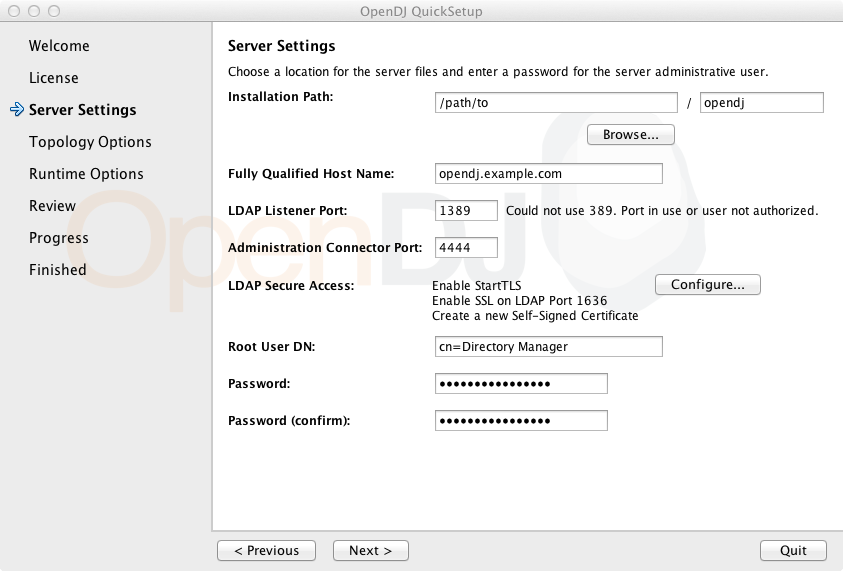
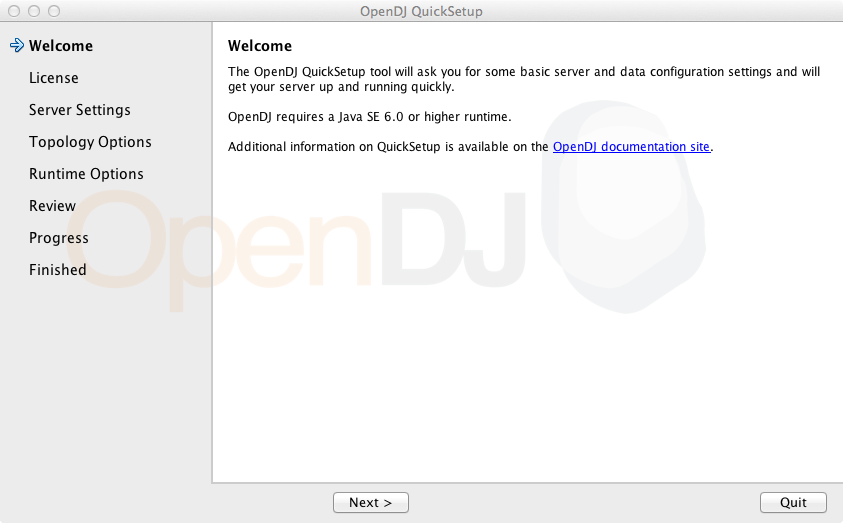
| | | <term><filename>QuickSetup.app</filename></term> |
|---|
| | | <listitem> |
|---|
| | | <para>Mac OS X GUI for installing OpenDJ</para> |
|---|
| | | </listitem> |
|---|
| | | </varlistentry> |
|---|
| | | <varlistentry> |
|---|
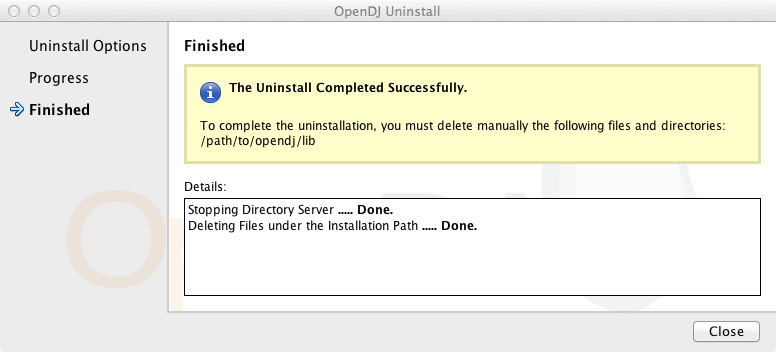
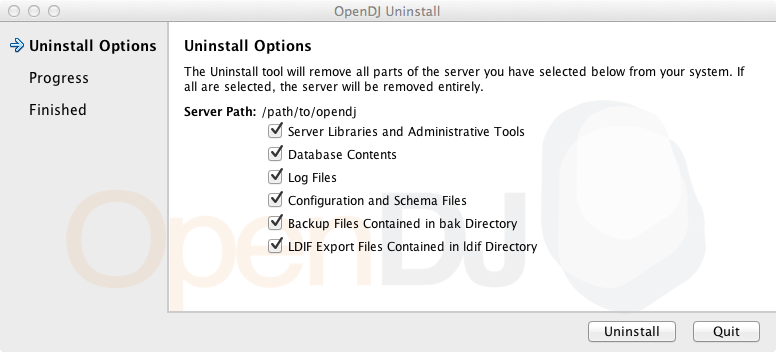
| | | <term><filename>Uninstall.app</filename></term> |
|---|
| | | <listitem> |
|---|
| | | <para>Mac OS X GUI for removing OpenDJ</para> |
|---|
| | | </listitem> |
|---|
| | | </varlistentry> |
|---|
| | | <varlistentry> |
|---|
| | | <term><filename>bak</filename></term> |
|---|
| | | <listitem> |
|---|
| | | <para>Directory for saving backup files</para> |
|---|
| | | </listitem> |
|---|
| | | </varlistentry> |
|---|
| | | <varlistentry> |
|---|
| | | <term><filename>bat</filename></term> |
|---|
| | | <listitem> |
|---|
| | | <para>Windows command-line tools and control panel</para> |
|---|
| | | </listitem> |
|---|
| | | </varlistentry> |
|---|
| | | <varlistentry> |
|---|
| | | <term><filename>bin</filename></term> |
|---|
| | | <listitem> |
|---|
| | | <para>UNIX/Linux/Mac OS X command-line tools and control panel</para> |
|---|
| | | </listitem> |
|---|
| | | </varlistentry> |
|---|
| | | <varlistentry> |
|---|
| | | <term><filename>changelogDb</filename></term> |
|---|
| | | <listitem> |
|---|
| | | <para>JE backend data for the external change log when using |
|---|
| | | replication</para> |
|---|
| | | </listitem> |
|---|
| | | </varlistentry> |
|---|
| | | <varlistentry> |
|---|
| | | <term><filename>classes</filename></term> |
|---|
| | | <listitem> |
|---|
| | | <para>Directory added to the <literal>CLASSPATH</literal> for OpenDJ, |
|---|
| | | permitting individual classes to be patched</para> |
|---|
| | | </listitem> |
|---|
| | | </varlistentry> |
|---|
| | | <varlistentry> |
|---|
| | | <term><filename>config</filename></term> |
|---|
| | | <listitem> |
|---|
| | | <para>OpenDJ server configuration and schema, PKI stores, LDIF generation |
|---|
| | | templates, resources for upgrade</para> |
|---|
| | | </listitem> |
|---|
| | | </varlistentry> |
|---|
| | | <varlistentry> |
|---|
| | | <term><filename>config/MakeLDIF</filename></term> |
|---|
| | | <listitem> |
|---|
| | | <para>Templates for use with the <command>make-ldif</command> LDIF |
|---|
| | | generation tool</para> |
|---|
| | | </listitem> |
|---|
| | | </varlistentry> |
|---|
| | | <varlistentry> |
|---|
| | | <term><filename>config/config.ldif</filename></term> |
|---|
| | | <listitem> |
|---|
| | | <para>LDIF representation of current OpenDJ server config</para> |
|---|
| | | <para>Use the <command>dsconfig</command> command to edit OpenDJ server |
|---|
| | | configuration.</para> |
|---|
| | | </listitem> |
|---|
| | | </varlistentry> |
|---|
| | | <varlistentry> |
|---|
| | | <term><filename>config/java.properties</filename></term> |
|---|
| | | <listitem> |
|---|
| | | <para>JVM settings for OpenDJ server and tools</para> |
|---|
| | | </listitem> |
|---|
| | | </varlistentry> |
|---|
| | | <varlistentry> |
|---|
| | | <term><filename>config/schema</filename></term> |
|---|
| | | <listitem> |
|---|
| | | <para>OpenDJ directory server LDAP schema definition files</para> |
|---|
| | | </listitem> |
|---|
| | | </varlistentry> |
|---|
| | | <varlistentry> |
|---|
| | | <term><filename>config/tasks.ldif</filename></term> |
|---|
| | | <listitem> |
|---|
| | | <para>Data used by task scheduler backend so that scheduled tasks and |
|---|
| | | recurring tasks persist after server restart</para> |
|---|
| | | </listitem> |
|---|
| | | </varlistentry> |
|---|
| | | <varlistentry> |
|---|
| | | <term><filename>config/tools.properties</filename></term> |
|---|
| | | <listitem> |
|---|
| | | <para>Default settings for command-line tools</para> |
|---|
| | | <para>Use as a template when creating an |
|---|
| | | <filename>~/.opendj/tools.properties</filename> file.</para> |
|---|
| | | </listitem> |
|---|
| | | </varlistentry> |
|---|
| | | <varlistentry> |
|---|
| | | <term><filename>config/upgrade</filename></term> |
|---|
| | | <listitem> |
|---|
| | | <para>Resources used by the upgrade command to move to the next version |
|---|
| | | of OpenDJ</para> |
|---|
| | | </listitem> |
|---|
| | | </varlistentry> |
|---|
| | | <varlistentry> |
|---|
| | | <term><filename>config/wordlist.txt</filename></term> |
|---|
| | | <listitem> |
|---|
| | | <para>List of words used to check password strength</para> |
|---|
| | | </listitem> |
|---|
| | | </varlistentry> |
|---|
| | | <varlistentry> |
|---|
| | | <term><filename>db</filename></term> |
|---|
| | | <listitem> |
|---|
| | | <para>JE backend data for backends that you create</para> |
|---|
| | | </listitem> |
|---|
| | | </varlistentry> |
|---|
| | | <varlistentry> |
|---|
| | | <term><filename>example-plugin.zip</filename></term> |
|---|
| | | <listitem> |
|---|
| | | <para>Sample OpenDJ plugin code. Custom plugins are meant to be installed |
|---|
| | | in <filename>lib/extensions</filename>.</para> |
|---|
| | | </listitem> |
|---|
| | | </varlistentry> |
|---|
| | | <varlistentry> |
|---|
| | | <term><filename>import-tmp</filename></term> |
|---|
| | | <listitem> |
|---|
| | | <para>Used when importing data into OpenDJ</para> |
|---|
| | | </listitem> |
|---|
| | | </varlistentry> |
|---|
| | | <varlistentry> |
|---|
| | | <term><filename>instance.loc</filename></term> |
|---|
| | | <listitem> |
|---|
| | | <para>Pointer to OpenDJ on the file system, useful in installations where |
|---|
| | | the program files are separate from the server instance files</para> |
|---|
| | | </listitem> |
|---|
| | | </varlistentry> |
|---|
| | | <varlistentry> |
|---|
| | | <term><filename>ldif</filename></term> |
|---|
| | | <listitem> |
|---|
| | | <para>Directory for saving LDIF export files</para> |
|---|
| | | </listitem> |
|---|
| | | </varlistentry> |
|---|
| | | <varlistentry> |
|---|
| | | <term><filename>legal-notices</filename></term> |
|---|
| | | <listitem> |
|---|
| | | <para>License information</para> |
|---|
| | | </listitem> |
|---|
| | | </varlistentry> |
|---|
| | | <varlistentry> |
|---|
| | | <term><filename>lib</filename></term> |
|---|
| | | <listitem> |
|---|
| | | <para>Scripts and libraries needed by OpenDJ and added to the |
|---|
| | | <literal>CLASSPATH</literal> for OpenDJ</para> |
|---|
| | | </listitem> |
|---|
| | | </varlistentry> |
|---|
| | | <varlistentry> |
|---|
| | | <term><filename>lib/extensions</filename></term> |
|---|
| | | <listitem> |
|---|
| | | <para>File system directory to hold your custom plugins</para> |
|---|
| | | </listitem> |
|---|
| | | </varlistentry> |
|---|
| | | <varlistentry> |
|---|
| | | <term><filename>locks</filename></term> |
|---|
| | | <listitem> |
|---|
| | | <para>Directory to hold lock files used when OpenDJ is running to prevent |
|---|
| | | backends from accidentally being used by more than one server process</para> |
|---|
| | | </listitem> |
|---|
| | | </varlistentry> |
|---|
| | | <varlistentry> |
|---|
| | | <term><filename>logs</filename></term> |
|---|
| | | <listitem> |
|---|
| | | <para>Access, errors, audit, and replication logs</para> |
|---|
| | | </listitem> |
|---|
| | | </varlistentry> |
|---|
| | | <varlistentry> |
|---|
| | | <term><filename>logs/server.pid</filename></term> |
|---|
| | | <listitem> |
|---|
| | | <para>Contains the process ID for the server when OpenDJ is running</para> |
|---|
| | | </listitem> |
|---|
| | | </varlistentry> |
|---|
| | | <varlistentry> |
|---|
| | | <term><filename>setup</filename></term> |
|---|
| | | <listitem> |
|---|
| | | <para>UNIX setup utility</para> |
|---|
| | | </listitem> |
|---|
| | | </varlistentry> |
|---|
| | | <varlistentry> |
|---|
| | | <term><filename>setup.bat</filename></term> |
|---|
| | | <listitem> |
|---|
| | | <para>Windows setup utility</para> |
|---|
| | | </listitem> |
|---|
| | | </varlistentry> |
|---|
| | | <varlistentry> |
|---|
| | | <term><filename>uninstall</filename></term> |
|---|
| | | <listitem> |
|---|
| | | <para>UNIX utility for removing OpenDJ</para> |
|---|
| | | </listitem> |
|---|
| | | </varlistentry> |
|---|
| | | <varlistentry> |
|---|
| | | <term><filename>uninstall.bat</filename></term> |
|---|
| | | <listitem> |
|---|
| | | <para>Windows utility for removing OpenDJ</para> |
|---|
| | | </listitem> |
|---|
| | | </varlistentry> |
|---|
| | | <varlistentry> |
|---|
| | | <term><filename>upgrade</filename></term> |
|---|
| | | <listitem> |
|---|
| | | <para>UNIX utility for upgrading OpenDJ by pointing to the new .zip</para> |
|---|
| | | </listitem> |
|---|
| | | </varlistentry> |
|---|
| | | <varlistentry> |
|---|
| | | <term><filename>upgrade.bat</filename></term> |
|---|
| | | <listitem> |
|---|
| | | <para>Windows utility for upgrading OpenDJ by pointing to the new .zip</para> |
|---|
| | | </listitem> |
|---|
| | | </varlistentry> |
|---|
| | | </variablelist> |
|---|
| | | </appendix> |
|---|
| New file |
| | |
|---|
| | | <?xml version="1.0" encoding="UTF-8"?> |
|---|
| | | <!-- |
|---|
| | | ! CCPL HEADER START |
|---|
| | | ! |
|---|
| | | ! This work is licensed under the Creative Commons |
|---|
| | | ! Attribution-NonCommercial-NoDerivs 3.0 Unported License. |
|---|
| | | ! To view a copy of this license, visit |
|---|
| | | ! http://creativecommons.org/licenses/by-nc-nd/3.0/ |
|---|
| | | ! or send a letter to Creative Commons, 444 Castro Street, |
|---|
| | | ! Suite 900, Mountain View, California, 94041, USA. |
|---|
| | | ! |
|---|
| | | ! See the License for the specific language governing permissions |
|---|
| | | ! and limitations under the License. |
|---|
| | | ! |
|---|
| | | ! If applicable, add the following below this CCPL HEADER, with the fields |
|---|
| | | ! enclosed by brackets "[]" replaced with your own identifying information: |
|---|
| | | ! Portions Copyright [yyyy] [name of copyright owner] |
|---|
| | | ! |
|---|
| | | ! CCPL HEADER END |
|---|
| | | ! |
|---|
| | | ! Copyright 2013 ForgeRock AS |
|---|
| | | ! |
|---|
| | | --> |
|---|
| | | <appendix xml:id="appendix-interface-stability" |
|---|
| | | xmlns='http://docbook.org/ns/docbook' version='5.0' xml:lang='en' |
|---|
| | | xmlns:xsi='http://www.w3.org/2001/XMLSchema-instance' |
|---|
| | | xsi:schemaLocation='http://docbook.org/ns/docbook http://docbook.org/xml/5.0/xsd/docbook.xsd' |
|---|
| | | xmlns:xlink='http://www.w3.org/1999/xlink' |
|---|
| | | xmlns:xinclude='http://www.w3.org/2001/XInclude'> |
|---|
| | | <title>Release Levels & Interface Stability</title> |
|---|
| | | |
|---|
| | | <para>This appendix includes ForgeRock definitions for product release levels |
|---|
| | | and interface stability.</para> |
|---|
| | | |
|---|
| | | <itemizedlist> |
|---|
| | | <para>In addition to the indications concerning interface stability that |
|---|
| | | you find in the documentation, review the following information about OpenDJ |
|---|
| | | user and application programming interfaces.</para> |
|---|
| | | |
|---|
| | | <listitem> |
|---|
| | | <para>Client tools — <command>ldap*</command>, <command>ldif*</command>, |
|---|
| | | and <command>*rate</command> commands — are Evolving.</para> |
|---|
| | | </listitem> |
|---|
| | | |
|---|
| | | <listitem> |
|---|
| | | <para>The following classes, interfaces, and methods in the <link |
|---|
| | | xlink:show="new" xlink:href="${serverJavadocBase}">OpenDJ directory server |
|---|
| | | APIs</link> are Evolving.</para> |
|---|
| | | |
|---|
| | | <itemizedlist> |
|---|
| | | <listitem><para><literal>org.forgerock.opendj.ldap.Connections#newInternalConnection</literal></para></listitem> |
|---|
| | | <listitem><para><literal>org.forgerock.opendj.ldap.Connections#newInternalConnectionFactory</literal></para></listitem> |
|---|
| | | <listitem><para><literal>org.forgerock.opendj.ldap.Connections#newServerConnectionFactory</literal></para></listitem> |
|---|
| | | <listitem><para><literal>org.forgerock.opendj.ldap.FutureResult</literal></para></listitem> |
|---|
| | | <listitem><para><literal>org.forgerock.opendj.ldap.LDAPClientContext</literal></para></listitem> |
|---|
| | | <listitem><para><literal>org.forgerock.opendj.ldap.LDAPListener</literal></para></listitem> |
|---|
| | | <listitem><para><literal>org.forgerock.opendj.ldap.LDAPListenerOptions</literal></para></listitem> |
|---|
| | | <listitem><para><literal>org.forgerock.opendj.ldap.MemoryBackend</literal></para></listitem> |
|---|
| | | <listitem><para><literal>org.forgerock.opendj.ldap.RequestContext</literal></para></listitem> |
|---|
| | | <listitem><para><literal>org.forgerock.opendj.ldap.RequestHandler</literal></para></listitem> |
|---|
| | | <listitem><para><literal>org.forgerock.opendj.ldap.RequestHandlerFactory</literal></para></listitem> |
|---|
| | | <listitem><para><literal>org.forgerock.opendj.ldap.ServerConnection</literal></para></listitem> |
|---|
| | | <listitem><para><literal>org.forgerock.opendj.ldap.ServerConnectionFactory</literal></para></listitem> |
|---|
| | | </itemizedlist> |
|---|
| | | </listitem> |
|---|
| | | |
|---|
| | | <listitem> |
|---|
| | | <para>The following classes and interfaces in the <link xlink:show="new" |
|---|
| | | xlink:href="${sdkJavadocBase}">OpenDJ LDAP SDK APIs</link> are Evolving.</para> |
|---|
| | | |
|---|
| | | <itemizedlist> |
|---|
| | | <listitem><para><literal>org.forgerock.opendj.ldap.ConnectionSecurityLayer</literal></para></listitem> |
|---|
| | | <listitem><para><literal>org.forgerock.opendj.ldap.LDAPUrl</literal></para></listitem> |
|---|
| | | <listitem><para><literal>org.forgerock.opendj.ldap.requests.BindRequest</literal>, including sub-types and especially SASL sub-types</para></listitem> |
|---|
| | | <listitem><para><literal>org.forgerock.opendj.ldap.schema.MatchingRuleImpl</literal></para></listitem> |
|---|
| | | <listitem><para><literal>org.forgerock.opendj.ldap.schema.SchemaValidationPolicy</literal></para></listitem> |
|---|
| | | <listitem><para><literal>org.forgerock.opendj.ldap.schema.SyntaxImpl</literal></para></listitem> |
|---|
| | | </itemizedlist> |
|---|
| | | |
|---|
| | | <para>The following methods are Deprecated.</para> |
|---|
| | | |
|---|
| | | <itemizedlist> |
|---|
| | | <listitem><para><literal>org.forgerock.opendj.ldap.LDAPListenerOptions#getTCPNIOTransport</literal></para></listitem> |
|---|
| | | <listitem><para><literal>org.forgerock.opendj.ldap.LDAPListenerOptions#setTCPNIOTransport</literal></para></listitem> |
|---|
| | | <listitem><para><literal>org.forgerock.opendj.ldap.LDAPOptions#getTCPNIOTransport</literal></para></listitem> |
|---|
| | | <listitem><para><literal>org.forgerock.opendj.ldap.LDAPOptions#setTCPNIOTransport</literal></para></listitem> |
|---|
| | | </itemizedlist> |
|---|
| | | |
|---|
| | | <para>The class <literal>org.forgerock.opendj.ldap.CoreMessages</literal> is |
|---|
| | | Internal.</para> |
|---|
| | | </listitem> |
|---|
| | | |
|---|
| | | <listitem> |
|---|
| | | <para>For all Java APIs, <literal>com.*</literal> packages are Internal.</para> |
|---|
| | | </listitem> |
|---|
| | | |
|---|
| | | <listitem> |
|---|
| | | <para>The configuration, user, and application programming interfaces for |
|---|
| | | RESTful access over HTTP to directory data are Evolving. This includes |
|---|
| | | interfaces exposed for the HTTP Connection Handler, its access log, and also |
|---|
| | | the REST LDAP gateway.</para> |
|---|
| | | </listitem> |
|---|
| | | |
|---|
| | | <listitem> |
|---|
| | | <para>Text in log messages should be considered Internal. Log message IDs are |
|---|
| | | Evolving.</para> |
|---|
| | | </listitem> |
|---|
| | | |
|---|
| | | <listitem> |
|---|
| | | <para>The default content of <literal>cn=schema</literal> (directory server |
|---|
| | | LDAP schema) is Evolving.</para> |
|---|
| | | </listitem> |
|---|
| | | |
|---|
| | | <listitem> |
|---|
| | | <para>The monitoring interface <literal>cn=monitor</literal> for LDAP and |
|---|
| | | the monitoring interface exposed by the JMX Connection Handler are |
|---|
| | | Evolving.</para> |
|---|
| | | </listitem> |
|---|
| | | |
|---|
| | | <listitem> |
|---|
| | | <para>Newly Deprecated and Removed interfaces are identified in the |
|---|
| | | <citetitle>Release Notes</citetitle> chapter, <link xlink:show="new" |
|---|
| | | xlink:href="release-notes#chap-compatibility" |
|---|
| | | xlink:role="http://docbook.org/xlink/role/olink"><citetitle>OpenDJ |
|---|
| | | Compatibility</citetitle></link>.</para> |
|---|
| | | </listitem> |
|---|
| | | |
|---|
| | | <listitem> |
|---|
| | | <para>Interfaces that are not described in released product documentation |
|---|
| | | should be considered Internal/Undocumented. For example, the LDIF |
|---|
| | | representation of the server configuration, <filename>config.ldif</filename>, |
|---|
| | | should be considered Internal.</para> |
|---|
| | | </listitem> |
|---|
| | | </itemizedlist> |
|---|
| | | |
|---|
| | | <xinclude:include href="../shared/sec-release-levels.xml" /> |
|---|
| | | <xinclude:include href="../shared/sec-interface-stability.xml" /> |
|---|
| | | </appendix> |
|---|
| New file |
| | |
|---|
| | | <?xml version="1.0" encoding="UTF-8"?> |
|---|
| | | <!-- |
|---|
| | | ! CCPL HEADER START |
|---|
| | | ! |
|---|
| | | ! This work is licensed under the Creative Commons |
|---|
| | | ! Attribution-NonCommercial-NoDerivs 3.0 Unported License. |
|---|
| | | ! To view a copy of this license, visit |
|---|
| | | ! http://creativecommons.org/licenses/by-nc-nd/3.0/ |
|---|
| | | ! or send a letter to Creative Commons, 444 Castro Street, |
|---|
| | | ! Suite 900, Mountain View, California, 94041, USA. |
|---|
| | | ! |
|---|
| | | ! You can also obtain a copy of the license at |
|---|
| | | ! trunk/opendj3/legal-notices/CC-BY-NC-ND.txt. |
|---|
| | | ! See the License for the specific language governing permissions |
|---|
| | | ! and limitations under the License. |
|---|
| | | ! |
|---|
| | | ! If applicable, add the following below this CCPL HEADER, with the fields |
|---|
| | | ! enclosed by brackets "[]" replaced with your own identifying information: |
|---|
| | | ! Portions Copyright [yyyy] [name of copyright owner] |
|---|
| | | ! |
|---|
| | | ! CCPL HEADER END |
|---|
| | | ! |
|---|
| | | ! Copyright 2011 ForgeRock AS |
|---|
| | | ! |
|---|
| | | --> |
|---|
| | | <appendix xml:id='appendix-l10n' |
|---|
| | | xmlns='http://docbook.org/ns/docbook' version='5.0' xml:lang='en' |
|---|
| | | xmlns:xsi='http://www.w3.org/2001/XMLSchema-instance' |
|---|
| | | xsi:schemaLocation='http://docbook.org/ns/docbook http://docbook.org/xml/5.0/xsd/docbook.xsd' |
|---|
| | | xmlns:xlink='http://www.w3.org/1999/xlink' |
|---|
| | | xmlns:xinclude='http://www.w3.org/2001/XInclude'> |
|---|
| | | <title>Localization</title> |
|---|
| | | |
|---|
| | | <para>OpenDJ software stores data in UTF-8 format. It enables you to store |
|---|
| | | and to search for attribute values according to a variety of language |
|---|
| | | specific locales. OpenDJ software is also itself localized for a smaller |
|---|
| | | variety of languages.</para> |
|---|
| | | |
|---|
| | | <section xml:id="supported-languages"> |
|---|
| | | <title>OpenDJ Languages</title> |
|---|
| | | <indexterm><primary>Languages</primary></indexterm> |
|---|
| | | <para>OpenDJ <?eval ${docTargetVersion}?> software has been localized |
|---|
| | | in the following languages.</para> |
|---|
| | | |
|---|
| | | <itemizedlist> |
|---|
| | | <listitem><para>French</para></listitem> |
|---|
| | | <listitem><para>German</para></listitem> |
|---|
| | | <listitem><para>Japanese</para></listitem> |
|---|
| | | <listitem><para>Simplified Chinese</para></listitem> |
|---|
| | | <listitem><para>Spanish</para></listitem> |
|---|
| | | </itemizedlist> |
|---|
| | | |
|---|
| | | <note> |
|---|
| | | <para>Certain messages have also been translated into Catalan, Korean, |
|---|
| | | Polish, and Traditional Chinese. Some error messages including messages |
|---|
| | | labeled SEVERE and FATAL are provided only in English.</para> |
|---|
| | | </note> |
|---|
| | | </section> |
|---|
| | | |
|---|
| | | <section xml:id="supported-locales"> |
|---|
| | | <title>Directory Support For Locales and Language Subtypes</title> |
|---|
| | | <indexterm><primary>Locales</primary></indexterm> |
|---|
| | | <para>OpenDJ software supports the following locales, with their |
|---|
| | | associated language and country codes, and their collation order |
|---|
| | | object identifiers. Locale support depends on the underlying Java |
|---|
| | | Virtual Machine.</para> |
|---|
| | | |
|---|
| | | <variablelist> |
|---|
| | | <varlistentry> |
|---|
| | | <term>Albanian</term> |
|---|
| | | <listitem> |
|---|
| | | <para>Code tag: sq</para> |
|---|
| | | <para>Collation order object identifier: 1.3.6.1.4.1.42.2.27.9.4.127.1</para> |
|---|
| | | </listitem> |
|---|
| | | </varlistentry> |
|---|
| | | <varlistentry> |
|---|
| | | <term>Arabic</term> |
|---|
| | | <listitem> |
|---|
| | | <para>Code tag: ar</para> |
|---|
| | | <para>Collation order object identifier: 1.3.6.1.4.1.42.2.27.9.4.3.1</para> |
|---|
| | | </listitem> |
|---|
| | | </varlistentry> |
|---|
| | | <varlistentry> |
|---|
| | | <term>Arabic (Algeria)</term> |
|---|
| | | <listitem> |
|---|
| | | <para>Code tag: ar-DZ</para> |
|---|
| | | <para>Collation order object identifier: 1.3.6.1.4.1.42.2.27.9.4.6.1</para> |
|---|
| | | </listitem> |
|---|
| | | </varlistentry> |
|---|
| | | <varlistentry> |
|---|
| | | <term>Arabic (Bahrain)</term> |
|---|
| | | <listitem> |
|---|
| | | <para>Code tag: ar-BH</para> |
|---|
| | | <para>Collation order object identifier: 1.3.6.1.4.1.42.2.27.9.4.5.1</para> |
|---|
| | | </listitem> |
|---|
| | | </varlistentry> |
|---|
| | | <varlistentry> |
|---|
| | | <term>Arabic (Egypt)</term> |
|---|
| | | <listitem> |
|---|
| | | <para>Code tag: ar-EG</para> |
|---|
| | | <para>Collation order object identifier: 1.3.6.1.4.1.42.2.27.9.4.7.1</para> |
|---|
| | | </listitem> |
|---|
| | | </varlistentry> |
|---|
| | | <varlistentry> |
|---|
| | | <term>Arabic (Iraq)</term> |
|---|
| | | <listitem> |
|---|
| | | <para>Code tag: ar-IQ</para> |
|---|
| | | <para>Collation order object identifier: 1.3.6.1.4.1.42.2.27.9.4.9.1</para> |
|---|
| | | </listitem> |
|---|
| | | </varlistentry> |
|---|
| | | <varlistentry> |
|---|
| | | <term>Arabic (Jordan)</term> |
|---|
| | | <listitem> |
|---|
| | | <para>Code tag: ar-JO</para> |
|---|
| | | <para>Collation order object identifier: 1.3.6.1.4.1.42.2.27.9.4.10.1</para> |
|---|
| | | </listitem> |
|---|
| | | </varlistentry> |
|---|
| | | <varlistentry> |
|---|
| | | <term>Arabic (Kuwait)</term> |
|---|
| | | <listitem> |
|---|
| | | <para>Code tag: ar-KW</para> |
|---|
| | | <para>Collation order object identifier: 1.3.6.1.4.1.42.2.27.9.4.11.1</para> |
|---|
| | | </listitem> |
|---|
| | | </varlistentry> |
|---|
| | | <varlistentry> |
|---|
| | | <term>Arabic (Lebanon)</term> |
|---|
| | | <listitem> |
|---|
| | | <para>Code tag: ar-LB</para> |
|---|
| | | <para>Collation order object identifier: 1.3.6.1.4.1.42.2.27.9.4.12.1</para> |
|---|
| | | </listitem> |
|---|
| | | </varlistentry> |
|---|
| | | <varlistentry> |
|---|
| | | <term>Arabic (Libya)</term> |
|---|
| | | <listitem> |
|---|
| | | <para>Code tag: ar-LY</para> |
|---|
| | | <para>Collation order object identifier: 1.3.6.1.4.1.42.2.27.9.4.13.1</para> |
|---|
| | | </listitem> |
|---|
| | | </varlistentry> |
|---|
| | | <varlistentry> |
|---|
| | | <term>Arabic (Morocco)</term> |
|---|
| | | <listitem> |
|---|
| | | <para>Code tag: ar-MA</para> |
|---|
| | | <para>Collation order object identifier: 1.3.6.1.4.1.42.2.27.9.4.14.1</para> |
|---|
| | | </listitem> |
|---|
| | | </varlistentry> |
|---|
| | | <varlistentry> |
|---|
| | | <term>Arabic (Oman)</term> |
|---|
| | | <listitem> |
|---|
| | | <para>Code tag: ar-OM</para> |
|---|
| | | <para>Collation order object identifier: 1.3.6.1.4.1.42.2.27.9.4.15.1</para> |
|---|
| | | </listitem> |
|---|
| | | </varlistentry> |
|---|
| | | <varlistentry> |
|---|
| | | <term>Arabic (Qatar)</term> |
|---|
| | | <listitem> |
|---|
| | | <para>Code tag: ar-QA</para> |
|---|
| | | <para>Collation order object identifier: 1.3.6.1.4.1.42.2.27.9.4.16.1</para> |
|---|
| | | </listitem> |
|---|
| | | </varlistentry> |
|---|
| | | <varlistentry> |
|---|
| | | <term>Arabic (Saudi Arabia)</term> |
|---|
| | | <listitem> |
|---|
| | | <para>Code tag: ar-SA</para> |
|---|
| | | <para>Collation order object identifier: 1.3.6.1.4.1.42.2.27.9.4.17.1</para> |
|---|
| | | </listitem> |
|---|
| | | </varlistentry> |
|---|
| | | <varlistentry> |
|---|
| | | <term>Arabic (Sudan)</term> |
|---|
| | | <listitem> |
|---|
| | | <para>Code tag: ar-SD</para> |
|---|
| | | <para>Collation order object identifier: 1.3.6.1.4.1.42.2.27.9.4.18.1</para> |
|---|
| | | </listitem> |
|---|
| | | </varlistentry> |
|---|
| | | <varlistentry> |
|---|
| | | <term>Arabic (Syria)</term> |
|---|
| | | <listitem> |
|---|
| | | <para>Code tag: ar-SY</para> |
|---|
| | | <para>Collation order object identifier: 1.3.6.1.4.1.42.2.27.9.4.19.1</para> |
|---|
| | | </listitem> |
|---|
| | | </varlistentry> |
|---|
| | | <varlistentry> |
|---|
| | | <term>Arabic (Tunisia)</term> |
|---|
| | | <listitem> |
|---|
| | | <para>Code tag: ar-TN</para> |
|---|
| | | <para>Collation order object identifier: 1.3.6.1.4.1.42.2.27.9.4.20.1</para> |
|---|
| | | </listitem> |
|---|
| | | </varlistentry> |
|---|
| | | <varlistentry> |
|---|
| | | <term>Arabic (United Arab Emirates)</term> |
|---|
| | | <listitem> |
|---|
| | | <para>Code tag: ar-AE</para> |
|---|
| | | <para>Collation order object identifier: 1.3.6.1.4.1.42.2.27.9.4.4.1</para> |
|---|
| | | </listitem> |
|---|
| | | </varlistentry> |
|---|
| | | <varlistentry> |
|---|
| | | <term>Arabic (Yemen)</term> |
|---|
| | | <listitem> |
|---|
| | | <para>Code tag: ar-YE</para> |
|---|
| | | <para>Collation order object identifier: 1.3.6.1.4.1.42.2.27.9.4.21.1</para> |
|---|
| | | </listitem> |
|---|
| | | </varlistentry> |
|---|
| | | <varlistentry> |
|---|
| | | <term>Belarusian</term> |
|---|
| | | <listitem> |
|---|
| | | <para>Code tag: be</para> |
|---|
| | | <para>Collation order object identifier: 1.3.6.1.4.1.42.2.27.9.4.22.1</para> |
|---|
| | | </listitem> |
|---|
| | | </varlistentry> |
|---|
| | | <varlistentry> |
|---|
| | | <term>Bulgarian</term> |
|---|
| | | <listitem> |
|---|
| | | <para>Code tag: bg</para> |
|---|
| | | <para>Collation order object identifier: 1.3.6.1.4.1.42.2.27.9.4.23.1</para> |
|---|
| | | </listitem> |
|---|
| | | </varlistentry> |
|---|
| | | <varlistentry> |
|---|
| | | <term>Catalan</term> |
|---|
| | | <listitem> |
|---|
| | | <para>Code tag: ca</para> |
|---|
| | | <para>Collation order object identifier: 1.3.6.1.4.1.42.2.27.9.4.25.1</para> |
|---|
| | | </listitem> |
|---|
| | | </varlistentry> |
|---|
| | | <varlistentry> |
|---|
| | | <term>Chinese</term> |
|---|
| | | <listitem> |
|---|
| | | <para>Code tag: zh</para> |
|---|
| | | <para>Collation order object identifier: 1.3.6.1.4.1.42.2.27.9.4.143.1</para> |
|---|
| | | </listitem> |
|---|
| | | </varlistentry> |
|---|
| | | <varlistentry> |
|---|
| | | <term>Chinese (Simplified) (China)</term> |
|---|
| | | <listitem> |
|---|
| | | <para>Code tag: zh-CN</para> |
|---|
| | | <para>Collation order object identifier: 1.3.6.1.4.1.42.2.27.9.4.144.1</para> |
|---|
| | | </listitem> |
|---|
| | | </varlistentry> |
|---|
| | | <varlistentry> |
|---|
| | | <term>Chinese (Traditional) (Hong Kong)</term> |
|---|
| | | <listitem> |
|---|
| | | <para>Code tag: zh-HK</para> |
|---|
| | | <para>Collation order object identifier: 1.3.6.1.4.1.42.2.27.9.4.145.1</para> |
|---|
| | | </listitem> |
|---|
| | | </varlistentry> |
|---|
| | | <varlistentry> |
|---|
| | | <term>Chinese (Traditional) (Taiwan)</term> |
|---|
| | | <listitem> |
|---|
| | | <para>Code tag: zh-TW</para> |
|---|
| | | <para>Collation order object identifier: 1.3.6.1.4.1.42.2.27.9.4.148.1</para> |
|---|
| | | </listitem> |
|---|
| | | </varlistentry> |
|---|
| | | <varlistentry> |
|---|
| | | <term>Croatian</term> |
|---|
| | | <listitem> |
|---|
| | | <para>Code tag: hr</para> |
|---|
| | | <para>Collation order object identifier: 1.3.6.1.4.1.42.2.27.9.4.87.1</para> |
|---|
| | | </listitem> |
|---|
| | | </varlistentry> |
|---|
| | | <varlistentry> |
|---|
| | | <term>Czech</term> |
|---|
| | | <listitem> |
|---|
| | | <para>Code tag: cs</para> |
|---|
| | | <para>Collation order object identifier: 1.3.6.1.4.1.42.2.27.9.4.26.1</para> |
|---|
| | | </listitem> |
|---|
| | | </varlistentry> |
|---|
| | | <varlistentry> |
|---|
| | | <term>Danish</term> |
|---|
| | | <listitem> |
|---|
| | | <para>Code tag: da</para> |
|---|
| | | <para>Collation order object identifier: 1.3.6.1.4.1.42.2.27.9.4.27.1</para> |
|---|
| | | </listitem> |
|---|
| | | </varlistentry> |
|---|
| | | <varlistentry> |
|---|
| | | <term>Dutch</term> |
|---|
| | | <listitem> |
|---|
| | | <para>Code tag: nl</para> |
|---|
| | | <para>Collation order object identifier: 1.3.6.1.4.1.42.2.27.9.4.105.1</para> |
|---|
| | | </listitem> |
|---|
| | | </varlistentry> |
|---|
| | | <varlistentry> |
|---|
| | | <term>Dutch (Belgium)</term> |
|---|
| | | <listitem> |
|---|
| | | <para>Code tag: nl-BE</para> |
|---|
| | | <para>Collation order object identifier: 1.3.6.1.4.1.42.2.27.9.4.106.1</para> |
|---|
| | | </listitem> |
|---|
| | | </varlistentry> |
|---|
| | | <varlistentry> |
|---|
| | | <term>Dutch (Netherlands)</term> |
|---|
| | | <listitem> |
|---|
| | | <para>Code tag: nl-NL</para> |
|---|
| | | <para>Collation order object identifier: 1.3.6.1.4.1.42.2.27.9.4.105.1</para> |
|---|
| | | </listitem> |
|---|
| | | </varlistentry> |
|---|
| | | <varlistentry> |
|---|
| | | <term>English</term> |
|---|
| | | <listitem> |
|---|
| | | <para>Code tag: en</para> |
|---|
| | | <para>Collation order object identifier: 1.3.6.1.4.1.42.2.27.9.4.34.1</para> |
|---|
| | | </listitem> |
|---|
| | | </varlistentry> |
|---|
| | | <varlistentry> |
|---|
| | | <term>English (Australia)</term> |
|---|
| | | <listitem> |
|---|
| | | <para>Code tag: en-AU</para> |
|---|
| | | <para>Collation order object identifier: 1.3.6.1.4.1.42.2.27.9.4.35.1</para> |
|---|
| | | </listitem> |
|---|
| | | </varlistentry> |
|---|
| | | <varlistentry> |
|---|
| | | <term>English (Canada)</term> |
|---|
| | | <listitem> |
|---|
| | | <para>Code tag: en-CA</para> |
|---|
| | | <para>Collation order object identifier: 1.3.6.1.4.1.42.2.27.9.4.36.1</para> |
|---|
| | | </listitem> |
|---|
| | | </varlistentry> |
|---|
| | | <varlistentry> |
|---|
| | | <term>English (Great Britain)</term> |
|---|
| | | <listitem> |
|---|
| | | <para>Code tag: en-GB</para> |
|---|
| | | <para>Collation order object identifier: 1.3.6.1.4.1.42.2.27.9.4.37.1</para> |
|---|
| | | </listitem> |
|---|
| | | </varlistentry> |
|---|
| | | <varlistentry> |
|---|
| | | <term>English (India)</term> |
|---|
| | | <listitem> |
|---|
| | | <para>Code tag: en-IN</para> |
|---|
| | | <para>Collation order object identifier: 1.3.6.1.4.1.42.2.27.9.4.40.1</para> |
|---|
| | | </listitem> |
|---|
| | | </varlistentry> |
|---|
| | | <varlistentry> |
|---|
| | | <term>English (Ireland)</term> |
|---|
| | | <listitem> |
|---|
| | | <para>Code tag: en-IE</para> |
|---|
| | | <para>Collation order object identifier: 1.3.6.1.4.1.42.2.27.9.4.39.1</para> |
|---|
| | | </listitem> |
|---|
| | | </varlistentry> |
|---|
| | | <varlistentry> |
|---|
| | | <term>English (New Zealand)</term> |
|---|
| | | <listitem> |
|---|
| | | <para>Code tag: en-NZ</para> |
|---|
| | | <para>Collation order object identifier: 1.3.6.1.4.1.42.2.27.9.4.42.1</para> |
|---|
| | | </listitem> |
|---|
| | | </varlistentry> |
|---|
| | | <varlistentry> |
|---|
| | | <term>English (South Africa)</term> |
|---|
| | | <listitem> |
|---|
| | | <para>Code tag: en-ZA</para> |
|---|
| | | <para>Collation order object identifier: 1.3.6.1.4.1.42.2.27.9.4.46.1</para> |
|---|
| | | </listitem> |
|---|
| | | </varlistentry> |
|---|
| | | <varlistentry> |
|---|
| | | <term>English (United States)</term> |
|---|
| | | <listitem> |
|---|
| | | <para>Code tag: en-US</para> |
|---|
| | | <para>Collation order object identifier: 1.3.6.1.4.1.42.2.27.9.4.34.1</para> |
|---|
| | | </listitem> |
|---|
| | | </varlistentry> |
|---|
| | | <varlistentry> |
|---|
| | | <term>Estonian</term> |
|---|
| | | <listitem> |
|---|
| | | <para>Code tag: et</para> |
|---|
| | | <para>Collation order object identifier: 1.3.6.1.4.1.42.2.27.9.4.69.1</para> |
|---|
| | | </listitem> |
|---|
| | | </varlistentry> |
|---|
| | | <varlistentry> |
|---|
| | | <term>Finnish</term> |
|---|
| | | <listitem> |
|---|
| | | <para>Code tag: fi</para> |
|---|
| | | <para>Collation order object identifier: 1.3.6.1.4.1.42.2.27.9.4.74.1</para> |
|---|
| | | </listitem> |
|---|
| | | </varlistentry> |
|---|
| | | <varlistentry> |
|---|
| | | <term>French</term> |
|---|
| | | <listitem> |
|---|
| | | <para>Code tag: fr</para> |
|---|
| | | <para>Collation order object identifier: 1.3.6.1.4.1.42.2.27.9.4.76.1</para> |
|---|
| | | </listitem> |
|---|
| | | </varlistentry> |
|---|
| | | <varlistentry> |
|---|
| | | <term>French (Belgium)</term> |
|---|
| | | <listitem> |
|---|
| | | <para>Code tag: fr-BE</para> |
|---|
| | | <para>Collation order object identifier: 1.3.6.1.4.1.42.2.27.9.4.77.1</para> |
|---|
| | | </listitem> |
|---|
| | | </varlistentry> |
|---|
| | | <varlistentry> |
|---|
| | | <term>French (Canada)</term> |
|---|
| | | <listitem> |
|---|
| | | <para>Code tag: fr-CA</para> |
|---|
| | | <para>Collation order object identifier: 1.3.6.1.4.1.42.2.27.9.4.78.1</para> |
|---|
| | | </listitem> |
|---|
| | | </varlistentry> |
|---|
| | | <varlistentry> |
|---|
| | | <term>French (France)</term> |
|---|
| | | <listitem> |
|---|
| | | <para>Code tag: fr-FR</para> |
|---|
| | | <para>Collation order object identifier: 1.3.6.1.4.1.42.2.27.9.4.76.1</para> |
|---|
| | | </listitem> |
|---|
| | | </varlistentry> |
|---|
| | | <varlistentry> |
|---|
| | | <term>French (Luxembourg)</term> |
|---|
| | | <listitem> |
|---|
| | | <para>Code tag: fr-LU</para> |
|---|
| | | <para>Collation order object identifier: 1.3.6.1.4.1.42.2.27.9.4.80.1</para> |
|---|
| | | </listitem> |
|---|
| | | </varlistentry> |
|---|
| | | <varlistentry> |
|---|
| | | <term>French (Switzerland)</term> |
|---|
| | | <listitem> |
|---|
| | | <para>Code tag: fr-CH</para> |
|---|
| | | <para>Collation order object identifier: 1.3.6.1.4.1.42.2.27.9.4.79.1</para> |
|---|
| | | </listitem> |
|---|
| | | </varlistentry> |
|---|
| | | <varlistentry> |
|---|
| | | <term>German</term> |
|---|
| | | <listitem> |
|---|
| | | <para>Code tag: de</para> |
|---|
| | | <para>Collation order object identifier: 1.3.6.1.4.1.42.2.27.9.4.28.1</para> |
|---|
| | | </listitem> |
|---|
| | | </varlistentry> |
|---|
| | | <varlistentry> |
|---|
| | | <term>German (Austria)</term> |
|---|
| | | <listitem> |
|---|
| | | <para>Code tag: de-AT</para> |
|---|
| | | <para>Collation order object identifier: 1.3.6.1.4.1.42.2.27.9.4.29.1</para> |
|---|
| | | </listitem> |
|---|
| | | </varlistentry> |
|---|
| | | <varlistentry> |
|---|
| | | <term>German (Germany)</term> |
|---|
| | | <listitem> |
|---|
| | | <para>Code tag: de-DE</para> |
|---|
| | | <para>Collation order object identifier: 1.3.6.1.4.1.42.2.27.9.4.28.1</para> |
|---|
| | | </listitem> |
|---|
| | | </varlistentry> |
|---|
| | | <varlistentry> |
|---|
| | | <term>German (Luxembourg)</term> |
|---|
| | | <listitem> |
|---|
| | | <para>Code tag: de-LU</para> |
|---|
| | | <para>Collation order object identifier: 1.3.6.1.4.1.42.2.27.9.4.32.1</para> |
|---|
| | | </listitem> |
|---|
| | | </varlistentry> |
|---|
| | | <varlistentry> |
|---|
| | | <term>German (Switzerland)</term> |
|---|
| | | <listitem> |
|---|
| | | <para>Code tag: de-CH</para> |
|---|
| | | <para>Collation order object identifier: 1.3.6.1.4.1.42.2.27.9.4.31.1</para> |
|---|
| | | </listitem> |
|---|
| | | </varlistentry> |
|---|
| | | <varlistentry> |
|---|
| | | <term>Greek</term> |
|---|
| | | <listitem> |
|---|
| | | <para>Code tag: el</para> |
|---|
| | | <para>Collation order object identifier: 1.3.6.1.4.1.42.2.27.9.4.33.1</para> |
|---|
| | | </listitem> |
|---|
| | | </varlistentry> |
|---|
| | | <varlistentry> |
|---|
| | | <term>Hebrew</term> |
|---|
| | | <listitem> |
|---|
| | | <para>Code tag: he</para> |
|---|
| | | <para>Collation order object identifier: 1.3.6.1.4.1.42.2.27.9.4.85.1</para> |
|---|
| | | </listitem> |
|---|
| | | </varlistentry> |
|---|
| | | <varlistentry> |
|---|
| | | <term>Hungarian</term> |
|---|
| | | <listitem> |
|---|
| | | <para>Code tag: hu</para> |
|---|
| | | <para>Collation order object identifier: 1.3.6.1.4.1.42.2.27.9.4.88.1</para> |
|---|
| | | </listitem> |
|---|
| | | </varlistentry> |
|---|
| | | <varlistentry> |
|---|
| | | <term>Icelandic</term> |
|---|
| | | <listitem> |
|---|
| | | <para>Code tag: is</para> |
|---|
| | | <para>Collation order object identifier: 1.3.6.1.4.1.42.2.27.9.4.91.1</para> |
|---|
| | | </listitem> |
|---|
| | | </varlistentry> |
|---|
| | | <varlistentry> |
|---|
| | | <term>Italian</term> |
|---|
| | | <listitem> |
|---|
| | | <para>Code tag: it</para> |
|---|
| | | <para>Collation order object identifier: 1.3.6.1.4.1.42.2.27.9.4.92.1</para> |
|---|
| | | </listitem> |
|---|
| | | </varlistentry> |
|---|
| | | <varlistentry> |
|---|
| | | <term>Italian (Switzerland)</term> |
|---|
| | | <listitem> |
|---|
| | | <para>Code tag: it-CH</para> |
|---|
| | | <para>Collation order object identifier: 1.3.6.1.4.1.42.2.27.9.4.93.1</para> |
|---|
| | | </listitem> |
|---|
| | | </varlistentry> |
|---|
| | | <varlistentry> |
|---|
| | | <term>Japanese</term> |
|---|
| | | <listitem> |
|---|
| | | <para>Code tag: ja</para> |
|---|
| | | <para>Collation order object identifier: 1.3.6.1.4.1.42.2.27.9.4.94.1</para> |
|---|
| | | </listitem> |
|---|
| | | </varlistentry> |
|---|
| | | <varlistentry> |
|---|
| | | <term>Korean</term> |
|---|
| | | <listitem> |
|---|
| | | <para>Code tag: ko</para> |
|---|
| | | <para>Collation order object identifier: 1.3.6.1.4.1.42.2.27.9.4.97.1</para> |
|---|
| | | </listitem> |
|---|
| | | </varlistentry> |
|---|
| | | <varlistentry> |
|---|
| | | <term>Latvian</term> |
|---|
| | | <listitem> |
|---|
| | | <para>Code tag: lv</para> |
|---|
| | | <para>Collation order object identifier: 1.3.6.1.4.1.42.2.27.9.4.101.1</para> |
|---|
| | | </listitem> |
|---|
| | | </varlistentry> |
|---|
| | | <varlistentry> |
|---|
| | | <term>Lithuanian</term> |
|---|
| | | <listitem> |
|---|
| | | <para>Code tag: lt</para> |
|---|
| | | <para>Collation order object identifier: 1.3.6.1.4.1.42.2.27.9.4.100.1</para> |
|---|
| | | </listitem> |
|---|
| | | </varlistentry> |
|---|
| | | <varlistentry> |
|---|
| | | <term>Macedonian</term> |
|---|
| | | <listitem> |
|---|
| | | <para>Code tag: mk</para> |
|---|
| | | <para>Collation order object identifier: 1.3.6.1.4.1.42.2.27.9.4.102.1</para> |
|---|
| | | </listitem> |
|---|
| | | </varlistentry> |
|---|
| | | <varlistentry> |
|---|
| | | <term>Norwegian</term> |
|---|
| | | <listitem> |
|---|
| | | <para>Code tag: no</para> |
|---|
| | | <para>Collation order object identifier: 1.3.6.1.4.1.42.2.27.9.4.107.1</para> |
|---|
| | | </listitem> |
|---|
| | | </varlistentry> |
|---|
| | | <varlistentry> |
|---|
| | | <term>Norwegian (Bokmål)</term> |
|---|
| | | <listitem> |
|---|
| | | <para>Code tag: no-NO</para> |
|---|
| | | <para>Collation order object identifier: 1.3.6.1.4.1.42.2.27.9.4.107.1</para> |
|---|
| | | </listitem> |
|---|
| | | </varlistentry> |
|---|
| | | <varlistentry> |
|---|
| | | <term>Norwegian (Nynorsk)</term> |
|---|
| | | <listitem> |
|---|
| | | <para>Code tag: no-NO-NY</para> |
|---|
| | | <para>Collation order object identifier: 1.3.6.1.4.1.42.2.27.9.4.108.1</para> |
|---|
| | | </listitem> |
|---|
| | | </varlistentry> |
|---|
| | | <varlistentry> |
|---|
| | | <term>Polish</term> |
|---|
| | | <listitem> |
|---|
| | | <para>Code tag: pl</para> |
|---|
| | | <para>Collation order object identifier: 1.3.6.1.4.1.42.2.27.9.4.114.1</para> |
|---|
| | | </listitem> |
|---|
| | | </varlistentry> |
|---|
| | | <varlistentry> |
|---|
| | | <term>Portuguese</term> |
|---|
| | | <listitem> |
|---|
| | | <para>Code tag: pt</para> |
|---|
| | | <para>Collation order object identifier: 1.3.6.1.4.1.42.2.27.9.4.115.1</para> |
|---|
| | | </listitem> |
|---|
| | | </varlistentry> |
|---|
| | | <varlistentry> |
|---|
| | | <term>Portuguese (Brazil)</term> |
|---|
| | | <listitem> |
|---|
| | | <para>Code tag: pt-BR</para> |
|---|
| | | <para>Collation order object identifier: 1.3.6.1.4.1.42.2.27.9.4.116.1</para> |
|---|
| | | </listitem> |
|---|
| | | </varlistentry> |
|---|
| | | <varlistentry> |
|---|
| | | <term>Portuguese (Portugal)</term> |
|---|
| | | <listitem> |
|---|
| | | <para>Code tag: pt-PT</para> |
|---|
| | | <para>Collation order object identifier: 1.3.6.1.4.1.42.2.27.9.4.115.1</para> |
|---|
| | | </listitem> |
|---|
| | | </varlistentry> |
|---|
| | | <varlistentry> |
|---|
| | | <term>Romanian</term> |
|---|
| | | <listitem> |
|---|
| | | <para>Code tag: ro</para> |
|---|
| | | <para>Collation order object identifier: 1.3.6.1.4.1.42.2.27.9.4.117.1</para> |
|---|
| | | </listitem> |
|---|
| | | </varlistentry> |
|---|
| | | <varlistentry> |
|---|
| | | <term>Russian</term> |
|---|
| | | <listitem> |
|---|
| | | <para>Code tag: ru</para> |
|---|
| | | <para>Collation order object identifier: 1.3.6.1.4.1.42.2.27.9.4.118.1</para> |
|---|
| | | </listitem> |
|---|
| | | </varlistentry> |
|---|
| | | <varlistentry> |
|---|
| | | <term>Russian (Russia)</term> |
|---|
| | | <listitem> |
|---|
| | | <para>Code tag: ru-RU</para> |
|---|
| | | <para>Collation order object identifier: 1.3.6.1.4.1.42.2.27.9.4.118.1</para> |
|---|
| | | </listitem> |
|---|
| | | </varlistentry> |
|---|
| | | <varlistentry> |
|---|
| | | <term>Serbian</term> |
|---|
| | | <listitem> |
|---|
| | | <para>Code tag: sr</para> |
|---|
| | | <para>Collation order object identifier: 1.3.6.1.4.1.42.2.27.9.4.128.1</para> |
|---|
| | | </listitem> |
|---|
| | | </varlistentry> |
|---|
| | | <varlistentry> |
|---|
| | | <term>Slovak</term> |
|---|
| | | <listitem> |
|---|
| | | <para>Code tag: sk</para> |
|---|
| | | <para>Collation order object identifier: 1.3.6.1.4.1.42.2.27.9.4.121.1</para> |
|---|
| | | </listitem> |
|---|
| | | </varlistentry> |
|---|
| | | <varlistentry> |
|---|
| | | <term>Slovenian</term> |
|---|
| | | <listitem> |
|---|
| | | <para>Code tag: sl</para> |
|---|
| | | <para>Collation order object identifier: 1.3.6.1.4.1.42.2.27.9.4.122.1</para> |
|---|
| | | </listitem> |
|---|
| | | </varlistentry> |
|---|
| | | <varlistentry> |
|---|
| | | <term>Spanish</term> |
|---|
| | | <listitem> |
|---|
| | | <para>Code tag: es</para> |
|---|
| | | <para>Collation order object identifier: 1.3.6.1.4.1.42.2.27.9.4.49.1</para> |
|---|
| | | </listitem> |
|---|
| | | </varlistentry> |
|---|
| | | <varlistentry> |
|---|
| | | <term>Spanish (Argentina)</term> |
|---|
| | | <listitem> |
|---|
| | | <para>Code tag: es-AR</para> |
|---|
| | | <para>Collation order object identifier: 1.3.6.1.4.1.42.2.27.9.4.50.1</para> |
|---|
| | | </listitem> |
|---|
| | | </varlistentry> |
|---|
| | | <varlistentry> |
|---|
| | | <term>Spanish (Bolivia)</term> |
|---|
| | | <listitem> |
|---|
| | | <para>Code tag: es-BO</para> |
|---|
| | | <para>Collation order object identifier: 1.3.6.1.4.1.42.2.27.9.4.51.1</para> |
|---|
| | | </listitem> |
|---|
| | | </varlistentry> |
|---|
| | | <varlistentry> |
|---|
| | | <term>Spanish (Chile)</term> |
|---|
| | | <listitem> |
|---|
| | | <para>Code tag: es-CL</para> |
|---|
| | | <para>Collation order object identifier: 1.3.6.1.4.1.42.2.27.9.4.52.1</para> |
|---|
| | | </listitem> |
|---|
| | | </varlistentry> |
|---|
| | | <varlistentry> |
|---|
| | | <term>Spanish (Colombia)</term> |
|---|
| | | <listitem> |
|---|
| | | <para>Code tag: es-CO</para> |
|---|
| | | <para>Collation order object identifier: 1.3.6.1.4.1.42.2.27.9.4.53.1</para> |
|---|
| | | </listitem> |
|---|
| | | </varlistentry> |
|---|
| | | <varlistentry> |
|---|
| | | <term>Spanish (Costa Rica)</term> |
|---|
| | | <listitem> |
|---|
| | | <para>Code tag: es-CR</para> |
|---|
| | | <para>Collation order object identifier: 1.3.6.1.4.1.42.2.27.9.4.54.1</para> |
|---|
| | | </listitem> |
|---|
| | | </varlistentry> |
|---|
| | | <varlistentry> |
|---|
| | | <term>Spanish (Dominican Republic)</term> |
|---|
| | | <listitem> |
|---|
| | | <para>Code tag: es-DO</para> |
|---|
| | | <para>Collation order object identifier: 1.3.6.1.4.1.42.2.27.9.4.55.1</para> |
|---|
| | | </listitem> |
|---|
| | | </varlistentry> |
|---|
| | | <varlistentry> |
|---|
| | | <term>Spanish (Ecuador)</term> |
|---|
| | | <listitem> |
|---|
| | | <para>Code tag: es-EC</para> |
|---|
| | | <para>Collation order object identifier: 1.3.6.1.4.1.42.2.27.9.4.56.1</para> |
|---|
| | | </listitem> |
|---|
| | | </varlistentry> |
|---|
| | | <varlistentry> |
|---|
| | | <term>Spanish (El Salvador)</term> |
|---|
| | | <listitem> |
|---|
| | | <para>Code tag: es-SV</para> |
|---|
| | | <para>Collation order object identifier: 1.3.6.1.4.1.42.2.27.9.4.65.1</para> |
|---|
| | | </listitem> |
|---|
| | | </varlistentry> |
|---|
| | | <varlistentry> |
|---|
| | | <term>Spanish (Guatemala)</term> |
|---|
| | | <listitem> |
|---|
| | | <para>Code tag: es-GT</para> |
|---|
| | | <para>Collation order object identifier: 1.3.6.1.4.1.42.2.27.9.4.57.1</para> |
|---|
| | | </listitem> |
|---|
| | | </varlistentry> |
|---|
| | | <varlistentry> |
|---|
| | | <term>Spanish (Honduras)</term> |
|---|
| | | <listitem> |
|---|
| | | <para>Code tag: es-HN</para> |
|---|
| | | <para>Collation order object identifier: 1.3.6.1.4.1.42.2.27.9.4.58.1</para> |
|---|
| | | </listitem> |
|---|
| | | </varlistentry> |
|---|
| | | <varlistentry> |
|---|
| | | <term>Spanish (Mexico)</term> |
|---|
| | | <listitem> |
|---|
| | | <para>Code tag: es-MX</para> |
|---|
| | | <para>Collation order object identifier: 1.3.6.1.4.1.42.2.27.9.4.59.1</para> |
|---|
| | | </listitem> |
|---|
| | | </varlistentry> |
|---|
| | | <varlistentry> |
|---|
| | | <term>Spanish (Nicaragua)</term> |
|---|
| | | <listitem> |
|---|
| | | <para>Code tag: es-NI</para> |
|---|
| | | <para>Collation order object identifier: 1.3.6.1.4.1.42.2.27.9.4.60.1</para> |
|---|
| | | </listitem> |
|---|
| | | </varlistentry> |
|---|
| | | <varlistentry> |
|---|
| | | <term>Spanish (Panama)</term> |
|---|
| | | <listitem> |
|---|
| | | <para>Code tag: es-PA</para> |
|---|
| | | <para>Collation order object identifier: 1.3.6.1.4.1.42.2.27.9.4.61.1</para> |
|---|
| | | </listitem> |
|---|
| | | </varlistentry> |
|---|
| | | <varlistentry> |
|---|
| | | <term>Spanish (Paraguay)</term> |
|---|
| | | <listitem> |
|---|
| | | <para>Code tag: es-PY</para> |
|---|
| | | <para>Collation order object identifier: 1.3.6.1.4.1.42.2.27.9.4.64.1</para> |
|---|
| | | </listitem> |
|---|
| | | </varlistentry> |
|---|
| | | <varlistentry> |
|---|
| | | <term>Spanish (Peru)</term> |
|---|
| | | <listitem> |
|---|
| | | <para>Code tag: es-PE</para> |
|---|
| | | <para>Collation order object identifier: 1.3.6.1.4.1.42.2.27.9.4.62.1</para> |
|---|
| | | </listitem> |
|---|
| | | </varlistentry> |
|---|
| | | <varlistentry> |
|---|
| | | <term>Spanish (Puerto Rico)</term> |
|---|
| | | <listitem> |
|---|
| | | <para>Code tag: es-PR</para> |
|---|
| | | <para>Collation order object identifier: 1.3.6.1.4.1.42.2.27.9.4.63.1</para> |
|---|
| | | </listitem> |
|---|
| | | </varlistentry> |
|---|
| | | <varlistentry> |
|---|
| | | <term>Spanish (Spain)</term> |
|---|
| | | <listitem> |
|---|
| | | <para>Code tag: es-ES</para> |
|---|
| | | <para>Collation order object identifier: 1.3.6.1.4.1.42.2.27.9.4.49.1</para> |
|---|
| | | </listitem> |
|---|
| | | </varlistentry> |
|---|
| | | <varlistentry> |
|---|
| | | <term>Spanish (Uruguay)</term> |
|---|
| | | <listitem> |
|---|
| | | <para>Code tag: es-UY</para> |
|---|
| | | <para>Collation order object identifier: 1.3.6.1.4.1.42.2.27.9.4.67.1</para> |
|---|
| | | </listitem> |
|---|
| | | </varlistentry> |
|---|
| | | <varlistentry> |
|---|
| | | <term>Spanish (Venezuela)</term> |
|---|
| | | <listitem> |
|---|
| | | <para>Code tag: es-VE</para> |
|---|
| | | <para>Collation order object identifier: 1.3.6.1.4.1.42.2.27.9.4.68.1</para> |
|---|
| | | </listitem> |
|---|
| | | </varlistentry> |
|---|
| | | <varlistentry> |
|---|
| | | <term>Swedish</term> |
|---|
| | | <listitem> |
|---|
| | | <para>Code tag: sv</para> |
|---|
| | | <para>Collation order object identifier: 1.3.6.1.4.1.42.2.27.9.4.129.1</para> |
|---|
| | | </listitem> |
|---|
| | | </varlistentry> |
|---|
| | | <varlistentry> |
|---|
| | | <term>Swedish (Sweden)</term> |
|---|
| | | <listitem> |
|---|
| | | <para>Code tag: sv-SE</para> |
|---|
| | | <para>Collation order object identifier: 1.3.6.1.4.1.42.2.27.9.4.129.1</para> |
|---|
| | | </listitem> |
|---|
| | | </varlistentry> |
|---|
| | | <varlistentry> |
|---|
| | | <term>Thai</term> |
|---|
| | | <listitem> |
|---|
| | | <para>Code tag: th</para> |
|---|
| | | <para>Collation order object identifier: 1.3.6.1.4.1.42.2.27.9.4.136.1</para> |
|---|
| | | </listitem> |
|---|
| | | </varlistentry> |
|---|
| | | <varlistentry> |
|---|
| | | <term>Turkish</term> |
|---|
| | | <listitem> |
|---|
| | | <para>Code tag: tr</para> |
|---|
| | | <para>Collation order object identifier: 1.3.6.1.4.1.42.2.27.9.4.140.1</para> |
|---|
| | | </listitem> |
|---|
| | | </varlistentry> |
|---|
| | | <varlistentry> |
|---|
| | | <term>Ukranian</term> |
|---|
| | | <listitem> |
|---|
| | | <para>Code tag: uk</para> |
|---|
| | | <para>Collation order object identifier: 1.3.6.1.4.1.42.2.27.9.4.141.1</para> |
|---|
| | | </listitem> |
|---|
| | | </varlistentry> |
|---|
| | | <varlistentry> |
|---|
| | | <term>Vietnamese</term> |
|---|
| | | <listitem> |
|---|
| | | <para>Code tag: vi</para> |
|---|
| | | <para>Collation order object identifier: 1.3.6.1.4.1.42.2.27.9.4.142.1</para> |
|---|
| | | </listitem> |
|---|
| | | </varlistentry> |
|---|
| | | </variablelist> |
|---|
| | | |
|---|
| | | <para>OpenDJ software supports the following language subtypes.</para> |
|---|
| | | <indexterm><primary>Language subtypes</primary></indexterm> |
|---|
| | | <itemizedlist xml:id="supported-language-subtypes"> |
|---|
| | | <listitem><para>Albanian, sq</para></listitem> |
|---|
| | | <listitem><para>Arabic, ar</para></listitem> |
|---|
| | | <listitem><para>Belarusian, be</para></listitem> |
|---|
| | | <listitem><para>Bulgarian, bg</para></listitem> |
|---|
| | | <listitem><para>Catalan, ca</para></listitem> |
|---|
| | | <listitem><para>Chinese, zh</para></listitem> |
|---|
| | | <listitem><para>Croatian, hr</para></listitem> |
|---|
| | | <listitem><para>Czech, cs</para></listitem> |
|---|
| | | <listitem><para>Danish, da</para></listitem> |
|---|
| | | <listitem><para>Dutch, nl</para></listitem> |
|---|
| | | <listitem><para>English, en</para></listitem> |
|---|
| | | <listitem><para>Estonian, et</para></listitem> |
|---|
| | | <listitem><para>Finnish, fi</para></listitem> |
|---|
| | | <listitem><para>French, fr</para></listitem> |
|---|
| | | <listitem><para>German, de</para></listitem> |
|---|
| | | <listitem><para>Greek, el</para></listitem> |
|---|
| | | <listitem><para>Hebrew, he</para></listitem> |
|---|
| | | <listitem><para>Hungarian, hu</para></listitem> |
|---|
| | | <listitem><para>Icelandic, is</para></listitem> |
|---|
| | | <listitem><para>Italian, it</para></listitem> |
|---|
| | | <listitem><para>Japanese, ja</para></listitem> |
|---|
| | | <listitem><para>Korean, ko</para></listitem> |
|---|
| | | <listitem><para>Latvian, lv</para></listitem> |
|---|
| | | <listitem><para>Lithuanian, lt</para></listitem> |
|---|
| | | <listitem><para>Macedonian, mk</para></listitem> |
|---|
| | | <listitem><para>Norwegian, no</para></listitem> |
|---|
| | | <listitem><para>Polish, pl</para></listitem> |
|---|
| | | <listitem><para>Portuguese, pt</para></listitem> |
|---|
| | | <listitem><para>Romanian, ro</para></listitem> |
|---|
| | | <listitem><para>Russian, ru</para></listitem> |
|---|
| | | <listitem><para>Serbian, sr</para></listitem> |
|---|
| | | <listitem><para>Slovak, sk</para></listitem> |
|---|
| | | <listitem><para>Slovenian, sl</para></listitem> |
|---|
| | | <listitem><para>Spanish, es</para></listitem> |
|---|
| | | <listitem><para>Swedish, sv</para></listitem> |
|---|
| | | <listitem><para>Thai, th</para></listitem> |
|---|
| | | <listitem><para>Turkish, tr</para></listitem> |
|---|
| | | <listitem><para>Ukranian, uk</para></listitem> |
|---|
| | | <listitem><para>Vietnamese, vi</para></listitem> |
|---|
| | | </itemizedlist> |
|---|
| | | </section> |
|---|
| | | </appendix> |
|---|
| New file |
| | |
|---|
| | | <?xml version="1.0" encoding="UTF-8"?> |
|---|
| | | <!-- |
|---|
| | | ! CCPL HEADER START |
|---|
| | | ! |
|---|
| | | ! This work is licensed under the Creative Commons |
|---|
| | | ! Attribution-NonCommercial-NoDerivs 3.0 Unported License. |
|---|
| | | ! To view a copy of this license, visit |
|---|
| | | ! http://creativecommons.org/licenses/by-nc-nd/3.0/ |
|---|
| | | ! or send a letter to Creative Commons, 444 Castro Street, |
|---|
| | | ! Suite 900, Mountain View, California, 94041, USA. |
|---|
| | | ! |
|---|
| | | ! You can also obtain a copy of the license at |
|---|
| | | ! trunk/opendj3/legal-notices/CC-BY-NC-ND.txt. |
|---|
| | | ! See the License for the specific language governing permissions |
|---|
| | | ! and limitations under the License. |
|---|
| | | ! |
|---|
| | | ! If applicable, add the following below this CCPL HEADER, with the fields |
|---|
| | | ! enclosed by brackets "[]" replaced with your own identifying information: |
|---|
| | | ! Portions Copyright [yyyy] [name of copyright owner] |
|---|
| | | ! |
|---|
| | | ! CCPL HEADER END |
|---|
| | | ! |
|---|
| | | ! Copyright 2011 ForgeRock AS |
|---|
| | | ! |
|---|
| | | --> |
|---|
| | | <appendix xml:id='appendix-ports-used' |
|---|
| | | xmlns='http://docbook.org/ns/docbook' version='5.0' xml:lang='en' |
|---|
| | | xmlns:xsi='http://www.w3.org/2001/XMLSchema-instance' |
|---|
| | | xsi:schemaLocation='http://docbook.org/ns/docbook http://docbook.org/xml/5.0/xsd/docbook.xsd' |
|---|
| | | xmlns:xlink='http://www.w3.org/1999/xlink' |
|---|
| | | xmlns:xinclude='http://www.w3.org/2001/XInclude'> |
|---|
| | | <title>Ports Used</title> |
|---|
| | | |
|---|
| | | <para>OpenDJ server software uses the following TCP/IP ports by default.</para> |
|---|
| | | |
|---|
| | | <!-- Protocol, port number, description (what for), on by default? --> |
|---|
| | | <variablelist> |
|---|
| | | <varlistentry xml:id="ldap-port"> |
|---|
| | | <term>LDAP: 389 (1389)</term> |
|---|
| | | <listitem> |
|---|
| | | <indexterm><primary>Ports</primary><secondary>389 (1389)</secondary></indexterm> |
|---|
| | | <para>OpenDJ directory server listens for LDAP requests from client |
|---|
| | | applications on port 389 by default. OpenDJ directory server uses port |
|---|
| | | 1389 by default for users who cannot use privileged ports. LDAP is enabled |
|---|
| | | by default.</para> |
|---|
| | | </listitem> |
|---|
| | | </varlistentry> |
|---|
| | | <varlistentry xml:id="ldaps-port"> |
|---|
| | | <term>LDAPS: 636 (1636)</term> |
|---|
| | | <listitem> |
|---|
| | | <indexterm><primary>Ports</primary><secondary>636 (1636)</secondary></indexterm> |
|---|
| | | <para>OpenDJ directory server listens for LDAPS requests from client |
|---|
| | | applications on port 636 by default. OpenDJ directory server uses port |
|---|
| | | 1636 by default for users who cannot use privileged ports. LDAPS is not |
|---|
| | | enabled by default.</para> |
|---|
| | | </listitem> |
|---|
| | | </varlistentry> |
|---|
| | | <varlistentry xml:id="admin-port"> |
|---|
| | | <term>Administrative connections: 4444</term> |
|---|
| | | <listitem> |
|---|
| | | <indexterm><primary>Ports</primary><secondary>4444</secondary></indexterm> |
|---|
| | | <para>OpenDJ directory server listens for administrative traffic on port |
|---|
| | | 4444 by default. The administration connector is enabled by default.</para> |
|---|
| | | </listitem> |
|---|
| | | </varlistentry> |
|---|
| | | <varlistentry xml:id="snmp-port"> |
|---|
| | | <term>SNMP: 161, 162</term> |
|---|
| | | <listitem> |
|---|
| | | <indexterm><primary>Ports</primary><secondary>161</secondary></indexterm> |
|---|
| | | <indexterm><primary>Ports</primary><secondary>162</secondary></indexterm> |
|---|
| | | <para>OpenDJ directory server listens for SNMP traffic on port 161 by |
|---|
| | | default, and uses port 162 for traps. SNMP is not enabled by default.</para> |
|---|
| | | </listitem> |
|---|
| | | </varlistentry> |
|---|
| | | <varlistentry xml:id="jmx-port"> |
|---|
| | | <term>JMX: 1689</term> |
|---|
| | | <listitem> |
|---|
| | | <indexterm><primary>Ports</primary><secondary>1689</secondary></indexterm> |
|---|
| | | <para>OpenDJ directory server listens for Java Management eXtension |
|---|
| | | traffic on port 1689 by default. JMX is not enabled by default.</para> |
|---|
| | | </listitem> |
|---|
| | | </varlistentry> |
|---|
| | | <varlistentry xml:id="http-port"> |
|---|
| | | <term>HTTP: 8080</term> |
|---|
| | | <listitem> |
|---|
| | | <indexterm><primary>Ports</primary><secondary>8080</secondary></indexterm> |
|---|
| | | <para>OpenDJ directory server can listen for HTTP client requests to the |
|---|
| | | RESTful API. The default port is 8080, but HTTP access is not enabled by |
|---|
| | | default.</para> |
|---|
| | | </listitem> |
|---|
| | | </varlistentry> |
|---|
| | | <varlistentry xml:id="repl-port"> |
|---|
| | | <term>Replication: 8989</term> |
|---|
| | | <listitem> |
|---|
| | | <indexterm><primary>Ports</primary><secondary>8989</secondary></indexterm> |
|---|
| | | <para>OpenDJ directory server listens for replication traffic |
|---|
| | | on port 8989 by default. Replication is not enabled by default.</para> |
|---|
| | | </listitem> |
|---|
| | | </varlistentry> |
|---|
| | | </variablelist> |
|---|
| | | </appendix> |
|---|
| New file |
| | |
|---|
| | | <?xml version="1.0" encoding="UTF-8"?> |
|---|
| | | <!-- |
|---|
| | | ! CCPL HEADER START |
|---|
| | | ! |
|---|
| | | ! This work is licensed under the Creative Commons |
|---|
| | | ! Attribution-NonCommercial-NoDerivs 3.0 Unported License. |
|---|
| | | ! To view a copy of this license, visit |
|---|
| | | ! http://creativecommons.org/licenses/by-nc-nd/3.0/ |
|---|
| | | ! or send a letter to Creative Commons, 444 Castro Street, |
|---|
| | | ! Suite 900, Mountain View, California, 94041, USA. |
|---|
| | | ! |
|---|
| | | ! You can also obtain a copy of the license at |
|---|
| | | ! trunk/opendj3/legal-notices/CC-BY-NC-ND.txt. |
|---|
| | | ! See the License for the specific language governing permissions |
|---|
| | | ! and limitations under the License. |
|---|
| | | ! |
|---|
| | | ! If applicable, add the following below this CCPL HEADER, with the fields |
|---|
| | | ! enclosed by brackets "[]" replaced with your own identifying information: |
|---|
| | | ! Portions Copyright [yyyy] [name of copyright owner] |
|---|
| | | ! |
|---|
| | | ! CCPL HEADER END |
|---|
| | | ! |
|---|
| | | ! Copyright 2013 ForgeRock AS |
|---|
| | | ! |
|---|
| | | --> |
|---|
| | | <appendix xml:id='appendix-rest2ldap' |
|---|
| | | xmlns='http://docbook.org/ns/docbook' version='5.0' xml:lang='en' |
|---|
| | | xmlns:xsi='http://www.w3.org/2001/XMLSchema-instance' |
|---|
| | | xsi:schemaLocation='http://docbook.org/ns/docbook http://docbook.org/xml/5.0/xsd/docbook.xsd' |
|---|
| | | xmlns:xlink='http://www.w3.org/1999/xlink' |
|---|
| | | xmlns:xinclude='http://www.w3.org/2001/XInclude'> |
|---|
| | | <title>REST LDAP Configuration</title> |
|---|
| | | <indexterm><primary>REST</primary></indexterm> |
|---|
| | | <indexterm><primary>HTTP</primary></indexterm> |
|---|
| | | <!-- This belongs in an OpenDJ reference. Ultimately this doc should |
|---|
| | | be generated, too, rather than written by hand. CREST-71? --> |
|---|
| | | |
|---|
| | | <itemizedlist> |
|---|
| | | <para>OpenDJ offers two alternatives for RESTful access to directory |
|---|
| | | data.</para> |
|---|
| | | |
|---|
| | | <listitem> |
|---|
| | | <para>OpenDJ directory server has an HTTP connection handler that exposes |
|---|
| | | the RESTful API over HTTP (or HTTPS). You configure the mapping between |
|---|
| | | JSON resources and LDAP entries by editing the configuration file for the |
|---|
| | | HTTP connection handler, by default |
|---|
| | | <filename>/path/to/opendj/config/http-config.json</filename>.</para> |
|---|
| | | </listitem> |
|---|
| | | |
|---|
| | | <listitem> |
|---|
| | | <para>The OpenDJ REST LDAP gateway runs as a Servlet independent from your |
|---|
| | | directory service. You configure the gateway to access your directory service |
|---|
| | | by editing <filename>opendj-rest2ldap-servlet.json</filename> where you |
|---|
| | | deploy the gateway web application.</para> |
|---|
| | | </listitem> |
|---|
| | | </itemizedlist> |
|---|
| | | |
|---|
| | | <variablelist> |
|---|
| | | <para>The JSON format configuration can hold the following configuration |
|---|
| | | objects. Some of the configuration settings are available only in the REST |
|---|
| | | LDAP gateway configuration. The order here is the order shown in the default |
|---|
| | | configuration file.</para> |
|---|
| | | |
|---|
| | | <para>Interface stability: <link xlink:href="admin-guide#interface-stability" |
|---|
| | | xlink:show="new" xlink:role="http://docbook.org/xlink/role/olink" |
|---|
| | | >Evolving</link></para> |
|---|
| | | |
|---|
| | | <varlistentry> |
|---|
| | | <term>"ldapConnectionFactories" (required, gateway only)</term> |
|---|
| | | <listitem> |
|---|
| | | <para>Configures how the gateway connects to LDAP servers. This entire |
|---|
| | | configuration object applies only to the REST LDAP gateway.</para> |
|---|
| | | |
|---|
| | | <variablelist> |
|---|
| | | <para>Configures at least a connection factory for unauthenticated |
|---|
| | | connections that are used for bind requests. By default, also configures a |
|---|
| | | factory for authenticated connections that are used for searches during |
|---|
| | | authentication and for proxied authorization operations.</para> |
|---|
| | | |
|---|
| | | <para>The default configuration is set to connect to a local directory |
|---|
| | | server listening for LDAP connections on port 1389, authenticating as the |
|---|
| | | root DN user <literal>cn=Directory Manager</literal>, with the password |
|---|
| | | <literal>password</literal>.</para> |
|---|
| | | |
|---|
| | | <varlistentry> |
|---|
| | | <term>"default"</term> |
|---|
| | | <listitem> |
|---|
| | | <para>Configures the unauthenticated connection factory for bind |
|---|
| | | operations.</para> |
|---|
| | | |
|---|
| | | <variablelist> |
|---|
| | | <varlistentry> |
|---|
| | | <term>"connectionPoolSize" (optional)</term> |
|---|
| | | <listitem> |
|---|
| | | <para>The gateway creates connection pools to the primary and |
|---|
| | | secondary LDAP servers that maintain up to |
|---|
| | | <literal>connectionPoolSize</literal> connections to the |
|---|
| | | servers.</para> |
|---|
| | | |
|---|
| | | <para>Default: 24</para> |
|---|
| | | |
|---|
| | | <programlisting language="javascript">"connectionPoolSize": 24</programlisting> |
|---|
| | | </listitem> |
|---|
| | | </varlistentry> |
|---|
| | | |
|---|
| | | <varlistentry> |
|---|
| | | <term>"connectionSecurity" (optional)</term> |
|---|
| | | <listitem> |
|---|
| | | <para>Whether connections to LDAP servers should be secured by using |
|---|
| | | SSL or StartTLS. The following values are supported.</para> |
|---|
| | | |
|---|
| | | <itemizedlist> |
|---|
| | | <listitem> |
|---|
| | | <para>"none" (default) means connections use plain LDAP and are |
|---|
| | | not secured.</para> |
|---|
| | | </listitem> |
|---|
| | | |
|---|
| | | <listitem> |
|---|
| | | <para>"ssl" means connections are secured using LDAPS.</para> |
|---|
| | | </listitem> |
|---|
| | | |
|---|
| | | <listitem> |
|---|
| | | <para>"startTLS" means connections are secured using LDAP and |
|---|
| | | StartTLS.</para> |
|---|
| | | </listitem> |
|---|
| | | </itemizedlist> |
|---|
| | | |
|---|
| | | <para>If you set "connectionSecurity", also review the |
|---|
| | | "trustManager" and "fileBasedTrustManager*" settings.</para> |
|---|
| | | </listitem> |
|---|
| | | </varlistentry> |
|---|
| | | |
|---|
| | | <varlistentry> |
|---|
| | | <term>"heartBeatIntervalSeconds" (optional)</term> |
|---|
| | | <listitem> |
|---|
| | | <para>The gateway tests its connections every |
|---|
| | | <literal>heartBeatIntervalSeconds</literal> seconds to detect whether |
|---|
| | | the connection is still alive.</para> |
|---|
| | | |
|---|
| | | <para>Default: 30 (seconds)</para> |
|---|
| | | |
|---|
| | | <programlisting language="javascript">"heartBeatIntervalSeconds": 30</programlisting> |
|---|
| | | </listitem> |
|---|
| | | </varlistentry> |
|---|
| | | |
|---|
| | | <varlistentry> |
|---|
| | | <term>"fileBasedTrustManagerFile" (optional)</term> |
|---|
| | | <listitem> |
|---|
| | | <para>If "trustManager" is set to "file", then this setting |
|---|
| | | configures the location of the trust store file.</para> |
|---|
| | | |
|---|
| | | <para>Default: "/path/to/truststore"</para> |
|---|
| | | </listitem> |
|---|
| | | </varlistentry> |
|---|
| | | |
|---|
| | | <varlistentry> |
|---|
| | | <term>"fileBasedTrustManagerPassword" (optional)</term> |
|---|
| | | <listitem> |
|---|
| | | <para>If "trustManager" is set to "file", then this setting |
|---|
| | | specifies the trust store password.</para> |
|---|
| | | |
|---|
| | | <para>Default: "password"</para> |
|---|
| | | </listitem> |
|---|
| | | </varlistentry> |
|---|
| | | |
|---|
| | | <varlistentry> |
|---|
| | | <term>"fileBasedTrustManagerType" (optional)</term> |
|---|
| | | <listitem> |
|---|
| | | <para>If "trustManager" is set to "file", then this setting |
|---|
| | | configures the format for the data in the trust store file specified |
|---|
| | | by the "fileBasedTrustManagerFile" setting. Formats include the |
|---|
| | | following, though other implementations might be supported as well |
|---|
| | | depending on the Java environment.</para> |
|---|
| | | |
|---|
| | | <itemizedlist> |
|---|
| | | <listitem> |
|---|
| | | <para>"JKS" (default) specifies Java Key Store format.</para> |
|---|
| | | </listitem> |
|---|
| | | |
|---|
| | | <listitem> |
|---|
| | | <para>"PKCS12" specifies Public-Key Cryptography Standards 12 |
|---|
| | | format.</para> |
|---|
| | | </listitem> |
|---|
| | | </itemizedlist> |
|---|
| | | |
|---|
| | | </listitem> |
|---|
| | | </varlistentry> |
|---|
| | | |
|---|
| | | <varlistentry> |
|---|
| | | <term>"primaryLDAPServers" (required)</term> |
|---|
| | | <listitem> |
|---|
| | | <para>The gateway accesses this array of LDAP servers before failing |
|---|
| | | over to the secondary LDAP servers. These might be LDAP servers in |
|---|
| | | the same data center for example.</para> |
|---|
| | | |
|---|
| | | <programlisting language="javascript">{ |
|---|
| | | "primaryLDAPServers": [ |
|---|
| | | { |
|---|
| | | "hostname": "local1.example.com", |
|---|
| | | "port": 1389 |
|---|
| | | }, |
|---|
| | | { |
|---|
| | | "hostname": "local2.example.com", |
|---|
| | | "port": 1389 |
|---|
| | | } |
|---|
| | | ] |
|---|
| | | }</programlisting> |
|---|
| | | |
|---|
| | | <para>By default, the gateway connects to the directory server |
|---|
| | | listening on port 1389 on the local host.</para> |
|---|
| | | </listitem> |
|---|
| | | </varlistentry> |
|---|
| | | |
|---|
| | | <varlistentry> |
|---|
| | | <term>"secondaryLDAPServers" (optional)</term> |
|---|
| | | <listitem> |
|---|
| | | <para>The gateway accesses this array of LDAP servers if primary LDAP |
|---|
| | | servers cannot be contacted. These might be LDAP servers in the same |
|---|
| | | data center for example.</para> |
|---|
| | | |
|---|
| | | <programlisting language="javascript">{ |
|---|
| | | "secondaryLDAPServers": [ |
|---|
| | | { |
|---|
| | | "hostname": "remote1.example.com", |
|---|
| | | "port": 1389 |
|---|
| | | }, |
|---|
| | | { |
|---|
| | | "hostname": "remote2.example.com", |
|---|
| | | "port": 1389 |
|---|
| | | } |
|---|
| | | ] |
|---|
| | | }</programlisting> |
|---|
| | | |
|---|
| | | <para>No secondary LDAP servers are configured by default.</para> |
|---|
| | | </listitem> |
|---|
| | | </varlistentry> |
|---|
| | | |
|---|
| | | <varlistentry> |
|---|
| | | <term>"trustManager" (optional)</term> |
|---|
| | | <listitem> |
|---|
| | | <para>If "connectionSecurity" is set to "ssl" or "startTLS", then |
|---|
| | | this setting configures how the LDAP servers are trusted. This |
|---|
| | | setting is ignored if "connectionSecurity" is set to "none".</para> |
|---|
| | | |
|---|
| | | <itemizedlist> |
|---|
| | | <listitem> |
|---|
| | | <para>"file" means trust the LDAP server certificate if it is |
|---|
| | | signed by a Certificate Authority (CA) trusted according to the |
|---|
| | | file-based trust store configured with the "fileBasedTrustManager*" |
|---|
| | | settings.</para> |
|---|
| | | </listitem> |
|---|
| | | |
|---|
| | | <listitem> |
|---|
| | | <para>"jvm" means trust the LDAP server certificate if it is signed |
|---|
| | | by a CA trusted by the Java environment.</para> |
|---|
| | | </listitem> |
|---|
| | | |
|---|
| | | <listitem> |
|---|
| | | <para>"trustAll" (default) means blindly trust all LDAP server |
|---|
| | | certificates.</para> |
|---|
| | | </listitem> |
|---|
| | | </itemizedlist> |
|---|
| | | |
|---|
| | | </listitem> |
|---|
| | | </varlistentry> |
|---|
| | | |
|---|
| | | </variablelist> |
|---|
| | | </listitem> |
|---|
| | | </varlistentry> |
|---|
| | | |
|---|
| | | <varlistentry> |
|---|
| | | <term>"root"</term> |
|---|
| | | <listitem> |
|---|
| | | <para>Configures the authenticated connection factory.</para> |
|---|
| | | |
|---|
| | | <variablelist> |
|---|
| | | <varlistentry> |
|---|
| | | <term>"inheritFrom" (optional)</term> |
|---|
| | | <listitem> |
|---|
| | | <para>Identifies the unauthenticated connection factory from which |
|---|
| | | to inherit settings. If this connection factory does not inherit from |
|---|
| | | another configuration object, then you must specify the configuration |
|---|
| | | here.</para> |
|---|
| | | |
|---|
| | | <para>Default: "default"</para> |
|---|
| | | </listitem> |
|---|
| | | </varlistentry> |
|---|
| | | |
|---|
| | | <varlistentry> |
|---|
| | | <term>"authentication" (required)</term> |
|---|
| | | <listitem> |
|---|
| | | <para>The gateway authenticates by simple bind using the credentials |
|---|
| | | specified.</para> |
|---|
| | | |
|---|
| | | <programlisting language="javascript">{ |
|---|
| | | "authentication": { |
|---|
| | | "bindDN": "cn=Directory Manager", |
|---|
| | | "password": "password" |
|---|
| | | } |
|---|
| | | }</programlisting> |
|---|
| | | </listitem> |
|---|
| | | </varlistentry> |
|---|
| | | </variablelist> |
|---|
| | | </listitem> |
|---|
| | | </varlistentry> |
|---|
| | | </variablelist> |
|---|
| | | </listitem> |
|---|
| | | </varlistentry> |
|---|
| | | |
|---|
| | | <varlistentry> |
|---|
| | | <term>"authenticationFilter" (required)</term> |
|---|
| | | <listitem> |
|---|
| | | <para>Configures the REST LDAP authentication filter. If the configuration |
|---|
| | | is not present, the filter is disabled.</para> |
|---|
| | | |
|---|
| | | <para>The default configuration allows HTTP Basic authentication where user |
|---|
| | | entries are <literal>inetOrgPerson</literal> entries expected to have |
|---|
| | | <literal>uid=<replaceable>username</replaceable></literal>, and to be found |
|---|
| | | under <literal>ou=people,dc=example,dc=com</literal>. The default |
|---|
| | | configuration also allows alternative, HTTP header based authentication in |
|---|
| | | the style of OpenIDM.</para> |
|---|
| | | |
|---|
| | | <para>By default, authentication is required both for the gateway and for |
|---|
| | | the HTTP connection handler. When the HTTP connection handler property |
|---|
| | | <literal>authentication-required</literal> is set to |
|---|
| | | <literal>false</literal> (default: <literal>true</literal>), the HTTP |
|---|
| | | connection handler accepts both authenticated and unauthenticated requests. |
|---|
| | | All requests are subject to access control and resource limit settings in |
|---|
| | | the same way as LDAP client requests to the directory server. The |
|---|
| | | <literal>authentication-required</literal> setting can be overridden by the |
|---|
| | | global configuration property |
|---|
| | | <literal>reject-unauthenticated-requests</literal> (default: |
|---|
| | | <literal>false</literal>), described in the section on <link |
|---|
| | | xlink:show="new" xlink:href="admin-guide#restrict-clients" |
|---|
| | | xlink:role="http://docbook.org/xlink/role/olink"><citetitle>Restricting |
|---|
| | | Client Access</citetitle></link>.</para> |
|---|
| | | |
|---|
| | | <para>To protect passwords, configure HTTPS for the HTTP connection handler |
|---|
| | | or for the container where the REST LDAP gateway runs.</para> |
|---|
| | | |
|---|
| | | <variablelist> |
|---|
| | | <para>The filter has the following configuration fields.</para> |
|---|
| | | |
|---|
| | | <varlistentry> |
|---|
| | | <term>"supportHTTPBasicAuthentication"</term> |
|---|
| | | <listitem> |
|---|
| | | <para>Whether to support HTTP Basic authentication. If this is set to |
|---|
| | | <literal>true</literal>, then the entry corresponding to the user name |
|---|
| | | is found using the "searchBaseDN", "searchScope", and |
|---|
| | | "searchFilterTemplate" settings.</para> |
|---|
| | | |
|---|
| | | <para>Default: <literal>true</literal></para> |
|---|
| | | </listitem> |
|---|
| | | </varlistentry> |
|---|
| | | |
|---|
| | | <varlistentry> |
|---|
| | | <term>"supportAltAuthentication"</term> |
|---|
| | | <listitem> |
|---|
| | | <para>Whether to allow alternative, HTTP header based authentication. If |
|---|
| | | this is set to <literal>true</literal>, then the headers to use are |
|---|
| | | specified in the "altAuthenticationUsernameHeader" and |
|---|
| | | "altAuthenticationPasswordHeader" values, and the bind DN is resolved |
|---|
| | | using the "searchFilterTemplate" value.</para> |
|---|
| | | |
|---|
| | | <para>Default: <literal>true</literal></para> |
|---|
| | | </listitem> |
|---|
| | | </varlistentry> |
|---|
| | | |
|---|
| | | <varlistentry> |
|---|
| | | <term>"altAuthenticationUsernameHeader"</term> |
|---|
| | | <listitem> |
|---|
| | | <para>Specifies the HTTP header containing the username for |
|---|
| | | authentication when alternative, HTTP-header based authentication is |
|---|
| | | allowed.</para> |
|---|
| | | |
|---|
| | | <para>Default: "X-OpenIDM-Username"</para> |
|---|
| | | </listitem> |
|---|
| | | </varlistentry> |
|---|
| | | |
|---|
| | | <varlistentry> |
|---|
| | | <term>"altAuthenticationPasswordHeader"</term> |
|---|
| | | <listitem> |
|---|
| | | <para>Specifies the HTTP header containing the password for |
|---|
| | | authentication when alternative, HTTP-header based authentication is |
|---|
| | | allowed.</para> |
|---|
| | | |
|---|
| | | <para>Default: "X-OpenIDM-Password"</para> |
|---|
| | | </listitem> |
|---|
| | | </varlistentry> |
|---|
| | | |
|---|
| | | <varlistentry> |
|---|
| | | <term>"reuseAuthenticatedConnection" (gateway only)</term> |
|---|
| | | <listitem> |
|---|
| | | <para>Whether to use authenticated LDAP connections for subsequent LDAP |
|---|
| | | operations. If this is set to <literal>true</literal>, the gateway does |
|---|
| | | not need its own connection factory, nor does it need to use proxied |
|---|
| | | authorization for LDAP operations. Instead, it performs the operations |
|---|
| | | as the user on the authenticated connection.</para> |
|---|
| | | |
|---|
| | | <para>Default: <literal>true</literal></para> |
|---|
| | | </listitem> |
|---|
| | | </varlistentry> |
|---|
| | | |
|---|
| | | <varlistentry> |
|---|
| | | <term>"method" (gateway only)</term> |
|---|
| | | <listitem> |
|---|
| | | <para>Specifies the authentication method used by the gateway. The |
|---|
| | | following values are supported.</para> |
|---|
| | | |
|---|
| | | <itemizedlist> |
|---|
| | | <listitem> |
|---|
| | | <para>"search-simple" (default) means the user name is resolved to |
|---|
| | | an LDAP bind DN by a search using the "searchFilterTemplate" value.</para> |
|---|
| | | </listitem> |
|---|
| | | <listitem> |
|---|
| | | <para>"sasl-plain" means the user name is resolved to an |
|---|
| | | authorization ID (authzid) using the "saslAuthzIdTemplate" value.</para> |
|---|
| | | </listitem> |
|---|
| | | <listitem> |
|---|
| | | <para>"simple" means the user name is the LDAP bind DN.</para> |
|---|
| | | </listitem> |
|---|
| | | </itemizedlist> |
|---|
| | | </listitem> |
|---|
| | | </varlistentry> |
|---|
| | | |
|---|
| | | <varlistentry> |
|---|
| | | <term>"bindLDAPConnectionFactory" (gateway only)</term> |
|---|
| | | <listitem> |
|---|
| | | <para>Identifies the factory providing connections used for bind |
|---|
| | | operations to authenticate users to LDAP servers.</para> |
|---|
| | | |
|---|
| | | <para>Default: "default"</para> |
|---|
| | | </listitem> |
|---|
| | | </varlistentry> |
|---|
| | | |
|---|
| | | <varlistentry> |
|---|
| | | <term>"saslAuthzIdTemplate" (gateway only)</term> |
|---|
| | | <listitem> |
|---|
| | | <para>Sets how to resolve the authorization ID when the authentication |
|---|
| | | "method" is set to "sasl-plain", substituting <literal>%s</literal> |
|---|
| | | in the template with the user name provided. The user name provided by |
|---|
| | | is DN escaped before the value is returned.</para> |
|---|
| | | |
|---|
| | | <para>Default: "dn:uid=%s,ou=people,dc=example,dc=com"</para> |
|---|
| | | </listitem> |
|---|
| | | </varlistentry> |
|---|
| | | |
|---|
| | | <varlistentry> |
|---|
| | | <term>"searchLDAPConnectionFactory" (gateway only)</term> |
|---|
| | | <listitem> |
|---|
| | | <para>Identifies the factory providing connections used to find |
|---|
| | | user entries in the directory server when the "method" is set to |
|---|
| | | "search-simple".</para> |
|---|
| | | |
|---|
| | | <para>Default: "root"</para> |
|---|
| | | </listitem> |
|---|
| | | </varlistentry> |
|---|
| | | |
|---|
| | | <varlistentry> |
|---|
| | | <term>"searchBaseDN"</term> |
|---|
| | | <listitem> |
|---|
| | | <para>Sets the base DN to search for user entries. For the gateway, |
|---|
| | | this applies when the "method" is set to "search-simple". This always |
|---|
| | | applies for the HTTP connection handler.</para> |
|---|
| | | |
|---|
| | | <para>Default: "ou=people,dc=example,dc=com"</para> |
|---|
| | | </listitem> |
|---|
| | | </varlistentry> |
|---|
| | | |
|---|
| | | <varlistentry> |
|---|
| | | <term>"searchScope"</term> |
|---|
| | | <listitem> |
|---|
| | | <para>Sets the search scope below the base DN such as "sub" (subtree |
|---|
| | | search) or "one" (one-level search) to search for user entries. For the |
|---|
| | | gateway, this applies when the "method" is set to "search-simple". This |
|---|
| | | always applies for the HTTP connection handler.</para> |
|---|
| | | |
|---|
| | | <para>Default: "sub"</para> |
|---|
| | | </listitem> |
|---|
| | | </varlistentry> |
|---|
| | | |
|---|
| | | <varlistentry> |
|---|
| | | <term>"searchFilterTemplate"</term> |
|---|
| | | <listitem> |
|---|
| | | <para>Sets the search filter used to find the user entry, substituting |
|---|
| | | <literal>%s</literal> in the template with the user name provided. The |
|---|
| | | user name provided by is DN escaped before the value is returned. For |
|---|
| | | the gateway, this applies when the "method" is set to "search-simple". |
|---|
| | | This always applies for the HTTP connection handler.</para> |
|---|
| | | |
|---|
| | | <para>Default: "(&(objectClass=inetOrgPerson)(uid=%s))"</para> |
|---|
| | | </listitem> |
|---|
| | | </varlistentry> |
|---|
| | | </variablelist> |
|---|
| | | </listitem> |
|---|
| | | </varlistentry> |
|---|
| | | |
|---|
| | | <varlistentry> |
|---|
| | | <term>"servlet" (required)</term> |
|---|
| | | <listitem> |
|---|
| | | <para>Configures how HTTP resources map to LDAP entries, and for the gateway |
|---|
| | | how to connect to LDAP servers and how to use proxied authorization.</para> |
|---|
| | | |
|---|
| | | <para>The default gateway configuration tries to reuse authenticated |
|---|
| | | connections for LDAP operations, falling back to a connection authenticated |
|---|
| | | as root DN using proxied authorization for LDAP operations.</para> |
|---|
| | | |
|---|
| | | <variablelist> |
|---|
| | | <varlistentry> |
|---|
| | | <term>"ldapConnectionFactory" (gateway only)</term> |
|---|
| | | <listitem> |
|---|
| | | <para>Specifies the connection factory used by the gateway to perform |
|---|
| | | LDAP operations if an authenticated connection is not passed from the |
|---|
| | | authentication filter according to the setting for |
|---|
| | | "reuseAuthenticatedConnection".</para> |
|---|
| | | |
|---|
| | | <para>Default: "root"</para> |
|---|
| | | </listitem> |
|---|
| | | </varlistentry> |
|---|
| | | |
|---|
| | | <varlistentry> |
|---|
| | | <term>"authorizationPolicy" (gateway only)</term> |
|---|
| | | <listitem> |
|---|
| | | <para>Specifies how to handle LDAP authorization. The following values |
|---|
| | | are supported.</para> |
|---|
| | | |
|---|
| | | <itemizedlist> |
|---|
| | | <listitem> |
|---|
| | | <para>"proxy" (default) means use proxied authorization when no |
|---|
| | | authenticated connection is provided for reuse, resolving the |
|---|
| | | authorization ID according to the setting for |
|---|
| | | "proxyAuthzIdTemplate".</para> |
|---|
| | | </listitem> |
|---|
| | | |
|---|
| | | <listitem> |
|---|
| | | <para>"none" means do not use proxied authorization and do not reuse |
|---|
| | | authenticated connections, but instead use connections from the |
|---|
| | | factory specified in "ldapConnectionFactory".</para> |
|---|
| | | </listitem> |
|---|
| | | |
|---|
| | | <listitem> |
|---|
| | | <para>"reuse" means reuse an authenticated connection passed by the |
|---|
| | | filter, and fail if no connection was passed by the filter.</para> |
|---|
| | | </listitem> |
|---|
| | | </itemizedlist> |
|---|
| | | </listitem> |
|---|
| | | </varlistentry> |
|---|
| | | |
|---|
| | | <varlistentry> |
|---|
| | | <term>"proxyAuthzIdTemplate" (gateway only)</term> |
|---|
| | | <listitem> |
|---|
| | | <para>Specifies the template to derive the authorization ID from the |
|---|
| | | security context created during authentication. Use |
|---|
| | | <literal>{dn}</literal> to indicate the user's bind DN or |
|---|
| | | <literal>{id}</literal> to indicate the user name provided for |
|---|
| | | authentication.</para> |
|---|
| | | |
|---|
| | | <para>Default: "dn:{dn}"</para> |
|---|
| | | </listitem> |
|---|
| | | </varlistentry> |
|---|
| | | |
|---|
| | | <varlistentry> |
|---|
| | | <term>"mappings"</term> |
|---|
| | | <listitem> |
|---|
| | | <para>For each collection URI such as <literal>/users</literal> and |
|---|
| | | <literal>/groups</literal>, you configure a mapping between the JSON |
|---|
| | | resource returned over HTTP, and the LDAP entry returned by the |
|---|
| | | directory service.</para> |
|---|
| | | |
|---|
| | | <variablelist> |
|---|
| | | <para>Each mapping has a number of configuration elements.</para> |
|---|
| | | |
|---|
| | | <varlistentry> |
|---|
| | | <term>"baseDN" (required)</term> |
|---|
| | | <listitem> |
|---|
| | | <para>The base DN where LDAP entries are found for this mapping.</para> |
|---|
| | | </listitem> |
|---|
| | | </varlistentry> |
|---|
| | | |
|---|
| | | <varlistentry> |
|---|
| | | <term>"readOnUpdatePolicy" (optional)</term> |
|---|
| | | <listitem> |
|---|
| | | <para>The policy used to read an entry before it is deleted, or to |
|---|
| | | read an entry after it is added or modified. One of the following.</para> |
|---|
| | | |
|---|
| | | <itemizedlist> |
|---|
| | | <listitem> |
|---|
| | | <para>"controls": (default) use RFC 4527 read-entry controls to |
|---|
| | | reflect the state of the resource at the time the update was |
|---|
| | | performed.</para> |
|---|
| | | <para>The directory service must support RFC 4527.</para> |
|---|
| | | </listitem> |
|---|
| | | |
|---|
| | | <listitem> |
|---|
| | | <para>"disabled": do not read the entry or return the resource on |
|---|
| | | update.</para> |
|---|
| | | </listitem> |
|---|
| | | |
|---|
| | | <listitem> |
|---|
| | | <para>"search": perform an LDAP search to retrieve the entry before |
|---|
| | | deletion or after it is added or modified.</para> |
|---|
| | | <para>The JSON resource returned might differ from the LDAP entry |
|---|
| | | that was updated.</para> |
|---|
| | | </listitem> |
|---|
| | | </itemizedlist> |
|---|
| | | </listitem> |
|---|
| | | </varlistentry> |
|---|
| | | |
|---|
| | | <varlistentry> |
|---|
| | | <term>"useSubtreeDelete" (required)</term> |
|---|
| | | <listitem> |
|---|
| | | <para>Whether to use the LDAP Subtree Delete Request Control (OID: |
|---|
| | | <literal>1.2.840.113556.1.4.805</literal>) for LDAP delete operations |
|---|
| | | resulting from delete operations on resources.</para> |
|---|
| | | |
|---|
| | | <para>Default: <literal>false</literal>. The default configuration |
|---|
| | | uses <literal>false</literal>.</para> |
|---|
| | | |
|---|
| | | <para>Set this to <literal>true</literal> if you want this behavior, |
|---|
| | | if your directory server supports the control, and if clients that |
|---|
| | | request delete operations have access to use the control.</para> |
|---|
| | | </listitem> |
|---|
| | | </varlistentry> |
|---|
| | | |
|---|
| | | <varlistentry> |
|---|
| | | <term>"usePermissiveModify" (required)</term> |
|---|
| | | <listitem> |
|---|
| | | <para>Whether to use the LDAP Permissive Modify Request Control (OID: |
|---|
| | | <literal>1.2.840.113556.1.4.1413</literal>) for LDAP modify operations |
|---|
| | | resulting from patch and update operations on resources.</para> |
|---|
| | | |
|---|
| | | <para>Default: <literal>false</literal>. The default configuration |
|---|
| | | uses <literal>true</literal>.</para> |
|---|
| | | |
|---|
| | | <para>Set this to <literal>false</literal> when using the gateway if |
|---|
| | | your directory server does not support the control.</para> |
|---|
| | | </listitem> |
|---|
| | | </varlistentry> |
|---|
| | | |
|---|
| | | <varlistentry> |
|---|
| | | <term>"etagAttribute" (optional)</term> |
|---|
| | | <listitem> |
|---|
| | | <para>The LDAP attribute to use for multi-version concurrency control |
|---|
| | | (MVCC).</para> |
|---|
| | | |
|---|
| | | <para>Default: "etag"</para> |
|---|
| | | </listitem> |
|---|
| | | </varlistentry> |
|---|
| | | |
|---|
| | | <varlistentry> |
|---|
| | | <term>"namingStrategy" (required)</term> |
|---|
| | | <listitem> |
|---|
| | | <para>The approach used to map LDAP entry names to JSON resources. The |
|---|
| | | following naming strategies are supported.</para> |
|---|
| | | |
|---|
| | | <itemizedlist> |
|---|
| | | <listitem> |
|---|
| | | <para>RDN and resource ID are both derived from a single user |
|---|
| | | attribute in the LDAP entry, as in the following example, where the |
|---|
| | | <literal>uid</literal> attribute is the RDN and its value is the |
|---|
| | | JSON resource ID.</para> |
|---|
| | | |
|---|
| | | <programlisting language="javascript">{ |
|---|
| | | "namingStrategy": { |
|---|
| | | "strategy": "clientDNNaming", |
|---|
| | | "dnAttribute": "uid" |
|---|
| | | } |
|---|
| | | }</programlisting> |
|---|
| | | </listitem> |
|---|
| | | |
|---|
| | | <listitem> |
|---|
| | | <para>RDN and resource ID are derived from separate user attributes |
|---|
| | | in the LDAP entry, as in the following example where the RDN |
|---|
| | | attribute is <literal>uid</literal> but the JSON resource ID is the |
|---|
| | | value of the <literal>mail</literal> attribute.</para> |
|---|
| | | |
|---|
| | | <programlisting language="javascript">{ |
|---|
| | | "namingStrategy": { |
|---|
| | | "strategy": "clientNaming", |
|---|
| | | "dnAttribute": "uid", |
|---|
| | | "idAttribute": "mail" |
|---|
| | | } |
|---|
| | | }</programlisting> |
|---|
| | | </listitem> |
|---|
| | | |
|---|
| | | <listitem> |
|---|
| | | <para>RDN is derived from a user attribute and the resource ID from |
|---|
| | | an operational attribute in the LDAP entry, as in the following |
|---|
| | | example, where the RDN attribute is <literal>uid</literal> but the |
|---|
| | | JSON resource ID is the value of the <literal>entryUUID</literal> |
|---|
| | | operational attribute.</para> |
|---|
| | | |
|---|
| | | <programlisting language="javascript">{ |
|---|
| | | "namingStrategy": { |
|---|
| | | "strategy": "serverNaming", |
|---|
| | | "dnAttribute": "uid", |
|---|
| | | "idAttribute": "entryUUID" |
|---|
| | | } |
|---|
| | | }</programlisting> |
|---|
| | | </listitem> |
|---|
| | | </itemizedlist> |
|---|
| | | </listitem> |
|---|
| | | </varlistentry> |
|---|
| | | |
|---|
| | | <varlistentry> |
|---|
| | | <term>"additionalLDAPAttributes" (optional, but necessary)</term> |
|---|
| | | <listitem> |
|---|
| | | <para>LDAP attributes to include during LDAP add operations as an |
|---|
| | | array of type-value lists, such as the following example.</para> |
|---|
| | | |
|---|
| | | <programlisting language="javascript">{ |
|---|
| | | "additionalLDAPAttributes": [ |
|---|
| | | { |
|---|
| | | "type": "objectClass", |
|---|
| | | "values": [ |
|---|
| | | "top", |
|---|
| | | "person", |
|---|
| | | "organizationalPerson", |
|---|
| | | "inetOrgPerson" |
|---|
| | | ] |
|---|
| | | } |
|---|
| | | ] |
|---|
| | | }</programlisting> |
|---|
| | | |
|---|
| | | <para>This configuration element is useful to set LDAP object classes |
|---|
| | | for example, which are not present in JSON resources.</para> |
|---|
| | | </listitem> |
|---|
| | | </varlistentry> |
|---|
| | | |
|---|
| | | <varlistentry> |
|---|
| | | <term>"attributes" (required)</term> |
|---|
| | | <listitem> |
|---|
| | | <para>How the JSON resource fields map to attributes on LDAP |
|---|
| | | entries, each taking the form "<replaceable>field-name</replaceable>": |
|---|
| | | <replaceable>mapping-object</replaceable>. A number of |
|---|
| | | <replaceable>mapping-object</replaceable>s are supported.</para> |
|---|
| | | |
|---|
| | | <variablelist> |
|---|
| | | <varlistentry> |
|---|
| | | <term>"constant"</term> |
|---|
| | | <listitem> |
|---|
| | | <para>Maps a single JSON attribute to a fixed value.</para> |
|---|
| | | |
|---|
| | | <para>This can be useful as in the default case where each JSON |
|---|
| | | resource "schemas" takes the SCIM URN, and so the value is not |
|---|
| | | related to the underlying LDAP entries.</para> |
|---|
| | | |
|---|
| | | <programlisting language="javascript">{ |
|---|
| | | "schemas": { |
|---|
| | | "constant": [ |
|---|
| | | "urn:scim:schemas:core:1.0" |
|---|
| | | ] |
|---|
| | | } |
|---|
| | | }</programlisting> |
|---|
| | | </listitem> |
|---|
| | | </varlistentry> |
|---|
| | | |
|---|
| | | <varlistentry> |
|---|
| | | <term>"simple"</term> |
|---|
| | | <listitem> |
|---|
| | | <para>Maps a JSON field to an LDAP attribute.</para> |
|---|
| | | |
|---|
| | | <para>Simple mappings are used where the correspondence between |
|---|
| | | JSON fields and LDAP attributes is one-to-one.</para> |
|---|
| | | |
|---|
| | | <programlisting language="javascript">{ |
|---|
| | | "userName": { |
|---|
| | | "simple": { |
|---|
| | | "ldapAttribute": "mail", |
|---|
| | | "isSingleValued": true, |
|---|
| | | "writability": "readOnly" |
|---|
| | | } |
|---|
| | | } |
|---|
| | | }</programlisting> |
|---|
| | | |
|---|
| | | <itemizedlist> |
|---|
| | | <para>Simple mappings can take a number of fields.</para> |
|---|
| | | |
|---|
| | | <listitem> |
|---|
| | | <para>(Required) "ldapAttribute": the name of LDAP attribute.</para> |
|---|
| | | </listitem> |
|---|
| | | |
|---|
| | | <listitem> |
|---|
| | | <para>(Optional) "defaultJSONValue": the JSON value if no LDAP |
|---|
| | | attribute is available on the entry.</para> |
|---|
| | | |
|---|
| | | <para>No default is set if this is omitted.</para> |
|---|
| | | </listitem> |
|---|
| | | |
|---|
| | | <listitem> |
|---|
| | | <para>(Optional) "isBinary": true means the LDAP attribute is |
|---|
| | | binary and the JSON field gets the base64-encoded value.</para> |
|---|
| | | |
|---|
| | | <para>Default: <literal>false</literal></para> |
|---|
| | | </listitem> |
|---|
| | | |
|---|
| | | <listitem> |
|---|
| | | <para>(Optional) "isRequired": true means the LDAP attribute is |
|---|
| | | mandatory and must be provided to create the resource; false |
|---|
| | | means it is optional.</para> |
|---|
| | | |
|---|
| | | <para>Default: <literal>false</literal></para> |
|---|
| | | </listitem> |
|---|
| | | |
|---|
| | | <listitem> |
|---|
| | | <para>(Optional) "isSingleValued": true means represent a |
|---|
| | | possibly multi-valued LDAP attribute as a single value; false |
|---|
| | | means represent it as an array of values.</para> |
|---|
| | | |
|---|
| | | <para>Default: determine the representation based on the LDAP |
|---|
| | | schema, so SINGLE-VALUE attributes take single values, and |
|---|
| | | multi-valued attributes take arrays.</para> |
|---|
| | | </listitem> |
|---|
| | | |
|---|
| | | <listitem> |
|---|
| | | <para>(Optional) "writability": indicates whether the LDAP |
|---|
| | | attribute supports updates. This field can take the following |
|---|
| | | values.</para> |
|---|
| | | |
|---|
| | | <itemizedlist> |
|---|
| | | <listitem> |
|---|
| | | <para>"createOnly": This attribute can be set only when the |
|---|
| | | entry is created. Attempts to update this attribute thereafter |
|---|
| | | result in errors.</para> |
|---|
| | | </listitem> |
|---|
| | | <listitem> |
|---|
| | | <para>"createOnlyDiscardWrites": This attribute can be set only |
|---|
| | | when the entry is created. Attempts to update this attribute |
|---|
| | | thereafter do not result in errors. Instead the update value |
|---|
| | | is discarded.</para> |
|---|
| | | </listitem> |
|---|
| | | <listitem> |
|---|
| | | <para>"readOnly": This attribute cannot be written. Attempts to |
|---|
| | | write this attribute result in errors.</para> |
|---|
| | | </listitem> |
|---|
| | | <listitem> |
|---|
| | | <para>"readOnlyDiscardWrites": This attribute cannot be written. |
|---|
| | | Attempts to write this attribute do not result in errors. |
|---|
| | | Instead the value to write is discarded.</para> |
|---|
| | | </listitem> |
|---|
| | | <listitem> |
|---|
| | | <para>"readWrite": (default) This attribute can be set at |
|---|
| | | creation and updated thereafter.</para> |
|---|
| | | </listitem> |
|---|
| | | </itemizedlist> |
|---|
| | | </listitem> |
|---|
| | | </itemizedlist> |
|---|
| | | </listitem> |
|---|
| | | </varlistentry> |
|---|
| | | |
|---|
| | | <varlistentry> |
|---|
| | | <term>"object"</term> |
|---|
| | | <listitem> |
|---|
| | | <para>Maps a JSON object to LDAP attributes.</para> |
|---|
| | | |
|---|
| | | <para>This mapping lets you create JSON objects whose fields |
|---|
| | | themselves have mappings to LDAP attributes.</para> |
|---|
| | | </listitem> |
|---|
| | | </varlistentry> |
|---|
| | | |
|---|
| | | <varlistentry> |
|---|
| | | <term>"reference"</term> |
|---|
| | | <listitem> |
|---|
| | | <para>Maps a JSON field to an LDAP entry found by reference.</para> |
|---|
| | | |
|---|
| | | <para>This mapping works for LDAP attributes whose values reference |
|---|
| | | other entries. This is shown in the following example from the |
|---|
| | | default configuration. The LDAP <literal>manager</literal> |
|---|
| | | attribute values are user entry DNs. Here, the JSON |
|---|
| | | <literal>manager</literal> field takes the user ID and name from |
|---|
| | | the entry referenced by the LDAP attribute. On updates, changes |
|---|
| | | to the JSON manager <literal>_id</literal> affect which manager |
|---|
| | | entry is referenced, yet any changes to the manager's name are |
|---|
| | | discarded, because changing managers only affects which user entry |
|---|
| | | to point to, not the referenced user's name.</para> |
|---|
| | | |
|---|
| | | <programlisting language="javascript">{ |
|---|
| | | "manager": { |
|---|
| | | "reference": { |
|---|
| | | "ldapAttribute": "manager", |
|---|
| | | "baseDN": "ou=people,dc=example,dc=com", |
|---|
| | | "primaryKey": "uid", |
|---|
| | | "mapper": { |
|---|
| | | "object": { |
|---|
| | | "_id": { |
|---|
| | | "simple": { |
|---|
| | | "ldapAttribute": "uid", |
|---|
| | | "isSingleValued": true, |
|---|
| | | "isRequired": true |
|---|
| | | } |
|---|
| | | }, |
|---|
| | | "displayName": { |
|---|
| | | "simple": { |
|---|
| | | "ldapAttribute": "cn", |
|---|
| | | "isSingleValued": true, |
|---|
| | | "writability": "readOnlyDiscardWrites" |
|---|
| | | } |
|---|
| | | } |
|---|
| | | } |
|---|
| | | } |
|---|
| | | } |
|---|
| | | } |
|---|
| | | }</programlisting> |
|---|
| | | |
|---|
| | | <para>Babs Jensen's manager in the sample LDAP data is Torrey |
|---|
| | | Rigden, who has user ID <literal>trigden</literal>. Babs's entry has |
|---|
| | | <literal>manager: uid=trigden,ou=People,dc=example,dc=com</literal>. |
|---|
| | | With this mapping, the resulting JSON field is the following.</para> |
|---|
| | | |
|---|
| | | <programlisting language="javascript">{ |
|---|
| | | "manager": [ |
|---|
| | | { |
|---|
| | | "_id": "trigden", |
|---|
| | | "displayName": "Torrey Rigden" |
|---|
| | | } |
|---|
| | | ] |
|---|
| | | }</programlisting> |
|---|
| | | |
|---|
| | | <itemizedlist> |
|---|
| | | <para>Reference mapping objects have the following fields.</para> |
|---|
| | | |
|---|
| | | <listitem> |
|---|
| | | <para>(Required) "baseDN": indicates the base LDAP DN under which |
|---|
| | | to find entries referenced by the JSON resource.</para> |
|---|
| | | </listitem> |
|---|
| | | |
|---|
| | | <listitem> |
|---|
| | | <para>(Required) "ldapAttribute": specifies the LDAP attribute in |
|---|
| | | the entry underlying the JSON resource whose value points to the |
|---|
| | | referenced entry.</para> |
|---|
| | | </listitem> |
|---|
| | | |
|---|
| | | <listitem> |
|---|
| | | <para>(Required) "mapper": describes how the referenced entry |
|---|
| | | content maps to the content of this JSON field.</para> |
|---|
| | | </listitem> |
|---|
| | | |
|---|
| | | <listitem> |
|---|
| | | <para>(Required) "primaryKey": indicates which LDAP attribute in |
|---|
| | | the mapper holds the primary key to the referenced entry.</para> |
|---|
| | | </listitem> |
|---|
| | | |
|---|
| | | <listitem> |
|---|
| | | <para>(Optional) "isRequired": true means the LDAP attribute is |
|---|
| | | mandatory and must be provided to create the resource; false |
|---|
| | | means it is optional.</para> |
|---|
| | | |
|---|
| | | <para>Default: <literal>false</literal></para> |
|---|
| | | </listitem> |
|---|
| | | |
|---|
| | | <listitem> |
|---|
| | | <para>(Optional) "isSingleValued": true means represent a |
|---|
| | | possibly multi-valued LDAP attribute as a single value; false |
|---|
| | | means represent it as an array of values.</para> |
|---|
| | | |
|---|
| | | <para>Default: <literal>false</literal></para> |
|---|
| | | </listitem> |
|---|
| | | |
|---|
| | | <!-- Not used. |
|---|
| | | <listitem> |
|---|
| | | <para>(Optional) "scope": indicates the scope of the LDAP search |
|---|
| | | to find the referenced entry. The default is |
|---|
| | | <literal>"SearchScope.WHOLE_SUBTREE"</literal>.</para> |
|---|
| | | </listitem> |
|---|
| | | --> |
|---|
| | | |
|---|
| | | <listitem> |
|---|
| | | <para>(Optional) "searchFilter": specifies the LDAP filter to |
|---|
| | | use to search for the referenced entry. The default is |
|---|
| | | <literal>"(objectClass=*)"</literal>.</para> |
|---|
| | | </listitem> |
|---|
| | | |
|---|
| | | <listitem> |
|---|
| | | <para>(Optional) "writability": indicates whether the mapping |
|---|
| | | supports updates, as described above for the simple mapping. The |
|---|
| | | default is "readWrite".</para> |
|---|
| | | </listitem> |
|---|
| | | </itemizedlist> |
|---|
| | | </listitem> |
|---|
| | | </varlistentry> |
|---|
| | | |
|---|
| | | </variablelist> |
|---|
| | | </listitem> |
|---|
| | | </varlistentry> |
|---|
| | | </variablelist> |
|---|
| | | |
|---|
| | | <para>The default mappings expose a SCIM view of user and group |
|---|
| | | data.</para> |
|---|
| | | |
|---|
| | | <programlisting language="javascript">{ |
|---|
| | | "/users": { |
|---|
| | | "baseDN": "ou=people,dc=example,dc=com", |
|---|
| | | "readOnUpdatePolicy": "controls", |
|---|
| | | "useSubtreeDelete": false, |
|---|
| | | "usePermissiveModify": true, |
|---|
| | | "etagAttribute": "etag", |
|---|
| | | "namingStrategy": { |
|---|
| | | "strategy": "clientDNNaming", |
|---|
| | | "dnAttribute": "uid" |
|---|
| | | }, |
|---|
| | | "additionalLDAPAttributes": [ |
|---|
| | | { |
|---|
| | | "type": "objectClass", |
|---|
| | | "values": [ |
|---|
| | | "top", |
|---|
| | | "person", |
|---|
| | | "organizationalPerson", |
|---|
| | | "inetOrgPerson" |
|---|
| | | ] |
|---|
| | | } |
|---|
| | | ], |
|---|
| | | "attributes": { |
|---|
| | | "schemas": { |
|---|
| | | "constant": [ |
|---|
| | | "urn:scim:schemas:core:1.0" |
|---|
| | | ] |
|---|
| | | }, |
|---|
| | | "_id": { |
|---|
| | | "simple": { |
|---|
| | | "ldapAttribute": "uid", |
|---|
| | | "isSingleValued": true, |
|---|
| | | "isRequired": true, |
|---|
| | | "writability": "createOnly" |
|---|
| | | } |
|---|
| | | }, |
|---|
| | | "_rev": { |
|---|
| | | "simple": { |
|---|
| | | "ldapAttribute": "etag", |
|---|
| | | "isSingleValued": true, |
|---|
| | | "writability": "readOnly" |
|---|
| | | } |
|---|
| | | }, |
|---|
| | | "userName": { |
|---|
| | | "simple": { |
|---|
| | | "ldapAttribute": "mail", |
|---|
| | | "isSingleValued": true, |
|---|
| | | "writability": "readOnly" |
|---|
| | | } |
|---|
| | | }, |
|---|
| | | "displayName": { |
|---|
| | | "simple": { |
|---|
| | | "ldapAttribute": "cn", |
|---|
| | | "isSingleValued": true, |
|---|
| | | "isRequired": true |
|---|
| | | } |
|---|
| | | }, |
|---|
| | | "name": { |
|---|
| | | "object": { |
|---|
| | | "givenName": { |
|---|
| | | "simple": { |
|---|
| | | "ldapAttribute": "givenName", |
|---|
| | | "isSingleValued": true |
|---|
| | | } |
|---|
| | | }, |
|---|
| | | "familyName": { |
|---|
| | | "simple": { |
|---|
| | | "ldapAttribute": "sn", |
|---|
| | | "isSingleValued": true, |
|---|
| | | "isRequired": true |
|---|
| | | } |
|---|
| | | } |
|---|
| | | } |
|---|
| | | }, |
|---|
| | | "manager": { |
|---|
| | | "reference": { |
|---|
| | | "ldapAttribute": "manager", |
|---|
| | | "baseDN": "ou=people,dc=example,dc=com", |
|---|
| | | "primaryKey": "uid", |
|---|
| | | "mapper": { |
|---|
| | | "object": { |
|---|
| | | "_id": { |
|---|
| | | "simple": { |
|---|
| | | "ldapAttribute": "uid", |
|---|
| | | "isSingleValued": true, |
|---|
| | | "isRequired": true |
|---|
| | | } |
|---|
| | | }, |
|---|
| | | "displayName": { |
|---|
| | | "simple": { |
|---|
| | | "ldapAttribute": "cn", |
|---|
| | | "isSingleValued": true, |
|---|
| | | "writability": "readOnlyDiscardWrites" |
|---|
| | | } |
|---|
| | | } |
|---|
| | | } |
|---|
| | | } |
|---|
| | | } |
|---|
| | | }, |
|---|
| | | "groups": { |
|---|
| | | "reference": { |
|---|
| | | "ldapAttribute": "isMemberOf", |
|---|
| | | "baseDN": "ou=groups,dc=example,dc=com", |
|---|
| | | "writability": "readOnly", |
|---|
| | | "primaryKey": "cn", |
|---|
| | | "mapper": { |
|---|
| | | "object": { |
|---|
| | | "_id": { |
|---|
| | | "simple": { |
|---|
| | | "ldapAttribute": "cn", |
|---|
| | | "isSingleValued": true |
|---|
| | | } |
|---|
| | | } |
|---|
| | | } |
|---|
| | | } |
|---|
| | | } |
|---|
| | | }, |
|---|
| | | "contactInformation": { |
|---|
| | | "object": { |
|---|
| | | "telephoneNumber": { |
|---|
| | | "simple": { |
|---|
| | | "ldapAttribute": "telephoneNumber", |
|---|
| | | "isSingleValued": true |
|---|
| | | } |
|---|
| | | }, |
|---|
| | | "emailAddress": { |
|---|
| | | "simple": { |
|---|
| | | "ldapAttribute": "mail", |
|---|
| | | "isSingleValued": true |
|---|
| | | } |
|---|
| | | } |
|---|
| | | } |
|---|
| | | }, |
|---|
| | | "meta": { |
|---|
| | | "object": { |
|---|
| | | "created": { |
|---|
| | | "simple": { |
|---|
| | | "ldapAttribute": "createTimestamp", |
|---|
| | | "isSingleValued": true, |
|---|
| | | "writability": "readOnly" |
|---|
| | | } |
|---|
| | | }, |
|---|
| | | "lastModified": { |
|---|
| | | "simple": { |
|---|
| | | "ldapAttribute": "modifyTimestamp", |
|---|
| | | "isSingleValued": true, |
|---|
| | | "writability": "readOnly" |
|---|
| | | } |
|---|
| | | } |
|---|
| | | } |
|---|
| | | } |
|---|
| | | } |
|---|
| | | }, |
|---|
| | | "/groups": { |
|---|
| | | "baseDN": "ou=groups,dc=example,dc=com", |
|---|
| | | "readOnUpdatePolicy": "controls", |
|---|
| | | "useSubtreeDelete": false, |
|---|
| | | "usePermissiveModify": true, |
|---|
| | | "etagAttribute": "etag", |
|---|
| | | "namingStrategy": { |
|---|
| | | "strategy": "clientDNNaming", |
|---|
| | | "dnAttribute": "cn" |
|---|
| | | }, |
|---|
| | | "additionalLDAPAttributes": [ |
|---|
| | | { |
|---|
| | | "type": "objectClass", |
|---|
| | | "values": [ |
|---|
| | | "top", |
|---|
| | | "groupOfUniqueNames" |
|---|
| | | ] |
|---|
| | | } |
|---|
| | | ], |
|---|
| | | "attributes": { |
|---|
| | | "schemas": { |
|---|
| | | "constant": [ |
|---|
| | | "urn:scim:schemas:core:1.0" |
|---|
| | | ] |
|---|
| | | }, |
|---|
| | | "_id": { |
|---|
| | | "simple": { |
|---|
| | | "ldapAttribute": "cn", |
|---|
| | | "isSingleValued": true, |
|---|
| | | "isRequired": true, |
|---|
| | | "writability": "createOnly" |
|---|
| | | } |
|---|
| | | }, |
|---|
| | | "_rev": { |
|---|
| | | "simple": { |
|---|
| | | "ldapAttribute": "etag", |
|---|
| | | "isSingleValued": true, |
|---|
| | | "writability": "readOnly" |
|---|
| | | } |
|---|
| | | }, |
|---|
| | | "displayName": { |
|---|
| | | "simple": { |
|---|
| | | "ldapAttribute": "cn", |
|---|
| | | "isSingleValued": true, |
|---|
| | | "isRequired": true, |
|---|
| | | "writability": "readOnly" |
|---|
| | | } |
|---|
| | | }, |
|---|
| | | "members": { |
|---|
| | | "reference": { |
|---|
| | | "ldapAttribute": "uniqueMember", |
|---|
| | | "baseDN": "dc=example,dc=com", |
|---|
| | | "primaryKey": "uid", |
|---|
| | | "mapper": { |
|---|
| | | "object": { |
|---|
| | | "_id": { |
|---|
| | | "simple": { |
|---|
| | | "ldapAttribute": "uid", |
|---|
| | | "isSingleValued": true, |
|---|
| | | "isRequired": true |
|---|
| | | } |
|---|
| | | }, |
|---|
| | | "displayName": { |
|---|
| | | "simple": { |
|---|
| | | "ldapAttribute": "cn", |
|---|
| | | "isSingleValued": true, |
|---|
| | | "writability": "readOnlyDiscardWrites" |
|---|
| | | } |
|---|
| | | } |
|---|
| | | } |
|---|
| | | } |
|---|
| | | } |
|---|
| | | }, |
|---|
| | | "meta": { |
|---|
| | | "object": { |
|---|
| | | "created": { |
|---|
| | | "simple": { |
|---|
| | | "ldapAttribute": "createTimestamp", |
|---|
| | | "isSingleValued": true, |
|---|
| | | "writability": "readOnly" |
|---|
| | | } |
|---|
| | | }, |
|---|
| | | "lastModified": { |
|---|
| | | "simple": { |
|---|
| | | "ldapAttribute": "modifyTimestamp", |
|---|
| | | "isSingleValued": true, |
|---|
| | | "writability": "readOnly" |
|---|
| | | } |
|---|
| | | } |
|---|
| | | } |
|---|
| | | } |
|---|
| | | } |
|---|
| | | } |
|---|
| | | }</programlisting> |
|---|
| | | </listitem> |
|---|
| | | </varlistentry> |
|---|
| | | </variablelist> |
|---|
| | | </listitem> |
|---|
| | | </varlistentry> |
|---|
| | | </variablelist> |
|---|
| | | </appendix> |
|---|
| New file |
| | |
|---|
| | | <?xml version="1.0" encoding="UTF-8"?> |
|---|
| | | <!-- |
|---|
| | | ! CCPL HEADER START |
|---|
| | | ! |
|---|
| | | ! This work is licensed under the Creative Commons |
|---|
| | | ! Attribution-NonCommercial-NoDerivs 3.0 Unported License. |
|---|
| | | ! To view a copy of this license, visit |
|---|
| | | ! http://creativecommons.org/licenses/by-nc-nd/3.0/ |
|---|
| | | ! or send a letter to Creative Commons, 444 Castro Street, |
|---|
| | | ! Suite 900, Mountain View, California, 94041, USA. |
|---|
| | | ! |
|---|
| | | ! You can also obtain a copy of the license at |
|---|
| | | ! trunk/opendj3/legal-notices/CC-BY-NC-ND.txt. |
|---|
| | | ! See the License for the specific language governing permissions |
|---|
| | | ! and limitations under the License. |
|---|
| | | ! |
|---|
| | | ! If applicable, add the following below this CCPL HEADER, with the fields |
|---|
| | | ! enclosed by brackets "[]" replaced with your own identifying information: |
|---|
| | | ! Portions Copyright [yyyy] [name of copyright owner] |
|---|
| | | ! |
|---|
| | | ! CCPL HEADER END |
|---|
| | | ! |
|---|
| | | ! Copyright 2011-2013 ForgeRock AS |
|---|
| | | ! |
|---|
| | | --> |
|---|
| | | <appendix xml:id='appendix-standards' |
|---|
| | | xmlns='http://docbook.org/ns/docbook' version='5.0' xml:lang='en' |
|---|
| | | xmlns:xsi='http://www.w3.org/2001/XMLSchema-instance' |
|---|
| | | xsi:schemaLocation='http://docbook.org/ns/docbook http://docbook.org/xml/5.0/xsd/docbook.xsd' |
|---|
| | | xmlns:xlink='http://www.w3.org/1999/xlink' |
|---|
| | | xmlns:xinclude='http://www.w3.org/2001/XInclude'> |
|---|
| | | <title>Standards, RFCs, & Internet-Drafts</title> |
|---|
| | | |
|---|
| | | <para>OpenDJ <?eval ${docTargetVersion}?> software implements the following |
|---|
| | | RFCs, Internet-Drafts, and standards.</para> |
|---|
| | | |
|---|
| | | <!-- Document [link], description --> |
|---|
| | | <variablelist> |
|---|
| | | <varlistentry xml:id="rfc1274"> |
|---|
| | | <term><link xlink:href='http://tools.ietf.org/html/rfc1274'>RFC 1274: |
|---|
| | | The COSINE and Internet X.500 Schema</link></term> |
|---|
| | | <listitem> |
|---|
| | | <indexterm> |
|---|
| | | <primary>Supported standards</primary> |
|---|
| | | <secondary>RFC 1274</secondary> |
|---|
| | | </indexterm> |
|---|
| | | <para>X.500 Directory Schema, or Naming Architecture, for use in the |
|---|
| | | COSINE and Internet X.500 pilots.</para> |
|---|
| | | </listitem> |
|---|
| | | </varlistentry> |
|---|
| | | <varlistentry xml:id="rfc1321"> |
|---|
| | | <term><link xlink:href='http://tools.ietf.org/html/rfc1321'>RFC 1321: |
|---|
| | | The MD5 Message-Digest Algorithm</link></term> |
|---|
| | | <listitem> |
|---|
| | | <indexterm> |
|---|
| | | <primary>Supported standards</primary> |
|---|
| | | <secondary>RFC 1321</secondary> |
|---|
| | | </indexterm> |
|---|
| | | <para>MD5 message-digest algorithm that takes as input a message of |
|---|
| | | arbitrary length and produces as output a 128-bit "fingerprint" or |
|---|
| | | "message digest" of the input.</para> |
|---|
| | | </listitem> |
|---|
| | | </varlistentry> |
|---|
| | | <varlistentry xml:id="rfc1777"> |
|---|
| | | <term><link xlink:href='http://tools.ietf.org/html/rfc1777'>RFC 1777: |
|---|
| | | Lightweight Directory Access Protocol (LDAPv2)</link></term> |
|---|
| | | <listitem> |
|---|
| | | <indexterm> |
|---|
| | | <primary>Supported standards</primary> |
|---|
| | | <secondary>RFC 1777</secondary> |
|---|
| | | </indexterm> |
|---|
| | | <para>Provide access to the X.500 Directory while not incurring the |
|---|
| | | resource requirements of the Directory Access Protocol.</para> |
|---|
| | | <para>Classified as an Historic document.</para> |
|---|
| | | </listitem> |
|---|
| | | </varlistentry> |
|---|
| | | <varlistentry xml:id="rfc1778"> |
|---|
| | | <term><link xlink:href='http://tools.ietf.org/html/rfc1778'>RFC 1778: |
|---|
| | | The String Representation of Standard Attribute Syntaxes</link></term> |
|---|
| | | <listitem> |
|---|
| | | <indexterm> |
|---|
| | | <primary>Supported standards</primary> |
|---|
| | | <secondary>RFC 1778</secondary> |
|---|
| | | </indexterm> |
|---|
| | | <para>Defines the requirements that must be satisfied by encoding |
|---|
| | | rules used to render X.500 Directory attribute syntaxes into a form |
|---|
| | | suitable for use in the LDAP, then defines the encoding rules for the |
|---|
| | | standard set of attribute syntaxes.</para> |
|---|
| | | <para>Classified as an Historic document.</para> |
|---|
| | | </listitem> |
|---|
| | | </varlistentry> |
|---|
| | | <varlistentry xml:id="rfc1779"> |
|---|
| | | <term><link xlink:href='http://tools.ietf.org/html/rfc1779'>RFC 1779: |
|---|
| | | A String Representation of Distinguished Names</link></term> |
|---|
| | | <listitem> |
|---|
| | | <indexterm> |
|---|
| | | <primary>Supported standards</primary> |
|---|
| | | <secondary>RFC 1779</secondary> |
|---|
| | | </indexterm> |
|---|
| | | <para>Defines a string format for representing names, which is designed |
|---|
| | | to give a clean representation of commonly used names, whilst being |
|---|
| | | able to represent any distinguished name.</para> |
|---|
| | | <para>Classified as an Historic document.</para> |
|---|
| | | </listitem> |
|---|
| | | </varlistentry> |
|---|
| | | <varlistentry xml:id="rfc2079"> |
|---|
| | | <term><link xlink:href='http://tools.ietf.org/html/rfc2079'>RFC 2079: |
|---|
| | | Definition of an X.500 Attribute Type and an Object Class to Hold |
|---|
| | | Uniform Resource Identifiers (URIs)</link></term> |
|---|
| | | <listitem> |
|---|
| | | <indexterm> |
|---|
| | | <primary>Supported standards</primary> |
|---|
| | | <secondary>RFC 2079</secondary> |
|---|
| | | </indexterm> |
|---|
| | | <para>Defines a new attribute type and an auxiliary object class to |
|---|
| | | allow URIs, including URLs, to be stored in directory entries in a |
|---|
| | | standard way.</para> |
|---|
| | | </listitem> |
|---|
| | | </varlistentry> |
|---|
| | | <varlistentry xml:id="rfc2222"> |
|---|
| | | <term><link xlink:href='http://tools.ietf.org/html/rfc2222'>RFC 2222: |
|---|
| | | Simple Authentication and Security Layer (SASL)</link></term> |
|---|
| | | <listitem> |
|---|
| | | <indexterm> |
|---|
| | | <primary>Supported standards</primary> |
|---|
| | | <secondary>RFC 2222</secondary> |
|---|
| | | </indexterm> |
|---|
| | | <para>Describes a method for adding authentication support to |
|---|
| | | connection-based protocols.</para> |
|---|
| | | </listitem> |
|---|
| | | </varlistentry> |
|---|
| | | <varlistentry xml:id="rfc2246"> |
|---|
| | | <term><link xlink:href='http://tools.ietf.org/html/rfc2246'>RFC 2246: |
|---|
| | | The TLS Protocol Version 1.0</link></term> |
|---|
| | | <listitem> |
|---|
| | | <indexterm> |
|---|
| | | <primary>Supported standards</primary> |
|---|
| | | <secondary>RFC 2246</secondary> |
|---|
| | | </indexterm> |
|---|
| | | <para>Specifies Version 1.0 of the Transport Layer Security |
|---|
| | | protocol.</para> |
|---|
| | | </listitem> |
|---|
| | | </varlistentry> |
|---|
| | | <varlistentry xml:id="rfc2247"> |
|---|
| | | <term><link xlink:href='http://tools.ietf.org/html/rfc2247'>RFC 2247: |
|---|
| | | Using Domains in LDAP/X.500 Distinguished Names</link></term> |
|---|
| | | <listitem> |
|---|
| | | <indexterm> |
|---|
| | | <primary>Supported standards</primary> |
|---|
| | | <secondary>RFC 2247</secondary> |
|---|
| | | </indexterm> |
|---|
| | | <para>Defines an algorithm by which a name registered with the Internet |
|---|
| | | Domain Name Service can be represented as an LDAP distinguished name.</para> |
|---|
| | | </listitem> |
|---|
| | | </varlistentry> |
|---|
| | | <varlistentry xml:id="rfc2251"> |
|---|
| | | <term><link xlink:href='http://tools.ietf.org/html/rfc2251'>RFC 2251: |
|---|
| | | Lightweight Directory Access Protocol (v3)</link></term> |
|---|
| | | <listitem> |
|---|
| | | <indexterm> |
|---|
| | | <primary>Supported standards</primary> |
|---|
| | | <secondary>RFC 2251</secondary> |
|---|
| | | </indexterm> |
|---|
| | | <para>Describes a directory access protocol designed to provide access |
|---|
| | | to directories supporting the X.500 models, while not incurring the |
|---|
| | | resource requirements of the X.500 Directory Access Protocol.</para> |
|---|
| | | </listitem> |
|---|
| | | </varlistentry> |
|---|
| | | <varlistentry xml:id="rfc2252"> |
|---|
| | | <term><link xlink:href='http://tools.ietf.org/html/rfc2252'>RFC 2252: |
|---|
| | | Lightweight Directory Access Protocol (v3): Attribute Syntax |
|---|
| | | Definitions</link></term> |
|---|
| | | <listitem> |
|---|
| | | <indexterm> |
|---|
| | | <primary>Supported standards</primary> |
|---|
| | | <secondary>RFC 2252</secondary> |
|---|
| | | </indexterm> |
|---|
| | | <para>Defines a set of syntaxes for LDAPv3, and the rules by which |
|---|
| | | attribute values of these syntaxes are represented as octet strings |
|---|
| | | for transmission in the LDAP protocol.</para> |
|---|
| | | </listitem> |
|---|
| | | </varlistentry> |
|---|
| | | <varlistentry xml:id="rfc2253"> |
|---|
| | | <term><link xlink:href='http://tools.ietf.org/html/rfc2253'>RFC 2253: |
|---|
| | | Lightweight Directory Access Protocol (v3): UTF-8 String Representation |
|---|
| | | of Distinguished Names</link></term> |
|---|
| | | <listitem> |
|---|
| | | <indexterm> |
|---|
| | | <primary>Supported standards</primary> |
|---|
| | | <secondary>RFC 2253</secondary> |
|---|
| | | </indexterm> |
|---|
| | | <para>Defines a common UTF-8 format to represent distinguished names |
|---|
| | | unambiguously.</para> |
|---|
| | | </listitem> |
|---|
| | | </varlistentry> |
|---|
| | | <varlistentry xml:id="rfc2254"> |
|---|
| | | <term><link xlink:href='http://tools.ietf.org/html/rfc2254'>RFC 2254: |
|---|
| | | The String Representation of LDAP Search Filters</link></term> |
|---|
| | | <listitem> |
|---|
| | | <indexterm> |
|---|
| | | <primary>Supported standards</primary> |
|---|
| | | <secondary>RFC 2254</secondary> |
|---|
| | | </indexterm> |
|---|
| | | <para>Defines the string format for representing names, which is designed |
|---|
| | | to give a clean representation of commonly used distinguished names, |
|---|
| | | while being able to represent any distinguished name.</para> |
|---|
| | | </listitem> |
|---|
| | | </varlistentry> |
|---|
| | | <varlistentry xml:id="rfc2255"> |
|---|
| | | <term><link xlink:href='http://tools.ietf.org/html/rfc2255'>RFC 2255: |
|---|
| | | The LDAP URL Format</link></term> |
|---|
| | | <listitem> |
|---|
| | | <indexterm> |
|---|
| | | <primary>Supported standards</primary> |
|---|
| | | <secondary>RFC 2255</secondary> |
|---|
| | | </indexterm> |
|---|
| | | <para>Describes a format for an LDAP Uniform Resource Locator.</para> |
|---|
| | | </listitem> |
|---|
| | | </varlistentry> |
|---|
| | | <varlistentry xml:id="rfc2256"> |
|---|
| | | <term><link xlink:href='http://tools.ietf.org/html/rfc2256'>RFC 2256: |
|---|
| | | A Summary of the X.500(96) User Schema for use with LDAPv3</link></term> |
|---|
| | | <listitem> |
|---|
| | | <indexterm> |
|---|
| | | <primary>Supported standards</primary> |
|---|
| | | <secondary>RFC 2256</secondary> |
|---|
| | | </indexterm> |
|---|
| | | <para>Provides an overview of the attribute types and object classes |
|---|
| | | defined by the ISO and ITU-T committees in the X.500 documents, in |
|---|
| | | particular those intended for use by directory clients.</para> |
|---|
| | | </listitem> |
|---|
| | | </varlistentry> |
|---|
| | | <varlistentry xml:id="rfc2307"> |
|---|
| | | <term><link xlink:href='http://tools.ietf.org/html/rfc2307'>RFC 2307: |
|---|
| | | An Approach for Using LDAP as a Network Information Service</link></term> |
|---|
| | | <listitem> |
|---|
| | | <indexterm> |
|---|
| | | <primary>Supported standards</primary> |
|---|
| | | <secondary>RFC 2307</secondary> |
|---|
| | | </indexterm> |
|---|
| | | <para>Describes an experimental mechanism for mapping entities related |
|---|
| | | to TCP/IP and the UNIX system into X.500 entries so that they may be |
|---|
| | | resolved with the Lightweight Directory Access Protocol.</para> |
|---|
| | | </listitem> |
|---|
| | | </varlistentry> |
|---|
| | | <varlistentry xml:id="rfc2377"> |
|---|
| | | <term><link xlink:href='http://tools.ietf.org/html/rfc2377'>RFC 2377: |
|---|
| | | Naming Plan for Internet Directory-Enabled Applications</link></term> |
|---|
| | | <listitem> |
|---|
| | | <indexterm> |
|---|
| | | <primary>Supported standards</primary> |
|---|
| | | <secondary>RFC 2377</secondary> |
|---|
| | | </indexterm> |
|---|
| | | <para>Proposes a new directory naming plan that leverages the strengths |
|---|
| | | of the most popular and successful Internet naming schemes for naming |
|---|
| | | objects in a hierarchical directory.</para> |
|---|
| | | </listitem> |
|---|
| | | </varlistentry> |
|---|
| | | <varlistentry xml:id="rfc2696"> |
|---|
| | | <term><link xlink:href='http://tools.ietf.org/html/rfc2696'>RFC 2696: |
|---|
| | | LDAP Control Extension for Simple Paged Results Manipulation</link></term> |
|---|
| | | <listitem> |
|---|
| | | <indexterm> |
|---|
| | | <primary>Supported standards</primary> |
|---|
| | | <secondary>RFC 2696</secondary> |
|---|
| | | </indexterm> |
|---|
| | | <para>Allows a client to control the rate at which an LDAP server |
|---|
| | | returns the results of an LDAP search operation.</para> |
|---|
| | | </listitem> |
|---|
| | | </varlistentry> |
|---|
| | | <varlistentry xml:id="rfc2713"> |
|---|
| | | <term><link xlink:href='http://tools.ietf.org/html/rfc2713'>RFC 2713: |
|---|
| | | Schema for Representing Java(tm) Objects in an LDAP Directory</link></term> |
|---|
| | | <listitem> |
|---|
| | | <indexterm> |
|---|
| | | <primary>Supported standards</primary> |
|---|
| | | <secondary>RFC 2713</secondary> |
|---|
| | | </indexterm> |
|---|
| | | <para>Defines a common way for applications to store and retrieve Java |
|---|
| | | objects from the directory.</para> |
|---|
| | | </listitem> |
|---|
| | | </varlistentry> |
|---|
| | | <varlistentry xml:id="rfc2714"> |
|---|
| | | <term><link xlink:href='http://tools.ietf.org/html/rfc2714'>RFC 2714: |
|---|
| | | Schema for Representing CORBA Object References in an LDAP |
|---|
| | | Directory</link></term> |
|---|
| | | <listitem> |
|---|
| | | <indexterm> |
|---|
| | | <primary>Supported standards</primary> |
|---|
| | | <secondary>RFC 2714</secondary> |
|---|
| | | </indexterm> |
|---|
| | | <para>Define a common way for applications to store and retrieve CORBA |
|---|
| | | object references from the directory.</para> |
|---|
| | | </listitem> |
|---|
| | | </varlistentry> |
|---|
| | | <varlistentry xml:id="rfc2739"> |
|---|
| | | <term><link xlink:href='http://tools.ietf.org/html/rfc2739'>RFC 2739: |
|---|
| | | Calendar Attributes for vCard and LDAP</link></term> |
|---|
| | | <listitem> |
|---|
| | | <indexterm> |
|---|
| | | <primary>Supported standards</primary> |
|---|
| | | <secondary>RFC 2739</secondary> |
|---|
| | | </indexterm> |
|---|
| | | <para>Defines a mechanism to locate a user calendar and free/busy time |
|---|
| | | using the LDAP protocol.</para> |
|---|
| | | </listitem> |
|---|
| | | </varlistentry> |
|---|
| | | <varlistentry xml:id="rfc2798"> |
|---|
| | | <term><link xlink:href='http://tools.ietf.org/html/rfc2798'>RFC 2798: |
|---|
| | | Definition of the inetOrgPerson LDAP Object Class</link></term> |
|---|
| | | <listitem> |
|---|
| | | <indexterm> |
|---|
| | | <primary>Supported standards</primary> |
|---|
| | | <secondary>RFC 2798</secondary> |
|---|
| | | </indexterm> |
|---|
| | | <para>Define an object class called inetOrgPerson for use in LDAP and |
|---|
| | | X.500 directory services that extends the X.521 standard |
|---|
| | | organizationalPerson class.</para> |
|---|
| | | </listitem> |
|---|
| | | </varlistentry> |
|---|
| | | <varlistentry xml:id="rfc2829"> |
|---|
| | | <term><link xlink:href='http://tools.ietf.org/html/rfc2829'>RFC 2829: |
|---|
| | | Authentication Methods for LDAP</link></term> |
|---|
| | | <listitem> |
|---|
| | | <indexterm> |
|---|
| | | <primary>Supported standards</primary> |
|---|
| | | <secondary>RFC 2829</secondary> |
|---|
| | | </indexterm> |
|---|
| | | <para>Specifies particular combinations of security mechanisms which |
|---|
| | | are required and recommended in LDAP implementations.</para> |
|---|
| | | </listitem> |
|---|
| | | </varlistentry> |
|---|
| | | <varlistentry xml:id="rfc2830"> |
|---|
| | | <term><link xlink:href='http://tools.ietf.org/html/rfc2830'>RFC 2830: |
|---|
| | | Lightweight Directory Access Protocol (v3): Extension for Transport |
|---|
| | | Layer Security</link></term> |
|---|
| | | <listitem> |
|---|
| | | <indexterm> |
|---|
| | | <primary>Supported standards</primary> |
|---|
| | | <secondary>RFC 2830</secondary> |
|---|
| | | </indexterm> |
|---|
| | | <para>Defines the "Start Transport Layer Security (TLS) Operation" |
|---|
| | | for LDAP.</para> |
|---|
| | | </listitem> |
|---|
| | | </varlistentry> |
|---|
| | | <varlistentry xml:id="rfc2849"> |
|---|
| | | <term><link xlink:href='http://tools.ietf.org/html/rfc2849'>RFC 2849: |
|---|
| | | The LDAP Data Interchange Format (LDIF) - Technical |
|---|
| | | Specification</link></term> |
|---|
| | | <listitem> |
|---|
| | | <indexterm> |
|---|
| | | <primary>Supported standards</primary> |
|---|
| | | <secondary>RFC 2849</secondary> |
|---|
| | | </indexterm> |
|---|
| | | <indexterm> |
|---|
| | | <primary>LDIF</primary> |
|---|
| | | <secondary>Specification</secondary> |
|---|
| | | </indexterm> |
|---|
| | | <para>Describes a file format suitable for describing directory |
|---|
| | | information or modifications made to directory information.</para> |
|---|
| | | </listitem> |
|---|
| | | </varlistentry> |
|---|
| | | <varlistentry xml:id="rfc2891"> |
|---|
| | | <term><link xlink:href='http://tools.ietf.org/html/rfc2891'>RFC 2891: |
|---|
| | | LDAP Control Extension for Server Side Sorting of Search Results</link></term> |
|---|
| | | <listitem> |
|---|
| | | <indexterm> |
|---|
| | | <primary>Supported standards</primary> |
|---|
| | | <secondary>RFC 2891</secondary> |
|---|
| | | </indexterm> |
|---|
| | | <para>Describes two LDAPv3 control extensions for server side |
|---|
| | | sorting of search results.</para> |
|---|
| | | </listitem> |
|---|
| | | </varlistentry> |
|---|
| | | <varlistentry xml:id="rfc2926"> |
|---|
| | | <term><link xlink:href='http://tools.ietf.org/html/rfc2926'>RFC 2926: |
|---|
| | | Conversion of LDAP Schemas to and from SLP Templates</link></term> |
|---|
| | | <listitem> |
|---|
| | | <indexterm> |
|---|
| | | <primary>Supported standards</primary> |
|---|
| | | <secondary>RFC 2926</secondary> |
|---|
| | | </indexterm> |
|---|
| | | <para>Describes a procedure for mapping between Service Location |
|---|
| | | Protocol service advertisements and lightweight directory access |
|---|
| | | protocol descriptions of services.</para> |
|---|
| | | </listitem> |
|---|
| | | </varlistentry> |
|---|
| | | <varlistentry xml:id="rfc3045"> |
|---|
| | | <term><link xlink:href='http://tools.ietf.org/html/rfc3045'>RFC 3045: |
|---|
| | | Storing Vendor Information in the LDAP root DSE</link></term> |
|---|
| | | <listitem> |
|---|
| | | <indexterm> |
|---|
| | | <primary>Supported standards</primary> |
|---|
| | | <secondary>RFC 3045</secondary> |
|---|
| | | </indexterm> |
|---|
| | | <para>Specifies two Lightweight Directory Access Protocol attributes, |
|---|
| | | vendorName and vendorVersion that MAY be included in the root |
|---|
| | | DSA-specific Entry (DSE) to advertise vendor-specific information.</para> |
|---|
| | | </listitem> |
|---|
| | | </varlistentry> |
|---|
| | | <varlistentry xml:id="rfc3062"> |
|---|
| | | <term><link xlink:href='http://tools.ietf.org/html/rfc3062'>RFC 3062: |
|---|
| | | LDAP Password Modify Extended Operation</link></term> |
|---|
| | | <listitem> |
|---|
| | | <indexterm> |
|---|
| | | <primary>Supported standards</primary> |
|---|
| | | <secondary>RFC 3062</secondary> |
|---|
| | | </indexterm> |
|---|
| | | <para>Describes an LDAP extended operation to allow modification of |
|---|
| | | user passwords which is not dependent upon the form of the authentication |
|---|
| | | identity nor the password storage mechanism used.</para> |
|---|
| | | </listitem> |
|---|
| | | </varlistentry> |
|---|
| | | <varlistentry xml:id="rfc3112"> |
|---|
| | | <term><link xlink:href='http://tools.ietf.org/html/rfc3112'>RFC 3112: |
|---|
| | | LDAP Authentication Password Schema</link></term> |
|---|
| | | <listitem> |
|---|
| | | <indexterm> |
|---|
| | | <primary>Supported standards</primary> |
|---|
| | | <secondary>RFC 3112</secondary> |
|---|
| | | </indexterm> |
|---|
| | | <para>Describes schema in support of user/password authentication in |
|---|
| | | a LDAP directory including the authPassword attribute type. This |
|---|
| | | attribute type holds values derived from the user's password(s) |
|---|
| | | (commonly using cryptographic strength one-way hash).</para> |
|---|
| | | </listitem> |
|---|
| | | </varlistentry> |
|---|
| | | <varlistentry xml:id="rfc3377"> |
|---|
| | | <term><link xlink:href='http://tools.ietf.org/html/rfc3377'>RFC 3377: |
|---|
| | | Lightweight Directory Access Protocol (v3): Technical |
|---|
| | | Specification</link></term> |
|---|
| | | <listitem> |
|---|
| | | <indexterm> |
|---|
| | | <primary>Supported standards</primary> |
|---|
| | | <secondary>RFC 3377</secondary> |
|---|
| | | </indexterm> |
|---|
| | | <para>Specifies the set of RFCs comprising the Lightweight Directory |
|---|
| | | Access Protocol Version 3 (LDAPv3), and addresses the "IESG Note" |
|---|
| | | attached to RFCs 2251 through 2256.</para> |
|---|
| | | </listitem> |
|---|
| | | </varlistentry> |
|---|
| | | <varlistentry xml:id="rfc3383"> |
|---|
| | | <term><link xlink:href='http://tools.ietf.org/html/rfc3383'>RFC 3383: |
|---|
| | | Internet Assigned Numbers Authority (IANA) Considerations for the |
|---|
| | | Lightweight Directory Access Protocol (LDAP)</link></term> |
|---|
| | | <listitem> |
|---|
| | | <indexterm> |
|---|
| | | <primary>Supported standards</primary> |
|---|
| | | <secondary>RFC 3383</secondary> |
|---|
| | | </indexterm> |
|---|
| | | <para>Provides procedures for registering extensible elements |
|---|
| | | of the Lightweight Directory Access Protocol (LDAP).</para> |
|---|
| | | </listitem> |
|---|
| | | </varlistentry> |
|---|
| | | <varlistentry xml:id="rfc3546"> |
|---|
| | | <term><link xlink:href='http://tools.ietf.org/html/rfc3546'>RFC 3546: |
|---|
| | | Transport Layer Security (TLS) Extensions</link></term> |
|---|
| | | <listitem> |
|---|
| | | <indexterm> |
|---|
| | | <primary>Supported standards</primary> |
|---|
| | | <secondary>RFC 3546</secondary> |
|---|
| | | </indexterm> |
|---|
| | | <para>Describes extensions that may be used to add functionality to |
|---|
| | | Transport Layer Security.</para> |
|---|
| | | </listitem> |
|---|
| | | </varlistentry> |
|---|
| | | <varlistentry xml:id="rfc3671"> |
|---|
| | | <term><link xlink:href='http://tools.ietf.org/html/rfc3671'>RFC 3671: |
|---|
| | | Collective Attributes in the Lightweight Directory Access Protocol |
|---|
| | | (LDAP)</link></term> |
|---|
| | | <listitem> |
|---|
| | | <indexterm> |
|---|
| | | <primary>Supported standards</primary> |
|---|
| | | <secondary>RFC 3671</secondary> |
|---|
| | | </indexterm> |
|---|
| | | <para>Summarizes the X.500 information model for collective attributes |
|---|
| | | and describes use of collective attributes in LDAP.</para> |
|---|
| | | </listitem> |
|---|
| | | </varlistentry> |
|---|
| | | <varlistentry xml:id="rfc3672"> |
|---|
| | | <term><link xlink:href='http://tools.ietf.org/html/rfc3672'>RFC 3672: |
|---|
| | | Subentries in the Lightweight Directory Access Protocol |
|---|
| | | (LDAP)</link></term> |
|---|
| | | <listitem> |
|---|
| | | <indexterm> |
|---|
| | | <primary>Supported standards</primary> |
|---|
| | | <secondary>RFC 3672</secondary> |
|---|
| | | </indexterm> |
|---|
| | | <para>Adapts X.500 subentries mechanisms for use with the Lightweight |
|---|
| | | Directory Access Protocol (LDAP).</para> |
|---|
| | | </listitem> |
|---|
| | | </varlistentry> |
|---|
| | | <varlistentry xml:id="rfc3673"> |
|---|
| | | <term><link xlink:href='http://tools.ietf.org/html/rfc3673'>RFC 3673: |
|---|
| | | Lightweight Directory Access Protocol version 3 (LDAPv3): All Operational |
|---|
| | | Attributes</link></term> |
|---|
| | | <listitem> |
|---|
| | | <indexterm> |
|---|
| | | <primary>Supported standards</primary> |
|---|
| | | <secondary>RFC 3673</secondary> |
|---|
| | | </indexterm> |
|---|
| | | <para>Describes an LDAP extension which clients may use to request the |
|---|
| | | return of all operational attributes.</para> |
|---|
| | | </listitem> |
|---|
| | | </varlistentry> |
|---|
| | | <varlistentry xml:id="rfc3674"> |
|---|
| | | <term><link xlink:href='http://tools.ietf.org/html/rfc3674'>RFC 3674: |
|---|
| | | Feature Discovery in Lightweight Directory Access Protocol |
|---|
| | | (LDAP)</link></term> |
|---|
| | | <listitem> |
|---|
| | | <indexterm> |
|---|
| | | <primary>Supported standards</primary> |
|---|
| | | <secondary>RFC 3674</secondary> |
|---|
| | | </indexterm> |
|---|
| | | <para>Introduces a general mechanism for discovery of elective features |
|---|
| | | and extensions which cannot be discovered using existing mechanisms.</para> |
|---|
| | | </listitem> |
|---|
| | | </varlistentry> |
|---|
| | | <varlistentry xml:id="rfc3771"> |
|---|
| | | <term><link xlink:href='http://tools.ietf.org/html/rfc3771'>RFC 3771: |
|---|
| | | Lightweight Directory Access Protocol (LDAP) Intermediate Response |
|---|
| | | Message</link></term> |
|---|
| | | <listitem> |
|---|
| | | <indexterm> |
|---|
| | | <primary>Supported standards</primary> |
|---|
| | | <secondary>RFC 3771</secondary> |
|---|
| | | </indexterm> |
|---|
| | | <para>Defines and describes the IntermediateResponse message, a general |
|---|
| | | mechanism for defining single-request/multiple-response operations in |
|---|
| | | Lightweight Directory Access Protocol.</para> |
|---|
| | | </listitem> |
|---|
| | | </varlistentry> |
|---|
| | | <varlistentry xml:id="rfc3829"> |
|---|
| | | <term><link xlink:href='http://tools.ietf.org/html/rfc3829'>RFC 3829: |
|---|
| | | Lightweight Directory Access Protocol (LDAP) Authorization Identity |
|---|
| | | Request and Response Controls</link></term> |
|---|
| | | <listitem> |
|---|
| | | <indexterm> |
|---|
| | | <primary>Supported standards</primary> |
|---|
| | | <secondary>RFC 3829</secondary> |
|---|
| | | </indexterm> |
|---|
| | | <para>Extends the Lightweight Directory Access Protocol bind operation |
|---|
| | | with a mechanism for requesting and returning the authorization identity |
|---|
| | | it establishes.</para> |
|---|
| | | </listitem> |
|---|
| | | </varlistentry> |
|---|
| | | <varlistentry xml:id="rfc3876"> |
|---|
| | | <term><link xlink:href='http://tools.ietf.org/html/rfc3876'>RFC 3876: |
|---|
| | | Returning Matched Values with the Lightweight Directory Access Protocol |
|---|
| | | version 3 (LDAPv3)</link></term> |
|---|
| | | <listitem> |
|---|
| | | <indexterm> |
|---|
| | | <primary>Supported standards</primary> |
|---|
| | | <secondary>RFC 3876</secondary> |
|---|
| | | </indexterm> |
|---|
| | | <para>Describes a control for the Lightweight Directory Access Protocol |
|---|
| | | version 3 that is used to return a subset of attribute values from an |
|---|
| | | entry.</para> |
|---|
| | | </listitem> |
|---|
| | | </varlistentry> |
|---|
| | | <varlistentry xml:id="rfc3909"> |
|---|
| | | <term><link xlink:href='http://tools.ietf.org/html/rfc3909'>RFC 3909: |
|---|
| | | Lightweight Directory Access Protocol (LDAP) Cancel Operation</link></term> |
|---|
| | | <listitem> |
|---|
| | | <indexterm> |
|---|
| | | <primary>Supported standards</primary> |
|---|
| | | <secondary>RFC 3909</secondary> |
|---|
| | | </indexterm> |
|---|
| | | <para>Describes a Lightweight Directory Access Protocol extended operation |
|---|
| | | to cancel (or abandon) an outstanding operation, with a response to |
|---|
| | | indicate the outcome of the operation.</para> |
|---|
| | | </listitem> |
|---|
| | | </varlistentry> |
|---|
| | | <varlistentry xml:id="rfc4346"> |
|---|
| | | <term><link xlink:href='http://tools.ietf.org/html/rfc4346'>RFC 4346: |
|---|
| | | The Transport Layer Security (TLS) Protocol Version 1.1</link></term> |
|---|
| | | <listitem> |
|---|
| | | <indexterm> |
|---|
| | | <primary>Supported standards</primary> |
|---|
| | | <secondary>RFC 4346</secondary> |
|---|
| | | </indexterm> |
|---|
| | | <para>Specifies Version 1.1 of the Transport Layer Security |
|---|
| | | protocol.</para> |
|---|
| | | </listitem> |
|---|
| | | </varlistentry> |
|---|
| | | <varlistentry xml:id="rfc4370"> |
|---|
| | | <term><link xlink:href='http://tools.ietf.org/html/rfc4370'>RFC 4370: |
|---|
| | | Lightweight Directory Access Protocol (LDAP) Proxied Authorization |
|---|
| | | Control</link></term> |
|---|
| | | <listitem> |
|---|
| | | <indexterm> |
|---|
| | | <primary>Supported standards</primary> |
|---|
| | | <secondary>RFC 4370</secondary> |
|---|
| | | </indexterm> |
|---|
| | | <para>Defines the Proxy Authorization Control, that allows a client |
|---|
| | | to request that an operation be processed under a provided authorization |
|---|
| | | identity instead of under the current authorization identity associated |
|---|
| | | with the connection.</para> |
|---|
| | | </listitem> |
|---|
| | | </varlistentry> |
|---|
| | | <varlistentry xml:id="rfc4403"> |
|---|
| | | <term><link xlink:href='http://tools.ietf.org/html/rfc4403'>RFC 4403: |
|---|
| | | Lightweight Directory Access Protocol (LDAP) Schema for Universal |
|---|
| | | Description, Discovery, and Integration version 3 (UDDIv3)</link></term> |
|---|
| | | <listitem> |
|---|
| | | <indexterm> |
|---|
| | | <primary>Supported standards</primary> |
|---|
| | | <secondary>RFC 4403</secondary> |
|---|
| | | </indexterm> |
|---|
| | | <para>Defines the Lightweight Directory Access Protocol schema for |
|---|
| | | representing Universal Description, Discovery, and Integration |
|---|
| | | data types in an LDAP directory.</para> |
|---|
| | | </listitem> |
|---|
| | | </varlistentry> |
|---|
| | | <varlistentry xml:id="rfc4422"> |
|---|
| | | <term><link xlink:href='http://tools.ietf.org/html/rfc4422'>RFC 4422: |
|---|
| | | Simple Authentication and Security Layer (SASL)</link></term> |
|---|
| | | <listitem> |
|---|
| | | <indexterm> |
|---|
| | | <primary>Supported standards</primary> |
|---|
| | | <secondary>RFC 4422</secondary> |
|---|
| | | </indexterm> |
|---|
| | | <para>Describes a framework for providing authentication and data |
|---|
| | | security services in connection-oriented protocols via replaceable |
|---|
| | | mechanisms.</para> |
|---|
| | | </listitem> |
|---|
| | | </varlistentry> |
|---|
| | | <varlistentry xml:id="rfc4505"> |
|---|
| | | <term><link xlink:href='http://tools.ietf.org/html/rfc4505'>RFC 4505: |
|---|
| | | Anonymous Simple Authentication and Security Layer (SASL) |
|---|
| | | Mechanism</link></term> |
|---|
| | | <listitem> |
|---|
| | | <indexterm> |
|---|
| | | <primary>Supported standards</primary> |
|---|
| | | <secondary>RFC 4505</secondary> |
|---|
| | | </indexterm> |
|---|
| | | <para>Describes a new way to provide anonymous login is needed |
|---|
| | | within the context of the Simple Authentication and Security |
|---|
| | | Layer framework.</para> |
|---|
| | | </listitem> |
|---|
| | | </varlistentry> |
|---|
| | | <varlistentry xml:id="rfc4510"> |
|---|
| | | <term><link xlink:href='http://tools.ietf.org/html/rfc4510'>RFC 4510: |
|---|
| | | Lightweight Directory Access Protocol (LDAP): Technical Specification |
|---|
| | | Road Map</link></term> |
|---|
| | | <listitem> |
|---|
| | | <indexterm> |
|---|
| | | <primary>Supported standards</primary> |
|---|
| | | <secondary>RFC 4510</secondary> |
|---|
| | | </indexterm> |
|---|
| | | <para>Provides a road map of the LDAP Technical Specification.</para> |
|---|
| | | </listitem> |
|---|
| | | </varlistentry> |
|---|
| | | <varlistentry xml:id="rfc4511"> |
|---|
| | | <term><link xlink:href='http://tools.ietf.org/html/rfc4511'>RFC 4511: |
|---|
| | | Lightweight Directory Access Protocol (LDAP): The Protocol</link></term> |
|---|
| | | <listitem> |
|---|
| | | <indexterm> |
|---|
| | | <primary>Supported standards</primary> |
|---|
| | | <secondary>RFC 4511</secondary> |
|---|
| | | </indexterm> |
|---|
| | | <para>Describes the protocol elements, along with their semantics and |
|---|
| | | encodings, of the Lightweight Directory Access Protocol.</para> |
|---|
| | | </listitem> |
|---|
| | | </varlistentry> |
|---|
| | | <varlistentry xml:id="rfc4512"> |
|---|
| | | <term><link xlink:href='http://tools.ietf.org/html/rfc4512'>RFC 4512: |
|---|
| | | Lightweight Directory Access Protocol (LDAP): Directory Information |
|---|
| | | Models</link></term> |
|---|
| | | <listitem> |
|---|
| | | <indexterm> |
|---|
| | | <primary>Supported standards</primary> |
|---|
| | | <secondary>RFC 4512</secondary> |
|---|
| | | </indexterm> |
|---|
| | | <para>Describes the X.500 Directory Information Models as used in |
|---|
| | | LDAP.</para> |
|---|
| | | </listitem> |
|---|
| | | </varlistentry> |
|---|
| | | <varlistentry xml:id="rfc4513"> |
|---|
| | | <term><link xlink:href='http://tools.ietf.org/html/rfc4513'>RFC 4513: |
|---|
| | | Lightweight Directory Access Protocol (LDAP): Authentication Methods |
|---|
| | | and Security Mechanisms</link></term> |
|---|
| | | <listitem> |
|---|
| | | <indexterm> |
|---|
| | | <primary>Supported standards</primary> |
|---|
| | | <secondary>RFC 4513</secondary> |
|---|
| | | </indexterm> |
|---|
| | | <para>Describes authentication methods and security mechanisms of the |
|---|
| | | Lightweight Directory Access Protocol.</para> |
|---|
| | | </listitem> |
|---|
| | | </varlistentry> |
|---|
| | | <varlistentry xml:id="rfc4514"> |
|---|
| | | <term><link xlink:href='http://tools.ietf.org/html/rfc4514'>RFC 4514: |
|---|
| | | Lightweight Directory Access Protocol (LDAP): String Representation of |
|---|
| | | Distinguished Names</link></term> |
|---|
| | | <listitem> |
|---|
| | | <indexterm> |
|---|
| | | <primary>Supported standards</primary> |
|---|
| | | <secondary>RFC 4514</secondary> |
|---|
| | | </indexterm> |
|---|
| | | <para>Defines the string representation used in the Lightweight Directory |
|---|
| | | Access Protocol to transfer distinguished names.</para> |
|---|
| | | </listitem> |
|---|
| | | </varlistentry> |
|---|
| | | <varlistentry xml:id="rfc4515"> |
|---|
| | | <term><link xlink:href='http://tools.ietf.org/html/rfc4515'>RFC 4515: |
|---|
| | | Lightweight Directory Access Protocol (LDAP): String Representation |
|---|
| | | of Search Filters</link></term> |
|---|
| | | <listitem> |
|---|
| | | <indexterm> |
|---|
| | | <primary>Supported standards</primary> |
|---|
| | | <secondary>RFC 4515</secondary> |
|---|
| | | </indexterm> |
|---|
| | | <para>Defines a human-readable string representation of LDAP search |
|---|
| | | filters that is appropriate for use in LDAP URLs and in other |
|---|
| | | applications.</para> |
|---|
| | | </listitem> |
|---|
| | | </varlistentry> |
|---|
| | | <varlistentry xml:id="rfc4516"> |
|---|
| | | <term><link xlink:href='http://tools.ietf.org/html/rfc4516'>RFC 4516: |
|---|
| | | Lightweight Directory Access Protocol (LDAP): Uniform Resource |
|---|
| | | Locator</link></term> |
|---|
| | | <listitem> |
|---|
| | | <indexterm> |
|---|
| | | <primary>Supported standards</primary> |
|---|
| | | <secondary>RFC 4516</secondary> |
|---|
| | | </indexterm> |
|---|
| | | <para>Describes a format for a Lightweight Directory Access Protocol |
|---|
| | | Uniform Resource Locator.</para> |
|---|
| | | </listitem> |
|---|
| | | </varlistentry> |
|---|
| | | <varlistentry xml:id="rfc4517"> |
|---|
| | | <term><link xlink:href='http://tools.ietf.org/html/rfc4517'>RFC 4517: |
|---|
| | | Lightweight Directory Access Protocol (LDAP): Syntaxes and Matching |
|---|
| | | Rules</link></term> |
|---|
| | | <listitem> |
|---|
| | | <indexterm> |
|---|
| | | <primary>Supported standards</primary> |
|---|
| | | <secondary>RFC 4517</secondary> |
|---|
| | | </indexterm> |
|---|
| | | <para>Defines a base set of syntaxes and matching rules for use in |
|---|
| | | defining attributes for LDAP directories.</para> |
|---|
| | | </listitem> |
|---|
| | | </varlistentry> |
|---|
| | | <varlistentry xml:id="rfc4518"> |
|---|
| | | <term><link xlink:href='http://tools.ietf.org/html/rfc4518'>RFC 4518: |
|---|
| | | Lightweight Directory Access Protocol (LDAP): Internationalized |
|---|
| | | String Preparation</link></term> |
|---|
| | | <listitem> |
|---|
| | | <indexterm> |
|---|
| | | <primary>Supported standards</primary> |
|---|
| | | <secondary>RFC 4518</secondary> |
|---|
| | | </indexterm> |
|---|
| | | <para>Defines string preparation algorithms for character-based matching |
|---|
| | | rules defined for use in LDAP.</para> |
|---|
| | | </listitem> |
|---|
| | | </varlistentry> |
|---|
| | | <varlistentry xml:id="rfc4519"> |
|---|
| | | <term><link xlink:href='http://tools.ietf.org/html/rfc4519'>RFC 4519: |
|---|
| | | Lightweight Directory Access Protocol (LDAP): Schema for User |
|---|
| | | Applications</link></term> |
|---|
| | | <listitem> |
|---|
| | | <indexterm> |
|---|
| | | <primary>Supported standards</primary> |
|---|
| | | <secondary>RFC 4519</secondary> |
|---|
| | | </indexterm> |
|---|
| | | <para>Provides a technical specification of attribute types and object |
|---|
| | | classes intended for use by LDAP directory clients for many directory |
|---|
| | | services, such as White Pages.</para> |
|---|
| | | </listitem> |
|---|
| | | </varlistentry> |
|---|
| | | <varlistentry xml:id="rfc4524"> |
|---|
| | | <term><link xlink:href='http://tools.ietf.org/html/rfc4524'>RFC 4524: |
|---|
| | | COSINE LDAP/X.500 Schema</link></term> |
|---|
| | | <listitem> |
|---|
| | | <indexterm> |
|---|
| | | <primary>Supported standards</primary> |
|---|
| | | <secondary>RFC 4524</secondary> |
|---|
| | | </indexterm> |
|---|
| | | <para>Provides a collection of schema elements for use with the |
|---|
| | | Lightweight Directory Access Protocol from the COSINE and Internet |
|---|
| | | X.500 pilot projects.</para> |
|---|
| | | </listitem> |
|---|
| | | </varlistentry> |
|---|
| | | <varlistentry xml:id="rfc4525"> |
|---|
| | | <term><link xlink:href='http://tools.ietf.org/html/rfc4525'>RFC 4525: |
|---|
| | | Lightweight Directory Access Protocol (LDAP) Modify-Increment |
|---|
| | | Extension</link></term> |
|---|
| | | <listitem> |
|---|
| | | <indexterm> |
|---|
| | | <primary>Supported standards</primary> |
|---|
| | | <secondary>RFC 4525</secondary> |
|---|
| | | </indexterm> |
|---|
| | | <para>Describes an extension to the Lightweight Directory Access |
|---|
| | | Protocol Modify operation to support an increment capability.</para> |
|---|
| | | </listitem> |
|---|
| | | </varlistentry> |
|---|
| | | <varlistentry xml:id="rfc4526"> |
|---|
| | | <term><link xlink:href='http://tools.ietf.org/html/rfc4526'>RFC 4526: |
|---|
| | | Lightweight Directory Access Protocol (LDAP) Absolute True and False |
|---|
| | | Filters</link></term> |
|---|
| | | <listitem> |
|---|
| | | <indexterm> |
|---|
| | | <primary>Supported standards</primary> |
|---|
| | | <secondary>RFC 4526</secondary> |
|---|
| | | </indexterm> |
|---|
| | | <para>Extends the Lightweight Directory Access Protocol to support |
|---|
| | | absolute True and False filters based upon similar capabilities found |
|---|
| | | in X.500 directory systems.</para> |
|---|
| | | </listitem> |
|---|
| | | </varlistentry> |
|---|
| | | <varlistentry xml:id="rfc4527"> |
|---|
| | | <term><link xlink:href='http://tools.ietf.org/html/rfc4527'>RFC 4527: |
|---|
| | | Lightweight Directory Access Protocol (LDAP) Read Entry |
|---|
| | | Controls</link></term> |
|---|
| | | <listitem> |
|---|
| | | <indexterm> |
|---|
| | | <primary>Supported standards</primary> |
|---|
| | | <secondary>RFC 4527</secondary> |
|---|
| | | </indexterm> |
|---|
| | | <para>Specifies an extension to the Lightweight Directory Access |
|---|
| | | Protocol to allow the client to read the target entry of an update |
|---|
| | | operation.</para> |
|---|
| | | </listitem> |
|---|
| | | </varlistentry> |
|---|
| | | <varlistentry xml:id="rfc4528"> |
|---|
| | | <term><link xlink:href='http://tools.ietf.org/html/rfc4528'>RFC 4528: |
|---|
| | | Lightweight Directory Access Protocol (LDAP) Assertion |
|---|
| | | Control</link></term> |
|---|
| | | <listitem> |
|---|
| | | <indexterm> |
|---|
| | | <primary>Supported standards</primary> |
|---|
| | | <secondary>RFC 4528</secondary> |
|---|
| | | </indexterm> |
|---|
| | | <para>Defines the Lightweight Directory Access Protocol Assertion |
|---|
| | | Control, which allows a client to specify that a directory operation |
|---|
| | | should only be processed if an assertion applied to the target entry |
|---|
| | | of the operation is true.</para> |
|---|
| | | </listitem> |
|---|
| | | </varlistentry> |
|---|
| | | <varlistentry xml:id="rfc4529"> |
|---|
| | | <term><link xlink:href='http://tools.ietf.org/html/rfc4529'>RFC 4529: |
|---|
| | | Requesting Attributes by Object Class in the Lightweight Directory |
|---|
| | | Access Protocol (LDAP)</link></term> |
|---|
| | | <listitem> |
|---|
| | | <indexterm> |
|---|
| | | <primary>Supported standards</primary> |
|---|
| | | <secondary>RFC 4529</secondary> |
|---|
| | | </indexterm> |
|---|
| | | <para>Extends LDAP to support a mechanism that LDAP clients may use to |
|---|
| | | request the return of all attributes of an object class.</para> |
|---|
| | | </listitem> |
|---|
| | | </varlistentry> |
|---|
| | | <varlistentry xml:id="rfc4530"> |
|---|
| | | <term><link xlink:href='http://tools.ietf.org/html/rfc4530'>RFC 4530: |
|---|
| | | Lightweight Directory Access Protocol (LDAP) entryUUID Operational |
|---|
| | | Attribute</link></term> |
|---|
| | | <listitem> |
|---|
| | | <indexterm> |
|---|
| | | <primary>Supported standards</primary> |
|---|
| | | <secondary>RFC 4530</secondary> |
|---|
| | | </indexterm> |
|---|
| | | <para>Describes the LDAP/X.500 'entryUUID' operational attribute and |
|---|
| | | associated matching rules and syntax.</para> |
|---|
| | | </listitem> |
|---|
| | | </varlistentry> |
|---|
| | | <varlistentry xml:id="rfc4532"> |
|---|
| | | <term><link xlink:href='http://tools.ietf.org/html/rfc4532'>RFC 4532: |
|---|
| | | Lightweight Directory Access Protocol (LDAP) "Who am I?" |
|---|
| | | Operation</link></term> |
|---|
| | | <listitem> |
|---|
| | | <indexterm> |
|---|
| | | <primary>Supported standards</primary> |
|---|
| | | <secondary>RFC 4532</secondary> |
|---|
| | | </indexterm> |
|---|
| | | <para>Provides a mechanism for Lightweight Directory Access Protocol |
|---|
| | | clients to obtain the authorization identity the server has associated |
|---|
| | | with the user or application entity.</para> |
|---|
| | | </listitem> |
|---|
| | | </varlistentry> |
|---|
| | | <varlistentry xml:id="rfc4616"> |
|---|
| | | <term><link xlink:href='http://tools.ietf.org/html/rfc4616'>RFC 4616: |
|---|
| | | The PLAIN Simple Authentication and Security Layer (SASL) |
|---|
| | | Mechanism</link></term> |
|---|
| | | <listitem> |
|---|
| | | <indexterm> |
|---|
| | | <primary>Supported standards</primary> |
|---|
| | | <secondary>RFC 4616</secondary> |
|---|
| | | </indexterm> |
|---|
| | | <para>Defines a simple clear-text user/password Simple Authentication |
|---|
| | | and Security Layer mechanism called the PLAIN mechanism.</para> |
|---|
| | | </listitem> |
|---|
| | | </varlistentry> |
|---|
| | | <varlistentry xml:id="rfc4634"> |
|---|
| | | <term><link xlink:href='http://tools.ietf.org/html/rfc4634'>RFC 4634: |
|---|
| | | US Secure Hash Algorithms (SHA and HMAC-SHA)</link></term> |
|---|
| | | <listitem> |
|---|
| | | <indexterm> |
|---|
| | | <primary>Supported standards</primary> |
|---|
| | | <secondary>RFC 4634</secondary> |
|---|
| | | </indexterm> |
|---|
| | | <para>Specifies Secure Hash Algorithms, SHA-256, SHA-384, and SHA-512, |
|---|
| | | for computing a condensed representation of a message or a data file.</para> |
|---|
| | | </listitem> |
|---|
| | | </varlistentry> |
|---|
| | | <varlistentry xml:id="rfc4752"> |
|---|
| | | <term><link xlink:href='http://tools.ietf.org/html/rfc4752'>RFC 4752: |
|---|
| | | The Kerberos V5 ("GSSAPI") Simple Authentication and Security Layer |
|---|
| | | (SASL) Mechanism</link></term> |
|---|
| | | <listitem> |
|---|
| | | <indexterm> |
|---|
| | | <primary>Supported standards</primary> |
|---|
| | | <secondary>RFC 4752</secondary> |
|---|
| | | </indexterm> |
|---|
| | | <para>Describes the method for using the Generic Security |
|---|
| | | Service Application Program Interface (GSS-API) Kerberos V5 in the |
|---|
| | | Simple Authentication and Security Layer, called the GSSAPI mechanism.</para> |
|---|
| | | </listitem> |
|---|
| | | </varlistentry> |
|---|
| | | <varlistentry xml:id="rfc4876"> |
|---|
| | | <term><link xlink:href='http://tools.ietf.org/html/rfc4876'>RFC 4876: |
|---|
| | | A Configuration Profile Schema for Lightweight Directory Access Protocol |
|---|
| | | (LDAP)-Based Agents</link></term> |
|---|
| | | <listitem> |
|---|
| | | <indexterm> |
|---|
| | | <primary>Supported standards</primary> |
|---|
| | | <secondary>RFC 4876</secondary> |
|---|
| | | </indexterm> |
|---|
| | | <para>Defines a schema for storing a profile for agents that make use |
|---|
| | | of the Lightweight Directory Access protocol (LDAP).</para> |
|---|
| | | </listitem> |
|---|
| | | </varlistentry> |
|---|
| | | <varlistentry xml:id="rfc5020"> |
|---|
| | | <term><link xlink:href='http://tools.ietf.org/html/rfc5020'>RFC 5020: |
|---|
| | | The Lightweight Directory Access Protocol (LDAP) entryDN Operational |
|---|
| | | Attribute</link></term> |
|---|
| | | <listitem> |
|---|
| | | <indexterm> |
|---|
| | | <primary>Supported standards</primary> |
|---|
| | | <secondary>RFC 5020</secondary> |
|---|
| | | </indexterm> |
|---|
| | | <para>Describes the Lightweight Directory Access Protocol |
|---|
| | | (LDAP) / X.500 'entryDN' operational attribute, that |
|---|
| | | provides a copy of the entry's distinguished name for use in |
|---|
| | | attribute value assertions.</para> |
|---|
| | | </listitem> |
|---|
| | | </varlistentry> |
|---|
| | | <varlistentry xml:id="fips180-1"> |
|---|
| | | <term><link xlink:href='http://www.itl.nist.gov/fipspubs/fip180-1.htm' |
|---|
| | | >FIPS 180-1: Secure Hash Standard (SHA-1)</link></term> |
|---|
| | | <listitem> |
|---|
| | | <indexterm> |
|---|
| | | <primary>Supported standards</primary> |
|---|
| | | <secondary>FIPS 180-1</secondary> |
|---|
| | | </indexterm> |
|---|
| | | <para>Specifies a Secure Hash Algorithm, SHA-1, for computing a condensed |
|---|
| | | representation of a message or a data file.</para> |
|---|
| | | </listitem> |
|---|
| | | </varlistentry> |
|---|
| | | <varlistentry xml:id="fips180-2"> |
|---|
| | | <term><link |
|---|
| | | xlink:href='http://csrc.nist.gov/publications/fips/fips180-2/fips180-2.pdf' |
|---|
| | | >FIPS 180-2: Secure Hash Standard (SHA-1, SHA-256, SHA-384, |
|---|
| | | SHA-512)</link></term> |
|---|
| | | <listitem> |
|---|
| | | <indexterm> |
|---|
| | | <primary>Supported standards</primary> |
|---|
| | | <secondary>FIPS 180-2</secondary> |
|---|
| | | </indexterm> |
|---|
| | | <para>Specifies four Secure Hash Algorithms for computing a condensed |
|---|
| | | representation of electronic data.</para> |
|---|
| | | </listitem> |
|---|
| | | </varlistentry> |
|---|
| | | <varlistentry xml:id="dsmlv2"> |
|---|
| | | <term><link |
|---|
| | | xlink:href='http://www.oasis-open.org/committees/dsml/docs/DSMLv2.xsd' |
|---|
| | | >DSMLv2: Directory Service Markup Language</link></term> |
|---|
| | | <listitem> |
|---|
| | | <indexterm> |
|---|
| | | <primary>Supported standards</primary> |
|---|
| | | <secondary>DSMLv2</secondary> |
|---|
| | | </indexterm> |
|---|
| | | <para>Provides a method for expressing directory queries and updates as |
|---|
| | | XML documents.</para> |
|---|
| | | </listitem> |
|---|
| | | </varlistentry> |
|---|
| | | <varlistentry> |
|---|
| | | <term><link xlink:show="new" xlink:href='http://www.json.org' |
|---|
| | | >JavaScript Object Notation</link></term> |
|---|
| | | <listitem> |
|---|
| | | <indexterm> |
|---|
| | | <primary>Supported standards</primary> |
|---|
| | | <secondary>JSON</secondary> |
|---|
| | | </indexterm> |
|---|
| | | <para>A data-interchange format that aims to be both "easy for humans to |
|---|
| | | read and write," and also "easy for machines to parse and generate."</para> |
|---|
| | | </listitem> |
|---|
| | | </varlistentry> |
|---|
| | | <varlistentry> |
|---|
| | | <term><link xlink:show="new" |
|---|
| | | xlink:href='http://www.simplecloud.info/specs/draft-scim-core-schema-00.html' |
|---|
| | | >Simple Cloud Identity Management: Core Schema 1.0</link></term> |
|---|
| | | <listitem> |
|---|
| | | <indexterm> |
|---|
| | | <primary>Supported standards</primary> |
|---|
| | | <secondary>SCIM Core Schema 1.0</secondary> |
|---|
| | | </indexterm> |
|---|
| | | <para>Platform neutral schema and extension model for representing users |
|---|
| | | and groups in JSON and XML formats. OpenDJ supports the JSON formats.</para> |
|---|
| | | </listitem> |
|---|
| | | </varlistentry> |
|---|
| | | </variablelist> |
|---|
| | | </appendix> |
|---|
| New file |
| | |
|---|
| | | <?xml version="1.0" encoding="UTF-8"?> |
|---|
| | | <!-- |
|---|
| | | ! CCPL HEADER START |
|---|
| | | ! |
|---|
| | | ! This work is licensed under the Creative Commons |
|---|
| | | ! Attribution-NonCommercial-NoDerivs 3.0 Unported License. |
|---|
| | | ! To view a copy of this license, visit |
|---|
| | | ! http://creativecommons.org/licenses/by-nc-nd/3.0/ |
|---|
| | | ! or send a letter to Creative Commons, 444 Castro Street, |
|---|
| | | ! Suite 900, Mountain View, California, 94041, USA. |
|---|
| | | ! |
|---|
| | | ! You can also obtain a copy of the license at |
|---|
| | | ! trunk/opendj3/legal-notices/CC-BY-NC-ND.txt. |
|---|
| | | ! See the License for the specific language governing permissions |
|---|
| | | ! and limitations under the License. |
|---|
| | | ! |
|---|
| | | ! If applicable, add the following below this CCPL HEADER, with the fields |
|---|
| | | ! enclosed by brackets "[]" replaced with your own identifying information: |
|---|
| | | ! Portions Copyright [yyyy] [name of copyright owner] |
|---|
| | | ! |
|---|
| | | ! CCPL HEADER END |
|---|
| | | ! |
|---|
| | | ! Copyright 2011-2013 ForgeRock AS |
|---|
| | | ! |
|---|
| | | --> |
|---|
| | | <chapter xml:id='chap-account-lockout' |
|---|
| | | xmlns='http://docbook.org/ns/docbook' version='5.0' xml:lang='en' |
|---|
| | | xmlns:xsi='http://www.w3.org/2001/XMLSchema-instance' |
|---|
| | | xsi:schemaLocation='http://docbook.org/ns/docbook http://docbook.org/xml/5.0/xsd/docbook.xsd' |
|---|
| | | xmlns:xlink='http://www.w3.org/1999/xlink' |
|---|
| | | xmlns:xinclude='http://www.w3.org/2001/XInclude'> |
|---|
| | | <title>Implementing Account Lockout & Notification</title> |
|---|
| | | |
|---|
| | | <para>OpenDJ directory server supports automatic account lockout. |
|---|
| | | The aim of account lockout is not to punish users who mistype their |
|---|
| | | passwords, but instead to protect the directory against attacks |
|---|
| | | in which the attacker attempts to guess a user password, repeatedly |
|---|
| | | attempting to bind until success is achieved.</para> |
|---|
| | | |
|---|
| | | <para>Account lockout disables a user account after a specified |
|---|
| | | number of successive authentication failures. When you implement account |
|---|
| | | lockout, you can opt to have OpenDJ directory server unlock the account |
|---|
| | | again after a specified interval, or you can leave the account locked |
|---|
| | | until the password is reset.</para> |
|---|
| | | |
|---|
| | | <note> |
|---|
| | | <para>When you configure account lockout as part of password policy, OpenDJ |
|---|
| | | locks an account after the specified number of consecutive authentication |
|---|
| | | failures. Account lockout is not transactional across a replication topology, |
|---|
| | | however. Under normal circumstances, replication nevertheless propagates |
|---|
| | | lockout quickly. If ever replication is delayed, an attacker with direct |
|---|
| | | access to multiple replicas could try to authenticate up to the specified |
|---|
| | | number of times on each replica before being locked out on all replicas.</para> |
|---|
| | | </note> |
|---|
| | | |
|---|
| | | <para>This chapter shows you how to set up account lockout policies, |
|---|
| | | and how to intervene manually to lock and unlock accounts.</para> |
|---|
| | | |
|---|
| | | <section xml:id="configure-account-lockout"> |
|---|
| | | <title>Configuring Account Lockout</title> |
|---|
| | | <indexterm><primary>Accounts</primary><secondary>Lockout</secondary></indexterm> |
|---|
| | | <para>Account lockout is configured as part of password policy. This section |
|---|
| | | demonstrates configuring account lockout as part of the default password |
|---|
| | | policy. Users are allowed three consecutive failures before being locked out |
|---|
| | | for five minutes. Failures themselves also expire after five minutes.</para> |
|---|
| | | |
|---|
| | | <para>Change the default password policy to activate lockout using the |
|---|
| | | <command>dsconfig</command> command. As the password policy is part of |
|---|
| | | the server configuration, you must manually apply the changes to each |
|---|
| | | replica in a replication topology.</para> |
|---|
| | | |
|---|
| | | <screen>$ dsconfig |
|---|
| | | set-password-policy-prop |
|---|
| | | --port 4444 |
|---|
| | | --hostname `hostname` |
|---|
| | | --bindDN "cn=Directory Manager" |
|---|
| | | --bindPassword password |
|---|
| | | --policy-name "Default Password Policy" |
|---|
| | | --set lockout-failure-count:3 |
|---|
| | | --set lockout-duration:5m |
|---|
| | | --set lockout-failure-expiration-interval:5m |
|---|
| | | --trustAll |
|---|
| | | --no-prompt</screen> |
|---|
| | | |
|---|
| | | <para>Users having the default password policy are then locked out after |
|---|
| | | three failed attempts in succession.</para> |
|---|
| | | |
|---|
| | | <screen>$ ldapsearch |
|---|
| | | --port 1389 |
|---|
| | | --bindDN "uid=bjensen,ou=people,dc=example,dc=com" |
|---|
| | | --bindPassword hifalutin |
|---|
| | | --baseDN dc=example,dc=com |
|---|
| | | uid=bjensen |
|---|
| | | mail |
|---|
| | | dn: uid=bjensen,ou=People,dc=example,dc=com |
|---|
| | | mail: bjensen@example.com |
|---|
| | | |
|---|
| | | $ ldapsearch |
|---|
| | | --port 1389 |
|---|
| | | --bindDN "uid=bjensen,ou=people,dc=example,dc=com" |
|---|
| | | --bindPassword fatfngrs |
|---|
| | | --baseDN dc=example,dc=com |
|---|
| | | uid=bjensen |
|---|
| | | mail |
|---|
| | | The simple bind attempt failed |
|---|
| | | Result Code: 49 (Invalid Credentials) |
|---|
| | | $ ldapsearch |
|---|
| | | --port 1389 |
|---|
| | | --bindDN "uid=bjensen,ou=people,dc=example,dc=com" |
|---|
| | | --bindPassword fatfngrs |
|---|
| | | --baseDN dc=example,dc=com |
|---|
| | | uid=bjensen |
|---|
| | | mail |
|---|
| | | The simple bind attempt failed |
|---|
| | | Result Code: 49 (Invalid Credentials) |
|---|
| | | $ ldapsearch |
|---|
| | | --port 1389 |
|---|
| | | --bindDN "uid=bjensen,ou=people,dc=example,dc=com" |
|---|
| | | --bindPassword fatfngrs |
|---|
| | | --baseDN dc=example,dc=com |
|---|
| | | uid=bjensen |
|---|
| | | mail |
|---|
| | | The simple bind attempt failed |
|---|
| | | Result Code: 49 (Invalid Credentials) |
|---|
| | | $ ldapsearch |
|---|
| | | --port 1389 |
|---|
| | | --bindDN "uid=bjensen,ou=people,dc=example,dc=com" |
|---|
| | | --bindPassword hifalutin |
|---|
| | | --baseDN dc=example,dc=com |
|---|
| | | uid=bjensen |
|---|
| | | mail |
|---|
| | | The simple bind attempt failed |
|---|
| | | Result Code: 49 (Invalid Credentials)</screen> |
|---|
| | | </section> |
|---|
| | | |
|---|
| | | <section xml:id="manage-accounts"> |
|---|
| | | <title>Managing Accounts Manually</title> |
|---|
| | | |
|---|
| | | <para>This section covers disabling and enabling accounts by using the |
|---|
| | | <command>manage-account</command> command. Password reset is covered in |
|---|
| | | the chapter on performing LDAP operations.</para> |
|---|
| | | |
|---|
| | | <para>For the following examples, the directory admin user, Kirsten Vaughan, |
|---|
| | | has <literal>ds-privilege-name: password-reset</literal>, and the following |
|---|
| | | ACI on <literal>ou=People,dc=example,dc=com</literal>.</para> |
|---|
| | | <literallayout class="monospaced">(target="ldap:///ou=People,dc=example,dc=com") (targetattr ="*||+")( |
|---|
| | | version 3.0;acl "Admins can run amok"; allow(all) groupdn = |
|---|
| | | "ldap:///cn=Directory Administrators,ou=Groups,dc=example,dc=com";)</literallayout> |
|---|
| | | |
|---|
| | | <procedure xml:id="disable-account"> |
|---|
| | | <title>To Disable an Account</title> |
|---|
| | | <indexterm><primary>Accounts</primary><secondary>Disabling</secondary></indexterm> |
|---|
| | | <step> |
|---|
| | | <para>Set the account status to disabled with the |
|---|
| | | <command>manage-account</command> command.</para> |
|---|
| | | |
|---|
| | | <screen>$ manage-account |
|---|
| | | set-account-is-disabled |
|---|
| | | --port 4444 |
|---|
| | | --bindDN "uid=kvaughan,ou=people,dc=example,dc=com" |
|---|
| | | --bindPassword bribery |
|---|
| | | --operationValue true |
|---|
| | | --targetDN uid=bjensen,ou=people,dc=example,dc=com |
|---|
| | | --trustAll |
|---|
| | | Account Is Disabled: true</screen> |
|---|
| | | </step> |
|---|
| | | </procedure> |
|---|
| | | |
|---|
| | | <procedure xml:id="reactivate-account"> |
|---|
| | | <title>To Activate a Disabled Account</title> |
|---|
| | | <indexterm><primary>Accounts</primary><secondary>Activating</secondary></indexterm> |
|---|
| | | <step> |
|---|
| | | <para>Clear the disabled status using the <command>manage-account</command> |
|---|
| | | command.</para> |
|---|
| | | |
|---|
| | | <screen>$ manage-account |
|---|
| | | clear-account-is-disabled |
|---|
| | | --port 4444 |
|---|
| | | --bindDN "uid=kvaughan,ou=people,dc=example,dc=com" |
|---|
| | | --bindPassword bribery |
|---|
| | | --targetDN uid=bjensen,ou=people,dc=example,dc=com |
|---|
| | | --trustAll |
|---|
| | | Account Is Disabled: false</screen> |
|---|
| | | </step> |
|---|
| | | </procedure> |
|---|
| | | </section> |
|---|
| | | |
|---|
| | | <section xml:id="account-status-notification"> |
|---|
| | | <title>Managing Account Status Notification</title> |
|---|
| | | <indexterm> |
|---|
| | | <primary>Accounts</primary> |
|---|
| | | <secondary>Status notifications</secondary> |
|---|
| | | </indexterm> |
|---|
| | | <para>OpenDJ can send mail about account status changes. OpenDJ needs an |
|---|
| | | SMTP server to send messages, and needs templates for the mail it sends. |
|---|
| | | By default, message templates are in English, under |
|---|
| | | <filename>/path/to/opendj/config/messages/</filename>.</para> |
|---|
| | | |
|---|
| | | <para>OpenDJ generates notifications only when OpenDJ writes to an entry or |
|---|
| | | evaluates a user entry for authentication. OpenDJ generates account enabled |
|---|
| | | and account disabled notifications when the user account is enabled or |
|---|
| | | disabled with the <command>manage-account</command> command, which writes |
|---|
| | | to the entry. OpenDJ generates password expiration notifications when a |
|---|
| | | user tries to bind.</para> |
|---|
| | | |
|---|
| | | <para>For example, if you set up OpenDJ to send a notification about password |
|---|
| | | expiration, that notification gets triggered when the user authenticates |
|---|
| | | during the password expiration warning interval. OpenDJ does not |
|---|
| | | automatically scan entries to send password expiry notifications. OpenDJ does |
|---|
| | | implement controls that you can pass in an LDAP search to determine whether a |
|---|
| | | user's password is about to expire. See the appendix on |
|---|
| | | <link xlink:href="admin-guide#appendix-controls" |
|---|
| | | xlink:role="http://docbook.org/xlink/role/olink"><citetitle>LDAP |
|---|
| | | Controls</citetitle></link> for a list. You can send notifications then |
|---|
| | | based on the results of your search.</para> |
|---|
| | | |
|---|
| | | <procedure xml:id="mail-account-status-notifications"> |
|---|
| | | <title>To Mail Users About Account Status</title> |
|---|
| | | |
|---|
| | | <para>The following steps demonstrate how to set up notifications. Whether |
|---|
| | | OpenDJ sends notifications depends on the settings in the password policy, |
|---|
| | | and on account activity as described above.</para> |
|---|
| | | |
|---|
| | | <step> |
|---|
| | | <para>Identify the SMTP server to which OpenDJ sends messages.</para> |
|---|
| | | <screen>$ dsconfig |
|---|
| | | set-global-configuration-prop |
|---|
| | | --port 4444 |
|---|
| | | --hostname `hostname` |
|---|
| | | --bindDN "cn=Directory Manager" |
|---|
| | | --bindPassword password |
|---|
| | | --set smtp-server:smtp.example.com |
|---|
| | | --trustAll |
|---|
| | | --no-prompt</screen> |
|---|
| | | </step> |
|---|
| | | |
|---|
| | | <step> |
|---|
| | | <para>Set up OpenDJ to be able to mail users about account status.</para> |
|---|
| | | <screen>$ dsconfig |
|---|
| | | set-account-status-notification-handler-prop |
|---|
| | | --port 4444 |
|---|
| | | --hostname `hostname` |
|---|
| | | --bindDN "cn=Directory Manager" |
|---|
| | | --bindPassword password |
|---|
| | | --handler-name "SMTP Handler" |
|---|
| | | --set enabled:true |
|---|
| | | --set email-address-attribute-type:mail |
|---|
| | | --trustAll |
|---|
| | | --no-prompt</screen> |
|---|
| | | <para>Notice that OpenDJ finds the user's mail address on the attribute |
|---|
| | | on the user's entry, specified by |
|---|
| | | <literal>email-address-attribute-type</literal>.</para> |
|---|
| | | <para>You can also configure the <literal>message-subject</literal> and |
|---|
| | | <literal>message-template-file</literal> properties. Try interactive |
|---|
| | | mode if you plan to do so.</para> |
|---|
| | | <para>You find templates for messages by default under the |
|---|
| | | <filename>config/messages</filename> directory. You can edit the templates |
|---|
| | | to suit your purposes.</para> |
|---|
| | | </step> |
|---|
| | | |
|---|
| | | <step> |
|---|
| | | <para>Adjust applicable password policies to use the account status |
|---|
| | | notification handler you configured.</para> |
|---|
| | | <screen>$ dsconfig |
|---|
| | | set-password-policy-prop |
|---|
| | | --port 4444 |
|---|
| | | --hostname `hostname` |
|---|
| | | --bindDN "cn=Directory Manager" |
|---|
| | | --bindPassword password |
|---|
| | | --policy-name "Default Password Policy" |
|---|
| | | --set account-status-notification-handler:"SMTP Handler" |
|---|
| | | --trustAll |
|---|
| | | --no-prompt</screen> |
|---|
| | | </step> |
|---|
| | | </procedure> |
|---|
| | | |
|---|
| | | <variablelist xml:id="about-message-templates"> |
|---|
| | | <title>About Notification Message Templates</title> |
|---|
| | | <indexterm> |
|---|
| | | <primary>Accounts</primary> |
|---|
| | | <secondary>Customizing notification messages</secondary> |
|---|
| | | </indexterm> |
|---|
| | | <para>When editing the <filename>config/messages</filename> templates |
|---|
| | | to suit your purposes, you can use the following tokens to have OpenDJ |
|---|
| | | update the message text dynamically.</para> |
|---|
| | | <varlistentry> |
|---|
| | | <term><literal>%%notification-type%%</literal></term> |
|---|
| | | <listitem> |
|---|
| | | <para>This token is replaced with the name of the account status |
|---|
| | | notification type for the notification.</para> |
|---|
| | | </listitem> |
|---|
| | | </varlistentry> |
|---|
| | | <varlistentry> |
|---|
| | | <term><literal>%%notification-message%%</literal></term> |
|---|
| | | <listitem> |
|---|
| | | <para>This token is replaced with the message for the account status |
|---|
| | | notification.</para> |
|---|
| | | </listitem> |
|---|
| | | </varlistentry> |
|---|
| | | <varlistentry> |
|---|
| | | <term><literal>%%notification-user-dn%%</literal></term> |
|---|
| | | <listitem> |
|---|
| | | <para>This token is replaced with the string representation of the DN for |
|---|
| | | the user that is the target of the account status notification.</para> |
|---|
| | | </listitem> |
|---|
| | | </varlistentry> |
|---|
| | | <varlistentry> |
|---|
| | | <term><literal>%%notification-user-attr:<replaceable>attrname</replaceable>%%</literal></term> |
|---|
| | | <listitem> |
|---|
| | | <para>This token is replaced with the value of the attribute specified by |
|---|
| | | <replaceable>attrname</replaceable> from the user's entry. If the |
|---|
| | | specified attribute has multiple values, then OpenDJ uses the first value |
|---|
| | | encountered. If the specified attribute does not have any values, then |
|---|
| | | OpenDJ replaces it with an emtpy string.</para> |
|---|
| | | </listitem> |
|---|
| | | </varlistentry> |
|---|
| | | <varlistentry> |
|---|
| | | <term><literal>%%notification-property:<replaceable>propname</replaceable>%%</literal></term> |
|---|
| | | <listitem> |
|---|
| | | <para>This token is replaced with the value of the specified notification |
|---|
| | | property from the account status notification. If the specified property |
|---|
| | | has multiple values, then OpenDJ uses the first value encountered. If the |
|---|
| | | specified property does not have any values, then OpenDJ replaces it with |
|---|
| | | an emtpy string. Valid <replaceable>propname</replaceable> values include |
|---|
| | | the following.</para> |
|---|
| | | <itemizedlist> |
|---|
| | | <listitem><para><literal>account-unlock-time</literal></para></listitem> |
|---|
| | | <listitem><para><literal>new-password</literal></para></listitem> |
|---|
| | | <listitem><para><literal>old-password</literal></para></listitem> |
|---|
| | | <listitem><para><literal>password-expiration-time</literal></para></listitem> |
|---|
| | | <listitem><para><literal>password-policy-dn</literal></para></listitem> |
|---|
| | | <listitem><para><literal>seconds-until-expiration</literal></para></listitem> |
|---|
| | | <listitem><para><literal>seconds-until-unlock</literal></para></listitem> |
|---|
| | | <listitem><para><literal>time-until-expiration</literal></para></listitem> |
|---|
| | | <listitem><para><literal>time-until-unlock</literal></para></listitem> |
|---|
| | | </itemizedlist> |
|---|
| | | </listitem> |
|---|
| | | </varlistentry> |
|---|
| | | </variablelist> |
|---|
| | | </section> |
|---|
| | | </chapter> |
|---|
| New file |
| | |
|---|
| | | <?xml version="1.0" encoding="UTF-8"?> |
|---|
| | | <!-- |
|---|
| | | ! CCPL HEADER START |
|---|
| | | ! |
|---|
| | | ! This work is licensed under the Creative Commons |
|---|
| | | ! Attribution-NonCommercial-NoDerivs 3.0 Unported License. |
|---|
| | | ! To view a copy of this license, visit |
|---|
| | | ! http://creativecommons.org/licenses/by-nc-nd/3.0/ |
|---|
| | | ! or send a letter to Creative Commons, 444 Castro Street, |
|---|
| | | ! Suite 900, Mountain View, California, 94041, USA. |
|---|
| | | ! |
|---|
| | | ! You can also obtain a copy of the license at |
|---|
| | | ! trunk/opendj3/legal-notices/CC-BY-NC-ND.txt. |
|---|
| | | ! See the License for the specific language governing permissions |
|---|
| | | ! and limitations under the License. |
|---|
| | | ! |
|---|
| | | ! If applicable, add the following below this CCPL HEADER, with the fields |
|---|
| | | ! enclosed by brackets "[]" replaced with your own identifying information: |
|---|
| | | ! Portions Copyright [yyyy] [name of copyright owner] |
|---|
| | | ! |
|---|
| | | ! CCPL HEADER END |
|---|
| | | ! |
|---|
| | | ! Copyright 2011-2013 ForgeRock AS |
|---|
| | | ! |
|---|
| | | --> |
|---|
| | | <chapter xml:id='chap-admin-tools' |
|---|
| | | xmlns='http://docbook.org/ns/docbook' version='5.0' xml:lang='en' |
|---|
| | | xmlns:xsi='http://www.w3.org/2001/XMLSchema-instance' |
|---|
| | | xsi:schemaLocation='http://docbook.org/ns/docbook http://docbook.org/xml/5.0/xsd/docbook.xsd' |
|---|
| | | xmlns:xlink='http://www.w3.org/1999/xlink' |
|---|
| | | xmlns:xinclude='http://www.w3.org/2001/XInclude'> |
|---|
| | | <title>Administration Interfaces & Tools</title> |
|---|
| | | |
|---|
| | | <para>OpenDJ server software installs with a cross-platform, Java Swing-based |
|---|
| | | Control Panel for many day-to-day tasks. OpenDJ server software also installs |
|---|
| | | command-line tools for configuration and management tasks.</para> |
|---|
| | | |
|---|
| | | <para>This chapter is one of the few to include screen shots of the control |
|---|
| | | panel. Most examples make use of the command-line tools. Once you understand |
|---|
| | | the concepts, and how to perform a task using the command-line tools, you |
|---|
| | | no doubt need no more than to know where to start in the Control Panel to |
|---|
| | | accomplish what you set out to do.</para> |
|---|
| | | |
|---|
| | | <para>At a protocol level, administration tools and interfaces connect to |
|---|
| | | servers through a different network port than that used to listen for traffic |
|---|
| | | from other client applications.</para> |
|---|
| | | |
|---|
| | | <para>This chapter takes a quick look at the tools for managing directory |
|---|
| | | services.</para> |
|---|
| | | |
|---|
| | | <section xml:id="control-panel"> |
|---|
| | | <title>Control Panel</title> |
|---|
| | | <indexterm><primary>Control panel</primary></indexterm> |
|---|
| | | <para>OpenDJ Control Panel offers a graphical user interface for |
|---|
| | | managing both local and remote servers. You choose the server to manage |
|---|
| | | when you start the Control Panel. The Control Panel connects to the |
|---|
| | | administration server port, making a secure LDAPS connection.</para> |
|---|
| | | |
|---|
| | | <itemizedlist> |
|---|
| | | <para>Start OpenDJ Control Panel.</para> |
|---|
| | | <listitem> |
|---|
| | | <para>(UNIX) Run <command>opendj/bin/control-panel</command>.</para> |
|---|
| | | </listitem> |
|---|
| | | <listitem> |
|---|
| | | <para>(Windows) Double-click <filename>opendj\bat\control-panel.bat</filename>.</para> |
|---|
| | | </listitem> |
|---|
| | | <listitem> |
|---|
| | | <para>(Mac OS X) Double-click <filename>opendj/bin/ControlPanel.app</filename>.</para> |
|---|
| | | </listitem> |
|---|
| | | </itemizedlist> |
|---|
| | | |
|---|
| | | <para>When you login to OpenDJ Control Panel, you authenticate over LDAP. |
|---|
| | | This means that if users can run the Control Panel, they can use it to manage |
|---|
| | | a running server. Yet, to start and stop the server process through OpenDJ |
|---|
| | | Control Panel, you must start the Control Panel on the system where OpenDJ |
|---|
| | | runs, as the user who owns the OpenDJ server files (such as the user who |
|---|
| | | installed OpenDJ). In other words, the OpenDJ Control Panel does not do |
|---|
| | | remote process management.</para> |
|---|
| | | |
|---|
| | | <mediaobject xml:id="figure-opendj-control-panel"> |
|---|
| | | <imageobject> |
|---|
| | | <imagedata fileref="images/OpenDJ-Control-Panel.png" format="PNG" /> |
|---|
| | | </imageobject> |
|---|
| | | <caption><para>OpenDJ Control Panel displays key information about the |
|---|
| | | server.</para></caption> |
|---|
| | | </mediaobject> |
|---|
| | | |
|---|
| | | <variablelist> |
|---|
| | | <para>Down the left side of OpenDJ Control Panel, notice what you can |
|---|
| | | configure.</para> |
|---|
| | | <varlistentry> |
|---|
| | | <term>Directory Data</term> |
|---|
| | | <listitem> |
|---|
| | | <para>Directory data provisioning is typically not something you do |
|---|
| | | by hand in most deployments. Usually entries are created, modified, and |
|---|
| | | deleted through specific directory client applications. The Manage |
|---|
| | | Entries window can be useful, however, both in the lab as you design |
|---|
| | | and test directory data, and also if you modify individual ACIs or |
|---|
| | | debug issues with particular entries.</para> |
|---|
| | | <mediaobject xml:id="figure-manage-entries"> |
|---|
| | | <imageobject> |
|---|
| | | <imagedata fileref="images/Manage-Entries.png" format="PNG" /> |
|---|
| | | </imageobject> |
|---|
| | | <caption><para>The Manage Entries window can check that your changes are |
|---|
| | | valid before sending the request to the directory.</para></caption> |
|---|
| | | </mediaobject> |
|---|
| | | <para>Additionally, the Directory Data list makes it easy to create |
|---|
| | | a new base DN, and then import user data for the new base DN from LDIF. |
|---|
| | | You can also use the tools in the list to export user data to LDIF, |
|---|
| | | and to backup and restore user data.</para> |
|---|
| | | </listitem> |
|---|
| | | </varlistentry> |
|---|
| | | <varlistentry> |
|---|
| | | <term>Schema</term> |
|---|
| | | <listitem> |
|---|
| | | <para>The Manage Schema window lets you browse and modify the rules |
|---|
| | | that define how data is stored in the directory. You can add new schema |
|---|
| | | definitions such as new attribute types and new object classes while the |
|---|
| | | server is running, and the changes you make take effect immediately.</para> |
|---|
| | | </listitem> |
|---|
| | | </varlistentry> |
|---|
| | | <varlistentry> |
|---|
| | | <term>Indexes</term> |
|---|
| | | <listitem> |
|---|
| | | <para>The Manage Indexes window gives you a quick overview of all |
|---|
| | | the indexes currently maintained for directory attributes. To protect |
|---|
| | | your directory resources from being absorbed by costly searches on |
|---|
| | | unindexed attributes, you may choose to keep the default behavior, |
|---|
| | | preventing unindexed searches, instead adding indexes required by specific |
|---|
| | | applications. (Notice that if the number of user data entries is smaller |
|---|
| | | than the default resource limits, you can still perform what appear |
|---|
| | | to be unindexed searches. That is because the <literal>dn2id</literal> |
|---|
| | | index returns all user data entries without hitting a resource limit that |
|---|
| | | would make the search unindexed.)</para> |
|---|
| | | <para>OpenDJ Control Panel also allows you to verify and rebuild |
|---|
| | | existing indexes, which you may have to do after an upgrade operation, |
|---|
| | | or if you have reason to suspect index corruption.</para> |
|---|
| | | </listitem> |
|---|
| | | </varlistentry> |
|---|
| | | <varlistentry> |
|---|
| | | <term>Monitoring</term> |
|---|
| | | <listitem> |
|---|
| | | <para>The Monitoring list gives you windows to observe information |
|---|
| | | about the system, the JVM used, and indications about how the cache is |
|---|
| | | used, whether the work queue has been filling up, as well as details |
|---|
| | | about the database. You can also view the numbers and types of requests |
|---|
| | | arriving over the connection handlers, and the current tasks in progress |
|---|
| | | as well.</para> |
|---|
| | | </listitem> |
|---|
| | | </varlistentry> |
|---|
| | | <varlistentry> |
|---|
| | | <term>Runtime Options</term> |
|---|
| | | <listitem> |
|---|
| | | <para>If you did not set appropriate JVM runtime options during the |
|---|
| | | installation process, this is the list that allows you to do so through |
|---|
| | | the Control Panel.</para> |
|---|
| | | </listitem> |
|---|
| | | </varlistentry> |
|---|
| | | </variablelist> |
|---|
| | | |
|---|
| | | </section> |
|---|
| | | |
|---|
| | | <section xml:id="cli-overview"> |
|---|
| | | <title>Command-Line Tools</title> |
|---|
| | | <indexterm><primary>Commands</primary></indexterm> |
|---|
| | | |
|---|
| | | <para>All OpenDJ command-line tools take the <option>--help</option> option.</para> |
|---|
| | | |
|---|
| | | <para>All commands call Java programs and therefore involve starting a |
|---|
| | | JVM.</para> |
|---|
| | | |
|---|
| | | <itemizedlist> |
|---|
| | | <para>Setup, upgrade, and uninstall tools are located in the directory where |
|---|
| | | you unpacked OpenDJ, such as <filename>/path/to/opendj</filename>. Find the |
|---|
| | | additional command-line tools for your platform.</para> |
|---|
| | | <listitem> |
|---|
| | | <para>(UNIX) In <filename>opendj/bin</filename>.</para> |
|---|
| | | </listitem> |
|---|
| | | <listitem> |
|---|
| | | <para>(Windows) In <filename>opendj\bat</filename>.</para> |
|---|
| | | </listitem> |
|---|
| | | </itemizedlist> |
|---|
| | | |
|---|
| | | <para>The following list uses the UNIX names for the tools. On Windows |
|---|
| | | all command-line tools have the extension .bat.</para> |
|---|
| | | |
|---|
| | | <variablelist> |
|---|
| | | <varlistentry> |
|---|
| | | <term><link xlink:href="admin-guide#backup-1" |
|---|
| | | xlink:role="http://docbook.org/xlink/role/olink">backup</link></term> |
|---|
| | | <listitem> |
|---|
| | | <para>Backup or schedule backup of directory data.</para> |
|---|
| | | </listitem> |
|---|
| | | </varlistentry> |
|---|
| | | <varlistentry> |
|---|
| | | <term><link xlink:href="admin-guide#base64-1" |
|---|
| | | xlink:role="http://docbook.org/xlink/role/olink">base64</link></term> |
|---|
| | | <listitem> |
|---|
| | | <para>Encode and decode data in base64 format.</para> |
|---|
| | | <para>Base64 encoding represents binary data in ASCII, and can be used to |
|---|
| | | encode character strings in LDIF, for example.</para> |
|---|
| | | </listitem> |
|---|
| | | </varlistentry> |
|---|
| | | <varlistentry> |
|---|
| | | <term><link xlink:href="admin-guide#create-rc-script-1" |
|---|
| | | xlink:role="http://docbook.org/xlink/role/olink">create-rc-script</link> |
|---|
| | | (UNIX)</term> |
|---|
| | | <listitem> |
|---|
| | | <para>Generate a script you can use to start, stop, and restart the server |
|---|
| | | either directly or at system boot and shutdown. Use <command>create-rc-script -f |
|---|
| | | <replaceable>script-file</replaceable></command>.</para> |
|---|
| | | </listitem> |
|---|
| | | </varlistentry> |
|---|
| | | <varlistentry> |
|---|
| | | <term><link xlink:href="admin-guide#dbtest-1" |
|---|
| | | xlink:role="http://docbook.org/xlink/role/olink">dbtest</link></term> |
|---|
| | | <listitem> |
|---|
| | | <para>Debug JE databases.</para> |
|---|
| | | </listitem> |
|---|
| | | </varlistentry> |
|---|
| | | <varlistentry> |
|---|
| | | <term><link xlink:href="admin-guide#dsconfig-1" |
|---|
| | | xlink:role="http://docbook.org/xlink/role/olink">dsconfig</link></term> |
|---|
| | | <listitem> |
|---|
| | | <para>The <command>dsconfig</command> command is the primary command-line |
|---|
| | | tool for viewing and editing OpenDJ configuration. When started without |
|---|
| | | arguments, <command>dsconfig</command> prompts you for administration |
|---|
| | | connection information. Once connected it presents you with a menu-driven |
|---|
| | | interface to the server configuration.</para> |
|---|
| | | <para>When you pass connection information, subcommands, and additional |
|---|
| | | options to <command>dsconfig</command>, the command runs in script mode |
|---|
| | | and so is not interactive.</para> |
|---|
| | | <para>You can prepare <command>dsconfig</command> batch scripts by running |
|---|
| | | the tool with the <option>--commandFilePath</option> option in interactive |
|---|
| | | mode, then reading from the batch file with the |
|---|
| | | <option>--batchFile</option> option in script mode. Batch files can be |
|---|
| | | useful when you have many <command>dsconfig</command> commands to run |
|---|
| | | and want to avoid starting the JVM and setting up a new connection for |
|---|
| | | each command.</para> |
|---|
| | | <para>In addition to the <link xlink:href="admin-guide#dsconfig-1" |
|---|
| | | xlink:role="http://docbook.org/xlink/role/olink">dsconfig</link> reference |
|---|
| | | that covers subcommands, the <link xlink:show="new" |
|---|
| | | xlink:href="${configRefBase}" |
|---|
| | | ><citetitle>Configuration Reference</citetitle></link> covers the |
|---|
| | | properties you can set using the <command>dsconfig</command> |
|---|
| | | command.</para> |
|---|
| | | </listitem> |
|---|
| | | </varlistentry> |
|---|
| | | <!-- |
|---|
| | | <varlistentry> |
|---|
| | | <term><link xlink:href="admin-guide#dsframework-1" |
|---|
| | | xlink:role="http://docbook.org/xlink/role/olink">dsframework</link></term> |
|---|
| | | <listitem> |
|---|
| | | <para>Manage server registration, server groups, and administrative |
|---|
| | | users.</para> |
|---|
| | | </listitem> |
|---|
| | | </varlistentry> |
|---|
| | | --> |
|---|
| | | <varlistentry> |
|---|
| | | <term><link xlink:href="admin-guide#dsjavaproperties-1" |
|---|
| | | xlink:role="http://docbook.org/xlink/role/olink">dsjavaproperties</link></term> |
|---|
| | | <listitem> |
|---|
| | | <para>Apply changes you make to |
|---|
| | | <filename>opendj/config/java.properties</filename>, which sets Java |
|---|
| | | runtime options.</para> |
|---|
| | | </listitem> |
|---|
| | | </varlistentry> |
|---|
| | | <varlistentry> |
|---|
| | | <term><link xlink:href="admin-guide#dsreplication-1" |
|---|
| | | xlink:role="http://docbook.org/xlink/role/olink">dsreplication</link></term> |
|---|
| | | <listitem> |
|---|
| | | <para>Configure data replication between directory servers to keep their |
|---|
| | | contents in sync.</para> |
|---|
| | | </listitem> |
|---|
| | | </varlistentry> |
|---|
| | | <varlistentry> |
|---|
| | | <term><link xlink:href="admin-guide#encode-password-1" |
|---|
| | | xlink:role="http://docbook.org/xlink/role/olink">encode-password</link></term> |
|---|
| | | <listitem> |
|---|
| | | <para>Encode a clear text password according to one of the available |
|---|
| | | storage schemes.</para> |
|---|
| | | </listitem> |
|---|
| | | </varlistentry> |
|---|
| | | <varlistentry> |
|---|
| | | <term><link xlink:href="admin-guide#export-ldif-1" |
|---|
| | | xlink:role="http://docbook.org/xlink/role/olink">export-ldif</link></term> |
|---|
| | | <listitem> |
|---|
| | | <para>Export directory data to LDAP Data Interchange Format, a standard, |
|---|
| | | portable, text-based representation of directory content.</para> |
|---|
| | | </listitem> |
|---|
| | | </varlistentry> |
|---|
| | | <varlistentry> |
|---|
| | | <term><link xlink:href="admin-guide#import-ldif-1" |
|---|
| | | xlink:role="http://docbook.org/xlink/role/olink">import-ldif</link></term> |
|---|
| | | <listitem> |
|---|
| | | <para>Load LDIF content into the directory, overwriting existing |
|---|
| | | data.</para> |
|---|
| | | </listitem> |
|---|
| | | </varlistentry> |
|---|
| | | <varlistentry> |
|---|
| | | <term><link xlink:href="admin-guide#ldapcompare-1" |
|---|
| | | xlink:role="http://docbook.org/xlink/role/olink">ldapcompare</link></term> |
|---|
| | | <listitem> |
|---|
| | | <para>Compare the attribute values you specify with those stored on |
|---|
| | | entries in the directory.</para> |
|---|
| | | </listitem> |
|---|
| | | </varlistentry> |
|---|
| | | <varlistentry> |
|---|
| | | <term><link xlink:href="admin-guide#ldapdelete-1" |
|---|
| | | xlink:role="http://docbook.org/xlink/role/olink">ldapdelete</link></term> |
|---|
| | | <listitem> |
|---|
| | | <para>Delete one entry or an entire branch of subordinate entries in the |
|---|
| | | directory.</para> |
|---|
| | | </listitem> |
|---|
| | | </varlistentry> |
|---|
| | | <varlistentry> |
|---|
| | | <term><link xlink:href="admin-guide#ldapmodify-1" |
|---|
| | | xlink:role="http://docbook.org/xlink/role/olink">ldapmodify</link></term> |
|---|
| | | <listitem> |
|---|
| | | <para>Modify the specified attribute values for the specified |
|---|
| | | entries.</para> |
|---|
| | | <para>Use the <command>ldapmodify</command> command with the |
|---|
| | | <option>-a</option> option to add new entries.</para> |
|---|
| | | </listitem> |
|---|
| | | </varlistentry> |
|---|
| | | <varlistentry> |
|---|
| | | <term><link xlink:href="admin-guide#ldappasswordmodify-1" |
|---|
| | | xlink:role="http://docbook.org/xlink/role/olink">ldappasswordmodify</link></term> |
|---|
| | | <listitem> |
|---|
| | | <para>Modify user passwords.</para> |
|---|
| | | </listitem> |
|---|
| | | </varlistentry> |
|---|
| | | <varlistentry> |
|---|
| | | <term><link xlink:href="admin-guide#ldapsearch-1" |
|---|
| | | xlink:role="http://docbook.org/xlink/role/olink">ldapsearch</link></term> |
|---|
| | | <listitem> |
|---|
| | | <para>Search a branch of directory data for entries matching the LDAP |
|---|
| | | filter that you specify.</para> |
|---|
| | | </listitem> |
|---|
| | | </varlistentry> |
|---|
| | | <varlistentry> |
|---|
| | | <term><link xlink:href="admin-guide#ldif-diff-1" |
|---|
| | | xlink:role="http://docbook.org/xlink/role/olink">ldif-diff</link></term> |
|---|
| | | <listitem> |
|---|
| | | <para>Display differences between two LDIF files, with the resulting output |
|---|
| | | having LDIF format.</para> |
|---|
| | | </listitem> |
|---|
| | | </varlistentry> |
|---|
| | | <varlistentry> |
|---|
| | | <term><link xlink:href="admin-guide#ldifmodify-1" |
|---|
| | | xlink:role="http://docbook.org/xlink/role/olink">ldifmodify</link></term> |
|---|
| | | <listitem> |
|---|
| | | <para>Similar to the <command>ldapmodify</command> command, modify |
|---|
| | | specified attribute values for specified entries in an LDIF file.</para> |
|---|
| | | </listitem> |
|---|
| | | </varlistentry> |
|---|
| | | <varlistentry> |
|---|
| | | <term><link xlink:href="admin-guide#ldifsearch-1" |
|---|
| | | xlink:role="http://docbook.org/xlink/role/olink">ldifsearch</link></term> |
|---|
| | | <listitem> |
|---|
| | | <para>Similar to the <command>ldapsearch</command> command, search a branch |
|---|
| | | of data in LDIF for entries matching the LDAP filter you specify.</para> |
|---|
| | | </listitem> |
|---|
| | | </varlistentry> |
|---|
| | | <varlistentry> |
|---|
| | | <term><link xlink:href="admin-guide#list-backends-1" |
|---|
| | | xlink:role="http://docbook.org/xlink/role/olink">list-backends</link></term> |
|---|
| | | <listitem> |
|---|
| | | <para>List backends and base DNs served by OpenDJ.</para> |
|---|
| | | </listitem> |
|---|
| | | </varlistentry> |
|---|
| | | <varlistentry> |
|---|
| | | <term><link xlink:href="admin-guide#make-ldif-1" |
|---|
| | | xlink:role="http://docbook.org/xlink/role/olink">make-ldif</link></term> |
|---|
| | | <listitem> |
|---|
| | | <para>Generate directory data in LDIF, based on templates that define how |
|---|
| | | the data should appear.</para> |
|---|
| | | <para>The <command>make-ldif</command> command is designed to help you |
|---|
| | | quickly generate test data that mimics data you expect to have in |
|---|
| | | production, but without compromising private information.</para> |
|---|
| | | </listitem> |
|---|
| | | </varlistentry> |
|---|
| | | <varlistentry> |
|---|
| | | <term><link xlink:href="admin-guide#manage-account-1" |
|---|
| | | xlink:role="http://docbook.org/xlink/role/olink">manage-account</link></term> |
|---|
| | | <listitem> |
|---|
| | | <para>Lock and unlock user accounts, and view and manipulate password |
|---|
| | | policy state information.</para> |
|---|
| | | </listitem> |
|---|
| | | </varlistentry> |
|---|
| | | <varlistentry> |
|---|
| | | <term><link xlink:href="admin-guide#manage-tasks-1" |
|---|
| | | xlink:role="http://docbook.org/xlink/role/olink">manage-tasks</link></term> |
|---|
| | | <listitem> |
|---|
| | | <para>View information about tasks scheduled to run in the server, and |
|---|
| | | cancel specified tasks.</para> |
|---|
| | | </listitem> |
|---|
| | | </varlistentry> |
|---|
| | | <varlistentry> |
|---|
| | | <term><link xlink:href="admin-guide#rebuild-index-1" |
|---|
| | | xlink:role="http://docbook.org/xlink/role/olink">rebuild-index</link></term> |
|---|
| | | <listitem> |
|---|
| | | <para>Rebuild an index stored in a JE backend.</para> |
|---|
| | | </listitem> |
|---|
| | | </varlistentry> |
|---|
| | | <varlistentry> |
|---|
| | | <term><link xlink:href="admin-guide#restore-1" |
|---|
| | | xlink:role="http://docbook.org/xlink/role/olink">restore</link></term> |
|---|
| | | <listitem> |
|---|
| | | <para>Restore user data from backup.</para> |
|---|
| | | </listitem> |
|---|
| | | </varlistentry> |
|---|
| | | <varlistentry> |
|---|
| | | <term><link xlink:href="admin-guide#start-ds-1" |
|---|
| | | xlink:role="http://docbook.org/xlink/role/olink">start-ds</link></term> |
|---|
| | | <listitem> |
|---|
| | | <para>Start OpenDJ directory server.</para> |
|---|
| | | </listitem> |
|---|
| | | </varlistentry> |
|---|
| | | <varlistentry> |
|---|
| | | <term><link xlink:href="admin-guide#status-1" |
|---|
| | | xlink:role="http://docbook.org/xlink/role/olink">status</link></term> |
|---|
| | | <listitem> |
|---|
| | | <para>Display information about the server.</para> |
|---|
| | | </listitem> |
|---|
| | | </varlistentry> |
|---|
| | | <varlistentry> |
|---|
| | | <term><link xlink:href="admin-guide#stop-ds-1" |
|---|
| | | xlink:role="http://docbook.org/xlink/role/olink">stop-ds</link></term> |
|---|
| | | <listitem> |
|---|
| | | <para>Stop OpenDJ directory server.</para> |
|---|
| | | </listitem> |
|---|
| | | </varlistentry> |
|---|
| | | <varlistentry> |
|---|
| | | <term><link xlink:href="admin-guide#verify-index-1" |
|---|
| | | xlink:role="http://docbook.org/xlink/role/olink">verify-index</link></term> |
|---|
| | | <listitem> |
|---|
| | | <para>Verify that an index stored in a JE backend is not corrupt.</para> |
|---|
| | | </listitem> |
|---|
| | | </varlistentry> |
|---|
| | | <varlistentry> |
|---|
| | | <term>windows-service.bat (Windows)</term> |
|---|
| | | <listitem> |
|---|
| | | <para>Register OpenDJ as a Windows Service.</para> |
|---|
| | | </listitem> |
|---|
| | | </varlistentry> |
|---|
| | | </variablelist> |
|---|
| | | </section> |
|---|
| | | </chapter> |
|---|
| New file |
| | |
|---|
| | | <?xml version="1.0" encoding="UTF-8"?> |
|---|
| | | <!-- |
|---|
| | | ! CCPL HEADER START |
|---|
| | | ! |
|---|
| | | ! This work is licensed under the Creative Commons |
|---|
| | | ! Attribution-NonCommercial-NoDerivs 3.0 Unported License. |
|---|
| | | ! To view a copy of this license, visit |
|---|
| | | ! http://creativecommons.org/licenses/by-nc-nd/3.0/ |
|---|
| | | ! or send a letter to Creative Commons, 444 Castro Street, |
|---|
| | | ! Suite 900, Mountain View, California, 94041, USA. |
|---|
| | | ! |
|---|
| | | ! You can also obtain a copy of the license at |
|---|
| | | ! trunk/opendj3/legal-notices/CC-BY-NC-ND.txt. |
|---|
| | | ! See the License for the specific language governing permissions |
|---|
| | | ! and limitations under the License. |
|---|
| | | ! |
|---|
| | | ! If applicable, add the following below this CCPL HEADER, with the fields |
|---|
| | | ! enclosed by brackets "[]" replaced with your own identifying information: |
|---|
| | | ! Portions Copyright [yyyy] [name of copyright owner] |
|---|
| | | ! |
|---|
| | | ! CCPL HEADER END |
|---|
| | | ! |
|---|
| | | ! Copyright 2011-2012 ForgeRock AS |
|---|
| | | ! |
|---|
| | | --> |
|---|
| | | <chapter xml:id='chap-attribute-uniqueness' |
|---|
| | | xmlns='http://docbook.org/ns/docbook' version='5.0' xml:lang='en' |
|---|
| | | xmlns:xsi='http://www.w3.org/2001/XMLSchema-instance' |
|---|
| | | xsi:schemaLocation='http://docbook.org/ns/docbook http://docbook.org/xml/5.0/xsd/docbook.xsd' |
|---|
| | | xmlns:xlink='http://www.w3.org/1999/xlink' |
|---|
| | | xmlns:xinclude='http://www.w3.org/2001/XInclude'> |
|---|
| | | <title>Implementing Attribute Value Uniqueness</title> |
|---|
| | | |
|---|
| | | <para>Some attribute values ought to remain unique. If you are using |
|---|
| | | <literal>uid</literal> values as RDNs to distinguish between millions of |
|---|
| | | user entries stored under <literal>ou=People</literal>, then you do not |
|---|
| | | want your directory to contain two or more identical |
|---|
| | | <literal>uid</literal> values. If your credit card or mobile number is |
|---|
| | | stored as an attribute value on your directory entry, you certainly do not |
|---|
| | | want to share that credit card or mobile number with another customer. |
|---|
| | | The same is true for your email address.</para> |
|---|
| | | |
|---|
| | | <indexterm><primary>Unique attribute values</primary></indexterm> |
|---|
| | | |
|---|
| | | <para>The difficulty for you as directory administrator lies in |
|---|
| | | implementing attribute value uniqueness without sacrificing the high |
|---|
| | | availability that comes from using OpenDJ's loosely consistent, |
|---|
| | | multi-master data replication. Indeed OpenDJ's replication model lets |
|---|
| | | you maintain write access during network outages for directory |
|---|
| | | applications. Yet, write access during a network outage can result in the |
|---|
| | | same, theoretically unique attribute value getting assigned to two different |
|---|
| | | entries at once. You do not notice the problem until the network outage |
|---|
| | | goes away and replication resumes.</para> |
|---|
| | | |
|---|
| | | <para>This chapter shows you how to set up attribute value uniqueness |
|---|
| | | in your directory environment.</para> |
|---|
| | | |
|---|
| | | <procedure xml:id="enable-unique-uids"> |
|---|
| | | <title>To Enable Unique UIDs</title> |
|---|
| | | |
|---|
| | | <para>OpenDJ provides a unique attribute plugin that you configure by using |
|---|
| | | the <command>dsconfig</command> command. By default, the plugin is prepared |
|---|
| | | to ensure attribute values are unique for <literal>uid</literal> |
|---|
| | | attributes.</para> |
|---|
| | | |
|---|
| | | <step> |
|---|
| | | <para>Set the base DN where <literal>uid</literal> should have unique |
|---|
| | | values, and enable the plugin.</para> |
|---|
| | | <screen>$ dsconfig |
|---|
| | | set-plugin-prop |
|---|
| | | --port 4444 |
|---|
| | | --hostname opendj.example.com |
|---|
| | | --bindDN "cn=Directory Manager" |
|---|
| | | --bindPassword password |
|---|
| | | --plugin-name "UID Unique Attribute" |
|---|
| | | --set base-dn:ou=people,dc=example,dc=com |
|---|
| | | --set enabled:true |
|---|
| | | --trustAll |
|---|
| | | --no-prompt</screen> |
|---|
| | | |
|---|
| | | <para>Alternatively, you can specify multiple base DNs for unique values |
|---|
| | | across multiple suffixes.</para> |
|---|
| | | <screen>$ dsconfig |
|---|
| | | set-plugin-prop |
|---|
| | | --port 4444 |
|---|
| | | --hostname opendj.example.com |
|---|
| | | --bindDn "cn=Directory Manager" |
|---|
| | | --bindPassword password |
|---|
| | | --plugin-name "UID Unique Attribute" |
|---|
| | | --set enabled:true |
|---|
| | | --add base-dn:ou=people,dc=example,dc=com |
|---|
| | | --add base-dn:ou=people,dc=example,dc=org |
|---|
| | | --trustAll |
|---|
| | | --no-prompt</screen> |
|---|
| | | </step> |
|---|
| | | <step> |
|---|
| | | <para>Check that the plugin is working correctly.</para> |
|---|
| | | <screen>$ cat bjensen.ldif |
|---|
| | | dn: uid=ajensen,ou=People,dc=example,dc=com |
|---|
| | | changetype: modify |
|---|
| | | add: uid |
|---|
| | | uid: bjensen |
|---|
| | | |
|---|
| | | $ ldapmodify |
|---|
| | | --defaultAdd |
|---|
| | | --port 1389 |
|---|
| | | --bindDN "cn=Directory Manager" |
|---|
| | | --bindPassword password |
|---|
| | | --filename bjensen.ldif |
|---|
| | | Processing MODIFY request for uid=ajensen,ou=People,dc=example,dc=com |
|---|
| | | MODIFY operation failed |
|---|
| | | Result Code: 19 (Constraint Violation) |
|---|
| | | Additional Information: A unique attribute conflict was detected for \ |
|---|
| | | attribute uid: value bjensen already exists in entry |
|---|
| | | uid=bjensen,ou=People,dc=example,dc=com</screen> |
|---|
| | | |
|---|
| | | <para>If you have set up multiple suffixes, you might try something like |
|---|
| | | this.</para> |
|---|
| | | <screen>$ cat bjensen.ldif |
|---|
| | | dn: uid=bjensen,ou=People,dc=example,dc=org |
|---|
| | | objectClass: top |
|---|
| | | objectClass: person |
|---|
| | | objectClass: organizationalPerson |
|---|
| | | objectClass: inetOrgPerson |
|---|
| | | cn: Babs |
|---|
| | | sn: Jensen |
|---|
| | | uid: bjensen |
|---|
| | | |
|---|
| | | $ ldapmodify |
|---|
| | | --port 1389 |
|---|
| | | --bindDN "cn=Directory Manager" |
|---|
| | | --bindPassword password |
|---|
| | | --defaultAdd |
|---|
| | | --filename bjensen.ldif |
|---|
| | | Processing ADD request for uid=bjensen,ou=People,dc=example,dc=org |
|---|
| | | ADD operation failed |
|---|
| | | Result Code: 19 (Constraint Violation) |
|---|
| | | Additional Information: A unique attribute conflict was detected for attribute |
|---|
| | | uid: value bjensen already exists in entry |
|---|
| | | uid=bjensen,ou=People,dc=example,dc=com</screen> |
|---|
| | | </step> |
|---|
| | | </procedure> |
|---|
| | | |
|---|
| | | <procedure xml:id="enable-unique-attributes"> |
|---|
| | | <title>To Enable Unique Values For Other Attributes</title> |
|---|
| | | |
|---|
| | | <para>You can also configure the unique attribute plugin for use with |
|---|
| | | other attributes, such as <literal>mail</literal>, <literal>mobile</literal>, |
|---|
| | | or attributes you define, for example <literal>cardNumber</literal>.</para> |
|---|
| | | |
|---|
| | | <step> |
|---|
| | | <para>Before you set up the plugin, index the attribute for equality.</para> |
|---|
| | | </step> |
|---|
| | | <step> |
|---|
| | | <para>Set up the plugin configuration for your attribute.</para> |
|---|
| | | <screen>$ dsconfig |
|---|
| | | create-plugin |
|---|
| | | --port 4444 |
|---|
| | | --hostname opendj.example.com |
|---|
| | | --bindDN "cn=Directory Manager" |
|---|
| | | --bindPassword password |
|---|
| | | --plugin-name "Unique mobile numbers" |
|---|
| | | --type unique-attribute |
|---|
| | | --set enabled:true |
|---|
| | | --set base-dn:ou=people,dc=example,dc=com |
|---|
| | | --set type:mobile |
|---|
| | | --trustAll |
|---|
| | | --no-prompt</screen> |
|---|
| | | </step> |
|---|
| | | <step> |
|---|
| | | <para>Check that the plugin is working correctly.</para> |
|---|
| | | <screen>$ cat mobile.ldif |
|---|
| | | dn: uid=ajensen,ou=People,dc=example,dc=com |
|---|
| | | changetype: modify |
|---|
| | | add: mobile |
|---|
| | | mobile: +1 828 555 1212 |
|---|
| | | |
|---|
| | | dn: uid=bjensen,ou=People,dc=example,dc=com |
|---|
| | | changetype: modify |
|---|
| | | add: mobile |
|---|
| | | mobile: +1 828 555 1212 |
|---|
| | | |
|---|
| | | $ ldapmodify |
|---|
| | | --defaultAdd |
|---|
| | | --port 1389 |
|---|
| | | --bindDN "cn=Directory Manager" |
|---|
| | | --bindPassword password |
|---|
| | | --filename mobile.ldif |
|---|
| | | Processing MODIFY request for uid=ajensen,ou=People,dc=example,dc=com |
|---|
| | | MODIFY operation successful for DN uid=ajensen,ou=People,dc=example,dc=com |
|---|
| | | Processing MODIFY request for uid=bjensen,ou=People,dc=example,dc=com |
|---|
| | | MODIFY operation failed |
|---|
| | | Result Code: 19 (Constraint Violation) |
|---|
| | | Additional Information: A unique attribute conflict was detected for |
|---|
| | | attribute mobile: value +1 828 555 1212 already exists in entry |
|---|
| | | uid=ajensen,ou=People,dc=example,dc=com</screen> |
|---|
| | | </step> |
|---|
| | | </procedure> |
|---|
| | | |
|---|
| | | <procedure xml:id="unique-attributes-repl"> |
|---|
| | | <title>To Ensure Unique Attribute Values With Replication</title> |
|---|
| | | <indexterm> |
|---|
| | | <primary>Replication</primary> |
|---|
| | | <secondary>Unique attributes</secondary> |
|---|
| | | </indexterm> |
|---|
| | | <para>The unique attribute plugin ensures unique attribute values on the |
|---|
| | | directory server where the attribute value is updated. If client applications |
|---|
| | | separately write the same attribute value at the same time on different |
|---|
| | | directory replicas, it is possible that both servers consider the duplicate |
|---|
| | | value unique, especially if the network is down between the replicas.</para> |
|---|
| | | |
|---|
| | | <step> |
|---|
| | | <para>Enable the plugin identically on all replicas.</para> |
|---|
| | | </step> |
|---|
| | | <step> |
|---|
| | | <para>To avoid duplicate values where possible, try one of the following |
|---|
| | | solutions.</para> |
|---|
| | | <stepalternatives> |
|---|
| | | <step> |
|---|
| | | <para>Use a load balancer or proxy technology to direct all updates |
|---|
| | | to the unique attribute to the same directory server.</para> |
|---|
| | | <para>The drawback here is the need for an additional component to |
|---|
| | | direct the updates to the same server, and to manage failover should that |
|---|
| | | server go down.</para> |
|---|
| | | </step> |
|---|
| | | <step> |
|---|
| | | <para>Configure safe read mode assured replication between replicas |
|---|
| | | storing the unique attribute.</para> |
|---|
| | | <para>The drawbacks here are the cost of safe read assured replication, |
|---|
| | | and the likelihood that assured replication can enter degraded mode during |
|---|
| | | a network outage, thus continuing to allow updates during the |
|---|
| | | outage.</para> |
|---|
| | | </step> |
|---|
| | | </stepalternatives> |
|---|
| | | </step> |
|---|
| | | </procedure> |
|---|
| | | </chapter> |
|---|
| New file |
| | |
|---|
| | | <?xml version="1.0" encoding="UTF-8"?> |
|---|
| | | <!-- |
|---|
| | | ! CCPL HEADER START |
|---|
| | | ! |
|---|
| | | ! This work is licensed under the Creative Commons |
|---|
| | | ! Attribution-NonCommercial-NoDerivs 3.0 Unported License. |
|---|
| | | ! To view a copy of this license, visit |
|---|
| | | ! http://creativecommons.org/licenses/by-nc-nd/3.0/ |
|---|
| | | ! or send a letter to Creative Commons, 444 Castro Street, |
|---|
| | | ! Suite 900, Mountain View, California, 94041, USA. |
|---|
| | | ! |
|---|
| | | ! You can also obtain a copy of the license at |
|---|
| | | ! trunk/opendj3/legal-notices/CC-BY-NC-ND.txt. |
|---|
| | | ! See the License for the specific language governing permissions |
|---|
| | | ! and limitations under the License. |
|---|
| | | ! |
|---|
| | | ! If applicable, add the following below this CCPL HEADER, with the fields |
|---|
| | | ! enclosed by brackets "[]" replaced with your own identifying information: |
|---|
| | | ! Portions Copyright [yyyy] [name of copyright owner] |
|---|
| | | ! |
|---|
| | | ! CCPL HEADER END |
|---|
| | | ! |
|---|
| | | ! Copyright 2011-2013 ForgeRock AS |
|---|
| | | ! |
|---|
| | | --> |
|---|
| | | <chapter xml:id='chap-backup-restore' |
|---|
| | | xmlns='http://docbook.org/ns/docbook' version='5.0' xml:lang='en' |
|---|
| | | xmlns:xsi='http://www.w3.org/2001/XMLSchema-instance' |
|---|
| | | xsi:schemaLocation='http://docbook.org/ns/docbook http://docbook.org/xml/5.0/xsd/docbook.xsd' |
|---|
| | | xmlns:xlink='http://www.w3.org/1999/xlink' |
|---|
| | | xmlns:xinclude='http://www.w3.org/2001/XInclude'> |
|---|
| | | <title>Backing Up & Restoring Data</title> |
|---|
| | | |
|---|
| | | <para>OpenDJ lets you backup and restore your data either in compressed, |
|---|
| | | binary format, or in LDAP Data Interchange Format. This chapter shows you how |
|---|
| | | to backup and to restore OpenDJ data from archives, and explains portability |
|---|
| | | of backup archives, as well as backing up server configuration |
|---|
| | | information.</para> |
|---|
| | | |
|---|
| | | <section xml:id="backup"> |
|---|
| | | <title>Backing Up Directory Data</title> |
|---|
| | | <indexterm><primary>Backup</primary></indexterm> |
|---|
| | | <para>A <filename>bak/</filename> directory is provided when you install |
|---|
| | | OpenDJ, as a location to save binary backups. When you create a backup, |
|---|
| | | the <filename>bak/backup.info</filename> contains information about the |
|---|
| | | archive.</para> |
|---|
| | | |
|---|
| | | <para>Archives produced by the <command>backup</command> command contain |
|---|
| | | backups only of the directory data. Backups of server configuration are |
|---|
| | | found in <filename>config/archived-configs/</filename>.</para> |
|---|
| | | |
|---|
| | | <procedure xml:id="backup-immediately"> |
|---|
| | | <title>To Back Up Data Immediately</title> |
|---|
| | | |
|---|
| | | <para>To perform online backup, you start backup as a task by connecting to |
|---|
| | | the administrative port and authenticating as a user with the |
|---|
| | | <literal>backend-backup</literal> privilege, and also setting a start time |
|---|
| | | for the task by using the <option>--start</option> option.</para> |
|---|
| | | |
|---|
| | | <para>To perform offline backup when OpenDJ is stopped, you run the |
|---|
| | | <command>backup</command> command without connecting to the server, |
|---|
| | | authenticating, or requesting a backup task.</para> |
|---|
| | | |
|---|
| | | <step> |
|---|
| | | <para>Use one of the following alternatives.</para> |
|---|
| | | <stepalternatives> |
|---|
| | | <step> |
|---|
| | | <para>Back up only the database for Example.com, where the data |
|---|
| | | is stored in the backend named <literal>userRoot</literal>.</para> |
|---|
| | | |
|---|
| | | <para>The following example requests an online backup task that |
|---|
| | | starts immediately, backing up only the <literal>userRoot</literal> |
|---|
| | | backend.</para> |
|---|
| | | <screen>$ backup |
|---|
| | | --port 4444 |
|---|
| | | --bindDN "cn=Directory Manager" |
|---|
| | | --bindPassword password |
|---|
| | | --backendID userRoot |
|---|
| | | --backupDirectory /path/to/opendj/bak |
|---|
| | | --start 0 |
|---|
| | | Backup task 20110613143715983 scheduled to start Jun 13, 2011 2:37:15 PM CEST</screen> |
|---|
| | | </step> |
|---|
| | | <step> |
|---|
| | | <para>Stop the server to back up Example.com data offline.</para> |
|---|
| | | |
|---|
| | | <para>The following example stops OpenDJ, runs offline backup, and |
|---|
| | | starts the server after backup has completed.</para> |
|---|
| | | <screen>$ stop-ds |
|---|
| | | Stopping Server... |
|---|
| | | |
|---|
| | | [13/Jun/2011:14:31:00 +0200] category=BACKEND severity=NOTICE msgID=9896306 |
|---|
| | | msg=The backend userRoot is now taken offline |
|---|
| | | [13/Jun/2011:14:31:00 +0200] category=CORE severity=NOTICE msgID=458955 |
|---|
| | | msg=The Directory Server is now stopped |
|---|
| | | $ backup --backendID userRoot -d /path/to/opendj/bak |
|---|
| | | [13/Jun/2011:14:33:48 +0200] category=TOOLS severity=NOTICE msgID=10944792 |
|---|
| | | msg=Starting backup for backend userRoot |
|---|
| | | [13/Jun/2011:14:33:48 +0200] category=JEB severity=NOTICE msgID=8847446 |
|---|
| | | msg=Archived: 00000000.jdb |
|---|
| | | [13/Jun/2011:14:33:48 +0200] category=TOOLS severity=NOTICE msgID=10944795 |
|---|
| | | msg=The backup process completed successfully |
|---|
| | | $ start-ds |
|---|
| | | ... The Directory Server has started successfully</screen> |
|---|
| | | </step> |
|---|
| | | <step> |
|---|
| | | <para>Back up all user data on the server.</para> |
|---|
| | | |
|---|
| | | <para>The following example requests an online backup task that |
|---|
| | | starts immediately, backing up all backends.</para> |
|---|
| | | <screen>$ backup |
|---|
| | | --port 4444 |
|---|
| | | --bindDN "cn=Directory Manager" |
|---|
| | | --bindPassword password |
|---|
| | | --backUpAll |
|---|
| | | --backupDirectory /path/to/opendj/bak |
|---|
| | | --start 0 |
|---|
| | | Backup task 20110613143801866 scheduled to start Jun 13, 2011 2:38:01 PM CEST</screen> |
|---|
| | | </step> |
|---|
| | | </stepalternatives> |
|---|
| | | </step> |
|---|
| | | </procedure> |
|---|
| | | |
|---|
| | | <procedure xml:id="schedule-backup"> |
|---|
| | | <title>To Schedule Data Backup</title> |
|---|
| | | |
|---|
| | | <para>You can schedule online data backup using <command>crontab</command> |
|---|
| | | format.</para> |
|---|
| | | |
|---|
| | | <step> |
|---|
| | | <para>Back up all user data every night at 2 AM, and notify |
|---|
| | | diradmin@example.com when finished, or on error.</para> |
|---|
| | | <screen>$ backup |
|---|
| | | --port 4444 |
|---|
| | | --bindDN "cn=Directory Manager" |
|---|
| | | --bindPassword password |
|---|
| | | --backUpAll |
|---|
| | | --backupDirectory /path/to/opendj/bak |
|---|
| | | --recurringTask "00 02 * * *" |
|---|
| | | --completionNotify diradmin@example.com |
|---|
| | | --errorNotify diradmin@example.com |
|---|
| | | Recurring Backup task BackupTask-988d6adf-4d65-44bf-8546-6ea74a2480b0 |
|---|
| | | scheduled successfully</screen> |
|---|
| | | </step> |
|---|
| | | </procedure> |
|---|
| | | </section> |
|---|
| | | |
|---|
| | | <section xml:id="restore-data"> |
|---|
| | | <title>Restoring Directory Data From Backup</title> |
|---|
| | | <indexterm><primary>Backup</primary></indexterm> |
|---|
| | | <indexterm> |
|---|
| | | <primary>Restoring</primary> |
|---|
| | | <secondary>From backup</secondary> |
|---|
| | | </indexterm> |
|---|
| | | |
|---|
| | | <para>When you restore data, the procedure to follow depends on whether |
|---|
| | | the OpenDJ directory server is replicated.</para> |
|---|
| | | |
|---|
| | | <procedure xml:id="restore-standalone-server"> |
|---|
| | | <title>To Restore a Stand-alone Server</title> |
|---|
| | | |
|---|
| | | <para>To restore OpenDJ when the server is online, you start a restore task |
|---|
| | | by connecting to the administrative port and authenticating as a user with |
|---|
| | | the <literal>backend-restore</literal> privilege, and also setting a start |
|---|
| | | time for the task by using the <option>--start</option> option.</para> |
|---|
| | | |
|---|
| | | <para>To restore data when OpenDJ is stopped, you run the |
|---|
| | | <command>restore</command> command without connecting to the server, |
|---|
| | | authenticating, or requesting a restore task.</para> |
|---|
| | | <step> |
|---|
| | | <para>Use one of the following alternatives.</para> |
|---|
| | | <stepalternatives> |
|---|
| | | <step> |
|---|
| | | <para>Stop the server to restore data for Example.com.</para> |
|---|
| | | |
|---|
| | | <para>The following example stops OpenDJ, restores data offline from |
|---|
| | | one of the available backups, and then starts the server after the |
|---|
| | | restore is complete.</para> |
|---|
| | | <screen>$ stop-ds |
|---|
| | | Stopping Server... |
|---|
| | | |
|---|
| | | [13/Jun/2011:15:44:06 +0200] category=BACKEND severity=NOTICE msgID=9896306 |
|---|
| | | msg=The backend userRoot is now taken offline |
|---|
| | | [13/Jun/2011:15:44:06 +0200] category=CORE severity=NOTICE msgID=458955 |
|---|
| | | msg=The Directory Server is now stopped |
|---|
| | | $ restore --backupDirectory /path/to/opendj/bak --listBackups |
|---|
| | | Backup ID: 20110613080032 |
|---|
| | | Backup Date: 13/Jun/2011:08:00:45 +0200 |
|---|
| | | Is Incremental: false |
|---|
| | | Is Compressed: false |
|---|
| | | Is Encrypted: false |
|---|
| | | Has Unsigned Hash: false |
|---|
| | | Has Signed Hash: false |
|---|
| | | Dependent Upon: none |
|---|
| | | $ restore --backupDirectory /path/to/opendj/bak --backupID 20110613080032 |
|---|
| | | [13/Jun/2011:15:47:41 +0200] category=JEB severity=NOTICE msgID=8847445 |
|---|
| | | msg=Restored: 00000000.jdb (size 341835) |
|---|
| | | $ start-ds |
|---|
| | | ... The Directory Server has started successfully</screen> |
|---|
| | | </step> |
|---|
| | | <step> |
|---|
| | | <para>Schedule the restore as a task to begin immediately.</para> |
|---|
| | | |
|---|
| | | <para>The following example requests an online restore task, scheduled |
|---|
| | | to start immediately.</para> |
|---|
| | | <screen>$ restore |
|---|
| | | --port 4444 |
|---|
| | | --bindDN "cn=Directory Manager" |
|---|
| | | --bindPassword password |
|---|
| | | --backupDirectory /path/to/opendj/bak |
|---|
| | | --backupID 20110613080032 |
|---|
| | | --start 0 |
|---|
| | | Restore task 20110613155052932 scheduled to start Jun 13, 2011 3:50:52 PM CEST</screen> |
|---|
| | | </step> |
|---|
| | | </stepalternatives> |
|---|
| | | </step> |
|---|
| | | </procedure> |
|---|
| | | |
|---|
| | | <procedure xml:id="restore-replica"> |
|---|
| | | <title>To Restore a Replica</title> |
|---|
| | | <indexterm> |
|---|
| | | <primary>Replication</primary> |
|---|
| | | <secondary>Restoring from backup</secondary> |
|---|
| | | </indexterm> |
|---|
| | | |
|---|
| | | <para>After you restore a replica from backup, replication brings the replica |
|---|
| | | up to date with changes that happened after you created the backup. In order |
|---|
| | | to bring the replica up to date, replication must apply changes that |
|---|
| | | happened after the backup was made. Replication uses internal change log |
|---|
| | | records to determine what changes to apply.</para> |
|---|
| | | |
|---|
| | | <para>Internal change log records are not kept forever, though. Replication |
|---|
| | | is configured to purge the change log of old changes, preventing the log |
|---|
| | | from growing indefinitely. Yet, for replication to determine what changes |
|---|
| | | to apply to a restored replica, it must find change log records dating back |
|---|
| | | at least to the last change in the backup. In other words, replication can |
|---|
| | | bring the restored replica up to date <emphasis>as long as the change log |
|---|
| | | records used to determine which changes to apply have not been |
|---|
| | | purged</emphasis>.</para> |
|---|
| | | |
|---|
| | | <para>Therefore, when you restore a replicated server from backup, make sure |
|---|
| | | the backup you use is newer than the last purge of the replication change |
|---|
| | | log (default: 3 days). If all your backups are older than the replication |
|---|
| | | purge delay, do not restore from a backup, but instead initialize a new |
|---|
| | | replica as described in <link xlink:href="admin-guide#init-repl" |
|---|
| | | xlink:role="http://docbook.org/xlink/role/olink"><citetitle>Initializing |
|---|
| | | Replicas</citetitle></link>.</para> |
|---|
| | | |
|---|
| | | <step> |
|---|
| | | <para>Restore the server database from the backup archive that you are |
|---|
| | | sure is newer than the last purge of the replication change log.</para> |
|---|
| | | |
|---|
| | | <screen>$ stop-ds |
|---|
| | | Stopping Server... |
|---|
| | | |
|---|
| | | [13/Jun/2011:15:44:06 +0200] category=BACKEND severity=NOTICE msgID=9896306 |
|---|
| | | msg=The backend userRoot is now taken offline |
|---|
| | | [13/Jun/2011:15:44:06 +0200] category=CORE severity=NOTICE msgID=458955 |
|---|
| | | msg=The Directory Server is now stopped |
|---|
| | | $ restore --backupDirectory /path/to/opendj/bak --listBackups |
|---|
| | | Backup ID: 20110613080032 |
|---|
| | | Backup Date: 13/Jun/2011:08:00:45 +0200 |
|---|
| | | Is Incremental: false |
|---|
| | | Is Compressed: false |
|---|
| | | Is Encrypted: false |
|---|
| | | Has Unsigned Hash: false |
|---|
| | | Has Signed Hash: false |
|---|
| | | Dependent Upon: none |
|---|
| | | $ restore --backupDirectory /path/to/opendj/bak --backupID 20110613080032 |
|---|
| | | [13/Jun/2011:15:47:41 +0200] category=JEB severity=NOTICE msgID=8847445 |
|---|
| | | msg=Restored: 00000000.jdb (size 341835) |
|---|
| | | $ start-ds |
|---|
| | | ... The Directory Server has started successfully</screen> |
|---|
| | | </step> |
|---|
| | | |
|---|
| | | </procedure> |
|---|
| | | </section> |
|---|
| | | </chapter> |
|---|
| New file |
| | |
|---|
| | | <?xml version="1.0" encoding="UTF-8"?> |
|---|
| | | <!-- |
|---|
| | | ! CCPL HEADER START |
|---|
| | | ! |
|---|
| | | ! This work is licensed under the Creative Commons |
|---|
| | | ! Attribution-NonCommercial-NoDerivs 3.0 Unported License. |
|---|
| | | ! To view a copy of this license, visit |
|---|
| | | ! http://creativecommons.org/licenses/by-nc-nd/3.0/ |
|---|
| | | ! or send a letter to Creative Commons, 444 Castro Street, |
|---|
| | | ! Suite 900, Mountain View, California, 94041, USA. |
|---|
| | | ! |
|---|
| | | ! You can also obtain a copy of the license at |
|---|
| | | ! trunk/opendj3/legal-notices/CC-BY-NC-ND.txt. |
|---|
| | | ! See the License for the specific language governing permissions |
|---|
| | | ! and limitations under the License. |
|---|
| | | ! |
|---|
| | | ! If applicable, add the following below this CCPL HEADER, with the fields |
|---|
| | | ! enclosed by brackets "[]" replaced with your own identifying information: |
|---|
| | | ! Portions Copyright [yyyy] [name of copyright owner] |
|---|
| | | ! |
|---|
| | | ! CCPL HEADER END |
|---|
| | | ! |
|---|
| | | ! Copyright 2011 ForgeRock AS |
|---|
| | | ! |
|---|
| | | --> |
|---|
| | | <chapter xml:id='chap-chaining' |
|---|
| | | xmlns='http://docbook.org/ns/docbook' version='5.0' xml:lang='en' |
|---|
| | | xmlns:xsi='http://www.w3.org/2001/XMLSchema-instance' |
|---|
| | | xsi:schemaLocation='http://docbook.org/ns/docbook http://docbook.org/xml/5.0/xsd/docbook.xsd' |
|---|
| | | xmlns:xlink='http://www.w3.org/1999/xlink' |
|---|
| | | xmlns:xinclude='http://www.w3.org/2001/XInclude'> |
|---|
| | | <title>Implementing Directory Operation Chaining</title> |
|---|
| | | |
|---|
| | | <para>Chaining involves one directory server communicating a directory |
|---|
| | | operation to another directory server in a distributed directory on behalf |
|---|
| | | of a client application. This chapter describes how to set up chaining |
|---|
| | | between directory servers in your deployment.</para> |
|---|
| | | |
|---|
| | | </chapter> |
|---|
| | | |
|---|
| New file |
| | |
|---|
| | | <?xml version="1.0" encoding="UTF-8"?> |
|---|
| | | <!-- |
|---|
| | | ! CCPL HEADER START |
|---|
| | | ! |
|---|
| | | ! This work is licensed under the Creative Commons |
|---|
| | | ! Attribution-NonCommercial-NoDerivs 3.0 Unported License. |
|---|
| | | ! To view a copy of this license, visit |
|---|
| | | ! http://creativecommons.org/licenses/by-nc-nd/3.0/ |
|---|
| | | ! or send a letter to Creative Commons, 444 Castro Street, |
|---|
| | | ! Suite 900, Mountain View, California, 94041, USA. |
|---|
| | | ! |
|---|
| | | ! You can also obtain a copy of the license at |
|---|
| | | ! trunk/opendj3/legal-notices/CC-BY-NC-ND.txt. |
|---|
| | | ! See the License for the specific language governing permissions |
|---|
| | | ! and limitations under the License. |
|---|
| | | ! |
|---|
| | | ! If applicable, add the following below this CCPL HEADER, with the fields |
|---|
| | | ! enclosed by brackets "[]" replaced with your own identifying information: |
|---|
| | | ! Portions Copyright [yyyy] [name of copyright owner] |
|---|
| | | ! |
|---|
| | | ! CCPL HEADER END |
|---|
| | | ! |
|---|
| | | ! Copyright 2013 ForgeRock AS |
|---|
| | | ! |
|---|
| | | --> |
|---|
| | | <chapter xml:id='chap-change-certs' |
|---|
| | | xmlns='http://docbook.org/ns/docbook' version='5.0' xml:lang='en' |
|---|
| | | xmlns:xsi='http://www.w3.org/2001/XMLSchema-instance' |
|---|
| | | xsi:schemaLocation='http://docbook.org/ns/docbook http://docbook.org/xml/5.0/xsd/docbook.xsd' |
|---|
| | | xmlns:xlink='http://www.w3.org/1999/xlink' |
|---|
| | | xmlns:xinclude='http://www.w3.org/2001/XInclude'> |
|---|
| | | <title>Changing Server Certificates</title> |
|---|
| | | <indexterm><primary>Certificates</primary></indexterm> |
|---|
| | | |
|---|
| | | <para>OpenDJ uses key stores (for private keys) and trust stores (for |
|---|
| | | public, signed certificates). Up to three sets of key stores are used, |
|---|
| | | as shown in the following illustration.</para> |
|---|
| | | |
|---|
| | | <mediaobject xml:id="figure-keystores"> |
|---|
| | | <imageobject> |
|---|
| | | <imagedata fileref="images/keystores.png" format="PNG" /> |
|---|
| | | </imageobject> |
|---|
| | | <caption><para>OpenDJ uses different sets of public and private keys for |
|---|
| | | different secure connections.</para></caption> |
|---|
| | | </mediaobject> |
|---|
| | | |
|---|
| | | <itemizedlist> |
|---|
| | | <para>By default the key stores are located in the |
|---|
| | | <filename>/path/to/opendj/config</filename> directory.</para> |
|---|
| | | |
|---|
| | | <listitem> |
|---|
| | | <para>The <filename>keystore</filename> and <filename>truststore</filename> |
|---|
| | | hold keys for securing connections with client applications.</para> |
|---|
| | | </listitem> |
|---|
| | | |
|---|
| | | <listitem> |
|---|
| | | <para>The <filename>admin-keystore</filename> and |
|---|
| | | <filename>admin-truststore</filename> hold keys for securing administrative |
|---|
| | | connections, such as those used when connecting with the |
|---|
| | | <command>dsconfig</command> command.</para> |
|---|
| | | </listitem> |
|---|
| | | |
|---|
| | | <listitem> |
|---|
| | | <para>The <filename>ads-truststore</filename> holds keys for securing |
|---|
| | | replication connections with other OpenDJ servers in the replication |
|---|
| | | topology.</para> |
|---|
| | | </listitem> |
|---|
| | | </itemizedlist> |
|---|
| | | |
|---|
| | | <variablelist> |
|---|
| | | <para>Each key store has a specific purpose.</para> |
|---|
| | | |
|---|
| | | <varlistentry> |
|---|
| | | <term><filename>admin-keystore</filename></term> |
|---|
| | | <listitem> |
|---|
| | | <para>This Java Key Store holds the private key and administrative |
|---|
| | | certificate for the server, <literal>admin-cert</literal>. This key pair |
|---|
| | | is used to protect communications on the administration port. The password, |
|---|
| | | stored in <filename>admin-keystore.pin</filename>, is also the key password |
|---|
| | | for <literal>admin-cert</literal>.</para> |
|---|
| | | </listitem> |
|---|
| | | </varlistentry> |
|---|
| | | |
|---|
| | | <varlistentry> |
|---|
| | | <term><filename>admin-truststore</filename></term> |
|---|
| | | <listitem> |
|---|
| | | <para>This Java Key Store holds a copy of the administrative certificate, |
|---|
| | | <literal>admin-cert</literal>. The password is the same as for the |
|---|
| | | <filename>admin-keystore</filename>, in other words the string in |
|---|
| | | <filename>admin-keystore.pin</filename>.</para> |
|---|
| | | </listitem> |
|---|
| | | </varlistentry> |
|---|
| | | |
|---|
| | | <varlistentry> |
|---|
| | | <term><filename>ads-truststore</filename></term> |
|---|
| | | <listitem> |
|---|
| | | <para>This Java Key Store holds public key certificates of all servers |
|---|
| | | replicating with the current server. It also includes the |
|---|
| | | <literal>ads-certificate</literal> key pair of the current server. |
|---|
| | | The password is stored in <filename>ads-truststore.pin</filename>.</para> |
|---|
| | | |
|---|
| | | <para>Do not change this key store directly.</para> |
|---|
| | | </listitem> |
|---|
| | | </varlistentry> |
|---|
| | | |
|---|
| | | <varlistentry> |
|---|
| | | <term><filename>keystore</filename></term> |
|---|
| | | <listitem> |
|---|
| | | <para>This Java Key Store holds the private key and server certificate, |
|---|
| | | <literal>server-cert</literal>, used to protect TLS/SSL communications |
|---|
| | | with client applications. The password, stored in |
|---|
| | | <filename>keystore.pin</filename>, is also the key password for |
|---|
| | | <literal>server-cert</literal>.</para> |
|---|
| | | </listitem> |
|---|
| | | </varlistentry> |
|---|
| | | |
|---|
| | | <varlistentry> |
|---|
| | | <term><filename>truststore</filename></term> |
|---|
| | | <listitem> |
|---|
| | | <para>This Java Key Store holds a copy of the <literal>server-cert</literal> |
|---|
| | | certificate from the <filename>keystore</filename>. This is also where you |
|---|
| | | import certificates of client applications if you want OpenDJ to recognize |
|---|
| | | them. The password is the same as for the <filename>keystore</filename>, |
|---|
| | | in other words the string in <filename>keystore.pin</filename>.</para> |
|---|
| | | </listitem> |
|---|
| | | </varlistentry> |
|---|
| | | </variablelist> |
|---|
| | | |
|---|
| | | <tip> |
|---|
| | | <para>Examples in this chapter use self-signed certificates, but you can |
|---|
| | | also use certificates signed by a Certificate Authority (CA).</para> |
|---|
| | | |
|---|
| | | <para>When importing a certificate (<command>keytool -import</command>) |
|---|
| | | signed by a well-known CA, use the <option>-trustcacerts</option> option |
|---|
| | | to trust the CA certificates delivered with the Java runtime |
|---|
| | | environment.</para> |
|---|
| | | </tip> |
|---|
| | | |
|---|
| | | <procedure xml:id="replace-key-pair"> |
|---|
| | | <title>To Replace a Server Key Pair</title> |
|---|
| | | |
|---|
| | | <para>This procedure shows how to replace a server key pair in the |
|---|
| | | <filename>admin-keystore</filename> and copy of the administrative certificate |
|---|
| | | in <filename>admin-truststore</filename>.</para> |
|---|
| | | |
|---|
| | | <para>The examples also apply when replacing a key pair in the |
|---|
| | | <filename>keystore</filename> and copy of the server certificate in |
|---|
| | | <filename>truststore</filename>. Just adapt the commands to use the correct |
|---|
| | | key store, trust store, and PIN file names.</para> |
|---|
| | | |
|---|
| | | <para>This procedure does not apply for replication key pairs. Instead, see |
|---|
| | | <xref linkend="replace-ads-cert" />.</para> |
|---|
| | | |
|---|
| | | <step> |
|---|
| | | <para>Check the alias of the key pair and certificate copy to replace.</para> |
|---|
| | | |
|---|
| | | <screen>$ cd /path/to/opendj/config |
|---|
| | | $ keytool -list -keystore admin-keystore -storepass `cat admin-keystore.pin` |
|---|
| | | |
|---|
| | | Keystore type: JKS |
|---|
| | | Keystore provider: SUN |
|---|
| | | |
|---|
| | | Your keystore contains 1 entry |
|---|
| | | |
|---|
| | | admin-cert, Mar 15, 2013, PrivateKeyEntry, |
|---|
| | | Certificate fingerprint (SHA1): 54:9F:C3:F8:7B:B6:...:0A:98:D0:17:8E |
|---|
| | | $ keytool -list -keystore admin-truststore -storepass `cat admin-keystore.pin` |
|---|
| | | |
|---|
| | | Keystore type: JKS |
|---|
| | | Keystore provider: SUN |
|---|
| | | |
|---|
| | | Your keystore contains 1 entry |
|---|
| | | |
|---|
| | | admin-cert, Mar 15, 2013, trustedCertEntry, |
|---|
| | | Certificate fingerprint (SHA1): 54:9F:C3:F8:7B:B6:...:0A:98:D0:17:8E</screen> |
|---|
| | | |
|---|
| | | <para>This alias is also stored in the server configuration.</para> |
|---|
| | | </step> |
|---|
| | | |
|---|
| | | <step> |
|---|
| | | <para>Remove the key pair and certificate copy to replace.</para> |
|---|
| | | |
|---|
| | | <screen>$ keytool |
|---|
| | | -delete |
|---|
| | | -alias admin-cert |
|---|
| | | -keystore admin-keystore |
|---|
| | | -storepass `cat admin-keystore.pin` |
|---|
| | | $ keytool |
|---|
| | | -delete |
|---|
| | | -alias admin-cert |
|---|
| | | -keystore admin-truststore |
|---|
| | | -storepass `cat admin-keystore.pin`</screen> |
|---|
| | | </step> |
|---|
| | | |
|---|
| | | <step> |
|---|
| | | <para>Generate a new key pair in the key store.</para> |
|---|
| | | |
|---|
| | | <screen width="83">$ keytool |
|---|
| | | -genkey |
|---|
| | | -alias admin-cert |
|---|
| | | -keyalg RSA |
|---|
| | | -validity 7300 |
|---|
| | | -keysize 2048 |
|---|
| | | -dname "CN=opendj.example.com, O=Administration Connector Self-Signed Certificate" |
|---|
| | | -keystore admin-keystore |
|---|
| | | -storepass `cat admin-keystore.pin` |
|---|
| | | -keypass `cat admin-keystore.pin`</screen> |
|---|
| | | |
|---|
| | | <para>Notice that the <option>-alias</option> option takes the same alias |
|---|
| | | as before. This is because the <literal>ssl-cert-nickname</literal> for |
|---|
| | | the Administration Connector is configured as <literal>admin-cert</literal>. |
|---|
| | | Also, the <option>-dname</option> option has a CN value corresponding to the |
|---|
| | | fully-qualified domain name of the host where OpenDJ directory server is |
|---|
| | | running.</para> |
|---|
| | | </step> |
|---|
| | | |
|---|
| | | <step> |
|---|
| | | <para>Get the new key pair's certificate signed, using one of the following |
|---|
| | | alternatives.</para> |
|---|
| | | |
|---|
| | | <stepalternatives> |
|---|
| | | <step> |
|---|
| | | <para>Self-sign the certificate.</para> |
|---|
| | | |
|---|
| | | <screen>$ keytool |
|---|
| | | -selfcert |
|---|
| | | -alias admin-cert |
|---|
| | | -keystore admin-keystore |
|---|
| | | -storepass `cat admin-keystore.pin`</screen> |
|---|
| | | </step> |
|---|
| | | |
|---|
| | | <step> |
|---|
| | | <para>Create a certificate signing request, have it signed by a CA, and |
|---|
| | | import the signed certificate from the CA reply.</para> |
|---|
| | | |
|---|
| | | <para>For examples of the <command>keytool</command> commands to use, see |
|---|
| | | the procedure <link xlink:href="admin-guide#new-ca-signed-cert" |
|---|
| | | xlink:role="http://docbook.org/xlink/role/olink"><citetitle>To Request and |
|---|
| | | Install a CA-Signed Certificate</citetitle></link>.</para> |
|---|
| | | </step> |
|---|
| | | </stepalternatives> |
|---|
| | | |
|---|
| | | </step> |
|---|
| | | |
|---|
| | | <step> |
|---|
| | | <para>Export a copy of the certificate from the key store.</para> |
|---|
| | | |
|---|
| | | <screen>$ keytool |
|---|
| | | -export |
|---|
| | | -alias admin-cert |
|---|
| | | -keystore admin-keystore |
|---|
| | | -storepass `cat admin-keystore.pin` |
|---|
| | | -file admin-cert.crt |
|---|
| | | Certificate stored in file <admin-cert.crt></screen> |
|---|
| | | </step> |
|---|
| | | |
|---|
| | | <step> |
|---|
| | | <para>Import the copy of the certificate into the trust store.</para> |
|---|
| | | |
|---|
| | | <screen width="81">$ keytool |
|---|
| | | -import |
|---|
| | | -alias admin-cert |
|---|
| | | -keystore admin-truststore |
|---|
| | | -storepass `cat admin-keystore.pin` |
|---|
| | | -file admin-cert.crt |
|---|
| | | Owner: CN=opendj.example.com, O=Administration Connector Self-Signed Certificate |
|---|
| | | Issuer: CN=opendj.example.com, O=Administration Connector Self-Signed Certificate |
|---|
| | | Serial number: 904fc2b |
|---|
| | | Valid from: Fri Mar 15 15:15:20 CET 2013 until: Thu Jun 13 16:15:20 CEST 2013 |
|---|
| | | Certificate fingerprints: |
|---|
| | | MD5: DD:2A:A1:3A:39:87:DF:02:15:A4:8A:9D:77:89:F1:E4 |
|---|
| | | SHA1: E1:99:82:92:D7:9B:28:B7:93:D2:B5:5B:C9:DA:4E:D2:62:C2:E7:B0 |
|---|
| | | SHA256: C5:34:9C:04:E2:87:A9:B1:72:B5:...:99:86:3A:02:28:D0:AB:02:5F:F4:BE |
|---|
| | | Signature algorithm name: SHA256withRSA |
|---|
| | | Version: 3 |
|---|
| | | |
|---|
| | | Extensions: |
|---|
| | | |
|---|
| | | #1: ObjectId: 2.5.29.14 Criticality=false |
|---|
| | | SubjectKeyIdentifier [ |
|---|
| | | KeyIdentifier [ |
|---|
| | | 0000: FE 33 69 67 FF E8 64 F6 D3 FB CD 14 1C D3 01 44 .3ig..d........D |
|---|
| | | 0010: EE 62 40 DD .b@. |
|---|
| | | ] |
|---|
| | | ] |
|---|
| | | |
|---|
| | | Trust this certificate? [no]: yes |
|---|
| | | Certificate was added to keystore</screen> |
|---|
| | | </step> |
|---|
| | | |
|---|
| | | <step> |
|---|
| | | <para>Restart OpenDJ to make sure it reloads the key stores.</para> |
|---|
| | | |
|---|
| | | <screen>$ cd /path/to/opendj/bin |
|---|
| | | $ stop-ds --restart</screen> |
|---|
| | | </step> |
|---|
| | | |
|---|
| | | <step> |
|---|
| | | <para>If you have client applications trusting the self-signed certificate, |
|---|
| | | have them import the new one (<filename>admin-cert.crt</filename> in this |
|---|
| | | example).</para> |
|---|
| | | </step> |
|---|
| | | </procedure> |
|---|
| | | |
|---|
| | | <procedure xml:id="replace-ads-cert"> |
|---|
| | | <title>To Replace the Key Pair Used for Replication</title> |
|---|
| | | |
|---|
| | | <para>Follow these steps to replace the key pair that is used to |
|---|
| | | secure replication connections.</para> |
|---|
| | | |
|---|
| | | <step> |
|---|
| | | <para>Generate a new key pair for the server.</para> |
|---|
| | | |
|---|
| | | <para>The changes you perform are replicated across the topology.</para> |
|---|
| | | |
|---|
| | | <para>OpenDJ has an <literal>ads-certificate</literal> and private |
|---|
| | | key, which is a local copy of the key pair used to secure replication |
|---|
| | | connections.</para> |
|---|
| | | |
|---|
| | | <para>To generate the new key pair, you remove the |
|---|
| | | <literal>ads-certificate</literal> key pair, prompt OpenDJ to |
|---|
| | | generate a new <literal>ads-certificate</literal> key pair, and |
|---|
| | | then add a copy to the administrative data using the MD5 fingerprint |
|---|
| | | of the certificate to define the RDN.</para> |
|---|
| | | |
|---|
| | | <substeps> |
|---|
| | | <step> |
|---|
| | | <para>Delete the <literal>ads-certificate</literal> entry.</para> |
|---|
| | | |
|---|
| | | <screen>$ ldapmodify |
|---|
| | | --port 1389 |
|---|
| | | --hostname opendj.example.com |
|---|
| | | --bindDN "cn=Directory Manager" |
|---|
| | | --bindPassword password |
|---|
| | | dn: ds-cfg-key-id=ads-certificate,cn=ads-truststore |
|---|
| | | changetype: delete |
|---|
| | | |
|---|
| | | Processing DELETE request for ds-cfg-key-id=ads-certificate,cn=ads-truststore |
|---|
| | | DELETE operation successful for DN ds-cfg-key-id=ads-certificate, |
|---|
| | | cn=ads-truststore</screen> |
|---|
| | | </step> |
|---|
| | | |
|---|
| | | <step> |
|---|
| | | <para>Prompt OpenDJ to generate a new, self-signed |
|---|
| | | <literal>ads-certificate</literal> key pair.</para> |
|---|
| | | |
|---|
| | | <para>You do this by adding an <literal>ads-certificate</literal> entry |
|---|
| | | with object class <literal>ds-cfg-self-signed-cert-request</literal>.</para> |
|---|
| | | |
|---|
| | | <screen>$ ldapmodify |
|---|
| | | --port 1389 |
|---|
| | | --hostname opendj.example.com |
|---|
| | | --bindDN "cn=Directory Manager" |
|---|
| | | --bindPassword password |
|---|
| | | dn: ds-cfg-key-id=ads-certificate,cn=ads-truststore |
|---|
| | | changetype: add |
|---|
| | | objectclass: ds-cfg-self-signed-cert-request |
|---|
| | | |
|---|
| | | Processing ADD request for ds-cfg-key-id=ads-certificate,cn=ads-truststore |
|---|
| | | ADD operation successful for DN ds-cfg-key-id=ads-certificate,cn=ads-truststore</screen> |
|---|
| | | </step> |
|---|
| | | |
|---|
| | | <step> |
|---|
| | | <para>Retrieve the <literal>ads-certificate</literal> entry.</para> |
|---|
| | | |
|---|
| | | <screen>$ ldapsearch |
|---|
| | | --port 1389 |
|---|
| | | --hostname opendj.example.com |
|---|
| | | --baseDN cn=ads-truststore |
|---|
| | | "(ds-cfg-key-id=ads-certificate)" |
|---|
| | | dn: ds-cfg-key-id=ads-certificate,cn=ads-truststore |
|---|
| | | ds-cfg-key-id: ads-certificate |
|---|
| | | ds-cfg-public-key-certificate;binary:: MIIB6zCCAVSgAwIBAgIEDKSUFjANBgkqhkiG9w0BA |
|---|
| | | QUFADA6MRswGQYDVQQKExJPcGVuREogQ2VydGlmaWNhdGUxGzAZBgNVBAMTEm9wZW5hbS5leGFtcGxl |
|---|
| | | LmNvbTAeFw0xMzAyMDcxMDMwMzNaFw0zMzAyMDIxMDMwMzNaMDoxGzAZBgNVBAoTEk9wZW5ESiBDZXJ |
|---|
| | | 0aWZpY2F0ZTEbMBkGA1UEAxMSb3BlbmFtLmV4YW1wbGUuY29tMIGfMA0GCSqGSIb3DQEBAQUAA4GNAD |
|---|
| | | CBiQKBgQCfGLAiUOz4sC8CM9T5DPTk9V9ErNC8N59XwBt1aN7UjhQl4/JZZsetubtUrZBLS9cRrnYdZ |
|---|
| | | cpFgLQNEmXifS+PdZ0DJkaLNFmd8ZX0spX8++fb4SkkggkmNRmi1fccDQ/DHMlwl7kk884lXummrzcD |
|---|
| | | GbZ7p4vnY7y7GmD1vZSP+wIDAQABMA0GCSqGSIb3DQEBBQUAA4GBAJciUzUP8T8A9VV6dQB0SYCNG1o |
|---|
| | | 7IvpE7jGVZh6KvM0m5sBNX3wPbTVJQNij3TDm8nx6yhi6DUkpiAZfz/OBL5k+WSw80TjpIZ2+klhP1s |
|---|
| | | srsST4Um4fHzDZXOXHR6NM83XxZBsR6MazYecL8CiGwnYW2AeBapzbAnGn1J831q1q |
|---|
| | | objectClass: top |
|---|
| | | objectClass: ds-cfg-instance-key</screen> |
|---|
| | | </step> |
|---|
| | | |
|---|
| | | <step> |
|---|
| | | <para>Retrieve the MD5 fingerprint of the |
|---|
| | | <literal>ads-certificate</literal>.</para> |
|---|
| | | |
|---|
| | | <para>In this example, the MD5 fingerprint is |
|---|
| | | <literal>07:35:80:D8:F3:CE:E1:39:9C:D0:73:DB:6C:FA:CC:1C</literal>.</para> |
|---|
| | | |
|---|
| | | <screen>$ keytool |
|---|
| | | -list |
|---|
| | | -v |
|---|
| | | -alias ads-certificate |
|---|
| | | -keystore /path/to/opendj/config/ads-truststore |
|---|
| | | -storepass `cat /path/to/opendj/config/ads-truststore.pin` |
|---|
| | | Alias name: ads-certificate |
|---|
| | | Creation date: Feb 7, 2013 |
|---|
| | | Entry type: PrivateKeyEntry |
|---|
| | | Certificate chain length: 1 |
|---|
| | | Certificate[1]: |
|---|
| | | Owner: CN=opendj.example.com, O=OpenDJ Certificate |
|---|
| | | Issuer: CN=opendj.example.com, O=OpenDJ Certificate |
|---|
| | | Serial number: ca49416 |
|---|
| | | Valid from: Thu Feb 07 11:30:33 CET 2013 until: Wed Feb 02 11:30:33 CET 2033 |
|---|
| | | Certificate fingerprints: |
|---|
| | | MD5: 07:35:80:D8:F3:CE:E1:39:9C:D0:73:DB:6C:FA:CC:1C |
|---|
| | | SHA1: 56:30:F6:79:AA:C0:BD:61:88:3E:FB:38:38:9D:84:70:0B:E4:43:57 |
|---|
| | | SHA256: A8:4B:81:EE:30:2A:0C:09:2E:...:C1:41:F5:AB:19:C6:EE:AB:50:64 |
|---|
| | | Signature algorithm name: SHA1withRSA |
|---|
| | | Version: 3</screen> |
|---|
| | | </step> |
|---|
| | | |
|---|
| | | <step> |
|---|
| | | <para>Using the MD5 fingerprint and the certificate entry, prepare LDIF |
|---|
| | | to update <literal>cn=admin data</literal> with the new server |
|---|
| | | certificate.</para> |
|---|
| | | |
|---|
| | | <screen>$ cat /path/to/update-server-cert.ldif |
|---|
| | | dn: ds-cfg-key-id=073580D8F3CEE1399CD073DB6CFACC1C,cn=instance keys, |
|---|
| | | cn=admin data |
|---|
| | | changetype: add |
|---|
| | | ds-cfg-key-id: 073580D8F3CEE1399CD073DB6CFACC1C |
|---|
| | | ds-cfg-public-key-certificate;binary:: MIIB6zCCAVSgAwIBAgIEDKSUFjANBgkqhkiG9w0BA |
|---|
| | | QUFADA6MRswGQYDVQQKExJPcGVuREogQ2VydGlmaWNhdGUxGzAZBgNVBAMTEm9wZW5hbS5leGFtcGxl |
|---|
| | | LmNvbTAeFw0xMzAyMDcxMDMwMzNaFw0zMzAyMDIxMDMwMzNaMDoxGzAZBgNVBAoTEk9wZW5ESiBDZXJ |
|---|
| | | 0aWZpY2F0ZTEbMBkGA1UEAxMSb3BlbmFtLmV4YW1wbGUuY29tMIGfMA0GCSqGSIb3DQEBAQUAA4GNAD |
|---|
| | | CBiQKBgQCfGLAiUOz4sC8CM9T5DPTk9V9ErNC8N59XwBt1aN7UjhQl4/JZZsetubtUrZBLS9cRrnYdZ |
|---|
| | | cpFgLQNEmXifS+PdZ0DJkaLNFmd8ZX0spX8++fb4SkkggkmNRmi1fccDQ/DHMlwl7kk884lXummrzcD |
|---|
| | | GbZ7p4vnY7y7GmD1vZSP+wIDAQABMA0GCSqGSIb3DQEBBQUAA4GBAJciUzUP8T8A9VV6dQB0SYCNG1o |
|---|
| | | 7IvpE7jGVZh6KvM0m5sBNX3wPbTVJQNij3TDm8nx6yhi6DUkpiAZfz/OBL5k+WSw80TjpIZ2+klhP1s |
|---|
| | | srsST4Um4fHzDZXOXHR6NM83XxZBsR6MazYecL8CiGwnYW2AeBapzbAnGn1J831q1q |
|---|
| | | objectClass: top |
|---|
| | | objectClass: ds-cfg-instance-key |
|---|
| | | |
|---|
| | | dn: cn=opendj.example.com:4444,cn=Servers,cn=admin data |
|---|
| | | changetype: modify |
|---|
| | | replace: ds-cfg-key-id |
|---|
| | | ds-cfg-key-id: 073580D8F3CEE1399CD073DB6CFACC1C |
|---|
| | | |
|---|
| | | </screen> |
|---|
| | | </step> |
|---|
| | | |
|---|
| | | <step> |
|---|
| | | <para>Update the administrative data, causing OpenDJ to create a |
|---|
| | | copy of the new <literal>ads-certificate</literal> with its MD5 signature |
|---|
| | | as the alias in the <filename>ads-truststore</filename>.</para> |
|---|
| | | |
|---|
| | | <screen>$ ldapmodify |
|---|
| | | --port 1389 |
|---|
| | | --hostname opendj.example.com |
|---|
| | | --bindDN "cn=Directory Manager" |
|---|
| | | --bindPassword password |
|---|
| | | --filename /path/to/update-server-cert.ldif |
|---|
| | | Processing ADD request for ds-cfg-key-id=073580D8F3CEE1399CD073DB6CFACC1C, |
|---|
| | | cn=instance keys,cn=admin data |
|---|
| | | ADD operation successful for DN ds-cfg-key-id=073580D8F3CEE1399CD073DB6CFACC1C, |
|---|
| | | cn=instance keys,cn=admin data |
|---|
| | | Processing MODIFY request for cn=opendj.example.com:4444,cn=Servers, |
|---|
| | | cn=admin data |
|---|
| | | MODIFY operation successful for DN cn=opendj.example.com:4444,cn=Servers, |
|---|
| | | cn=admin data</screen> |
|---|
| | | </step> |
|---|
| | | </substeps> |
|---|
| | | </step> |
|---|
| | | |
|---|
| | | <step> |
|---|
| | | <para>Force OpenDJ to reopen replication connections using the new key |
|---|
| | | pair.</para> |
|---|
| | | |
|---|
| | | <para>Stop replication temporarily and then start it again as described |
|---|
| | | in the <citetitle>Administration Guide</citetitle> section on <link |
|---|
| | | xlink:href="admin-guide#configure-repl" |
|---|
| | | xlink:role="http://docbook.org/xlink/role/olink" |
|---|
| | | ><citetitle>Configuring Replication</citetitle></link>.</para> |
|---|
| | | |
|---|
| | | <screen>$ dsconfig |
|---|
| | | set-synchronization-provider-prop |
|---|
| | | --port 4444 |
|---|
| | | --hostname opendj.example.com |
|---|
| | | --bindDN "cn=Directory Manager" |
|---|
| | | --bindPassword password |
|---|
| | | --provider-name "Multimaster Synchronization" |
|---|
| | | --set enabled:false |
|---|
| | | --no-prompt |
|---|
| | | $ dsconfig |
|---|
| | | set-synchronization-provider-prop |
|---|
| | | --port 4444 |
|---|
| | | --hostname opendj.example.com |
|---|
| | | --bindDN "cn=Directory Manager" |
|---|
| | | --bindPassword password |
|---|
| | | --provider-name "Multimaster Synchronization" |
|---|
| | | --set enabled:true |
|---|
| | | --no-prompt</screen> |
|---|
| | | </step> |
|---|
| | | </procedure> |
|---|
| | | </chapter> |
|---|
| New file |
| | |
|---|
| | | <?xml version="1.0" encoding="UTF-8"?> |
|---|
| | | <!-- |
|---|
| | | ! CCPL HEADER START |
|---|
| | | ! |
|---|
| | | ! This work is licensed under the Creative Commons |
|---|
| | | ! Attribution-NonCommercial-NoDerivs 3.0 Unported License. |
|---|
| | | ! To view a copy of this license, visit |
|---|
| | | ! http://creativecommons.org/licenses/by-nc-nd/3.0/ |
|---|
| | | ! or send a letter to Creative Commons, 444 Castro Street, |
|---|
| | | ! Suite 900, Mountain View, California, 94041, USA. |
|---|
| | | ! |
|---|
| | | ! You can also obtain a copy of the license at |
|---|
| | | ! trunk/opendj3/legal-notices/CC-BY-NC-ND.txt. |
|---|
| | | ! See the License for the specific language governing permissions |
|---|
| | | ! and limitations under the License. |
|---|
| | | ! |
|---|
| | | ! If applicable, add the following below this CCPL HEADER, with the fields |
|---|
| | | ! enclosed by brackets "[]" replaced with your own identifying information: |
|---|
| | | ! Portions Copyright [yyyy] [name of copyright owner] |
|---|
| | | ! |
|---|
| | | ! CCPL HEADER END |
|---|
| | | ! |
|---|
| | | ! Copyright 2011-2013 ForgeRock AS |
|---|
| | | ! |
|---|
| | | --> |
|---|
| | | <chapter xml:id='chap-connection-handlers' |
|---|
| | | xmlns='http://docbook.org/ns/docbook' version='5.0' xml:lang='en' |
|---|
| | | xmlns:xsi='http://www.w3.org/2001/XMLSchema-instance' |
|---|
| | | xsi:schemaLocation='http://docbook.org/ns/docbook http://docbook.org/xml/5.0/xsd/docbook.xsd' |
|---|
| | | xmlns:xlink='http://www.w3.org/1999/xlink' |
|---|
| | | xmlns:xinclude='http://www.w3.org/2001/XInclude'> |
|---|
| | | <title>Configuring Connection Handlers</title> |
|---|
| | | <indexterm><primary>Ports</primary><secondary>Configuring</secondary></indexterm> |
|---|
| | | <para>This chapter shows you how to configure OpenDJ directory server to |
|---|
| | | listen for directory client requests, using connection handlers. You can view |
|---|
| | | information about connection handlers in the OpenDJ Control Panel, and update |
|---|
| | | the configuration using the <command>dsconfig</command> command.</para> |
|---|
| | | |
|---|
| | | <section xml:id="configure-ldap-port"> |
|---|
| | | <title>LDAP Client Access</title> |
|---|
| | | |
|---|
| | | <para>You configure LDAP client access by using the command-line tool |
|---|
| | | <command>dsconfig</command>. By default you configure OpenDJ to listen for |
|---|
| | | LDAP when you install.</para> |
|---|
| | | |
|---|
| | | <para>The standard port number for LDAP client access is 389. If you |
|---|
| | | install OpenDJ directory server as a user who can use port 389 and the port |
|---|
| | | is not yet in use, then 389 is the default port number presented at |
|---|
| | | installation time. If you install as a user who cannot use a port < 1024, |
|---|
| | | then the default port number presented at installation time is 1389.</para> |
|---|
| | | |
|---|
| | | <procedure xml:id="change-ldap-port"> |
|---|
| | | <title>To Change the LDAP Port Number</title> |
|---|
| | | |
|---|
| | | <step> |
|---|
| | | <para>Change the port number using the <command>dsconfig</command> |
|---|
| | | command.</para> |
|---|
| | | <screen>$ dsconfig |
|---|
| | | set-connection-handler-prop |
|---|
| | | --hostname opendj.example.com |
|---|
| | | --port 4444 |
|---|
| | | --bindDN "cn=Directory Manager" |
|---|
| | | --bindPassword password |
|---|
| | | --handler-name "LDAP Connection Handler" |
|---|
| | | --set listen-port:11389 |
|---|
| | | --trustAll |
|---|
| | | --no-prompt</screen> |
|---|
| | | <para>This example changes the port number to 11389 in the configuration.</para> |
|---|
| | | </step> |
|---|
| | | <step> |
|---|
| | | <para>Restart the connection handler so the change takes effect.</para> |
|---|
| | | <para> To restart the connection handler, you disable it, then enable |
|---|
| | | it again.</para> |
|---|
| | | <screen>$ dsconfig |
|---|
| | | set-connection-handler-prop |
|---|
| | | --hostname opendj.example.com |
|---|
| | | --port 4444 |
|---|
| | | --bindDN "cn=Directory Manager" |
|---|
| | | --bindPassword password |
|---|
| | | --handler-name "LDAP Connection Handler" |
|---|
| | | --set enabled:false |
|---|
| | | --trustAll |
|---|
| | | --no-prompt |
|---|
| | | $ dsconfig |
|---|
| | | set-connection-handler-prop |
|---|
| | | --hostname opendj.example.com |
|---|
| | | --port 4444 |
|---|
| | | --bindDN "cn=Directory Manager" |
|---|
| | | --bindPassword password |
|---|
| | | --handler-name "LDAP Connection Handler" |
|---|
| | | --set enabled:true |
|---|
| | | --trustAll |
|---|
| | | --no-prompt</screen> |
|---|
| | | </step> |
|---|
| | | </procedure> |
|---|
| | | </section> |
|---|
| | | |
|---|
| | | <section xml:id="setup-server-cert"> |
|---|
| | | <title>Preparing For Secure Communications</title> |
|---|
| | | <indexterm><primary>Certificates</primary></indexterm> |
|---|
| | | |
|---|
| | | <para>One common way to protect connections between OpenDJ and client |
|---|
| | | applications involves using StartTLS for LDAP or LDAPS to secure |
|---|
| | | connections. OpenDJ and client applications use X.509 digital certificates |
|---|
| | | to set up secure connections.</para> |
|---|
| | | |
|---|
| | | <para>Both OpenDJ and client applications check that certificates are signed |
|---|
| | | by a trusted party before accepting them. Merely setting up a secure |
|---|
| | | connection therefore involves a sort of authentication using certificates. |
|---|
| | | If either OpenDJ or the client application cannot trust the peer certificate, |
|---|
| | | then the attempt to set up a secure connection must fail.</para> |
|---|
| | | |
|---|
| | | <para>By default OpenDJ client tools prompt you if they do not recognize the |
|---|
| | | server certificate. Other clients might not prompt you. OpenDJ server has no |
|---|
| | | one to prompt when a client presents a certificate that cannot be |
|---|
| | | trusted, so it must simply refuse to set up the |
|---|
| | | connection.<footnote><para>Unless you use the Blind Trust Manager |
|---|
| | | Provider, which is recommended only for test purposes.</para></footnote> |
|---|
| | | In other words, it is important for both OpenDJ and client applications |
|---|
| | | to be able to verify that peer certificates exchanged have been signed by |
|---|
| | | a trusted party.</para> |
|---|
| | | |
|---|
| | | <para>In practice this means that both OpenDJ and client applications must |
|---|
| | | put the certificates that were used to sign each others' certificates in their |
|---|
| | | respective trust stores. Conventionally, certificates are therefore signed by |
|---|
| | | a Certificate Authority (CA). A CA is trusted to sign other certificates. The |
|---|
| | | Java runtime environment for example comes with a trust store holding |
|---|
| | | certificates from many well-known CAs.<footnote><para><filename |
|---|
| | | >$JAVA_HOME/jre/lib/security/cacerts</filename> holds the CA certificates. |
|---|
| | | To read the full list, use the following command.</para> |
|---|
| | | <screen>$ keytool |
|---|
| | | -list |
|---|
| | | -v |
|---|
| | | -keystore $JAVA_HOME/jre/lib/security/cacerts |
|---|
| | | -storepass changeit</screen></footnote> If your client uses a valid |
|---|
| | | certificate signed by one of these CAs, then OpenDJ can verify the |
|---|
| | | certificate without additional configuration, because OpenDJ can find |
|---|
| | | the CA certificate in the Java CA certificate trust store. Likewise if |
|---|
| | | you set up StartTLS or LDAPS in OpenDJ using a valid certificate signed |
|---|
| | | by one of these CAs, then many client applications can verify the OpenDJ |
|---|
| | | server certificate without further configuration.</para> |
|---|
| | | |
|---|
| | | <para>In summary, if you need a certificate to be recognized automatically, |
|---|
| | | get the certificate signed by a well-known CA.</para> |
|---|
| | | |
|---|
| | | <para>You can, however, choose to have your certificates signed some other |
|---|
| | | way. You can set up your own CA. You can use a CA whose signing certificate |
|---|
| | | is not widely distributed. You can also use self-signed certificates. In each |
|---|
| | | case, you must add the signing certificates into the trust store of each |
|---|
| | | peer making secure connections.</para> |
|---|
| | | |
|---|
| | | <para>For OpenDJ directory server, you can choose to import your own CA-signed |
|---|
| | | certificate as part of the installation process, or later using command-line |
|---|
| | | tools. Alternatively, you can let the OpenDJ installation program create a |
|---|
| | | self-signed certificate as part of the OpenDJ installation process. In |
|---|
| | | addition, you can add a signing certificate to the OpenDJ trust store using |
|---|
| | | the Java <command>keytool</command> command.</para> |
|---|
| | | |
|---|
| | | <para>The following example shows the <command>keytool</command> command to |
|---|
| | | add a client application's binary format, self-signed certificate to the |
|---|
| | | OpenDJ trust store (assuming OpenDJ is already configured to use secure |
|---|
| | | connections). This enables OpenDJ to recognize the self-signed client |
|---|
| | | application certificate. (By definition a self-signed certificate is itself |
|---|
| | | the signing certificate. Notice that the Owner and the Issuer are the |
|---|
| | | same.)</para> |
|---|
| | | |
|---|
| | | <screen>$ keytool |
|---|
| | | -import |
|---|
| | | -alias myapp-cert |
|---|
| | | -file myapp-cert.crt |
|---|
| | | -keystore /path/to/opendj/config/truststore |
|---|
| | | -storepass `cat /path/to/opendj/config/keystore.pin` |
|---|
| | | Owner: CN=My App, OU=Apps, DC=example, DC=com |
|---|
| | | Issuer: CN=My App, OU=Apps, DC=example, DC=com |
|---|
| | | Serial number: 5ae2277 |
|---|
| | | Valid from: Fri Jan 18 18:27:09 CET 2013 until: Thu Jan 13 18:27:09 CET 2033 |
|---|
| | | Certificate fingerprints: |
|---|
| | | MD5: 48:AC:F9:13:11:E0:AB:C4:65:A2:83:9E:DB:FE:0C:37 |
|---|
| | | SHA1: F9:61:54:37:AA:C1:BC:92:45:07:64:4B:23:6C:BC:C9:CD:1D:44:0F |
|---|
| | | SHA256: 2D:B1:58:CD:33:40:E9:ED:...:EA:C9:FF:6A:19:93:FE:E4:84:E3 |
|---|
| | | Signature algorithm name: SHA256withRSA |
|---|
| | | Version: 3 |
|---|
| | | |
|---|
| | | Extensions: |
|---|
| | | |
|---|
| | | #1: ObjectId: 2.5.29.14 Criticality=false |
|---|
| | | SubjectKeyIdentifier [ |
|---|
| | | KeyIdentifier [ |
|---|
| | | 0000: 54 C0 C5 9C 73 37 85 4B F2 3B D3 37 FD 45 0A AB T...s7.K.;.7.E.. |
|---|
| | | 0010: C9 6B 32 95 .k2. |
|---|
| | | ] |
|---|
| | | ] |
|---|
| | | |
|---|
| | | Trust this certificate? [no]: yes |
|---|
| | | Certificate was added to keystore</screen> |
|---|
| | | |
|---|
| | | <para>When working with a certificate in printable encoding format (.pem) |
|---|
| | | rather than binary format, use the <option>-rfc</option> option, too.</para> |
|---|
| | | |
|---|
| | | <para>Restart OpenDJ after adding certificates to the trust store to make |
|---|
| | | sure that OpenDJ reads the updated trust store file.</para> |
|---|
| | | |
|---|
| | | <para>On the client side, if your applications are also Java applications, |
|---|
| | | then you can also import the OpenDJ signing certificate into the trust |
|---|
| | | store for the applications using the <command>keytool</command> |
|---|
| | | command.</para> |
|---|
| | | |
|---|
| | | <para>The following example shows the <command>keytool</command> command |
|---|
| | | to export the OpenDJ self-signed certificate in binary format.</para> |
|---|
| | | |
|---|
| | | <screen>$ keytool |
|---|
| | | -export |
|---|
| | | -alias server-cert |
|---|
| | | -file server-cert.crt |
|---|
| | | -keystore /path/to/opendj/config/keystore |
|---|
| | | -storepass `cat /path/to/opendj/config/keystore.pin` |
|---|
| | | Certificate stored in file <server-cert.crt></screen> |
|---|
| | | |
|---|
| | | <para>Importing the server certificate is similar to importing the client |
|---|
| | | certificate, as shown above.</para> |
|---|
| | | |
|---|
| | | <para>The following sections describe how to get and install certificates |
|---|
| | | for OpenDJ directory server on the command line, for use when setting up |
|---|
| | | StartTLS or LDAPS.</para> |
|---|
| | | |
|---|
| | | <procedure xml:id="new-ca-signed-cert"> |
|---|
| | | <title>To Request and Install a CA-Signed Certificate</title> |
|---|
| | | |
|---|
| | | <para>First you create a server certificate in a Java Key Store. Next you |
|---|
| | | issue a signing request to the CA, and get the CA-signed certificate as a |
|---|
| | | reply. Then you set up the Key Manager Provider and Trust Manager Provider |
|---|
| | | to rely on your new server certificate stored in the OpenDJ key store.</para> |
|---|
| | | |
|---|
| | | <step> |
|---|
| | | <para>Generate the server certificate by using the Java |
|---|
| | | <command>keytool</command> command.</para> |
|---|
| | | |
|---|
| | | <para>The CN attribute value is the FQDN for OpenDJ directory server, which |
|---|
| | | you can see under Server Details in the OpenDJ Control Panel.</para> |
|---|
| | | |
|---|
| | | <screen>$ keytool |
|---|
| | | -genkey |
|---|
| | | -alias server-cert |
|---|
| | | -keyalg rsa |
|---|
| | | -dname "CN=opendj.example.com,O=Example Corp,C=FR" |
|---|
| | | -keystore /path/to/opendj/config/keystore |
|---|
| | | -storepass changeit |
|---|
| | | -keypass changeit</screen> |
|---|
| | | |
|---|
| | | <note><para>Notice that the <option>-storepass</option> and |
|---|
| | | <option>-keypass</option> options take identical password arguments. |
|---|
| | | OpenDJ requires that you use the same password to protect both the keystore |
|---|
| | | and also the private key.</para></note> |
|---|
| | | </step> |
|---|
| | | |
|---|
| | | <step> |
|---|
| | | <para>Create a certificate signing request file for the certificate you |
|---|
| | | generated.</para> |
|---|
| | | |
|---|
| | | <screen>$ keytool |
|---|
| | | -certreq |
|---|
| | | -alias server-cert |
|---|
| | | -keystore /path/to/opendj/config/keystore |
|---|
| | | -storepass changeit |
|---|
| | | -file server-cert.csr</screen> |
|---|
| | | </step> |
|---|
| | | |
|---|
| | | <step> |
|---|
| | | <para>Have the CA sign the request |
|---|
| | | (<filename>server-cert.csr</filename>).</para> |
|---|
| | | <para>See the instructions from your CA on how to provide the |
|---|
| | | request.</para> |
|---|
| | | <para>The CA returns the signed certificate.</para> |
|---|
| | | |
|---|
| | | <!-- Create a CA cert for signing certificates. |
|---|
| | | |
|---|
| | | Not part of the procedure, but helpful when trying this out: |
|---|
| | | http://social.rocho.org/jan/selfsign.html |
|---|
| | | |
|---|
| | | $ openssl genrsa -des3 -out ca.key 4096 |
|---|
| | | Generating RSA private key, 4096 bit long modulus |
|---|
| | | .....++ |
|---|
| | | .......................++ |
|---|
| | | e is 65537 (0x10001) |
|---|
| | | Enter pass phrase for ca.key: |
|---|
| | | Verifying - Enter pass phrase for ca.key: |
|---|
| | | |
|---|
| | | $ openssl req -new -x509 -days 7300 -key ca.key -out ca.crt |
|---|
| | | Enter pass phrase for ca.key: |
|---|
| | | You are about to be asked to enter information that will be incorporated |
|---|
| | | into your certificate request. |
|---|
| | | What you are about to enter is what is called a Distinguished Name or a DN. |
|---|
| | | There are quite a few fields but you can leave some blank |
|---|
| | | For some fields there will be a default value, |
|---|
| | | If you enter '.', the field will be left blank. |
|---|
| | | |
|---|
| | | Country Name (2 letter code) [AU]:FR |
|---|
| | | State or Province Name (full name) [Some-State]: |
|---|
| | | Locality Name (eg, city) []:Grenoble |
|---|
| | | Organization Name (eg, company) [Internet Widgits Pty Ltd]:Example Corp |
|---|
| | | Organizational Unit Name (eg, section) []: |
|---|
| | | Common Name (eg, YOUR name) []:Example CA |
|---|
| | | Email Address []:mark.craig@forgerock.com |
|---|
| | | |
|---|
| | | $ openssl x509 -req -in server-cert.csr -CA ca.crt -CAkey ca.key -set_serial 01 -out server-cert.crt |
|---|
| | | Signature ok |
|---|
| | | subject=/C=FR/O=Example Corp/CN=openam.example.com |
|---|
| | | Getting CA Private Key |
|---|
| | | Enter pass phrase for ca.key: |
|---|
| | | |
|---|
| | | $ openssl x509 -req -in myapp-cert.csr -CA ca.crt -CAkey ca.key -set_serial 01 -out myapp-cert.crt |
|---|
| | | Signature ok |
|---|
| | | subject=/DC=com/DC=example/OU=Apps/CN=My App |
|---|
| | | Getting CA Private Key |
|---|
| | | Enter pass phrase for ca.key: |
|---|
| | | |
|---|
| | | --> |
|---|
| | | </step> |
|---|
| | | |
|---|
| | | <step> |
|---|
| | | <para>If you have set up your own CA and signed the certificate, or are |
|---|
| | | using a CA whose signing certificate is not included in the Java runtime |
|---|
| | | environment, import the CA certificate into the key store so that it can be |
|---|
| | | trusted.</para> |
|---|
| | | |
|---|
| | | <para>Otherwise, when you import the signed certificate in the reply from |
|---|
| | | the (unknown) CA, <command>keytool</command> fails to import the signed |
|---|
| | | certificate with the message <literal>keytool error: java.lang.Exception: |
|---|
| | | Failed to establish chain from reply</literal>.</para> |
|---|
| | | |
|---|
| | | <para>The following example illustrates import of a CA certificate created |
|---|
| | | with the <command>openssl</command> command. See the |
|---|
| | | <command>openssl</command> documentation for instructions on creating CAs |
|---|
| | | and on signing other certificates with the CA you created.</para> |
|---|
| | | |
|---|
| | | <screen>$ keytool |
|---|
| | | -import |
|---|
| | | -keystore /path/to/opendj/config/keystore |
|---|
| | | -file ca.crt |
|---|
| | | -alias ca-cert |
|---|
| | | -storepass changeit |
|---|
| | | Owner: EMAILADDRESS=admin@example.com, CN=Example CA, O=Example Corp, C=FR |
|---|
| | | Issuer: EMAILADDRESS=admin@example.com, CN=Example CA, O=Example Corp, C=FR |
|---|
| | | Serial number: d4586ea05c878b0c |
|---|
| | | Valid from: Tue Jan 29 09:30:31 CET 2013 until: Mon Jan 24 09:30:31 CET 2033 |
|---|
| | | Certificate fingerprints: |
|---|
| | | MD5: 8A:83:61:9B:E7:18:A2:21:CE:92:94:96:59:68:60:FA |
|---|
| | | SHA1: 01:99:18:38:3A:57:D7:92:7B:D6:03:8C:7B:E4:1D:37:45:0E:29:DA |
|---|
| | | SHA256: 5D:20:F1:86:CC:CD:64:50:...:DF:15:43:07:69:44:00:FB:36:CF |
|---|
| | | Signature algorithm name: SHA1withRSA |
|---|
| | | Version: 3 |
|---|
| | | |
|---|
| | | Extensions: |
|---|
| | | |
|---|
| | | #1: ObjectId: 2.5.29.35 Criticality=false |
|---|
| | | AuthorityKeyIdentifier [ |
|---|
| | | KeyIdentifier [ |
|---|
| | | 0000: 30 07 67 7D 1F 09 B6 E6 90 85 95 58 94 37 FD 31 0.g........X.7.1 |
|---|
| | | 0010: 03 D4 56 7B ..V. |
|---|
| | | ] |
|---|
| | | [EMAILADDRESS=admin@example.com, CN=Example CA, O=Example Corp, C=FR] |
|---|
| | | SerialNumber: [ d4586ea0 5c878b0c] |
|---|
| | | ] |
|---|
| | | |
|---|
| | | #2: ObjectId: 2.5.29.19 Criticality=false |
|---|
| | | BasicConstraints:[ |
|---|
| | | CA:true |
|---|
| | | PathLen:2147483647 |
|---|
| | | ] |
|---|
| | | |
|---|
| | | #3: ObjectId: 2.5.29.14 Criticality=false |
|---|
| | | SubjectKeyIdentifier [ |
|---|
| | | KeyIdentifier [ |
|---|
| | | 0000: 30 07 67 7D 1F 09 B6 E6 90 85 95 58 94 37 FD 31 0.g........X.7.1 |
|---|
| | | 0010: 03 D4 56 7B ..V. |
|---|
| | | ] |
|---|
| | | ] |
|---|
| | | |
|---|
| | | Trust this certificate? [no]: yes |
|---|
| | | Certificate was added to keystore</screen> |
|---|
| | | </step> |
|---|
| | | |
|---|
| | | <step> |
|---|
| | | <para>Import the signed certificate from the CA reply into the keystore |
|---|
| | | where you generated the server certificate.</para> |
|---|
| | | |
|---|
| | | <para>In this example the certificate from the reply is |
|---|
| | | <filename>~/Downloads/server-cert.crt</filename>.</para> |
|---|
| | | |
|---|
| | | <screen>$ keytool |
|---|
| | | -import |
|---|
| | | -trustcacerts |
|---|
| | | -alias server-cert |
|---|
| | | -file ~/Downloads/server-cert.crt |
|---|
| | | -keystore /path/to/opendj/config/keystore |
|---|
| | | -storepass changeit |
|---|
| | | -keypass changeit |
|---|
| | | Certificate reply was installed in keystore</screen> |
|---|
| | | </step> |
|---|
| | | |
|---|
| | | <step> |
|---|
| | | <para>Configure the File Based Key Manager Provider for JKS to use the file |
|---|
| | | name and key store PIN that you set up with the <command>keytool</command> |
|---|
| | | command.</para> |
|---|
| | | |
|---|
| | | <screen>$ dsconfig |
|---|
| | | set-key-manager-provider-prop |
|---|
| | | --hostname opendj.example.com |
|---|
| | | --port 4444 |
|---|
| | | --bindDN "cn=Directory Manager" |
|---|
| | | --bindPassword password |
|---|
| | | --provider-name JKS |
|---|
| | | --set enabled:true |
|---|
| | | --set key-store-pin:changeit |
|---|
| | | --remove key-store-pin-file:config/keystore.pin |
|---|
| | | --trustAll |
|---|
| | | --no-prompt</screen> |
|---|
| | | </step> |
|---|
| | | |
|---|
| | | <step> |
|---|
| | | <para>Configure the File Based Trust Manager Provider for JKS to use the |
|---|
| | | key store and PIN as well.</para> |
|---|
| | | |
|---|
| | | <screen>$ dsconfig |
|---|
| | | set-trust-manager-provider-prop |
|---|
| | | --hostname opendj.example.com |
|---|
| | | --port 4444 |
|---|
| | | --bindDN "cn=Directory Manager" |
|---|
| | | --bindPassword password |
|---|
| | | --provider-name JKS |
|---|
| | | --set enabled:true |
|---|
| | | --set trust-store-file:config/keystore |
|---|
| | | --set trust-store-pin:changeit |
|---|
| | | --trustAll |
|---|
| | | --no-prompt</screen> |
|---|
| | | |
|---|
| | | <para>At this point, OpenDJ directory server can use your new CA-signed |
|---|
| | | certificate, for example for StartTLS and LDAPS connection handlers.</para> |
|---|
| | | </step> |
|---|
| | | |
|---|
| | | <step> |
|---|
| | | <para>If you use a CA certificate that is not known to clients, such as a |
|---|
| | | CA that you set up yourself rather than a well-known CA whose certificate |
|---|
| | | is included with the client system, import the CA certificate into the |
|---|
| | | client application trust store. Otherwise the client application cannot |
|---|
| | | trust the signature on the OpenDJ CA-signed server certificate.</para> |
|---|
| | | </step> |
|---|
| | | </procedure> |
|---|
| | | |
|---|
| | | <procedure xml:id="new-self-signed-cert"> |
|---|
| | | <title>To Create & Install a Self-Signed Certificate</title> |
|---|
| | | |
|---|
| | | <para>If you choose to configure LDAP Secure Access when setting up OpenDJ |
|---|
| | | directory server, the setup program generates a key pair in the Java Key |
|---|
| | | Store <filename>/path/to/opendj/config/keystore</filename>, and self-signs |
|---|
| | | the public key certificate, which has the alias <literal>server-cert</literal>. |
|---|
| | | The password for the key store and the private key is stored in clear text |
|---|
| | | in the file <filename>/path/to/opendj/config/keystore.pin</filename>.</para> |
|---|
| | | |
|---|
| | | <para>If you want to secure communications, but did not chose to configure |
|---|
| | | LDAP Secure Access at setup time, this procedure can help. The following |
|---|
| | | steps explain how to create and install a key pair with a self-signed |
|---|
| | | certificate in preparation to configure LDAPS or HTTPS. First you create a |
|---|
| | | key pair in a new Java Key Store, and then self-sign the certificate. Next, |
|---|
| | | you set up the Key Manager Provider and Trust Manager Provider to access |
|---|
| | | the new server certificate in the new key store.</para> |
|---|
| | | |
|---|
| | | <para>If instead you want to <emphasis>replace the existing server key pair |
|---|
| | | with self-signed certificate</emphasis>, then first use <command>keytool |
|---|
| | | -delete -alias server-cert</command> to delete the existing keys before you |
|---|
| | | generate a new key pair with the same alias. You can also either reuse the |
|---|
| | | existing password in <filename>keystore.pin</filename>, or use a new password |
|---|
| | | as shown in the steps below.</para> |
|---|
| | | |
|---|
| | | <step> |
|---|
| | | <para>Generate the server certificate using the Java |
|---|
| | | <command>keytool</command> command.</para> |
|---|
| | | <screen>$ keytool |
|---|
| | | -genkey |
|---|
| | | -alias server-cert |
|---|
| | | -keyalg rsa |
|---|
| | | -dname "CN=opendj.example.com,O=Example Corp,C=FR" |
|---|
| | | -keystore /path/to/opendj/config/keystore |
|---|
| | | -storepass changeit |
|---|
| | | -keypass changeit</screen> |
|---|
| | | |
|---|
| | | <para>In this example, OpenDJ is running on a system with fully qualified |
|---|
| | | host name <literal>opendj.example.com</literal>. The Java Key Store (JKS) |
|---|
| | | is created in the <filename>config</filename> directory where OpenDJ is |
|---|
| | | installed, which is the default value for JKS.</para> |
|---|
| | | |
|---|
| | | <note> |
|---|
| | | <para>Notice that the <option>-storepass</option> and |
|---|
| | | <option>-keypass</option> options take identical password arguments. |
|---|
| | | OpenDJ requires that you use the same password to protect both the |
|---|
| | | key store and also the private key.</para> |
|---|
| | | </note> |
|---|
| | | |
|---|
| | | <para>Keep track of the password provided to the <option>-storepass</option> |
|---|
| | | and <option>-keypass</option> options.</para> |
|---|
| | | </step> |
|---|
| | | <step> |
|---|
| | | <para>Self-sign the server certificate.</para> |
|---|
| | | <screen>$ keytool |
|---|
| | | -selfcert |
|---|
| | | -alias server-cert |
|---|
| | | -keystore /path/to/opendj/config/keystore |
|---|
| | | -storepass changeit</screen> |
|---|
| | | </step> |
|---|
| | | <step> |
|---|
| | | <para>Configure the File Based Key Manager Provider for JKS to access the |
|---|
| | | Java Key Store with key store/private key password.</para> |
|---|
| | | |
|---|
| | | <para>In this example, the alias is <literal>server-cert</literal> and the |
|---|
| | | password is <literal>changeit</literal>.</para> |
|---|
| | | |
|---|
| | | <para>If you are replacing a key pair with a self-signed certificate, |
|---|
| | | reusing the <literal>server-cert</literal> alias and password stored in |
|---|
| | | <filename>keystore.pin</filename>, then you can skip this step.</para> |
|---|
| | | |
|---|
| | | <screen>$ echo changeit > /path/to/opendj/config/keystore.pin |
|---|
| | | $ chmod 600 /path/to/opendj/config/keystore.pin |
|---|
| | | $ dsconfig |
|---|
| | | set-key-manager-provider-prop |
|---|
| | | --hostname opendj.example.com |
|---|
| | | --port 4444 |
|---|
| | | --bindDN "cn=Directory Manager" |
|---|
| | | --bindPassword password |
|---|
| | | --provider-name JKS |
|---|
| | | --set enabled:true |
|---|
| | | --set key-store-file:config/keystore |
|---|
| | | --set key-store-pin-file:config/keystore.pin |
|---|
| | | --trustAll |
|---|
| | | --no-prompt</screen> |
|---|
| | | </step> |
|---|
| | | <step> |
|---|
| | | <para>Configure the File Based Trust Manager Provider for JKS to use the |
|---|
| | | key store and PIN as well.</para> |
|---|
| | | |
|---|
| | | <para>If you skipped the previous step, you can also skip this step.</para> |
|---|
| | | |
|---|
| | | <screen>$ dsconfig |
|---|
| | | set-trust-manager-provider-prop |
|---|
| | | --hostname opendj.example.com |
|---|
| | | --port 4444 |
|---|
| | | --bindDN "cn=Directory Manager" |
|---|
| | | --bindPassword password |
|---|
| | | --provider-name JKS |
|---|
| | | --set enabled:true |
|---|
| | | --set trust-store-file:config/keystore |
|---|
| | | --set trust-store-pin-file:config/keystore.pin |
|---|
| | | --trustAll |
|---|
| | | --no-prompt</screen> |
|---|
| | | |
|---|
| | | <para>At this point, OpenDJ directory server can use your new self-signed |
|---|
| | | certificate, for example for StartTLS and LDAPS or HTTPS connection |
|---|
| | | handlers.</para> |
|---|
| | | </step> |
|---|
| | | </procedure> |
|---|
| | | </section> |
|---|
| | | |
|---|
| | | <section xml:id="configure-starttls"> |
|---|
| | | <title>LDAP Client Access With Transport Layer Security</title> |
|---|
| | | <indexterm><primary>StartTLS</primary></indexterm> |
|---|
| | | <para>StartTLS (Transport Layer Security) negotiations start on the unsecure |
|---|
| | | LDAP port, and then protect communication with the client. You can opt to |
|---|
| | | configure StartTLS during installation, or later using the |
|---|
| | | <command>dsconfig</command> command.</para> |
|---|
| | | |
|---|
| | | <procedure xml:id="setup-starttls-port"> |
|---|
| | | <title>To Enable StartTLS on the LDAP Port</title> |
|---|
| | | |
|---|
| | | <step> |
|---|
| | | <para>Make sure you have a server certificate installed.</para> |
|---|
| | | |
|---|
| | | <screen>$ keytool |
|---|
| | | -list |
|---|
| | | -alias server-cert |
|---|
| | | -keystore /path/to/opendj/config/keystore |
|---|
| | | -storepass `cat /path/to/opendj/config/keystore.pin` |
|---|
| | | server-cert, Jun 17, 2013, PrivateKeyEntry, |
|---|
| | | Certificate fingerprint (SHA1): 92:B7:4C:4F:2E:24:...:EB:7C:22:3F |
|---|
| | | </screen> |
|---|
| | | </step> |
|---|
| | | <step> |
|---|
| | | <para>Activate StartTLS on the current LDAP port.</para> |
|---|
| | | <screen>$ dsconfig |
|---|
| | | set-connection-handler-prop |
|---|
| | | --hostname opendj.example.com |
|---|
| | | --port 4444 |
|---|
| | | --bindDN "cn=Directory Manager" |
|---|
| | | --bindPassword password |
|---|
| | | --handler-name "LDAP Connection Handler" |
|---|
| | | --set allow-start-tls:true |
|---|
| | | --set key-manager-provider:JKS |
|---|
| | | --set trust-manager-provider:JKS |
|---|
| | | --trustAll |
|---|
| | | --no-prompt</screen> |
|---|
| | | <para>The change takes effect. No need to restart the server.</para> |
|---|
| | | </step> |
|---|
| | | </procedure> |
|---|
| | | </section> |
|---|
| | | |
|---|
| | | <section xml:id="configure-ssl"> |
|---|
| | | <title>LDAP Client Access Over SSL</title> |
|---|
| | | <indexterm><primary>SSL</primary></indexterm> |
|---|
| | | <para>You configure LDAPS (LDAP/SSL) client access by using the command-line |
|---|
| | | tool <command>dsconfig</command>. You can opt to configure LDAPS access |
|---|
| | | when you install.</para> |
|---|
| | | |
|---|
| | | <para>The standard port number for LDAPS client access is 636. If you |
|---|
| | | install OpenDJ directory server as a user who can use port 636 and the port |
|---|
| | | is not yet in use, then 636 is the default port number presented at |
|---|
| | | installation time. If you install as a user who cannot use a port < 1024, |
|---|
| | | then the default port number presented at installation time is 1636.</para> |
|---|
| | | |
|---|
| | | <procedure xml:id="setup-ssl-port"> |
|---|
| | | <title>To Set Up LDAPS Access</title> |
|---|
| | | |
|---|
| | | <step> |
|---|
| | | <para>Make sure you have a server certificate installed.</para> |
|---|
| | | |
|---|
| | | <screen>$ keytool |
|---|
| | | -list |
|---|
| | | -alias server-cert |
|---|
| | | -keystore /path/to/opendj/config/keystore |
|---|
| | | -storepass `cat /path/to/opendj/config/keystore.pin` |
|---|
| | | server-cert, Jun 17, 2013, PrivateKeyEntry, |
|---|
| | | Certificate fingerprint (SHA1): 92:B7:4C:4F:2E:24:...:EB:7C:22:3F |
|---|
| | | </screen> |
|---|
| | | </step> |
|---|
| | | <step> |
|---|
| | | <para>Configure the server to activate LDAPS access.</para> |
|---|
| | | <screen>$ dsconfig |
|---|
| | | set-connection-handler-prop |
|---|
| | | --hostname opendj.example.com |
|---|
| | | --port 4444 |
|---|
| | | --bindDN "cn=Directory Manager" |
|---|
| | | --bindPassword password |
|---|
| | | --handler-name "LDAPS Connection Handler" |
|---|
| | | --set listen-port:1636 |
|---|
| | | --set enabled:true |
|---|
| | | --set use-ssl:true |
|---|
| | | --trustAll |
|---|
| | | --no-prompt</screen> |
|---|
| | | <para>This example changes the port number to 1636 in the configuration.</para> |
|---|
| | | </step> |
|---|
| | | </procedure> |
|---|
| | | |
|---|
| | | <procedure xml:id="change-ssl-port"> |
|---|
| | | <title>To Change the LDAPS Port Number</title> |
|---|
| | | |
|---|
| | | <step> |
|---|
| | | <para>Change the port number using the <command>dsconfig</command> |
|---|
| | | command.</para> |
|---|
| | | <screen>$ dsconfig |
|---|
| | | set-connection-handler-prop |
|---|
| | | --hostname opendj.example.com |
|---|
| | | --port 4444 |
|---|
| | | --bindDN "cn=Directory Manager" |
|---|
| | | --bindPassword password |
|---|
| | | --handler-name "LDAPS Connection Handler" |
|---|
| | | --set listen-port:11636 |
|---|
| | | --trustAll |
|---|
| | | --no-prompt</screen> |
|---|
| | | <para>This example changes the port number to 11636 in the configuration.</para> |
|---|
| | | </step> |
|---|
| | | <step> |
|---|
| | | <para>Restart the connection handler so the change takes effect.</para> |
|---|
| | | <para> To restart the connection handler, you disable it, then enable |
|---|
| | | it again.</para> |
|---|
| | | <screen>$ dsconfig |
|---|
| | | set-connection-handler-prop |
|---|
| | | --hostname opendj.example.com |
|---|
| | | --port 4444 |
|---|
| | | --bindDN "cn=Directory Manager" |
|---|
| | | --bindPassword password |
|---|
| | | --handler-name "LDAPS Connection Handler" |
|---|
| | | --set enabled:false |
|---|
| | | --trustAll |
|---|
| | | --no-prompt |
|---|
| | | $ dsconfig |
|---|
| | | set-connection-handler-prop |
|---|
| | | --hostname opendj.example.com |
|---|
| | | --port 4444 |
|---|
| | | --bindDN "cn=Directory Manager" |
|---|
| | | --bindPassword password |
|---|
| | | --handler-name "LDAPS Connection Handler" |
|---|
| | | --set enabled:true |
|---|
| | | --trustAll |
|---|
| | | --no-prompt</screen> |
|---|
| | | </step> |
|---|
| | | </procedure> |
|---|
| | | </section> |
|---|
| | | |
|---|
| | | <section xml:id="restrict-clients"> |
|---|
| | | <title>Restricting Client Access</title> |
|---|
| | | <indexterm><primary>Access control</primary></indexterm> |
|---|
| | | |
|---|
| | | <para>Using the OpenDJ directory server global configuration properties, you |
|---|
| | | can add global restrictions on how clients access the server. These settings |
|---|
| | | are per server, and so much be set independently on each server in replication |
|---|
| | | topology.</para> |
|---|
| | | |
|---|
| | | <para>These global settings are fairly coarse-grained. For a full discussion |
|---|
| | | of the rich set of administrative privileges and fine-grained access control |
|---|
| | | instructions that OpenDJ supports, see the chapter on <link |
|---|
| | | xlink:href="admin-guide#chap-privileges-acis" |
|---|
| | | xlink:role="http://docbook.org/xlink/role/olink"><citetitle>Configuring |
|---|
| | | Privileges & Access Control</citetitle></link>.</para> |
|---|
| | | |
|---|
| | | <variablelist> |
|---|
| | | <para>Consider the following global configuration settings.</para> |
|---|
| | | |
|---|
| | | <varlistentry> |
|---|
| | | <term><literal>bind-with-dn-requires-password</literal></term> |
|---|
| | | <listitem> |
|---|
| | | <para>Whether the directory server should reject any simple bind request |
|---|
| | | that contains a DN but no password. Default: <literal>true</literal></para> |
|---|
| | | <para>To change this setting use the following command.</para> |
|---|
| | | <screen>$ dsconfig |
|---|
| | | set-global-configuration-prop |
|---|
| | | --port 4444 |
|---|
| | | --hostname opendj.example.com |
|---|
| | | --bindDN "cn=Directory Manager" |
|---|
| | | --bindPassword password |
|---|
| | | --set bind-with-dn-requires-password:false |
|---|
| | | --no-prompt</screen> |
|---|
| | | </listitem> |
|---|
| | | </varlistentry> |
|---|
| | | |
|---|
| | | <varlistentry> |
|---|
| | | <term><literal>max-allowed-client-connections</literal></term> |
|---|
| | | <listitem> |
|---|
| | | <para>Restricts the number of concurrent client connections to the |
|---|
| | | directory server. Default: 0, meaning no limit is set</para> |
|---|
| | | <para>To set a limit of 32768 use the following command.</para> |
|---|
| | | <screen>$ dsconfig |
|---|
| | | set-global-configuration-prop |
|---|
| | | --port 4444 |
|---|
| | | --hostname opendj.example.com |
|---|
| | | --bindDN "cn=Directory Manager" |
|---|
| | | --bindPassword password |
|---|
| | | --set max-allowed-client-connections:32768 |
|---|
| | | --no-prompt</screen> |
|---|
| | | </listitem> |
|---|
| | | </varlistentry> |
|---|
| | | |
|---|
| | | <varlistentry> |
|---|
| | | <term><literal>reject-unauthenticated-requests</literal></term> |
|---|
| | | <listitem> |
|---|
| | | <para>Rejects any request (other than bind or StartTLS requests) received |
|---|
| | | from a client that has not yet been authenticated, whose last |
|---|
| | | authentication attempt was unsuccessful, or whose last authentication |
|---|
| | | attempt used anonymous authentication. Default: <literal>false</literal></para> |
|---|
| | | <para>To shut down anonymous binds use the following command.</para> |
|---|
| | | <screen>$ dsconfig |
|---|
| | | set-global-configuration-prop |
|---|
| | | --port 4444 |
|---|
| | | --hostname opendj.example.com |
|---|
| | | --bindDN "cn=Directory Manager" |
|---|
| | | --bindPassword password |
|---|
| | | --set reject-unauthenticated-requests:true |
|---|
| | | --no-prompt</screen> |
|---|
| | | </listitem> |
|---|
| | | </varlistentry> |
|---|
| | | |
|---|
| | | <varlistentry> |
|---|
| | | <term><literal>return-bind-error-messages</literal></term> |
|---|
| | | <listitem> |
|---|
| | | <para>Does not restrict access, but by default prevents OpenDJ directory |
|---|
| | | server from returning extra information about why a bind failed, as that |
|---|
| | | information could be used by an attacker. Instead, the information is |
|---|
| | | written to the server errors log. Default: <literal>false</literal></para> |
|---|
| | | <para>To have OpenDJ return additional information about why a bind failed |
|---|
| | | use the following command.</para> |
|---|
| | | <screen>$ dsconfig |
|---|
| | | set-global-configuration-prop |
|---|
| | | --port 4444 |
|---|
| | | --hostname opendj.example.com |
|---|
| | | --bindDN "cn=Directory Manager" |
|---|
| | | --bindPassword password |
|---|
| | | --set return-bind-error-messages:true |
|---|
| | | --no-prompt</screen> |
|---|
| | | </listitem> |
|---|
| | | </varlistentry> |
|---|
| | | </variablelist> |
|---|
| | | </section> |
|---|
| | | |
|---|
| | | <section xml:id="tls-protocols-cipher-suites"> |
|---|
| | | <title>TLS Protocols & Cipher Suites</title> |
|---|
| | | <indexterm> |
|---|
| | | <primary>TLS</primary> |
|---|
| | | </indexterm> |
|---|
| | | |
|---|
| | | <para>By default OpenDJ supports the SSL and TLS protocols and the cipher |
|---|
| | | suites supported by the underlying Java virtual machine. For details see the |
|---|
| | | documentation for the Java virtual machine in which you run OpenDJ. For Oracle |
|---|
| | | Java, see the <citetitle>Java Cryptography Architecture Oracle Providers |
|---|
| | | Documentation</citetitle> for the <link xlink:show="new" |
|---|
| | | xlink:href="http://docs.oracle.com/javase/7/docs/technotes/guides/security/SunProviders.html#SunJSSEProvider" |
|---|
| | | >The <literal>SunJSSE</literal> Provider</link>.</para> |
|---|
| | | |
|---|
| | | <para>To list the available protocols and cipher suites, read the |
|---|
| | | <literal>supportedTLSProtocols</literal> and |
|---|
| | | <literal>supportedTLSCiphers</literal> attributes of the root DSE. Install |
|---|
| | | unlimited strength Java cryptography extensions for stronger ciphers.</para> |
|---|
| | | |
|---|
| | | <screen |
|---|
| | | >$ ldapsearch --port 1389 --baseDN "" --searchScope base "(objectclass=*)" |
|---|
| | | supportedTLSCiphers supportedTLSProtocols |
|---|
| | | dn: |
|---|
| | | supportedTLSCiphers: TLS_ECDHE_ECDSA_WITH_AES_128_CBC_SHA256 |
|---|
| | | supportedTLSCiphers: TLS_ECDHE_RSA_WITH_AES_128_CBC_SHA256 |
|---|
| | | supportedTLSCiphers: TLS_RSA_WITH_AES_128_CBC_SHA256 |
|---|
| | | supportedTLSCiphers: TLS_ECDH_ECDSA_WITH_AES_128_CBC_SHA256 |
|---|
| | | supportedTLSCiphers: TLS_ECDH_RSA_WITH_AES_128_CBC_SHA256 |
|---|
| | | supportedTLSCiphers: TLS_DHE_RSA_WITH_AES_128_CBC_SHA256 |
|---|
| | | supportedTLSCiphers: TLS_DHE_DSS_WITH_AES_128_CBC_SHA256 |
|---|
| | | supportedTLSCiphers: TLS_ECDHE_ECDSA_WITH_AES_128_CBC_SHA |
|---|
| | | supportedTLSCiphers: TLS_ECDHE_RSA_WITH_AES_128_CBC_SHA |
|---|
| | | supportedTLSCiphers: TLS_RSA_WITH_AES_128_CBC_SHA |
|---|
| | | supportedTLSCiphers: TLS_ECDH_ECDSA_WITH_AES_128_CBC_SHA |
|---|
| | | supportedTLSCiphers: TLS_ECDH_RSA_WITH_AES_128_CBC_SHA |
|---|
| | | supportedTLSCiphers: TLS_DHE_RSA_WITH_AES_128_CBC_SHA |
|---|
| | | supportedTLSCiphers: TLS_DHE_DSS_WITH_AES_128_CBC_SHA |
|---|
| | | supportedTLSCiphers: TLS_ECDHE_ECDSA_WITH_RC4_128_SHA |
|---|
| | | supportedTLSCiphers: TLS_ECDHE_RSA_WITH_RC4_128_SHA |
|---|
| | | supportedTLSCiphers: SSL_RSA_WITH_RC4_128_SHA |
|---|
| | | supportedTLSCiphers: TLS_ECDH_ECDSA_WITH_RC4_128_SHA |
|---|
| | | supportedTLSCiphers: TLS_ECDH_RSA_WITH_RC4_128_SHA |
|---|
| | | supportedTLSCiphers: TLS_ECDHE_ECDSA_WITH_3DES_EDE_CBC_SHA |
|---|
| | | supportedTLSCiphers: TLS_ECDHE_RSA_WITH_3DES_EDE_CBC_SHA |
|---|
| | | supportedTLSCiphers: SSL_RSA_WITH_3DES_EDE_CBC_SHA |
|---|
| | | supportedTLSCiphers: TLS_ECDH_ECDSA_WITH_3DES_EDE_CBC_SHA |
|---|
| | | supportedTLSCiphers: TLS_ECDH_RSA_WITH_3DES_EDE_CBC_SHA |
|---|
| | | supportedTLSCiphers: SSL_DHE_RSA_WITH_3DES_EDE_CBC_SHA |
|---|
| | | supportedTLSCiphers: SSL_DHE_DSS_WITH_3DES_EDE_CBC_SHA |
|---|
| | | supportedTLSCiphers: SSL_RSA_WITH_RC4_128_MD5 |
|---|
| | | supportedTLSCiphers: TLS_EMPTY_RENEGOTIATION_INFO_SCSV |
|---|
| | | supportedTLSProtocols: SSLv2Hello |
|---|
| | | supportedTLSProtocols: SSLv3 |
|---|
| | | supportedTLSProtocols: TLSv1 |
|---|
| | | supportedTLSProtocols: TLSv1.1 |
|---|
| | | supportedTLSProtocols: TLSv1.2 |
|---|
| | | </screen> |
|---|
| | | |
|---|
| | | <para>You can restrict the list of protocols and cipher suites used by setting |
|---|
| | | the <literal>ssl-protocol</literal> and <literal>ssl-cipher-suite</literal> |
|---|
| | | connection handler properties to include only the protocols or cipher suites |
|---|
| | | you want.</para> |
|---|
| | | |
|---|
| | | <para>For example, to restrict the cipher suites to |
|---|
| | | <literal>TLS_EMPTY_RENEGOTIATION_INFO_SCSV</literal> and |
|---|
| | | <literal>TLS_RSA_WITH_AES_256_CBC_SHA</literal> use the <command>dsconfig |
|---|
| | | set-connection-handler-prop</command> command as shown in the following |
|---|
| | | example.</para> |
|---|
| | | |
|---|
| | | <screen>$ dsconfig |
|---|
| | | set-connection-handler-prop |
|---|
| | | --port 4444 |
|---|
| | | --hostname opendj.example.com |
|---|
| | | --bindDN "cn=Directory Manager" |
|---|
| | | --bindPassword password |
|---|
| | | --handler-name "LDAPS Connection Handler" |
|---|
| | | --add ssl-cipher-suite:TLS_EMPTY_RENEGOTIATION_INFO_SCSV |
|---|
| | | --add ssl-cipher-suite:TLS_RSA_WITH_AES_256_CBC_SHA |
|---|
| | | --no-prompt |
|---|
| | | --trustAll</screen> |
|---|
| | | </section> |
|---|
| | | |
|---|
| | | <section xml:id="setup-rest2ldap"> |
|---|
| | | <title>RESTful Client Access</title> |
|---|
| | | <indexterm><primary>HTTP</primary></indexterm> |
|---|
| | | <indexterm><primary>JSON</primary></indexterm> |
|---|
| | | <indexterm><primary>REST</primary></indexterm> |
|---|
| | | |
|---|
| | | <orderedlist> |
|---|
| | | <para>OpenDJ offers two ways to give RESTful client applications HTTP access |
|---|
| | | to directory data as JSON resources.</para> |
|---|
| | | |
|---|
| | | <listitem> |
|---|
| | | <para>Enable the listener on OpenDJ directory server to respond |
|---|
| | | to REST requests.</para> |
|---|
| | | |
|---|
| | | <para>With this approach, you do not need to install additional |
|---|
| | | software.</para> |
|---|
| | | </listitem> |
|---|
| | | |
|---|
| | | <listitem> |
|---|
| | | <para>Configure the external REST LDAP gateway Servlet to access your |
|---|
| | | directory service.</para> |
|---|
| | | |
|---|
| | | <para>With this approach, you must install the gateway separately.</para> |
|---|
| | | </listitem> |
|---|
| | | </orderedlist> |
|---|
| | | |
|---|
| | | <procedure xml:id="setup-rest2ldap-connection-handler"> |
|---|
| | | <title>To Set Up REST Access to OpenDJ Directory Server</title> |
|---|
| | | |
|---|
| | | <para>OpenDJ directory server has a handler for HTTP connections, where it |
|---|
| | | exposes the RESTful API demonstrated in the chapter on |
|---|
| | | <link xlink:href="admin-guide#chap-rest-operations" xlink:show="new" |
|---|
| | | xlink:role="http://docbook.org/xlink/role/olink"><citetitle>Performing |
|---|
| | | RESTful Operations</citetitle></link>. The HTTP connection handler is not |
|---|
| | | enabled by default.</para> |
|---|
| | | |
|---|
| | | <para>You configure the mapping between JSON resources and LDAP entries |
|---|
| | | by editing the configuration file for the HTTP connection handler, by |
|---|
| | | default <filename>/path/to/opendj/config/http-config.json</filename>. The |
|---|
| | | configuration is described in the appendix, <link xlink:show="new" |
|---|
| | | xlink:href="admin-guide#appendix-rest2ldap" |
|---|
| | | xlink:role="http://docbook.org/xlink/role/olink"><citetitle>REST LDAP |
|---|
| | | Configuration</citetitle></link>. The default mapping works out of the box |
|---|
| | | with Example.com data generated as part of the setup process and with |
|---|
| | | <link xlink:show="new" xlink:href="http://opendj.forgerock.org/Example.ldif" |
|---|
| | | >Example.ldif</link>.</para> |
|---|
| | | |
|---|
| | | <step> |
|---|
| | | <para>Enable the connection handler.</para> |
|---|
| | | |
|---|
| | | <screen>$ dsconfig |
|---|
| | | set-connection-handler-prop |
|---|
| | | --hostname opendj.example.com |
|---|
| | | --port 4444 |
|---|
| | | --bindDN "cn=Directory Manager" |
|---|
| | | --bindPassword password |
|---|
| | | --handler-name "HTTP Connection Handler" |
|---|
| | | --set enabled:true |
|---|
| | | --no-prompt |
|---|
| | | --trustAll</screen> |
|---|
| | | </step> |
|---|
| | | |
|---|
| | | <step> |
|---|
| | | <para>Enable the HTTP access log.</para> |
|---|
| | | |
|---|
| | | <screen>$ dsconfig |
|---|
| | | set-log-publisher-prop |
|---|
| | | --hostname opendj.example.com |
|---|
| | | --port 4444 |
|---|
| | | --bindDN "cn=Directory Manager" |
|---|
| | | --bindPassword password |
|---|
| | | --publisher-name "File-Based HTTP Access Logger" |
|---|
| | | --set enabled:true |
|---|
| | | --no-prompt |
|---|
| | | --trustAll</screen> |
|---|
| | | |
|---|
| | | <para>This enables the HTTP access log, |
|---|
| | | <filename>opendj/logs/http-access</filename>. For details on the |
|---|
| | | format of the HTTP access log, see the section on <link xlink:show="new" |
|---|
| | | xlink:href="admin-guide#logging" |
|---|
| | | xlink:role="http://docbook.org/xlink/role/olink"><citetitle>Server |
|---|
| | | Logs</citetitle></link>.</para> |
|---|
| | | </step> |
|---|
| | | |
|---|
| | | <step performance="optional"> |
|---|
| | | <para>Try reading a resource.</para> |
|---|
| | | |
|---|
| | | <para>The HTTP connection handler paths start by default at the root |
|---|
| | | context, as shown in the following example.</para> |
|---|
| | | |
|---|
| | | <screen>$ curl http://bjensen:hifalutin@opendj.example.com:8080/users/bjensen |
|---|
| | | ?_prettyPrint=true |
|---|
| | | { |
|---|
| | | "_rev" : "00000000315fb731", |
|---|
| | | "schemas" : [ "urn:scim:schemas:core:1.0" ], |
|---|
| | | "manager" : [ { |
|---|
| | | "_id" : "trigden", |
|---|
| | | "displayName" : "Torrey Rigden" |
|---|
| | | } ], |
|---|
| | | "contactInformation" : { |
|---|
| | | "telephoneNumber" : "+1 408 555 1862", |
|---|
| | | "emailAddress" : "bjensen@example.com" |
|---|
| | | }, |
|---|
| | | "_id" : "bjensen", |
|---|
| | | "name" : { |
|---|
| | | "familyName" : "Jensen", |
|---|
| | | "givenName" : "Barbara" |
|---|
| | | }, |
|---|
| | | "userName" : "bjensen@example.com", |
|---|
| | | "displayName" : "Barbara Jensen" |
|---|
| | | }</screen> |
|---|
| | | </step> |
|---|
| | | |
|---|
| | | <step performance="optional"> |
|---|
| | | <para>If necessary, change the connection handler configuration using the |
|---|
| | | <command>dsconfig</command> command.</para> |
|---|
| | | |
|---|
| | | <para>The following example shows how to set the port to 8443, and to |
|---|
| | | configure the connection handler to do SSL (using the default server |
|---|
| | | certificate). If you did not generate a default, self-signed certificate |
|---|
| | | when installing OpenDJ directory server see the instructions, <link |
|---|
| | | xlink:show="new" xlink:href="admin-guide#new-self-signed-cert" |
|---|
| | | xlink:role="http://docbook.org/xlink/role/olink"><citetitle>To Create & |
|---|
| | | Install a Self-Signed Certificate</citetitle></link>, and more generally the |
|---|
| | | section on <link xlink:show="new" |
|---|
| | | xlink:href="admin-guide#setup-server-cert" |
|---|
| | | xlink:role="http://docbook.org/xlink/role/olink"><citetitle>Preparing For |
|---|
| | | Secure Communications</citetitle></link> for additional instructions |
|---|
| | | including how to import a CA-signed certificate.</para> |
|---|
| | | |
|---|
| | | <screen>$ dsconfig |
|---|
| | | set-connection-handler-prop |
|---|
| | | --hostname opendj.example.com |
|---|
| | | --port 4444 |
|---|
| | | --bindDN "cn=Directory Manager" |
|---|
| | | --bindPassword password |
|---|
| | | --handler-name "HTTP Connection Handler" |
|---|
| | | --set listen-port:8443 |
|---|
| | | --set use-ssl:true |
|---|
| | | --set key-manager-provider:JKS |
|---|
| | | --set trust-manager-provider:"Blind Trust" |
|---|
| | | --no-prompt |
|---|
| | | $ stop-ds --restart |
|---|
| | | Stopping Server... |
|---|
| | | .... The Directory Server has started successfully |
|---|
| | | $ keytool |
|---|
| | | -export |
|---|
| | | -rfc |
|---|
| | | -alias server-cert |
|---|
| | | -keystore /path/to/opendj/config/keystore |
|---|
| | | -storepass `cat /path/to/opendj/config/keystore.pin` |
|---|
| | | -file server-cert.pem |
|---|
| | | Certificate stored in file <server-cert.pem> |
|---|
| | | $ curl |
|---|
| | | --cacert server-cert.pem |
|---|
| | | --user bjensen:hifalutin |
|---|
| | | https://opendj.example.com:8443/users/bjensen?_prettyPrint=true |
|---|
| | | { |
|---|
| | | "_rev" : "0000000018c8b685", |
|---|
| | | "schemas" : [ "urn:scim:schemas:core:1.0" ], |
|---|
| | | "contactInformation" : { |
|---|
| | | "telephoneNumber" : "+1 408 555 1862", |
|---|
| | | "emailAddress" : "bjensen@example.com" |
|---|
| | | }, |
|---|
| | | "_id" : "bjensen", |
|---|
| | | "name" : { |
|---|
| | | "familyName" : "Jensen", |
|---|
| | | "givenName" : "Barbara" |
|---|
| | | }, |
|---|
| | | "userName" : "bjensen@example.com", |
|---|
| | | "displayName" : "Barbara Jensen", |
|---|
| | | "manager" : [ { |
|---|
| | | "_id" : "trigden", |
|---|
| | | "displayName" : "Torrey Rigden" |
|---|
| | | } ] |
|---|
| | | }</screen> |
|---|
| | | </step> |
|---|
| | | </procedure> |
|---|
| | | |
|---|
| | | <procedure xml:id="setup-rest2ldap-gateway"> |
|---|
| | | <title>To Set Up OpenDJ REST LDAP Gateway</title> |
|---|
| | | |
|---|
| | | <para>Follow these steps to set up OpenDJ REST LDAP gateway Servlet to access |
|---|
| | | your directory service.</para> |
|---|
| | | |
|---|
| | | <step> |
|---|
| | | <para>Download and install the gateway as described in <link |
|---|
| | | xlink:href="install-guide#install-rest2ldap-servlet" |
|---|
| | | xlink:role="http://docbook.org/xlink/role/olink"><citetitle>To Install |
|---|
| | | OpenDJ REST LDAP Gateway</citetitle></link>.</para> |
|---|
| | | </step> |
|---|
| | | |
|---|
| | | <step> |
|---|
| | | <para>Adjust the configuration for your directory service as described in |
|---|
| | | <link xlink:href="admin-guide#appendix-rest2ldap" |
|---|
| | | xlink:role="http://docbook.org/xlink/role/olink"><citetitle>REST LDAP |
|---|
| | | Configuration</citetitle></link>.</para> |
|---|
| | | </step> |
|---|
| | | </procedure> |
|---|
| | | </section> |
|---|
| | | |
|---|
| | | <section xml:id="setup-dsml"> |
|---|
| | | <title>DSML Client Access</title> |
|---|
| | | <indexterm><primary>DSML</primary></indexterm> |
|---|
| | | |
|---|
| | | <para>Directory Services Markup Language (DSML) client access is implemented |
|---|
| | | as a servlet that runs in a web application container.</para> |
|---|
| | | |
|---|
| | | <para>You configure DSML client access by editing the |
|---|
| | | <filename>WEB-INF/web.xml</filename> after you deploy the web |
|---|
| | | application. In particular, you must at least set the |
|---|
| | | <literal>ldap.host</literal> and <literal>ldap.port</literal> parameters |
|---|
| | | if they differ from the default values, which are |
|---|
| | | <literal>localhost</literal> and <literal>389</literal>.</para> |
|---|
| | | |
|---|
| | | <variablelist> |
|---|
| | | <para>The list of DSML configuration parameters, including those that are |
|---|
| | | optional, consists of the following.</para> |
|---|
| | | <varlistentry> |
|---|
| | | <term><literal>ldap.host</literal></term> |
|---|
| | | <listitem> |
|---|
| | | <para>Required parameter indicating the host name of the underlying |
|---|
| | | directory server. Default: <literal>localhost</literal>.</para> |
|---|
| | | </listitem> |
|---|
| | | </varlistentry> |
|---|
| | | <varlistentry> |
|---|
| | | <term><literal>ldap.port</literal></term> |
|---|
| | | <listitem> |
|---|
| | | <para>Required parameter indicating the LDAP port of the underlying |
|---|
| | | directory server. Default: 389.</para> |
|---|
| | | </listitem> |
|---|
| | | </varlistentry> |
|---|
| | | <varlistentry> |
|---|
| | | <term><literal>ldap.userdn</literal></term> |
|---|
| | | <listitem> |
|---|
| | | <para>Optional parameter specifying the DN used by the DSML gateway to |
|---|
| | | bind to the underlying directory server. Not used by default.</para> |
|---|
| | | </listitem> |
|---|
| | | </varlistentry> |
|---|
| | | <varlistentry> |
|---|
| | | <term><literal>ldap.userpassword</literal></term> |
|---|
| | | <listitem> |
|---|
| | | <para>Optional parameter specifying the password used by the DSML gateway |
|---|
| | | to bind to the underlying directory server. Not used by default.</para> |
|---|
| | | </listitem> |
|---|
| | | </varlistentry> |
|---|
| | | <varlistentry> |
|---|
| | | <term><literal>ldap.authzidtypeisid</literal></term> |
|---|
| | | <listitem> |
|---|
| | | <para>This parameter can help you set up the DSML gateway to do HTTP |
|---|
| | | Basic Access Authentication, given the appropriate mapping between the |
|---|
| | | user ID, and the user's entry in the directory.</para> |
|---|
| | | <para>Required boolean parameter specifying whether the HTTP Authorization |
|---|
| | | header field's Basic credentials in the request hold a plain ID, rather |
|---|
| | | than a DN. If set to <literal>true</literal>, then the gateway performs an |
|---|
| | | LDAP SASL bind using SASL plain, enabled by default in OpenDJ to look for |
|---|
| | | an exact match between a <literal>uid</literal> value and the plain ID |
|---|
| | | value from the header. In other words, if the plain ID is |
|---|
| | | <literal>bjensen</literal>, and that corresponds in the directory server |
|---|
| | | to Babs Jensen's entry with DN |
|---|
| | | <literal>uid=bjensen,ou=people,dc=example,dc=com</literal>, then the bind |
|---|
| | | happens as Babs Jensen. Note also that you can configure OpenDJ identity |
|---|
| | | mappers for scenarios that use a different attribute than |
|---|
| | | <literal>uid</literal>, such as the <literal>mail</literal> |
|---|
| | | attribute.</para> |
|---|
| | | <para>Default: <literal>false</literal></para> |
|---|
| | | </listitem> |
|---|
| | | </varlistentry> |
|---|
| | | <varlistentry> |
|---|
| | | <term><literal>ldap.usessl</literal></term> |
|---|
| | | <listitem> |
|---|
| | | <para>Required parameter indicating whether <literal>ldap.port</literal> |
|---|
| | | points to a port listening for LDAPS (LDAP/SSL) traffic. Default: |
|---|
| | | <literal>false</literal>.</para> |
|---|
| | | </listitem> |
|---|
| | | </varlistentry> |
|---|
| | | <varlistentry> |
|---|
| | | <term><literal>ldap.usestarttls</literal></term> |
|---|
| | | <listitem> |
|---|
| | | <para>Required parameter indicating whether to use StartTLS to connect |
|---|
| | | to the specified <literal>ldap.port</literal>. Default: |
|---|
| | | <literal>false</literal>.</para> |
|---|
| | | </listitem> |
|---|
| | | </varlistentry> |
|---|
| | | <varlistentry> |
|---|
| | | <term><literal>ldap.trustall</literal></term> |
|---|
| | | <listitem> |
|---|
| | | <para>Required parameter indicating whether blindly to trust all |
|---|
| | | certificates presented to the DSML gateway when using secure connections |
|---|
| | | (LDAPS or StartTLS). Default: <literal>false</literal>.</para> |
|---|
| | | </listitem> |
|---|
| | | </varlistentry> |
|---|
| | | <varlistentry> |
|---|
| | | <term><literal>ldap.truststore.path</literal></term> |
|---|
| | | <listitem> |
|---|
| | | <para>Optional parameter indicating the trust store used to verify |
|---|
| | | certificates when using secure connections. If you want to connect |
|---|
| | | using LDAPS or StartTLS, and do not want the gateway blindly to trust |
|---|
| | | all certificates, then you must set up a trust store. Not used by |
|---|
| | | default.</para> |
|---|
| | | </listitem> |
|---|
| | | </varlistentry> |
|---|
| | | <varlistentry> |
|---|
| | | <term><literal>ldap.truststore.password</literal></term> |
|---|
| | | <listitem> |
|---|
| | | <para>Optional parameter indicating the trust store password. If you |
|---|
| | | set up and configure a trust store, then you need to set this as well. |
|---|
| | | Not used by default.</para> |
|---|
| | | </listitem> |
|---|
| | | </varlistentry> |
|---|
| | | </variablelist> |
|---|
| | | |
|---|
| | | <para>The DSML servlet translates between DSML and LDAP, and passes requests |
|---|
| | | to the directory server. For initial testing purposes, you might try |
|---|
| | | <link xlink:href="http://jxplorer.org/">JXplorer</link>, where DSML Service: |
|---|
| | | /<replaceable>webapp-dir</replaceable>/DSMLServlet. Here, |
|---|
| | | <replaceable>webapp-dir</replaceable> refers to the name of the directory |
|---|
| | | in which you unpacked the DSML .war file.</para> |
|---|
| | | |
|---|
| | | <mediaobject xml:id="figure-jxplorer-dsml"> |
|---|
| | | <imageobject> |
|---|
| | | <imagedata fileref="images/JXplorer-dsml.png" format="PNG" /> |
|---|
| | | </imageobject> |
|---|
| | | <caption><para>JXplorer accessing OpenDJ through DSML</para></caption> |
|---|
| | | </mediaobject> |
|---|
| | | </section> |
|---|
| | | |
|---|
| | | <section xml:id="jmx-access"> |
|---|
| | | <title>JMX Client Access</title> |
|---|
| | | <indexterm><primary>JMX</primary></indexterm> |
|---|
| | | |
|---|
| | | <para>You configure Java Management Extensions (JMX) client access by using |
|---|
| | | the command-line tool, <command>dsconfig</command>.</para> |
|---|
| | | |
|---|
| | | <procedure xml:id="setup-jmx"> |
|---|
| | | <title>To Set Up JMX Access</title> |
|---|
| | | |
|---|
| | | <step> |
|---|
| | | <para>Configure the server to activate JMX access.</para> |
|---|
| | | <screen>$ dsconfig |
|---|
| | | set-connection-handler-prop |
|---|
| | | --hostname opendj.example.com |
|---|
| | | --port 4444 |
|---|
| | | --bindDN "cn=Directory Manager" |
|---|
| | | --bindPassword password |
|---|
| | | --handler-name "JMX Connection Handler" |
|---|
| | | --set enabled:true |
|---|
| | | --trustAll |
|---|
| | | --no-prompt</screen> |
|---|
| | | <para>This example uses the default port number, 1689.</para> |
|---|
| | | </step> |
|---|
| | | <step> |
|---|
| | | <para>Restart the server so the change takes effect.</para> |
|---|
| | | <screen>$ stop-ds --restart</screen> |
|---|
| | | </step> |
|---|
| | | </procedure> |
|---|
| | | |
|---|
| | | <procedure xml:id="access-jmx"> |
|---|
| | | <title>To Configure Access To JMX</title> |
|---|
| | | |
|---|
| | | <para>After you set up OpenDJ directory server to listen for JMX connections, |
|---|
| | | you must assign privileges in order to allow a user to connect over |
|---|
| | | protocol.</para> |
|---|
| | | |
|---|
| | | <step> |
|---|
| | | <para>Assign the privileges, <literal>jmx-notify</literal>, |
|---|
| | | <literal>jmx-read</literal>, and <literal>jmx-write</literal> as |
|---|
| | | necessary to the user who connects over JMX.</para> |
|---|
| | | <para>See the section on <link xlink:href="admin-guide#configure-privileges" |
|---|
| | | xlink:role="http://docbook.org/xlink/role/olink"><citetitle>Configuring |
|---|
| | | Privileges</citetitle></link> for details.</para> |
|---|
| | | </step> |
|---|
| | | <step> |
|---|
| | | <para>Connect using the service URI, user name, and password.</para> |
|---|
| | | <variablelist> |
|---|
| | | <varlistentry> |
|---|
| | | <term>Service URI</term> |
|---|
| | | <listitem> |
|---|
| | | <para>Full URI to the service including the hostname or IP address |
|---|
| | | and port number for JMX where OpenDJ directory server listens for |
|---|
| | | connections. For example, if the server IP is |
|---|
| | | <literal>192.168.0.10</literal> and you configured OpenDJ to listen |
|---|
| | | for JMX connections on port 1689, then the service URI is |
|---|
| | | <literal>service:jmx:rmi:///jndi/rmi://192.168.0.10:1689/org.opends.server.protocols.jmx.client-unknown</literal>.</para> |
|---|
| | | </listitem> |
|---|
| | | </varlistentry> |
|---|
| | | <varlistentry> |
|---|
| | | <term>User name</term> |
|---|
| | | <listitem> |
|---|
| | | <para>The full DN of the user with privileges to connect over JMX such |
|---|
| | | as <literal>uid=kvaughan,ou=People,dc=example,dc=com</literal>.</para> |
|---|
| | | </listitem> |
|---|
| | | </varlistentry> |
|---|
| | | <varlistentry> |
|---|
| | | <term>Password</term> |
|---|
| | | <listitem> |
|---|
| | | <para>The bind password for the user.</para> |
|---|
| | | </listitem> |
|---|
| | | </varlistentry> |
|---|
| | | </variablelist> |
|---|
| | | </step> |
|---|
| | | </procedure> |
|---|
| | | </section> |
|---|
| | | |
|---|
| | | <section xml:id="ldif-access"> |
|---|
| | | <title>LDIF File Access</title> |
|---|
| | | <indexterm> |
|---|
| | | <primary>LDIF</primary> |
|---|
| | | <secondary>File as backend</secondary> |
|---|
| | | </indexterm> |
|---|
| | | |
|---|
| | | <para>The LDIF connection handler lets you make changes to directory data |
|---|
| | | by placing LDIF in a file system directory that OpenDJ server regularly |
|---|
| | | polls for changes. The LDIF, once consumed, is deleted.</para> |
|---|
| | | |
|---|
| | | <para>You configure LDIF file access by using the command-line tool |
|---|
| | | <command>dsconfig</command>.</para> |
|---|
| | | |
|---|
| | | <procedure xml:id="setup-ldif-access"> |
|---|
| | | <title>To Set Up LDIF File Access</title> |
|---|
| | | |
|---|
| | | <step> |
|---|
| | | <para>Activate LDIF file access.</para> |
|---|
| | | <screen>$ dsconfig |
|---|
| | | set-connection-handler-prop |
|---|
| | | --hostname opendj.example.com |
|---|
| | | --port 4444 |
|---|
| | | --bindDN "cn=Directory Manager" |
|---|
| | | --bindPassword password |
|---|
| | | --handler-name "LDIF Connection Handler" |
|---|
| | | --set enabled:true |
|---|
| | | --trustAll |
|---|
| | | --no-prompt</screen> |
|---|
| | | <para>The change takes effect immediately.</para> |
|---|
| | | </step> |
|---|
| | | <step> |
|---|
| | | <para>Add the directory where you put LDIF to be processed.</para> |
|---|
| | | <screen>$ mkdir /path/to/opendj/config/auto-process-ldif</screen> |
|---|
| | | <para>This example uses the default value of the |
|---|
| | | <literal>ldif-directory</literal> property for the LDIF connection |
|---|
| | | handler.</para> |
|---|
| | | </step> |
|---|
| | | </procedure> |
|---|
| | | </section> |
|---|
| | | |
|---|
| | | <section xml:id="snmp-access"> |
|---|
| | | <title>SNMP Access</title> |
|---|
| | | |
|---|
| | | <para>For instructions on setting up the SNMP Connection Handler, see the |
|---|
| | | section, <link xlink:href="admin-guide#snmp-monitoring" |
|---|
| | | xlink:role="http://docbook.org/xlink/role/olink"><citetitle>SNMP-Based |
|---|
| | | Monitoring</citetitle></link>.</para> |
|---|
| | | </section> |
|---|
| | | </chapter> |
|---|
| New file |
| | |
|---|
| | | <?xml version="1.0" encoding="UTF-8"?> |
|---|
| | | <!-- |
|---|
| | | ! CCPL HEADER START |
|---|
| | | ! |
|---|
| | | ! This work is licensed under the Creative Commons |
|---|
| | | ! Attribution-NonCommercial-NoDerivs 3.0 Unported License. |
|---|
| | | ! To view a copy of this license, visit |
|---|
| | | ! http://creativecommons.org/licenses/by-nc-nd/3.0/ |
|---|
| | | ! or send a letter to Creative Commons, 444 Castro Street, |
|---|
| | | ! Suite 900, Mountain View, California, 94041, USA. |
|---|
| | | ! |
|---|
| | | ! You can also obtain a copy of the license at |
|---|
| | | ! trunk/opendj3/legal-notices/CC-BY-NC-ND.txt. |
|---|
| | | ! See the License for the specific language governing permissions |
|---|
| | | ! and limitations under the License. |
|---|
| | | ! |
|---|
| | | ! If applicable, add the following below this CCPL HEADER, with the fields |
|---|
| | | ! enclosed by brackets "[]" replaced with your own identifying information: |
|---|
| | | ! Portions Copyright [yyyy] [name of copyright owner] |
|---|
| | | ! |
|---|
| | | ! CCPL HEADER END |
|---|
| | | ! |
|---|
| | | ! Copyright 2011 ForgeRock AS |
|---|
| | | ! |
|---|
| | | --> |
|---|
| | | <chapter xml:id='chap-failover' |
|---|
| | | xmlns='http://docbook.org/ns/docbook' version='5.0' xml:lang='en' |
|---|
| | | xmlns:xsi='http://www.w3.org/2001/XMLSchema-instance' |
|---|
| | | xsi:schemaLocation='http://docbook.org/ns/docbook http://docbook.org/xml/5.0/xsd/docbook.xsd' |
|---|
| | | xmlns:xlink='http://www.w3.org/1999/xlink' |
|---|
| | | xmlns:xinclude='http://www.w3.org/2001/XInclude'> |
|---|
| | | <title>Configuring Health Checks & Failover Policies</title> |
|---|
| | | |
|---|
| | | <para>Directory proxy servers use health checks and failover policies |
|---|
| | | to switch from one directory server to another when something goes wrong |
|---|
| | | either with the directory server or with the network access to the |
|---|
| | | directory server. You can configure how the proxy determines to make |
|---|
| | | the switch. This chapter describes how to carry out the configuration.</para> |
|---|
| | | |
|---|
| | | </chapter> |
|---|
| | | |
|---|
| New file |
| | |
|---|
| | | <?xml version="1.0" encoding="UTF-8"?> |
|---|
| | | <!-- |
|---|
| | | ! CCPL HEADER START |
|---|
| | | ! |
|---|
| | | ! This work is licensed under the Creative Commons |
|---|
| | | ! Attribution-NonCommercial-NoDerivs 3.0 Unported License. |
|---|
| | | ! To view a copy of this license, visit |
|---|
| | | ! http://creativecommons.org/licenses/by-nc-nd/3.0/ |
|---|
| | | ! or send a letter to Creative Commons, 444 Castro Street, |
|---|
| | | ! Suite 900, Mountain View, California, 94041, USA. |
|---|
| | | ! |
|---|
| | | ! You can also obtain a copy of the license at |
|---|
| | | ! trunk/opendj3/legal-notices/CC-BY-NC-ND.txt. |
|---|
| | | ! See the License for the specific language governing permissions |
|---|
| | | ! and limitations under the License. |
|---|
| | | ! |
|---|
| | | ! If applicable, add the following below this CCPL HEADER, with the fields |
|---|
| | | ! enclosed by brackets "[]" replaced with your own identifying information: |
|---|
| | | ! Portions Copyright [yyyy] [name of copyright owner] |
|---|
| | | ! |
|---|
| | | ! CCPL HEADER END |
|---|
| | | ! |
|---|
| | | ! Copyright 2011-2013 ForgeRock AS |
|---|
| | | ! |
|---|
| | | --> |
|---|
| | | <chapter xml:id='chap-groups' |
|---|
| | | xmlns='http://docbook.org/ns/docbook' version='5.0' xml:lang='en' |
|---|
| | | xmlns:xsi='http://www.w3.org/2001/XMLSchema-instance' |
|---|
| | | xsi:schemaLocation='http://docbook.org/ns/docbook http://docbook.org/xml/5.0/xsd/docbook.xsd' |
|---|
| | | xmlns:xlink='http://www.w3.org/1999/xlink' |
|---|
| | | xmlns:xinclude='http://www.w3.org/2001/XInclude'> |
|---|
| | | <title>Working With Groups of Entries</title> |
|---|
| | | |
|---|
| | | <para>OpenDJ supports several methods of grouping entries in the directory. |
|---|
| | | Static groups list their members, whereas dynamic groups look up their |
|---|
| | | membership based on an LDAP filter. OpenDJ also supports virtual static |
|---|
| | | groups, which uses a dynamic group style definition, but allows applications |
|---|
| | | to list group members as if the group were static.</para> |
|---|
| | | |
|---|
| | | <para>When listing entries in static groups, you must also have a mechanism |
|---|
| | | for removing entries from the list when they are deleted or modified in ways |
|---|
| | | that end their membership. OpenDJ makes that possible with |
|---|
| | | <emphasis>referential integrity</emphasis> functionality.</para> |
|---|
| | | |
|---|
| | | <para>This chapter demonstrates how to work with groups.</para> |
|---|
| | | |
|---|
| | | <tip> |
|---|
| | | <para>The examples in this chapter assume that an |
|---|
| | | <literal>ou=Groups,dc=example,dc=com</literal> entry already exists. If you |
|---|
| | | imported data from <link xlink:href="http://opendj.forgerock.org/Example.ldif" |
|---|
| | | xlink:show="new">Example.ldif</link>, then you already have the entry. If you |
|---|
| | | generated data during setup and did not create an organizational unit for |
|---|
| | | groups yet, create the entry before you try the examples.</para> |
|---|
| | | |
|---|
| | | <screen>$ ldapmodify |
|---|
| | | --defaultAdd |
|---|
| | | --port 1389 |
|---|
| | | --bindDN "cn=Directory Manager" |
|---|
| | | --bindPassword password |
|---|
| | | dn: ou=Groups,dc=example,dc=com |
|---|
| | | objectClass: organizationalunit |
|---|
| | | objectClass: top |
|---|
| | | ou: Groups |
|---|
| | | |
|---|
| | | Processing ADD request for ou=Groups,dc=example,dc=com |
|---|
| | | ADD operation successful for DN ou=Groups,dc=example,dc=com</screen> |
|---|
| | | </tip> |
|---|
| | | |
|---|
| | | <section xml:id="static-groups"> |
|---|
| | | <title>Creating Static Groups</title> |
|---|
| | | <indexterm> |
|---|
| | | <primary>Groups</primary> |
|---|
| | | <secondary>Static</secondary> |
|---|
| | | </indexterm> |
|---|
| | | |
|---|
| | | <para>A <firstterm>static group</firstterm> is expressed as an entry |
|---|
| | | that enumerates all the entries that belong to the group. Static group |
|---|
| | | entries grow as their membership increases.</para> |
|---|
| | | |
|---|
| | | <para>Static group entries can take the standard object class |
|---|
| | | <literal>groupOfNames</literal> where each <literal>member</literal> |
|---|
| | | attribute value is a distinguished name of an entry, or |
|---|
| | | <literal>groupOfUniqueNames</literal> where each |
|---|
| | | <literal>uniqueMember</literal> attribute value has Name and Optional UID |
|---|
| | | syntax.<footnote><para>Name and Optional UID syntax values are a DN optionally |
|---|
| | | followed by <literal>#<replaceable>BitString</replaceable></literal>. The |
|---|
| | | <replaceable>BitString</replaceable>, such as <literal>'0101111101'B</literal>, |
|---|
| | | serves to distinguish the entry from another entry having the same DN, which |
|---|
| | | can occur when the original entry was deleted and a new entry created with the |
|---|
| | | same DN.</para></footnote> Like other LDAP attributes, |
|---|
| | | <literal>member</literal> and <literal>uniqueMember</literal> attributes take |
|---|
| | | sets of unique values.</para> |
|---|
| | | |
|---|
| | | <para>Static group entries can also have the object class |
|---|
| | | <literal>groupOfEntries</literal>, which is like |
|---|
| | | <literal>groupOfNames</literal> except that it is designed to allow |
|---|
| | | groups not to have members.</para> |
|---|
| | | |
|---|
| | | <para>When creating a group entry, use <literal>groupOfNames</literal> or |
|---|
| | | <literal>groupOfEntries</literal> where possible.</para> |
|---|
| | | |
|---|
| | | <para>To create a static group, add a group entry such as the following |
|---|
| | | to the directory.</para> |
|---|
| | | |
|---|
| | | <screen>$ cat static.ldif |
|---|
| | | dn: cn=My Static Group,ou=Groups,dc=example,dc=com |
|---|
| | | cn: My Static Group |
|---|
| | | objectClass: groupOfNames |
|---|
| | | objectClass: top |
|---|
| | | ou: Groups |
|---|
| | | member: uid=ahunter,ou=People,dc=example,dc=com |
|---|
| | | member: uid=bjensen,ou=People,dc=example,dc=com |
|---|
| | | member: uid=tmorris,ou=People,dc=example,dc=com |
|---|
| | | |
|---|
| | | $ ldapmodify |
|---|
| | | --port 1389 |
|---|
| | | --bindDN "cn=Directory Manager" |
|---|
| | | --bindPassword password |
|---|
| | | --defaultAdd |
|---|
| | | --filename static.ldif |
|---|
| | | Processing ADD request for cn=My Static Group,ou=Groups,dc=example,dc=com |
|---|
| | | ADD operation successful for DN cn=My Static Group,ou=Groups,dc=example,dc=com</screen> |
|---|
| | | |
|---|
| | | <para>To change group membership, modify the values of the membership |
|---|
| | | attribute.</para> |
|---|
| | | |
|---|
| | | <screen>$ cat add2grp.ldif |
|---|
| | | dn: cn=My Static Group,ou=Groups,dc=example,dc=com |
|---|
| | | changetype: modify |
|---|
| | | add: member |
|---|
| | | member: uid=scarter,ou=People,dc=example,dc=com |
|---|
| | | |
|---|
| | | $ ldapmodify |
|---|
| | | --port 1389 |
|---|
| | | --bindDN "cn=Directory Manager" |
|---|
| | | --bindPassword password |
|---|
| | | --filename add2grp.ldif |
|---|
| | | Processing MODIFY request for cn=My Static Group,ou=Groups,dc=example,dc=com |
|---|
| | | MODIFY operation successful for DN |
|---|
| | | cn=My Static Group,ou=Groups,dc=example,dc=com |
|---|
| | | $ ldapsearch |
|---|
| | | --port 1389 |
|---|
| | | --baseDN dc=example,dc=com |
|---|
| | | "(cn=My Static Group)" |
|---|
| | | dn: cn=My Static Group,ou=Groups,dc=example,dc=com |
|---|
| | | ou: Groups |
|---|
| | | objectClass: groupOfNames |
|---|
| | | objectClass: top |
|---|
| | | member: uid=ahunter,ou=People,dc=example,dc=com |
|---|
| | | member: uid=bjensen,ou=People,dc=example,dc=com |
|---|
| | | member: uid=tmorris,ou=People,dc=example,dc=com |
|---|
| | | member: uid=scarter,ou=People,dc=example,dc=com |
|---|
| | | cn: My Static Group</screen> |
|---|
| | | |
|---|
| | | <para>RFC 4519 says a <literal>groupOfNames</literal> entry must have |
|---|
| | | at least one member. Although OpenDJ allows you to create a |
|---|
| | | <literal>groupOfNames</literal> without members, strictly speaking that |
|---|
| | | behavior is not standard. Alternatively, you can use the |
|---|
| | | <literal>groupOfEntries</literal> object class as shown in the following |
|---|
| | | example.</para> |
|---|
| | | |
|---|
| | | <screen>$ cat group-of-entries.ldif |
|---|
| | | dn: cn=Initially Empty Static Group,ou=Groups,dc=example,dc=com |
|---|
| | | cn: Initially Empty Static Group |
|---|
| | | objectClass: groupOfEntries |
|---|
| | | objectClass: top |
|---|
| | | ou: Groups |
|---|
| | | |
|---|
| | | $ ldapmodify |
|---|
| | | --port 1389 |
|---|
| | | --bindDN "cn=Directory Manager" |
|---|
| | | --bindPassword password |
|---|
| | | --defaultAdd |
|---|
| | | --filename group-of-entries.ldif |
|---|
| | | Processing ADD request for |
|---|
| | | cn=Initially Empty Static Group,ou=Groups,dc=example,dc=com |
|---|
| | | ADD operation successful for DN |
|---|
| | | cn=Initially Empty Static Group,ou=Groups,dc=example,dc=com |
|---|
| | | $ cat add-members.ldif |
|---|
| | | # Now add some members to the group. |
|---|
| | | dn: cn=Initially Empty Static Group,ou=Groups,dc=example,dc=com |
|---|
| | | changetype: modify |
|---|
| | | add: member |
|---|
| | | member: uid=ahunter,ou=People,dc=example,dc=com |
|---|
| | | member: uid=bjensen,ou=People,dc=example,dc=com |
|---|
| | | member: uid=tmorris,ou=People,dc=example,dc=com |
|---|
| | | member: uid=scarter,ou=People,dc=example,dc=com |
|---|
| | | |
|---|
| | | $ ldapmodify |
|---|
| | | --port 1389 |
|---|
| | | --bindDN "cn=Directory Manager" |
|---|
| | | --bindPassword password |
|---|
| | | --filename add-members.ldif |
|---|
| | | Processing MODIFY request for |
|---|
| | | cn=Initially Empty Static Group,ou=Groups,dc=example,dc=com |
|---|
| | | MODIFY operation successful for DN |
|---|
| | | cn=Initially Empty Static Group,ou=Groups,dc=example,dc=com</screen> |
|---|
| | | </section> |
|---|
| | | |
|---|
| | | <section xml:id="dynamic-groups"> |
|---|
| | | <title>Creating Dynamic Groups</title> |
|---|
| | | <indexterm> |
|---|
| | | <primary>Groups</primary> |
|---|
| | | <secondary>Dynamic</secondary> |
|---|
| | | </indexterm> |
|---|
| | | |
|---|
| | | <para>A <firstterm>dynamic group</firstterm> specifies members using |
|---|
| | | LDAP URLs. Dynamic groups entries can stay small even as their |
|---|
| | | membership increases.</para> |
|---|
| | | |
|---|
| | | <para>Dynamic group entries take the <literal>groupOfURLs</literal> |
|---|
| | | object class, with one or more <literal>memberURL</literal> values |
|---|
| | | specifying LDAP URLs to identify group members.</para> |
|---|
| | | |
|---|
| | | <para>To create a dynamic group, add a group entry such as the following to |
|---|
| | | the directory.</para> |
|---|
| | | |
|---|
| | | <para>The following example builds a dynamic group of entries effectively |
|---|
| | | matching the filter <literal>"(l=Cupertino)"</literal> (users whose location |
|---|
| | | is Cupertino). Change the filter if your data is different, and so no |
|---|
| | | entries have <literal>l: Cupertino</literal>.</para> |
|---|
| | | |
|---|
| | | <screen>$ cat dynamic.ldif |
|---|
| | | dn: cn=My Dynamic Group,ou=Groups,dc=example,dc=com |
|---|
| | | cn: My Dynamic Group |
|---|
| | | objectClass: top |
|---|
| | | objectClass: groupOfURLs |
|---|
| | | ou: Groups |
|---|
| | | memberURL: ldap:///ou=People,dc=example,dc=com??sub?l=Cupertino |
|---|
| | | |
|---|
| | | $ ldapmodify |
|---|
| | | --port 1389 |
|---|
| | | --bindDN "cn=Directory Manager" |
|---|
| | | --bindPassword password |
|---|
| | | --defaultAdd |
|---|
| | | --filename dynamic.ldif |
|---|
| | | Processing ADD request for cn=My Dynamic Group,ou=Groups,dc=example,dc=com |
|---|
| | | ADD operation successful for DN cn=My Dynamic Group,ou=Groups,dc=example,dc=com</screen> |
|---|
| | | |
|---|
| | | <para>Group membership changes dynamically as entries change to match the |
|---|
| | | <literal>memberURL</literal> values.</para> |
|---|
| | | |
|---|
| | | <screen>$ ldapsearch |
|---|
| | | --port 1389 |
|---|
| | | --baseDN dc=example,dc=com |
|---|
| | | "(&(uid=*jensen)(isMemberOf=cn=My Dynamic Group,ou=Groups,dc=example,dc=com))" |
|---|
| | | mail |
|---|
| | | dn: uid=bjensen,ou=People,dc=example,dc=com |
|---|
| | | mail: bjensen@example.com |
|---|
| | | |
|---|
| | | dn: uid=rjensen,ou=People,dc=example,dc=com |
|---|
| | | mail: rjensen@example.com |
|---|
| | | |
|---|
| | | $ ldapmodify |
|---|
| | | --port 1389 |
|---|
| | | --bindDN "cn=Directory Manager" |
|---|
| | | --bindPassword password |
|---|
| | | dn: uid=ajensen,ou=People,dc=example,dc=com |
|---|
| | | changetype: modify |
|---|
| | | replace: l |
|---|
| | | l: Cupertino |
|---|
| | | |
|---|
| | | Processing MODIFY request for uid=ajensen,ou=People,dc=example,dc=com |
|---|
| | | MODIFY operation successful for DN uid=ajensen,ou=People,dc=example,dc=com |
|---|
| | | ^D |
|---|
| | | $ ldapsearch |
|---|
| | | --port 1389 |
|---|
| | | --baseDN dc=example,dc=com |
|---|
| | | "(&(uid=*jensen)(isMemberOf=cn=My Dynamic Group,ou=Groups,dc=example,dc=com))" |
|---|
| | | mail |
|---|
| | | dn: uid=ajensen,ou=People,dc=example,dc=com |
|---|
| | | mail: ajensen@example.com |
|---|
| | | |
|---|
| | | dn: uid=bjensen,ou=People,dc=example,dc=com |
|---|
| | | mail: bjensen@example.com |
|---|
| | | |
|---|
| | | dn: uid=rjensen,ou=People,dc=example,dc=com |
|---|
| | | mail: rjensen@example.com</screen> |
|---|
| | | </section> |
|---|
| | | |
|---|
| | | <section xml:id="virtual-static-groups"> |
|---|
| | | <title>Creating Virtual Static Groups</title> |
|---|
| | | <indexterm> |
|---|
| | | <primary>Groups</primary> |
|---|
| | | <secondary>Virtual static</secondary> |
|---|
| | | </indexterm> |
|---|
| | | |
|---|
| | | <para>OpenDJ lets you create <firstterm>virtual static groups</firstterm>, |
|---|
| | | which let applications see dynamic groups as what appear to be static |
|---|
| | | groups.</para> |
|---|
| | | |
|---|
| | | <para>The virtual static group takes auxiliary object class |
|---|
| | | <literal>ds-virtual-static-group</literal>. Virtual static groups also take |
|---|
| | | either the object class <literal>groupOfNames</literal>, or |
|---|
| | | <literal>groupOfUniqueNames</literal>, but instead of having |
|---|
| | | <literal>member</literal> or <literal>uniqueMember</literal> attributes, |
|---|
| | | have <literal>ds-target-group-dn</literal> attributes pointing to other |
|---|
| | | groups.</para> |
|---|
| | | |
|---|
| | | <para>Generating the list of members can be resource intensive for large |
|---|
| | | groups, so by default you cannot retrieve the list of members. You can |
|---|
| | | change this with the <command>dsconfig</command> command by setting the |
|---|
| | | <literal>Virtual Static member</literal> or |
|---|
| | | <literal>Virtual Static uniqueMember</literal> property.</para> |
|---|
| | | |
|---|
| | | <screen>$ dsconfig |
|---|
| | | set-virtual-attribute-prop |
|---|
| | | --port 4444 |
|---|
| | | --hostname opendj.example.com |
|---|
| | | --bindDN "cn=Directory Manager" |
|---|
| | | --bindPassword password |
|---|
| | | --name "Virtual Static member" |
|---|
| | | --set allow-retrieving-membership:true |
|---|
| | | --trustAll |
|---|
| | | --no-prompt</screen> |
|---|
| | | |
|---|
| | | <para>The following example creates a virtual static group, and reads the |
|---|
| | | group entry with all members.</para> |
|---|
| | | |
|---|
| | | <screen>$ cat virtual.ldif |
|---|
| | | dn: cn=Virtual Static,ou=Groups,dc=example,dc=com |
|---|
| | | cn: Virtual Static |
|---|
| | | objectclass: top |
|---|
| | | objectclass: groupOfNames |
|---|
| | | objectclass: ds-virtual-static-group |
|---|
| | | ds-target-group-dn: cn=My Dynamic Group,ou=Groups,dc=example,dc=com |
|---|
| | | |
|---|
| | | $ ldapmodify |
|---|
| | | --port 1389 |
|---|
| | | --bindDN "cn=Directory Manager" |
|---|
| | | --bindPassword password |
|---|
| | | --defaultAdd |
|---|
| | | --filename virtual.ldif |
|---|
| | | Processing ADD request for cn=Virtual Static,ou=Groups,dc=example,dc=com |
|---|
| | | ADD operation successful for DN cn=Virtual Static,ou=Groups,dc=example,dc=com |
|---|
| | | $ ldapsearch --port 1389 --baseDN dc=example,dc=com "(cn=Virtual Static)" |
|---|
| | | dn: cn=Virtual Static,ou=Groups,dc=example,dc=com |
|---|
| | | objectClass: groupOfNames |
|---|
| | | objectClass: ds-virtual-static-group |
|---|
| | | objectClass: top |
|---|
| | | member: uid=jwalker,ou=People,dc=example,dc=com |
|---|
| | | member: uid=jmuffly,ou=People,dc=example,dc=com |
|---|
| | | member: uid=tlabonte,ou=People,dc=example,dc=com |
|---|
| | | member: uid=dakers,ou=People,dc=example,dc=com |
|---|
| | | member: uid=jreuter,ou=People,dc=example,dc=com |
|---|
| | | member: uid=rfisher,ou=People,dc=example,dc=com |
|---|
| | | member: uid=pshelton,ou=People,dc=example,dc=com |
|---|
| | | member: uid=rjensen,ou=People,dc=example,dc=com |
|---|
| | | member: uid=jcampaig,ou=People,dc=example,dc=com |
|---|
| | | member: uid=mjablons,ou=People,dc=example,dc=com |
|---|
| | | member: uid=mlangdon,ou=People,dc=example,dc=com |
|---|
| | | member: uid=aknutson,ou=People,dc=example,dc=com |
|---|
| | | member: uid=bplante,ou=People,dc=example,dc=com |
|---|
| | | member: uid=awalker,ou=People,dc=example,dc=com |
|---|
| | | member: uid=smason,ou=People,dc=example,dc=com |
|---|
| | | member: uid=ewalker,ou=People,dc=example,dc=com |
|---|
| | | member: uid=dthorud,ou=People,dc=example,dc=com |
|---|
| | | member: uid=btalbot,ou=People,dc=example,dc=com |
|---|
| | | member: uid=tcruse,ou=People,dc=example,dc=com |
|---|
| | | member: uid=kcarter,ou=People,dc=example,dc=com |
|---|
| | | member: uid=aworrell,ou=People,dc=example,dc=com |
|---|
| | | member: uid=bjensen,ou=People,dc=example,dc=com |
|---|
| | | member: uid=ajensen,ou=People,dc=example,dc=com |
|---|
| | | member: uid=cwallace,ou=People,dc=example,dc=com |
|---|
| | | member: uid=mwhite,ou=People,dc=example,dc=com |
|---|
| | | member: uid=kschmith,ou=People,dc=example,dc=com |
|---|
| | | member: uid=mtalbot,ou=People,dc=example,dc=com |
|---|
| | | member: uid=tschmith,ou=People,dc=example,dc=com |
|---|
| | | member: uid=gfarmer,ou=People,dc=example,dc=com |
|---|
| | | member: uid=speterso,ou=People,dc=example,dc=com |
|---|
| | | member: uid=prose,ou=People,dc=example,dc=com |
|---|
| | | member: uid=jbourke,ou=People,dc=example,dc=com |
|---|
| | | member: uid=mtyler,ou=People,dc=example,dc=com |
|---|
| | | member: uid=abergin,ou=People,dc=example,dc=com |
|---|
| | | member: uid=mschneid,ou=People,dc=example,dc=com |
|---|
| | | cn: Virtual Static |
|---|
| | | ds-target-group-dn: cn=My Dynamic Group,ou=Groups,dc=example,dc=com</screen> |
|---|
| | | </section> |
|---|
| | | |
|---|
| | | <section xml:id="group-membership"> |
|---|
| | | <title>Looking Up Group Membership</title> |
|---|
| | | <indexterm> |
|---|
| | | <primary>Groups</primary> |
|---|
| | | <secondary>Membership</secondary> |
|---|
| | | </indexterm> |
|---|
| | | |
|---|
| | | <para>OpenDJ lets you look up which groups a user belongs to by using the |
|---|
| | | <literal>isMemberOf</literal> attribute.</para> |
|---|
| | | |
|---|
| | | <screen>$ ldapsearch |
|---|
| | | --port 1389 |
|---|
| | | --baseDN dc=example,dc=com |
|---|
| | | uid=bjensen |
|---|
| | | isMemberOf |
|---|
| | | dn: uid=bjensen,ou=People,dc=example,dc=com |
|---|
| | | isMemberOf: cn=My Static Group,ou=Groups,dc=example,dc=com |
|---|
| | | isMemberOf: cn=Virtual Static,ou=Groups,dc=example,dc=com |
|---|
| | | isMemberOf: cn=My Dynamic Group,ou=Groups,dc=example,dc=com</screen> |
|---|
| | | |
|---|
| | | <para>You must request <literal>isMemberOf</literal> explicitly.</para> |
|---|
| | | </section> |
|---|
| | | |
|---|
| | | <section xml:id="referential-integrity"> |
|---|
| | | <title>Configuring Referential Integrity</title> |
|---|
| | | <indexterm> |
|---|
| | | <primary>Groups</primary> |
|---|
| | | <secondary>Referential integrity</secondary> |
|---|
| | | </indexterm> |
|---|
| | | |
|---|
| | | <para>When you delete or rename an entry that belongs to static groups, that |
|---|
| | | entry's DN must be removed or changed in the list of each group to which it |
|---|
| | | belongs. You can configure OpenDJ to resolve membership on your behalf after |
|---|
| | | the change operation succeeds by enabling referential integrity.</para> |
|---|
| | | |
|---|
| | | <para>Referential integrity functionality is implemented as a plugin. The |
|---|
| | | referential integrity plugin is disabled by default. To enable the plugin, |
|---|
| | | use the <command>dsconfig</command> command.</para> |
|---|
| | | |
|---|
| | | <screen>$ dsconfig |
|---|
| | | set-plugin-prop |
|---|
| | | --port 4444 |
|---|
| | | --hostname opendj.example.com |
|---|
| | | --bindDN "cn=Directory Manager" |
|---|
| | | --bindPassword password |
|---|
| | | --plugin-name "Referential Integrity" |
|---|
| | | --set enabled:true |
|---|
| | | --trustAll --no-prompt</screen> |
|---|
| | | |
|---|
| | | <para>With the plugin enabled, you can see OpenDJ referential integrity |
|---|
| | | resolving group membership automatically.</para> |
|---|
| | | |
|---|
| | | <screen>$ ldapsearch --port 1389 --baseDN dc=example,dc=com "(cn=My Static Group)" |
|---|
| | | dn: cn=My Static Group,ou=Groups,dc=example,dc=com |
|---|
| | | ou: Groups |
|---|
| | | objectClass: groupOfNames |
|---|
| | | objectClass: top |
|---|
| | | member: uid=ahunter,ou=People,dc=example,dc=com |
|---|
| | | member: uid=bjensen,ou=People,dc=example,dc=com |
|---|
| | | member: uid=tmorris,ou=People,dc=example,dc=com |
|---|
| | | member: uid=scarter,ou=People,dc=example,dc=com |
|---|
| | | cn: My Static Group |
|---|
| | | |
|---|
| | | $ ldapdelete |
|---|
| | | --port 1389 |
|---|
| | | --bindDN "cn=Directory Manager" |
|---|
| | | --bindPassword password |
|---|
| | | uid=scarter,ou=People,dc=example,dc=com |
|---|
| | | Processing DELETE request for uid=scarter,ou=People,dc=example,dc=com |
|---|
| | | DELETE operation successful for DN uid=scarter,ou=People,dc=example,dc=com |
|---|
| | | $ ldapsearch --port 1389 --baseDN dc=example,dc=com "(cn=My Static Group)" |
|---|
| | | dn: cn=My Static Group,ou=Groups,dc=example,dc=com |
|---|
| | | ou: Groups |
|---|
| | | objectClass: groupOfNames |
|---|
| | | objectClass: top |
|---|
| | | cn: My Static Group |
|---|
| | | member: uid=ahunter,ou=People,dc=example,dc=com |
|---|
| | | member: uid=bjensen,ou=People,dc=example,dc=com |
|---|
| | | member: uid=tmorris,ou=People,dc=example,dc=com</screen> |
|---|
| | | |
|---|
| | | <para>By default the referential integrity plugin is configured to manage |
|---|
| | | <literal>member</literal> and <literal>uniqueMember</literal> attributes. |
|---|
| | | These attributes take values that are DNs, and are indexed for equality by |
|---|
| | | default. Before you add an additional attribute to manage, make sure that |
|---|
| | | it has DN syntax and that it is indexed for equality. OpenDJ requires that |
|---|
| | | the attribute be indexed because an unindexed search for integrity would |
|---|
| | | potentially consume too many of the server's resources. Attribute syntax is |
|---|
| | | explained in the chapter on <link xlink:href="admin-guide#chap-schema" |
|---|
| | | xlink:show="new" xlink:role="http://docbook.org/xlink/role/olink"><citetitle |
|---|
| | | >Managing Schema</citetitle></link>. For instructions on indexing attributes, |
|---|
| | | see the section on <link xlink:href="admin-guide#configure-indexes" |
|---|
| | | xlink:show="new" xlink:role="http://docbook.org/xlink/role/olink"><citetitle |
|---|
| | | >Configuring & Rebuilding Indexes</citetitle></link>.</para> |
|---|
| | | |
|---|
| | | <para>You can also configure the referential integrity plugin to check that |
|---|
| | | new entries added to groups actually exist in the directory by setting the |
|---|
| | | <literal>check-references</literal> property to <literal>true</literal>. You |
|---|
| | | can specify additional criteria once you have activated the check. To ensure |
|---|
| | | that entries added must match a filter, set the |
|---|
| | | <literal>check-references-filter-criteria</literal> to identify the attribute |
|---|
| | | and the filter. For example, you can specify that group members must be person |
|---|
| | | entries by setting <literal>check-references-filter-criteria</literal> to |
|---|
| | | <literal>member:(objectclass=person)</literal>. To ensure that entries must be |
|---|
| | | located in the same naming context, set |
|---|
| | | <literal>check-references-scope-criteria</literal> to |
|---|
| | | <literal>naming-context</literal>.</para> |
|---|
| | | </section> |
|---|
| | | </chapter> |
|---|
| New file |
| | |
|---|
| | | <?xml version="1.0" encoding="UTF-8"?> |
|---|
| | | <!-- |
|---|
| | | ! CCPL HEADER START |
|---|
| | | ! |
|---|
| | | ! This work is licensed under the Creative Commons |
|---|
| | | ! Attribution-NonCommercial-NoDerivs 3.0 Unported License. |
|---|
| | | ! To view a copy of this license, visit |
|---|
| | | ! http://creativecommons.org/licenses/by-nc-nd/3.0/ |
|---|
| | | ! or send a letter to Creative Commons, 444 Castro Street, |
|---|
| | | ! Suite 900, Mountain View, California, 94041, USA. |
|---|
| | | ! |
|---|
| | | ! You can also obtain a copy of the license at |
|---|
| | | ! trunk/opendj3/legal-notices/CC-BY-NC-ND.txt. |
|---|
| | | ! See the License for the specific language governing permissions |
|---|
| | | ! and limitations under the License. |
|---|
| | | ! |
|---|
| | | ! If applicable, add the following below this CCPL HEADER, with the fields |
|---|
| | | ! enclosed by brackets "[]" replaced with your own identifying information: |
|---|
| | | ! Portions Copyright [yyyy] [name of copyright owner] |
|---|
| | | ! |
|---|
| | | ! CCPL HEADER END |
|---|
| | | ! |
|---|
| | | ! Copyright 2011-2013 ForgeRock AS |
|---|
| | | ! |
|---|
| | | --> |
|---|
| | | <chapter xml:id='chap-import-export' |
|---|
| | | xmlns='http://docbook.org/ns/docbook' version='5.0' xml:lang='en' |
|---|
| | | xmlns:xsi='http://www.w3.org/2001/XMLSchema-instance' |
|---|
| | | xsi:schemaLocation='http://docbook.org/ns/docbook http://docbook.org/xml/5.0/xsd/docbook.xsd' |
|---|
| | | xmlns:xlink='http://www.w3.org/1999/xlink' |
|---|
| | | xmlns:xinclude='http://www.w3.org/2001/XInclude'> |
|---|
| | | <title>Importing & Exporting LDIF Data</title> |
|---|
| | | <indexterm><primary>Provisioning</primary></indexterm> |
|---|
| | | <indexterm><primary>Importing data</primary></indexterm> |
|---|
| | | <indexterm> |
|---|
| | | <primary>Restoring</primary> |
|---|
| | | <secondary>From LDIF</secondary> |
|---|
| | | </indexterm> |
|---|
| | | <indexterm><primary>Exporting data</primary></indexterm> |
|---|
| | | <indexterm><primary>Backup</primary></indexterm> |
|---|
| | | <indexterm> |
|---|
| | | <primary>LDIF</primary> |
|---|
| | | <secondary>Import</secondary> |
|---|
| | | </indexterm> |
|---|
| | | <indexterm> |
|---|
| | | <primary>LDIF</primary> |
|---|
| | | <secondary>Export</secondary> |
|---|
| | | </indexterm> |
|---|
| | | |
|---|
| | | <para>LDAP Data Interchange Format provides a mechanism for representing |
|---|
| | | directory data in text format. LDIF data is typically used to initialize |
|---|
| | | directory databases, but also may be used to move data between different |
|---|
| | | directories that cannot replicate directly, or even as an alternative |
|---|
| | | backup format.</para> |
|---|
| | | |
|---|
| | | <para>This chapter shows you how to import and export LDIF. |
|---|
| | | This chapter also covers creating test data in LDIF format, and manipulating |
|---|
| | | LDIF data with command-line tools.</para> |
|---|
| | | |
|---|
| | | <section xml:id="generating-ldif"> |
|---|
| | | <title>Generating Test Data</title> |
|---|
| | | <para>When you install OpenDJ, you have the option of importing sample |
|---|
| | | data generated during the installation. This procedure demonstrates how to |
|---|
| | | generate LDIF using the <command>make-ldif</command> command.</para> |
|---|
| | | |
|---|
| | | <procedure xml:id="generate-ldif"> |
|---|
| | | <title>To Generate Test LDIF Data</title> |
|---|
| | | <indexterm> |
|---|
| | | <primary>Importing data</primary> |
|---|
| | | <secondary>Test data</secondary> |
|---|
| | | </indexterm> |
|---|
| | | |
|---|
| | | <para>The <command>make-ldif</command> command uses templates to provide |
|---|
| | | sample data. Default templates are located in the |
|---|
| | | <filename>OpenDJ/config/MakeLDIF/</filename> directory. The |
|---|
| | | <filename>example.template</filename> file can be used to create |
|---|
| | | a suffix with entries of the type <literal>inetOrgPerson</literal>. You can |
|---|
| | | do the equivalent in OpenDJ Control Panel (Directory Data > New Base |
|---|
| | | DN... > Import Automatically Generated Example Data).</para> |
|---|
| | | |
|---|
| | | <step> |
|---|
| | | <para>Write a file to act as the template for your generated LDIF.</para> |
|---|
| | | <para>The resulting test data template depends on what data you expect to |
|---|
| | | encounter in production. Base your work on your knowledge of the production |
|---|
| | | data, and on the sample template, |
|---|
| | | <filename>OpenDJ/config/MakeLDIF/example.template</filename>, and |
|---|
| | | associated data.</para> |
|---|
| | | |
|---|
| | | <para>See <link xlink:href="admin-guide#make-ldif-template-5" |
|---|
| | | xlink:role="http://docbook.org/xlink/role/olink" xlink:show="new"><citetitle |
|---|
| | | >make-ldif.template</citetitle></link> for reference information about |
|---|
| | | template files.</para> |
|---|
| | | </step> |
|---|
| | | <step> |
|---|
| | | <para>Create additional data files for the content in your template to be |
|---|
| | | selected randomly from a file, rather than generated by an expression.</para> |
|---|
| | | <para>Additional data files are located in the same directory as your |
|---|
| | | template file.</para> |
|---|
| | | </step> |
|---|
| | | <step> |
|---|
| | | <para>Decide whether you want to generate the same test data each time |
|---|
| | | you run the <command>make-ldif</command> command with your template.</para> |
|---|
| | | <para>If so, provide the same <literal>randomSeed</literal> integer each |
|---|
| | | time you run the command.</para> |
|---|
| | | </step> |
|---|
| | | <step> |
|---|
| | | <para>Before generating a very large LDIF file, make sure you have enough |
|---|
| | | space on disk.</para> |
|---|
| | | </step> |
|---|
| | | <step> |
|---|
| | | <para>Run the <command>make-ldif</command> command to generate your |
|---|
| | | LDIF file.</para> |
|---|
| | | <screen>$ make-ldif |
|---|
| | | --randomSeed 0 |
|---|
| | | --templateFile /path/to/my.template |
|---|
| | | --ldifFile /path/to/generated.ldif |
|---|
| | | Processed 1000 entries |
|---|
| | | Processed 2000 entries |
|---|
| | | ... |
|---|
| | | Processed 10000 entries |
|---|
| | | LDIF processing complete. 10003 entries written</screen> |
|---|
| | | </step> |
|---|
| | | </procedure> |
|---|
| | | </section> |
|---|
| | | |
|---|
| | | <section xml:id="importing-exporting-ldif"> |
|---|
| | | <title>Importing & Exporting Data</title> |
|---|
| | | |
|---|
| | | <para>You can use the OpenDJ Control Panel to import data (Directory |
|---|
| | | Data > Import LDIF...) and to export data (Directory Data > Export |
|---|
| | | LDIF...). The following procedures demonstrate how to use the |
|---|
| | | <command>import-ldif</command> and <command>export-ldif</command> |
|---|
| | | commands.</para> |
|---|
| | | |
|---|
| | | <procedure xml:id="import-ldif"> |
|---|
| | | <title>To Import LDIF Data</title> |
|---|
| | | |
|---|
| | | <para>The most efficient method of importing LDIF data is to take the |
|---|
| | | OpenDJ server offline. Alternatively, you can schedule a task to import |
|---|
| | | the data while the server is online.</para> |
|---|
| | | |
|---|
| | | <step performance="optional"> |
|---|
| | | <para>If you do not want to use the default <literal>userRoot</literal> |
|---|
| | | backend, create a new JE backend for your data.</para> |
|---|
| | | <para>See <xref linkend="create-database-backend" /> for details.</para> |
|---|
| | | </step> |
|---|
| | | <step> |
|---|
| | | <para>The following example imports <literal>dc=example,dc=org</literal> |
|---|
| | | data into the <literal>userRoot</literal> backend, overwriting existing |
|---|
| | | data.</para> |
|---|
| | | <stepalternatives> |
|---|
| | | <step> |
|---|
| | | <para>If you want to speed up the process—for example because you |
|---|
| | | have millions of directory entries to import—first shut down the |
|---|
| | | server, and then run the <command>import-ldif</command> command.</para> |
|---|
| | | <screen>$ stop-ds |
|---|
| | | $ import-ldif |
|---|
| | | --includeBranch dc=example,dc=org |
|---|
| | | --backendID userRoot |
|---|
| | | --ldifFile /path/to/generated.ldif</screen> |
|---|
| | | </step> |
|---|
| | | <step> |
|---|
| | | <para>If not, schedule a task to import the data while online.</para> |
|---|
| | | <screen>$ import-ldif |
|---|
| | | --port 4444 |
|---|
| | | --hostname opendj.example.com |
|---|
| | | --bindDN "cn=Directory Manager" |
|---|
| | | --bindPassword password |
|---|
| | | --includeBranch dc=example,dc=org |
|---|
| | | --backendID userRoot |
|---|
| | | --ldifFile /path/to/generated.ldif |
|---|
| | | --trustAll</screen> |
|---|
| | | <para>Notice that the task is scheduled through communication over SSL on |
|---|
| | | the administration port, by default <literal>4444</literal>. You can |
|---|
| | | schedule the import task to start at a particular time using the |
|---|
| | | <option>--start</option> option.</para> |
|---|
| | | <para>The <option>--trustAll</option> option trusts all SSL certificates, |
|---|
| | | such as a default self-signed certificate used for testing.</para> |
|---|
| | | </step> |
|---|
| | | </stepalternatives> |
|---|
| | | </step> |
|---|
| | | </procedure> |
|---|
| | | |
|---|
| | | <procedure xml:id="export-ldif"> |
|---|
| | | <title>To Export LDIF Data</title> |
|---|
| | | |
|---|
| | | <step> |
|---|
| | | <para>The following example exports <literal>dc=example,dc=org</literal> |
|---|
| | | data from the <literal>userRoot</literal> backend.</para> |
|---|
| | | <stepalternatives> |
|---|
| | | <step> |
|---|
| | | <para>If you want to speed up export, first shut down the server, and then |
|---|
| | | export data using the <command>export-ldif</command> command.</para> |
|---|
| | | <screen>$ stop-ds |
|---|
| | | $ export-ldif |
|---|
| | | --includeBranch dc=example,dc=org |
|---|
| | | --backendID userRoot |
|---|
| | | --ldifFile /path/to/backup.ldif</screen> |
|---|
| | | </step> |
|---|
| | | <step> |
|---|
| | | <para>If not, schedule a task to export the data while online.</para> |
|---|
| | | <screen>$ export-ldif |
|---|
| | | --port 4444 |
|---|
| | | --hostname opendj.example.com |
|---|
| | | --bindDN "cn=Directory Manager" |
|---|
| | | --bindPassword password |
|---|
| | | --includeBranch dc=example,dc=org |
|---|
| | | --backendID userRoot |
|---|
| | | --ldifFile /path/to/backup.ldif |
|---|
| | | --start 20111221230000 |
|---|
| | | --trustAll</screen> |
|---|
| | | <para>The <option>--start 20111221230000</option> option tells OpenDJ to |
|---|
| | | start the export at 11 PM on December 21, 2012.</para> |
|---|
| | | <para>If OpenDJ is stopped at this time, then when you start OpenDJ again, |
|---|
| | | the server attempts to perform the task after starting up.</para> |
|---|
| | | </step> |
|---|
| | | </stepalternatives> |
|---|
| | | </step> |
|---|
| | | </procedure> |
|---|
| | | </section> |
|---|
| | | |
|---|
| | | <section xml:id="ldif-tools"> |
|---|
| | | <title>Other Tools For Working With LDIF Data</title> |
|---|
| | | <indexterm> |
|---|
| | | <primary>LDIF</primary> |
|---|
| | | <secondary>Tools</secondary> |
|---|
| | | </indexterm> |
|---|
| | | |
|---|
| | | <para>This section demonstrates the <command>ldifsearch</command>, |
|---|
| | | <command>ldifmodify</command>, and <command>ldif-diff</command> tools.</para> |
|---|
| | | |
|---|
| | | <section xml:id="ldifsearch-example"> |
|---|
| | | <title>Searching in LDIF With <command>ldifsearch</command></title> |
|---|
| | | |
|---|
| | | <para>The <command>ldifsearch</command> command lets you search LDIF files |
|---|
| | | in a similar way to how you search LDAP directories with the |
|---|
| | | <command>ldapsearch</command> command.</para> |
|---|
| | | |
|---|
| | | <screen>$ ldifsearch |
|---|
| | | --baseDN dc=example,dc=org |
|---|
| | | --ldifFile generated.ldif |
|---|
| | | "(sn=Grenier)" |
|---|
| | | mobile |
|---|
| | | dn: uid=user.4630,ou=People,dc=example,dc=org |
|---|
| | | mobile: +1 728 983 6669</screen> |
|---|
| | | |
|---|
| | | <para>The <option>--ldifFile <replaceable>ldif-file</replaceable></option> |
|---|
| | | option replaces the <option>--hostname</option> and <option>--port</option> |
|---|
| | | options used to connect to an LDAP directory. Otherwise the command syntax |
|---|
| | | and LDIF output is familiar to <command>ldapsearch</command> users.</para> |
|---|
| | | </section> |
|---|
| | | |
|---|
| | | <section xml:id="ldifmodify-example"> |
|---|
| | | <title>Updating LDIF With <command>ldifmodify</command></title> |
|---|
| | | |
|---|
| | | <para>The <command>ldifmodify</command> command lets you apply changes to |
|---|
| | | LDIF files, generating a new, changed version of the original file.</para> |
|---|
| | | |
|---|
| | | <screen>$ cat changes.ldif |
|---|
| | | dn: uid=user.0,ou=People,dc=example,dc=org |
|---|
| | | changetype: modify |
|---|
| | | replace: description |
|---|
| | | description: This is the new description for Aaccf Amar. |
|---|
| | | - |
|---|
| | | replace: initials |
|---|
| | | initials: AAA |
|---|
| | | |
|---|
| | | $ ldifmodify |
|---|
| | | --sourceLDIF generated.ldif |
|---|
| | | --changesLDIF changes.ldif |
|---|
| | | --targetLDIF new.ldif</screen> |
|---|
| | | |
|---|
| | | <para>Notice that the resulting new LDIF file is likely to be about the |
|---|
| | | same size as the source LDIF file.</para> |
|---|
| | | </section> |
|---|
| | | |
|---|
| | | <section xml:id="ldif-diff-example"> |
|---|
| | | <title>Comparing LDIF With <command>ldif-diff</command></title> |
|---|
| | | |
|---|
| | | <para>The <command>ldif-diff</command> command reports differences between |
|---|
| | | two LDIF files in LDIF format.</para> |
|---|
| | | |
|---|
| | | <screen>$ ldif-diff --sourceLDIF old.ldif --targetLDIF new.ldif |
|---|
| | | dn: uid=user.0,ou=People,dc=example,dc=org |
|---|
| | | changetype: modify |
|---|
| | | add: initials |
|---|
| | | initials: AAA |
|---|
| | | - |
|---|
| | | delete: initials |
|---|
| | | initials: ASA |
|---|
| | | - |
|---|
| | | add: description |
|---|
| | | description: This is the new description for Aaccf Amar. |
|---|
| | | - |
|---|
| | | delete: description |
|---|
| | | description: This is the description for Aaccf Amar. |
|---|
| | | |
|---|
| | | </screen> |
|---|
| | | |
|---|
| | | <para>As the <command>ldif-diff</command> command reads both files into |
|---|
| | | memory, constructing tree maps to perform the comparison, the command |
|---|
| | | is designed to work with small files and fragments. The command can quickly |
|---|
| | | run out of memory when calculating differences between large files.</para> |
|---|
| | | </section> |
|---|
| | | </section> |
|---|
| | | |
|---|
| | | <section xml:id="create-database-backend"> |
|---|
| | | <title>Creating a New Database Backend</title> |
|---|
| | | <indexterm> |
|---|
| | | <primary>Database backend</primary> |
|---|
| | | <secondary>Creating</secondary> |
|---|
| | | </indexterm> |
|---|
| | | |
|---|
| | | <para>OpenDJ stores your data in a <firstterm>backend</firstterm>. OpenDJ |
|---|
| | | stores directory data in backends. Backends are what you backup and restore. |
|---|
| | | By default, OpenDJ stores your data in a backend named |
|---|
| | | <literal>userRoot</literal>. You can create new backends using the |
|---|
| | | <command>dsconfig</command> command. The following example creates a |
|---|
| | | local backend named <literal>testData</literal>.</para> |
|---|
| | | <screen>$ dsconfig create-backend --backend-name testData --type local-db |
|---|
| | | |
|---|
| | | |
|---|
| | | >>>> Configuring the "base-dn" property |
|---|
| | | |
|---|
| | | Specifies the base DN(s) for the data that the backend handles. |
|---|
| | | |
|---|
| | | A single backend may be responsible for one or more base DNs. Note that no |
|---|
| | | two backends may have the same base DN although one backend may have a |
|---|
| | | base DN that is below a base DN provided by another backend (similar to |
|---|
| | | the use of sub-suffixes in the Sun Java System Directory Server). If any |
|---|
| | | of the base DNs is subordinate to a base DN for another backend, then all |
|---|
| | | base DNs for that backend must be subordinate to that same base DN. |
|---|
| | | |
|---|
| | | Syntax: DN |
|---|
| | | |
|---|
| | | Enter a value for the "base-dn" property: dc=example,dc=org |
|---|
| | | |
|---|
| | | Enter another value for the "base-dn" property [continue]: |
|---|
| | | |
|---|
| | | |
|---|
| | | >>>> Configuring the "enabled" property |
|---|
| | | |
|---|
| | | Indicates whether the backend is enabled in the server. |
|---|
| | | |
|---|
| | | If a backend is not enabled, then its contents are not accessible when |
|---|
| | | processing operations. |
|---|
| | | |
|---|
| | | Select a value for the "enabled" property: |
|---|
| | | |
|---|
| | | 1) true |
|---|
| | | 2) false |
|---|
| | | |
|---|
| | | ?) help |
|---|
| | | q) quit |
|---|
| | | |
|---|
| | | Enter choice: 1 |
|---|
| | | |
|---|
| | | |
|---|
| | | >>>> Configure the properties of the Local DB Backend |
|---|
| | | |
|---|
| | | Property Value(s) |
|---|
| | | -------------------------------------- |
|---|
| | | 1) backend-id testData |
|---|
| | | 2) base-dn "dc=example,dc=org" |
|---|
| | | 3) compact-encoding true |
|---|
| | | 4) db-cache-percent 10 |
|---|
| | | 5) db-cache-size 0 b |
|---|
| | | 6) db-directory db |
|---|
| | | 7) enabled true |
|---|
| | | 8) index-entry-limit 4000 |
|---|
| | | 9) writability-mode enabled |
|---|
| | | |
|---|
| | | ?) help |
|---|
| | | f) finish - create the new Local DB Backend |
|---|
| | | q) quit |
|---|
| | | |
|---|
| | | Enter choice [f]: |
|---|
| | | |
|---|
| | | The Local DB Backend was created successfully</screen> |
|---|
| | | <para>Alternatively, you can create a new backend in OpenDJ Control Panel |
|---|
| | | (Directory Data > New Base DN... > Backend > New Backend: |
|---|
| | | <replaceable>backend-name</replaceable>).</para> |
|---|
| | | </section> |
|---|
| | | |
|---|
| | | <section xml:id="delete-database-backend"> |
|---|
| | | <title>Deleting a Database Backend</title> |
|---|
| | | <indexterm> |
|---|
| | | <primary>Database backend</primary> |
|---|
| | | <secondary>Deleting</secondary> |
|---|
| | | </indexterm> |
|---|
| | | |
|---|
| | | <para>You delete a database backend by using the <command>dsconfig |
|---|
| | | delete-backend</command> command.</para> |
|---|
| | | |
|---|
| | | <para>When you delete a database backend by using the <command>dsconfig |
|---|
| | | delete-backend</command> command, OpenDJ does not actually remove the |
|---|
| | | database files for two reasons. First, a mistake could potentially cause |
|---|
| | | lots of data to be lost. Second, deleting a large database backend could |
|---|
| | | cause severe service degradation due to a sudden increase in I/O load.</para> |
|---|
| | | |
|---|
| | | <para>Instead, after you run the <command>dsconfig delete-backend</command> |
|---|
| | | command you must also manually remove the database backend files.</para> |
|---|
| | | |
|---|
| | | <para>If you do run the <command>dsconfig delete-backend</command> command by |
|---|
| | | mistake and have not yet deleted the actual files, then you can recover from |
|---|
| | | the mistake by creating the backend again, reconfiguring the indexes that |
|---|
| | | were removed, and rebuilding the indexes as described in the section on <link |
|---|
| | | xlink:href="admin-guide#configure-indexes" |
|---|
| | | xlink:role="http://docbook.org/xlink/role/olink"><citetitle>Configuring & |
|---|
| | | Rebuilding Indexes</citetitle></link>.</para> |
|---|
| | | </section> |
|---|
| | | </chapter> |
|---|
| New file |
| | |
|---|
| | | <?xml version="1.0" encoding="UTF-8"?> |
|---|
| | | <!-- |
|---|
| | | ! CCPL HEADER START |
|---|
| | | ! |
|---|
| | | ! This work is licensed under the Creative Commons |
|---|
| | | ! Attribution-NonCommercial-NoDerivs 3.0 Unported License. |
|---|
| | | ! To view a copy of this license, visit |
|---|
| | | ! http://creativecommons.org/licenses/by-nc-nd/3.0/ |
|---|
| | | ! or send a letter to Creative Commons, 444 Castro Street, |
|---|
| | | ! Suite 900, Mountain View, California, 94041, USA. |
|---|
| | | ! |
|---|
| | | ! You can also obtain a copy of the license at |
|---|
| | | ! trunk/opendj3/legal-notices/CC-BY-NC-ND.txt. |
|---|
| | | ! See the License for the specific language governing permissions |
|---|
| | | ! and limitations under the License. |
|---|
| | | ! |
|---|
| | | ! If applicable, add the following below this CCPL HEADER, with the fields |
|---|
| | | ! enclosed by brackets "[]" replaced with your own identifying information: |
|---|
| | | ! Portions Copyright [yyyy] [name of copyright owner] |
|---|
| | | ! |
|---|
| | | ! CCPL HEADER END |
|---|
| | | ! |
|---|
| | | ! Copyright 2011-2013 ForgeRock AS |
|---|
| | | ! |
|---|
| | | --> |
|---|
| | | <chapter xml:id='chap-indexing' |
|---|
| | | xmlns='http://docbook.org/ns/docbook' version='5.0' xml:lang='en' |
|---|
| | | xmlns:xsi='http://www.w3.org/2001/XMLSchema-instance' |
|---|
| | | xsi:schemaLocation='http://docbook.org/ns/docbook http://docbook.org/xml/5.0/xsd/docbook.xsd' |
|---|
| | | xmlns:xlink='http://www.w3.org/1999/xlink' |
|---|
| | | xmlns:xinclude='http://www.w3.org/2001/XInclude'> |
|---|
| | | <title>Indexing Attribute Values</title> |
|---|
| | | <indexterm> |
|---|
| | | <primary>Indexes</primary> |
|---|
| | | </indexterm> |
|---|
| | | |
|---|
| | | <para>OpenDJ provides several indexing schemes to speed up searches.</para> |
|---|
| | | |
|---|
| | | <para>When a client requests a directory search operation, the client sends |
|---|
| | | the server a filter expression such as |
|---|
| | | <literal>(&(uid=*jensen*)(l=Stavanger))</literal>. The server then uses |
|---|
| | | applicable indexes to find entries with attribute values likely to match |
|---|
| | | the search. If no indexes are applicable, then the server potentially has |
|---|
| | | to go through all entries to look for candidate matches.</para> |
|---|
| | | |
|---|
| | | <para>Looking through all entries is resource-intensive for large directories. |
|---|
| | | For this reason, the <literal>unindexed-search</literal> privilege, allowing |
|---|
| | | users to request searches for which no applicable index exists, is reserved |
|---|
| | | for the directory root user by default.</para> |
|---|
| | | |
|---|
| | | <para>Rather than granting the <literal>unindexed-search</literal> privilege |
|---|
| | | to more users and client applications, you configure indexes to correspond |
|---|
| | | to the searches that clients need to perform.</para> |
|---|
| | | |
|---|
| | | <para>This chapter first describes index types, then demonstrates how to |
|---|
| | | index attribute values. This chapter also lists the default indexing |
|---|
| | | configuration for OpenDJ directory server.</para> |
|---|
| | | |
|---|
| | | <section xml:id="indexes-overview"> |
|---|
| | | <title>Index Types & What Each Does</title> |
|---|
| | | |
|---|
| | | <para>OpenDJ provides several different index types, each corresponding |
|---|
| | | to a different type of search.</para> |
|---|
| | | |
|---|
| | | <section xml:id="indexes-approximate"> |
|---|
| | | <title>Approximate Index</title> |
|---|
| | | <indexterm> |
|---|
| | | <primary>Indexes</primary> |
|---|
| | | <secondary>Approximate</secondary> |
|---|
| | | </indexterm> |
|---|
| | | |
|---|
| | | <para>An approximate index is used to match values that "sound like" those |
|---|
| | | provided in the filter. An approximate index on <literal>cn</literal> |
|---|
| | | allows clients to find people even when they misspell names as in the |
|---|
| | | following example.</para> |
|---|
| | | |
|---|
| | | <screen>$ ldapsearch --port 1389 --baseDN dc=example,dc=com "(cn~=Babs Jansen)" cn |
|---|
| | | dn: uid=bjensen,ou=People,dc=example,dc=com |
|---|
| | | cn: Barbara Jensen |
|---|
| | | cn: Babs Jensen</screen> |
|---|
| | | </section> |
|---|
| | | |
|---|
| | | <section xml:id="indexes-equality"> |
|---|
| | | <title>Equality Index</title> |
|---|
| | | <indexterm> |
|---|
| | | <primary>Indexes</primary> |
|---|
| | | <secondary>Equality</secondary> |
|---|
| | | </indexterm> |
|---|
| | | |
|---|
| | | <para>An equality index is used to match values that correspond exactly |
|---|
| | | (though generally without case sensitivity) to the value provided in |
|---|
| | | the search filter. An equality index requires clients to match values |
|---|
| | | without wildcards or misspellings.</para> |
|---|
| | | |
|---|
| | | <screen>$ ldapsearch --port 1389 --baseDN dc=example,dc=com "(uid=bjensen)" mail |
|---|
| | | dn: uid=bjensen,ou=People,dc=example,dc=com |
|---|
| | | mail: bjensen@example.com</screen> |
|---|
| | | </section> |
|---|
| | | |
|---|
| | | <section xml:id="indexes-ordering"> |
|---|
| | | <title>Ordering Index</title> |
|---|
| | | <indexterm> |
|---|
| | | <primary>Indexes</primary> |
|---|
| | | <secondary>Ordering</secondary> |
|---|
| | | </indexterm> |
|---|
| | | |
|---|
| | | <para>An ordering index is used to match values for a filter that |
|---|
| | | specifies a range. The <literal>ds-sync-hist</literal> has an ordering |
|---|
| | | index by default because searches on that attribute often seek entries |
|---|
| | | with changes more recent than the last time a search was performed.</para> |
|---|
| | | |
|---|
| | | <para>The following example shows a search that specifies ranges.</para> |
|---|
| | | |
|---|
| | | <screen>$ ldapsearch --port 1389 --baseDN dc=example,dc=com |
|---|
| | | "(&(uidNumber>=1120)(roomNumber>=4500))" uid |
|---|
| | | dn: uid=charvey,ou=People,dc=example,dc=com |
|---|
| | | uid: charvey |
|---|
| | | |
|---|
| | | dn: uid=eward,ou=People,dc=example,dc=com |
|---|
| | | uid: eward |
|---|
| | | |
|---|
| | | dn: uid=mvaughan,ou=People,dc=example,dc=com |
|---|
| | | uid: mvaughan |
|---|
| | | |
|---|
| | | dn: uid=pchassin,ou=People,dc=example,dc=com |
|---|
| | | uid: pchassin</screen> |
|---|
| | | </section> |
|---|
| | | |
|---|
| | | <section xml:id="indexes-presence"> |
|---|
| | | <title>Presence Index</title> |
|---|
| | | <indexterm> |
|---|
| | | <primary>Indexes</primary> |
|---|
| | | <secondary>Presence</secondary> |
|---|
| | | </indexterm> |
|---|
| | | |
|---|
| | | <para>A presence index is used to match the fact that an attribute is |
|---|
| | | present on the entry, regardless of the value. The <literal>aci</literal> |
|---|
| | | attribute is indexed for presence by default to allow quick retrieval |
|---|
| | | of entries with ACIs.</para> |
|---|
| | | |
|---|
| | | <screen>$ ldapsearch --port 1389 --baseDN dc=example,dc=com "(aci=*)" - |
|---|
| | | dn: dc=example,dc=com |
|---|
| | | |
|---|
| | | dn: ou=People,dc=example,dc=com</screen> |
|---|
| | | </section> |
|---|
| | | |
|---|
| | | <section xml:id="indexes-substring"> |
|---|
| | | <title>Substring Index</title> |
|---|
| | | <indexterm> |
|---|
| | | <primary>Indexes</primary> |
|---|
| | | <secondary>Substring</secondary> |
|---|
| | | </indexterm> |
|---|
| | | |
|---|
| | | <para>A substring index is used to match values specified with wildcards |
|---|
| | | in the filter. Substring indexes can be expensive to maintain, especially |
|---|
| | | for large attribute values.</para> |
|---|
| | | |
|---|
| | | <screen>$ ldapsearch --port 1389 --baseDN dc=example,dc=com "(cn=Barb*)" cn |
|---|
| | | dn: uid=bfrancis,ou=People,dc=example,dc=com |
|---|
| | | cn: Barbara Francis |
|---|
| | | |
|---|
| | | dn: uid=bhal2,ou=People,dc=example,dc=com |
|---|
| | | cn: Barbara Hall |
|---|
| | | |
|---|
| | | dn: uid=bjablons,ou=People,dc=example,dc=com |
|---|
| | | cn: Barbara Jablonski |
|---|
| | | |
|---|
| | | dn: uid=bjensen,ou=People,dc=example,dc=com |
|---|
| | | cn: Barbara Jensen |
|---|
| | | cn: Babs Jensen |
|---|
| | | |
|---|
| | | dn: uid=bmaddox,ou=People,dc=example,dc=com |
|---|
| | | cn: Barbara Maddox</screen> |
|---|
| | | </section> |
|---|
| | | |
|---|
| | | <section xml:id="indexes-vlv"> |
|---|
| | | <title>Virtual List View (Browsing) Index</title> |
|---|
| | | <indexterm> |
|---|
| | | <primary>Indexes</primary> |
|---|
| | | <secondary>Virtual list view (browsing)</secondary> |
|---|
| | | </indexterm> |
|---|
| | | |
|---|
| | | <para>A VLV or browsing index are designed to help the server respond to |
|---|
| | | client applications that need virtual list view results, for example to |
|---|
| | | browse through a long list in a GUI. They also help the server respond |
|---|
| | | to clients that request server-side sorting of the search results.</para> |
|---|
| | | |
|---|
| | | <para>VLV indexes correspond to particular searches. Configure your |
|---|
| | | VLV indexes using the Control Panel, and copy the command-line |
|---|
| | | equivalent from the Details pane for the operation, if necessary.</para> |
|---|
| | | </section> |
|---|
| | | |
|---|
| | | <section xml:id="indexes-extensible"> |
|---|
| | | <title>Extensible Matching Rule Index</title> |
|---|
| | | <indexterm> |
|---|
| | | <primary>Indexes</primary> |
|---|
| | | <secondary>Extensible matching rule</secondary> |
|---|
| | | </indexterm> |
|---|
| | | |
|---|
| | | <para>In some cases you need an index for a matching rule other than those |
|---|
| | | described above. For example, OpenDJ supports generalized time based |
|---|
| | | matching so applications can search for all times later than, or earlier |
|---|
| | | than a specified time.</para> |
|---|
| | | </section> |
|---|
| | | </section> |
|---|
| | | |
|---|
| | | <section xml:id="configure-indexes"> |
|---|
| | | <title>Configuring & Rebuilding Indexes</title> |
|---|
| | | <indexterm> |
|---|
| | | <primary>Indexes</primary> |
|---|
| | | <secondary>Configuring</secondary> |
|---|
| | | </indexterm> |
|---|
| | | |
|---|
| | | <para>You modify index configurations using the <command>dsconfig</command> |
|---|
| | | command. The configuration changes then take effect after you rebuild the |
|---|
| | | index according to the new configuration, using the |
|---|
| | | <command>rebuild-index</command>. The <command>dsconfig |
|---|
| | | --help-database</command> command lists subcommands for creating, reading, |
|---|
| | | updating, and deleting index configuration.</para> |
|---|
| | | |
|---|
| | | <tip> |
|---|
| | | <para>Indexes are per directory backend rather than per suffix. To maintain |
|---|
| | | separate indexes for different suffixes on the same directory server, put |
|---|
| | | the suffixes in different backends.</para> |
|---|
| | | </tip> |
|---|
| | | |
|---|
| | | <section xml:id="configure-standard-index"> |
|---|
| | | <title>Configuring a Standard Index</title> |
|---|
| | | |
|---|
| | | <para>You can configure standard indexes from the Control Panel, and also |
|---|
| | | on the command line using the <command>dsconfig</command> command. After |
|---|
| | | you finish configuring the index, you must rebuild the index for the changes |
|---|
| | | to take effect.</para> |
|---|
| | | |
|---|
| | | <example xml:id="create-index-example"> |
|---|
| | | <title>Create a New Index</title> |
|---|
| | | |
|---|
| | | <para>The following example creates a new substring index for |
|---|
| | | <literal>description</literal>.</para> |
|---|
| | | |
|---|
| | | <screen>$ dsconfig |
|---|
| | | create-local-db-index |
|---|
| | | --port 4444 |
|---|
| | | --hostname opendj.example.com |
|---|
| | | --bindDN "cn=Directory Manager" |
|---|
| | | --bindPassword password |
|---|
| | | --backend-name userRoot |
|---|
| | | --index-name description |
|---|
| | | --set index-type:substring |
|---|
| | | --trustAll |
|---|
| | | --no-prompt</screen> |
|---|
| | | </example> |
|---|
| | | |
|---|
| | | <example xml:id="approx-index-example"> |
|---|
| | | <title>Configure an Approximate Index</title> |
|---|
| | | <indexterm> |
|---|
| | | <primary>Indexes</primary> |
|---|
| | | <secondary>Approximate</secondary> |
|---|
| | | </indexterm> |
|---|
| | | |
|---|
| | | <para>The following example configures an approximate index for |
|---|
| | | <literal>cn</literal> (common name).</para> |
|---|
| | | |
|---|
| | | <screen>$ dsconfig |
|---|
| | | set-local-db-index-prop |
|---|
| | | --port 4444 |
|---|
| | | --hostname opendj.example.com |
|---|
| | | --bindDN "cn=Directory Manager" |
|---|
| | | --bindPassword password |
|---|
| | | --backend-name userRoot |
|---|
| | | --index-name cn |
|---|
| | | --set index-type:approximate |
|---|
| | | --trustAll |
|---|
| | | --no-prompt</screen> |
|---|
| | | </example> |
|---|
| | | |
|---|
| | | <example xml:id="extensible-match-index-example"> |
|---|
| | | <title>Configure an Extensible Match Index</title> |
|---|
| | | <indexterm> |
|---|
| | | <primary>Indexes</primary> |
|---|
| | | <secondary>Extensible matching rule</secondary> |
|---|
| | | </indexterm> |
|---|
| | | |
|---|
| | | <para>The OpenDJ Control Panel New Index window does not help you set up |
|---|
| | | extensible matching rule indexes. Use the <command>dsconfig</command> |
|---|
| | | command instead.</para> |
|---|
| | | |
|---|
| | | <para>The following example configures an extensible matching rule |
|---|
| | | index for "later than" and "earlier than" generalized time matching on |
|---|
| | | a <literal>lastLoginTime</literal> attribute.</para> |
|---|
| | | |
|---|
| | | <screen>$ dsconfig |
|---|
| | | create-local-db-index |
|---|
| | | --port 4444 |
|---|
| | | --hostname opendj.example.com |
|---|
| | | --bindDN "cn=Directory Manager" |
|---|
| | | --bindPassword password |
|---|
| | | --backend-name userRoot |
|---|
| | | --set index-type:extensible |
|---|
| | | --set index-extensible-matching-rule:1.3.6.1.4.1.26027.1.4.5 |
|---|
| | | --set index-extensible-matching-rule:1.3.6.1.4.1.26027.1.4.6 |
|---|
| | | --index-name lastLoginTime |
|---|
| | | --trustAll |
|---|
| | | --no-prompt</screen> |
|---|
| | | </example> |
|---|
| | | </section> |
|---|
| | | |
|---|
| | | <section xml:id="configure-vlv"> |
|---|
| | | <title>Configuring a Virtual List View Index</title> |
|---|
| | | <indexterm> |
|---|
| | | <primary>Indexes</primary> |
|---|
| | | <secondary>Virtual list view (browsing)</secondary> |
|---|
| | | </indexterm> |
|---|
| | | |
|---|
| | | <para>In the OpenDJ Control Panel, select Manage Indexes > |
|---|
| | | New VLV Index..., and then set up your VLV index using the New VLV |
|---|
| | | Index window.</para> |
|---|
| | | |
|---|
| | | <mediaobject xml:id="figure-create-vlv-index"> |
|---|
| | | <imageobject> |
|---|
| | | <imagedata fileref="images/create-vlv-index.png" format="PNG" /> |
|---|
| | | </imageobject> |
|---|
| | | </mediaobject> |
|---|
| | | |
|---|
| | | <para>After you finish configuring your index and click OK, the Control |
|---|
| | | Panel prompts you to make the additional changes necessary to complete the |
|---|
| | | VLV index configuration, and then to build the index.</para> |
|---|
| | | |
|---|
| | | <para>You can also create the equivalent index configuration using the |
|---|
| | | <command>dsconfig</command> command.</para> |
|---|
| | | |
|---|
| | | <screen>$ dsconfig |
|---|
| | | create-local-db-vlv-index |
|---|
| | | --port 4444 |
|---|
| | | --hostname opendj.example.com |
|---|
| | | --bindDn "cn=Directory Manager" |
|---|
| | | --bindPassword password |
|---|
| | | --backend-name userRoot |
|---|
| | | --index-name people-by-last-name |
|---|
| | | --set base-dn:ou=People,dc=example,dc=com |
|---|
| | | --set filter:"(|(givenName=*)(sn=*))" |
|---|
| | | --set scope:single-level |
|---|
| | | --set sort-order:"+sn +givenName" |
|---|
| | | --trustAll |
|---|
| | | --no-prompt</screen> |
|---|
| | | |
|---|
| | | <note> |
|---|
| | | <para>When referring to a virtual list view (VLV) index after creation, you |
|---|
| | | must add <literal>vlv.</literal> as a prefix. In other words, if you named |
|---|
| | | the VLV index <literal>people-by-last-name</literal>, you refer to it as |
|---|
| | | <literal>vlv.people-by-last-name</literal> when rebuilding indexes, |
|---|
| | | changing index properties such as the index entry limit, or verifying |
|---|
| | | indexes.</para> |
|---|
| | | </note> |
|---|
| | | </section> |
|---|
| | | |
|---|
| | | <section xml:id="rebuild-index"> |
|---|
| | | <title>Rebuilding Indexes</title> |
|---|
| | | <indexterm> |
|---|
| | | <primary>Indexes</primary> |
|---|
| | | <secondary>Rebuilding</secondary> |
|---|
| | | </indexterm> |
|---|
| | | |
|---|
| | | <para>After you change an index configuration, or when you find that |
|---|
| | | an index is corrupt, you can rebuild the index. When you rebuild indexes, |
|---|
| | | you specify the base DN of the data to index, and either the list of indexes |
|---|
| | | to rebuild or <option>--rebuildAll</option>. You can rebuild indexes while |
|---|
| | | the server is offline, or while the server is online. If you rebuild the |
|---|
| | | index while the server is online, then you must schedule the rebuild process |
|---|
| | | as a task.</para> |
|---|
| | | |
|---|
| | | <example xml:id="rebuild-index-example"> |
|---|
| | | <title>Rebuild Index</title> |
|---|
| | | |
|---|
| | | <para>The following example rebuilds the <literal>cn</literal> index |
|---|
| | | immediately with the server online.</para> |
|---|
| | | |
|---|
| | | <screen>$ rebuild-index |
|---|
| | | --port 4444 |
|---|
| | | --hostname opendj.example.com |
|---|
| | | --bindDN "cn=Directory Manager" |
|---|
| | | --bindPassword password |
|---|
| | | --baseDN dc=example,dc=com |
|---|
| | | --index cn |
|---|
| | | --start 0 |
|---|
| | | Rebuild Index task 20110607171639867 scheduled to start Jun 7, 2011 5:16:39 PM</screen> |
|---|
| | | </example> |
|---|
| | | |
|---|
| | | <example xml:id="rebuild-degraded-indexes-example"> |
|---|
| | | <title>Rebuild Degraded Indexes</title> |
|---|
| | | |
|---|
| | | <para>The following example rebuilds degraded indexes immediately with |
|---|
| | | the server online.</para> |
|---|
| | | |
|---|
| | | <screen>$ rebuild-index |
|---|
| | | --port 4444 |
|---|
| | | --hostname opendj.example.com |
|---|
| | | --bindDN "cn=Directory Manager" |
|---|
| | | --bindPassword password |
|---|
| | | --baseDN dc=example,dc=com |
|---|
| | | --rebuildDegraded |
|---|
| | | ... |
|---|
| | | [31/Jan/2012:16:43:25 +0100] severity="NOTICE" msgCount=7 msgID=8847510 |
|---|
| | | message="Due to changes in the configuration, index |
|---|
| | | dc_example_dc_com_description is currently operating in a degraded state |
|---|
| | | and must be rebuilt before it can be used" |
|---|
| | | [31/Jan/2012:16:43:25 +0100] severity="NOTICE" msgCount=8 msgID=8847591 |
|---|
| | | message="Rebuild of all degraded indexes started with 160 total entries |
|---|
| | | to process" |
|---|
| | | ... |
|---|
| | | [31/Jan/2012:16:43:25 +0100] severity="NOTICE" msgCount=10 msgID=8847493 |
|---|
| | | message="Rebuild complete. Processed 160 entries in 0 seconds (average |
|---|
| | | rate 1860.5/sec)" |
|---|
| | | ... |
|---|
| | | Rebuild Index task 20120131164324838 has been successfully completed</screen> |
|---|
| | | </example> |
|---|
| | | |
|---|
| | | <example xml:id="clear-degraded-indexes-example"> |
|---|
| | | <title>Clear New, Unused, "Degraded" Indexes</title> |
|---|
| | | |
|---|
| | | <para>When you add a new attribute as described in <link |
|---|
| | | xlink:href="admin-guide#update-schema" |
|---|
| | | xlink:role="http://docbook.org/xlink/role/olink"><citetitle>Updating |
|---|
| | | Directory Schema</citetitle></link>, and then create indexes for the new |
|---|
| | | attribute, the new indexes appear as degraded, even though the attribute |
|---|
| | | has not yet been used, and so indexes are sure to be empty, rather than |
|---|
| | | degraded.</para> |
|---|
| | | |
|---|
| | | <para>In this special case, you can safely use the |
|---|
| | | <command>rebuild-index</command> command |
|---|
| | | <option>--clearDegradedState</option> option to avoid having to scan |
|---|
| | | the entire directory backend to rebuild the new, unused index. This |
|---|
| | | is shown in the following example, where an index has just been created |
|---|
| | | for <literal>newUnusedAttribute</literal>.</para> |
|---|
| | | |
|---|
| | | <screen>$ dbtest |
|---|
| | | list-index-status |
|---|
| | | --backendID userRoot |
|---|
| | | --baseDN dc=example,dc=com |
|---|
| | | | grep newUnusedAttribute |
|---|
| | | newUnusedAttribute.equality Index ...newUnusedAttribute.equality false... |
|---|
| | | newUnusedAttribute.presence Index ...newUnusedAttribute.presence false... |
|---|
| | | newUnusedAttribute.substring Index ...newUnusedAttribute.substring false... |
|---|
| | | $ rebuild-index |
|---|
| | | --port 4444 |
|---|
| | | --hostname opendj.example.com |
|---|
| | | --bindDN "cn=Directory Manager" |
|---|
| | | --bindPassword password |
|---|
| | | --baseDN dc=example,dc=com |
|---|
| | | --clearDegradedState |
|---|
| | | --index newUnusedAttribute |
|---|
| | | --start 0 |
|---|
| | | Rebuild Index task 20130211175925012 scheduled to start Feb 11, 2013 5:59:25 |
|---|
| | | PM CET |
|---|
| | | $ dbtest |
|---|
| | | list-index-status |
|---|
| | | --backendID userRoot |
|---|
| | | --baseDN dc=example,dc=com |
|---|
| | | | grep newUnusedAttribute |
|---|
| | | newUnusedAttribute.equality Index ...newUnusedAttribute.equality true... |
|---|
| | | newUnusedAttribute.presence Index ...newUnusedAttribute.presence true... |
|---|
| | | newUnusedAttribute.substring Index ...newUnusedAttribute.substring true...</screen> |
|---|
| | | |
|---|
| | | <para>If the newly indexed attribute has already been used, rebuild indexes |
|---|
| | | instead.</para> |
|---|
| | | </example> |
|---|
| | | </section> |
|---|
| | | |
|---|
| | | <section xml:id="index-entry-limits"> |
|---|
| | | <title>Changing Index Entry Limits</title> |
|---|
| | | <indexterm> |
|---|
| | | <primary>Indexes</primary> |
|---|
| | | <secondary>Entry limits</secondary> |
|---|
| | | </indexterm> |
|---|
| | | |
|---|
| | | <para>As the number of entries in your directory grows, it can make sense |
|---|
| | | not to maintain indexes for particular values. For example, every entry |
|---|
| | | in the directory has the value <literal>top</literal> for the |
|---|
| | | <literal>objectClass</literal> attribute, so maintaining a list of entries |
|---|
| | | that match the filter <literal>(objectClass=top)</literal> is not a |
|---|
| | | reasonable use of resources. In a very, very large directory, the same can |
|---|
| | | be true for <literal>(givenName=John)</literal> and |
|---|
| | | <literal>(sn=Smith)</literal>.</para> |
|---|
| | | |
|---|
| | | <para>In an index, each index key points to a list of entries that |
|---|
| | | are candidates to match. For the <literal>objectClass</literal> index key |
|---|
| | | that corresponds to <literal>=top</literal>, the list of entries can |
|---|
| | | include every entry in the directory.</para> |
|---|
| | | |
|---|
| | | <para>OpenDJ directory server therefore defines an index entry limit. When |
|---|
| | | the number of entries that an index key points to exceeds the index entry |
|---|
| | | limit, OpenDJ stops maintaining the list of entries for that index key.</para> |
|---|
| | | |
|---|
| | | <para>The default index entry limit value is 4000. 4000 is usually plenty |
|---|
| | | large for all index keys, except for <literal>objectClass</literal> indexes. |
|---|
| | | If you have clients performing searches with filters such as |
|---|
| | | <literal>(objectClass=person)</literal>, you might suggest that they adjust |
|---|
| | | the search to be more specific, such as |
|---|
| | | <literal>(&(mail=username@maildomain.net)(objectClass=person))</literal>, |
|---|
| | | so that the server can use an index, in this case equality for mail, to |
|---|
| | | limit the number of candidate entries to check for matches.</para> |
|---|
| | | |
|---|
| | | <para>You can change the index entry limit on a per index basis.</para> |
|---|
| | | |
|---|
| | | <example xml:id="change-index-entry-limit"> |
|---|
| | | <title>Change Index Entry Limit</title> |
|---|
| | | |
|---|
| | | <para>The following example changes the index entry limit for the |
|---|
| | | <literal>objectClass</literal> index, and then rebuilds the index for the |
|---|
| | | configuration change to take effect.</para> |
|---|
| | | |
|---|
| | | <screen>$ dsconfig |
|---|
| | | set-local-db-index-prop |
|---|
| | | --port 4444 |
|---|
| | | --hostname opendj.example.com |
|---|
| | | --bindDN "cn=Directory Manager" |
|---|
| | | --bindPassword password |
|---|
| | | --backend-name userRoot |
|---|
| | | --index-name objectClass |
|---|
| | | --set index-entry-limit:5000 |
|---|
| | | --trustAll |
|---|
| | | --no-prompt |
|---|
| | | $ rebuild-index |
|---|
| | | --port 4444 |
|---|
| | | --hostname opendj.example.com |
|---|
| | | --bindDN "cn=Directory Manager" |
|---|
| | | --bindPassword password |
|---|
| | | --baseDN dc=example,dc=com |
|---|
| | | --index objectclass |
|---|
| | | --start 0 |
|---|
| | | Rebuild Index task 20110607160349596 scheduled to start Jun 7, 2011 4:03:49 PM</screen> |
|---|
| | | </example> |
|---|
| | | |
|---|
| | | <para>Alternatively, you can configure the index entry limit for all |
|---|
| | | indexes stored in a backend by using the <command>dsconfig |
|---|
| | | set-backend-prop</command> command with the <option>--backend-name |
|---|
| | | <replaceable>backendName</replaceable> --set |
|---|
| | | index-entry-limit:<replaceable>limitValue</replaceable></option> |
|---|
| | | options.</para> |
|---|
| | | </section> |
|---|
| | | </section> |
|---|
| | | |
|---|
| | | <section xml:id="verify-index"> |
|---|
| | | <title>Verifying Indexes</title> |
|---|
| | | <indexterm> |
|---|
| | | <primary>Indexes</primary> |
|---|
| | | <secondary>Verifying</secondary> |
|---|
| | | </indexterm> |
|---|
| | | |
|---|
| | | <para>You can verify that indexes correspond to current directory data, |
|---|
| | | and that indexes do not contain errors using the |
|---|
| | | <command>verify-index</command> command.</para> |
|---|
| | | |
|---|
| | | <example xml:id="verify-index-example"> |
|---|
| | | <title>Verify Index</title> |
|---|
| | | |
|---|
| | | <para>The following example verifies the <literal>cn</literal> (common |
|---|
| | | name) index for completeness and for errors.</para> |
|---|
| | | |
|---|
| | | <screen>$ verify-index |
|---|
| | | --baseDN dc=example,dc=com |
|---|
| | | --index cn |
|---|
| | | --clean |
|---|
| | | --countErrors |
|---|
| | | [07/Jun/2011:16:06:50 +0200] category=BACKEND severity=INFORMATION |
|---|
| | | msgID=9437595 msg=Local DB backend userRoot does not specify the number of |
|---|
| | | lock tables: defaulting to 97 |
|---|
| | | [07/Jun/2011:16:06:50 +0200] category=BACKEND severity=INFORMATION |
|---|
| | | msgID=9437594 msg=Local DB backend userRoot does not specify the number of |
|---|
| | | cleaner threads: defaulting to 24 threads |
|---|
| | | [07/Jun/2011:16:06:51 +0200] category=JEB severity=NOTICE msgID=8847461 |
|---|
| | | msg=Checked 1316 records and found 0 error(s) in 0 seconds |
|---|
| | | (average rate 2506.7/sec) |
|---|
| | | [07/Jun/2011:16:06:51 +0200] category=JEB severity=INFORMATION |
|---|
| | | msgID=8388710 msg=Number of records referencing more than one entry: 315 |
|---|
| | | [07/Jun/2011:16:06:51 +0200] category=JEB severity=INFORMATION |
|---|
| | | msgID=8388711 msg=Number of records that exceed the entry limit: 0 |
|---|
| | | [07/Jun/2011:16:06:51 +0200] category=JEB severity=INFORMATION |
|---|
| | | msgID=8388712 msg=Average number of entries referenced is 1.58/record |
|---|
| | | [07/Jun/2011:16:06:51 +0200] category=JEB severity=INFORMATION |
|---|
| | | msgID=8388713 msg=Maximum number of entries referenced by any |
|---|
| | | record is 32</screen> |
|---|
| | | |
|---|
| | | <para>Ignore the messages regarding lock tables and cleaner threads. The |
|---|
| | | important information is whether any errors are found in the indexes.</para> |
|---|
| | | </example> |
|---|
| | | </section> |
|---|
| | | |
|---|
| | | <section xml:id="debug-search-indexes"> |
|---|
| | | <title>Checking Indexes For a Search</title> |
|---|
| | | <indexterm> |
|---|
| | | <primary>Indexes</primary> |
|---|
| | | <secondary>Debugging searches</secondary> |
|---|
| | | </indexterm> |
|---|
| | | |
|---|
| | | <para>When searching, you can improve performance by making sure your search |
|---|
| | | is indexed as you expect. One way of checking is to request the |
|---|
| | | <literal>debugsearchindex</literal> attribute in your results.</para> |
|---|
| | | |
|---|
| | | <screen>$ ldapsearch |
|---|
| | | --port 1389 |
|---|
| | | --baseDN dc=example,dc=com |
|---|
| | | "(uid=bjensen)" |
|---|
| | | debugsearchindex |
|---|
| | | dn: cn=debugsearch |
|---|
| | | debugsearchindex: filter=(uid=bjensen)[INDEX:uid.equality][COUNT:1] |
|---|
| | | final=[COUNT:1]</screen> |
|---|
| | | |
|---|
| | | <para>When you request the <literal>debugsearchindex</literal> attribute, |
|---|
| | | instead of performing the search, OpenDJ returns debug information indicating |
|---|
| | | how it would process the search operation. In the example above you notice |
|---|
| | | OpenDJ hits the equality index for <literal>uid</literal> right away.</para> |
|---|
| | | |
|---|
| | | <para>A less exact search requires more work from OpenDJ. In the following |
|---|
| | | example OpenDJ would have to return 160 entries.</para> |
|---|
| | | |
|---|
| | | <screen>$ ldapsearch |
|---|
| | | --port 1389 |
|---|
| | | --baseDN dc=example,dc=com |
|---|
| | | "(uid=*)" |
|---|
| | | debugsearchindex |
|---|
| | | dn: cn=debugsearch |
|---|
| | | debugsearchindex: filter=(uid=*)[NOT-INDEXED] scope=wholeSubtree[COUNT:160] |
|---|
| | | final=[COUNT:160]</screen> |
|---|
| | | |
|---|
| | | <para>By default OpenDJ rejects unindexed searches when the number of |
|---|
| | | candidate entries goes beyond the search or look-though limit.</para> |
|---|
| | | </section> |
|---|
| | | |
|---|
| | | <section xml:id="default-indexes"> |
|---|
| | | <title>Default Indexes</title> |
|---|
| | | <indexterm> |
|---|
| | | <primary>Indexes</primary> |
|---|
| | | <secondary>Default settings</secondary> |
|---|
| | | </indexterm> |
|---|
| | | |
|---|
| | | <para>When you first install OpenDJ directory server and import your |
|---|
| | | data from LDIF, the following indexes are configured.</para> |
|---|
| | | |
|---|
| | | <table pgwide="1" rules="none"> |
|---|
| | | <title>Default Indexes</title> |
|---|
| | | <tgroup cols="7"> |
|---|
| | | <colspec colnum="2" colname="c2" /> |
|---|
| | | <colspec colnum="7" colname="c7" /> |
|---|
| | | <thead> |
|---|
| | | <row> |
|---|
| | | <entry>Index</entry> |
|---|
| | | <entry>Approx.</entry> |
|---|
| | | <entry>Equality</entry> |
|---|
| | | <entry>Ordering</entry> |
|---|
| | | <entry>Presence</entry> |
|---|
| | | <entry>Substring</entry> |
|---|
| | | <entry>Entry Limit</entry> |
|---|
| | | </row> |
|---|
| | | </thead> |
|---|
| | | <tbody> |
|---|
| | | <row> |
|---|
| | | <entry><literal>aci</literal></entry> |
|---|
| | | <entry>-</entry> |
|---|
| | | <entry>-</entry> |
|---|
| | | <entry>-</entry> |
|---|
| | | <entry>Yes</entry> |
|---|
| | | <entry>-</entry> |
|---|
| | | <entry>4000</entry> |
|---|
| | | </row> |
|---|
| | | <row> |
|---|
| | | <entry><literal>cn</literal></entry> |
|---|
| | | <entry>-</entry> |
|---|
| | | <entry>Yes</entry> |
|---|
| | | <entry>-</entry> |
|---|
| | | <entry>-</entry> |
|---|
| | | <entry>Yes</entry> |
|---|
| | | <entry>4000</entry> |
|---|
| | | </row> |
|---|
| | | <row> |
|---|
| | | <entry><literal>dn2id</literal></entry> |
|---|
| | | <entry namest="c2" nameend="c7" align="center">Non-configurable |
|---|
| | | internal index</entry> |
|---|
| | | </row> |
|---|
| | | <row> |
|---|
| | | <entry><literal>ds-sync-conflict</literal></entry> |
|---|
| | | <entry>-</entry> |
|---|
| | | <entry>Yes</entry> |
|---|
| | | <entry>-</entry> |
|---|
| | | <entry>-</entry> |
|---|
| | | <entry>-</entry> |
|---|
| | | <entry>4000</entry> |
|---|
| | | </row> |
|---|
| | | <row> |
|---|
| | | <entry><literal>ds-sync-hist</literal></entry> |
|---|
| | | <entry>-</entry> |
|---|
| | | <entry>-</entry> |
|---|
| | | <entry>Yes</entry> |
|---|
| | | <entry>-</entry> |
|---|
| | | <entry>-</entry> |
|---|
| | | <entry>4000</entry> |
|---|
| | | </row> |
|---|
| | | <row> |
|---|
| | | <entry><literal>entryUUID</literal></entry> |
|---|
| | | <entry>-</entry> |
|---|
| | | <entry>Yes</entry> |
|---|
| | | <entry>-</entry> |
|---|
| | | <entry>-</entry> |
|---|
| | | <entry>-</entry> |
|---|
| | | <entry>4000</entry> |
|---|
| | | </row> |
|---|
| | | <row> |
|---|
| | | <entry><literal>givenName</literal></entry> |
|---|
| | | <entry>-</entry> |
|---|
| | | <entry>Yes</entry> |
|---|
| | | <entry>-</entry> |
|---|
| | | <entry>-</entry> |
|---|
| | | <entry>Yes</entry> |
|---|
| | | <entry>4000</entry> |
|---|
| | | </row> |
|---|
| | | <row> |
|---|
| | | <entry><literal>id2children</literal></entry> |
|---|
| | | <entry namest="c2" nameend="c7" align="center">Non-configurable |
|---|
| | | internal index</entry> |
|---|
| | | </row> |
|---|
| | | <row> |
|---|
| | | <entry><literal>id2subtree</literal></entry> |
|---|
| | | <entry namest="c2" nameend="c7" align="center">Non-configurable |
|---|
| | | internal index</entry> |
|---|
| | | </row> |
|---|
| | | <row> |
|---|
| | | <entry><literal>mail</literal></entry> |
|---|
| | | <entry>-</entry> |
|---|
| | | <entry>Yes</entry> |
|---|
| | | <entry>-</entry> |
|---|
| | | <entry>-</entry> |
|---|
| | | <entry>Yes</entry> |
|---|
| | | <entry>4000</entry> |
|---|
| | | </row> |
|---|
| | | <row> |
|---|
| | | <entry><literal>member</literal></entry> |
|---|
| | | <entry>-</entry> |
|---|
| | | <entry>Yes</entry> |
|---|
| | | <entry>-</entry> |
|---|
| | | <entry>-</entry> |
|---|
| | | <entry>-</entry> |
|---|
| | | <entry>4000</entry> |
|---|
| | | </row> |
|---|
| | | <row> |
|---|
| | | <entry><literal>objectClass</literal></entry> |
|---|
| | | <entry>-</entry> |
|---|
| | | <entry>Yes</entry> |
|---|
| | | <entry>-</entry> |
|---|
| | | <entry>-</entry> |
|---|
| | | <entry>-</entry> |
|---|
| | | <entry>4000</entry> |
|---|
| | | </row> |
|---|
| | | <row> |
|---|
| | | <entry><literal>sn</literal></entry> |
|---|
| | | <entry>-</entry> |
|---|
| | | <entry>Yes</entry> |
|---|
| | | <entry>-</entry> |
|---|
| | | <entry>-</entry> |
|---|
| | | <entry>Yes</entry> |
|---|
| | | <entry>4000</entry> |
|---|
| | | </row> |
|---|
| | | <row> |
|---|
| | | <entry><literal>telephone­Number</literal></entry> |
|---|
| | | <entry>-</entry> |
|---|
| | | <entry>Yes</entry> |
|---|
| | | <entry>-</entry> |
|---|
| | | <entry>-</entry> |
|---|
| | | <entry>Yes</entry> |
|---|
| | | <entry>4000</entry> |
|---|
| | | </row> |
|---|
| | | <row> |
|---|
| | | <entry><literal>uid</literal></entry> |
|---|
| | | <entry>-</entry> |
|---|
| | | <entry>Yes</entry> |
|---|
| | | <entry>-</entry> |
|---|
| | | <entry>-</entry> |
|---|
| | | <entry>-</entry> |
|---|
| | | <entry>4000</entry> |
|---|
| | | </row> |
|---|
| | | <row> |
|---|
| | | <entry><literal>unique­Member</literal></entry> |
|---|
| | | <entry>-</entry> |
|---|
| | | <entry>Yes</entry> |
|---|
| | | <entry>-</entry> |
|---|
| | | <entry>-</entry> |
|---|
| | | <entry>-</entry> |
|---|
| | | <entry>4000</entry> |
|---|
| | | </row> |
|---|
| | | </tbody> |
|---|
| | | </tgroup> |
|---|
| | | </table> |
|---|
| | | |
|---|
| | | <para>When you create a JE backend using the <command>dsconfig</command> |
|---|
| | | command, OpenDJ creates the <literal>aci</literal> presence, |
|---|
| | | <literal>ds-sync-conflict</literal> equality, |
|---|
| | | <literal>ds-sync-hist</literal> ordering, |
|---|
| | | <literal>entryUUID</literal> equality, and |
|---|
| | | <literal>objectClass</literal> equality indexes automatically.</para> |
|---|
| | | </section> |
|---|
| | | </chapter> |
|---|
| New file |
| | |
|---|
| | | <?xml version="1.0" encoding="UTF-8"?> |
|---|
| | | <!-- |
|---|
| | | ! CCPL HEADER START |
|---|
| | | ! |
|---|
| | | ! This work is licensed under the Creative Commons |
|---|
| | | ! Attribution-NonCommercial-NoDerivs 3.0 Unported License. |
|---|
| | | ! To view a copy of this license, visit |
|---|
| | | ! http://creativecommons.org/licenses/by-nc-nd/3.0/ |
|---|
| | | ! or send a letter to Creative Commons, 444 Castro Street, |
|---|
| | | ! Suite 900, Mountain View, California, 94041, USA. |
|---|
| | | ! |
|---|
| | | ! You can also obtain a copy of the license at |
|---|
| | | ! trunk/opendj3/legal-notices/CC-BY-NC-ND.txt. |
|---|
| | | ! See the License for the specific language governing permissions |
|---|
| | | ! and limitations under the License. |
|---|
| | | ! |
|---|
| | | ! If applicable, add the following below this CCPL HEADER, with the fields |
|---|
| | | ! enclosed by brackets "[]" replaced with your own identifying information: |
|---|
| | | ! Portions Copyright [yyyy] [name of copyright owner] |
|---|
| | | ! |
|---|
| | | ! CCPL HEADER END |
|---|
| | | ! |
|---|
| | | ! Copyright 2011-2013 ForgeRock AS |
|---|
| | | ! |
|---|
| | | --> |
|---|
| | | <chapter xml:id='chap-ldap-operations' |
|---|
| | | xmlns='http://docbook.org/ns/docbook' version='5.0' xml:lang='en' |
|---|
| | | xmlns:xsi='http://www.w3.org/2001/XMLSchema-instance' |
|---|
| | | xsi:schemaLocation='http://docbook.org/ns/docbook http://docbook.org/xml/5.0/xsd/docbook.xsd' |
|---|
| | | xmlns:xlink='http://www.w3.org/1999/xlink' |
|---|
| | | xmlns:xinclude='http://www.w3.org/2001/XInclude'> |
|---|
| | | <title>Performing LDAP Operations</title> |
|---|
| | | |
|---|
| | | <para>OpenDJ comes with a Control Panel browser for managing entries and also |
|---|
| | | command-line tools for performing LDAP operations. This chapter demonstrates |
|---|
| | | how to use the command line tools to script LDAP operations.</para> |
|---|
| | | |
|---|
| | | <section xml:id="search-ldap"> |
|---|
| | | <title>Searching the Directory</title> |
|---|
| | | <indexterm><primary>Searching data</primary></indexterm> |
|---|
| | | |
|---|
| | | <para>Searching the directory resembles searching for a phone number in |
|---|
| | | a paper phone book. You can look up a phone number because you know the |
|---|
| | | last name of a subscriber's entry. In other words, you use the value of |
|---|
| | | one attribute of the entry to find entries that have another attribute |
|---|
| | | you want.</para> |
|---|
| | | |
|---|
| | | <para>Yet whereas a paper phone book has only one index (alphabetical order |
|---|
| | | by name), the directory has many indexes. For a search you therefore always |
|---|
| | | specify which index to use, by specifying which attribute(s) you are using |
|---|
| | | to lookup entries.</para> |
|---|
| | | |
|---|
| | | <para>Your paper phone book might be divided into white pages for residential |
|---|
| | | subscribers, and yellow pages for businesses. If you are looking up an |
|---|
| | | individual's phone number, you limit your search to the white pages. |
|---|
| | | Directory services divide entries in various ways, often to separate |
|---|
| | | organizations, and to separate groups from user entries from printers for |
|---|
| | | example, but potentially in other ways. When searching you therefore also |
|---|
| | | specify where in the directory to search.</para> |
|---|
| | | |
|---|
| | | <para>The <command>ldapsearch</command> command thus takes at minimum a |
|---|
| | | search base DN option and an LDAP filter. The search base DN identifies |
|---|
| | | where in the directory to search for entries that match the filter. |
|---|
| | | For example, if you are looking for printers, you might specify the base |
|---|
| | | DN as <literal>ou=Printers,dc=example,dc=com</literal>. Perhaps you are |
|---|
| | | visiting the <literal>GNB00</literal> office and are looking for a |
|---|
| | | printer.</para> |
|---|
| | | |
|---|
| | | <screen>$ ldapsearch --baseDN ou=Printers,dc=example,dc=com "(printerLocation=GNB00)"</screen> |
|---|
| | | |
|---|
| | | <para>In the example, the LDAP filter indicates to the directory that you |
|---|
| | | want to lookup printer entries where the <literal>printerLocation</literal> |
|---|
| | | attribute is equal to <literal>GNB00</literal>.</para> |
|---|
| | | |
|---|
| | | <para>You also specify the host and port to access directory services, |
|---|
| | | what protocol to use (for example, LDAP/SSL, or StartTLS to protect |
|---|
| | | communication). If the directory service does not allow anonymous access |
|---|
| | | to the data you want to search, you also identify who is performing the |
|---|
| | | search and provide their credentials, such as a password or |
|---|
| | | certificate. Finally, you can specify a list of attributes to return. |
|---|
| | | If you do not specify attributes, then the search returns all user attributes |
|---|
| | | for the entry.</para> |
|---|
| | | |
|---|
| | | <itemizedlist> |
|---|
| | | <para>Review the following examples in this section to get a sense of how |
|---|
| | | searches work.</para> |
|---|
| | | <listitem><para><xref linkend="simple-filter-search"/></para></listitem> |
|---|
| | | <listitem><para><xref linkend="complex-filter-search"/></para></listitem> |
|---|
| | | <listitem><para><xref linkend="operational-attrs-search"/></para></listitem> |
|---|
| | | <listitem><para><xref linkend="attr-desc-list-search"/></para></listitem> |
|---|
| | | <listitem><para><xref linkend="escape-characters-in-filter"/></para></listitem> |
|---|
| | | <listitem><para><xref linkend="extensible-match-search"/></para></listitem> |
|---|
| | | <listitem><para><xref linkend="localized-search"/></para></listitem> |
|---|
| | | </itemizedlist> |
|---|
| | | |
|---|
| | | <example xml:id="simple-filter-search"> |
|---|
| | | <title>Search: Simple Filter</title> |
|---|
| | | |
|---|
| | | <para>The following example searches for entries with user IDs |
|---|
| | | (<literal>uid</literal>) containing <literal>jensen</literal>, returning |
|---|
| | | only DNs and user ID values.</para> |
|---|
| | | |
|---|
| | | <screen>$ ldapsearch --port 1389 --baseDN dc=example,dc=com "(uid=*jensen*)" uid |
|---|
| | | dn: uid=ajensen,ou=People,dc=example,dc=com |
|---|
| | | uid: ajensen |
|---|
| | | |
|---|
| | | dn: uid=bjensen,ou=People,dc=example,dc=com |
|---|
| | | uid: bjensen |
|---|
| | | |
|---|
| | | dn: uid=gjensen,ou=People,dc=example,dc=com |
|---|
| | | uid: gjensen |
|---|
| | | |
|---|
| | | dn: uid=jjensen,ou=People,dc=example,dc=com |
|---|
| | | uid: jjensen |
|---|
| | | |
|---|
| | | dn: uid=kjensen,ou=People,dc=example,dc=com |
|---|
| | | uid: kjensen |
|---|
| | | |
|---|
| | | dn: uid=rjensen,ou=People,dc=example,dc=com |
|---|
| | | uid: rjensen |
|---|
| | | |
|---|
| | | dn: uid=tjensen,ou=People,dc=example,dc=com |
|---|
| | | uid: tjensen |
|---|
| | | |
|---|
| | | |
|---|
| | | Result Code: 0 (Success)</screen> |
|---|
| | | </example> |
|---|
| | | |
|---|
| | | <example xml:id="complex-filter-search"> |
|---|
| | | <title>Search: Complex Filter</title> |
|---|
| | | |
|---|
| | | <para>The following example returns entries with <literal>uid</literal> |
|---|
| | | containing <literal>jensen</literal> for users located in Santa Clara. The |
|---|
| | | command returns the attributes associated with the <literal>person</literal> |
|---|
| | | object class.</para> |
|---|
| | | |
|---|
| | | <screen>$ ldapsearch |
|---|
| | | --port 1389 |
|---|
| | | --baseDN ou=people,dc=example,dc=com |
|---|
| | | "(&(uid=*jensen*)(l=Santa Clara))" |
|---|
| | | @person |
|---|
| | | dn: uid=ajensen,ou=People,dc=example,dc=com |
|---|
| | | objectClass: person |
|---|
| | | objectClass: organizationalPerson |
|---|
| | | objectClass: inetOrgPerson |
|---|
| | | objectClass: posixAccount |
|---|
| | | objectClass: top |
|---|
| | | cn: Allison Jensen |
|---|
| | | telephoneNumber: +1 408 555 7892 |
|---|
| | | sn: Jensen |
|---|
| | | |
|---|
| | | dn: uid=gjensen,ou=People,dc=example,dc=com |
|---|
| | | objectClass: person |
|---|
| | | objectClass: organizationalPerson |
|---|
| | | objectClass: inetOrgPerson |
|---|
| | | objectClass: posixAccount |
|---|
| | | objectClass: top |
|---|
| | | cn: Gern Jensen |
|---|
| | | telephoneNumber: +1 408 555 3299 |
|---|
| | | sn: Jensen |
|---|
| | | |
|---|
| | | dn: uid=kjensen,ou=People,dc=example,dc=com |
|---|
| | | objectClass: person |
|---|
| | | objectClass: organizationalPerson |
|---|
| | | objectClass: inetOrgPerson |
|---|
| | | objectClass: posixAccount |
|---|
| | | objectClass: top |
|---|
| | | cn: Kurt Jensen |
|---|
| | | telephoneNumber: +1 408 555 6127 |
|---|
| | | sn: Jensen |
|---|
| | | |
|---|
| | | dn: uid=tjensen,ou=People,dc=example,dc=com |
|---|
| | | objectClass: person |
|---|
| | | objectClass: organizationalPerson |
|---|
| | | objectClass: inetOrgPerson |
|---|
| | | objectClass: posixAccount |
|---|
| | | objectClass: top |
|---|
| | | cn: Ted Jensen |
|---|
| | | telephoneNumber: +1 408 555 8622 |
|---|
| | | sn: Jensen |
|---|
| | | |
|---|
| | | </screen> |
|---|
| | | |
|---|
| | | <para>Complex filters can use both "and" syntax, |
|---|
| | | <literal>(&(<replaceable>filtercomp</replaceable>)(<replaceable>filtercomp</replaceable>))</literal>, |
|---|
| | | and "or" syntax, |
|---|
| | | <literal>(|(<replaceable>filtercomp</replaceable>)(<replaceable>filtercomp</replaceable>))</literal>.</para> |
|---|
| | | </example> |
|---|
| | | |
|---|
| | | <example xml:id="operational-attrs-search"> |
|---|
| | | <title>Search: Return Operational Attributes</title> |
|---|
| | | |
|---|
| | | <para>Use <literal>+</literal> in the attribute list after the filter |
|---|
| | | to return all operational attributes. Alternatively, specify operational |
|---|
| | | attributes by name.</para> |
|---|
| | | |
|---|
| | | <screen>$ ldapsearch --port 1389 --baseDN dc=example,dc=com uid=bjensen + |
|---|
| | | dn: uid=bjensen,ou=People,dc=example,dc=com |
|---|
| | | numSubordinates: 0 |
|---|
| | | structuralObjectClass: inetOrgPerson |
|---|
| | | pwdPolicySubentry: cn=Default Password Policy,cn=Password Policies,cn=config |
|---|
| | | subschemaSubentry: cn=schema |
|---|
| | | hasSubordinates: false |
|---|
| | | entryDN: uid=bjensen,ou=people,dc=example,dc=com |
|---|
| | | entryUUID: fc252fd9-b982-3ed6-b42a-c76d2546312c</screen> |
|---|
| | | </example> |
|---|
| | | |
|---|
| | | <example xml:id="attr-desc-list-search"> |
|---|
| | | <title>Search: Return Attributes for an Object Class</title> |
|---|
| | | |
|---|
| | | <para>Use <literal>@<replaceable>objectClass</replaceable></literal> in the |
|---|
| | | attribute list after the filter to return the attributes associated with |
|---|
| | | a particular object class.</para> |
|---|
| | | |
|---|
| | | <screen>$ ldapsearch --port 1389 --baseDN dc=example,dc=com uid=bjensen @person |
|---|
| | | dn: uid=bjensen,ou=People,dc=example,dc=com |
|---|
| | | objectClass: person |
|---|
| | | objectClass: organizationalPerson |
|---|
| | | objectClass: inetOrgPerson |
|---|
| | | objectClass: posixAccount |
|---|
| | | objectClass: top |
|---|
| | | cn: Barbara Jensen |
|---|
| | | cn: Babs Jensen |
|---|
| | | telephoneNumber: +1 408 555 1862 |
|---|
| | | sn: Jensen</screen> |
|---|
| | | </example> |
|---|
| | | |
|---|
| | | <example xml:id="escape-characters-in-filter"> |
|---|
| | | <title>Search: Escaping Search Filter Characters</title> |
|---|
| | | |
|---|
| | | <para><link xlink:href='http://tools.ietf.org/html/rfc4515'>RFC 4515: |
|---|
| | | Lightweight Directory Access Protocol (LDAP): String Representation |
|---|
| | | of Search Filters</link> mentions a number of characters that you must |
|---|
| | | handle with care when using them in search filters.</para> |
|---|
| | | |
|---|
| | | <itemizedlist> |
|---|
| | | <para>For a filter like <literal>(attr=<replaceable |
|---|
| | | >value</replaceable>)</literal>, the following list indicates characters |
|---|
| | | that you must replace with a backslash ( <literal>\</literal> ) followed |
|---|
| | | by two hexadecimal digits when using them as part of the |
|---|
| | | <replaceable>value</replaceable> string.</para> |
|---|
| | | <listitem> |
|---|
| | | <para>Replace <literal>*</literal> with <literal>\2a</literal>.</para> |
|---|
| | | </listitem> |
|---|
| | | <listitem> |
|---|
| | | <para>Replace <literal>(</literal> with <literal>\28</literal>.</para> |
|---|
| | | </listitem> |
|---|
| | | <listitem> |
|---|
| | | <para>Replace <literal>)</literal> with <literal>\29</literal>.</para> |
|---|
| | | </listitem> |
|---|
| | | <listitem> |
|---|
| | | <para>Replace <literal>\</literal> with <literal>\5c</literal>.</para> |
|---|
| | | </listitem> |
|---|
| | | <listitem> |
|---|
| | | <para>Replace NUL (0x00) with <literal>\00</literal>.</para> |
|---|
| | | </listitem> |
|---|
| | | </itemizedlist> |
|---|
| | | |
|---|
| | | <para>The following example shows a filter with escaped characters matching |
|---|
| | | an actual value.</para> |
|---|
| | | <screen>$ ldapsearch --port 1389 --baseDN dc=example,dc=com |
|---|
| | | "(description=\28*\5c*\2a\29)" description |
|---|
| | | dn: uid=bjensen,ou=People,dc=example,dc=com |
|---|
| | | description: (A \great\ description*)</screen> |
|---|
| | | </example> |
|---|
| | | |
|---|
| | | <example xml:id="extensible-match-search"><?dbfo keep-together="auto"?> |
|---|
| | | <title>Search: List Active Accounts</title> |
|---|
| | | |
|---|
| | | <para>OpenDJ supports extensible matching rules, meaning you can pass in |
|---|
| | | filters specifying a matching rule OID that extends your search beyond what |
|---|
| | | you can do with standard LDAP. One specific matching rule of this type that |
|---|
| | | OpenDJ supports is the generalized time based "later than" and "earlier |
|---|
| | | than" matching rules. See the example, <link |
|---|
| | | xlink:role="http://docbook.org/xlink/role/olink" |
|---|
| | | xlink:href="admin-guide#extensible-match-index-example"><citetitle>Configure |
|---|
| | | an Extensible Match Index</citetitle></link>, showing how to build an index |
|---|
| | | for these matching rules.</para> |
|---|
| | | |
|---|
| | | <para>You can use these matching rules to list, for example, all users who |
|---|
| | | have authenticated recently.</para> |
|---|
| | | |
|---|
| | | <para>First set up an attribute to store a last login timestamp. |
|---|
| | | You can do this by adding a schema file for the attribute.</para> |
|---|
| | | |
|---|
| | | <screen>$ ldapmodify |
|---|
| | | --port 1389 |
|---|
| | | --hostname opendj.example.com |
|---|
| | | --bindDN "cn=Directory Manager" |
|---|
| | | --bindPassword password |
|---|
| | | dn: cn=schema |
|---|
| | | changetype: modify |
|---|
| | | add: attributeTypes |
|---|
| | | attributeTypes: ( lastLoginTime-oid |
|---|
| | | NAME 'lastLoginTime' |
|---|
| | | DESC 'Last time the user logged in' |
|---|
| | | EQUALITY generalizedTimeMatch |
|---|
| | | ORDERING generalizedTimeOrderingMatch |
|---|
| | | SYNTAX 1.3.6.1.4.1.1466.115.121.1.24 |
|---|
| | | SINGLE-VALUE |
|---|
| | | NO-USER-MODIFICATION |
|---|
| | | USAGE directoryOperation |
|---|
| | | X-ORIGIN 'OpenDJ example documentation' ) |
|---|
| | | |
|---|
| | | Processing MODIFY request for cn=schema |
|---|
| | | MODIFY operation successful for DN cn=schema |
|---|
| | | |
|---|
| | | </screen> |
|---|
| | | |
|---|
| | | <para>Configure the applicable password policy to write the last login |
|---|
| | | timestamp when a user authenticates. The following command configures the |
|---|
| | | default password policy to write the timestamp in generalized time format |
|---|
| | | to the <literal>lastLoginTime</literal> operational attribute on the user's |
|---|
| | | entry.</para> |
|---|
| | | |
|---|
| | | <screen>$ dsconfig |
|---|
| | | set-password-policy-prop |
|---|
| | | --port 4444 |
|---|
| | | --hostname opendj.example.com |
|---|
| | | --bindDN "cn=Directory Manager" |
|---|
| | | --bindPassword password |
|---|
| | | --policy-name "Default Password Policy" |
|---|
| | | --set last-login-time-attribute:lastLoginTime |
|---|
| | | --set last-login-time-format:"yyyyMMddHH'Z'" |
|---|
| | | --trustAll |
|---|
| | | --no-prompt</screen> |
|---|
| | | |
|---|
| | | <para>Wait a while for users to authenticate again (or test it yourself) so |
|---|
| | | that OpenDJ writes the timestamps. The following search then returns users |
|---|
| | | who have authenticated in the last three months (13 weeks) after you |
|---|
| | | configured OpenDJ to keep the last login timestamps.</para> |
|---|
| | | |
|---|
| | | <screen>$ ldapsearch |
|---|
| | | --port 1389 |
|---|
| | | --baseDN dc=example,dc=com |
|---|
| | | "(lastLoginTime:1.3.6.1.4.1.26027.1.4.6:=13w)" mail |
|---|
| | | dn: uid=bjensen,ou=People,dc=example,dc=com |
|---|
| | | mail: bjensen@example.com |
|---|
| | | |
|---|
| | | dn: uid=kvaughan,ou=People,dc=example,dc=com |
|---|
| | | mail: kvaughan@example.com</screen> |
|---|
| | | </example> |
|---|
| | | |
|---|
| | | <example xml:id="localized-search"><?dbfo keep-together="auto"?> |
|---|
| | | <title>Search: Language Subtype</title> |
|---|
| | | |
|---|
| | | <para>OpenDJ directory server supports many language subtypes. See the |
|---|
| | | chapter on <link xlink:href="admin-guide#appendix-l10n" |
|---|
| | | xlink:role="http://docbook.org/xlink/role/olink" |
|---|
| | | ><citetitle>Localization</citetitle></link> for a list.</para> |
|---|
| | | |
|---|
| | | <para>When you perform a search you can request the language subtype by |
|---|
| | | OID or by language subtype string. For example, the following search gets |
|---|
| | | the French version of a common name. The example uses the |
|---|
| | | <command>base64</command> command provided with OpenDJ directory server to |
|---|
| | | decode the attribute value.</para> |
|---|
| | | |
|---|
| | | <screen>$ ldapsearch |
|---|
| | | --port 1389 |
|---|
| | | --baseDN dc=example,dc=com |
|---|
| | | "(givenName:fr:=Fréderique)" cn\;lang-fr |
|---|
| | | dn: uid=fdupont,ou=People,dc=example,dc=com |
|---|
| | | cn;lang-fr:: RnJlZMOpcmlxdWUgRHVwb250 |
|---|
| | | |
|---|
| | | $ base64 decode -d RnJlZMOpcmlxdWUgRHVwb250 |
|---|
| | | Fredérique Dupont</screen> |
|---|
| | | |
|---|
| | | <itemizedlist> |
|---|
| | | <para>At the end of the OID or language subtype, you further specify the |
|---|
| | | matching rule as follows:</para> |
|---|
| | | <listitem> |
|---|
| | | <para>Add <literal>.1</literal> for less than</para> |
|---|
| | | </listitem> |
|---|
| | | <listitem> |
|---|
| | | <para>Add <literal>.2</literal> for less than or equal to</para> |
|---|
| | | </listitem> |
|---|
| | | <listitem> |
|---|
| | | <para>Add <literal>.3</literal> for equal to (default)</para> |
|---|
| | | </listitem> |
|---|
| | | <listitem> |
|---|
| | | <para>Add <literal>.4</literal> for greater than or equal to</para> |
|---|
| | | </listitem> |
|---|
| | | <listitem> |
|---|
| | | <para>Add <literal>.5</literal> for greater than</para> |
|---|
| | | </listitem> |
|---|
| | | <listitem> |
|---|
| | | <para>Add <literal>.6</literal> for substring</para> |
|---|
| | | </listitem> |
|---|
| | | </itemizedlist> |
|---|
| | | </example> |
|---|
| | | |
|---|
| | | <para>The following table describes the operators you can use in LDAP search |
|---|
| | | filters.</para> |
|---|
| | | <xinclude:include href="../shared/table-filter-operators.xml" /> |
|---|
| | | </section> |
|---|
| | | |
|---|
| | | <section xml:id="compare-ldap"> |
|---|
| | | <title>Comparing Attribute Values</title> |
|---|
| | | <indexterm><primary>Comparing attribute values</primary></indexterm> |
|---|
| | | |
|---|
| | | <para>The compare operation checks whether an attribute value you specify |
|---|
| | | matches the attribute value stored on one or more directory entries.</para> |
|---|
| | | |
|---|
| | | <example xml:id="compare-example"> |
|---|
| | | <title>Compare: Checking <literal>authPassword</literal></title> |
|---|
| | | |
|---|
| | | <para>In this example, Kirsten Vaughan checks whether the hashed password |
|---|
| | | value matches the stored value on <literal>authPassword</literal>.</para> |
|---|
| | | |
|---|
| | | <screen>$ <userinput>ldapcompare |
|---|
| | | --port 1389 |
|---|
| | | --bindDN "uid=kvaughan,ou=people,dc=example,dc=com" |
|---|
| | | --bindPassword bribery |
|---|
| | | 'authPassword:MD5$dFHgpDxXUT8=$qlC4xMXvmVlusJLz9/WJ5Q==' |
|---|
| | | uid=kvaughan,ou=people,dc=example,dc=com</userinput> |
|---|
| | | Comparing type authPassword with value |
|---|
| | | MD5$dFHgpDxXUT8=$qlC4xMXvmVlusJLz9/WJ5Q== in entry |
|---|
| | | uid=kvaughan,ou=people,dc=example,dc=com |
|---|
| | | Compare operation returned true for entry |
|---|
| | | uid=kvaughan,ou=people,dc=example,dc=com</screen> |
|---|
| | | </example> |
|---|
| | | </section> |
|---|
| | | |
|---|
| | | <section xml:id="write-ldap"> |
|---|
| | | <title>Updating the Directory</title> |
|---|
| | | <indexterm><primary>Updating data</primary></indexterm> |
|---|
| | | <indexterm><primary>LDIF</primary><secondary>Examples</secondary></indexterm> |
|---|
| | | <para>Authorized users can change directory data using the LDAP add, modify, |
|---|
| | | modify DN, and delete operations.</para> |
|---|
| | | |
|---|
| | | <section xml:id="add-ldap"> |
|---|
| | | <title>Adding Entries</title> |
|---|
| | | |
|---|
| | | <para>With the <command>ldapmodify -a</command> command, authorized users |
|---|
| | | can add entire entries from the same sort of LDIF file used to import |
|---|
| | | and export data.</para> |
|---|
| | | |
|---|
| | | <example xml:id="add-two-users"> |
|---|
| | | <title>Add: Two New Users</title> |
|---|
| | | |
|---|
| | | <screen>$ cat new-users.ldif |
|---|
| | | dn: cn=Arsene Lupin,ou=Special Users,dc=example,dc=com |
|---|
| | | objectClass: person |
|---|
| | | objectClass: top |
|---|
| | | cn: Arsene Lupin |
|---|
| | | telephoneNumber: +33 1 23 45 67 89 |
|---|
| | | sn: Lupin |
|---|
| | | |
|---|
| | | dn: cn=Horace Velmont,ou=Special Users,dc=example,dc=com |
|---|
| | | objectClass: person |
|---|
| | | objectClass: top |
|---|
| | | cn: Horace Velmont |
|---|
| | | telephoneNumber: +33 1 12 23 34 45 |
|---|
| | | sn: Velmont |
|---|
| | | |
|---|
| | | $ ldapmodify |
|---|
| | | --defaultAdd |
|---|
| | | --port 1389 |
|---|
| | | --bindDN "uid=kvaughan,ou=people,dc=example,dc=com" |
|---|
| | | --bindPassword bribery |
|---|
| | | --filename new-users.ldif |
|---|
| | | Processing ADD request for cn=Arsene Lupin,ou=Special Users,dc=example,dc=com |
|---|
| | | ADD operation successful for DN |
|---|
| | | cn=Arsene Lupin,ou=Special Users,dc=example,dc=com |
|---|
| | | Processing ADD request for cn=Horace Velmont,ou=Special Users,dc=example,dc=com |
|---|
| | | ADD operation successful for DN |
|---|
| | | cn=Horace Velmont,ou=Special Users,dc=example,dc=com</screen> |
|---|
| | | </example> |
|---|
| | | </section> |
|---|
| | | |
|---|
| | | <section xml:id="modify-ldap"> |
|---|
| | | <title>Modifying Entry Attributes</title> |
|---|
| | | |
|---|
| | | <para>With the <command>ldapmodify</command> command, authorized users |
|---|
| | | can change the values of attributes in the directory using LDIF as specified |
|---|
| | | in <link xlink:href='http://tools.ietf.org/html/rfc2849'>RFC 2849</link>.</para> |
|---|
| | | |
|---|
| | | <example xml:id="modify-add-attribute"> |
|---|
| | | <title>Modify: Adding Attributes</title> |
|---|
| | | |
|---|
| | | <para>The following example adds a description and JPEG photo to Sam |
|---|
| | | Carter's entry.</para> |
|---|
| | | |
|---|
| | | <screen>$ cat scarter-mods.ldif |
|---|
| | | dn: uid=scarter,ou=people,dc=example,dc=com |
|---|
| | | changetype: modify |
|---|
| | | add: description |
|---|
| | | description: Accounting Manager |
|---|
| | | - |
|---|
| | | add: jpegphoto |
|---|
| | | jpegphoto:<file:///tmp/Samantha-Carter.jpg |
|---|
| | | |
|---|
| | | $ ldapmodify |
|---|
| | | --port 1389 |
|---|
| | | --bindDN "uid=kvaughan,ou=people,dc=example,dc=com" |
|---|
| | | --bindPassword bribery |
|---|
| | | --filename scarter-mods.ldif |
|---|
| | | Processing MODIFY request for uid=scarter,ou=people,dc=example,dc=com |
|---|
| | | MODIFY operation successful for DN uid=scarter,ou=people,dc=example,dc=com</screen> |
|---|
| | | </example> |
|---|
| | | |
|---|
| | | <example xml:id="modify-replace-attribute"> |
|---|
| | | <title>Modify: Changing an Attribute Value</title> |
|---|
| | | |
|---|
| | | <para>The following example replaces the description on Sam Carter's |
|---|
| | | entry.</para> |
|---|
| | | |
|---|
| | | <screen>$ cat scarter-newdesc.ldif |
|---|
| | | dn: uid=scarter,ou=people,dc=example,dc=com |
|---|
| | | changetype: modify |
|---|
| | | replace: description |
|---|
| | | description: Accounting Director |
|---|
| | | |
|---|
| | | $ ldapmodify |
|---|
| | | --port 1389 |
|---|
| | | --bindDN "uid=kvaughan,ou=people,dc=example,dc=com" |
|---|
| | | --bindPassword bribery |
|---|
| | | --filename scarter-newdesc.ldif |
|---|
| | | Processing MODIFY request for uid=scarter,ou=people,dc=example,dc=com |
|---|
| | | MODIFY operation successful for DN uid=scarter,ou=people,dc=example,dc=com</screen> |
|---|
| | | </example> |
|---|
| | | |
|---|
| | | <example xml:id="modify-delete-attribute"> |
|---|
| | | <title>Modify: Deleting an Attribute Value</title> |
|---|
| | | |
|---|
| | | <para>The following example deletes the JPEG photo on Sam Carter's |
|---|
| | | entry.</para> |
|---|
| | | |
|---|
| | | <screen>$ cat /path/to/scarter-deljpeg.ldif |
|---|
| | | dn: uid=scarter,ou=people,dc=example,dc=com |
|---|
| | | changetype: modify |
|---|
| | | delete: jpegphoto |
|---|
| | | |
|---|
| | | $ ldapmodify |
|---|
| | | --port 1389 |
|---|
| | | --bindDN "uid=kvaughan,ou=people,dc=example,dc=com" |
|---|
| | | --bindPassword bribery |
|---|
| | | --filename scarter-deljpeg.ldif |
|---|
| | | Processing MODIFY request for uid=scarter,ou=people,dc=example,dc=com |
|---|
| | | MODIFY operation successful for DN uid=scarter,ou=people,dc=example,dc=com</screen> |
|---|
| | | </example> |
|---|
| | | |
|---|
| | | <example xml:id="modify-optimistic-concurrency"><?dbfo keep-together="auto"?> |
|---|
| | | <title>Modify: Optimistic Concurrency</title> |
|---|
| | | |
|---|
| | | <para>Imagine you are writing an application that lets end users update |
|---|
| | | user profiles through a browser. You store user profiles as OpenDJ entries. |
|---|
| | | Your end users can look up user profiles and modify them. Your application |
|---|
| | | assumes that the end users can tell the right information when they see it, |
|---|
| | | and so aims to update profiles exactly as users see them on their |
|---|
| | | screens.</para> |
|---|
| | | |
|---|
| | | <para>Consider two users, Alice and Bob, both busy and often interrupted. |
|---|
| | | Alice has Babs Jensen's new phone and room numbers. Bob has Babs's new |
|---|
| | | location and description. Both assume that they have all the information |
|---|
| | | that has changed. What can you do to make sure that your application |
|---|
| | | applies the right changes when Alice and Bob simulaneously update Babs |
|---|
| | | Jensen's profile?</para> |
|---|
| | | |
|---|
| | | <para>OpenDJ offers a couple of features to help you in this situation. |
|---|
| | | One of the features is the <link |
|---|
| | | xlink:role="http://docbook.org/xlink/role/olink" |
|---|
| | | xlink:href="admin-guide#assertion-request-control">LDAP Assertion |
|---|
| | | Control</link>, used to tell OpenDJ to perform the modify only if |
|---|
| | | an assertion you make stays true. The other feature is OpenDJ's support |
|---|
| | | for <link xlink:href="http://tools.ietf.org/html/rfc2616#section-3.11" |
|---|
| | | xlink:show="new">entity tag</link> (ETag) attributes, making it easy to |
|---|
| | | check whether the entry in the directory is the same as the entry you |
|---|
| | | read.</para> |
|---|
| | | |
|---|
| | | <para>Alice and Bob both get Babs's entry. In LDIF the relevant |
|---|
| | | attributes from the entry look like this. Notice the ETag.</para> |
|---|
| | | |
|---|
| | | <programlisting language="ldif">dn: uid=bjensen,ou=People,dc=example,dc=com |
|---|
| | | telephoneNumber: +1 408 555 1862 |
|---|
| | | roomNumber: 0209 |
|---|
| | | l: Cupertino |
|---|
| | | ETag: 000000007a1999df</programlisting> |
|---|
| | | |
|---|
| | | <para>Bob prepares his changes in your application. Bob is almost ready |
|---|
| | | to submit the new location and description when Carol stops by to ask Bob |
|---|
| | | a few questions.</para> |
|---|
| | | |
|---|
| | | <para>Alice starts just after Bob, but manages to submit her changes |
|---|
| | | without getting interrupted. Now Babs's entry looks like this.</para> |
|---|
| | | |
|---|
| | | <programlisting language="ldif">dn: uid=bjensen,ou=People,dc=example,dc=com |
|---|
| | | description: Updated by Alice |
|---|
| | | telephoneNumber: +47 2108 1746 |
|---|
| | | roomNumber: 1389 |
|---|
| | | l: Cupertino |
|---|
| | | ETag: 00000000aec2c1e9</programlisting> |
|---|
| | | |
|---|
| | | <para>In your application, you use the ETag attribute value with the |
|---|
| | | assertion control to prevent Bob's update from going through when the |
|---|
| | | ETag value has changed. Your application tries the equivalent of the |
|---|
| | | following commands with Bob's updates.</para> |
|---|
| | | |
|---|
| | | <screen>$ cat /path/to/bobs.ldif |
|---|
| | | dn: uid=bjensen,ou=People,dc=example,dc=com |
|---|
| | | changetype: modify |
|---|
| | | replace: l |
|---|
| | | l: Grenoble |
|---|
| | | - |
|---|
| | | add: description |
|---|
| | | description: Employee of the Month |
|---|
| | | |
|---|
| | | $ ldapmodify |
|---|
| | | --bindDN "cn=Directory Manager" |
|---|
| | | --bindPassword password |
|---|
| | | --port 1389 |
|---|
| | | --filename /path/to/bobs.ldif |
|---|
| | | --assertionFilter "(ETag=000000007a1999df)" |
|---|
| | | Processing MODIFY request for uid=bjensen,ou=People,dc=example,dc=com |
|---|
| | | MODIFY operation failed |
|---|
| | | Result Code: 122 (Assertion Failed) |
|---|
| | | Additional Information: Entry uid=bjensen,ou=People,dc=example,dc=com |
|---|
| | | cannot be modified because the request contained an LDAP assertion control |
|---|
| | | and the associated filter did not match the contents of the that entry</screen> |
|---|
| | | |
|---|
| | | <para>Your application therefore reloads Babs's entry, also getting the new |
|---|
| | | ETag value, <literal>00000000aec2c1e9</literal>, and lets Bob try again. |
|---|
| | | This time Bob's changes do not collide with other changes. Babs's entry is |
|---|
| | | successfully updated.</para> |
|---|
| | | |
|---|
| | | <programlisting language="ldif">dn: uid=bjensen,ou=People,dc=example,dc=com |
|---|
| | | description: Employee of the Month |
|---|
| | | telephoneNumber: +47 2108 1746 |
|---|
| | | roomNumber: 1389 |
|---|
| | | l: Grenoble |
|---|
| | | ETag: 00000000e882c35e</programlisting> |
|---|
| | | </example> |
|---|
| | | </section> |
|---|
| | | |
|---|
| | | <section xml:id="filter-adds-modifies"> |
|---|
| | | <title>Filtering Add & Modify Operations</title> |
|---|
| | | <indexterm> |
|---|
| | | <primary>Updating data</primary> |
|---|
| | | <secondary>Filtering</secondary> |
|---|
| | | </indexterm> |
|---|
| | | |
|---|
| | | <para>Some client applications send updates including attributes with names |
|---|
| | | that differ from the attribute names defined in OpenDJ. Other client |
|---|
| | | applications might try to update attributes they should not update, such |
|---|
| | | as the operational attributes <literal>creatorsName</literal>, |
|---|
| | | <literal>createTimestamp</literal>, <literal>modifiersName</literal>, |
|---|
| | | and <literal>modifyTimestamp</literal>. Ideally you would fix the client |
|---|
| | | application behavior, but that is not always feasible.</para> |
|---|
| | | |
|---|
| | | <para>You can configure the attribute cleanup plugin to filter add and |
|---|
| | | modify requests, renaming attributes in requests using incorrect names, |
|---|
| | | and removing attributes that applications should not change.</para> |
|---|
| | | |
|---|
| | | <example xml:id="attr-cleanup-rename"> |
|---|
| | | <title>Renaming Incoming Attributes</title> |
|---|
| | | |
|---|
| | | <para>The following example renames incoming <literal>email</literal> |
|---|
| | | attributes to <literal>mail</literal> attributes. First, configure the |
|---|
| | | attribute cleanup plugin to rename the inbound attribute.</para> |
|---|
| | | |
|---|
| | | <screen>$ dsconfig |
|---|
| | | create-plugin |
|---|
| | | --port 4444 |
|---|
| | | --hostname opendj.example.com |
|---|
| | | --bindDN "cn=Directory Manager" |
|---|
| | | --bindPassword password |
|---|
| | | --type attribute-cleanup |
|---|
| | | --plugin-name "Rename email to mail" |
|---|
| | | --set enabled:true |
|---|
| | | --set rename-inbound-attributes:email:mail |
|---|
| | | --trustAll |
|---|
| | | --no-prompt</screen> |
|---|
| | | |
|---|
| | | <para>Next, see that it works as expected.</para> |
|---|
| | | |
|---|
| | | <screen>$ cat email.ldif |
|---|
| | | dn: uid=newuser,ou=People,dc=example,dc=com |
|---|
| | | uid: newuser |
|---|
| | | objectClass: person |
|---|
| | | objectClass: organizationalPerson |
|---|
| | | objectClass: inetOrgPerson |
|---|
| | | objectClass: top |
|---|
| | | cn: New User |
|---|
| | | sn: User |
|---|
| | | ou: People |
|---|
| | | email: newuser@example.com |
|---|
| | | userPassword: changeme |
|---|
| | | |
|---|
| | | $ ldapmodify |
|---|
| | | --port 1389 |
|---|
| | | --bindDN "cn=Directory Manager" |
|---|
| | | --bindPassword password |
|---|
| | | --defaultAdd |
|---|
| | | --filename email.ldif |
|---|
| | | Processing ADD request for uid=newuser,ou=People,dc=example,dc=com |
|---|
| | | ADD operation successful for DN uid=newuser,ou=People,dc=example,dc=com |
|---|
| | | $ ldapsearch --port 1389 --baseDN dc=example,dc=com uid=newuser mail |
|---|
| | | dn: uid=newuser,ou=People,dc=example,dc=com |
|---|
| | | mail: newuser@example.com</screen> |
|---|
| | | </example> |
|---|
| | | |
|---|
| | | <example xml:id="attr-cleanup-remove"> |
|---|
| | | <title>Removing Incoming Attributes</title> |
|---|
| | | |
|---|
| | | <para>The following example prevents client applications from adding or |
|---|
| | | modifying <literal>creatorsName</literal>, |
|---|
| | | <literal>createTimestamp</literal>, <literal>modifiersName</literal>, |
|---|
| | | and <literal>modifyTimestamp</literal> attributes. First, set up the |
|---|
| | | attribute cleanup plugin.</para> |
|---|
| | | |
|---|
| | | <screen>$ dsconfig |
|---|
| | | create-plugin |
|---|
| | | --port 4444 |
|---|
| | | --hostname opendj.example.com |
|---|
| | | --bindDN "cn=Directory Manager" |
|---|
| | | --bindPassword password |
|---|
| | | --type attribute-cleanup |
|---|
| | | --plugin-name "Remove attrs" |
|---|
| | | --set enabled:true |
|---|
| | | --set remove-inbound-attributes:creatorsName |
|---|
| | | --set remove-inbound-attributes:createTimestamp |
|---|
| | | --set remove-inbound-attributes:modifiersName |
|---|
| | | --set remove-inbound-attributes:modifyTimestamp |
|---|
| | | --trustAll |
|---|
| | | --no-prompt</screen> |
|---|
| | | |
|---|
| | | <para>Next, see that it works as expected.</para> |
|---|
| | | |
|---|
| | | <screen>$ cat badattrs.ldif |
|---|
| | | dn: uid=badattr,ou=People,dc=example,dc=com |
|---|
| | | uid: newuser |
|---|
| | | objectClass: person |
|---|
| | | objectClass: organizationalPerson |
|---|
| | | objectClass: inetOrgPerson |
|---|
| | | objectClass: top |
|---|
| | | cn: Bad Attr |
|---|
| | | sn: Attr |
|---|
| | | ou: People |
|---|
| | | mail: badattr@example.com |
|---|
| | | userPassword: changeme |
|---|
| | | creatorsName: cn=Bad Attr |
|---|
| | | createTimestamp: Never in a million years. |
|---|
| | | modifiersName: cn=Directory Manager,cn=Root DNs,cn=config |
|---|
| | | modifyTimestamp: 20110930164937Z |
|---|
| | | |
|---|
| | | $ ldapmodify |
|---|
| | | --port 1389 |
|---|
| | | --bindDN "cn=Directory Manager" |
|---|
| | | --bindPassword password |
|---|
| | | --defaultAdd |
|---|
| | | --filename badattrs.ldif |
|---|
| | | Processing ADD request for uid=badattr,ou=People,dc=example,dc=com |
|---|
| | | ADD operation successful for DN uid=badattr,ou=People,dc=example,dc=com |
|---|
| | | $ ldapsearch --port 1389 --baseDN dc=example,dc=com uid=badattr + |
|---|
| | | dn: uid=badattr,ou=People,dc=example,dc=com |
|---|
| | | numSubordinates: 0 |
|---|
| | | structuralObjectClass: inetOrgPerson |
|---|
| | | pwdPolicySubentry: cn=Default Password Policy,cn=Password Policies,cn=config |
|---|
| | | subschemaSubentry: cn=schema |
|---|
| | | hasSubordinates: false |
|---|
| | | entryDN: uid=badattr,ou=people,dc=example,dc=com |
|---|
| | | entryUUID: 35e5cb0e-e929-49d8-a50f-2df036d60db9 |
|---|
| | | pwdChangedTime: 20110930165959.135Z |
|---|
| | | creatorsName: cn=Directory Manager,cn=Root DNs,cn=config |
|---|
| | | createTimestamp: 20110930165959Z</screen> |
|---|
| | | </example> |
|---|
| | | </section> |
|---|
| | | |
|---|
| | | <section xml:id="rename-ldap"> |
|---|
| | | <title>Renaming Entries</title> |
|---|
| | | |
|---|
| | | <para>The Relative Distinguished Name (RDN) refers to the part of an |
|---|
| | | entry's DN that distinguishes it from all other DNs at the same level |
|---|
| | | in the directory tree. For example <literal>uid=bjensen</literal> is |
|---|
| | | the RDN of the entry having DN |
|---|
| | | <literal>uid=bjensen,ou=People,dc=example,dc=com</literal>.</para> |
|---|
| | | |
|---|
| | | <para>With the <command>ldapmodify</command> command, authorized users |
|---|
| | | can rename entries in the directory.</para> |
|---|
| | | |
|---|
| | | <para>When you change the RDN of the entry, you are renaming the entry, |
|---|
| | | modifying the value of the naming attribute, but also modifying the entry's |
|---|
| | | DN.</para> |
|---|
| | | |
|---|
| | | <example xml:id="rename-modrdn"> |
|---|
| | | <title>Rename: Modifying the DN</title> |
|---|
| | | |
|---|
| | | <para>Sam Carter is changing her last name to Jensen, and changing her |
|---|
| | | login from <literal>scarter</literal> to <literal>sjensen</literal>. |
|---|
| | | The following example renames and changes Sam Carter's entry accordingly. |
|---|
| | | Notice the boolean field, <literal>deleteoldrdn: 1</literal>, which |
|---|
| | | indicates that the previous RDN, <literal>uid: scarter</literal>, should |
|---|
| | | be removed. (Setting <literal>deleteoldrdn: 0</literal> instead would |
|---|
| | | preserve <literal>uid: scarter</literal> on the entry.)</para> |
|---|
| | | |
|---|
| | | <screen>$ cat /path/to/scarter-sjensen.ldif |
|---|
| | | dn: uid=scarter,ou=people,dc=example,dc=com |
|---|
| | | changetype: modrdn |
|---|
| | | newrdn: uid=sjensen |
|---|
| | | deleteoldrdn: 1 |
|---|
| | | |
|---|
| | | dn: uid=sjensen,ou=people,dc=example,dc=com |
|---|
| | | changetype: modify |
|---|
| | | replace: cn |
|---|
| | | cn: Sam Jensen |
|---|
| | | - |
|---|
| | | replace: sn |
|---|
| | | sn: Jensen |
|---|
| | | - |
|---|
| | | replace: homeDirectory |
|---|
| | | homeDirectory: /home/sjensen |
|---|
| | | - |
|---|
| | | replace: mail |
|---|
| | | mail: sjensen@example.com |
|---|
| | | |
|---|
| | | $ ldapmodify |
|---|
| | | --port 1389 |
|---|
| | | --bindDN "uid=kvaughan,ou=people,dc=example,dc=com" |
|---|
| | | --bindPassword bribery |
|---|
| | | --filename /path/to/scarter-sjensen.ldif |
|---|
| | | Processing MODIFY DN request for uid=scarter,ou=people,dc=example,dc=com |
|---|
| | | MODIFY DN operation successful for DN uid=scarter,ou=people,dc=example,dc=com |
|---|
| | | Processing MODIFY request for uid=sjensen,ou=people,dc=example,dc=com |
|---|
| | | MODIFY operation successful for DN uid=sjensen,ou=people,dc=example,dc=com</screen> |
|---|
| | | </example> |
|---|
| | | </section> |
|---|
| | | |
|---|
| | | <section xml:id="rename-moddn"> |
|---|
| | | <title>Moving Entries</title> |
|---|
| | | |
|---|
| | | <para>When you rename an entry with child entries, the directory has |
|---|
| | | to move all the entries underneath.</para> |
|---|
| | | |
|---|
| | | <note> |
|---|
| | | <para>The modify DN operation only works when moving entries in the same |
|---|
| | | backend, under the same suffix. Also, depending on the number of entries |
|---|
| | | you move, this can be a resource-intensive operation.</para> |
|---|
| | | </note> |
|---|
| | | |
|---|
| | | <para>With the <command>ldapmodify</command> command, authorized users |
|---|
| | | can move entries in the directory.</para> |
|---|
| | | |
|---|
| | | <example xml:id="move-entry-example"><?dbfo keep-together="auto"?> |
|---|
| | | <title>Move: Merging Customer and Employees Under |
|---|
| | | <literal>ou=People</literal></title> |
|---|
| | | |
|---|
| | | <para>The following example moves |
|---|
| | | <literal>ou=Customers,dc=example,dc=com</literal> to |
|---|
| | | <literal>ou=People,dc=example,dc=com</literal>, and then moves each |
|---|
| | | employee under <literal>ou=Employees,dc=example,dc=com</literal> |
|---|
| | | under <literal>ou=People,dc=example,dc=com</literal> as well, finally |
|---|
| | | removing the empty <literal>ou=Employees,dc=example,dc=com</literal> |
|---|
| | | container. Here, <literal>deleteoldrdn: 1</literal> indicates that the |
|---|
| | | old RDN, <literal>ou: Customers</literal>, should be removed from the |
|---|
| | | entry. For employees, <literal>deleteoldrdn: 0</literal> indicates that |
|---|
| | | old RDNs, in this case <literal>uid</literal> attribute values, should |
|---|
| | | be preserved.</para> |
|---|
| | | |
|---|
| | | <screen>$ cat move-customers.ldif |
|---|
| | | dn: ou=Customers,dc=example,dc=com |
|---|
| | | changetype: modrdn |
|---|
| | | newrdn: ou=People |
|---|
| | | deleteoldrdn: 1 |
|---|
| | | newsuperior: dc=example,dc=com |
|---|
| | | |
|---|
| | | $ ldapmodify |
|---|
| | | --port 1389 |
|---|
| | | --bindDN "cn=Directory Manager" |
|---|
| | | --bindPassword password |
|---|
| | | --filename move-customers.ldif |
|---|
| | | Processing MODIFY DN request for ou=Customers,dc=example,dc=com |
|---|
| | | MODIFY DN operation successful for DN ou=Customers,dc=example,dc=com |
|---|
| | | $ cat move-employees.pl |
|---|
| | | #!/usr/bin/perl -w |
|---|
| | | |
|---|
| | | # For each employee, construct a spec to move under ou=People. |
|---|
| | | while (<>) |
|---|
| | | { |
|---|
| | | # Next line folded for readability only. Should not be split. |
|---|
| | | $_ =~ s/dn: (.*?)(,.*)/dn: $1$2\nchangetype: moddn\nnewrdn: $1\n |
|---|
| | | deleteoldrdn: 0\nnewsuperior: ou=People,dc=example,dc=com/; |
|---|
| | | print; |
|---|
| | | } |
|---|
| | | $ ldapsearch --port 1389 --baseDN ou=Employees,dc=example,dc=com uid=* - | |
|---|
| | | move-employees.pl > /tmp/move-employees.ldif |
|---|
| | | $ head -n 6 /tmp/move-employees.ldif |
|---|
| | | dn: uid=abarnes,ou=Employees,dc=example,dc=com |
|---|
| | | changetype: moddn |
|---|
| | | newrdn: uid=abarnes |
|---|
| | | deleteoldrdn: 0 |
|---|
| | | newsuperior: ou=People,dc=example,dc=com |
|---|
| | | |
|---|
| | | $ ldapmodify |
|---|
| | | --port 1389 |
|---|
| | | --bindDN "cn=Directory Manager" |
|---|
| | | --bindPassword password |
|---|
| | | --filename /tmp/move-employees.ldif |
|---|
| | | Processing MODIFY DN request for uid=abarnes,ou=Employees,dc=example,dc=com |
|---|
| | | MODIFY DN operation successful for DN uid=abarnes,ou=Employees,dc=example,dc=com |
|---|
| | | Processing MODIFY DN request for uid=abergin,ou=Employees,dc=example,dc=com |
|---|
| | | MODIFY DN operation successful for DN uid=abergin,ou=Employees,dc=example,dc=com |
|---|
| | | ... |
|---|
| | | Processing MODIFY DN request for uid=wlutz,ou=Employees,dc=example,dc=com |
|---|
| | | MODIFY DN operation successful for DN uid=wlutz,ou=Employees,dc=example,dc=com |
|---|
| | | $ ldapdelete |
|---|
| | | --port 1389 |
|---|
| | | --bindDN "cn=Directory Manager" |
|---|
| | | --bindPassword password |
|---|
| | | ou=Employees,dc=example,dc=com |
|---|
| | | Processing DELETE request for ou=Employees,dc=example,dc=com |
|---|
| | | DELETE operation successful for DN ou=Employees,dc=example,dc=com</screen> |
|---|
| | | </example> |
|---|
| | | </section> |
|---|
| | | |
|---|
| | | <section xml:id="delete-ldap"> |
|---|
| | | <title>Deleting Entries</title> |
|---|
| | | |
|---|
| | | <para>With the <command>ldapmodify</command> command, authorized users |
|---|
| | | can delete entries from the directory.</para> |
|---|
| | | |
|---|
| | | <example xml:id="delete-subtree"> |
|---|
| | | <title>Delete: Removing a Subtree</title> |
|---|
| | | |
|---|
| | | <para>The following example uses the subtree delete option to remove |
|---|
| | | all Special Users from the directory.</para> |
|---|
| | | |
|---|
| | | <screen>$ ldapdelete |
|---|
| | | --port 1389 |
|---|
| | | --bindDN "cn=Directory Manager" |
|---|
| | | --bindPassword password |
|---|
| | | --deleteSubtree "ou=Special Users,dc=example,dc=com" |
|---|
| | | Processing DELETE request for ou=Special Users,dc=example,dc=com |
|---|
| | | DELETE operation successful for DN ou=Special Users,dc=example,dc=com</screen> |
|---|
| | | </example> |
|---|
| | | </section> |
|---|
| | | </section> |
|---|
| | | |
|---|
| | | <section xml:id="change-password"> |
|---|
| | | <title>Changing Passwords</title> |
|---|
| | | <indexterm><primary>Passwords</primary><secondary>Changing</secondary></indexterm> |
|---|
| | | |
|---|
| | | <para>With the <command>ldappasswordmodify</command> command, authorized |
|---|
| | | users can change and reset user passwords.</para> |
|---|
| | | |
|---|
| | | <example xml:id="password-reset"> |
|---|
| | | <title>Password Reset</title> |
|---|
| | | <indexterm> |
|---|
| | | <primary>Resetting passwords</primary> |
|---|
| | | </indexterm> |
|---|
| | | |
|---|
| | | <para>The following example shows Kirsten Vaughan resetting Sam Carter's |
|---|
| | | password. Kirsten has the appropriate privilege to reset Sam's |
|---|
| | | password.</para> |
|---|
| | | |
|---|
| | | <screen>$ ldappasswordmodify |
|---|
| | | --useStartTLS |
|---|
| | | --port 1389 |
|---|
| | | --bindDN "uid=kvaughan,ou=people,dc=example,dc=com" |
|---|
| | | --bindPassword bribery |
|---|
| | | --authzID "dn:uid=scarter,ou=people,dc=example,dc=com" |
|---|
| | | --newPassword ChangeMe |
|---|
| | | The LDAP password modify operation was successful</screen> |
|---|
| | | |
|---|
| | | <tip> |
|---|
| | | <para>Whenever one user changes another user's password, OpenDJ considers |
|---|
| | | it a password reset. That often means the user has to change her password |
|---|
| | | again after the reset.</para> |
|---|
| | | <para>If you want your application to change a user's password, rather |
|---|
| | | than reset a user's password, have your application request the password |
|---|
| | | change as the user whose password is changing. To change the password as |
|---|
| | | the user, either bind as the user or use proxied authorization. For |
|---|
| | | instructions on the latter, see the section on <link |
|---|
| | | xlink:href="admin-guide#proxied-authz" |
|---|
| | | xlink:role="http://docbook.org/xlink/role/olink"><citetitle>Configuring |
|---|
| | | Proxied Authorization</citetitle></link>.</para> |
|---|
| | | </tip> |
|---|
| | | |
|---|
| | | <para>You could also accomplish password reset with the following command, |
|---|
| | | but <command>set-password-is-reset</command> is a hidden option, supported |
|---|
| | | only for testing.</para> |
|---|
| | | |
|---|
| | | <screen>$ manage-account |
|---|
| | | set-password-is-reset |
|---|
| | | --bindDN "cn=Directory Manager" |
|---|
| | | --bindPassword password |
|---|
| | | --targetDN uid=scarter,ou=people,dc=example,dc=com |
|---|
| | | --operationValue true |
|---|
| | | Password Is Reset: true</screen> |
|---|
| | | </example> |
|---|
| | | |
|---|
| | | <example xml:id="change-own-password"> |
|---|
| | | <title>Change Own Password</title> |
|---|
| | | |
|---|
| | | <para>You can use the <command>ldappasswordmodify</command> command to |
|---|
| | | change your password, as long as you know your current password.</para> |
|---|
| | | |
|---|
| | | <screen>$ ldappasswordmodify |
|---|
| | | --port 1389 |
|---|
| | | --authzID "dn:uid=bjensen,ou=people,dc=example,dc=com" |
|---|
| | | --currentPassword hifalutin |
|---|
| | | --newPassword secret12 |
|---|
| | | The LDAP password modify operation was successful</screen> |
|---|
| | | |
|---|
| | | <para>The same operation works for <literal>cn=Directory |
|---|
| | | Manager</literal>.</para> |
|---|
| | | |
|---|
| | | <screen>$ ldappasswordmodify |
|---|
| | | --port 1389 |
|---|
| | | --authzID "dn:cn=Directory Manager" |
|---|
| | | --currentPassword password |
|---|
| | | --newPassword secret12 |
|---|
| | | The LDAP password modify operation was successful</screen> |
|---|
| | | </example> |
|---|
| | | |
|---|
| | | <example xml:id="non-ascii-password"> |
|---|
| | | <title>Passwords With Special Characters</title> |
|---|
| | | |
|---|
| | | <para>OpenDJ expects passwords to be UTF-8 encoded (base64 encoded when |
|---|
| | | included in LDIF).</para> |
|---|
| | | |
|---|
| | | <screen>$ echo $LANG |
|---|
| | | en_US.utf8 |
|---|
| | | $ ldappasswordmodify |
|---|
| | | --port 1389 |
|---|
| | | --bindDN uid=bjensen,ou=People,dc=example,dc=com |
|---|
| | | --bindPassword hifalutin |
|---|
| | | --currentPassword hifalutin |
|---|
| | | --newPassword pàsswȏrd |
|---|
| | | The LDAP password modify operation was successful |
|---|
| | | $ ldapsearch |
|---|
| | | --port 1389 |
|---|
| | | --bindDN uid=bjensen,ou=People,dc=example,dc=com |
|---|
| | | --bindPassword pàsswȏrd |
|---|
| | | --baseDN dc=example,dc=com |
|---|
| | | "(uid=bjensen)" cn |
|---|
| | | dn: uid=bjensen,ou=People,dc=example,dc=com |
|---|
| | | userPassword: {SSHA}k0eEeCxj9YRXUp8yJn0Z/mwqe+wrcFb1N1gg2g== |
|---|
| | | cn: Barbara Jensen |
|---|
| | | cn: Babs Jensen |
|---|
| | | </screen> |
|---|
| | | </example> |
|---|
| | | </section> |
|---|
| | | |
|---|
| | | <section xml:id="tools-properties"> |
|---|
| | | <title>Configuring Default Settings</title> |
|---|
| | | <indexterm><primary>Ports</primary><secondary>Settings for tools</secondary></indexterm> |
|---|
| | | <para>You can use <filename>~/.opendj/tools.properties</filename> to set |
|---|
| | | the defaults for bind DN, host name, and port number as in the following |
|---|
| | | example.</para> |
|---|
| | | <programlisting language="ini">hostname=directory.example.com |
|---|
| | | port=1389 |
|---|
| | | bindDN=uid=kvaughan,ou=People,dc=example,dc=com |
|---|
| | | |
|---|
| | | ldapcompare.port=1389 |
|---|
| | | ldapdelete.port=1389 |
|---|
| | | ldapmodify.port=1389 |
|---|
| | | ldappasswordmodify.port=1389 |
|---|
| | | ldapsearch.port=1389</programlisting> |
|---|
| | | <para>The location on Windows is |
|---|
| | | <filename>%UserProfile%/.opendj/tools.properties</filename>.</para> |
|---|
| | | </section> |
|---|
| | | |
|---|
| | | <section xml:id="client-auth"> |
|---|
| | | <title>Authenticating To the Directory Server</title> |
|---|
| | | <indexterm><primary>Authenticating</primary></indexterm> |
|---|
| | | |
|---|
| | | <para>Authentication is the act of confirming the identity of a principal. |
|---|
| | | Authorization is the act of determining whether to grant or to deny access to |
|---|
| | | a principal. Authentication is done to make authorization decisions.</para> |
|---|
| | | |
|---|
| | | <para>As explained in <link xlink:href="admin-guide#chap-privileges-acis" |
|---|
| | | xlink:role="http://docbook.org/xlink/role/olink"><citetitle>Configuring |
|---|
| | | Privileges & Access Control</citetitle></link>, OpenDJ directory server |
|---|
| | | implements fine-grained access control for authorization. What is authorized |
|---|
| | | depends on who is requesting the operation. Directory servers like OpenDJ must |
|---|
| | | first therefore authenticate the principals using the clients before they can |
|---|
| | | authorize or deny access. The LDAP bind operation, where a directory client |
|---|
| | | authenticates with the directory server, is therefore the first LDAP operation |
|---|
| | | in every LDAP session.</para> |
|---|
| | | |
|---|
| | | <para>Clients bind by providing both a means to find their principal's entry |
|---|
| | | in the directory and also providing some credentials that the directory server |
|---|
| | | can check against their entry.</para> |
|---|
| | | |
|---|
| | | <para>In the simplest bind operation, the client provides a zero-length |
|---|
| | | name and a zero-length password. This results in an anonymous bind, meaning |
|---|
| | | the client is authenticated as an anonymous user of the directory. In the |
|---|
| | | simplest examples in <xref linkend="search-ldap" />, notice that no |
|---|
| | | authentication information is provided. The examples work because the |
|---|
| | | client commands default to requesting anonymous binds when you provide no |
|---|
| | | credentials, and because access controls for the sample data allow anonymous |
|---|
| | | clients to read, search, and compare some directory data.</para> |
|---|
| | | |
|---|
| | | <para>In a simple bind operation, the client provides an LDAP name, such as |
|---|
| | | the DN identifying its entry, and the corresponding password stored on the |
|---|
| | | <literal>userPassword</literal> attribute of the entry. In |
|---|
| | | <xref linkend="write-ldap" />, notice that to change directory data the |
|---|
| | | client provides the bind DN and bind password of a user who has permission |
|---|
| | | to change directory data. The commands do not work with a bind DN and bind |
|---|
| | | password because access controls for the sample data only allow authorized |
|---|
| | | users to change directory data.</para> |
|---|
| | | |
|---|
| | | <para>Users rarely provide client applications with DNs, however. Instead |
|---|
| | | users might provide a client application with an identity string like a user |
|---|
| | | ID or an email address for example. Depending on how the DNs are constructed, |
|---|
| | | the client application can either build the DN directly from the user's |
|---|
| | | identity string, or use a session where the bind has been done with some |
|---|
| | | other identity to search for the user entry based on the user's identity |
|---|
| | | string. Given the DN constructed or found, the client application can then |
|---|
| | | perform a simple bind.</para> |
|---|
| | | |
|---|
| | | <para>For example, suppose Babs Jensen enters her email address, |
|---|
| | | <literal>bjensen@example.com</literal>, and her password in order to log in. |
|---|
| | | The client application might search for the entry matching |
|---|
| | | <literal>(mail=bjensen@example.com)</literal> under base DN |
|---|
| | | <literal>dc=example,dc=com</literal>. Alternatively, the client application |
|---|
| | | might know to extract the user ID <literal>bjensen</literal> from the address, |
|---|
| | | and then build the corresponding DN, |
|---|
| | | <literal>uid=bjensen,ou=people,dc=example,dc=com</literal> in order to |
|---|
| | | bind.</para> |
|---|
| | | |
|---|
| | | <indexterm><primary>Identity mappers</primary></indexterm> |
|---|
| | | <para>When an identifier string provided by the user can readily be mapped to |
|---|
| | | the user's entry DN, OpenDJ directory server can do the translation between |
|---|
| | | the identifier string and the entry DN. This translation is the job of a |
|---|
| | | component called an identity mapper. Identity mappers are used to perform |
|---|
| | | PLAIN SASL authentication (with a user name and password), SASL GSSAPI |
|---|
| | | authentication (Kerberos V5), SASL CRAM MD5 and DIGEST MD5 authentication. |
|---|
| | | They also handle authorization IDs during password modify extended operations |
|---|
| | | and proxied authorization.</para> |
|---|
| | | |
|---|
| | | <para>One use of PLAIN SASL is to translate user names from HTTP Basic |
|---|
| | | authentication to LDAP authentication. The following example shows PLAIN SASL |
|---|
| | | authentication using the default Exact Match identity mapper. In this |
|---|
| | | (contrived) example, Babs Jensen reads the hashed value of her password. |
|---|
| | | (According to the access controls in the example data, Babs must authenticate |
|---|
| | | to read her password.) Notice the authentication ID is her user ID, |
|---|
| | | <literal>u:bjensen</literal>, rather than the DN of her entry.</para> |
|---|
| | | |
|---|
| | | <screen>$ ldapsearch |
|---|
| | | --port 1389 |
|---|
| | | --useStartTLS |
|---|
| | | --baseDN dc=example,dc=com |
|---|
| | | --saslOption mech=PLAIN |
|---|
| | | --saslOption authid=u:bjensen |
|---|
| | | --bindPassword hifalutin |
|---|
| | | "(cn=Babs Jensen)" cn userPassword |
|---|
| | | dn: uid=bjensen,ou=People,dc=example,dc=com |
|---|
| | | cn: Barbara Jensen |
|---|
| | | cn: Babs Jensen |
|---|
| | | userPassword: {SSHA}7S4Si+vPE513cYQ7otiqb8hjiCzU7XNTv0RPBA==</screen> |
|---|
| | | |
|---|
| | | <para>The Exact Match identity mapper searches for a match between the string |
|---|
| | | provided (here, <literal>bjensen</literal>) and the value of a specified |
|---|
| | | attribute (by default the <literal>uid</literal> attribute). If |
|---|
| | | you know users are entering their email addresses, you could create an |
|---|
| | | exact match identity mapper for email addresses, and then use that for PLAIN |
|---|
| | | SASL authentication as in the following example.</para> |
|---|
| | | |
|---|
| | | <screen>$ dsconfig |
|---|
| | | create-identity-mapper |
|---|
| | | --hostname opendj.example.com |
|---|
| | | --port 4444 |
|---|
| | | --bindDN "cn=Directory Manager" |
|---|
| | | --bindPassword password |
|---|
| | | --mapper-name "Email Mapper" |
|---|
| | | --type exact-match |
|---|
| | | --set match-attribute:mail |
|---|
| | | --set enabled:true |
|---|
| | | --no-prompt |
|---|
| | | $ dsconfig |
|---|
| | | set-sasl-mechanism-handler-prop |
|---|
| | | --hostname opendj.example.com |
|---|
| | | --port 4444 |
|---|
| | | --bindDN "cn=Directory Manager" |
|---|
| | | --bindPassword password |
|---|
| | | --handler-name PLAIN |
|---|
| | | --set identity-mapper:"Email Mapper" |
|---|
| | | --no-prompt |
|---|
| | | $ ldapsearch |
|---|
| | | --port 1389 |
|---|
| | | --useStartTLS |
|---|
| | | --baseDN dc=example,dc=com |
|---|
| | | --saslOption mech=PLAIN |
|---|
| | | --saslOption authid=u:bjensen@example.com |
|---|
| | | --bindPassword hifalutin |
|---|
| | | "(cn=Babs Jensen)" cn userPassword |
|---|
| | | dn: uid=bjensen,ou=People,dc=example,dc=com |
|---|
| | | cn: Barbara Jensen |
|---|
| | | cn: Babs Jensen |
|---|
| | | userPassword: {SSHA}7S4Si+vPE513cYQ7otiqb8hjiCzU7XNTv0RPBA==</screen> |
|---|
| | | |
|---|
| | | <para>The Regular Expression identity mapper uses a regular expression to |
|---|
| | | extract a substring from the string provided, and then searches for a match |
|---|
| | | between the substring and the value of a specified attribute. In the case |
|---|
| | | of example data where an email address is <replaceable>user ID</replaceable> |
|---|
| | | + @ + <replaceable>domain</replaceable>, you can use the default Regular |
|---|
| | | Expression identity mapper in the same way as the email mapper from the |
|---|
| | | previous example. The default regular expression pattern is |
|---|
| | | <literal>^([^@]+)@.+$</literal>, and the part of the identity string matching |
|---|
| | | <literal>([^@]+)</literal> is used to find the entry by user ID.</para> |
|---|
| | | |
|---|
| | | <screen>$ dsconfig |
|---|
| | | set-sasl-mechanism-handler-prop |
|---|
| | | --hostname opendj.example.com |
|---|
| | | --port 4444 |
|---|
| | | --bindDN "cn=Directory Manager" |
|---|
| | | --bindPassword password |
|---|
| | | --handler-name PLAIN |
|---|
| | | --set identity-mapper:"Regular Expression" |
|---|
| | | --no-prompt |
|---|
| | | $ ldapsearch |
|---|
| | | --port 1389 |
|---|
| | | --useStartTLS |
|---|
| | | --baseDN dc=example,dc=com |
|---|
| | | --saslOption mech=PLAIN |
|---|
| | | --saslOption authid=u:bjensen@example.com |
|---|
| | | --bindPassword hifalutin |
|---|
| | | "(cn=Babs Jensen)" cn userPassword |
|---|
| | | dn: uid=bjensen,ou=People,dc=example,dc=com |
|---|
| | | cn: Barbara Jensen |
|---|
| | | cn: Babs Jensen |
|---|
| | | userPassword: {SSHA}7S4Si+vPE513cYQ7otiqb8hjiCzU7XNTv0RPBA==</screen> |
|---|
| | | |
|---|
| | | <para>Try the <command>dsconfig</command> command interactively to experiment |
|---|
| | | with <literal>match-pattern</literal> and <literal>replace-pattern</literal> |
|---|
| | | settings for the Regular Expression identity mapper. The |
|---|
| | | <literal>match-pattern</literal> can be any regular expression supported by |
|---|
| | | <literal>javax.util.regex.Pattern</literal>.</para> |
|---|
| | | </section> |
|---|
| | | |
|---|
| | | <section xml:id="proxied-authz"> |
|---|
| | | <title>Configuring Proxied Authorization</title> |
|---|
| | | <indexterm><primary>Proxied authorization</primary></indexterm> |
|---|
| | | <para>Proxied authorization provides a standard control as defined in <link |
|---|
| | | xlink:href='http://tools.ietf.org/html/rfc4370'>RFC 4370</link> (and an |
|---|
| | | earlier Internet-Draft) for binding with the user credentials of a proxy, who |
|---|
| | | carries out LDAP operations on behalf of other users. You might use proxied |
|---|
| | | authorization, for example, to have your application bind with its |
|---|
| | | credentials, and then carry out operations as the users who login to the |
|---|
| | | application.</para> |
|---|
| | | |
|---|
| | | <para>Suppose you have an administrative directory client application that |
|---|
| | | has an entry in the directory with DN |
|---|
| | | <literal>cn=My App,ou=Apps,dc=example,dc=com</literal>. You can give that |
|---|
| | | application the access rights and privileges to use proxied authorization. |
|---|
| | | The default access control for OpenDJ permits authenticated users to use |
|---|
| | | the proxied authorization control.</para> |
|---|
| | | |
|---|
| | | <para>Suppose also that when directory administrator, Kirsten Vaughan, logs |
|---|
| | | in to your application to change Babs Jensen's entry, your application looks |
|---|
| | | up Kirsten's entry, and finds that she has DN |
|---|
| | | <literal>uid=kvaughan,ou=People,dc=example,dc=com</literal>. For the example |
|---|
| | | commands in the following procedure. My App uses proxied authorization to |
|---|
| | | make a change to Babs's entry as Kirsten.</para> |
|---|
| | | |
|---|
| | | <procedure xml:id="setup-proxied-authz"> |
|---|
| | | <title>To Set Up Proxied Authorization</title> |
|---|
| | | <step> |
|---|
| | | <para>Grant access to applications that can use proxied authorization.</para> |
|---|
| | | <screen>$ ldapmodify |
|---|
| | | --port 1389 |
|---|
| | | --bindDN "cn=Directory Manager" |
|---|
| | | --bindPassword password |
|---|
| | | dn: dc=example,dc=com |
|---|
| | | changetype: modify |
|---|
| | | add: aci |
|---|
| | | aci: (target="ldap:///dc=example,dc=com") (targetattr ="* |
|---|
| | | ")(version 3.0; acl "Allow apps proxied auth"; allow(all, proxy |
|---|
| | | )(userdn = "ldap:///cn=*,ou=Apps,dc=example,dc=com");) |
|---|
| | | |
|---|
| | | Processing MODIFY request for dc=example,dc=com |
|---|
| | | MODIFY operation successful for DN dc=example,dc=com</screen> |
|---|
| | | </step> |
|---|
| | | <step> |
|---|
| | | <para>Grant the privilege to use proxied authorization to My App.</para> |
|---|
| | | <screen>$ ldapmodify |
|---|
| | | --port 1389 |
|---|
| | | --bindDN "cn=Directory Manager" |
|---|
| | | --bindPassword password |
|---|
| | | dn: cn=My App,ou=Apps,dc=example,dc=com |
|---|
| | | changetype: modify |
|---|
| | | add: ds-privilege-name |
|---|
| | | ds-privilege-name: proxied-auth |
|---|
| | | |
|---|
| | | Processing MODIFY request for cn=My App,ou=Apps,dc=example,dc=com |
|---|
| | | MODIFY operation successful for DN cn=My App,ou=Apps,dc=example,dc=com</screen> |
|---|
| | | </step> |
|---|
| | | <step> |
|---|
| | | <para>Test that My App can use proxied authorization.</para> |
|---|
| | | <screen>$ ldapmodify |
|---|
| | | --port 1389 |
|---|
| | | --bindDN "cn=My App,ou=Apps,dc=example,dc=com" |
|---|
| | | --bindPassword password |
|---|
| | | --proxyAs "dn:uid=kvaughan,ou=People,dc=example,dc=com" |
|---|
| | | dn: uid=bjensen,ou=People,dc=example,dc=com |
|---|
| | | changetype: modify |
|---|
| | | replace: description |
|---|
| | | description: Changed through proxied auth |
|---|
| | | |
|---|
| | | Processing MODIFY request for uid=bjensen,ou=People,dc=example,dc=com |
|---|
| | | MODIFY operation successful for DN uid=bjensen,ou=People,dc=example,dc=com</screen> |
|---|
| | | </step> |
|---|
| | | </procedure> |
|---|
| | | |
|---|
| | | <para>If you need to map authorization identifiers using the |
|---|
| | | <literal>u:</literal> form rather than using <literal>dn:</literal>, you can |
|---|
| | | set the identity mapper with the global configuration setting, |
|---|
| | | <literal>proxied-authorization-identity-mapper</literal>. For example, if you |
|---|
| | | get user ID values from the client, such as <literal>bjensen</literal>, you |
|---|
| | | can use the Exact Match Identity Mapper to match those to DNs based on an |
|---|
| | | attribute of the entry. Use the <command>dsconfig</command> command |
|---|
| | | interactively to investigate the settings you need.</para> |
|---|
| | | </section> |
|---|
| | | |
|---|
| | | <section xml:id="client-cert-auth"> |
|---|
| | | <title>Authenticating Using a Certificate</title> |
|---|
| | | <indexterm><primary>Certificates</primary></indexterm> |
|---|
| | | <indexterm><primary>StartTLS</primary></indexterm> |
|---|
| | | <indexterm><primary>SSL</primary></indexterm> |
|---|
| | | |
|---|
| | | <para>One alternative to simple binds with user name/password combinations |
|---|
| | | consists in storing a digital certificate on the user entry, and then using |
|---|
| | | the certificate as credentials during the bind. You can use this mechanism for |
|---|
| | | example to let applications bind without using passwords.</para> |
|---|
| | | |
|---|
| | | <para>Simply by setting up a secure connection with a certificate, the client |
|---|
| | | is in effect authenticating to the server. The server must close the |
|---|
| | | connection if it cannot trust the client certificate. However, the process |
|---|
| | | of establishing a secure connection does not in itself identify the client |
|---|
| | | to OpenDJ directory server.</para> |
|---|
| | | |
|---|
| | | <para>Instead when binding with a certificate, the client must request the |
|---|
| | | SASL External mechanism by which OpenDJ directory server maps the certificate |
|---|
| | | to the client entry in the directory. When it finds a match, OpenDJ sets the |
|---|
| | | authorization identity for the connection to that of the client, and the bind |
|---|
| | | is successful.</para> |
|---|
| | | |
|---|
| | | <para>For the whole process of authenticating with a certificate to work |
|---|
| | | smoothly, OpenDJ and the client must trust each others' certificates, the |
|---|
| | | client certificate must be stored on the client entry in the directory, and |
|---|
| | | OpenDJ must be configured to map the certificate to the client entry.</para> |
|---|
| | | |
|---|
| | | <procedure xml:id="add-client-cert"> |
|---|
| | | <title>To Add Certificate Information to an Entry</title> |
|---|
| | | |
|---|
| | | <para>Before trying to bind to OpenDJ directory server using a certificate, |
|---|
| | | create a certificate, and then add the certificate attributes to the |
|---|
| | | entry.</para> |
|---|
| | | |
|---|
| | | <para><link xlink:href="http://opendj.forgerock.org/Example.ldif" |
|---|
| | | xlink:show="new">Example.ldif</link> includes an entry for |
|---|
| | | <literal>cn=My App,ou=Apps,dc=example,dc=com</literal>. Examples in this |
|---|
| | | section use that entry, and use the Java <command>keytool</command> command |
|---|
| | | to manage the certificate.</para> |
|---|
| | | |
|---|
| | | <step> |
|---|
| | | <para>Create a certificate using the DN of the client entry as the |
|---|
| | | distinguished name string.</para> |
|---|
| | | |
|---|
| | | <screen>$ keytool |
|---|
| | | -genkey |
|---|
| | | -alias myapp-cert |
|---|
| | | -keyalg rsa |
|---|
| | | -dname "cn=My App,ou=Apps,dc=example,dc=com" |
|---|
| | | -keystore keystore |
|---|
| | | -storepass changeit |
|---|
| | | -keypass changeit</screen> |
|---|
| | | </step> |
|---|
| | | |
|---|
| | | <step> |
|---|
| | | <para>Get the certificate signed.</para> |
|---|
| | | |
|---|
| | | <para>If you cannot get the certificate signed by a Certificate Authority, |
|---|
| | | self-sign the certificate.</para> |
|---|
| | | |
|---|
| | | <screen>$ keytool |
|---|
| | | -selfcert |
|---|
| | | -alias myapp-cert |
|---|
| | | -validity 7300 |
|---|
| | | -keystore keystore |
|---|
| | | -storepass changeit |
|---|
| | | -keypass changeit</screen> |
|---|
| | | </step> |
|---|
| | | |
|---|
| | | <step> |
|---|
| | | <para>Make note of the certificate fingerprints.</para> |
|---|
| | | |
|---|
| | | <para>Later in this procedure you update the client application entry with |
|---|
| | | the MD5 fingerprint, which in this example is |
|---|
| | | <literal>48:AC:F9:13:11:E0:AB:C4:65:A2:83:9E:DB:FE:0C:37</literal>.</para> |
|---|
| | | <screen>$ keytool |
|---|
| | | -list |
|---|
| | | -v |
|---|
| | | -alias myapp-cert |
|---|
| | | -keystore keystore |
|---|
| | | -storepass changeit |
|---|
| | | Alias name: myapp-cert |
|---|
| | | Creation date: Jan 18, 2013 |
|---|
| | | Entry type: PrivateKeyEntry |
|---|
| | | Certificate chain length: 1 |
|---|
| | | Certificate[1]: |
|---|
| | | Owner: CN=My App, OU=Apps, DC=example, DC=com |
|---|
| | | Issuer: CN=My App, OU=Apps, DC=example, DC=com |
|---|
| | | Serial number: 5ae2277 |
|---|
| | | Valid from: Fri Jan 18 18:27:09 CET 2013 until: Thu Jan 13 18:27:09 CET 2033 |
|---|
| | | Certificate fingerprints: |
|---|
| | | MD5: 48:AC:F9:13:11:E0:AB:C4:65:A2:83:9E:DB:FE:0C:37 |
|---|
| | | SHA1: F9:61:54:37:AA:C1:BC:92:45:07:64:4B:23:6C:BC:C9:CD:1D:44:0F |
|---|
| | | SHA256: 2D:B1:58:CD:33:40:E9:...:FD:61:EA:C9:FF:6A:19:93:FE:E4:84:E3 |
|---|
| | | Signature algorithm name: SHA256withRSA |
|---|
| | | Version: 3 |
|---|
| | | |
|---|
| | | Extensions: |
|---|
| | | |
|---|
| | | #1: ObjectId: 2.5.29.14 Criticality=false |
|---|
| | | SubjectKeyIdentifier [ |
|---|
| | | KeyIdentifier [ |
|---|
| | | 0000: 54 C0 C5 9C 73 37 85 4B F2 3B D3 37 FD 45 0A AB T...s7.K.;.7.E.. |
|---|
| | | 0010: C9 6B 32 95 .k2. |
|---|
| | | ] |
|---|
| | | ]</screen> |
|---|
| | | </step> |
|---|
| | | |
|---|
| | | <step> |
|---|
| | | <para>Export the certificate to a file in binary format.</para> |
|---|
| | | |
|---|
| | | <screen>$ keytool |
|---|
| | | -export |
|---|
| | | -alias myapp-cert |
|---|
| | | -keystore keystore |
|---|
| | | -storepass changeit |
|---|
| | | -keypass changeit |
|---|
| | | -file myapp-cert.crt |
|---|
| | | Certificate stored in file </path/to/myapp-cert.crt></screen> |
|---|
| | | </step> |
|---|
| | | |
|---|
| | | <step> |
|---|
| | | <para>Modify the entry to add attributes related to the certificate.</para> |
|---|
| | | |
|---|
| | | <para>By default, you need the <literal>userCertificate</literal> |
|---|
| | | value.</para> |
|---|
| | | |
|---|
| | | <para>If you want OpenDJ to map the certificate to its fingerprint, use |
|---|
| | | <literal>ds-certificate-fingerprint</literal>. This example uses the MD5 |
|---|
| | | fingerprint, which corresponds to the default setting for the Fingerprint |
|---|
| | | Certificate Mapper.</para> |
|---|
| | | |
|---|
| | | <para>If you want to map the certificate subject DN to an attribute of the |
|---|
| | | entry, use <literal>ds-certificate-subject-dn</literal>.</para> |
|---|
| | | |
|---|
| | | <screen>$ cat addcert.ldif |
|---|
| | | dn: cn=My App,ou=Apps,dc=example,dc=com |
|---|
| | | changetype: modify |
|---|
| | | add: objectclass |
|---|
| | | objectclass: ds-certificate-user |
|---|
| | | - |
|---|
| | | add: ds-certificate-fingerprint |
|---|
| | | ds-certificate-fingerprint: 48:AC:F9:13:11:E0:AB:C4:65:A2:83:9E:DB:FE:0C:37 |
|---|
| | | - |
|---|
| | | add: ds-certificate-subject-dn |
|---|
| | | ds-certificate-subject-dn: CN=My App, OU=Apps, DC=example, DC=com |
|---|
| | | - |
|---|
| | | add: userCertificate;binary |
|---|
| | | userCertificate;binary:<file:///path/to/myapp-cert.crt |
|---|
| | | |
|---|
| | | $ ldapmodify |
|---|
| | | --port 1389 |
|---|
| | | --hostname opendj.example.com |
|---|
| | | --bindDN "cn=Directory Manager" |
|---|
| | | --bindPassword password |
|---|
| | | --filename addcert.ldif |
|---|
| | | Processing MODIFY request for cn=My App,ou=Apps,dc=example,dc=com |
|---|
| | | MODIFY operation successful for DN cn=My App,ou=Apps,dc=example,dc=com</screen> |
|---|
| | | </step> |
|---|
| | | |
|---|
| | | <step> |
|---|
| | | <para>Check your work.</para> |
|---|
| | | |
|---|
| | | <screen>$ ldapsearch |
|---|
| | | --port 1389 |
|---|
| | | --hostname opendj.example.com |
|---|
| | | --baseDN dc=example,dc=com |
|---|
| | | "(cn=My App)" |
|---|
| | | dn: cn=My App,ou=Apps,dc=example,dc=com |
|---|
| | | ds-certificate-fingerprint: 4B:F5:CF:2C:2D:B3:86:14:FF:43:A8:37:17:DD:E7:55 |
|---|
| | | userCertificate;binary:: MIIDOzCCAiOgAwIBAgIESfC6IjANBgkqhkiG9w0BAQsFADBOMRMwEQY |
|---|
| | | KCZImiZPyLGQBGRYDY29tMRcwFQYKCZImiZPyLGQBGRYHZXhhbXBsZTENMAsGA1UECxMEQXBwczEPMA |
|---|
| | | 0GA1UEAxMGTXkgQXBwMB4XDTEzMDExNzE3MTEwM1oXDTEzMDQxNzE3MTEwM1owTjETMBEGCgmSJomT8 |
|---|
| | | ixkARkWA2NvbTEXMBUGCgmSJomT8ixkARkWB2V4YW1wbGUxDTALBgNVBAsTBEFwcHMxDzANBgNVBAMT |
|---|
| | | Bk15IEFwcDCCASIwDQYJKoZIhvcNAQEBBQADggEPADCCAQoCggEBAJQYq+jG4ZQdNkyBT4OQBZ0sFkl |
|---|
| | | X5o2yBViDMGl1sSWIRGLpFwu6iq1chndPBJYTC+FkT66yEEOwWOpSfcYdFHkMQP0qp5A8mgP6bYkeH1 |
|---|
| | | ROvQ1nhLs0ILuksR10CVIQ5b1zv6bGEFhA9gSKmpHfQOSt9PXq8+kuz+4RgZk9Il28tgDNMm91wSJr7 |
|---|
| | | kqi5g7a2a7Io5s9L2FeLhVSBYwinWQnASk8nENrhcE0hHkrpGsaxdhIQBQQvm+SRC0dI4E9iwBGI3Lw |
|---|
| | | lV3a4KTa5DlYD6cDREI6B8XlSdc1DaIhwC8CbsE0WJQoCERSURdjkuHrPck6f69HKUFRiC7JMT3dFbs |
|---|
| | | CAwEAAaMhMB8wHQYDVR0OBBYEFFTAxZxzN4VL8jvTN/1FCqvJazKVMA0GCSqGSIb3DQEBCwUAA4IBAQ |
|---|
| | | BXsAIEw7I5XUzLFHvXb2N0hmW/Vmhb/Vlv9LTT8JcCRJy4zaiyS9Q+Sp9zQUkrXauFnNAhJLwpAymjZ |
|---|
| | | MCOq1Th1bw9LnIzbccPQ/1+ZHLKDU5pgnc5BcvaV6Zl6COLLH2OOt0XMZ/OrODBV1M6STfhChqcowff |
|---|
| | | xp72pWMQe+kpZfzjeDBk4kK2hUNTZsimB9qRyrDAMCIXdmdmFv1o07orxjy8c/6S1329swiiVqFckBR |
|---|
| | | aXIa8wCcXjpQbZacDODeKk6wZIKxw4miLg1YByCMa7vkUfz+Jj+JHgbHjyoT/G82mtDbX02chLgXbDm |
|---|
| | | xJPFN3mwAC7NEkSPbqd35nJlf3 |
|---|
| | | objectClass: person |
|---|
| | | objectClass: inetOrgPerson |
|---|
| | | objectClass: organizationalPerson |
|---|
| | | objectClass: ds-certificate-user |
|---|
| | | objectClass: top |
|---|
| | | ds-certificate-subject-dn: CN=My App, OU=Apps, DC=example, DC=com |
|---|
| | | cn: My App |
|---|
| | | sn: App</screen> |
|---|
| | | </step> |
|---|
| | | |
|---|
| | | <step> |
|---|
| | | <para>When using a self-signed certificate, import the client certificate |
|---|
| | | into the trust store for OpenDJ.</para> |
|---|
| | | |
|---|
| | | <para>When the client presents its certificate to OpenDJ, by default OpenDJ |
|---|
| | | has to be able to trust the client certificate before it can accept the |
|---|
| | | connection. If OpenDJ cannot trust the client certificate, it cannot |
|---|
| | | establish a secure connection.</para> |
|---|
| | | |
|---|
| | | <screen>$ keytool |
|---|
| | | -import |
|---|
| | | -alias myapp-cert |
|---|
| | | -file /path/to/myapp-cert.crt |
|---|
| | | -keystore /path/to/opendj/config/truststore |
|---|
| | | -storepass `cat /path/to/opendj/config/keystore.pin` |
|---|
| | | Owner: CN=My App, OU=Apps, DC=example, DC=com |
|---|
| | | Issuer: CN=My App, OU=Apps, DC=example, DC=com |
|---|
| | | Serial number: 5ae2277 |
|---|
| | | Valid from: Fri Jan 18 18:27:09 CET 2013 until: Thu Jan 13 18:27:09 CET 2033 |
|---|
| | | Certificate fingerprints: |
|---|
| | | MD5: 48:AC:F9:13:11:E0:AB:C4:65:A2:83:9E:DB:FE:0C:37 |
|---|
| | | SHA1: F9:61:54:37:AA:C1:BC:92:45:07:64:4B:23:6C:BC:C9:CD:1D:44:0F |
|---|
| | | SHA256: 2D:B1:58:CD:33:40:E9:...:FD:61:EA:C9:FF:6A:19:93:FE:E4:84:E3 |
|---|
| | | Signature algorithm name: SHA256withRSA |
|---|
| | | Version: 3 |
|---|
| | | |
|---|
| | | Extensions: |
|---|
| | | |
|---|
| | | #1: ObjectId: 2.5.29.14 Criticality=false |
|---|
| | | SubjectKeyIdentifier [ |
|---|
| | | KeyIdentifier [ |
|---|
| | | 0000: 54 C0 C5 9C 73 37 85 4B F2 3B D3 37 FD 45 0A AB T...s7.K.;.7.E.. |
|---|
| | | 0010: C9 6B 32 95 .k2. |
|---|
| | | ] |
|---|
| | | ] |
|---|
| | | |
|---|
| | | Trust this certificate? [no]: yes |
|---|
| | | Certificate was added to keystore</screen> |
|---|
| | | </step> |
|---|
| | | |
|---|
| | | <step> |
|---|
| | | <para>When using a certificate signed by a CA whose certificate is not |
|---|
| | | delivered with the Java runtime environment<footnote> |
|---|
| | | <para><filename>$JAVA_HOME/jre/lib/security/cacerts</filename> holds the |
|---|
| | | certificates for many CAs. To get the full list, use the following |
|---|
| | | command.</para> |
|---|
| | | <screen>$ keytool |
|---|
| | | -list |
|---|
| | | -v |
|---|
| | | -keystore $JAVA_HOME/jre/lib/security/cacerts |
|---|
| | | -storepass changeit</screen></footnote>, import the CA certificate either |
|---|
| | | into the Java runtime environment trust store, or into the OpenDJ trust |
|---|
| | | store as shown in the following example.</para> |
|---|
| | | |
|---|
| | | <screen>$ keytool |
|---|
| | | -import |
|---|
| | | -alias ca-cert |
|---|
| | | -file ca.crt |
|---|
| | | -keystore /path/to/opendj/config/truststore |
|---|
| | | -storepass `cat /path/to/opendj/config/keystore.pin` |
|---|
| | | Owner: EMAILADDRESS=admin@example.com, CN=Example CA, O=Example Corp, C=FR |
|---|
| | | Issuer: EMAILADDRESS=admin@example.com, CN=Example CA, O=Example Corp, C=FR |
|---|
| | | Serial number: d4586ea05c878b0c |
|---|
| | | Valid from: Tue Jan 29 09:30:31 CET 2013 until: Mon Jan 24 09:30:31 CET 2033 |
|---|
| | | Certificate fingerprints: |
|---|
| | | MD5: 8A:83:61:9B:E7:18:A2:21:CE:92:94:96:59:68:60:FA |
|---|
| | | SHA1: 01:99:18:38:3A:57:D7:92:7B:D6:03:8C:7B:E4:1D:37:45:0E:29:DA |
|---|
| | | SHA256: 5D:20:F1:86:CC:CD:64:50:1E:54:...:DF:15:43:07:69:44:00:FB:36:CF |
|---|
| | | Signature algorithm name: SHA1withRSA |
|---|
| | | Version: 3 |
|---|
| | | |
|---|
| | | Extensions: |
|---|
| | | |
|---|
| | | #1: ObjectId: 2.5.29.35 Criticality=false |
|---|
| | | AuthorityKeyIdentifier [ |
|---|
| | | KeyIdentifier [ |
|---|
| | | 0000: 30 07 67 7D 1F 09 B6 E6 90 85 95 58 94 37 FD 31 0.g........X.7.1 |
|---|
| | | 0010: 03 D4 56 7B ..V. |
|---|
| | | ] |
|---|
| | | [EMAILADDRESS=admin@example.com, CN=Example CA, O=Example Corp, C=FR] |
|---|
| | | SerialNumber: [ d4586ea0 5c878b0c] |
|---|
| | | ] |
|---|
| | | |
|---|
| | | #2: ObjectId: 2.5.29.19 Criticality=false |
|---|
| | | BasicConstraints:[ |
|---|
| | | CA:true |
|---|
| | | PathLen:2147483647 |
|---|
| | | ] |
|---|
| | | |
|---|
| | | #3: ObjectId: 2.5.29.14 Criticality=false |
|---|
| | | SubjectKeyIdentifier [ |
|---|
| | | KeyIdentifier [ |
|---|
| | | 0000: 30 07 67 7D 1F 09 B6 E6 90 85 95 58 94 37 FD 31 0.g........X.7.1 |
|---|
| | | 0010: 03 D4 56 7B ..V. |
|---|
| | | ] |
|---|
| | | ] |
|---|
| | | |
|---|
| | | Trust this certificate? [no]: yes |
|---|
| | | Certificate was added to keystore</screen> |
|---|
| | | </step> |
|---|
| | | |
|---|
| | | <step> |
|---|
| | | <para>If you updated the OpenDJ trust store to add a certificate, restart |
|---|
| | | OpenDJ to make sure it reads the updated trust store and can recognize the |
|---|
| | | certificate.</para> |
|---|
| | | |
|---|
| | | <screen>$ stop-ds --restart |
|---|
| | | Stopping Server... |
|---|
| | | ... |
|---|
| | | ... The Directory Server has started successfully</screen> |
|---|
| | | </step> |
|---|
| | | </procedure> |
|---|
| | | |
|---|
| | | <procedure xml:id="config-cert-mappers"> |
|---|
| | | <title>To Configure Certificate Mappers</title> |
|---|
| | | |
|---|
| | | <variablelist> |
|---|
| | | <para>OpenDJ uses certificate mappers during binds to establish a mapping |
|---|
| | | between a client certificate and the entry that corresponds to that |
|---|
| | | certificate. The certificate mappers provided out of the box include the |
|---|
| | | following.</para> |
|---|
| | | |
|---|
| | | <varlistentry> |
|---|
| | | <term>Fingerprint Certificate Mapper</term> |
|---|
| | | <listitem> |
|---|
| | | <para>Looks for the MD5 (default) or SHA1 certificate fingerprint in an |
|---|
| | | attribute of the entry (default: |
|---|
| | | <literal>ds-certificate-fingerprint</literal>).</para> |
|---|
| | | </listitem> |
|---|
| | | </varlistentry> |
|---|
| | | |
|---|
| | | <varlistentry> |
|---|
| | | <term>Subject Attribute To User Attribute Mapper</term> |
|---|
| | | <listitem> |
|---|
| | | <para>Looks for a match between an attribute of the certificate subject |
|---|
| | | and an attribute of the entry (default: match <literal>cn</literal> in |
|---|
| | | the certificate to <literal>cn</literal> on the entry, or match |
|---|
| | | <literal>emailAddress</literal> in the certificate to |
|---|
| | | <literal>mail</literal> on the entry).</para> |
|---|
| | | </listitem> |
|---|
| | | </varlistentry> |
|---|
| | | |
|---|
| | | <varlistentry> |
|---|
| | | <term>Subject DN to User Attribute Certificate Mapper</term> |
|---|
| | | <listitem> |
|---|
| | | <para>Looks for the certificate subject DN in an attribute of the entry |
|---|
| | | (default: <literal>ds-certificate-subject-dn</literal>).</para> |
|---|
| | | </listitem> |
|---|
| | | </varlistentry> |
|---|
| | | |
|---|
| | | <varlistentry> |
|---|
| | | <term>Subject Equals DN Certificate Mapper</term> |
|---|
| | | <listitem> |
|---|
| | | <para>Looks for an entry whose DN matches the certificate subject DN.</para> |
|---|
| | | </listitem> |
|---|
| | | </varlistentry> |
|---|
| | | </variablelist> |
|---|
| | | |
|---|
| | | <para>If the default configurations for the certificate mappers are |
|---|
| | | acceptable, you do not need to change them. They are enabled by |
|---|
| | | default.</para> |
|---|
| | | |
|---|
| | | <para>The following steps demonstrate how to change the Fingerprint Mapper |
|---|
| | | default algorithm of MD5 to SHA1.</para> |
|---|
| | | |
|---|
| | | <step> |
|---|
| | | <para>List the certificate mappers to retrieve the correct name.</para> |
|---|
| | | |
|---|
| | | <screen width="83">$ dsconfig |
|---|
| | | list-certificate-mappers |
|---|
| | | --port 4444 |
|---|
| | | --hostname opendj.example.com |
|---|
| | | --bindDN "cn=Directory Manager" |
|---|
| | | --bindPassword password |
|---|
| | | |
|---|
| | | Certificate Mapper : Type : enabled |
|---|
| | | ------------------------------------:-------------------------------------:-------- |
|---|
| | | Fingerprint Mapper : fingerprint : true |
|---|
| | | Subject Attribute to User Attribute : subject-attribute-to-user-attribute : true |
|---|
| | | Subject DN to User Attribute : subject-dn-to-user-attribute : true |
|---|
| | | Subject Equals DN : subject-equals-dn : true</screen> |
|---|
| | | </step> |
|---|
| | | |
|---|
| | | <step> |
|---|
| | | <para>Examine the current configuration.</para> |
|---|
| | | |
|---|
| | | <screen>$ dsconfig |
|---|
| | | get-certificate-mapper-prop |
|---|
| | | --port 4444 |
|---|
| | | --hostname opendj.example.com |
|---|
| | | --bindDN "cn=Directory Manager" |
|---|
| | | --bindPassword password |
|---|
| | | --mapper-name "Fingerprint Mapper" |
|---|
| | | |
|---|
| | | Property : Value(s) |
|---|
| | | ----------------------:--------------------------- |
|---|
| | | enabled : true |
|---|
| | | fingerprint-algorithm : md5 |
|---|
| | | fingerprint-attribute : ds-certificate-fingerprint |
|---|
| | | user-base-dn : -</screen> |
|---|
| | | </step> |
|---|
| | | |
|---|
| | | <step> |
|---|
| | | <para>Change the configuration as necessary.</para> |
|---|
| | | |
|---|
| | | <screen>$ dsconfig |
|---|
| | | set-certificate-mapper-prop |
|---|
| | | --port 4444 |
|---|
| | | --hostname opendj.example.com |
|---|
| | | --bindDN "cn=Directory Manager" |
|---|
| | | --bindPassword password |
|---|
| | | --mapper-name "Fingerprint Mapper" |
|---|
| | | --set fingerprint-algorithm:sha1 |
|---|
| | | --no-prompt</screen> |
|---|
| | | </step> |
|---|
| | | |
|---|
| | | <step> |
|---|
| | | <para>Set the External SASL Mechanism Handler to use the appropriate |
|---|
| | | certificate mapper (default: Subject Equals DN).</para> |
|---|
| | | |
|---|
| | | <para>Clients applications use the SASL External mechanism during the bind |
|---|
| | | to have OpenDJ set the authorization identifier based on the entry that |
|---|
| | | matches the client certificate.</para> |
|---|
| | | |
|---|
| | | <screen>$ dsconfig |
|---|
| | | set-sasl-mechanism-handler-prop |
|---|
| | | --port 4444 |
|---|
| | | --hostname opendj.example.com |
|---|
| | | --bindDN "cn=Directory Manager" |
|---|
| | | --bindPassword password |
|---|
| | | --handler-name External |
|---|
| | | --set certificate-mapper:"Fingerprint Mapper" |
|---|
| | | --no-prompt</screen> |
|---|
| | | </step> |
|---|
| | | </procedure> |
|---|
| | | |
|---|
| | | <example xml:id="auth-with-client-cert"><?dbfo keep-together="auto"?> |
|---|
| | | <title>Authenticate With Client Certificate</title> |
|---|
| | | |
|---|
| | | <para>Instead of providing a bind DN and password as for simple |
|---|
| | | authentication, use the SASL EXTERNAL authentication mechanism, and provide |
|---|
| | | the certificate. As a test with example data you can try an anonymous search, |
|---|
| | | and then try with certificate-based authentication.</para> |
|---|
| | | |
|---|
| | | <para>Before you try this example, make sure OpenDJ is set up to accept |
|---|
| | | StartTLS from clients, and that you have set up the client certificate |
|---|
| | | as described above. Next, create a password .pin file for your client key |
|---|
| | | store.</para> |
|---|
| | | |
|---|
| | | <screen>$ echo changeit > keystore.pin |
|---|
| | | $ chmod 400 keystore.pin</screen> |
|---|
| | | |
|---|
| | | <para>Also, if OpenDJ directory server uses a certificate for StartTLS that |
|---|
| | | was not signed by a well-known CA, import the appropriate certificate into |
|---|
| | | the client key store, which can then double as a trust store. For example, |
|---|
| | | if OpenDJ uses a self-signed certificate, import the server certificate into |
|---|
| | | the key store.</para> |
|---|
| | | |
|---|
| | | <screen>$ keytool |
|---|
| | | -export |
|---|
| | | -alias server-cert |
|---|
| | | -file server-cert.crt |
|---|
| | | -keystore /path/to/opendj/config/keystore |
|---|
| | | -storepass `cat /path/to/opendj/config/keystore.pin` |
|---|
| | | $ keytool |
|---|
| | | -import |
|---|
| | | -trustcacerts |
|---|
| | | -alias server-cert |
|---|
| | | -file server-cert.crt |
|---|
| | | -keystore keystore |
|---|
| | | -storepass `cat keystore.pin`</screen> |
|---|
| | | |
|---|
| | | <para>If OpenDJ directory server uses a CA-signed certificate, but the CA is |
|---|
| | | not well known, import the CA certificate into your keystore.</para> |
|---|
| | | |
|---|
| | | <screen>$ keytool |
|---|
| | | -import |
|---|
| | | -trustcacerts |
|---|
| | | -alias ca-cert |
|---|
| | | -file ca-cert.crt |
|---|
| | | -keystore keystore |
|---|
| | | -storepass `cat keystore.pin`</screen> |
|---|
| | | |
|---|
| | | <para>Now that you can try the example, notice that OpenDJ does not return |
|---|
| | | the <literal>userPassword</literal> value for an anonymous search.</para> |
|---|
| | | |
|---|
| | | <screen>$ ldapsearch |
|---|
| | | --port 1389 |
|---|
| | | --hostname opendj.example.com |
|---|
| | | --baseDN dc=example,dc=com |
|---|
| | | --useStartTLS |
|---|
| | | --trustStorePath keystore |
|---|
| | | --trustStorePasswordFile keystore.pin |
|---|
| | | "(cn=My App)" userPassword |
|---|
| | | dn: cn=My App,ou=Apps,dc=example,dc=com |
|---|
| | | </screen> |
|---|
| | | |
|---|
| | | <para>OpenDJ does let users read the values of their own |
|---|
| | | <literal>userPassword</literal> attributes after they bind |
|---|
| | | successfully.</para> |
|---|
| | | |
|---|
| | | <screen>$ ldapsearch |
|---|
| | | --port 1389 |
|---|
| | | --hostname opendj.example.com |
|---|
| | | --baseDN dc=example,dc=com |
|---|
| | | --useStartTLS |
|---|
| | | --useSASLExternal |
|---|
| | | --certNickName myapp-cert |
|---|
| | | --keyStorePath keystore |
|---|
| | | --keyStorePasswordFile keystore.pin |
|---|
| | | --trustStorePath keystore |
|---|
| | | --trustStorePasswordFile keystore.pin |
|---|
| | | "(cn=My App)" userPassword |
|---|
| | | dn: cn=My App,ou=Apps,dc=example,dc=com |
|---|
| | | userPassword: {SSHA}vy/vTthOQoV/wH3MciTOBKKR4OX+0dSN/a09Ew==</screen> |
|---|
| | | |
|---|
| | | <para>You can also try the same test with other certificate mappers.</para> |
|---|
| | | |
|---|
| | | <screen># Fingerprint mapper |
|---|
| | | $ dsconfig |
|---|
| | | set-sasl-mechanism-handler-prop |
|---|
| | | --port 4444 |
|---|
| | | --hostname opendj.example.com |
|---|
| | | --bindDN "cn=Directory Manager" |
|---|
| | | --bindPassword password |
|---|
| | | --handler-name External |
|---|
| | | --set certificate-mapper:"Fingerprint Mapper" |
|---|
| | | --no-prompt |
|---|
| | | $ ldapsearch |
|---|
| | | --port 1389 |
|---|
| | | --hostname opendj.example.com |
|---|
| | | --baseDN dc=example,dc=com |
|---|
| | | --useStartTLS |
|---|
| | | --useSASLExternal |
|---|
| | | --certNickName myapp-cert |
|---|
| | | --keyStorePath keystore |
|---|
| | | --keyStorePasswordFile keystore.pin |
|---|
| | | --trustStorePath keystore |
|---|
| | | --trustStorePasswordFile keystore.pin |
|---|
| | | "(cn=My App)" userPassword |
|---|
| | | dn: cn=My App,ou=Apps,dc=example,dc=com |
|---|
| | | userPassword: {SSHA}vy/vTthOQoV/wH3MciTOBKKR4OX+0dSN/a09Ew== |
|---|
| | | |
|---|
| | | # Subject Attribute to User Attribute mapper |
|---|
| | | $ dsconfig |
|---|
| | | set-sasl-mechanism-handler-prop |
|---|
| | | --port 4444 |
|---|
| | | --hostname opendj.example.com |
|---|
| | | --bindDN "cn=Directory Manager" |
|---|
| | | --bindPassword password |
|---|
| | | --handler-name External |
|---|
| | | --set certificate-mapper:"Subject Attribute to User Attribute" |
|---|
| | | --no-prompt |
|---|
| | | $ ldapsearch |
|---|
| | | --port 1389 |
|---|
| | | --hostname opendj.example.com |
|---|
| | | --baseDN dc=example,dc=com |
|---|
| | | --useStartTLS |
|---|
| | | --useSASLExternal |
|---|
| | | --certNickName myapp-cert |
|---|
| | | --keyStorePath keystore |
|---|
| | | --keyStorePasswordFile keystore.pin |
|---|
| | | --trustStorePath keystore |
|---|
| | | --trustStorePasswordFile keystore.pin |
|---|
| | | "(cn=My App)" userPassword |
|---|
| | | dn: cn=My App,ou=Apps,dc=example,dc=com |
|---|
| | | userPassword: {SSHA}vy/vTthOQoV/wH3MciTOBKKR4OX+0dSN/a09Ew== |
|---|
| | | |
|---|
| | | # Subject DN to User Attribute mapper |
|---|
| | | $ dsconfig |
|---|
| | | set-sasl-mechanism-handler-prop |
|---|
| | | --port 4444 |
|---|
| | | --hostname opendj.example.com |
|---|
| | | --bindDN "cn=Directory Manager" |
|---|
| | | --bindPassword password |
|---|
| | | --handler-name External |
|---|
| | | --set certificate-mapper:"Subject DN to User Attribute" |
|---|
| | | --no-prompt |
|---|
| | | $ ldapsearch |
|---|
| | | --port 1389 |
|---|
| | | --hostname opendj.example.com |
|---|
| | | --baseDN dc=example,dc=com |
|---|
| | | --useStartTLS |
|---|
| | | --useSASLExternal |
|---|
| | | --certNickName myapp-cert |
|---|
| | | --keyStorePath keystore |
|---|
| | | --keyStorePasswordFile keystore.pin |
|---|
| | | --trustStorePath keystore |
|---|
| | | --trustStorePasswordFile keystore.pin |
|---|
| | | "(cn=My App)" userPassword |
|---|
| | | dn: cn=My App,ou=Apps,dc=example,dc=com |
|---|
| | | userPassword: {SSHA}vy/vTthOQoV/wH3MciTOBKKR4OX+0dSN/a09Ew==</screen> |
|---|
| | | </example> |
|---|
| | | </section> |
|---|
| | | </chapter> |
|---|
| New file |
| | |
|---|
| | | <?xml version="1.0" encoding="UTF-8"?> |
|---|
| | | <!-- |
|---|
| | | ! CCPL HEADER START |
|---|
| | | ! |
|---|
| | | ! This work is licensed under the Creative Commons |
|---|
| | | ! Attribution-NonCommercial-NoDerivs 3.0 Unported License. |
|---|
| | | ! To view a copy of this license, visit |
|---|
| | | ! http://creativecommons.org/licenses/by-nc-nd/3.0/ |
|---|
| | | ! or send a letter to Creative Commons, 444 Castro Street, |
|---|
| | | ! Suite 900, Mountain View, California, 94041, USA. |
|---|
| | | ! |
|---|
| | | ! You can also obtain a copy of the license at |
|---|
| | | ! trunk/opendj3/legal-notices/CC-BY-NC-ND.txt. |
|---|
| | | ! See the License for the specific language governing permissions |
|---|
| | | ! and limitations under the License. |
|---|
| | | ! |
|---|
| | | ! If applicable, add the following below this CCPL HEADER, with the fields |
|---|
| | | ! enclosed by brackets "[]" replaced with your own identifying information: |
|---|
| | | ! Portions Copyright [yyyy] [name of copyright owner] |
|---|
| | | ! |
|---|
| | | ! CCPL HEADER END |
|---|
| | | ! |
|---|
| | | ! Copyright 2011 ForgeRock AS |
|---|
| | | ! |
|---|
| | | --> |
|---|
| | | <chapter xml:id='chap-load-balancing' |
|---|
| | | xmlns='http://docbook.org/ns/docbook' version='5.0' xml:lang='en' |
|---|
| | | xmlns:xsi='http://www.w3.org/2001/XMLSchema-instance' |
|---|
| | | xsi:schemaLocation='http://docbook.org/ns/docbook http://docbook.org/xml/5.0/xsd/docbook.xsd' |
|---|
| | | xmlns:xlink='http://www.w3.org/1999/xlink' |
|---|
| | | xmlns:xinclude='http://www.w3.org/2001/XInclude'> |
|---|
| | | <title>Balancing Workload Across Servers</title> |
|---|
| | | |
|---|
| | | <para>One main reason for deploying a directory proxy server is to balance |
|---|
| | | workload across the directory servers available. Load balancing works |
|---|
| | | particularly well for read operations, as each directory server can respond |
|---|
| | | to read operations without impact on other directory servers. Load balancing |
|---|
| | | can also be used in reverse for write operations, as in a replicated |
|---|
| | | environment the results of each write operation must be applied on all |
|---|
| | | directory servers to keep their data in sync.</para> |
|---|
| | | |
|---|
| | | <para>This chapter demonstrates how to configure proxy load balancing of |
|---|
| | | client application traffic.</para> |
|---|
| | | |
|---|
| | | </chapter> |
|---|
| | | |
|---|
| New file |
| | |
|---|
| | | <?xml version="1.0" encoding="UTF-8"?> |
|---|
| | | <!-- |
|---|
| | | ! CCPL HEADER START |
|---|
| | | ! |
|---|
| | | ! This work is licensed under the Creative Commons |
|---|
| | | ! Attribution-NonCommercial-NoDerivs 3.0 Unported License. |
|---|
| | | ! To view a copy of this license, visit |
|---|
| | | ! http://creativecommons.org/licenses/by-nc-nd/3.0/ |
|---|
| | | ! or send a letter to Creative Commons, 444 Castro Street, |
|---|
| | | ! Suite 900, Mountain View, California, 94041, USA. |
|---|
| | | ! |
|---|
| | | ! You can also obtain a copy of the license at |
|---|
| | | ! trunk/opendj3/legal-notices/CC-BY-NC-ND.txt. |
|---|
| | | ! See the License for the specific language governing permissions |
|---|
| | | ! and limitations under the License. |
|---|
| | | ! |
|---|
| | | ! If applicable, add the following below this CCPL HEADER, with the fields |
|---|
| | | ! enclosed by brackets "[]" replaced with your own identifying information: |
|---|
| | | ! Portions Copyright [yyyy] [name of copyright owner] |
|---|
| | | ! |
|---|
| | | ! CCPL HEADER END |
|---|
| | | ! |
|---|
| | | ! Copyright 2011-2013 ForgeRock AS |
|---|
| | | ! |
|---|
| | | --> |
|---|
| | | <chapter xml:id='chap-monitoring' |
|---|
| | | xmlns='http://docbook.org/ns/docbook' version='5.0' xml:lang='en' |
|---|
| | | xmlns:xsi='http://www.w3.org/2001/XMLSchema-instance' |
|---|
| | | xsi:schemaLocation='http://docbook.org/ns/docbook http://docbook.org/xml/5.0/xsd/docbook.xsd' |
|---|
| | | xmlns:xlink='http://www.w3.org/1999/xlink' |
|---|
| | | xmlns:xinclude='http://www.w3.org/2001/XInclude'> |
|---|
| | | <title>Monitoring, Logging, & Alerts</title> |
|---|
| | | |
|---|
| | | <para>This chapter describes the monitoring capabilities that OpenDJ |
|---|
| | | implements, and shows how to configure them.</para> |
|---|
| | | |
|---|
| | | <indexterm><primary>Monitoring</primary></indexterm> |
|---|
| | | |
|---|
| | | <para>OpenDJ Control Panel provides basic monitoring capabilities under |
|---|
| | | Monitoring > General Information, Monitoring > Connection Handler, and |
|---|
| | | Monitoring > Manage Tasks. This chapter covers the other options for |
|---|
| | | monitoring OpenDJ.</para> |
|---|
| | | |
|---|
| | | <section xml:id="ldap-monitoring"> |
|---|
| | | <title>LDAP-Based Monitoring</title> |
|---|
| | | |
|---|
| | | <para>OpenDJ exposes monitoring information over LDAP under the entry |
|---|
| | | <literal>cn=monitor</literal>. Many different types of information are |
|---|
| | | exposed. The following example shows monitoring information about the |
|---|
| | | <literal>userRoot</literal> backend holding Example.com data.</para> |
|---|
| | | |
|---|
| | | <para>Interface stability: <link xlink:href="admin-guide#interface-stability" |
|---|
| | | xlink:show="new" xlink:role="http://docbook.org/xlink/role/olink" |
|---|
| | | >Evolving</link></para> |
|---|
| | | |
|---|
| | | <screen>$ ldapsearch --port 1389 --baseDN cn=monitor "(cn=userRoot backend)" |
|---|
| | | dn: cn=userRoot backend,cn=Disk Space Monitor,cn=monitor |
|---|
| | | disk-state: normal |
|---|
| | | objectClass: top |
|---|
| | | objectClass: ds-monitor-entry |
|---|
| | | objectClass: extensibleObject |
|---|
| | | disk-dir: /path/to/opendj/db/userRoot |
|---|
| | | disk-free: 343039315968 |
|---|
| | | cn: userRoot backend |
|---|
| | | |
|---|
| | | dn: cn=userRoot Backend,cn=monitor |
|---|
| | | objectClass: top |
|---|
| | | objectClass: ds-monitor-entry |
|---|
| | | objectClass: ds-backend-monitor-entry |
|---|
| | | ds-backend-is-private: FALSE |
|---|
| | | ds-backend-writability-mode: enabled |
|---|
| | | cn: userRoot Backend |
|---|
| | | ds-backend-entry-count: 163 |
|---|
| | | ds-backend-id: userRoot |
|---|
| | | ds-base-dn-entry-count: 163 dc=example,dc=com |
|---|
| | | ds-backend-base-dn: dc=example,dc=com |
|---|
| | | </screen> |
|---|
| | | |
|---|
| | | <para>You can set global ACIs on the Access Control Handler if you want |
|---|
| | | to limit read access under <literal>cn=monitor</literal>.</para> |
|---|
| | | </section> |
|---|
| | | |
|---|
| | | <section xml:id="snmp-monitoring"> |
|---|
| | | <title>SNMP-Based Monitoring</title> |
|---|
| | | <indexterm><primary>SNMP</primary></indexterm> |
|---|
| | | |
|---|
| | | <para>OpenDJ lets you monitor the server over the Simple Network Management |
|---|
| | | Protocol (SNMP), with support for the Management Information Base described |
|---|
| | | in <link xlink:href="http://tools.ietf.org/html/rfc2605">RFC 2605: Directory |
|---|
| | | Server Monitoring MIB</link>.</para> |
|---|
| | | |
|---|
| | | <para>OpenDJ SNMP-based monitoring depends on OpenDMK, which you must |
|---|
| | | <link xlink:href="http://opendmk.java.net/download/" xlink:show="new">download |
|---|
| | | separately</link>. Install the <link xlink:show="new" |
|---|
| | | xlink:href="http://java.net/projects/opendmk/content/download/opendmk-1.0-b02-bin-dual-01-Oct-2007_19-17-46.jar" |
|---|
| | | >Full Binary Bundle</link> by using the graphical installer, which requires |
|---|
| | | that you accept the <link xlink:show="new" |
|---|
| | | xlink:href="http://java.net/projects/opendmk/content/legal_notices/LICENSE_BINARY.txt" |
|---|
| | | >Binary License for Project OpenDMK</link>. OpenDJ directory server that you |
|---|
| | | download from ForgeRock is built with OpenDMK, but due to licensing OpenDMK |
|---|
| | | is not part of OpenDJ. SNMP is therefore not enabled by default.</para> |
|---|
| | | |
|---|
| | | <para>To run the OpenDMK installer, use the self-extracting .jar.</para> |
|---|
| | | |
|---|
| | | <screen>$ java -jar ~/Downloads/opendmk-1.0-b02-*.jar</screen> |
|---|
| | | |
|---|
| | | <para>If you install under <filename>/path/to</filename>, then the runtime |
|---|
| | | library needed for SNMP is |
|---|
| | | <filename>/path/to/OpenDMK-bin/lib/jdmkrt.jar</filename>.</para> |
|---|
| | | |
|---|
| | | <para>Once you have installed OpenDMK, you can set up a connection handler |
|---|
| | | for SNMP by enabling the connection handler, and pointing OpenDJ to your |
|---|
| | | installation of the OpenDMK <filename>jdmkrt.jar</filename> library.</para> |
|---|
| | | |
|---|
| | | <screen>$ dsconfig |
|---|
| | | set-connection-handler-prop |
|---|
| | | --port 4444 |
|---|
| | | --hostname opendj.example.com |
|---|
| | | --bindDN "cn=Directory Manager" |
|---|
| | | --bindPassword password |
|---|
| | | --handler-name "SNMP Connection Handler" |
|---|
| | | --set enabled:true |
|---|
| | | --set opendmk-jarfile:/path/to/OpenDMK-bin/lib/jdmkrt.jar |
|---|
| | | --trustAll |
|---|
| | | --no-prompt</screen> |
|---|
| | | |
|---|
| | | <para>By default, the SNMP Connection Handler listens on port 161 and uses |
|---|
| | | port 162 for traps. On UNIX and Linux systems, only root can normally open |
|---|
| | | these ports. Therefore if you install as a normal user, you might want |
|---|
| | | to change the listen and trap ports.</para> |
|---|
| | | |
|---|
| | | <screen>$ dsconfig |
|---|
| | | set-connection-handler-prop |
|---|
| | | --port 4444 |
|---|
| | | --hostname opendj.example.com |
|---|
| | | --bindDN "cn=Directory Manager" |
|---|
| | | --bindPassword password |
|---|
| | | --handler-name "SNMP Connection Handler" |
|---|
| | | --set listen-port:11161 |
|---|
| | | --set trap-port:11162 |
|---|
| | | --trustAll |
|---|
| | | --no-prompt</screen> |
|---|
| | | |
|---|
| | | <para>Restart the SNMP Connection Handler to take the port number changes |
|---|
| | | into account.</para> |
|---|
| | | <para> To restart the connection handler, you disable it, then enable |
|---|
| | | it again.</para> |
|---|
| | | |
|---|
| | | <screen>$ dsconfig |
|---|
| | | set-connection-handler-prop |
|---|
| | | --port 4444 |
|---|
| | | --hostname opendj.example.com |
|---|
| | | --bindDN "cn=Directory Manager" |
|---|
| | | --bindPassword password |
|---|
| | | --handler-name "SNMP Connection Handler" |
|---|
| | | --set enabled:false |
|---|
| | | --trustAll |
|---|
| | | --no-prompt |
|---|
| | | $ dsconfig |
|---|
| | | set-connection-handler-prop |
|---|
| | | --port 4444 |
|---|
| | | --hostname opendj.example.com |
|---|
| | | --bindDN "cn=Directory Manager" |
|---|
| | | --bindPassword password |
|---|
| | | --handler-name "SNMP Connection Handler" |
|---|
| | | --set enabled:true |
|---|
| | | --trustAll |
|---|
| | | --no-prompt</screen> |
|---|
| | | |
|---|
| | | <para>Use a command such as <command>snmpwalk</command> to check that the |
|---|
| | | SNMP listen port works.</para> |
|---|
| | | |
|---|
| | | <screen>$ snmpwalk -v 2c -c OpenDJ@OpenDJ localhost:11161 |
|---|
| | | SNMPv2-SMI::mib-2.66.1.1.1.1 = STRING: "OpenDJ <?eval ${docTargetVersion}?>..." |
|---|
| | | SNMPv2-SMI::mib-2.66.1.1.2.1 = STRING: "/path/to/opendj" |
|---|
| | | ...</screen> |
|---|
| | | |
|---|
| | | </section> |
|---|
| | | |
|---|
| | | <section xml:id="jmx-monitoring"> |
|---|
| | | <title>JMX-Based Monitoring</title> |
|---|
| | | <indexterm><primary>JMX</primary></indexterm> |
|---|
| | | |
|---|
| | | <para>OpenDJ provides Java Management eXtensions (JMX) based monitoring. A |
|---|
| | | number of tools support JMX, including <command>jconsole</command> and |
|---|
| | | <command>jvisualvm</command>, which are bundled with the Sun/Oracle Java |
|---|
| | | platform. JMX is not configured by default. Use the |
|---|
| | | <command>dsconfig</command> command to configure the JMX connection |
|---|
| | | handler.</para> |
|---|
| | | |
|---|
| | | <para>Interface stability: <link xlink:href="admin-guide#interface-stability" |
|---|
| | | xlink:show="new" xlink:role="http://docbook.org/xlink/role/olink" |
|---|
| | | >Evolving</link></para> |
|---|
| | | |
|---|
| | | <screen>$ dsconfig |
|---|
| | | set-connection-handler-prop |
|---|
| | | --port 4444 |
|---|
| | | --hostname opendj.example.com |
|---|
| | | --bindDN "cn=Directory Manager" |
|---|
| | | --bindPassword password |
|---|
| | | --handler-name "JMX Connection Handler" |
|---|
| | | --set enabled:true |
|---|
| | | --trustAll |
|---|
| | | --no-prompt</screen> |
|---|
| | | |
|---|
| | | <para>By default, no users have privileges to access the JMX connection. The |
|---|
| | | following command adds JMX privileges for Directory Manager.</para> |
|---|
| | | |
|---|
| | | <screen>$ dsconfig |
|---|
| | | set-root-dn-prop |
|---|
| | | --port 4444 |
|---|
| | | --hostname opendj.example.com |
|---|
| | | --bindDN "cn=Directory Manager" |
|---|
| | | --bindPassword password |
|---|
| | | --add default-root-privilege-name:jmx-notify |
|---|
| | | --add default-root-privilege-name:jmx-read |
|---|
| | | --add default-root-privilege-name:jmx-write |
|---|
| | | --trustAll |
|---|
| | | --no-prompt</screen> |
|---|
| | | |
|---|
| | | <para>You must also configure security to login remotely. See the section on |
|---|
| | | <citetitle>Using SSL</citetitle> in <link |
|---|
| | | xlink:href="http://docs.oracle.com/javase/1.5.0/docs/guide/management/agent.html#SSL_enabled" |
|---|
| | | xlink:show="new"><citetitle>Monitoring and Management Using |
|---|
| | | JMX</citetitle></link> for hints.</para> |
|---|
| | | |
|---|
| | | <para>Alternatively, you can connect to a local server process by using the |
|---|
| | | server process identifier.</para> |
|---|
| | | |
|---|
| | | <screen>$ cat ../logs/server.pid |
|---|
| | | 3363 |
|---|
| | | $ jvisualvm --openpid 3363 &</screen> |
|---|
| | | </section> |
|---|
| | | |
|---|
| | | <section xml:id="monitoring-status-and-tasks"> |
|---|
| | | <title>Server Operation & Tasks</title> |
|---|
| | | |
|---|
| | | <para>OpenDJ comes with two commands for monitoring server processes and |
|---|
| | | tasks. The <command>status</command> command displays basic information |
|---|
| | | about the local server, similar to what is seen in the default window of the |
|---|
| | | Control Panel. The <command>manage-tasks</command> command lets you manage |
|---|
| | | tasks scheduled on a server, such as nightly backup.</para> |
|---|
| | | |
|---|
| | | <para>The <command>status</command> command takes administrative credentials |
|---|
| | | to read the configuration, as does the Control Panel.</para> |
|---|
| | | <screen>$ status --bindDN "cn=Directory Manager" --bindPassword password |
|---|
| | | |
|---|
| | | --- Server Status --- |
|---|
| | | Server Run Status: Started |
|---|
| | | Open Connections: 1 |
|---|
| | | |
|---|
| | | --- Server Details --- |
|---|
| | | Host Name: localhost |
|---|
| | | Administrative Users: cn=Directory Manager |
|---|
| | | Installation Path: /path/to/opendj |
|---|
| | | Version: OpenDJ <?eval ${docTargetVersion}?> |
|---|
| | | Java Version: 1.6.0_24 |
|---|
| | | Administration Connector: Port 4444 (LDAPS) |
|---|
| | | |
|---|
| | | --- Connection Handlers --- |
|---|
| | | Address:Port : Protocol : State |
|---|
| | | -------------:----------:--------- |
|---|
| | | -- : LDIF : Disabled |
|---|
| | | 0.0.0.0:636 : LDAPS : Disabled |
|---|
| | | 0.0.0.0:1389 : LDAP : Enabled |
|---|
| | | 0.0.0.0:1689 : JMX : Disabled |
|---|
| | | |
|---|
| | | --- Data Sources --- |
|---|
| | | Base DN: dc=example,dc=com |
|---|
| | | Backend ID: userRoot |
|---|
| | | Entries: 163 |
|---|
| | | Replication: Disabled</screen> |
|---|
| | | |
|---|
| | | <para>The <command>manage-tasks</command> command connects over the |
|---|
| | | administration port, and so can connect to both local and remote |
|---|
| | | servers.</para> |
|---|
| | | |
|---|
| | | <screen>$ manage-tasks |
|---|
| | | --hostname opendj.example.com |
|---|
| | | --port 4444 |
|---|
| | | --bindDN "cn=Directory Manager" |
|---|
| | | --bindPassword password |
|---|
| | | --trustAll |
|---|
| | | --no-prompt |
|---|
| | | |
|---|
| | | ID Type Status |
|---|
| | | -------------------------------------------------------- |
|---|
| | | example Backup Recurring |
|---|
| | | example-20110623030000000 Backup Waiting on start time</screen> |
|---|
| | | </section> |
|---|
| | | |
|---|
| | | <section xml:id="logging"> |
|---|
| | | <title>Server Logs</title> |
|---|
| | | <indexterm><primary>Logs</primary></indexterm> |
|---|
| | | <indexterm> |
|---|
| | | <primary>Replication</primary> |
|---|
| | | <secondary>Log</secondary> |
|---|
| | | </indexterm> |
|---|
| | | |
|---|
| | | <para>By default OpenDJ stores access and errors logs as well as a |
|---|
| | | server process ID file under the <filename>logs/</filename> directory. |
|---|
| | | For the replication service, OpenDJ also keeps a replication log there. |
|---|
| | | You can also configure a debug log. Furthermore, you can configure policies |
|---|
| | | about how logs are rotated, and how they are retained. You configure logging |
|---|
| | | using the <command>dsconfig</command> command.</para> |
|---|
| | | |
|---|
| | | <itemizedlist> |
|---|
| | | <listitem> |
|---|
| | | <para>The <firstterm>access log</firstterm> traces the operations the |
|---|
| | | server processes including timestamps, connection information, and |
|---|
| | | information about the operation itself. The access log can therefore |
|---|
| | | grow quickly, as each client request results in at least one new log |
|---|
| | | message.</para> |
|---|
| | | <para>The following access log excerpt shows a search operation from the |
|---|
| | | local host, with the first three lines wrapped for readability.</para> |
|---|
| | | <screen> |
|---|
| | | [21/Jun/2011:08:01:53 +0200] CONNECT conn=4 from=127.0.0.1:49708 |
|---|
| | | to=127.0.0.1:1389 protocol=LDAP |
|---|
| | | [21/Jun/2011:08:01:53 +0200] SEARCH REQ conn=4 op=0 msgID=1 |
|---|
| | | base="dc=example,dc=com" scope=wholeSubtree filter="(uid=bjensen)" attrs="ALL" |
|---|
| | | [21/Jun/2011:08:01:53 +0200] SEARCH RES conn=4 op=0 msgID=1 |
|---|
| | | result=0 nentries=1 etime=3 |
|---|
| | | [21/Jun/2011:08:01:53 +0200] UNBIND REQ conn=4 op=1 msgID=2 |
|---|
| | | [21/Jun/2011:08:01:53 +0200] DISCONNECT conn=4 reason="Client Unbind"</screen> |
|---|
| | | </listitem> |
|---|
| | | <listitem> |
|---|
| | | <para>The <firstterm>errors log</firstterm> traces server events, error |
|---|
| | | conditions, and warnings, categorized and identified by severity.</para> |
|---|
| | | <para>The following errors log excerpt shows log entries about a |
|---|
| | | backup task, with lines wrapped for readability.</para> |
|---|
| | | <screen> |
|---|
| | | [22/Jun/2011:12:32:23 +0200] category=BACKEND severity=NOTICE msgID=9896349 |
|---|
| | | msg=Backup task 20110622123224088 started execution |
|---|
| | | [22/Jun/2011:12:32:23 +0200] category=TOOLS severity=NOTICE msgID=10944792 |
|---|
| | | msg=Starting backup for backend userRoot |
|---|
| | | [22/Jun/2011:12:32:24 +0200] category=JEB severity=NOTICE msgID=8847446 |
|---|
| | | msg=Archived: 00000000.jdb |
|---|
| | | [22/Jun/2011:12:32:24 +0200] category=TOOLS severity=NOTICE msgID=10944795 |
|---|
| | | msg=The backup process completed successfully |
|---|
| | | [22/Jun/2011:12:32:24 +0200] category=BACKEND severity=NOTICE msgID=9896350 |
|---|
| | | msg=Backup task 20110622123224088 finished execution</screen> |
|---|
| | | </listitem> |
|---|
| | | |
|---|
| | | <listitem> |
|---|
| | | <para>If you use the HTTP Connection Handler, OpenDJ maintains a separate |
|---|
| | | access log in <filename>logs/http-access</filename>. This access log, by |
|---|
| | | default configured as the File Based HTTP Access Log Publisher, uses |
|---|
| | | a different format than the LDAP access log. This HTTP access log uses |
|---|
| | | <link xlink:href="http://www.w3.org/TR/WD-logfile.html" xlink:show="new" |
|---|
| | | >Extended Log File Format</link> with fields described in <link |
|---|
| | | xlink:show="new" |
|---|
| | | xlink:href="http://www.microsoft.com/technet/prodtechnol/WindowsServer2003/Library/IIS/676400bc-8969-4aa7-851a-9319490a9bbb.mspx?mfr=true" |
|---|
| | | >Microsoft's implementation</link> as well. The following default |
|---|
| | | fields are shown here in the order they occur in the log file.</para> |
|---|
| | | |
|---|
| | | <para>Interface stability: <link xlink:href="admin-guide#interface-stability" |
|---|
| | | xlink:show="new" xlink:role="http://docbook.org/xlink/role/olink" |
|---|
| | | >Evolving</link></para> |
|---|
| | | |
|---|
| | | <variablelist> |
|---|
| | | <varlistentry> |
|---|
| | | <term><literal>cs-host</literal></term> |
|---|
| | | <listitem> |
|---|
| | | <para>Client host name</para> |
|---|
| | | </listitem> |
|---|
| | | </varlistentry> |
|---|
| | | <varlistentry> |
|---|
| | | <term><literal>c-ip</literal></term> |
|---|
| | | <listitem> |
|---|
| | | <para>Client IP address</para> |
|---|
| | | </listitem> |
|---|
| | | </varlistentry> |
|---|
| | | <varlistentry> |
|---|
| | | <term><literal>cs-username</literal></term> |
|---|
| | | <listitem> |
|---|
| | | <para>Username used to authenticate</para> |
|---|
| | | </listitem> |
|---|
| | | </varlistentry> |
|---|
| | | <varlistentry> |
|---|
| | | <term><literal>x-datetime</literal></term> |
|---|
| | | <listitem> |
|---|
| | | <para>Completion timestamp for the HTTP request, which you can configure |
|---|
| | | using the <literal>log-record-time-format</literal> property</para> |
|---|
| | | </listitem> |
|---|
| | | </varlistentry> |
|---|
| | | <varlistentry> |
|---|
| | | <term><literal>cs-method</literal></term> |
|---|
| | | <listitem> |
|---|
| | | <para>HTTP method requested by the client</para> |
|---|
| | | </listitem> |
|---|
| | | </varlistentry> |
|---|
| | | <varlistentry> |
|---|
| | | <term><literal>cs-uri-query</literal></term> |
|---|
| | | <listitem> |
|---|
| | | <para>Path and query string requested by the client</para> |
|---|
| | | </listitem> |
|---|
| | | </varlistentry> |
|---|
| | | <varlistentry> |
|---|
| | | <term><literal>cs-version</literal></term> |
|---|
| | | <listitem> |
|---|
| | | <para>HTTP version requested by the client</para> |
|---|
| | | </listitem> |
|---|
| | | </varlistentry> |
|---|
| | | <varlistentry> |
|---|
| | | <term><literal>sc-status</literal></term> |
|---|
| | | <listitem> |
|---|
| | | <para>HTTP status code for the operation</para> |
|---|
| | | </listitem> |
|---|
| | | </varlistentry> |
|---|
| | | <varlistentry> |
|---|
| | | <term><literal>cs(User-Agent)</literal></term> |
|---|
| | | <listitem> |
|---|
| | | <para>User-Agent identifier</para> |
|---|
| | | </listitem> |
|---|
| | | </varlistentry> |
|---|
| | | <varlistentry> |
|---|
| | | <term><literal>x-connection-id</literal></term> |
|---|
| | | <listitem> |
|---|
| | | <para>Connection ID used for OpenDJ internal operations</para> |
|---|
| | | <para>When using this field to match HTTP requests with internal |
|---|
| | | operations in the LDAP access log, first set the access log advanced |
|---|
| | | property, <literal>suppress-internal-operations</literal>, to |
|---|
| | | <literal>false</literal>. By default, internal operations do not appear |
|---|
| | | in the LDAP access log.</para> |
|---|
| | | </listitem> |
|---|
| | | </varlistentry> |
|---|
| | | <varlistentry> |
|---|
| | | <term><literal>x-etime</literal></term> |
|---|
| | | <listitem> |
|---|
| | | <para>Execution time in milliseconds needed by OpenDJ to service the |
|---|
| | | HTTP request</para> |
|---|
| | | </listitem> |
|---|
| | | </varlistentry> |
|---|
| | | </variablelist> |
|---|
| | | |
|---|
| | | <para>Missing values are replaced with <literal>-</literal>. Tabs separate |
|---|
| | | the fields, and if a field contains a tab character, then the field is |
|---|
| | | surrounded with double quotes. OpenDJ then doubles double quotes in the |
|---|
| | | field to escape them.</para> |
|---|
| | | |
|---|
| | | <para>The following example shows an excerpt of an HTTP access log with |
|---|
| | | the default configuration. Lines are folded and space reformatted for the |
|---|
| | | printed page.</para> |
|---|
| | | |
|---|
| | | <screen>- 192.168.0.15 bjensen 22/May/2013:10:06:18 +0200 |
|---|
| | | GET /users/bjensen?_prettyPrint=true HTTP/1.1 200 |
|---|
| | | curl/7.21.4 3 40 |
|---|
| | | - 192.168.0.15 bjensen 22/May/2013:10:06:52 +0200 |
|---|
| | | GET /groups/Directory%20Administrators?_prettyPrint=true HTTP/1.1 200 |
|---|
| | | curl/7.21.4 4 41 |
|---|
| | | - 192.168.0.12 bjensen 22/May/2013:10:07:07 +0200 |
|---|
| | | GET /users/missing?_prettyPrint=true HTTP/1.1 200 |
|---|
| | | curl/7.21.4 5 9 |
|---|
| | | - 192.168.0.12 - 22/May/2013:10:07:46 +0200 |
|---|
| | | GET /users/missing?_prettyPrint=true HTTP/1.1 401 |
|---|
| | | curl/7.21.4 6 0 |
|---|
| | | - 192.168.0.15 kvaughan 22/May/2013:10:09:10 +0200 |
|---|
| | | POST /users?_action=create&_prettyPrint=true HTTP/1.1 200 |
|---|
| | | curl/7.21.4 7 120</screen> |
|---|
| | | |
|---|
| | | <para>You can configure the <literal>log-format</literal> for the access log |
|---|
| | | using the <command>dsconfig</command> command. In addition to the default |
|---|
| | | fields, the following standard fields are supported.</para> |
|---|
| | | |
|---|
| | | <variablelist> |
|---|
| | | <varlistentry> |
|---|
| | | <term><literal>c-port</literal></term> |
|---|
| | | <listitem> |
|---|
| | | <para>Client port number</para> |
|---|
| | | </listitem> |
|---|
| | | </varlistentry> |
|---|
| | | <varlistentry> |
|---|
| | | <term><literal>s-computername</literal></term> |
|---|
| | | <listitem> |
|---|
| | | <para>Server name where the access log was written</para> |
|---|
| | | </listitem> |
|---|
| | | </varlistentry> |
|---|
| | | <varlistentry> |
|---|
| | | <term><literal>s-ip</literal></term> |
|---|
| | | <listitem> |
|---|
| | | <para>Server IP address</para> |
|---|
| | | </listitem> |
|---|
| | | </varlistentry> |
|---|
| | | <varlistentry> |
|---|
| | | <term><literal>s-port</literal></term> |
|---|
| | | <listitem> |
|---|
| | | <para>Server port number</para> |
|---|
| | | </listitem> |
|---|
| | | </varlistentry> |
|---|
| | | </variablelist> |
|---|
| | | </listitem> |
|---|
| | | |
|---|
| | | <listitem> |
|---|
| | | <para>The <firstterm>replication log</firstterm> traces replication |
|---|
| | | events, with entries similar to the errors log. The following excerpt has |
|---|
| | | lines wrapped for readability.</para> |
|---|
| | | <screen> |
|---|
| | | [22/Jun/2011:14:37:34 +0200] category=SYNC severity=NOTICE msgID=15139026 |
|---|
| | | msg=Finished total update: exported domain "dc=example,dc=com" from this |
|---|
| | | directory server DS(24065) to all remote directory servers. |
|---|
| | | [22/Jun/2011:14:37:35 +0200] category=SYNC severity=MILD_WARNING msgID=14745663 |
|---|
| | | msg=Replication server RS(23947) at opendj.example.com/10.10.0.168:8989 has |
|---|
| | | closed the connection to this directory server DS(24065). This directory |
|---|
| | | server will now try to connect to another replication server in order to |
|---|
| | | receive changes for the domain "dc=example,dc=com" |
|---|
| | | [22/Jun/2011:14:37:35 +0200] category=SYNC severity=NOTICE msgID=15138894 |
|---|
| | | msg=The generation ID for domain "dc=example,dc=com" has been reset to 3679640</screen> |
|---|
| | | <para>Notice that the replication log does not trace replication operations. |
|---|
| | | Use the external change log instead to get notifications about changes to |
|---|
| | | directory data over protocol. You can alternatively configure an audit |
|---|
| | | log, which is a type of access log that dumps changes in LDIF.</para> |
|---|
| | | </listitem> |
|---|
| | | <listitem> |
|---|
| | | <para>A <firstterm>debug log</firstterm> traces details needed to |
|---|
| | | troubleshoot a problem in the server. Debug logs can grow large quickly, |
|---|
| | | and therefore no debug logs are enabled by default.</para> |
|---|
| | | </listitem> |
|---|
| | | </itemizedlist> |
|---|
| | | |
|---|
| | | <para>Each log depends on a <firstterm>log publisher</firstterm>, whose |
|---|
| | | type corresponds to the type of log. OpenDJ uses file-based log publishers. |
|---|
| | | The design allows for custom log publishers, however, which could publish |
|---|
| | | the logs elsewhere besides a file.</para> |
|---|
| | | |
|---|
| | | <para>For debug logging, you also set a <firstterm>debug target</firstterm> |
|---|
| | | to control what gets logged.</para> |
|---|
| | | |
|---|
| | | <section xml:id="log-rotation"> |
|---|
| | | <title>Log Rotation & Retention</title> |
|---|
| | | |
|---|
| | | <para>Each file-based log can be associated with a <firstterm>log rotation |
|---|
| | | policy</firstterm>, and a <firstterm>log retention policy</firstterm>. The |
|---|
| | | former can specify when, after how much time, or at what maximum size a log |
|---|
| | | is rotated. The latter can specify a maximum number or size of logs to |
|---|
| | | retain, or an amount of free disk space to maintain. The design allows |
|---|
| | | for custom policies as well.</para> |
|---|
| | | |
|---|
| | | <para>By default the file-based logs are subject to rotation and retention |
|---|
| | | policies that you can list with <command>dsconfig |
|---|
| | | list-log-rotation-policies</command> and <command>dsconfig |
|---|
| | | list-log-retention-policies</command>.</para> |
|---|
| | | |
|---|
| | | <para>For example, view the log rotation policies with the following |
|---|
| | | command.</para> |
|---|
| | | |
|---|
| | | <screen width="101">$ dsconfig |
|---|
| | | list-log-rotation-policies |
|---|
| | | --port 4444 |
|---|
| | | --hostname opendj.example.com |
|---|
| | | --bindDN "cn=Directory Manager" |
|---|
| | | --bindPassword password |
|---|
| | | |
|---|
| | | |
|---|
| | | Log Rotation Policy : Type : file-size-limit : rotation-interval : time-of-day |
|---|
| | | ------------------------------------:------------:-----------------:-------------------:------------ |
|---|
| | | 24 Hours Time Limit Rotation Policy : time-limit : - : 1 d : - |
|---|
| | | 7 Days Time Limit Rotation Policy : time-limit : - : 1 w : - |
|---|
| | | Fixed Time Rotation Policy : fixed-time : - : - : 2359 |
|---|
| | | Size Limit Rotation Policy : size-limit : 100 mb : - : -</screen> |
|---|
| | | |
|---|
| | | <para>View the log retention policies with the following command.</para> |
|---|
| | | |
|---|
| | | <screen width="105">$ dsconfig |
|---|
| | | list-log-retention-policies |
|---|
| | | --port 4444 |
|---|
| | | --hostname opendj.example.com |
|---|
| | | --bindDN "cn=Directory Manager" |
|---|
| | | --bindPassword password |
|---|
| | | |
|---|
| | | |
|---|
| | | Log Retention Policy : Type : disk-space-used : free-disk-space : number-of-files |
|---|
| | | ---------------------------------:-----------------:-----------------:-----------------:---------------- |
|---|
| | | File Count Retention Policy : file-count : - : - : 10 |
|---|
| | | Free Disk Space Retention Policy : free-disk-space : - : 500 mb : - |
|---|
| | | Size Limit Retention Policy : size-limit : 500 mb : - : -</screen> |
|---|
| | | |
|---|
| | | <para>Use the <command>dsconfig get-log-publisher-prop</command> command to |
|---|
| | | examine the policies that apply to a particular logger.</para> |
|---|
| | | |
|---|
| | | <screen>$ dsconfig |
|---|
| | | get-log-publisher-prop |
|---|
| | | --port 4444 |
|---|
| | | --hostname opendj.example.com |
|---|
| | | --bindDN "cn=Directory Manager" |
|---|
| | | --bindPassword password |
|---|
| | | --publisher-name "File-Based Access Logger" |
|---|
| | | --property retention-policy |
|---|
| | | --property rotation-policy |
|---|
| | | Property : Value(s) |
|---|
| | | -----------------:------------------------------------------------------------- |
|---|
| | | retention-policy : File Count Retention Policy |
|---|
| | | rotation-policy : 24 Hours Time Limit Rotation Policy, Size Limit Rotation |
|---|
| | | : Policy</screen> |
|---|
| | | |
|---|
| | | <para>In other words, by default OpenDJ keeps 10 access log files, rotating |
|---|
| | | the access log each day, or when the log size reaches 100 MB.</para> |
|---|
| | | |
|---|
| | | <para>The <command>dsconfig</command> command offers a number of subcommands |
|---|
| | | for creating and deleting log rotation and retention policies, and for |
|---|
| | | setting policy properties. You can update which policies apply to a logger |
|---|
| | | by using the <command>dsconfig set-log-publisher-prop</command> |
|---|
| | | command.</para> |
|---|
| | | </section> |
|---|
| | | |
|---|
| | | <section xml:id="log-filtering"> |
|---|
| | | <title>Log Filtering</title> |
|---|
| | | <indexterm> |
|---|
| | | <primary>Logs</primary> |
|---|
| | | <secondary>Filtering</secondary> |
|---|
| | | </indexterm> |
|---|
| | | |
|---|
| | | <para>Each time a client application sends a request to OpenDJ, the server |
|---|
| | | writes to its access log. As shown above, a simple search operation results |
|---|
| | | in five messages written to the access log. This volume of logging gives you |
|---|
| | | the information to analyze overall access patterns, or to audit access when |
|---|
| | | you do not know in advance what you are looking for.</para> |
|---|
| | | |
|---|
| | | <para>Yet when you do know what you are looking for, log filtering |
|---|
| | | lets you limit what the server logs, and focus on what you want to see. |
|---|
| | | You define the filter criteria, and also set the filtering policy.</para> |
|---|
| | | |
|---|
| | | <para>You can filter both access and also audit logs.</para> |
|---|
| | | |
|---|
| | | <itemizedlist> |
|---|
| | | <para>Log filtering lets you define rules based these criteria.</para> |
|---|
| | | <listitem> |
|---|
| | | <para>Client IP address, bind DN, group membership</para> |
|---|
| | | </listitem> |
|---|
| | | <listitem> |
|---|
| | | <para>Port number</para> |
|---|
| | | </listitem> |
|---|
| | | <listitem> |
|---|
| | | <para>Protocol used (such as LDAP, LDAPS, JMX)</para> |
|---|
| | | </listitem> |
|---|
| | | <listitem> |
|---|
| | | <para>Response times</para> |
|---|
| | | </listitem> |
|---|
| | | <listitem> |
|---|
| | | <para>Result codes (only log error results, for example)</para> |
|---|
| | | </listitem> |
|---|
| | | <listitem> |
|---|
| | | <para>Search response criteria (number of entries returned, whether the |
|---|
| | | search was indexed)</para> |
|---|
| | | </listitem> |
|---|
| | | <listitem> |
|---|
| | | <para>Target DN</para> |
|---|
| | | </listitem> |
|---|
| | | <listitem> |
|---|
| | | <para>Type of operation (connect, bind, add, delete, modify, rename, |
|---|
| | | search, etc.)</para> |
|---|
| | | </listitem> |
|---|
| | | </itemizedlist> |
|---|
| | | <para>The filtering policy in the log publisher configuration specifies |
|---|
| | | whether to include or exclude log messages that match the criteria you |
|---|
| | | define. OpenDJ does not filter logs until you update the log publisher |
|---|
| | | configuration.</para> |
|---|
| | | |
|---|
| | | <example xml:id="log-filtering-exclude-control-panel"> |
|---|
| | | <title>Example: Exclude Control Panel-Related Messages</title> |
|---|
| | | |
|---|
| | | <para>A common development troubleshooting technique consists of sending |
|---|
| | | client requests while tailing the access log:</para> |
|---|
| | | <screen>$ tail -f /path/to/opendj/logs/access</screen> |
|---|
| | | <para>Trouble is, when OpenDJ Control Panel is running, or when you are |
|---|
| | | also adapting your configuration using the <command>dsconfig</command> |
|---|
| | | command, OpenDJ writes access log messages related to administration. |
|---|
| | | These might prevent you from noticing the messages that interest |
|---|
| | | you.</para> |
|---|
| | | |
|---|
| | | <para>This example demonstrates how to filter out access log messages |
|---|
| | | due to administrative connections over LDAPS on ports 1636 and 4444.</para> |
|---|
| | | |
|---|
| | | <para>Create access log filtering criteria rules.</para> |
|---|
| | | <screen>$ dsconfig |
|---|
| | | create-access-log-filtering-criteria |
|---|
| | | --port 4444 |
|---|
| | | --hostname opendj.example.com |
|---|
| | | --bindDN "cn=Directory Manager" |
|---|
| | | --bindPassword password |
|---|
| | | --publisher-name "File-Based Access Logger" |
|---|
| | | --criteria-name "Exclude LDAPS on 1636 and 4444" |
|---|
| | | --type generic |
|---|
| | | --set connection-port-equal-to:1636 |
|---|
| | | --set connection-port-equal-to:4444 |
|---|
| | | --set connection-protocol-equal-to:ldaps |
|---|
| | | --trustAll |
|---|
| | | --no-prompt</screen> |
|---|
| | | |
|---|
| | | <para>Activate filtering to exclude messages from the default access log |
|---|
| | | according to the criteria you specified.</para> |
|---|
| | | <screen>$ dsconfig |
|---|
| | | set-log-publisher-prop |
|---|
| | | --port 4444 |
|---|
| | | --hostname opendj.example.com |
|---|
| | | --bindDN "cn=Directory Manager" |
|---|
| | | --bindPassword password |
|---|
| | | --publisher-name "File-Based Access Logger" |
|---|
| | | --set filtering-policy:exclusive |
|---|
| | | --trustAll |
|---|
| | | --no-prompt</screen> |
|---|
| | | |
|---|
| | | <para>At this point, OpenDJ filters out connections over LDAPS to ports |
|---|
| | | 1636 and 4444. While performing operations in OpenDJ Control Panel, if |
|---|
| | | you perform a simple <command>ldapsearch --port 1389 --baseDN |
|---|
| | | dc=example,dc=com uid=bjensen cn</command>, then all you see in the access |
|---|
| | | log is the effect of the <command>ldapsearch</command> command.</para> |
|---|
| | | <screen>$ tail -f /path/to/opendj/logs/access |
|---|
| | | [19/Oct/2011:16:37:16 +0200] CONNECT conn=8 from=127.0.0.1:54165 |
|---|
| | | to=127.0.0.1:1389 protocol=LDAP |
|---|
| | | [19/Oct/2011:16:37:16 +0200] SEARCH REQ conn=8 op=0 msgID=1 |
|---|
| | | base="dc=example,dc=com" scope=wholeSubtree filter="(uid=bjensen)" attrs="cn" |
|---|
| | | [19/Oct/2011:16:37:16 +0200] SEARCH RES conn=8 op=0 msgID=1 result=0 nentries=1 |
|---|
| | | etime=14 |
|---|
| | | [19/Oct/2011:16:37:16 +0200] UNBIND REQ conn=8 op=1 msgID=2 |
|---|
| | | [19/Oct/2011:16:37:16 +0200] DISCONNECT conn=8 reason="Client Unbind"</screen> |
|---|
| | | </example> |
|---|
| | | |
|---|
| | | <para>In addition to the filtering policy, you can also adjust how OpenDJ |
|---|
| | | writes log messages. By default, OpenDJ writes one log message for a |
|---|
| | | request, and another for a response. You can set the log publisher |
|---|
| | | property <literal>log-format</literal> to <literal>combined</literal> |
|---|
| | | to have OpenDJ write a single message per operation. This can be helpful, |
|---|
| | | for example, when evaluating response times. In addition, you can change |
|---|
| | | the log message time stamps with <literal>log-record-time-format</literal>, |
|---|
| | | and specify whether to log LDAP control OIDs for operations by setting |
|---|
| | | <literal>log-control-oids</literal> to <literal>true</literal>.</para> |
|---|
| | | </section> |
|---|
| | | </section> |
|---|
| | | |
|---|
| | | <section xml:id="alert-notifications"> |
|---|
| | | <title>Alert Notifications</title> |
|---|
| | | <indexterm><primary>Alerts</primary></indexterm> |
|---|
| | | |
|---|
| | | <para>OpenDJ can send alerts to provide notifications of significant server |
|---|
| | | events. Yet alert notifications are not enabled by default. You can use |
|---|
| | | the <command>dsconfig</command> command to enable alert notifications.</para> |
|---|
| | | |
|---|
| | | <screen>$ dsconfig |
|---|
| | | set-alert-handler-prop |
|---|
| | | --port 4444 |
|---|
| | | --hostname opendj.example.com |
|---|
| | | --bindDN "cn=Directory Manager" |
|---|
| | | --bindPassword password |
|---|
| | | --handler-name "JMX Alert Handler" |
|---|
| | | --set enabled:true |
|---|
| | | --trustAll |
|---|
| | | --no-prompt</screen> |
|---|
| | | |
|---|
| | | <para>OpenDJ can also send mail over SMTP instead of JMX notifications. |
|---|
| | | Before you set up the SMTP-based alert handler, you must identify an SMTP |
|---|
| | | server to which OpenDJ sends messages.</para> |
|---|
| | | |
|---|
| | | <screen>$ dsconfig |
|---|
| | | set-global-configuration-prop |
|---|
| | | --port 4444 |
|---|
| | | --hostname opendj.example.com |
|---|
| | | --bindDN "cn=Directory Manager" |
|---|
| | | --bindPassword password |
|---|
| | | --set smtp-server:smtp.example.com |
|---|
| | | --trustAll |
|---|
| | | --no-prompt |
|---|
| | | $ dsconfig |
|---|
| | | create-alert-handler |
|---|
| | | --port 4444 |
|---|
| | | --hostname opendj.example.com |
|---|
| | | --bindDN "cn=Directory Manager" |
|---|
| | | --bindPassword password |
|---|
| | | --handler-name "SMTP Alert Handler" |
|---|
| | | --type smtp |
|---|
| | | --set enabled:true |
|---|
| | | --set message-subject:"OpenDJ Alert, Type: %%alert-type%%, ID: %%alert-id%%" |
|---|
| | | --set message-body:"%%alert-message%%" |
|---|
| | | --set recipient-address:kvaughan@example.com |
|---|
| | | --set sender-address:opendj@example.com |
|---|
| | | --trustAll |
|---|
| | | --no-prompt</screen> |
|---|
| | | |
|---|
| | | <variablelist xml:id="alert-types"> |
|---|
| | | <title>Alert Types</title> |
|---|
| | | |
|---|
| | | <para>OpenDJ directory server uses the following types when sending |
|---|
| | | alerts. For alert types that indicate server problems, check |
|---|
| | | <filename>OpenDJ/logs/errors</filename> for details.</para> |
|---|
| | | |
|---|
| | | <varlistentry> |
|---|
| | | <term><literal>org.opends.server.AccessControlDisabled</literal></term> |
|---|
| | | <listitem> |
|---|
| | | <para>The access control handler has been disabled.</para> |
|---|
| | | </listitem> |
|---|
| | | </varlistentry> |
|---|
| | | <varlistentry> |
|---|
| | | <term><literal>org.opends.server.AccessControlEnabled</literal></term> |
|---|
| | | <listitem> |
|---|
| | | <para>The access control handler has been enabled.</para> |
|---|
| | | </listitem> |
|---|
| | | </varlistentry> |
|---|
| | | <varlistentry> |
|---|
| | | <term><literal>org.opends.server.authentiation.dseecompat.ACIParseFailed</literal></term> |
|---|
| | | <listitem> |
|---|
| | | <para>The dseecompat access control subsystem failed to correctly parse |
|---|
| | | one or more ACI rules when the server first started.</para> |
|---|
| | | </listitem> |
|---|
| | | </varlistentry> |
|---|
| | | <varlistentry> |
|---|
| | | <term><literal>org.opends.server.BackendRunRecovery</literal></term> |
|---|
| | | <listitem> |
|---|
| | | <para>The JE backend has thrown a <literal>RunRecoveryException</literal>. |
|---|
| | | The directory server needs to be restarted.</para> |
|---|
| | | </listitem> |
|---|
| | | </varlistentry> |
|---|
| | | <varlistentry> |
|---|
| | | <term><literal>org.opends.server.CannotCopySchemaFiles</literal></term> |
|---|
| | | <listitem> |
|---|
| | | <para>A problem has occurred while attempting to create copies of the |
|---|
| | | existing schema configuration files before making a schema update, and the |
|---|
| | | schema configuration has been left in a potentially inconsistent |
|---|
| | | state.</para> |
|---|
| | | </listitem> |
|---|
| | | </varlistentry> |
|---|
| | | <varlistentry> |
|---|
| | | <term><literal>org.opends.server.CannotRenameCurrentTaskFile</literal></term> |
|---|
| | | <listitem> |
|---|
| | | <para>The directory server is unable to rename the current tasks backing |
|---|
| | | file in the process of trying to write an updated version.</para> |
|---|
| | | </listitem> |
|---|
| | | </varlistentry> |
|---|
| | | <varlistentry> |
|---|
| | | <term><literal>org.opends.server.CannotRenameNewTaskFile</literal></term> |
|---|
| | | <listitem> |
|---|
| | | <para>The directory server is unable to rename the new tasks backing file |
|---|
| | | into place.</para> |
|---|
| | | </listitem> |
|---|
| | | </varlistentry> |
|---|
| | | <varlistentry> |
|---|
| | | <term><literal>org.opends.server.CannotScheduleRecurringIteration</literal></term> |
|---|
| | | <listitem> |
|---|
| | | <para>The directory server is unable to schedule an iteration of a |
|---|
| | | recurring task.</para> |
|---|
| | | </listitem> |
|---|
| | | </varlistentry> |
|---|
| | | <varlistentry> |
|---|
| | | <term><literal>org.opends.server.CannotWriteConfig</literal></term> |
|---|
| | | <listitem> |
|---|
| | | <para>The directory server is unable to write its updated configuration |
|---|
| | | for some reason and therefore the server may not exhibit the new |
|---|
| | | configuration if it is restarted.</para> |
|---|
| | | </listitem> |
|---|
| | | </varlistentry> |
|---|
| | | <varlistentry> |
|---|
| | | <term><literal>org.opends.server.CannotWriteNewSchemaFiles</literal></term> |
|---|
| | | <listitem> |
|---|
| | | <para>A problem has occurred while attempting to write new versions of the |
|---|
| | | server schema configuration files, and the schema configuration has been |
|---|
| | | left in a potentially inconsistent state.</para> |
|---|
| | | </listitem> |
|---|
| | | </varlistentry> |
|---|
| | | <varlistentry> |
|---|
| | | <term><literal>org.opends.server.CannotWriteTaskFile</literal></term> |
|---|
| | | <listitem> |
|---|
| | | <para>The directory server is unable to write an updated tasks backing |
|---|
| | | file for some reason.</para> |
|---|
| | | </listitem> |
|---|
| | | </varlistentry> |
|---|
| | | <varlistentry> |
|---|
| | | <term><literal>org.opends.server.DirectoryServerShutdown</literal></term> |
|---|
| | | <listitem> |
|---|
| | | <para>The directory server has begun the process of shutting down.</para> |
|---|
| | | </listitem> |
|---|
| | | </varlistentry> |
|---|
| | | <varlistentry> |
|---|
| | | <term><literal>org.opends.server.DirectoryServerStarted</literal></term> |
|---|
| | | <listitem> |
|---|
| | | <para>The directory server has completed its startup process.</para> |
|---|
| | | </listitem> |
|---|
| | | </varlistentry> |
|---|
| | | <varlistentry> |
|---|
| | | <term><literal>org.opends.server.DiskFull</literal></term> |
|---|
| | | <listitem> |
|---|
| | | <para>Free disk space has reached the full threshold.</para> |
|---|
| | | <para>Default is 20 MB.</para> |
|---|
| | | </listitem> |
|---|
| | | </varlistentry> |
|---|
| | | <varlistentry> |
|---|
| | | <term><literal>org.opends.server.DiskSpaceLow</literal></term> |
|---|
| | | <listitem> |
|---|
| | | <para>Free disk space has reached the low threshold.</para> |
|---|
| | | <para>Default is 100 MB.</para> |
|---|
| | | </listitem> |
|---|
| | | </varlistentry> |
|---|
| | | <varlistentry> |
|---|
| | | <term><literal>org.opends.server.EnteringLockdownMode</literal></term> |
|---|
| | | <listitem> |
|---|
| | | <para>The directory server is entering lockdown mode, in which only root |
|---|
| | | users are allowed to perform operations and only over the loopback |
|---|
| | | address.</para> |
|---|
| | | </listitem> |
|---|
| | | </varlistentry> |
|---|
| | | <varlistentry> |
|---|
| | | <term><literal>org.opends.server.LDAPHandlerDisabledByConsecutiveFailures</literal></term> |
|---|
| | | <listitem> |
|---|
| | | <para>Consecutive failures have occurred in the LDAP connection handler |
|---|
| | | and have caused it to become disabled.</para> |
|---|
| | | </listitem> |
|---|
| | | </varlistentry> |
|---|
| | | <varlistentry> |
|---|
| | | <term><literal>org.opends.server.LDAPHandlerUncaughtError</literal></term> |
|---|
| | | <listitem> |
|---|
| | | <para>Uncaught errors in the LDAP connection handler that have caused it |
|---|
| | | to become disabled.</para> |
|---|
| | | </listitem> |
|---|
| | | </varlistentry> |
|---|
| | | <varlistentry> |
|---|
| | | <term><literal>org.opends.server.LDIFBackendCannotWriteUpdate</literal></term> |
|---|
| | | <listitem> |
|---|
| | | <para>An LDIF backend was unable to store an updated copy of the LDIF file |
|---|
| | | after processing a write operation.</para> |
|---|
| | | </listitem> |
|---|
| | | </varlistentry> |
|---|
| | | <varlistentry> |
|---|
| | | <term><literal>org.opends.server.LDIFConnectionHandlerIOError</literal></term> |
|---|
| | | <listitem> |
|---|
| | | <para>The LDIF connection handler encountered an I/O error that prevented |
|---|
| | | it from completing its processing.</para> |
|---|
| | | </listitem> |
|---|
| | | </varlistentry> |
|---|
| | | <varlistentry> |
|---|
| | | <term><literal>org.opends.server.LDIFConnectionHandlerParseError</literal></term> |
|---|
| | | <listitem> |
|---|
| | | <para>The LDIF connection handler encountered an unrecoverable error while |
|---|
| | | attempting to parse an LDIF file.</para> |
|---|
| | | </listitem> |
|---|
| | | </varlistentry> |
|---|
| | | <varlistentry> |
|---|
| | | <term><literal>org.opends.server.LeavingLockdownMode</literal></term> |
|---|
| | | <listitem> |
|---|
| | | <para>The directory server is leaving lockdown mode.</para> |
|---|
| | | </listitem> |
|---|
| | | </varlistentry> |
|---|
| | | <varlistentry> |
|---|
| | | <term><literal>org.opends.server.ManualConfigEditHandled</literal></term> |
|---|
| | | <listitem> |
|---|
| | | <para>The directory server detects that its configuration has been |
|---|
| | | manually edited with the server online and those changes were overwritten |
|---|
| | | by another change made through the server. The manually-edited |
|---|
| | | configuration will be copied to another location.</para> |
|---|
| | | </listitem> |
|---|
| | | </varlistentry> |
|---|
| | | <varlistentry> |
|---|
| | | <term><literal>org.opends.server.ManualConfigEditLost</literal></term> |
|---|
| | | <listitem> |
|---|
| | | <para>The directory server detects that its configuration has been |
|---|
| | | manually edited with the server online and those changes were overwritten |
|---|
| | | by another change made through the server. The manually-edited |
|---|
| | | configuration could not be preserved due to an unexpected error.</para> |
|---|
| | | </listitem> |
|---|
| | | </varlistentry> |
|---|
| | | <varlistentry> |
|---|
| | | <term><literal>org.opends.server.replication.UnresolvedConflict</literal></term> |
|---|
| | | <listitem> |
|---|
| | | <para>Multimaster replication cannot resolve a conflict |
|---|
| | | automatically.</para> |
|---|
| | | </listitem> |
|---|
| | | </varlistentry> |
|---|
| | | <varlistentry> |
|---|
| | | <term><literal>org.opends.server.UncaughtException</literal></term> |
|---|
| | | <listitem> |
|---|
| | | <para>A directory server thread has encountered an uncaught exception that |
|---|
| | | caused that thread to terminate abnormally. The impact that this problem |
|---|
| | | has on the server depends on which thread was impacted and the nature |
|---|
| | | of the exception.</para> |
|---|
| | | </listitem> |
|---|
| | | </varlistentry> |
|---|
| | | <varlistentry> |
|---|
| | | <term><literal>org.opends.server.UniqueAttributeSynchronizationConflict</literal></term> |
|---|
| | | <listitem> |
|---|
| | | <para>A unique attribute conflict has been detected during synchronization |
|---|
| | | processing.</para> |
|---|
| | | </listitem> |
|---|
| | | </varlistentry> |
|---|
| | | <varlistentry> |
|---|
| | | <term><literal>org.opends.server.UniqueAttributeSynchronizationError</literal></term> |
|---|
| | | <listitem> |
|---|
| | | <para>An error occurred while attempting to perform unique attribute |
|---|
| | | conflict detection during synchronization processing.</para> |
|---|
| | | </listitem> |
|---|
| | | </varlistentry> |
|---|
| | | </variablelist> |
|---|
| | | </section> |
|---|
| | | </chapter> |
|---|
| New file |
| | |
|---|
| | | <?xml version="1.0" encoding="UTF-8"?> |
|---|
| | | <!-- |
|---|
| | | ! CCPL HEADER START |
|---|
| | | ! |
|---|
| | | ! This work is licensed under the Creative Commons |
|---|
| | | ! Attribution-NonCommercial-NoDerivs 3.0 Unported License. |
|---|
| | | ! To view a copy of this license, visit |
|---|
| | | ! http://creativecommons.org/licenses/by-nc-nd/3.0/ |
|---|
| | | ! or send a letter to Creative Commons, 444 Castro Street, |
|---|
| | | ! Suite 900, Mountain View, California, 94041, USA. |
|---|
| | | ! |
|---|
| | | ! You can also obtain a copy of the license at |
|---|
| | | ! trunk/opendj3/legal-notices/CC-BY-NC-ND.txt. |
|---|
| | | ! See the License for the specific language governing permissions |
|---|
| | | ! and limitations under the License. |
|---|
| | | ! |
|---|
| | | ! If applicable, add the following below this CCPL HEADER, with the fields |
|---|
| | | ! enclosed by brackets "[]" replaced with your own identifying information: |
|---|
| | | ! Portions Copyright [yyyy] [name of copyright owner] |
|---|
| | | ! |
|---|
| | | ! CCPL HEADER END |
|---|
| | | ! |
|---|
| | | ! Copyright 2011-2013 ForgeRock AS |
|---|
| | | ! |
|---|
| | | --> |
|---|
| | | <chapter xml:id='chap-mv-servers' |
|---|
| | | xmlns='http://docbook.org/ns/docbook' version='5.0' xml:lang='en' |
|---|
| | | xmlns:xsi='http://www.w3.org/2001/XMLSchema-instance' |
|---|
| | | xsi:schemaLocation='http://docbook.org/ns/docbook http://docbook.org/xml/5.0/xsd/docbook.xsd' |
|---|
| | | xmlns:xlink='http://www.w3.org/1999/xlink' |
|---|
| | | xmlns:xinclude='http://www.w3.org/2001/XInclude'> |
|---|
| | | <title>Moving Servers</title> |
|---|
| | | <indexterm><primary>Moving servers</primary></indexterm> |
|---|
| | | |
|---|
| | | <para>When you change where OpenDJ is deployed, you must take host names, |
|---|
| | | port numbers, and certificates into account. The changes can also affect |
|---|
| | | your replication configuration. This chapter shows what to do when moving |
|---|
| | | a server.</para> |
|---|
| | | <indexterm> |
|---|
| | | <primary>Replication</primary> |
|---|
| | | <secondary>Moving servers</secondary> |
|---|
| | | </indexterm> |
|---|
| | | |
|---|
| | | <section xml:id="moving-servers-overview"> |
|---|
| | | <title>Overview</title> |
|---|
| | | |
|---|
| | | <para>From time to time you might change server hardware, file system layout, |
|---|
| | | or host names. At those times you move the services running on the system. |
|---|
| | | You can move OpenDJ data between servers and operating systems. Most of the |
|---|
| | | configuration is also portable.</para> |
|---|
| | | |
|---|
| | | <indexterm><primary>Certificates</primary></indexterm> |
|---|
| | | <itemizedlist> |
|---|
| | | <para>Two aspects of the configuration are not portable.</para> |
|---|
| | | <listitem> |
|---|
| | | <para>Server certificates contain the host name of the system. Even if you |
|---|
| | | did not set up secure communications when you installed the server, the |
|---|
| | | server still has a certificate used for secure communications on the |
|---|
| | | administrative port.</para> |
|---|
| | | <para>To resolve the issue with server certificates, you can change the |
|---|
| | | server certificates during the move as described in this chapter.</para> |
|---|
| | | </listitem> |
|---|
| | | <listitem> |
|---|
| | | <para>Replication configuration includes the host name and administrative |
|---|
| | | port numbers.</para> |
|---|
| | | <para>You can work around the issue with replication configuration by |
|---|
| | | disabling replication for the server before the move, and then enabling and |
|---|
| | | initializing replication again after the move.</para> |
|---|
| | | </listitem> |
|---|
| | | </itemizedlist> |
|---|
| | | </section> |
|---|
| | | |
|---|
| | | <section xml:id="before-moving-servers"> |
|---|
| | | <title>Before You Move</title> |
|---|
| | | |
|---|
| | | <para>Take a moment to determine whether you find it quicker and easier to |
|---|
| | | move your server, or instead to recreate a copy. To recreate a copy, install |
|---|
| | | a new server, set up the new server configuration to match the old, and then |
|---|
| | | copy only the data from the old server to the new server, initializing |
|---|
| | | replication from existing data, or even from LDIF if your database is not |
|---|
| | | too large.</para> |
|---|
| | | |
|---|
| | | <para>After you decide to move a server, start by taking it out of |
|---|
| | | service. Taking it out of service means directing client applications |
|---|
| | | elsewhere, and then preventing updates from client applications, and finally |
|---|
| | | disabling replication, too. Directing client applications elsewhere depends |
|---|
| | | on your network configuration and possibly on your client application |
|---|
| | | configuration. The other two steps can be completed with the |
|---|
| | | <command>dsconfig</command> and <command>dsreplication</command> |
|---|
| | | commands.</para> |
|---|
| | | |
|---|
| | | <procedure xml:id="remove-server"> |
|---|
| | | <title>To Take the Server Out of Service</title> |
|---|
| | | |
|---|
| | | <step> |
|---|
| | | <para>Direct client applications to other servers.</para> |
|---|
| | | <para>How you do this depends on your network and client application |
|---|
| | | configurations.</para> |
|---|
| | | </step> |
|---|
| | | <step> |
|---|
| | | <para>Prevent the server from accepting updates from client |
|---|
| | | applications.</para> |
|---|
| | | <screen>$ dsconfig |
|---|
| | | set-global-configuration-prop |
|---|
| | | --port 4444 |
|---|
| | | --hostname opendj2.example.com |
|---|
| | | --bindDN "cn=Directory Manager" |
|---|
| | | --bindPassword password |
|---|
| | | --set writability-mode:internal-only |
|---|
| | | --trustAll |
|---|
| | | --no-prompt</screen> |
|---|
| | | </step> |
|---|
| | | <step> |
|---|
| | | <para>Disable replication for the server.</para> |
|---|
| | | <screen>$ dsreplication |
|---|
| | | disable |
|---|
| | | --disableAll |
|---|
| | | --port 4444 |
|---|
| | | --hostname opendj2.example.com |
|---|
| | | --adminUID admin |
|---|
| | | --adminPassword password |
|---|
| | | --trustAll |
|---|
| | | --no-prompt |
|---|
| | | Establishing connections ..... Done. |
|---|
| | | Disabling replication on base DN dc=example,dc=com of server |
|---|
| | | opendj2.example.com:4444 ..... Done. |
|---|
| | | Disabling replication on base DN cn=admin data of server |
|---|
| | | opendj2.example.com:4444 ..... Done. |
|---|
| | | Disabling replication on base DN cn=schema of server |
|---|
| | | opendj2.example.com:4444 ..... Done. |
|---|
| | | Disabling replication port 8989 of server opendj2.example.com:4444 ..... Done. |
|---|
| | | Removing registration information ..... Done. |
|---|
| | | Removing truststore information ..... Done. |
|---|
| | | |
|---|
| | | See |
|---|
| | | /var/.../opends-replication-3173475478874782719.log |
|---|
| | | for a detailed log of this operation.</screen> |
|---|
| | | </step> |
|---|
| | | <step> |
|---|
| | | <para>With the server no longer receiving traffic or accepting updates |
|---|
| | | from clients, and no longer replicating to other servers, you can shut it |
|---|
| | | down in preparation for the move.</para> |
|---|
| | | <screen>$ stop-ds |
|---|
| | | Stopping Server... |
|---|
| | | |
|---|
| | | ... msg=The Directory Server is now stopped</screen> |
|---|
| | | </step> |
|---|
| | | <step performance="optional"> |
|---|
| | | <para>You might also choose to remove extra log files from the server |
|---|
| | | <filename>logs/</filename> directory before moving the server.</para> |
|---|
| | | </step> |
|---|
| | | </procedure> |
|---|
| | | </section> |
|---|
| | | |
|---|
| | | <section xml:id="moving-servers"> |
|---|
| | | <title>Moving a Server</title> |
|---|
| | | |
|---|
| | | <para>Now that you have decided to move your server, and prepared for the |
|---|
| | | move, you must not only move the files but also fix the configuration and |
|---|
| | | the server certificates, and then enable replication.</para> |
|---|
| | | |
|---|
| | | <procedure xml:id="mv-one-server"> |
|---|
| | | <title>To Move the Server</title> |
|---|
| | | |
|---|
| | | <step> |
|---|
| | | <para>Move the contents of the server installation directory to the new |
|---|
| | | location.</para> |
|---|
| | | </step> |
|---|
| | | <step performance="optional"> |
|---|
| | | <para>If you must change port numbers, edit the port numbers in |
|---|
| | | <filename>config/config.ldif</filename>, carefully avoiding changing |
|---|
| | | any whitespace or other lines in the file.</para> |
|---|
| | | </step> |
|---|
| | | <step> |
|---|
| | | <para>Change server certificates as described in the chapter on |
|---|
| | | <link xlink:href="admin-guide#chap-change-certs" |
|---|
| | | xlink:role="http://docbook.org/xlink/role/olink"><citetitle>Changing |
|---|
| | | Server Certificates</citetitle></link>.</para> |
|---|
| | | </step> |
|---|
| | | <step> |
|---|
| | | <para>Start the server.</para> |
|---|
| | | <screen>$ start-ds |
|---|
| | | ... The Directory Server has started successfully</screen> |
|---|
| | | </step> |
|---|
| | | <step> |
|---|
| | | <para>Enable and initialize replication.</para> |
|---|
| | | <screen>$ dsreplication |
|---|
| | | enable |
|---|
| | | --adminUID admin |
|---|
| | | --bindPassword password |
|---|
| | | --baseDN dc=example,dc=com |
|---|
| | | --host1 opendj.example.com |
|---|
| | | --port1 4444 |
|---|
| | | --bindDN1 "cn=Directory Manager" |
|---|
| | | --bindPassword1 password |
|---|
| | | --replicationPort1 8989 |
|---|
| | | --host2 opendj2.example.com |
|---|
| | | --port2 4444 |
|---|
| | | --bindDN2 "cn=Directory Manager" |
|---|
| | | --bindPassword2 password |
|---|
| | | --replicationPort2 8989 |
|---|
| | | --trustAll |
|---|
| | | --no-prompt |
|---|
| | | |
|---|
| | | Establishing connections ..... Done. |
|---|
| | | Checking registration information ..... Done. |
|---|
| | | Configuring Replication port on server opendj.example.com:4444 ..... Done. |
|---|
| | | Updating remote references on server opendj2.example.com:4444 ..... Done. |
|---|
| | | Updating replication configuration for baseDN dc=example,dc=com on server |
|---|
| | | opendj.example.com:4444 ..... Done. |
|---|
| | | Updating replication configuration for baseDN dc=example,dc=com on server |
|---|
| | | opendj2.example.com:4444 ..... Done. |
|---|
| | | Updating registration configuration on server |
|---|
| | | opendj.example.com:4444 ..... Done. |
|---|
| | | Updating registration configuration on server |
|---|
| | | opendj2.example.com:4444 ..... Done. |
|---|
| | | Updating replication configuration for baseDN cn=schema on server |
|---|
| | | opendj.example.com:4444 ..... Done. |
|---|
| | | Updating replication configuration for baseDN cn=schema on server |
|---|
| | | opendj2.example.com:4444 ..... Done. |
|---|
| | | Initializing registration information on server opendj.example.com:4444 with |
|---|
| | | the contents of server opendj2.example.com:4444 ..... Done. |
|---|
| | | Initializing schema on server opendj2.example.com:4444 with the contents of |
|---|
| | | server opendj.example.com:4444 ..... Done. |
|---|
| | | |
|---|
| | | Replication has been successfully enabled. Note that for replication to work |
|---|
| | | you must initialize the contents of the base DN's that are being replicated |
|---|
| | | (use dsreplication initialize to do so). |
|---|
| | | |
|---|
| | | See /tmp/opends-replication-1476402020764482023.log for a detailed log of this |
|---|
| | | operation. |
|---|
| | | |
|---|
| | | $ dsreplication |
|---|
| | | pre-external-initialization |
|---|
| | | --adminUID admin |
|---|
| | | --bindPassword password |
|---|
| | | --port 4444 |
|---|
| | | --baseDN dc=example,dc=com |
|---|
| | | --trustAll |
|---|
| | | --no-prompt |
|---|
| | | |
|---|
| | | Preparing base DN dc=example,dc=com to be initialized externally ..... Done. |
|---|
| | | |
|---|
| | | Now you can proceed to the initialization of the contents of the base DN's on |
|---|
| | | all the replicated servers. You can use the command import-ldif or the binary |
|---|
| | | copy to do so. You must use the same LDIF file or binary copy on each server. |
|---|
| | | |
|---|
| | | When the initialization is completed you must use the subcommand |
|---|
| | | 'post-external-initialization' for replication to work with the new base DN's |
|---|
| | | contents. |
|---|
| | | $ dsreplication |
|---|
| | | post-external-initialization |
|---|
| | | --adminUID admin |
|---|
| | | --bindPassword password |
|---|
| | | --port 4444 |
|---|
| | | --baseDN dc=example,dc=com |
|---|
| | | --trustAll |
|---|
| | | --no-prompt |
|---|
| | | |
|---|
| | | Updating replication information on base DN dc=example,dc=com ..... Done. |
|---|
| | | |
|---|
| | | Post initialization procedure completed successfully.</screen> |
|---|
| | | </step> |
|---|
| | | <step> |
|---|
| | | <para>Accept updates from client applications.</para> |
|---|
| | | <screen>$ dsconfig |
|---|
| | | set-global-configuration-prop |
|---|
| | | --port 4444 |
|---|
| | | --hostname opendj.example.com |
|---|
| | | --bindDN "cn=Directory Manager" |
|---|
| | | --bindPassword password |
|---|
| | | --set writability-mode:enabled |
|---|
| | | --trustAll |
|---|
| | | --no-prompt</screen> |
|---|
| | | </step> |
|---|
| | | <step> |
|---|
| | | <para>Direct client applications to the server.</para> |
|---|
| | | </step> |
|---|
| | | </procedure> |
|---|
| | | </section> |
|---|
| | | </chapter> |
|---|
| New file |
| | |
|---|
| | | <?xml version="1.0" encoding="UTF-8"?> |
|---|
| | | <!-- |
|---|
| | | ! CCPL HEADER START |
|---|
| | | ! |
|---|
| | | ! This work is licensed under the Creative Commons |
|---|
| | | ! Attribution-NonCommercial-NoDerivs 3.0 Unported License. |
|---|
| | | ! To view a copy of this license, visit |
|---|
| | | ! http://creativecommons.org/licenses/by-nc-nd/3.0/ |
|---|
| | | ! or send a letter to Creative Commons, 444 Castro Street, |
|---|
| | | ! Suite 900, Mountain View, California, 94041, USA. |
|---|
| | | ! |
|---|
| | | ! You can also obtain a copy of the license at |
|---|
| | | ! trunk/opendj3/legal-notices/CC-BY-NC-ND.txt. |
|---|
| | | ! See the License for the specific language governing permissions |
|---|
| | | ! and limitations under the License. |
|---|
| | | ! |
|---|
| | | ! If applicable, add the following below this CCPL HEADER, with the fields |
|---|
| | | ! enclosed by brackets "[]" replaced with your own identifying information: |
|---|
| | | ! Portions Copyright [yyyy] [name of copyright owner] |
|---|
| | | ! |
|---|
| | | ! CCPL HEADER END |
|---|
| | | ! |
|---|
| | | ! Copyright 2011-2013 ForgeRock AS |
|---|
| | | ! |
|---|
| | | --> |
|---|
| | | <chapter xml:id='chap-privileges-acis' |
|---|
| | | xmlns='http://docbook.org/ns/docbook' version='5.0' xml:lang='en' |
|---|
| | | xmlns:xsi='http://www.w3.org/2001/XMLSchema-instance' |
|---|
| | | xsi:schemaLocation='http://docbook.org/ns/docbook http://docbook.org/xml/5.0/xsd/docbook.xsd' |
|---|
| | | xmlns:xlink='http://www.w3.org/1999/xlink' |
|---|
| | | xmlns:xinclude='http://www.w3.org/2001/XInclude'> |
|---|
| | | <title>Configuring Privileges & Access Control</title> |
|---|
| | | |
|---|
| | | <para>OpenDJ supports two mechanisms to protect access to the directory, |
|---|
| | | <firstterm>access control instructions</firstterm> and |
|---|
| | | <firstterm>privileges</firstterm>.</para> |
|---|
| | | |
|---|
| | | <para>Access control instructions apply to directory data, providing |
|---|
| | | fine-grained control over what a user or group member is authorized to do in |
|---|
| | | terms of LDAP operations. Most access control instructions specify scopes |
|---|
| | | (targets) to which they apply such that an administrative user who has all |
|---|
| | | access to <literal>dc=example,dc=com</literal> need not have any access to |
|---|
| | | <literal>dc=example,dc=org</literal>.</para> |
|---|
| | | |
|---|
| | | <para>Privileges control the administrative tasks that users can perform, |
|---|
| | | such as bypassing the access control mechanism, performing backup and restore |
|---|
| | | operations, making changes to the configuration, and so forth. Privileges are |
|---|
| | | implemented independently from access control. By default, privileges restrict |
|---|
| | | administrative access to directory root users, though any user can be assigned |
|---|
| | | a privilege. Privileges apply to a directory server, and do not have a |
|---|
| | | scope.</para> |
|---|
| | | |
|---|
| | | <para>Some operations require both privileges and also access control |
|---|
| | | instructions. For example, in order to reset user's passwords, an administrator |
|---|
| | | needs both the <literal>password-reset</literal> privilege and also access |
|---|
| | | control to write <literal>userPassword</literal> values on the user entries. |
|---|
| | | By combining an access control instruction with a privilege, you can |
|---|
| | | effectively restrict the scope of that privilege to a particular branch of |
|---|
| | | the Directory Information Tree.</para> |
|---|
| | | |
|---|
| | | <para>This chapter covers both access control instructions and privileges, |
|---|
| | | demonstrating how to configure both.</para> |
|---|
| | | |
|---|
| | | <section xml:id="about-acis"> |
|---|
| | | <title>About Access Control Instructions</title> |
|---|
| | | <indexterm><primary>Access control</primary></indexterm> |
|---|
| | | |
|---|
| | | <para>OpenDJ directory server access control instructions (ACIs) exist as |
|---|
| | | operational <literal>aci</literal> attribute values on directory entries, and |
|---|
| | | as global ACIs stored in the configuration. ACIs apply to a scope defined in |
|---|
| | | the instruction, and set permissions that depend on what operation is |
|---|
| | | requested, who requested the operation, and how the client connected to the |
|---|
| | | server.</para> |
|---|
| | | |
|---|
| | | <para>For example, the ACIs on the following entry allow anonymous read |
|---|
| | | access to all attributes except passwords, and allow read-write access |
|---|
| | | for directory administrators under <literal>dc=example,dc=com</literal>.</para> |
|---|
| | | |
|---|
| | | <programlisting language="ldif">dn: dc=example,dc=com |
|---|
| | | objectClass: domain |
|---|
| | | objectClass: top |
|---|
| | | dc: example |
|---|
| | | aci: (target ="ldap:///dc=example,dc=com")(targetattr != |
|---|
| | | "userPassword")(version 3.0;acl "Anonymous read-search access"; |
|---|
| | | allow (read, search, compare)(userdn = "ldap:///anyone");) |
|---|
| | | aci: (target="ldap:///dc=example,dc=com") (targetattr = |
|---|
| | | "*")(version 3.0; acl "allow all Admin group"; allow(all) groupdn = |
|---|
| | | "ldap:///cn=Directory Administrators,ou=Groups,dc=example,dc=com";) |
|---|
| | | </programlisting> |
|---|
| | | |
|---|
| | | <para>OpenDJ directory server's default behavior is that no access is allowed |
|---|
| | | unless it is specifically granted by an access control instruction. In |
|---|
| | | addition privileges assigned to certain users such as <literal>cn=Directory |
|---|
| | | Manager</literal> allow them to bypass access control checks.</para> |
|---|
| | | |
|---|
| | | <para>OpenDJ directory server provides several global ACIs out of the box to |
|---|
| | | facilitate evaluation while maintaining a reasonable security policy. By |
|---|
| | | default users are allow to read the root DSE, to read the schema, to use |
|---|
| | | certain controls and extended operations, to modify their own entries, to |
|---|
| | | bind, and so forth. Global ACIs are defined on the access control handler, |
|---|
| | | and apply to the entire directory server. You must adjust the default global |
|---|
| | | ACIs to match the security policies for your organization, for example to |
|---|
| | | restrict anonymous access.</para> |
|---|
| | | |
|---|
| | | <para>ACI attribute values use a specific language described in this section. |
|---|
| | | Although ACI attribute values can become difficult to read in LDIF, the |
|---|
| | | basic syntax is simple.</para> |
|---|
| | | |
|---|
| | | <literallayout class="monospaced"><replaceable |
|---|
| | | >targets</replaceable>(version 3.0;acl "<replaceable |
|---|
| | | >name</replaceable>";<replaceable>permissions</replaceable> <replaceable |
|---|
| | | >subjects</replaceable>;)</literallayout> |
|---|
| | | |
|---|
| | | <para>The following list briefly explains the variables in the syntax above.</para> |
|---|
| | | |
|---|
| | | <variablelist> |
|---|
| | | <varlistentry> |
|---|
| | | <term><replaceable>targets</replaceable></term> |
|---|
| | | <listitem> |
|---|
| | | <para>The <replaceable>targets</replaceable> specifies entries, attributes, |
|---|
| | | controls, and extended operations to which the ACI applies.</para> |
|---|
| | | <para>To include multiple <replaceable>targets</replaceable>, enclose |
|---|
| | | each individual target in parentheses, (). When you specify multiple |
|---|
| | | targets, all targets must match for the ACI to apply |
|---|
| | | (<literal>AND</literal>).</para> |
|---|
| | | </listitem> |
|---|
| | | </varlistentry> |
|---|
| | | <varlistentry> |
|---|
| | | <term><replaceable>name</replaceable></term> |
|---|
| | | <listitem> |
|---|
| | | <para>Supplies a human-readable description of what the ACI does.</para> |
|---|
| | | </listitem> |
|---|
| | | </varlistentry> |
|---|
| | | <varlistentry> |
|---|
| | | <term><replaceable>permissions</replaceable></term> |
|---|
| | | <listitem> |
|---|
| | | <para>Defines which actions to allow, and which to deny. Paired with |
|---|
| | | <replaceable>subjects</replaceable>.</para> |
|---|
| | | </listitem> |
|---|
| | | </varlistentry> |
|---|
| | | <varlistentry> |
|---|
| | | <term><replaceable>subjects</replaceable></term> |
|---|
| | | <listitem> |
|---|
| | | <para>Identify clients to which the ACI applies depending on |
|---|
| | | who connected, and when, where, and how they connected. Paired with |
|---|
| | | <replaceable>permissions</replaceable>.</para> |
|---|
| | | </listitem> |
|---|
| | | </varlistentry> |
|---|
| | | </variablelist> |
|---|
| | | |
|---|
| | | <para>Separate multiple pairs of <replaceable>permissions</replaceable> |
|---|
| | | <replaceable>subjects</replaceable> definitions with semicolons, ;. When you |
|---|
| | | specify multiple permissions-subjects pairs, at least one must match |
|---|
| | | (<literal>OR</literal>).</para> |
|---|
| | | |
|---|
| | | <section xml:id="aci-targets"> |
|---|
| | | <title>ACI Targets</title> |
|---|
| | | <indexterm> |
|---|
| | | <primary>Access control</primary> |
|---|
| | | <secondary>Targets</secondary> |
|---|
| | | </indexterm> |
|---|
| | | |
|---|
| | | <para>The seven types of ACI targets identify the objects to which the ACI |
|---|
| | | applies.</para> |
|---|
| | | |
|---|
| | | <variablelist> |
|---|
| | | <varlistentry> |
|---|
| | | <term><literal>(target = "ldap:///<replaceable>DN</replaceable>")</literal></term> |
|---|
| | | <term><literal>(target != "ldap:///<replaceable>DN</replaceable>")</literal></term> |
|---|
| | | <listitem> |
|---|
| | | <para>Sets the scope to the entry with distinguished name |
|---|
| | | <replaceable>DN</replaceable>, and to child entries.</para> |
|---|
| | | <para>You can use asterisks, *, to replace attribute types, attribute |
|---|
| | | values, and entire DN components. In other words, the following |
|---|
| | | specification targets both |
|---|
| | | <literal>uid=bjensen,ou=People,dc=example,dc=com</literal> and also |
|---|
| | | <literal>cn=Frank Zappa,ou=Musicians,dc=example,dc=com</literal>.</para> |
|---|
| | | <programlisting language="aci">(target = "ldap:///*=*,*,dc=example,dc=com")</programlisting> |
|---|
| | | <para>The <replaceable>DN</replaceable> must be in the subtree of the |
|---|
| | | entry on which the ACI is defined.</para> |
|---|
| | | <para>If you do not specify <literal>target</literal>, then the entry |
|---|
| | | holding this ACI will be affected. If <literal>targetscope</literal> is |
|---|
| | | also omitted, then this entry and all subordinates will be affected.</para> |
|---|
| | | </listitem> |
|---|
| | | </varlistentry> |
|---|
| | | <varlistentry> |
|---|
| | | <term><literal>(targetattr = "<replaceable>attr-list</replaceable>")</literal></term> |
|---|
| | | <term><literal>(targetattr != "<replaceable>attr-list</replaceable>")</literal></term> |
|---|
| | | <listitem> |
|---|
| | | <para>Replace <replaceable>attr-list</replaceable> with a list of |
|---|
| | | attribute type names, such as <literal>userPassword</literal>, separating |
|---|
| | | multiple attribute type names with ||.</para> |
|---|
| | | <para>This specification affects the entry where the ACI is located, or |
|---|
| | | the entries specified by other targets in the ACI.</para> |
|---|
| | | <para>You can use an asterisk, *, to specify all non-operational |
|---|
| | | attributes, although you will see better performance when explicitly |
|---|
| | | including or excluding attribute types needed. You can use a plus, +, to |
|---|
| | | specify all operational attributes.</para> |
|---|
| | | <para>If you do not include this target specification, then by default |
|---|
| | | no attributes are affected by the ACI.</para> |
|---|
| | | </listitem> |
|---|
| | | </varlistentry> |
|---|
| | | <varlistentry> |
|---|
| | | <term><literal>(targetfilter = "<replaceable>ldap-filter</replaceable>")</literal></term> |
|---|
| | | <term><literal>(targetfilter != "<replaceable>ldap-filter</replaceable>")</literal></term> |
|---|
| | | <listitem> |
|---|
| | | <para>Sets the scope to match the <replaceable>ldap-filter</replaceable> |
|---|
| | | dynamically, as in an LDAP search. The |
|---|
| | | <replaceable>ldap-filter</replaceable> can be any valid LDAP filter.</para> |
|---|
| | | </listitem> |
|---|
| | | </varlistentry> |
|---|
| | | <varlistentry> |
|---|
| | | <term><literal>(targattrfilters = "<replaceable>expression</replaceable>")</literal></term> |
|---|
| | | <term><literal>(targattrfilters != "<replaceable>expression</replaceable>")</literal></term> |
|---|
| | | <listitem> |
|---|
| | | <para>Use this target specification when managing changes made to |
|---|
| | | particular attributes.</para> |
|---|
| | | <para>Here <replaceable>expression</replaceable> takes one of the |
|---|
| | | following forms. Separate expressions with semicolons, ;.</para> |
|---|
| | | <literallayout class="monospaced"><replaceable |
|---|
| | | >op</replaceable>=<replaceable>attr1</replaceable>:<replaceable |
|---|
| | | >filter1</replaceable>[&& <replaceable |
|---|
| | | >attr2</replaceable>:<replaceable>filter2</replaceable> …][;<replaceable |
|---|
| | | >op</replaceable>=<replaceable>attr3</replaceable>:<replaceable |
|---|
| | | >filter3</replaceable>[&& <replaceable |
|---|
| | | >attr4</replaceable>:<replaceable>filter4</replaceable> …] …]</literallayout> |
|---|
| | | <para>Here <replaceable>op</replaceable> can be either |
|---|
| | | <literal>add</literal> for operations creating attributes, or |
|---|
| | | <literal>delete</literal> for operations removing them. |
|---|
| | | Replace <replaceable>attr</replaceable> with an attribute type. |
|---|
| | | Replace <replaceable>filter</replaceable> with an LDAP filter that |
|---|
| | | corresponds to the <replaceable>attr</replaceable> attribute type.</para> |
|---|
| | | </listitem> |
|---|
| | | </varlistentry> |
|---|
| | | <varlistentry> |
|---|
| | | <term><literal>(targetscope = "base|onelevel|subtree|subordinate")</literal></term> |
|---|
| | | <listitem> |
|---|
| | | <para>Here <literal>base</literal> refers to the entry where the ACI is |
|---|
| | | defined, <literal>onelevel</literal> to immediate children, |
|---|
| | | <literal>subtree</literal> to the base entry and all children, and |
|---|
| | | <literal>subordinate</literal> to all children only.</para> |
|---|
| | | <para>If you do not specify <literal>targetscope</literal>, then the |
|---|
| | | default is <literal>subtree</literal>.</para> |
|---|
| | | </listitem> |
|---|
| | | </varlistentry> |
|---|
| | | <varlistentry> |
|---|
| | | <term><literal>(targetcontrol = "<replaceable>OID</replaceable>")</literal></term> |
|---|
| | | <term><literal>(targetcontrol != "<replaceable>OID</replaceable>")</literal></term> |
|---|
| | | <listitem> |
|---|
| | | <para>Replace <replaceable>OID</replaceable> with the object identifier |
|---|
| | | for the LDAP control to target. Separate multiple OIDs with ||.</para> |
|---|
| | | <para>This target cannot be restricted to a specific subtree by combining |
|---|
| | | it with another target.</para> |
|---|
| | | </listitem> |
|---|
| | | </varlistentry> |
|---|
| | | <varlistentry> |
|---|
| | | <term><literal>(extop = "<replaceable>OID</replaceable>")</literal></term> |
|---|
| | | <term><literal>(extop != "<replaceable>OID</replaceable>")</literal></term> |
|---|
| | | <listitem> |
|---|
| | | <para>Replace <replaceable>OID</replaceable> with the object identifier |
|---|
| | | for the extended operation to target. Separate multiple OIDs with ||.</para> |
|---|
| | | <para>This target cannot be restricted to a specific subtree by combining |
|---|
| | | it with another target.</para> |
|---|
| | | </listitem> |
|---|
| | | </varlistentry> |
|---|
| | | </variablelist> |
|---|
| | | </section> |
|---|
| | | |
|---|
| | | <section xml:id="aci-permissions"> |
|---|
| | | <title>ACI Permissions</title> |
|---|
| | | <indexterm> |
|---|
| | | <primary>Access control</primary> |
|---|
| | | <secondary>Permissions</secondary> |
|---|
| | | </indexterm> |
|---|
| | | |
|---|
| | | <para>ACI permission definitions take one of the following forms.</para> |
|---|
| | | |
|---|
| | | <literallayout class="monospaced">allow(<replaceable |
|---|
| | | >action</replaceable>[, <replaceable>action</replaceable> …])</literallayout> |
|---|
| | | <literallayout class="monospaced">deny(<replaceable |
|---|
| | | >action</replaceable>[, <replaceable>action</replaceable> …])</literallayout> |
|---|
| | | |
|---|
| | | <tip> |
|---|
| | | <para>Although <literal>deny</literal> is supported, avoid restricting |
|---|
| | | permissions by using <literal>deny</literal>. Instead, explicitly |
|---|
| | | <literal>allow</literal> access only where needed. What looks harmless and |
|---|
| | | simple in your lab examples can grow difficult to maintain in a real-world |
|---|
| | | deployment with nested ACIs.</para> |
|---|
| | | </tip> |
|---|
| | | |
|---|
| | | <para>Replace <replaceable>action</replaceable> with one of the following.</para> |
|---|
| | | |
|---|
| | | <variablelist> |
|---|
| | | <varlistentry> |
|---|
| | | <term><literal>add</literal></term> |
|---|
| | | <listitem> |
|---|
| | | <para>Entry creation, as for an LDAP add operation</para> |
|---|
| | | </listitem> |
|---|
| | | </varlistentry> |
|---|
| | | <varlistentry> |
|---|
| | | <term><literal>all</literal></term> |
|---|
| | | <listitem> |
|---|
| | | <para>All permissions, except <literal>export</literal>, |
|---|
| | | <literal>import</literal>, <literal>proxy</literal></para> |
|---|
| | | </listitem> |
|---|
| | | </varlistentry> |
|---|
| | | <varlistentry> |
|---|
| | | <term><literal>compare</literal></term> |
|---|
| | | <listitem> |
|---|
| | | <para>Attribute value comparison, as for an LDAP compare operation</para> |
|---|
| | | </listitem> |
|---|
| | | </varlistentry> |
|---|
| | | <varlistentry> |
|---|
| | | <term><literal>delete</literal></term> |
|---|
| | | <listitem> |
|---|
| | | <para>Entry deletion, as for an LDAP delete operation</para> |
|---|
| | | </listitem> |
|---|
| | | </varlistentry> |
|---|
| | | <varlistentry> |
|---|
| | | <term><literal>export</literal></term> |
|---|
| | | <listitem> |
|---|
| | | <para>Entry export during a modify DN operation.</para> |
|---|
| | | <para>Despite the name, this action is unrelated to LDIF export |
|---|
| | | operations.</para> |
|---|
| | | </listitem> |
|---|
| | | </varlistentry> |
|---|
| | | <varlistentry> |
|---|
| | | <term><literal>import</literal></term> |
|---|
| | | <listitem> |
|---|
| | | <para>Entry import during a modify DN operation.</para> |
|---|
| | | <para>Despite the name, this action is unrelated to LDIF import |
|---|
| | | operations.</para> |
|---|
| | | </listitem> |
|---|
| | | </varlistentry> |
|---|
| | | <varlistentry> |
|---|
| | | <term><literal>proxy</literal></term> |
|---|
| | | <listitem> |
|---|
| | | <para>Access the ACI target using the rights of another user</para> |
|---|
| | | </listitem> |
|---|
| | | </varlistentry> |
|---|
| | | <varlistentry> |
|---|
| | | <term><literal>read</literal></term> |
|---|
| | | <listitem> |
|---|
| | | <para>Read entries and attributes</para> |
|---|
| | | </listitem> |
|---|
| | | </varlistentry> |
|---|
| | | <varlistentry> |
|---|
| | | <term><literal>search</literal></term> |
|---|
| | | <listitem> |
|---|
| | | <para>Search the ACI targets. Needs to be combine with |
|---|
| | | <literal>read</literal> in order to read the search results.</para> |
|---|
| | | </listitem> |
|---|
| | | </varlistentry> |
|---|
| | | <varlistentry> |
|---|
| | | <term><literal>selfwrite</literal></term> |
|---|
| | | <listitem> |
|---|
| | | <para>Add or delete own DN from a group</para> |
|---|
| | | </listitem> |
|---|
| | | </varlistentry> |
|---|
| | | <varlistentry> |
|---|
| | | <term><literal>write</literal></term> |
|---|
| | | <listitem> |
|---|
| | | <para>Modify attributes on ACI target entries</para> |
|---|
| | | </listitem> |
|---|
| | | </varlistentry> |
|---|
| | | </variablelist> |
|---|
| | | |
|---|
| | | </section> |
|---|
| | | |
|---|
| | | <section xml:id="aci-subjects"> |
|---|
| | | <title>ACI Subjects</title> |
|---|
| | | <indexterm> |
|---|
| | | <primary>Access control</primary> |
|---|
| | | <secondary>Subjects</secondary> |
|---|
| | | </indexterm> |
|---|
| | | |
|---|
| | | <para>ACI subjects match characteristics of the client connection to the |
|---|
| | | server. Use subjects to restrict whether the ACI applies depending on who |
|---|
| | | connected, and when, where, and how they connected.</para> |
|---|
| | | |
|---|
| | | <variablelist> |
|---|
| | | <varlistentry> |
|---|
| | | <term><literal>authmethod = "none|simple|ssl|sasl <replaceable |
|---|
| | | >mech</replaceable>"</literal></term> |
|---|
| | | <term><literal>authmethod != "none|simple|ssl|sasl <replaceable |
|---|
| | | >mech</replaceable>"</literal></term> |
|---|
| | | <listitem> |
|---|
| | | <para>Here you use <literal>none</literal> to mean do not check, |
|---|
| | | <literal>simple</literal> for simple authentication, |
|---|
| | | <literal>ssl</literal> for certificate-based authentication over LDAPS, |
|---|
| | | <literal>sasl <replaceable>mech</replaceable></literal> for |
|---|
| | | SASL where <replaceable>mech</replaceable> is DIGEST-MD5, EXTERNAL, or |
|---|
| | | GSSAPI.</para> |
|---|
| | | </listitem> |
|---|
| | | </varlistentry> |
|---|
| | | <varlistentry> |
|---|
| | | <term><literal>dayofweek = "<replaceable>day</replaceable>[, <replaceable |
|---|
| | | >day</replaceable> …]"</literal></term> |
|---|
| | | <term><literal>dayofweek != "<replaceable>day</replaceable>[, <replaceable |
|---|
| | | >day</replaceable> …]"</literal></term> |
|---|
| | | <listitem> |
|---|
| | | <para>Replace <replaceable>day</replaceable> with one of |
|---|
| | | <literal>sun</literal>, <literal>mon</literal>, <literal>tue</literal>, |
|---|
| | | <literal>wed</literal>, <literal>thu</literal>, <literal>fri</literal>, |
|---|
| | | <literal>sat</literal>.</para> |
|---|
| | | </listitem> |
|---|
| | | </varlistentry> |
|---|
| | | <varlistentry> |
|---|
| | | <term><literal>dns = "<replaceable>hostname</replaceable>"</literal></term> |
|---|
| | | <term><literal>dns != "<replaceable>hostname</replaceable>"</literal></term> |
|---|
| | | <listitem> |
|---|
| | | <para>You can use asterisks, *, to replace name components, such as |
|---|
| | | <literal>dns = "*.myCompany.com"</literal>.</para> |
|---|
| | | </listitem> |
|---|
| | | </varlistentry> |
|---|
| | | <varlistentry> |
|---|
| | | <term><literal>groupdn = "ldap:///<replaceable |
|---|
| | | >DN</replaceable>[|| ldap:///<replaceable>DN</replaceable> …]"</literal></term> |
|---|
| | | <term><literal>groupdn != "ldap:///<replaceable |
|---|
| | | >DN</replaceable>[|| ldap:///<replaceable>DN</replaceable> …]"</literal></term> |
|---|
| | | <listitem> |
|---|
| | | <para>Replace <replaceable>DN</replaceable> with the distinguished name |
|---|
| | | of a group to permit or restrict access for members.</para> |
|---|
| | | </listitem> |
|---|
| | | </varlistentry> |
|---|
| | | <varlistentry> |
|---|
| | | <term><literal>ip = "<replaceable>addresses</replaceable>"</literal></term> |
|---|
| | | <term><literal>ip != "<replaceable>addresses</replaceable>"</literal></term> |
|---|
| | | <listitem> |
|---|
| | | <para>Here <replaceable>addresses</replaceable> can be specified for |
|---|
| | | IPv4 or IPv6. IPv6 addresses are specified in brackets as |
|---|
| | | <literal>ldap://[<replaceable>address</replaceable>]/<replaceable |
|---|
| | | >subnet-prefix</replaceable></literal> |
|---|
| | | where /<replaceable>subnet-prefix</replaceable> is optional. |
|---|
| | | You can specify individual IPv4 addresses, addresses with asterisks (*) to |
|---|
| | | replace subnets and host numbers, CIDR notation, and forms such as |
|---|
| | | <literal>192.168.0.*+255.255.255.0</literal> to specify subnet masks.</para> |
|---|
| | | </listitem> |
|---|
| | | </varlistentry> |
|---|
| | | <varlistentry> |
|---|
| | | <term><literal>ssf = "<replaceable>strength</replaceable>"</literal></term> |
|---|
| | | <term><literal>ssf != "<replaceable>strength</replaceable>"</literal></term> |
|---|
| | | <term><literal>ssf > "<replaceable>strength</replaceable>"</literal></term> |
|---|
| | | <term><literal>ssf >= "<replaceable>strength</replaceable>"</literal></term> |
|---|
| | | <term><literal>ssf < "<replaceable>strength</replaceable>"</literal></term> |
|---|
| | | <term><literal>ssf <= "<replaceable>strength</replaceable>"</literal></term> |
|---|
| | | <listitem> |
|---|
| | | <para>Here the security strength factor pertains to the cipher key |
|---|
| | | strength for connections using DIGEST-MD5, GSSAPI, SSL, or TLS. For |
|---|
| | | example, to require that the connection must have at least 128 bits |
|---|
| | | of encryption, specify <literal>ssf >= 128</literal>.</para> |
|---|
| | | </listitem> |
|---|
| | | </varlistentry> |
|---|
| | | <varlistentry> |
|---|
| | | <term><literal>timeofday = "<replaceable>hhmm</replaceable>"</literal></term> |
|---|
| | | <term><literal>timeofday != "<replaceable>hhmm</replaceable>"</literal></term> |
|---|
| | | <term><literal>timeofday > "<replaceable>hhmm</replaceable>"</literal></term> |
|---|
| | | <term><literal>timeofday >= "<replaceable>hhmm</replaceable>"</literal></term> |
|---|
| | | <term><literal>timeofday < "<replaceable>hhmm</replaceable>"</literal></term> |
|---|
| | | <term><literal>timeofday <= "<replaceable>hhmm</replaceable>"</literal></term> |
|---|
| | | <listitem> |
|---|
| | | <para>Here <replaceable>hhmm</replaceable> is expressed as on a 24-hour |
|---|
| | | clock. For example, 1:15 PM is written <literal>1315</literal>.</para> |
|---|
| | | </listitem> |
|---|
| | | </varlistentry> |
|---|
| | | <varlistentry> |
|---|
| | | <term><literal>userattr = "<replaceable>attr</replaceable>#<replaceable |
|---|
| | | >value</replaceable>"</literal></term> |
|---|
| | | <term><literal>userattr != "<replaceable>attr</replaceable>#<replaceable |
|---|
| | | >value</replaceable>"</literal></term> |
|---|
| | | <term><literal>userattr = <replaceable |
|---|
| | | >ldap-url</replaceable>#LDAPURL"</literal></term> |
|---|
| | | <term><literal>userattr != <replaceable |
|---|
| | | >ldap-url</replaceable>#LDAPURL"</literal></term> |
|---|
| | | <term><literal>userattr = "[parent[<replaceable |
|---|
| | | >child-level</replaceable>]. ]<replaceable>attr</replaceable |
|---|
| | | >#GROUPDN|USERDN"</literal></term> |
|---|
| | | <term><literal>userattr != "[parent[<replaceable |
|---|
| | | >child-level</replaceable>]. ]<replaceable>attr</replaceable |
|---|
| | | >#GROUPDN|USERDN"</literal></term> |
|---|
| | | <listitem> |
|---|
| | | <para>The <literal>userattr</literal> subject specifies an attribute |
|---|
| | | that must match on both the bind entry and the target of the ACI.</para> |
|---|
| | | <para>To match when the attribute on the bind DN entry corresponds |
|---|
| | | directly to the attribute on the target entry, replace |
|---|
| | | <replaceable>attr</replaceable> with the attribute type, and |
|---|
| | | <replaceable>value</replaceable> with the attribute value.</para> |
|---|
| | | <para>To match when the target entry is identified by an LDAP URL, and |
|---|
| | | the bind DN is in the subtree of the DN of the LDAP URL, use |
|---|
| | | <replaceable>ldap-url</replaceable>#LDAPURL.</para> |
|---|
| | | <para>To match when the bind DN corresponds to a member of the group |
|---|
| | | identified by the <replaceable>attr</replaceable> value on the target |
|---|
| | | entry, use <replaceable>attr</replaceable>#GROUPDN.</para> |
|---|
| | | <para>To match when the bind DN corresponds to the |
|---|
| | | <replaceable>attr</replaceable> value on the target entry, use |
|---|
| | | <replaceable>attr</replaceable>#USERDN.</para> |
|---|
| | | <para>The optional inheritance specification, |
|---|
| | | <literal>parent[<replaceable>child-level</replaceable>].</literal>, lets |
|---|
| | | you specify how many levels below the target entry inherit the ACI. |
|---|
| | | Here <replaceable>child-level</replaceable> is a number from 0 to 9, with |
|---|
| | | 0 indicating the target entry only. Separate multiple |
|---|
| | | <replaceable>child-level</replaceable> digits with commas (,).</para> |
|---|
| | | </listitem> |
|---|
| | | </varlistentry> |
|---|
| | | <varlistentry> |
|---|
| | | <term><literal>userdn = "<replaceable>ldap-url++</replaceable>[|| <replaceable |
|---|
| | | >ldap-url++</replaceable> …]"</literal></term> |
|---|
| | | <term><literal>userdn != "<replaceable>ldap-url++</replaceable>[|| <replaceable |
|---|
| | | >ldap-url++</replaceable> …]"</literal></term> |
|---|
| | | <listitem> |
|---|
| | | <para>To match the bind DN, replace <replaceable>ldap-url++</replaceable> |
|---|
| | | with either a valid LDAP URL such as |
|---|
| | | <literal>ldap:///uid=bjensen,ou=People,dc=example,dc=com</literal>, |
|---|
| | | <literal>ldap:///dc=example,dc=com??sub?(uid=bjensen)</literal>, |
|---|
| | | or a special LDAP URL-like keyword from the following list.</para> |
|---|
| | | <variablelist> |
|---|
| | | <varlistentry> |
|---|
| | | <term><literal>ldap:///all</literal></term> |
|---|
| | | <listitem> |
|---|
| | | <para>Match authenticated users.</para> |
|---|
| | | </listitem> |
|---|
| | | </varlistentry> |
|---|
| | | <varlistentry> |
|---|
| | | <term><literal>ldap:///anyone</literal></term> |
|---|
| | | <listitem> |
|---|
| | | <para>Match anonymous and authenticated users.</para> |
|---|
| | | </listitem> |
|---|
| | | </varlistentry> |
|---|
| | | <varlistentry> |
|---|
| | | <term><literal>ldap:///parent</literal></term> |
|---|
| | | <listitem> |
|---|
| | | <para>Match when the bind DN is a parent of the ACI target.</para> |
|---|
| | | </listitem> |
|---|
| | | </varlistentry> |
|---|
| | | <varlistentry> |
|---|
| | | <term><literal>ldap:///self</literal></term> |
|---|
| | | <listitem> |
|---|
| | | <para>Match when the bind DN entry corresponds to ACI target.</para> |
|---|
| | | </listitem> |
|---|
| | | </varlistentry> |
|---|
| | | </variablelist> |
|---|
| | | </listitem> |
|---|
| | | </varlistentry> |
|---|
| | | </variablelist> |
|---|
| | | </section> |
|---|
| | | |
|---|
| | | <section xml:id="aci-evaluation"> |
|---|
| | | <title>How ACI is Evaluated</title> |
|---|
| | | <indexterm> |
|---|
| | | <primary>Access control</primary> |
|---|
| | | <secondary>Evaluation</secondary> |
|---|
| | | </indexterm> |
|---|
| | | |
|---|
| | | <para>Understanding how OpenDJ evaluates the aci values is critical when |
|---|
| | | implementing an access control policy. The rules the server follows are |
|---|
| | | simple.</para> |
|---|
| | | |
|---|
| | | <orderedlist> |
|---|
| | | <listitem> |
|---|
| | | <para>To determine if an operation is allowed or denied, the OpenDJ server |
|---|
| | | looks in the directory for the target of the operation. It collects any aci |
|---|
| | | values from that entry, and then walks up the directory tree to the suffix, |
|---|
| | | collecting all aci values en route. Global aci values are then collected.</para> |
|---|
| | | </listitem> |
|---|
| | | <listitem> |
|---|
| | | <para>It then separates the aci values into two lists; one list contains |
|---|
| | | all the aci values that matches the target and denies the required access, |
|---|
| | | and the other list contains all the aci values that matches the target and |
|---|
| | | allows the required access.</para> |
|---|
| | | </listitem> |
|---|
| | | <listitem> |
|---|
| | | <para>If the deny list contains any aci values after this procedure, access |
|---|
| | | will be immediately denied.</para> |
|---|
| | | </listitem> |
|---|
| | | <listitem> |
|---|
| | | <para>If the deny list is empty, then the allow list is processed. If the |
|---|
| | | allow list contains any aci values, access will be allowed.</para> |
|---|
| | | </listitem> |
|---|
| | | <listitem> |
|---|
| | | <para>If both lists are empty, access will be denied.</para> |
|---|
| | | </listitem> |
|---|
| | | </orderedlist> |
|---|
| | | |
|---|
| | | <note> |
|---|
| | | <para>Some operations require multiple permissions and involve multiple |
|---|
| | | targets. Evaluation will therefore take place multiple times. For example a |
|---|
| | | search operation requires the <literal>search</literal> permission for each |
|---|
| | | attribute in the search filter. If all those are allowed, the |
|---|
| | | <literal>read</literal> permission is used to decide what attributes and |
|---|
| | | values can be returned.</para> |
|---|
| | | </note> |
|---|
| | | </section> |
|---|
| | | |
|---|
| | | <section xml:id="aci-required"> |
|---|
| | | <title>ACI Required For LDAP Operations</title> |
|---|
| | | <indexterm> |
|---|
| | | <primary>Access control</primary> |
|---|
| | | <secondary>Operations</secondary> |
|---|
| | | </indexterm> |
|---|
| | | |
|---|
| | | <para>The minimal access control information required for specific LDAP |
|---|
| | | operations is described here.</para> |
|---|
| | | |
|---|
| | | <variablelist> |
|---|
| | | <varlistentry> |
|---|
| | | <term>Add</term> |
|---|
| | | <listitem> |
|---|
| | | <para>The ACI must allow the <literal>add</literal> permission to entries |
|---|
| | | in the target. This implicitly allows the attributes and values to be set. |
|---|
| | | Use <literal>targetattrfilters</literal> to explicitly deny access to any |
|---|
| | | values if required.</para> |
|---|
| | | <para>For example, the ACI required to allow |
|---|
| | | <literal>uid=bjensen,ou=People,dc=example,dc=com</literal> to add an entry |
|---|
| | | is:</para> |
|---|
| | | <programlisting language="ldif">aci: (version 3.0;acl "Add entry"; allow (add)(userdn = |
|---|
| | | "ldap:///uid=bjensen,ou=People,dc=example,dc=com");) |
|---|
| | | </programlisting> |
|---|
| | | </listitem> |
|---|
| | | </varlistentry> |
|---|
| | | <varlistentry> |
|---|
| | | <term>Bind</term> |
|---|
| | | <listitem> |
|---|
| | | <para>Because this is used to establish the user's identity and derived |
|---|
| | | authorizations, ACI is irrelevant for this operation and is not checked. |
|---|
| | | To prevent authentication, |
|---|
| | | disable the account instead. For more information see <link |
|---|
| | | xlink:href="admin-guide#manage-accounts" |
|---|
| | | xlink:role="http://docbook.org/xlink/role/olink"><citetitle>Managing |
|---|
| | | Accounts Manually</citetitle></link>.</para> |
|---|
| | | </listitem> |
|---|
| | | </varlistentry> |
|---|
| | | <varlistentry> |
|---|
| | | <term>Compare</term> |
|---|
| | | <listitem> |
|---|
| | | <para>The ACI must allow the <literal>compare</literal> permission to the |
|---|
| | | attribute in the target entry.</para> |
|---|
| | | <para>For example, the ACI required to allow |
|---|
| | | <literal>uid=bjensen,ou=People,dc=example,dc=com</literal> to compare |
|---|
| | | values against the <literal>sn</literal> attribute is:</para> |
|---|
| | | <programlisting language="ldif">aci: (targetattr = "sn")(version 3.0;acl "Compare surname"; |
|---|
| | | allow (compare)(userdn = |
|---|
| | | "ldap:///uid=bjensen,ou=People,dc=example,dc=com");) |
|---|
| | | </programlisting> |
|---|
| | | </listitem> |
|---|
| | | </varlistentry> |
|---|
| | | <varlistentry> |
|---|
| | | <term>Delete</term> |
|---|
| | | <listitem> |
|---|
| | | <para>The ACI must allow the <literal>delete</literal> permission to the |
|---|
| | | target entry. This implicitly allows the attributes and values in the |
|---|
| | | target to be deleted. Use <literal>targetattrfilters</literal> to |
|---|
| | | explicitly deny access to the values if required.</para> |
|---|
| | | <para>For example, the ACI required to allow |
|---|
| | | <literal>uid=bjensen,ou=People,dc=example,dc=com</literal> to delete an |
|---|
| | | entry is:</para> |
|---|
| | | <programlisting language="ldif">aci: (version 3.0;acl "Delete entry"; allow (delete) |
|---|
| | | (userdn = "ldap:///uid=bjensen,ou=People,dc=example,dc=com");) |
|---|
| | | </programlisting> |
|---|
| | | </listitem> |
|---|
| | | </varlistentry> |
|---|
| | | <varlistentry> |
|---|
| | | <term>Modify</term> |
|---|
| | | <listitem> |
|---|
| | | <para>The ACI must allow the <literal>write</literal> permission to |
|---|
| | | attributes in the target entries. This implicitly allows all |
|---|
| | | values in the target attribute to be modified. Use |
|---|
| | | <literal>targetattrfilters</literal> to explicitly deny access to specific |
|---|
| | | values if required.</para> |
|---|
| | | <para>For example, the ACI required to allow |
|---|
| | | <literal>uid=bjensen,ou=People,dc=example,dc=com</literal> to modify the |
|---|
| | | <literal>description</literal> attribute in an entry is:</para> |
|---|
| | | <programlisting language="ldif">aci: (targetattr = "description")(version 3.0; |
|---|
| | | acl "Modify description"; allow (write)(userdn = |
|---|
| | | "ldap:///uid=bjensen,ou=People,dc=example,dc=com");) |
|---|
| | | </programlisting> |
|---|
| | | </listitem> |
|---|
| | | </varlistentry> |
|---|
| | | <varlistentry> |
|---|
| | | <term>ModifyDN</term> |
|---|
| | | <listitem> |
|---|
| | | <para>If the entry is being moved to a <literal>newSuperior</literal>, the |
|---|
| | | <literal>export</literal> permission must be allowed on the target, and |
|---|
| | | the <literal>import</literal> permission must be allowed on the |
|---|
| | | <literal>newSuperior</literal> entry.</para> |
|---|
| | | <para>The ACI must allow <literal>write</literal> permission to the |
|---|
| | | attributes in the old RDN and the new RDN. All values of the old RDN and |
|---|
| | | new RDN can be written implicitly; use |
|---|
| | | <literal>targetattrfilters</literal> to explicitly deny access to values |
|---|
| | | used if required.</para> |
|---|
| | | <para>For example, the ACI required to allow |
|---|
| | | <literal>uid=bjensen,ou=People,dc=example,dc=com</literal> to rename |
|---|
| | | entries named with the <literal>uid</literal> attribute to new |
|---|
| | | locations:</para> |
|---|
| | | <programlisting language="ldif">aci: (targetattr = "uid")(version 3.0;acl "Rename uid= entries"; |
|---|
| | | allow (write, import, export)(userdn = |
|---|
| | | "ldap:///uid=bjensen,ou=People,dc=example,dc=com");) |
|---|
| | | </programlisting> |
|---|
| | | </listitem> |
|---|
| | | </varlistentry> |
|---|
| | | <varlistentry> |
|---|
| | | <term>Search</term> |
|---|
| | | <listitem> |
|---|
| | | <para>ACI is required to process the search filter, and to determine what |
|---|
| | | attributes and values may be returned in the results. The |
|---|
| | | <literal>search</literal> permission is used to allow particular |
|---|
| | | attributes in the search filter. The <literal>read</literal> permission is |
|---|
| | | used to allow particular attributes to be returned. If |
|---|
| | | <literal>read</literal> permission is allowed to any attribute, the |
|---|
| | | server will automatically allow the <literal>objectClass</literal> |
|---|
| | | attribute to also be read. All values of readable attributes can be |
|---|
| | | implicitly read; to restrict this use |
|---|
| | | <literal>targetattrfilters</literal>.</para> |
|---|
| | | <para>For example, the ACI required to allow |
|---|
| | | <literal>uid=bjensen,ou=People,dc=example,dc=com</literal> to search for |
|---|
| | | <literal>uid</literal> attributes, and also to read that attribute in |
|---|
| | | matching entries is:</para> |
|---|
| | | <programlisting language="ldif">aci: (targetattr = "uid")(version 3.0;acl "Search and read uid"; |
|---|
| | | allow (search, read)(userdn = |
|---|
| | | "ldap:///uid=bjensen,ou=People,dc=example,dc=com");) |
|---|
| | | </programlisting> |
|---|
| | | </listitem> |
|---|
| | | </varlistentry> |
|---|
| | | </variablelist> |
|---|
| | | </section> |
|---|
| | | </section> |
|---|
| | | |
|---|
| | | <section xml:id="about-privileges"> |
|---|
| | | <title>About Privileges</title> |
|---|
| | | <indexterm><primary>Privileges</primary></indexterm> |
|---|
| | | |
|---|
| | | <para>Privileges provide access control for server administration |
|---|
| | | independently from access control instructions.</para> |
|---|
| | | |
|---|
| | | <para>Directory root users, such as <literal>cn=Directory Manager</literal>, |
|---|
| | | are granted privileges in the following list and marked with an asterisk (*) |
|---|
| | | by default. Other administrator users can be assigned privileges, too.</para> |
|---|
| | | |
|---|
| | | <variablelist> |
|---|
| | | <varlistentry> |
|---|
| | | <term><literal>backend-backup</literal>*</term> |
|---|
| | | <listitem> |
|---|
| | | <para>Request a task to backup data</para> |
|---|
| | | </listitem> |
|---|
| | | </varlistentry> |
|---|
| | | <varlistentry> |
|---|
| | | <term><literal>backend-restore</literal>*</term> |
|---|
| | | <listitem> |
|---|
| | | <para>Request a task to restore data from backup</para> |
|---|
| | | </listitem> |
|---|
| | | </varlistentry> |
|---|
| | | <varlistentry> |
|---|
| | | <term><literal>bypass-acl</literal>*</term> |
|---|
| | | <listitem> |
|---|
| | | <para>Perform operations without regard to ACIs</para> |
|---|
| | | </listitem> |
|---|
| | | </varlistentry> |
|---|
| | | <varlistentry> |
|---|
| | | <term><literal>bypass-lockdown</literal>*</term> |
|---|
| | | <listitem> |
|---|
| | | <para>Perform operations without regard to lockdown mode</para> |
|---|
| | | </listitem> |
|---|
| | | </varlistentry> |
|---|
| | | <varlistentry> |
|---|
| | | <term><literal>cancel-request</literal>*</term> |
|---|
| | | <listitem> |
|---|
| | | <para>Cancel any client request</para> |
|---|
| | | </listitem> |
|---|
| | | </varlistentry> |
|---|
| | | <varlistentry> |
|---|
| | | <term><literal>config-read</literal>*</term> |
|---|
| | | <listitem> |
|---|
| | | <para>Read the server configuration</para> |
|---|
| | | </listitem> |
|---|
| | | </varlistentry> |
|---|
| | | <varlistentry> |
|---|
| | | <term><literal>config-write</literal>*</term> |
|---|
| | | <listitem> |
|---|
| | | <para>Change the server configuration</para> |
|---|
| | | </listitem> |
|---|
| | | </varlistentry> |
|---|
| | | <varlistentry> |
|---|
| | | <term><literal>data-sync</literal></term> |
|---|
| | | <listitem> |
|---|
| | | <para>Perform data synchronization</para> |
|---|
| | | </listitem> |
|---|
| | | </varlistentry> |
|---|
| | | <varlistentry> |
|---|
| | | <term><literal>disconnect-client</literal>*</term> |
|---|
| | | <listitem> |
|---|
| | | <para>Close any client connection</para> |
|---|
| | | </listitem> |
|---|
| | | </varlistentry> |
|---|
| | | <varlistentry> |
|---|
| | | <term><literal>jmx-notify</literal></term> |
|---|
| | | <listitem> |
|---|
| | | <para>Subscribe to JMX notifications</para> |
|---|
| | | </listitem> |
|---|
| | | </varlistentry> |
|---|
| | | <varlistentry> |
|---|
| | | <term><literal>jmx-read</literal></term> |
|---|
| | | <listitem> |
|---|
| | | <para>Read JMX attribute values</para> |
|---|
| | | </listitem> |
|---|
| | | </varlistentry> |
|---|
| | | <varlistentry> |
|---|
| | | <term><literal>jmx-write</literal></term> |
|---|
| | | <listitem> |
|---|
| | | <para>Write JMX attribute values</para> |
|---|
| | | </listitem> |
|---|
| | | </varlistentry> |
|---|
| | | <varlistentry> |
|---|
| | | <term><literal>ldif-export</literal>*</term> |
|---|
| | | <listitem> |
|---|
| | | <para>Export data to LDIF</para> |
|---|
| | | </listitem> |
|---|
| | | </varlistentry> |
|---|
| | | <varlistentry> |
|---|
| | | <term><literal>ldif-import</literal>*</term> |
|---|
| | | <listitem> |
|---|
| | | <para>Import data from LDIF</para> |
|---|
| | | </listitem> |
|---|
| | | </varlistentry> |
|---|
| | | <varlistentry> |
|---|
| | | <term><literal>modify-acl</literal>*</term> |
|---|
| | | <listitem> |
|---|
| | | <para>Change ACIs</para> |
|---|
| | | </listitem> |
|---|
| | | </varlistentry> |
|---|
| | | <varlistentry> |
|---|
| | | <term><literal>password-reset</literal>*</term> |
|---|
| | | <listitem> |
|---|
| | | <para>Reset other users' passwords</para> |
|---|
| | | </listitem> |
|---|
| | | </varlistentry> |
|---|
| | | <varlistentry> |
|---|
| | | <term><literal>privilege-change</literal>*</term> |
|---|
| | | <listitem> |
|---|
| | | <para>Change the privileges assigned to users</para> |
|---|
| | | </listitem> |
|---|
| | | </varlistentry> |
|---|
| | | <varlistentry> |
|---|
| | | <term><literal>proxied-auth</literal></term> |
|---|
| | | <listitem> |
|---|
| | | <para>Use the Proxied Authorization control</para> |
|---|
| | | </listitem> |
|---|
| | | </varlistentry> |
|---|
| | | <varlistentry> |
|---|
| | | <term><literal>server-lockdown</literal>*</term> |
|---|
| | | <listitem> |
|---|
| | | <para>Put OpenDJ into, and take OpenDJ out of, lockdown mode</para> |
|---|
| | | </listitem> |
|---|
| | | </varlistentry> |
|---|
| | | <varlistentry> |
|---|
| | | <term><literal>server-restart</literal>*</term> |
|---|
| | | <listitem> |
|---|
| | | <para>Request a task to restart the server</para> |
|---|
| | | </listitem> |
|---|
| | | </varlistentry> |
|---|
| | | <varlistentry> |
|---|
| | | <term><literal>server-shutdown</literal>*</term> |
|---|
| | | <listitem> |
|---|
| | | <para>Request a task to stop the server</para> |
|---|
| | | </listitem> |
|---|
| | | </varlistentry> |
|---|
| | | <varlistentry> |
|---|
| | | <term><literal>subentry-write</literal>*</term> |
|---|
| | | <listitem> |
|---|
| | | <para>Perform LDAP subentry write operations</para> |
|---|
| | | </listitem> |
|---|
| | | </varlistentry> |
|---|
| | | <varlistentry> |
|---|
| | | <term><literal>unindexed-search</literal>*</term> |
|---|
| | | <listitem> |
|---|
| | | <para>Search using a filter with no correponding index</para> |
|---|
| | | </listitem> |
|---|
| | | </varlistentry> |
|---|
| | | <varlistentry> |
|---|
| | | <term><literal>update-schema</literal>*</term> |
|---|
| | | <listitem> |
|---|
| | | <para>Change OpenDJ schema definitions</para> |
|---|
| | | </listitem> |
|---|
| | | </varlistentry> |
|---|
| | | </variablelist> |
|---|
| | | |
|---|
| | | <para>* = default directory root user privileges</para> |
|---|
| | | </section> |
|---|
| | | |
|---|
| | | <section xml:id="configure-privileges"> |
|---|
| | | <title>Configuring Privileges</title> |
|---|
| | | |
|---|
| | | <para>For root directory administrators, by default <literal>cn=Directory |
|---|
| | | Manager</literal>, you configure privileges using the |
|---|
| | | <command>dsconfig</command> command.</para> |
|---|
| | | |
|---|
| | | <para>For non-root directory administrators, you add privileges with |
|---|
| | | the <command>ldapmodify</command> command.</para> |
|---|
| | | |
|---|
| | | <procedure xml:id="change-root-dn-privileges"> |
|---|
| | | <title>To Change Root DN Privileges</title> |
|---|
| | | |
|---|
| | | <step> |
|---|
| | | <para>Start <command>dsconfig</command> in interactive mode.</para> |
|---|
| | | <screen>$ dsconfig |
|---|
| | | --port 4444 |
|---|
| | | --hostname opendj.example.com |
|---|
| | | --bindDN "cn=Directory Manager" |
|---|
| | | --bindPassword password</screen> |
|---|
| | | </step> |
|---|
| | | <step> |
|---|
| | | <para>Select the Root DN menu.</para> |
|---|
| | | </step> |
|---|
| | | <step> |
|---|
| | | <para>Select View and edit the Root DN.</para> |
|---|
| | | </step> |
|---|
| | | <step> |
|---|
| | | <para>Edit the <literal>default-root-privilege-name</literal>.</para> |
|---|
| | | </step> |
|---|
| | | <step> |
|---|
| | | <para>Make sure you apply the changes when finished.</para> |
|---|
| | | </step> |
|---|
| | | </procedure> |
|---|
| | | |
|---|
| | | <procedure xml:id="change-individual-privileges"> |
|---|
| | | <title>To Add Privileges on an Individual Entry</title> |
|---|
| | | |
|---|
| | | <para>Privileges are specified using the <literal>ds-privilege-name</literal> |
|---|
| | | operational attribute, which you can change on the command-line using |
|---|
| | | <command>ldapmodify</command>.</para> |
|---|
| | | |
|---|
| | | <step> |
|---|
| | | <para>Determine the privileges to add.</para> |
|---|
| | | <screen>$ cat privilege.ldif |
|---|
| | | dn: uid=kvaughan,ou=People,dc=example,dc=com |
|---|
| | | changetype: modify |
|---|
| | | add: ds-privilege-name |
|---|
| | | ds-privilege-name: config-read |
|---|
| | | ds-privilege-name: password-reset |
|---|
| | | </screen> |
|---|
| | | <para>This example lets the user read the server configuration, and reset |
|---|
| | | user passwords. In order for the user to be able to change a user password, |
|---|
| | | you must also allow the modification using ACIs. For this example, Kirsten |
|---|
| | | Vaughan is a member of the Directory Administrators group for Example.com, |
|---|
| | | and already has access to modify user entries.</para> |
|---|
| | | <para>Prior to having the privileges, Kirsten gets messages about |
|---|
| | | insufficent access when trying to read the server configuration, or |
|---|
| | | reset a user password.</para> |
|---|
| | | <screen>$ ldapsearch |
|---|
| | | --port 1389 |
|---|
| | | --bindDN "uid=kvaughan,ou=people,dc=example,dc=com" |
|---|
| | | --bindPassword bribery |
|---|
| | | --baseDN cn=config |
|---|
| | | "(objectclass=*)" |
|---|
| | | SEARCH operation failed |
|---|
| | | Result Code: 50 (Insufficient Access Rights) |
|---|
| | | Additional Information: You do not have sufficient privileges to perform |
|---|
| | | search operations in the Directory Server configuration |
|---|
| | | $ ldappasswordmodify |
|---|
| | | --port 1389 |
|---|
| | | --bindDN "uid=kvaughan,ou=people,dc=example,dc=com" |
|---|
| | | --bindPassword bribery |
|---|
| | | --authzID "dn:uid=scarter,ou=People,dc=example,dc=com" |
|---|
| | | --newPassword changeit |
|---|
| | | The LDAP password modify operation failed with result code 50 |
|---|
| | | Error Message: You do not have sufficient privileges to perform password |
|---|
| | | reset operations</screen> |
|---|
| | | </step> |
|---|
| | | <step> |
|---|
| | | <para>Apply the change as a user with the |
|---|
| | | <literal>privilege-change</literal> privilege.</para> |
|---|
| | | <screen>$ ldapmodify |
|---|
| | | --port 1389 |
|---|
| | | --bindDN "cn=Directory Manager" |
|---|
| | | --bindPassword password |
|---|
| | | --filename privilege.ldif |
|---|
| | | Processing MODIFY request for uid=kvaughan,ou=People,dc=example,dc=com |
|---|
| | | MODIFY operation successful for DN uid=kvaughan,ou=People,dc=example,dc=com</screen> |
|---|
| | | <para>At this point, Kirsten can perform the operations requiring |
|---|
| | | privileges.</para> |
|---|
| | | <screen>$ ldapsearch |
|---|
| | | --port 1389 |
|---|
| | | --bindDN "uid=kvaughan,ou=people,dc=example,dc=com" |
|---|
| | | --bindPassword bribery |
|---|
| | | --baseDN cn=config |
|---|
| | | "(objectclass=*)" |
|---|
| | | dn: cn=config |
|---|
| | | ds-cfg-return-bind-error-messages: false |
|---|
| | | ds-cfg-default-password-policy: cn=Default Password Policy,cn=Password Policies, |
|---|
| | | cn=config |
|---|
| | | … |
|---|
| | | $ ldappasswordmodify |
|---|
| | | --port 1389 |
|---|
| | | --bindDN "uid=kvaughan,ou=people,dc=example,dc=com" |
|---|
| | | --bindPassword bribery |
|---|
| | | --authzID "dn:uid=scarter,ou=People,dc=example,dc=com" |
|---|
| | | --newPassword changeit |
|---|
| | | The LDAP password modify operation was successful</screen> |
|---|
| | | </step> |
|---|
| | | </procedure> |
|---|
| | | |
|---|
| | | <procedure xml:id="change-group-privileges"> |
|---|
| | | <title>To Add Privileges For a Group of Administrators</title> |
|---|
| | | |
|---|
| | | <para>For deployments with more than one administrator, you no doubt use |
|---|
| | | a group to define adminstrative rights. You can use a collective attribute |
|---|
| | | subentry to specify privileges for the administrator group.</para> |
|---|
| | | |
|---|
| | | <para>Collective attributes provide a standard mechanism for defining |
|---|
| | | attributes that appear on all the entries in a particular subtree. OpenDJ |
|---|
| | | extends collective attributes to give you fine-grained control over the |
|---|
| | | which entries in the subtree are targetted. Also, OpenDJ lets you use |
|---|
| | | virtual attributes, such as <literal>isMemberOf</literal> to construct the |
|---|
| | | filter for targetting entries to which the collective attributes apply. This |
|---|
| | | allows you, for example, to define administrative privileges that apply to |
|---|
| | | all users who belong to an administrator group.</para> |
|---|
| | | |
|---|
| | | <step> |
|---|
| | | <para>Create an LDAP subentry that specifies the collective attributes.</para> |
|---|
| | | <screen>$ cat collective.ldif |
|---|
| | | dn: cn=Administrator Privileges,dc=example,dc=com |
|---|
| | | objectClass: collectiveAttributeSubentry |
|---|
| | | objectClass: extensibleObject |
|---|
| | | objectClass: subentry |
|---|
| | | objectClass: top |
|---|
| | | cn: Administrator Privileges |
|---|
| | | ds-privilege-name;collective: config-read |
|---|
| | | ds-privilege-name;collective: config-write |
|---|
| | | ds-privilege-name;collective: ldif-export |
|---|
| | | ds-privilege-name;collective: modify-acl |
|---|
| | | ds-privilege-name;collective: password-reset |
|---|
| | | ds-privilege-name;collective: proxied-auth |
|---|
| | | subtreeSpecification: {base "ou=people", specificationFilter |
|---|
| | | "(isMemberOf=cn=Directory Administrators,ou=Groups,dc=example,dc=com)" } |
|---|
| | | |
|---|
| | | $ ldapmodify |
|---|
| | | --port 1389 |
|---|
| | | --bindDN "cn=Directory Manager" |
|---|
| | | --bindPassword password |
|---|
| | | --defaultAdd |
|---|
| | | --filename collective.ldif |
|---|
| | | Processing ADD request for cn=Administrator Privileges,dc=example,dc=com |
|---|
| | | ADD operation successful for DN cn=Administrator Privileges,dc=example,dc=com</screen> |
|---|
| | | <para>The Directory Administrators group for Example.com includes members |
|---|
| | | like Kirsten Vaughan.</para> |
|---|
| | | </step> |
|---|
| | | <step> |
|---|
| | | <para>Observe that the change takes effect immediately.</para> |
|---|
| | | <screen>$ ldappasswordmodify |
|---|
| | | --port 1389 |
|---|
| | | --bindDN "uid=kvaughan,ou=people,dc=example,dc=com" |
|---|
| | | --bindPassword bribery |
|---|
| | | --authzID "dn:uid=scarter,ou=People,dc=example,dc=com" |
|---|
| | | --newPassword changeit |
|---|
| | | The LDAP password modify operation was successful</screen> |
|---|
| | | </step> |
|---|
| | | </procedure> |
|---|
| | | </section> |
|---|
| | | |
|---|
| | | <section xml:id="configure-acis"> |
|---|
| | | <title>Configuring Access Control</title> |
|---|
| | | <indexterm> |
|---|
| | | <primary>Access control</primary> |
|---|
| | | <secondary>Examples</secondary> |
|---|
| | | </indexterm> |
|---|
| | | |
|---|
| | | <para>Access control instructions are defined in the data, as values for |
|---|
| | | <literal>aci</literal> attributes. They can be imported in LDIF. They can |
|---|
| | | be modified over LDAP. Yet in order to make changes to ACIs users first |
|---|
| | | need the <literal>modify-acl</literal> privilege described previously. |
|---|
| | | By default, only the root DN user has the <literal>modify-acl</literal> |
|---|
| | | privilege.</para> |
|---|
| | | |
|---|
| | | <para>Global ACIs on <literal>cn=Access Control Handler,cn=config</literal> |
|---|
| | | can be set using the <command>dsconfig</command> command. Global ACIs have |
|---|
| | | attribute type <literal>ds-cfg-global-aci</literal>. Modify global ACIs from |
|---|
| | | the Access Control Handler menu in <command>dsconfig</command>.</para> |
|---|
| | | |
|---|
| | | <indexterm> |
|---|
| | | <primary>Replication</primary> |
|---|
| | | <secondary>Data access</secondary> |
|---|
| | | </indexterm> |
|---|
| | | |
|---|
| | | <itemizedlist> |
|---|
| | | <para>Default global ACIs set up the following access rules.</para> |
|---|
| | | <listitem> |
|---|
| | | <para>Users can employ LDAP controls and perform extended operations.</para> |
|---|
| | | </listitem> |
|---|
| | | <listitem> |
|---|
| | | <para>Anonymous read access is allowed for most user data attributes.</para> |
|---|
| | | </listitem> |
|---|
| | | <listitem> |
|---|
| | | <para>Users can read password values on their own entries after binding. |
|---|
| | | (Also by default, password values are hashed.)</para> |
|---|
| | | </listitem> |
|---|
| | | <listitem> |
|---|
| | | <para>Anonymous read access is allowed for schema-related operational |
|---|
| | | attributes.</para> |
|---|
| | | </listitem> |
|---|
| | | <listitem> |
|---|
| | | <para>Anonymous read access is allowed for root DSE attributes describing |
|---|
| | | what the server supports.</para> |
|---|
| | | </listitem> |
|---|
| | | <listitem> |
|---|
| | | <para>Anonymous read access is allowed for operational attributes related |
|---|
| | | to entry updates and entry identification.</para> |
|---|
| | | </listitem> |
|---|
| | | <listitem> |
|---|
| | | <para>Access to replication data is denied.</para> |
|---|
| | | </listitem> |
|---|
| | | </itemizedlist> |
|---|
| | | |
|---|
| | | <para>Users with write access to add ACIs and with the |
|---|
| | | <literal>modify-acl</literal> privilege can use the |
|---|
| | | <command>ldapmodify</command> command to change ACIs located in user |
|---|
| | | data.</para> |
|---|
| | | |
|---|
| | | <para>This section therefore focuses on ACI examples, rather than |
|---|
| | | demonstrating how to update the directory for each example. To update ACIs, |
|---|
| | | either change them using the <command>ldapmodify</command> command, or |
|---|
| | | using OpenDJ Control Panel.</para> |
|---|
| | | |
|---|
| | | <para>If you use OpenDJ Control Panel, find the entry to modify in the Manage |
|---|
| | | Entries window. Then try View > LDIF View to edit the entry. Control Panel |
|---|
| | | checks your syntax and lets you know if you made an error before it saves any |
|---|
| | | changes.</para> |
|---|
| | | |
|---|
| | | <para>For hints on updating directory entries with |
|---|
| | | <command>ldapmodify</command>, see the section on <link |
|---|
| | | xlink:role="http://docbook.org/xlink/role/olink" |
|---|
| | | xlink:href="admin-guide#modify-ldap"><citetitle>Modifying Entry |
|---|
| | | Attributes</citetitle></link>, keeping in mind that the name of the ACI |
|---|
| | | attribute is <literal>aci</literal> as shown in the examples that |
|---|
| | | follow.</para> |
|---|
| | | |
|---|
| | | <example xml:id="access-control-anonymous-reads"> |
|---|
| | | <title>ACI: Anonymous Reads & Searches</title> |
|---|
| | | |
|---|
| | | <para>This works when the only attributes you do not want world-readable |
|---|
| | | are password attributes.</para> |
|---|
| | | <programlisting language="ldif">aci: (target ="ldap:///dc=example,dc=com")(targetattr != |
|---|
| | | "authPassword || userPassword")(version 3.0;acl "Anonymous read-search access"; |
|---|
| | | allow (read, search, compare)(userdn = "ldap:///anyone");) |
|---|
| | | </programlisting> |
|---|
| | | </example> |
|---|
| | | |
|---|
| | | <example xml:id="access-control-disable-anonymous"><?dbfo keep-together="auto"?> |
|---|
| | | <title>ACI: Disable Anonymous Access</title> |
|---|
| | | <indexterm> |
|---|
| | | <primary>Access control</primary> |
|---|
| | | <secondary>Disabling anonymous access</secondary> |
|---|
| | | </indexterm> |
|---|
| | | |
|---|
| | | <para>By default OpenDJ denies access unless an access control explicitly |
|---|
| | | allows access.<footnote><para>This does not apply to the directory root |
|---|
| | | user, such as <literal>cn=Directory Manager</literal>, who bypasses |
|---|
| | | ACIs.</para></footnote> However, OpenDJ also allows anonymous access by |
|---|
| | | default to use some controls, to perform certain extended operations, to |
|---|
| | | view root DSE operational attributes, to view directory schema definitions, |
|---|
| | | to view some other operational attibutes, and to perform compare and search |
|---|
| | | operations.</para> |
|---|
| | | |
|---|
| | | <para>These default capabilities are defined on the |
|---|
| | | <literal>global-aci</literal> property of the access control handler, which |
|---|
| | | you can read by using the |
|---|
| | | <command>dsconfig get-access-control-handler-prop</command> command.</para> |
|---|
| | | |
|---|
| | | <screen>$ dsconfig |
|---|
| | | get-access-control-handler-prop |
|---|
| | | --port 4444 |
|---|
| | | --hostname opendj.example.com |
|---|
| | | --bindDN "cn=Directory Manager" |
|---|
| | | --bindPassword password |
|---|
| | | --property global-aci</screen> |
|---|
| | | |
|---|
| | | <para>To disable anonymous read access for example, use the |
|---|
| | | <command>dsconfig set-access-control-handler-prop</command> command.</para> |
|---|
| | | |
|---|
| | | <para>First, remove the <literal>global-aci</literal> attribute value that |
|---|
| | | allows anonymous read access. Do not wrap the lines in the following |
|---|
| | | example if you use it as the basis for your script.</para> |
|---|
| | | |
|---|
| | | <screen>$ dsconfig \ |
|---|
| | | set-access-control-handler-prop \ |
|---|
| | | --remove global-aci:\(targetattr!=\"userPassword\|\|authPassword\|\|changes\|\ |
|---|
| | | \|changeNumber\|\|changeType\|\|changeTime\|\|targetDN\|\|newRDN\|\ |
|---|
| | | \|newSuperior\|\|deleteOldRDN\|\|targetEntryUUID\|\|changeInitiatorsName\|\ |
|---|
| | | \|changeLogCookie\|\|includedAttributes\"\)\(version\ 3.0\;\ acl\ \"Anonymous\ |
|---|
| | | \ read\ access\"\;\ allow\ \(read,search,compare\)\ |
|---|
| | | \ userdn=\"ldap:///anyone\"\;\)\ |
|---|
| | | --hostname opendj.example.com \ |
|---|
| | | --port 4444 \ |
|---|
| | | --bindDN cn=Directory\ Manager \ |
|---|
| | | --bindPassword password \ |
|---|
| | | --trustAll \ |
|---|
| | | --no-prompt</screen> |
|---|
| | | |
|---|
| | | <para>If the <literal>global-aci</literal> does not match the ACI exactly |
|---|
| | | then the command fails to remove the value. An alternative approach is to |
|---|
| | | use the <command>dsconfig</command> command interactively, adding the |
|---|
| | | <option>--commandFilePath</option> option. You can then use the command |
|---|
| | | you capture to remove the property value on other servers for example. |
|---|
| | | To use the <command>dsconfig</command> command this way, start the |
|---|
| | | command as follows.</para> |
|---|
| | | |
|---|
| | | <screen>$ dsconfig |
|---|
| | | --port 4444 |
|---|
| | | --hostname opendj.example.com |
|---|
| | | --bindDN "cn=Directory Manager" |
|---|
| | | --bindPassword password |
|---|
| | | --commandFilePath /tmp/captured-command.sh</screen> |
|---|
| | | |
|---|
| | | <para>Next, add a global ACI value that allows authenticated users to |
|---|
| | | perform read operations. You can use <command>dsconfig</command> |
|---|
| | | interactively to add the ACI value as shown below |
|---|
| | | <literal>(targetattr!= … userdn="ldap:///all";)</literal>.</para> |
|---|
| | | |
|---|
| | | <programlisting language="ldif">global-aci: (targetattr!="userPassword|| |
|---|
| | | authPassword||changes||changeNumber||changeType||changeTime||targetDN||newRDN|| |
|---|
| | | newSuperior||deleteOldRDN||targetEntryUUID||changeInitiatorsName|| |
|---|
| | | changeLogCookie||includedAttributes")(version 3.0; acl "Authenticated users |
|---|
| | | read access"; allow (read,search,compare) userdn="ldap:///all";)</programlisting> |
|---|
| | | |
|---|
| | | <para>Notice that these changes are made to the OpenDJ directory server |
|---|
| | | configuration, and so are not replicated to other servers. You must instead |
|---|
| | | apply the changes separately to each server.</para> |
|---|
| | | </example> |
|---|
| | | |
|---|
| | | <example xml:id="access-control-full-access"> |
|---|
| | | <title>ACI: Full Access for Administrators</title> |
|---|
| | | |
|---|
| | | <para>Directory Administrators need privileges as well for full access to |
|---|
| | | administrative operations.</para> |
|---|
| | | <programlisting language="ldif">aci: (target="ldap:///dc=example,dc=com") (targetattr = |
|---|
| | | "* || +")(version 3.0;acl "Admins can run amok"; allow( |
|---|
| | | all, proxy, import, export) groupdn = |
|---|
| | | "ldap:///cn=Directory Administrators,ou=Groups,dc=example,dc=com";) |
|---|
| | | </programlisting> |
|---|
| | | <para>Notice both <literal>targetattr = "* || +"</literal>, which permits |
|---|
| | | access to both all user attributes and all operational attributes, and |
|---|
| | | <literal>allow(all, proxy, import, export)</literal>, which permits not |
|---|
| | | only all user operations, but also proxy authorization as well as data |
|---|
| | | import and export operations.</para> |
|---|
| | | </example> |
|---|
| | | |
|---|
| | | <example xml:id="access-control-selfwrite-password"> |
|---|
| | | <title>ACI: Change Own Password</title> |
|---|
| | | |
|---|
| | | <para>By default this capability is set in a global ACI.</para> |
|---|
| | | <programlisting language="ldif">aci: (target ="ldap:///ou=People,dc=example,dc=com")(targetattr = |
|---|
| | | "authPassword || userPassword")(version 3.0;acl "Allow users to change pass |
|---|
| | | words"; allow (write)(userdn = "ldap:///self");)</programlisting> |
|---|
| | | </example> |
|---|
| | | |
|---|
| | | <example xml:id="access-control-selfwrite-group"> |
|---|
| | | <title>ACI: Manage Own Group Membership</title> |
|---|
| | | |
|---|
| | | <para>For some static groups such as carpoolers and social club members, |
|---|
| | | you might choose to let users manage their own memberships.</para> |
|---|
| | | <programlisting language="ldif">aci: (target ="ldap:///ou=Self Service,ou=Groups,dc=example,dc=com")( |
|---|
| | | targetattr = "member")(version 3.0;acl "Self registration"; allow(selfwrite)( |
|---|
| | | userdn = "ldap:///uid=*,ou=People,dc=example,dc=com");)</programlisting> |
|---|
| | | </example> |
|---|
| | | |
|---|
| | | <example xml:id="access-control-self-service-group"> |
|---|
| | | <title>ACI: Manage Self Service Groups</title> |
|---|
| | | |
|---|
| | | <para>Let users create and delete self-managed groups.</para> |
|---|
| | | <programlisting language="ldif">aci: (target ="ldap:///ou=Self Service,ou=Groups,dc=example,dc=com")( |
|---|
| | | targattrfilters="add=objectClass:(objectClass=groupOfNames)")(version 3.0; |
|---|
| | | acl "All can create self service groups"; allow (add)(userdn= " |
|---|
| | | ldap:///uid=*,ou=People,dc=example,dc=com");) |
|---|
| | | aci: (target ="ldap:///ou=Self Service,ou=Groups,dc=example,dc=com")(version 3 |
|---|
| | | .0; acl "Owner can delete self service groups"; allow (delete)(userattr= " |
|---|
| | | owner#USERDN");)</programlisting> |
|---|
| | | </example> |
|---|
| | | |
|---|
| | | <example xml:id="access-control-loopback-only"> |
|---|
| | | <title>ACI: Permit Clear Text Access Over Loopback Only</title> |
|---|
| | | |
|---|
| | | <para>This ACI uses IP address and Security Strength Factor subjects.</para> |
|---|
| | | <programlisting language="ldif">aci: (target = "ldap:///dc=example,dc=com")(targetattr = |
|---|
| | | "*")(version 3.0;acl "Use loopback only for LDAP in the clear"; deny (all)( |
|---|
| | | ip != "127.0.0.1" and ssf <= "1");)</programlisting> |
|---|
| | | <para>The <literal>ssf</literal> is one for example when using SSL but you |
|---|
| | | have not configured a cipher, so the packets are checksummed for integrity |
|---|
| | | checking by all content is nevertheless sent in clear text.</para> |
|---|
| | | </example> |
|---|
| | | </section> |
|---|
| | | |
|---|
| | | <section xml:id="get-effective-rights"> |
|---|
| | | <title>Viewing Effective Rights</title> |
|---|
| | | <indexterm> |
|---|
| | | <primary>Access control</primary> |
|---|
| | | <secondary>Debugging</secondary> |
|---|
| | | </indexterm> |
|---|
| | | <indexterm> |
|---|
| | | <primary>Access control</primary> |
|---|
| | | <secondary>Effective rights</secondary> |
|---|
| | | </indexterm> |
|---|
| | | |
|---|
| | | <para>Once you set up a number of ACIs, you might find it difficult to |
|---|
| | | understand by inspection what rights a user actually has to a given entry. |
|---|
| | | The Get Effective Rights control can help.</para> |
|---|
| | | |
|---|
| | | <note> |
|---|
| | | <para>The control OID, <literal>1.3.6.1.4.1.42.2.27.9.5.2</literal>, is |
|---|
| | | not allowed by the default global ACIs.</para> |
|---|
| | | </note> |
|---|
| | | |
|---|
| | | <para>In this example, Babs Jensen is the owner of a small group of people |
|---|
| | | who are willing to carpool.</para> |
|---|
| | | |
|---|
| | | <screen>$ ldapsearch |
|---|
| | | --port 1389 |
|---|
| | | --bindDN "uid=bjensen,ou=people,dc=example,dc=com" |
|---|
| | | --bindPassword hifalutin |
|---|
| | | --baseDN "ou=Self Service,ou=Groups,dc=example,dc=com" |
|---|
| | | "cn=*" |
|---|
| | | dn: cn=Carpoolers,ou=Self Service,ou=Groups,dc=example,dc=com |
|---|
| | | objectClass: groupOfNames |
|---|
| | | objectClass: top |
|---|
| | | member: uid=bjensen,ou=People,dc=example,dc=com |
|---|
| | | description: People who are willing to carpool |
|---|
| | | owner: uid=bjensen,ou=People,dc=example,dc=com |
|---|
| | | cn: Carpoolers |
|---|
| | | </screen> |
|---|
| | | |
|---|
| | | <para>Performing the same search with the get effective rights control, and |
|---|
| | | asking for the <literal>aclRights</literal> attribute, shows what rights |
|---|
| | | Babs has on the entry.</para> |
|---|
| | | |
|---|
| | | <screen>$ ldapsearch |
|---|
| | | --control effectiverights |
|---|
| | | --port 1389 |
|---|
| | | --bindDN "uid=bjensen,ou=people,dc=example,dc=com" |
|---|
| | | --bindPassword hifalutin |
|---|
| | | --baseDN "ou=Self Service,ou=Groups,dc=example,dc=com" |
|---|
| | | "cn=*" |
|---|
| | | aclRights |
|---|
| | | dn: cn=Carpoolers,ou=Self Service,ou=Groups,dc=example,dc=com |
|---|
| | | aclRights;entryLevel: add:0,delete:1,read:1,write:0,proxy:0 |
|---|
| | | </screen> |
|---|
| | | |
|---|
| | | <para>Requesting the <literal>aclRightsInfo</literal> attribute results in |
|---|
| | | information about the ACIs applied to arrive at the results.</para> |
|---|
| | | |
|---|
| | | <screen>$ ldapsearch |
|---|
| | | --control effectiverights |
|---|
| | | --port 1389 |
|---|
| | | --bindDN "uid=bjensen,ou=people,dc=example,dc=com" |
|---|
| | | --bindPassword hifalutin |
|---|
| | | --baseDN "ou=Self Service,ou=Groups,dc=example,dc=com" |
|---|
| | | "cn=*" |
|---|
| | | aclRights |
|---|
| | | aclRightsInfo |
|---|
| | | dn: cn=Carpoolers,ou=Self Service,ou=Groups,dc=example,dc=com |
|---|
| | | aclRightsInfo;logs;entryLevel;read: acl_summary(main): access allowed(read) on e |
|---|
| | | ntry/attr(cn=Carpoolers,ou=Self Service,ou=Groups,dc=example,dc=com, objectClas |
|---|
| | | s) to (uid=bjensen,ou=People,dc=example,dc=com) (not proxied) ( reason: evaluat |
|---|
| | | ed allow , deciding_aci: Anonymous read-search access) |
|---|
| | | aclRightsInfo;logs;entryLevel;write: acl_summary(main): access not allowed(write |
|---|
| | | ) on entry/attr(cn=Carpoolers,ou=Self Service,ou=Groups,dc=example,dc=com, NULL |
|---|
| | | ) to (uid=bjensen,ou=People,dc=example,dc=com) (not proxied) ( reason: no acis |
|---|
| | | matched the subject ) |
|---|
| | | aclRightsInfo;logs;entryLevel;add: acl_summary(main): access not allowed(add) on |
|---|
| | | entry/attr(cn=Carpoolers,ou=Self Service,ou=Groups,dc=example,dc=com, NULL) to |
|---|
| | | (uid=bjensen,ou=People,dc=example,dc=com) (not proxied) ( reason: no acis matc |
|---|
| | | hed the subject ) |
|---|
| | | aclRightsInfo;logs;entryLevel;delete: acl_summary(main): access allowed(delete) |
|---|
| | | on entry/attr(cn=Carpoolers,ou=Self Service,ou=Groups,dc=example,dc=com, NULL) |
|---|
| | | to (uid=bjensen,ou=People,dc=example,dc=com) (not proxied) ( reason: evaluated |
|---|
| | | allow , deciding_aci: Owner can delete self service groups) |
|---|
| | | aclRights;entryLevel: add:0,delete:1,read:1,write:0,proxy:0 |
|---|
| | | aclRightsInfo;logs;entryLevel;proxy: acl_summary(main): access not allowed(proxy |
|---|
| | | ) on entry/attr(cn=Carpoolers,ou=Self Service,ou=Groups,dc=example,dc=com, NULL |
|---|
| | | ) to (uid=bjensen,ou=People,dc=example,dc=com) (not proxied) ( reason: no acis |
|---|
| | | matched the subject ) |
|---|
| | | </screen> |
|---|
| | | |
|---|
| | | <para>You can also request the effective rights for another user by using the |
|---|
| | | <option>--getEffectiveRightsAuthzid</option> (short form: <option>-g</option>) |
|---|
| | | option, which takes the authorization identity of the other user as an |
|---|
| | | argument. The following example shows Directory Manager checking anonymous |
|---|
| | | user rights to the same entry. Notice that the authorization identity for an |
|---|
| | | anonymous user is expressed as <literal>"dn:"</literal>.</para> |
|---|
| | | |
|---|
| | | <screen>$ ldapsearch |
|---|
| | | --getEffectiveRightsAuthzid "dn:" |
|---|
| | | --port 1389 |
|---|
| | | --bindDN "cn=Directory Manager" |
|---|
| | | --bindPassword password |
|---|
| | | --baseDN "ou=Self Service,ou=groups,dc=example,dc=com" |
|---|
| | | "cn=*" aclRightsInfo |
|---|
| | | dn: cn=Carpoolers,ou=Self Service,ou=Groups,dc=example,dc=com |
|---|
| | | aclRightsInfo;logs;entryLevel;read: acl_summary(main): access allowed(read) on e |
|---|
| | | ntry/attr(cn=Carpoolers,ou=Self Service,ou=Groups,dc=example,dc=com, objectClas |
|---|
| | | s) to (anonymous) (not proxied) ( reason: evaluated allow , deciding_aci: Anony |
|---|
| | | mous read-search access) |
|---|
| | | aclRightsInfo;logs;entryLevel;write: acl_summary(main): access not allowed(write |
|---|
| | | ) on entry/attr(cn=Carpoolers,ou=Self Service,ou=Groups,dc=example,dc=com, NULL |
|---|
| | | ) to (anonymous) (not proxied) ( reason: no acis matched the subject ) |
|---|
| | | aclRightsInfo;logs;entryLevel;add: acl_summary(main): access not allowed(add) on |
|---|
| | | entry/attr(cn=Carpoolers,ou=Self Service,ou=Groups,dc=example,dc=com, NULL) to |
|---|
| | | (anonymous) (not proxied) ( reason: no acis matched the subject ) |
|---|
| | | aclRightsInfo;logs;entryLevel;delete: acl_summary(main): access not allowed(dele |
|---|
| | | te) on entry/attr(cn=Carpoolers,ou=Self Service,ou=Groups,dc=example,dc=com, NU |
|---|
| | | LL) to (anonymous) (not proxied) ( reason: no acis matched the subject ) |
|---|
| | | aclRightsInfo;logs;entryLevel;proxy: acl_summary(main): access not allowed(proxy |
|---|
| | | ) on entry/attr(cn=Carpoolers,ou=Self Service,ou=Groups,dc=example,dc=com, NULL |
|---|
| | | ) to (anonymous) (not proxied) ( reason: no acis matched the subject )</screen> |
|---|
| | | |
|---|
| | | <para>When you need to check access to an attribute that might not yet exist |
|---|
| | | on the entry, you can further use the |
|---|
| | | <option>--getEffectiveRightsAttribute</option> (short form: |
|---|
| | | <option>-e</option>) option, which takes an attribute list as an argument. |
|---|
| | | The following example shows Directory Manager checking anonymous user |
|---|
| | | access to the description attribute for the Self Service groups organizational |
|---|
| | | unit entry. The description attribute is not present on the entry, yet.</para> |
|---|
| | | |
|---|
| | | <screen>$ ldapsearch |
|---|
| | | --port 1389 |
|---|
| | | --baseDN "ou=Self Service,ou=groups,dc=example,dc=com" |
|---|
| | | "ou=Self Service" description |
|---|
| | | dn: ou=Self Service,ou=Groups,dc=example,dc=com |
|---|
| | | |
|---|
| | | $ ldapsearch |
|---|
| | | --getEffectiveRightsAuthzid "dn:" |
|---|
| | | --getEffectiveRightsAttribute description |
|---|
| | | --port 1389 |
|---|
| | | --bindDN "cn=Directory Manager" |
|---|
| | | --bindPassword password |
|---|
| | | --baseDN "ou=Self Service,ou=groups,dc=example,dc=com" |
|---|
| | | "ou=Self Service" aclRights |
|---|
| | | dn: ou=Self Service,ou=Groups,dc=example,dc=com |
|---|
| | | aclRights;attributeLevel;description: search:1,read:1,compare:1,write:0,selfwrit |
|---|
| | | e_add:0,selfwrite_delete:0,proxy:0 |
|---|
| | | aclRights;entryLevel: add:0,delete:0,read:1,write:0,proxy:0</screen> |
|---|
| | | </section> |
|---|
| | | </chapter> |
|---|
| New file |
| | |
|---|
| | | <?xml version="1.0" encoding="UTF-8"?> |
|---|
| | | <!-- |
|---|
| | | ! CCPL HEADER START |
|---|
| | | ! |
|---|
| | | ! This work is licensed under the Creative Commons |
|---|
| | | ! Attribution-NonCommercial-NoDerivs 3.0 Unported License. |
|---|
| | | ! To view a copy of this license, visit |
|---|
| | | ! http://creativecommons.org/licenses/by-nc-nd/3.0/ |
|---|
| | | ! or send a letter to Creative Commons, 444 Castro Street, |
|---|
| | | ! Suite 900, Mountain View, California, 94041, USA. |
|---|
| | | ! |
|---|
| | | ! You can also obtain a copy of the license at |
|---|
| | | ! trunk/opendj3/legal-notices/CC-BY-NC-ND.txt. |
|---|
| | | ! See the License for the specific language governing permissions |
|---|
| | | ! and limitations under the License. |
|---|
| | | ! |
|---|
| | | ! If applicable, add the following below this CCPL HEADER, with the fields |
|---|
| | | ! enclosed by brackets "[]" replaced with your own identifying information: |
|---|
| | | ! Portions Copyright [yyyy] [name of copyright owner] |
|---|
| | | ! |
|---|
| | | ! CCPL HEADER END |
|---|
| | | ! |
|---|
| | | ! Copyright 2011-2013 ForgeRock AS |
|---|
| | | ! |
|---|
| | | --> |
|---|
| | | <chapter xml:id='chap-pta' |
|---|
| | | xmlns='http://docbook.org/ns/docbook' version='5.0' xml:lang='en' |
|---|
| | | xmlns:xsi='http://www.w3.org/2001/XMLSchema-instance' |
|---|
| | | xsi:schemaLocation='http://docbook.org/ns/docbook http://docbook.org/xml/5.0/xsd/docbook.xsd' |
|---|
| | | xmlns:xlink='http://www.w3.org/1999/xlink' |
|---|
| | | xmlns:xinclude='http://www.w3.org/2001/XInclude'> |
|---|
| | | <title>Configuring Pass Through Authentication</title> |
|---|
| | | <indexterm><primary>Pass through authentication</primary></indexterm> |
|---|
| | | |
|---|
| | | <para>This chapter focuses on pass through authentication (PTA), whereby you |
|---|
| | | configure another server to determine the response to an authentication |
|---|
| | | request. A typical use case for pass through authentication involves |
|---|
| | | passing authentication through to Active Directory for users coming |
|---|
| | | from Microsoft Windows systems.</para> |
|---|
| | | |
|---|
| | | <section xml:id="about-pta"> |
|---|
| | | <title>About Pass Through Authentication</title> |
|---|
| | | |
|---|
| | | <para>You use <firstterm>LDAP pass through authentication</firstterm> when |
|---|
| | | the credentials for authenticating are stored not in OpenDJ, but instead |
|---|
| | | in a remote directory service. In effect OpenDJ redirects the bind operation |
|---|
| | | against a remote LDAP server.</para> |
|---|
| | | |
|---|
| | | <para>Exactly how OpenDJ redirects the bind depends on how the user entry |
|---|
| | | in OpenDJ maps to the corresponding user entry in the remote directory.</para> |
|---|
| | | |
|---|
| | | <itemizedlist> |
|---|
| | | <para>OpenDJ provides you several choices to set up the mapping.</para> |
|---|
| | | <listitem> |
|---|
| | | <para>When both the local entry in OpenDJ and the remote entry in the |
|---|
| | | other server have the same DN, you do not have to set up the mapping at |
|---|
| | | all. By default, OpenDJ redirects the bind with the original DN and |
|---|
| | | password from the client application.</para> |
|---|
| | | </listitem> |
|---|
| | | <listitem> |
|---|
| | | <para>When the local entry in OpenDJ has been provisioned with an attribute |
|---|
| | | holding the DN of the remote entry, you can specify which attribute holds |
|---|
| | | the DN, and OpenDJ redirects the bind on the remote server using the DN |
|---|
| | | value.</para> |
|---|
| | | </listitem> |
|---|
| | | <listitem> |
|---|
| | | <para>When you cannot get the remote bind DN directly, you need an |
|---|
| | | attribute and value on the OpenDJ entry that corresponds to an identical |
|---|
| | | attribute and value on the remote server in order to map the local entry |
|---|
| | | to the remote entry. In this case you also need the bind credentials for |
|---|
| | | a user who can search for the entry on the remote server. OpenDJ performs |
|---|
| | | a search for the entry using the matching attribute and value, and then |
|---|
| | | redirects the bind with the DN from the remote entry.</para> |
|---|
| | | </listitem> |
|---|
| | | </itemizedlist> |
|---|
| | | |
|---|
| | | <para>You configure pass through authentication as an authentication policy |
|---|
| | | that you associate with a user's entry in the same way that you associate |
|---|
| | | a password policy with a user's entry. Either a user has an authentication |
|---|
| | | policy for pass through authentication, or the user has a local password |
|---|
| | | policy.</para> |
|---|
| | | </section> |
|---|
| | | |
|---|
| | | <section xml:id="configure-pta"> |
|---|
| | | <title>Setting Up Pass Through Authentication</title> |
|---|
| | | |
|---|
| | | <para>When setting up pass through authentication, you need to know to which |
|---|
| | | remote server or servers to redirect binds, and you need to know how you map |
|---|
| | | user entries in OpenDJ to user entries in the remote directory.</para> |
|---|
| | | |
|---|
| | | <procedure xml:id="configure-ssl-to-test-pta"> |
|---|
| | | <title>To Set Up SSL Communication For Testing</title> |
|---|
| | | |
|---|
| | | <para>When performing pass through authentication, you no doubt protect |
|---|
| | | communications between OpenDJ and the server providing authentication. If |
|---|
| | | you test using SSL with self-signed certificates, and you do not want |
|---|
| | | the client blindly to trust the server, follow these steps to import |
|---|
| | | the authentication server's certificate into the OpenDJ key store.</para> |
|---|
| | | |
|---|
| | | <step> |
|---|
| | | <para>Export the server certificate from the authentication server.</para> |
|---|
| | | <para>How you perform this step depends on the authentication directory |
|---|
| | | server. With OpenDJ, you can export the certificate as shown here.</para> |
|---|
| | | <screen>$ cd /path/to/PTA-Server/config |
|---|
| | | $ keytool |
|---|
| | | -exportcert |
|---|
| | | -rfc |
|---|
| | | -alias server-cert |
|---|
| | | -keystore keystore |
|---|
| | | -storepass `cat keystore.pin` |
|---|
| | | > /tmp/pta-srv-cert.pem</screen> |
|---|
| | | </step> |
|---|
| | | <step> |
|---|
| | | <para>Make note of the host name used in the certificate.</para> |
|---|
| | | <para>You use the host name when configuring the SSL connection. With |
|---|
| | | OpenDJ, you can view the certificate details as shown here.</para> |
|---|
| | | <screen>$ keytool |
|---|
| | | -list |
|---|
| | | -v |
|---|
| | | -alias server-cert |
|---|
| | | -keystore keystore |
|---|
| | | -storepass `cat keystore.pin` |
|---|
| | | Alias name: server-cert |
|---|
| | | Creation date: Sep 12, 2011 |
|---|
| | | Entry type: PrivateKeyEntry |
|---|
| | | Certificate chain length: 1 |
|---|
| | | Certificate[1]: |
|---|
| | | Owner: CN=<emphasis role="strong">pta-server.example.com</emphasis>, O=OpenDJ Self-Signed Certificate |
|---|
| | | Issuer: CN=<emphasis role="strong">pta-server.example.com</emphasis>, O=OpenDJ Self-Signed Certificate |
|---|
| | | Serial number: 4e6dc429 |
|---|
| | | Valid from: Mon Sep 12 10:34:49 CEST 2011 until: Wed Sep 11 10:34:49 CEST 2013 |
|---|
| | | Certificate fingerprints: |
|---|
| | | MD5: B6:EE:1C:A0:71:12:EF:6F:21:24:B9:50:EF:8B:4E:6A |
|---|
| | | SHA1: 7E:A1:C9:07:D2:86:56:31:24:14:F7:07:A8:6B:3E:A1:39:63:F4:0E |
|---|
| | | Signature algorithm name: SHA1withRSA |
|---|
| | | Version: 3</screen> |
|---|
| | | </step> |
|---|
| | | <step> |
|---|
| | | <para>Import the authentication server certificate into OpenDJ's |
|---|
| | | key store.</para> |
|---|
| | | <screen>$ cd /path/to/opendj/config |
|---|
| | | $ keytool |
|---|
| | | -importcert |
|---|
| | | -alias pta-cert |
|---|
| | | -keystore truststore |
|---|
| | | -storepass `cat keystore.pin` |
|---|
| | | -file /tmp/pta-srv-cert.pem |
|---|
| | | Owner: CN=pta-server.example.com, O=OpenDJ Self-Signed Certificate |
|---|
| | | Issuer: CN=pta-server.example.com, O=OpenDJ Self-Signed Certificate |
|---|
| | | Serial number: 4e6dc429 |
|---|
| | | Valid from: Mon Sep 12 10:34:49 CEST 2011 until: Wed Sep 11 10:34:49 CEST 2013 |
|---|
| | | Certificate fingerprints: |
|---|
| | | MD5: B6:EE:1C:A0:71:12:EF:6F:21:24:B9:50:EF:8B:4E:6A |
|---|
| | | SHA1: 7E:A1:C9:07:D2:86:56:31:24:14:F7:07:A8:6B:3E:A1:39:63:F4:0E |
|---|
| | | Signature algorithm name: SHA1withRSA |
|---|
| | | Version: 3 |
|---|
| | | Trust this certificate? [no]: yes |
|---|
| | | Certificate was added to keystore</screen> |
|---|
| | | </step> |
|---|
| | | </procedure> |
|---|
| | | |
|---|
| | | <procedure xml:id="configure-pta-policy"> |
|---|
| | | <title>To Configure an LDAP Pass Through Authentication Policy</title> |
|---|
| | | |
|---|
| | | <para>You configure authentication policies with the |
|---|
| | | <command>dsconfig</command> command. Notice that authentication policies |
|---|
| | | are part of the server configuration, and therefore not replicated.</para> |
|---|
| | | |
|---|
| | | <step> |
|---|
| | | <para>Set up an authentication policy for pass through |
|---|
| | | authentication to the authentication server.</para> |
|---|
| | | <screen>$ dsconfig |
|---|
| | | create-password-policy |
|---|
| | | --port 4444 |
|---|
| | | --hostname opendj.example.com |
|---|
| | | --bindDN "cn=Directory Manager" |
|---|
| | | --bindPassword password |
|---|
| | | --type ldap-pass-through |
|---|
| | | --policy-name "PTA Policy" |
|---|
| | | --set primary-remote-ldap-server:pta-server.example.com:636 |
|---|
| | | --set mapped-attribute:uid |
|---|
| | | --set mapped-search-base-dn:"dc=PTA Server,dc=com" |
|---|
| | | --set mapping-policy:mapped-search |
|---|
| | | --set use-ssl:true |
|---|
| | | --set trust-manager-provider:JKS |
|---|
| | | --trustAll |
|---|
| | | --no-prompt</screen> |
|---|
| | | <para>The policy shown here maps identities having this password policy |
|---|
| | | to identities under <literal>dc=PTA Server,dc=com</literal>. Users must |
|---|
| | | have the same <literal>uid</literal> values on both servers. The policy |
|---|
| | | here also uses SSL between OpenDJ and the authentication server.</para> |
|---|
| | | </step> |
|---|
| | | <step> |
|---|
| | | <para>Check that your policy has been added to the list.</para> |
|---|
| | | <screen>$ dsconfig |
|---|
| | | list-password-policies |
|---|
| | | --port 4444 |
|---|
| | | --hostname opendj.example.com |
|---|
| | | --bindDN "cn=Directory Manager" |
|---|
| | | --bindPassword password |
|---|
| | | --property use-ssl |
|---|
| | | |
|---|
| | | Password Policy : Type : use-ssl |
|---|
| | | ------------------------:-------------------:-------- |
|---|
| | | Default Password Policy : password-policy : - |
|---|
| | | PTA Policy : ldap-pass-through : true |
|---|
| | | Root Password Policy : password-policy : -</screen> |
|---|
| | | </step> |
|---|
| | | </procedure> |
|---|
| | | |
|---|
| | | <procedure xml:id="configure-pta-to-ad"> |
|---|
| | | <title>To Configure Pass Through Authentication To Active Directory</title> |
|---|
| | | <indexterm> |
|---|
| | | <primary>Active Directory</primary> |
|---|
| | | <see>Pass through authentication</see> |
|---|
| | | </indexterm> |
|---|
| | | |
|---|
| | | <para>The steps below demonstrate setting up pass through authentication |
|---|
| | | to Active Directory. Here is some background to help you make sense of the |
|---|
| | | steps.</para> |
|---|
| | | |
|---|
| | | <para>Entries on the OpenDJ side use <literal>uid</literal> as the naming |
|---|
| | | attribute, and entries also have <literal>cn</literal> attributes. Active |
|---|
| | | Directory entries use <literal>cn</literal> as the naming attribute. |
|---|
| | | User entries on both sides share the same <literal>cn</literal> values. The |
|---|
| | | mapping between entries therefore uses <literal>cn</literal>.</para> |
|---|
| | | |
|---|
| | | <para>Consider the example where an OpenDJ account with <literal>cn=LDAP |
|---|
| | | PTA User</literal> and DN |
|---|
| | | <literal>uid=ldapptauser,ou=People,dc=example,dc=com</literal> corresponds |
|---|
| | | to an Active Directory account with DN <literal>CN=LDAP PTA |
|---|
| | | User,CN=Users,DC=internal,DC=forgerock,DC=com</literal>. The steps below |
|---|
| | | enable the user with <literal>cn=LDAP PTA User</literal> on OpenDJ |
|---|
| | | authenticate through to Active Directory.</para> |
|---|
| | | |
|---|
| | | <screen>$ ldapsearch |
|---|
| | | --hostname opendj.example.com |
|---|
| | | --baseDN dc=example,dc=com |
|---|
| | | uid=ldapptauser |
|---|
| | | cn |
|---|
| | | dn: uid=ldapptauser,ou=People,dc=example,dc=com |
|---|
| | | cn: LDAP PTA User |
|---|
| | | |
|---|
| | | $ ldapsearch |
|---|
| | | --hostname ad.example.com |
|---|
| | | --baseDN "CN=Users,DC=internal,DC=forgerock,DC=com" |
|---|
| | | --bindDN "cn=administrator,cn=Users,DC=internal,DC=forgerock,DC=com" |
|---|
| | | --bindPassword password |
|---|
| | | "(cn=LDAP PTA User)" |
|---|
| | | cn |
|---|
| | | dn: CN=LDAP PTA User,CN=Users,DC=internal,DC=forgerock,DC=com |
|---|
| | | cn: LDAP PTA User</screen> |
|---|
| | | |
|---|
| | | <para>OpenDJ must map its |
|---|
| | | <literal>uid=ldapptauser,ou=People,dc=example,dc=com</literal> entry to the |
|---|
| | | Active Directory entry, <literal>CN=LDAP PTA |
|---|
| | | User,CN=Users,DC=internal,DC=forgerock,DC=com</literal>. In order to do the |
|---|
| | | mapping, OpenDJ has to perform a search for the user in Active Directory |
|---|
| | | using the <literal>cn</literal> value it recovers from its own entry for the |
|---|
| | | user. Active Directory does not allow anonymous searches, so part of the |
|---|
| | | authentication policy configuration consists of the administrator DN and |
|---|
| | | password OpenDJ uses to bind to Active Directory to be able to search.</para> |
|---|
| | | |
|---|
| | | <para>Finally, before setting up the pass through authentication policy, |
|---|
| | | make sure OpenDJ can connect to Active Directory over a secure connection |
|---|
| | | to avoid sending passwords in the clear.</para> |
|---|
| | | |
|---|
| | | <step> |
|---|
| | | <para>Export the certificate from the Windows server.</para> |
|---|
| | | <substeps> |
|---|
| | | <step> |
|---|
| | | <para>Click start > All Programs > Administrative Tools > |
|---|
| | | Certification Authority, then right-click the CA and select |
|---|
| | | Properties.</para> |
|---|
| | | </step> |
|---|
| | | <step> |
|---|
| | | <para>In the General tab, select the certificate and click View |
|---|
| | | Certificate.</para> |
|---|
| | | </step> |
|---|
| | | <step> |
|---|
| | | <para>In the Certificate dialog, click the Details tab, then click |
|---|
| | | Copy to File...</para> |
|---|
| | | </step> |
|---|
| | | <step> |
|---|
| | | <para>Use the Certificate Export Wizard to export the certificate into |
|---|
| | | a file, such as <filename>windows.cer</filename>.</para> |
|---|
| | | </step> |
|---|
| | | </substeps> |
|---|
| | | </step> |
|---|
| | | <step> |
|---|
| | | <para>Copy the exported certificate to the system running OpenDJ.</para> |
|---|
| | | </step> |
|---|
| | | <step> |
|---|
| | | <para>Import the server certificate into OpenDJ's key store.</para> |
|---|
| | | <screen>$ cd /path/to/opendj/config |
|---|
| | | $ keytool |
|---|
| | | -importcert |
|---|
| | | -alias ad-cert |
|---|
| | | -keystore truststore |
|---|
| | | -storepass `cat keystore.pin` |
|---|
| | | -file ~/Downloads/windows.cer |
|---|
| | | Owner: CN=internal-ACTIVEDIRECTORY-CA, DC=internal, DC=forgerock, DC=com |
|---|
| | | Issuer: CN=internal-ACTIVEDIRECTORY-CA, DC=internal, DC=forgerock, DC=com |
|---|
| | | Serial number: 587465257200a7b14a6976cb47916b32 |
|---|
| | | Valid from: Tue Sep 20 11:14:24 CEST 2011 until: Tue Sep 20 11:24:23 CEST 2016 |
|---|
| | | Certificate fingerprints: |
|---|
| | | MD5: A3:D6:F1:8D:0D:F9:9C:76:00:BC:84:8A:14:55:28:38 |
|---|
| | | SHA1: 0F:BD:45:E6:21:DF:BD:6A:CA:8A:7C:1D:F9:DA:A1:8E:8A:0D:A4:BF |
|---|
| | | Signature algorithm name: SHA1withRSA |
|---|
| | | Version: 3 |
|---|
| | | |
|---|
| | | Extensions: |
|---|
| | | |
|---|
| | | #1: ObjectId: 2.5.29.19 Criticality=true |
|---|
| | | BasicConstraints:[ |
|---|
| | | CA:true |
|---|
| | | PathLen:2147483647 |
|---|
| | | ] |
|---|
| | | |
|---|
| | | #2: ObjectId: 2.5.29.15 Criticality=false |
|---|
| | | KeyUsage [ |
|---|
| | | DigitalSignature |
|---|
| | | Key_CertSign |
|---|
| | | Crl_Sign |
|---|
| | | ] |
|---|
| | | |
|---|
| | | #3: ObjectId: 2.5.29.14 Criticality=false |
|---|
| | | SubjectKeyIdentifier [ |
|---|
| | | KeyIdentifier [ |
|---|
| | | 0000: A3 3E C0 E3 B2 76 15 DC 97 D0 B3 C0 2E 77 8A 11 .>...v.......w.. |
|---|
| | | 0010: 24 62 70 0A $bp. |
|---|
| | | ] |
|---|
| | | ] |
|---|
| | | |
|---|
| | | #4: ObjectId: 1.3.6.1.4.1.311.21.1 Criticality=false |
|---|
| | | |
|---|
| | | Trust this certificate? [no]: yes |
|---|
| | | Certificate was added to keystore</screen> |
|---|
| | | <para>At this point OpenDJ can connect to Active Directory over SSL.</para> |
|---|
| | | </step> |
|---|
| | | <step> |
|---|
| | | <para>Set up an authentication policy for OpenDJ users to authenticate |
|---|
| | | to Active Directory.</para> |
|---|
| | | <screen>$ dsconfig |
|---|
| | | create-password-policy |
|---|
| | | --port 4444 |
|---|
| | | --hostname opendj.example.com |
|---|
| | | --bindDN "cn=Directory Manager" |
|---|
| | | --bindPassword password |
|---|
| | | --type ldap-pass-through |
|---|
| | | --policy-name "AD PTA Policy" |
|---|
| | | --set primary-remote-ldap-server:ad.example.com:636 |
|---|
| | | --set mapped-attribute:cn |
|---|
| | | --set mapped-search-base-dn:"CN=Users,DC=internal,DC=forgerock,DC=com" |
|---|
| | | --set mapped-search-bind-dn:"cn=administrator,cn=Users,DC=internal,DC=forgerock |
|---|
| | | ,DC=com" |
|---|
| | | --set mapped-search-bind-password:password |
|---|
| | | --set mapping-policy:mapped-search |
|---|
| | | --set trust-manager-provider:JKS |
|---|
| | | --set use-ssl:true |
|---|
| | | --trustAll --no-prompt</screen> |
|---|
| | | </step> |
|---|
| | | <step> |
|---|
| | | <para>Assign the authentication policy to a test user.</para> |
|---|
| | | <screen>$ ldapmodify |
|---|
| | | --port 1389 |
|---|
| | | --bindDN "cn=Directory Manager" |
|---|
| | | --bindPassword password |
|---|
| | | dn: uid=ldapptauser,ou=People,dc=example,dc=com |
|---|
| | | changetype: modify |
|---|
| | | add: ds-pwp-password-policy-dn |
|---|
| | | ds-pwp-password-policy-dn: cn=AD PTA Policy,cn=Password Policies,cn=config |
|---|
| | | |
|---|
| | | Processing MODIFY request for uid=ldapptauser,ou=People,dc=example,dc=com |
|---|
| | | MODIFY operation successful for DN uid=ldapptauser,ou=People,dc=example,dc=com</screen> |
|---|
| | | </step> |
|---|
| | | <step> |
|---|
| | | <para>Check that the user can bind using pass through authentication to |
|---|
| | | Active Directory.</para> |
|---|
| | | <screen>$ ldapsearch |
|---|
| | | --hostname opendj.example.com |
|---|
| | | --port 1389 |
|---|
| | | --baseDN dc=example,dc=com |
|---|
| | | --bindDN uid=ldapptauser,ou=People,dc=example,dc=com |
|---|
| | | --bindPassword password |
|---|
| | | "(cn=LDAP PTA User)" |
|---|
| | | userpassword cn |
|---|
| | | dn: uid=ldapptauser,ou=People,dc=example,dc=com |
|---|
| | | cn: LDAP PTA User</screen> |
|---|
| | | <para>Notice that to complete the search, the user authenticated with a |
|---|
| | | password to Active Directory, though no <literal>userpassword</literal> |
|---|
| | | value is present on the entry on the OpenDJ side.</para> |
|---|
| | | </step> |
|---|
| | | </procedure> |
|---|
| | | </section> |
|---|
| | | |
|---|
| | | <section xml:id="assigning-pta"> |
|---|
| | | <title>Assigning Pass Through Authentication Policies</title> |
|---|
| | | |
|---|
| | | <para>You assign authentication policies in the same way as you |
|---|
| | | assign password policies, by using the |
|---|
| | | <literal>ds-pwp-password-policy-dn</literal> attribute.</para> |
|---|
| | | |
|---|
| | | <note> |
|---|
| | | <para>Although you assign the pass through authentication policy using |
|---|
| | | the same attribute as for password policy, the authentication policy is |
|---|
| | | not in fact a password policy. Therefore, the user with a pass through |
|---|
| | | authentication policy does not have a value for the operational attribute |
|---|
| | | <literal>pwdPolicySubentry</literal>.</para> |
|---|
| | | <screen>$ ldapsearch |
|---|
| | | --port 1389 |
|---|
| | | --baseDN dc=example,dc=com |
|---|
| | | uid=user.0 |
|---|
| | | pwdPolicySubentry |
|---|
| | | dn: uid=user.0,ou=People,dc=example,dc=com |
|---|
| | | </screen> |
|---|
| | | </note> |
|---|
| | | |
|---|
| | | <procedure xml:id="assign-pta-to-user"> |
|---|
| | | <title>To Assign a Pass Through Authentication Policy To a User</title> |
|---|
| | | |
|---|
| | | <para>Users depending on pass through authentication no longer need a local |
|---|
| | | password policy, as they no longer authenticate locally.</para> |
|---|
| | | |
|---|
| | | <para>Examples in the following procedure work for this user, whose |
|---|
| | | entry on OpenDJ is as shown. Notice that the user has no password set. The |
|---|
| | | user's password on the authentication server is |
|---|
| | | <literal>password</literal>.</para> |
|---|
| | | |
|---|
| | | <programlisting language="ldif">dn: uid=user.0,ou=People,dc=example,dc=com |
|---|
| | | cn: Aaccf Amar |
|---|
| | | description: This is the description for Aaccf Amar. |
|---|
| | | employeeNumber: 0 |
|---|
| | | givenName: Aaccf |
|---|
| | | homePhone: +1 225 216 5900 |
|---|
| | | initials: ASA |
|---|
| | | l: Panama City |
|---|
| | | mail: user.0@maildomain.net |
|---|
| | | mobile: +1 010 154 3228 |
|---|
| | | objectClass: person |
|---|
| | | objectClass: inetorgperson |
|---|
| | | objectClass: organizationalperson |
|---|
| | | objectClass: top |
|---|
| | | pager: +1 779 041 6341 |
|---|
| | | postalAddress: Aaccf Amar$01251 Chestnut Street$Panama City, DE 50369 |
|---|
| | | postalCode: 50369 |
|---|
| | | sn: Amar |
|---|
| | | st: DE |
|---|
| | | street: 01251 Chestnut Street |
|---|
| | | telephoneNumber: +1 685 622 6202 |
|---|
| | | uid: user.0 |
|---|
| | | </programlisting> |
|---|
| | | |
|---|
| | | <para>This user's entry on the authentication server also has |
|---|
| | | <literal>uid=user.0</literal>, and the pass through authentication policy |
|---|
| | | performs the mapping to find the user entry in the authentication |
|---|
| | | server.</para> |
|---|
| | | |
|---|
| | | <step> |
|---|
| | | <para>Prevent users from changing their own password policies.</para> |
|---|
| | | <screen>$ cat protect-pta.ldif |
|---|
| | | dn: ou=People,dc=example,dc=com |
|---|
| | | changetype: modify |
|---|
| | | add: aci |
|---|
| | | aci: (target ="ldap:///uid=*,ou=People,dc=example,dc=com")(targetattr = |
|---|
| | | "ds-pwp-password-policy-dn")(version 3.0;acl "Cannot choose own pass |
|---|
| | | word policy";deny (write)(userdn = "ldap:///self");) |
|---|
| | | |
|---|
| | | $ ldapmodify |
|---|
| | | --port 1389 |
|---|
| | | --bindDN "cn=Directory Manager" |
|---|
| | | --bindPassword password |
|---|
| | | --filename protect-pta.ldif |
|---|
| | | Processing MODIFY request for ou=People,dc=example,dc=com |
|---|
| | | MODIFY operation successful for DN ou=People,dc=example,dc=com</screen> |
|---|
| | | </step> |
|---|
| | | <step> |
|---|
| | | <para>Update the user's <literal>ds-pwp-password-policy-dn</literal> |
|---|
| | | attribute.</para> |
|---|
| | | <screen>$ ldapmodify |
|---|
| | | --port 1389 |
|---|
| | | --bindDN "cn=Directory Manager" |
|---|
| | | --bindPassword password |
|---|
| | | dn: uid=user.0,ou=People,dc=example,dc=com |
|---|
| | | changetype: modify |
|---|
| | | add: ds-pwp-password-policy-dn |
|---|
| | | ds-pwp-password-policy-dn: cn=PTA Policy,cn=Password Policies,cn=config |
|---|
| | | |
|---|
| | | Processing MODIFY request for uid=user.0,ou=People,dc=example,dc=com |
|---|
| | | MODIFY operation successful for DN uid=user.0,ou=People,dc=example,dc=com</screen> |
|---|
| | | </step> |
|---|
| | | <step> |
|---|
| | | <para>Check that the user can authenticate through to the authentication |
|---|
| | | server.</para> |
|---|
| | | <screen>$ ldapsearch |
|---|
| | | --port 1389 |
|---|
| | | --baseDN dc=example,dc=com |
|---|
| | | --bindDN uid=user.0,ou=People,dc=example,dc=com |
|---|
| | | --bindPassword password |
|---|
| | | uid=user.0 |
|---|
| | | cn sn |
|---|
| | | dn: uid=user.0,ou=People,dc=example,dc=com |
|---|
| | | cn: Aaccf Amar |
|---|
| | | sn: Amar |
|---|
| | | </screen> |
|---|
| | | </step> |
|---|
| | | </procedure> |
|---|
| | | |
|---|
| | | <procedure xml:id="assign-pta-to-group"> |
|---|
| | | <title>To Assign a Pass Through Authentication Policy To a Group</title> |
|---|
| | | |
|---|
| | | <para>Examples in the following steps use the pass through authentication |
|---|
| | | policy as defined above. Kirsten Vaughan's entry has been reproduced on |
|---|
| | | the authentication server under <literal>dc=PTA |
|---|
| | | Server,dc=com</literal>.</para> |
|---|
| | | |
|---|
| | | <step> |
|---|
| | | <para>Create a subentry to assign a collective attribute that sets the |
|---|
| | | <literal>ds-pwp-password-policy-dn</literal> attribute for group |
|---|
| | | members' entries.</para> |
|---|
| | | |
|---|
| | | <screen>$ cat pta-coll.ldif |
|---|
| | | dn: cn=PTA Policy for Dir Admins,dc=example,dc=com |
|---|
| | | objectClass: collectiveAttributeSubentry |
|---|
| | | objectClass: extensibleObject |
|---|
| | | objectClass: subentry |
|---|
| | | objectClass: top |
|---|
| | | cn: PTA Policy for Dir Admins |
|---|
| | | ds-pwp-password-policy-dn;collective: cn=PTA Policy,cn=Password Policies, |
|---|
| | | cn=config |
|---|
| | | subtreeSpecification: { base "ou=People", specificationFilter "(isMemberOf= |
|---|
| | | cn=Directory Administrators,ou=Groups,dc=example,dc=com)"} |
|---|
| | | |
|---|
| | | $ ldapmodify |
|---|
| | | --port 1389 |
|---|
| | | --bindDN "cn=Directory Manager" |
|---|
| | | --bindPassword password |
|---|
| | | --defaultAdd |
|---|
| | | --filename pta-coll.ldif |
|---|
| | | Processing ADD request for cn=PTA Policy for Dir Admins,dc=example,dc=com |
|---|
| | | ADD operation successful for DN cn=PTA Policy for Dir Admins,dc=example,dc=com</screen> |
|---|
| | | </step> |
|---|
| | | <step> |
|---|
| | | <para>Check that OpenDJ has applied the policy.</para> |
|---|
| | | <substeps> |
|---|
| | | <step> |
|---|
| | | <para>Make sure you can bind as the user on the authentication |
|---|
| | | server.</para> |
|---|
| | | <screen>$ ldapsearch |
|---|
| | | --port 2389 |
|---|
| | | --bindDN "uid=kvaughan,ou=People,dc=PTA Server,dc=com" |
|---|
| | | --bindPassword password |
|---|
| | | --baseDN "dc=PTA Server,dc=com" |
|---|
| | | uid=kvaughan |
|---|
| | | dn: uid=kvaughan,ou=People,dc=PTA Server,dc=com |
|---|
| | | objectClass: person |
|---|
| | | objectClass: organizationalPerson |
|---|
| | | objectClass: inetOrgPerson |
|---|
| | | objectClass: top |
|---|
| | | givenName: Kirsten |
|---|
| | | uid: kvaughan |
|---|
| | | cn: Kirsten Vaughan |
|---|
| | | sn: Vaughan |
|---|
| | | userPassword: {SSHA}x1BdtrJyRTw63kBSJFDvgvd4guzk66CV8L+t8w== |
|---|
| | | ou: People |
|---|
| | | mail: jvaughan@example.com |
|---|
| | | </screen> |
|---|
| | | </step> |
|---|
| | | <step> |
|---|
| | | <para>Check that the user can authenticate through to the authentication |
|---|
| | | server from OpenDJ.</para> |
|---|
| | | <screen>$ ldapsearch |
|---|
| | | --port 1389 |
|---|
| | | --bindDN "uid=kvaughan,ou=people,dc=example,dc=com" |
|---|
| | | --bindPassword password |
|---|
| | | --baseDN dc=example,dc=com |
|---|
| | | uid=kvaughan |
|---|
| | | cn sn |
|---|
| | | dn: uid=kvaughan,ou=People,dc=example,dc=com |
|---|
| | | cn: Kirsten Vaughan |
|---|
| | | sn: Vaughan</screen> |
|---|
| | | </step> |
|---|
| | | </substeps> |
|---|
| | | </step> |
|---|
| | | </procedure> |
|---|
| | | </section> |
|---|
| | | </chapter> |
|---|
| New file |
| | |
|---|
| | | <?xml version="1.0" encoding="UTF-8"?> |
|---|
| | | <!-- |
|---|
| | | ! CCPL HEADER START |
|---|
| | | ! |
|---|
| | | ! This work is licensed under the Creative Commons |
|---|
| | | ! Attribution-NonCommercial-NoDerivs 3.0 Unported License. |
|---|
| | | ! To view a copy of this license, visit |
|---|
| | | ! http://creativecommons.org/licenses/by-nc-nd/3.0/ |
|---|
| | | ! or send a letter to Creative Commons, 444 Castro Street, |
|---|
| | | ! Suite 900, Mountain View, California, 94041, USA. |
|---|
| | | ! |
|---|
| | | ! You can also obtain a copy of the license at |
|---|
| | | ! trunk/opendj3/legal-notices/CC-BY-NC-ND.txt. |
|---|
| | | ! See the License for the specific language governing permissions |
|---|
| | | ! and limitations under the License. |
|---|
| | | ! |
|---|
| | | ! If applicable, add the following below this CCPL HEADER, with the fields |
|---|
| | | ! enclosed by brackets "[]" replaced with your own identifying information: |
|---|
| | | ! Portions Copyright [yyyy] [name of copyright owner] |
|---|
| | | ! |
|---|
| | | ! CCPL HEADER END |
|---|
| | | ! |
|---|
| | | ! Copyright 2011-2013 ForgeRock AS |
|---|
| | | ! |
|---|
| | | --> |
|---|
| | | <chapter xml:id='chap-pwd-policy' |
|---|
| | | xmlns='http://docbook.org/ns/docbook' version='5.0' xml:lang='en' |
|---|
| | | xmlns:xsi='http://www.w3.org/2001/XMLSchema-instance' |
|---|
| | | xsi:schemaLocation='http://docbook.org/ns/docbook http://docbook.org/xml/5.0/xsd/docbook.xsd' |
|---|
| | | xmlns:xlink='http://www.w3.org/1999/xlink' |
|---|
| | | xmlns:xinclude='http://www.w3.org/2001/XInclude'> |
|---|
| | | <title>Configuring Password Policy</title> |
|---|
| | | <indexterm><primary>Password policy</primary></indexterm> |
|---|
| | | |
|---|
| | | <para>If you want to synchronize password policy across your organization |
|---|
| | | and your applications go to the directory for authentication, then the |
|---|
| | | directory can be a good place to enforce your password policy uniformly. |
|---|
| | | Even if you do not depend on the directory for all your password policy, |
|---|
| | | you no doubt still want to consider directory password policy if only to |
|---|
| | | choose the appropriate password storage scheme.</para> |
|---|
| | | |
|---|
| | | <para>This chapter covers password policy, including examples of how |
|---|
| | | to configure password policies for common use cases.</para> |
|---|
| | | |
|---|
| | | <section xml:id="pwp-overview"> |
|---|
| | | <title>About OpenDJ Password Policies</title> |
|---|
| | | |
|---|
| | | <para>OpenDJ password policies govern not only passwords, but also account |
|---|
| | | lockout, and how OpenDJ provides notification about account status.</para> |
|---|
| | | |
|---|
| | | <para>OpenDJ supports password policies as part of the server configuration, |
|---|
| | | and also subentry password policies as part of the (replicated) user |
|---|
| | | data.</para> |
|---|
| | | |
|---|
| | | <section xml:id="pwp-per-server"> |
|---|
| | | <title>Server Based Password Policies</title> |
|---|
| | | |
|---|
| | | <para>You manage server based password policies in the OpenDJ configuration |
|---|
| | | by using the <command>dsconfig</command> command. As they are part of the |
|---|
| | | server configuration, such password policies are not replicated. You must |
|---|
| | | instead apply password policy configuration updates to each replica in your |
|---|
| | | deployment.</para> |
|---|
| | | |
|---|
| | | <para>By default, OpenDJ includes two password policy configurations, one |
|---|
| | | default for all users, and another for directory root DN users, such as |
|---|
| | | <literal>cn=Directory Manager</literal>. You can see all the default password |
|---|
| | | policy settings using the <command>dsconfig</command> command as |
|---|
| | | follows.</para> |
|---|
| | | |
|---|
| | | <screen>$ dsconfig |
|---|
| | | get-password-policy-prop |
|---|
| | | --port 4444 |
|---|
| | | --hostname opendj.example.com |
|---|
| | | --bindDN "cn=Directory Manager" |
|---|
| | | --bindPassword password |
|---|
| | | --policy-name "Default Password Policy" |
|---|
| | | --advanced |
|---|
| | | Property : Value(s) |
|---|
| | | ------------------------------------------:-------------------------- |
|---|
| | | account-status-notification-handler : - |
|---|
| | | allow-expired-password-changes : false |
|---|
| | | allow-multiple-password-values : false |
|---|
| | | allow-pre-encoded-passwords : false |
|---|
| | | allow-user-password-changes : true |
|---|
| | | default-password-storage-scheme : Salted SHA-1 |
|---|
| | | deprecated-password-storage-scheme : - |
|---|
| | | expire-passwords-without-warning : false |
|---|
| | | force-change-on-add : false |
|---|
| | | force-change-on-reset : false |
|---|
| | | grace-login-count : 0 |
|---|
| | | idle-lockout-interval : 0 s |
|---|
| | | last-login-time-attribute : - |
|---|
| | | last-login-time-format : - |
|---|
| | | lockout-duration : 0 s |
|---|
| | | lockout-failure-count : 0 |
|---|
| | | lockout-failure-expiration-interval : 0 s |
|---|
| | | max-password-age : 0 s |
|---|
| | | max-password-reset-age : 0 s |
|---|
| | | min-password-age : 0 s |
|---|
| | | password-attribute : userpassword |
|---|
| | | password-change-requires-current-password : false |
|---|
| | | password-expiration-warning-interval : 5 d |
|---|
| | | password-generator : Random Password Generator |
|---|
| | | password-history-count : 0 |
|---|
| | | password-history-duration : 0 s |
|---|
| | | password-validator : - |
|---|
| | | previous-last-login-time-format : - |
|---|
| | | require-change-by-time : - |
|---|
| | | require-secure-authentication : false |
|---|
| | | require-secure-password-changes : false |
|---|
| | | skip-validation-for-administrators : false |
|---|
| | | state-update-failure-policy : reactive</screen> |
|---|
| | | |
|---|
| | | <para>See the <citetitle>OpenDJ Configuration Reference</citetitle> page |
|---|
| | | on <link xlink:show="new" |
|---|
| | | xlink:href="${configRefBase}password-policy.html" |
|---|
| | | ><citetitle>Password Policy</citetitle></link> for detailed descriptions of |
|---|
| | | each property.</para> |
|---|
| | | |
|---|
| | | <para>Here you notice that many capabilities are not set by default: no |
|---|
| | | lockout, no password expiration, no multiple passwords, no password validator |
|---|
| | | to check that passwords contain the appropriate mix of characters. This means |
|---|
| | | that if you decide to use the directory to enforce password policy, you |
|---|
| | | must configure at least the default password policy to meet your |
|---|
| | | needs.</para> |
|---|
| | | |
|---|
| | | <para>Yet a few basic protections are configured by default. When you import |
|---|
| | | LDIF with <literal>userPassword</literal> values, OpenDJ hashes the values |
|---|
| | | before storing them. When a user provides a password value during a bind for |
|---|
| | | example, the server hashes the value provided to compared it with the stored |
|---|
| | | value. Even the directory manager cannot see the plain text value of a user's |
|---|
| | | password.</para> |
|---|
| | | |
|---|
| | | <screen>$ ldapsearch |
|---|
| | | --port 1389 |
|---|
| | | --bindDN "cn=Directory Manager" |
|---|
| | | --bindPassword password |
|---|
| | | --baseDN dc=example,dc=com |
|---|
| | | uid=bjensen |
|---|
| | | userpassword |
|---|
| | | dn: uid=bjensen,ou=People,dc=example,dc=com |
|---|
| | | userpassword: {SSHA}QWAtw8ch/9850HNFRRqLNMIQc1YhxCnOoGmk1g==</screen> |
|---|
| | | |
|---|
| | | <para>In addition, users can change their passwords provided you have |
|---|
| | | granted them access to do so. OpenDJ uses the <literal>userPassword</literal> |
|---|
| | | attribute to store passwords by default, rather than the |
|---|
| | | <literal>authPassword</literal> attribute, which is designed to store |
|---|
| | | passwords hashed by the client application.</para> |
|---|
| | | </section> |
|---|
| | | |
|---|
| | | <section xml:id="pwp-replicated"> |
|---|
| | | <title>Subentry Based Password Policies</title> |
|---|
| | | <indexterm> |
|---|
| | | <primary>Replication</primary> |
|---|
| | | <secondary>Password policy</secondary> |
|---|
| | | </indexterm> |
|---|
| | | |
|---|
| | | <para>You manage subentry password policies by adding the subentries |
|---|
| | | alongside the user data. Thus OpenDJ can replicate subentry password |
|---|
| | | policies across servers.</para> |
|---|
| | | |
|---|
| | | <indexterm> |
|---|
| | | <primary>Password policy</primary> |
|---|
| | | <secondary>Behera Internet-Draft</secondary> |
|---|
| | | </indexterm> |
|---|
| | | <para>Subentry password policies support the Internet-Draft <link |
|---|
| | | xlink:href="http://tools.ietf.org/html/draft-behera-ldap-password-policy-09" |
|---|
| | | >Password Policy for LDAP Directories</link> (version 09). A subentry |
|---|
| | | password policy effectively overrides settings in the default password |
|---|
| | | policy defined in the OpenDJ configuration. Settings not supported or not |
|---|
| | | included in the subentry password policy are thus inherited from the default |
|---|
| | | password policy.</para> |
|---|
| | | |
|---|
| | | <para>As a result, the following Internet-Draft password policy attributes |
|---|
| | | override the default password policy when you set them in the |
|---|
| | | subentry.</para> |
|---|
| | | <itemizedlist> |
|---|
| | | <listitem><para><literal>pwdAllowUserChange</literal>, corresponding to the |
|---|
| | | OpenDJ password policy property |
|---|
| | | <literal>allow-user-password-changes</literal></para></listitem> |
|---|
| | | <listitem><para><literal>pwdMustChange</literal>, corresponding to the |
|---|
| | | OpenDJ password policy property |
|---|
| | | <literal>force-change-on-reset</literal></para></listitem> |
|---|
| | | <listitem><para><literal>pwdGraceAuthNLimit</literal>, corresponding to the |
|---|
| | | OpenDJ password policy property |
|---|
| | | <literal>grace-login-count</literal></para></listitem> |
|---|
| | | <listitem><para><literal>pwdLockoutDuration</literal>, corresponding to the |
|---|
| | | OpenDJ password policy property |
|---|
| | | <literal>lockout-duration</literal></para></listitem> |
|---|
| | | <listitem><para><literal>pwdMaxFailure</literal>, corresponding to the |
|---|
| | | OpenDJ password policy property |
|---|
| | | <literal>lockout-failure-count</literal></para></listitem> |
|---|
| | | <listitem><para><literal>pwdFailureCountInterval</literal>, corresponding |
|---|
| | | to the OpenDJ password policy property |
|---|
| | | <literal>lockout-failure-expiration-interval</literal></para></listitem> |
|---|
| | | <listitem><para><literal>pwdMaxAge</literal>, corresponding to the OpenDJ |
|---|
| | | password policy property |
|---|
| | | <literal>max-password-age</literal></para></listitem> |
|---|
| | | <listitem><para><literal>pwdMinAge</literal>, corresponding to the OpenDJ |
|---|
| | | password policy property |
|---|
| | | <literal>min-password-age</literal></para></listitem> |
|---|
| | | <listitem><para><literal>pwdAttribute</literal>, corresponding to the |
|---|
| | | OpenDJ password policy property |
|---|
| | | <literal>password-attribute</literal></para></listitem> |
|---|
| | | <listitem><para><literal>pwdSafeModify</literal>, corresponding to the |
|---|
| | | OpenDJ password policy property |
|---|
| | | <literal>password-change-requires-current-password</literal></para></listitem> |
|---|
| | | <listitem><para><literal>pwdExpireWarning</literal>, corresponding to the |
|---|
| | | OpenDJ password policy property |
|---|
| | | <literal>password-expiration-warning-interval</literal></para></listitem> |
|---|
| | | <listitem><para><literal>pwdInHistory</literal>, corresponding to the |
|---|
| | | OpenDJ password policy property |
|---|
| | | <literal>password-history-count</literal></para></listitem> |
|---|
| | | </itemizedlist> |
|---|
| | | |
|---|
| | | <para>The following Internet-Draft password policy attributes are not |
|---|
| | | taken into account by OpenDJ.</para> |
|---|
| | | <itemizedlist> |
|---|
| | | <listitem> |
|---|
| | | <para><literal>pwdCheckQuality</literal>, as OpenDJ has password |
|---|
| | | validators. You can set password validators to use in the default |
|---|
| | | password policy.</para> |
|---|
| | | </listitem> |
|---|
| | | <listitem> |
|---|
| | | <para><literal>pwdMinLength</literal>, as this is handled by the Length |
|---|
| | | Based Password Validator. You can configure this as part of the |
|---|
| | | default password policy.</para> |
|---|
| | | </listitem> |
|---|
| | | <listitem> |
|---|
| | | <para><literal>pwdLockout</literal>, as OpenDJ can deduce whether |
|---|
| | | lockout is configured based on the values of other lockout-related |
|---|
| | | password policy attributes.</para> |
|---|
| | | </listitem> |
|---|
| | | </itemizedlist> |
|---|
| | | |
|---|
| | | <para>Values of the following properties are inherited from the default |
|---|
| | | password policy for Internet-Draft based password policies.</para> |
|---|
| | | <itemizedlist> |
|---|
| | | <listitem><para><literal>account-status-notification-handlers</literal></para></listitem> |
|---|
| | | <listitem><para><literal>allow-expired-password-changes</literal></para></listitem> |
|---|
| | | <listitem><para><literal>allow-multiple-password-values</literal></para></listitem> |
|---|
| | | <listitem><para><literal>allow-pre-encoded-passwords</literal></para></listitem> |
|---|
| | | <listitem><para><literal>default-password-storage-schemes</literal></para></listitem> |
|---|
| | | <listitem><para><literal>deprecated-password-storage-schemes</literal></para></listitem> |
|---|
| | | <listitem><para><literal>expire-passwords-without-warning</literal></para></listitem> |
|---|
| | | <listitem><para><literal>force-change-on-add</literal></para></listitem> |
|---|
| | | <listitem><para><literal>idle-lockout-interval</literal></para></listitem> |
|---|
| | | <listitem><para><literal>last-login-time-attribute</literal></para></listitem> |
|---|
| | | <listitem><para><literal>last-login-time-format</literal></para></listitem> |
|---|
| | | <listitem><para><literal>max-password-reset-age</literal></para></listitem> |
|---|
| | | <listitem><para><literal>password-generator</literal></para></listitem> |
|---|
| | | <listitem><para><literal>password-history-duration</literal></para></listitem> |
|---|
| | | <listitem><para><literal>password-validators</literal></para></listitem> |
|---|
| | | <listitem><para><literal>previous-last-login-time-formats</literal></para></listitem> |
|---|
| | | <listitem><para><literal>require-change-by-time</literal></para></listitem> |
|---|
| | | <listitem><para><literal>require-secure-authentication</literal></para></listitem> |
|---|
| | | <listitem><para><literal>require-secure-password-changes</literal></para></listitem> |
|---|
| | | <listitem><para><literal>skip-validation-for-administrators</literal></para></listitem> |
|---|
| | | <listitem><para><literal>state-update-failure-policy</literal></para></listitem> |
|---|
| | | </itemizedlist> |
|---|
| | | </section> |
|---|
| | | |
|---|
| | | <section xml:id="pwp-application"> |
|---|
| | | <title>Which Password Policy Applies</title> |
|---|
| | | |
|---|
| | | <para>The password policy that applies to a user is identified by the |
|---|
| | | operational attribute, <literal>pwdPolicySubentry</literal>.</para> |
|---|
| | | |
|---|
| | | <screen>$ ldapsearch --port 1389 --baseDN dc=example,dc=com uid=bjensen pwdPolicySubentry |
|---|
| | | dn: uid=bjensen,ou=People,dc=example,dc=com |
|---|
| | | pwdPolicySubentry: cn=Default Password Policy,cn=Password Policies,cn=config</screen> |
|---|
| | | </section> |
|---|
| | | </section> |
|---|
| | | |
|---|
| | | <section xml:id="configure-pwp"> |
|---|
| | | <title>Configuring Password Policies</title> |
|---|
| | | |
|---|
| | | <para>You configure server based password policies using the |
|---|
| | | <command>dsconfig</command> command. Notice that server based password |
|---|
| | | policies are part of the server configuration, and therefore not replicated. |
|---|
| | | Alternatively, you can configure a subset of password policy features using |
|---|
| | | subentry based password policies that are stored with the replicated |
|---|
| | | server data. This section covers both server based and subentry based |
|---|
| | | password policies.</para> |
|---|
| | | |
|---|
| | | <procedure xml:id="default-pwp"> |
|---|
| | | <title>To Adjust the Default Password Policy</title> |
|---|
| | | <indexterm> |
|---|
| | | <primary>Password policy</primary> |
|---|
| | | <secondary>Default</secondary> |
|---|
| | | </indexterm> |
|---|
| | | |
|---|
| | | <para>You can reconfigure the default password policy for example to |
|---|
| | | enforce password expiration, check that passwords do not match dictionary |
|---|
| | | words, and prevent password reuse. This default policy is a server based |
|---|
| | | password policy.</para> |
|---|
| | | <step> |
|---|
| | | <para>Enable the appropriate password validator.</para> |
|---|
| | | <screen>$ dsconfig |
|---|
| | | set-password-validator-prop |
|---|
| | | --port 4444 |
|---|
| | | --hostname opendj.example.com |
|---|
| | | --bindDN "cn=Directory Manager" |
|---|
| | | --bindPassword password |
|---|
| | | --validator-name Dictionary |
|---|
| | | --set enabled:true |
|---|
| | | --set check-substrings:true |
|---|
| | | --set min-substring-length:4 |
|---|
| | | --trustAll |
|---|
| | | --no-prompt</screen> |
|---|
| | | </step> |
|---|
| | | <step> |
|---|
| | | <para>Apply the changes to the default password policy.</para> |
|---|
| | | <screen>$ dsconfig |
|---|
| | | set-password-policy-prop |
|---|
| | | --port 4444 |
|---|
| | | --hostname opendj.example.com |
|---|
| | | --bindDN "cn=Directory Manager" |
|---|
| | | --bindPassword password |
|---|
| | | --policy-name "Default Password Policy" |
|---|
| | | --set max-password-age:90d |
|---|
| | | --set min-password-age:4w |
|---|
| | | --set password-history-count:7 |
|---|
| | | --set password-validator:Dictionary |
|---|
| | | --trustAll |
|---|
| | | --no-prompt</screen> |
|---|
| | | </step> |
|---|
| | | <step> |
|---|
| | | <para>Check your work.</para> |
|---|
| | | <screen>$ dsconfig |
|---|
| | | get-password-policy-prop |
|---|
| | | --port 4444 |
|---|
| | | --hostname opendj.example.com |
|---|
| | | --bindDN "cn=Directory Manager" |
|---|
| | | --bindPassword password |
|---|
| | | --policy-name "Default Password Policy" |
|---|
| | | Property : Value(s) |
|---|
| | | ------------------------------------------:-------------------------- |
|---|
| | | account-status-notification-handler : - |
|---|
| | | allow-expired-password-changes : false |
|---|
| | | allow-user-password-changes : true |
|---|
| | | default-password-storage-scheme : Salted SHA-1 |
|---|
| | | deprecated-password-storage-scheme : - |
|---|
| | | expire-passwords-without-warning : false |
|---|
| | | force-change-on-add : false |
|---|
| | | force-change-on-reset : false |
|---|
| | | grace-login-count : 0 |
|---|
| | | idle-lockout-interval : 0 s |
|---|
| | | last-login-time-attribute : - |
|---|
| | | last-login-time-format : - |
|---|
| | | lockout-duration : 0 s |
|---|
| | | lockout-failure-count : 0 |
|---|
| | | lockout-failure-expiration-interval : 0 s |
|---|
| | | max-password-age : 12 w 6 d |
|---|
| | | max-password-reset-age : 0 s |
|---|
| | | min-password-age : 4 w |
|---|
| | | password-attribute : userpassword |
|---|
| | | password-change-requires-current-password : false |
|---|
| | | password-expiration-warning-interval : 5 d |
|---|
| | | password-generator : Random Password Generator |
|---|
| | | password-history-count : 7 |
|---|
| | | password-history-duration : 0 s |
|---|
| | | password-validator : Dictionary |
|---|
| | | previous-last-login-time-format : - |
|---|
| | | require-change-by-time : - |
|---|
| | | require-secure-authentication : false |
|---|
| | | require-secure-password-changes : false</screen> |
|---|
| | | </step> |
|---|
| | | </procedure> |
|---|
| | | |
|---|
| | | <procedure xml:id="create-per-server-pwp"> |
|---|
| | | <title>To Create a Server Based Password Policy</title> |
|---|
| | | |
|---|
| | | <para>You can add a password policy for example for new users who have not |
|---|
| | | yet used their credentials to bind.</para> |
|---|
| | | <step> |
|---|
| | | <para>Create the new password policy.</para> |
|---|
| | | <screen>$ dsconfig |
|---|
| | | create-password-policy |
|---|
| | | --port 4444 |
|---|
| | | --hostname opendj.example.com |
|---|
| | | --bindDN "cn=Directory Manager" |
|---|
| | | --bindPassword password |
|---|
| | | --policy-name "New Account Password Policy" |
|---|
| | | --set default-password-storage-scheme:"Salted SHA-1" |
|---|
| | | --set force-change-on-add:true |
|---|
| | | --set password-attribute:userPassword |
|---|
| | | --type password-policy |
|---|
| | | --trustAll |
|---|
| | | --no-prompt</screen> |
|---|
| | | </step> |
|---|
| | | <step> |
|---|
| | | <para>Check your work.</para> |
|---|
| | | <screen>$ dsconfig |
|---|
| | | get-password-policy-prop |
|---|
| | | --port 4444 |
|---|
| | | --hostname opendj.example.com |
|---|
| | | --bindDN "cn=Directory Manager" |
|---|
| | | --bindPassword password |
|---|
| | | --policy-name "New Account Password Policy" |
|---|
| | | Property : Value(s) |
|---|
| | | ------------------------------------------:------------- |
|---|
| | | account-status-notification-handler : - |
|---|
| | | allow-expired-password-changes : false |
|---|
| | | allow-user-password-changes : true |
|---|
| | | default-password-storage-scheme : Salted SHA-1 |
|---|
| | | deprecated-password-storage-scheme : - |
|---|
| | | expire-passwords-without-warning : false |
|---|
| | | force-change-on-add : true |
|---|
| | | force-change-on-reset : false |
|---|
| | | grace-login-count : 0 |
|---|
| | | idle-lockout-interval : 0 s |
|---|
| | | last-login-time-attribute : - |
|---|
| | | last-login-time-format : - |
|---|
| | | lockout-duration : 0 s |
|---|
| | | lockout-failure-count : 0 |
|---|
| | | lockout-failure-expiration-interval : 0 s |
|---|
| | | max-password-age : 0 s |
|---|
| | | max-password-reset-age : 0 s |
|---|
| | | min-password-age : 0 s |
|---|
| | | password-attribute : userpassword |
|---|
| | | password-change-requires-current-password : false |
|---|
| | | password-expiration-warning-interval : 5 d |
|---|
| | | password-generator : - |
|---|
| | | password-history-count : 0 |
|---|
| | | password-history-duration : 0 s |
|---|
| | | password-validator : - |
|---|
| | | previous-last-login-time-format : - |
|---|
| | | require-change-by-time : - |
|---|
| | | require-secure-authentication : false |
|---|
| | | require-secure-password-changes : false</screen> |
|---|
| | | |
|---|
| | | <para>If you use a password policy like this, you might want to change the |
|---|
| | | user's policy again when the new user successfully updates the |
|---|
| | | password.</para> |
|---|
| | | </step> |
|---|
| | | </procedure> |
|---|
| | | |
|---|
| | | <procedure xml:id="create-repl-pwp"> |
|---|
| | | <title>To Create a Subentry Based Password Policy</title> |
|---|
| | | <para>You can add a subentry to configure a password policy that |
|---|
| | | applies to Directory Administrators.</para> |
|---|
| | | |
|---|
| | | <step> |
|---|
| | | <para>Create the entry that specifies the password policy.</para> |
|---|
| | | <screen>$ cat /path/to/subentry-pwp.ldif |
|---|
| | | dn: cn=Subentry Password Policy,dc=example,dc=com |
|---|
| | | objectClass: top |
|---|
| | | objectClass: subentry |
|---|
| | | objectClass: pwdPolicy |
|---|
| | | cn: Subentry Password Policy |
|---|
| | | pwdAttribute: userPassword |
|---|
| | | pwdLockout: TRUE |
|---|
| | | pwdMaxFailure: 3 |
|---|
| | | pwdFailureCountInterval: 300 |
|---|
| | | pwdLockoutDuration: 300 |
|---|
| | | pwdAllowUserChange: TRUE |
|---|
| | | pwdSafeModify: TRUE |
|---|
| | | subtreeSpecification: {base "ou=people", specificationFilter |
|---|
| | | "(isMemberOf=cn=Directory Administrators,ou=Groups,dc=example,dc=com)" }</screen> |
|---|
| | | </step> |
|---|
| | | <step> |
|---|
| | | <para>Add the policy to the directory.</para> |
|---|
| | | <screen>$ ldapmodify |
|---|
| | | --port 1389 |
|---|
| | | --bindDN "cn=Directory Manager" |
|---|
| | | --bindPassword password |
|---|
| | | --defaultAdd |
|---|
| | | --filename /path/to/subentry-pwp.ldif |
|---|
| | | Processing ADD request for cn=Subentry Password Policy,dc=example,dc=com |
|---|
| | | ADD operation successful for DN cn=Subentry Password Policy,dc=example,dc=com</screen> |
|---|
| | | </step> |
|---|
| | | <step> |
|---|
| | | <para>Check that the policy applies as specified.</para> |
|---|
| | | <para>In the example, the policy should apply to a Directory Administrator, |
|---|
| | | while a normal user has the default password policy. Here, Kirsten Vaughan |
|---|
| | | is a member of the Directory Administrators group, and Babs Jensen is not |
|---|
| | | a member.</para> |
|---|
| | | <screen>$ ldapsearch |
|---|
| | | --port 1389 |
|---|
| | | --baseDN dc=example,dc=com |
|---|
| | | uid=kvaughan |
|---|
| | | pwdPolicySubentry |
|---|
| | | dn: uid=kvaughan,ou=People,dc=example,dc=com |
|---|
| | | pwdPolicySubentry: cn=Subentry Password Policy,dc=example,dc=com |
|---|
| | | |
|---|
| | | $ ldapsearch |
|---|
| | | --port 1389 |
|---|
| | | --baseDN dc=example,dc=com |
|---|
| | | uid=bjensen |
|---|
| | | pwdPolicySubentry |
|---|
| | | dn: uid=bjensen,ou=People,dc=example,dc=com |
|---|
| | | pwdPolicySubentry: cn=Default Password Policy,cn=Password Policies,cn=config</screen> |
|---|
| | | </step> |
|---|
| | | </procedure> |
|---|
| | | </section> |
|---|
| | | |
|---|
| | | <section xml:id="assign-pwp"> |
|---|
| | | <title>Assigning Password Policies</title> |
|---|
| | | |
|---|
| | | <para>You assign subentry based password policies for a subtree of the DIT by |
|---|
| | | adding the policy to an LDAP subentry whose immediate superior is the root of |
|---|
| | | the subtree. In other words you can add the subtree based password policy |
|---|
| | | under <literal>ou=People,dc=example,dc=com</literal>, to have it apply to all |
|---|
| | | entries under <literal>ou=People,dc=example,dc=com</literal>. You can further |
|---|
| | | use the capabilities of LDAP <link |
|---|
| | | xlink:href="http://tools.ietf.org/html/rfc3672">subentries</link> to refine |
|---|
| | | the scope of application.</para> |
|---|
| | | |
|---|
| | | <para>You assign server based password policies by using the |
|---|
| | | <literal>ds-pwp-password-policy-dn</literal> attribute.</para> |
|---|
| | | |
|---|
| | | <procedure xml:id="assign-pwp-to-individual"> |
|---|
| | | <title>To Assign a Password Policy to a User</title> |
|---|
| | | |
|---|
| | | <step> |
|---|
| | | <para>Prevent users from selecting their own password policy.</para> |
|---|
| | | |
|---|
| | | <screen>$ cat protectpwp.ldif |
|---|
| | | dn: ou=People,dc=example,dc=com |
|---|
| | | changetype: modify |
|---|
| | | add: aci |
|---|
| | | aci: (target ="ldap:///uid=*,ou=People,dc=example,dc=com")(targetattr = |
|---|
| | | "ds-pwp-password-policy-dn")(version 3.0;acl "Cannot choose own pass |
|---|
| | | word policy";deny (write)(userdn = "ldap:///self");) |
|---|
| | | |
|---|
| | | $ ldapmodify |
|---|
| | | --port 1389 |
|---|
| | | --bindDN "cn=Directory Manager" |
|---|
| | | --bindPassword password |
|---|
| | | --filename protectpwp.ldif |
|---|
| | | Processing MODIFY request for ou=People,dc=example,dc=com |
|---|
| | | MODIFY operation successful for DN ou=People,dc=example,dc=com</screen> |
|---|
| | | </step> |
|---|
| | | <step> |
|---|
| | | <para>Update the user's <literal>ds-pwp-password-policy-dn</literal> |
|---|
| | | attribute.</para> |
|---|
| | | |
|---|
| | | <screen>$ cat newuser.ldif |
|---|
| | | dn: uid=newuser,ou=People,dc=example,dc=com |
|---|
| | | uid: newuser |
|---|
| | | objectClass: person |
|---|
| | | objectClass: organizationalPerson |
|---|
| | | objectClass: inetOrgPerson |
|---|
| | | objectClass: top |
|---|
| | | cn: New User |
|---|
| | | sn: User |
|---|
| | | ou: People |
|---|
| | | mail: newuser@example.com |
|---|
| | | userPassword: changeme |
|---|
| | | ds-pwp-password-policy-dn: cn=New Account Password Policy,cn=Password Policies, |
|---|
| | | cn=config |
|---|
| | | |
|---|
| | | $ ldapmodify |
|---|
| | | --port 1389 |
|---|
| | | --bindDN "cn=Directory Manager" |
|---|
| | | --bindPassword password |
|---|
| | | --defaultAdd |
|---|
| | | --filename newuser.ldif |
|---|
| | | Processing ADD request for uid=newuser,ou=People,dc=example,dc=com |
|---|
| | | ADD operation successful for DN uid=newuser,ou=People,dc=example,dc=com</screen> |
|---|
| | | </step> |
|---|
| | | <step> |
|---|
| | | <para>Check your work.</para> |
|---|
| | | <screen>$ ldapsearch |
|---|
| | | --port 1389 |
|---|
| | | --bindDN "cn=Directory Manager" |
|---|
| | | --bindPassword password |
|---|
| | | --baseDN dc=example,dc=com |
|---|
| | | uid=newuser |
|---|
| | | pwdPolicySubentry |
|---|
| | | dn: uid=newuser,ou=People,dc=example,dc=com |
|---|
| | | pwdPolicySubentry: cn=New Account Password Policy,cn=Password Policies,cn=config</screen> |
|---|
| | | </step> |
|---|
| | | </procedure> |
|---|
| | | |
|---|
| | | <procedure xml:id="assign-pwp-to-group"> |
|---|
| | | <title>To Assign a Password Policy to a Group</title> |
|---|
| | | |
|---|
| | | <step> |
|---|
| | | <para>Create a subentry defining the collective attribute that sets the |
|---|
| | | <literal>ds-pwp-password-policy-dn</literal> attribute for group |
|---|
| | | members' entries.</para> |
|---|
| | | |
|---|
| | | <screen>$ cat pwp-coll.ldif |
|---|
| | | dn: cn=Password Policy for Dir Admins,dc=example,dc=com |
|---|
| | | objectClass: collectiveAttributeSubentry |
|---|
| | | objectClass: extensibleObject |
|---|
| | | objectClass: subentry |
|---|
| | | objectClass: top |
|---|
| | | cn: Password Policy for Dir Admins |
|---|
| | | ds-pwp-password-policy-dn;collective: cn=Root Password Policy,cn=Pass |
|---|
| | | word Policies,cn=config |
|---|
| | | subtreeSpecification: { base "ou=People", specificationFilter "(isMemberOf= |
|---|
| | | cn=Directory Administrators,ou=Groups,dc=example,dc=com)"} |
|---|
| | | |
|---|
| | | $ ldapmodify |
|---|
| | | --port 1389 |
|---|
| | | --bindDN "cn=Directory Manager" |
|---|
| | | --bindPassword password |
|---|
| | | --defaultAdd |
|---|
| | | --filename pwp-coll.ldif |
|---|
| | | Processing ADD request for cn=Password Policy for Dir Admins,dc=example,dc=com |
|---|
| | | ADD operation successful for DN cn=Password Policy for Dir |
|---|
| | | Admins,dc=example,dc=com</screen> |
|---|
| | | </step> |
|---|
| | | <step> |
|---|
| | | <para>Check your work.</para> |
|---|
| | | |
|---|
| | | <screen>$ ldapsearch |
|---|
| | | --port 1389 |
|---|
| | | --baseDN dc=example,dc=com |
|---|
| | | uid=kvaughan |
|---|
| | | pwdPolicySubentry |
|---|
| | | dn: uid=kvaughan,ou=People,dc=example,dc=com |
|---|
| | | pwdPolicySubentry: cn=Root Password Policy,cn=Password Policies,cn=config</screen> |
|---|
| | | </step> |
|---|
| | | </procedure> |
|---|
| | | </section> |
|---|
| | | |
|---|
| | | <section xml:id="configure-pwd-generation"> |
|---|
| | | <title>Configuring Password Generation</title> |
|---|
| | | <indexterm> |
|---|
| | | <primary>Passwords</primary> |
|---|
| | | <secondary>Generating</secondary> |
|---|
| | | </indexterm> |
|---|
| | | |
|---|
| | | <para>Password generators are used by OpenDJ during the LDAP password modify |
|---|
| | | extended operation to construct a new password for the user. In other words, |
|---|
| | | a directory administrator resetting a user's password can have OpenDJ |
|---|
| | | directory server generate the new password.</para> |
|---|
| | | |
|---|
| | | <screen>$ ldappasswordmodify |
|---|
| | | --port 1389 |
|---|
| | | --bindDN "cn=Directory Manager" |
|---|
| | | --bindPassword password |
|---|
| | | --authzID "u:bjensen" |
|---|
| | | The LDAP password modify operation was successful |
|---|
| | | Generated Password: eak77qdi</screen> |
|---|
| | | |
|---|
| | | <para>The default password policy shown in <xref linkend="default-pwp" /> uses |
|---|
| | | the Random Password Generator.</para> |
|---|
| | | |
|---|
| | | <screen>$ dsconfig |
|---|
| | | get-password-policy-prop |
|---|
| | | --hostname opendj.example.com |
|---|
| | | --port 4444 |
|---|
| | | --bindDN "cn=Directory Manager" |
|---|
| | | --bindPassword password |
|---|
| | | --policy-name "Default Password Policy" |
|---|
| | | --property password-generator |
|---|
| | | Property : Value(s) |
|---|
| | | -------------------:-------------------------- |
|---|
| | | password-generator : Random Password Generator |
|---|
| | | $ dsconfig |
|---|
| | | get-password-generator-prop |
|---|
| | | --hostname opendj.example.com |
|---|
| | | --port 4444 |
|---|
| | | --bindDN "cn=Directory Manager" |
|---|
| | | --bindPassword password |
|---|
| | | --generator-name "Random Password Generator" |
|---|
| | | --property password-generator |
|---|
| | | Property : Value(s) |
|---|
| | | -----------------------:----------------------------------------------------- |
|---|
| | | enabled : true |
|---|
| | | password-character-set : alpha:abcdefghijklmnopqrstuvwxyz, numeric:0123456789 |
|---|
| | | password-format : "alpha:3,numeric:2,alpha:3"</screen> |
|---|
| | | |
|---|
| | | <para>Notice that the default configuration for the Random Password Generator |
|---|
| | | defines two <literal>password-character-set</literal> values, and then uses |
|---|
| | | those definitions in the <literal>password-format</literal> so that generated |
|---|
| | | passwords have eight characters: three from the <literal>alpha</literal> set, |
|---|
| | | followed by two from the <literal>numeric</literal> set, followed by three |
|---|
| | | from the <literal>alpha</literal> set. The |
|---|
| | | <literal>password-character-set</literal> name must be ASCII.</para> |
|---|
| | | |
|---|
| | | <para>To set the password generator that OpenDJ employs when constructing a |
|---|
| | | new password for a user, set the <literal>password-generator</literal> |
|---|
| | | property for the password policy that applies to the user.</para> |
|---|
| | | |
|---|
| | | <para>The following example does not change the password policy, but instead |
|---|
| | | changes the Random Password Generator configuration, and then demonstrates a |
|---|
| | | password being generated upon reset.</para> |
|---|
| | | |
|---|
| | | <screen>$ dsconfig |
|---|
| | | set-password-generator-prop |
|---|
| | | --hostname opendj.example.com |
|---|
| | | --port 4444 |
|---|
| | | --bindDN "cn=Directory Manager" |
|---|
| | | --bindPassword password |
|---|
| | | --generator-name "Random Password Generator" |
|---|
| | | --remove password-character-set:alpha:abcdefghijklmnopqrstuvwxyz |
|---|
| | | --add |
|---|
| | | password-character-set:alpha:ABCDEFGHIJKLMNOPQRSTUVWabcdefghijklmnopqrstuvwxyz |
|---|
| | | --add password-character-set:punct:,./\`!@#\$%^&*:\;[]\"\'\(\)+=-_~\\ |
|---|
| | | --set |
|---|
| | | password-format:alpha:3,punct:1,numeric:2,punct:2,numeric:3,alpha:3,punct:2 |
|---|
| | | --no-prompt |
|---|
| | | $ ldappasswordmodify |
|---|
| | | --port 1389 |
|---|
| | | --bindDN "cn=Directory Manager" |
|---|
| | | --bindPassword password |
|---|
| | | --authzID "u:bjensen" |
|---|
| | | The LDAP password modify operation was successful |
|---|
| | | Generated Password: pld^06:)529HTq$'</screen> |
|---|
| | | |
|---|
| | | <para>If you also set up a password validator in the password policy as |
|---|
| | | shown in <xref linkend="default-pwp" /> and further described in |
|---|
| | | <xref linkend="configure-pwd-validation" />, make sure the generated |
|---|
| | | passwords are acceptable to the validator.</para> |
|---|
| | | </section> |
|---|
| | | |
|---|
| | | <section xml:id="configure-pwd-storage"> |
|---|
| | | <title>Configuring Password Storage</title> |
|---|
| | | <indexterm> |
|---|
| | | <primary>Passwords</primary> |
|---|
| | | <secondary>Storage schemes</secondary> |
|---|
| | | </indexterm> |
|---|
| | | |
|---|
| | | <para>Password storage schemes encode new passwords provided by users so that |
|---|
| | | they are stored in an encoded manner. This makes it difficult or impossible |
|---|
| | | for someone to determine the clear-text passwords from the encoded |
|---|
| | | values. Password storage schemes also determine whether a clear-text password |
|---|
| | | provided by a client matches the encoded value stored in the server.</para> |
|---|
| | | |
|---|
| | | <para>OpenDJ offers a variety of both reversible and one-way password storage |
|---|
| | | schemes. Some schemes make it easy to recover the clear-text password, |
|---|
| | | whereas others aim to make it computationally hard to do so.</para> |
|---|
| | | |
|---|
| | | <screen>$ dsconfig |
|---|
| | | list-password-storage-schemes |
|---|
| | | --hostname opendj.example.com |
|---|
| | | --port 4444 |
|---|
| | | --bindDN "cn=Directory Manager" |
|---|
| | | --bindPassword password |
|---|
| | | |
|---|
| | | Password Storage Scheme : Type : enabled |
|---|
| | | ------------------------:---------------:-------- |
|---|
| | | 3DES : triple-des : true |
|---|
| | | AES : aes : true |
|---|
| | | Base64 : base64 : true |
|---|
| | | Blowfish : blowfish : true |
|---|
| | | Clear : clear : true |
|---|
| | | CRYPT : crypt : true |
|---|
| | | MD5 : md5 : true |
|---|
| | | PBKDF2 : pbkdf2 : true |
|---|
| | | RC4 : rc4 : true |
|---|
| | | Salted MD5 : salted-md5 : true |
|---|
| | | Salted SHA-1 : salted-sha1 : true |
|---|
| | | Salted SHA-256 : salted-sha256 : true |
|---|
| | | Salted SHA-384 : salted-sha384 : true |
|---|
| | | Salted SHA-512 : salted-sha512 : true |
|---|
| | | SHA-1 : sha1 : true</screen> |
|---|
| | | |
|---|
| | | <para>As shown in <xref linkend="default-pwp" />, the default password storage |
|---|
| | | scheme for users in Salted SHA-1. When you add users or import user entries |
|---|
| | | with <literal>userPassword</literal> values in clear text, OpenDJ hashes them |
|---|
| | | with the default password storage scheme. Root DN users have a different |
|---|
| | | password policy by default, shown in <xref linkend="assign-pwp-to-group" />. |
|---|
| | | The Root Password Policy uses Salted SHA-512 by default.</para> |
|---|
| | | |
|---|
| | | <para>You change the default password policy storage scheme for users by |
|---|
| | | changing the applicable password policy, as shown in the following |
|---|
| | | example.</para> |
|---|
| | | |
|---|
| | | <screen>$ dsconfig |
|---|
| | | set-password-policy-prop |
|---|
| | | --hostname opendj.example.com |
|---|
| | | --port 4444 |
|---|
| | | --bindDN "cn=Directory Manager" |
|---|
| | | --bindPassword password |
|---|
| | | --policy-name "Default Password Policy" |
|---|
| | | --set default-password-storage-scheme:pbkdf2 |
|---|
| | | --no-prompt</screen> |
|---|
| | | |
|---|
| | | <para>Notice that the change in default password storage scheme does not |
|---|
| | | cause OpenDJ to update any stored password values. By default, OpenDJ only |
|---|
| | | stores a password with the new storage scheme the next time that the password |
|---|
| | | is changed.</para> |
|---|
| | | |
|---|
| | | <para>OpenDJ prefixes passwords with the scheme used to encode them, which |
|---|
| | | means it is straightforward to see which password storage scheme is in use. |
|---|
| | | After the default password storage scheme is changed to PBKDF2, old user |
|---|
| | | passwords remain encoded with Salted SHA-1.</para> |
|---|
| | | |
|---|
| | | <screen>$ ldapsearch |
|---|
| | | --port 1389 |
|---|
| | | --bindDN uid=bjensen,ou=people,dc=example,dc=com |
|---|
| | | --bindPassword hifalutin |
|---|
| | | --baseDN dc=example,dc=com |
|---|
| | | "(uid=bjensen)" userPassword |
|---|
| | | dn: uid=bjensen,ou=People,dc=example,dc=com |
|---|
| | | userPassword: {SSHA}Rc3tkAj1qP5zGiRkwDIWDFxrxpGgO8Fwh3aibg==</screen> |
|---|
| | | |
|---|
| | | <para>When the password is changed, the new default password storage scheme |
|---|
| | | takes effect, as shown in the following example.</para> |
|---|
| | | |
|---|
| | | <screen>$ ldappasswordmodify |
|---|
| | | --port 1389 |
|---|
| | | --bindDN "cn=Directory Manager" |
|---|
| | | --bindPassword password |
|---|
| | | --authzID "u:bjensen" |
|---|
| | | --newPassword changeit |
|---|
| | | The LDAP password modify operation was successful |
|---|
| | | $ ldapsearch |
|---|
| | | --port 1389 |
|---|
| | | --bindDN uid=bjensen,ou=people,dc=example,dc=com |
|---|
| | | --bindPassword changeit |
|---|
| | | --baseDN dc=example,dc=com |
|---|
| | | "(uid=bjensen)" userPassword |
|---|
| | | dn: uid=bjensen,ou=People,dc=example,dc=com |
|---|
| | | userPassword: {PBKDF2}10000:O3V6G7y7n7AefOkRGNKQ5ukrMuO5uf+iEQ9ZLg==</screen> |
|---|
| | | |
|---|
| | | <para>When you change the password storage scheme for users, realize that |
|---|
| | | the user passwords must change in order for OpenDJ to encode them with |
|---|
| | | the chosen storage scheme. If you are changing the storage scheme because |
|---|
| | | the old scheme was too weak, then you no doubt want users to change their |
|---|
| | | passwords anyway.</para> |
|---|
| | | |
|---|
| | | <para>If however the storage scheme change is not related to vulnerability, |
|---|
| | | you can use the <literal>deprecated-password-storage-scheme</literal> |
|---|
| | | property of the password policy to have OpenDJ store the password in the new |
|---|
| | | format after successful authentication. This makes it possible to do password |
|---|
| | | migration for active users without forcing users to change their |
|---|
| | | passwords.</para> |
|---|
| | | |
|---|
| | | <screen>$ ldapsearch |
|---|
| | | --port 1389 |
|---|
| | | --bindDN uid=kvaughan,ou=people,dc=example,dc=com |
|---|
| | | --bindPassword bribery |
|---|
| | | --baseDN dc=example,dc=com |
|---|
| | | "(uid=kvaughan)" userPassword |
|---|
| | | dn: uid=kvaughan,ou=People,dc=example,dc=com |
|---|
| | | userPassword: {SSHA}hDgK44F2GhIIZj913b+29Ak7phb9oU3Lz4ogkg== |
|---|
| | | |
|---|
| | | $ dsconfig |
|---|
| | | set-password-policy-prop |
|---|
| | | --hostname opendj.example.com |
|---|
| | | --port 4444 |
|---|
| | | --bindDN "cn=Directory Manager" |
|---|
| | | --bindPassword password |
|---|
| | | --policy-name "Default Password Policy" |
|---|
| | | --set deprecated-password-storage-scheme:"Salted SHA-1" |
|---|
| | | --no-prompt |
|---|
| | | $ ldapsearch |
|---|
| | | --port 1389 |
|---|
| | | --bindDN uid=kvaughan,ou=people,dc=example,dc=com |
|---|
| | | --bindPassword bribery |
|---|
| | | --baseDN dc=example,dc=com |
|---|
| | | "(uid=kvaughan)" userPassword |
|---|
| | | dn: uid=kvaughan,ou=People,dc=example,dc=com |
|---|
| | | userPassword: {PBKDF2}10000:L4dCYqSsNnf47YZ3a6aC8K2E3DChhHHhpcoUzg==</screen> |
|---|
| | | |
|---|
| | | <para>Notice that with <literal>deprecated-password-storage-scheme</literal> |
|---|
| | | set appropriately, Kirsten Vaughan's password was hashed again after she |
|---|
| | | authenticated successfully.</para> |
|---|
| | | </section> |
|---|
| | | |
|---|
| | | <section xml:id="configure-pwd-validation"> |
|---|
| | | <title>Configuring Password Validation</title> |
|---|
| | | <indexterm> |
|---|
| | | <primary>Passwords</primary> |
|---|
| | | <secondary>Validating</secondary> |
|---|
| | | </indexterm> |
|---|
| | | |
|---|
| | | <para>Password validators are responsible for determining whether a proposed |
|---|
| | | password is acceptable for use and can run checks like ensuring the password |
|---|
| | | meets minimum length requirements, that it has an appropriate range of |
|---|
| | | characters, or that it is not in the history. OpenDJ directory server |
|---|
| | | provides a variety of password validators.</para> |
|---|
| | | |
|---|
| | | <screen>$ dsconfig |
|---|
| | | list-password-validators |
|---|
| | | --hostname opendj.example.com |
|---|
| | | --port 4444 |
|---|
| | | --bindDN "cn=Directory Manager" |
|---|
| | | --bindPassword password |
|---|
| | | |
|---|
| | | |
|---|
| | | Password Validator : Type : enabled |
|---|
| | | ------------------------------------:---------------------:-------- |
|---|
| | | Attribute Value : attribute-value : true |
|---|
| | | Character Set : character-set : true |
|---|
| | | Dictionary : dictionary : false |
|---|
| | | Length-Based Password Validator : length-based : true |
|---|
| | | Repeated Characters : repeated-characters : true |
|---|
| | | Similarity-Based Password Validator : similarity-based : true |
|---|
| | | Unique Characters : unique-characters : true</screen> |
|---|
| | | |
|---|
| | | <para>The password policy for a user specifies the set of password validators |
|---|
| | | that should be used whenever that user provides a new password. By default |
|---|
| | | no password validators are configured. You can see an example setting the |
|---|
| | | Default Password Policy to use the Dictionary validator in |
|---|
| | | <xref linkend="default-pwp" />. The following example shows how to set up |
|---|
| | | a custom password validator and assign it to the default password |
|---|
| | | policy.</para> |
|---|
| | | |
|---|
| | | <itemizedlist> |
|---|
| | | <para>The custom password validator ensures passwords meet at least three of |
|---|
| | | the following four criteria. Passwords are composed of:</para> |
|---|
| | | |
|---|
| | | <listitem> |
|---|
| | | <para>English lowercase characters (a through z)</para> |
|---|
| | | </listitem> |
|---|
| | | |
|---|
| | | <listitem> |
|---|
| | | <para>English uppercase characters (A through Z)</para> |
|---|
| | | </listitem> |
|---|
| | | |
|---|
| | | <listitem> |
|---|
| | | <para>Base 10 digits (0 through 9)</para> |
|---|
| | | </listitem> |
|---|
| | | |
|---|
| | | <listitem> |
|---|
| | | <para>Non-alphabetic characters (for example, !, $, #, %)</para> |
|---|
| | | </listitem> |
|---|
| | | </itemizedlist> |
|---|
| | | |
|---|
| | | <para>Notice how the <literal>character-set</literal> values are constructed. |
|---|
| | | The initial <literal>0:</literal> means the set is optional, whereas |
|---|
| | | <literal>1:</literal> would mean the set is required.</para> |
|---|
| | | |
|---|
| | | <screen>$ dsconfig |
|---|
| | | create-password-validator |
|---|
| | | --hostname opendj.example.com |
|---|
| | | --port 4444 |
|---|
| | | --bindDN "cn=Directory Manager" |
|---|
| | | --bindPassword password |
|---|
| | | --validator-name "Custom Character Set Password Validator" |
|---|
| | | --set allow-unclassified-characters:true |
|---|
| | | --set enabled:true |
|---|
| | | --set character-set:0:abcdefghijklmnopqrstuvwxyz |
|---|
| | | --set character-set:0:ABCDEFGHIJKLMNOPQRSTUVWXYZ |
|---|
| | | --set character-set:0:0123456789 |
|---|
| | | --set character-set:0:!\"#\$%&\'\(\)*+,-./:\;\\<=\>?@[\\]^_\`{\|}~ |
|---|
| | | --set min-character-sets:3 |
|---|
| | | --type character-set |
|---|
| | | --no-prompt |
|---|
| | | |
|---|
| | | $ dsconfig |
|---|
| | | set-password-policy-prop |
|---|
| | | --hostname opendj.example.com |
|---|
| | | --port 4444 |
|---|
| | | --bindDN "cn=Directory Manager" |
|---|
| | | --bindPassword password |
|---|
| | | --policy-name "Default Password Policy" |
|---|
| | | --set password-validator:"Custom Character Set Password Validator" |
|---|
| | | --no-prompt |
|---|
| | | |
|---|
| | | $ ldappasswordmodify |
|---|
| | | --port 1389 |
|---|
| | | --bindDN "cn=Directory Manager" |
|---|
| | | --bindPassword password |
|---|
| | | --authzID "u:bjensen" |
|---|
| | | --newPassword '!ABcd$%^'</screen> |
|---|
| | | |
|---|
| | | <para>In the preceding example, the character set of ASCII punctuation, |
|---|
| | | <literal>!\"#\$%&\'\(\)*+,-./:\;\\<=\>?@[\\]^_\`{\|}~</literal>, |
|---|
| | | is hard to read because of all the escape characters. In practice it can |
|---|
| | | be easier to enter sequences like that by using <command>dsconfig</command> |
|---|
| | | in interactive mode, and letting it do the escaping for you. You can also |
|---|
| | | use the <option>--commandFilePath {path}</option> option to save the result |
|---|
| | | of your interactive session to a file for use in scripts later.</para> |
|---|
| | | |
|---|
| | | <para>An attempt to set an invalid password fails as shown in the following |
|---|
| | | example.</para> |
|---|
| | | |
|---|
| | | <screen>$ ldappasswordmodify |
|---|
| | | --port 1389 |
|---|
| | | --bindDN "cn=Directory Manager" |
|---|
| | | --bindPassword password |
|---|
| | | --authzID "u:bjensen" |
|---|
| | | --newPassword hifalutin |
|---|
| | | The LDAP password modify operation failed with result code 19 |
|---|
| | | Error Message: The provided new password failed the validation checks defined |
|---|
| | | in the server: The provided password did not contain characters from at least |
|---|
| | | 3 of the following character sets or ranges: 'ABCDEFGHIJKLMNOPQRSTUVWXYZ', |
|---|
| | | '!"#$%&'()*+,-./:;<=\>?@[\]^_`{|}~', '0123456789', 'abcdefghijklmnopqrstuvwxyz'</screen> |
|---|
| | | |
|---|
| | | <para>Validation does not affect existing passwords, but only takes effect |
|---|
| | | when the password is updated.</para> |
|---|
| | | </section> |
|---|
| | | </chapter> |
|---|
| New file |
| | |
|---|
| | | <?xml version="1.0" encoding="UTF-8"?> |
|---|
| | | <!-- |
|---|
| | | ! CCPL HEADER START |
|---|
| | | ! |
|---|
| | | ! This work is licensed under the Creative Commons |
|---|
| | | ! Attribution-NonCommercial-NoDerivs 3.0 Unported License. |
|---|
| | | ! To view a copy of this license, visit |
|---|
| | | ! http://creativecommons.org/licenses/by-nc-nd/3.0/ |
|---|
| | | ! or send a letter to Creative Commons, 444 Castro Street, |
|---|
| | | ! Suite 900, Mountain View, California, 94041, USA. |
|---|
| | | ! |
|---|
| | | ! You can also obtain a copy of the license at |
|---|
| | | ! trunk/opendj3/legal-notices/CC-BY-NC-ND.txt. |
|---|
| | | ! See the License for the specific language governing permissions |
|---|
| | | ! and limitations under the License. |
|---|
| | | ! |
|---|
| | | ! If applicable, add the following below this CCPL HEADER, with the fields |
|---|
| | | ! enclosed by brackets "[]" replaced with your own identifying information: |
|---|
| | | ! Portions Copyright [yyyy] [name of copyright owner] |
|---|
| | | ! |
|---|
| | | ! CCPL HEADER END |
|---|
| | | ! |
|---|
| | | ! Copyright 2011-2012 ForgeRock AS |
|---|
| | | ! |
|---|
| | | --> |
|---|
| | | <chapter xml:id='chap-referrals' |
|---|
| | | xmlns='http://docbook.org/ns/docbook' version='5.0' xml:lang='en' |
|---|
| | | xmlns:xsi='http://www.w3.org/2001/XMLSchema-instance' |
|---|
| | | xsi:schemaLocation='http://docbook.org/ns/docbook http://docbook.org/xml/5.0/xsd/docbook.xsd' |
|---|
| | | xmlns:xlink='http://www.w3.org/1999/xlink' |
|---|
| | | xmlns:xinclude='http://www.w3.org/2001/XInclude'> |
|---|
| | | <title>Working With Referrals</title> |
|---|
| | | <indexterm><primary>Referrals</primary></indexterm> |
|---|
| | | |
|---|
| | | <para><firstterm>Referrals</firstterm> point directory clients to another |
|---|
| | | directory container, which can be another directory server running elsewhere, |
|---|
| | | or another container on the same server. The client receiving a referral must |
|---|
| | | then connect to the other container to complete the request.</para> |
|---|
| | | |
|---|
| | | <note> |
|---|
| | | <para>Some clients follow referrals on your behalf by default. The OpenDJ |
|---|
| | | <command>ldapsearch</command> command does not follow referrals.</para> |
|---|
| | | </note> |
|---|
| | | |
|---|
| | | <para>Referrals are used for example when a some directory data are temporarily |
|---|
| | | unavailable due to maintenance. Referrals can also be used when a container |
|---|
| | | holds only some of the directory data for a suffix and points to other |
|---|
| | | containers for branches whose data is not available locally.</para> |
|---|
| | | |
|---|
| | | <para>This chapter demonstrates how to add and remove referrals with the |
|---|
| | | <command>ldapmodify</command> command. You can also use the Manage Entries |
|---|
| | | window of the Control Panel to handle referrals.</para> |
|---|
| | | |
|---|
| | | <section xml:id="referrals-overview"> |
|---|
| | | <title>About Referrals</title> |
|---|
| | | |
|---|
| | | <para>Referrals are implemented as entries with <link |
|---|
| | | xlink:href="http://tools.ietf.org/html/rfc4516">LDAP URL</link> |
|---|
| | | <literal>ref</literal> attribute values that point elsewhere. The |
|---|
| | | <literal>ref</literal> attribute type is required by the |
|---|
| | | <literal>referral</literal> object class. The <literal>referral</literal> |
|---|
| | | object class is structural, however, and therefore cannot by default be added |
|---|
| | | to an entry that already has a structural object class defined. When adding |
|---|
| | | a <literal>ref</literal> attribute type to an existing entry, you can use |
|---|
| | | the <literal>extensibleObject</literal> auxiliary object class.</para> |
|---|
| | | |
|---|
| | | <para>When a referral is set, OpenDJ returns the referral to client |
|---|
| | | applications requesting the entry or child entries affected. Client |
|---|
| | | applications must be capable of following the referral returned. When the |
|---|
| | | directory server responds for example to your search with referrals to one |
|---|
| | | or more LDAP URLs, your client then constructs new searches from the LDAP |
|---|
| | | URLs returned, and tries again.</para> |
|---|
| | | </section> |
|---|
| | | |
|---|
| | | <section xml:id="managing-referrals"> |
|---|
| | | <title>Managing Referrals</title> |
|---|
| | | |
|---|
| | | <para>To create an LDAP referral either you create a referral entry, or |
|---|
| | | you add the <literal>extensibleObject</literal> object class and the |
|---|
| | | <literal>ref</literal> attribute with an LDAP URL to an existing entry. |
|---|
| | | This section demonstrates use of the latter approach.</para> |
|---|
| | | |
|---|
| | | <screen>$ cat referral.ldif |
|---|
| | | dn: ou=People,dc=example,dc=com |
|---|
| | | changetype: modify |
|---|
| | | add: objectClass |
|---|
| | | objectClass: extensibleObject |
|---|
| | | - |
|---|
| | | add: ref |
|---|
| | | ref: ldap://opendj.example.com:2389/ou=People,dc=example,dc=com |
|---|
| | | |
|---|
| | | $ ldapmodify |
|---|
| | | --port 1389 |
|---|
| | | --bindDN "cn=Directory Manager" |
|---|
| | | --bindPassword password |
|---|
| | | --filename referral.ldif |
|---|
| | | Processing MODIFY request for ou=People,dc=example,dc=com |
|---|
| | | MODIFY operation successful for DN ou=People,dc=example,dc=com</screen> |
|---|
| | | |
|---|
| | | <para>The example above adds a referral to |
|---|
| | | <literal>ou=People,dc=example,dc=com</literal>. OpenDJ can now return |
|---|
| | | a referral for operations under the People organizational unit.</para> |
|---|
| | | |
|---|
| | | <screen>$ ldapsearch --port 1389 --baseDN dc=example,dc=com uid=bjensen description |
|---|
| | | |
|---|
| | | SearchReference(referralURLs= |
|---|
| | | {ldap://opendj.example.com:2389/ou=People,dc=example,dc=com??sub?}) |
|---|
| | | |
|---|
| | | $ ldapsearch --port 1389 --baseDN dc=example,dc=com ou=people |
|---|
| | | |
|---|
| | | SearchReference(referralURLs= |
|---|
| | | {ldap://opendj.example.com:2389/ou=People,dc=example,dc=com??sub?})</screen> |
|---|
| | | |
|---|
| | | <para>To access the entry instead of the referral, use the Manage DSAIT |
|---|
| | | control.</para> |
|---|
| | | |
|---|
| | | <screen>$ ldapsearch |
|---|
| | | --port 1389 |
|---|
| | | --baseDN dc=example,dc=com |
|---|
| | | --control ManageDSAIT:true |
|---|
| | | ou=people |
|---|
| | | ref |
|---|
| | | dn: ou=People,dc=example,dc=com |
|---|
| | | ref: ldap://opendj.example.com:2389/ou=People,dc=example,dc=com |
|---|
| | | |
|---|
| | | $ cat people.ldif |
|---|
| | | dn: ou=People,dc=example,dc=com |
|---|
| | | changetype: modify |
|---|
| | | delete: ref |
|---|
| | | ref: ldap://opendj.example.com:2389/ou=People,dc=example,dc=com |
|---|
| | | |
|---|
| | | $ ldapmodify |
|---|
| | | --port 1389 |
|---|
| | | --bindDN "cn=Directory Manager" |
|---|
| | | --bindPassword password |
|---|
| | | --filename people.ldif |
|---|
| | | Processing MODIFY request for ou=People,dc=example,dc=com |
|---|
| | | MODIFY operation successful for DN ou=People,dc=example,dc=com |
|---|
| | | A referral entry ou=People,dc=example,dc=com indicates that the operation must |
|---|
| | | be processed at a different server |
|---|
| | | [ldap://opendj.example.com:2389/ou=People,dc=example,dc=com] |
|---|
| | | $ ldapmodify |
|---|
| | | --port 1389 |
|---|
| | | --bindDN "cn=Directory Manager" |
|---|
| | | --bindPassword password |
|---|
| | | --control ManageDSAIT |
|---|
| | | --filename people.ldif |
|---|
| | | Processing MODIFY request for ou=People,dc=example,dc=com |
|---|
| | | MODIFY operation successful for DN ou=People,dc=example,dc=com |
|---|
| | | $ ldapsearch --port 1389 --baseDN dc=example,dc=com ou=people |
|---|
| | | dn: ou=People,dc=example,dc=com |
|---|
| | | ou: People |
|---|
| | | objectClass: organizationalunit |
|---|
| | | objectClass: extensibleObject |
|---|
| | | objectClass: top</screen> |
|---|
| | | |
|---|
| | | <para>The example above shows how to remove the referral using the Manage |
|---|
| | | DSAIT control with the <command>ldapmodify</command> command.</para> |
|---|
| | | </section> |
|---|
| | | </chapter> |
|---|
| New file |
| | |
|---|
| | | <?xml version="1.0" encoding="UTF-8"?> |
|---|
| | | <!-- |
|---|
| | | ! CCPL HEADER START |
|---|
| | | ! |
|---|
| | | ! This work is licensed under the Creative Commons |
|---|
| | | ! Attribution-NonCommercial-NoDerivs 3.0 Unported License. |
|---|
| | | ! To view a copy of this license, visit |
|---|
| | | ! http://creativecommons.org/licenses/by-nc-nd/3.0/ |
|---|
| | | ! or send a letter to Creative Commons, 444 Castro Street, |
|---|
| | | ! Suite 900, Mountain View, California, 94041, USA. |
|---|
| | | ! |
|---|
| | | ! You can also obtain a copy of the license at |
|---|
| | | ! trunk/opendj3/legal-notices/CC-BY-NC-ND.txt. |
|---|
| | | ! See the License for the specific language governing permissions |
|---|
| | | ! and limitations under the License. |
|---|
| | | ! |
|---|
| | | ! If applicable, add the following below this CCPL HEADER, with the fields |
|---|
| | | ! enclosed by brackets "[]" replaced with your own identifying information: |
|---|
| | | ! Portions Copyright [yyyy] [name of copyright owner] |
|---|
| | | ! |
|---|
| | | ! CCPL HEADER END |
|---|
| | | ! |
|---|
| | | ! Copyright 2011-2013 ForgeRock AS |
|---|
| | | ! |
|---|
| | | --> |
|---|
| | | <chapter xml:id='chap-replication' |
|---|
| | | xmlns='http://docbook.org/ns/docbook' version='5.0' xml:lang='en' |
|---|
| | | xmlns:xsi='http://www.w3.org/2001/XMLSchema-instance' |
|---|
| | | xsi:schemaLocation='http://docbook.org/ns/docbook http://docbook.org/xml/5.0/xsd/docbook.xsd' |
|---|
| | | xmlns:xlink='http://www.w3.org/1999/xlink' |
|---|
| | | xmlns:xinclude='http://www.w3.org/2001/XInclude'> |
|---|
| | | <title>Managing Data Replication</title> |
|---|
| | | |
|---|
| | | <para>OpenDJ uses advanced data replication with automated conflict |
|---|
| | | resolution to help ensure your directory services remain available in the |
|---|
| | | event a server crashes or a network goes down, and also as you backup or |
|---|
| | | upgrade your directory service. You can configure data replication as part |
|---|
| | | of OpenDJ installation, and in many cases let replication do its work in |
|---|
| | | the background.</para> |
|---|
| | | |
|---|
| | | <section xml:id="repl-quick-setup"> |
|---|
| | | <title>Replication Quick Setup</title> |
|---|
| | | <indexterm> |
|---|
| | | <primary>Replication</primary> |
|---|
| | | <secondary>Quick setup</secondary> |
|---|
| | | </indexterm> |
|---|
| | | <indexterm> |
|---|
| | | <primary>High availability</primary> |
|---|
| | | <see>Replication</see> |
|---|
| | | </indexterm> |
|---|
| | | |
|---|
| | | <para>You can set up replication during installation by choosing to |
|---|
| | | configure replication through the setup wizard.</para> |
|---|
| | | |
|---|
| | | <para>In the Topology Options screen for the first server you set up, select |
|---|
| | | This server will be part of a replication topology. If you also choose |
|---|
| | | Configure as Secure, then replication traffic is protected by SSL.</para> |
|---|
| | | |
|---|
| | | <mediaobject xml:id="figure-repla-setup"> |
|---|
| | | <imageobject> |
|---|
| | | <imagedata fileref="images/replA-setup.png" format="PNG" /> |
|---|
| | | </imageobject> |
|---|
| | | <textobject> |
|---|
| | | <para>QuickSetup makes it easy to configure replication.</para> |
|---|
| | | </textobject> |
|---|
| | | </mediaobject> |
|---|
| | | |
|---|
| | | <para>In the Topology Options screen for subsequent servers, also select |
|---|
| | | There is already a server in the topology, providing the Host Name, |
|---|
| | | Administration Connector Port number, Admin User, and Admin Password for |
|---|
| | | the first replica you set up.</para> |
|---|
| | | |
|---|
| | | <mediaobject xml:id="figure-replb-setup"> |
|---|
| | | <imageobject> |
|---|
| | | <imagedata fileref="images/replB-setup.png" format="PNG" /> |
|---|
| | | </imageobject> |
|---|
| | | <textobject> |
|---|
| | | <para>Subsequent servers can point to the first server at setup time.</para> |
|---|
| | | </textobject> |
|---|
| | | </mediaobject> |
|---|
| | | |
|---|
| | | <para>You also set up a global administrator account, stored under |
|---|
| | | <literal>cn=admin data</literal> across replicas, used to manage replication |
|---|
| | | in the topology.</para> |
|---|
| | | |
|---|
| | | <mediaobject xml:id="figure-replb-global-admin"> |
|---|
| | | <imageobject> |
|---|
| | | <imagedata fileref="images/replB-global-admin.png" format="PNG" /> |
|---|
| | | </imageobject> |
|---|
| | | <textobject> |
|---|
| | | <para>The global administrator account exists on all servers in the |
|---|
| | | replication topology.</para> |
|---|
| | | </textobject> |
|---|
| | | </mediaobject> |
|---|
| | | |
|---|
| | | <para>You further set up what to replicate.</para> |
|---|
| | | |
|---|
| | | <mediaobject xml:id="figure-replb-data-repl"> |
|---|
| | | <imageobject> |
|---|
| | | <imagedata fileref="images/replB-data-repl.png" format="PNG" /> |
|---|
| | | </imageobject> |
|---|
| | | <textobject> |
|---|
| | | <para>You choose the user data to replicate. OpenDJ automatically replicates |
|---|
| | | administrative data and directory schema.</para> |
|---|
| | | </textobject> |
|---|
| | | </mediaobject> |
|---|
| | | |
|---|
| | | <para>Once replication is set up, it works for all the replicas. You can |
|---|
| | | monitor the replication connection and status through the OpenDJ Control |
|---|
| | | Panel.</para> |
|---|
| | | |
|---|
| | | <mediaobject xml:id="figure-repla-monitor-repl"> |
|---|
| | | <imageobject> |
|---|
| | | <imagedata fileref="images/replA-monitor-repl.png" format="PNG" /> |
|---|
| | | </imageobject> |
|---|
| | | <textobject> |
|---|
| | | <para>OpenDJ Control Panel indicates the status of data being |
|---|
| | | replicated.</para> |
|---|
| | | </textobject> |
|---|
| | | </mediaobject> |
|---|
| | | |
|---|
| | | </section> |
|---|
| | | |
|---|
| | | <section xml:id="about-repl"> |
|---|
| | | <title>About Replication</title> |
|---|
| | | <indexterm> |
|---|
| | | <primary>Replication</primary> |
|---|
| | | <secondary>Overview</secondary> |
|---|
| | | </indexterm> |
|---|
| | | |
|---|
| | | <para>Before you take replication further than setting up replication |
|---|
| | | in the setup wizard, read this section to learn more about how OpenDJ |
|---|
| | | replication works.</para> |
|---|
| | | |
|---|
| | | <section xml:id="repl-what-it-is"> |
|---|
| | | <title>What Replication Is</title> |
|---|
| | | |
|---|
| | | <para>Replication is the process of copying updates between OpenDJ |
|---|
| | | directory servers such that all servers converge on identical copies of |
|---|
| | | directory data. Replication is designed to let convergence happen over |
|---|
| | | time by default. <footnote><para>Assured replication can require, however, |
|---|
| | | that the convergence happen before the client application is notified that |
|---|
| | | the operation was successful.</para></footnote> Letting convergence |
|---|
| | | happen over time means that different replicas can be momentarily out of |
|---|
| | | sync, but it also means that if you lose an individual server or even an |
|---|
| | | entire data center, your directory service can keep on running, and then |
|---|
| | | get back in sync when the servers are restarted or the network is |
|---|
| | | repaired.</para> |
|---|
| | | |
|---|
| | | <para>Replication is specific to the OpenDJ directory service. Replication |
|---|
| | | uses a specific protocol that replays update operations quickly, storing |
|---|
| | | enough historical information about the updates to resolve most conflicts |
|---|
| | | automatically. For example, if two client applications separately update |
|---|
| | | a user entry to change the phone number, replication can work out which |
|---|
| | | was the latest change, and apply that change across servers. The historical |
|---|
| | | information needed to resolve these issues is periodically purged to avoid |
|---|
| | | growing larger and larger forever. As a directory administrator, you must |
|---|
| | | ensure that you do not purge the historical information more often than you |
|---|
| | | backup your directory data.</para> |
|---|
| | | |
|---|
| | | <para>Keep server clocks synchronized for your topology. You can use NTP for |
|---|
| | | example. Keeping server clocks synchronized helps prevent issues with SSL |
|---|
| | | connections and with replication itself. Keeping server clocks synchronized |
|---|
| | | also makes it easier to compare timestamps from multiple servers.</para> |
|---|
| | | </section> |
|---|
| | | |
|---|
| | | <section xml:id="repl-per-suffix"> |
|---|
| | | <title>Replication Per Suffix</title> |
|---|
| | | |
|---|
| | | <para>The primary unit of replication is the suffix, specified by a |
|---|
| | | base DN such as <literal>dc=example,dc=com</literal>.<footnote><para>When |
|---|
| | | you configure partial and fractional replication, however, you can replicate |
|---|
| | | only part of a suffix, or only certain attributes on entries. Also, |
|---|
| | | if you split your suffix across multiple backends, then you need to set up |
|---|
| | | replication separately for each part of suffix in a different backend.</para> |
|---|
| | | </footnote> Replication also depends on the directory schema, defined on |
|---|
| | | <literal>cn=schema</literal>, and the <literal>cn=admin data</literal> |
|---|
| | | suffix with administrative identities and certificates for protecting |
|---|
| | | communications. Thus that content gets replicated as well.</para> |
|---|
| | | |
|---|
| | | <para>The set of OpenDJ servers replicating data for a given suffix is |
|---|
| | | called a replication topology. You can have more than one replication |
|---|
| | | topology. For example, one topology could be devoted to |
|---|
| | | <literal>dc=example,dc=com</literal>, and another to |
|---|
| | | <literal>dc=example,dc=org</literal>. OpenDJ servers are capable of |
|---|
| | | serving more than one suffix. They are also capable of participating in |
|---|
| | | more than one replication topology.</para> |
|---|
| | | |
|---|
| | | <mediaobject xml:id="figure-replication-topologies-right"> |
|---|
| | | <alt>Three replication topologies set up correctly</alt> |
|---|
| | | <imageobject> |
|---|
| | | <imagedata fileref="images/repl-topologies-right.png" format="PNG" /> |
|---|
| | | </imageobject> |
|---|
| | | <textobject> |
|---|
| | | <para>In this figure, all OpenDJ servers serve the replicated suffix |
|---|
| | | <literal>dc=example,dc=com</literal>. Only servers A and B serve |
|---|
| | | <literal>dc=example,dc=org</literal>. Only server C and D serve |
|---|
| | | <literal>dc=example,dc=net</literal>.</para> |
|---|
| | | </textobject> |
|---|
| | | </mediaobject> |
|---|
| | | |
|---|
| | | <para>Within a replication topology, the suffixes being replicated are |
|---|
| | | identified to the replication servers by their DN. As all the replication |
|---|
| | | servers are fully connected in a topology, a consequence is that it is |
|---|
| | | impossible to have multiple "sub-topologies" within the overall set of |
|---|
| | | servers as illustrated in the following diagram.</para> |
|---|
| | | |
|---|
| | | <mediaobject xml:id="figure-replication-topologies-wrong"> |
|---|
| | | <alt>Two replication topologies, one of which does not work</alt> |
|---|
| | | <imageobject> |
|---|
| | | <imagedata fileref="images/repl-topologies-wrong.png" format="PNG" /> |
|---|
| | | </imageobject> |
|---|
| | | <textobject> |
|---|
| | | <para>You cannot have all servers replicating both |
|---|
| | | <literal>dc=example,dc=com</literal> and also |
|---|
| | | <literal>dc=example,dc=org</literal>, but with all servers connected for |
|---|
| | | <literal>dc=example,dc=com</literal> and only some of the servers |
|---|
| | | connected for <literal>dc=example,dc=org</literal>.</para> |
|---|
| | | </textobject> |
|---|
| | | </mediaobject> |
|---|
| | | </section> |
|---|
| | | |
|---|
| | | <section xml:id="repl-connection-selection"> |
|---|
| | | <title>Replication Connection Selection</title> |
|---|
| | | |
|---|
| | | <para>In order to understand what happens when individual servers stop |
|---|
| | | responding due to a network partition or a crash, know that OpenDJ can |
|---|
| | | offer both directory service and also replication service, and the two |
|---|
| | | services are not the same, even if they can run alongside each other in |
|---|
| | | the same OpenDJ server in the same Java Virtual Machine.</para> |
|---|
| | | |
|---|
| | | <para>Replication relies on the replication service provided by OpenDJ |
|---|
| | | replication servers, where OpenDJ directory servers publish changes made |
|---|
| | | to their data, and subscribe to changes published by other OpenDJ directory |
|---|
| | | servers. A replication server manages replication data only, handling |
|---|
| | | replication traffic with directory servers and with other replication |
|---|
| | | servers, receiving, sending, and storing only changes to directory data |
|---|
| | | rather than directory data itself. Once a replication server is connected |
|---|
| | | to a replication topology, it maintains connections to all other |
|---|
| | | replication servers in that topology.</para> |
|---|
| | | |
|---|
| | | <para>A directory server handles directory data. It responds to requests, |
|---|
| | | stores directory data and historical information. For each replicated |
|---|
| | | suffix, such as <literal>dc=example,dc=com</literal>, |
|---|
| | | <literal>cn=schema</literal> and <literal>cn=admin data</literal>, the |
|---|
| | | directory server publishes changes to a replication server, and subscribes |
|---|
| | | to changes from that replication server. (Directory servers do not publish |
|---|
| | | changes to other directory servers.) A directory server also resolves any |
|---|
| | | conflicts that arise when reconciling changes from other directory servers, |
|---|
| | | using the historical information about changes to resolve the conflicts. |
|---|
| | | (Conflict resolution is the responsibility of the directory server rather |
|---|
| | | than the replication server.)</para> |
|---|
| | | |
|---|
| | | <para>Once a directory server is connected to a replication topology for a |
|---|
| | | particular suffix, it connects to one replication server at a time for that |
|---|
| | | suffix. The replication server provides the directory server with a list of |
|---|
| | | all replication servers for that suffix. Given the list of possible |
|---|
| | | replication servers to which it can connect, the directory server can |
|---|
| | | determine which replication server to connect to when starting up, or when |
|---|
| | | the current connection is lost or becomes unresponsive.</para> |
|---|
| | | |
|---|
| | | <orderedlist> |
|---|
| | | <para>For each replicated suffix, a directory server prefers to connect to |
|---|
| | | a replication server:</para> |
|---|
| | | |
|---|
| | | <listitem> |
|---|
| | | <para>In the same group as the directory server</para> |
|---|
| | | </listitem> |
|---|
| | | |
|---|
| | | <listitem> |
|---|
| | | <para>Having the same initial data for the suffix as the directory |
|---|
| | | server</para> |
|---|
| | | </listitem> |
|---|
| | | |
|---|
| | | <listitem> |
|---|
| | | <para>If initial data were the same, having all the latest changes from |
|---|
| | | the directory server</para> |
|---|
| | | </listitem> |
|---|
| | | |
|---|
| | | <listitem> |
|---|
| | | <para>Running in the same Java Virtual Machine as the directory |
|---|
| | | server</para> |
|---|
| | | </listitem> |
|---|
| | | |
|---|
| | | <listitem> |
|---|
| | | <para>Having the most available capacity relative to other eligible |
|---|
| | | replication servers</para> |
|---|
| | | |
|---|
| | | <para>Available capacity depends on how many directory servers in the |
|---|
| | | topology are already connected to a replication server, and what |
|---|
| | | proportion of all directory servers in the topology ought to be connected |
|---|
| | | to the replication server.</para> |
|---|
| | | |
|---|
| | | <para>To determine what proportion of the total number of directory |
|---|
| | | servers should be connected to a replication server, OpenDJ uses |
|---|
| | | replication server weight. When configuring a replication server, you |
|---|
| | | can assign it a weight (default: 1). The weight property takes an integer |
|---|
| | | that indicates capacity to provide replication service relative to other |
|---|
| | | servers. For example, a weight of 2 would indicate a replication server |
|---|
| | | that can handle twice as many connected servers as a replication server |
|---|
| | | with weight 1.</para> |
|---|
| | | |
|---|
| | | <para>The proportion of directory servers in a topology that should be |
|---|
| | | connected to a given replication server is equal to (replication server |
|---|
| | | weight)/(sum of replication server weights). In other words, if there are |
|---|
| | | 4 replication servers in a topology each with default weights, the |
|---|
| | | proportion for each replication server is 1/4.</para> |
|---|
| | | </listitem> |
|---|
| | | </orderedlist> |
|---|
| | | |
|---|
| | | <para>Consider a situation where 7 directory servers are connected to |
|---|
| | | replication servers A, B, C, and D for <literal>dc=example,dc=com</literal> |
|---|
| | | data. Suppose 2 directory servers each are connected to A, B, and C, and 1 |
|---|
| | | directory server is connected to replication server D. Replication server D |
|---|
| | | is therefore the server with the most available capacity relative to other |
|---|
| | | replication servers in the topology. All other criteria being equal, |
|---|
| | | replication server D is the server to connect to when an 8th directory |
|---|
| | | server joins the topology.</para> |
|---|
| | | |
|---|
| | | <para>The directory server regularly updates the list of replication servers |
|---|
| | | in case it must reconnect. As available capacity of replication servers for |
|---|
| | | each replication topology can change dynamically, a directory server can |
|---|
| | | potentially reconnect to another replication server to balance the |
|---|
| | | replication load in the topology. For this reason the server can also end |
|---|
| | | up connected to different replication servers for different suffixes.</para> |
|---|
| | | </section> |
|---|
| | | </section> |
|---|
| | | |
|---|
| | | <section xml:id="configure-repl"> |
|---|
| | | <title>Configuring Replication</title> |
|---|
| | | <indexterm> |
|---|
| | | <primary>Replication</primary> |
|---|
| | | <secondary>Configuring</secondary> |
|---|
| | | </indexterm> |
|---|
| | | |
|---|
| | | <para>This section shows how to configure replication with command-line |
|---|
| | | tools.</para> |
|---|
| | | |
|---|
| | | <section xml:id="enable-repl"> |
|---|
| | | <title>Enabling Replication</title> |
|---|
| | | |
|---|
| | | <para>You can start the replication process by using the |
|---|
| | | <command>dsreplication enable</command> command.</para> |
|---|
| | | |
|---|
| | | <screen>$ dsreplication |
|---|
| | | enable |
|---|
| | | --adminUID admin |
|---|
| | | --adminPassword password |
|---|
| | | --baseDN dc=example,dc=com |
|---|
| | | --host1 opendj.example.com |
|---|
| | | --port1 4444 |
|---|
| | | --bindDN1 "cn=Directory Manager" |
|---|
| | | --bindPassword1 password |
|---|
| | | --replicationPort1 8989 |
|---|
| | | --host2 opendj2.example.com |
|---|
| | | --port2 4444 |
|---|
| | | --bindDN2 "cn=Directory Manager" |
|---|
| | | --bindPassword2 password |
|---|
| | | --replicationPort2 8989 |
|---|
| | | --trustAll |
|---|
| | | --no-prompt |
|---|
| | | |
|---|
| | | Establishing connections ..... Done. |
|---|
| | | Checking registration information ..... Done. |
|---|
| | | Updating remote references on server opendj.example.com:4444 ..... Done. |
|---|
| | | Configuring Replication port on server opendj2.example.com:4444 ..... Done. |
|---|
| | | Updating replication configuration for baseDN dc=example,dc=com on server |
|---|
| | | opendj.example.com:4444 ..... Done. |
|---|
| | | Updating replication configuration for baseDN dc=example,dc=com on server |
|---|
| | | opendj2.example.com:4444 ..... Done. |
|---|
| | | Updating registration configuration on server |
|---|
| | | opendj.example.com:4444 ..... Done. |
|---|
| | | Updating registration configuration on server |
|---|
| | | opendj2.example.com:4444 ..... Done. |
|---|
| | | Updating replication configuration for baseDN cn=schema on server |
|---|
| | | opendj.example.com:4444 ..... Done. |
|---|
| | | Updating replication configuration for baseDN cn=schema on server |
|---|
| | | opendj2.example.com:4444 ..... Done. |
|---|
| | | Initializing registration information on server opendj2.example.com:4444 with |
|---|
| | | the contents of server opendj.example.com:4444 ..... Done. |
|---|
| | | Initializing schema on server opendj2.example.com:4444 with the contents of |
|---|
| | | server opendj.example.com:4444 ..... Done. |
|---|
| | | |
|---|
| | | Replication has been successfully enabled. Note that for replication to |
|---|
| | | work you must initialize the contents of the base DN's that are being |
|---|
| | | replicated (use dsreplication initialize to do so). |
|---|
| | | |
|---|
| | | See |
|---|
| | | /var/.../opends-replication-7958637258600693490.log |
|---|
| | | for a detailed log of this operation.</screen> |
|---|
| | | |
|---|
| | | <para>To enable secure connections for replication use the |
|---|
| | | <option>--secureReplication1</option> and |
|---|
| | | <option>--secureReplication2</option> options, which are equivalent to |
|---|
| | | selecting Configure as Secure in the replication topology options screen of |
|---|
| | | the setup wizard.</para> |
|---|
| | | |
|---|
| | | <para>As you see in the command output, replication is set up to function |
|---|
| | | once enabled. You must however initialize replication in order to start |
|---|
| | | the process.</para> |
|---|
| | | |
|---|
| | | <tip> |
|---|
| | | <para>When scripting the configuration to set up multiple replicas in quick |
|---|
| | | succession, use the same initial replication server each time you run the |
|---|
| | | command. In other words, pass the same <option>--host1</option>, |
|---|
| | | <option>--port1</option>, <option>--bindDN1</option>, |
|---|
| | | <option>--bindPassword1</option>, and <option>--replicationPort1</option> |
|---|
| | | options for each of the other replicas that you set up in your |
|---|
| | | script.</para> |
|---|
| | | </tip> |
|---|
| | | |
|---|
| | | <para>If you need to add another OpenDJ directory server to participate |
|---|
| | | in replication, use the <command>dsreplication enable</command> with |
|---|
| | | the new server as the second server.</para> |
|---|
| | | </section> |
|---|
| | | |
|---|
| | | <section xml:id="init-repl"> |
|---|
| | | <title>Initializing Replicas</title> |
|---|
| | | |
|---|
| | | <para>You can initialize replication between servers by performing |
|---|
| | | initialization over the network after you have enabled replication, or by |
|---|
| | | importing the same LDIF data on all servers and then enabling replication. |
|---|
| | | You can also add a new server by restoring a backup from an existing replica |
|---|
| | | onto the new server and then enabling replication with an existing |
|---|
| | | replica.</para> |
|---|
| | | |
|---|
| | | <itemizedlist> |
|---|
| | | <para>The alternatives are described step-by-step in the following |
|---|
| | | procedures.</para> |
|---|
| | | |
|---|
| | | <listitem><para><xref linkend="init-repl-online" /></para></listitem> |
|---|
| | | <listitem><para><xref linkend="init-repl-ldif" /></para></listitem> |
|---|
| | | <listitem><para><xref linkend="init-repl-backup" /></para></listitem> |
|---|
| | | </itemizedlist> |
|---|
| | | |
|---|
| | | <procedure xml:id="init-repl-online"> |
|---|
| | | <title>To Initialize Replication Over the Network</title> |
|---|
| | | |
|---|
| | | <para>Initialization over the network while the server is online works well |
|---|
| | | when you have no initial data, or when your network bandwidth is large |
|---|
| | | compared to the initial amount of data to replicate.</para> |
|---|
| | | |
|---|
| | | <step> |
|---|
| | | <para>Enable replication on all servers.</para> |
|---|
| | | |
|---|
| | | <para>See <xref linkend="enable-repl" /> for instructions.</para> |
|---|
| | | </step> |
|---|
| | | |
|---|
| | | <step> |
|---|
| | | <para>Start replication with the <command>dsreplication |
|---|
| | | initialize-all</command> command.</para> |
|---|
| | | |
|---|
| | | <screen>$ dsreplication |
|---|
| | | initialize-all |
|---|
| | | --adminUID admin |
|---|
| | | --adminPassword password |
|---|
| | | --baseDN dc=example,dc=com |
|---|
| | | --hostname opendj.example.com |
|---|
| | | --port 4444 |
|---|
| | | --trustAll |
|---|
| | | --no-prompt |
|---|
| | | |
|---|
| | | Initializing base DN dc=example,dc=com with the contents from |
|---|
| | | opendj.example.com:4444: 160 entries processed (100 % complete). |
|---|
| | | Base DN initialized successfully. |
|---|
| | | |
|---|
| | | See |
|---|
| | | /var/.../opends-replication-5020375834904394170.log |
|---|
| | | for a detailed log of this operation.</screen> |
|---|
| | | </step> |
|---|
| | | </procedure> |
|---|
| | | |
|---|
| | | <procedure xml:id="init-repl-ldif"> |
|---|
| | | <title>To Initialize All Servers From the Same LDIF</title> |
|---|
| | | |
|---|
| | | <para>This procedure can be useful when you are starting with a large amount |
|---|
| | | of directory data that is available locally to all directory servers.</para> |
|---|
| | | |
|---|
| | | <step> |
|---|
| | | <para>Import the same LDIF on all servers as described in the procedure, |
|---|
| | | <link xlink:show="new" xlink:role="http://docbook.org/xlink/role/olink" |
|---|
| | | xlink:href="admin-guide#import-ldif"><citetitle>To Import LDIF |
|---|
| | | Data</citetitle></link>.</para> |
|---|
| | | |
|---|
| | | <para>Do not yet accept updates to the directory data. |
|---|
| | | <xref linkend="read-only-repl" /> shows how to prevent replicas from |
|---|
| | | accepting updates from clients.</para> |
|---|
| | | </step> |
|---|
| | | |
|---|
| | | <step> |
|---|
| | | <para>Enable replication for all servers.</para> |
|---|
| | | |
|---|
| | | <para>See <xref linkend="enable-repl" /> for instructions.</para> |
|---|
| | | </step> |
|---|
| | | |
|---|
| | | <step> |
|---|
| | | <para>Allow updates to the directory data by setting |
|---|
| | | <literal>writability-mode:enabled</literal> using a command like the |
|---|
| | | one you found in <xref linkend="read-only-repl" />.</para> |
|---|
| | | </step> |
|---|
| | | </procedure> |
|---|
| | | |
|---|
| | | <procedure xml:id="init-repl-backup"> |
|---|
| | | <title>To Create a New Replica From Existing Backup</title> |
|---|
| | | |
|---|
| | | <para>You can create a new replica from a backup of a server in the existing |
|---|
| | | topology.</para> |
|---|
| | | |
|---|
| | | <step> |
|---|
| | | <para>Install a new server to use as the new replica.</para> |
|---|
| | | </step> |
|---|
| | | |
|---|
| | | <step> |
|---|
| | | <para>Backup the database on an existing server as described in |
|---|
| | | <link xlink:show="new" xlink:role="http://docbook.org/xlink/role/olink" |
|---|
| | | xlink:href="admin-guide#backup"><citetitle>Backing Up Directory |
|---|
| | | Data</citetitle></link>.</para> |
|---|
| | | |
|---|
| | | <para>At this point, other servers in the topology can continue to process |
|---|
| | | updates.</para> |
|---|
| | | </step> |
|---|
| | | |
|---|
| | | <step> |
|---|
| | | <para>Enable replication on the new replica.</para> |
|---|
| | | |
|---|
| | | <screen>$ dsreplication |
|---|
| | | enable |
|---|
| | | --adminUID admin |
|---|
| | | --adminPassword password |
|---|
| | | --baseDN dc=example,dc=com |
|---|
| | | --host1 opendj.example.com |
|---|
| | | --port1 4444 |
|---|
| | | --bindDN1 "cn=Directory Manager" |
|---|
| | | --bindPassword1 password |
|---|
| | | --replicationPort1 8989 |
|---|
| | | --host2 opendj3.example.com |
|---|
| | | --port2 4444 |
|---|
| | | --bindDN2 "cn=Directory Manager" |
|---|
| | | --bindPassword2 password |
|---|
| | | --replicationPort2 8989 |
|---|
| | | --trustAll |
|---|
| | | --no-prompt |
|---|
| | | |
|---|
| | | Establishing connections ..... Done. |
|---|
| | | Checking registration information ..... Done. |
|---|
| | | Updating remote references on server opendj.example.com:4444 ..... Done. |
|---|
| | | Configuring Replication port on server opendj3.example.com:4444 ..... Done. |
|---|
| | | Updating replication configuration for baseDN dc=example,dc=com on server |
|---|
| | | opendj.example.com:4444 ..... Done. |
|---|
| | | Updating replication configuration for baseDN dc=example,dc=com on server |
|---|
| | | opendj3.example.com:4444 ..... Done. |
|---|
| | | Updating replication configuration for baseDN dc=example,dc=com on server |
|---|
| | | opendj2.example.com:4444 ..... Done. |
|---|
| | | Updating remote references on server opendj2.example.com:4444 ..... Done. |
|---|
| | | Updating registration configuration on server |
|---|
| | | opendj.example.com:4444 ..... Done. |
|---|
| | | Updating registration configuration on server |
|---|
| | | opendj3.example.com:4444 ..... Done. |
|---|
| | | Updating registration configuration on server |
|---|
| | | opendj2.example.com:4444 ..... Done. |
|---|
| | | Updating replication configuration for baseDN cn=schema on server |
|---|
| | | opendj.example.com:4444 ..... Done. |
|---|
| | | Updating replication configuration for baseDN cn=schema on server |
|---|
| | | opendj3.example.com:4444 ..... Done. |
|---|
| | | Updating replication configuration for baseDN cn=schema on server |
|---|
| | | opendj2.example.com:4444 ..... Done. |
|---|
| | | Initializing registration information on server opendj3.example.com:4444 with |
|---|
| | | the contents of server opendj.example.com:4444 ..... Done. |
|---|
| | | |
|---|
| | | Replication has been successfully enabled. Note that for replication to |
|---|
| | | work you must initialize the contents of the base DN's that are being |
|---|
| | | replicated (use dsreplication initialize to do so). |
|---|
| | | |
|---|
| | | See |
|---|
| | | /var/.../opends-replication-1672058070147419978.log |
|---|
| | | for a detailed log of this operation.</screen> |
|---|
| | | |
|---|
| | | <para>Contrary to the message from the command, you do not need to use |
|---|
| | | the <command>dsreplication initialize</command> command at this |
|---|
| | | point.</para> |
|---|
| | | </step> |
|---|
| | | |
|---|
| | | <step> |
|---|
| | | <para>On the new server, restore the database from the backup |
|---|
| | | archive as described in the procedure, <link xlink:show="new" |
|---|
| | | xlink:role="http://docbook.org/xlink/role/olink" |
|---|
| | | xlink:href="admin-guide#restore-replica"><citetitle>To Restore a |
|---|
| | | Replica</citetitle></link>.</para> |
|---|
| | | |
|---|
| | | <para>As long as you restore the database on the new replica before the |
|---|
| | | replication purge delay runs out, updates processed by other servers after |
|---|
| | | you created the backup are replicated to the new server after you restore |
|---|
| | | the data.</para> |
|---|
| | | </step> |
|---|
| | | </procedure> |
|---|
| | | </section> |
|---|
| | | |
|---|
| | | <section xml:id="stop-repl"> |
|---|
| | | <title>Stopping Replication</title> |
|---|
| | | <indexterm> |
|---|
| | | <primary>Replication</primary> |
|---|
| | | <secondary>Stopping</secondary> |
|---|
| | | </indexterm> |
|---|
| | | |
|---|
| | | <para>How you stop replication depends on whether the change is meant to |
|---|
| | | be temporary or permanent.</para> |
|---|
| | | |
|---|
| | | <procedure xml:id="stop-repl-tmp"> |
|---|
| | | <title>To Stop Replication Temporarily For a Replica</title> |
|---|
| | | |
|---|
| | | <para>If you need to stop a server from replicating temporarily, you can |
|---|
| | | do so using <command>dsconfig</command> command.</para> |
|---|
| | | |
|---|
| | | <warning> |
|---|
| | | <para>Do not allow modifications on the replica for which replication is |
|---|
| | | disabled, as no record of such changes is kept, and the changes cause |
|---|
| | | replication to diverge.</para> |
|---|
| | | </warning> |
|---|
| | | |
|---|
| | | <step> |
|---|
| | | <para>Disable the multimaster synchronization provider.</para> |
|---|
| | | <screen>$ dsconfig |
|---|
| | | set-synchronization-provider-prop |
|---|
| | | --port 4444 |
|---|
| | | --hostname opendj2.example.com |
|---|
| | | --bindDN "cn=Directory Manager" |
|---|
| | | --bindPassword password |
|---|
| | | --provider-name "Multimaster Synchronization" |
|---|
| | | --set enabled:false |
|---|
| | | --trustAll |
|---|
| | | --no-prompt</screen> |
|---|
| | | </step> |
|---|
| | | <step performance="optional"> |
|---|
| | | <para>When you are ready to resume replication, enable the multimaster |
|---|
| | | synchronization provider.</para> |
|---|
| | | <screen>$ dsconfig |
|---|
| | | set-synchronization-provider-prop |
|---|
| | | --port 4444 |
|---|
| | | --hostname opendj2.example.com |
|---|
| | | --bindDN "cn=Directory Manager" |
|---|
| | | --bindPassword password |
|---|
| | | --provider-name "Multimaster Synchronization" |
|---|
| | | --set enabled:true |
|---|
| | | --trustAll |
|---|
| | | --no-prompt</screen> |
|---|
| | | </step> |
|---|
| | | </procedure> |
|---|
| | | |
|---|
| | | <procedure xml:id="stop-repl-permanent"> |
|---|
| | | <title>To Stop Replication Permanently For a Replica</title> |
|---|
| | | |
|---|
| | | <para>If you need to stop a server from replicating permanently, for |
|---|
| | | example in preparation to remove a server, you can do so with the |
|---|
| | | <command>dsreplication disable</command> command.</para> |
|---|
| | | |
|---|
| | | <step> |
|---|
| | | <para>Stop replication using the <command>dsreplication disable</command> |
|---|
| | | command.</para> |
|---|
| | | <screen>$ dsreplication |
|---|
| | | disable |
|---|
| | | --disableAll |
|---|
| | | --port 4444 |
|---|
| | | --hostname opendj2.example.com |
|---|
| | | --bindDN "cn=Directory Manager" |
|---|
| | | --adminPassword password |
|---|
| | | --trustAll |
|---|
| | | --no-prompt |
|---|
| | | Establishing connections ..... Done. |
|---|
| | | Disabling replication on base DN cn=admin data of server |
|---|
| | | opendj2.example.com:4444 ..... Done. |
|---|
| | | Disabling replication on base DN dc=example,dc=com of server |
|---|
| | | opendj2.example.com:4444 ..... Done. |
|---|
| | | Disabling replication on base DN cn=schema of server |
|---|
| | | opendj2.example.com:4444 ..... Done. |
|---|
| | | Disabling replication port 8989 of server |
|---|
| | | opendj2.example.com:4444 ..... Done. |
|---|
| | | Removing registration information ..... Done. |
|---|
| | | Removing truststore information ..... Done. |
|---|
| | | |
|---|
| | | See |
|---|
| | | /var/.../opends-replication-125248191132797765.log |
|---|
| | | for a detailed log of this operation.</screen> |
|---|
| | | <para>The <command>dsreplication disable</command> as shown completely |
|---|
| | | removes the replication configuration information from the server.</para> |
|---|
| | | </step> |
|---|
| | | <step performance="optional"> |
|---|
| | | <para>If you want to restart replication for the server, you need to run |
|---|
| | | the <command>dsreplication enable</command> and <command>dsreplication |
|---|
| | | initialize</command> commands again.</para> |
|---|
| | | </step> |
|---|
| | | </procedure> |
|---|
| | | </section> |
|---|
| | | |
|---|
| | | <section xml:id="repl-dedicated-servers"> |
|---|
| | | <title>Stand-alone Replication Servers</title> |
|---|
| | | <indexterm> |
|---|
| | | <primary>Replication</primary> |
|---|
| | | <secondary>Dedicated servers</secondary> |
|---|
| | | </indexterm> |
|---|
| | | |
|---|
| | | <para>Replication in OpenDJ is designed to be both easy to implement in |
|---|
| | | environments with a few servers, and also scalable in environments with |
|---|
| | | many servers. You can enable the replication service on each OpenDJ |
|---|
| | | directory server in your deployment, for example, to limit the number |
|---|
| | | of servers you deploy. Yet in a large deployment, you can use stand-alone |
|---|
| | | replication servers — OpenDJ servers that do nothing but relay |
|---|
| | | replication messages — to configure (and troubleshoot) the replication |
|---|
| | | service separately from the directory service. You only need a few |
|---|
| | | stand-alone replication servers publishing changes to serve many directory |
|---|
| | | servers subscribed to the changes. Furthermore, replication is designed |
|---|
| | | such that you need only connect a directory server to the nearest |
|---|
| | | replication server for the directory server to replicate with all others |
|---|
| | | in your topology. Yet only the stand-alone replication servers participate |
|---|
| | | in fully-meshed replication.</para> |
|---|
| | | |
|---|
| | | |
|---|
| | | <para>All replication servers in a topology are connected to all other |
|---|
| | | replication servers. Directory servers are connected only to one replication |
|---|
| | | server at a time, and their connections should be to replication servers on |
|---|
| | | the same LAN. Therefore the total number of replication connections, |
|---|
| | | Total<subscript>conn</subscript> is expressed as follows.</para> |
|---|
| | | |
|---|
| | | <equation> |
|---|
| | | <mathphrase>Total<subscript>conn</subscript> = (N<subscript>RS</subscript> * |
|---|
| | | N<subscript>RS</subscript>-1)/2 + N<subscript>DS</subscript></mathphrase> |
|---|
| | | </equation> |
|---|
| | | |
|---|
| | | <para>Here, N<subscript>RS</subscript> is the number of replication servers, |
|---|
| | | and N<subscript>DS</subscript> is the number of stand-alone directory |
|---|
| | | servers. In other words, if you have only 3 servers, then |
|---|
| | | Total<subscript>conn</subscript> is 3 with no stand-alone servers. |
|---|
| | | However, if you have two data centers, and need 12 directory servers, then |
|---|
| | | with no stand-alone directory servers Total<subscript>conn</subscript> is |
|---|
| | | (12 * 11)/2 or 66. Yet, with 4 stand-alone replication servers, and 12 |
|---|
| | | stand-alone directory servers, Total<subscript>conn</subscript> is |
|---|
| | | (4 * 3)/2 + 12, or 18, with only four of those connections needing to go |
|---|
| | | over the WAN. (By running four directory servers that also run replication |
|---|
| | | servers and eight stand-alone directory servers, you reduce the number of |
|---|
| | | replication connections to 14 for 12 replicas.)</para> |
|---|
| | | |
|---|
| | | <mediaobject xml:id="figure-standalone-repl"> |
|---|
| | | <alt>Dedicated servers versus consolidated instances</alt> |
|---|
| | | <imageobject> |
|---|
| | | <imagedata fileref="images/standalone-repl.png" format="PNG"/> |
|---|
| | | </imageobject> |
|---|
| | | <textobject> |
|---|
| | | <para>Dedicated servers are suited to environments with large numbers |
|---|
| | | of replicas.</para> |
|---|
| | | </textobject> |
|---|
| | | </mediaobject> |
|---|
| | | |
|---|
| | | <tip> |
|---|
| | | <para>If you set up OpenDJ directory server to replicate by using the |
|---|
| | | Quick Setup wizard, then the wizard activated the replication service for |
|---|
| | | that server. You can turn off the replication service on OpenDJ directory |
|---|
| | | server, and then configure the server to work with a separate, stand-alone |
|---|
| | | replication server instead. Start by using the <command>dsreplication |
|---|
| | | disable --disableReplicationServer</command> command to turn off the |
|---|
| | | replication service on the server.</para> |
|---|
| | | </tip> |
|---|
| | | |
|---|
| | | <procedure xml:id="repl-setup-dedicated-server"> |
|---|
| | | <title>To Set Up a Stand-alone Replication Server</title> |
|---|
| | | |
|---|
| | | <para>This example sets up a stand-alone replication server to handle |
|---|
| | | the replication traffic between two directory servers that do not |
|---|
| | | handle replication themselves.</para> |
|---|
| | | |
|---|
| | | <para>Here the replication server is <literal>rs.example.com</literal>. The |
|---|
| | | directory servers are <literal>opendj.example.com</literal> and |
|---|
| | | <literal>opendj2.example.com</literal>.</para> |
|---|
| | | |
|---|
| | | <para>In a real deployment, you would have more replication servers |
|---|
| | | to avoid a single point of failure.</para> |
|---|
| | | |
|---|
| | | <step> |
|---|
| | | <para>Setup the replication server as a directory server that has |
|---|
| | | no database.</para> |
|---|
| | | </step> |
|---|
| | | <step> |
|---|
| | | <para>Setup the directory servers as stand-alone directory servers.</para> |
|---|
| | | </step> |
|---|
| | | <step> |
|---|
| | | <para>Enable replication with the appropriate |
|---|
| | | <option>--noReplicationServer</option> and |
|---|
| | | <option>--onlyReplicationServer</option> options.</para> |
|---|
| | | <screen>$ dsreplication |
|---|
| | | enable |
|---|
| | | --adminUID admin |
|---|
| | | --adminPassword password |
|---|
| | | --baseDN dc=example,dc=com |
|---|
| | | --host1 opendj.example.com |
|---|
| | | --port1 4444 |
|---|
| | | --bindDN1 "cn=Directory Manager" |
|---|
| | | --bindPassword1 password |
|---|
| | | --noReplicationServer1 |
|---|
| | | --host2 rs.example.com |
|---|
| | | --port2 4444 |
|---|
| | | --bindDN2 "cn=Directory Manager" |
|---|
| | | --bindPassword2 password |
|---|
| | | --replicationPort2 8989 |
|---|
| | | --onlyReplicationServer2 |
|---|
| | | --trustAll |
|---|
| | | --no-prompt |
|---|
| | | Establishing connections ..... Done. |
|---|
| | | Only one replication server will be defined for the following base DN's: |
|---|
| | | dc=example,dc=com |
|---|
| | | It is recommended to have at least two replication servers (two changelogs) to |
|---|
| | | avoid a single point of failure in the replication topology. |
|---|
| | | |
|---|
| | | Checking registration information ..... Done. |
|---|
| | | Configuring Replication port on server rs.example.com:4444 ..... Done. |
|---|
| | | Updating replication configuration for baseDN dc=example,dc=com on server |
|---|
| | | opendj.example.com:4444 ..... Done. |
|---|
| | | Updating registration configuration on server |
|---|
| | | opendj.example.com:4444 ..... Done. |
|---|
| | | Updating registration configuration on server |
|---|
| | | rs.example.com:4444 ..... Done. |
|---|
| | | Updating replication configuration for baseDN cn=schema on server |
|---|
| | | opendj.example.com:4444 ..... Done. |
|---|
| | | Initializing registration information on server rs.example.com:4444 with |
|---|
| | | the contents of server opendj.example.com:4444 ..... Done. |
|---|
| | | |
|---|
| | | Replication has been successfully enabled. Note that for replication to work |
|---|
| | | you must initialize the contents of the base DN's that are being |
|---|
| | | replicated (use dsreplication initialize to do so). |
|---|
| | | |
|---|
| | | See |
|---|
| | | /var/.../opends-replication-1720959352638609971.log |
|---|
| | | for a detailed log of this operation. |
|---|
| | | |
|---|
| | | $ dsreplication |
|---|
| | | enable |
|---|
| | | --adminUID admin |
|---|
| | | --adminPassword password |
|---|
| | | --baseDN dc=example,dc=com |
|---|
| | | --host1 opendj2.example.com |
|---|
| | | --port1 4444 |
|---|
| | | --bindDN1 "cn=Directory Manager" |
|---|
| | | --bindPassword1 password |
|---|
| | | --noReplicationServer1 |
|---|
| | | --host2 rs.example.com |
|---|
| | | --port2 4444 |
|---|
| | | --bindDN2 "cn=Directory Manager" |
|---|
| | | --bindPassword2 password |
|---|
| | | --replicationPort2 8989 |
|---|
| | | --onlyReplicationServer2 |
|---|
| | | --trustAll |
|---|
| | | --no-prompt |
|---|
| | | |
|---|
| | | Establishing connections ..... Done. |
|---|
| | | Only one replication server will be defined for the following base DN's: |
|---|
| | | dc=example,dc=com |
|---|
| | | It is recommended to have at least two replication servers (two changelogs) to |
|---|
| | | avoid a single point of failure in the replication topology. |
|---|
| | | |
|---|
| | | Checking registration information ..... Done. |
|---|
| | | Updating remote references on server rs.example.com:4444 ..... Done. |
|---|
| | | Updating replication configuration for baseDN dc=example,dc=com on server |
|---|
| | | opendj2.example.com:4444 ..... Done. |
|---|
| | | Updating replication configuration for baseDN dc=example,dc=com on server |
|---|
| | | opendj.example.com:4444 ..... Done. |
|---|
| | | Updating registration configuration on server |
|---|
| | | opendj2.example.com:4444 ..... Done. |
|---|
| | | Updating registration configuration on server |
|---|
| | | rs.example.com:4444 ..... Done. |
|---|
| | | Updating registration configuration on server |
|---|
| | | opendj.example.com:4444 ..... Done. |
|---|
| | | Updating replication configuration for baseDN cn=schema on server |
|---|
| | | opendj2.example.com:4444 ..... Done. |
|---|
| | | Updating replication configuration for baseDN cn=schema on server |
|---|
| | | opendj.example.com:4444 ..... Done. |
|---|
| | | Initializing registration information on server opendj2.example.com:4444 with |
|---|
| | | the contents of server rs.example.com:4444 ..... Done. |
|---|
| | | |
|---|
| | | Replication has been successfully enabled. Note that for replication to work |
|---|
| | | you must initialize the contents of the base DN's that are being |
|---|
| | | replicated (use dsreplication initialize to do so). |
|---|
| | | |
|---|
| | | See |
|---|
| | | /var/folders/.../opends-replication-5893037538856033562.log |
|---|
| | | for a detailed log of this operation.</screen> |
|---|
| | | </step> |
|---|
| | | <step> |
|---|
| | | <para>Initialize replication from one of the directory servers.</para> |
|---|
| | | <screen>$ dsreplication |
|---|
| | | initialize-all |
|---|
| | | --adminUID admin |
|---|
| | | --adminPassword password |
|---|
| | | --baseDN dc=example,dc=com |
|---|
| | | --hostname opendj.example.com |
|---|
| | | --port 4444 |
|---|
| | | --trustAll |
|---|
| | | --no-prompt |
|---|
| | | |
|---|
| | | Initializing base DN dc=example,dc=com with the contents from |
|---|
| | | opendj.example.com:4444: 160 entries processed (100 % complete). |
|---|
| | | Base DN initialized successfully. |
|---|
| | | |
|---|
| | | See |
|---|
| | | /var/.../opends-replication-7677303986403997574.log |
|---|
| | | for a detailed log of this operation.</screen> |
|---|
| | | </step> |
|---|
| | | </procedure> |
|---|
| | | </section> |
|---|
| | | |
|---|
| | | <section xml:id="repl-groups"> |
|---|
| | | <title>Replication Groups</title> |
|---|
| | | <indexterm> |
|---|
| | | <primary>Replication</primary> |
|---|
| | | <secondary>Grouping servers</secondary> |
|---|
| | | </indexterm> |
|---|
| | | |
|---|
| | | <para>Replication lets you define groups so that replicas communicate |
|---|
| | | first with replication servers in the group before going to replication |
|---|
| | | servers outside the group. Groups are identified with unique numeric |
|---|
| | | group IDs.</para> |
|---|
| | | |
|---|
| | | <para>Replication groups are designed for deployments across multiple data |
|---|
| | | centers, where you aim to focus replication traffic on the LAN rather than |
|---|
| | | the WAN. In multi-data center deployments, group nearby servers |
|---|
| | | together.</para> |
|---|
| | | |
|---|
| | | <procedure xml:id="define-repl-groups"> |
|---|
| | | <title>To Set Up Replication Groups</title> |
|---|
| | | |
|---|
| | | <para>For each group, set the appropriate group ID for the topology |
|---|
| | | on both the replication servers and the directory servers.</para> |
|---|
| | | |
|---|
| | | <para>The example commands in this procedure set up two replication |
|---|
| | | groups, each with a replication server and a directory server. The |
|---|
| | | directory servers are <literal>opendj.example.com</literal> and |
|---|
| | | <literal>opendj2.example.com</literal>. The replication servers |
|---|
| | | are <literal>rs.example.com</literal> and |
|---|
| | | <literal>rs2.example.com</literal>. In a full-scale deployment, you would |
|---|
| | | have multiple servers of each type in each group, such as all the replicas |
|---|
| | | and replication servers in each data center being in the same group.</para> |
|---|
| | | |
|---|
| | | <step> |
|---|
| | | <para>Pick a group ID for each group.</para> |
|---|
| | | <para>The default group ID is 1.</para> |
|---|
| | | </step> |
|---|
| | | <step> |
|---|
| | | <para>Set the group ID for each group by replication domain on the |
|---|
| | | directory servers.</para> |
|---|
| | | <screen>$ dsconfig |
|---|
| | | set-replication-domain-prop |
|---|
| | | --port 4444 |
|---|
| | | --hostname opendj.example.com |
|---|
| | | --bindDN "cn=Directory Manager" |
|---|
| | | --bindPassword password |
|---|
| | | --provider-name "Multimaster Synchronization" |
|---|
| | | --domain-name "dc=example,dc=com" |
|---|
| | | --set group-id:1 |
|---|
| | | --trustAll |
|---|
| | | --no-prompt |
|---|
| | | |
|---|
| | | $ dsconfig |
|---|
| | | set-replication-domain-prop |
|---|
| | | --port 4444 |
|---|
| | | --hostname opendj2.example.com |
|---|
| | | --bindDN "cn=Directory Manager" |
|---|
| | | --bindPassword password |
|---|
| | | --provider-name "Multimaster Synchronization" |
|---|
| | | --domain-name "dc=example,dc=com" |
|---|
| | | --set group-id:2 |
|---|
| | | --trustAll |
|---|
| | | --no-prompt</screen> |
|---|
| | | </step> |
|---|
| | | <step> |
|---|
| | | <para>Set the group ID for each group on the replication servers.</para> |
|---|
| | | <screen>$ dsconfig |
|---|
| | | set-replication-server-prop |
|---|
| | | --port 4444 |
|---|
| | | --hostname rs.example.com |
|---|
| | | --bindDN "cn=Directory Manager" |
|---|
| | | --bindPassword password |
|---|
| | | --provider-name "Multimaster Synchronization" |
|---|
| | | --set group-id:1 |
|---|
| | | --trustAll |
|---|
| | | --no-prompt |
|---|
| | | $ dsconfig |
|---|
| | | set-replication-server-prop |
|---|
| | | --port 4444 |
|---|
| | | --hostname rs2.example.com |
|---|
| | | --bindDN "cn=Directory Manager" |
|---|
| | | --bindPassword password |
|---|
| | | --provider-name "Multimaster Synchronization" |
|---|
| | | --set group-id:2 |
|---|
| | | --trustAll |
|---|
| | | --no-prompt</screen> |
|---|
| | | </step> |
|---|
| | | </procedure> |
|---|
| | | </section> |
|---|
| | | |
|---|
| | | <section xml:id="read-only-repl"> |
|---|
| | | <title>Read-Only Replicas</title> |
|---|
| | | <indexterm> |
|---|
| | | <primary>Replication</primary> |
|---|
| | | <secondary>Read-only servers</secondary> |
|---|
| | | </indexterm> |
|---|
| | | |
|---|
| | | <para>By default all directory servers in a replication topology are |
|---|
| | | read-write. You can however choose to make replicas take updates only |
|---|
| | | from the replication protocol, and refuse updates from client |
|---|
| | | applications.</para> |
|---|
| | | |
|---|
| | | <screen>$ dsconfig |
|---|
| | | set-global-configuration-prop |
|---|
| | | --port 4444 |
|---|
| | | --hostname opendj2.example.com |
|---|
| | | --bindDN "cn=Directory Manager" |
|---|
| | | --bindPassword password |
|---|
| | | --set writability-mode:internal-only |
|---|
| | | --trustAll |
|---|
| | | --no-prompt</screen> |
|---|
| | | </section> |
|---|
| | | |
|---|
| | | <section xml:id="repl-assured"> |
|---|
| | | <title>Assured Replication</title> |
|---|
| | | <indexterm> |
|---|
| | | <primary>Replication</primary> |
|---|
| | | <secondary>Assured</secondary> |
|---|
| | | </indexterm> |
|---|
| | | |
|---|
| | | <para>In standard replication, when a client requests an update operation |
|---|
| | | the directory server performs the update and, if the update is successful, |
|---|
| | | sends information about the update to the replication service, and sends |
|---|
| | | a result code to the client application right away. As a result, the |
|---|
| | | client application can conclude that the update was successful, |
|---|
| | | <emphasis>but only on the replica that handled the update</emphasis>.</para> |
|---|
| | | |
|---|
| | | <para>Assured replication lets you force the replica performing the initial |
|---|
| | | update to wait for confirmation that the update has been received elsewhere |
|---|
| | | in the topology before sending a result code to the client application. |
|---|
| | | You can configure assured replication either to wait for one or more |
|---|
| | | replication servers to acknowledge having received the update, or to wait |
|---|
| | | for all directory servers to have replayed the update.</para> |
|---|
| | | |
|---|
| | | <para>As you might imagine, assured replication is theoretically safer than |
|---|
| | | standard replication, yet it is also slower, potentially waiting for a |
|---|
| | | timeout before failing when the network or other servers are down.</para> |
|---|
| | | |
|---|
| | | <procedure xml:id="repl-safe-data"> |
|---|
| | | <title>To Ensure Updates Reach Replication Servers</title> |
|---|
| | | |
|---|
| | | <para>Safe data mode requires the update be sent to |
|---|
| | | <literal>assured-sd-level</literal> replication servers before |
|---|
| | | acknowledgement is returned to the client application.</para> |
|---|
| | | |
|---|
| | | <step> |
|---|
| | | <para>For each directory server, set safe data mode for the replication |
|---|
| | | domain, and also set the safe data level.</para> |
|---|
| | | |
|---|
| | | <screen>$ dsconfig |
|---|
| | | set-replication-domain-prop |
|---|
| | | --port 4444 |
|---|
| | | --hostname opendj.example.com |
|---|
| | | --bindDN "cn=Directory Manager" |
|---|
| | | --bindPassword password |
|---|
| | | --provider-name "Multimaster Synchronization" |
|---|
| | | --domain-name "dc=example,dc=com" |
|---|
| | | --set assured-type:safe-data |
|---|
| | | --set assured-sd-level:1 |
|---|
| | | --trustAll |
|---|
| | | --no-prompt |
|---|
| | | |
|---|
| | | $ dsconfig |
|---|
| | | set-replication-domain-prop |
|---|
| | | --port 4444 |
|---|
| | | --hostname opendj2.example.com |
|---|
| | | --bindDN "cn=Directory Manager" |
|---|
| | | --bindPassword password |
|---|
| | | --provider-name "Multimaster Synchronization" |
|---|
| | | --domain-name "dc=example,dc=com" |
|---|
| | | --set assured-type:safe-data |
|---|
| | | --set assured-sd-level:1 |
|---|
| | | --trustAll |
|---|
| | | --no-prompt</screen> |
|---|
| | | </step> |
|---|
| | | </procedure> |
|---|
| | | |
|---|
| | | <procedure xml:id="repl-safe-read"> |
|---|
| | | <title>To Ensure Updates Are Replayed Everywhere</title> |
|---|
| | | |
|---|
| | | <para>Safe read mode requires the update be replayed on all directory |
|---|
| | | servers before acknowledgement is returned to the client application.</para> |
|---|
| | | |
|---|
| | | <step> |
|---|
| | | <para>For each directory server, set safe read mode for the replication |
|---|
| | | domain.</para> |
|---|
| | | |
|---|
| | | <screen>$ dsconfig |
|---|
| | | set-replication-domain-prop |
|---|
| | | --port 4444 |
|---|
| | | --hostname opendj.example.com |
|---|
| | | --bindDN "cn=Directory Manager" |
|---|
| | | --bindPassword password |
|---|
| | | --provider-name "Multimaster Synchronization" |
|---|
| | | --domain-name "dc=example,dc=com" |
|---|
| | | --set assured-type:safe-read |
|---|
| | | --trustAll |
|---|
| | | --no-prompt |
|---|
| | | |
|---|
| | | $ dsconfig |
|---|
| | | set-replication-domain-prop |
|---|
| | | --port 4444 |
|---|
| | | --hostname opendj2.example.com |
|---|
| | | --bindDN "cn=Directory Manager" |
|---|
| | | --bindPassword password |
|---|
| | | --provider-name "Multimaster Synchronization" |
|---|
| | | --domain-name "dc=example,dc=com" |
|---|
| | | --set assured-type:safe-read |
|---|
| | | --trustAll |
|---|
| | | --no-prompt</screen> |
|---|
| | | </step> |
|---|
| | | </procedure> |
|---|
| | | |
|---|
| | | <para>When working with assured replication, the replication server property |
|---|
| | | <literal>degraded-status-threshold</literal> (default: 5000), sets the |
|---|
| | | number of operations allowed to build up in the replication queue before |
|---|
| | | the server is assigned degraded status. When a replication server has |
|---|
| | | degraded status, assured replication ceases to have an effect.</para> |
|---|
| | | </section> |
|---|
| | | |
|---|
| | | <section xml:id="repl-subtree"> |
|---|
| | | <title>Subtree Replication</title> |
|---|
| | | <indexterm> |
|---|
| | | <primary>Replication</primary> |
|---|
| | | <secondary>Subtree</secondary> |
|---|
| | | </indexterm> |
|---|
| | | |
|---|
| | | <para>OpenDJ can perform subtree replication, for example replicating |
|---|
| | | <literal>ou=People,dc=example,dc=com</literal>, but not the rest of |
|---|
| | | <literal>dc=example,dc=com</literal>, by putting the subtree in a separate |
|---|
| | | backend from the rest of the suffix.</para> |
|---|
| | | |
|---|
| | | <para>For example, in this case you might have a <literal>userRoot</literal> |
|---|
| | | backend containing everything in <literal>dc=example,dc=com</literal> |
|---|
| | | except <literal>ou=People,dc=example,dc=com</literal>, and a separate |
|---|
| | | <literal>peopleRoot</literal> backend for |
|---|
| | | <literal>ou=People,dc=example,dc=com</literal>. Then you replicate |
|---|
| | | <literal>ou=People,dc=example,dc=com</literal> in its own topology.</para> |
|---|
| | | </section> |
|---|
| | | |
|---|
| | | <section xml:id="repl-fractional"> |
|---|
| | | <title>Fractional Replication</title> |
|---|
| | | <indexterm> |
|---|
| | | <primary>Replication</primary> |
|---|
| | | <secondary>Fractional</secondary> |
|---|
| | | </indexterm> |
|---|
| | | |
|---|
| | | <para>OpenDJ can perform fractional replication, whereby you specify |
|---|
| | | the attributes to include in or to exclude from the replication |
|---|
| | | process.</para> |
|---|
| | | |
|---|
| | | <para>You set fractional replication configuration as |
|---|
| | | <literal>fractional-include</literal> or |
|---|
| | | <literal>fractional-exclude</literal> properties for a replication |
|---|
| | | domain. When you include attributes, the attributes that are required on |
|---|
| | | the relevant object classes are also included, whether you specify them |
|---|
| | | or not. When you exclude attributes, the excluded attributes must be |
|---|
| | | optional attributes for the relevant object classes. Fractional |
|---|
| | | replicas still respect schema definitions.</para> |
|---|
| | | |
|---|
| | | <para>Fractional replication works by filtering objects at the replication |
|---|
| | | server. Initialize replication as you would normally. Of course you cannot |
|---|
| | | create a full replica from a replica with only a subset of the data. If you |
|---|
| | | must prevent data from being replicated across a national boundary, split |
|---|
| | | the replication server handling the updates from the directory servers |
|---|
| | | receiving the updates as described in |
|---|
| | | <xref linkend="repl-setup-dedicated-server" />.</para> |
|---|
| | | |
|---|
| | | <para>For example, you might configure an externally facing |
|---|
| | | fractional replica to include only some <literal>inetOrgPerson</literal> |
|---|
| | | attributes.</para> |
|---|
| | | |
|---|
| | | <screen>$ dsconfig |
|---|
| | | set-replication-domain-prop |
|---|
| | | --port 4444 |
|---|
| | | --hostname opendj.example.com |
|---|
| | | --bindDN "cn=Directory Manager" |
|---|
| | | --bindPassword password |
|---|
| | | --provider-name "Multimaster Synchronization" |
|---|
| | | --domain-name "dc=example,dc=com" |
|---|
| | | --trustAll |
|---|
| | | --no-prompt |
|---|
| | | --set |
|---|
| | | fractional-include:inetorgperson:cn,givenname,mail,mobile,sn,telephonenumber</screen> |
|---|
| | | |
|---|
| | | <para>As another example, you might exclude a custom attribute called |
|---|
| | | <literal>sessionToken</literal> from being replicated.</para> |
|---|
| | | |
|---|
| | | <screen>$ dsconfig |
|---|
| | | set-replication-domain-prop |
|---|
| | | --port 4444 |
|---|
| | | --hostname opendj.example.com |
|---|
| | | --bindDN "cn=Directory Manager" |
|---|
| | | --bindPassword password |
|---|
| | | --provider-name "Multimaster Synchronization" |
|---|
| | | --domain-name "dc=example,dc=com" |
|---|
| | | --set fractional-exclude:*:sessionToken |
|---|
| | | --trustAll |
|---|
| | | --no-prompt</screen> |
|---|
| | | |
|---|
| | | <para>This last example only works if you first define a |
|---|
| | | <literal>sessionToken</literal> attribute in the directory server |
|---|
| | | schema.</para> |
|---|
| | | </section> |
|---|
| | | </section> |
|---|
| | | |
|---|
| | | <section xml:id="repl-change-notification"> |
|---|
| | | <title>Change Notification For Your Applications</title> |
|---|
| | | <indexterm> |
|---|
| | | <primary>Replication</primary> |
|---|
| | | <secondary>Change notification</secondary> |
|---|
| | | </indexterm> |
|---|
| | | <indexterm> |
|---|
| | | <primary>External change log</primary> |
|---|
| | | </indexterm> |
|---|
| | | |
|---|
| | | <para>Some applications require notification when directory data updates |
|---|
| | | occur. For example, an application might need to sync directory data with |
|---|
| | | another database, or the application might need to kick off other processing |
|---|
| | | when certain updates occur.</para> |
|---|
| | | |
|---|
| | | <para>In addition to supporting persistent search operations, OpenDJ |
|---|
| | | provides an external change log mechanism to allow applications to be |
|---|
| | | notified of changes to directory data.</para> |
|---|
| | | |
|---|
| | | <procedure xml:id="enable-ecl"> |
|---|
| | | <title>To Enable the External Change Log</title> |
|---|
| | | |
|---|
| | | <para>OpenDJ directory servers without replication cannot expose an |
|---|
| | | external change log. The OpenDJ server that exposes the change log must |
|---|
| | | function both as a directory server, and also as a replication server for |
|---|
| | | the suffix whose changes you want logged.</para> |
|---|
| | | |
|---|
| | | <step> |
|---|
| | | <para>Enable replication without using the |
|---|
| | | <option>--noReplicationServer</option> or |
|---|
| | | <option>--onlyReplicationServer</option> options.</para> |
|---|
| | | |
|---|
| | | <para>With replication enabled, the changelog data can be accessed under |
|---|
| | | <literal>cn=changelog</literal>. For example, the following search shows |
|---|
| | | the publicly visible data available before any changes have been |
|---|
| | | made.</para> |
|---|
| | | |
|---|
| | | <screen>$ ldapsearch --baseDN cn=changelog --port 1389 "(objectclass=*)" \* + |
|---|
| | | dn: cn=changelog |
|---|
| | | cn: changelog |
|---|
| | | objectClass: top |
|---|
| | | objectClass: container |
|---|
| | | subschemaSubentry: cn=schema |
|---|
| | | hasSubordinates: false |
|---|
| | | entryDN: cn=changelog |
|---|
| | | </screen> |
|---|
| | | </step> |
|---|
| | | </procedure> |
|---|
| | | |
|---|
| | | <procedure xml:id="use-ecl"> |
|---|
| | | <title>To Use the External Change Log</title> |
|---|
| | | |
|---|
| | | <para>You read the external change log over LDAP. In addition, when you |
|---|
| | | poll the change log periodically, you can get the list of updates that |
|---|
| | | happened since your last request.</para> |
|---|
| | | |
|---|
| | | <para>The external change log mechanism uses an LDAP control with |
|---|
| | | OID <literal>1.3.6.1.4.1.26027.1.5.4</literal> to allow the exchange |
|---|
| | | of cookies for the client application to bookmark the last changes seen, |
|---|
| | | and then start reading the next set of changes from where it left off on |
|---|
| | | the previous request.</para> |
|---|
| | | |
|---|
| | | <para>This procedure shows the client reading the change log as |
|---|
| | | <literal>cn=Directory Manager</literal>. Make sure your client application |
|---|
| | | reads the changes with sufficient access to view all the changes it |
|---|
| | | needs to see.</para> |
|---|
| | | |
|---|
| | | <step> |
|---|
| | | <para>Send an initial search request using the LDAP control with no |
|---|
| | | cookie value.</para> |
|---|
| | | |
|---|
| | | <para>Notice the value of the <literal>changeLogCookie</literal> attribute |
|---|
| | | for the last of the two changes.</para> |
|---|
| | | |
|---|
| | | <screen>$ ldapsearch |
|---|
| | | --baseDN cn=changelog |
|---|
| | | --port 1389 |
|---|
| | | --bindDN "cn=Directory Manager" |
|---|
| | | --bindPassword password |
|---|
| | | --control "1.3.6.1.4.1.26027.1.5.4:false" |
|---|
| | | "(objectclass=*)" |
|---|
| | | \* + |
|---|
| | | dn: cn=changelog |
|---|
| | | cn: changelog |
|---|
| | | objectClass: top |
|---|
| | | objectClass: container |
|---|
| | | subschemaSubentry: cn=schema |
|---|
| | | hasSubordinates: true |
|---|
| | | entryDN: cn=changelog |
|---|
| | | |
|---|
| | | # Public changelog exchange control(1.3.6.1.4.1.26027.1.5.4): |
|---|
| | | dc=example,dc=com:0000013087cbc28212d100000001; |
|---|
| | | dn: replicationCSN=0000013087cbc28212d100000001,dc=example,dc=com,cn=changelog |
|---|
| | | targetDN: cn=arsene lupin,ou=special users,dc=example,dc=com |
|---|
| | | changeNumber: 0 |
|---|
| | | changes:: b2JqZWN0Q2xhc3M6IHBlcnNvbgpvYmplY3RDbGFzczogdG9wCmNuOiBBcnNlbmUgTHVwaW |
|---|
| | | 4KdGVsZXBob25lTnVtYmVyOiArMzMgMSAyMyA0NSA2NyA4OQpzbjogTHVwaW4KZW50cnlVVUlEOiA5M |
|---|
| | | GM3MTRmNy00ODZiLTRkNDctOTQwOS1iNDRkMTlkZWEzMWUKY3JlYXRlVGltZXN0YW1wOiAyMDExMDYx |
|---|
| | | MzA2NTg1NVoKY3JlYXRvcnNOYW1lOiBjbj1EaXJlY3RvcnkgTWFuYWdlcixjbj1Sb290IEROcyxjbj1 |
|---|
| | | jb25maWcK |
|---|
| | | changeType: add |
|---|
| | | changeTime: 20110613065855Z |
|---|
| | | objectClass: top |
|---|
| | | objectClass: changeLogEntry |
|---|
| | | targetEntryUUID: 90c714f7-486b-4d47-9409-b44d19dea31e |
|---|
| | | replicationCSN: 0000013087cbc28212d100000001 |
|---|
| | | numSubordinates: 0 |
|---|
| | | replicaIdentifier: 4817 |
|---|
| | | changeLogCookie: dc=example,dc=com:0000013087cbc28212d100000001; |
|---|
| | | changeInitiatorsName: cn=Directory Manager,cn=Root DNs,cn=config |
|---|
| | | subschemaSubentry: cn=schema |
|---|
| | | hasSubordinates: false |
|---|
| | | entryDN: replicationCSN=0000013087cbc28212d100000001,dc=example,dc=com,cn=change |
|---|
| | | log |
|---|
| | | |
|---|
| | | # Public changelog exchange control(1.3.6.1.4.1.26027.1.5.4): |
|---|
| | | dc=example,dc=com:0000013087cbc34a12d100000002; |
|---|
| | | dn: replicationCSN=0000013087cbc34a12d100000002,dc=example,dc=com,cn=changelog |
|---|
| | | targetDN: cn=horace velmont,ou=special users,dc=example,dc=com |
|---|
| | | changeNumber: 0 |
|---|
| | | changes:: b2JqZWN0Q2xhc3M6IHBlcnNvbgpvYmplY3RDbGFzczogdG9wCmNuOiBIb3JhY2UgVmVsbW |
|---|
| | | 9udAp0ZWxlcGhvbmVOdW1iZXI6ICszMyAxIDEyIDIzIDM0IDQ1CnNuOiBWZWxtb250CmVudHJ5VVVJR |
|---|
| | | DogNmIyMjQ0MGEtNzZkMC00MDMxLTk0YjctMzViMWQ4NmYwNjdlCmNyZWF0ZVRpbWVzdGFtcDogMjAx |
|---|
| | | MTA2MTMwNjU4NTVaCmNyZWF0b3JzTmFtZTogY249RGlyZWN0b3J5IE1hbmFnZXIsY249Um9vdCBETnM |
|---|
| | | sY249Y29uZmlnCg== |
|---|
| | | changeType: add |
|---|
| | | changeTime: 20110613065855Z |
|---|
| | | objectClass: top |
|---|
| | | objectClass: changeLogEntry |
|---|
| | | targetEntryUUID: 6b22440a-76d0-4031-94b7-35b1d86f067e |
|---|
| | | replicationCSN: 0000013087cbc34a12d100000002 |
|---|
| | | numSubordinates: 0 |
|---|
| | | replicaIdentifier: 4817 |
|---|
| | | <emphasis>changeLogCookie: dc=example,dc=com:0000013087cbc34a12d100000002;</emphasis> |
|---|
| | | changeInitiatorsName: cn=Directory Manager,cn=Root DNs,cn=config |
|---|
| | | subschemaSubentry: cn=schema |
|---|
| | | hasSubordinates: false |
|---|
| | | entryDN: replicationCSN=0000013087cbc34a12d100000002,dc=example,dc=com,cn=change |
|---|
| | | log |
|---|
| | | </screen> |
|---|
| | | |
|---|
| | | <para>In this example, two new users were added to another replica |
|---|
| | | before the change log request was made.</para> |
|---|
| | | |
|---|
| | | <para>Here the changes are base64 encoded, so you can decode them using |
|---|
| | | the <command>base64</command> command.</para> |
|---|
| | | |
|---|
| | | <screen>$ base64 decode --encodedData b2JqZW...ZmlnCg== |
|---|
| | | objectClass: person |
|---|
| | | objectClass: top |
|---|
| | | cn: Horace Velmont |
|---|
| | | telephoneNumber: +33 1 12 23 34 45 |
|---|
| | | sn: Velmont |
|---|
| | | entryUUID: 6b22440a-76d0-4031-94b7-35b1d86f067e |
|---|
| | | createTimestamp: 20110613065855Z |
|---|
| | | creatorsName: cn=Directory Manager,cn=Root DNs,cn=config |
|---|
| | | </screen> |
|---|
| | | </step> |
|---|
| | | |
|---|
| | | <step> |
|---|
| | | <para>For the next search, provide the cookie to start reading where |
|---|
| | | you left off last time.</para> |
|---|
| | | |
|---|
| | | <para>In this example, a description was added to Babs Jensen's entry.</para> |
|---|
| | | |
|---|
| | | <screen>$ ldapsearch |
|---|
| | | --baseDN cn=changelog |
|---|
| | | --port 1389 |
|---|
| | | --bindDN "cn=Directory Manager" |
|---|
| | | --bindPassword password |
|---|
| | | --control "1.3.6.1.4.1.26027.1.5.4:false: |
|---|
| | | dc=example,dc=com:0000013087cbc34a12d100000002;" |
|---|
| | | "(objectclass=*)" |
|---|
| | | \* + |
|---|
| | | dn: cn=changelog |
|---|
| | | cn: changelog |
|---|
| | | objectClass: top |
|---|
| | | objectClass: container |
|---|
| | | subschemaSubentry: cn=schema |
|---|
| | | hasSubordinates: true |
|---|
| | | entryDN: cn=changelog |
|---|
| | | |
|---|
| | | # Public changelog exchange control(1.3.6.1.4.1.26027.1.5.4): |
|---|
| | | dc=example,dc=com:0000013087d7e27f12d100000003; |
|---|
| | | dn: replicationCSN=0000013087d7e27f12d100000003,dc=example,dc=com,cn=changelog |
|---|
| | | targetDN: uid=bjensen,ou=people,dc=example,dc=com |
|---|
| | | changeNumber: 0 |
|---|
| | | changes:: YWRkOiBkZXNjcmlwdGlvbgpkZXNjcmlwdGlvbjogQSB0aGlyZCBjaGFuZ2UKLQpyZXBsYW |
|---|
| | | NlOiBtb2RpZmllcnNOYW1lCm1vZGlmaWVyc05hbWU6IGNuPURpcmVjdG9yeSBNYW5hZ2VyLGNuPVJvb |
|---|
| | | 3QgRE5zLGNuPWNvbmZpZwotCnJlcGxhY2U6IG1vZGlmeVRpbWVzdGFtcAptb2RpZnlUaW1lc3RhbXA6 |
|---|
| | | IDIwMTEwNjEzMDcxMjEwWgotCg== |
|---|
| | | changeType: modify |
|---|
| | | changeTime: 20110613071210Z |
|---|
| | | objectClass: top |
|---|
| | | objectClass: changeLogEntry |
|---|
| | | targetEntryUUID: fc252fd9-b982-3ed6-b42a-c76d2546312c |
|---|
| | | replicationCSN: 0000013087d7e27f12d100000003 |
|---|
| | | numSubordinates: 0 |
|---|
| | | replicaIdentifier: 4817 |
|---|
| | | changeLogCookie: dc=example,dc=com:0000013087d7e27f12d100000003; |
|---|
| | | changeInitiatorsName: cn=Directory Manager,cn=Root DNs,cn=config |
|---|
| | | subschemaSubentry: cn=schema |
|---|
| | | hasSubordinates: false |
|---|
| | | entryDN: replicationCSN=0000013087d7e27f12d100000003,dc=example,dc=com,cn=change |
|---|
| | | log |
|---|
| | | </screen> |
|---|
| | | |
|---|
| | | <para>If we base64-decode the changes, we see the following.</para> |
|---|
| | | |
|---|
| | | <screen>$ base64 decode --encodedData YWRkO...gotCg== |
|---|
| | | add: description |
|---|
| | | description: A third change |
|---|
| | | - |
|---|
| | | replace: modifiersName |
|---|
| | | modifiersName: cn=Directory Manager,cn=Root DNs,cn=config |
|---|
| | | - |
|---|
| | | replace: modifyTimestamp |
|---|
| | | modifyTimestamp: 20110613071210Z |
|---|
| | | - |
|---|
| | | </screen> |
|---|
| | | </step> |
|---|
| | | <step> |
|---|
| | | <para>If for some reason you lose the cookie, you can start over from |
|---|
| | | the earliest available change by sending a search request with no |
|---|
| | | value for the cookie.</para> |
|---|
| | | </step> |
|---|
| | | </procedure> |
|---|
| | | |
|---|
| | | <procedure xml:id="ecl-add-attributes"> |
|---|
| | | <title>To Include Unchanged Attributes in the External Change Log</title> |
|---|
| | | |
|---|
| | | <para>As shown above, the changes returned from a search on the external |
|---|
| | | change log include only what was actually changed. If you have applications |
|---|
| | | that need additional attributes published with every change log entry, |
|---|
| | | regardless of whether or not the attribute itself has changed, then specify |
|---|
| | | those using <literal>ecl-include</literal> and |
|---|
| | | <literal>ecl-include-for-deletes</literal>.</para> |
|---|
| | | |
|---|
| | | <step> |
|---|
| | | <para>Set the attributes to include for all update operations with |
|---|
| | | <literal>ecl-include</literal>.</para> |
|---|
| | | <screen>$ dsconfig |
|---|
| | | set-external-changelog-domain-prop |
|---|
| | | --port 4444 |
|---|
| | | --hostname opendj.example.com |
|---|
| | | --bindDN "cn=Directory Manager" |
|---|
| | | --bindPassword password |
|---|
| | | --provider-name "Multimaster Synchronization" |
|---|
| | | --domain-name dc=example,dc=com |
|---|
| | | --set ecl-include:"@person" |
|---|
| | | --trustAll |
|---|
| | | --no-prompt</screen> |
|---|
| | | </step> |
|---|
| | | <step> |
|---|
| | | <para>Set the attributes to include for deletes with |
|---|
| | | <literal>ecl-include-for-deletes</literal>.</para> |
|---|
| | | <screen>$ dsconfig |
|---|
| | | set-external-changelog-domain-prop |
|---|
| | | --port 4444 |
|---|
| | | --hostname opendj.example.com |
|---|
| | | --bindDN "cn=Directory Manager" |
|---|
| | | --bindPassword password |
|---|
| | | --provider-name "Multimaster Synchronization" |
|---|
| | | --domain-name dc=example,dc=com |
|---|
| | | --add ecl-include-for-deletes:"*" |
|---|
| | | --add ecl-include-for-deletes:"+" |
|---|
| | | --trustAll |
|---|
| | | --no-prompt</screen> |
|---|
| | | </step> |
|---|
| | | </procedure> |
|---|
| | | |
|---|
| | | <procedure xml:id="ecl-limit-content"> |
|---|
| | | <title>To Limit External Change Log Content</title> |
|---|
| | | |
|---|
| | | <para>You can limit external change log content by disabling the domain |
|---|
| | | for a base DN. By default, <literal>cn=schema</literal> and |
|---|
| | | <literal>cn=admin data</literal> are not enabled.</para> |
|---|
| | | |
|---|
| | | <step> |
|---|
| | | <para>Prevent OpenDJ from logging changes by disabling the domain.</para> |
|---|
| | | <screen>$ dsconfig |
|---|
| | | set-external-changelog-domain-prop |
|---|
| | | --port 4444 |
|---|
| | | --hostname opendj.example.com |
|---|
| | | --bindDN "cn=Directory Manager" |
|---|
| | | --bindPassword password |
|---|
| | | --provider-name "Multimaster Synchronization" |
|---|
| | | --domain-name dc=example,dc=com |
|---|
| | | --set enabled:false |
|---|
| | | --trustAll |
|---|
| | | --no-prompt</screen> |
|---|
| | | </step> |
|---|
| | | </procedure> |
|---|
| | | |
|---|
| | | <para xml:id="ecl-legacy-format">The external change log can also work for |
|---|
| | | applications that follow the <link |
|---|
| | | xlink:href="http://tools.ietf.org/html/draft-good-ldap-changelog-04" |
|---|
| | | >Internet-Draft: Definition of an Object Class to Hold LDAP Change |
|---|
| | | Records</link>. Nothing special is required to get the objects specified for |
|---|
| | | this legacy format. Such applications cannot however use the change log |
|---|
| | | cookies that are shared across the replication topology, and therefore |
|---|
| | | can continue to be used after failover to another replica in a multi-master |
|---|
| | | replication environment.</para> |
|---|
| | | <indexterm> |
|---|
| | | <primary>External change log</primary> |
|---|
| | | <secondary>Legacy format</secondary> |
|---|
| | | </indexterm> |
|---|
| | | </section> |
|---|
| | | </chapter> |
|---|
| New file |
| | |
|---|
| | | <!-- |
|---|
| | | ! CCPL HEADER START |
|---|
| | | ! |
|---|
| | | ! This work is licensed under the Creative Commons |
|---|
| | | ! Attribution-NonCommercial-NoDerivs 3.0 Unported License. |
|---|
| | | ! To view a copy of this license, visit |
|---|
| | | ! http://creativecommons.org/licenses/by-nc-nd/3.0/ |
|---|
| | | ! or send a letter to Creative Commons, 444 Castro Street, |
|---|
| | | ! Suite 900, Mountain View, California, 94041, USA. |
|---|
| | | ! |
|---|
| | | ! You can also obtain a copy of the license at |
|---|
| | | ! trunk/opendj3/legal-notices/CC-BY-NC-ND.txt. |
|---|
| | | ! See the License for the specific language governing permissions |
|---|
| | | ! and limitations under the License. |
|---|
| | | ! |
|---|
| | | ! If applicable, add the following below this CCPL HEADER, with the fields |
|---|
| | | ! enclosed by brackets "[]" replaced with your own identifying information: |
|---|
| | | ! Portions Copyright [yyyy] [name of copyright owner] |
|---|
| | | ! |
|---|
| | | ! CCPL HEADER END |
|---|
| | | ! |
|---|
| | | ! Copyright 2011-2012 ForgeRock AS |
|---|
| | | ! |
|---|
| | | --> |
|---|
| | | <chapter xml:id='chap-resource-limits' |
|---|
| | | xmlns='http://docbook.org/ns/docbook' version='5.0' xml:lang='en' |
|---|
| | | xmlns:xsi='http://www.w3.org/2001/XMLSchema-instance' |
|---|
| | | xsi:schemaLocation='http://docbook.org/ns/docbook http://docbook.org/xml/5.0/xsd/docbook.xsd' |
|---|
| | | xmlns:xlink='http://www.w3.org/1999/xlink' |
|---|
| | | xmlns:xinclude='http://www.w3.org/2001/XInclude'> |
|---|
| | | <title>Setting Resource Limits</title> |
|---|
| | | <indexterm><primary>Resource limits</primary></indexterm> |
|---|
| | | |
|---|
| | | <para>This chapter shows you how to set resource limits that prevent |
|---|
| | | directory clients from using an unfair share of system resources.</para> |
|---|
| | | |
|---|
| | | <section xml:id="limit-search-resources"> |
|---|
| | | <title>Limiting Search Resources</title> |
|---|
| | | |
|---|
| | | <para>Well-written directory client applications limit the scope of their |
|---|
| | | searches with filters that narrow the number of results returned. By default, |
|---|
| | | OpenDJ also only allows users with appropriate privileges to perform |
|---|
| | | unindexed searches.</para> |
|---|
| | | |
|---|
| | | <para>You can further adjust additional limits on search operations, such |
|---|
| | | as the following.</para> |
|---|
| | | <itemizedlist> |
|---|
| | | <listitem> |
|---|
| | | <para>The <firstterm>lookthrough limit</firstterm> defines the maximum |
|---|
| | | number of candidate entries OpenDJ considers when processing a |
|---|
| | | search.</para> |
|---|
| | | <para>The default lookthrough limit, set by using the global server |
|---|
| | | property <literal>lookthrough-limit</literal>, is 5000.</para> |
|---|
| | | <para>You can override the limit for a particular user by changing the |
|---|
| | | operational attribute, <literal>ds-rlim-lookthrough-limit</literal>, on |
|---|
| | | the user's entry.</para> |
|---|
| | | </listitem> |
|---|
| | | <listitem> |
|---|
| | | <para>The <firstterm>size limit</firstterm> sets the maximum number of |
|---|
| | | entries returned for a search.</para> |
|---|
| | | <para>The default size limit, set by using the global server property |
|---|
| | | <literal>size-limit</literal>, is 1000.</para> |
|---|
| | | <para>You can override the limit for a particular user by changing the |
|---|
| | | operational attribute, <literal>ds-rlim-size-limit</literal>, on |
|---|
| | | the user's entry.</para> |
|---|
| | | </listitem> |
|---|
| | | <listitem> |
|---|
| | | <para>The <firstterm>time limit</firstterm> defines the maximum processing |
|---|
| | | time OpenDJ devotes to a search operation.</para> |
|---|
| | | <para>The default time limit, set by using the global server property |
|---|
| | | <literal>time-limit</literal>, is 1 minute.</para> |
|---|
| | | <para>You can override the limit for a particular user by changing the |
|---|
| | | operational attribute, <literal>ds-rlim-time-limit</literal>, on |
|---|
| | | the user's entry. Times for <literal>ds-rlim-time-limit</literal> are |
|---|
| | | expressed in seconds.</para> |
|---|
| | | </listitem> |
|---|
| | | <listitem> |
|---|
| | | <para>The <firstterm>idle time limit</firstterm> defines how long OpenDJ |
|---|
| | | allows idle connections to remain open.</para> |
|---|
| | | <para>No default idle time limit is set. You can set an idle time limit |
|---|
| | | by using the global server property |
|---|
| | | <literal>idle-time-limit</literal>.</para> |
|---|
| | | <para>You can override the limit for a particular user by changing the |
|---|
| | | operational attribute, <literal>ds-rlim-idle-time-limit</literal>, on |
|---|
| | | the user's entry. Times for <literal>ds-rlim-idle-time-limit</literal> |
|---|
| | | are expressed in seconds.</para> |
|---|
| | | </listitem> |
|---|
| | | <listitem> |
|---|
| | | <para>The maximum number of persistent searches can be set using the |
|---|
| | | global server property <literal>max-psearches</literal>.</para> |
|---|
| | | </listitem> |
|---|
| | | </itemizedlist> |
|---|
| | | |
|---|
| | | <procedure xml:id="set-search-limits-per-user"> |
|---|
| | | <title>To Set Search Limits For a User</title> |
|---|
| | | <step> |
|---|
| | | <para>Change the user entry to set the limits to override.</para> |
|---|
| | | <screen>$ cat limit.ldif |
|---|
| | | dn: uid=bjensen,ou=People,dc=example,dc=com |
|---|
| | | changetype: modify |
|---|
| | | add: ds-rlim-size-limit |
|---|
| | | ds-rlim-size-limit: 10 |
|---|
| | | |
|---|
| | | $ ldapmodify |
|---|
| | | --port 1389 |
|---|
| | | --bindDN "cn=Directory Manager" |
|---|
| | | --bindPassword password |
|---|
| | | --filename limit.ldif |
|---|
| | | Processing MODIFY request for uid=bjensen,ou=People,dc=example,dc=com |
|---|
| | | MODIFY operation successful for DN uid=bjensen,ou=People,dc=example,dc=com</screen> |
|---|
| | | |
|---|
| | | <para>Now when Babs Jensen performs a search returning more than 10 |
|---|
| | | entries, she sees the following message.</para> |
|---|
| | | |
|---|
| | | <screen>Result Code: 4 (Size Limit Exceeded) |
|---|
| | | Additional Information: This search operation has sent the maximum of |
|---|
| | | 10 entries to the client</screen> |
|---|
| | | </step> |
|---|
| | | </procedure> |
|---|
| | | |
|---|
| | | <procedure xml:id="set-search-limits-per-group"> |
|---|
| | | <title>To Set Search Limits For a Group</title> |
|---|
| | | <step> |
|---|
| | | <para>Create an LDAP subentry to specify the limits using collective |
|---|
| | | attributes.</para> |
|---|
| | | <screen>$ cat grouplim.ldif |
|---|
| | | dn: cn=Remove Administrator Search Limits,dc=example,dc=com |
|---|
| | | objectClass: collectiveAttributeSubentry |
|---|
| | | objectClass: extensibleObject |
|---|
| | | objectClass: subentry |
|---|
| | | objectClass: top |
|---|
| | | cn: Remove Administrator Search Limits |
|---|
| | | ds-rlim-lookthrough-limit;collective: 0 |
|---|
| | | ds-rlim-size-limit;collective: 0 |
|---|
| | | ds-rlim-time-limit;collective: 0 |
|---|
| | | subtreeSpecification: {base "ou=people", specificationFilter " |
|---|
| | | (isMemberOf=cn=Directory Administrators,ou=Groups,dc=example,dc=com)" } |
|---|
| | | |
|---|
| | | $ ldapmodify |
|---|
| | | --port 1389 |
|---|
| | | --bindDN "cn=Directory Manager" |
|---|
| | | --bindPassword password |
|---|
| | | --defaultAdd |
|---|
| | | --filename grouplim.ldif |
|---|
| | | Processing ADD request for |
|---|
| | | cn=Remove Administrator Search Limits,dc=example,dc=com |
|---|
| | | ADD operation successful for DN |
|---|
| | | cn=Remove Administrator Search Limits,dc=example,dc=com</screen> |
|---|
| | | </step> |
|---|
| | | <step> |
|---|
| | | <para>Check the results.</para> |
|---|
| | | <screen>$ ldapsearch --port 1389 --baseDN dc=example,dc=com uid=kvaughan +|grep ds-rlim |
|---|
| | | ds-rlim-lookthrough-limit: 0 |
|---|
| | | ds-rlim-time-limit: 0 |
|---|
| | | ds-rlim-size-limit: 0</screen> |
|---|
| | | </step> |
|---|
| | | </procedure> |
|---|
| | | </section> |
|---|
| | | |
|---|
| | | <section xml:id="limit-idle-time"> |
|---|
| | | <title>Limiting Idle Time</title> |
|---|
| | | |
|---|
| | | <para>If you have applications that leave connections open for long |
|---|
| | | periods, OpenDJ can end up devoting resources to maintaining connections |
|---|
| | | that are no longer used. If your network does not drop such connections |
|---|
| | | eventually, you can configure OpenDJ to drop them by setting the |
|---|
| | | global configuration property, <literal>idle-time-limit</literal>. By |
|---|
| | | default, no idle time limit is set.</para> |
|---|
| | | |
|---|
| | | <note> |
|---|
| | | <para>OpenDJ does not enforce idle timeout for persistent searches.</para> |
|---|
| | | </note> |
|---|
| | | |
|---|
| | | <screen>$ dsconfig |
|---|
| | | set-global-configuration-prop |
|---|
| | | --port 4444 |
|---|
| | | --hostname opendj.example.com |
|---|
| | | --bindDN "cn=Directory Manager" |
|---|
| | | --bindPassword password |
|---|
| | | --set idle-time-limit:24h |
|---|
| | | --trustAll |
|---|
| | | --no-prompt</screen> |
|---|
| | | |
|---|
| | | <para>The example shown sets the idle time limit to 24 hours.</para> |
|---|
| | | </section> |
|---|
| | | |
|---|
| | | <section xml:id="limit-max-request-size"> |
|---|
| | | <title>Limiting Maximum Request Size</title> |
|---|
| | | |
|---|
| | | <para>The default maximum request size of 5 MB, set using the advanced |
|---|
| | | connection handler property <literal>max-request-size</literal>, is |
|---|
| | | sufficient to satisfy most client requests. Yet, there are some cases where |
|---|
| | | you might need to raise the request size limit. For example, if clients |
|---|
| | | add groups with large numbers of members, those add requests can go beyond |
|---|
| | | the 5 MB limit.</para> |
|---|
| | | |
|---|
| | | <screen>$ dsconfig |
|---|
| | | set-connection-handler-prop |
|---|
| | | --port 4444 |
|---|
| | | --hostname opendj.example.com |
|---|
| | | --bindDN "cn=Directory Manager" |
|---|
| | | --bindPassword password |
|---|
| | | --handler-name "LDAP Connection Handler" |
|---|
| | | --set max-request-size:20mb |
|---|
| | | --trustAll |
|---|
| | | --no-prompt</screen> |
|---|
| | | |
|---|
| | | <para>The example shown sets the maximum request size on the LDAP connection |
|---|
| | | handler to 20 MB.</para> |
|---|
| | | </section> |
|---|
| | | </chapter> |
|---|
| New file |
| | |
|---|
| | | <?xml version="1.0" encoding="UTF-8"?> |
|---|
| | | <!-- |
|---|
| | | ! CCPL HEADER START |
|---|
| | | ! |
|---|
| | | ! This work is licensed under the Creative Commons |
|---|
| | | ! Attribution-NonCommercial-NoDerivs 3.0 Unported License. |
|---|
| | | ! To view a copy of this license, visit |
|---|
| | | ! http://creativecommons.org/licenses/by-nc-nd/3.0/ |
|---|
| | | ! or send a letter to Creative Commons, 444 Castro Street, |
|---|
| | | ! Suite 900, Mountain View, California, 94041, USA. |
|---|
| | | ! |
|---|
| | | ! You can also obtain a copy of the license at |
|---|
| | | ! trunk/opendj3/legal-notices/CC-BY-NC-ND.txt. |
|---|
| | | ! See the License for the specific language governing permissions |
|---|
| | | ! and limitations under the License. |
|---|
| | | ! |
|---|
| | | ! If applicable, add the following below this CCPL HEADER, with the fields |
|---|
| | | ! enclosed by brackets "[]" replaced with your own identifying information: |
|---|
| | | ! Portions Copyright [yyyy] [name of copyright owner] |
|---|
| | | ! |
|---|
| | | ! CCPL HEADER END |
|---|
| | | ! |
|---|
| | | ! Copyright 2013 ForgeRock AS |
|---|
| | | ! |
|---|
| | | --> |
|---|
| | | <chapter xml:id='chap-rest-operations' |
|---|
| | | xmlns='http://docbook.org/ns/docbook' version='5.0' xml:lang='en' |
|---|
| | | xmlns:xsi='http://www.w3.org/2001/XMLSchema-instance' |
|---|
| | | xsi:schemaLocation='http://docbook.org/ns/docbook http://docbook.org/xml/5.0/xsd/docbook.xsd' |
|---|
| | | xmlns:xlink='http://www.w3.org/1999/xlink' |
|---|
| | | xmlns:xinclude='http://www.w3.org/2001/XInclude'> |
|---|
| | | <title>Performing RESTful Operations</title> |
|---|
| | | <indexterm><primary>HTTP</primary></indexterm> |
|---|
| | | <indexterm><primary>JSON</primary></indexterm> |
|---|
| | | <indexterm><primary>REST</primary></indexterm> |
|---|
| | | |
|---|
| | | <para>OpenDJ lets you access directory data as JSON resources over HTTP. |
|---|
| | | This chapter demonstrates basic RESTful client operations using the |
|---|
| | | default configuration and sample directory data imported into OpenDJ from |
|---|
| | | <link xlink:show="new" xlink:href="http://opendj.forgerock.org/Example.ldif" |
|---|
| | | >Example.ldif</link>. Before trying the examples, enable HTTP access to |
|---|
| | | OpenDJ directory server as described in procedure, <link xlink:show="new" |
|---|
| | | xlink:href="admin-guide#setup-rest2ldap-connection-handler" |
|---|
| | | xlink:role="http://docbook.org/xlink/role/olink"><citetitle>To Set Up REST |
|---|
| | | Access to OpenDJ Directory Server</citetitle></link>.</para> |
|---|
| | | |
|---|
| | | <para>Interface stability: <link xlink:href="admin-guide#interface-stability" |
|---|
| | | xlink:show="new" xlink:role="http://docbook.org/xlink/role/olink" |
|---|
| | | >Evolving</link></para> |
|---|
| | | |
|---|
| | | <section xml:id="understand-rest"> |
|---|
| | | <title>Understanding the OpenDJ REST API</title> |
|---|
| | | |
|---|
| | | <para>The OpenDJ REST API is built on a common ForgeRock HTTP-based REST API |
|---|
| | | for interacting with JSON Resources. APIs built on this common layer all let |
|---|
| | | you perform the following operations.</para> |
|---|
| | | |
|---|
| | | <variablelist> |
|---|
| | | <varlistentry> |
|---|
| | | <term><link linkend="create-rest">Create</link></term> |
|---|
| | | <listitem> |
|---|
| | | <para>Add a resource that does not yet exist</para> |
|---|
| | | </listitem> |
|---|
| | | </varlistentry> |
|---|
| | | |
|---|
| | | <varlistentry> |
|---|
| | | <term><link linkend="read-rest">Read</link></term> |
|---|
| | | <listitem> |
|---|
| | | <para>Retrieve a single resource</para> |
|---|
| | | </listitem> |
|---|
| | | </varlistentry> |
|---|
| | | |
|---|
| | | <varlistentry> |
|---|
| | | <term><link linkend="update-rest">Update</link></term> |
|---|
| | | <listitem> |
|---|
| | | <para>Replace an existing resource</para> |
|---|
| | | </listitem> |
|---|
| | | </varlistentry> |
|---|
| | | |
|---|
| | | <varlistentry> |
|---|
| | | <term><link linkend="delete-rest">Delete</link></term> |
|---|
| | | <listitem> |
|---|
| | | <para>Remove an existing resource</para> |
|---|
| | | </listitem> |
|---|
| | | </varlistentry> |
|---|
| | | |
|---|
| | | <varlistentry> |
|---|
| | | <term><link linkend="patch-rest">Patch</link></term> |
|---|
| | | <listitem> |
|---|
| | | <para>Modify part of an existing resource</para> |
|---|
| | | </listitem> |
|---|
| | | </varlistentry> |
|---|
| | | |
|---|
| | | <varlistentry> |
|---|
| | | <term><link linkend="action-rest">Action</link></term> |
|---|
| | | <listitem> |
|---|
| | | <para>Perform a predefined action</para> |
|---|
| | | </listitem> |
|---|
| | | </varlistentry> |
|---|
| | | |
|---|
| | | <varlistentry> |
|---|
| | | <term><link linkend="query-rest">Query</link></term> |
|---|
| | | <listitem> |
|---|
| | | <para>List a set of resources</para> |
|---|
| | | </listitem> |
|---|
| | | </varlistentry> |
|---|
| | | </variablelist> |
|---|
| | | |
|---|
| | | <para>The present implementation in OpenDJ maps JSON resources onto LDAP |
|---|
| | | entries, meaning REST clients can in principle do just about anything an |
|---|
| | | LDAP client can do with directory data.</para> |
|---|
| | | |
|---|
| | | <variablelist> |
|---|
| | | <para>In addition to query string parameters that depend on the operation, |
|---|
| | | the examples in this chapter make use of the following parameters that |
|---|
| | | apply to the JSON resource returned for all operations.</para> |
|---|
| | | <varlistentry> |
|---|
| | | <term><literal>_fields=<replaceable>field</replaceable>[,…]</literal></term> |
|---|
| | | <listitem> |
|---|
| | | <para>Retain only the specified fields in the JSON resource returned.</para> |
|---|
| | | </listitem> |
|---|
| | | </varlistentry> |
|---|
| | | <varlistentry> |
|---|
| | | <term><literal>_prettyPrint=true|false</literal></term> |
|---|
| | | <listitem> |
|---|
| | | <para>Make the JSON resource returned easy for humans to read.</para> |
|---|
| | | </listitem> |
|---|
| | | </varlistentry> |
|---|
| | | </variablelist> |
|---|
| | | </section> |
|---|
| | | |
|---|
| | | <section xml:id="authenticate-rest"> |
|---|
| | | <title>Authenticating Over REST</title> |
|---|
| | | |
|---|
| | | <para>When you first try to get a resource that you can read as an LDAP |
|---|
| | | entry with an anonymous search, you might be surprised that you must |
|---|
| | | authenticate.</para> |
|---|
| | | |
|---|
| | | <screen>$ curl http://opendj.example.com:8080/users/bjensen?_prettyPrint=true |
|---|
| | | { |
|---|
| | | "code" : 401, |
|---|
| | | "reason" : "Unauthorized", |
|---|
| | | "message" : "Unauthorized" |
|---|
| | | }</screen> |
|---|
| | | |
|---|
| | | <para>HTTP status code 401 tells your HTTP client that the request requires |
|---|
| | | user authentication. You can change this behavior by setting the HTTP |
|---|
| | | connection handler property, <literal>authentication-required</literal>, |
|---|
| | | to <literal>false</literal>.</para> |
|---|
| | | |
|---|
| | | <screen>$ dsconfig |
|---|
| | | set-connection-handler-prop |
|---|
| | | --hostname opendj.example.com |
|---|
| | | --port 4444 |
|---|
| | | --bindDN "cn=Directory Manager" |
|---|
| | | --bindPassword password |
|---|
| | | --handler-name "HTTP Connection Handler" |
|---|
| | | --set authentication-required:false |
|---|
| | | --no-prompt |
|---|
| | | --trustAll</screen> |
|---|
| | | |
|---|
| | | <para>Out of the box both the HTTP Connection Handler and also the REST LDAP |
|---|
| | | gateway are configured to allow HTTP Basic authentication and HTTP header |
|---|
| | | based authentication in the style of OpenIDM. The authentication mechanisms |
|---|
| | | translate HTTP authentication to LDAP authentication on the directory server |
|---|
| | | side.</para> |
|---|
| | | |
|---|
| | | <para>When you install OpenDJ either with generated sample user entries or |
|---|
| | | with data from <link xlink:href="http://opendj.forgerock.org/Example.ldif" |
|---|
| | | xlink:show="new">Example.ldif</link>, the relative distinguished name |
|---|
| | | attribute for the sample user entries is the user ID (<literal>uid</literal>) |
|---|
| | | attribute. For example, the DN and user ID for Babs Jensen are as |
|---|
| | | follows.</para> |
|---|
| | | |
|---|
| | | <programlisting language="ldif">dn: uid=bjensen,ou=People,dc=example,dc=com |
|---|
| | | uid: bjensen</programlisting> |
|---|
| | | |
|---|
| | | <para>Given this pattern in the user entries, the default REST to LDAP |
|---|
| | | configuration assumes that the user name on the HTTP side is the value of |
|---|
| | | the user ID, and that user entries can be found under |
|---|
| | | <literal>ou=People,dc=example,dc=com</literal>. In other words, Babs Jensen |
|---|
| | | authenticates as <literal>bjensen</literal> (password: |
|---|
| | | <literal>hifalutin</literal>) over HTTP. This is mapped for an LDAP bind |
|---|
| | | to the bind DN <literal>uid=bjensen,ou=People,dc=example,dc=com</literal>.</para> |
|---|
| | | |
|---|
| | | <para>With HTTP Basic authentication, it looks like this.</para> |
|---|
| | | |
|---|
| | | <screen>$ curl |
|---|
| | | --user bjensen:hifalutin |
|---|
| | | http://opendj.example.com:8080/users/bjensen?_prettyPrint=true |
|---|
| | | { |
|---|
| | | "_rev" : "0000000016cbb68c", |
|---|
| | | ... |
|---|
| | | }</screen> |
|---|
| | | |
|---|
| | | <para>Or, using the HTTP Basic |
|---|
| | | <replaceable>username</replaceable>:<replaceable>password</replaceable>@ form |
|---|
| | | in the URL, it looks like this.</para> |
|---|
| | | |
|---|
| | | <screen>$ curl |
|---|
| | | http://bjensen:hifalutin@opendj.example.com:8080/users/bjensen?_prettyPrint=true |
|---|
| | | { |
|---|
| | | "_rev" : "0000000016cbb68c", |
|---|
| | | ... |
|---|
| | | }</screen> |
|---|
| | | |
|---|
| | | <para>With HTTP header based authentication, it looks like this.</para> |
|---|
| | | |
|---|
| | | <screen>$ curl |
|---|
| | | --header "X-OpenIDM-Username: bjensen" |
|---|
| | | --header "X-OpenIDM-Password: hifalutin" |
|---|
| | | http://opendj.example.com:8080/users/bjensen?_prettyPrint=true |
|---|
| | | { |
|---|
| | | "_rev" : "0000000016cbb68c", |
|---|
| | | ... |
|---|
| | | }</screen> |
|---|
| | | |
|---|
| | | <para>If your directory data are laid out differently, or if your user names |
|---|
| | | are email addresses rather than user IDs for example, then you must update |
|---|
| | | the configuration in order for authentication to work.</para> |
|---|
| | | |
|---|
| | | <para>The REST LDAP gateway can also translate HTTP user name and password |
|---|
| | | authentication to PLAIN SASL authentication on the LDAP side. Moreover, the |
|---|
| | | gateway can fall back to proxied authorization as necessary, using a root DN |
|---|
| | | authenticated connection to LDAP servers. See <link xlink:show="new" |
|---|
| | | xlink:href="admin-guide#appendix-rest2ldap" |
|---|
| | | xlink:role="http://docbook.org/xlink/role/olink"><citetitle>REST LDAP |
|---|
| | | Configuration</citetitle></link> for details on all configuration |
|---|
| | | choices.</para> |
|---|
| | | </section> |
|---|
| | | |
|---|
| | | <section xml:id="create-rest"> |
|---|
| | | <title>Creating Resources</title> |
|---|
| | | |
|---|
| | | <para>There are two ways to create resources.</para> |
|---|
| | | |
|---|
| | | <itemizedlist> |
|---|
| | | <listitem> |
|---|
| | | <para>To create a resource using an ID that you specify, perform an HTTP PUT |
|---|
| | | request with headers <literal>Content-Type: application/json</literal> and |
|---|
| | | <literal>If-None-Match: *</literal>, and the JSON content of your |
|---|
| | | resource.</para> |
|---|
| | | |
|---|
| | | <para>The following example creates a new user entry with ID |
|---|
| | | <literal>newuser</literal>.</para> |
|---|
| | | |
|---|
| | | <screen>$ curl |
|---|
| | | --request PUT |
|---|
| | | --user kvaughan:bribery |
|---|
| | | --header "Content-Type: application/json" |
|---|
| | | --header "If-None-Match: *" |
|---|
| | | --data '{ |
|---|
| | | "_id": "newuser", |
|---|
| | | "contactInformation": { |
|---|
| | | "telephoneNumber": "+1 408 555 1212", |
|---|
| | | "emailAddress": "newuser@example.com" |
|---|
| | | }, |
|---|
| | | "name": { |
|---|
| | | "familyName": "New", |
|---|
| | | "givenName": "User" |
|---|
| | | }, |
|---|
| | | "displayName": "New User", |
|---|
| | | "manager": [ |
|---|
| | | { |
|---|
| | | "_id": "kvaughan", |
|---|
| | | "displayName": "Kirsten Vaughan" |
|---|
| | | } |
|---|
| | | ] |
|---|
| | | }' |
|---|
| | | http://opendj.example.com:8080/users/newuser?_prettyPrint=true |
|---|
| | | { |
|---|
| | | "_rev" : "000000005b337348", |
|---|
| | | "schemas" : [ "urn:scim:schemas:core:1.0" ], |
|---|
| | | "contactInformation" : { |
|---|
| | | "telephoneNumber" : "+1 408 555 1212", |
|---|
| | | "emailAddress" : "newuser@example.com" |
|---|
| | | }, |
|---|
| | | "_id" : "newuser", |
|---|
| | | "name" : { |
|---|
| | | "familyName" : "New", |
|---|
| | | "givenName" : "User" |
|---|
| | | }, |
|---|
| | | "userName" : "newuser@example.com", |
|---|
| | | "displayName" : "New User", |
|---|
| | | "meta" : { |
|---|
| | | "created" : "2013-04-11T09:58:27Z" |
|---|
| | | }, |
|---|
| | | "manager" : [ { |
|---|
| | | "_id" : "kvaughan", |
|---|
| | | "displayName" : "Kirsten Vaughan" |
|---|
| | | } ] |
|---|
| | | }</screen> |
|---|
| | | </listitem> |
|---|
| | | |
|---|
| | | <listitem> |
|---|
| | | <para>To create a resource letting the server choose the ID, perform an HTTP |
|---|
| | | POST with <literal>_action=create</literal> as described in |
|---|
| | | <xref linkend="action-rest" />.</para> |
|---|
| | | </listitem> |
|---|
| | | </itemizedlist> |
|---|
| | | </section> |
|---|
| | | |
|---|
| | | <section xml:id="read-rest"> |
|---|
| | | <title>Reading a Resource</title> |
|---|
| | | |
|---|
| | | <para>To read a resource, perform an HTTP GET.</para> |
|---|
| | | |
|---|
| | | <screen>$ curl |
|---|
| | | --request GET |
|---|
| | | --user kvaughan:bribery |
|---|
| | | http://opendj.example.com:8080/users/newuser?_prettyPrint=true |
|---|
| | | { |
|---|
| | | "_rev" : "000000005b337348", |
|---|
| | | "schemas" : [ "urn:scim:schemas:core:1.0" ], |
|---|
| | | "contactInformation" : { |
|---|
| | | "telephoneNumber" : "+1 408 555 1212", |
|---|
| | | "emailAddress" : "newuser@example.com" |
|---|
| | | }, |
|---|
| | | "_id" : "newuser", |
|---|
| | | "name" : { |
|---|
| | | "familyName" : "New", |
|---|
| | | "givenName" : "User" |
|---|
| | | }, |
|---|
| | | "userName" : "newuser@example.com", |
|---|
| | | "displayName" : "New User", |
|---|
| | | "meta" : { |
|---|
| | | "created" : "2013-04-11T09:58:27Z" |
|---|
| | | }, |
|---|
| | | "manager" : [ { |
|---|
| | | "_id" : "kvaughan", |
|---|
| | | "displayName" : "Kirsten Vaughan" |
|---|
| | | } ] |
|---|
| | | }</screen> |
|---|
| | | </section> |
|---|
| | | |
|---|
| | | <section xml:id="update-rest"> |
|---|
| | | <title>Updating Resources</title> |
|---|
| | | |
|---|
| | | <para>To update a resource, perform an HTTP PUT with the changes to the |
|---|
| | | resource. For read-only fields, either include unmodified versions, or omit |
|---|
| | | them from your updated version.</para> |
|---|
| | | |
|---|
| | | <para>The following example adds a manager for Sam Carter.</para> |
|---|
| | | |
|---|
| | | <screen>$ curl |
|---|
| | | --request PUT |
|---|
| | | --user kvaughan:bribery |
|---|
| | | --header "Content-Type: application/json" |
|---|
| | | --data '{ |
|---|
| | | "contactInformation": { |
|---|
| | | "telephoneNumber": "+1 408 555 4798", |
|---|
| | | "emailAddress": "scarter@example.com" |
|---|
| | | }, |
|---|
| | | "name": { |
|---|
| | | "familyName": "Carter", |
|---|
| | | "givenName": "Sam" |
|---|
| | | }, |
|---|
| | | "userName": "scarter@example.com", |
|---|
| | | "displayName": "Sam Carter", |
|---|
| | | "groups": [ |
|---|
| | | { |
|---|
| | | "_id": "Accounting Managers" |
|---|
| | | } |
|---|
| | | ], |
|---|
| | | "manager": [ |
|---|
| | | { |
|---|
| | | "_id": "trigden", |
|---|
| | | "displayName": "Torrey Rigden" |
|---|
| | | } |
|---|
| | | ] |
|---|
| | | }' |
|---|
| | | http://opendj.example.com:8080/users/scarter?_prettyPrint=true |
|---|
| | | { |
|---|
| | | "_rev" : "00000000a1923db2", |
|---|
| | | "schemas" : [ "urn:scim:schemas:core:1.0" ], |
|---|
| | | "contactInformation" : { |
|---|
| | | "telephoneNumber" : "+1 408 555 4798", |
|---|
| | | "emailAddress" : "scarter@example.com" |
|---|
| | | }, |
|---|
| | | "_id" : "scarter", |
|---|
| | | "name" : { |
|---|
| | | "familyName" : "Carter", |
|---|
| | | "givenName" : "Sam" |
|---|
| | | }, |
|---|
| | | "userName" : "scarter@example.com", |
|---|
| | | "displayName" : "Sam Carter", |
|---|
| | | "manager" : [ { |
|---|
| | | "_id" : "trigden", |
|---|
| | | "displayName" : "Torrey Rigden" |
|---|
| | | } ], |
|---|
| | | "meta" : { |
|---|
| | | "lastModified" : "2013-04-12T07:42:34Z" |
|---|
| | | }, |
|---|
| | | "groups" : [ { |
|---|
| | | "_id" : "Accounting Managers" |
|---|
| | | } ] |
|---|
| | | }</screen> |
|---|
| | | |
|---|
| | | <para>To update a resource only if the resource matches a particular version, |
|---|
| | | use an <literal>If-Match: <replaceable>revision</replaceable></literal> |
|---|
| | | header.</para> |
|---|
| | | |
|---|
| | | <screen> $ curl |
|---|
| | | --user kvaughan:bribery |
|---|
| | | http://opendj.example.com:8080/users/scarter?_fields=_rev |
|---|
| | | <emphasis>{"_rev":"00000000b017c5b8"}</emphasis> |
|---|
| | | $ curl |
|---|
| | | --request PUT |
|---|
| | | --user kvaughan:bribery |
|---|
| | | <emphasis>--header "If-Match: 00000000b017c5b8"</emphasis> |
|---|
| | | --header "Content-Type: application/json" |
|---|
| | | --data '{ |
|---|
| | | "contactInformation": { |
|---|
| | | "telephoneNumber": "+1 408 555 1212", |
|---|
| | | "emailAddress": "scarter@example.com" |
|---|
| | | }, |
|---|
| | | "name": { |
|---|
| | | "familyName": "Carter", |
|---|
| | | "givenName": "Sam" |
|---|
| | | }, |
|---|
| | | "userName": "scarter@example.com", |
|---|
| | | "displayName": "Sam Carter", |
|---|
| | | "groups": [ |
|---|
| | | { |
|---|
| | | "_id": "Accounting Managers" |
|---|
| | | } |
|---|
| | | ], |
|---|
| | | "manager": [ |
|---|
| | | { |
|---|
| | | "_id": "trigden", |
|---|
| | | "displayName": "Torrey Rigden" |
|---|
| | | } |
|---|
| | | ] |
|---|
| | | }' |
|---|
| | | http://opendj.example.com:8080/users/scarter?_prettyPrint=true |
|---|
| | | { |
|---|
| | | "_rev" : "00000000a1ee3da3", |
|---|
| | | "schemas" : [ "urn:scim:schemas:core:1.0" ], |
|---|
| | | "contactInformation" : { |
|---|
| | | "telephoneNumber" : "+1 408 555 1212", |
|---|
| | | "emailAddress" : "scarter@example.com" |
|---|
| | | }, |
|---|
| | | "_id" : "scarter", |
|---|
| | | "name" : { |
|---|
| | | "familyName" : "Carter", |
|---|
| | | "givenName" : "Sam" |
|---|
| | | }, |
|---|
| | | "userName" : "scarter@example.com", |
|---|
| | | "displayName" : "Sam Carter", |
|---|
| | | "meta" : { |
|---|
| | | "lastModified" : "2013-04-12T07:47:45Z" |
|---|
| | | }, |
|---|
| | | "groups" : [ { |
|---|
| | | "_id" : "Accounting Managers" |
|---|
| | | } ], |
|---|
| | | "manager" : [ { |
|---|
| | | "_id" : "trigden", |
|---|
| | | "displayName" : "Torrey Rigden" |
|---|
| | | } ] |
|---|
| | | }</screen> |
|---|
| | | </section> |
|---|
| | | |
|---|
| | | <section xml:id="delete-rest"> |
|---|
| | | <title>Deleting Resources</title> |
|---|
| | | |
|---|
| | | <para>To delete a resource, perform an HTTP DELETE on the resource URL. |
|---|
| | | On success, the operation returns the resource you deleted.</para> |
|---|
| | | |
|---|
| | | <screen>$ curl |
|---|
| | | --request DELETE |
|---|
| | | --user kvaughan:bribery |
|---|
| | | http://opendj.example.com:8080/users/newuser?_prettyPrint=true |
|---|
| | | { |
|---|
| | | "_rev" : "000000003a5f3cb2", |
|---|
| | | "schemas" : [ "urn:scim:schemas:core:1.0" ], |
|---|
| | | "contactInformation" : { |
|---|
| | | "telephoneNumber" : "+1 408 555 1212", |
|---|
| | | "emailAddress" : "newuser@example.com" |
|---|
| | | }, |
|---|
| | | "_id" : "newuser", |
|---|
| | | "name" : { |
|---|
| | | "familyName" : "New", |
|---|
| | | "givenName" : "User" |
|---|
| | | }, |
|---|
| | | "userName" : "newuser@example.com", |
|---|
| | | "displayName" : "New User", |
|---|
| | | "meta" : { |
|---|
| | | "created" : "2013-04-11T09:58:27Z" |
|---|
| | | }, |
|---|
| | | "manager" : [ { |
|---|
| | | "_id" : "kvaughan", |
|---|
| | | "displayName" : "Kirsten Vaughan" |
|---|
| | | } ] |
|---|
| | | }</screen> |
|---|
| | | |
|---|
| | | <para>To delete a resource only if the resource matches a particular version, |
|---|
| | | use an <literal>If-Match: <replaceable>revision</replaceable></literal> |
|---|
| | | header.</para> |
|---|
| | | |
|---|
| | | <screen>$ curl |
|---|
| | | --user kvaughan:bribery |
|---|
| | | http://opendj.example.com:8080/users/newuser?_fields=_rev |
|---|
| | | {"_rev":"000000006d8d7358"} |
|---|
| | | $ curl |
|---|
| | | --request DELETE |
|---|
| | | --user kvaughan:bribery |
|---|
| | | --header "If-Match: 000000006d8d7358" |
|---|
| | | http://opendj.example.com:8080/users/newuser?_prettyPrint=true |
|---|
| | | { |
|---|
| | | "_rev" : "00000000383f3cae", |
|---|
| | | "schemas" : [ "urn:scim:schemas:core:1.0" ], |
|---|
| | | "contactInformation" : { |
|---|
| | | "telephoneNumber" : "+1 408 555 1212", |
|---|
| | | "emailAddress" : "newuser@example.com" |
|---|
| | | }, |
|---|
| | | "_id" : "newuser", |
|---|
| | | "name" : { |
|---|
| | | "familyName" : "New", |
|---|
| | | "givenName" : "User" |
|---|
| | | }, |
|---|
| | | "userName" : "newuser@example.com", |
|---|
| | | "displayName" : "New User", |
|---|
| | | "meta" : { |
|---|
| | | "created" : "2013-04-11T12:48:48Z" |
|---|
| | | }, |
|---|
| | | "manager" : [ { |
|---|
| | | "_id" : "kvaughan", |
|---|
| | | "displayName" : "Kirsten Vaughan" |
|---|
| | | } ] |
|---|
| | | }</screen> |
|---|
| | | |
|---|
| | | <orderedlist> |
|---|
| | | <para>To delete a resource and all its children, you must change the |
|---|
| | | configuration, get the REST LDAP gateway or HTTP Connection Handler to |
|---|
| | | reload its configuration, and perform the operation as a user who has the |
|---|
| | | access rights required. The following steps show one way to do this with |
|---|
| | | the HTTP Connection Handler.</para> |
|---|
| | | |
|---|
| | | <para>In this case the LDAP view of the user to delete shows two child |
|---|
| | | entries.</para> |
|---|
| | | |
|---|
| | | <screen>$ ldapsearch --port 1389 --baseDN uid=nbohr,ou=people,dc=example,dc=com "(&)" dn |
|---|
| | | dn: uid=nbohr,ou=People,dc=example,dc=com |
|---|
| | | |
|---|
| | | dn: cn=quantum dot,uid=nbohr,ou=People,dc=example,dc=com |
|---|
| | | |
|---|
| | | dn: cn=qubit generator,uid=nbohr,ou=People,dc=example,dc=com</screen> |
|---|
| | | |
|---|
| | | <listitem> |
|---|
| | | <para>In the configuration file for the HTTP Connection Handler, by default |
|---|
| | | <filename>/path/to/opendj/config/http-config.json</filename>, set |
|---|
| | | <literal>"useSubtreeDelete" : true</literal>.</para> |
|---|
| | | |
|---|
| | | <note> |
|---|
| | | <para>After this change, only users who have access to request a tree |
|---|
| | | delete can delete resources.</para> |
|---|
| | | </note> |
|---|
| | | </listitem> |
|---|
| | | |
|---|
| | | <listitem> |
|---|
| | | <para>Force the HTTP Connection Handler to reread its configuration.</para> |
|---|
| | | |
|---|
| | | <screen>$ dsconfig |
|---|
| | | set-connection-handler-prop |
|---|
| | | --hostname opendj.example.com |
|---|
| | | --port 4444 |
|---|
| | | --bindDN "cn=Directory Manager" |
|---|
| | | --bindPassword password |
|---|
| | | --handler-name "HTTP Connection Handler" |
|---|
| | | <emphasis>--set enabled:false</emphasis> |
|---|
| | | --no-prompt |
|---|
| | | $ dsconfig |
|---|
| | | set-connection-handler-prop |
|---|
| | | --hostname opendj.example.com |
|---|
| | | --port 4444 |
|---|
| | | --bindDN "cn=Directory Manager" |
|---|
| | | --bindPassword password |
|---|
| | | --handler-name "HTTP Connection Handler" |
|---|
| | | <emphasis>--set enabled:true</emphasis> |
|---|
| | | --no-prompt</screen> |
|---|
| | | </listitem> |
|---|
| | | |
|---|
| | | <listitem> |
|---|
| | | <para>Delete as a user who has rights to perform a subtree delete on |
|---|
| | | the resource.</para> |
|---|
| | | |
|---|
| | | <screen>$ curl |
|---|
| | | --request DELETE |
|---|
| | | --user kvaughan:bribery |
|---|
| | | http://opendj.example.com:8080/users/nbohr?_prettyPrint=true |
|---|
| | | { |
|---|
| | | "_rev" : "000000003d912113", |
|---|
| | | "schemas" : [ "urn:scim:schemas:core:1.0" ], |
|---|
| | | "contactInformation" : { |
|---|
| | | "telephoneNumber" : "+1 408 555 1212", |
|---|
| | | "emailAddress" : "nbohr@example.com" |
|---|
| | | }, |
|---|
| | | "_id" : "nbohr", |
|---|
| | | "name" : { |
|---|
| | | "familyName" : "Bohr", |
|---|
| | | "givenName" : "Niels" |
|---|
| | | }, |
|---|
| | | "userName" : "nbohr@example.com", |
|---|
| | | "displayName" : "Niels Bohr" |
|---|
| | | }</screen> |
|---|
| | | </listitem> |
|---|
| | | </orderedlist> |
|---|
| | | </section> |
|---|
| | | |
|---|
| | | <section xml:id="patch-rest"> |
|---|
| | | <title>Patching Resources</title> |
|---|
| | | |
|---|
| | | <para>OpenDJ lets you patch JSON resources, updating part of the resource |
|---|
| | | rather than replacing it. For example, you could change Babs Jensen's |
|---|
| | | email address by issuing an HTTP PATCH request, as in the example that |
|---|
| | | follows.</para> |
|---|
| | | |
|---|
| | | <para>Notice that the data sent specifies the type of patch operation, the |
|---|
| | | field to change, and a value that depends on the field you change and on the |
|---|
| | | operation. A single-valued field takes an object, boolean, string, or number |
|---|
| | | depending on its type, whereas a multi-valued field takes an array of values. |
|---|
| | | Getting the type wrong results in an error. Also notice that the patch data is |
|---|
| | | itself an array, since you could patch more than one part of the resource by |
|---|
| | | using a set of patch operations in the same request.</para> |
|---|
| | | |
|---|
| | | <screen>$ curl |
|---|
| | | --user kvaughan:bribery |
|---|
| | | --request PATCH |
|---|
| | | --header "Content-Type: application/json" |
|---|
| | | --data '[ |
|---|
| | | { |
|---|
| | | "operation": "replace", |
|---|
| | | "field": "/contactInformation/emailAddress", |
|---|
| | | "value": "babs@example.com" |
|---|
| | | } |
|---|
| | | ]' |
|---|
| | | http://opendj.example.com:8080/users/bjensen?_prettyPrint=true |
|---|
| | | { |
|---|
| | | "_rev" : "00000000f3fdd370", |
|---|
| | | "schemas" : [ "urn:scim:schemas:core:1.0" ], |
|---|
| | | "contactInformation" : { |
|---|
| | | "telephoneNumber" : "+1 408 555 1862", |
|---|
| | | "emailAddress" : "babs@example.com" |
|---|
| | | }, |
|---|
| | | "_id" : "bjensen", |
|---|
| | | "name" : { |
|---|
| | | "familyName" : "Jensen", |
|---|
| | | "givenName" : "Barbara" |
|---|
| | | }, |
|---|
| | | "userName" : "babs@example.com", |
|---|
| | | "displayName" : "Barbara Jensen", |
|---|
| | | "meta" : { |
|---|
| | | "lastModified" : "2013-05-13T14:35:31Z" |
|---|
| | | }, |
|---|
| | | "manager" : [ { |
|---|
| | | "_id" : "trigden", |
|---|
| | | "displayName" : "Torrey Rigden" |
|---|
| | | } ] |
|---|
| | | }</screen> |
|---|
| | | |
|---|
| | | <variablelist> |
|---|
| | | <para>OpenDJ supports four types of patch operation.</para> |
|---|
| | | |
|---|
| | | <varlistentry> |
|---|
| | | <term>"add"</term> |
|---|
| | | <listitem> |
|---|
| | | <para>The add operation ensures that the target field contains the value |
|---|
| | | provided, creating parent fields as necessary.</para> |
|---|
| | | |
|---|
| | | <para>If the target field is single-valued and a value already exists, then |
|---|
| | | that value is replaced with the value you provide. <emphasis |
|---|
| | | role="strong">Note that you do not get an error when adding a value to a |
|---|
| | | single-valued field that already has a value.</emphasis> A single-valued |
|---|
| | | field is one whose value is not an array (an object, string, boolean, or |
|---|
| | | number).</para> |
|---|
| | | |
|---|
| | | <para>If the target field is multi-valued, then the array of values you |
|---|
| | | provide is merged with the set of values already in the resource. New |
|---|
| | | values are added, and duplicate values are ignored. A multi-valued field |
|---|
| | | takes an array value.</para> |
|---|
| | | </listitem> |
|---|
| | | </varlistentry> |
|---|
| | | |
|---|
| | | <varlistentry> |
|---|
| | | <term>"remove"</term> |
|---|
| | | <listitem> |
|---|
| | | <para>The remove operation ensures that the target field does not contain |
|---|
| | | the value provided. If you do not provide a value, the entire field is |
|---|
| | | removed if it already exists.</para> |
|---|
| | | |
|---|
| | | <para>If the target field is single-valued and a value is provided, then |
|---|
| | | the provided value must match the existing value to remove, otherwise the |
|---|
| | | field is left unchanged.</para> |
|---|
| | | |
|---|
| | | <para>If the target field is multi-valued, then values in the array you |
|---|
| | | provide are removed from the existing set of values.</para> |
|---|
| | | </listitem> |
|---|
| | | </varlistentry> |
|---|
| | | |
|---|
| | | <varlistentry> |
|---|
| | | <term>"replace"</term> |
|---|
| | | <listitem> |
|---|
| | | <para>The replace operation removes existing values on the target field, |
|---|
| | | and replaces them with the values you provide. It is equivalent to |
|---|
| | | performing a remove on the field, then an add with the values you |
|---|
| | | provide.</para> |
|---|
| | | </listitem> |
|---|
| | | </varlistentry> |
|---|
| | | |
|---|
| | | <varlistentry> |
|---|
| | | <term>"increment"</term> |
|---|
| | | <listitem> |
|---|
| | | <para>The increment operation increments or decrements the value or values |
|---|
| | | in the target field by the amount you specify, which is positive to |
|---|
| | | increment, negative to decrement. The target field must be a number or |
|---|
| | | a set of numbers. The value you provide must be a single number.</para> |
|---|
| | | </listitem> |
|---|
| | | </varlistentry> |
|---|
| | | </variablelist> |
|---|
| | | |
|---|
| | | <para>One key nuance in how patch works with OpenDJ has to do with |
|---|
| | | multi-valued fields. Although JSON resources represent multi-valued fields as |
|---|
| | | <emphasis>arrays</emphasis>, OpenDJ treats those values as |
|---|
| | | <emphasis>sets</emphasis>. In other words, values in the field are unique, |
|---|
| | | and the ordering of an array of values is not meaningful in the context of |
|---|
| | | patch operations. If you reference array values by index, OpenDJ returns |
|---|
| | | an error.<footnote><para>OpenDJ does let you use a hyphen as the last element |
|---|
| | | of the "field" JSON pointer value to add an element to the set, as in |
|---|
| | | <command>curl --user kvaughan:bribery --request PATCH --header "Content-Type: |
|---|
| | | application/json" --data '[{ "operation" : "add", "field" : "/members/-", |
|---|
| | | "value" : { "_id" : "bjensen" } }]' |
|---|
| | | http://opendj.example.com:8080/groups/Directory%20Administrators</command>.</para> |
|---|
| | | </footnote></para> |
|---|
| | | |
|---|
| | | <para>Instead use the patch operations as if arrays values were sets. For |
|---|
| | | example, you can include Barbara Jensen in a group by adding her to the set |
|---|
| | | of members.</para> |
|---|
| | | |
|---|
| | | <screen>$ curl |
|---|
| | | --user kvaughan:bribery |
|---|
| | | --request PATCH |
|---|
| | | --header "Content-Type: application/json" |
|---|
| | | --data '[ |
|---|
| | | { |
|---|
| | | "operation": "add", |
|---|
| | | "field": "/members", |
|---|
| | | "value": [ |
|---|
| | | { |
|---|
| | | "_id": "bjensen" |
|---|
| | | } |
|---|
| | | ] |
|---|
| | | } |
|---|
| | | ]' |
|---|
| | | http://opendj.example.com:8080/groups/Directory%20Administrators |
|---|
| | | ?_prettyPrint=true |
|---|
| | | { |
|---|
| | | "_rev" : "00000000b70c881a", |
|---|
| | | "schemas" : [ "urn:scim:schemas:core:1.0" ], |
|---|
| | | "_id" : "Directory Administrators", |
|---|
| | | "displayName" : "Directory Administrators", |
|---|
| | | "meta" : { |
|---|
| | | "lastModified" : "2013-05-13T16:40:23Z" |
|---|
| | | }, |
|---|
| | | "members" : [ { |
|---|
| | | "_id" : "kvaughan", |
|---|
| | | "displayName" : "Kirsten Vaughan" |
|---|
| | | }, { |
|---|
| | | "_id" : "rdaugherty", |
|---|
| | | "displayName" : "Robert Daugherty" |
|---|
| | | }, { |
|---|
| | | "_id" : "bjensen", |
|---|
| | | "displayName" : "Barbara Jensen" |
|---|
| | | }, { |
|---|
| | | "_id" : "hmiller", |
|---|
| | | "displayName" : "Harry Miller" |
|---|
| | | } ] |
|---|
| | | }</screen> |
|---|
| | | |
|---|
| | | <para>Removing her from the group is similar.</para> |
|---|
| | | |
|---|
| | | <screen>$ curl |
|---|
| | | --user kvaughan:bribery |
|---|
| | | --request PATCH |
|---|
| | | --header "Content-Type: application/json" |
|---|
| | | --data '[ |
|---|
| | | { |
|---|
| | | "operation": "remove", |
|---|
| | | "field": "/members", |
|---|
| | | "value": [ |
|---|
| | | { |
|---|
| | | "_id": "bjensen" |
|---|
| | | } |
|---|
| | | ] |
|---|
| | | } |
|---|
| | | ]' |
|---|
| | | http://opendj.example.com:8080/groups/Directory%20Administrators |
|---|
| | | ?_prettyPrint=true |
|---|
| | | { |
|---|
| | | "_rev" : "00000000e241797e", |
|---|
| | | "schemas" : [ "urn:scim:schemas:core:1.0" ], |
|---|
| | | "_id" : "Directory Administrators", |
|---|
| | | "displayName" : "Directory Administrators", |
|---|
| | | "meta" : { |
|---|
| | | "lastModified" : "2013-05-13T16:40:55Z" |
|---|
| | | }, |
|---|
| | | "members" : [ { |
|---|
| | | "_id" : "kvaughan", |
|---|
| | | "displayName" : "Kirsten Vaughan" |
|---|
| | | }, { |
|---|
| | | "_id" : "rdaugherty", |
|---|
| | | "displayName" : "Robert Daugherty" |
|---|
| | | }, { |
|---|
| | | "_id" : "hmiller", |
|---|
| | | "displayName" : "Harry Miller" |
|---|
| | | } ] |
|---|
| | | }</screen> |
|---|
| | | |
|---|
| | | <para>You can use resource revision numbers in <literal>If-Match: |
|---|
| | | <replaceable>revision</replaceable></literal> headers to patch the resource |
|---|
| | | only if the resource matches a particular version.</para> |
|---|
| | | |
|---|
| | | <screen>$ curl |
|---|
| | | --user kvaughan:bribery |
|---|
| | | "http://opendj.example.com:8080/users/bjensen?_prettyPrint=true&_fields=_rev" |
|---|
| | | { |
|---|
| | | "_rev" : "00000000c1b6d4c7" |
|---|
| | | } |
|---|
| | | $ curl |
|---|
| | | --user kvaughan:bribery |
|---|
| | | --request PATCH |
|---|
| | | --header "If-Match: 00000000c1b6d4c7" |
|---|
| | | --header "Content-Type: application/json" |
|---|
| | | --data '[ |
|---|
| | | { |
|---|
| | | "operation": "add", |
|---|
| | | "field": "/contactInformation/emailAddress", |
|---|
| | | "value": "babs@example.com" |
|---|
| | | } |
|---|
| | | ]' |
|---|
| | | http://opendj.example.com:8080/users/bjensen?_prettyPrint=true |
|---|
| | | { |
|---|
| | | "_rev" : "00000000f946d377", |
|---|
| | | "schemas" : [ "urn:scim:schemas:core:1.0" ], |
|---|
| | | "contactInformation" : { |
|---|
| | | "telephoneNumber" : "+1 408 555 1862", |
|---|
| | | "emailAddress" : "babs@example.com" |
|---|
| | | }, |
|---|
| | | "_id" : "bjensen", |
|---|
| | | "name" : { |
|---|
| | | "familyName" : "Jensen", |
|---|
| | | "givenName" : "Barbara" |
|---|
| | | }, |
|---|
| | | "userName" : "babs@example.com", |
|---|
| | | "displayName" : "Barbara Jensen", |
|---|
| | | "meta" : { |
|---|
| | | "lastModified" : "2013-05-13T16:56:33Z" |
|---|
| | | }, |
|---|
| | | "manager" : [ { |
|---|
| | | "_id" : "trigden", |
|---|
| | | "displayName" : "Torrey Rigden" |
|---|
| | | } ] |
|---|
| | | }</screen> |
|---|
| | | |
|---|
| | | <para>The resource revision changes after you successfully perform the patch |
|---|
| | | operation.</para> |
|---|
| | | </section> |
|---|
| | | |
|---|
| | | <section xml:id="action-rest"> |
|---|
| | | <title>Using Actions</title> |
|---|
| | | |
|---|
| | | <para>OpenDJ implements an action that lets the server set the resource ID |
|---|
| | | on creation. To use this action, perform an HTTP POST with header |
|---|
| | | <literal>Content-Type: application/json</literal>, |
|---|
| | | <literal>_action=create</literal> in the query string, and the JSON content of |
|---|
| | | your resource.</para> |
|---|
| | | |
|---|
| | | <para>The following example creates a new user entry.</para> |
|---|
| | | |
|---|
| | | <screen width="82">$ curl |
|---|
| | | --request POST |
|---|
| | | --user kvaughan:bribery |
|---|
| | | --header "Content-Type: application/json" |
|---|
| | | --data '{ |
|---|
| | | "_id": "newuser", |
|---|
| | | "contactInformation": { |
|---|
| | | "telephoneNumber": "+1 408 555 1212", |
|---|
| | | "emailAddress": "newuser@example.com" |
|---|
| | | }, |
|---|
| | | "name": { |
|---|
| | | "familyName": "New", |
|---|
| | | "givenName": "User" |
|---|
| | | }, |
|---|
| | | "displayName": "New User", |
|---|
| | | "manager": [ |
|---|
| | | { |
|---|
| | | "_id": "kvaughan", |
|---|
| | | "displayName": "Kirsten Vaughan" |
|---|
| | | } |
|---|
| | | ] |
|---|
| | | }' |
|---|
| | | "http://opendj.example.com:8080/users?_action=create&_prettyPrint=true" |
|---|
| | | { |
|---|
| | | "_rev" : "0000000034a23ca7", |
|---|
| | | "schemas" : [ "urn:scim:schemas:core:1.0" ], |
|---|
| | | "contactInformation" : { |
|---|
| | | "telephoneNumber" : "+1 408 555 1212", |
|---|
| | | "emailAddress" : "newuser@example.com" |
|---|
| | | }, |
|---|
| | | "_id" : "newuser", |
|---|
| | | "name" : { |
|---|
| | | "familyName" : "New", |
|---|
| | | "givenName" : "User" |
|---|
| | | }, |
|---|
| | | "userName" : "newuser@example.com", |
|---|
| | | "displayName" : "New User", |
|---|
| | | "meta" : { |
|---|
| | | "created" : "2013-04-11T11:19:08Z" |
|---|
| | | }, |
|---|
| | | "manager" : [ { |
|---|
| | | "_id" : "kvaughan", |
|---|
| | | "displayName" : "Kirsten Vaughan" |
|---|
| | | } ] |
|---|
| | | }</screen> |
|---|
| | | </section> |
|---|
| | | |
|---|
| | | <section xml:id="query-rest"> |
|---|
| | | <title>Querying Resource Collections</title> |
|---|
| | | |
|---|
| | | <para>To query resource collections, perform an HTTP GET with a |
|---|
| | | <literal>_queryFilter=<replaceable>filter</replaceable></literal> parameter |
|---|
| | | in your query string.</para> |
|---|
| | | |
|---|
| | | <variablelist> |
|---|
| | | <para>For query operations, your <replaceable>filter</replaceable> |
|---|
| | | expressions are constructed from the following building blocks. |
|---|
| | | Make sure you URL encode the filter expressions, which are shown here |
|---|
| | | without URL encoding to make them easier to read.</para> |
|---|
| | | |
|---|
| | | <para>In these expressions the simplest |
|---|
| | | <replaceable>json-pointer</replaceable> is a field of the JSON resource, |
|---|
| | | such as <literal>userName</literal> or <literal>id</literal>. A |
|---|
| | | <replaceable>json-pointer</replaceable> can however point to nested |
|---|
| | | elements as described in the <link xlink:show="new" |
|---|
| | | xlink:href="http://tools.ietf.org/html/draft-ietf-appsawg-json-pointer">JSON |
|---|
| | | Pointer</link> Internet-Draft.</para> |
|---|
| | | |
|---|
| | | <varlistentry> |
|---|
| | | <term>Comparison expressions</term> |
|---|
| | | <listitem> |
|---|
| | | <para>You can build filters using the following comparison expressions.</para> |
|---|
| | | |
|---|
| | | <variablelist> |
|---|
| | | <varlistentry> |
|---|
| | | <term><literal><replaceable>json-pointer</replaceable> eq <replaceable>json-value</replaceable></literal></term> |
|---|
| | | <listitem> |
|---|
| | | <para>Matches when the pointer equals the value, as in the following |
|---|
| | | example.</para> |
|---|
| | | |
|---|
| | | <screen>$ curl --user kvaughan:bribery 'http://opendj.example.com:8080 |
|---|
| | | /users?_queryFilter=userName+eq+"bjensen@example.com"&_prettyPrint=true' |
|---|
| | | { |
|---|
| | | "result" : [ { |
|---|
| | | "_rev" : "00000000315fb731", |
|---|
| | | "schemas" : [ "urn:scim:schemas:core:1.0" ], |
|---|
| | | "manager" : [ { |
|---|
| | | "_id" : "trigden", |
|---|
| | | "displayName" : "Torrey Rigden" |
|---|
| | | } ], |
|---|
| | | "contactInformation" : { |
|---|
| | | "telephoneNumber" : "+1 408 555 1862", |
|---|
| | | "emailAddress" : "bjensen@example.com" |
|---|
| | | }, |
|---|
| | | "_id" : "bjensen", |
|---|
| | | "name" : { |
|---|
| | | "familyName" : "Jensen", |
|---|
| | | "givenName" : "Barbara" |
|---|
| | | }, |
|---|
| | | "userName" : "bjensen@example.com", |
|---|
| | | "displayName" : "Barbara Jensen" |
|---|
| | | } ], |
|---|
| | | "resultCount" : 1, |
|---|
| | | "pagedResultsCookie" : null, |
|---|
| | | "remainingPagedResults" : -1 |
|---|
| | | }</screen> |
|---|
| | | </listitem> |
|---|
| | | </varlistentry> |
|---|
| | | |
|---|
| | | <varlistentry> |
|---|
| | | <term><literal><replaceable>json-pointer</replaceable> co <replaceable>json-value</replaceable></literal></term> |
|---|
| | | <listitem> |
|---|
| | | <para>Matches when the pointer contains the value, as in the following |
|---|
| | | example.</para> |
|---|
| | | |
|---|
| | | <screen>$ curl --user kvaughan:bribery 'http://opendj.example.com:8080 |
|---|
| | | /users?_queryFilter=userName+co+"jensen"&_fields=userName&_prettyPrint=true' |
|---|
| | | { |
|---|
| | | "result" : [ { |
|---|
| | | "userName" : "ajensen@example.com" |
|---|
| | | }, { |
|---|
| | | "userName" : "bjensen@example.com" |
|---|
| | | }, { |
|---|
| | | "userName" : "gjensen@example.com" |
|---|
| | | }, { |
|---|
| | | "userName" : "jjensen@example.com" |
|---|
| | | }, { |
|---|
| | | "userName" : "kjensen@example.com" |
|---|
| | | }, { |
|---|
| | | "userName" : "rjensen@example.com" |
|---|
| | | }, { |
|---|
| | | "userName" : "tjensen@example.com" |
|---|
| | | } ], |
|---|
| | | "resultCount" : 7, |
|---|
| | | "pagedResultsCookie" : null, |
|---|
| | | "remainingPagedResults" : -1 |
|---|
| | | }</screen> |
|---|
| | | </listitem> |
|---|
| | | </varlistentry> |
|---|
| | | |
|---|
| | | <varlistentry> |
|---|
| | | <term><literal><replaceable>json-pointer</replaceable> sw <replaceable>json-value</replaceable></literal></term> |
|---|
| | | <listitem> |
|---|
| | | <para>Matches when the pointer starts with the value, as in the |
|---|
| | | following example.</para> |
|---|
| | | |
|---|
| | | <screen>$ curl --user kvaughan:bribery 'http://opendj.example.com:8080 |
|---|
| | | /users?_queryFilter=userName+sw+"ab"&_fields=userName&_prettyPrint=true' |
|---|
| | | { |
|---|
| | | "result" : [ { |
|---|
| | | "userName" : "abarnes@example.com" |
|---|
| | | }, { |
|---|
| | | "userName" : "abergin@example.com" |
|---|
| | | } ], |
|---|
| | | "resultCount" : 2, |
|---|
| | | "pagedResultsCookie" : null, |
|---|
| | | "remainingPagedResults" : -1 |
|---|
| | | }</screen> |
|---|
| | | </listitem> |
|---|
| | | </varlistentry> |
|---|
| | | |
|---|
| | | <varlistentry> |
|---|
| | | <term><literal><replaceable>json-pointer</replaceable> lt <replaceable>json-value</replaceable></literal></term> |
|---|
| | | <listitem> |
|---|
| | | <para>Matches when the pointer is less than the value, as in the |
|---|
| | | following example.</para> |
|---|
| | | |
|---|
| | | <screen>$ curl --user kvaughan:bribery 'http://opendj.example.com:8080 |
|---|
| | | /users?_queryFilter=userName+lt+"ac"&_fields=userName&_prettyPrint=true' |
|---|
| | | { |
|---|
| | | "result" : [ { |
|---|
| | | "userName" : "abarnes@example.com" |
|---|
| | | }, { |
|---|
| | | "userName" : "abergin@example.com" |
|---|
| | | } ], |
|---|
| | | "resultCount" : 2, |
|---|
| | | "pagedResultsCookie" : null, |
|---|
| | | "remainingPagedResults" : -1 |
|---|
| | | }</screen> |
|---|
| | | </listitem> |
|---|
| | | </varlistentry> |
|---|
| | | |
|---|
| | | <varlistentry> |
|---|
| | | <term><literal><replaceable>json-pointer</replaceable> le <replaceable>json-value</replaceable></literal></term> |
|---|
| | | <listitem> |
|---|
| | | <para>Matches when the pointer is less than or equal to the value, as |
|---|
| | | in the following example.</para> |
|---|
| | | |
|---|
| | | <screen>$ curl --user kvaughan:bribery 'http://opendj.example.com:8080 |
|---|
| | | /users?_queryFilter=userName+le+"ad"&_fields=userName&_prettyPrint=true' |
|---|
| | | { |
|---|
| | | "result" : [ { |
|---|
| | | "userName" : "abarnes@example.com" |
|---|
| | | }, { |
|---|
| | | "userName" : "abergin@example.com" |
|---|
| | | }, { |
|---|
| | | "userName" : "achassin@example.com" |
|---|
| | | } ], |
|---|
| | | "resultCount" : 3, |
|---|
| | | "pagedResultsCookie" : null, |
|---|
| | | "remainingPagedResults" : -1 |
|---|
| | | }</screen> |
|---|
| | | </listitem> |
|---|
| | | </varlistentry> |
|---|
| | | |
|---|
| | | <varlistentry> |
|---|
| | | <term><literal><replaceable>json-pointer</replaceable> gt <replaceable>json-value</replaceable></literal></term> |
|---|
| | | <listitem> |
|---|
| | | <para>Matches when the pointer is greater than the value, as in the |
|---|
| | | following example.</para> |
|---|
| | | |
|---|
| | | <screen>$ curl --user kvaughan:bribery 'http://opendj.example.com:8080 |
|---|
| | | /users?_queryFilter=userName+gt+"tt"&_fields=userName&_prettyPrint=true' |
|---|
| | | { |
|---|
| | | "result" : [ { |
|---|
| | | "userName" : "ttully@example.com" |
|---|
| | | }, { |
|---|
| | | "userName" : "tward@example.com" |
|---|
| | | }, { |
|---|
| | | "userName" : "wlutz@example.com" |
|---|
| | | } ], |
|---|
| | | "resultCount" : 3, |
|---|
| | | "pagedResultsCookie" : null, |
|---|
| | | "remainingPagedResults" : -1 |
|---|
| | | }</screen> |
|---|
| | | </listitem> |
|---|
| | | </varlistentry> |
|---|
| | | |
|---|
| | | <varlistentry> |
|---|
| | | <term><literal><replaceable>json-pointer</replaceable> ge <replaceable>json-value</replaceable></literal></term> |
|---|
| | | <listitem> |
|---|
| | | <para>Matches when the pointer is greater than or equal to the value, |
|---|
| | | as in the following example.</para> |
|---|
| | | |
|---|
| | | <screen>$ curl --user kvaughan:bribery 'http://opendj.example.com:8080 |
|---|
| | | /users?_queryFilter=userName+ge+"tw"&_fields=userName&_prettyPrint=true' |
|---|
| | | { |
|---|
| | | "result" : [ { |
|---|
| | | "userName" : "tward@example.com" |
|---|
| | | }, { |
|---|
| | | "userName" : "wlutz@example.com" |
|---|
| | | } ], |
|---|
| | | "resultCount" : 2, |
|---|
| | | "pagedResultsCookie" : null, |
|---|
| | | "remainingPagedResults" : -1 |
|---|
| | | }</screen> |
|---|
| | | </listitem> |
|---|
| | | </varlistentry> |
|---|
| | | </variablelist> |
|---|
| | | </listitem> |
|---|
| | | </varlistentry> |
|---|
| | | |
|---|
| | | <varlistentry> |
|---|
| | | <term>Presence expression</term> |
|---|
| | | <listitem> |
|---|
| | | <para><literal><replaceable>json-pointer</replaceable> pr</literal> matches |
|---|
| | | any resource on which the <replaceable>json-pointer</replaceable> is |
|---|
| | | present, as in the following example.</para> |
|---|
| | | |
|---|
| | | <screen>$ curl --user kvaughan:bribery 'http://opendj.example.com:8080 |
|---|
| | | /users?_queryFilter=userName%20pr&_prettyPrint=true' |
|---|
| | | { |
|---|
| | | "result" : [ { |
|---|
| | | "_rev" : "000000002210a544", |
|---|
| | | "schemas" : [ "urn:scim:schemas:core:1.0" ], |
|---|
| | | "manager" : [ { |
|---|
| | | "_id" : "scarter", |
|---|
| | | "displayName" : "Sam Carter" |
|---|
| | | } ], |
|---|
| | | "contactInformation" : { |
|---|
| | | "telephoneNumber" : "+1 408 555 9445", |
|---|
| | | "emailAddress" : "abarnes@example.com" |
|---|
| | | }, |
|---|
| | | "_id" : "abarnes", |
|---|
| | | "name" : { |
|---|
| | | "familyName" : "Barnes", |
|---|
| | | "givenName" : "Anne-Louise" |
|---|
| | | }, |
|---|
| | | "userName" : "abarnes@example.com", |
|---|
| | | "displayName" : "Anne-Louise Barnes" |
|---|
| | | },… many entries omitted … |
|---|
| | | "_id" : "newuser", |
|---|
| | | "name" : { |
|---|
| | | "familyName" : "New", |
|---|
| | | "givenName" : "User" |
|---|
| | | }, |
|---|
| | | "userName" : "newuser@example.com", |
|---|
| | | "displayName" : "New User", |
|---|
| | | "meta" : { |
|---|
| | | "created" : "2013-03-26T10:52:42Z" |
|---|
| | | } |
|---|
| | | } ], |
|---|
| | | "resultCount" : 152, |
|---|
| | | "pagedResultsCookie" : null, |
|---|
| | | "remainingPagedResults" : -1 |
|---|
| | | }</screen> |
|---|
| | | </listitem> |
|---|
| | | </varlistentry> |
|---|
| | | |
|---|
| | | <varlistentry> |
|---|
| | | <term>Literal expressions</term> |
|---|
| | | <listitem> |
|---|
| | | <para><literal>true</literal> matches any resource in the collection.</para> |
|---|
| | | <para><literal>false</literal> matches no resource in the collection.</para> |
|---|
| | | |
|---|
| | | <para>In other words you can list all resources in a collection as in the |
|---|
| | | following example.</para> |
|---|
| | | |
|---|
| | | <screen>$ curl --user kvaughan:bribery 'http://opendj.example.com:8080 |
|---|
| | | /groups?_queryFilter=true&_fields=displayName&_prettyPrint=true' |
|---|
| | | { |
|---|
| | | "result" : [ { |
|---|
| | | "displayName" : "Accounting Managers" |
|---|
| | | }, { |
|---|
| | | "displayName" : "Directory Administrators" |
|---|
| | | }, { |
|---|
| | | "displayName" : "HR Managers" |
|---|
| | | }, { |
|---|
| | | "displayName" : "PD Managers" |
|---|
| | | }, { |
|---|
| | | "displayName" : "QA Managers" |
|---|
| | | } ], |
|---|
| | | "resultCount" : 5, |
|---|
| | | "pagedResultsCookie" : null, |
|---|
| | | "remainingPagedResults" : -1 |
|---|
| | | }</screen> |
|---|
| | | </listitem> |
|---|
| | | </varlistentry> |
|---|
| | | |
|---|
| | | <varlistentry> |
|---|
| | | <term>Complex expressions</term> |
|---|
| | | <listitem> |
|---|
| | | <para>You can combine expressions using boolean operators |
|---|
| | | <literal>and</literal>, <literal>or</literal>, and <literal>!</literal> |
|---|
| | | (not), using parentheses, |
|---|
| | | <literal>(<replaceable>expression</replaceable>)</literal>, to group |
|---|
| | | expressions. The following example queries resources with last name |
|---|
| | | Jensen and manager name starting with <literal>Bar</literal>. Notice that |
|---|
| | | the filters use the JSON pointers <literal>name/familyName</literal> and |
|---|
| | | <literal>manager/displayName</literal> to identify the fields that are |
|---|
| | | nested inside the <literal>name</literal> and <literal>manager</literal> |
|---|
| | | objects.</para> |
|---|
| | | |
|---|
| | | <screen>$ curl --user kvaughan:bribery 'http://opendj.example.com:8080 |
|---|
| | | /users?_queryFilter=(userName+co+"jensen"+and+manager/displayName+sw+"Sam") |
|---|
| | | &_fields=displayName&_prettyPrint=true' |
|---|
| | | { |
|---|
| | | "result" : [ { |
|---|
| | | "displayName" : "Jody Jensen" |
|---|
| | | }, { |
|---|
| | | "displayName" : "Ted Jensen" |
|---|
| | | } ], |
|---|
| | | "resultCount" : 2, |
|---|
| | | "pagedResultsCookie" : null, |
|---|
| | | "remainingPagedResults" : -1 |
|---|
| | | }</screen> |
|---|
| | | </listitem> |
|---|
| | | </varlistentry> |
|---|
| | | </variablelist> |
|---|
| | | |
|---|
| | | <!-- Pending implementation https://bugster.forgerock.org/jira/browse/OPENDJ-702 |
|---|
| | | <para>You can have the server sort JSON resources before it returns them by |
|---|
| | | using the <literal>_sortKeys[+-]=<replaceable>field</replaceable>[,…]</literal> |
|---|
| | | query string.</para> |
|---|
| | | --> |
|---|
| | | |
|---|
| | | <!-- Pending implementation https://bugster.forgerock.org/jira/browse/OPENDJ-701 |
|---|
| | | <variablelist> |
|---|
| | | <para>You can page through search results using the following query string |
|---|
| | | parameters.</para> |
|---|
| | | |
|---|
| | | <varlistentry> |
|---|
| | | <term><literal>__pagedResultsCookie=<replaceable>string</replaceable></literal></term> |
|---|
| | | <listitem> |
|---|
| | | <para></para> |
|---|
| | | </listitem> |
|---|
| | | </varlistentry> |
|---|
| | | |
|---|
| | | <varlistentry> |
|---|
| | | <term><literal>__pagedResultsOffset=<replaceable>string</replaceable></literal></term> |
|---|
| | | <listitem> |
|---|
| | | <para></para> |
|---|
| | | </listitem> |
|---|
| | | </varlistentry> |
|---|
| | | |
|---|
| | | <varlistentry> |
|---|
| | | <term><literal>__pagedResultsCookie=<replaceable>string</replaceable></literal></term> |
|---|
| | | <listitem> |
|---|
| | | <para></para> |
|---|
| | | </listitem> |
|---|
| | | </varlistentry> |
|---|
| | | </variablelist> |
|---|
| | | --> |
|---|
| | | </section> |
|---|
| | | </chapter> |
|---|
| New file |
| | |
|---|
| | | <?xml version="1.0" encoding="UTF-8"?> |
|---|
| | | <!-- |
|---|
| | | ! CCPL HEADER START |
|---|
| | | ! |
|---|
| | | ! This work is licensed under the Creative Commons |
|---|
| | | ! Attribution-NonCommercial-NoDerivs 3.0 Unported License. |
|---|
| | | ! To view a copy of this license, visit |
|---|
| | | ! http://creativecommons.org/licenses/by-nc-nd/3.0/ |
|---|
| | | ! or send a letter to Creative Commons, 444 Castro Street, |
|---|
| | | ! Suite 900, Mountain View, California, 94041, USA. |
|---|
| | | ! |
|---|
| | | ! You can also obtain a copy of the license at |
|---|
| | | ! trunk/opendj3/legal-notices/CC-BY-NC-ND.txt. |
|---|
| | | ! See the License for the specific language governing permissions |
|---|
| | | ! and limitations under the License. |
|---|
| | | ! |
|---|
| | | ! If applicable, add the following below this CCPL HEADER, with the fields |
|---|
| | | ! enclosed by brackets "[]" replaced with your own identifying information: |
|---|
| | | ! Portions Copyright [yyyy] [name of copyright owner] |
|---|
| | | ! |
|---|
| | | ! CCPL HEADER END |
|---|
| | | ! |
|---|
| | | ! Copyright 2011-2013 ForgeRock AS |
|---|
| | | ! |
|---|
| | | --> |
|---|
| | | <chapter xml:id='chap-samba' |
|---|
| | | xmlns='http://docbook.org/ns/docbook' version='5.0' xml:lang='en' |
|---|
| | | xmlns:xsi='http://www.w3.org/2001/XMLSchema-instance' |
|---|
| | | xsi:schemaLocation='http://docbook.org/ns/docbook http://docbook.org/xml/5.0/xsd/docbook.xsd' |
|---|
| | | xmlns:xlink='http://www.w3.org/1999/xlink' |
|---|
| | | xmlns:xinclude='http://www.w3.org/2001/XInclude'> |
|---|
| | | <title>Samba Password Synchronization</title> |
|---|
| | | <indexterm><primary>Samba</primary></indexterm> |
|---|
| | | |
|---|
| | | <para><link xlink:href="http://www.samba.org/" xlink:show="new">Samba</link>, |
|---|
| | | the Windows interoperability suite for Linux and UNIX, stores accounts because |
|---|
| | | UNIX and Windows password storage management is not interoperable. The default |
|---|
| | | account storage mechanism is designed to work well with relatively small |
|---|
| | | numbers of accounts and configurations with one domain controller. For larger |
|---|
| | | installations, you can configure Samba to use OpenDJ for storing Samba |
|---|
| | | accounts. See the Samba documentation for your platform for instructions on |
|---|
| | | how to configure an LDAP directory server such as OpenDJ as a Samba passdb |
|---|
| | | backend.</para> |
|---|
| | | |
|---|
| | | <para>The rest of this chapter focuses on how you keep passwords in sync when |
|---|
| | | using OpenDJ for Samba account storage.</para> |
|---|
| | | |
|---|
| | | <para>When you store Samba accounts in OpenDJ, Samba stores its own attributes |
|---|
| | | as defined in the Samba schema. Samba does not use the LDAP standard |
|---|
| | | <literal>userPassword</literal> attribute to store users' Samba passwords. |
|---|
| | | You can configure Samba to apply changes to Samba passwords to LDAP passwords |
|---|
| | | as well, too. Yet, if a user modifies her LDAP password directly without |
|---|
| | | updating the Samba password, the LDAP and Samba passwords get out of |
|---|
| | | sync.</para> |
|---|
| | | |
|---|
| | | <para>The OpenDJ Samba Password plugin resolves this problem for you. The |
|---|
| | | plugin intercepts password changes to Samba user profiles, synchronizing Samba |
|---|
| | | password and LDAP password values. For an incoming Password Modify Extended |
|---|
| | | Request or modify request changing the user password, the OpenDJ Samba Password |
|---|
| | | plugin detects whether the user's entry reflects a Samba user profile (entry |
|---|
| | | has object class <literal>sambaSAMAccount</literal>), hashes the incoming |
|---|
| | | password value, and applies the password change to the appropriate password |
|---|
| | | attribute, keeping the password values in sync. The OpenDJ Samba Password |
|---|
| | | plugin can perform synchronization as long as new passwords values are |
|---|
| | | provided in clear text in the modification request. If you configure Samba |
|---|
| | | to synchronize LDAP passwords when it changes Samba passwords, then the |
|---|
| | | plugin can ignore changes by the Samba user to avoid duplicate |
|---|
| | | synchronization.</para> |
|---|
| | | |
|---|
| | | <procedure xml:id="setup-samba-administrator-account"> |
|---|
| | | <title>To Set Up a Samba Administrator Account</title> |
|---|
| | | |
|---|
| | | <para>The Samba Administrator synchronizes LDAP passwords after changing |
|---|
| | | Samba passwords by issuing a Password Modify Extended Request. In Samba's |
|---|
| | | <filename>smb.conf</filename> configuration file, the value of |
|---|
| | | <literal>ldap admin dn</literal> is set to the DN of this account. When |
|---|
| | | the Samba Administrator changes a user password, the plugin ignores |
|---|
| | | the changes, so choose a distinct account different from Directory Manager |
|---|
| | | and other administrators.</para> |
|---|
| | | |
|---|
| | | <step> |
|---|
| | | <para>Create or choose an account for the Samba Administrator.</para> |
|---|
| | | <screen>$ cat samba.ldif |
|---|
| | | dn: uid=samba-admin,ou=Special Users,dc=example,dc=com |
|---|
| | | cn: Samba Administrator |
|---|
| | | givenName: Samba |
|---|
| | | mail: samba@example.com |
|---|
| | | objectClass: person |
|---|
| | | objectClass: inetOrgPerson |
|---|
| | | objectClass: organizationalPerson |
|---|
| | | objectClass: top |
|---|
| | | sn: Administrator |
|---|
| | | uid: samba-admin |
|---|
| | | userPassword: password |
|---|
| | | |
|---|
| | | $ ldapmodify |
|---|
| | | --port 1389 |
|---|
| | | --bindDN "cn=Directory Manager" |
|---|
| | | --bindPassword password |
|---|
| | | --defaultAdd |
|---|
| | | --filename samba.ldif |
|---|
| | | Processing ADD request for uid=samba-admin,ou=Special Users,dc=example,dc=com |
|---|
| | | ADD operation successful for DN uid=samba-admin,ou=Special Users, |
|---|
| | | dc=example,dc=com</screen> |
|---|
| | | </step> |
|---|
| | | <step> |
|---|
| | | <para>Ensure the Samba Administrator can reset user passwords.</para> |
|---|
| | | <screen>$ cat samba-rights.ldif |
|---|
| | | dn: uid=samba-admin,ou=Special Users,dc=example,dc=com |
|---|
| | | changetype: modify |
|---|
| | | add: ds-privilege-name |
|---|
| | | ds-privilege-name: password-reset |
|---|
| | | |
|---|
| | | dn: dc=example,dc=com |
|---|
| | | changetype: modify |
|---|
| | | add: aci |
|---|
| | | aci: (target="ldap:///dc=example,dc=com") (targetattr ="*")(version 3.0; acl " |
|---|
| | | Samba Admin user rights"; allow(all) groupdn ="ldap:///uid=samba-user,ou= |
|---|
| | | Special Users,dc=example,dc=com";) |
|---|
| | | |
|---|
| | | $ ldapmodify |
|---|
| | | --port 1389 |
|---|
| | | --bindDN "cn=Directory Manager" |
|---|
| | | --bindPassword password |
|---|
| | | --filename samba-rights.ldif |
|---|
| | | Processing MODIFY request for uid=samba-admin,ou=Special Users,dc=example,dc=com |
|---|
| | | MODIFY operation successful for DN |
|---|
| | | uid=samba-admin,ou=Special Users,dc=example,dc=com |
|---|
| | | Processing MODIFY request for dc=example,dc=com |
|---|
| | | MODIFY operation successful for DN dc=example,dc=com</screen> |
|---|
| | | </step> |
|---|
| | | </procedure> |
|---|
| | | |
|---|
| | | <procedure xml:id="setup-samba-pwd-plugin"> |
|---|
| | | <title>To Set Up the Samba Password Plugin</title> |
|---|
| | | |
|---|
| | | <step> |
|---|
| | | <para>Determine whether the plugin must store passwords hashed like |
|---|
| | | LanManager (<literal>sync-lm-password</literal>) or like Windows NT |
|---|
| | | (<literal>sync-nt-password</literal>), based on how you set up Samba |
|---|
| | | in your environment.</para> |
|---|
| | | </step> |
|---|
| | | <step> |
|---|
| | | <para>Enable the plugin.</para> |
|---|
| | | <screen>$ dsconfig |
|---|
| | | create-plugin |
|---|
| | | --port 4444 |
|---|
| | | --hostname opendj.example.com |
|---|
| | | --bindDN "cn=Directory Manager" |
|---|
| | | --bindPassword password |
|---|
| | | --plugin-name "Samba Password Synchronisation" |
|---|
| | | --type samba-password |
|---|
| | | --set enabled:true |
|---|
| | | --set pwd-sync-policy:sync-nt-password |
|---|
| | | --set |
|---|
| | | samba-administrator-dn:"uid=samba-admin,ou=Special Users,dc=example,dc=com" |
|---|
| | | --trustAll |
|---|
| | | --no-prompt</screen> |
|---|
| | | <para>At this point the Samba Password plugin is active.</para> |
|---|
| | | </step> |
|---|
| | | <step performance="optional"> |
|---|
| | | <para>When troubleshooting Samba Password plugin issues, you can turn on |
|---|
| | | debug logging as follows.</para> |
|---|
| | | <screen>$ dsconfig |
|---|
| | | create-debug-target |
|---|
| | | --port 4444 |
|---|
| | | --hostname opendj.example.com |
|---|
| | | --bindDN "cn=Directory Manager" |
|---|
| | | --bindPassword password |
|---|
| | | --publisher-name "File-Based Debug Logger" |
|---|
| | | --target-name org.opends.server.plugins.SambaPasswordPlugin |
|---|
| | | --set debug-level:all |
|---|
| | | --trustAll |
|---|
| | | --no-prompt |
|---|
| | | $ dsconfig |
|---|
| | | set-log-publisher-prop |
|---|
| | | --port 4444 |
|---|
| | | --hostname opendj.example.com |
|---|
| | | --bindDN "cn=Directory Manager" |
|---|
| | | --bindPassword password |
|---|
| | | --publisher-name "File-Based Debug Logger" |
|---|
| | | --set enabled:true |
|---|
| | | --trustAll |
|---|
| | | --no-prompt</screen> |
|---|
| | | </step> |
|---|
| | | </procedure> |
|---|
| | | </chapter> |
|---|
| New file |
| | |
|---|
| | | <?xml version="1.0" encoding="UTF-8"?> |
|---|
| | | <!-- |
|---|
| | | ! CCPL HEADER START |
|---|
| | | ! |
|---|
| | | ! This work is licensed under the Creative Commons |
|---|
| | | ! Attribution-NonCommercial-NoDerivs 3.0 Unported License. |
|---|
| | | ! To view a copy of this license, visit |
|---|
| | | ! http://creativecommons.org/licenses/by-nc-nd/3.0/ |
|---|
| | | ! or send a letter to Creative Commons, 444 Castro Street, |
|---|
| | | ! Suite 900, Mountain View, California, 94041, USA. |
|---|
| | | ! |
|---|
| | | ! You can also obtain a copy of the license at |
|---|
| | | ! trunk/opendj3/legal-notices/CC-BY-NC-ND.txt. |
|---|
| | | ! See the License for the specific language governing permissions |
|---|
| | | ! and limitations under the License. |
|---|
| | | ! |
|---|
| | | ! If applicable, add the following below this CCPL HEADER, with the fields |
|---|
| | | ! enclosed by brackets "[]" replaced with your own identifying information: |
|---|
| | | ! Portions Copyright [yyyy] [name of copyright owner] |
|---|
| | | ! |
|---|
| | | ! CCPL HEADER END |
|---|
| | | ! |
|---|
| | | ! Copyright 2011-2013 ForgeRock AS |
|---|
| | | ! |
|---|
| | | --> |
|---|
| | | <chapter xml:id='chap-schema' |
|---|
| | | xmlns='http://docbook.org/ns/docbook' version='5.0' xml:lang='en' |
|---|
| | | xmlns:xsi='http://www.w3.org/2001/XMLSchema-instance' |
|---|
| | | xsi:schemaLocation='http://docbook.org/ns/docbook http://docbook.org/xml/5.0/xsd/docbook.xsd' |
|---|
| | | xmlns:xlink='http://www.w3.org/1999/xlink' |
|---|
| | | xmlns:xinclude='http://www.w3.org/2001/XInclude'> |
|---|
| | | <title>Managing Schema</title> |
|---|
| | | <indexterm><primary>Schema</primary></indexterm> |
|---|
| | | |
|---|
| | | <para>Schema definitions describe the data, and especially the object classes |
|---|
| | | and attribute types that can be stored in the directory. By default OpenDJ |
|---|
| | | conforms strictly to LDAPv3 standards pertaining to schema definitions and |
|---|
| | | attribute syntax checking, ensuring that data stored is valid and properly |
|---|
| | | formed. Unless your data use only standard schema present in OpenDJ when |
|---|
| | | you install, then you must add additional schema definitions to account |
|---|
| | | the data your applications stored.</para> |
|---|
| | | |
|---|
| | | <para>Out of the box, OpenDJ comes with many standard schema definitions. |
|---|
| | | In addition you can update and extend schema definitions while OpenDJ |
|---|
| | | is online. As a result you can add new applications requiring additional |
|---|
| | | data without stopping your directory service.</para> |
|---|
| | | |
|---|
| | | <para>This chapter demonstrates how to change and to extend OpenDJ schema. |
|---|
| | | This chapter also identifies the standard schema definitions available when |
|---|
| | | you install OpenDJ.</para> |
|---|
| | | |
|---|
| | | <section xml:id="about-schema"> |
|---|
| | | <title>About Directory Schema</title> |
|---|
| | | |
|---|
| | | <para>Directory schema, described in <link |
|---|
| | | xlink:href='http://tools.ietf.org/html/rfc4512'>RFC 4512</link>, define |
|---|
| | | the kinds of information you find in the directory, and can define how |
|---|
| | | the information are related. This chapter focuses primarily on two types |
|---|
| | | of directory schema definitions.</para> |
|---|
| | | |
|---|
| | | <itemizedlist> |
|---|
| | | <listitem> |
|---|
| | | <para><firstterm>Attribute type</firstterm> definitions describe attributes |
|---|
| | | of directory entries, such as <literal>givenName</literal> or |
|---|
| | | <literal>mail</literal>.</para> |
|---|
| | | <para>Here is an example of an attribute type definition.</para> |
|---|
| | | <programlisting language="ldif"># Attribute type definition |
|---|
| | | attributeTypes: ( 0.9.2342.19200300.100.1.3 NAME ( 'mail' 'rfc822Mailbox' ) |
|---|
| | | EQUALITY caseIgnoreIA5Match SUBSTR caseIgnoreIA5SubstringsMatch |
|---|
| | | SYNTAX 1.3.6.1.4.1.1466.115.121.1.26{256} X-ORIGIN 'RFC 4524' )</programlisting> |
|---|
| | | <para>Attribute type definitions start with an object identifier (OID), |
|---|
| | | and generally a short name or names that are easier to remember than the |
|---|
| | | OID. The attribute type definition can specify how attribute values |
|---|
| | | should be collated for sorting, and what syntax they use. The X-ORIGIN |
|---|
| | | is an extension to identify where the definition originated. When you |
|---|
| | | define your one schema, you likely want to provide an X-ORIGIN to help |
|---|
| | | you to track versions of definitions, and where the definitions came |
|---|
| | | from.</para> |
|---|
| | | </listitem> |
|---|
| | | <listitem> |
|---|
| | | <para><firstterm>Object class</firstterm> definitions identify the |
|---|
| | | attribute types that an entry must have, and may have. Examples of |
|---|
| | | object classes include <literal>person</literal> and |
|---|
| | | <literal>organizationalUnit</literal>.</para> |
|---|
| | | <para>Here is an example of an object class definition.</para> |
|---|
| | | <programlisting language="ldif"># Object class definition |
|---|
| | | objectClasses: ( 2.5.6.6 NAME 'person' SUP top STRUCTURAL MUST ( sn $ cn ) |
|---|
| | | MAY ( userPassword $ telephoneNumber $ seeAlso $ description ) |
|---|
| | | X-ORIGIN 'RFC 4519' )</programlisting> |
|---|
| | | <para>Entries all have an attribute identifying their object classes, |
|---|
| | | called <literal>objectClass</literal>.</para> |
|---|
| | | <para>Object class definitions start with an object identifier (OID), and |
|---|
| | | generally a short name that is easier to remember than the OID. The |
|---|
| | | definition here says that the person object class inherits from the top |
|---|
| | | object class, which is the top-level parent of all object classes. When |
|---|
| | | you view the objectclass attribute values on an entry, you see the list |
|---|
| | | of object classes that the entry takes. An entry can have one STRUCTURAL |
|---|
| | | object class inheritance branch, such as <literal>top</literal> - |
|---|
| | | <literal>person</literal> - <literal>organizationalPerson</literal> - |
|---|
| | | <literal>inetOrgPerson</literal>. Yet entries can have multiple |
|---|
| | | AUXILIARY object classes. The object class then defines the attribute |
|---|
| | | types that must be included, and the attribute types that may be included |
|---|
| | | on entries having the object class.</para> |
|---|
| | | </listitem> |
|---|
| | | |
|---|
| | | <listitem> |
|---|
| | | <para>An <firstterm>attribute syntax</firstterm> constrains what directory |
|---|
| | | clients can store as attribute values.</para> |
|---|
| | | |
|---|
| | | <para>An attribute syntax is identified in an attribute type definition by |
|---|
| | | its OID. String-based syntax OIDs are optionally followed by a number, set |
|---|
| | | between braces, that represents a minimum upper bound on the number of |
|---|
| | | characters in the attribute value. For example, in the attribute type |
|---|
| | | definition shown above, the syntax is |
|---|
| | | <literal>1.3.6.1.4.1.1466.115.121.1.26{256}</literal>. The syntax is an |
|---|
| | | IA5 string (composed of characters from the international version of the |
|---|
| | | ASCII character set) that can contain at least 256 characters.</para> |
|---|
| | | |
|---|
| | | <para>You can find a table matching attribute syntax OIDs with their |
|---|
| | | human-readable names in RFC 4517, <link xlink:show="new" |
|---|
| | | xlink:href="http://tools.ietf.org/html/rfc4517#appendix-A">Appendix A. |
|---|
| | | Summary of Syntax Object Identifiers</link>. The RFC describes |
|---|
| | | attribute syntaxes in detail. Alternatively, you can see the attribute |
|---|
| | | syntaxes that OpenDJ supports by opening the OpenDJ Control Panel and |
|---|
| | | browsing to Schema > Manage Schema > Attribute Syntaxes. You can |
|---|
| | | also list them by using the <command>dsconfig</command> command.</para> |
|---|
| | | |
|---|
| | | <para>Although attribute syntaxes are often specified in attribute type |
|---|
| | | definitions, directory servers do not always check that attribute values |
|---|
| | | comply with attribute syntaxes. OpenDJ directory server does tend to |
|---|
| | | enforce compliance by default, in particular for certificates, country |
|---|
| | | strings, directory strings, JPEG photos, and telephone numbers. The aim |
|---|
| | | is to avoid accumulating garbage in your directory data.</para> |
|---|
| | | |
|---|
| | | <para>If you are trying unsuccessfully to import non-compliant data from a |
|---|
| | | more lenient directory server, you can either clean the data before |
|---|
| | | importing it, or if cleaning the data is not an option, read <xref |
|---|
| | | linkend="schema-legacy-support" />.</para> |
|---|
| | | |
|---|
| | | <para>When creating your own attribute type definitions, use existing |
|---|
| | | attribute syntaxes where possible. If you must create your own attribute |
|---|
| | | syntax, then consider the extensions in |
|---|
| | | <xref linkend="attr-syntax-schema-definition-extensions" />.</para> |
|---|
| | | </listitem> |
|---|
| | | |
|---|
| | | <listitem> |
|---|
| | | <para>Matching rules determine how the directory server compares attribute |
|---|
| | | values to assertion values for LDAP search and LDAP compare |
|---|
| | | operations.</para> |
|---|
| | | |
|---|
| | | <para>For example, suppose you search with the filter |
|---|
| | | <literal>(uid=bjensen)</literal>. The assertion value in this case is |
|---|
| | | <literal>bjensen</literal>.</para> |
|---|
| | | |
|---|
| | | <para>OpenDJ has the following schema definition for the user ID |
|---|
| | | attribute.</para> |
|---|
| | | |
|---|
| | | <programlisting language="ldif" |
|---|
| | | >attributeTypes: ( 0.9.2342.19200300.100.1.1 NAME ( 'uid' 'userid' ) |
|---|
| | | EQUALITY caseIgnoreMatch SUBSTR caseIgnoreSubstringsMatch |
|---|
| | | SYNTAX 1.3.6.1.4.1.1466.115.121.1.15{256} X-ORIGIN 'RFC 4519' )</programlisting> |
|---|
| | | |
|---|
| | | <para>When finding an equality match for your search, OpenDJ uses the |
|---|
| | | <literal>caseIgnoreMatch</literal> matching rule to check for user ID |
|---|
| | | attribute values that equal <literal>bjensen</literal> without regard |
|---|
| | | to case.</para> |
|---|
| | | |
|---|
| | | <para>You can see the matching rules that OpenDJ supports by opening the |
|---|
| | | OpenDJ Control Panel and browsing to Schema > Manage Schema > |
|---|
| | | Matching Rules. Notice that many matching rules support string collation |
|---|
| | | in languages other than English. You can also list matching rules by |
|---|
| | | using the <command>dsconfig</command> command.</para> |
|---|
| | | |
|---|
| | | <para>As you can read in examples like, <link |
|---|
| | | xlink:href="admin-guide#extensible-match-search" |
|---|
| | | xlink:role="http://docbook.org/xlink/role/olink"><citetitle>Search: List |
|---|
| | | Active Accounts</citetitle></link>, OpenDJ matching rules enable |
|---|
| | | directory clients to do more interesting searches than simply comparing |
|---|
| | | strings. That example shows how to search for users who have |
|---|
| | | authenticated in the last three months.</para> |
|---|
| | | </listitem> |
|---|
| | | </itemizedlist> |
|---|
| | | |
|---|
| | | <para>OpenDJ exposes schema over protocol through the |
|---|
| | | <literal>cn=schema</literal> entry. OpenDJ stores the schema definitions |
|---|
| | | corresponding to the entry in LDIF under the |
|---|
| | | <filename>config/schema/</filename> directory. Many standard definitions |
|---|
| | | and definitions pertaining to the server configuration are included at |
|---|
| | | installation time.</para> |
|---|
| | | </section> |
|---|
| | | |
|---|
| | | <section xml:id="update-schema"> |
|---|
| | | <title>Updating Directory Schema</title> |
|---|
| | | <indexterm> |
|---|
| | | <primary>Replication</primary> |
|---|
| | | <secondary>Schema definitions</secondary> |
|---|
| | | </indexterm> |
|---|
| | | |
|---|
| | | <para>OpenDJ directory server is designed to permit updating the list of |
|---|
| | | directory schema definitions while the server is running. As a result you can |
|---|
| | | add support for new applications that require new attributes or new kinds |
|---|
| | | of entries without interrupting the directory service. OpenDJ also replicates |
|---|
| | | schema definitions, so the schema you add on one replica are propagated to |
|---|
| | | other replicas without you having to intervene manually.</para> |
|---|
| | | |
|---|
| | | <para>As it is easy to introduce typos into schema definitions, the |
|---|
| | | best way to start defining your own schema is with the OpenDJ Control |
|---|
| | | Panel. Open the Control Panel > Schema > Manage Schema window to |
|---|
| | | get started creating your custom object classes and attribute types.</para> |
|---|
| | | |
|---|
| | | <mediaobject xml:id="figure-manage-schema"> |
|---|
| | | <imageobject> |
|---|
| | | <imagedata fileref="images/Manage-Schema.png" format="PNG" /> |
|---|
| | | </imageobject> |
|---|
| | | </mediaobject> |
|---|
| | | |
|---|
| | | <para>As object classes reference attribute types, you first create |
|---|
| | | custom attribute types, and then create the object class that references |
|---|
| | | the attribute types.</para> |
|---|
| | | |
|---|
| | | <para>Create a custom attribute type through the New Attribute window.</para> |
|---|
| | | |
|---|
| | | <mediaobject xml:id="figure-custom-attrtype"> |
|---|
| | | <imageobject> |
|---|
| | | <imagedata fileref="images/custom-attrtype.png" format="PNG" /> |
|---|
| | | </imageobject> |
|---|
| | | </mediaobject> |
|---|
| | | |
|---|
| | | <para>Using the New Object Class window, create an auxiliary object class |
|---|
| | | that allows your new custom attribute type. You set the type to Auxiliary |
|---|
| | | under Extra Options.</para> |
|---|
| | | |
|---|
| | | <mediaobject xml:id="figure-custom-objclass"> |
|---|
| | | <imageobject> |
|---|
| | | <imagedata fileref="images/custom-objclass.png" format="PNG" /> |
|---|
| | | </imageobject> |
|---|
| | | </mediaobject> |
|---|
| | | |
|---|
| | | <para>When you finish, the schema changes show up by default in the file |
|---|
| | | <filename>config/schema/99-user.ldif</filename>. Notice that the file name |
|---|
| | | starts with a number, 99. This number is larger than the numbers prefixing |
|---|
| | | other schema file names. In fact, OpenDJ reads the schema files in sorted |
|---|
| | | order, reading schema definitions as they occur. If OpenDJ reads a schema |
|---|
| | | definition for an object class before it has read the definitions of the |
|---|
| | | attribute types mentioned in the object class definition, then it displays |
|---|
| | | an error. Therefore, when naming your schema file, make sure the name appears |
|---|
| | | in the sorted list of file names <emphasis>after</emphasis> all the schema |
|---|
| | | files containing definitions that your schema definitions depends on. The |
|---|
| | | default file name for your schema, <filename>99-user.ldif</filename>, ensures |
|---|
| | | that your definitions load only after all of the schema files installed by |
|---|
| | | default.</para> |
|---|
| | | |
|---|
| | | <para>You can create this file in the lab using the Control Panel, and then |
|---|
| | | apply the definitions in production by adapting the content for use with the |
|---|
| | | <command>ldapmodify</command> command, for example.</para> |
|---|
| | | |
|---|
| | | <screen>$ cat config/schema/99-user.ldif |
|---|
| | | dn: cn=schema |
|---|
| | | objectClass: top |
|---|
| | | objectClass: ldapSubentry |
|---|
| | | objectClass: subschema |
|---|
| | | cn: schema |
|---|
| | | attributeTypes: ( temporary-fake-attr-id NAME 'myCustomAttribute' EQUALITY case |
|---|
| | | IgnoreMatch ORDERING caseIgnoreOrderingMatch SUBSTR caseIgnoreSubstrings |
|---|
| | | Match SYNTAX 1.3.6.1.4.1.1466.115.121.1.15 USAGE userApplications ) |
|---|
| | | objectClasses: ( temporary-fake-oc-id NAME 'myCustomObjClass |
|---|
| | | ' SUP top AUXILIARY MAY myCustomAttribute ) |
|---|
| | | modifiersName: cn=Directory Manager,cn=Root DNs,cn=config |
|---|
| | | modifyTimestamp: 20110620095948Z |
|---|
| | | </screen> |
|---|
| | | |
|---|
| | | <para>To test your schema definition, add the object class and attribute |
|---|
| | | to an entry.</para> |
|---|
| | | |
|---|
| | | <screen>$ cat custom-attr.ldif |
|---|
| | | dn: uid=bjensen,ou=People,dc=example,dc=com |
|---|
| | | changetype: modify |
|---|
| | | add: objectClass |
|---|
| | | objectClass: myCustomObjClass |
|---|
| | | - |
|---|
| | | add: myCustomAttribute |
|---|
| | | myCustomAttribute: Testing 1, 2, 3... |
|---|
| | | |
|---|
| | | $ ldapmodify |
|---|
| | | --port 1389 |
|---|
| | | --bindDN "cn=Directory Manager" |
|---|
| | | --bindPassword password |
|---|
| | | --filename custom-attr.ldif |
|---|
| | | Processing MODIFY request for uid=bjensen,ou=People,dc=example,dc=com |
|---|
| | | MODIFY operation successful for DN uid=bjensen,ou=People,dc=example,dc=com |
|---|
| | | $ ldapsearch |
|---|
| | | --port 1389 |
|---|
| | | --baseDN dc=example,dc=com |
|---|
| | | uid=bjensen |
|---|
| | | myCustomAttribute |
|---|
| | | dn: uid=bjensen,ou=People,dc=example,dc=com |
|---|
| | | myCustomAttribute: Testing 1, 2, 3... |
|---|
| | | </screen> |
|---|
| | | |
|---|
| | | <para>In addition to supporting the standard schema definitions that are |
|---|
| | | described in <link xlink:href="http://tools.ietf.org/html/rfc4512#section-4.1" |
|---|
| | | >RFC 4512, section 4.1</link>, OpenDJ also supports the following extensions |
|---|
| | | that you can use when adding your own definitions.</para> |
|---|
| | | |
|---|
| | | <variablelist xml:id="general-schema-definition-extensions"> |
|---|
| | | <title>Extensions for All Schema Definitions</title> |
|---|
| | | |
|---|
| | | <indexterm> |
|---|
| | | <primary>Schema</primary> |
|---|
| | | <secondary>Schema definition extensions</secondary> |
|---|
| | | </indexterm> |
|---|
| | | |
|---|
| | | <varlistentry> |
|---|
| | | <term><literal>X-ORIGIN</literal></term> |
|---|
| | | <listitem> |
|---|
| | | <para>Used to specify the origin of a schema element. Examples include |
|---|
| | | <literal>X-ORIGIN 'RFC 4519'</literal>, <literal>X-ORIGIN |
|---|
| | | 'draft-ietf-ldup-subentry'</literal>, and <literal>X-ORIGIN |
|---|
| | | 'OpenDJ Directory Server'</literal>.</para> |
|---|
| | | </listitem> |
|---|
| | | </varlistentry> |
|---|
| | | |
|---|
| | | <varlistentry> |
|---|
| | | <term><literal>X-SCHEMA-FILE</literal></term> |
|---|
| | | <listitem> |
|---|
| | | <para>Used to specify the relative path to the schema file containing the |
|---|
| | | schema element such as <literal>X-SCHEMA-FILE '00-core.ldif'</literal>. |
|---|
| | | Schema definitions are located by default in |
|---|
| | | <filename>/path/to/opendj/config/schema/*.ldif</filename> files.</para> |
|---|
| | | </listitem> |
|---|
| | | </varlistentry> |
|---|
| | | </variablelist> |
|---|
| | | |
|---|
| | | <variablelist xml:id="attr-syntax-schema-definition-extensions"> |
|---|
| | | <title>Extensions for Attribute Syntax Descriptions</title> |
|---|
| | | |
|---|
| | | <indexterm> |
|---|
| | | <primary>Schema</primary> |
|---|
| | | <secondary>Schema definition extensions</secondary> |
|---|
| | | </indexterm> |
|---|
| | | |
|---|
| | | <varlistentry> |
|---|
| | | <term><literal>X-ENUM</literal></term> |
|---|
| | | <listitem> |
|---|
| | | <para>Used to define a syntax that is an enumeration of values. The |
|---|
| | | following attribute syntax description defines a syntax allowing four |
|---|
| | | possible attribute values for example.</para> |
|---|
| | | <programlisting language="ldif" |
|---|
| | | >ldapSyntaxes: ( security-label-syntax-oid DESC 'Security Label' |
|---|
| | | X-ENUM ( 'top-secret' 'secret' 'confidential' 'unclassified' ) )</programlisting> |
|---|
| | | </listitem> |
|---|
| | | </varlistentry> |
|---|
| | | |
|---|
| | | <varlistentry> |
|---|
| | | <term><literal>X-PATTERN</literal></term> |
|---|
| | | <listitem> |
|---|
| | | <para>Used to define a syntax based on a regular expression pattern, where |
|---|
| | | valid regular expressions are those defined for <link xlink:show="new" |
|---|
| | | xlink:href="http://docs.oracle.com/javase/6/docs/api/java/util/regex/Pattern.html" |
|---|
| | | ><literal>java.util.regex.Pattern</literal></link>. The following attribute |
|---|
| | | syntax description defines a simple, lenient SIP phone URI syntax |
|---|
| | | check.</para> |
|---|
| | | <programlisting language="ldif" |
|---|
| | | >ldapSyntaxes: ( simple-sip-uri-syntax-oid DESC 'Lenient SIP URI Syntax' |
|---|
| | | X-PATTERN '^sip:[a-zA-Z0-9.]+@[a-zA-Z0-9.]+(:[0-9]+)?$' )</programlisting> |
|---|
| | | </listitem> |
|---|
| | | </varlistentry> |
|---|
| | | |
|---|
| | | <varlistentry> |
|---|
| | | <term><literal>X-SUBST</literal></term> |
|---|
| | | <listitem> |
|---|
| | | <para>Used as a fallback to substitute a defined syntax for one that |
|---|
| | | OpenDJ does not implement. The following example substitutes Directory |
|---|
| | | String syntax, which has OID 1.3.6.1.4.1.1466.115.121.1.15, for a syntax |
|---|
| | | that OpenDJ does not implement.</para> |
|---|
| | | <programlisting language="ldif" |
|---|
| | | >ldapSyntaxes: ( non-implemented-syntax-oid DESC 'Not Implemented in OpenDJ' |
|---|
| | | X-SUBST '1.3.6.1.4.1.1466.115.121.1.15' )</programlisting> |
|---|
| | | </listitem> |
|---|
| | | </varlistentry> |
|---|
| | | </variablelist> |
|---|
| | | |
|---|
| | | <variablelist xml:id="attr-type-schema-definition-extensions"> |
|---|
| | | <title>Extension for Attribute Type Descriptions</title> |
|---|
| | | |
|---|
| | | <indexterm> |
|---|
| | | <primary>Schema</primary> |
|---|
| | | <secondary>Schema definition extensions</secondary> |
|---|
| | | </indexterm> |
|---|
| | | |
|---|
| | | <varlistentry> |
|---|
| | | <term><literal>X-APPROX</literal></term> |
|---|
| | | <listitem> |
|---|
| | | <para><literal>X-APPROX</literal> is used to specify the approximate |
|---|
| | | matching rule to use for a given attribute type when not using the default, |
|---|
| | | which is the <link xlink:href="http://aspell.net/metaphone/" |
|---|
| | | xlink:show="new">double metaphone approximate match</link>.</para> |
|---|
| | | </listitem> |
|---|
| | | </varlistentry> |
|---|
| | | </variablelist> |
|---|
| | | </section> |
|---|
| | | |
|---|
| | | <section xml:id="schema-legacy-support"> |
|---|
| | | <title>Relaxing Schema Checking to Import Legacy Data</title> |
|---|
| | | <indexterm> |
|---|
| | | <primary>Schema</primary> |
|---|
| | | <secondary>Legacy data</secondary> |
|---|
| | | </indexterm> |
|---|
| | | |
|---|
| | | <para>By default, OpenDJ accepts data that follows the standards in terms of |
|---|
| | | what is allowed and what is rejected. You might have legacy data from a |
|---|
| | | directory service that is more lenient, allowing non-standard constructions |
|---|
| | | such as multiple structural object classes per entry, not checking attribute |
|---|
| | | value syntax, or even not respecting schema definitions.</para> |
|---|
| | | |
|---|
| | | <para>For example, when importing data with multiple structural object |
|---|
| | | classes defined per entry, you can relax schema checking to warn rather |
|---|
| | | than reject entries having this issue.</para> |
|---|
| | | |
|---|
| | | <screen>$ dsconfig |
|---|
| | | set-global-configuration-prop |
|---|
| | | --hostname opendj.example.com |
|---|
| | | --port 4444 |
|---|
| | | --bindDN "cn=Directory Manager" |
|---|
| | | --bindPassword password |
|---|
| | | --set single-structural-objectclass-behavior:warn |
|---|
| | | --trustAll |
|---|
| | | --no-prompt</screen> |
|---|
| | | |
|---|
| | | <para>You can allow attribute values that do not respect the defined syntax |
|---|
| | | with the <command>dsconfig</command> command as well.</para> |
|---|
| | | |
|---|
| | | <screen>$ dsconfig |
|---|
| | | set-global-configuration-prop |
|---|
| | | --hostname opendj.example.com |
|---|
| | | --port 4444 |
|---|
| | | --bindDN "cn=Directory Manager" |
|---|
| | | --bindPassword password |
|---|
| | | --set invalid-attribute-syntax-behavior:warn |
|---|
| | | --trustAll |
|---|
| | | --no-prompt</screen> |
|---|
| | | |
|---|
| | | <para>You can even turn off schema checking altogether, although turning |
|---|
| | | off schema checking only really makes sense when you are absolutely sure |
|---|
| | | that the entries and attribute values respect the schema definitions, and |
|---|
| | | you simply want to turn off schema checking temporarily to speed up import |
|---|
| | | processing.</para> |
|---|
| | | |
|---|
| | | <screen>$ dsconfig |
|---|
| | | set-global-configuration-prop |
|---|
| | | --hostname opendj.example.com |
|---|
| | | --port 4444 |
|---|
| | | --bindDN "cn=Directory Manager" |
|---|
| | | --bindPassword password |
|---|
| | | --set check-schema:false |
|---|
| | | --trustAll |
|---|
| | | --no-prompt</screen> |
|---|
| | | </section> |
|---|
| | | |
|---|
| | | <section xml:id="standard-schema"> |
|---|
| | | <title>Standard Schema Included With OpenDJ</title> |
|---|
| | | <indexterm> |
|---|
| | | <primary>Schema</primary> |
|---|
| | | <secondary>Bundled definitions</secondary> |
|---|
| | | </indexterm> |
|---|
| | | |
|---|
| | | <para>The following files under <filename>config/schema/</filename> |
|---|
| | | contain schema definitions out of the box.</para> |
|---|
| | | |
|---|
| | | <variablelist> |
|---|
| | | <varlistentry> |
|---|
| | | <term> |
|---|
| | | <filename>00-core.ldif</filename> |
|---|
| | | </term> |
|---|
| | | <listitem> |
|---|
| | | <para>This file contains a core set of attribute type and objectlass |
|---|
| | | definitions from several standard LDAP documents, including |
|---|
| | | draft-ietf-boreham-numsubordinates, draft-findlay-ldap-groupofentries, |
|---|
| | | draft-furuseth-ldap-untypedobject, draft-good-ldap-changelog, |
|---|
| | | draft-ietf-ldup-subentry, draft-wahl-ldap-adminaddr, RFC 1274, RFC 2079, |
|---|
| | | RFC 2256, RFC 2798, RFC 3045, RFC 3296, RFC 3671, RFC 3672, RFC 4512, |
|---|
| | | RFC 4519, RFC 4523, RFC 4524, RFC 4530, RFC 5020, and X.501.</para> |
|---|
| | | </listitem> |
|---|
| | | </varlistentry> |
|---|
| | | <varlistentry> |
|---|
| | | <term> |
|---|
| | | <filename>01-pwpolicy.ldif</filename> |
|---|
| | | </term> |
|---|
| | | <listitem> |
|---|
| | | <para>This file contains schema definitions from |
|---|
| | | draft-behera-ldap-password-policy, which defines a mechanism for storing |
|---|
| | | password policy information in an LDAP directory server.</para> |
|---|
| | | </listitem> |
|---|
| | | </varlistentry> |
|---|
| | | <varlistentry> |
|---|
| | | <term> |
|---|
| | | <filename>02-config.ldif</filename> |
|---|
| | | </term> |
|---|
| | | <listitem> |
|---|
| | | <para>This file contains the attribute type and objectclass definitions |
|---|
| | | for use with the directory server configuration.</para> |
|---|
| | | </listitem> |
|---|
| | | </varlistentry> |
|---|
| | | <varlistentry> |
|---|
| | | <term> |
|---|
| | | <filename>03-changelog.ldif</filename> |
|---|
| | | </term> |
|---|
| | | <listitem> |
|---|
| | | <para>This file contains schema definitions from |
|---|
| | | draft-good-ldap-changelog, which defines a mechanism for storing |
|---|
| | | information about changes to directory server data.</para> |
|---|
| | | </listitem> |
|---|
| | | </varlistentry> |
|---|
| | | <varlistentry> |
|---|
| | | <term> |
|---|
| | | <filename>03-rfc2713.ldif</filename> |
|---|
| | | </term> |
|---|
| | | <listitem> |
|---|
| | | <para>This file contains schema definitions from RFC 2713, which defines a |
|---|
| | | mechanism for storing serialized Java objects in the directory |
|---|
| | | server.</para> |
|---|
| | | </listitem> |
|---|
| | | </varlistentry> |
|---|
| | | <varlistentry> |
|---|
| | | <term> |
|---|
| | | <filename>03-rfc2714.ldif</filename> |
|---|
| | | </term> |
|---|
| | | <listitem> |
|---|
| | | <para>This file contains schema definitions from RFC 2714, which defines a |
|---|
| | | mechanism for storing CORBA objects in the directory server.</para> |
|---|
| | | </listitem> |
|---|
| | | </varlistentry> |
|---|
| | | <varlistentry> |
|---|
| | | <term> |
|---|
| | | <filename>03-rfc2739.ldif</filename> |
|---|
| | | </term> |
|---|
| | | <listitem> |
|---|
| | | <para>This file contains schema definitions from RFC 2739, which defines a |
|---|
| | | mechanism for storing calendar and vCard objects in the directory server. |
|---|
| | | Note that the definition in RFC 2739 contains a number of errors, and this |
|---|
| | | schema file has been altered from the standard definition in order to fix |
|---|
| | | a number of those problems.</para> |
|---|
| | | </listitem> |
|---|
| | | </varlistentry> |
|---|
| | | <varlistentry> |
|---|
| | | <term> |
|---|
| | | <filename>03-rfc2926.ldif</filename> |
|---|
| | | </term> |
|---|
| | | <listitem> |
|---|
| | | <para>This file contains schema definitions from RFC 2926, which defines a |
|---|
| | | mechanism for mapping between Service Location Protocol (SLP) |
|---|
| | | advertisements and LDAP.</para> |
|---|
| | | </listitem> |
|---|
| | | </varlistentry> |
|---|
| | | <varlistentry> |
|---|
| | | <term> |
|---|
| | | <filename>03-rfc3112.ldif</filename> |
|---|
| | | </term> |
|---|
| | | <listitem> |
|---|
| | | <para>This file contains schema definitions from RFC 3112, which defines |
|---|
| | | the authentication password schema.</para> |
|---|
| | | </listitem> |
|---|
| | | </varlistentry> |
|---|
| | | <varlistentry> |
|---|
| | | <term> |
|---|
| | | <filename>03-rfc3712.ldif</filename> |
|---|
| | | </term> |
|---|
| | | <listitem> |
|---|
| | | <para>This file contains schema definitions from RFC 3712, which defines a |
|---|
| | | mechanism for storing printer information in the directory server.</para> |
|---|
| | | </listitem> |
|---|
| | | </varlistentry> |
|---|
| | | <varlistentry> |
|---|
| | | <term> |
|---|
| | | <filename>03-uddiv3.ldif</filename> |
|---|
| | | </term> |
|---|
| | | <listitem> |
|---|
| | | <para>This file contains schema definitions from RFC 4403, |
|---|
| | | which defines a mechanism for storing UDDIv3 information in the directory |
|---|
| | | server.</para> |
|---|
| | | </listitem> |
|---|
| | | </varlistentry> |
|---|
| | | <varlistentry> |
|---|
| | | <term> |
|---|
| | | <filename>04-rfc2307bis.ldif</filename> |
|---|
| | | </term> |
|---|
| | | <listitem> |
|---|
| | | <para>This file contains schema definitions from the |
|---|
| | | draft-howard-rfc2307bis specification, used to store naming service |
|---|
| | | information in the directory server.</para> |
|---|
| | | </listitem> |
|---|
| | | </varlistentry> |
|---|
| | | <varlistentry> |
|---|
| | | <term> |
|---|
| | | <filename>05-rfc4876.ldif</filename> |
|---|
| | | </term> |
|---|
| | | <listitem> |
|---|
| | | <para>This file contains schema definitions from RFC 4876, which defines |
|---|
| | | a schema for storing Directory User Agent (DUA) profiles and preferences |
|---|
| | | in the directory server.</para> |
|---|
| | | </listitem> |
|---|
| | | </varlistentry> |
|---|
| | | <varlistentry> |
|---|
| | | <term> |
|---|
| | | <filename>05-samba.ldif</filename> |
|---|
| | | </term> |
|---|
| | | <listitem> |
|---|
| | | <para>This file contains schema definitions required when storing Samba |
|---|
| | | user accounts in the directory server.</para> |
|---|
| | | </listitem> |
|---|
| | | </varlistentry> |
|---|
| | | <varlistentry> |
|---|
| | | <term> |
|---|
| | | <filename>05-solaris.ldif</filename> |
|---|
| | | </term> |
|---|
| | | <listitem> |
|---|
| | | <para>This file contains schema definitions required for Solaris and |
|---|
| | | OpenSolaris LDAP naming services.</para> |
|---|
| | | </listitem> |
|---|
| | | </varlistentry> |
|---|
| | | <varlistentry> |
|---|
| | | <term> |
|---|
| | | <filename>06-compat.ldif</filename> |
|---|
| | | </term> |
|---|
| | | <listitem> |
|---|
| | | <para>This file contains the attribute type and objectclass definitions |
|---|
| | | for use with the directory server configuration.</para> |
|---|
| | | </listitem> |
|---|
| | | </varlistentry> |
|---|
| | | </variablelist> |
|---|
| | | </section> |
|---|
| | | </chapter> |
|---|
| New file |
| | |
|---|
| | | <?xml version="1.0" encoding="UTF-8"?> |
|---|
| | | <!-- |
|---|
| | | ! CCPL HEADER START |
|---|
| | | ! |
|---|
| | | ! This work is licensed under the Creative Commons |
|---|
| | | ! Attribution-NonCommercial-NoDerivs 3.0 Unported License. |
|---|
| | | ! To view a copy of this license, visit |
|---|
| | | ! http://creativecommons.org/licenses/by-nc-nd/3.0/ |
|---|
| | | ! or send a letter to Creative Commons, 444 Castro Street, |
|---|
| | | ! Suite 900, Mountain View, California, 94041, USA. |
|---|
| | | ! |
|---|
| | | ! You can also obtain a copy of the license at |
|---|
| | | ! trunk/opendj3/legal-notices/CC-BY-NC-ND.txt. |
|---|
| | | ! See the License for the specific language governing permissions |
|---|
| | | ! and limitations under the License. |
|---|
| | | ! |
|---|
| | | ! If applicable, add the following below this CCPL HEADER, with the fields |
|---|
| | | ! enclosed by brackets "[]" replaced with your own identifying information: |
|---|
| | | ! Portions Copyright [yyyy] [name of copyright owner] |
|---|
| | | ! |
|---|
| | | ! CCPL HEADER END |
|---|
| | | ! |
|---|
| | | ! Copyright 2011-2013 ForgeRock AS |
|---|
| | | ! |
|---|
| | | --> |
|---|
| | | <chapter xml:id='chap-server-process' |
|---|
| | | xmlns='http://docbook.org/ns/docbook' version='5.0' xml:lang='en' |
|---|
| | | xmlns:xsi='http://www.w3.org/2001/XMLSchema-instance' |
|---|
| | | xsi:schemaLocation='http://docbook.org/ns/docbook http://docbook.org/xml/5.0/xsd/docbook.xsd' |
|---|
| | | xmlns:xlink='http://www.w3.org/1999/xlink' |
|---|
| | | xmlns:xinclude='http://www.w3.org/2001/XInclude'> |
|---|
| | | <title>Managing Server Processes</title> |
|---|
| | | <para>Using the OpenDJ Control Panel, you can start and stop local servers. |
|---|
| | | You can also start and stop OpenDJ using command-line tools, and use the |
|---|
| | | operating system's capabilities for starting OpenDJ at boot time.</para> |
|---|
| | | |
|---|
| | | <para>This chapter demonstrates how to start and stop server processes |
|---|
| | | with command line tools and using operating system capabilities. This |
|---|
| | | chapter also describes what OpenDJ directory server does during startup |
|---|
| | | and shutdown, and how it recovers following an abrupt shutdown such as |
|---|
| | | happens during a system crash or when you kill the server process using |
|---|
| | | system tools.</para> |
|---|
| | | |
|---|
| | | <section xml:id="start-server"> |
|---|
| | | <title>Starting a Server</title> |
|---|
| | | <indexterm><primary>Start server</primary></indexterm> |
|---|
| | | |
|---|
| | | <itemizedlist> |
|---|
| | | <para>Use one of the following techniques.</para> |
|---|
| | | <listitem> |
|---|
| | | <para>Use the <command>start-ds</command> command.</para> |
|---|
| | | <screen>$ opendj/bin/start-ds</screen> |
|---|
| | | <para>Alternatively, you can specify the --no-detach option to start |
|---|
| | | the server in the foreground.</para> |
|---|
| | | </listitem> |
|---|
| | | <listitem> |
|---|
| | | <para>(UNIX) Create an RC script, and then use the script to start |
|---|
| | | the server.</para> |
|---|
| | | <para>Unless you run OpenDJ as root, use the --userName |
|---|
| | | <replaceable>userName</replaceable> option to specify the user |
|---|
| | | who installed OpenDJ.</para> |
|---|
| | | <screen>$ sudo opendj/bin/create-rc-script |
|---|
| | | --outputFile /etc/init.d/opendj |
|---|
| | | --userName mark |
|---|
| | | $ sudo /etc/init.d/opendj start</screen> |
|---|
| | | <para>For example, on Linux if you run OpenDJ as root, you can use the |
|---|
| | | RC script to start the server at system boot, and stop the server at |
|---|
| | | system shutdown.</para> |
|---|
| | | <screen>$ sudo update-rc.d opendj defaults |
|---|
| | | update-rc.d: warning: /etc/init.d/opendj missing LSB information |
|---|
| | | update-rc.d: see <http://wiki.debian.org/LSBInitScripts> |
|---|
| | | Adding system startup for /etc/init.d/opendj ... |
|---|
| | | /etc/rc0.d/K20opendj -> ../init.d/opendj |
|---|
| | | /etc/rc1.d/K20opendj -> ../init.d/opendj |
|---|
| | | /etc/rc6.d/K20opendj -> ../init.d/opendj |
|---|
| | | /etc/rc2.d/S20opendj -> ../init.d/opendj |
|---|
| | | /etc/rc3.d/S20opendj -> ../init.d/opendj |
|---|
| | | /etc/rc4.d/S20opendj -> ../init.d/opendj |
|---|
| | | /etc/rc5.d/S20opendj -> ../init.d/opendj</screen> |
|---|
| | | </listitem> |
|---|
| | | <listitem> |
|---|
| | | <para>(Windows) Register OpenDJ as a Windows Service, and then manage |
|---|
| | | the service through Windows administration tools.</para> |
|---|
| | | <screen>C:\Users\Mark> opendj\bat\windows-service.bat --enableService</screen> |
|---|
| | | </listitem> |
|---|
| | | </itemizedlist> |
|---|
| | | |
|---|
| | | <para>By default OpenDJ saves a compressed version of the server |
|---|
| | | configuration used on successful startup. This ensures that the server |
|---|
| | | provides a "last known good" configuration, which can be used as a reference |
|---|
| | | or copied into the active configuration if the server fails to start with the |
|---|
| | | current active configuration. It is possible, though not usually recommended, |
|---|
| | | to turn this behavior off by changing the global server setting |
|---|
| | | <literal>save-config-on-successful-startup</literal> to |
|---|
| | | <literal>false</literal>.</para> |
|---|
| | | </section> |
|---|
| | | |
|---|
| | | <section xml:id="stop-server"> |
|---|
| | | <title>Stopping a Server</title> |
|---|
| | | <indexterm><primary>Stop server</primary></indexterm> |
|---|
| | | |
|---|
| | | <itemizedlist> |
|---|
| | | <para>Use one of the following techniques.</para> |
|---|
| | | <listitem> |
|---|
| | | <para>Use the <command>stop-ds</command> command.</para> |
|---|
| | | <screen>$ opendj/bin/stop-ds</screen> |
|---|
| | | </listitem> |
|---|
| | | <listitem> |
|---|
| | | <para>(UNIX) Create an RC script, and then use the script to stop |
|---|
| | | the server.</para> |
|---|
| | | <screen>$ sudo opendj/bin/create-rc-script |
|---|
| | | --outputFile /etc/init.d/opendj |
|---|
| | | --userName mark |
|---|
| | | $ sudo /etc/init.d/opendj stop</screen> |
|---|
| | | </listitem> |
|---|
| | | <listitem> |
|---|
| | | <para>(Windows) Register OpenDJ as a Windows Service, and then manage |
|---|
| | | the service through Windows administration tools.</para> |
|---|
| | | <screen>C:\Users\Mark> opendj\bat\windows-service.bat --enableService</screen> |
|---|
| | | </listitem> |
|---|
| | | </itemizedlist> |
|---|
| | | </section> |
|---|
| | | |
|---|
| | | <section xml:id="restart-server"> |
|---|
| | | <title>Restarting a Server</title> |
|---|
| | | <indexterm><primary>Restart server</primary></indexterm> |
|---|
| | | |
|---|
| | | <itemizedlist> |
|---|
| | | <para>Use one of the following techniques.</para> |
|---|
| | | <listitem> |
|---|
| | | <para>Use the <command>stop-ds</command> command.</para> |
|---|
| | | <screen>$ opendj/bin/stop-ds --restart</screen> |
|---|
| | | </listitem> |
|---|
| | | <listitem> |
|---|
| | | <para>(UNIX) Create an RC script, and then use the script to stop |
|---|
| | | the server.</para> |
|---|
| | | <screen>$ sudo opendj/bin/create-rc-script |
|---|
| | | --outputFile /etc/init.d/opendj |
|---|
| | | --userName mark |
|---|
| | | $ /etc/init.d/opendj restart</screen> |
|---|
| | | </listitem> |
|---|
| | | <listitem> |
|---|
| | | <para>(Windows) Register OpenDJ as a Windows Service, and then manage |
|---|
| | | the service through Windows administration tools.</para> |
|---|
| | | <screen>C:\Users\Mark> opendj\bat\windows-service.bat --enableService</screen> |
|---|
| | | </listitem> |
|---|
| | | </itemizedlist> |
|---|
| | | </section> |
|---|
| | | |
|---|
| | | <section xml:id="crash-recovery"> |
|---|
| | | <title>Server Recovery</title> |
|---|
| | | <indexterm> |
|---|
| | | <primary>Replication</primary> |
|---|
| | | <secondary>Crash recovery</secondary> |
|---|
| | | </indexterm> |
|---|
| | | |
|---|
| | | <para>OpenDJ tends to show resilience when restarting after a crash or after |
|---|
| | | the server process is killed abruptly. OpenDJ might have to replay the last |
|---|
| | | few entries in a transaction log. Generally OpenDJ returns to service |
|---|
| | | quickly.</para> |
|---|
| | | |
|---|
| | | <para>You can find Berkeley Java Edition database recovery messages in the |
|---|
| | | database log file, such as |
|---|
| | | <filename>/path/to/opendj/db/userRoot/je.info.0</filename>. The following |
|---|
| | | shows two example messages from that log, the first written at the beginning |
|---|
| | | of the recovery process, the second written at the end of the process.</para> |
|---|
| | | |
|---|
| | | <screen>111104 10:23:48:967 CONFIG [/path/to/opendj/db/userRoot]Recovery |
|---|
| | | underway, found end of log |
|---|
| | | ... |
|---|
| | | 111104 10:23:49:015 CONFIG [/path/to/opendj/db/userRoot]Recovery finished: |
|---|
| | | Recovery Info ...</screen> |
|---|
| | | |
|---|
| | | <para>What can take some time during server startup is preloading database |
|---|
| | | content into memory when the server starts. Objects cached in memory do not |
|---|
| | | survive a crash. By default, OpenDJ does not cache objects in memory before |
|---|
| | | starting to accept client requests. You can however set a |
|---|
| | | <link xlink:href="${configRefBase}local-db-backend.html#preload-time-limit" |
|---|
| | | ><literal>preload-time-limit</literal></link> for the database cache of your |
|---|
| | | backend if you do want to load objects into the database cache before |
|---|
| | | OpenDJ begins accepting client connections.</para> |
|---|
| | | </section> |
|---|
| | | </chapter> |
|---|
| New file |
| | |
|---|
| | | <?xml version="1.0" encoding="UTF-8"?> |
|---|
| | | <!-- |
|---|
| | | ! CCPL HEADER START |
|---|
| | | ! |
|---|
| | | ! This work is licensed under the Creative Commons |
|---|
| | | ! Attribution-NonCommercial-NoDerivs 3.0 Unported License. |
|---|
| | | ! To view a copy of this license, visit |
|---|
| | | ! http://creativecommons.org/licenses/by-nc-nd/3.0/ |
|---|
| | | ! or send a letter to Creative Commons, 444 Castro Street, |
|---|
| | | ! Suite 900, Mountain View, California, 94041, USA. |
|---|
| | | ! |
|---|
| | | ! You can also obtain a copy of the license at |
|---|
| | | ! trunk/opendj3/legal-notices/CC-BY-NC-ND.txt. |
|---|
| | | ! See the License for the specific language governing permissions |
|---|
| | | ! and limitations under the License. |
|---|
| | | ! |
|---|
| | | ! If applicable, add the following below this CCPL HEADER, with the fields |
|---|
| | | ! enclosed by brackets "[]" replaced with your own identifying information: |
|---|
| | | ! Portions Copyright [yyyy] [name of copyright owner] |
|---|
| | | ! |
|---|
| | | ! CCPL HEADER END |
|---|
| | | ! |
|---|
| | | ! Copyright 2011-2013 ForgeRock AS |
|---|
| | | ! |
|---|
| | | --> |
|---|
| | | <chapter xml:id='chap-troubleshooting' |
|---|
| | | xmlns='http://docbook.org/ns/docbook' |
|---|
| | | version='5.0' xml:lang='en' |
|---|
| | | xmlns:xsi='http://www.w3.org/2001/XMLSchema-instance' |
|---|
| | | xsi:schemaLocation='http://docbook.org/ns/docbook http://docbook.org/xml/5.0/xsd/docbook.xsd' |
|---|
| | | xmlns:xlink='http://www.w3.org/1999/xlink' |
|---|
| | | > |
|---|
| | | <title>Troubleshooting Server Problems</title> |
|---|
| | | <indexterm><primary>Troubleshooting</primary></indexterm> |
|---|
| | | |
|---|
| | | <para>This chapter describes how to troubleshoot common server problems, |
|---|
| | | and how to collect information necessary when seeking support help.</para> |
|---|
| | | |
|---|
| | | <section xml:id="troubleshoot-identify-problem"> |
|---|
| | | <title>Identifying the Problem</title> |
|---|
| | | |
|---|
| | | <para>In order to solve your problem methodically, save time by defining the |
|---|
| | | problem clearly up front. In a replicated environment with multiple directory |
|---|
| | | servers and many client applications, it can be particularly important to |
|---|
| | | pin down not only the problem (difference in observed behavior compared to |
|---|
| | | expected behavior), but also the circumstances and steps that lead to the |
|---|
| | | problem occurring.</para> |
|---|
| | | |
|---|
| | | <itemizedlist> |
|---|
| | | <para>Answer the following questions.</para> |
|---|
| | | |
|---|
| | | <listitem> |
|---|
| | | <para>How do you reproduce the problem?</para> |
|---|
| | | </listitem> |
|---|
| | | |
|---|
| | | <listitem> |
|---|
| | | <para>What exactly is the problem? In other words, what is the behavior |
|---|
| | | you expected? What is the behavior you observed?</para> |
|---|
| | | </listitem> |
|---|
| | | |
|---|
| | | <listitem> |
|---|
| | | <para>When did the problem start occurring? Under similar circumstances, |
|---|
| | | when does the problem not occur?</para> |
|---|
| | | </listitem> |
|---|
| | | |
|---|
| | | <listitem> |
|---|
| | | <para>Is the problem permanent? Intermittent? Is it getting worse? |
|---|
| | | Getting better? Staying the same?</para> |
|---|
| | | </listitem> |
|---|
| | | </itemizedlist> |
|---|
| | | |
|---|
| | | <para>Pinpointing the problem can sometimes indicate where you should |
|---|
| | | start looking for solutions.</para> |
|---|
| | | </section> |
|---|
| | | |
|---|
| | | <section xml:id="troubleshoot-installation"> |
|---|
| | | <title>Troubleshooting Installation & Upgrade</title> |
|---|
| | | |
|---|
| | | <para>Installation and upgrade procedures result in a log file tracing |
|---|
| | | the operation. The log location differs by operating system, but look for |
|---|
| | | lines in the command output of the following form.</para> |
|---|
| | | |
|---|
| | | <literallayout class="monospaced">See /var/....log for a detailed log of this operation.</literallayout> |
|---|
| | | </section> |
|---|
| | | |
|---|
| | | <section xml:id="troubleshoot-reset-admin-passwords"> |
|---|
| | | <title>Resetting Administrator Passwords</title> |
|---|
| | | |
|---|
| | | <para>This section describes what to do if you forgot the password for |
|---|
| | | Directory Manager or for the global (replication) administrator.</para> |
|---|
| | | |
|---|
| | | <procedure xml:id="reset-directory-manager-password"> |
|---|
| | | <title>Resetting the Directory Manager's Password</title> |
|---|
| | | <indexterm> |
|---|
| | | <primary>Resetting passwords</primary> |
|---|
| | | <secondary>cn=Directory Manager</secondary> |
|---|
| | | </indexterm> |
|---|
| | | |
|---|
| | | <para>OpenDJ directory server stores the entry for Directory Manager in |
|---|
| | | the LDIF representation of its configuration. You must be able to edit |
|---|
| | | directory server files in order to reset Directory Manager's password.</para> |
|---|
| | | |
|---|
| | | <step> |
|---|
| | | <para>Generate the encoded version of the new password using the OpenDJ |
|---|
| | | <command>encode-password</command> command.</para> |
|---|
| | | <screen>$ cd /path/to/opendj/bin/ |
|---|
| | | $ ./encode-password --storageScheme SSHA512 --clearPassword password |
|---|
| | | Encoded Password: "{SSHA512}yWqHnYV4a5llPvE7WHLe5jzK27oZQWLIlVcs9gySu4TyZJMg |
|---|
| | | NQNRtnR/Xx2xces1wu1dVLI9jVVtl1W4BVsmOKjyjr0rWrHt"</screen> |
|---|
| | | </step> |
|---|
| | | |
|---|
| | | <step> |
|---|
| | | <para>Stop OpenDJ directory server while you edit the configuration.</para> |
|---|
| | | <screen>$ ./stop-ds</screen> |
|---|
| | | </step> |
|---|
| | | |
|---|
| | | <step> |
|---|
| | | <para>Find Directory Manager's entry, which has DN <literal>cn=Directory |
|---|
| | | Manager,cn=Root DNs,cn=config</literal>, in |
|---|
| | | <filename>/path/to/opendj/config/config.ldif</filename>, and carefully |
|---|
| | | replace the <literal>userpassword</literal> attribute value with the |
|---|
| | | encoded version of the new password, taking care not to leave any |
|---|
| | | whitespace at the end of the line.</para> |
|---|
| | | <programlisting language="ldif" |
|---|
| | | >dn: cn=Directory Manager,cn=Root DNs,cn=config |
|---|
| | | objectClass: person |
|---|
| | | objectClass: inetOrgPerson |
|---|
| | | objectClass: organizationalPerson |
|---|
| | | objectClass: ds-cfg-root-dn-user |
|---|
| | | objectClass: top |
|---|
| | | userpassword: {SSHA512}yWqHnYV4a5llPvE7WHLe5jzK27oZQWLIlVcs9gySu4TyZJMg |
|---|
| | | NQNRtnR/Xx2xces1wu1dVLI9jVVtl1W4BVsmOKjyjr0rWrHt |
|---|
| | | givenName: Directory |
|---|
| | | cn: Directory Manager |
|---|
| | | ds-cfg-alternate-bind-dn: cn=Directory Manager |
|---|
| | | sn: Manager |
|---|
| | | ds-pwp-password-policy-dn: cn=Root Password Policy,cn=Password Policies |
|---|
| | | ,cn=config |
|---|
| | | ds-rlim-time-limit: 0 |
|---|
| | | ds-rlim-lookthrough-limit: 0 |
|---|
| | | ds-rlim-idle-time-limit: 0 |
|---|
| | | ds-rlim-size-limit: 0</programlisting> |
|---|
| | | </step> |
|---|
| | | |
|---|
| | | <step> |
|---|
| | | <para>Start OpenDJ directory server again.</para> |
|---|
| | | <screen>$ ./start-ds</screen> |
|---|
| | | </step> |
|---|
| | | |
|---|
| | | <step> |
|---|
| | | <para>Verify that you can administer the server as Directory Manager using |
|---|
| | | the new password.</para> |
|---|
| | | <screen>$ ./dsconfig -p 4444 -h `hostname` -D "cn=Directory Manager" -w password |
|---|
| | | |
|---|
| | | |
|---|
| | | >>>> OpenDJ configuration console main menu |
|---|
| | | |
|---|
| | | What do you want to configure? |
|---|
| | | |
|---|
| | | ... |
|---|
| | | |
|---|
| | | Enter choice: q</screen> |
|---|
| | | </step> |
|---|
| | | </procedure> |
|---|
| | | |
|---|
| | | <procedure xml:id="reset-repl-admin-password"> |
|---|
| | | <title>To Reset the Global Administrator's Password</title> |
|---|
| | | <indexterm> |
|---|
| | | <primary>Resetting passwords</primary> |
|---|
| | | <secondary>Global (replication) administrator</secondary> |
|---|
| | | </indexterm> |
|---|
| | | |
|---|
| | | <para>When you enable replication, part of the process involves creating a |
|---|
| | | global administrator and setting that user's password. This user is present |
|---|
| | | on all replicas. If you chose default values, this user has DN |
|---|
| | | <literal>cn=admin,cn=Administrators,cn=admin data</literal>. You reset the |
|---|
| | | password as you would for any other user, though you do so as Directory |
|---|
| | | Manager.</para> |
|---|
| | | |
|---|
| | | <step> |
|---|
| | | <para>Use the <command>ldappasswordmodify</command> command to reset the |
|---|
| | | global administrator's password</para> |
|---|
| | | <screen>$ cd /path/to/opendj/bin/ |
|---|
| | | $ ./ldappasswordmodify |
|---|
| | | --useStartTLS |
|---|
| | | --port 1389 |
|---|
| | | --hostname opendj.example.com |
|---|
| | | --bindDN "cn=Directory Manager" |
|---|
| | | --bindPassword password |
|---|
| | | --authzID "cn=admin,cn=Administrators,cn=admin data" |
|---|
| | | --newPassword password |
|---|
| | | The LDAP password modify operation was successful</screen> |
|---|
| | | </step> |
|---|
| | | |
|---|
| | | <step> |
|---|
| | | <para>Let replication copy the password change to other replicas.</para> |
|---|
| | | </step> |
|---|
| | | </procedure> |
|---|
| | | </section> |
|---|
| | | |
|---|
| | | <section xml:id="troubleshoot-enable-debug-logging"> |
|---|
| | | <title>Enabling Debug Logging</title> |
|---|
| | | <indexterm><primary>Debug log</primary></indexterm> |
|---|
| | | <indexterm> |
|---|
| | | <primary>Logs</primary> |
|---|
| | | <secondary>Debug</secondary> |
|---|
| | | </indexterm> |
|---|
| | | |
|---|
| | | <para>OpenDJ can write debug information and stack traces to the server |
|---|
| | | debug log. What is logged depends both on debug targets that you create, |
|---|
| | | and also on the debug level that you choose.</para> |
|---|
| | | |
|---|
| | | <procedure xml:id="configure-debug-logging"> |
|---|
| | | <title>To Configure Debug Logging</title> |
|---|
| | | |
|---|
| | | <step> |
|---|
| | | <para>Enable the debug log, <filename>opendj/logs/debug</filename>, which |
|---|
| | | is not enabled by default.</para> |
|---|
| | | |
|---|
| | | <screen>$ dsconfig |
|---|
| | | set-log-publisher-prop |
|---|
| | | --hostname opendj.example.com |
|---|
| | | --port 4444 |
|---|
| | | --bindDN "cn=Directory Manager" |
|---|
| | | --bindPassword password |
|---|
| | | --publisher-name "File-Based Debug Logger" |
|---|
| | | --set enabled:true |
|---|
| | | --set default-debug-level:all |
|---|
| | | --no-prompt |
|---|
| | | --trustAll</screen> |
|---|
| | | |
|---|
| | | <para>You can set <literal>default-debug-level</literal> to a less verbose |
|---|
| | | level if necessary.</para> |
|---|
| | | </step> |
|---|
| | | |
|---|
| | | <step> |
|---|
| | | <para>Create a debug target or targets.</para> |
|---|
| | | |
|---|
| | | <para>No debug targets are enabled by default.</para> |
|---|
| | | |
|---|
| | | <screen>$ dsconfig |
|---|
| | | list-debug-targets |
|---|
| | | --hostname opendj.example.com |
|---|
| | | --port 4444 |
|---|
| | | --bindDN "cn=Directory Manager" |
|---|
| | | --bindPassword password |
|---|
| | | --publisher-name "File-Based Debug Logger" |
|---|
| | | --no-prompt |
|---|
| | | --trustAll |
|---|
| | | |
|---|
| | | Debug Target : debug-level : debug-category |
|---|
| | | -------------:-------------:--------------- |
|---|
| | | |
|---|
| | | $ </screen> |
|---|
| | | |
|---|
| | | <para>A debug target specifies a fully-qualified OpenDJ Java package, |
|---|
| | | class, or method for which to log debug messages at the level you |
|---|
| | | specify.</para> |
|---|
| | | |
|---|
| | | <screen>$ dsconfig |
|---|
| | | create-debug-target |
|---|
| | | --hostname opendj.example.com |
|---|
| | | --port 4444 |
|---|
| | | --bindDN "cn=Directory Manager" |
|---|
| | | --bindPassword password |
|---|
| | | --publisher-name "File-Based Debug Logger" |
|---|
| | | --type generic |
|---|
| | | --target-name org.opends.server.api |
|---|
| | | --set debug-level:all |
|---|
| | | --no-prompt |
|---|
| | | --trustAll</screen> |
|---|
| | | </step> |
|---|
| | | |
|---|
| | | <step> |
|---|
| | | <para>Restart OpenDJ to see debug messages in the log.</para> |
|---|
| | | |
|---|
| | | <screen>$ /path/to/opendj/bin/stop-ds --restart |
|---|
| | | ... |
|---|
| | | $ tail -f /path/to/opendj/logs/debug |
|---|
| | | ...</screen> |
|---|
| | | |
|---|
| | | <para>If you have set <literal>debug-level:all</literal>, OpenDJ generates |
|---|
| | | a great deal of output in the debug log file. Use debug logging very |
|---|
| | | sparingly on production systems.</para> |
|---|
| | | </step> |
|---|
| | | </procedure> |
|---|
| | | </section> |
|---|
| | | |
|---|
| | | <section xml:id="troubleshoot-use-lockdown-mode"> |
|---|
| | | <title>Preventing Access While You Fix Issues</title> |
|---|
| | | <indexterm><primary>Lockdown mode</primary></indexterm> |
|---|
| | | |
|---|
| | | <para>Misconfiguration can potentially put OpenDJ in a state where you must |
|---|
| | | intervene, and where you need to prevent users and applications |
|---|
| | | from accessing the directory until you are done fixing the problem.</para> |
|---|
| | | |
|---|
| | | <para>OpenDJ provides a <firstterm>lockdown mode</firstterm> that allows |
|---|
| | | connections only on the loopback address, and allows only operations |
|---|
| | | requested by root users, such as <literal>cn=Directory |
|---|
| | | Manager</literal>. You can use lockdown mode to prevent all but |
|---|
| | | administrative access to OpenDJ in order to repair the server.</para> |
|---|
| | | |
|---|
| | | <para>To put OpenDJ into lockdown mode, the server must be running. You |
|---|
| | | cause the server to enter lockdown mode by using a task. Notice that |
|---|
| | | the modify operation is performed over the loopback address (accessing |
|---|
| | | OpenDJ on the local host).</para> |
|---|
| | | |
|---|
| | | <screen>$ ldapmodify |
|---|
| | | --port 1389 |
|---|
| | | --bindDN "cn=Directory Manager" |
|---|
| | | --bindPassword password |
|---|
| | | --defaultAdd |
|---|
| | | dn: ds-task-id=Enter Lockdown Mode,cn=Scheduled Tasks,cn=tasks |
|---|
| | | objectClass: top |
|---|
| | | objectClass: ds-task |
|---|
| | | ds-task-id: Enter Lockdown Mode |
|---|
| | | ds-task-class-name: org.opends.server.tasks.EnterLockdownModeTask |
|---|
| | | |
|---|
| | | Processing ADD request for |
|---|
| | | ds-task-id=Enter Lockdown Mode,cn=Scheduled Tasks,cn=tasks |
|---|
| | | ADD operation successful for DN |
|---|
| | | ds-task-id=Enter Lockdown Mode,cn=Scheduled Tasks,cn=tasks</screen> |
|---|
| | | |
|---|
| | | <para>OpenDJ logs a notice message in <filename>logs/errors</filename> |
|---|
| | | when lockdown mode takes effect.</para> |
|---|
| | | |
|---|
| | | <literallayout class="monospaced"> |
|---|
| | | [30/Jan/2012:17:04:32 +0100] category=BACKEND severity=NOTICE msgID=9896350 |
|---|
| | | msg=Lockdown task Enter Lockdown Mode finished execution</literallayout> |
|---|
| | | |
|---|
| | | <para>Client applications that request operations get a message concerning |
|---|
| | | lockdown mode.</para> |
|---|
| | | |
|---|
| | | <screen>$ ldapsearch --port 1389 --baseDN "" --searchScope base "(objectclass=*)" + |
|---|
| | | SEARCH operation failed |
|---|
| | | Result Code: 53 (Unwilling to Perform) |
|---|
| | | Additional Information: Rejecting the requested operation because the server |
|---|
| | | is in lockdown mode and will only accept requests from root users over |
|---|
| | | loopback connections</screen> |
|---|
| | | |
|---|
| | | <para>You also leave lockdown mode by using a task.</para> |
|---|
| | | |
|---|
| | | <screen>$ ldapmodify |
|---|
| | | --port 1389 |
|---|
| | | --bindDN "cn=Directory Manager" |
|---|
| | | --bindPassword password |
|---|
| | | --defaultAdd |
|---|
| | | dn: ds-task-id=Leave Lockdown Mode,cn=Scheduled Tasks,cn=tasks |
|---|
| | | objectClass: top |
|---|
| | | objectClass: ds-task |
|---|
| | | ds-task-id: Leave Lockdown Mode |
|---|
| | | ds-task-class-name: org.opends.server.tasks.LeaveLockdownModeTask |
|---|
| | | |
|---|
| | | Processing ADD request for |
|---|
| | | ds-task-id=Leave Lockdown Mode,cn=Scheduled Tasks,cn=tasks |
|---|
| | | ADD operation successful for DN |
|---|
| | | ds-task-id=Leave Lockdown Mode,cn=Scheduled Tasks,cn=tasks</screen> |
|---|
| | | |
|---|
| | | <para>OpenDJ also logs a notice message when leaving lockdown.</para> |
|---|
| | | |
|---|
| | | <literallayout class="monospaced"> |
|---|
| | | [30/Jan/2012:17:13:05 +0100] category=BACKEND severity=NOTICE msgID=9896350 |
|---|
| | | msg=Leave Lockdown task Leave Lockdown Mode finished execution</literallayout> |
|---|
| | | </section> |
|---|
| | | |
|---|
| | | <section xml:id="troubleshoot-import"> |
|---|
| | | <title>Troubleshooting LDIF Import</title> |
|---|
| | | |
|---|
| | | <para>By default OpenDJ requires that LDIF data you import respect standards. |
|---|
| | | In particular, OpenDJ is set to check that entries to import match the |
|---|
| | | schema defined for the server. You can temporarily bypass this check by using |
|---|
| | | the <option>--skipSchemaValidation</option> with the |
|---|
| | | <command>import-ldif</command> command.</para> |
|---|
| | | |
|---|
| | | <para>OpenDJ also ensures by default that entries have only one structural |
|---|
| | | object class. You can relax this behavior by using the advanced global |
|---|
| | | configuration property, |
|---|
| | | <literal>single-structural-objectclass-behavior</literal>. This can be useful |
|---|
| | | when importing data exported from Sun Directory Server. For example, to |
|---|
| | | warn when entries have more than one structural object class instead of |
|---|
| | | reject such entries being added, set |
|---|
| | | <literal>single-structural-objectclass-behavior:warn</literal> as |
|---|
| | | follows.</para> |
|---|
| | | |
|---|
| | | <screen>$ dsconfig |
|---|
| | | set-global-configuration-prop |
|---|
| | | --port 4444 |
|---|
| | | --hostname `hostname` |
|---|
| | | --bindDN "cn=Directory Manager" |
|---|
| | | --bindPassword password |
|---|
| | | --set single-structural-objectclass-behavior:warn |
|---|
| | | --trustAll |
|---|
| | | --no-prompt</screen> |
|---|
| | | |
|---|
| | | <para>By default, OpenDJ also checks syntax for a number of attribute types. |
|---|
| | | You can relax this behavior as well by using the <command>dsconfig |
|---|
| | | set-attribute-syntax-prop</command> command. See the list of attribute |
|---|
| | | syntaxes and use the <option>--help</option> option for further |
|---|
| | | information.</para> |
|---|
| | | |
|---|
| | | <para>When running <command>import-ldif</command>, you can use the <option>-R |
|---|
| | | <replaceable>rejectFile</replaceable></option> option to capture entries that |
|---|
| | | could not be imported, and the <option>--countRejects</option> option to |
|---|
| | | return the number of rejected entries as the <command>import-ldif</command> |
|---|
| | | exit code.</para> |
|---|
| | | |
|---|
| | | <para>Once you work through the issues with your LDIF data, reinstate the |
|---|
| | | default behavior to ensure automated checking.</para> |
|---|
| | | </section> |
|---|
| | | |
|---|
| | | <section xml:id="troubleshoot-secure-connections"> |
|---|
| | | <title>Troubleshooting TLS/SSL Connections</title> |
|---|
| | | |
|---|
| | | <para>In order to trust the server certificate, client applications usually |
|---|
| | | compare the signature on certificates with those of the Certificate |
|---|
| | | Authorities (CAs) whose certificates are distributed with the client |
|---|
| | | software. For example, the Java environment is distributed with a key store |
|---|
| | | holding many CA certificates.</para> |
|---|
| | | |
|---|
| | | <screen>$ keytool -list -keystore $JAVA_HOME/lib/security/cacerts -storepass changeit |
|---|
| | | | wc -l |
|---|
| | | 334</screen> |
|---|
| | | |
|---|
| | | <para>The self-signed server certificates that can be configured during |
|---|
| | | OpenDJ setup are not recognized as being signed by any CAs. Your software |
|---|
| | | therefore is configured not to trust the self-signed certificates by |
|---|
| | | default. You must either configure the client applications to accept the |
|---|
| | | self-signed certificates, or else use certificates signed by recognized |
|---|
| | | CAs.</para> |
|---|
| | | |
|---|
| | | <para>You can further debug the network traffic by collecting debug traces. |
|---|
| | | To see the traffic going over TLS/SSL in debug mode, configure OpenDJ to dump |
|---|
| | | debug traces from <literal>javax.net.debug</literal> into the |
|---|
| | | <filename>logs/server.out</filename> file.</para> |
|---|
| | | |
|---|
| | | <screen>OPENDJ_JAVA_ARGS="-Djavax.net.debug=all" start-ds</screen> |
|---|
| | | |
|---|
| | | <section xml:id="troubleshoot-certificate-authentication"> |
|---|
| | | <title>Troubleshooting Certificates & SSL Authentication</title> |
|---|
| | | |
|---|
| | | <para>Replication uses SSL to protect directory data on the network. |
|---|
| | | In some configurations, replica can fail to connect to each other due |
|---|
| | | to SSL handshake errors. This leads to error log messages such as the |
|---|
| | | following.</para> |
|---|
| | | |
|---|
| | | <screen>[21/Nov/2011:13:03:20 -0600] category=SYNC severity=NOTICE |
|---|
| | | msgID=15138921 msg=SSL connection attempt from myserver (123.456.789.012) |
|---|
| | | failed: Remote host closed connection during handshake</screen> |
|---|
| | | |
|---|
| | | <itemizedlist> |
|---|
| | | <para>Notice these problem characteristics in the message above.</para> |
|---|
| | | <listitem> |
|---|
| | | <para>The host name, <literal>myserver</literal>, is not fully |
|---|
| | | qualified.</para> |
|---|
| | | <para>You should not see non fully qualified host names in the error logs. |
|---|
| | | Non fully qualified host names are a sign that an OpenDJ server has not |
|---|
| | | been configured properly.</para> |
|---|
| | | <para>Always install and configure OpenDJ using fully-qualified host names. |
|---|
| | | The OpenDJ administration connector, which is used by the |
|---|
| | | <command>dsconfig</command> command, and also replication depend upon SSL |
|---|
| | | and, more specifically, self-signed certificates for establishing SSL |
|---|
| | | connections. If the host name used for connection establishment does not |
|---|
| | | correspond to the host name stored in the SSL certificate then the SSL |
|---|
| | | handshake can fail. For the purposes of establishing the SSL connection, |
|---|
| | | a host name like <literal>myserver</literal> does not match |
|---|
| | | <literal>myserver.example.com</literal>, and vice versa.</para> |
|---|
| | | </listitem> |
|---|
| | | <listitem> |
|---|
| | | <para>The connection succeeded, but the SSL handshake failed, suggesting |
|---|
| | | a problem with authentication or with the cipher or protocol negotiation. |
|---|
| | | As most deployments use the same Java Virtual Machine, and the same JVM |
|---|
| | | configuration for each replica, the problem is likely not related to SSL |
|---|
| | | cipher or protocol negotiation, but instead lies with authentication.</para> |
|---|
| | | </listitem> |
|---|
| | | </itemizedlist> |
|---|
| | | |
|---|
| | | <orderedlist> |
|---|
| | | <para>Follow these steps on each OpenDJ server to check whether the problem |
|---|
| | | lies with the host name configuration.</para> |
|---|
| | | <listitem> |
|---|
| | | <para>Make sure each OpenDJ server uses only fully qualified host names in |
|---|
| | | the replication configuration. You can obtain a quick summary by running |
|---|
| | | the following command against each server's configuration.</para> |
|---|
| | | <screen>$ grep ds-cfg-replication-server: config/config.ldif | sort | uniq</screen> |
|---|
| | | </listitem> |
|---|
| | | <listitem> |
|---|
| | | <para>Make sure that the host names in OpenDJ certificates also contain |
|---|
| | | fully qualified host names, and correspond to the host names found in the |
|---|
| | | previous step.</para> |
|---|
| | | <screen># Examine the certificates used for the administration connector. |
|---|
| | | $ keytool -list -v -keystore config/admin-truststore |
|---|
| | | -storepass `cat config/admin-keystore.pin` |grep "^Owner:" |
|---|
| | | |
|---|
| | | # Examine the certificates used for replication. |
|---|
| | | $ keytool -list -v -keystore config/ads-truststore |
|---|
| | | -storepass `cat config/ads-truststore.pin`| grep "^Owner:" |
|---|
| | | </screen> |
|---|
| | | </listitem> |
|---|
| | | </orderedlist> |
|---|
| | | |
|---|
| | | <para>Sample output for a server on host <literal>opendj.example.com</literal> |
|---|
| | | follows.</para> |
|---|
| | | <screen>$ grep ds-cfg-replication-server: config/config.ldif |sort | uniq |
|---|
| | | ds-cfg-replication-server: opendj.example.com:8989 |
|---|
| | | ds-cfg-replication-server: opendj.example.com:9989 |
|---|
| | | |
|---|
| | | $ keytool -list -v -keystore config/admin-truststore |
|---|
| | | -storepass `cat config/admin-keystore.pin` | grep "^Owner:" |
|---|
| | | Owner: CN=opendj.example.com, O=Administration Connector Self-Signed Certificate |
|---|
| | | |
|---|
| | | $ keytool -list -v -keystore config/ads-truststore |
|---|
| | | -storepass `cat config/ads-truststore.pin`| grep "^Owner:" |
|---|
| | | Owner: CN=opendj.example.com, O=OpenDJ Certificate |
|---|
| | | Owner: CN=opendj.example.com, O=OpenDJ Certificate |
|---|
| | | Owner: CN=opendj.example.com, O=OpenDJ Certificate</screen> |
|---|
| | | |
|---|
| | | <itemizedlist> |
|---|
| | | <para>Unfortunately there is no easy solution to badly configured host |
|---|
| | | names. It is often easier and quicker simply to reinstall your OpenDJ |
|---|
| | | servers remembering to use fully qualified host names everywhere.</para> |
|---|
| | | <listitem> |
|---|
| | | <para>When using the <command>setup</command> tool to install and |
|---|
| | | configure a server ensure that the <option>-h</option> option is |
|---|
| | | included, and that it specifies the fully qualified host name. Make sure |
|---|
| | | you include this option even if you are not enabling SSL/StartTLS LDAP |
|---|
| | | connections (see <link |
|---|
| | | xlink:href="https://bugster.forgerock.org/jira/browse/OPENDJ-363" |
|---|
| | | >OPENDJ-363</link>).</para> |
|---|
| | | <para>If you are using the GUI installer, then make sure you specify the |
|---|
| | | fully qualified host name on the first page of the wizard.</para> |
|---|
| | | </listitem> |
|---|
| | | <listitem> |
|---|
| | | <para>When using the <command>dsreplication</command> tool to enable |
|---|
| | | replication make sure that any <option>--host</option> options include the |
|---|
| | | fully qualified host name.</para> |
|---|
| | | </listitem> |
|---|
| | | </itemizedlist> |
|---|
| | | |
|---|
| | | <orderedlist> |
|---|
| | | <para>If you cannot reinstall the server, follow these steps.</para> |
|---|
| | | <listitem> |
|---|
| | | <para>Disable replication in each replica.</para> |
|---|
| | | <screen>$ dsreplication |
|---|
| | | disable |
|---|
| | | --disableAll |
|---|
| | | --port <replaceable>adminPort</replaceable> |
|---|
| | | --hostname <replaceable>hostName</replaceable> |
|---|
| | | --bindDN "cn=Directory Manager" |
|---|
| | | --adminPassword <replaceable>password</replaceable> |
|---|
| | | --trustAll |
|---|
| | | --no-prompt</screen> |
|---|
| | | </listitem> |
|---|
| | | <listitem> |
|---|
| | | <para>Stop and restart each server in order to clear the in-memory ADS |
|---|
| | | trust store backend.</para> |
|---|
| | | </listitem> |
|---|
| | | <listitem> |
|---|
| | | <para>Enable replication making certain that fully qualified host names |
|---|
| | | are used throughout</para> |
|---|
| | | <screen>$ dsreplication |
|---|
| | | enable |
|---|
| | | --adminUID admin |
|---|
| | | --adminPassword <replaceable>password</replaceable> |
|---|
| | | --baseDN dc=example,dc=com |
|---|
| | | --host1 <replaceable>hostName1</replaceable> |
|---|
| | | --port1 <replaceable>adminPort1</replaceable> |
|---|
| | | --bindDN1 "cn=Directory Manager" |
|---|
| | | --bindPassword1 <replaceable>password</replaceable> |
|---|
| | | --replicationPort1 <replaceable>replPort1</replaceable> |
|---|
| | | --host2 <replaceable>hostName2</replaceable> |
|---|
| | | --port2 <replaceable>adminPort2</replaceable> |
|---|
| | | --bindDN2 "cn=Directory Manager" |
|---|
| | | --bindPassword2 <replaceable>password</replaceable> |
|---|
| | | --replicationPort2 <replaceable>replPort2</replaceable> |
|---|
| | | --trustAll |
|---|
| | | --no-prompt</screen> |
|---|
| | | </listitem> |
|---|
| | | <listitem> |
|---|
| | | <para>Repeat the previous step for each remaining replica. In other words, |
|---|
| | | host1 with host2, host1 with host3, host1 with host4, ..., host1 with |
|---|
| | | hostN.</para> |
|---|
| | | </listitem> |
|---|
| | | <listitem> |
|---|
| | | <para>Initialize all remaining replica with the data from host1.</para> |
|---|
| | | <screen>$ dsreplication |
|---|
| | | initialize-all |
|---|
| | | --adminUID admin |
|---|
| | | --adminPassword password |
|---|
| | | --baseDN dc=example,dc=com |
|---|
| | | --hostname <replaceable>hostName1</replaceable> |
|---|
| | | --port 4444 |
|---|
| | | --trustAll |
|---|
| | | --no-prompt</screen> |
|---|
| | | </listitem> |
|---|
| | | <listitem> |
|---|
| | | <para>Check that the host names are correct in the configuration and in |
|---|
| | | the key stores by following the steps you used to check for host name |
|---|
| | | problems. The only broken host name remaining should be in the key and |
|---|
| | | trust stores for the administration connector.</para> |
|---|
| | | <screen>$ keytool -list -v -keystore config/admin-truststore |
|---|
| | | -storepass `cat config/admin-keystore.pin` |grep "^Owner:"</screen> |
|---|
| | | </listitem> |
|---|
| | | <listitem> |
|---|
| | | <para>Stop each server, and then fix the remaining admin connector |
|---|
| | | certificate as described here in the procedure <link |
|---|
| | | xlink:href="admin-guide#replace-key-pair" |
|---|
| | | xlink:role="http://docbook.org/xlink/role/olink"><citetitle>To Replace a |
|---|
| | | Server Key Pair</citetitle></link>.</para> |
|---|
| | | </listitem> |
|---|
| | | </orderedlist> |
|---|
| | | </section> |
|---|
| | | |
|---|
| | | <section xml:id="troubleshoot-compromised-key"> |
|---|
| | | <title>Handling Compromised Keys</title> |
|---|
| | | <indexterm><primary>Certificates</primary></indexterm> |
|---|
| | | <indexterm><primary>SSL</primary></indexterm> |
|---|
| | | |
|---|
| | | <para>As explained in <link xlink:href="admin-guide#chap-change-certs" |
|---|
| | | xlink:role="http://docbook.org/xlink/role/olink" xlink:show="new"><citetitle |
|---|
| | | >Changing Server Certificates</citetitle></link>, OpenDJ directory server |
|---|
| | | has different keys and key stores for different purposes. The public keys |
|---|
| | | used for replication are also used to encrypt shared secret symmetric keys |
|---|
| | | for example to encrypt and to sign back ups. This section looks at what to |
|---|
| | | do if either a key pair or secret key is compromised.</para> |
|---|
| | | |
|---|
| | | <itemizedlist> |
|---|
| | | <para>How you deal with the problem depends on which key was |
|---|
| | | compromised.</para> |
|---|
| | | |
|---|
| | | <listitem> |
|---|
| | | <para>For a key pair used for a client connection handler and with a |
|---|
| | | certificate signed by a certificate authority (CA), contact the CA for |
|---|
| | | help. The CA might choose to publish a certificate revocation list (CRL) |
|---|
| | | that identifies the certificate of the compromised key pair.</para> |
|---|
| | | |
|---|
| | | <para>Also make sure you replace the key pair. See <link |
|---|
| | | xlink:href="admin-guide#replace-key-pair" xlink:show="new" |
|---|
| | | xlink:role="http://docbook.org/xlink/role/olink"><citetitle>To Replace a |
|---|
| | | Server Key Pair</citetitle></link> for specific steps.</para> |
|---|
| | | </listitem> |
|---|
| | | |
|---|
| | | <listitem> |
|---|
| | | <para>For a key pair used for a client connection handler and that has |
|---|
| | | a self-signed certificate, follow the steps in <link |
|---|
| | | xlink:href="admin-guide#replace-key-pair" xlink:show="new" |
|---|
| | | xlink:role="http://docbook.org/xlink/role/olink"><citetitle>To Replace a |
|---|
| | | Server Key Pair</citetitle></link>, and make sure the clients remove the |
|---|
| | | compromised certificate from their trust stores, updating those trust |
|---|
| | | stores with the new certificate.</para> |
|---|
| | | </listitem> |
|---|
| | | |
|---|
| | | <listitem> |
|---|
| | | <para>For a key pair that is used for replication, mark the key as |
|---|
| | | compromised as described below, and replace the key pair. See <link |
|---|
| | | xlink:href="admin-guide#replace-ads-cert" xlink:show="new" |
|---|
| | | xlink:role="http://docbook.org/xlink/role/olink"><citetitle>To Replace a |
|---|
| | | Server Key Pair</citetitle></link> for specific steps.</para> |
|---|
| | | |
|---|
| | | <orderedlist> |
|---|
| | | <para>To mark the key pair as compromised, follow these steps.</para> |
|---|
| | | |
|---|
| | | <listitem> |
|---|
| | | <para>Identity the key entry by searching administrative data on the |
|---|
| | | server whose key was compromised.</para> |
|---|
| | | |
|---|
| | | <para>The server in this example is installed on |
|---|
| | | <literal>opendj.example.com</literal> with administration port |
|---|
| | | <literal>4444</literal>.</para> |
|---|
| | | |
|---|
| | | <screen>$ ldapsearch |
|---|
| | | --port 1389 |
|---|
| | | --hostname opendj.example.com |
|---|
| | | --baseDN "cn=admin data" |
|---|
| | | "(cn=opendj.example.com:4444)" ds-cfg-key-id |
|---|
| | | dn: cn=opendj.example.com:4444,cn=Servers,cn=admin data |
|---|
| | | ds-cfg-key-id: 4F2F97979A7C05162CF64C9F73AF66ED</screen> |
|---|
| | | |
|---|
| | | <para>The key ID, <literal>4F2F97979A7C05162CF64C9F73AF66ED</literal>, is |
|---|
| | | the RDN of the key entry.</para> |
|---|
| | | </listitem> |
|---|
| | | |
|---|
| | | <listitem> |
|---|
| | | <para>Mark the key as compromised by adding the attribute, |
|---|
| | | <literal>ds-cfg-key-compromised-time</literal>, to the key entry.</para> |
|---|
| | | |
|---|
| | | <para>The attribute has generalized time syntax, and so takes as its |
|---|
| | | value the time at which the key was compromised expressed in generalized |
|---|
| | | time. In the following example, the key pair was compromised at 8:34 AM |
|---|
| | | UTC on March 21, 2013.</para> |
|---|
| | | |
|---|
| | | <screen width="81">$ ldapmodify |
|---|
| | | --port 1389 |
|---|
| | | --hostname opendj.example.com |
|---|
| | | --bindDN "cn=Directory Manager" |
|---|
| | | --bindPassword password |
|---|
| | | dn: ds-cfg-key-id=4F2F97979A7C05162CF64C9F73AF66ED,cn=instance keys,cn=admin data |
|---|
| | | changetype: modify |
|---|
| | | add: ds-cfg-key-compromised-time |
|---|
| | | ds-cfg-key-compromised-time: 201303210834Z |
|---|
| | | |
|---|
| | | Processing MODIFY request for ds-cfg-key-id=4F2F97979A7C05162CF64C9F73AF66ED, |
|---|
| | | cn=instance keys,cn=admin data |
|---|
| | | MODIFY operation successful for DN ds-cfg-key-id=4F2F97979A7C05162CF64C9F73AF66ED |
|---|
| | | ,cn=instance keys,cn=admin data</screen> |
|---|
| | | </listitem> |
|---|
| | | |
|---|
| | | <listitem> |
|---|
| | | <para>If the server uses encrypted or signed data, then the shared secret |
|---|
| | | keys used for encryption or signing and associated with the compromised |
|---|
| | | key pair should also be considered compromised. Therefore, mark all |
|---|
| | | shared secret keys encrypted with the instance key as compromised.</para> |
|---|
| | | |
|---|
| | | <para>To identify the shared secret keys, find the list of secret keys |
|---|
| | | in the administrative data whose <literal>ds-cfg-symmetric-key</literal> |
|---|
| | | starts with the key ID of the compromised key.</para> |
|---|
| | | |
|---|
| | | <screen>$ ldapsearch |
|---|
| | | --port 1389 |
|---|
| | | --bindDN "cn=Directory Manager" |
|---|
| | | --bindPassword password |
|---|
| | | --baseDN "cn=secret keys,cn=admin data" |
|---|
| | | "(ds-cfg-symmetric-key=4F2F97979A7C05162CF64C9F73AF66ED*)" dn |
|---|
| | | dn: ds-cfg-key-id=fba16e59-2ce1-4619-96e7-8caf33f916c8,cn=secret keys,cn=admin d |
|---|
| | | ata |
|---|
| | | |
|---|
| | | dn: ds-cfg-key-id=57bd8b8b-9cc6-4a29-b42f-fb7a9e48d713,cn=secret keys,cn=admin d |
|---|
| | | ata |
|---|
| | | |
|---|
| | | dn: ds-cfg-key-id=f05e2e6a-5c4b-44d0-b2e8-67a36d304f3a,cn=secret keys,cn=admin d |
|---|
| | | ata</screen> |
|---|
| | | |
|---|
| | | <para>For each such key, mark the entry with |
|---|
| | | <literal>ds-cfg-key-compromised-time</literal> as shown above for the |
|---|
| | | instance key.</para> |
|---|
| | | </listitem> |
|---|
| | | </orderedlist> |
|---|
| | | |
|---|
| | | <para>Changes to administration data are replicated to other OpenDJ |
|---|
| | | servers in the replication topology.</para> |
|---|
| | | </listitem> |
|---|
| | | |
|---|
| | | <listitem> |
|---|
| | | <para>For a shared secret key used for data encryption that has been |
|---|
| | | compromised, mark the key entry with |
|---|
| | | <literal>ds-cfg-key-compromised-time</literal> as shown in the example |
|---|
| | | above that demonstrates marking the instance key as compromised.</para> |
|---|
| | | |
|---|
| | | <para>Again, changes to administration data are replicated to other OpenDJ |
|---|
| | | servers in the replication topology.</para> |
|---|
| | | </listitem> |
|---|
| | | </itemizedlist> |
|---|
| | | </section> |
|---|
| | | </section> |
|---|
| | | |
|---|
| | | <section xml:id="troubleshoot-connections"> |
|---|
| | | <title>Troubleshooting Client Operations</title> |
|---|
| | | |
|---|
| | | <para>By default OpenDJ logs information about all LDAP client operations in |
|---|
| | | <filename>logs/access</filename>, and all HTTP client operations in |
|---|
| | | <filename>logs/http-access</filename>. The following lines are wrapped for |
|---|
| | | readability, showing a search for the entry with |
|---|
| | | <literal>uid=bjensen</literal> as traced in the LDAP access log. In the access |
|---|
| | | log itself, each line starts with a time stamp.</para> |
|---|
| | | |
|---|
| | | <screen>[27/Jun/2011:17:23:00 +0200] CONNECT conn=19 from=127.0.0.1:56641 |
|---|
| | | to=127.0.0.1:1389 protocol=LDAP |
|---|
| | | [27/Jun/2011:17:23:00 +0200] SEARCH REQ conn=19 op=0 msgID=1 |
|---|
| | | base="dc=example,dc=com" scope=wholeSubtree filter="(uid=bjensen)" attrs="ALL" |
|---|
| | | [27/Jun/2011:17:23:00 +0200] SEARCH RES conn=19 op=0 msgID=1 |
|---|
| | | result=0 nentries=1 etime=3 |
|---|
| | | [27/Jun/2011:17:23:00 +0200] UNBIND REQ conn=19 op=1 msgID=2 |
|---|
| | | [27/Jun/2011:17:23:00 +0200] DISCONNECT conn=19 reason="Client Unbind"</screen> |
|---|
| | | |
|---|
| | | <para>As you see, each client connection and set of LDAP operations are |
|---|
| | | traced, starting with a time stamp and information about the operation |
|---|
| | | performed, then including information about the connection, the operation |
|---|
| | | number for the sequence of operations performed by the client, a message |
|---|
| | | identification number, and additional information about the operation.</para> |
|---|
| | | |
|---|
| | | <para>To match HTTP client operations with related internal server operations, |
|---|
| | | first prevent OpenDJ from suppressing internal operations from the LDAP access |
|---|
| | | log by using the <command>dsconfig</command> command to set the LDAP access |
|---|
| | | log publisher <literal>suppress-internal-operations</literal> advanced |
|---|
| | | property to <literal>false</literal>. Then match the values of the |
|---|
| | | <literal>x-connection-id</literal> field in the HTTP access log with |
|---|
| | | <literal>conn=<replaceable>id</replaceable></literal> values in the LDAP |
|---|
| | | access log.</para> |
|---|
| | | |
|---|
| | | <para>For example, consider an HTTP GET request for the <literal>_id</literal> |
|---|
| | | field of the user <literal>newuser</literal>, which is handled by connection 4 |
|---|
| | | as shown in <filename>logs/http-access</filename>.</para> |
|---|
| | | |
|---|
| | | <screen>- 192.168.0.12 bjensen 22/May/2013:16:27:52 +0200 |
|---|
| | | GET /users/newuser?_fields=_id HTTP/1.1 200 |
|---|
| | | curl/7.21.4 4 12</screen> |
|---|
| | | |
|---|
| | | <para>With internal operations logged in <filename>logs/access</filename>, |
|---|
| | | log lines for the related operations have <literal>conn=4</literal>.</para> |
|---|
| | | |
|---|
| | | <screen>[22/May/2013:16:27:52 +0200] CONNECT conn=4 |
|---|
| | | from=192.168.0.12:63593 to=192.168.0.12:8080 protocol=HTTP/1.1 |
|---|
| | | [22/May/2013:16:27:52 +0200] SEARCH REQ conn=4 |
|---|
| | | op=0 msgID=0 base="ou=people,dc=example,dc=com" scope=wholeSubtree |
|---|
| | | filter="(&(objectClass=inetOrgPerson)(uid=bjensen))" attrs="1.1" |
|---|
| | | [22/May/2013:16:27:52 +0200] SEARCH RES conn=4 |
|---|
| | | op=0 msgID=0 result=0 nentries=1 etime=5 |
|---|
| | | [22/May/2013:16:27:52 +0200] BIND REQ conn=4 |
|---|
| | | op=1 msgID=1 version=3 type=SIMPLE |
|---|
| | | dn="uid=bjensen,ou=People,dc=example,dc=com" |
|---|
| | | [22/May/2013:16:27:52 +0200] BIND RES conn=4 |
|---|
| | | op=1 msgID=1 result=0 authDN="uid=bjensen,ou=People,dc=example,dc=com" |
|---|
| | | etime=3 |
|---|
| | | [22/May/2013:16:27:52 +0200] SEARCH REQ conn=4 |
|---|
| | | op=2 msgID=2 base="uid=newuser,ou=people,dc=example,dc=com" scope=baseObject |
|---|
| | | filter="(objectClass=*)" attrs="uid,etag" |
|---|
| | | [22/May/2013:16:27:52 +0200] SEARCH RES conn=4 |
|---|
| | | op=2 msgID=2 result=0 nentries=1 etime=4 |
|---|
| | | [22/May/2013:16:27:52 +0200] UNBIND REQ conn=4 |
|---|
| | | op=3 msgID=3 |
|---|
| | | [22/May/2013:16:27:52 +0200] DISCONNECT conn=4 |
|---|
| | | reason="Client Unbind"</screen> |
|---|
| | | |
|---|
| | | <para>To help diagnose errors due to access permissions, OpenDJ supports the |
|---|
| | | get effective rights control. The control OID, |
|---|
| | | <literal>1.3.6.1.4.1.42.2.27.9.5.2</literal>, is not allowed by the default |
|---|
| | | global ACIs. You must therefore add access to use the get effective rights |
|---|
| | | control when not using it as Directory Manager.</para> |
|---|
| | | |
|---|
| | | <section xml:id="troubleshoot-simple-paged-results"> |
|---|
| | | <title>Clients Need Simple Paged Results Control</title> |
|---|
| | | |
|---|
| | | <para>For Solaris and some versions of Linux you might see a message in |
|---|
| | | the OpenDJ access logs such as the following.</para> |
|---|
| | | |
|---|
| | | <literallayout class="monospaced"> |
|---|
| | | The request control with Object Identifier (OID) "1.2.840.113556.1.4.319" |
|---|
| | | cannot be used due to insufficient access rights</literallayout> |
|---|
| | | |
|---|
| | | <para>This message means clients are trying to use the <link xlink:show="new" |
|---|
| | | xlink:href="http://tools.ietf.org/html/rfc2696">simple paged results |
|---|
| | | control</link> without authenticating. By default, OpenDJ includes a global |
|---|
| | | ACI to allow only authenticated users to use the control.</para> |
|---|
| | | |
|---|
| | | <screen>$ dsconfig |
|---|
| | | --port 4444 |
|---|
| | | --hostname opendj.example.com |
|---|
| | | --bindDN "cn=Directory Manager" |
|---|
| | | --bindPassword "password" |
|---|
| | | get-access-control-handler-prop |
|---|
| | | |
|---|
| | | Property : Value(s) |
|---|
| | | -----------:------------------------------------------------------------------- |
|---|
| | | enabled : true |
|---|
| | | global-aci : (extop="1.3.6.1.4.1.26027.1.6.1 || 1.3.6.1.4.1.26027.1.6.3 || |
|---|
| | | ... |
|---|
| | | : (targetcontrol="1.3.6.1.1.12 || 1.3.6.1.1.13.1 || 1.3.6.1.1.13.2 |
|---|
| | | : || <emphasis role="strong">1.2.840.113556.1.4.319</emphasis> || 1.2.826.0.1.3344810.2.3 || |
|---|
| | | : 2.16.840.1.113730.3.4.18 || 2.16.840.1.113730.3.4.9 || |
|---|
| | | : 1.2.840.113556.1.4.473 || 1.3.6.1.4.1.42.2.27.9.5.9") (version |
|---|
| | | : 3.0; acl "Authenticated users control access"; allow(read) |
|---|
| | | : userdn="ldap:///all";), (targetcontrol="2.16.840.1.113730.3.4.2 || |
|---|
| | | : 2.16.840.1.113730.3.4.17 || 2.16.840.1.113730.3.4.19 || |
|---|
| | | : 1.3.6.1.4.1.4203.1.10.2 || 1.3.6.1.4.1.42.2.27.8.5.1 || |
|---|
| | | : 2.16.840.1.113730.3.4.16") (version 3.0; acl "Anonymous control |
|---|
| | | : access"; allow(read) userdn="ldap:///anyone";)</screen> |
|---|
| | | |
|---|
| | | <para>To grant anonymous (unauthenticated) user access to the control, |
|---|
| | | add the OID for the simple paged results control to the list of those in |
|---|
| | | the <literal>Anonymous control access</literal> global ACI.</para> |
|---|
| | | |
|---|
| | | <screen>$ dsconfig |
|---|
| | | --port 4444 |
|---|
| | | --hostname opendj.example.com |
|---|
| | | --bindDN "cn=Directory Manager" |
|---|
| | | --bindPassword "password" |
|---|
| | | set-access-control-handler-prop |
|---|
| | | --remove global-aci:"(targetcontrol=\"2.16.840.1.113730.3.4.2 || |
|---|
| | | 2.16.840.1.113730.3.4.17 || 2.16.840.1.113730.3.4.19 || |
|---|
| | | 1.3.6.1.4.1.4203.1.10.2 || 1.3.6.1.4.1.42.2.27.8.5.1 || |
|---|
| | | 2.16.840.1.113730.3.4.16\") (version 3.0; acl \"Anonymous control access\"; |
|---|
| | | allow(read) userdn=\"ldap:///anyone\";)" |
|---|
| | | --add global-aci:"(targetcontrol=\"2.16.840.1.113730.3.4.2 || |
|---|
| | | 2.16.840.1.113730.3.4.17 || 2.16.840.1.113730.3.4.19 || |
|---|
| | | 1.3.6.1.4.1.4203.1.10.2 || 1.3.6.1.4.1.42.2.27.8.5.1 || |
|---|
| | | 2.16.840.1.113730.3.4.16 || <emphasis role="strong">1.2.840.113556.1.4.319</emphasis>\") |
|---|
| | | (version 3.0; acl \"Anonymous control access\"; allow(read) |
|---|
| | | userdn=\"ldap:///anyone\";)" |
|---|
| | | --no-prompt</screen> |
|---|
| | | |
|---|
| | | <para>Alternatively, stop OpenDJ, edit the corresponding ACI carefully in |
|---|
| | | <filename>/path/to/opendj/config/config.ldif</filename>, and restart OpenDJ. |
|---|
| | | <footnote><para>Unlike the <command>dsconfig</command> command, the |
|---|
| | | <filename>config.ldif</filename> file is not a public interface, so this |
|---|
| | | alternative should not be used in production.</para></footnote></para> |
|---|
| | | </section> |
|---|
| | | </section> |
|---|
| | | |
|---|
| | | <section xml:id="troubleshoot-repl"> |
|---|
| | | <title>Troubleshooting Replication</title> |
|---|
| | | <indexterm> |
|---|
| | | <primary>Replication</primary> |
|---|
| | | <secondary>Troubleshooting</secondary> |
|---|
| | | </indexterm> |
|---|
| | | |
|---|
| | | <para>Replication can generally recover from conflicts and transient issues. |
|---|
| | | Replication does, however, require that update operations be copied |
|---|
| | | from server to server. It is therefore possible to experience temporary |
|---|
| | | delays while replicas converge, especially when the write operation load is |
|---|
| | | heavy. OpenDJ's tolerance for temporary divergence between replicas is what |
|---|
| | | allows OpenDJ to remain available to serve client applications even when |
|---|
| | | networks linking the replicas go down.</para> |
|---|
| | | |
|---|
| | | <para>In other words, the fact that directory services are loosely convergent |
|---|
| | | rather than transactional is a feature, not a bug.</para> |
|---|
| | | |
|---|
| | | <para>That said, you may encounter errors. Replication uses its own error log |
|---|
| | | file, <filename>logs/replication</filename>. Error messages in the log file |
|---|
| | | have <literal>category=SYNC</literal>. The messages have the following form. |
|---|
| | | Here the line is folded for readability.</para> |
|---|
| | | |
|---|
| | | <screen>[27/Jun/2011:14:37:48 +0200] category=SYNC severity=INFORMATION msgID=14680169 |
|---|
| | | msg=Replication server accepted a connection from 10.10.0.10/10.10.0.10:52859 |
|---|
| | | to local address 0.0.0.0/0.0.0.0:8989 but the SSL handshake failed. This is |
|---|
| | | probably benign, but may indicate a transient network outage or a |
|---|
| | | misconfigured client application connecting to this replication server. |
|---|
| | | The error was: Remote host closed connection during handshake</screen> |
|---|
| | | |
|---|
| | | <para>OpenDJ maintains historical information about changes in order to |
|---|
| | | bring replicas up to date, and to resolve replication conflicts. To prevent |
|---|
| | | historical information from growing without limit, OpenDJ purges historical |
|---|
| | | information after a configurable delay |
|---|
| | | (<literal>replication-purge-delay</literal>, default: 3 days). A replica |
|---|
| | | can become irrevocably out of sync if you restore it from a backup archive |
|---|
| | | older than the purge delay, or if you stop it for longer than the purge |
|---|
| | | delay. If this happens to you, disable the replica, and then reinitialize it |
|---|
| | | from a recent backup or from a server that is up to date.</para> |
|---|
| | | </section> |
|---|
| | | |
|---|
| | | <section xml:id="troubleshoot-get-help"> |
|---|
| | | <title>Asking For Help</title> |
|---|
| | | |
|---|
| | | <para>When you cannot resolve a problem yourself, and want to ask for help, |
|---|
| | | clearly identify the problem and how you reproduce it, and also the version |
|---|
| | | of OpenDJ you use to reproduce the problem. The version includes both a |
|---|
| | | version number and also a build time stamp.</para> |
|---|
| | | |
|---|
| | | <screen>$ dsconfig --version |
|---|
| | | OpenDJ <?eval ${docTargetVersion}?> |
|---|
| | | Build <replaceable>yyyymmddhhmmss</replaceable>Z</screen> |
|---|
| | | |
|---|
| | | <itemizedlist> |
|---|
| | | |
|---|
| | | <para>Be ready to provide additional information, too.</para> |
|---|
| | | |
|---|
| | | <listitem> |
|---|
| | | <para>The output from the <command>java -version</command> command.</para> |
|---|
| | | </listitem> |
|---|
| | | |
|---|
| | | <listitem> |
|---|
| | | <para><filename>access</filename> and <filename>errors</filename> logs |
|---|
| | | showing what the server was doing when the problem started occurring</para> |
|---|
| | | </listitem> |
|---|
| | | |
|---|
| | | <listitem> |
|---|
| | | <para>A copy of the server configuration file, |
|---|
| | | <filename>config/config.ldif</filename>, in use when the problem started |
|---|
| | | occurring</para> |
|---|
| | | </listitem> |
|---|
| | | |
|---|
| | | <listitem> |
|---|
| | | <para>Other relevant logs or output, such as those from client applications |
|---|
| | | experiencing the problem</para> |
|---|
| | | </listitem> |
|---|
| | | |
|---|
| | | <listitem> |
|---|
| | | <para>A description of the environment where OpenDJ is running, including |
|---|
| | | system characteristics, host names, IP addresses, Java versions, storage |
|---|
| | | characteristics, and network characteristics. This helps to understand |
|---|
| | | the logs, and other information.</para> |
|---|
| | | </listitem> |
|---|
| | | </itemizedlist> |
|---|
| | | </section> |
|---|
| | | </chapter> |
|---|
| src/main/docbkx/admin-guide/chap-tuning.xml
src/main/docbkx/admin-guide/chap-virtual-attrs-collective-attrs.xml
src/main/docbkx/admin-guide/images/JXplorer-dsml.png
src/main/docbkx/admin-guide/images/Manage-Entries.png
src/main/docbkx/admin-guide/images/Manage-Schema.png
src/main/docbkx/admin-guide/images/OpenDJ-Control-Panel.png
src/main/docbkx/admin-guide/images/create-vlv-index.png
src/main/docbkx/admin-guide/images/custom-attrtype.png
src/main/docbkx/admin-guide/images/custom-objclass.png
src/main/docbkx/admin-guide/images/keystores.png
src/main/docbkx/admin-guide/images/repl-topologies-right.png
src/main/docbkx/admin-guide/images/repl-topologies-wrong.png
src/main/docbkx/admin-guide/images/replA-monitor-repl.png
src/main/docbkx/admin-guide/images/replA-setup.png
src/main/docbkx/admin-guide/images/replB-data-repl.png
src/main/docbkx/admin-guide/images/replB-global-admin.png
src/main/docbkx/admin-guide/images/replB-setup.png
src/main/docbkx/admin-guide/images/standalone-repl.png
src/main/docbkx/admin-guide/man-ldapcompare.xml
src/main/docbkx/admin-guide/man-ldapmodify.xml
src/main/docbkx/admin-guide/man-ldappasswordmodify.xml
src/main/docbkx/admin-guide/man-ldapsearch.xml
src/main/docbkx/admin-guide/man-ldifmodify.xml
src/main/docbkx/admin-guide/man-ldifsearch.xml
src/main/docbkx/admin-guide/preface.xml
src/main/docbkx/dev-guide/SKIP-index.xml
src/main/docbkx/dev-guide/chap-authenticating.xml
src/main/docbkx/dev-guide/chap-best-practices.xml
src/main/docbkx/dev-guide/chap-controls.xml
src/main/docbkx/dev-guide/chap-extended-ops.xml
src/main/docbkx/dev-guide/chap-get-sdk.xml
src/main/docbkx/dev-guide/chap-getting-directory-info.xml
src/main/docbkx/dev-guide/chap-i18n.xml
src/main/docbkx/dev-guide/chap-ldif.xml
src/main/docbkx/dev-guide/chap-reading.xml
src/main/docbkx/dev-guide/chap-simple-proxy.xml
src/main/docbkx/dev-guide/chap-understanding-ldap.xml
src/main/docbkx/dev-guide/chap-using-the-sdk.xml
src/main/docbkx/dev-guide/chap-writing.xml
src/main/docbkx/dev-guide/images/data-organization.png
src/main/docbkx/dev-guide/images/ldap-lifecycle.png
src/main/docbkx/dev-guide/images/ldap-tree.png
src/main/docbkx/dev-guide/preface.xml
src/main/docbkx/install-guide/SKIP-index.xml
src/main/docbkx/install-guide/chap-install-cli.xml
src/main/docbkx/install-guide/chap-install-gui.xml
src/main/docbkx/install-guide/chap-jvm-opts.xml
src/main/docbkx/install-guide/chap-uninstall.xml
src/main/docbkx/install-guide/chap-upgrade.xml
src/main/docbkx/install-guide/images/OpenDJ-Control-Panel.png
src/main/docbkx/install-guide/images/QuickSetup-finished.png
src/main/docbkx/install-guide/images/QuickSetup-gendata.png
src/main/docbkx/install-guide/images/QuickSetup-jvmopts.png
src/main/docbkx/install-guide/images/QuickSetup-license.png
src/main/docbkx/install-guide/images/QuickSetup-replopts.png
src/main/docbkx/install-guide/images/QuickSetup-review.png
src/main/docbkx/install-guide/images/QuickSetup-svrconf.png
src/main/docbkx/install-guide/images/QuickSetup-welcome.png
src/main/docbkx/install-guide/images/missing-java6.png
src/main/docbkx/install-guide/images/uninstall-finished.png
src/main/docbkx/install-guide/images/uninstall-start.png
src/main/docbkx/install-guide/preface.xml
src/main/docbkx/release-notes/chap-before-you-install.xml
src/main/docbkx/release-notes/chap-compatibility.xml
src/main/docbkx/release-notes/chap-feedback.xml
src/main/docbkx/release-notes/chap-issues.xml
src/main/docbkx/release-notes/chap-support.xml
src/main/docbkx/release-notes/chap-update-install.xml
src/main/docbkx/release-notes/chap-whats-new.xml
src/main/docbkx/release-notes/index-SKIP.xml
src/main/docbkx/sdk-release-notes/chap-before-you-install.xml
src/main/docbkx/sdk-release-notes/chap-compatibility.xml
src/main/docbkx/sdk-release-notes/chap-feedback.xml
src/main/docbkx/sdk-release-notes/chap-get-sdk.xml
src/main/docbkx/sdk-release-notes/chap-issues.xml
src/main/docbkx/sdk-release-notes/chap-support.xml
src/main/docbkx/sdk-release-notes/chap-whats-new.xml
src/main/docbkx/sdk-release-notes/index.xml
src/main/docbkx/sdk-release-notes/resources/maven-xml.txt
src/main/docbkx/shared/affiliation-fr.xml
src/main/docbkx/shared/glossary.xml
src/main/docbkx/shared/images/forgerock-opendj-logo.png
src/main/docbkx/shared/itemizedlist-download.xml
src/main/docbkx/shared/man-authrate.xml
src/main/docbkx/shared/man-backup.xml
src/main/docbkx/shared/man-base64.xml
src/main/docbkx/shared/man-control-panel.xml
src/main/docbkx/shared/man-create-rc-script.xml
src/main/docbkx/shared/man-dbtest.xml
src/main/docbkx/shared/man-dsconfig.xml
src/main/docbkx/shared/man-dsframework.xml
src/main/docbkx/shared/man-dsjavaproperties.xml
src/main/docbkx/shared/man-dsreplication.xml
src/main/docbkx/shared/man-encode-password.xml
src/main/docbkx/shared/man-export-ldif.xml
src/main/docbkx/shared/man-import-ldif.xml
src/main/docbkx/shared/man-ldapcompare.xml
src/main/docbkx/shared/man-ldapdelete.xml
src/main/docbkx/shared/man-ldapmodify.xml
src/main/docbkx/shared/man-ldappasswordmodify.xml
src/main/docbkx/shared/man-ldapsearch.xml
src/main/docbkx/shared/man-ldif-diff.xml
src/main/docbkx/shared/man-ldifdiff.xml
src/main/docbkx/shared/man-ldifmodify.xml
src/main/docbkx/shared/man-ldifsearch.xml
src/main/docbkx/shared/man-list-backends.xml
src/main/docbkx/shared/man-make-ldif-template.xml
src/main/docbkx/shared/man-make-ldif.xml
src/main/docbkx/shared/man-manage-account.xml
src/main/docbkx/shared/man-manage-tasks.xml
src/main/docbkx/shared/man-modrate.xml
src/main/docbkx/shared/man-rebuild-index.xml
src/main/docbkx/shared/man-restore.xml
src/main/docbkx/shared/man-searchrate.xml
src/main/docbkx/shared/man-setup.xml
src/main/docbkx/shared/man-start-ds.xml
src/main/docbkx/shared/man-status.xml
src/main/docbkx/shared/man-stop-ds.xml
src/main/docbkx/shared/man-uninstall.xml
src/main/docbkx/shared/man-upgrade.xml
src/main/docbkx/shared/man-verify-index.xml
src/main/docbkx/shared/mediaobject-fr-logo.xml
src/main/docbkx/shared/screen-upgrade.xml
src/main/docbkx/shared/sec-accessing-doc-online.xml
src/main/docbkx/shared/sec-formatting-conventions.xml
src/main/docbkx/shared/sec-interface-stability.xml
src/main/docbkx/shared/sec-joining-the-community.xml
src/main/docbkx/shared/sec-release-levels.xml
src/main/docbkx/shared/table-filter-operators.xml |